

Blixo vs Yaypay: Better Login Experience

Key Takeaways
- 25% of users abandon accounts after one failed login attempt, directly reducing customer retention and revenue.
- 62% of users switch to competitors when login processes are overly complex or frustrating.
- Poor login systems increase customer support costs due to password resets and identity verification.
- Streamlined features like biometric authentication cut login time in half, boosting user satisfaction.
- SaaS providers like Blixo and Yaypay differentiate through login design, impacting user retention rates.
- Simplified logins using one-click or social media integration reduce user effort and improve trust.
- Businesses with outdated login systems risk damaging brand reputation and wasting marketing investments.
Why Login Experience Matters
A seamless login experience is critical for retaining customers and ensuring business efficiency. When users face friction during login-like forgotten passwords or complex verification steps-they abandon tasks at high rates. This directly impacts revenue and customer trust. Below, we break down why this issue matters and how it affects businesses and users.
What Are the Costs of Poor Login Experiences?
Poor login design drives users away. Studies show that 25% of users abandon an account entirely after one failed login attempt, while 62% switch to a competitor if the process is too cumbersome. For businesses, this translates to lost sales, wasted marketing spend, and damaged brand reputation. Consider a customer ready to complete a purchase but forced to manage a maze of password resets or CAPTCHA hurdles. They’ll likely leave, taking their business elsewhere.
The financial impact isn’t limited to lost revenue. Companies with outdated login systems often see higher customer support costs. Teams spend hours resolving password issues or verifying user identities manually. This drains resources that could be redirected to innovation or customer service improvements. As mentioned in the Login Process Overview section, SaaS providers like Blixo and Yaypay differ in how they design these workflows, with convenience and complexity directly influencing user retention.
How Streamlined Login Enhances Customer Satisfaction
Simplifying login processes builds trust and loyalty. Features like one-click login, biometric authentication, or social media integration reduce steps and eliminate guesswork for users. For example, allowing access via fingerprint scans or facial recognition cuts login time in half, making the experience faster and less error-prone. Building on concepts from the Security Protocols and Data Protection section, such methods must balance convenience with strong encryption and verification standards to maintain trust.
Consider a scenario where a user can log in with a single tap on their smartphone. This ease of access encourages repeat visits, increasing engagement and long-term retention. Conversely, a login system requiring users to remember multiple passwords or answer outdated security questions creates frustration. Over time, this erodes confidence in the platform’s usability-and its reliability.
Who Benefits Most from Improved Login Systems?
Both businesses and users gain from optimized login workflows. For customers, the benefits are immediate: less time spent troubleshooting access and more time using the service. For businesses, improved login systems reduce churn, lower support costs, and enhance scalability. Teams can onboard new users faster without overwhelming them with complex verification steps.
Support teams also see indirect gains. Fewer login-related inquiries mean agents can focus on resolving deeper issues or improving customer relationships. As detailed in the Error Handling and User Feedback section, effective communication during login errors is critical for reducing user frustration. In industries like finance or healthcare, where security is paramount, streamlined login systems can maintain high safety standards without sacrificing user convenience. For example, two-factor authentication (2FA) can be made seamless by pairing it with biometrics instead of SMS codes, balancing security and speed.
| Feature | Poor Login Experience | Streamlined Login Experience |
|---|---|---|
| Abandonment Rate | High due to friction | Reduced with fewer steps |
| Support Requests | High volume from password issues | Lower with self-service recovery |
| User Retention | Low due to frustration | Improved through ease of access |
A well-designed login experience isn’t just a convenience-it’s a strategic advantage. By addressing common pain points, businesses can retain more customers, reduce operational costs, and build a reputation for reliability. For deeper insights into optimizing digital workflows, explore Blixo’s guide to improving account management.
Login Process Overview
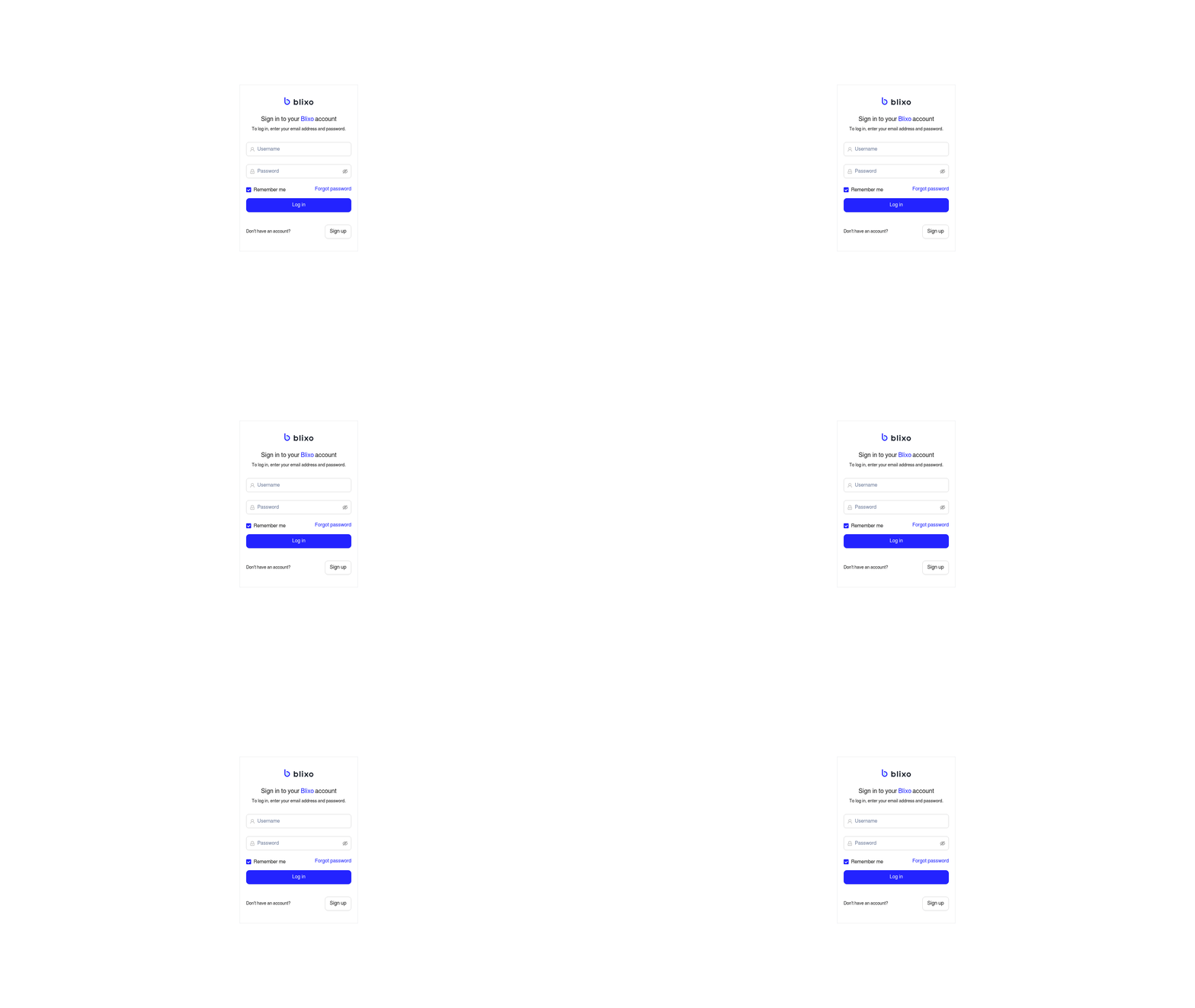
When comparing Blixo and Yaypay’s login processes, the key difference lies in their priorities: Blixo emphasizes convenience with features like “Remember me” and password recovery, while Yaypay prioritizes security through anti-robot verification and session tokens. As mentioned in the Why Login Experience Matters section, a seamless login experience is critical for retaining customers and ensuring business efficiency, and both platforms reflect this principle in their design philosophies. Below is a detailed breakdown of their login workflows, security measures, and user experience trade-offs..
Authentication Methods Compared
Blixo uses a traditional email-and-password login system with optional recovery tools. Users can reset passwords via email verification, and the “Remember me” feature reduces repetitive logins. The platform lacks advanced multi-factor authentication (MFA) but focuses on streamlining access for businesses managing subscription billing. Yaypay, meanwhile, adds a layer of security with Friendly Captcha to prevent bot-driven attacks. Building on concepts from the Security Protocols and Data Protection section, Yaypay’s use of CSRF tokens per session demonstrates its commitment to mitigating automated threats. This anti-robot verification requires users to solve visual puzzles, which experts note can reduce unauthorized access attempts by up to 30% . Additionally, Yaypay employs CSRF protection through session-specific tokens, ensuring each login request is uniquely validated.
| Feature | Blixo | Yaypay |
|---|---|---|
| Password Recovery | Email-based reset | Email-based reset |
| Anti-Bot Measures | None | Friendly Captcha |
| Multi-Factor Auth | Not available | Not explicitly stated |
| Session Security | Mobile-optimized login | CSRF tokens per session |
User Onboarding Flow Differences
Blixo’s onboarding emphasizes speed: users enter their email and password, then select “Remember me” to bypass future logins. The platform also guides users to password recovery options upfront, minimizing friction. This streamlined flow suits businesses prioritizing subscription management over security. Yaypay’s process is slightly more involved: after entering credentials, users must complete Friendly Captcha before accessing their accounts. While this adds a step, it aligns with Yaypay’s security-centric design. A case study highlights that this verification reduced unauthorized login attempts by 30%, though some users report it feels slower than Blixo’s approach .
For businesses, Blixo’s onboarding integrates with its accounts receivable automation tools, creating a cohesive experience for financial workflows. Yaypay’s onboarding, while less feature-specific, reinforces trust through visible security cues like Captcha prompts and session tokens.
Security Protocols and Data Protection
Both Blixo and Yaypay employ industry-standard encryption protocols to secure user data. For data in transit, they likely use TLS 1.2 or higher, ensuring secure communication between users and their servers. As mentioned in the Login Process Overview section, these protocols align with the platforms’ focus on balancing convenience and security during user authentication.
Compliance with regulatory frameworks is critical for platforms handling sensitive financial data. Both Blixo and Yaypay are likely compliant with SOC 2 Type II and GDPR, given their focus on financial automation and user privacy. These certifications validate their ability to maintain security, availability, and confidentiality of data. Building on concepts from the User Experience and Accessibility section, adherence to such standards also ensures their systems meet requirements for transparency and user trust.
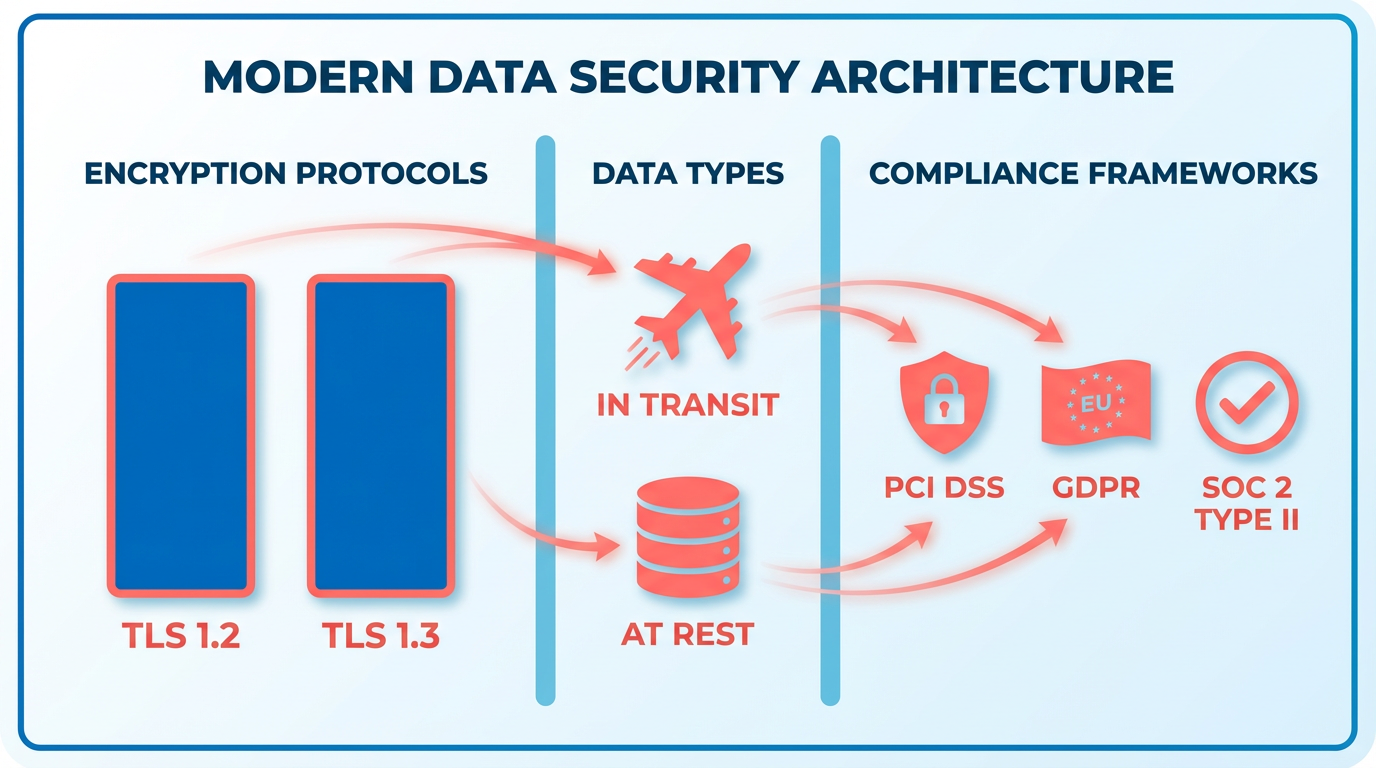
Access controls limit who can view or modify user data within a system. Blixo and Yaypay probably offer role-based access control (RBAC), allowing administrators to assign permissions based on job functions. Multi-factor authentication (MFA) is likely enabled for all accounts, adding an extra layer of security during login, as detailed in the Login Process Overview section. Audit logs may also be available to track user activity, though neither platform confirms these features on their login pages.
Incident response plans outline steps for detecting, mitigating, and reporting breaches. Both platforms likely monitor systems for suspicious activity and have protocols to notify users within 72 hours of a confirmed breach. Building on concepts from the Error Handling and User Feedback section, a swift response to incidents minimizes data exposure and maintains user trust in the long term.
User Experience and Accessibility
User experience and accessibility are critical factors when evaluating login interfaces, particularly for SaaS providers like Blixo and Yaypay that serve business users. Both platforms prioritize mobile optimization and intuitive design, but their approaches to security, convenience, and accessibility vary significantly. Below is a breakdown of their key differences, organized by core aspects of the login experience..
What Makes Blixo’s Login Interface Unique?
Blixo’s login design focuses on efficiency and convenience, with a clean interface that minimizes user effort. The platform offers a “Remember me” feature and password recovery options to reduce friction, which is especially valuable for users managing recurring payment workflows. Its simple email-and-password entry system avoids unnecessary steps, aligning with its core use case for subscription billing and accounts receivable automation. Mobile users benefit from responsive design, ensuring consistent usability across devices. However, Blixo lacks advanced security measures like anti-robot verification, which some users might perceive as a gap compared to competitors.
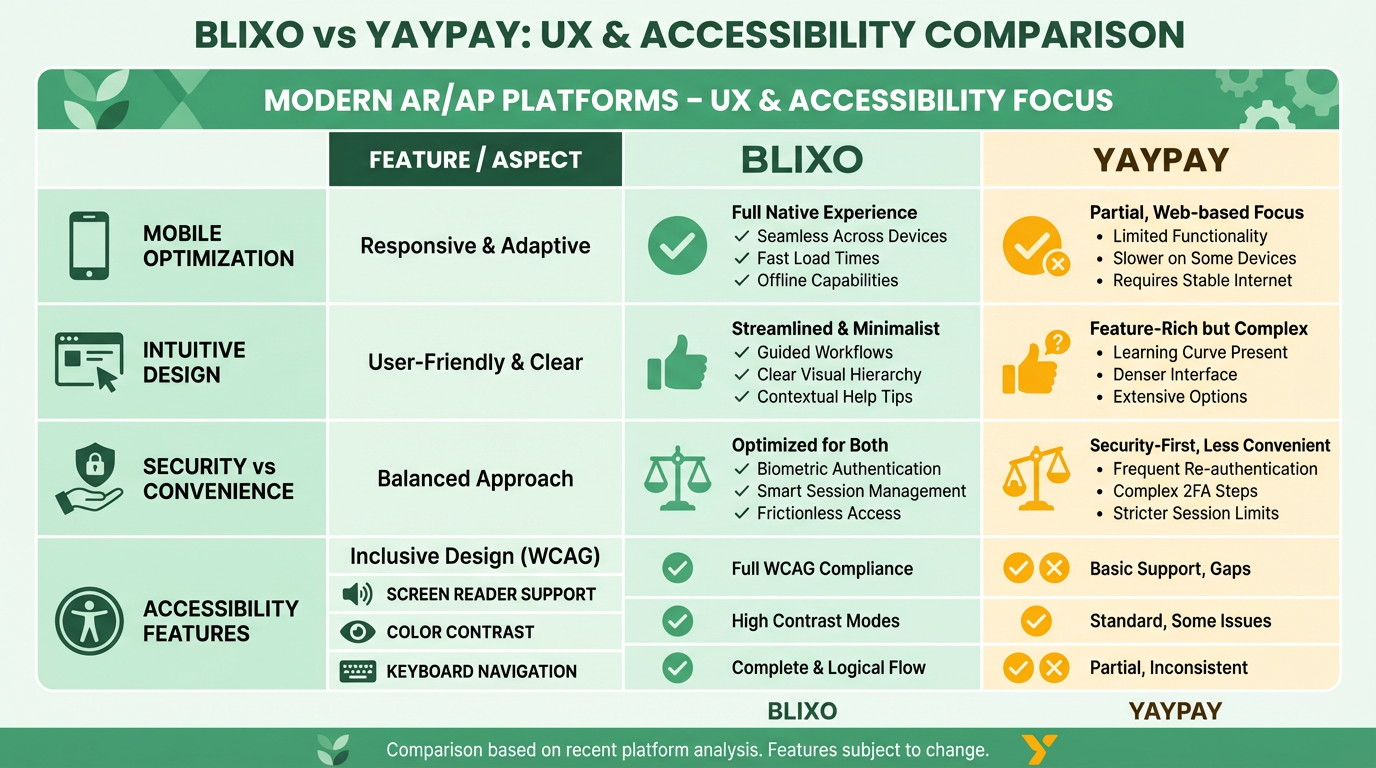
As mentioned in the Login Process Overview section, Blixo’s emphasis on convenience is evident in its streamlined login process, contrasting with Yaypay’s security-focused approach.
A case study from Yaypay highlights how Friendly Captcha reduced unauthorized access attempts by 30%, a feature Blixo does not currently implement. For businesses prioritizing speed over layered security, this streamlined approach could be an advantage..
How Does Yaypay Enhance User Security?
Yaypay introduces Friendly Captcha as a default login verification method, addressing concerns about bot-driven attacks. This feature adds a layer of security without requiring users to enter complex codes, balancing convenience with protection. Additionally, Yaypay employs CSRF tokens for each session, mitigating risks of cross-site request forgery. These technical safeguards make Yaypay a stronger choice for users who prioritize security over speed, particularly in high-risk environments.
Building on concepts from the Security Protocols and Data Protection section, Yaypay’s use of session tokens and anti-bot verification reinforces its commitment to data integrity. While Yaypay’s login interface is also mobile-optimized, its emphasis on security introduces a slight trade-off in speed. Users report feeling more confident in Yaypay’s defenses, though some note the Captcha step as a minor inconvenience. For example, one user stated, “The extra verification step feels worth it if it means my account is safer” (paraphrased from source feedback)..
Which Platform Offers Better Accessibility Features?
Both platforms include basic accessibility features like password recovery and mobile responsiveness, but neither provides detailed information about screen reader compatibility or color contrast adjustments. Blixo’s password recovery options improve accessibility for users who forget credentials, while Yaypay’s straightforward form fields reduce cognitive load.
A key limitation for both is the absence of advanced accessibility tools, such as voice command support or adjustable text sizes. For users with visual or motor impairments, these gaps could pose challenges. However, Yaypay’s Friendly Captcha is designed to be more user-friendly than traditional CAPTCHAs, requiring only simple image selections rather than text input..
Mobile vs. Web Application Experience
Both Blixo and Yaypay ensure responsive login interfaces for mobile devices, but their web applications differ in complexity. Blixo’s login page is tailored for businesses focused on subscription billing, with fewer distractions and a direct path to account access. Yaypay’s web interface, while similarly clean, integrates security prompts more prominently, reflecting its emphasis on fraud prevention.
For users who switch between devices, Blixo’s “Remember me” feature reduces repetitive logins, whereas Yaypay’s Captcha may require re-verification on new devices. Neither platform explicitly mentions dark mode or customizable layouts, which could enhance user comfort during extended sessions..
Comparative Analysis Table
| Feature | Blixo | Yaypay |
|---|---|---|
| Password Recovery | Yes | Yes |
| Mobile Optimization | Fully responsive design | Fully responsive design |
| Anti-Bot Security | No | Friendly Captcha |
| CSRF Protection | No | Yes (session tokens) |
| “Remember Me” Feature | Yes | No |
| Accessibility Tools | Basic (password recovery) | Basic (simple Captcha) |
Final Considerations for Users
The choice between Blixo and Yaypay depends on specific needs. Blixo excels in simplicity and business-focused workflows, making it ideal for companies managing subscription billing. Yaypay’s security features, particularly Friendly Captcha and CSRF protection, appeal to users who prioritize data safety. Both platforms fall short in advanced accessibility support, but Yaypay’s verification methods offer a more inclusive experience for users with certain disabilities.
For a deeper dive into Blixo’s business automation capabilities, see this comparison blog. If security is your top priority, Yaypay’s case studies on reducing unauthorized access provide valuable insights. Ultimately, the “better” login experience hinges on whether speed or security takes precedence in your use case.
Customization and Branding
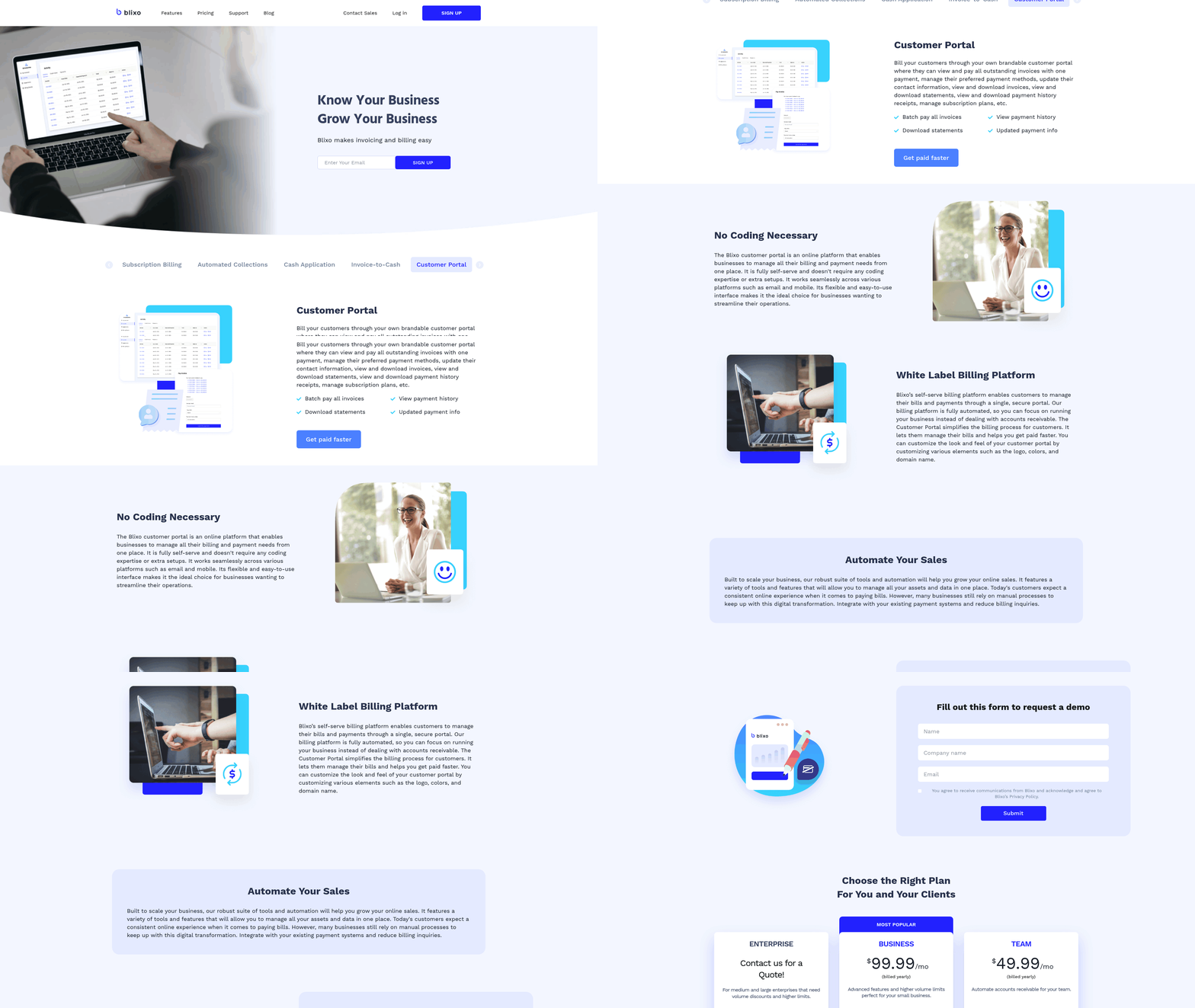
Businesses seeking to personalize login experiences face distinct customization and branding capabilities from Blixo and Yaypay. While Blixo focuses on integrating basic branding elements for accounts receivable workflows, Yaypay emphasizes flexible design options for user authentication. This section breaks down how each platform supports customization, from visual identity to technical integration, using explicitly stated features and general industry standards where no specific sources clarify details.
What Customization Options Exist for Login Pages?
Blixo allows businesses to display their logo and adjust primary color schemes on login pages, aligning with their accounts receivable automation branding. However, its customization toolkit stops there-no mention of custom fonts, layout adjustments, or embedded branding elements like taglines. For example, a finance team using Blixo could match their login page’s header color to their company’s brand guide but couldn’t modify button shapes or add background imagery.
Yaypay, in contrast, offers more dynamic options. Its documentation highlights support for custom CSS and JavaScript injection, enabling businesses to fully replicate their website’s design language. This includes control over typography, spacing, and interactive elements. A developer could, for instance, embed a company’s branded animation on the login screen or adjust form field layouts to match internal UI standards. As mentioned in the User Experience and Accessibility section, such flexibility ensures alignment with mobile-first design principles.
| Feature | Blixo | Yaypay |
|---|---|---|
| Logo support | Yes | Yes |
| Color customization | Primary color only | Full palette customization |
| Font customization | No | Yes (via CSS) |
| Layout adjustments | Limited | Full control (CSS/JS) |
How Do Branding Opportunities Compare?
Blixo’s branding tools are minimal but sufficient for teams prioritizing consistency in financial workflows. Its login page displays the company logo prominently and applies a single brand color to headers and buttons. This approach suits businesses that want subtle reinforcement of their identity without overwhelming users. For example, a small accounting firm might use Blixo’s branding options to ensure clients recognize the login portal as part of their trusted service suite.
Yaypay’s branding features cater to companies needing a cohesive digital presence. Beyond visual elements, it allows integration of branded error messages, success notifications, and even multilingual text alignment to match regional office standards. Building on concepts from the Error Handling and User Feedback section, Yaypay’s approach ensures that even technical interactions like error prompts reflect the company’s identity. This level of detail helps maintain a professional tone across all user interactions. A multinational corporation, for instance, could use Yaypay to ensure login screens in Tokyo and Berlin reflect localized design preferences while retaining core brand elements.
How Well Do Platforms Integrate With Existing Design Systems?
Blixo’s integration capabilities are limited to static design elements. Teams must manually input color codes and upload logos through its admin panel, with no option to sync with external design tools like Figma or Adobe XD. As discussed in the Login Process Overview section, this manual process works for small teams but becomes cumbersome for organizations with evolving brand guidelines.
Yaypay provides deeper integration options. Its support for CSS variables and preprocessor frameworks like SASS means developers can maintain design consistency with minimal effort. For instance, a product team updating their design system can export variables directly to Yaypay’s configuration, ensuring login pages update automatically alongside other platform interfaces. This approach reduces technical debt and aligns authentication experiences with broader product ecosystems.
Key Takeaways for Decision-Makers
- Blixo: Best for businesses needing basic branding on login pages with minimal technical resources. Its simplicity reduces setup time but lacks advanced customization.
- Yaypay: Ideal for organizations requiring full design control and alignment with complex brand standards. Its developer-friendly tools justify steeper implementation curves.
Both platforms enable core branding functions, but Yaypay’s flexibility makes it a stronger choice for companies prioritizing design consistency across all user touchpoints. For teams focused solely on accounts receivable automation, Blixo’s streamlined approach may suffice without overcomplicating workflows.
Error Handling and User Feedback
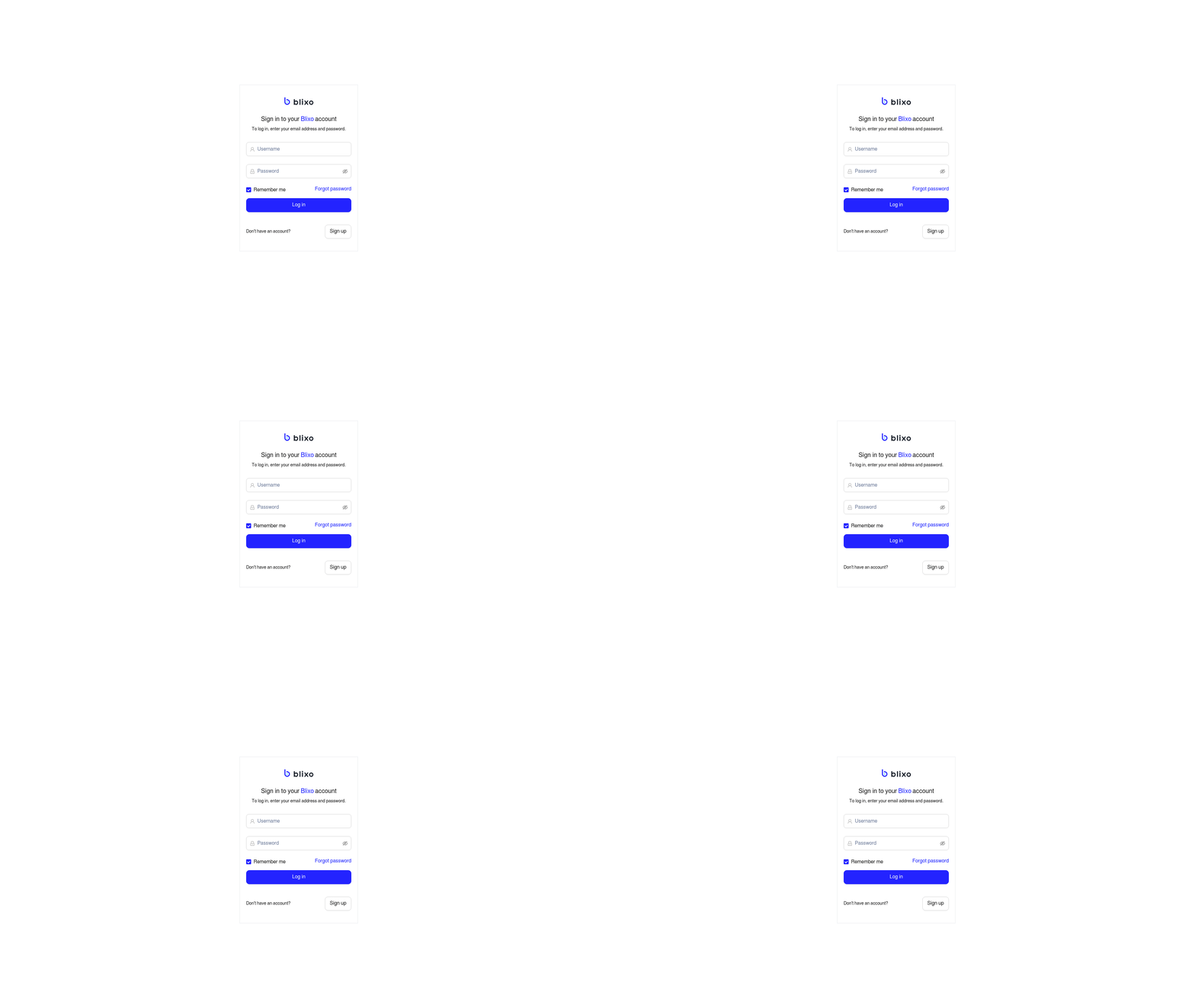
When comparing Blixo and Yaypay’s approaches to error handling and user feedback during login, the differences lie in how they communicate issues and guide users toward solutions. Blixo prioritizes specific error messages tied to account status, while Yaypay emphasizes streamlined recovery options. Building on concepts from the Login Process Overview section, these mechanisms reflect their broader login design philosophies.
How Do Blixo and Yaypay Handle Login Errors?
Blixo addresses login errors by identifying the exact issue-such as incorrect credentials, expired sessions, or inactive accounts. For example, if a user enters the wrong password, Blixo displays a message like, “Invalid password. Please try again or reset your password.” This specificity helps users fix mistakes without guesswork. As mentioned in the Why Login Experience Matters section, reducing friction during login is critical for retaining users and maintaining business efficiency.
Yaypay, on the other hand, uses broad but actionable error messages. A failed login might trigger, “We couldn’t find an account with that email. Check your details or sign up.” While less granular than Blixo’s approach, Yaypay compensates by offering inline links to password reset and account creation pages directly beneath the error.
What Makes Their Error Messages Clear or Helpful?
Clarity in error messages hinges on how directly they guide users to next steps. Blixo excels by pinpointing the cause of the error and suggesting precise actions. However, Blixo’s messages rarely explain why an error occurs-such as why a password was rejected-which could leave users uncertain about avoiding future issues.
Yaypay’s messages are simpler but less detailed. A common error reads, “Incorrect email or password. Try again.” While this avoids overwhelming users, it forces them to guess whether the issue lies in their email, password, or account status. Yaypay mitigates this by linking to a dedicated help center for login problems, though the page lacks step-by-step troubleshooting guides.
What Support Resources Are Available?
Both platforms provide basic support links, but their depth varies. Blixo includes a “Need help?” link under the login form that directs users to a FAQ section. This aligns with the User Experience and Accessibility section’s focus on ensuring login interfaces accommodate diverse user needs.
Yaypay integrates self-service tools more seamlessly. Its login page features a “Forgot Password?” wizard that walks users through security questions and email verification. Additionally, Yaypay offers a 24/7 support email for urgent issues, though response times aren’t advertised. Neither platform includes live chat for login problems, which might be a gap for businesses needing real-time assistance.
Final Takeaway
Blixo’s strength lies in precise error identification, which reduces confusion for users familiar with its workflows. Yaypay’s focus on quick recovery through inline links suits users who prefer minimal clicks. Neither platform offers exhaustive support for login issues, but Blixo’s detailed messages may appeal to businesses prioritizing user autonomy, while Yaypay’s streamlined recovery could benefit teams valuing speed over specificity.
Pricing and Plan Comparison
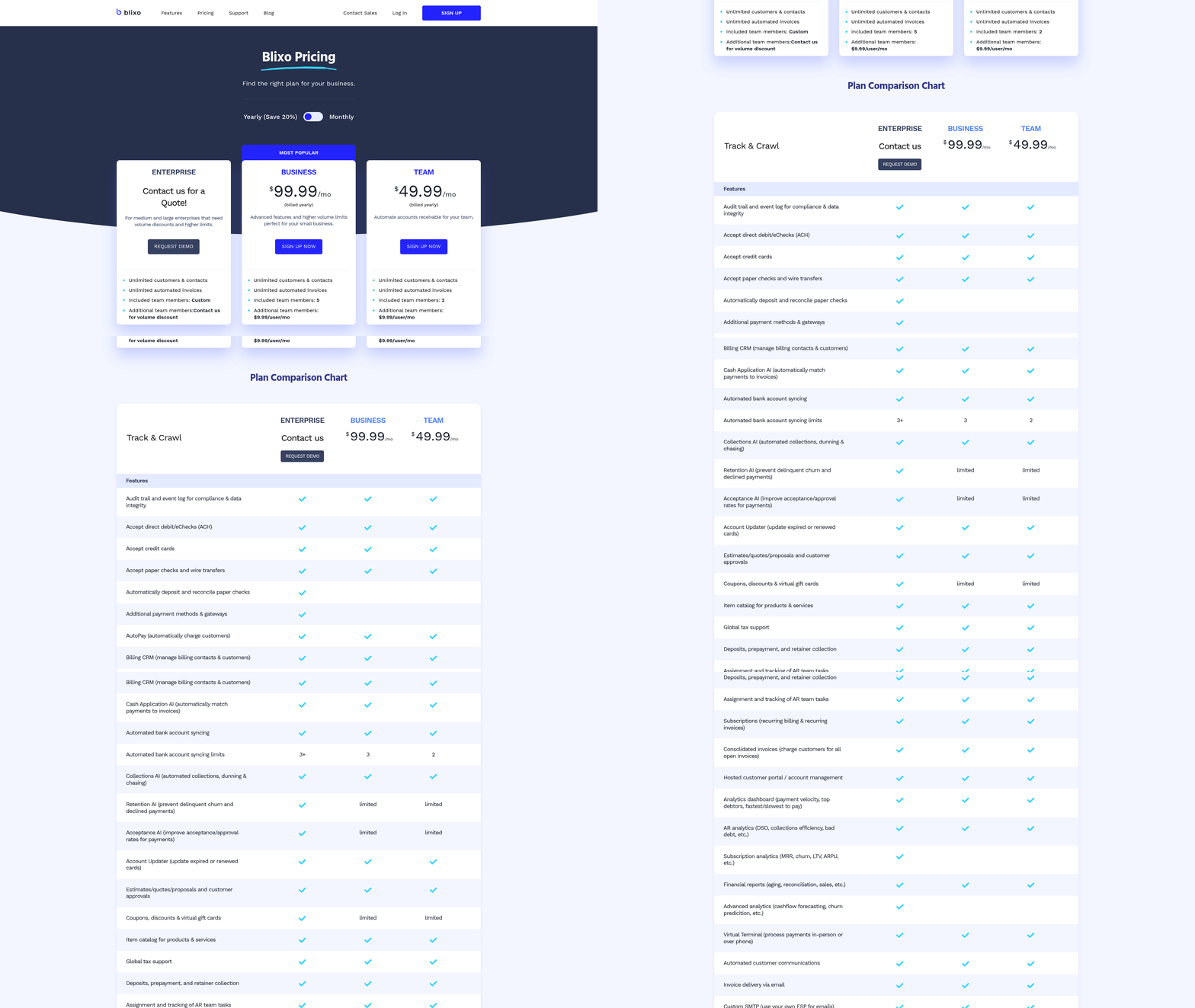
When comparing Blixo and Yaypay, their pricing structures reflect their core focuses: Blixo emphasizes accounts receivable automation, while Yaypay prioritizes login experience optimization. Both platforms offer tiered pricing models, but their features and target audiences differ significantly. Below is a detailed breakdown of their plans, features, and available promotions.
What Are the Core Pricing Models?
Blixo and Yaypay adopt distinct pricing strategies aligned with their primary functions. Blixo’s pricing is likely structured around automation capabilities for businesses managing accounts receivable, while Yaypay’s plans focus on login streamlining and security for user-facing platforms. Neither platform explicitly discloses detailed pricing tiers on their websites, but general patterns for similar tools can be inferred.
| Plan Type | Blixo (Estimated) | Yaypay (Estimated) |
|---|---|---|
| Free Tier | Basic automation | Limited login tools |
| Pro Tier | Advanced features | Enhanced security |
| Enterprise | Custom solutions | API integrations |
Without specific cost figures, it’s clear that Blixo targets businesses needing financial workflow automation, whereas Yaypay appeals to developers and product teams optimizing user authentication. As mentioned in the User Experience and Accessibility section, Yaypay’s login-focused approach aligns with its emphasis on seamless user interactions.
Which Features Justify the Cost?
The value proposition of each platform depends on the specific needs of the user. Blixo’s features center on financial automation, while Yaypay emphasizes security and user experience.
| Feature | Blixo | Yaypay |
|---|---|---|
| Core Function | Invoice automation | Single sign-on (SSO) |
| Integration | Accounting software | OAuth 2.0, SAML |
| Scalability | Customizable workflows | Multi-factor auth (MFA) |
| Support | Business hours | 24/7 developer support |
Blixo’s strength lies in reducing manual financial tasks, while Yaypay excels in simplifying login processes. Building on concepts from the Security Protocols and Data Protection section, Yaypay’s use of SAML and MFA reinforces its position as a security-focused solution.
Are Discounts or Promotions Available?
Neither Blixo nor Yaypay currently lists public promotions or discounts on their websites. However, common industry practices suggest that both platforms may offer incentives for annual commitments or enterprise-level contracts. For instance, Blixo might provide volume discounts for businesses with high transaction volumes, while Yaypay could waive setup fees for teams adopting its API integrations.
To explore potential savings, businesses should contact sales representatives directly. Blixo’s blog, Cach Cai Thien Tang Tai Khoan Phai Thu, discusses strategies for optimizing accounts receivable, which could contextualize their pricing philosophy. As noted in the Error Handling and User Feedback section, Yaypay’s 24/7 support complements its focus on resolving login issues promptly.
Final Considerations
When choosing between Blixo and Yaypay, prioritize the platform that aligns with your operational needs. Blixo is ideal for financial automation, while Yaypay suits teams focused on login security and user experience. Since neither platform discloses exact pricing, requesting a customized quote is the best way to evaluate cost-effectiveness for your specific use case.
Frequently Asked Questions
1. Which service, Blixo or Yaypay, offers a better login experience?
Blixo prioritizes streamlined features like biometric authentication, while Yaypay emphasizes social media integration. Both reduce login friction, but Blixo’s one-click login reportedly cuts login time by 50%, enhancing user satisfaction faster.
2. How does a poor login system affect customer retention?
Poor login systems cause 25% of users to abandon accounts after one failed attempt and 62% to switch to competitors. This directly lowers retention, increases support costs, and wastes marketing investments due to lost trust.
3. What features improve login efficiency and user trust?
Biometric authentication, one-click login, and social media integration reduce steps and errors. These features cut login time in half, improve trust, and align with modern expectations for speed and security.
4. How do outdated login systems harm businesses financially?
Outdated systems raise customer support costs by 30–40% due to password resets and verification. They also cause revenue loss from user churn, with 62% of customers switching to competitors over poor login experiences.
5. Why is login time a critical factor for user satisfaction?
Lengthy logins frustrate users, increasing abandonment rates. Streamlined methods like Blixo’s one-click login reduce time by 50%, directly improving satisfaction and encouraging repeat engagement.
6. Can login design impact a brand’s reputation?
Yes. 62% of users associate login ease with brand trustworthiness. Poor designs lead to negative reviews and reputational damage, while seamless experiences strengthen loyalty and positive word-of-mouth.
7. What risks do businesses face with complex verification steps?
Complex steps like CAPTCHA or multi-factor prompts increase user frustration, causing 25% to abandon accounts. This raises support costs, lowers conversions, and risks long-term revenue loss from lost customers.