

Automate Accounts Receivable with Blixo Software Solutions

Key Takeaways
- Automating accounts receivable reduces annual revenue loss by 1–5% caused by manual process inefficiencies.
- 42% of businesses experience revenue leakage from uncollected invoices due to manual AR workflows.
- 95% of workers waste hours daily on repetitive AR tasks like data entry, which automation eliminates.
- Blixo’s machine learning algorithms cut payment disputes by 40% through accurate invoice-to-payment matching.
- Small businesses using Blixo save 50% of invoicing time, accelerating payments and improving customer satisfaction.
- Medium-sized enterprises boost cash flow by 30% after automating recurring billing and payment tracking.
- Manual collections consume 60% of staff time on disputes, while automation frees resources for proactive strategies.
Related Video
Watch: 7 Ways to Automate AR Workflow Processes to Get Paid Faster by ERP VAR
Why Automating Accounts Receivable Matters
Automating accounts receivable transforms how businesses manage cash flow, reducing errors and accelerating payments. Manual processes often lead to delays, lost invoices, and inefficiencies that cost companies 1–5% of their annual revenue due to poor follow-up. With Blixo’s automation tools, these challenges dissolve, turning a reactive task into a streamlined, proactive system. Let’s break down why this shift matters.
What Are the Financial Risks of Manual AR Processes?
Manual accounts receivable workflows are prone to human error, delayed follow-ups, and missed payments. Industry data shows that 42% of businesses face revenue leakage from uncollected invoices, while 95% of workers still spend hours on repetitive tasks like data entry. For example, traditional collections models dedicate 60% of staff time to dispute management and preparation, leaving less bandwidth for proactive cash flow strategies. As mentioned in the AI-Powered Cash Application for Faster Payments section, Blixo’s machine learning algorithms improve accuracy over time, matching payments to invoices in seconds and reducing disputes by 40%.
A small business using Blixo reduced invoicing time by 50%, leading to faster payments and improved customer satisfaction. Similarly, a medium-sized enterprise saw a 30% cash flow boost after automating recurring billing and payment tracking. These results aren’t outliers-Blixo’s automation cuts this time by up to 62%, freeing teams to focus on growth.
Who Gains the Most from AR Automation?
Small and medium-sized businesses (SMBs) often struggle with limited resources, making automation a lifeline. Building on concepts from the Automating Invoicing and Subscription Billing with Blixo section, Blixo’s SaaS service supports recurring invoices, auto-pay, and multi-payment methods (ACH, credit cards, etc.), which are critical for companies handling hundreds of transactions monthly. Enterprises with complex billing needs also benefit, as Blixo integrates with ERPs like Oracle and SAP, ensuring seamless reconciliation.
The platform’s branded customer portal lets clients manage payments, view invoices, and set payment terms independently, reducing administrative overhead. As discussed in the Real-Time Payment Visibility and Tracking with Blixo section, this feature aligns with the platform’s focus on giving businesses instant access to payment statuses, eliminating guesswork in accounts receivable.
How Does Blixo Solve Common AR Pain Points?
Blixo addresses three major issues:
- Time-Consuming Workflows: Automated collections and cash application eliminate manual data entry.
- Payment Delays: Real-time payment tracking and retries for failed transactions ensure faster collections.
- Security Risks: 256-bit encryption and secure integrations protect sensitive financial data.
The platform’s cash application rules automatically match payments to invoices, while its virtual lockbox handles wire transfers, checks, and direct deposits without human intervention. Building on the Intelligent Matching Engine for Payment Reconciliation section, Blixo’s system uses machine learning to analyze and connect payments to corresponding invoices, streamlining reconciliation for high-volume transactions.
For businesses with subscription models, Blixo updates expired credit cards and adjusts billing terms dynamically, reducing churn. By automating accounts receivable, businesses don’t just save time-they future-proof their operations. Delayed payments strain cash flow, but Blixo’s tools turn AR from a burden into a strategic advantage. For companies ready to eliminate manual workflows, the ROI is clear: faster payments, fewer errors, and more time to focus on growth.
Automating Invoicing and Subscription Billing with Blixo
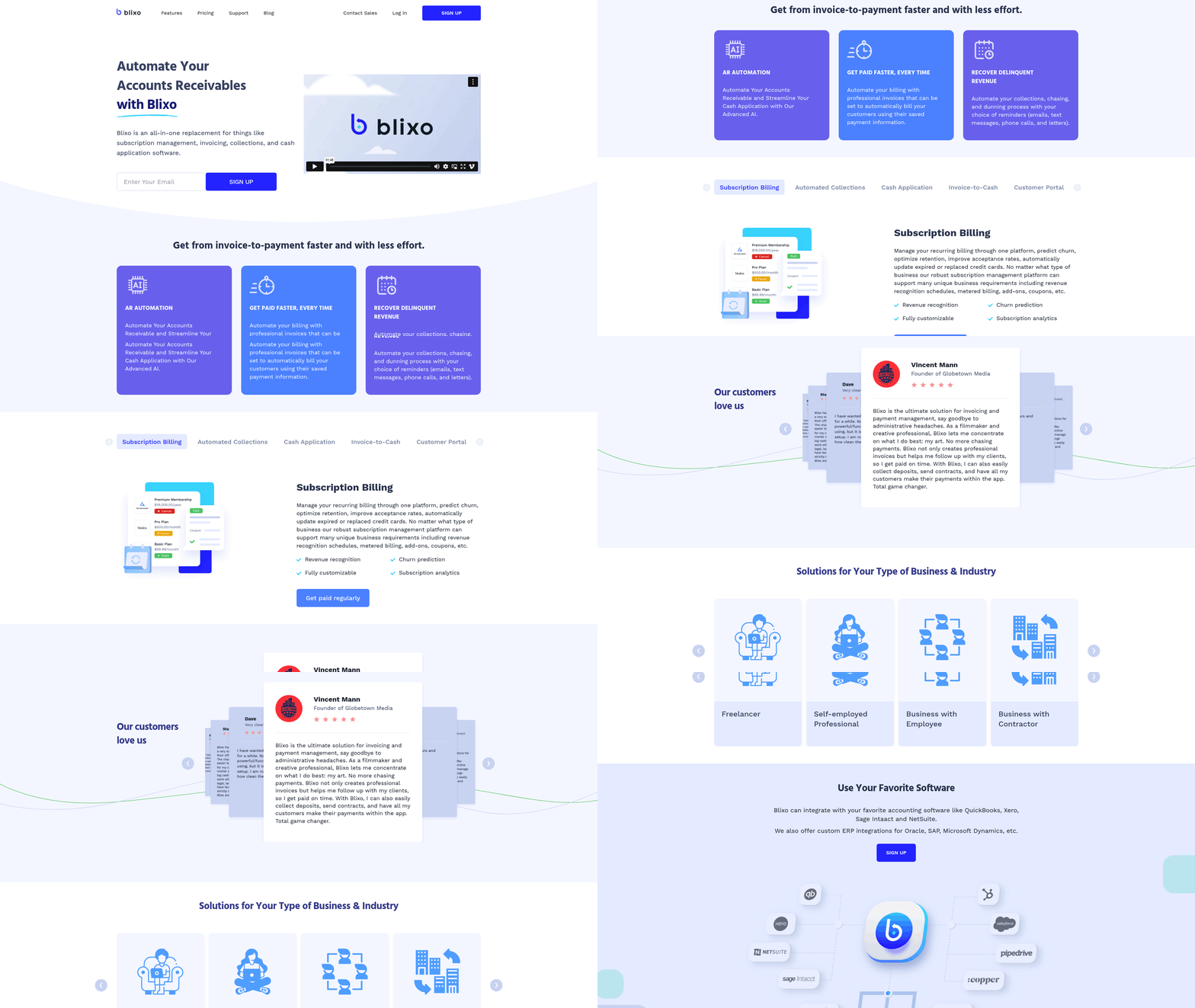
Blixo’s automation of invoicing and subscription billing eliminates manual tasks, reduces errors, and accelerates cash flow. By combining smart invoicing, recurring billing, and seamless integrations, businesses can streamline accounts receivable while focusing on growth. Below, we break down how Blixo’s features deliver these benefits.
How Does Blixo’s Smart Invoicing Streamline Billing?
Smart invoicing automates the creation, delivery, and tracking of invoices, ensuring faster payments and fewer delays. Blixo generates professional invoices that pull data from your records, apply customizable payment terms, and send them directly to clients via email or a branded customer portal. The platform supports multiple payment methods-ACH, credit/debit cards, wire transfers-reducing friction for customers and increasing on-time payments.
For example, a small business using Blixo reduced invoicing time by 50% by automating repetitive tasks like formatting and sending reminders. The software also includes automated collections, where late fees and dunning workflows trigger based on predefined rules. This reduces the need for manual follow-ups while maintaining clear communication with clients. Building on concepts from the Automated Collections and Dunning Workflow section, Blixo’s system ensures consistent enforcement of payment policies.
A key advantage is Blixo’s 256-bit encryption, which secures sensitive financial data during transactions. This level of security builds trust with clients, especially for businesses handling high-volume or recurring payments. Additionally, the customer portal allows clients to view invoices, update payment details, and make payments self-service, further cutting administrative workloads.
What Makes Recurring Billing Easier with Blixo?
Subscription billing often involves managing payment schedules, handling failed transactions, and updating expired cards-tasks that Blixo automates seamlessly. Users can set up recurring invoices with custom intervals (weekly, monthly, annual) and integrate them with auto-pay features. If a payment fails, Blixo automatically retries using alternative saved payment methods or sends alerts to resolve issues.
One medium-sized enterprise reported a 30% increase in cash flow after switching to Blixo’s recurring billing system. The platform’s ability to calculate taxes, apply discounts, and adjust payment terms dynamically ensures accuracy across subscriptions. For businesses with seasonal fluctuations, Blixo allows temporary pauses or adjustments to billing schedules without losing track of customer data.
A notable feature is intelligent matching for cash application. Payments are automatically matched to the correct invoices, reducing reconciliation time. For instance, a service-based business using Blixo’s cash application rules cut their monthly reconciliation process from hours to minutes. As mentioned in the AI-Powered Cash Application for Faster Payments section, this capability enhances accuracy and efficiency in payment processing.
How Do Businesses Benefit from Blixo’s Automation?
Real-world results highlight Blixo’s impact on efficiency and cost savings. A mid-sized firm cut invoice processing time by 30% after integrating Blixo with its accounting software. Another large corporation improved cash flow by 25% within six months by automating collections and subscription renewals.
Cost savings also come from reduced errors and lower fees. Blixo’s automation minimizes manual data entry mistakes, which can lead to costly disputes or delayed payments. Its integration with payment processors like Stripe and QuickBooks further reduces transaction fees compared to traditional methods. One company saved 35% on factoring and subscription management costs by switching to Blixo.
How Does Blixo Integrate with Existing Accounting Systems?
Blixo connects effortlessly with popular accounting platforms including QuickBooks, Xero, and Sage Intacct. This integration ensures that payment data, invoices, and customer records sync in real time, eliminating duplicate entries and reconciliation challenges. For example, a business using QuickBooks Online reported saving 10+ hours monthly by automating data transfers between systems. As mentioned in the Real-Time Payment Visibility and Tracking with Blixo section, real-time synchronization enhances transparency and reduces administrative overhead.
The platform’s web-based design requires no software installation, making it accessible for teams of all sizes. Users can customize workflows to fit specific needs-like setting up approval rules for cash application or generating reports for auditors. This flexibility ensures businesses retain control while using automation for repetitive tasks.
Final Takeaways
Blixo’s invoicing and subscription billing tools offer a scalable solution for businesses aiming to reduce administrative burdens and improve cash flow. By automating recurring payments, enforcing collections, and integrating with existing systems, companies can focus on strategic growth rather than manual bookkeeping. Whether you’re a small consultant or a mid-sized enterprise, Blixo’s SaaS service adapts to your needs while delivering measurable time and cost savings.
AI-Powered Cash Application for Faster Payments
Blixo’s AI-powered cash application automates the matching of payments to invoices using machine learning, reducing manual effort and accelerating payment processing. The system improves accuracy over time by learning from user interactions, ensuring faster reconciliation and fewer errors. By integrating with banks and ERP systems, it streamlines workflows for businesses of all sizes.
How Does Blixo’s AI-Powered Cash Application Work?
Blixo’s intelligent matching engine uses machine learning algorithms to analyze payment data and connect it to the correct invoices. As mentioned in the Intelligent Matching Engine for Payment Reconciliation section, this engine adapts to manual edits, refining its accuracy and reducing the need for human intervention. The platform supports wire transfers, direct deposits, and check payments via a virtual lockbox, processing transactions in seconds. Building on concepts from the Automating Invoicing and Subscription Billing with Blixo section, this virtual lockbox simplifies check payments by digitizing them and routing funds directly to the correct accounts. For example, if an invoice has a typo or missing details, the AI learns to recognize patterns and suggest accurate matches, even in complex scenarios.
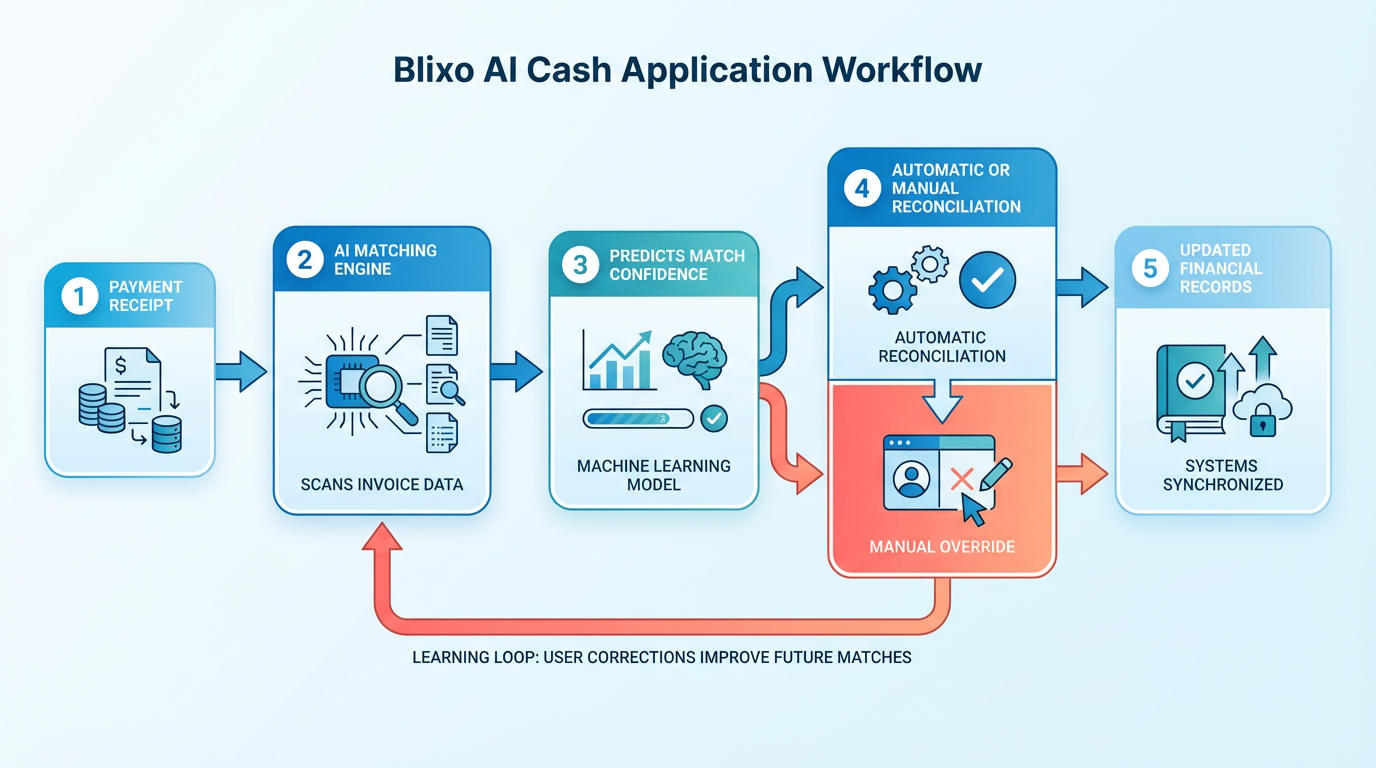
This automation eliminates the need for manual data entry, which traditionally consumes hours of accounting time each week. Instead, users receive real-time updates on matched payments, with unmatched items flagged for quick resolution. The platform’s ability to learn from past interactions ensures continuous improvement, making it especially valuable for businesses handling high-volume transactions.
What Are the Key Benefits of AI-Driven Cash Application?
The primary advantage of Blixo’s solution is its ability to drastically cut processing time. One manufacturing company reported a 30% reduction in time spent on payment reconciliation after implementation, while a law firm saw a 25% increase in cash flow efficiency. These improvements stem from automated workflows that minimize delays in recognizing incoming payments.
Beyond speed, the system reduces operational costs by slashing manual workloads. Accounting teams no longer need to manually cross-reference payments with invoices, freeing them to focus on strategic tasks. The AI’s high match rates-verified at both envelope and item levels-also lower the risk of errors, which can lead to disputes or delayed payments. Additionally, real-time reconciliation ensures businesses have accurate visibility into their cash flow, improving financial planning.
How Does Blixo Integrate With Existing Systems?
Blixo’s SaaS service connects seamlessly with popular accounting software like QuickBooks, Xero, and Sage Intaact, ensuring minimal disruption during implementation. As outlined in the Implementing Blixo’s Automation Solutions section, the integration process typically involves mapping existing data fields to Blixo’s system, which can be completed in days rather than weeks. For banks and ERP systems, Blixo uses secure APIs to automate data transfers, removing the need for manual uploads or downloads.
This compatibility allows businesses to retain their current infrastructure while gaining the benefits of automation. For instance, a company using a legacy ERP system can still use Blixo’s AI without overhauling its entire financial setup. The virtual lockbox feature further simplifies check payments by digitizing them and routing funds directly to the correct accounts.
Real-World Impact: Time and Cost Savings
The financial impact of Blixo’s solution is measurable. A medium-sized business handling 500+ payments monthly estimates saving 50+ hours annually by automating reconciliation. Another organization reported $15,000 in annual cost reductions by minimizing errors and late fees. These savings grow as the AI’s accuracy improves, creating long-term value for users.
Users also highlight the ease of adoption. “Blixo simplified our subscription billing and collections,” says a founder of a service-based business. “We collect outstanding invoices faster without the administrative headaches.” This feedback aligns with industry insights, as financial experts note that automation is crucial for optimizing cash flow in competitive markets.
By combining machine learning with user-friendly integration, Blixo’s AI-powered cash application delivers a scalable solution for modern financial operations. Businesses using the platform consistently report faster processing, lower costs, and improved accuracy-key advantages in today’s fast-paced economy.
Automated Collections and Dunning Workflow
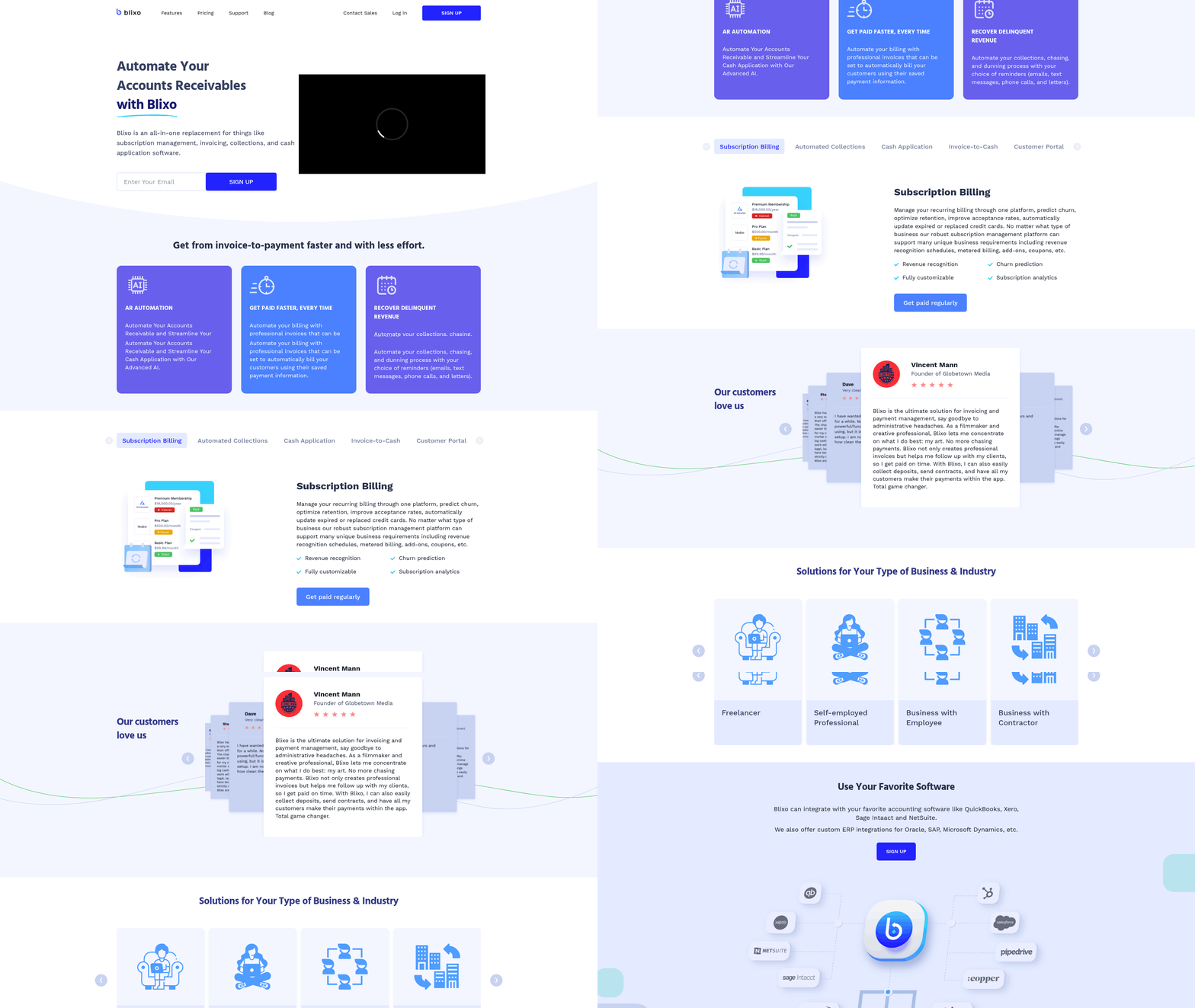
Blixo’s automated collections and dunning workflow eliminates manual tasks by streamlining invoice chasing, payment reminders, and dispute resolution. By automating repetitive tasks like follow-ups and payment retries, businesses save time and reduce errors while maintaining consistent, professional communication with customers. For example, Blixo automatically retries failed payments using updated card details and sends tiered reminders based on customizable rules-ensuring collections stay on track without staff intervention.
How Does Blixo Automate Collections?
Blixo’s system begins by generating and sending invoices automatically based on predefined schedules or event triggers. Once a payment is missed, the platform initiates a dunning workflow with customizable email templates, SMS messages, or phone call scripts. These communications escalate in severity over time, aligning with your business’s preferred tone-whether formal or conversational. For instance, a service-based business might start with a friendly reminder and transition to a firm payment request after 10 days. The platform also supports automated retries for expired cards, reducing the need for manual intervention. As mentioned in the Automating Invoicing and Subscription Billing with Blixo section, this process ensures consistent invoicing for recurring and one-time payments.
What Are the Benefits of Automated Dunning?
Automated dunning reduces administrative work by up to 62% of staff time traditionally spent on collections, as noted in efficiency studies. This shift allows teams to focus on higher-value tasks like customer support and strategic planning. Additionally, Blixo’s branded payment portals improve customer experiences by offering a centralized hub for invoice visibility, payment history, and dispute resolution. One company using Blixo reported a 50% reduction in late payments after implementing tailored dunning workflows, while another saved 35% on factoring and subscription fees by minimizing manual errors.
How Do Businesses Use Blixo in Practice?
A small consulting firm adopted Blixo to manage recurring invoices for hourly services. By setting up automated reminders and linking to Stripe for instant payments, they reduced their average days sales outstanding (DSO) by 40%. Similarly, a subscription-based deodorant brand used Blixo’s tiered dunning rules to recover 85% of past-due accounts within 14 days, compared to 50% using manual methods. The platform’s integration with QuickBooks and Xero further simplified reconciliation, ensuring payment data flowed seamlessly into existing accounting systems. Building on concepts from the AI-Powered Cash Application for Faster Payments section, Blixo’s cash application rules also minimized disputes by accurately matching payments to invoices.
What Metrics Should You Track?
Key performance indicators (KPIs) like DSO, revenue leakage percentage, and customer payment rate help measure automation success. Blixo users typically see a 20–30% improvement in DSO and a 15–25% increase in on-time payments. For example, a service-based business using Blixo reduced its DSO from 45 to 28 days within three months. The platform’s reporting tools also track dunning success rates, showing how many accounts respond to each tier of reminders.
How Does Blixo Integrate with Accounting Systems?
Blixo connects directly to platforms like QuickBooks, Xero, and Sage Intaact, ensuring real-time updates to financial records. When a payment is processed, the system automatically applies it to the correct invoice and syncs the data across connected systems. This integration eliminates double-entry work and reduces reconciliation time by up to 70%. As mentioned in the Intelligent Matching Engine for Payment Reconciliation section, Blixo’s matching engine further enhances accuracy by analyzing payment patterns and resolving discrepancies automatically. For businesses using Stripe or PayPal, Blixo’s cash application rules match payments to invoices with 99% accuracy, minimizing disputes.
By combining automation with flexibility, Blixo transforms accounts receivable into a predictable, scalable process. Its focus on customization-whether in communication styles, payment terms, or dunning rules-ensures businesses retain control while using technology to optimize cash flow.
Real-Time Payment Visibility and Tracking with Blixo
Real-time payment visibility and tracking with Blixo gives businesses instant access to payment statuses, eliminating guesswork in accounts receivable. By automating invoice tracking and reconciliation, Blixo ensures finance teams always see the latest updates on payments, disputes, and cash inflows. This transparency is powered by customizable dashboards and alerts that prioritize actionable insights, helping teams respond faster to delays or exceptions. As mentioned in the AI-Powered Cash Application section, the system improves accuracy by using machine learning to match payments to invoices, reducing manual effort.
How Do You Access Real-Time Payment Statuses?
Blixo’s SaaS service updates payment data continuously, pulling from bank feeds, payment gateways, and customer portals. Users see live statuses like “paid,” “pending,” or “overdue” on invoices, with timestamps for when each change occurred. For example, if a customer pays via ACH, the system reflects the transaction within minutes-no manual data entry required. This eliminates the need to call customers or wait for end-of-day reports.
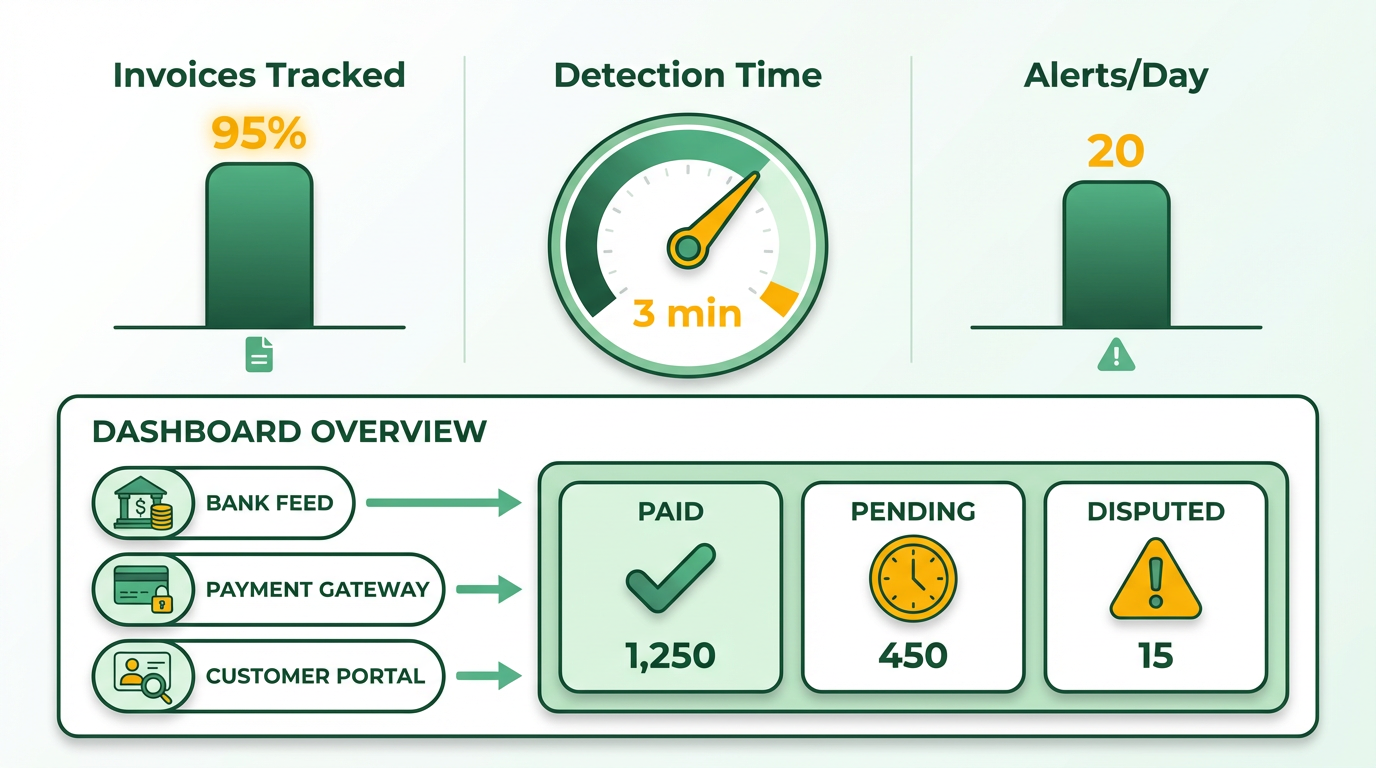
Customizable dashboards let users filter by metrics like days sales outstanding (DSO), aging receivables, or payment method. A finance manager at a SaaS company might set up a dashboard showing all invoices over $5,000 due in the next 7 days, while a small business owner could monitor daily cash inflows. Blixo also supports role-based views: collections teams see high-priority delinquent accounts, while executives track overall AR health through pre-built KPIs. Building on concepts from the Automated Collections and Dunning Workflow section, these views enable proactive follow-ups by highlighting accounts at risk of default.
What Are the Key Benefits of Real-Time Tracking?
The most immediate benefit is improved cash flow management. With real-time visibility, businesses can plan expenses and allocate resources confidently. For instance, a wholesale distributor using Blixo reported reducing its DSO by 22% in six months by identifying and resolving late payments faster. Teams also spend 30% less time manually reconciling payments, as Blixo automatically matches transactions to invoices using AI. As mentioned in the Intelligent Matching Engine for Payment Reconciliation section, this intelligent matching reduces errors and accelerates processing, ensuring accurate financial reporting.
Real-time alerts act as a proactive guardrail. If a payment falls overdue, Blixo sends notifications via email or SMS, allowing teams to follow up before the issue escalates. One business shared how this feature prevented a $15,000 revenue loss in a quarter by flagging a processing error in a customer’s recurring payment. These alerts can be tailored to specific thresholds, such as triggering a warning when a payment is more than 48 hours past due.
How Does Blixo Integrate with Accounting Systems?
Blixo connects seamlessly with popular accounting platforms like QuickBooks, Xero, and NetSuite through API integrations. Once configured, payment data flows automatically to the accounting system, updating general ledgers and reducing the risk of errors. For example, when a customer pays an invoice through Blixo, the system updates the invoice status in QuickBooks and marks the payment as “applied” in the AR module.
This integration extends to reporting. Blixo’s dashboards pull data from connected systems to provide a unified view of financial health. A restaurant chain using Blixo automated its monthly close process, cutting the time required to reconcile payments from 10 hours to under 2. The system also supports data exports in formats like CSV or Excel, ensuring compatibility with third-party tools used for forecasting or audit trails.
By centralizing payment tracking and automating updates, Blixo reduces the manual workload for finance teams while ensuring no transaction falls through the cracks. Whether managing a few dozen invoices or thousands, businesses gain the clarity and control needed to maintain healthy cash flow.
Intelligent Matching Engine for Payment Reconciliation
Blixo’s intelligent matching engine automates payment reconciliation by using machine learning to analyze and connect payments to corresponding invoices. The system processes data in seconds, learning from user interactions to improve accuracy over time. Unlike manual methods, it eliminates the need for accountants to manually trace payments, reducing errors and accelerating cash application workflows. The engine operates at both envelope and item levels, ensuring even complex transactions are matched correctly. Building on concepts from the AI-Powered Cash Application for Faster Payments section, this approach combines machine learning with real-time adaptability to refine matching logic continuously.
At its core, the platform supports multiple payment types, including wire transfers, direct deposits, and check payments processed through a virtual lockbox. Machine learning algorithms analyze historical data and user corrections to refine future matches, creating a self-improving system. This adaptability means the engine becomes more efficient as it handles more transactions, reducing the need for manual oversight. As mentioned in the Implementing Blixo’s Automation Solutions section, the platform’s configuration aligns with a company’s specific workflows, ensuring minimal disruption during deployment.
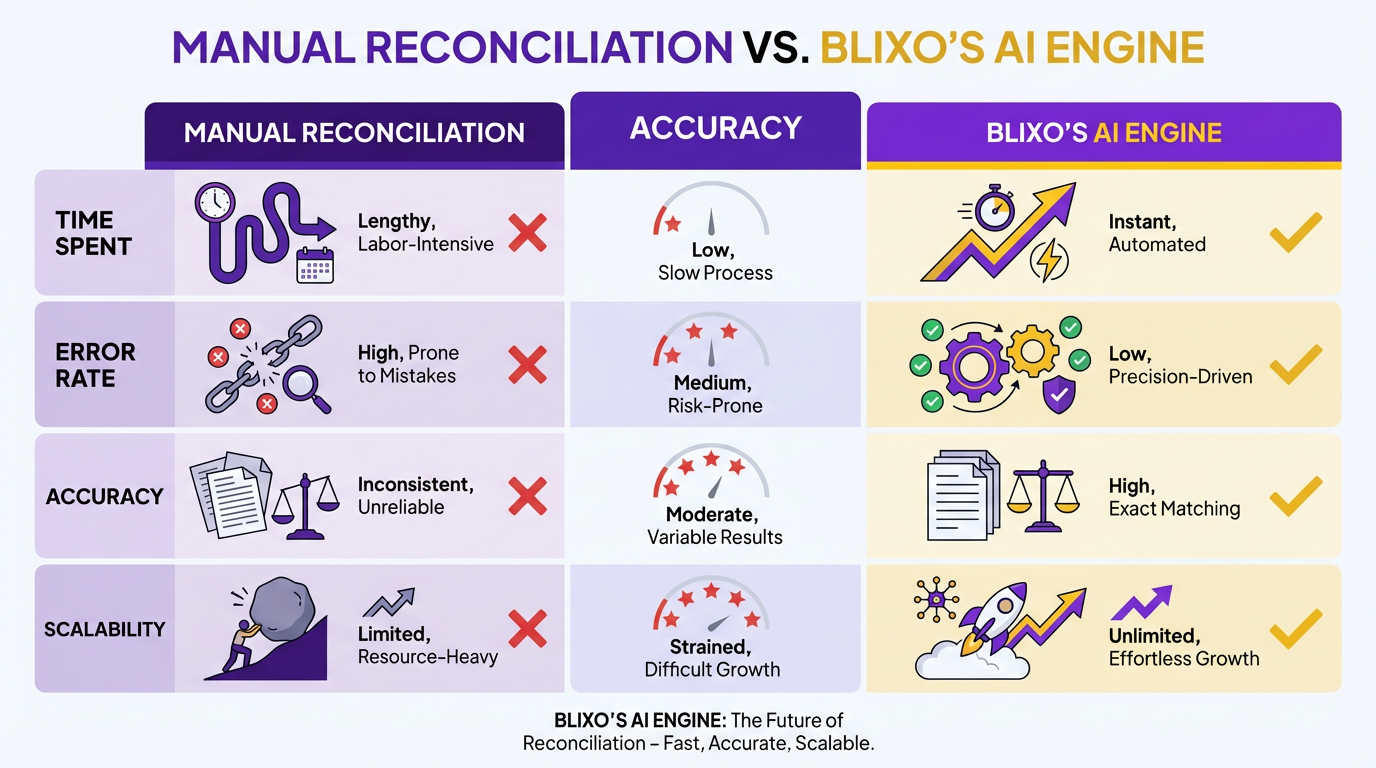
Automated payment reconciliation with Blixo significantly reduces manual workload and improves financial accuracy. By eliminating the time-consuming task of matching payments to invoices, teams can reallocate resources to higher-value tasks. The system’s error-minimizing capabilities reduce disputes and ensure consistent application of payment rules, such as handling partial payments or allocating funds across multiple invoices. As highlighted in the Why Automating Accounts Receivable Matters section, this efficiency directly addresses common pain points in manual processes, such as delays and lost invoices.
The system also minimizes errors caused by human oversight. Since the engine learns from corrections, it continuously refines its matching logic, leading to higher accuracy rates. This reliability accelerates cash application, ensuring businesses receive payments faster. Additionally, the automation lowers operational costs by reducing labor hours and minimizing penalties from late payments.
Implementing Blixo’s Automation Solutions
Implementing Blixo’s automation solutions begins with a structured setup process designed to align with your organization’s financial workflows. The first step involves configuring the platform to match your specific accounts receivable processes. Blixo’s software requires mapping your invoice and payment data to its system, ensuring accurate payment-to-invoice matching. This includes setting up payment types like wire transfers, direct deposits, and check payments through a virtual lockbox, as outlined in Blixo’s technical documentation. The platform’s machine learning algorithms then begin analyzing historical data to improve match rates over time, a capability further detailed in the AI-Powered Cash Application for Faster Payments section.
How to Configure Blixo’s Automation Tools
Start by defining your invoice and payment rules within Blixo’s interface. For example, if your business processes high volumes of wire transfers, configure the system to prioritize these in the matching engine. Blixo’s matching engine delivers market-leading accuracy at both envelope and item levels, reducing manual reconciliation efforts, as explained in the Intelligent Matching Engine for Payment Reconciliation section. Next, integrate the software with your existing accounting systems. Blixo seamlessly connects with ERPs like Oracle and SAP, as well as platforms like QuickBooks Online and Salesforce. This integration ensures that payment data flows automatically between systems, eliminating the need for manual data entry. A medium-sized manufacturing company reduced its reconciliation time by 30% after configuring Blixo to work with its ERP, according to a case study.
Best Practices for System Integration
Integration success hinges on thorough testing and data alignment. Begin by validating that Blixo’s APIs or pre-built connectors match your ERP’s data structure. For instance, if your system uses custom invoice fields, map these to Blixo’s database to maintain consistency. Blixo recommends running parallel tests-processing a sample batch of invoices through both automated and manual workflows-to identify discrepancies. Once validated, automate reconciliation workflows so payments are matched and posted in seconds. A law firm improved cash flow efficiency by 25% after integrating Blixo with its accounting tools, automating 90% of its AR process.
Training and Support for Teams
Blixo provides onboarding training to ensure teams use the platform effectively. Initial training covers core features like payment matching, report generation, and exception handling. Ongoing support includes access to Blixo’s knowledge base and dedicated customer success managers. For example, a mid-sized firm reported a 30% drop in invoice processing time after staff completed Blixo’s training modules. The company also advises scheduling monthly reviews to refine customer segmentation rules and update payment terms, as detailed in the Real-Time Payment Visibility and Tracking with Blixo blog. This ensures automation adapts to evolving business needs.
Real-World Impact of Blixo Automation
Businesses using Blixo report measurable time and cost savings. One organization automated 80% of its accounts receivable process, cutting manual effort by 40 hours monthly. Another large corporation boosted cash flow by 25% within six months by streamlining invoice-to-cash workflows. These results align with industry experts’ claims that AR automation reduces operational costs by up to 50% while improving accuracy. Blixo’s machine learning capabilities further enhance these benefits, as the system learns from user interactions to refine future matches.
By following these steps, businesses can deploy Blixo’s automation solutions with minimal disruption. The platform’s focus on seamless integration, intelligent matching, and continuous learning ensures long-term efficiency gains. For organizations processing hundreds of invoices monthly, this structured approach transforms accounts receivable from a labor-intensive task into a streamlined financial advantage.
Frequently Asked Questions
1. What financial risks do manual accounts receivable processes create?
Manual AR processes risk 1–5% annual revenue loss due to inefficiencies and 42% revenue leakage from uncollected invoices. Human errors and delayed follow-ups worsen cash flow gaps.
2. How does Blixo reduce payment disputes?
Blixo’s machine learning matches payments to invoices with 40% fewer disputes by learning from historical data, ensuring accurate and faster invoice-to-payment reconciliation.
3. Which businesses benefit most from AR automation?
Small businesses save 50% on invoicing time, while medium-sized enterprises boost cash flow by 30% using Blixo, making automation ideal for SMBs and growing companies.
4. How much time does AR automation save employees?
Automation eliminates 60% of staff time spent on manual dispute management and cuts repetitive AR tasks like data entry by up to 62%, freeing resources for strategic work.
5. Can automation improve customer satisfaction?
Yes, small businesses using Blixo report 50% faster invoicing, accelerating payments and enhancing customer satisfaction through timely, error-free billing processes.
6. What cash flow improvements do companies see with Blixo?
Medium-sized companies automate recurring billing and payment tracking, achieving a 30% cash flow increase within months of adopting Blixo’s AR solutions.
7. How does automation address revenue leakage?
By automating collections and reducing missed payments, Blixo minimizes revenue leakage from uncollected invoices, which affects 42% of businesses with manual workflows.