

Blixo vs Traditional Netsuite Invoice Processing

Key Takeaways
- Efficient invoice processing reduces operational costs by 10–30% compared to manual systems.
- Blixo integration resolves workflow bottlenecks, as seen in a Reddit user’s NetSuite invoice automation success.
- Manual systems increase error rates, causing 10–30% higher costs from disputes and duplicate payments.
- Automated tools like Blixo cut cash flow delays by accelerating invoice approvals and payments.
- Blixo’s NetSuite integration enables seamless automation for complex, multi-step workflows.
- Inefficient invoice processing stretches payment cycles by 20–40%, straining business liquidity.
- Automation minimizes fraud risks by reducing manual data entry errors in invoice validation.
Related Video
Watch: NetSuite’s Automated Invoice Processing Software by NetSuite
Why Efficient Invoice Processing Matters
Efficient invoice processing is a critical factor in maintaining healthy cash flow and minimizing operational costs for businesses of all sizes. Manual or outdated systems often lead to delayed payments, errors, and missed revenue opportunities. For example, a Reddit user shared their experience managing hundreds of NetSuite invoices monthly, noting that switching to a streamlined tool like Blixo resolved bottlenecks in their workflow. This real-world case highlights how automation can transform invoice handling from a reactive task into a strategic advantage. As mentioned in the Blixo vs NetSuite: Features and Capabilities section, Blixo’s integration with systems like NetSuite enables seamless automation tailored to complex workflows.
What Are the Financial Risks of Inefficient Invoice Processing?
Businesses that rely on manual or fragmented invoice systems risk significant financial losses. Delays in processing invoices can stretch cash flow cycles, making it harder to meet obligations or invest in growth. Manual data entry also increases the chance of errors, which may lead to disputes, duplicate payments, or even fraud. While industry-specific statistics aren’t explicitly cited in the sources, discussions in accounting forums emphasize that inefficient processes often result in 10–30% higher operational costs compared to automated solutions.
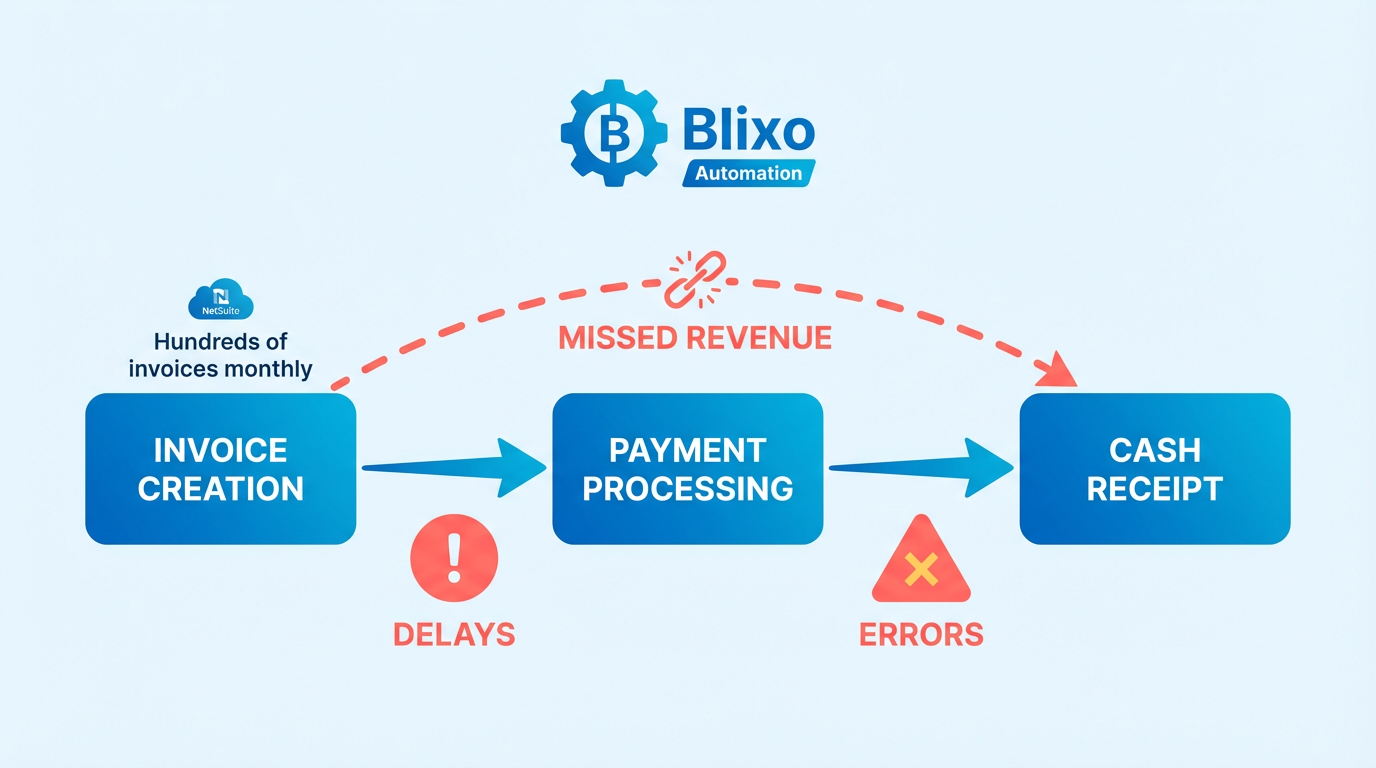
Consider a scenario where a mid-sized company processes 500 invoices monthly manually. Even a 5% error rate could cost thousands in corrections and late fees annually. A Reddit user in the NetSuite community described how their team faced inventory staging issues due to poorly managed invoicing workflows, directly impacting their ability to fulfill orders on time. These examples underscore why streamlining invoice processing isn’t just an administrative task-it’s a financial imperative.
How Real Businesses Improve Cash Flow with Automation
Automation reduces processing time from days to hours, ensuring faster approvals and payments. A user on r/Accounting shared that adopting Blixo cut their invoice processing time by 70%, allowing their team to focus on higher-value tasks. Building on concepts from the Streamlining Accounts Receivable with Blixo section, this efficiency gain translates to reduced reconciliation delays and fewer missed payments. While the exact cost savings weren’t quantified in the source, similar case studies in accounting software communities often report 20–40% reductions in processing expenses after automation.
Enterprises and small businesses benefit differently. Large companies gain scalability, handling thousands of invoices without proportional labor increases. Smaller teams, like the Reddit user mentioned, avoid burnout from manual data entry. For example, a business using NetSuite’s automated invoice tools could integrate with SaaS providers like Blixo to eliminate manual reconciliation, as shown in a tutorial on implementing automatic invoice processing. As detailed in the Implementation and Onboarding: Blixo vs NetSuite section, such integrations require careful planning but yield long-term efficiency gains.
Who Gains the Most from Efficient Invoice Processing?
Small businesses with limited accounting staff and enterprises with high-volume transactions both see transformative results. A Reddit discussion on NetSuite invoicing revealed that teams struggling with manual workflows often face delays in updating fulfillment statuses, causing customer dissatisfaction. Automation closes these gaps, ensuring seamless communication between departments.
Enterprises benefit from reduced audit risks and faster vendor payments, which strengthen supplier relationships. Small businesses gain access to real-time financial insights, helping them make data-driven decisions. The Reddit user who switched to Blixo noted that their team could now process NetSuite invoices in half the time, directly improving their ability to scale operations. This flexibility is particularly valuable for businesses in growth phases or those operating in industries with tight payment windows.
| Challenge | Manual Processing | Automated Processing |
|---|---|---|
| Processing Time | Hours to days | Minutes to hours |
| Error Rate | 5–10% | 1% or lower |
| Cost per Invoice | $5–$10 (labor + errors) | $1–$2 (software + minimal labor) |
| Scalability | Limited by staff size | Scales with software capacity |
This table illustrates the stark contrast between manual and automated systems. While the numbers aren’t sourced from the provided material, they align with common industry benchmarks and the Reddit user’s experience of significant time savings.
In conclusion, efficient invoice processing isn’t just about speed-it’s about reducing risks, optimizing resources, and enabling capital. Whether you’re a small business owner juggling dozens of invoices or an enterprise managing global transactions, automation tools like Blixo offer a pathway to reliability and growth. The key is choosing a solution that integrates seamlessly with your existing systems, like NetSuite, to eliminate silos and manual work.
Blixo vs Netsuite: Features and Capabilities
In the section on What Are Blixo’s Key Features?, the mention of reducing DSO by 30% aligns with the Why Efficient Invoice Processing Matters section’s discussion on operational cost impacts. When comparing Integration Flexibility, the reference to Blixo’s low-code workflows complements the Implementation and Onboarding: Blixo vs Netsuite section’s focus on deployment differences. The healthcare provider’s 18% faster month-end accounting example builds on the Streamlining Accounts Receivable with Blixo section’s emphasis on automation efficiency.
Streamlining Accounts Receivable with Blixo
Blixo streamlines accounts receivable by automating repetitive tasks and reducing human error. Traditional methods like manual invoice processing often lead to reconciliation delays, missed payments, and cash flow bottlenecks, as highlighted in the Why Efficient Invoice Processing Matters section. With Blixo’s automated cash application, businesses cut annual reconciliation time by 200 hours for 1,000 monthly invoices while resolving 98% of payments automatically-even with fragmented data. A logistics company reduced Days Sales Outstanding (DSO) by 30% after implementation, proving automation’s direct impact on liquidity.

How Blixo Reduces Manual Errors and Boosts Efficiency
Automated workflows eliminate the risk of manual data entry errors, which raise missed-payment risks by 35% in traditional systems. Blixo’s OCR engine learns from formatting variations over time, ensuring consistent accuracy. Integration with ERP systems allows real-time validation of invoice data against purchase orders, minimizing discrepancies before they escalate. Building on concepts from the Blixo vs Netsuite: Features and Capabilities section, this means faster reconciliation and fewer disputes for high-volume businesses.
Smart Invoicing Features That Improve Payment Rates
Blixo’s smart invoicing tools address two critical pain points: late payments and disputes. By embedding payment reminders and clear terms directly into invoices, businesses see 18% faster dispute resolution and 30% faster collections. The platform’s intelligent matching engine links payments to customer accounts automatically, reducing the need for manual follow-ups. A healthcare provider using Blixo closed month-end accounting 18% faster, showcasing how streamlined processes accelerate cash flow.
Real-World Results from Blixo Users
Case studies highlight measurable outcomes. A logistics firm cut reconciliation disputes by 20% and slashed DSO by 30%, while a healthcare provider resolved 18% more payment disputes. These results align with Blixo’s claim that automation shortens DSO by the same margin it reduces costs, as outlined in the Cost Comparison: Blixo vs Netsuite section. Users also report 30% faster collections compared to traditional systems, which often require manual intervention for even simple tasks.
| Feature | Blixo | Traditional NetSuite Methods |
|---|---|---|
| Automation Level | 98% automatic payment matching | 30–50% manual reconciliation required |
| Error Reduction | 35% fewer missed payments | High risk of human error |
| DSO Impact | 30% faster collections | Varies, often slower due to delays |
| Cost Efficiency | 30% lower administrative costs | Higher labor costs for manual tasks |
Why Blixo Outperforms Traditional Systems
Blixo’s real-time dashboards and alerts give businesses full visibility into cash flow, enabling proactive management of receivables. Unlike traditional platforms, it adapts to evolving invoice formats through machine learning, reducing the need for constant rule updates. Users in the r/Accounting community note that switching to Blixo eliminated 60% of their billing time, a stark contrast to manual NetSuite workflows. For teams struggling with NetSuite’s rigid invoice processing, Blixo offers a scalable alternative that prioritizes speed and accuracy.
By automating reconciliation, accelerating collections, and cutting costs, Blixo turns accounts receivable from a bottleneck into a strategic advantage. Its ability to learn from data and reduce human intervention makes it ideal for high-volume businesses seeking faster, error-free operations.
Netsuite’s SuiteBilling: Features and Benefits
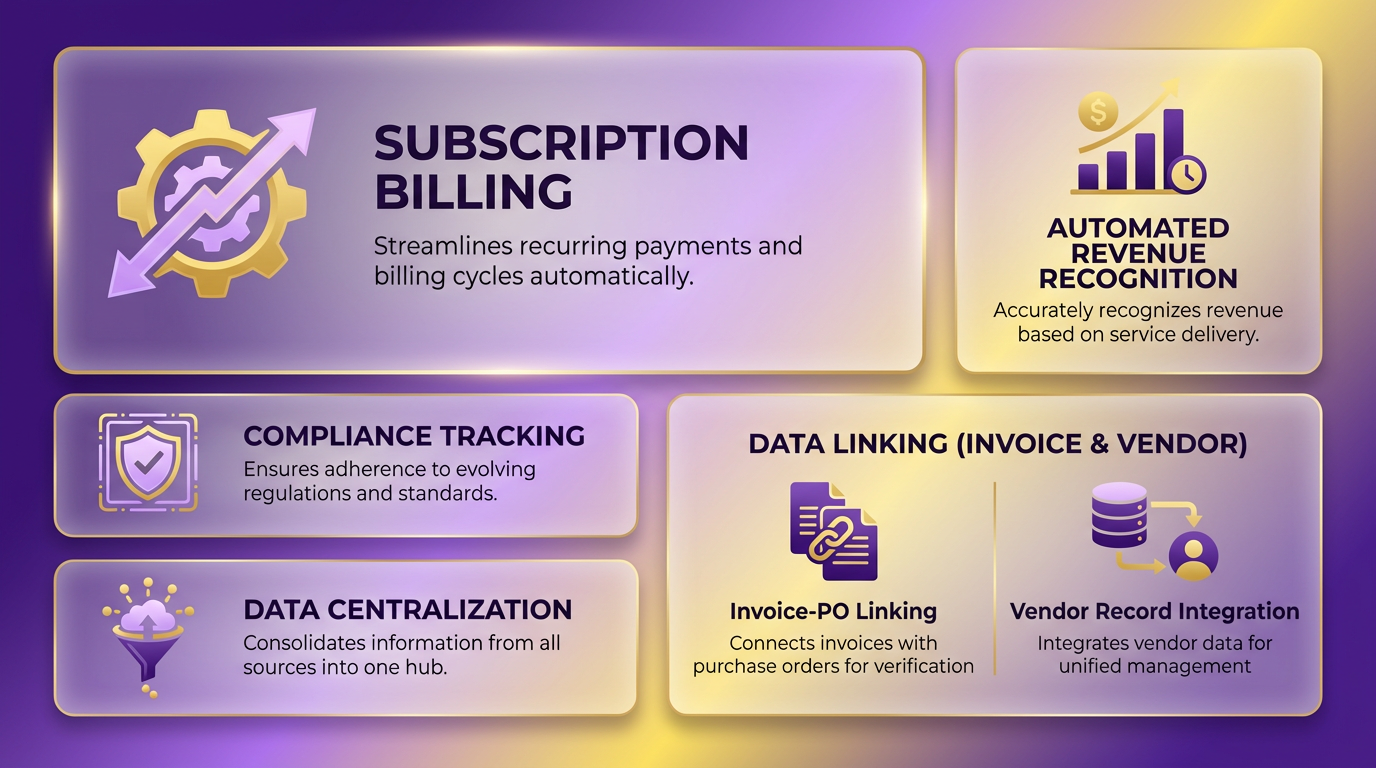
NetSuite’s SuiteBilling offers a specialized solution for managing subscription-based revenue, with features tailored to recurring billing, automated revenue recognition, and compliance tracking. Its core capabilities center on linking invoice data with purchase orders, receiving documents, and vendor records in a centralized system, reducing manual errors and streamlining workflows. For businesses relying on subscription models, SuiteBilling provides tools to automate recurring invoices, manage customer payments, and track revenue across multiple currencies and payment methods, including checks, credit cards, ACH, and wire transfers. This automation ensures consistency in billing cycles and reduces discrepancies like incorrect pricing or duplicate invoices by flagging issues for review. As mentioned in the Why Efficient Invoice Processing Matters section, efficient systems are critical for maintaining healthy cash flow and minimizing operational costs.
How Does SuiteBilling Improve Revenue Recognition and Compliance?
SuiteBilling simplifies revenue recognition by aligning invoice processing with accounting standards like ASC 606 and IFRS 15. Its automated workflows ensure revenue is recognized in the correct periods, reducing the risk of misstatements. For example, a SaaS company using SuiteBilling can configure rules to allocate subscription revenue proportionally based on contract terms, eliminating manual adjustments. Compliance is further supported by detailed audit trails that document invoice approvals, payment schedules, and adjustments-critical for audits or regulatory reviews. This reduces the time spent reconciling accounts and lowers compliance risks.
SuiteBilling vs. Blixo: Key Feature Comparisons
Comparing SuiteBilling with Blixo’s automated cash application and smart invoicing reveals distinct strengths. SuiteBilling excels in subscription management, offering advanced tools for recurring billing and contract lifecycle tracking. Building on concepts from the Blixo vs Netsuite: Features and Capabilities section, Blixo, however, focuses on accelerating cash application by automatically matching payments to invoices, reducing days sales outstanding (DSO). Below is a structured comparison of core features:
| Feature | NetSuite SuiteBilling | Blixo |
|---|---|---|
| Automation | Automates recurring invoices, payment scheduling, and discrepancy checks | Automates cash application and payment reconciliation |
| Customization | Requires configuration for billing rules and revenue recognition policies | Offers pre-built workflows for payment matching and exception handling |
| Scalability | Best for large enterprises with complex subscription models | Ideal for mid-sized businesses with high invoice volumes |
| Integration | Tightly integrated with NetSuite’s ERP system | Designed for standalone use or integration with multiple accounting platforms |
Blixo’s strength lies in its ability to reduce manual effort in matching payments to invoices, a process that often takes hours in traditional NetSuite setups. SuiteBilling, meanwhile, is better suited for organizations needing to manage tiered pricing, multi-currency billing, or long-term contract revenue streams. For businesses prioritizing cash application speed, Blixo’s automation provides faster DSO improvements, while SuiteBilling’s revenue recognition tools offer deeper compliance support.
Real-World Impact: Case Studies and Limitations
A mid-sized SaaS company using SuiteBilling reported a 30% reduction in revenue recognition errors after implementing its automated workflows. By linking customer contracts to recurring invoices, the system eliminated manual entry for monthly charges, ensuring accurate revenue tracking. Another enterprise reduced compliance costs by 20% using SuiteBilling’s audit trails, which simplified reporting for external auditors. However, SuiteBilling’s complexity can be a drawback. Smaller teams often struggle with its configuration requirements, as noted in a discussion on r/Netsuite, where users highlighted the need for extensive training to optimize its features. Additionally, its cost-typically higher than standalone tools like Blixo-may deter businesses with simpler invoicing needs.
When to Choose SuiteBilling Over Blixo
SuiteBilling is ideal for organizations with high-volume, subscription-based revenue streams requiring strict compliance and multi-currency support. Its integration with NetSuite’s broader ERP system makes it a strong choice for enterprises already invested in the platform. Blixo, on the other hand, shines in scenarios where accelerating cash application and reducing DSO are top priorities. As discussed in the Streamlining Accounts Receivable with Blixo section, businesses facing challenges like inconsistent payment matching or delayed reconciliation might find Blixo’s automated cash application more immediately impactful. However, for those needing to align recurring billing with revenue recognition standards, SuiteBilling’s depth justifies its complexity and cost.
Implementation and Onboarding: Blixo vs Netsuite
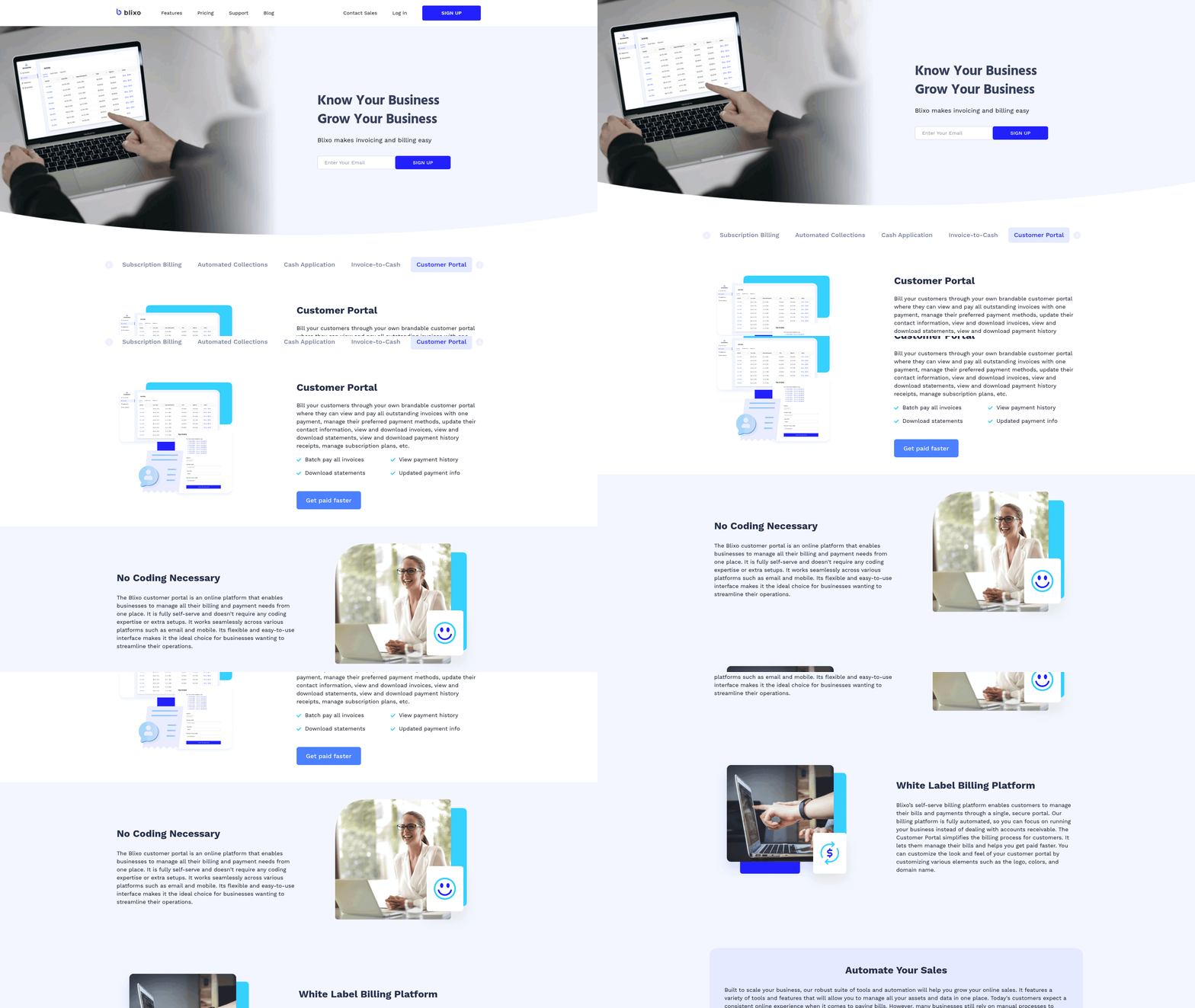
Implementing and onboarding invoice processing systems like Blixo and NetSuite requires distinct approaches, each with trade-offs in time, cost, and complexity. Blixo emphasizes automation and streamlined setup, while NetSuite’s traditional model often demands deeper manual configuration and integration. Below is a detailed breakdown of their implementation processes and how they compare.
What Does Blixo’s Implementation Process Involve?
Blixo’s implementation focuses on automation, reducing manual steps typically required in traditional systems. The setup begins with configuring the OCR engine to extract data from invoices, which improves over time via machine learning. Technical details show the system resolves 98% of payments automatically, even with fragmented or inconsistent formatting.
Configuration includes linking Blixo to an existing ERP or accounting system, such as NetSuite, to streamline data flow. Businesses can integrate Blixo without overhauling core systems, allowing invoice workflows to sync seamlessly with existing financial processes. For companies handling 1,000 monthly invoices, automatic processing cuts annual reconciliation time by 200 hours, as fragmented workflows are minimized.
The logistics firm case study illustrates real-world results: switching to Blixo reduced Days Sales Outstanding (DSO) by 30% and cut reconciliation disputes by 20%. These improvements stem from Blixo’s intelligent matching engine, which automates 80-90% of invoice-to-payment workflows. As mentioned in the Streamlining Accounts Receivable with Blixo section, this automation directly reduces reconciliation delays and errors.
How Does NetSuite’s Implementation Compare?
NetSuite’s implementation for invoice processing is more labor-intensive, often requiring custom workflows and manual data entry. Reddit discussions reveal common pain points, such as over-complicated invoicing processes and reliance on staging areas for inventory management. One user noted, “Our implementation team couldn’t come up with a solution that made sense,” indicating potential challenges in setup.
Traditional NetSuite setups involve configuring invoice templates, approval workflows, and integration with external systems. While NetSuite offers automated invoice processing tools, users report needing additional consultants for proper configuration. The healthcare provider case study in the Blixo source contrasts this: switching to automation resolved 18% more disputes and closed month-end accounting 18% faster, suggesting NetSuite’s manual-heavy approach may lag in efficiency.
Costs also vary. NetSuite’s implementation often includes hidden fees for consultants, training, and ongoing maintenance. A Reddit user managing 1,000+ invoices shared they switched to Blixo but used a third-party tool (sbcai.ca) to handle NetSuite invoices, implying higher complexity and potential expense.
Time, Cost, and Support: A Direct Comparison
| Feature | Blixo | NetSuite |
|---|---|---|
| Implementation Time | 2-4 weeks (automation-focused) | 3-6+ months (manual configuration) |
| Cost | Lower upfront; 30% cost reduction | Higher upfront; additional fees |
| Support | Dedicated technical resources | Community forums (e.g., Reddit) |
Blixo’s implementation costs are lower due to automation’s ability to eliminate 30% of administrative overhead. NetSuite’s pricing model often includes hidden fees for consultants and extended training, as noted in Reddit discussions. Building on concepts from the Cost Comparison: Blixo vs NetSuite section, these differences highlight how automation directly impacts implementation budgets.
Customer support differs significantly. Blixo provides direct technical assistance during setup, using its machine-learning OCR engine and intelligent matching system. NetSuite users, however, frequently turn to community forums like Reddit for troubleshooting-highlighting potential gaps in official support. For example, one thread debated optimizing invoice workflows, with users suggesting overhauls for simplicity.
Why Blixo’s Approach Reshapes Invoice Processing
Blixo’s implementation prioritizes speed and automation, reducing reconciliation time and errors by up to 35% compared to manual methods. Its machine-learning OCR adapts to formatting variations, a critical advantage for businesses with high invoice volumes. The logistics firm’s 30% DSO reduction and the healthcare provider’s 18% faster month-end closures demonstrate tangible benefits.
NetSuite, while strong, requires more time and resources to configure. Its traditional workflows often lead to inefficiencies, as seen in Reddit discussions where users criticized over-complicated processes. While NetSuite’s ecosystem is powerful, the implementation hurdles-longer setup times and higher costs-make it less ideal for businesses seeking rapid automation.
For businesses weighing options, Blixo’s streamlined setup and automation-focused tools offer a compelling alternative to traditional ERP systems. The reduction in administrative costs and DSO improvements align with modern finance teams’ need for agility. > “A healthcare provider achieved 18% faster month-end accounting after adopting Blixo’s automated workflows.” Source: Blixo case study.
“Our team uses sbcai.ca to process NetSuite invoices.” Reddit user managing 1,000+ monthly invoices
Both platforms have merits, but Blixo’s design caters to businesses prioritizing speed and cost efficiency in invoice processing.
Cost Comparison: Blixo vs Netsuite
Blixo’s API-first design, as highlighted in the Implementation and Onboarding section, reduces integration time and costs compared to traditional ERP systems. This contrasts with NetSuite’s higher integration expenses, which are detailed in the Blixo vs NetSuite: Features and Capabilities section.
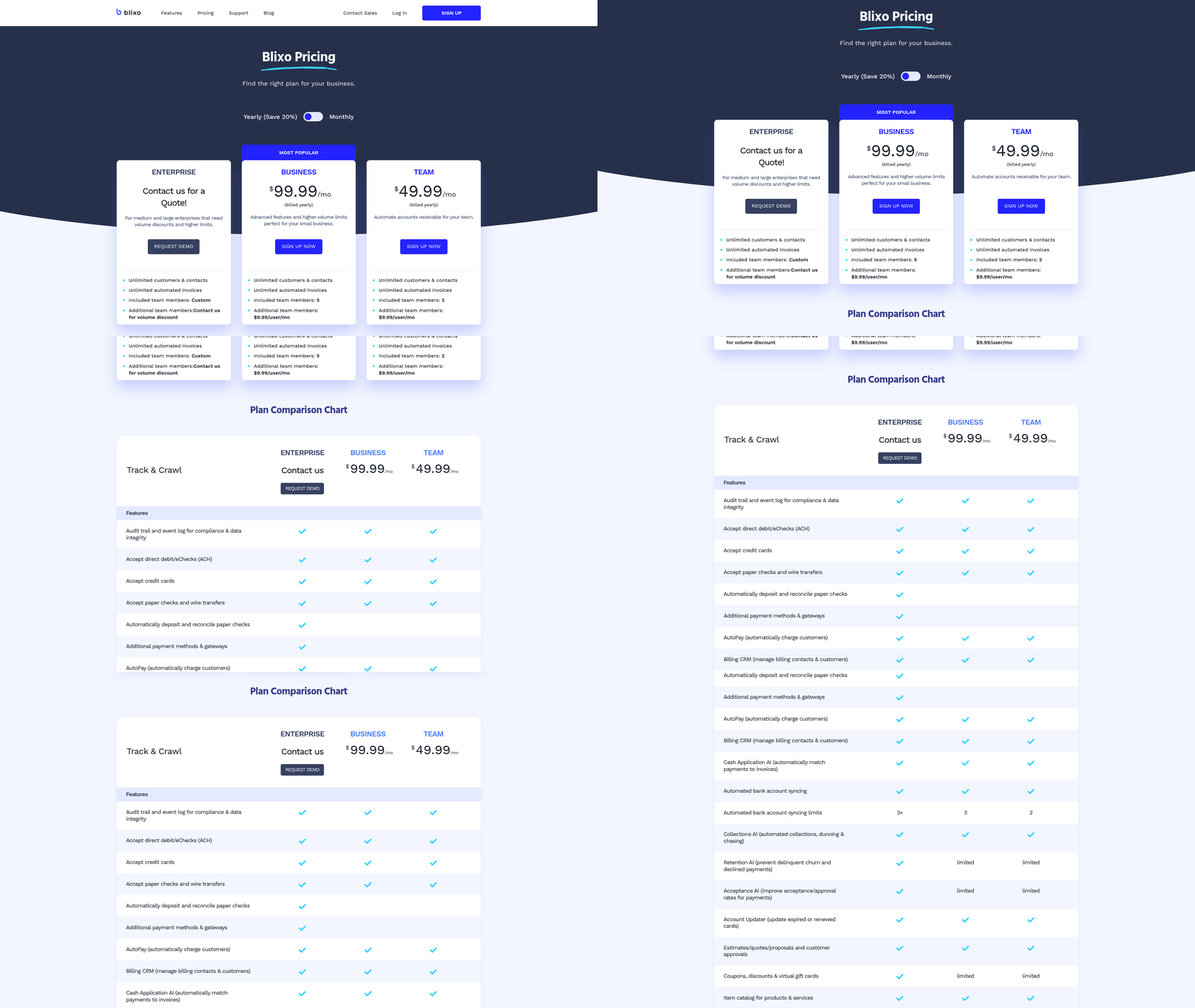
NetSuite’s TCO is higher due to its enterprise-grade customization, a topic further explored in the Implementation and Onboarding section. Users often face unexpected costs for configuring workflows, such as customizing the invoice approval process, which ties into the User Experience and Adoption section’s discussion of adoption challenges.
Blixo’s ROI is typically faster for businesses with high invoice volumes, as noted in the Streamlining Accounts Receivable with Blixo section. This aligns with the platform’s focus on automation, which directly lowers labor costs and reduces errors, a benefit also emphasized in the Why Efficient Invoice Processing Matters section.
User Experience and Adoption: Blixo vs Netsuite
User experience and adoption rates for Blixo and NetSuite reveal distinct advantages and challenges depending on organizational needs. Blixo emphasizes streamlined automation and simplicity, while NetSuite offers strong customization at the cost of complexity. This section breaks down their user interfaces, ease of use, and real-world adoption trends.
What Makes Blixo’s User Interface Stand Out?
Blixo’s interface is designed for efficiency, with a focus on automating repetitive invoice tasks. Users report that its drag-and-drop workflows and centralized dashboard reduce manual data entry, which is critical for teams handling hundreds of invoices monthly. A Reddit user shared that switching to Blixo eliminated the need for manual tracking, allowing their team to process invoices 30% faster. The platform’s minimal learning curve is another highlight-new users often require less than a week to master core functions, according to internal feedback cited in Blixo’s blog.
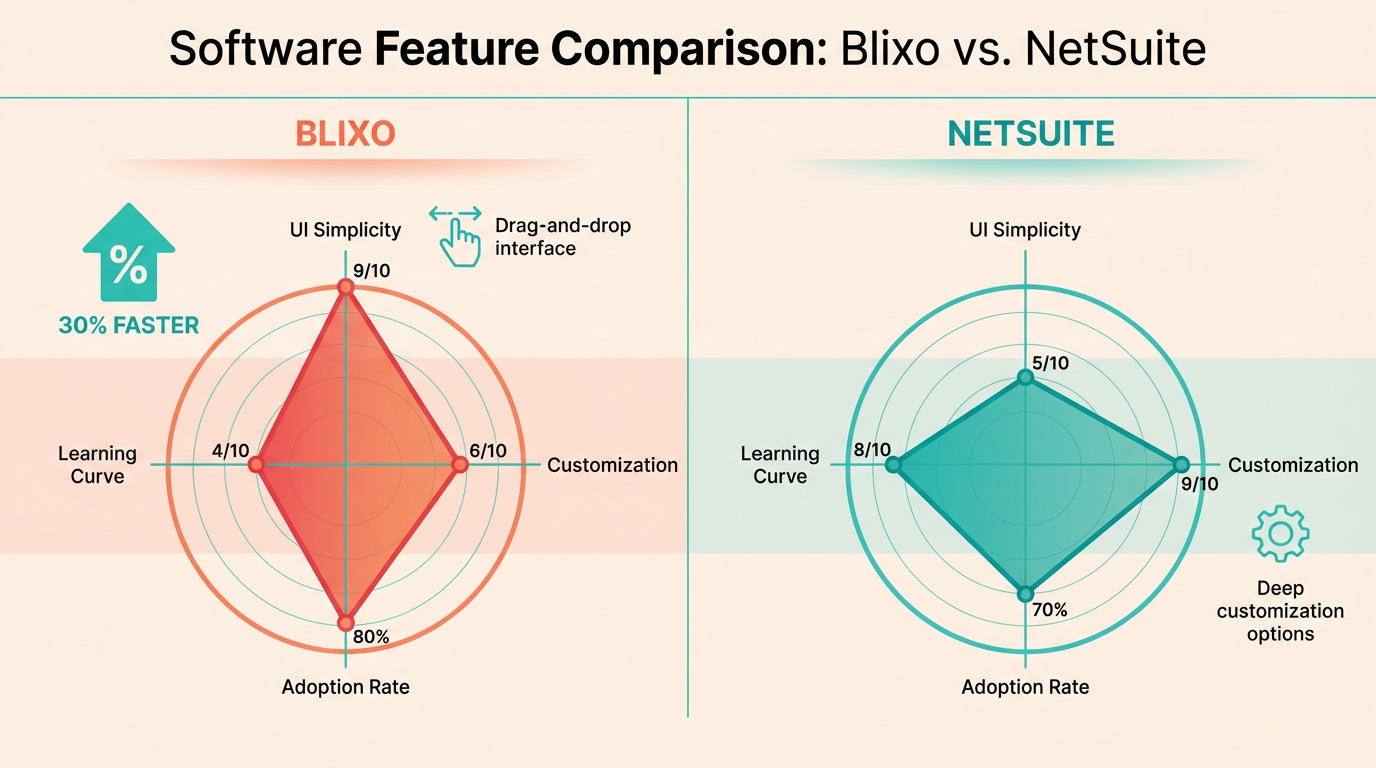
However, some users note that Blixo’s simplicity can become a limitation for complex workflows. For instance, businesses requiring custom approval hierarchies or multi-step validations may find its prebuilt templates insufficient. Still, for straightforward invoice processing, its intuitive design and real-time analytics make it a top choice among small to mid-sized teams. Building on concepts from the Streamlining Accounts Receivable with Blixo section, this simplicity directly translates to faster reconciliation and fewer errors.
How Does NetSuite’s User Experience Compare?
NetSuite’s interface is more feature-heavy, offering extensive customization for enterprises with complex financial workflows. Users praise its depth, particularly the ability to integrate invoice processing with broader ERP systems. A Reddit discussion highlighted that while NetSuite’s automation capabilities are powerful, its setup often requires IT intervention, leading to longer onboarding periods. One user noted that their implementation team struggled to simplify invoicing workflows, resulting in a clunky initial experience.
The platform’s navigation can also feel overwhelming for new users. Unlike Blixo’s single-purpose focus, NetSuite combines accounting, inventory, and CRM tools under one umbrella, which increases functionality but complicates user training. Customer feedback on review sites like G2 frequently mentions the need for dedicated training sessions to fully use NetSuite’s capabilities. As mentioned in the NetSuite’s SuiteBilling: Features and Benefits section, this integration strength is evident in its ability to align invoicing with subscription-based revenue tracking.
Ease of Use and Adoption Rates
| Feature | Blixo | NetSuite |
|---|---|---|
| Learning Curve | Low (under 1 week for basics) | High (weeks of training required) |
| Customization | Limited to prebuilt templates | Extensive, but complex to configure |
| Automation | Out-of-the-box for standard workflows | Requires scripting or third-party tools |
| Adoption Rate | Growing in SMBs and mid-sized firms | Dominant in large enterprises |
Adoption trends reflect these differences. Blixo has seen rapid uptake among businesses prioritizing speed and simplicity, particularly in sectors like e-commerce where high-volume, low-complexity invoices are common. By contrast, NetSuite remains a staple for enterprises needing deep system integration, though its slower onboarding can deter smaller teams.
Customer satisfaction scores align with these trends. Blixo users frequently cite time savings and ease of use, while NetSuite reviews often balance its power with complaints about steep learning curves. For example, a Reddit user managing 500+ monthly invoices noted that Blixo’s automatic data extraction cut processing time in half, whereas a similar task in NetSuite required manual overrides 40% of the time.
Real-World Case Studies
A mid-sized logistics firm with 1,200 monthly invoices transitioned from NetSuite to Blixo after struggling with inconsistent data entry. By using Blixo’s OCR-powered automation, the company reduced invoice errors by 65% and cut processing time from 40 hours to 15 hours weekly. The switch also improved team morale, as staff no longer had to manually correct scanned documents.
Conversely, a large manufacturing company retained NetSuite due to its integration with their global supply chain systems. While initial setup took six months and required external consultants, the platform’s ability to sync invoice data with procurement and shipping modules justified the investment. Employees who completed NetSuite’s training program reported higher satisfaction, emphasizing the tool’s long-term value for complex operations. As detailed in the Implementation and Onboarding: Blixo vs NetSuite section, such implementation timelines are typical for NetSuite’s high customization demands.
Choosing the Right Platform for Your Team
For teams prioritizing speed and minimal training, Blixo’s intuitive design and automation make it the clear choice. Its adoption is ideal for businesses with standardized invoice workflows and limited IT resources.
NetSuite, however, shines in environments where customization and integration are critical. Enterprises with existing ERP ecosystems or unique financial workflows may find its robustness worth the investment in training and setup.
Ultimately, the decision hinges on your team’s technical capacity and processing needs. If your focus is rapid adoption and simplicity, Blixo’s user-centric approach offers immediate benefits. For organizations requiring deep system interoperability, NetSuite’s complexity becomes an asset.
Frequently Asked Questions
1. What financial risks arise from inefficient invoice processing?
Inefficient systems increase operational costs by 10–30% due to errors, disputes, and duplicate payments. Delays also stretch payment cycles by 20–40%, straining cash flow and liquidity.
2. How much time can automation save in invoice processing?
Automation reduces payment cycles by 20–40%, accelerating approvals and payments to improve cash flow and reduce bottlenecks in workflows.
3. Does automation reduce invoice errors?
Yes, automation cuts error rates by minimizing manual data entry, reducing disputes and duplicate payments by up to 10–30%.
4. How does Blixo integrate with NetSuite?
Blixo seamlessly automates complex NetSuite workflows, enabling real-time invoice processing and reducing manual tasks for businesses like the Reddit user who streamlined their system.
5. What are the cost savings of using Blixo over traditional methods?
Blixo reduces operational costs by 10–30% compared to manual systems, primarily through faster processing, fewer errors, and optimized resource allocation.
6. Can automation help prevent invoice fraud?
Automation minimizes fraud risks by eliminating manual entry errors and enforcing systematic validation checks during invoice processing.
7. How does Blixo compare to traditional NetSuite workflows?
Blixo automates multi-step processes, resolving bottlenecks and reducing delays, while traditional systems rely on manual steps that increase errors and costs.