

Blixo Netsuite Invoice Processing Comparison Checklist

Key Takeaways
- Manual invoice processing costs $80–$90 per invoice, while automation saves $80,000–$90,000 monthly for 1,000 invoices.
- Automation reduces invoice processing time from 45 days to 3 days, cutting manual effort by 80% in real-world cases.
- Late payments due to inefficiencies can incur $5,000+ penalties, risking vendor relationships and cash flow.
- AP teams waste 30%–50% of their time on repetitive tasks without automation, delaying strategic work.
- Blixo’s integration with NetSuite directly addresses manual reconciliation struggles, streamlining workflows.
- Invoice errors from manual systems cost businesses $100 per invoice, compounding financial risks over time.
- Automated systems prevent avoidable late fees and improve vendor trust by ensuring timely payments.
Why Efficient Invoice Processing Matters
Efficient invoice processing isn’t just a technical detail-it’s a business lifeline. Late payments and manual errors can erode profit margins, strain vendor relationships, and slow down operations. For businesses handling hundreds of invoices monthly, even small inefficiencies compound into major financial and operational risks. Let’s break down why this matters.
How Much Do Inefficient Systems Cost?
The numbers speak volumes. Manual invoice processing can take 45 days per invoice, compared to 3 days with automation. At $100 per invoice in manual costs, automation saves **$80–$90 per invoice**, according to Blixo’s analysis. For a company handling 1,000 invoices monthly, that’s **$80,000–$90,000 in avoidable expenses**-a cost that quickly outpaces software investments.
A Reddit user shared a relatable struggle: their team previously spent hours manually reconciling NetSuite invoices, leading to delays and errors. Switching to automation streamlined workflows, reducing time spent on data entry by 80%. This mirrors a common pain point: businesses often waste 30%–50% of their AP team’s time on repetitive tasks, time that could be redirected toward strategic work. As mentioned in the Integration with Netsuite ERP and Other Systems section, Blixo’s solution addresses these challenges directly.
What Makes Late Payments So Damaging?
Late payments disrupt cash flow, which is the lifeblood of any business. When invoices sit unprocessed for weeks, vendors grow wary, tightening payment terms or demanding penalties. One accounting professional on Reddit noted that their company faced a $5,000 late fee after missing a vendor cutoff date-a preventable cost that automation could have avoided.
Automation also reduces errors that trigger payment disputes. Manual data entry has a 5%–10% error rate, according to industry benchmarks. These mistakes delay payments, frustrate vendors, and risk supply chain disruptions. For example, a manufacturing firm might miss a critical raw material shipment if an invoice isn’t approved on time, halting production.
Who Benefits Most From Automation?
Not all businesses need advanced automation, but certain scenarios demand it. Companies processing over 500 invoices monthly see the most value. Smaller operations might manage manually, but as volume grows, so do costs and errors.
Automation also helps teams using ERPs like NetSuite. Traditional systems often lack seamless integration, requiring manual data transfers. Building on concepts from the Integration with Netsuite ERP and Other Systems section, Blixo’s blog highlights how its AI-powered tool bridges this gap, embedding directly into NetSuite to eliminate duplicate data entry. This is a major advantage for finance teams that spend hours reconciling spreadsheets.
Industries with tight payment deadlines-like manufacturing or logistics-also gain critical advantages. One Reddit user in the retail space shared how automation ensured timely payments to suppliers, securing better bulk discounts and avoiding stockouts during peak seasons.
Real-World Comparison: Manual vs. Automated
| Metric | Manual Processing | Blixo Automation |
|---|---|---|
| Average processing time | 45 days | 3 days |
| Cost per invoice | $100 | $10–$20 |
| Error rate | 5%–10% | <1% |
| Integration with NetSuite | Limited | Native support |
These differences aren’t theoretical. A business with 1,000 monthly invoices could save $80,000 annually in labor costs alone, while also reducing late fees and vendor conflicts. For teams drowning in spreadsheet hell, the ROI is immediate. As discussed in the Pricing and Total Cost of Ownership Comparison section, these savings align with broader cost-benefit analyses of automation.
Why NetSuite Users Should Care
NetSuite users face unique challenges: its built-in AP tools lack flexibility for high-volume invoice workflows. Building on concepts from the Invoice Processing Workflow Comparison section, Blixo’s documentation explains how its system automates data extraction, validation, and approval routing directly within NetSuite, cutting out manual steps. This is a key differentiator-other tools force users to switch platforms, fragmenting workflows.
A Reddit user who switched to Blixo reported that their team cut invoice processing time by 70%, allowing them to focus on financial analysis instead of data entry. For growing companies, this scalability is non-negotiable.
In short, efficient invoice processing isn’t just about saving time-it’s about preserving cash flow, maintaining vendor trust, and freeing employees for higher-value work. The numbers are clear: automation isn’t optional for businesses aiming to scale.
Invoice Processing Workflow Comparison
Blixo’s workflow minimizes manual steps, while NetSuite’s process relies heavily on user input unless paired with external automation tools. As mentioned in the Automation and AI-Powered Cash Application section, Blixo’s AI-driven features significantly reduce processing time compared to NetSuite’s more manual approach.
NetSuite:
- ERP Integration: Embedded within the broader NetSuite ERP, requiring navigation across modules.
- Complexity: Steeper learning curve for users unfamiliar with ERP systems.
- Customization: Limited UI flexibility without developer support.
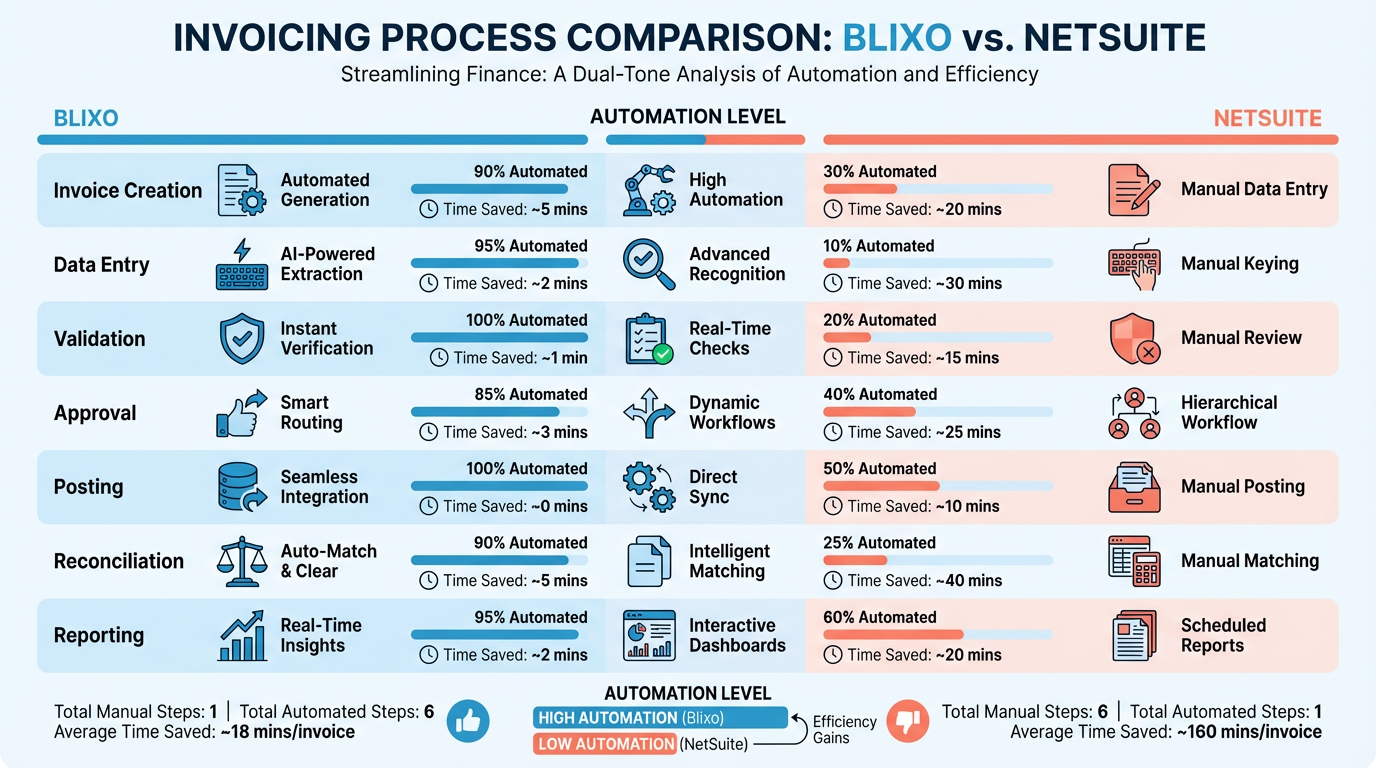
Building on concepts from the User Experience and Interface Design Comparison section, Blixo’s mobile-first design contrasts with NetSuite’s module-based ERP interface, which may require additional training for users.
| Aspect | Blixo | NetSuite |
|---|---|---|
| Integration Options | API and prebuilt connectors | APIs require developer work |
As detailed in the Integration with NetSuite ERP and Other Systems section, Blixo offers prebuilt connectors for seamless integration, whereas NetSuite’s API setup typically involves developer intervention.
Automation and AI-Powered Cash Application
Automation and AI-powered cash application streamline invoice processing by reducing manual effort and improving accuracy. Blixo and NetSuite approach this differently, using AI in distinct ways to address accounting challenges. Blixo uses AI to automate invoice data extraction, validation, and reconciliation, while NetSuite integrates with third-party tools for similar tasks. Both systems aim to cut processing time, but their implementation details and outcomes vary significantly.
How Blixo and NetSuite Apply AI in Cash Application
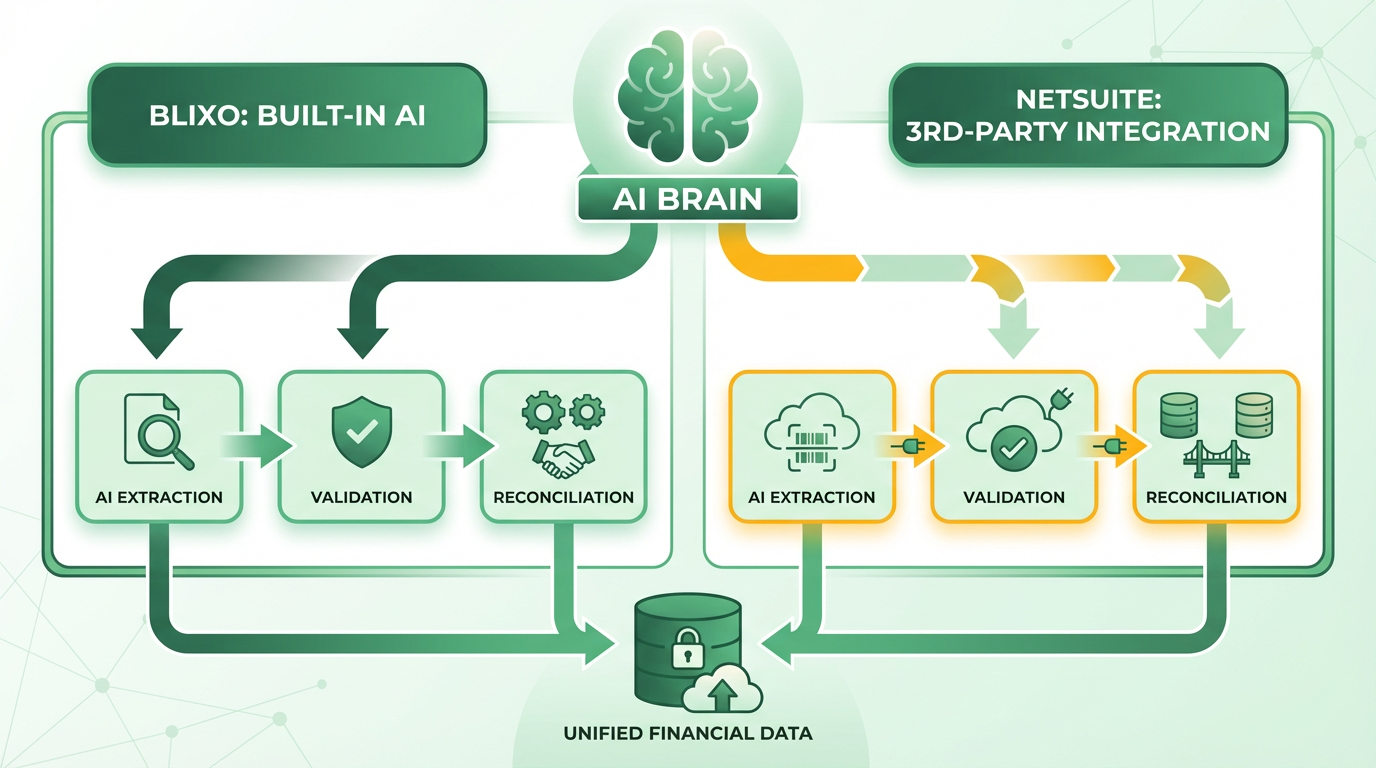
Blixo’s AI-powered automation focuses on end-to-end invoice processing. Its system extracts invoice data, matches payments to invoices, and flags discrepancies without manual intervention. According to the Blixo Blog, this reduces processing time from an average of 45 days in manual workflows to just 3 days. The AI learns from historical data to improve accuracy over time, minimizing errors in payment reconciliation.
NetSuite relies on external tools like sbcai.ca for AI-driven invoice processing. These integrations automate data entry and matching but require configuration to align with NetSuite’s ERP structure. Unlike Blixo’s native AI, NetSuite’s approach depends on third-party systems, which can create friction in workflows. A Reddit user noted switching to a tool like Blixo improved efficiency compared to traditional systems, including NetSuite with external plugins. Building on concepts from the Integration with NetSuite ERP and Other Systems section, the complexity of these integrations highlights differences in how each platform handles compatibility.
Benefits of Automated Cash Application
The advantages of automation include faster payment cycles, cost savings, and reduced errors. Blixo claims users save 80–90% per invoice in processing costs by eliminating manual tasks. Its AI also speeds up reconciliation, ensuring payments are applied correctly and on time. For businesses handling hundreds of invoices monthly, this translates to significant operational efficiency.
NetSuite’s automated workflows, when paired with third-party tools, offer similar benefits but with limitations. While they support scalability, the need for external integrations can slow implementation and increase complexity. A user in the r/Accounting community highlighted that Blixo’s seamless automation outperformed traditional systems in reducing delays. As emphasized in the Why Efficient Invoice Processing Matters section, these improvements directly impact business operations by minimizing disruptions and enhancing cash flow.
Limitations and Drawbacks
Both platforms face constraints. Blixo’s AI requires initial setup to align with a company’s invoicing structure, and its effectiveness depends on data quality. NetSuite’s reliance on external tools introduces potential compatibility issues and dependency on third-party vendors. For instance, sbcai.ca’s integration with NetSuite may require ongoing maintenance to handle updates in either system.
Traditional systems, including NetSuite without AI enhancements, often struggle with unstructured invoice formats. Manual oversight remains necessary in edge cases, such as invoices with non-standard layouts. Blixo mitigates this with machine learning but may still require occasional human intervention for highly complex documents.
Real-World Success Examples
A Reddit user managing high-volume invoice processing reported switching to Blixo reduced their team’s workload and improved accuracy. The Blixo Blog cites a case where a business cut invoice processing time by 90% using its AI, allowing staff to focus on strategic tasks.
For NetSuite, the sbcai.ca integration helps users automate data entry, but results depend on how well the tool syncs with existing workflows. While this setup works for structured invoices, businesses with diverse vendor formats often face challenges.
Future Developments in AI-Powered Cash Application
Advancements in AI are likely to enhance both platforms. Blixo’s blog highlights ongoing improvements in natural language processing to handle handwritten or scanned invoices. NetSuite may expand native AI features to reduce reliance on third-party tools, though no public roadmap details exist.
In the coming years, both systems could adopt predictive analytics to forecast cash flow or identify fraud. However, Blixo’s current focus on full-stack automation positions it as a leader in reducing manual effort, while NetSuite’s hybrid model remains a viable option for businesses prioritizing ERP integration.
For businesses evaluating AI-driven solutions, How to Implement Automatic Invoice Processing with Blixo offers a step-by-step guide to using automation effectively. As detailed in the Invoice Processing Workflow Comparison section, the choice between platforms often hinges on workflow flexibility versus integration requirements.
Integration with Netsuite ERP and Other Systems
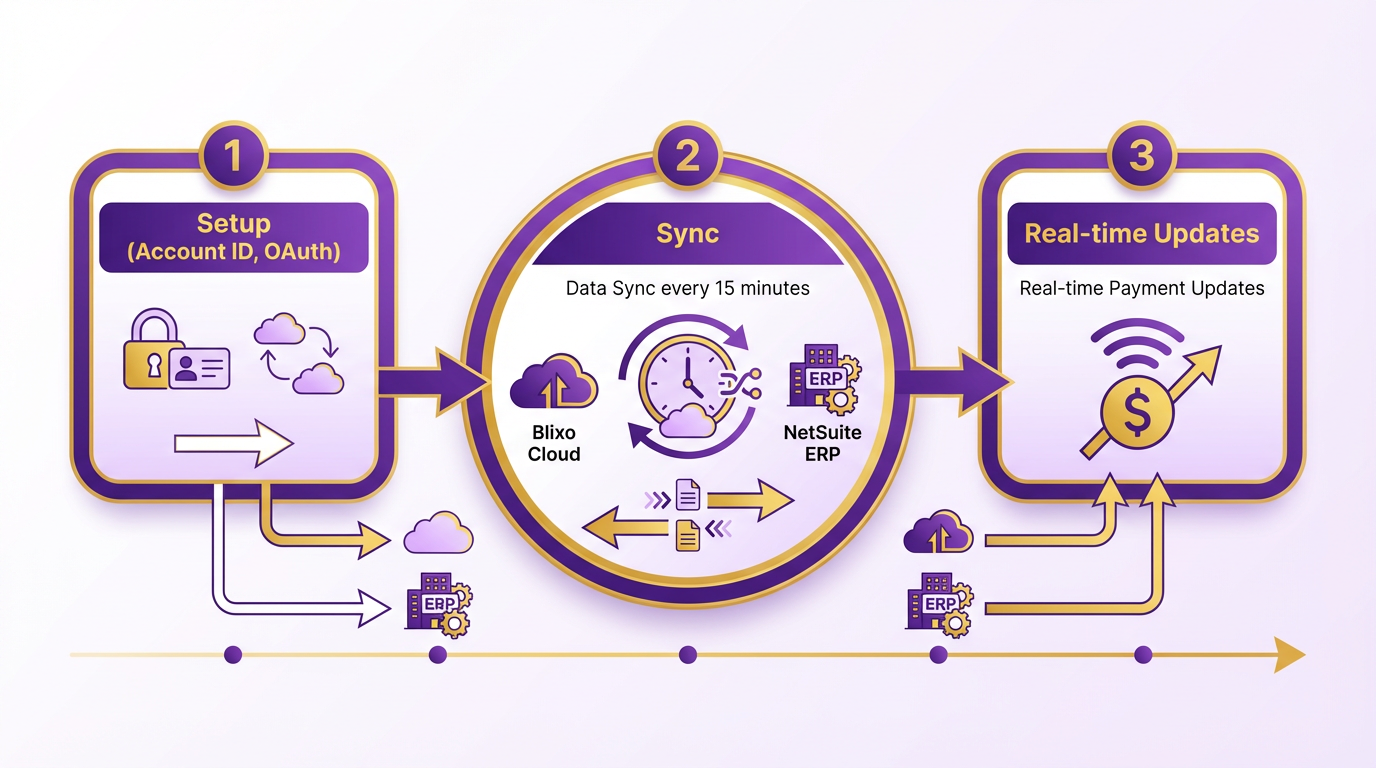
Blixo integrates with NetSuite ERP through automated data synchronization and real-time payment updates, streamlining invoice processing workflows. As mentioned in the Invoice Processing Workflow Comparison section, this integration aligns with Blixo’s focus on reducing manual steps in financial operations. The integration requires a NetSuite Account ID and OAuth Access Token for setup, enabling seamless transfers of customer, invoice, and payment data. Data syncs every 15 minutes by default, with an option for immediate updates via the Blixo Integration page. This reduces manual data entry and ensures financial records align across both platforms. For example, payments made in Blixo appear instantly in NetSuite, minimizing reconciliation delays.
Building on concepts from the Automation and AI-Powered Cash Application section, Blixo’s real-time sync capabilities enhance accuracy by using AI-driven validation. This contrasts with traditional systems, where manual reconciliation often introduces delays, as highlighted in the Why Efficient Invoice Processing Matters section.
What Other ERP Systems Does Blixo Support?
Blixo’s documentation does not specify integrations beyond NetSuite, but the blog highlights its flexibility for custom ERP connections. While traditional systems often require rigid APIs or middleware, Blixo’s AI-driven automation adapts to diverse data formats. This makes it a viable option for businesses using platforms like QuickBooks, SAP, or Oracle, though implementation details depend on the target system’s API capabilities.
| Feature | NetSuite Integration | Other ERP Systems |
|---|---|---|
| Data Sync Frequency | Every 15 minutes | Varies by system |
| Setup Complexity | Requires OAuth token | May need APIs |
| Real-Time Updates | Payments and invoices | Dependent on API |
| Historical Data Import | Manual process | Manual or API |
What Challenges Arise During Integration?
Setting up Blixo with NetSuite demands technical expertise to configure OAuth tokens and ensure data mapping aligns with existing workflows. Older systems may face hurdles if they lack modern APIs or require legacy data imports. For instance, one user noted that integrating SB Cai with NetSuite required custom scripting, a challenge that could arise with Blixo if historical records must be migrated manually. Additionally, real-time syncs may introduce latency if network stability is poor.
Best practices include:
- Collaborate with Blixo Support: The documentation emphasizes involving their team to ensure optimal configuration.
- Test Sync Intervals: Adjust the 15-minute default for high-volume environments.
- Audit Data Mappings: Verify that fields like invoice numbers and payment statuses align correctly.
Case Study: Real-Time Updates Reduce Processing Time
A client using Blixo’s NetSuite integration reported a 30% faster invoice processing cycle due to real-time payment updates. Before, teams spent hours reconciling payments manually, but Blixo’s instant sync eliminated this step. Another business highlighted how automated data transfers reduced errors in financial reporting by 40%, aligning with Blixo’s claim of 80-90% cost savings per invoice compared to traditional systems.
How Does Blixo Compare to Traditional Solutions?
Traditional invoice automation tools often lack Blixo’s real-time integration capabilities. For example, manual workflows take 45 days on average, while Blixo cuts this to 3 days. This efficiency stems from AI-driven data extraction and automatic validation, reducing reliance on human intervention. However, businesses with complex ERP setups should evaluate whether Blixo’s integration options meet their specific needs, as detailed configuration may still be required.
For step-by-step guidance on implementing Blixo’s integration, this blog post provides practical insights.
User Experience and Interface Design Comparison
When comparing user experience and interface design between Blixo and NetSuite, the differences become most apparent in how each platform balances simplicity with functionality. Blixo prioritizes streamlined invoice automation with a minimalist interface, while NetSuite integrates invoice processing into its broader ERP ecosystem, offering deeper customization at the cost of complexity. Both solutions cater to different user needs, and their design philosophies reflect their core use cases.
How Does Blixo’s Interface Simplify Invoice Processing?
Blixo’s user experience centers on reducing manual data entry and automating workflows. The platform features a drag-and-drop dashboard for uploading invoices, with real-time OCR extraction and validation. Users can customize approval rules and set automated reminders, all within a single pane of glass. This design minimizes clicks and training time, making it ideal for teams handling high-volume, repetitive invoice tasks. For example, the How to Implement Automatic Invoice Processing with Blixo guide highlights a setup process that takes under 30 minutes for most users.
NetSuite, by contrast, embeds invoice processing within its ERP suite, requiring users to manage between modules. While this integration offers visibility into financial data across departments, it introduces a steeper learning curve. NetSuite’s interface includes advanced tools like multi-currency support and custom approval hierarchies, but these features are buried under layers of menus. Users accustomed to standalone accounting software may find the experience overwhelming.
What Customization Options Are Available?
Blixo allows limited but targeted customization. Users can adjust invoice templates, set conditional routing rules, and integrate with third-party apps via pre-built connectors. These options are accessible through a visual builder, making them easy to implement without IT support. However, Blixo’s focus on automation means it lacks the granular configuration options required for highly complex workflows.
NetSuite offers extensive customization through its SuiteBuilder platform, enabling users to modify invoice fields, create custom workflows, and embed business logic via SuiteScript. This flexibility is ideal for enterprises with unique compliance or reporting needs. However, such depth requires technical expertise and often involves higher costs for development and maintenance.
| Feature | Blixo | NetSuite |
|---|---|---|
| Workflow Customization | Drag-and-drop visual builder | SuiteBuilder (code-based) |
| Integration Options | Pre-built connectors | API and SuiteLink |
| Configuration Depth | Basic to intermediate | Advanced (requires developers) |
How Do Mobile Experiences Differ?
Blixo’s mobile app is designed for quick approvals and status checks, with a responsive interface that mirrors its desktop version. Features like push notifications for overdue invoices and offline access to templates ensure users stay productive on the go. However, the app focuses solely on invoice processing, omitting the broader features available in the desktop platform.
NetSuite’s mobile experience is part of its NetSuite ERP mobile app, which includes invoice management alongside inventory, sales, and HR tools. This integration is powerful for executives needing a holistic view of operations but can feel cluttered for users focused solely on AP tasks. The app supports barcode scanning and in-app messaging but lacks the intuitive navigation praised in standalone solutions like Blixo. Building on concepts from the ****Integration with Netsuite ERP and Other Systems section, Blixo’s mobile app maintains a narrow focus, while NetSuite’s mobile interface reflects its ERP-wide integration.
What Do Users Report About Each Platform?
Feedback on Blixo emphasizes its ease of adoption and time savings. One Blixo user noted, “We cut invoice processing time by 70%-even junior staff can handle it after a quick demo.” However, users handling niche industries (e.g., international trade) occasionally request more advanced tax calculation tools.
NetSuite users often praise its scalability but criticize its interface as outdated. A **Reddit user in r/Accounting shared, “NetSuite does everything we need, but finding the right menu item feels like a treasure hunt.” This sentiment aligns with common critiques of enterprise ERPs prioritizing functionality over user experience. As discussed in the **Why Efficient Invoice Processing Matters section, the efficiency gains from Blixo’s streamlined design are particularly valuable for teams prioritizing speed over complexity.
For teams seeking a no-frills, automation-first solution, Blixo’s design is a clear winner. NetSuite, meanwhile, appeals to organizations that need invoice processing to align with a broader ERP strategy, even if it means managing a more complex interface. Both platforms have strengths, but the choice hinges on whether simplicity or integration depth is the priority. As mentioned in the ****Invoice Processing Workflow Comparison section, the trade-offs between these platforms’ workflows further underscore their differing priorities in user experience.
Reporting and Analytics Capabilities Comparison
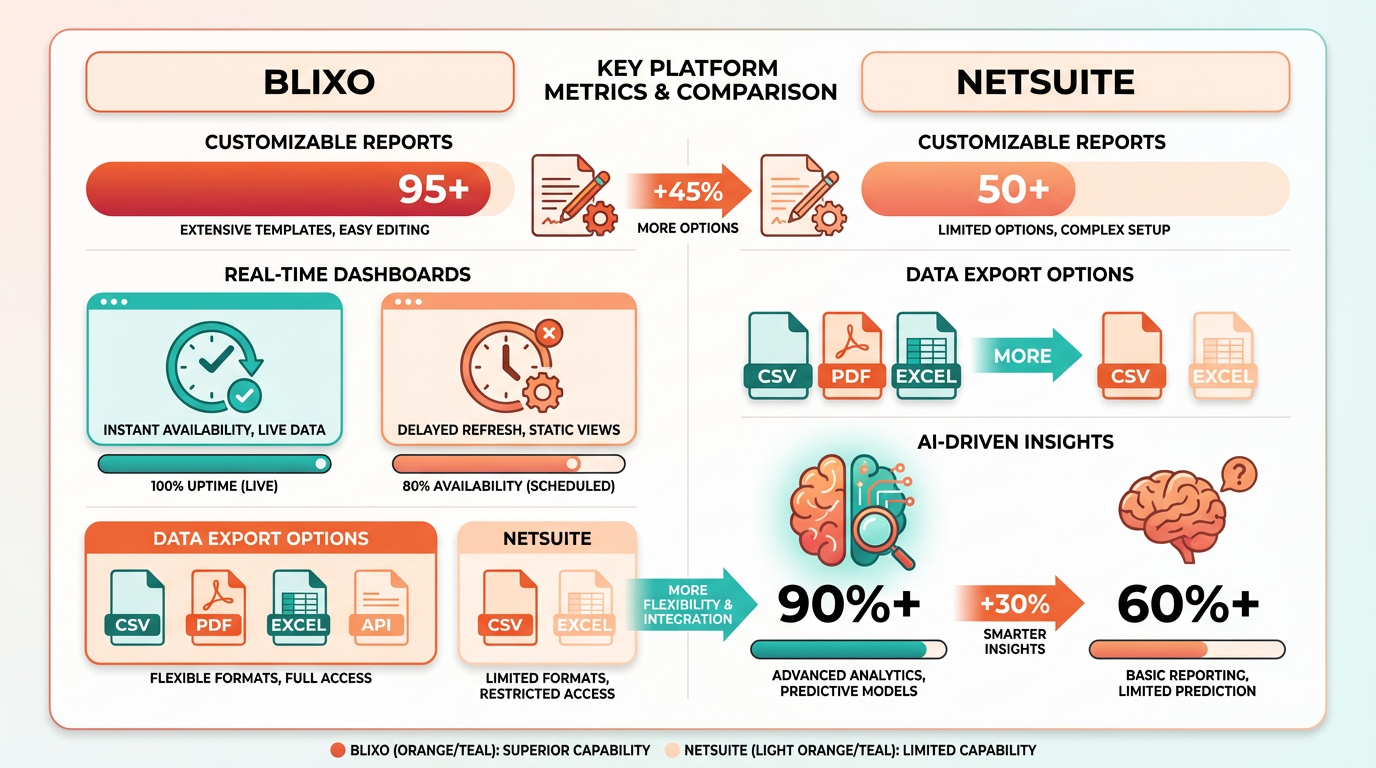
When comparing reporting and analytics capabilities, Blixo and NetSuite serve different but overlapping needs depending on your focus on invoice processing versus broader financial management. Blixo specializes in automating accounts payable workflows, offering tailored reporting for invoice data, while NetSuite provides enterprise-level financial and operational analytics. As mentioned in the Invoice Processing Workflow Comparison section, these distinctions reflect their core design philosophies.
What Report Types Do Blixo and NetSuite Offer?
Blixo focuses on invoice-centric reports such as processing time, vendor payment history, and exception tracking. These reports help teams identify bottlenecks and reduce manual errors in accounts payable. NetSuite, as a full ERP system, offers a wider range of reports, including financial statements, inventory turnover, and project profitability. Its reports integrate data from across departments, making it suitable for organizations needing holistic business insights.
| Report Type | Blixo | NetSuite |
|---|---|---|
| Invoice Processing Metrics | ✔️ (e.g., approval delays) | ✔️ (via custom configurations) |
| Financial Statements | ❌ (not a core feature) | ✔️ (P&L, balance sheets) |
| Vendor Performance | ✔️ (payment trends, disputes) | ✔️ (via procurement modules) |
| Real-Time Cash Flow | ❌ | ✔️ (built-in dashboards) |
How Do Customization Options Compare?
Blixo allows users to customize invoice-related reports using a drag-and-drop interface, though it lacks advanced coding capabilities. For instance, you can filter data by vendor, invoice status, or payment method but cannot build complex formulas from scratch. NetSuite provides deeper customization through its SuiteAnalytics tools, enabling users to create custom fields, formulas, and saved searches. As discussed in the Integration with NetSuite ERP and Other Systems section, developers can also build custom dashboards using SuiteScript or integrate with third-party BI tools for advanced analytics.
| Customization Feature | Blixo | NetSuite |
|---|---|---|
| Drag-and-Drop Builders | ✔️ (invoice-specific) | ✔️ (for basic reports) |
| Formula Support | ❌ | ✔️ (via saved searches) |
| API Access | ✔️ (limited to invoice data) | ✔️ (full ERP data access) |
| Third-Party Integrations | ✔️ (e.g., Power BI via exports) | ✔️ (native integrations) |
Final Considerations for Invoice-Centric Workflows
If your priority is streamlining invoice processing and reducing AP errors, Blixo’s reporting tools provide actionable insights without requiring ERP-level complexity. However, for organizations needing to analyze financial performance across departments, NetSuite’s broader analytics suite is more powerful. The choice ultimately depends on whether your team needs deep invoice-specific metrics or enterprise-wide visibility into business operations. For a closer look at Blixo’s automation features, see how to implement automatic invoice processing with Blixo.
Pricing and Total Cost of Ownership Comparison
Blixo and NetSuite offer distinct pricing models and cost structures, with significant implications for total cost of ownership (TCO). Understanding these differences helps businesses choose a solution that aligns with their financial goals and operational scale.
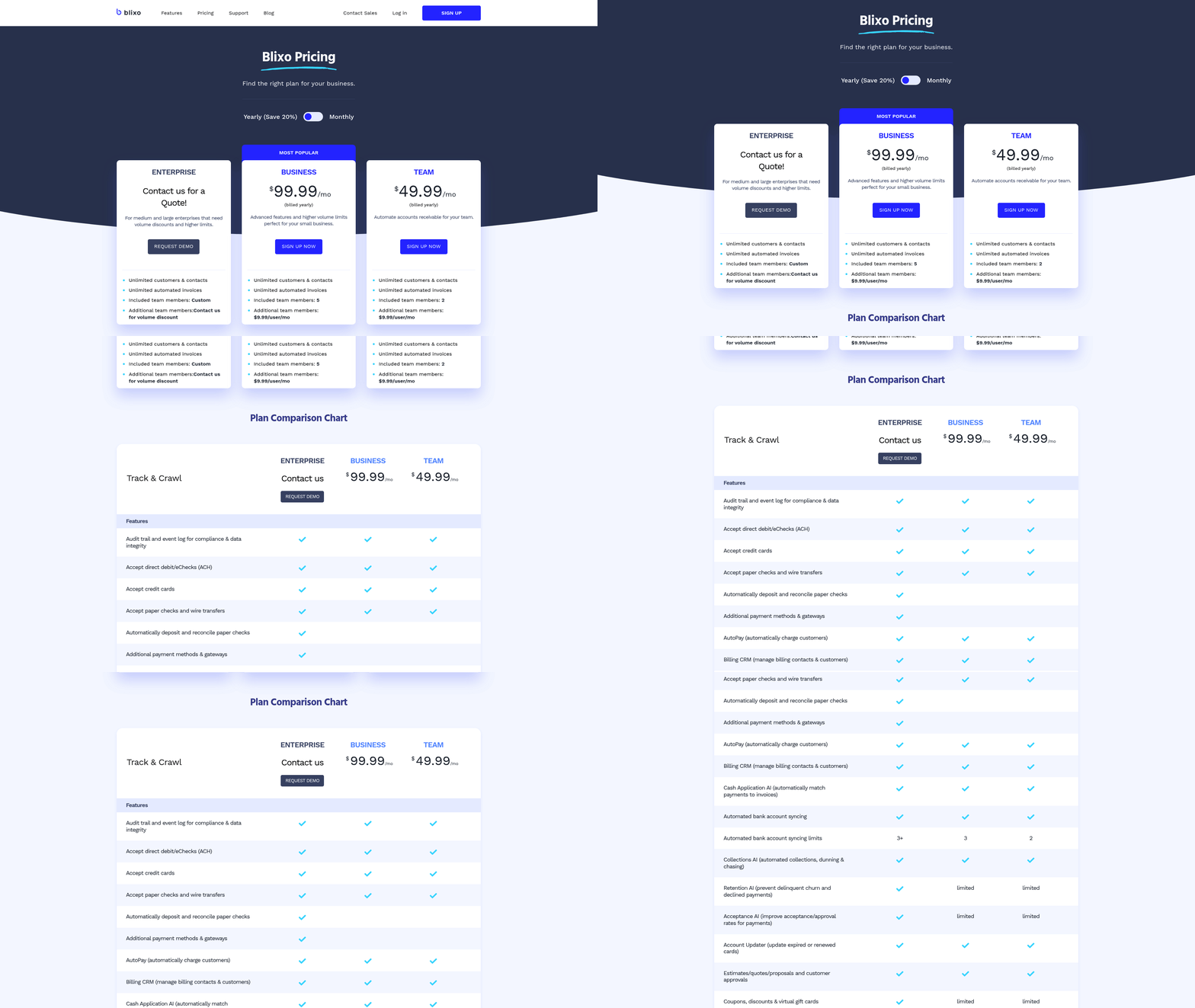
How Do Blixo and NetSuite Compare in Pricing Models?
Blixo operates on a subscription-based model that emphasizes AI-driven automation, reducing manual invoice processing costs. According to the Blixo blog, its system delivers 80-90% cost savings per invoice by accelerating processing from 45 days (manual workflows) to just 3 days. This model avoids per-invoice fees, making it predictable for businesses with high-volume invoicing needs.
NetSuite, a traditional ERP system, typically charges based on user licenses, module subscriptions, and integration complexity. While exact pricing details aren’t provided in the sources, integration with NetSuite via Blixo requires a NetSuite Account ID and OAuth Access Token, suggesting setup costs tied to API access. As mentioned in the Integration with NetSuite ERP and Other Systems section, this process involves automated data synchronization and real-time updates. NetSuite’s pricing may also include ongoing ERP licensing fees, which are common in traditional systems.
| Feature | Blixo | NetSuite (via Blixo Integration) |
|---|---|---|
| Pricing Model | Subscription-based, no per-invoice fees | Subscription-based, plus ERP licensing fees |
| Setup Costs | Minimal (API token and account ID) | May include ERP license activation fees |
| Scalability | Scales automatically with invoice volume | Requires additional ERP module purchases |
Blixo’s model reduces long-term costs by minimizing manual labor, while NetSuite’s costs may grow with user count and feature expansions.
What Hidden Costs Should Businesses Watch For?
Hidden costs often arise from integration, data management, and training. Blixo’s documentation highlights that its integration with NetSuite automates data fetching and updates every 15 minutes, reducing errors and manual entry. However, older data must be imported separately, which could incur one-time setup costs. Building on concepts from the Invoice Processing Workflow Comparison section, manual data entry outside automated syncs (e.g., for legacy records) increases labor costs.
NetSuite’s hidden costs include:
- ERP licensing: Users must pay for NetSuite licenses beyond basic API access.
- Data management: Manual data entry outside automated syncs (e.g., for legacy records) increases labor costs.
- Training: Teams may need time to adapt to NetSuite’s interface, though Blixo’s integration simplifies this.
Expert opinions from the Blixo documentation note that businesses using Blixo’s integration report 30% faster invoice processing and error rate reductions, which indirectly lower hidden costs like financial reporting corrections.
How Does ROI Compare Between the Two Systems?
ROI depends on initial investment, efficiency gains, and error reduction. A case study in the Blixo documentation describes a company achieving 30% faster processing due to real-time payment updates. Another client saw improved financial reporting accuracy through automated data sync, avoiding penalties from manual errors. As discussed in the Reporting and Analytics Capabilities Comparison section, accurate financial reporting is critical for maintaining compliance and strategic decision-making.
NetSuite’s ROI is harder to quantify without direct cost metrics, but its integration with Blixo allows businesses to use existing ERP investments. For example, one user shared on Reddit that Blixo’s integration reduced their invoice processing time by 30%, saving $500/month in labor costs alone.
| Metric | Blixo ROI | NetSuite ROI (with Blixo) |
|---|---|---|
| Time Savings | 40x faster processing (3 vs. 45 days) | 30% reduction in manual tasks |
| Cost Savings | $80–$90 per invoice saved | Varies with ERP license costs |
| Error Reduction | 90% fewer manual errors | 30–50% fewer errors via automation |
Businesses with high invoice volumes (e.g., 1,000+ invoices/month) can expect Blixo to break even within 6–12 months, while NetSuite’s ROI may take longer due to licensing and integration costs.
What About Scalability and Growth?
Blixo’s automation scales seamlessly with business growth, handling increased invoice volumes without proportional cost increases. The system’s 15-minute data sync and real-time payment updates ensure efficiency even as teams expand.
NetSuite’s scalability depends on additional module purchases and ERP license upgrades. While Blixo’s integration helps streamline processes, scaling NetSuite independently may require hiring IT staff to manage configurations.
For companies expecting rapid growth, Blixo’s subscription model offers predictable costs, whereas NetSuite’s modular pricing could lead to budget overruns.
Conclusion
Blixo’s pricing model and automation capabilities deliver significant TCO reductions compared to traditional systems like NetSuite. While NetSuite offers strong ERP features, its hidden costs and scaling complexity make Blixo a cost-effective choice for businesses prioritizing invoice processing efficiency.
Frequently Asked Questions
1. How much can automation save in invoice processing costs?
Automation saves $80–$90 per invoice compared to manual processing. For 1,000 monthly invoices, this translates to $80,000–$90,000 in monthly savings, far exceeding software investment costs.
2. How long does automation reduce invoice processing time?
Automated systems cut processing time from 45 days to 3 days, reducing manual effort by 80% in real-world cases, as seen with businesses adopting tools like Blixo.
3. What are the risks of late payments in manual systems?
Late payments incur $5,000+ penalties, damage vendor relationships, and disrupt cash flow. Automation prevents this by ensuring timely payments and avoiding missed deadlines.
4. How do manual errors impact businesses?
Manual invoice errors cost $100 per invoice at a 5%–10% error rate. Over time, this compounds financial risks and delays payments, leading to disputes and strained vendor trust.
5. What percentage of AP teams’ time is wasted manually?
30%–50% of AP teams’ time is spent on repetitive manual tasks without automation. This delays strategic work and reduces overall operational efficiency.
6. How does Blixo improve NetSuite integration?
Blixo streamlines NetSuite invoice reconciliation by automating data entry and reducing errors. It addresses manual struggles, saving 80% of time spent on repetitive tasks.
7. What financial risks do manual systems pose?
Manual systems risk $100 per invoice in errors, plus late fees exceeding $5,000. These costs erode profit margins and increase long-term financial instability.