

Blixo Invoice Automation Tool Checklist for Simplified Billing
Key Takeaways
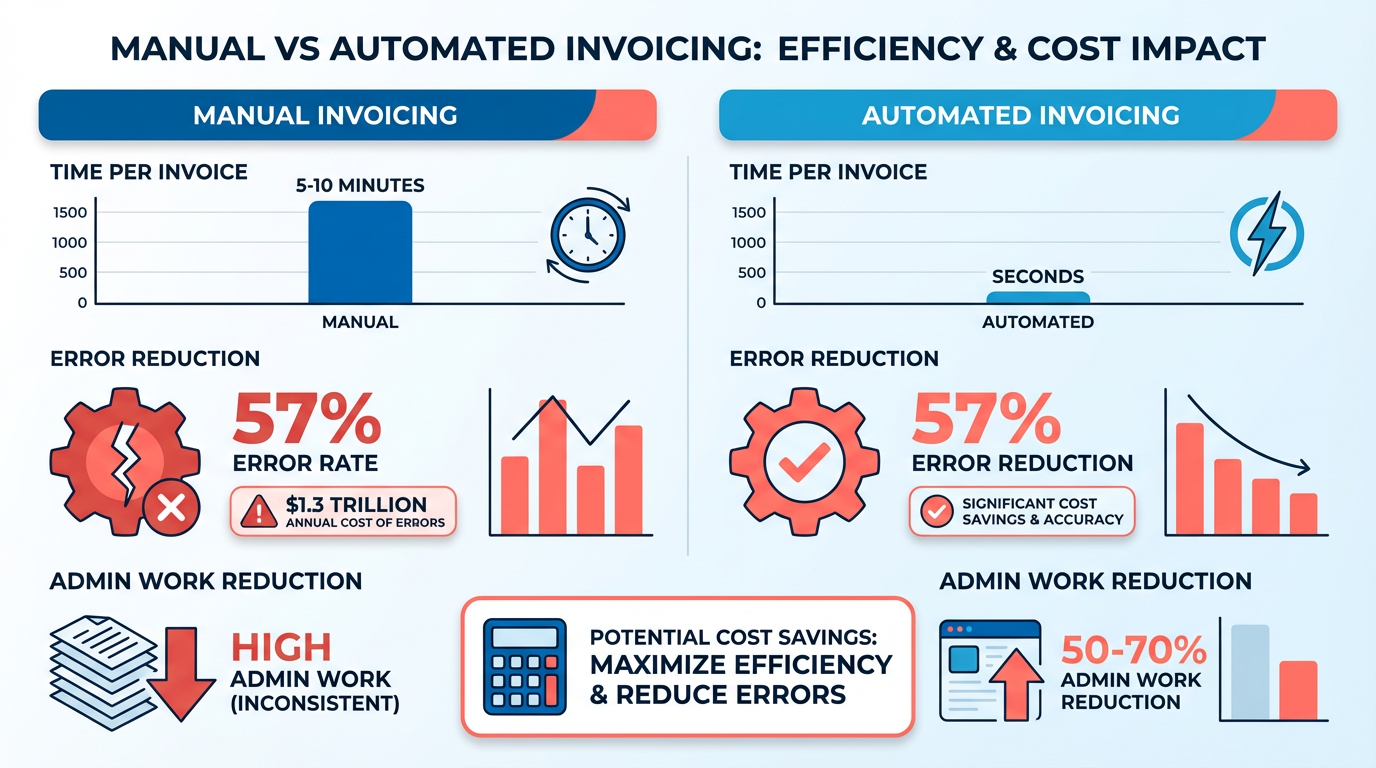
- Manual invoicing costs U.S. firms $1.3 trillion annually in errors, while automation reduces errors by 57%.
- Invoice automation cuts processing time from 5–10 minutes per document to seconds, saving hundreds of hours monthly.
- 69% of businesses with manual systems report rising late payments, averaging a 60-day DSO.
- Automated systems slash administrative work by 50–70%, directly improving operational efficiency.
- 39% of manually processed invoices contain errors, increasing missed-payment risk by 35%.
- High-volume businesses cut payment delays from 78 days to 55 days with automation.
- 82% of AP teams manually input invoice data, contributing to 39% of invoice errors and payment disputes.
Related Video
Watch: How to receive payment for an invoice on Blixo by Blixo
Why Invoice Automation Matters
Invoice automation isn’t just a convenience-it’s a financial lifeline for businesses of all sizes. Manual invoicing is error-prone, time-consuming, and costly. For every invoice processed manually, teams spend 5–10 minutes per document, riddled with errors that cost U.S. firms $1.3 trillion annually. Automation slashes processing time to seconds, reduces errors by 57%, and cuts administrative work by 50–70%, saving hundreds of hours monthly. These gains translate directly to faster cash flow, fewer disputes, and higher customer satisfaction.
What Problems Does Manual Invoicing Cause?
Manual processes create bottlenecks that hurt revenue and relationships.
- Delayed Payments: 69% of businesses using manual systems report rising late payments, while DSO (Days Sales Outstanding) averages 60 days.
- Lost Revenue: 39% of invoices contain errors, and 82% of AP teams manually input data, increasing missed-payment risk by 35%.
- Operational Strain: High-volume businesses processing over 20,000 invoices/month face 78-day payment delays, compared to 55 days with automation.
How Automation Solves Core Challenges
Invoice automation SaaS providers like Blixo address these pain points with AI-driven workflows and real-time analytics.
- Streamlined Workflows: Blixo’s AI automates invoice generation, payment matching, and reconciliation, reducing DSO by up to 30%. A SaaS company cut DSO from 60 to 30 days, while a law firm boosted cash-flow efficiency by 50%.
- Error Reduction: Automated systems lower billing disputes by 40% and late payments by 69%. One global employer of record reduced processing time from 5–10 minutes to 5 seconds.
- Improved Cash Flow: Real-time dashboards track DSO, aging, and payment trends, as detailed in the Monitoring and Reporting Dashboard section, enabling proactive collections. A B2B firm improved cash-forecasting accuracy by 40%, recovering $25,000 in overdue payments.
Who Benefits Most?
From small businesses to enterprises, automation delivers scalable value.
- Small Businesses: Freelancers and agencies using Blixo’s lifetime deal ($69) save 30% on invoicing/collections time. A digital marketing agency saw 35% faster payments and 40% fewer disputes.
- Enterprises: High-volume operations cut payment timelines by 60%. A Turkish financial institution achieved cost savings and performance boosts by switching to Blixo’s cloud solution.
- Subscription-Based Models: Blixo’s AI-driven dunning automates 80% of upgrades, as outlined in the Automating Collections and Dunning Processes section, reduces churn by 15%, and supports proration, cancellations, and tax adjustments. A Miami startup increased sales conversions by 70% using these tools.
Real-World Case Studies
- Elemental Deodorant: Automated subscription billing reduced manual tasks and improved customer self-service, boosting retention.
- Freelance Design Studio: Subscriptions tools increased monthly revenue by 25%.
- E-Commerce Firm: Invoice processing time dropped from 4 hours to 20 minutes, driving 22% revenue growth.
The ROI of Automation
Businesses using Blixo report measurable returns within months:
- **$871,000 saved** on 100,000 invoices with a **480% ROI** after $150,000 in implementation costs.
- 40% fewer disputes and 75–85% accuracy in payment matching, reducing reconciliation time by 70%.
By automating invoicing, businesses eliminate delays, errors, and manual drudgery-freeing teams to focus on growth. Blixo’s all-in-one platform bundles AI-driven prioritization, 70+ ERP connectors, and transparent pricing into a solution that scales with transaction volume. For companies targeting 30% DSO reductions or $1.3 trillion in annual losses, the choice is clear: automation isn’t optional-it’s essential.
Configuring Blixo for Invoice Automation
Step 1: Configure Smart Invoicing Templates
Start by setting up smart invoicing templates to standardize billing while maintaining brand consistency. Blixo allows you to create reusable templates with dynamic fields that auto-fill data from your accounting system. Custom fields, such as project names or client-specific terms, reduce manual input errors. For example, a SaaS company automated 90% of its invoices using pre-built templates, cutting processing time by 60% (source).
- Choose a template type (e.g., one-time, recurring, or subscription-based).
- Map dynamic fields (e.g., client name, invoice number, due date) to your accounting software.
- Add custom fields for unique data like project IDs or service descriptions.
Step 2: Automate Cash Application Rules
Blixo’s AI-driven cash application matches payments to invoices in real time, reducing reconciliation time by 75%. Configure rules to handle partial payments, overpayments, or mismatched transactions. For instance, a mid-sized firm reduced manual reconciliation from 5 days to 12 hours by automating payment matching (source). This process complements the strategies outlined in the Automating Collections and Dunning Processes section.
- Define matching logic (e.g., exact amount, partial match, or AI-based prediction).
- Set up alerts for discrepancies like underpayments or duplicate transactions.
- Test rules with sample data to ensure accuracy before full deployment.
Step 3: Design Workflows for Recurring and One-Time Payments
Tailor workflows to handle recurring subscriptions and one-time invoices separately. For subscriptions, automate proration, upgrades, and cancellations. Building on concepts from the Managing Recurring Subscriptions and Invoices section, configure dunning rules for failed payments (e.g., retry logic, late fees).
- For recurring invoices:
- Set billing cycles (daily, monthly, annual).
- Enable proration for mid-cycle changes.
- Configure dunning rules for failed payments (e.g., retry logic, late fees).
- For one-time invoices:
- Schedule automated reminders (e.g., 7 days before due date).
- Link to payment gateways (Stripe, PayPal) for instant processing.
Step 4: Integrate with Accounting Software
As mentioned in the Why Invoice Automation Matters section, seamless integration with QuickBooks, Xero, or NetSuite ensures real-time data sync and eliminates manual entry. Use Blixo’s pre-built connectors or RESTful API to map fields like accounts payable and revenue. A healthcare provider cut data entry errors by 80% after integration (source).
- Connect your accounting system via Blixo’s pre-built APIs.
- Map invoice, payment, and customer fields between platforms.
- Verify data consistency with a test batch of 10–20 invoices.
Step 5: Test and Troubleshoot
Before full rollout, test workflows with a small team to identify gaps. Monitor key metrics like Days Sales Outstanding (DSO) and error rates. A global employer reduced invoice errors from 10% to 2% through iterative testing (source).
- Run a dry run with sample invoices and payments.
- Check for edge cases (e.g., late fees, currency conversions).
- Use Blixo’s real-time dashboards to track performance and adjust rules.
Best Practices for Success
- Start Small: Automate 1–2 high-impact areas (e.g., invoice generation, payment reminders) first.
- Train Your Team: Host workshops to familiarize staff with Blixo’s interface and workflows.
- Monitor KPIs: Track DSO, error rates, and cash-flow velocity to measure ROI.
By following these steps, you’ll transform manual billing into a streamlined, error-resistant process-reducing DSO by up to 30% and saving 40+ hours monthly (source).
Automating Collections and Dunning Processes
What Are the Key Steps to Automate Collections?
Start by configuring automated reminders and dunning rules to target overdue invoices. Blixo’s system reduces delinquencies by up to 30% and boosts on-time payments by 25% through tiered email alerts.
- [ ] Integrate Payment Gateways Connect Stripe, QuickBooks, or other gateways to allow instant payments. As mentioned in the Configuring Blixo for Invoice Automation section, setting up payment integrations ensures seamless transaction processing from the outset. A healthcare provider cut dispute resolution time by 35% using pre-integrated payment tools..
How to Monitor and Optimize Collections?
Real-time analytics and reporting help track performance and refine strategies. Building on concepts from the Monitoring and Reporting Dashboard section, Blixo’s dashboards provide insights into DSO, payment success rates, and dispute trends.
- [ ] Track Key Metrics Monitor Days Sales Outstanding (DSO) and payment error rates. A logistics company reduced reconciliation time from 45 days to 3.1 days using these metrics..
How to Offer Flexible Payment Options?
Flexible payment plans improve client satisfaction and reduce involuntary churn. Building on concepts from the Managing Recurring Subscriptions and Invoices section, Blixo supports installment options and recurring billing to accommodate diverse needs.
- [ ] Set Up Installment Schedules Allow clients to split payments into monthly or quarterly installments. An e-commerce brand cut admin workload by 40% using automated payment plans.
Managing Recurring Subscriptions and Invoices
What Makes Blixo Effective for Recurring Billing?
Blixo streamlines recurring subscriptions by combining automation, AI-driven tools, and seamless integrations. its SaaS service handles everything from initial setup to ongoing management, reducing manual work and minimizing errors. By centralizing subscription data and automating workflows, businesses can focus on growth while ensuring consistent revenue streams..
How to Set Up Recurring Subscription Plans
Create structured billing cycles with customizable intervals and prorated adjustments.
- Define subscription intervals: Set billing cycles (daily, weekly, monthly, yearly) and align them with your service model. Blixo allows tiered pricing structures, so you can offer discounts for longer-term commitments.
- Enable prorated billing: Automatically calculate partial charges for mid-cycle upgrades, downgrades, or cancellations. This ensures fair invoicing and reduces disputes.
- Integrate payment gateways: Connect Stripe or other supported platforms to process payments instantly. Blixo auto-retries failed transactions, improving collection rates.
- Customize customer portals: Let clients view active subscriptions, upcoming invoices, and payment history. A branded portal enhances trust and reduces support requests..
Automating Payment Processing and Retries
Reduce late payments with AI-driven collections and retry logic.
- Set auto-retry rules: Configure Blixo to retry failed payments after 3–7 days. The system updates expired cards and applies partial payments if possible.
- Use Collections AI: This feature aggregates payment data and predicts delinquencies, sending proactive reminders via email or SMS. One e-commerce brand reported a 20% increase in on-time payments after enabling it. As mentioned in the Automating Collections and Dunning Processes section, this functionality aligns with Blixo’s broader strategy for reducing manual collections work.
- Handle disputes efficiently: Blixo tracks chargebacks and provides documentation for disputes. Partial payments are allowed, ensuring you recover at least some revenue in case of issues..
Managing Subscription Changes and Cancellations
Adjust subscriptions dynamically while maintaining transparency.
- Process upgrades/downgrades: Modify plans instantly, with prorated refunds or charges applied automatically. For example, a client switching from a monthly to an annual plan receives credit for unused days.
- Issue prorated refunds: When a customer cancels mid-cycle, Blixo calculates the refund based on remaining days. This prevents overcharging and maintains goodwill.
- Pause or resume subscriptions: Let clients temporarily halt billing (e.g., during holidays) without losing their place in the payment queue..
Integrating with CRM Systems for Data Sync
Keep customer information consistent across platforms.
- Link QuickBooks or Xero: Sync subscription data, payment histories, and invoices directly into your accounting system. This eliminates manual data entry and ensures real-time financial reporting.
- Automate customer updates: Changes in contact details or payment methods in Blixo automatically reflect in your CRM, reducing errors.
- Track interactions: Use CRM logs to monitor client communication about subscriptions, helping your team resolve issues faster..
Best Practices for Monitoring and Reporting
Maintain oversight with real-time analytics and alerts.
- Review dashboards daily: Blixo’s real-time analytics show subscription health, payment success rates, and revenue trends. Building on concepts from the Monitoring and Reporting Dashboard section, these insights help identify operational inefficiencies and improve client satisfaction.
- Set up alerts for anomalies: Get notified of failed payments, unusual activity, or upcoming renewals. This proactive approach prevents revenue leakage.
- Generate monthly reports: Export data to analyze churn rates, payment success, and customer lifetime value. Use this to refine pricing strategies..
Real-World Impact of Blixo’s Tools
Businesses using Blixo report measurable improvements:
- A service firm cut manual AR hours by 40+ per month, saving $2,400 annually.
- An e-commerce brand reduced admin workload by 40% through automated invoicing and retries.
- A SaaS startup achieved 98% billing accuracy, improving client satisfaction.
By using Blixo’s tools, you can transform recurring billing from a reactive task into a predictable, scalable revenue stream. Start with the checklist above to ensure every step-from setup to reporting-is optimized for efficiency.
Security and Data Privacy Measures
Blixo prioritizes data encryption to safeguard sensitive billing information. All data stored in Blixo’s systems is encrypted at rest using AES-256, an industry-standard algorithm that secures financial records, client details, and payment data. In transit, data is protected by TLS 1.3 encryption, ensuring secure communication between user devices and Blixo’s servers. For highly sensitive fields like credit card numbers, tokenization replaces actual data with non-sensitive placeholders, reducing exposure risks during transactions.
- Verify AES-256 encryption for stored data This prevents unauthorized access to databases in case of physical breaches.
- Confirm TLS 1.3 for data in transit Stronger than older TLS versions, it blocks eavesdropping during online transfers.
- Enable tokenization for payment fields Minimizes the impact of potential breaches by rendering stolen data useless.
As mentioned in the Configuring Blixo for Invoice Automation section, smart invoicing templates integrate these encryption protocols by default, ensuring security is embedded in automation workflows.
Blixo’s encryption practices align with financial industry standards, making it harder for attackers to exploit vulnerabilities..
How Does Blixo Manage User Access?
Access controls ensure only authorized users interact with sensitive billing data. Blixo uses role-based access control (RBAC), letting administrators assign permissions to teams or individuals. For example, a finance manager might have full access to payment records, while a junior accountant sees only invoice statuses.
- Assign roles like Admin, Editor, or Viewer Tailors access levels to job responsibilities, reducing accidental or intentional misuse.
- Enforce multi-factor authentication (MFA) Requires a second verification step (e.g., code sent to a mobile app) to log in, blocking unauthorized access.
- Set session timeouts for inactive accounts Automatically logs users out after a period of inactivity, preventing unauthorized use of open devices.
Building on concepts from the Configuring Blixo for Invoice Automation section, these access controls can be configured alongside smart templates to align security policies with operational workflows.
Built-in access features allow businesses to audit user activity logs, ensuring accountability..
What Compliance Standards Does Blixo Meet?
For businesses handling personal or health-related data, compliance with regulations like GDPR and HIPAA is non-negotiable. Blixo adheres to these frameworks by design:
-
GDPR compliance ensures data subjects can request access, correction, or deletion of their information. Blixo also conducts data minimization, collecting only what’s necessary for billing.
-
HIPAA compliance adds safeguards for health data, such as encrypted backups and audit trails for system access.
-
Review GDPR/HIPAA compliance documentation Proof of alignment with strict data protection laws, crucial for EU or healthcare clients.
-
Schedule annual compliance audits Third-party assessments validate that Blixo maintains required security standards.
As mentioned in the Monitoring and Reporting Dashboard section, automated compliance metrics are integrated into dashboards to track adherence in real time.
Blixo’s compliance page details how it supports businesses in meeting legal obligations without manual overhead..
How Does Blixo Handle Security Threats?
Even with strong defenses, proactive measures like audits and incident response plans are critical. Blixo conducts quarterly penetration tests to identify vulnerabilities before attackers can exploit them. These tests simulate real-world attacks, such as SQL injection or phishing attempts, to evaluate system resilience.
- Request a summary of recent penetration test results Shows Blixo’s commitment to identifying and fixing weaknesses.
- Confirm incident response protocols Blixo’s team must have a plan to isolate breaches, notify affected users, and restore systems within hours.
- Check for automatic data backups Regular backups ensure minimal data loss during cyberattacks or hardware failures.
By combining encryption, access controls, and rigorous testing, Blixo minimizes risks while maintaining billing efficiency. For a deeper dive, see how Blixo automates secure invoicing workflows.
Monitoring and Reporting Dashboard
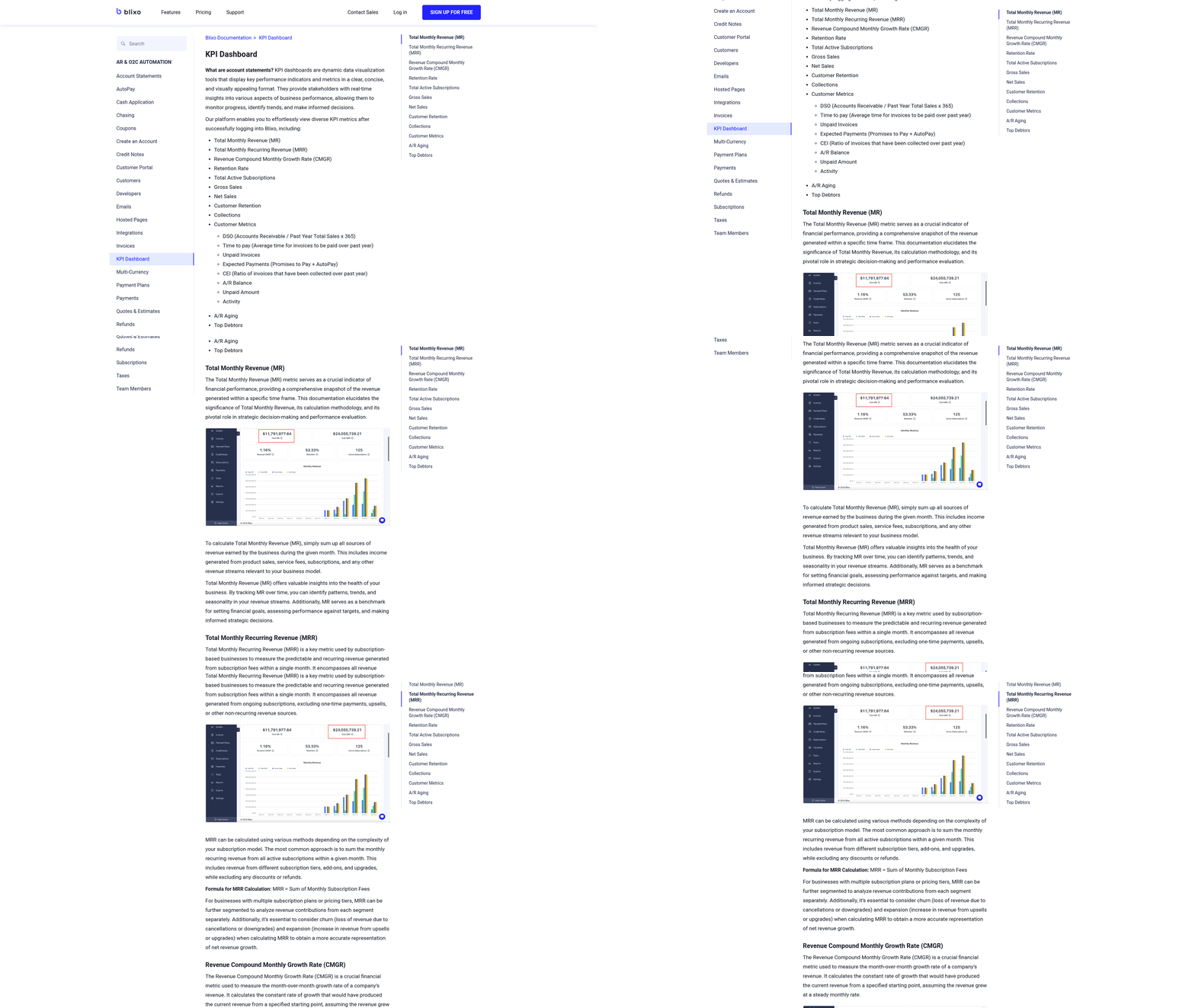
Monitoring and reporting dashboards in Blixo are designed to give businesses real-time visibility into invoice automation performance and payment activity. The platform tracks key metrics like Days Sales Outstanding (DSO), payment aging, error rates, and cash flow velocity, helping teams identify bottlenecks and optimize workflows. For example, a SaaS company reduced DSO from 60 to 30 days using automated follow-ups and real-time analytics, showcasing how actionable insights drive efficiency. As mentioned in the Configuring Blixo for Invoice Automation section, aligning dashboard metrics with standardized templates ensures consistency across billing processes.
How to Customize the Dashboard for Business Needs
Blixo allows users to tailor dashboards to specific goals, such as tracking high-volume invoice processing or prioritizing high-risk accounts. Start by selecting relevant KPIs-like payment trends or dispute rates-and adjusting visualization settings to align with team workflows. The platform integrates with over 70 ERP and CRM systems, ensuring data consistency across tools. For instance, a business processing 20,000+ invoices monthly might add custom alerts for delayed payments and set automated rules to categorize transactions by priority. Building on concepts from the Configuring Blixo for Invoice Automation section, mapping ERP/CRM fields to dashboard metrics streamlines data accuracy and reduces manual reconciliation.
- Identify core metrics (DSO, error rate, cash flow velocity) to monitor
- Adjust dashboard widgets to reflect team priorities (e.g., aging reports, dispute tracking)
- Use pre-built ERP/CRM connectors to pull in external data
Setting Up Alerts for Critical Events
Automated alerts in Blixo ensure teams respond swiftly to milestones or issues. Configure notifications for events like overdue payments, failed transactions, or disputes exceeding thresholds. For example, a business could set SMS alerts for late payments and email triggers when DSO exceeds 45 days. The platform’s AI-driven prioritization flags high-risk accounts, reducing manual oversight. One company cut billing disputes by 40% using real-time alerts to address errors before they escalated. As mentioned in the Automating Collections and Dunning Processes section, AI-driven prioritization also enhances collections workflows by targeting accounts most likely to default.
- Define alert rules for payment delays, disputes, or workflow exceptions
- Choose delivery methods (email, SMS, in-app) based on urgency
- Test alerts with a small team before full rollout
Integrating the Dashboard with Business Systems
Seamless integration is critical for a unified view of financial operations. Blixo connects with accounting software like QuickBooks and payment gateways such as Stripe, ensuring data flows automatically. For example, a retail business might sync sales data from its CRM to generate invoices directly in Blixo, reducing manual entry errors. The platform’s API supports custom workflows, allowing teams to build triggers that update inventory systems when payments clear.
- Map ERP/CRM fields to Blixo’s invoice automation templates
- Validate integrations with test transactions before going live
- Use bulk import tools for historical data migration
Best Practices for Decision-Making
Use the dashboard to refine billing strategies and improve customer satisfaction. Regularly review trends like payment timing and dispute frequency to adjust credit terms or communication strategies. A B2B firm improved cash forecasting accuracy by 40% after analyzing payment patterns in Blixo’s aging reports. Teams should also share dashboard insights with stakeholders monthly to align on goals.
- Compare monthly KPIs (e.g., DSO, error rate) to track progress
- Use AI-driven recommendations to optimize payment collection workflows
- Audit dashboard configurations quarterly to remove outdated metrics
By combining real-time tracking with customizable workflows, Blixo’s dashboard empowers businesses to streamline invoicing, reduce errors, and accelerate cash flow. Teams that align dashboard settings with strategic goals-like lowering DSO or improving dispute resolution-can achieve measurable efficiency gains within weeks.
Frequently Asked Questions
1. How much do manual invoicing errors cost U.S. businesses annually?
Manual invoicing errors cost U.S. firms $1.3 trillion yearly. These errors account for 39% of all invoices and increase missed-payment risks by 35%. Automation reduces errors by 57%, significantly lowering financial losses.
2. How much time does invoice automation save compared to manual processes?
Automation cuts invoice processing time from 5–10 minutes per document to seconds. This saves hundreds of hours monthly, especially for high-volume businesses processing over 20,000 invoices.
3. What is the average reduction in Days Sales Outstanding (DSO) with automation?
Invoice automation reduces DSO by up to 30%. For example, a SaaS company lowered its DSO from 60 to 30 days using tools like Blixo, accelerating cash flow and reducing late payments.
4. How does automation impact administrative workload?
Automated systems reduce administrative tasks by 50–70%. This cuts operational strain, allowing teams to focus on strategic work instead of error-prone manual data entry.
5. Why do 69% of manual invoicing businesses face late payments?
Manual systems lack real-time tracking and accuracy, leading to 60-day average DSO. Automation ensures timely processing, reducing payment delays from 78 to 55 days for high-volume businesses.
6. What percentage of invoice errors stem from manual data entry?
39% of invoice errors arise from manual data entry, which 82% of AP teams still rely on. Automation eliminates these errors by automating generation, matching, and reconciliation workflows.
7. Can automation improve customer satisfaction?
Yes. By reducing errors (57% fewer) and speeding up payments, automation lowers disputes and improves customer trust. Faster processing also ensures timely cash flow, enhancing business relationships.