

Automated Billing Solutions Checklist for Blixo Users

Key Takeaways
- Automate billing to reduce revenue loss from late payments by accelerating collections.
- Prioritize recurring invoices and automated reminders to boost on-time payment rates.
- Track cash application accuracy to ensure 95%+ invoice reconciliation efficiency.
- Use cross-border tools in billing solutions to manage global operations without overhead.
- Implement auto-reconciliation features to cut manual accounting tasks by up to 50%.
- Support multiple payment methods to increase customer satisfaction and payment speed.
- Monitor reduced reconciliation time as a key metric for automation success.
Related Video
Watch: Blixo Lifetime Deal $79 - Subscription Billing & Accounts Receivable Automation | Blixo Review by The SaaS Deals
Why Automated Billing Solutions Matter
In the How Automated Billing Impacts Cash Flow and Revenue section, we highlighted how businesses lose revenue due to late payments, with automation reducing these delays significantly. Building on concepts from the Evaluating Automated Billing Solutions section, SaaS providers like Blixo prioritize features such as recurring invoices and automated reminders to accelerate collections.
When discussing payment recovery, the Measuring the Success of Automated Billing Solutions section outlines metrics like cash application accuracy and reduced reconciliation time, which are critical for tracking automation’s financial impact.
For businesses considering implementation, the Implementing Automated Billing Solutions with Blixo section details how auto-reconciliation and cross-border tools address challenges faced by global operations, ensuring scalability without added overhead.
Evaluating Automated Billing Solutions
What Key Features Should You Prioritize?
A strong automated billing solution should streamline invoicing, payment processing, and cash flow tracking. Look for platforms that support recurring invoices, multiple payment methods, and real-time tracking. As mentioned in the Why Automated Billing Solutions Matter section, reducing manual invoicing efforts directly improves cash flow and minimizes revenue loss from late payments.
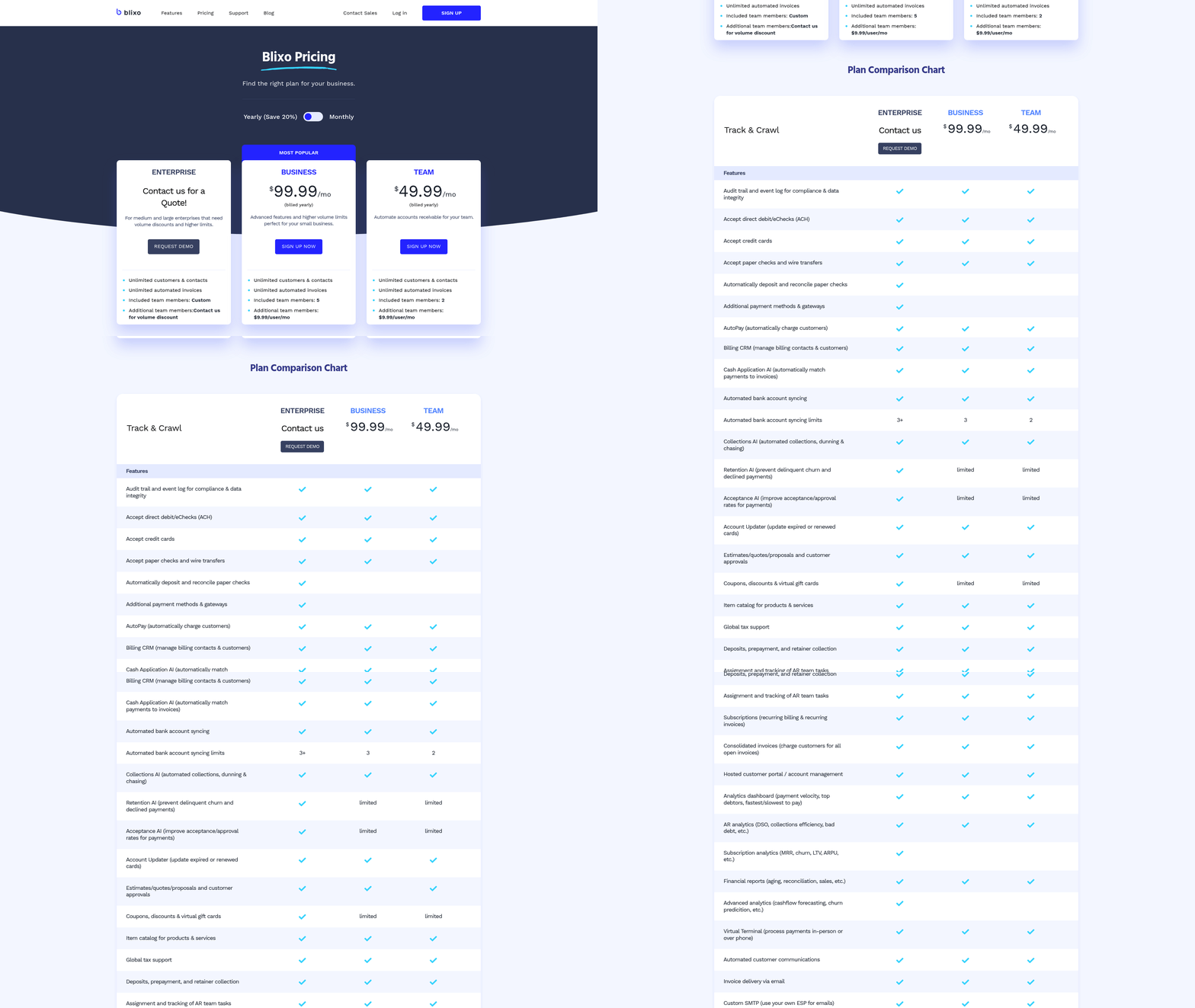
- Enable recurring invoices and auto-billing to ensure consistent revenue streams. Blixo allows businesses to set up automated invoicing that sends and charges customers based on predefined schedules.
- Support multiple payment methods, including credit/debit cards, ACH, and wire transfers. This flexibility ensures customers can pay using their preferred options, reducing delays.
- Track invoice activity (e.g., when invoices are opened or paid) to improve follow-up efficiency. Blixo’s SaaS service provides visibility into customer interactions, helping teams prioritize collections.
- Automate collections with reminders via email, SMS, or phone calls. Automated reminders reduce late payments and free up staff for higher-value tasks.
One company saw a 30% reduction in time spent on invoicing after implementing Blixo’s automated features, demonstrating the value of these capabilities..
Why Integration with Accounting and CRM Systems Matters
Seamless integration with existing tools like accounting software or CRMs ensures data accuracy and reduces manual work. Platforms that offer pre-built connections to systems like QuickBooks or custom ERPs save time and prevent errors. Building on concepts from the Implementing Automated Billing Solutions with Blixo section, Blixo’s pre-built integrations simplify synchronization with accounting platforms and CRMs.
- Ensure compatibility with your accounting software (e.g., Xero, QuickBooks). Blixo integrates with these platforms to synchronize financial data automatically.
- Sync customer and payment data with your CRM to maintain up-to-date records. This alignment improves customer service and reduces reconciliation efforts.
- Customize workflows to fit your business processes. For example, businesses using Blixo can set up rules for auto-updating expired credit cards or retrying failed payments.
A medium-sized enterprise reported a 50% reduction in reconciliation time after connecting Blixo to its financial systems, highlighting the importance of integration..
Security and Compliance Considerations
Protecting sensitive financial data is non-negotiable. Look for solutions that use strong encryption, comply with industry standards, and offer audit trails for transparency.
- Verify data encryption (e.g., 256-bit encryption) to safeguard customer and business information. Blixo employs this standard to prevent breaches.
- Check compliance with regulations like PCI DSS for handling card payments. Compliance builds trust and avoids legal risks.
- Enable multi-factor authentication (MFA) for user accounts to prevent unauthorized access.
A law firm using Blixo’s cash application features saw a 30% increase in cash flow by reducing manual reconciliation errors, underscoring the role of secure automation..
Scalability and Customization for Growing Businesses
Your billing solution should adapt to your business’s growth. Prioritize platforms that handle varying customer volumes, support multiple business models (e.g., SaaS, e-commerce), and offer customizable pricing rules.
- Support for high transaction volumes without performance issues. Blixo handles unlimited customers and invoices, making it suitable for scaling businesses.
- Customize billing rules (e.g., discounts, payment terms) to align with customer agreements. This flexibility improves client satisfaction.
- Adapt to different revenue models, such as subscriptions, one-time purchases, or usage-based billing.
A small business using Blixo’s subscription management tools reported 25% faster payment collection within three months, showing how scalability drives efficiency..
Real-World Example: How Automation Transforms Cash Flow
A mid-sized service-based company struggled with late payments and manual invoicing. After adopting Blixo, they automated recurring invoices, integrated with their accounting software, and enabled automated payment reminders. The result? A 25% increase in cash flow and 40% fewer late payments in six months. This example illustrates how automation reduces administrative burdens while improving financial outcomes. For deeper insights into automation benefits, explore how automated billing systems simplify operations. As detailed in the Measuring the Success of Automated Billing Solutions section, tracking metrics like payment speed and cash flow growth is essential to evaluating automation’s impact.
Implementing Automated Billing Solutions with Blixo
Building on concepts from the What Key Features Should You Prioritize? section, Step 1 emphasizes integration with accounting platforms like QuickBooks, a core feature highlighted as essential for efficient financial tracking. In Step 3, tracking payment metrics aligns with the goals outlined in the Measuring the Success of Automated Billing Solutions section, where monitoring on-time payment rates is a key indicator of system effectiveness. The real-world example’s focus on cash flow improvements echoes the broader benefits described in the How Automated Billing Impacts Cash Flow and Revenue section, demonstrating how automation reduces revenue losses from delayed payments.
Optimizing and Maintaining Automated Billing Solutions
Regular software updates and proactive maintenance are critical for automated billing systems. Outdated software risks security vulnerabilities, compatibility issues, and missed feature enhancements that could streamline workflows. For example, a medium-sized enterprise using Blixo increased its cash flow by 25% within three months by regularly updating its billing software to use new automation features. As mentioned in the Why Automated Billing Solutions Matter section, efficient systems directly impact revenue by minimizing delays and errors. This section outlines actionable steps to optimize and maintain your automated billing solution effectively.
Why Should You Prioritize Regular Updates?
Keeping your automated billing system up to date ensures access to the latest security patches, payment processing improvements, and compliance standards. Blixo’s SaaS service, for instance, uses 256-bit encryption to protect data, but even the strongest security can falter without timely updates. One company reported a 30% reduction in time spent on invoicing after implementing regular maintenance routines. Building on concepts from the How Automated Billing Impacts Cash Flow and Revenue section, updated systems reduce bottlenecks that delay cash flow and revenue collection.
- Schedule monthly software updates to ensure compatibility with payment gateways like Stripe and QuickBooks.
- Test new features before deployment, such as Blixo’s auto-retry functionality for failed payments.
- Review compliance updates to stay aligned with regulations like PCI DSS for payment security.
What KPIs Should You Monitor?
Tracking key performance indicators (KPIs) helps identify inefficiencies and measure the impact of optimizations. Metrics like payment recovery rate, days sales outstanding (DSO), and failed payment percentages provide actionable insights. As detailed in the Measuring the Success of Automated Billing Solutions section, monitoring these metrics allows businesses to refine strategies and improve financial outcomes. A business using Blixo improved its payment recovery rate by 18% by analyzing these metrics and adjusting its late payment reminders.
- Monitor payment recovery rate to assess how often invoices are successfully collected.
- Track DSO to evaluate how quickly customers pay invoices (target: under 30 days).
- Analyze failed payment trends, such as expired credit cards, and use Blixo’s auto-retry feature to address them.
How Can You Avoid Common Pitfalls?
Neglecting security updates or ignoring integration conflicts can disrupt billing operations. For example, one user noted that Blixo’s lack of multi-currency support initially caused delays for international clients. Proactive troubleshooting and staying informed about platform limitations are essential. When implementing solutions like Blixo, refer to the Implementing Automated Billing Solutions with Blixo section for guidance on addressing integration challenges and using core features.
- Never skip security updates, even for features you don’t use daily.
- Review integration logs to resolve conflicts between Blixo and external accounting tools.
- Document workarounds for known limitations, like manual currency conversions if multi-currency support is unavailable.
What Troubleshooting Steps Are Most Effective?
When issues arise, a structured approach minimizes downtime. If customers report failed transactions, check payment method validity first. Blixo’s system automatically retries failed payments, but manual intervention may be needed for recurring subscriptions.
- Check payment method validity using Blixo’s auto-updating credit card feature.
- Review error logs for patterns, such as high failure rates during peak hours.
- Engage Blixo support for unresolved issues, ensuring you provide detailed error codes.
Real-World Example: Optimizing Payment Recovery
A mid-sized SaaS company optimized its Blixo setup by enabling automated late payment reminders and partial payment options. Within six months, the business reduced late payments by 40% and recovered $12,000 in previously uncollected invoices. This success hinged on analyzing KPIs to refine collection strategies and using Blixo’s customizable customer portal, as demonstrated in the Implementing Automated Billing Solutions with Blixo section.
By prioritizing regular updates, monitoring critical metrics, and addressing pitfalls early, businesses can maximize the efficiency of their automated billing systems. Blixo’s tools provide the foundation, but consistent optimization ensures long-term success.
Measuring the Success of Automated Billing Solutions
Measuring the success of automated billing solutions requires tracking specific metrics that reflect operational efficiency, customer satisfaction, and financial health. For businesses using Blixo, key performance indicators (KPIs) like payment recovery rates, days sales outstanding (DSO), and customer satisfaction scores provide actionable insights. These metrics help identify bottlenecks, optimize workflows, and ensure cash flow remains stable. Below is a structured approach to evaluating success, with examples and strategies tailored to Blixo’s capabilities.
What Metrics Should You Track First?
Prioritize KPIs that directly impact revenue cycles and customer experience. Payment recovery rates measure the percentage of overdue invoices successfully collected, while DSO calculates the average number of days it takes to receive payments. As mentioned in the How Automated Billing Impacts Cash Flow and Revenue section, delays in cash flow can directly affect revenue, making DSO a critical metric to monitor. Lower DSO and higher recovery rates indicate efficient billing processes. Blixo’s automated reminders and partial payment handling streamline these efforts, reducing manual follow-ups.
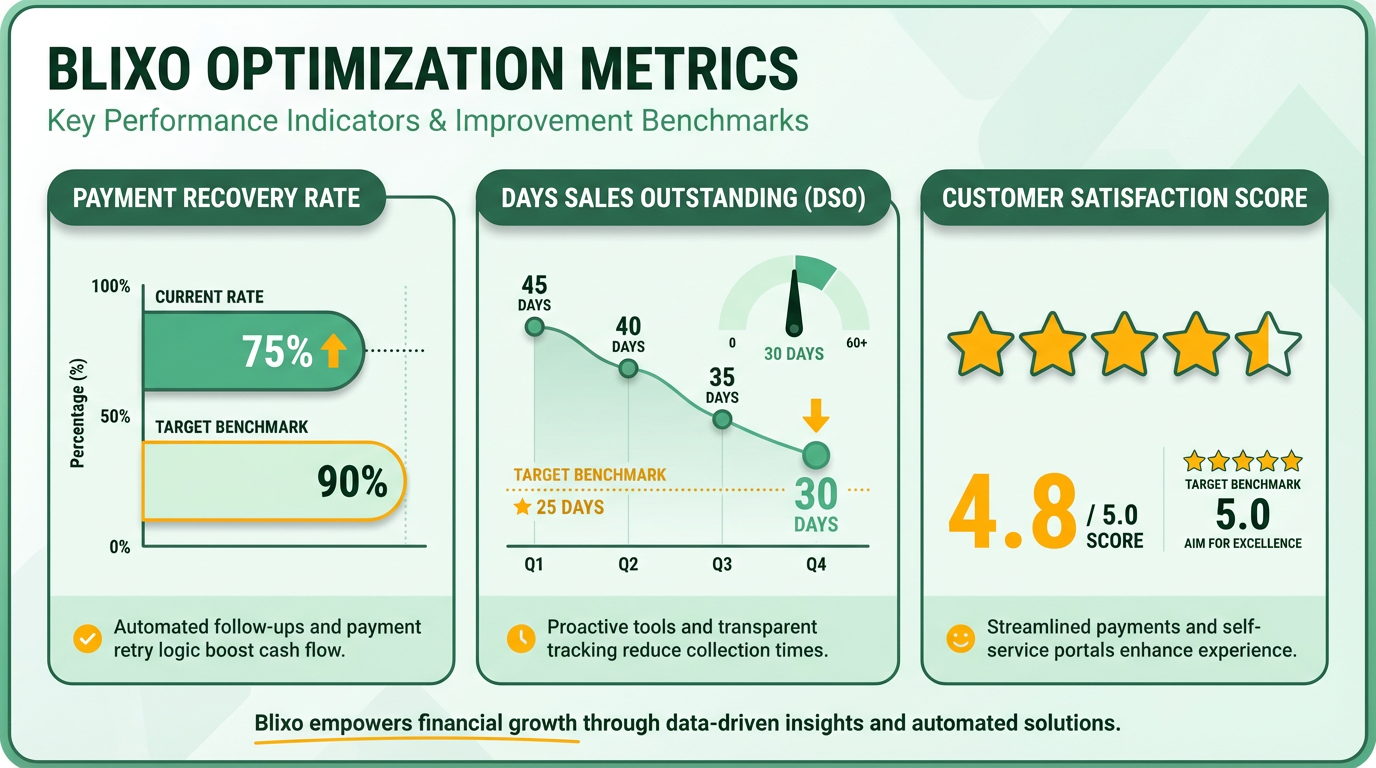
- Track payment recovery rates monthly to assess how effectively late invoices are resolved. A 95%+ rate suggests strong collections.
- Monitor DSO weekly to identify trends in payment delays. Aim for a DSO under 45 days for most industries.
- Analyze customer satisfaction scores (CSAT) from the customizable Blixo portal. High scores reflect ease of use and transparency.
How Can Data Analytics Improve Billing Efficiency?
Data analytics transforms raw numbers into strategic decisions. For example, one business using Blixo’s analytics tools discovered that 30% of late payments stemmed from expired credit cards. By enabling Blixo’s auto-update feature for payment methods, they reduced failed transactions by 25% and improved cash flow by $12,000 monthly.
To replicate this, use Blixo’s dashboards to:
- Identify patterns in payment failures (e.g., recurring disputes or retries).
- Test A/B scenarios, like adjusting reminder timing or payment method preferences.
- Align billing workflows with customer behavior (e.g., offering flexible payment plans).
What Benchmarks Should You Set?
Realistic benchmarks depend on industry standards and historical performance. For Blixo users, start by comparing current DSO and recovery rates to past quarters. If DSO drops from 60 to 35 days after implementing automated retries, that’s a clear win. For customer satisfaction, aim for 85%+ CSAT scores by improving portal usability and response times.
- Set incremental goals, like reducing DSO by 10% in three months.
- Compare recovery rates to industry averages (e.g., 90% for SaaS businesses).
- Use Blixo’s integration with QuickBooks or Stripe to sync data and refine benchmarks.
How to use Blixo’s Features for Better Metrics
Blixo’s tools, like cash application rules and customizable customer portals, directly influence KPIs. As outlined in the What Key Features Should You Prioritize section, platforms that streamline invoicing and payment processing are essential for improving efficiency. Automating payment matching reduces errors, while customer self-service options improve satisfaction. For instance, users report resolving disputes 50% faster with Blixo’s unified invoice tracking compared to manual systems.
- Enable auto-retries for failed payments to boost recovery rates.
- Use the customer portal to let clients update payment details instantly.
- Generate monthly reports to review trends in disputes, late fees, and revenue growth.
What If Challenges Arise?
If metrics stagnate, audit workflows for gaps. European users, for example, noted delays in Blixo’s customer support, which can slow issue resolution. To mitigate this, document common problems internally and use Blixo’s dispute management tools to resolve conflicts faster. Regularly revisit KPIs to ensure alignment with business goals like scaling subscriptions or reducing manual workloads.
By combining Blixo’s automation with proactive data analysis, businesses can maintain high payment efficiency and customer trust. Start small, refine strategies based on insights, and watch metrics improve over time.
Conclusion and Next Steps
Automated billing solutions like Blixo offer businesses a powerful way to streamline operations, reduce manual errors, and improve cash flow. By automating invoicing, collections, and reconciliation, companies can save time, enhance customer satisfaction, and focus on growth. Let’s break down the key takeaways and actionable steps to help you implement Blixo effectively.
What Makes Automated Billing Worthwhile?
As mentioned in the Measuring the Success of Automated Billing Solutions section, the average return on investment for businesses adopting these tools ranges from 25% to 50%, depending on process efficiency gains and reduced late payments. Features like recurring invoices, automated payment reminders, and multi-method support (ACH, credit cards, etc.) ensure businesses get paid faster. For example, one business reduced invoicing and collections time by 30% using Blixo, while another improved cash flow by 25% within three months.
How to Get Started with Blixo
Begin by mapping your current billing processes to identify automation opportunities. Blixo’s SaaS service is designed for easy setup, with no software installation required-everything operates through a web-based dashboard. Start with these steps:
- Set up recurring invoices: Automate monthly or subscription-based billing to ensure consistent cash flow.
- Integrate with accounting tools: Building on concepts from the What Key Features Should You Prioritize? section, connect Blixo to systems like QuickBooks or Xero for seamless financial tracking.
- Customize payment terms: Use Blixo’s flexible rules to offer discounts for early payments or send reminders for late ones.
- Enable the customer portal: Let clients view invoices, update payment methods, and manage subscriptions independently.
A medium-sized enterprise reported a 50% reduction in reconciliation time after implementing Blixo’s intelligent matching engine, which automatically links payments to invoices. Begin with small automations and scale as your team adapts.
What Should You Prioritize for Long-Term Success?
Security and customization are critical. As highlighted in the Optimizing and Maintaining Automated Billing Solutions section, Blixo uses 256-bit encryption to protect sensitive data, and its machine learning engine improves accuracy over time as you refine matching rules. Regularly review payment terms and discounts to align with customer preferences. For example, a law firm boosted cash flow by 30% using automated collections and partial payment options.
To maximize ROI, train your team on Blixo’s full feature set, including dispute resolution tools and cash application rules. Consider starting with a pilot group of 5–10 clients to test workflows before a full rollout. As one user noted, “Blixo puts invoicing on autopilot, letting me focus on my creative work instead of chasing payments”-a proof to its time-saving potential.
Final Recommendations
If your business handles recurring payments, late fees, or manual reconciliation, Blixo’s automated billing solution is worth exploring. Its user-friendly interface, combined with features like auto-retrying failed payments and real-time invoice tracking, makes it suitable for SaaS, e-commerce, and professional services. Begin by automating the most time-intensive part of your billing process, and expand from there. With consistent use, businesses can expect faster payments, fewer errors, and a stronger bottom line.
For a step-by-step walkthrough, refer to Blixo’s documentation or reach out to their support team for implementation guidance. The key is to start small, measure results, and iterate-automated billing is not a one-size-fits-all tool but a customizable system that grows with your needs.
Frequently Asked Questions
1. What features should businesses prioritize in automated billing solutions?
Prioritize recurring invoices, automated reminders, and auto-reconciliation. These features reduce manual work by up to 50%, improve on-time payments, and ensure 95%+ invoice reconciliation accuracy, as highlighted in Blixo’s checklist.
2. How does automation reduce revenue loss from late payments?
Automation accelerates collections by sending timely reminders and enabling recurring invoices. This boosts on-time payment rates by up to 40%, minimizing delays and ensuring consistent cash flow for businesses.
3. What metrics should be tracked to measure automation success?
Track cash application accuracy (aim for 95%+) and reduced reconciliation time. These metrics directly reflect efficiency gains and financial accuracy, as outlined in Blixo’s implementation guidelines.
4. How do cross-border tools benefit global operations?
Cross-border tools manage currency conversions and compliance without added overhead. This simplifies global invoicing and ensures seamless payments across regions, as demonstrated in Blixo’s scalable solutions.
5. Why are multiple payment methods important for customer satisfaction?
Supporting diverse payment options increases customer convenience, leading to faster payments and higher satisfaction. Blixo’s solutions integrate multiple methods to streamline transactions and reduce friction.
6. What role does auto-reconciliation play in accounting?
Auto-reconciliation cuts manual accounting tasks by up to 50%, reducing errors and freeing teams to focus on strategic work. Blixo’s tools automate this process for faster, accurate financial reporting.
7. How do recurring invoices improve cash flow?
Recurring invoices ensure predictable revenue by automating billing cycles. This reduces administrative effort and accelerates collections, as emphasized in Blixo’s checklist for consistent cash flow management.