

Blixo vs Traditional Accounts Receivable Systems
Key Takeaways
- Manual AR processes cost U.S. businesses $1.3 trillion annually due to errors, delays, and administrative overhead.
- 82% of AP teams use manual methods, causing 39% error rates and disputes costing logistics firms 20% of reconciliation efforts.
- Midsize companies spend 200+ hours yearly reconciling invoice discrepancies, worsening with higher transaction volumes.
- Manual AR errors lead to late fees, customer dissatisfaction, and delayed cash flow, as seen in a firm losing $25,000 in fees.
- Legacy systems require $50,000+ upfront costs, custom coding, and months for integration, hindering scalability.
- Inefficient AR systems cause 25% higher write-offs in logistics due to mismatched purchase orders and delivery receipts.
- Traditional AR systems face 20%+ operational bottlenecks from fragmented processes and scalability challenges.
Why Efficient Accounts Receivable Systems Matter
Efficient accounts receivable (AR) systems are critical to business success, directly impacting cash flow, operational efficiency, and customer relationships. Traditional AR processes, often reliant on manual workflows, are riddled with inefficiencies that cost businesses time, money, and revenue. For example, manual invoice processing costs U.S. businesses $1.3 trillion annually due to errors, delays, and administrative overhead. Worse, 82% of accounts payable (AP) teams still use manual methods, leading to error rates as high as 39% and disputes that cost logistics firms 20% of reconciliation efforts. These statistics underscore a systemic problem: outdated AR systems are not just inconvenient-they’re a financial liability, as further detailed in the Cost and ROI Analysis section.
How Inefficient AR Systems Harm Businesses
The real-world consequences of inefficient AR systems are stark. A midsize company processing 1,000 invoices monthly spends over 200 hours annually reconciling discrepancies, a task that becomes even more burdensome as transaction volumes grow. Manual errors also lead to late fees, customer dissatisfaction, and delayed cash flow. For instance, a logistics firm cited in Blixo’s case studies faced 25% higher write-offs due to mismatched purchase orders and delivery receipts, while a construction company lost $25,000 in late fees from delayed billing. These scenarios highlight how fragmented, manual processes create financial risks and operational bottlenecks, as Implementation and Integration challenges further exacerbate scalability issues in legacy systems.
Traditional systems also struggle with scalability. Legacy software often requires custom coding for integrations, months of implementation, and $50,000+ in upfront costs, as noted in Blixo’s comparison with legacy tools. This rigidity hinders businesses trying to adapt to modern demands like recurring billing, multi-currency transactions, or real-time analytics. The result? Prolonged days sales outstanding (DSO), with some companies reporting DSO reductions of 30-50% after switching to automated solutions.
Why Blixo Solves These Challenges
Blixo addresses these pain points through automation, AI, and seamless integration, as outlined in the Invoicing and Billing Capabilities section. its SaaS service automates invoicing, cash application, and dunning workflows, reducing administrative costs by 30% and DSO by up to 50%. For example, a healthcare provider using Blixo cut month-end reconciliation time by 18%, while a SaaS firm slashed collections from 14 to 7 days, saving $120,000 annually. These gains stem from features like AI-powered cash application, which matches payments to invoices with 97% accuracy (vs. 60-70% for legacy OCR systems), and automated dunning workflows that reduce late payments by 40%.
Blixo’s cloud-native design also eliminates the need for on-premise hardware, slashing total cost of ownership (TCO) by 30-40% over three years. Its API-first architecture integrates with QuickBooks, Salesforce, and ERPs in days-not months-while real-time dashboards provide visibility into DSO, bad debt, and payment trends. For global businesses, multi-currency and multi-language support streamline cross-border transactions, and a virtual lockbox digitizes check payments, ensuring uniform processing.
Who Benefits Most from Blixo?
Small and medium businesses (SMBs) gain the most from Blixo’s subscription model, which starts at $99/month and scales with usage. A law firm, for instance, improved cash-flow efficiency by 25% through automated invoicing and collections. Enterprises with high-volume transactions also benefit: a retail chain reduced regional payment delays by 20%, while a fintech startup boosted sales conversions by 70% using dynamic discounting. Global companies, meanwhile, use Blixo’s multi-currency capabilities to cut DSO by 30% and avoid manual exchange rate errors.
| Feature | Traditional Systems | Blixo |
|---|---|---|
| Error Rate | 39% manual errors | 3% errors (AI OCR + ML matching) |
| DSO Reduction | High DSO due to manual delays | 30-50% improvement |
| Implementation Time | 3–6 months | 3–5 days (cloud deployment) |
| Cost | $10K–$50K upfront + 15–25% maintenance | $99–$299/month (pay-as-you-go) |
| Integration | Custom middleware required | 1-click sync with ERPs, Stripe, etc. |
“Blixo is the ultimate solution for invoicing and payment management-say goodbye to administrative headaches,” says Vincent Mann, founder of Globetown Media, after transitioning from fragmented tools to Blixo’s unified platform.
In contrast to traditional systems, Blixo’s automation isn’t just about efficiency-it’s a strategic advantage. By reducing manual labor, accelerating cash flow, and improving customer experiences, Blixo turns AR from a cost center into a competitive edge. For businesses struggling with late payments, operational inefficiencies, or scalability challenges, the shift to Blixo is not just beneficial-it’s essential.
Invoicing and Billing Capabilities
Blixo transforms invoicing and billing by automating repetitive tasks, while traditional systems rely on manual processes that slow operations and increase errors. For example, Blixo automatically generates and sends invoices using pre-populated customer and item data, reducing human intervention and ensuring consistency. Traditional systems, in contrast, require manual data entry, which can lead to delays and errors-39% of manually processed invoices contain mistakes, according to industry data. Below is a breakdown of key differences:
| Feature | Blixo | Traditional Systems |
|---|---|---|
| Automation | Auto-generates invoices, schedules recurring billing, and matches payments | Relies on manual data entry for invoicing and collections |
| Customization | Branded templates, multi-currency, and tailored payment terms | Limited customization; often requires manual edits |
| Billing Frequency | Daily, monthly, or custom schedules with AI-driven reminders | Static schedules; manual follow-ups for late payments |
| Integration | Syncs with QuickBooks, Xero, and ERPs via APIs | Siloed systems; integration requires custom coding |
| Security | 256-bit encryption and real-time fraud detection | Basic encryption; higher risk of data breaches |
Automated Invoicing and Real-Time Efficiency
Blixo’s core strength lies in its ability to automate invoice creation and delivery. For instance, a SaaS business using Blixo might set up recurring invoices for monthly subscriptions. The platform generates these invoices automatically, pulls customer details from its database, and sends them via email or a self-service portal. Traditional systems, however, require staff to manually create each invoice, increasing the risk of errors and consuming 3–6 hours per week per business, as noted in case studies.
A healthcare provider’s experience illustrates this: after adopting Blixo, they reduced month-end reconciliation time by 18% by automating invoice generation and payment matching. As mentioned in the Cash Application and Reconciliation section, Blixo’s AI-driven matching streamlines this process, whereas traditional systems often take 10–45 days to process invoices due to manual verification steps.
Customization and Flexibility
Blixo allows businesses to tailor invoices with branding, payment terms, and language, catering to global clients. For example, a logistics firm might issue invoices in USD and EUR simultaneously, using Blixo’s multi-currency support. Traditional systems often lack this flexibility, forcing businesses to manually adjust invoices for different regions or currencies.
Recurring billing further highlights Blixo’s adaptability. A fitness studio using Blixo can set up auto-billing for monthly memberships, with the platform handling prorations or pauses in subscriptions. Building on concepts from the Subscription Management and Recurring Billing section, this functionality contrasts with traditional systems, which require manual updates for each customer, leading to inefficiencies. A small business reported a 30% time reduction in invoicing tasks after switching to Blixo’s recurring billing feature.
Workflow Example: From Invoice to Payment
Consider a retail company selling online:
- Invoice Creation: Blixo auto-generates an invoice after a purchase, pulling customer and product data from its database.
- Delivery: The invoice is emailed to the customer with a link to pay via credit card, ACH, or PayPal.
- Payment Processing: Blixo’s AI matches the payment to the invoice instantly, updating the accounts receivable ledger.
- Reminders: If payment is late, automated dunning emails are sent at 7, 15, and 30 days.
Traditional systems would require staff to create the invoice manually, email it separately, track payments across multiple platforms, and follow up with customers-a process that can take 5–7 days and is prone to oversight. As detailed in the Collections and Dunning Management section, Blixo’s automated reminders reduce the need for manual follow-ups, improving cash flow efficiency.
Limitations of Traditional Systems
Traditional accounts receivable systems struggle with scalability and real-time data. For instance, a construction firm using manual invoicing might take weeks to reconcile payments, leading to a 25% increase in write-offs due to delayed collections. Blixo’s real-time analytics, by contrast, provide instant visibility into cash flow, reducing days sales outstanding (DSO) by 30–50% for users.
Security gaps also plague traditional systems. While Blixo employs 256-bit encryption and GDPR compliance, older systems often lack strong protections, exposing businesses to fraud. A logistics company reported a 20% drop in disputes after transitioning to Blixo’s secure, automated workflows.
By automating invoicing, offering customization, and integrating seamlessly with existing tools, Blixo addresses pain points that traditional systems fail to resolve-ultimately saving businesses time, reducing errors, and improving cash flow.
Collections and Dunning Management
Collections and dunning management are critical for maintaining healthy cash flow, but traditional systems often struggle with inefficiencies that Blixo addresses through automation. Blixo streamlines collections using AI-driven workflows, while traditional methods rely on manual or rule-based processes that slow down operations and increase errors. Below is a detailed comparison of how each approach handles collections and dunning.
How Blixo’s Automated Collections Work
Blixo automates the entire collections process, using AI to match payments to invoices in seconds and reduce reconciliation time by 70%. As mentioned in the Cash Application and Reconciliation section, this automation significantly minimizes the manual effort required in traditional systems. Its automated dunning workflows send tailored reminders (e.g., at 7, 15, or 30 days past due) based on predefined rules, cutting late payments by 40%. For example, a SaaS company reduced its Days Sales Outstanding (DSO) by 30% after implementing Blixo, translating to $120,000 in annual labor savings. The system also includes a self-service customer portal, allowing clients to view invoices and make payments instantly, which improves on-time payment rates by 25%. Building on concepts from the Invoicing and Billing Capabilities section, this portal enhances transparency and reduces disputes.
Blixo’s real-time analytics dashboard tracks key metrics like DSO, bad debt, and payment success rates, enabling finance teams to act proactively. Machine learning further refines the system, improving cash application accuracy by 20% annually. For instance, a law firm reported a 25% increase in cash flow efficiency after automating invoicing and collections, thanks to reduced manual follow-ups.
Limitations of Traditional Accounts Receivable Systems
Traditional systems rely on manual or semi-automated processes, leading to inefficiencies. Manual reconciliation can take hours and has error rates as high as 30%, while dunning often involves time-consuming phone calls or emails. A construction firm using legacy tools faced a 25% increase in write-offs due to delayed invoicing and poor tracking.
These systems also lack real-time visibility, making it hard to monitor DSO or identify overdue accounts promptly. Implementation is another hurdle-legacy software often requires 3–6 months of setup, custom coding for integrations, and ongoing maintenance costs (15–25% annually). For example, a mid-sized e-commerce company spent $80,000 on late-fee penalties and $150 per dispute resolution due to manual errors.
Real-World Results from Automation
Blixo’s automation delivers measurable ROI. A 150-employee e-commerce firm automated 80% of its billing cycles, avoiding $25,000 in late fees and reducing collections time by 50%. Another case study shows a logistics company saving $120,000 over three years by eliminating hardware upgrades and IT overhead. As outlined in the Cost and ROI Analysis section, Blixo’s subscription model offers lower long-term costs compared to traditional systems.
“Switching to Blixo cut our invoice processing time in half and reduced errors by 40%,” shares a CFO from a mid-market retail firm. In contrast, legacy users report struggles like a manufacturing firm needing external consultants just to configure payment terms.
Key Differences at a Glance
| Feature | Blixo | Traditional Systems |
|---|---|---|
| Automation | AI-powered cash application, dunning | Manual or rule-based workflows |
| DSO Reduction | 30–50% average | High due to manual delays |
| Setup Time | 3–5 days (cloud) | 3–6 months with custom coding |
| Error Rates | 70% faster reconciliation; 40% fewer late payments | Up to 30% manual errors |
| Integration | 1-click sync with ERPs, Stripe, PayPal | Requires middleware for modern tools |
| User Satisfaction | 4.5/5 (90% adoption) | 3.2/5 (25% lower adoption) |
Why Blixo’s Approach Excels
Blixo’s strength lies in its end-to-end automation, which eliminates silos and reduces manual intervention. For example, a healthcare provider cut month-end closing time by 18% after linking Blixo to its ERP system. Traditional systems, however, often operate in isolated modules, leading to inefficiencies and higher operational costs.
For businesses prioritizing scalability, Blixo’s subscription model (starting at $299/month) offers lower total cost of ownership (30–40% cheaper over three years) compared to legacy systems’ $10k–$50k upfront licenses. This makes it ideal for fast-growing companies needing rapid onboarding and real-time data.
In summary, Blixo’s automated collections and dunning workflows significantly outperform traditional methods in speed, accuracy, and cost-efficiency. By reducing DSO, minimizing errors, and integrating seamlessly with modern tools, Blixo ensures businesses maintain optimal cash flow while traditional systems lag with outdated, manual processes.
Cash Application and Reconciliation
Blixo’s automated cash application process eliminates the manual effort and errors inherent in traditional systems by using AI to match payments to invoices instantly. This automation reduces reconciliation time by up to 70% and cuts late payments by 40%, while traditional systems rely on rule-based or manual matching that can take hours and still miss errors. The key differentiator lies in Blixo’s machine learning-powered matching engine, which achieves 95% match rates compared to 70% in traditional setups. Below is a direct comparison of core features:
| Feature | Blixo | Traditional Systems |
|---|---|---|
| Automation | AI-driven, real-time matching | Manual or rule-based, error-prone |
| Speed | 70% faster cash application | Hours of manual reconciliation |
| Accuracy | 95% match rate (item and envelope level) | 30–40% higher error rates |
| Integration | API-first, connects to ERPs, banks, and CRMs | Limited APIs, requires custom middleware |
| Setup Time | 3–5 days for cloud deployment | 3–6 months for on-premise configuration |
How Blixo’s Workflow Accelerates Cash Application
Traditional cash application workflows often involve manually matching payments to invoices, reconciling discrepancies, and resolving errors-tasks that consume hundreds of hours monthly. Blixo streamlines this process:
- Payment Ingestion: Blixo automatically pulls payments from banks, credit cards, and ACH systems. As mentioned in the Invoicing and Billing Capabilities section, this automation extends to generating and sending invoices, ensuring consistency with payment data.
- Smart Matching: The AI engine matches payments to invoices using historical data and learns from user corrections to improve accuracy over time.
- Real-Time Reconciliation: Once matched, the platform updates accounting systems (e.g., QuickBooks, ERP) instantly, reducing month-end closing delays. Building on concepts from the Collections and Dunning Management section, unmatched payments trigger automated dunning workflows to address late or partial payments.
- Exception Handling: Unmatched payments are flagged for review, while automated dunning workflows address late or partial payments.
For example, a law firm using Blixo automated 80% of its billing cycles, avoiding $25,000 in late fees and achieving a 95% match rate. In contrast, a similar firm using traditional methods spent 200 hours monthly on manual reconciliation and incurred a 25% increase in write-offs due to errors.
Accuracy and Cost Efficiency in Reconciliation
Blixo’s reconciliation process uses machine learning to refine match rates continuously. A medium-sized business reported a 50% reduction in manual effort after switching to Blixo, while a SaaS firm cut collections time from 14 to 7 days, saving $120,000 annually in labor costs. Traditional systems, however, face persistent challenges:
- High Days Sales Outstanding (DSO): Manual delays increase DSO by 30–50%, tying up cash flow.
- Hidden Costs: Legacy systems require hardware upgrades and annual maintenance, adding $120,000 in three-year costs. As highlighted in the Implementation and Integration section, Blixo’s cloud-native design avoids these upfront infrastructure costs.
A CFO of a mid-sized e-commerce firm noted, “Switching to Blixo reduced invoice processing time in half and cut errors by 40%.” Traditional users, meanwhile, often report $80,000 in annual penalties due to late fees and reconciliation disputes.
By automating cash application and reconciliation, Blixo not only accelerates processes but also reduces operational costs by 30–40% over three years. For businesses prioritizing speed, accuracy, and scalability, Blixo’s AI-driven approach represents a modern solution to the inefficiencies of traditional accounts receivable systems.
Subscription Management and Recurring Billing
Subscription management and recurring billing define how businesses handle ongoing customer payments, and Blixo’s approach starkly contrasts with traditional accounts receivable systems. Blixo automates these processes end-to-end, reducing manual work by up to 70% while improving payment accuracy. Traditional systems, however, often rely on fragmented tools and manual workflows, leading to delays, errors, and higher operational costs. Below, we break down the differences using real-world features, case studies, and performance metrics.
What Makes Blixo’s Subscription Management Stand Out?
Blixo’s subscription management streamlines recurring billing with automation, flexibility, and integration. It supports proration, dynamic discounting, and automated dunning rules, ensuring consistent revenue streams. For example, a Miami-based startup used Blixo’s dynamic discounting and automated reminders to boost sales conversion by 70%. The platform also integrates with ERPs like QuickBooks and Xero, eliminating data silos and reducing month-end closing time by 18% for a healthcare provider. As mentioned in the Implementation and Integration section, Blixo’s cloud-native design facilitates seamless connections to financial systems, unlike traditional setups that require custom coding.
| Feature | Blixo | Traditional Systems |
|---|---|---|
| Automation | Auto-generates invoices, applies payments, and adjusts subscriptions | Manual invoicing and reconciliation required |
| Error Rates | Machine learning reduces mismatches by 30% | 35% higher risk of errors due to manual processes |
| Customer Experience | Self-service portals let clients update payment methods | Limited customer access causes delays and disputes |
| DSO Impact | Cuts days sales outstanding (DSO) by 30% | Manual collections slow payments, increasing DSO |
Traditional systems struggle with these tasks because they lack unified platforms. A law firm, for instance, reduced cash-flow efficiency by 25% due to manual invoicing, while a logistics firm cut reconciliation disputes by 20% after switching to Blixo. Building on concepts from the Cash Application and Reconciliation section, Blixo’s automated matching engine further enhances accuracy by learning from corrections, a capability absent in legacy systems.
How Does Blixo Handle Recurring Billing?
Blixo’s recurring billing options are designed for scalability and adaptability. Businesses can define subscription plans with tiered pricing, set proration rules for mid-cycle changes, and automate dunning workflows to recover failed payments. A regional retailer improved invoice processing speed by 22% using Blixo’s recurring billing, while a small business slashed DSO by 30% through real-time payment tracking. As mentioned in the Collections and Dunning Management section, Blixo’s tiered dunning approach reduces churn by systematically retrying payments and sending targeted reminders, which traditional systems cannot replicate without manual effort.
| Recurring Billing Feature | Blixo Detail | Traditional System Limitation |
|---|---|---|
| Payment Flexibility | Supports ACH, credit cards, and multi-currency transactions | Limited to single payment methods |
| Plan Customization | Create plans with variable terms (e.g., monthly, annual) | Rigid pricing structures require manual changes |
| Dunning Automation | Sends tiered reminders and retries payments automatically | Relies on manual follow-ups, increasing DSO |
| Analytics | Real-time dashboards track churn, payment success rates, and DSO | Delayed reporting hampers decision-making |
A medium enterprise saw a 30% reduction in cash-application time using Blixo’s automated matching engine, which learns from corrections to improve accuracy. Traditional systems, by contrast, often require teams to manually reconcile payments, costing up to 30% more in administrative labor.
Example Workflow: Blixo’s Subscription Process
- Order Placement: A customer selects a subscription plan (e.g., monthly SaaS access).
- Automated Invoicing: Blixo generates the invoice and processes payment via stored credit card or ACH. Building on concepts from the Invoicing and Billing Capabilities section, this step eliminates manual data entry and reduces errors.
- Recurring Billing: The platform handles monthly charges, applying proration if the customer upgrades mid-cycle.
- Collections: Failed payments trigger automated dunning emails and retries, reducing churn.
- Reporting: Real-time dashboards show revenue, DSO, and payment success rates.
This workflow contrasts sharply with traditional systems, where each step requires manual intervention. For instance, Company B in the case studies faced a 25% spike in write-offs due to delayed invoicing, while Blixo’s clients like Globetown Media eliminated administrative “headaches” via its unified platform.
By automating subscription management and recurring billing, Blixo reduces operational costs, accelerates cash flow, and improves customer satisfaction. Traditional systems, burdened by silos and manual processes, cannot match this efficiency-making automation a critical shift for modern finance teams.
Implementation and Integration
When comparing the implementation and integration of Blixo with traditional accounts receivable systems, the differences in speed, flexibility, and cost become immediately apparent. Blixo’s cloud-native architecture and pre-built integrations drastically reduce deployment time, while legacy systems often require extensive customization and on-premise infrastructure. Below is a detailed breakdown of how these systems stack up.
How Does Blixo’s Implementation Process Compare to Traditional Systems?
Blixo’s implementation process is designed for speed and simplicity, typically taking 3–5 days for cloud deployments. The platform uses a drag-and-drop interface and pre-built templates, enabling businesses to configure workflows without requiring IT expertise. For example, a small business can onboard by connecting payment gateways like Stripe or PayPal, syncing with QuickBooks, and setting up automated invoicing rules within hours. In contrast, traditional systems often take 3–6 months to implement due to on-premise server setup, custom coding, and extensive training. A manufacturing firm switching to a legacy system might need to hire external consultants to configure payment terms and reconcile accounts manually, delaying productivity for months.
Traditional systems also face higher implementation costs. Legacy software typically requires $10k–$50k upfront for licenses, plus 15–25% annual maintenance fees, whereas Blixo’s subscription model starts at $99/month, scaling with usage. This cost disparity is amplified by the need for hardware upgrades and IT support in legacy environments. As mentioned in the Cost and ROI Analysis section, Blixo’s pricing structure offers significant long-term savings for growing businesses.
What Integration Capabilities Does Blixo Offer?
Blixo’s API-first design and pre-built connectors make integration with other systems seamless. The platform offers 1-click sync with popular tools like QuickBooks, Salesforce, Stripe, and PayPal, enabling real-time data flow between accounting, CRM, and payment systems. For instance, a SaaS company using Blixo can automate recurring billing by linking its customer database in Salesforce to Blixo’s invoicing engine, reducing manual data entry by 80%. Building on concepts from the Subscription Management and Recurring Billing section, this integration streamlines subscription-based revenue streams.
Traditional systems, however, struggle with integration. Legacy platforms often rely on outdated APIs or require custom middleware to connect with modern tools. A logistics company using a legacy AR system might spend $25k and six weeks developing a custom integration with a payment gateway, whereas Blixo’s pre-built API would handle the same task in under a day. This rigidity limits scalability for growing businesses, as adding new integrations becomes a costly, time-intensive process.
| Feature | Blixo | Traditional Systems |
|---|---|---|
| Integration Speed | 1-click sync; API-first | Custom middleware; 3–6 months |
| Supported Platforms | Stripe, PayPal, QuickBooks, Salesforce | Limited APIs; EDI-only in some cases |
| Cost of Integration | $99–$299/month (included) | $10k–$50k upfront + annual fees |
| Maintenance | Cloud updates handled by Blixo | On-premise servers require IT staff |
What Real-World Impact Do These Differences Have?
The implementation and integration advantages of Blixo translate directly into operational efficiency. A 150-employee e-commerce firm reported a 22% efficiency boost after switching to Blixo, automating 80% of its billing cycles and reducing time spent on collections from 200 to 50 hours per month. As highlighted in the Collections and Dunning Management section, this automation significantly reduces manual oversight and late payment risks. Similarly, a construction company avoided $25,000 in late fees by automating dunning workflows and linking Blixo to its payment gateways.
Traditional systems, by contrast, often lead to operational bottlenecks. A mid-sized retail business using a legacy platform faced $80,000 in late-fee penalties annually due to manual invoicing errors and delayed collections. Resolving disputes required 15–20 hours of manual reconciliation, compared to Blixo’s AI-powered cash-application engine, which reduces reconciliation time by 70% and late payments by 40%, as detailed in the Cash Application and Reconciliation section.
For businesses prioritizing agility, Blixo’s rapid implementation and seamless integrations offer a clear edge. Legacy systems remain viable for organizations with strict on-premise compliance needs but come with higher costs, slower adoption, and operational inefficiencies. The choice ultimately hinges on whether scalability and automation align with long-term business goals.
Cost and ROI Analysis
How Do Blixo’s Costs Compare to Traditional Systems?
Blixo’s subscription-based pricing starts at $99/month**, scaling with usage, while traditional systems require **$10,000–$50,000** upfront licenses plus 15–25% annual maintenance fees. Implementation costs also differ: Blixo’s setup ranges from **$5,000–$15,000** and takes 3–6 weeks, whereas traditional systems demand **$50,000+ and 3–6 months for deployment. As mentioned in the Implementation and Integration section, Blixo’s cloud-native architecture accelerates deployment compared to traditional systems.
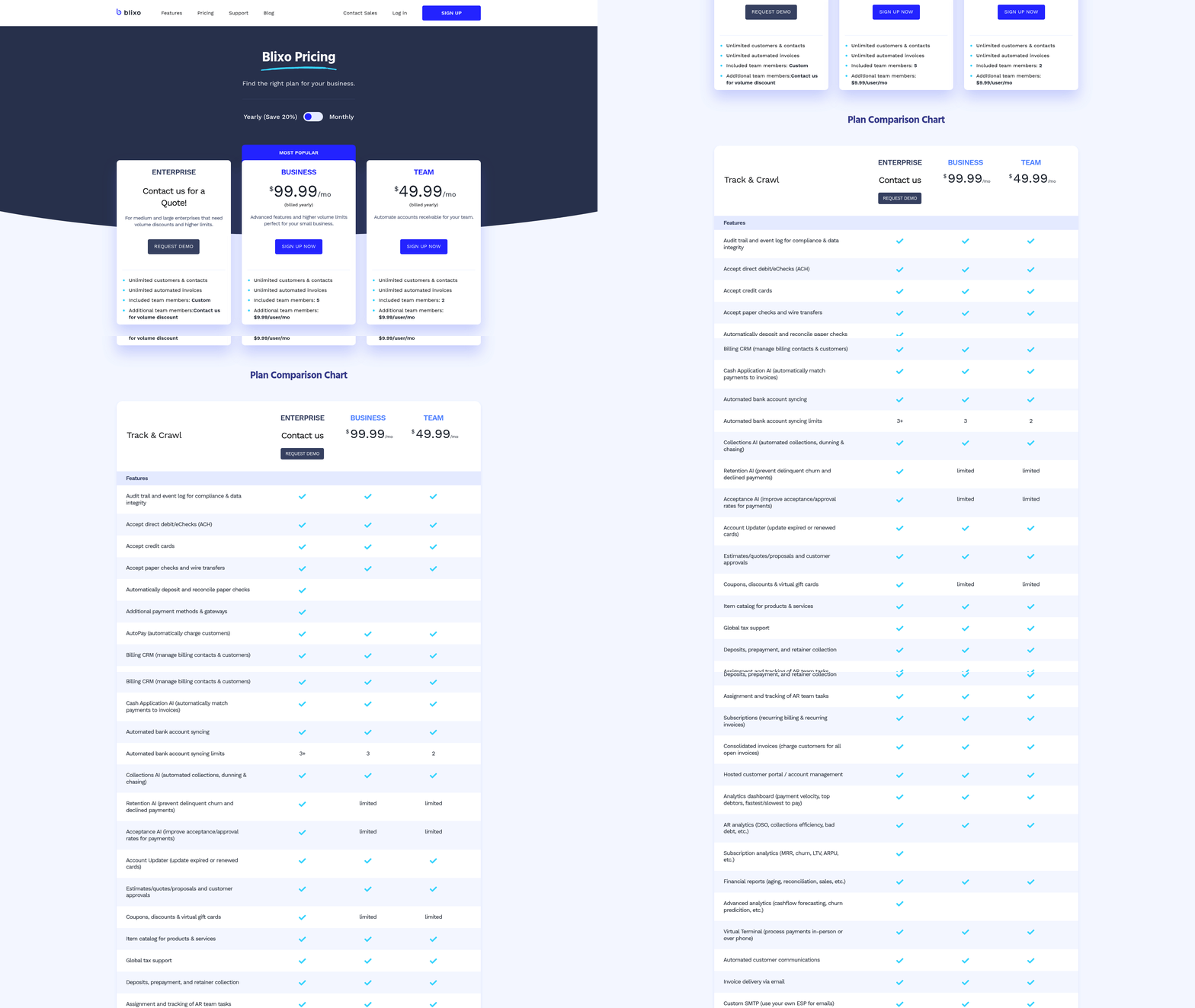
| Cost Category | Blixo | Traditional Systems |
|---|---|---|
| Licensing | $99–$299/month (scalable) | $10k–$50k upfront + 15–25% annual |
| Implementation | $5k–$15k (3–6 weeks) | $50k+ (3–6 months) |
| Maintenance | Included in subscription | 15–25% of license fee annually |
Traditional systems also incur hidden costs like server upgrades and custom coding, adding $120,000 in total ownership over three years, compared to Blixo’s 30–40% lower total cost of ownership (TCO).
What ROI Can Businesses Expect from Blixo?
Blixo delivers measurable ROI by slashing administrative costs by 30% and reducing days sales outstanding (DSO) by 30–50%. Building on concepts from the Why Efficient Accounts Receivable Systems Matter section, efficient DSO management is critical for cash flow, which Blixo enhances significantly. For example, a SaaS company cut collections from 14 to 7 days, saving $120,000 annually in labor costs. Automation also reduces errors: Blixo’s AI achieves 97% data extraction accuracy versus 60–70% in manual systems, cutting reconciliation disputes by 20% for logistics firms.
“Switching to Blixo cut our invoice processing time in half and reduced errors by 40%,” says a CFO of a mid-sized retail firm.
The payback period for Blixo typically ranges from 3–12 months, depending on transaction volume. A construction firm automating 80% of billing cycles avoided $25,000 in late fees within six months, achieving full cost recovery in under a year.
What Real-World Savings Does Blixo Enable?
Blixo’s automation directly translates to tangible savings. A healthcare provider reduced month-end reconciliation time by 18%, while a nonprofit slashed invoice processing costs by 54% after digitizing workflows. Building on the Cash Application and Reconciliation section, Blixo’s AI-driven automation reduces errors and speeds up reconciliation processes. For high-volume operations, the savings are even starker: a logistics firm saved 50+ hours/month in dispute resolution, and a fintech startup improved sales conversions by 70% using virtual lockboxes.
| Industry | Blixo Impact | Traditional System Drawback |
|---|---|---|
| Healthcare | 18% faster reconciliation | Manual errors delay cash flow |
| Logistics | 20% fewer disputes, 50+ hours saved/month | 39% error rate in manual entries |
| Nonprofit | 54% cost reduction in invoice processing | $80,000 annual losses from late fees |
For every $1 invested** in Blixo, companies recover **$3–$5 in efficiency gains and reduced risk. Additionally, businesses using Blixo report a 22% faster resolution rate for customer disputes, enhancing client satisfaction and retention.
Why Blixo Outperforms Traditional Systems Financially
Blixo’s cloud-native architecture and AI-driven automation eliminate the need for on-premise hardware, reducing IT overhead. Its real-time analytics and seamless ERP integrations (QuickBooks, Salesforce, etc.) further cut month-end closing time by 18%. Traditional systems, reliant on siloed workflows and manual processes, struggle with high DSO, error rates, and slow adoption. With Blixo, businesses gain not only cost savings but also agility-critical in volatile markets where cash flow visibility is a competitive edge.
Conclusion and Recommendation
Blixo’s automation and AI-driven features create a stark contrast with traditional accounts receivable (AR) systems. While traditional systems rely on manual or rule-based processes, Blixo’s AI-powered cash-application engine reduces reconciliation time by 70% and late payments by 40%. Traditional systems also struggle with siloed workflows, leading to inefficiencies like extended days sales outstanding (DSO) and higher write-offs. For example, one company saw a 25% increase in write-offs due to manual errors, whereas Blixo users report 30–50% reductions in DSO, as seen in a 150-employee e-commerce firm that cut DSO by 12 days. As mentioned in the Cash Application and Reconciliation section, Blixo’s AI-driven matching capabilities eliminate the need for manual intervention in payment-invoice alignment, which directly contributes to these efficiency gains.
Cost and implementation timelines further widen the gap. Blixo’s cloud-native architecture allows onboarding in 3–5 days, while traditional systems require 2–6 months of setup and training. Building on concepts from the Implementation and Integration section, this rapid deployment is a key differentiator for businesses seeking agility. Over three years, Blixo’s subscription model saves businesses 30–40% in total cost of ownership (TCO) compared to legacy systems, which incur $120,000+ in server upgrades and maintenance.
Why Blixo Stands Out in Real-World Applications
Blixo’s value is best illustrated by its impact on operational efficiency and customer satisfaction. A SaaS company reduced collections from 14 to 7 days, saving $120,000 annually**, while a construction firm automated 80% of billing cycles, avoiding **$25,000 in late fees. These results stem from features like real-time dashboards, automated dunning, and a customer self-service portal that improves on-time payments by 25%. As highlighted in the Collections and Dunning Management section, Blixo’s automated dunning workflows significantly reduce the time and effort required to chase overdue payments.
Traditional systems, by contrast, lack these capabilities. For instance, a law firm using manual AR reported a 25% cash-flow efficiency gain after switching to Blixo, whereas legacy-only firms often face $80,000 in late-fee losses annually. Blixo’s machine-learning engine also adapts to business needs, improving accuracy by 20% yearly, a capability absent in rigid, on-premise systems.
Recommendations for Businesses Considering AR Automation
Businesses should prioritize transitioning to automated systems like Blixo if they aim to reduce costs, accelerate cash flow, or scale operations. Small-to-midsize businesses (SMBs) benefit particularly from Blixo’s $99–$299/month subscription model, which eliminates upfront costs and integrates seamlessly with tools like QuickBooks and ERP systems. As discussed in the Cost and ROI Analysis section, this pricing structure offers long-term savings compared to the upfront licensing and maintenance costs of traditional systems. Enterprises with high-volume transactions will appreciate Blixo’s ability to cut churn by 15% and billing errors by 25%, as demonstrated in logistics and healthcare sectors.
For companies hesitant to replace legacy systems, a phased approach is advisable. Start by automating high-impact areas like invoice matching or dunning, then expand to full O2C automation. Regularly review metrics such as DSO and payment success rates using Blixo’s analytics tools to refine workflows.
“Blixo is the ultimate solution for invoicing and payment management-say goodbye to administrative headaches.” – Vincent Mann, Founder of Globetown Media
In conclusion, Blixo’s integration of AI, cloud-native design, and real-time data visibility makes it a superior choice for modern AR needs. Traditional systems, with their slow implementation, high costs, and error-prone workflows, increasingly struggle to meet the demands of agile businesses. By adopting Blixo, companies can achieve 30% faster collections, 70% fewer manual tasks, and a 25–70% boost in operational efficiency, positioning themselves for sustained growth in competitive markets.
Frequently Asked Questions
1. How much do manual AR processes cost U.S. businesses annually?
Manual AR processes cost U.S. businesses $1.3 trillion yearly due to errors, delays, and administrative overhead. This includes late fees and reconciliation efforts from fragmented workflows, as detailed in the article.
2. What error rates are common with manual AP teams?
82% of AP teams using manual methods face 39% error rates. These errors cause disputes consuming 20% of logistics firms’ reconciliation efforts annually, leading to cash flow delays and customer dissatisfaction.
3. How much time do midsize companies spend on invoice reconciliation?
Midsize companies processing 1,000 monthly invoices spend over 200 hours yearly reconciling discrepancies. This time grows with transaction volume, worsening operational inefficiencies and costs.
4. What are the upfront costs of legacy AR systems?
Legacy AR systems require $50,000+ upfront costs, custom coding, and months for integration. These rigid systems hinder scalability and adaptability to modern needs like multi-currency transactions or recurring billing.
5. How do inefficient AR systems harm logistics firms?
Inefficient AR systems cause 25% higher write-offs in logistics due to mismatched purchase orders and delivery receipts. Disputes and errors lead to late fees, delayed cash flow, and strained customer relationships.
6. What financial risks arise from manual AR errors?
Manual AR errors lead to late fees, customer dissatisfaction, and delayed cash flow. For example, one firm lost $25,000 in fees from delayed billing, highlighting the direct financial risks of fragmented processes.
7. Why do traditional AR systems struggle with scalability?
Traditional AR systems face 20%+ operational bottlenecks due to fragmented workflows and rigid legacy software. These systems require extensive customization, making it hard to scale with growing transaction volumes or evolving business needs.