

Automate Accounts Receivable Management Systems with Blixo
Related Video
Watch: Blixo Lifetime Deal $79 - Subscription Billing & Accounts Receivable Automation | Blixo Review by The SaaS Deals
Key Takeaways
- Automating AR reduces reconciliation time by 70% using AI-driven cash application.
- Automated systems collect payments 30% faster through dunning workflows and reminders.
- AR automation cuts days sales outstanding (DSO) by 20%, recovering thousands in lost revenue.
- Businesses save administrative time by streamlining invoicing, tracking, and collections.
- Automation minimizes revenue leakage by ensuring faster, accurate payment processing.
- Mid-sized enterprises report 20% faster cash flow management with automated collections.
- Automating AR reduces manual errors and frees teams for strategic, growth-focused tasks.
Why Automating Accounts Receivable Matters
Automating accounts receivable (AR) processes isn’t just a convenience-it’s a strategic move that directly impacts a business’s bottom line. Manual AR systems are error-prone, time-consuming, and costly. As mentioned in the Identifying Pain Points in Manual Accounts Receivable Processes section, these inefficiencies slow cash flow, frustrate customers, and divert resources from growth-focused activities. By automating AR workflows, businesses eliminate human errors, accelerate payment collections, and free up teams to prioritize strategic work.
What Problems Does AR Automation Solve?
Automated systems tackle recurring pain points that plague manual processes. First, they reduce administrative workload by streamlining invoicing, payment tracking, and collections. Building on concepts from the Key Features of Blixo for AR Automation section, Blixo’s AI-driven cash application, for instance, automatically matches payments to invoices, cutting reconciliation time by up to 70%. Second, they improve cash flow management. Automated reminders and dunning workflows ensure faster payments-businesses using Blixo report collecting payments 30% quicker than before. Third, automation minimizes revenue leakage. A mid-sized enterprise reduced days sales outstanding (DSO) by 20% after implementing automated collections, recovering thousands in previously lost revenue.
Who Benefits Most from AR Automation?
While all businesses gain from automation, certain models see transformative results. As highlighted in the Benefits of Automating Accounts Receivable with Blixo section, subscription-based and recurring billing businesses, for example, thrive on predictable cash flow. Blixo’s SaaS service automates recurring invoices, handles multi-currency payments, and scales seamlessly with growing customer bases. A small e-commerce company using Blixo for subscription management saw a 30% cash flow boost within three months, enabling expansion into new markets. Similarly, global enterprises benefit from automated compliance and multi-language support, ensuring smooth cross-border transactions.
How Automation Boosts Accuracy and Customer Satisfaction
Manual invoicing errors-such as miscalculations or duplicate bills-damage trust and increase disputes. Blixo’s system verifies customer payment details at invoice creation, reducing chargeback risks. Its centralized customer portal lets clients view invoices, schedule payments, and resolve disputes self-service, cutting support requests by 40%. One service-based business noted, “Clients appreciate the transparency-our satisfaction scores rose 25% after switching to Blixo.” Additionally, automated workflows ensure consistent communication, from initial invoices to late payment alerts, fostering trust and loyalty.
By automating AR processes, businesses turn a historically reactive task into a proactive growth driver. The result? Reduced errors, faster payments, and a team that can focus on innovation rather than spreadsheets. For companies ready to optimize their financial operations, SaaS providers like Blixo offer a scalable, secure solution tailored to modern business needs.
Identifying Pain Points in Manual Accounts Receivable Processes
Manual accounts receivable processes often create bottlenecks that slow business growth. These inefficiencies stem from outdated workflows, human errors, and fragmented systems. By automating these processes, businesses can reduce delays, improve accuracy, and gain real-time visibility into cash flow. Below, we break down the most critical pain points and how Blixo solves them..
What Are the Biggest Pain Points in Manual Invoicing?
Manual invoicing workflows are time-consuming, error-prone, and inconsistent. Teams often spend hours generating, sending, and tracking invoices, only to face delays due to missing details or payment errors. For example, 42% of companies lose 1% to 5% of EBITA due to poor payment follow-up, often caused by manual invoicing mistakes. Blixo streamlines this by automating invoice generation, payment reminders, and reconciliation. Its integration with platforms like QuickBooks and Stripe ensures seamless data flow, while AI-powered tools verify customer bank accounts before sending invoices, reducing chargeback risks. One small business using Blixo reported a 30% increase in cash flow within the first quarter by eliminating manual invoicing delays. As mentioned in the Key Features of Blixo for AR Automation section, these integrations are central to Blixo’s ability to unify fragmented financial workflows..
Why Do Manual Processes Slow Down Cash Flow?
Slow or inconsistent customer payments hurt revenue predictability. Without automated tracking, teams may miss late payments or fail to send timely reminders, leading to extended days sales outstanding (DSO). A mid-sized enterprise case study shows that implementing automated collections reduced DSO by 20% and improved cash flow by 15%. Blixo addresses this by sending automated payment reminders via email, SMS, or in-app notifications. It also supports multiple payment methods (ACH, credit cards, wire transfers) and allows businesses to set custom payment terms. For instance, Blixo’s “Blixo Factory” feature collects upfront payments, shifting risk from sellers to the platform and ensuring faster cash flow. Building on concepts from the Benefits of Automating Accounts Receivable with Blixo section, this functionality directly contributes to measurable cash flow improvements..
How Do Manual Cash Application and Reconciliation Cause Errors?
Manual cash application requires matching payments to invoices, a process that’s slow and error-prone. Teams often spend hours reconciling payments, leading to delays in recognizing revenue. Studies show 95% of workers still perform repetitive, time-consuming tasks despite automation efforts. Blixo automates this with AI-driven cash application, using machine learning to match payments to invoices instantly. Its intelligent reconciliation tools reduce errors by up to 90%, ensuring accurate financial records. For example, a SaaS business using Blixo’s subscription billing platform automated 80% of its cash application process, cutting reconciliation time from 10 hours to under 30 minutes weekly. This aligns with the Implementing Blixo for AR Automation section, which highlights how automation reduces manual effort and accelerates financial workflows..
What Happens When Visibility Into Payment Status Is Limited?
Without real-time visibility, businesses struggle to track payment statuses or identify bottlenecks. Teams may chase payments unnecessarily or miss opportunities to resolve disputes. Blixo solves this with a centralized dashboard that provides live updates on invoice status, payment timelines, and cash flow metrics. Its customer portal allows clients to view invoices, make payments, and update subscription details self-service, reducing administrative overhead. One user, Vincent Mann, founder of Globetown Media, noted that Blixo’s dashboard “eliminated the guesswork” in tracking payments, letting him focus on creative work instead of administrative tasks..
How Do Manual Processes Increase Operational Costs?
Manual accounts receivable tasks are costly. A survey found that 67% of businesses use automation for daily tasks, yet many still rely on spreadsheets for invoicing and reconciliation. This hybrid approach leads to inefficiencies, with teams spending 15–20 hours monthly on manual corrections. Blixo reduces these costs by automating repetitive tasks like invoice generation, payment reminders, and reconciliation. Its AI-driven tools also minimize revenue leakage-companies using Blixo reported up to 35% savings on factoring and collection fees. For example, a global e-commerce brand using Blixo’s multi-currency support cut manual currency conversion errors by 95%, saving $20,000 annually in reconciliation costs. This cost reduction is further detailed in the Implementing Blixo for AR Automation section, which emphasizes long-term financial efficiency gains.. By addressing these pain points, Blixo transforms accounts receivable from a reactive, error-prone function into a proactive, data-driven process. Its automation not only saves time but also strengthens customer relationships through faster, more accurate service. For businesses struggling with manual workflows, the shift to automation is not just beneficial-it’s essential.
Benefits of Automating Accounts Receivable with Blixo
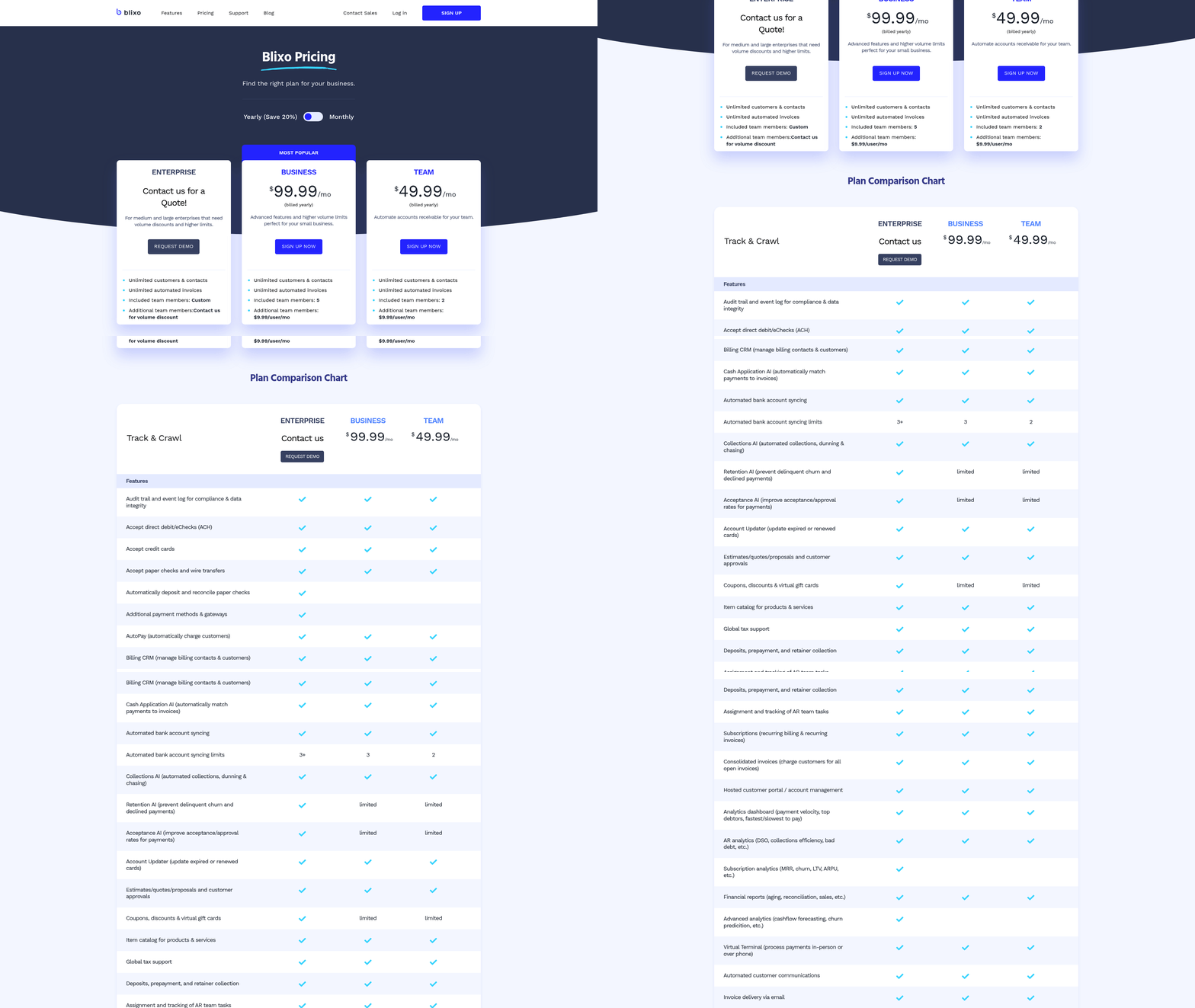
Automating accounts receivable with Blixo transforms how businesses manage payments, offering measurable improvements in efficiency, accuracy, and customer relationships. By integrating advanced automation into billing and collections, Blixo addresses common pain points like delayed payments, manual errors, and fragmented workflows. Below, we break down the core benefits of this automation, supported by real-world applications and user experiences.
How Does Automating Accounts Receivable with Blixo Accelerate Payment Recovery?
Automated workflows in Blixo significantly reduce the time between invoice issuance and payment receipt. The platform sends timely reminders and personalized communication via email or SMS, ensuring customers stay aware of due dates without manual follow-ups. As mentioned in the Why Automating Accounts Receivable Matters section, automation directly impacts a business’s bottom line by minimizing delays. A mid-sized enterprise using Blixo’s automation reduced its average days sales outstanding (DSO) by 20% within six months. Additionally, Blixo’s AI-driven cash application matches payments to invoices instantly, cutting reconciliation time and accelerating cash availability. This speed ensures businesses maintain a steady inflow of working capital, critical for scaling operations or meeting short-term obligations.
What Operational Efficiencies Does Blixo Provide?
Blixo streamlines invoicing, collections, and reconciliation by eliminating repetitive administrative tasks. Manual data entry, a common source of billing errors, is replaced with automated invoice generation and payment tracking. Building on concepts from the Key Features of Blixo for AR Automation section, the platform’s integration with accounting systems like QuickBooks and Xero enables real-time data synchronization and reduces the need for manual reconciliation. For instance, tasks like order entry, credit checks, and customer notifications are handled seamlessly, reducing human error and freeing staff to focus on strategic priorities. The platform also supports multiple payment methods, including ACH, credit cards, and international currencies. This flexibility minimizes delays caused by payment failures or currency conversion issues. One user shared that switching to Blixo saved their business 35% on factoring and subscription fees compared to previous tools. By centralizing all accounts receivable functions into a single SaaS solution, Blixo reduces operational overhead while improving accuracy across the order-to-cash lifecycle.
How Does Blixo Enhance Transparency and Customer Satisfaction?
Transparency in billing processes builds trust and reduces disputes. Blixo’s self-service customer portal allows clients to view invoices, make payments, and update subscription preferences at any time. This autonomy reduces the volume of customer support inquiries and ensures a frictionless experience. As outlined in the Identifying Pain Points in Manual Accounts Receivable Processes section, fragmented systems often lead to customer dissatisfaction, which Blixo’s portal directly addresses. For service-based businesses, this feature has been a major advantage-users like Stacey, a consultant, praise the portal’s clean interface and ease of use. The platform also improves satisfaction through personalized communication. Automated notifications about payment confirmations, failed attempts, or subscription updates are tailored to customer preferences, minimizing confusion. Blixo’s 256-bit encryption adds an extra layer of security, reassuring customers that their financial data is protected. This combination of convenience and trust has led to higher retention rates, as satisfied customers are less likely to churn.
What Customization Options Does Blixo Offer?
Blixo adapts to diverse business needs through its customizable billing solutions. Whether a company requires recurring invoices for subscriptions, one-time payments for projects, or tiered pricing models, the platform accommodates these scenarios. For example, a SaaS business used Blixo to automate dunning processes, recovering 95% of delinquent accounts within 48 hours. The system also supports customizable workflows, allowing finance teams to define rules for payment terms, late fees, and tax calculations. For global operations, Blixo handles multi-currency invoicing and compliance with standards like ASC 606 and IFRS 15, simplifying revenue recognition. This adaptability ensures businesses can scale without overhauling their billing infrastructure. As one enterprise user noted, expanding into three new markets became seamless with Blixo’s localized payment processing and currency support.
In summary, Blixo’s automation not only accelerates payment cycles and reduces administrative burdens but also fosters stronger customer relationships. By combining speed, accuracy, and flexibility, the platform empowers businesses to focus on growth while ensuring their accounts receivable processes are resilient and customer-centric.
Key Features of Blixo for AR Automation
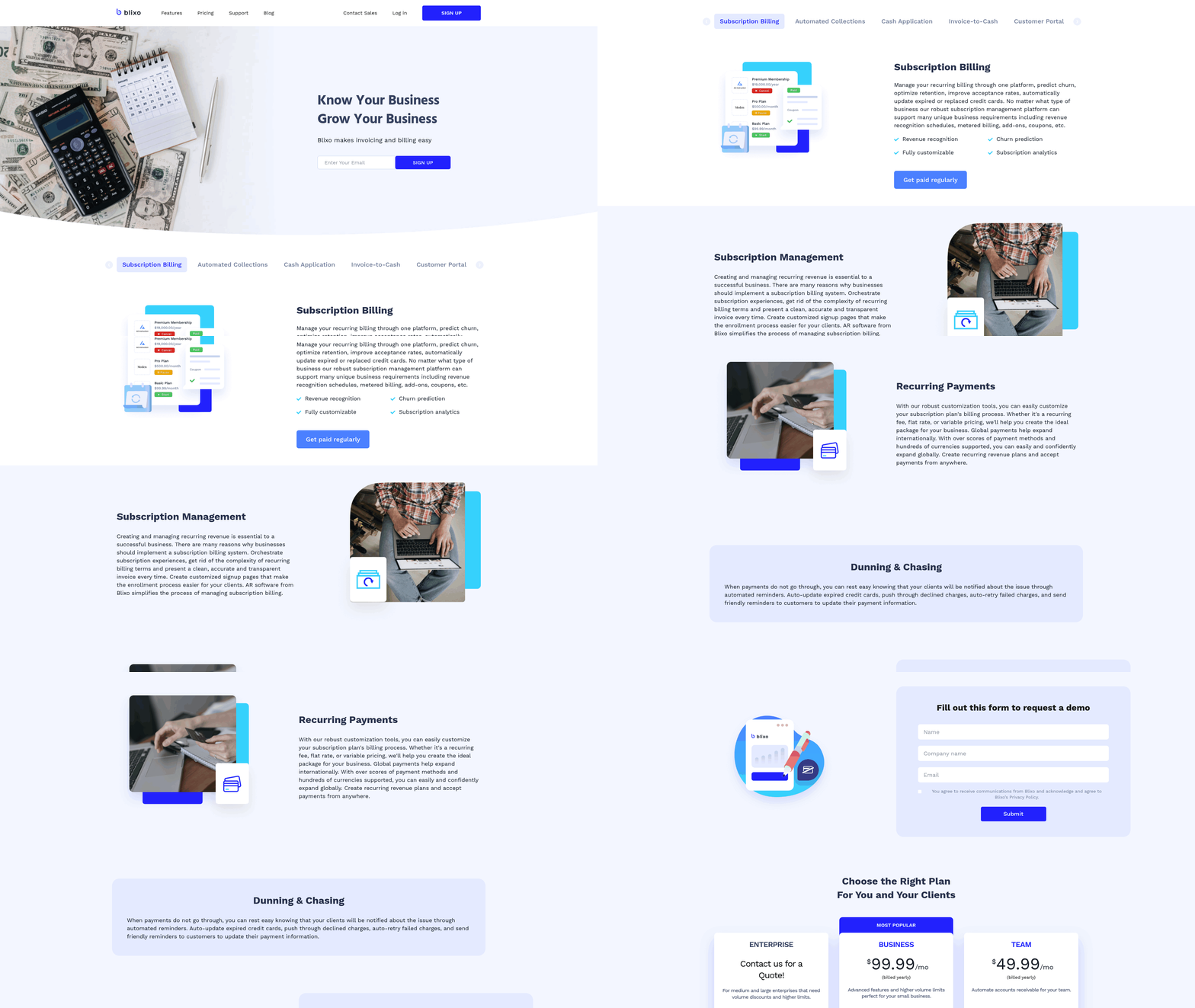
Blixo’s accounts receivable automation platform streamlines financial workflows through AI-driven tools and user-centric design. Below are its core features, structured to address common pain points in AR management, subscription billing, and customer engagement.
How Does Blixo Automate Cash Application?
Blixo uses AI-powered cash application to match payments with invoices automatically. Its intelligent matching engine analyzes payment data in real time, reducing manual reconciliation efforts by up to 80%. For example, machine learning algorithms identify patterns in payment behavior, ensuring even partial or delayed payments are correctly allocated. This minimizes errors and accelerates cash flow visibility. As mentioned in the Identifying Pain Points in Manual Accounts Receivable Processes section, manual reconciliation often introduces delays and inaccuracies, which Blixo systematically eliminates.
The platform also verifies bank accounts during invoice creation, cutting down charge-back risks. A case study from a mid-sized enterprise showed a 40% reduction in payment disputes after implementing this feature. By eliminating guesswork, Blixo ensures finance teams focus on strategic tasks instead of resolving mismatches.
What Automation Tools Streamline Collections and Customer Engagement?
Blixo’s automated collections and dunning workflows proactively manage late payments. The system sends tailored reminders via email, SMS, or in-app notifications based on predefined rules. For instance, if a payment is 7 days overdue, it triggers a gentle nudge; if unpaid after 14 days, it escalates to a formal notice. This structured approach reduces DSO (Days Sales Outstanding) by up to 25%, as seen in a case study where a business improved its cash flow within three months. Building on concepts from the Why Automating Accounts Receivable Matters section, this feature directly addresses the financial impact of delayed payments.
Customer engagement is further enhanced through personalized communication. Businesses can customize message templates to maintain brand tone while addressing delinquencies. The platform also tracks customer payment history to avoid over-aggressive dunning, balancing firmness with goodwill.
How Does Blixo Improve Revenue Visibility and Subscription Management?
The platform offers real-time reconciliation and revenue tracking, providing a single source of truth for financial data. Dashboards display metrics like cash flow, outstanding invoices, and payment trends, updated instantly as transactions occur. This transparency helps businesses forecast revenue accurately and identify bottlenecks. For example, a SaaS company using Blixo reduced revenue leakage by 15% by pinpointing recurring billing errors.
For subscription-based models, Blixo automates recurring billing and churn prediction. It generates invoices on schedule, adjusts charges for plan changes, and flags at-risk customers likely to cancel. A small business reported a 30% increase in retained subscribers after using these tools. The system also supports multi-currency payments and integrates with platforms like Stripe and QuickBooks, simplifying global operations.
What Self-Service Tools Empower Customers?
Blixo’s customizable customer portal lets clients view invoices, make payments, and update billing details without IT intervention. This self-service model cuts support requests by 50%, as noted in user feedback. For instance, a law firm saw a 60% drop in payment-related inquiries after enabling the portal. Building on the benefits outlined in the Benefits of Automating Accounts Receivable with Blixo section, the portal enhances operational efficiency while improving customer satisfaction.
The portal’s design is fully configurable-businesses can brand it with their logo, set payment due dates, and offer early-payment discounts. Users appreciate the simplicity: one reviewer called it “intuitive enough for non-tech-savvy clients,” while another highlighted its role in “streamlining subscription renewals.”.
Key Takeaways
- AI-driven cash application reduces manual work and errors, ensuring faster payment processing.
- Automated collections balance efficiency with customer experience, improving DSO and reducing bad debt.
- Real-time analytics and subscription management tools provide clarity on revenue health and customer retention.
- Self-service portals boost customer satisfaction while lowering operational overhead.
By combining these features, Blixo transforms AR management from a reactive task into a proactive, data-driven process. Whether for small businesses or enterprises, the platform adapts to diverse needs while maintaining compliance and scalability.
Implementing Blixo for AR Automation
Implementing Blixo for accounts receivable (AR) automation begins with evaluating its total cost of ownership (TCO) and return on investment (ROI). Blixo reduces manual work by automating invoicing, collections, and cash application, which lowers labor costs and accelerates cash flow. For example, one company saved 50% of its billing team’s time by shifting to automated workflows. To calculate ROI, compare the cost of Blixo’s subscription against the savings from reduced errors, faster payments, and improved customer satisfaction. As mentioned in the Why Automating Accounts Receivable Matters section, manual AR systems are error-prone and costly, making automation a strategic necessity.
How Do You Assess Blixo’s Value Against Alternatives?
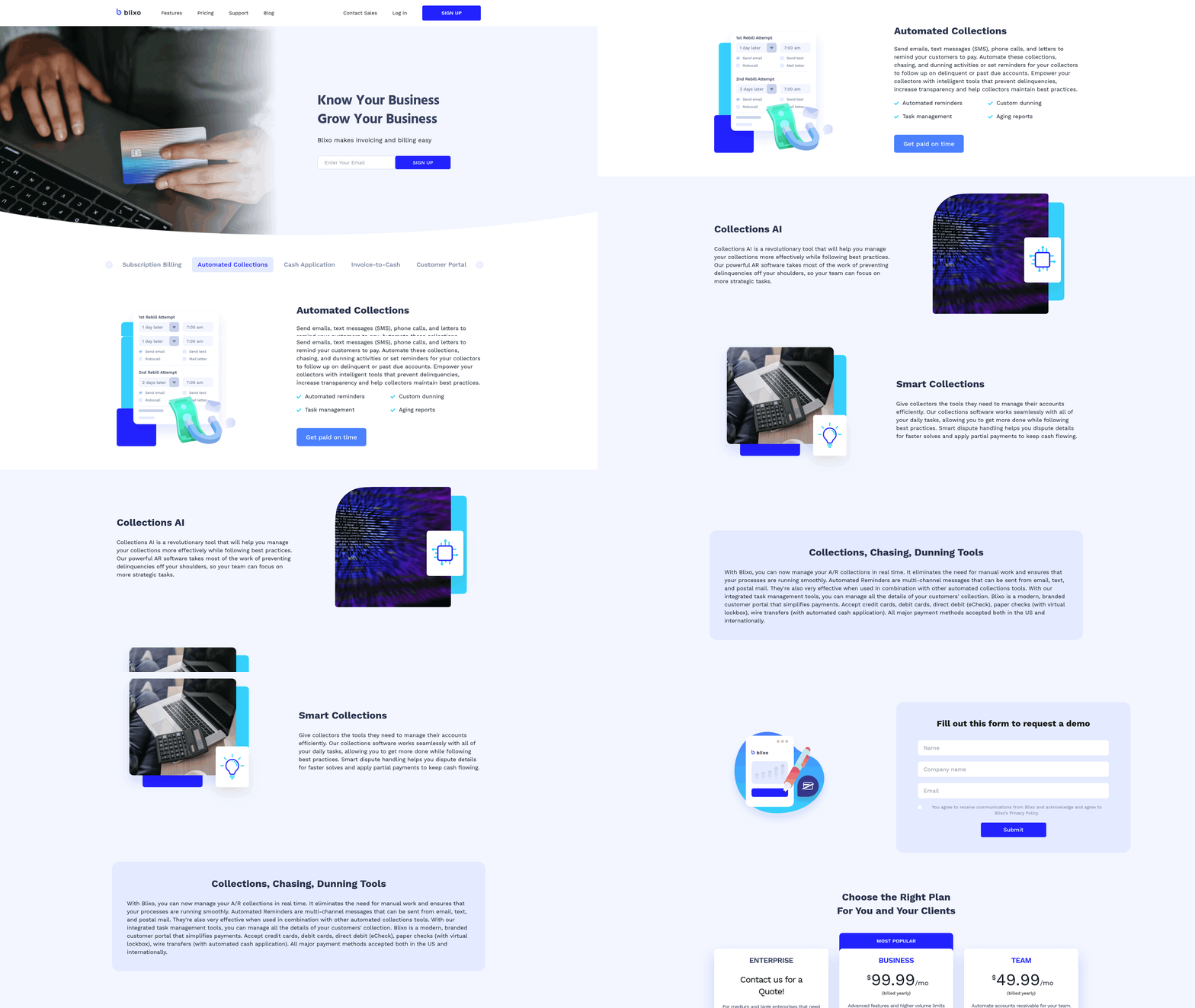
Blixo stands out with features like intelligent cash application powered by machine learning, which another provider in this space might lack. Its all-in-one platform combines subscription billing, AR automation, and customer portals, whereas alternative solutions often require stitching together multiple tools. Pricing is structured to scale with business needs, avoiding the rigid plans of a [type of service] provider. For instance, Blixo’s automated collections reduce late fees and bad debt, directly improving profitability. Building on concepts from the Key Features of Blixo for AR Automation section, these capabilities address common pain points such as fragmented workflows and manual reconciliation.
What’s the Step-by-Step Implementation Roadmap?
- Evaluate Current Processes: Map your existing invoicing, collections, and payment workflows to identify gaps. Blixo’s integration with QuickBooks, Xero, and Sage Intaact ensures compatibility with most accounting systems.
- Configure Core Features: Set up automated invoicing schedules, payment portals, and collections rules. Use Blixo’s customer portal to let clients view invoices, make payments, and update subscriptions independently.
- Test and Refine: Run dry-run scenarios for recurring billing, dunning management, and cash application. Blixo’s intelligent matching improves accuracy over time, but initial testing ensures alignment with your financial processes.
- Train Teams: Host workshops to familiarize finance teams with Blixo’s dashboard, reporting tools, and reconciliation features.
How Do You Measure Success After Implementation?
Track key performance indicators (KPIs) like days sales outstanding (DSO), payment accuracy, and customer satisfaction. Blixo’s real-time dashboards show DSO reductions, such as moving from 45 to 15 days, as seen in a service-based business case study. Building on concepts from the Optimizing AR Automation with Blixo section, refining workflows post-implementation ensures sustained efficiency gains. Payment accuracy improves due to machine learning-driven cash application, which one user noted was “significantly more powerful” than previous tools. Monitor customer feedback through the portal’s usability ratings-Stacey highlighted Blixo’s clean interface as a key benefit for her team.
What Pitfalls Should You Avoid During Setup?
- Incomplete Integration: Ensure all accounting and CRM systems are fully linked to avoid data silos. Blixo’s documentation provides step-by-step guides for common integrations.
- Overlooking Customization: Tailor workflows to match your billing cycles, such as dunning rules for subscription services. Matthew Schwartz credits Blixo’s flexibility for streamlining his e-commerce business.
- Neglecting Testing: Simulate edge cases like failed payments or subscription upgrades to validate Blixo’s responsiveness. Dave emphasized that thorough testing prevented disruptions during his transition.
By following this roadmap, businesses can automate AR processes while minimizing risks. Blixo’s focus on transparency, scalability, and user-centric design ensures a smoother implementation than fragmented tools. Start with a pilot project, then expand to full-scale deployment once workflows are optimized.
Optimizing AR Automation with Blixo
Optimizing AR automation with Blixo requires a strategic approach that aligns with your business’s unique workflows and goals. By using Blixo’s flexible tools, you can refine processes, reduce manual tasks, and improve cash flow efficiency. Below, we break down actionable steps to maximize Blixo’s potential.
How Do You Customize Blixo for Specific Workflows?
Start by tailoring Blixo’s automation rules to match your accounts receivable (AR) processes. For example, configure payment reminders, late fees, or dunning workflows based on your customer behavior and credit terms. Blixo allows you to set custom triggers-like sending an invoice when a project milestone is completed-ensuring automation aligns with your operational rhythm. Building on concepts from the Key Features of Blixo for AR Automation section, the workflow builder enables precise control over automation logic. To implement this, access Blixo’s workflow builder and define conditions for each action. Suppose your business deals with recurring subscriptions: you can automate monthly invoicing, apply discounts for early payments, or pause billing during customer disputes. This level of customization reduces manual intervention and minimizes errors. A retail company using Blixo automated 80% of its invoice generation, cutting processing time by 50%.
What Integration Options Exist for Blixo?
Blixo seamlessly connects with your existing accounting and enterprise resource planning (ERP) systems, eliminating data silos. Use pre-built integrations or APIs to synchronize Blixo with platforms like QuickBooks, NetSuite, or SAP. This ensures real-time data flow between systems, from invoice creation to payment reconciliation. As mentioned in the Benefits of Automating Accounts Receivable with Blixo section, integration enhances accuracy and speeds up financial operations. For instance, when a customer pays an invoice in Blixo, the transaction updates automatically in your ERP, reducing the risk of discrepancies. To set this up, map Blixo’s fields to your system’s database and test the integration with a small dataset. A manufacturing firm integrated Blixo with its ERP, achieving a 30% faster month-end close by automating data transfers.
How Can Analytics Improve AR Automation?
Blixo’s dashboards and reports provide actionable insights into your AR performance. Track metrics like Days Sales Outstanding (DSO), payment trends, and customer aging reports to identify bottlenecks. For example, if data shows a spike in late payments from a specific region, adjust your collections strategy by prioritizing follow-ups or revising credit terms. Use Blixo’s predictive analytics to forecast cash flow and allocate resources effectively. One SaaS company used these tools to reduce DSO from 45 to 32 days by targeting high-risk accounts with personalized payment plans. Regularly review analytics to refine automation rules-like adjusting dunning thresholds based on historical payment data.
Why Is Continuous Monitoring Critical?
AR automation isn’t a set-it-and-forget-it solution. Regularly audit Blixo’s performance using KPIs like payment success rate and automation accuracy. If error rates rise, investigate whether outdated rules or integration issues are causing the problem. For example, a 15% drop in automated payment approvals might signal a need to update fraud detection parameters. Blixo’s alert system notifies you of anomalies, such as duplicate invoices or failed transactions. Address these promptly to maintain trust with customers and avoid revenue leakage. Schedule monthly reviews to assess how well automation supports your evolving business needs.
How Do You Stay Updated on Blixo’s Features?
Blixo frequently releases updates to enhance automation capabilities. Subscribe to their blog or documentation to learn about new features-like AI-driven payment predictions or multi-currency support. For example, a recent update added batch invoice generation, which a logistics company used to reduce processing time for 500+ invoices weekly. Participate in Blixo’s webinars or community forums to exchange best practices with other users. One business discovered a more efficient way to handle partial payments by adopting a workflow shared in a user case study. Staying informed ensures you use Blixo’s full potential without relying on guesswork.
By combining customization, integration, analytics, and proactive monitoring, you can transform Blixo from a basic automation tool into a strategic asset. The result? Faster collections, fewer errors, and a finance team empowered to focus on growth.
Frequently Asked Questions
1. How much time does AR automation save on reconciliation?
AR automation reduces reconciliation time by 70% using AI-driven cash application, as seen with Blixo. This cuts manual work and speeds up financial processes significantly for businesses.
2. How does automation speed up payment collection?
Automated dunning workflows and reminders in systems like Blixo accelerate payment collections by 30%, improving cash flow efficiency and reducing delays.
3. What’s the impact on cash flow?
AR automation lowers days sales outstanding (DSO) by 20%, recovering lost revenue and improving cash flow by accelerating collections. Businesses see faster access to funds.
4. Who benefits most from AR automation?
Subscription-based and mid-sized businesses gain the most, with 20% faster cash flow management and scalable solutions for recurring billing and growth.
5. How does automation reduce revenue leakage?
Automation minimizes revenue loss by ensuring accurate, timely payments and reducing errors, recovering thousands in previously lost revenue for enterprises.
6. What administrative tasks does AR automation streamline?
AR automation streamlines invoicing, payment tracking, and collections, saving businesses significant administrative time and reducing manual workload.
7. Does AR automation support multi-currency payments?
Yes, platforms like Blixo handle multi-currency payments, enabling seamless international transactions and simplifying global financial management for businesses.