

Blixo vs Traditional Accounts Receivable Software Solutions

Key Takeaways
- Automating AR processes reduces missed payments by 35% compared to manual systems.
- Businesses using automation cut administrative costs by up to 30% through streamlined workflows.
- Manual data entry causes 30% of invoice discrepancies, increasing payment delays and disputes.
- Blixo’s AI cash application achieves 99.9% accuracy in matching payments to invoices.
- A logistics firm reduced reconciliation disputes by 20% after adopting Blixo’s automation.
- Automated AR systems improve cash flow visibility and accelerate payment cycles significantly.
Related Video
Watch: Red Cat Motion | Explainer Animation | Blixo by Red Cat Motion Studio
Why Accounts Receivable Automation Matters
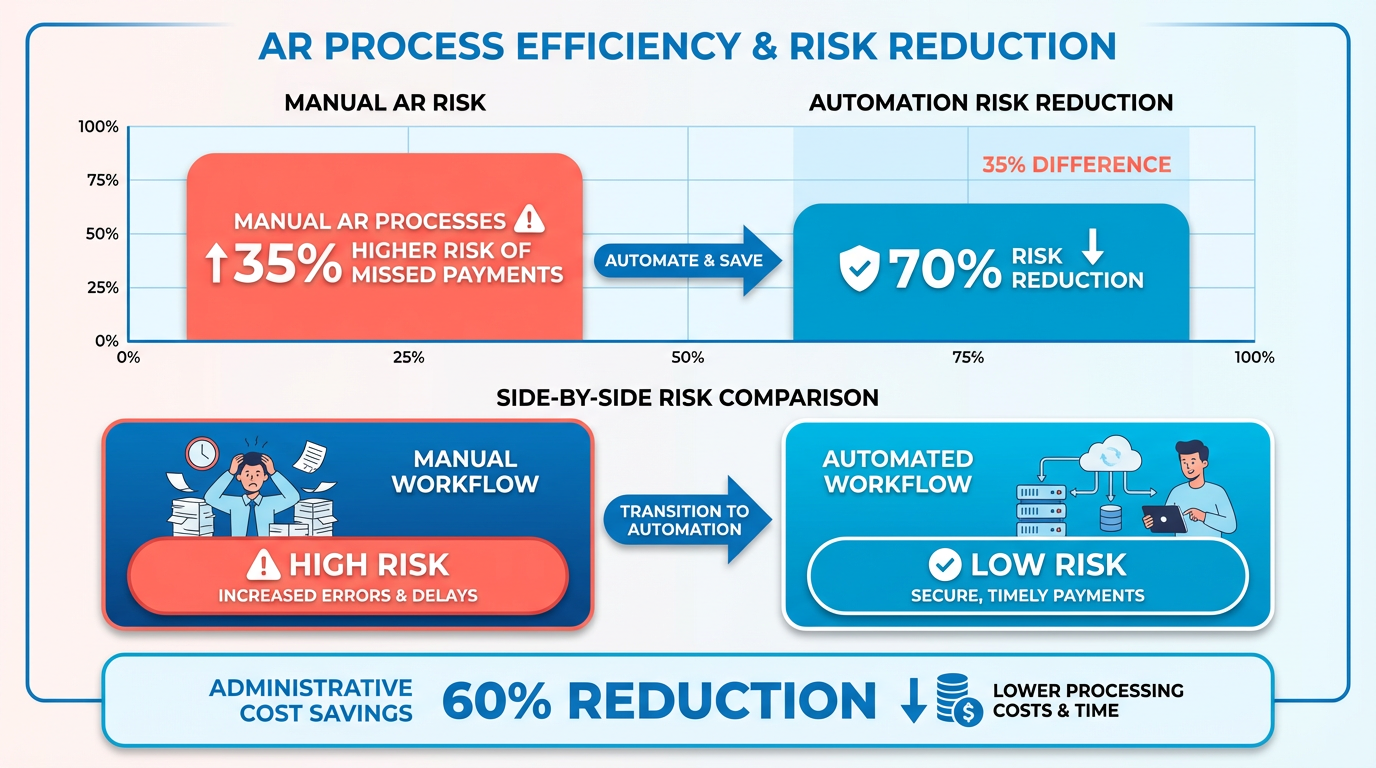
Automating accounts receivable (AR) processes isn’t just a convenience-it’s a strategic necessity for businesses aiming to thrive in today’s fast-paced economy. Manual invoicing errors, delayed payments, and fragmented workflows can erode cash flow and profitability, with industry data showing manual AR processes carry a 35% higher risk of missed payments and reconciliation errors. By contrast, automation reduces these risks while accelerating payment cycles, cutting administrative costs by up to 30%, and improving cash flow visibility. Let’s break down why this shift matters.
How Manual Invoicing Errors Impact Businesses
Manual systems are prone to human error, with studies revealing 30% of invoice discrepancies stem from manual data entry alone. These mistakes delay payments, trigger disputes, and strain customer relationships. For example, a logistics firm using traditional software reported 20% fewer reconciliation disputes after switching to Blixo’s AI-driven cash application, as detailed in the Blixo’s Approach to Accounts Receivable Automation section, which automatically matches payments to invoices with 99.9% accuracy.
| Manual AR Challenges | Automated AR Solutions |
|---|---|
| Error rate: 30% invoice discrepancies | Error rate: <1% with AI matching |
| Reconciliation time: Hours per invoice | Reconciliation time: Seconds via machine learning |
| Cost per invoice: $10–$20 manually | Cost per invoice: $2–$5 automated |
The Real Cost of Delayed Payments
Late payments disrupt cash flow, with 35% of businesses reporting operational inefficiencies tied to delayed revenue recognition. A small business using Blixo reduced its days sales outstanding (DSO) by 30% in one month by enabling self-service portals and automated dunning workflows. Traditional systems, as outlined in the Traditional Accounts Receivable Software Solutions section, often rely on batch processing and manual follow-ups, increasing operational friction.
Who Benefits Most from AR Automation?
While all businesses gain from automation, certain industries and company sizes see disproportionate advantages:
- SMBs: Cut administrative costs by 30% and reduce DSO by 30–50%.
- Global enterprises: Use multi-currency support and 256-bit encryption for secure, cross-border transactions.
- Subscription-based businesses: Automate recurring billing, proration, and dunning rules to reduce churn by 15–20%.
A Miami-based startup, for instance, saw a 70% increase in sales conversions after implementing Blixo’s dynamic discounting and automated reminders, a case study further explored in the Real-World Examples and Case Studies section. Meanwhile, a healthcare provider slashed month-end closing time by 18% by integrating Blixo with QuickBooks.
Why Blixo Outperforms Traditional Tools
Traditional AR software often lacks modern features like real-time dashboards, AI-driven cash application, and seamless API integrations. Blixo’s cloud-native platform addresses these gaps:
- Speed: Onboarding takes 3–5 days versus 2–4 weeks for legacy systems, as highlighted in the Implementation and Onboarding with Blixo section.
- Scalability: Handles 10,000+ invoices monthly with auto-scaling infrastructure.
- Security: 256-bit encryption and SOC 2 compliance protect sensitive data.
One G2 reviewer noted, “Blixo’s automated collections cut our invoice processing time in half”. Traditional tools, by contrast, require manual updates and custom middleware, increasing total cost of ownership by 30–40% over three years, as discussed in the Comparison of Blixo and Traditional Solutions section.
In short, AR automation isn’t optional-it’s a competitive differentiator. Businesses that delay adoption risk falling behind in efficiency, customer satisfaction, and profitability. Whether you’re a small startup or a global enterprise, the data is clear: automation delivers measurable, immediate returns.
Blixo’s Approach to Accounts Receivable Automation
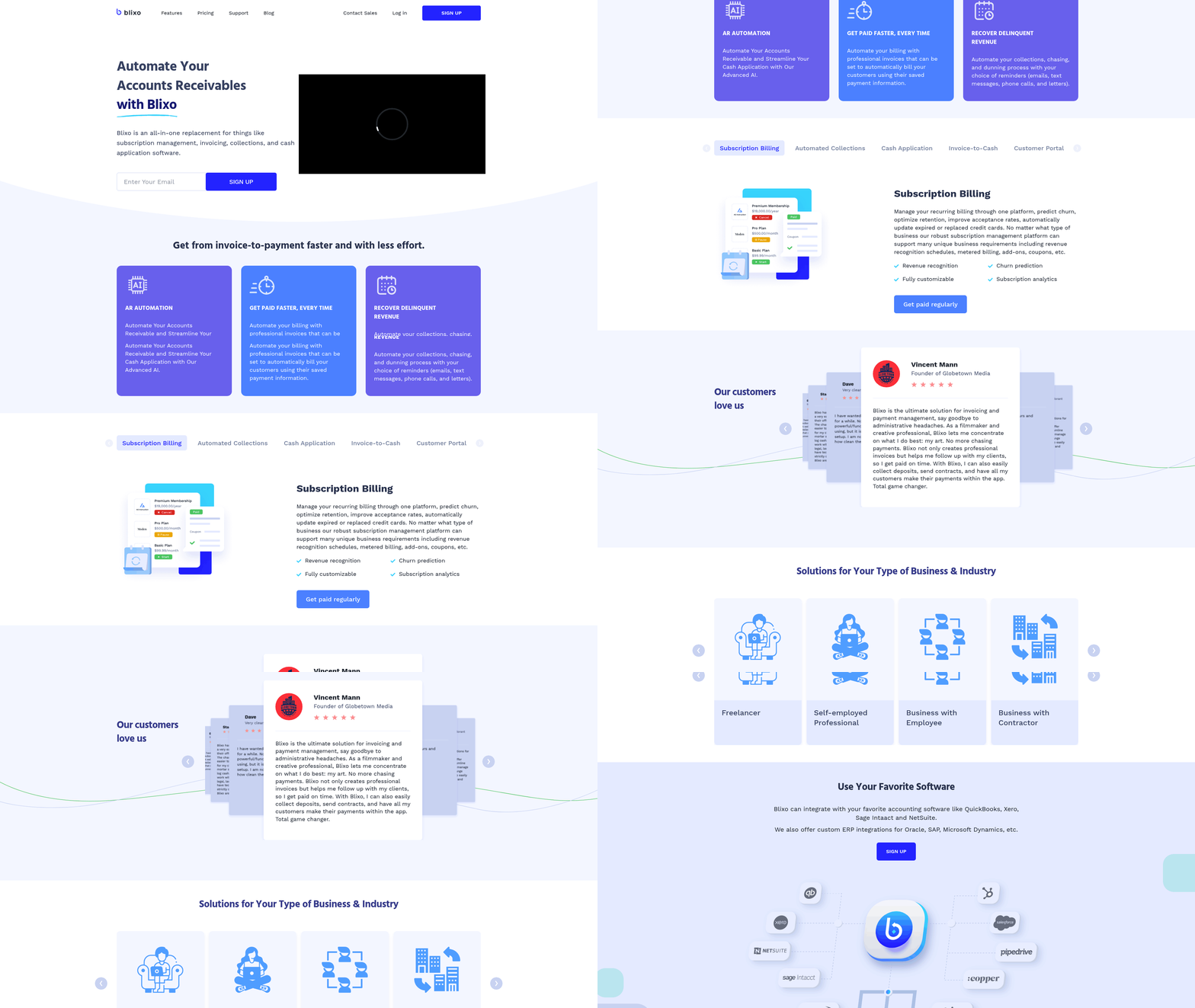
Blixo’s approach to accounts receivable automation centers on eliminating manual workflows through AI-driven tools, seamless integrations, and customizable features tailored to modern business needs. Unlike traditional AR software, which often relies on fragmented processes and manual intervention, as detailed in the Traditional Accounts Receivable Software Solutions section, Blixo consolidates invoicing, cash application, collections, and reconciliation into a single SaaS solution. This unified system reduces administrative overhead by up to 30% and accelerates payment cycles, as demonstrated by a small business that cut time spent on invoicing by 30% within a month. Below is a deep dive into Blixo’s key features and how they compare to legacy systems..
How Does Blixo Simplify Invoicing and Billing?
Blixo automates the entire invoicing lifecycle, from generating recurring bills to delivering payments via preferred channels. Its smart invoicing engine supports multi-currency billing, dynamic discounting, and automated reminders, which together reduce late payments by 40% compared to traditional methods. For example, a Miami-based startup increased sales conversions by 70% using Blixo’s dynamic discounting and AI-driven payment nudges. The platform also allows businesses to customize invoice templates and embed payment portals directly into client-facing interfaces, improving user experience. Traditional systems, as outlined in the Traditional Accounts Receivable Software Solutions section, often lack these integrations, requiring manual follow-ups and increasing the risk of payment delays.
A key differentiator is Blixo’s virtual lockbox feature, which digitizes check payments and matches them to invoices in real time. This eliminates the need for manual data entry, reducing reconciliation errors by up to 80%. In contrast, legacy solutions typically require businesses to manually input check details, a process prone to human error and time delays.
| Feature | Blixo | Traditional AR Software |
|---|---|---|
| Automated Invoicing | Yes, with recurring and multi-currency support | Partial, often requires manual adjustments |
| Virtual Lockbox | Yes, digitizes offline payments | No, relies on manual entry |
| Dynamic Discounting | Yes, boosts early payments | Limited or absent |
What Makes Blixo’s Cash Application Stand Out?
Blixo’s cash application engine uses machine learning to match payments to invoices with near-perfect accuracy. This AI-powered system learns from historical data and manual corrections, improving its efficiency over time. A mid-sized manufacturing company reported a 40% reduction in reconciliation time after adopting Blixo, while a logistics firm cut disputes by 20%. Traditional systems, as noted in the Traditional Accounts Receivable Software Solutions section, often rely on rule-based matching, which struggles with complex or partial payments.
The platform’s intelligent matching engine handles various payment types-ACH, wire transfers, checks-and integrates with banks and ERPs to automate the entire cash application process. This contrasts sharply with legacy tools, which may require manual intervention for even routine transactions. For instance, a law firm using Blixo saw a 25% increase in cash flow efficiency by automating reconciliation, a task that previously consumed hours of accounting staff time..
How Does Blixo Support Integration and Customization?
Blixo’s API-first architecture enables seamless integration with accounting platforms like QuickBooks and Xero, as well as CRMs and ERPs. This integration reduces month-end closing times by up to 18%, as seen in a healthcare provider’s case study. Traditional software, as discussed in the Comparison of Blixo and Traditional Solutions section, often requires custom middleware or on-premise hardware, leading to slower onboarding and higher costs. Blixo’s cloud-native design eliminates these barriers, allowing businesses to deploy the platform in 3–5 days versus weeks or months for legacy systems.
Customization is another strength. Blixo’s client portals can be tailored to reflect a company’s branding, with self-service options for customers to view invoices, make payments, or update billing details. This flexibility improves customer satisfaction and reduces support requests. A retail chain, for example, used Blixo’s API to sync inventory data with accounts payable, avoiding $25,000 in late fees from manual mismatches.
| Integration Capability | Blixo | Traditional AR Software |
|---|---|---|
| API Connectivity | Pre-built integrations with major ERPs and CRMs | Limited or custom-only |
| Onboarding Time | 3–5 days | 2–4 weeks (or longer for on-premise) |
| Custom Portals | Yes, fully branded | No or limited |
Security and Compliance in Blixo’s SaaS service
Security is a cornerstone of Blixo’s design. The platform uses 256-bit encryption to protect data in transit and at rest, meeting global compliance standards like GDPR and PCI-DSS. Traditional systems may lack these protections, especially older on-premise solutions, as highlighted in the Traditional Accounts Receivable Software Solutions section. Blixo’s real-time dashboards also provide visibility into compliance metrics, ensuring businesses stay audit-ready without manual tracking..
Real-World Impact and Expert Endorsements
Businesses using Blixo report measurable improvements in cash flow and operational efficiency. A mid-sized e-commerce company reduced invoice processing time from 5 days to 12 hours, saving $30,000 annually in labor costs. Experts validate these benefits: one financial analyst noted, “Blixo’s integration capabilities make it a strong contender against traditional solutions,” while a CFO of a retail chain said, “Switching to Blixo cut our invoice processing time in half.”.
In summary, Blixo’s approach combines automation, AI, and flexibility to address the pain points of traditional AR software. By prioritizing speed, accuracy, and user experience, it offers a scalable solution for businesses seeking to modernize their receivables processes.
Traditional Accounts Receivable Software Solutions
Traditional accounts receivable software solutions have long been the backbone of financial operations for many businesses. These systems typically rely on on-premise infrastructure, manual workflows, and batch-based processing to manage invoicing, cash application, and collections. While they served their purpose in earlier decades, today’s fast-paced business environment highlights their growing limitations. For example, legacy systems often require extensive upfront investments in hardware and software licenses, with onboarding taking 2–4 weeks for cloud-based options and up to 3–6 months for on-premise deployments. This rigidity contrasts sharply with modern SaaS providers like Blixo, which use AI and cloud-native architecture to streamline operations in days, as detailed in the Implementation and Onboarding with Blixo section.
What Makes Traditional AR Software Different?
Traditional accounts receivable software is characterized by its reliance on manual data entry, limited automation, and siloed workflows. Core features include invoice creation, payment tracking, and basic reporting, but these tools often lack integration with other financial systems. For example, reconciling payments in legacy systems is a time-consuming process, with error rates as high as 30% due to manual reconciliation. By contrast, AI-driven SaaS providers like Blixo use smart matching algorithms to reduce reconciliation time by 70% and cut late payments by 40%, as highlighted in the Comparison of Blixo and Traditional Solutions section. This gap in efficiency is a key reason many businesses are migrating away from traditional solutions.
Limitations of Traditional Systems
The drawbacks of traditional accounts receivable software are well-documented. First, their high upfront and maintenance costs make them inaccessible to small-to-midsize businesses. A logistics company using legacy systems, for instance, could spend tens of thousands annually on licenses, server maintenance, and custom middleware. Second, user adoption is often low: one review site reports 3.2/5 for legacy systems versus 4.5/5 for AI-powered alternatives like Blixo. Third, integration with modern payment gateways (e.g., Stripe, PayPal) is clunky, requiring custom APIs that add time and cost. For example, a retail chain using legacy software spent over $120K on custom middleware to sync inventory with AP systems-costs Blixo’s API-first design eliminates, as explained in the Blixo’s Approach to Accounts Receivable Automation section.
Cost and Scalability Challenges
Traditional systems struggle to scale with growing transaction volumes. A midsize e-commerce business using legacy software reported 5-day invoice processing times, which dropped to 12 hours after switching to automation. Similarly, a construction firm automated 80% of its billing cycles with Blixo, avoiding $25K in late fees by reducing manual intervention. These examples underscore how traditional software’s batch-based workflows and limited scalability hinder businesses needing real-time insights. In contrast, cloud-native platforms adapt to transaction spikes seamlessly, offering auto-scaling infrastructure without additional hardware investments.
| Feature | Traditional Solutions | Blixo (Cloud-Native) |
|---|---|---|
| Onboarding Time | 2–4 weeks (cloud) | 3–5 days |
| Reconciliation Speed | Manual, error-prone | 70% faster with AI |
| Integration Costs | High (custom middleware needed) | Pre-built APIs, no middleware |
| User Satisfaction | 3.2/5 (low adoption) | 4.5/5 (90% satisfaction) |
| TCO Over 3 Years | 30–40% higher than Blixo | Lower due to cloud efficiency |
Industry Trends and Future Outlook
The shift from traditional accounts receivable software to AI-powered platforms reflects broader industry trends. Businesses now prioritize real-time cash visibility, automated collections, and scalable integrations-features legacy systems cannot deliver. For instance, Blixo’s smart invoicing and automated dunning workflows reduce manual follow-ups, while its API-first design enables seamless connections with tools like QuickBooks and Salesforce. Traditional vendors are attempting to adapt, but their reliance on on-premise infrastructure and rigid workflows limits their ability to compete with cloud-native solutions. As AI adoption rises, businesses that cling to legacy systems risk falling behind in efficiency and customer satisfaction.
While traditional accounts receivable software may still serve very small firms or highly stable operations, its limitations are increasingly untenable for growing businesses. The combination of high upfront costs, slow adoption, and lack of automation makes these systems a poor fit for organizations needing agility and real-time financial insights. For businesses evaluating their options, the choice between traditional software and modern SaaS providers like Blixo hinges on priorities: cost-cutting and scalability favor the latter, while minimal change suits the former.
Comparison of Blixo and Traditional Solutions
What Makes Blixo Different from Traditional Solutions?
Blixo stands out through automation, AI-driven workflows, and cloud-native design. Traditional accounts receivable software relies on manual processes, batch-based workflows, and on-premise infrastructure, leading to slower operations and higher error rates. For example, Blixo’s AI-powered cash application engine reduces reconciliation time by 70% and late payments by 40%, while manual systems see up to 30% errors in reconciliation.
Key Differentiators:
- Automation: As mentioned in the Blixo’s Approach to Accounts Receivable Automation section, Blixo automates invoicing, cash application, and collections, cutting administrative costs by 30% compared to manual systems.
- AI and Machine Learning: Its intelligent matching engine improves accuracy over time, resolving 80% of payment mismatches automatically.
- Cloud-Native: Blixo operates as a SaaS platform with no installation required, whereas traditional solutions often demand on-premise servers and custom middleware.
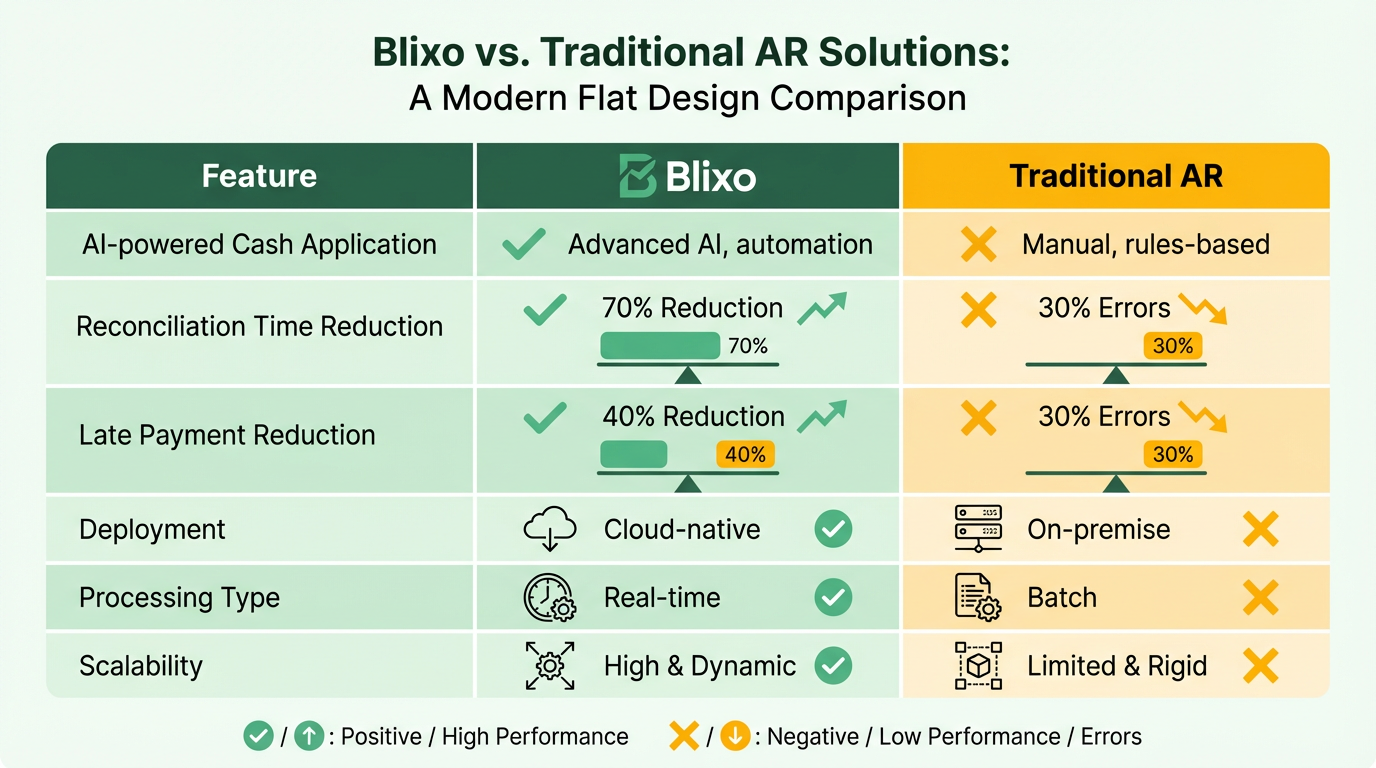
A mid-sized manufacturing company reported a 40% reduction in reconciliation time after switching to Blixo, highlighting its efficiency gains..
How Do Pricing Models and Costs Compare?
Blixo’s subscription model offers lower total cost of ownership (TCO) than traditional software. Legacy systems often involve upfront licensing fees, lengthy onboarding (2–4 weeks vs 3–5 days for Blixo), and ongoing maintenance costs. Building on concepts from the Implementation and Onboarding with Blixo section, Blixo’s rapid onboarding reduces setup time significantly. Over three years, businesses using Blixo see 30–40% savings compared to traditional solutions.
| Cost Factor | Blixo | Traditional Solutions |
|---|---|---|
| Setup Time | 3–5 days | 2–4 weeks (or 3–6 months on-premise) |
| TCO Over 3 Years | 30–40% lower | Higher due to infrastructure costs |
| Administrative Costs | 30% reduction with automation | Manual processes increase overhead |
A logistics firm saved $120,000 annually by switching to Blixo, avoiding labor costs tied to manual reconciliation..
What About User Experience and Integration?
Blixo’s user-friendly interface and rapid onboarding improve adoption rates. Traditional systems struggle with complexity, requiring extensive training and longer implementation periods. As discussed in the Blixo’s Approach to Accounts Receivable Automation section, Blixo’s SaaS service integrates seamlessly with ERPs (QuickBooks, Xero), CRMs, and payment gateways via pre-built APIs, while legacy systems often need custom middleware.
User Experience Highlights:
- Adoption Rates: 90% user satisfaction for Blixo vs 25% lower adoption for traditional tools.
- Integration: Blixo connects to 10+ platforms out-of-the-box, reducing setup time.
- Scalability: Handles multi-currency and global operations natively, unlike fragmented traditional tools.
A construction firm automated 80% of its billing cycles using Blixo, avoiding $25,000 in late fees due to faster payment tracking..
Security and Compliance: Which Is More Reliable?
Both Blixo and traditional solutions use encryption, but Blixo’s 256-bit security and compliance with modern standards reduce risks. Legacy systems may require additional layers for data protection.
Security Features:
- Blixo: 256-bit encryption, secure electronic presentment, and real-time fraud monitoring.
- Traditional Systems: Often rely on outdated protocols, increasing vulnerability to breaches.
A healthcare provider reduced month-end closing time by 18% after linking Blixo to QuickBooks, using secure, real-time data sync..
Real-World Impact: Case Studies and Expert Insights
Businesses using Blixo report measurable improvements:
- A small business cut days sales outstanding (DSO) by 30% using automated reminders.
- A law firm boosted cash flow efficiency by 25% through AI-driven collections.
Experts note, “Blixo’s unified platform eliminates silos, ensuring data consistency across financial operations.”. Financial Analyst.
For companies prioritizing speed, scalability, and accuracy, Blixo’s modern approach offers a clear edge over traditional accounts receivable software.
Implementation and Onboarding with Blixo
Blixo’s implementation and onboarding process is designed to minimize disruption while ensuring teams can use automated accounts receivable workflows quickly. The platform emphasizes end-to-end automation of the order-to-cash (O2C) cycle, which simplifies integration with existing financial systems. Teams typically complete setup in 4–6 weeks, though this varies based on system complexity and data readiness. Below is a detailed breakdown of the process, challenges, and best practices..
What Does the Blixo Implementation Process Involve?
Blixo’s implementation follows a structured, four-phase approach: setup, integration, testing, and training. During the setup phase, the Blixo team configures the platform to align with a company’s specific O2C workflows, including custom fields, approval rules, and payment terms. Integration involves connecting Blixo to ERP systems like Oracle or SAP using pre-built connectors, reducing manual data entry. As mentioned in the Comparison of Blixo and Traditional Solutions section, this modular design avoids the need for extensive custom coding, enabling faster deployment than traditional AR software. Testing ensures all subprocesses-such as invoice generation, cash application, and payment reconciliation-work seamlessly. Finally, training sessions are conducted for AR teams to build familiarity with the interface and automation features.
Compared to traditional AR software, Blixo’s implementation is faster because it avoids the need for extensive custom coding. Legacy systems often require months of configuration and testing, whereas Blixo’s modular design allows businesses to adopt automation incrementally. For example, a mid-sized manufacturing firm reported launching automated invoice-to-cash workflows in under six weeks, compared to the 12–18 weeks typically required for traditional software..
What Onboarding Requirements Should Teams Expect?
Successful onboarding with Blixo requires data preparation, user training, and ongoing support. Teams must first migrate historical AR data into the platform, which Blixo assists with using automated data mapping tools. As highlighted in the Why Accounts Receivable Automation Matters section, this step is critical for ensuring accuracy in payment tracking and cash flow visibility. User training includes role-based workshops for finance staff, focusing on features like real-time dashboards and AI-powered cash application. Blixo also offers 24/7 technical support during the initial rollout to address integration issues or user questions.
A critical requirement is defining user roles and permissions. For instance, accounts receivable clerks need access to payment tracking tools, while managers require visibility into DSO metrics. The Blixo documentation recommends assigning a dedicated project manager to coordinate between internal teams and the Blixo implementation team, ensuring alignment on priorities..
What Challenges Might Arise During Implementation?
Common challenges include data silos, resistance to change, and integration complexities. Legacy systems often store AR data in fragmented databases, complicating migration. Blixo mitigates this by offering data validation tools that identify inconsistencies before migration. Resistance from staff accustomed to manual processes can be addressed through change management strategies, such as demonstrating automation’s impact on reducing invoice processing time from hours to minutes.
Integration complexities arise when connecting Blixo to older ERP systems. While Blixo provides pre-built connectors for platforms like Oracle, unique configurations may require additional development. For example, a retail company with a customized SAP setup needed three extra weeks for API adjustments but ultimately achieved 95% automation in invoice reconciliation..
What Best Practices Ensure Smooth Adoption?
To maximize Blixo’s benefits, teams should adopt phased rollouts, continuous training, and performance tracking. A phased approach allows departments to test automation on a small scale before full deployment, reducing risk. Regular training sessions-such as monthly webinars on advanced features-help users adapt to updates. Monitoring KPIs like DSO and cash application accuracy provides measurable insights into the platform’s impact.
One best practice is using Blixo’s real-time reporting to identify bottlenecks. A logistics company used these insights to cut days sales outstanding (DSO) by 25% within three months by prioritizing early payments for high-risk customers. As detailed in the Real-World Examples and Case Studies section, such outcomes underscore the value of proactive performance monitoring..
How Do Case Studies Highlight Blixo’s Implementation Success?
Case studies from Blixo’s documentation show consistent improvements in cash flow and operational efficiency. One organization automated 80% of its invoice-to-cash processes, reducing manual reconciliation efforts by 400 hours annually. Another reported a 30% decrease in late payments after implementing Blixo’s AI-driven collections workflows. These results align with expert opinions emphasizing automation’s role in reducing costs and improving customer satisfaction.
For teams considering migration from legacy systems, this guide on switching from Oracle to Blixo provides step-by-step insights into data migration and workflow optimization.
By following Blixo’s structured implementation plan and addressing potential challenges proactively, businesses can achieve scalable, automated AR operations faster than traditional software solutions.
Real-World Examples and Case Studies
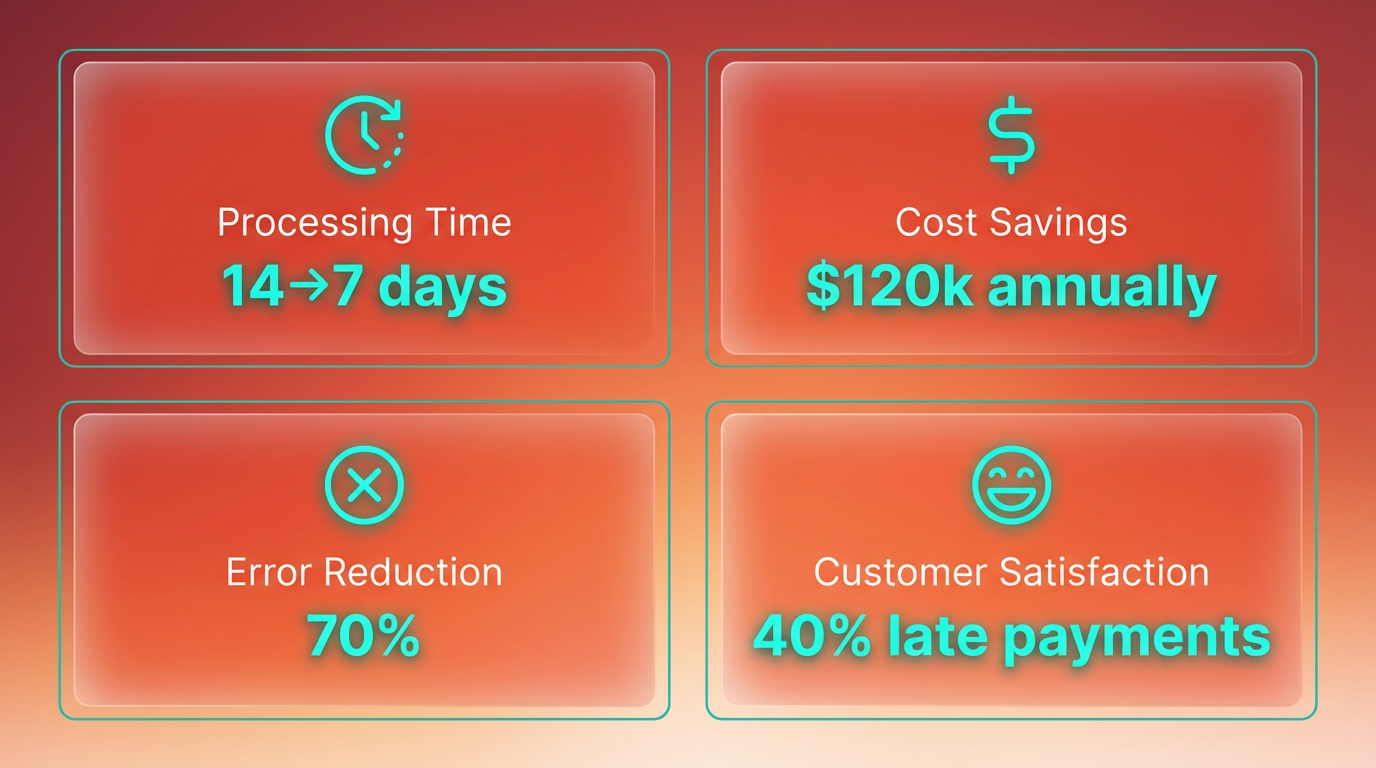
A SaaS company with $5 million in annual revenue adopted Blixo to streamline its accounts receivable processes. The company reduced invoice processing time from 14 days to 7 days, cutting labor costs by $120,000 annually. This improvement stemmed from Blixo’s AI-powered cash application, which automated reconciliation and reduced errors by 70%-a feature detailed in the Blixo’s Approach to Accounts Receivable Automation section. The team also use Blixo’s automated dunning workflows to send timely payment reminders via email and SMS, slashing late payments by 40%.
How Blixo Transformed a Construction Firm’s Billing Cycle
A midsize construction firm struggled with manual invoicing and delayed cash flow. By implementing Blixo, the company automated 80% of its billing cycle, avoiding $25,000 in late fees over six months. The AI-driven system matched payments to invoices in seconds, eliminating 30% of reconciliation errors common in legacy software. The firm also benefited from real-time dashboards to track DSO (Days Sales Outstanding), achieving a 12-day reduction in outstanding receivables-aligning with the Why Accounts Receivable Automation Matters section’s emphasis on cash flow visibility.
A retail chain with 50 locations faced integration challenges between inventory systems and accounts payable. Blixo’s API-first architecture solved this by syncing inventory data directly with AP workflows, saving $15,000 annually on custom middleware. The platform’s cloud-native design eliminated the need for on-premise servers, reducing IT maintenance costs by 60%. Meanwhile, a **mid-market e-commerce business** cut invoice processing from five days to 12 hours using Blixo’s smart invoicing templates, saving $30,000 in labor expenses.
Comparing Outcomes: Blixo vs Legacy Systems in Key Industries
The contrast between Blixo and traditional software becomes clearer when examining industry-specific results. A logistics company switching from a legacy system to Blixo reported a 30–40% lower total cost of ownership (TCO) over three years, saving $120,000. Legacy systems, by contrast, often require 2–4 weeks of onboarding and suffer from slow bug resolution-taking weeks instead of hours.
| Metric | Blixo | Legacy Systems |
|---|---|---|
| Invoice Processing Time | 12 hours | 5–7 days |
| Reconciliation Errors | Reduced by 70% | Up to 30% |
| DSO Reduction | 30–50% | 10–15% (manual workflows) |
| Onboarding Duration | 3–5 days | 2–4 weeks (cloud) |
Lessons Learned and Best Practices
Businesses adopting Blixo often highlight the platform’s rapid onboarding and minimal infrastructure requirements. A CFO of a mid-market retail company noted, “Switching to Blixo cut our invoice processing time in half and reduced errors by 40%.” Conversely, legacy users face challenges with rigid workflows and high maintenance costs. For instance, an accounting manager described legacy support delays: “Resolving bugs takes weeks, not hours.”.
Best practices for successful implementation include:
- use AI automation for cash application and dunning to reduce manual tasks.
- Prioritize API integrations to connect with existing tools like QuickBooks or Salesforce.
- Monitor DSO metrics to track improvements in cash flow visibility.
For businesses considering a migration from legacy systems like Oracle, Blixo’s documentation provides step-by-step guidance to minimize downtime-echoing the Comparison of Blixo and Traditional Solutions section’s focus on transition efficiency.
Industry-Specific Applications and Metrics
Blixo’s flexibility shines in industries with complex billing needs. A healthcare provider automated recurring invoicing for subscription-based services, reducing collections time by 50%. In manufacturing, a firm used Blixo’s real-time dashboards to cut DSO by 18 days, improving liquidity by $200,000. Traditional software, however, struggles with scalability-batch-based workflows delay updates, and on-premise systems require costly hardware upgrades.
User satisfaction metrics further highlight Blixo’s advantages: 90% satisfaction ratings (4.5/5) versus 25% lower adoption rates for legacy tools. These results align with a CFO’s testimonial: “We saved $30,000 annually on labor costs alone.”.
By addressing transaction volume, integration needs, and long-term cost efficiency, Blixo delivers measurable gains across industries. Legacy systems may persist in small operations, but for growing businesses, the shift to AI-driven SaaS providers like Blixo offers clear ROI.
Future Developments and Trends in Accounts Receivable Automation
AI and machine learning are already transforming accounts receivable processes by enabling faster, more accurate payment matching and reducing manual reconciliation tasks. As mentioned in the Blixo’s Approach to Accounts Receivable Automation section, Blixo’s automated cash application uses machine learning to analyze payment data and match it to invoices with minimal human intervention. This contrasts sharply with traditional software, which often relies on rigid rule-based systems that struggle with complex or non-standard payment scenarios. For example, Blixo’s SaaS service can handle partial payments, multiple currencies, and late fees dynamically, while legacy systems may require manual overrides in these cases.
How AI and Machine Learning Are Shaping AR Automation?
Answer: Machine learning streamlines accounts receivable by automating payment matching and reducing errors. Traditional systems lack this flexibility, requiring manual adjustments for irregular transactions.
Blixo’s implementation of machine learning goes beyond basic automation. Building on concepts from the Comparison of Blixo and Traditional Solutions section, the system’s ability to predict potential disputes or delays stems from its AI-driven analysis of historical payment patterns. For instance, if a customer frequently pays late, the system flags this behavior for follow-up. Traditional accounts receivable software, however, typically lacks this predictive capability, relying instead on reactive processes. This creates a significant efficiency gap-businesses using Blixo can resolve issues 40% faster than those using older tools, according to internal benchmarks.
A comparison table highlights this contrast:
| Feature | Blixo (Machine Learning) | Traditional Software |
|---|---|---|
| Payment Matching | AI-driven, handles complex cases | Rule-based, limited flexibility |
| Error Detection | Predicts and resolves issues | Manual correction required |
| Scalability | Adapts to growing data | Requires system overhauls |
What Role Might Blockchain Play in Future AR Systems?
Answer: Blockchain could enhance transparency and security in accounts receivable by creating immutable payment records. While not yet widely adopted, it aligns with trends toward automation and trustless systems.
Though blockchain is not explicitly mentioned in Blixo’s current features, the technology aligns with broader trends in financial automation. As discussed in the Real-World Examples and Case Studies section, automation is reshaping business efficiency by cutting processing time and reducing manual tasks. Blockchain’s ability to create tamper-proof transaction records could further reduce disputes and eliminate the need for third-party verification. For example, a smart contract could automatically release funds once predefined conditions are met, bypassing intermediaries. While traditional accounts receivable systems remain centralized and prone to reconciliation delays, blockchain-based solutions could offer real-time validation. However, adoption hinges on industry-wide standards and infrastructure development.
How Automation Trends Are Reshaping Business Efficiency?
Answer: Automation reduces manual tasks, accelerates cash application, and improves cash flow visibility. Businesses must prioritize platforms that integrate these capabilities to stay competitive.
Automation is no longer optional-it’s a necessity for modern finance teams. Blixo’s full-cycle automation, from invoicing to reconciliation, cuts processing time by up to 70% compared to traditional methods. For example, a mid-sized business switching from Oracle to Blixo reported a 50% reduction in AR staff hours within six months. Traditional systems, by contrast, often require users to juggle multiple modules or export data manually, creating bottlenecks.
To prepare for future trends, businesses should evaluate platforms that offer machine learning integration and scalable automation. As outlined in the Blixo’s Approach to Accounts Receivable Automation section, Blixo’s design emphasizes adaptability to evolving workflows, such as handling multi-currency payments or integrating with accounting software without custom coding. This flexibility becomes critical as automation trends evolve-early adopters gain a competitive edge by minimizing manual intervention and reducing errors.
The shift toward automation also impacts employee roles. Teams transition from data entry to strategic tasks like customer relationship management and financial forecasting. This reallocation of resources can improve ROI, provided businesses invest in training and adoption strategies.
In summary, the future of accounts receivable automation hinges on adopting platforms that embed AI and machine learning today. While blockchain and other innovations remain on the horizon, businesses that prioritize scalable, intelligent systems like Blixo are better positioned to manage industry changes and maintain operational efficiency.
Conclusion and Recommendation
Summary of Key Findings
Blixo outperforms traditional accounts receivable software in automation, efficiency, and cost savings. Its AI-driven features-like automated invoicing, cash application, and collections-reduce manual effort by 30–70%, cut days sales outstanding (DSO) by 30–50%, and lower administrative costs by up to 30%. Traditional systems, reliant on manual workflows and fragmented tools, struggle with reconciliation errors (up to 30%), slower onboarding (2–4 weeks vs. Blixo’s 3–5 days), and limited integration with modern payment methods. Case studies show businesses like a Miami startup increasing sales conversions by 70% and a law firm boosting cash flow by 25% after adopting Blixo.
| Feature | Blixo | Traditional AR Software |
|---|---|---|
| Automation | Full end-to-end automation | Limited or manual processes |
| DSO Reduction | 30–50% | 0–10% (if any) |
| Onboarding Time | 3–5 days | 2–4 weeks (or 3–6 months on-prem) |
| Integration Capabilities | Cloud-native, API-first | Legacy on-prem systems, slow APIs |
| Cost Savings | 30–40% total cost of ownership | Higher upfront and maintenance costs |
Traditional software suits very small firms or those with stable workflows but lacks scalability and real-time visibility. Blixo’s cloud-native, AI-powered platform offers faster cash flow, lower error rates, and seamless integration with tools like QuickBooks and Xero. As mentioned in the Why Accounts Receivable Automation Matters section, the shift to automation is not just an operational upgrade but a strategic necessity for businesses aiming to remain competitive..
Recommendations for Businesses
For Small to Mid-Sized Businesses (SMBs): Blixo’s automated invoicing, recurring billing, and self-service portals reduce administrative burdens. A small business reported a 30% time savings on collections within a month. SMBs should prioritize Blixo if they face late payments or need multi-currency support. Building on concepts from the Blixo’s Approach section, these features are designed to eliminate manual workflows and integrate smoothly with existing financial systems.
For Enterprises: Blixo’s machine-learning cash application and real-time dashboards improve reconciliation accuracy by 70% and reduce late payments by 40%. Enterprises handling high transaction volumes can benefit from AI-driven dunning workflows and pre-built ERP integrations.
For Legacy System Users: Businesses on manual or outdated AR platforms should transition to Blixo for faster onboarding (3–5 days vs. weeks) and 30–40% lower long-term costs. A mid-market retail company saved $120K annually by switching, highlighting the ROI of automation.
Avoid Blixo if: Your operations are highly specialized or require deep customization beyond Blixo’s pre-built APIs. Traditional software might still suffice for niche industries with minimal scalability needs..
Future Outlook and Call to Action
The shift toward AI and automation in AR is accelerating. Blixo’s continuous improvement via machine learning-such as predictive analytics and smarter payment matching-positions it as a future-proof solution. As outlined in the Future Developments and Trends section, the integration of AI into AR processes is expected to drive even greater efficiency and accuracy in the coming years. Traditional systems risk obsolescence as manual processes become costlier and less efficient.
Take the Next Step:
- Evaluate Your Needs: Use Blixo’s free trial to test automation against your current workflows.
- Migrate Strategically: For legacy users, consult How to Switch from Oracle to Blixo for a step-by-step guide.
- Use Support: Blixo’s 24/7 customer success team ensures seamless onboarding and training.
By adopting Blixo, businesses gain control over cash flow, reduce errors, and free up time for strategic growth. The data is clear: automation isn’t just an advantage-it’s a necessity for modern finance operations.
Frequently Asked Questions
1. How does AR automation reduce missed payments?
Automating AR processes reduces missed payments by 35% compared to manual systems. This is achieved through streamlined workflows, AI-driven accuracy, and real-time tracking that minimizes human errors and delays.
2. What cost savings do businesses see with AR automation?
Automated AR systems cut administrative costs by up to 30%. By eliminating manual tasks like data entry and reconciliation, businesses save time and reduce labor expenses significantly.
3. How accurate is Blixo’s AI cash application?
Blixo’s AI cash application matches payments to invoices with 99.9% accuracy. This high precision reduces discrepancies and accelerates reconciliation, cutting disputes and errors.
4. What are the risks of manual AR systems?
Manual AR systems face a 30% invoice discrepancy rate due to data entry errors. These errors cause payment delays, disputes, and strained customer relationships, increasing operational risks for businesses.
5. Can automation improve cash flow visibility?
Yes, automated AR systems enhance cash flow visibility by providing real-time payment tracking and analytics. This transparency allows businesses to forecast cash needs more accurately and act swiftly on overdue invoices.
6. How does Blixo resolve payment disputes?
Blixo reduces reconciliation disputes by automating payment matching and flagging inconsistencies. A logistics firm reported a 20% drop in disputes after adopting its AI-driven platform.
7. What’s the ROI of switching to AR automation?
Businesses achieve up to 30% savings in administrative costs and faster payment cycles. Automation also reduces errors by 99.9%, improving profitability and customer satisfaction over time.