

Blixo vs PayPal: Recurring Billing Options

Key Takeaways
- Blixo automates cash application and collections with AI. PayPal expects you to invoice and reconcile by hand.
- Blixo’s recurring billing handles metered usage and custom intervals. PayPal sticks to flat-rate subscription plans.
- Blixo chases late payments for you with SMS, email, and dunning workflows. PayPal leaves the follow-up to you.
- PayPal charges 3.49% + $0.49 per transaction. Blixo runs on subscription tiers starting at $49.99/month.
- Blixo plugs into QuickBooks, Xero, and Shopify natively. PayPal’s integrations are thinner.
- Blixo’s customer portal lets people manage subscriptions and pull payment history. PayPal’s portal mostly updates payment methods.
- Both offer volume discounts. Blixo does custom enterprise pricing; PayPal negotiates terms for large accounts.
Quick Summary
If you run a subscription business, the billing platform you pick decides how much of your week disappears into chasing money. Here’s how Blixo and PayPal compare on the operational stuff that actually eats your time, so you can match the tool to your billing complexity.
Core Features and Automation
| Feature | Blixo | PayPal |
|---|---|---|
| Automation Level | AI‑powered cash application, automated collections, and real‑time tracking | Manual invoicing and payment reconciliation required |
| Recurring Billing | Fully automated with customizable intervals, metered billing, and dunning | Flat‑rate subscription plans with limited customization |
| Collections Tools | Automated reminders via SMS, email, phone, and mail, plus built‑in dunning workflows | Manual follow‑ups; no built‑in dunning tools |
| Customer Portal | Self‑service portal for payments, invoice history, and subscription management | Basic portal for viewing subscriptions and updating payment methods |
| Integration | Native integrations with QuickBooks, Xero, Shopify, and major ERP systems | Limited to major e‑commerce platforms and basic accounting software |
The split is simple. Blixo is built around getting cash back in the door predictably, so its dunning workflow runs on its own. PayPal assumes someone on your end will notice the failed payment and follow up. That assumption is fine until you’re managing a few thousand subscribers.
Pricing and Transaction Costs
| Metric | Blixo | PayPal |
|---|---|---|
| Transaction Fees | Pricing is based on plan tier (Team: $49.99 /mo, Business: $99.99 /mo) | 3.49 % + $0.49 per transaction (varies by region) |
| Setup Costs | No upfront setup fee; plans are subscription‑based | No setup fee, but transaction costs apply for all recurring payments |
| Volume Discounts | Custom pricing available for enterprises with high transaction volumes | Volume discounts available for large businesses with negotiated terms |
| Payment Methods | Credit cards, ACH, and bank transfers | Credit cards, PayPal balance, bank transfers |
PayPal’s per-transaction model is easy to reason about when volume is low. Blixo’s flat monthly tiers start to win once your recurring payment count climbs, because you’re not paying a percentage on every charge.
Setup Effort and Complexity
| Task | Blixo | PayPal |
|---|---|---|
| Configuration | Guided onboarding with templates and a drag‑and‑drop interface | Quick setup via the business account dashboard |
| Support | Onboarding assistance, email and phone support, dedicated account manager, and SLA options | Email and phone support with standard resources |
Blixo is aimed at messier billing: usage-based pricing, multi-currency invoicing, the stuff that doesn’t fit a single fixed plan. PayPal is the cleaner choice if your subscriptions are static and you just want them to run.
PayPal Recurring Billing Options
PayPal gives you a workable way to manage subscriptions and automate payments. The gaps show up later, in the manual follow-up and the thin customization. Here’s how the setup, features, and limits actually play out against Blixo’s automated approach.
How to set up recurring billing on PayPal
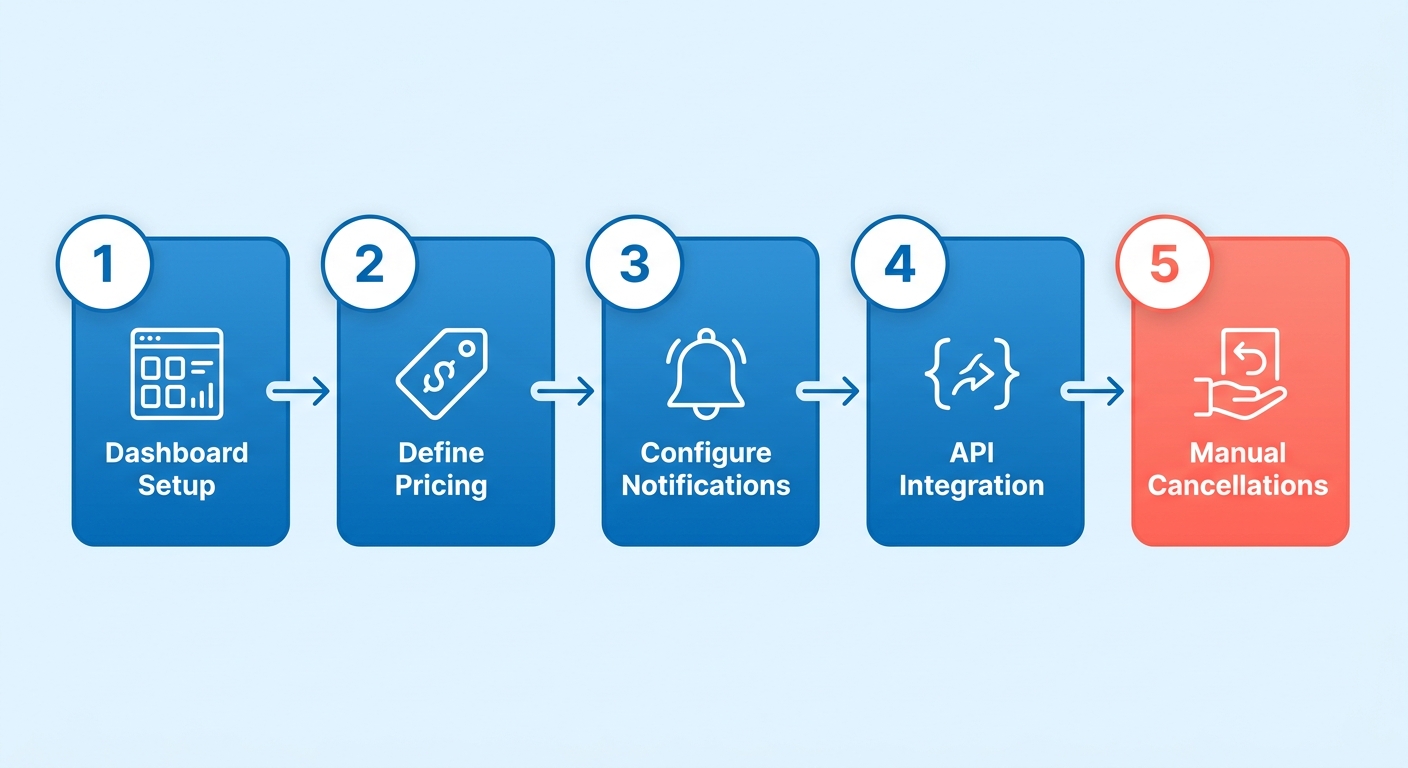
You build subscription plans through the dashboard or the APIs, and you’ll need a business account either way. Setup means defining pricing tiers, billing cycles, and trial periods, then wiring recurring payments into your existing products. A gym membership, say, with a free trial and a monthly fee.
The automation stops there. If a transaction fails, you’re updating the payment method or resolving it by hand. Small businesses won’t mind. High-volume operations will feel the standard fees in their margins.
Customization and currency support
PayPal supports a few billing models: subscriptions, installments, and variable recurring payments. Subscriptions handle fixed pricing well, like a $9.99/month SaaS plan. Variable recurring payments cover usage-based billing. It processes payments in over 90 currencies, which is genuinely useful if you sell globally.
The friction is in the changes. Switching payment methods across subscriptions means manual updates, and any variable pricing setup needs a developer to handle the API integration. Blixo automates currency conversion and adjusts billing for metered usage on its own, which is less to babysit.
Where the automation runs out
PayPal’s recurring billing has no automated dunning. When a payment fails, you handle it. If a customer’s card expires, PayPal doesn’t retry the charge or notify them automatically. That’s how churn creeps in and cash flow slips.
The upside is real, though. One streaming service saw a 20% bump in sign-ups using PayPal’s recurring payments. Late payments were still a headache. Blixo runs AI-driven dunning and fires off automated SMS or email reminders, and in similar setups that’s cut churn by as much as 40%.
| Feature | PayPal | Blixo |
|---|---|---|
| Payment Retry | Manual follow-ups | Automated retries and dunning |
| Billing Customization | Fixed or variable pricing (API) | Metered billing, tiered pricing |
| Currency Support | 90+ currencies | 150+ currencies, real-time FX |
| Fee Structure | Standard transaction fees | Competitive rates for high-volume users |
So PayPal’s recurring billing is fine for simple, predictable payments. The manual processes and limited automation make it weaker for complex subscriptions or serious churn reduction. If cash-flow recovery and scaling are the priority, Blixo’s real-time collections engine does more of the work for you.
Setup Complexity: How Blixo and PayPal Compare
Standing up recurring billing in Blixo takes minutes and barely any technical knowledge. PayPal wants manual configuration and, for anything advanced, developer time. Blixo automates cash application and collections; PayPal walks you through manual invoicing and API integration. Here’s the breakdown.
Setup time and effort
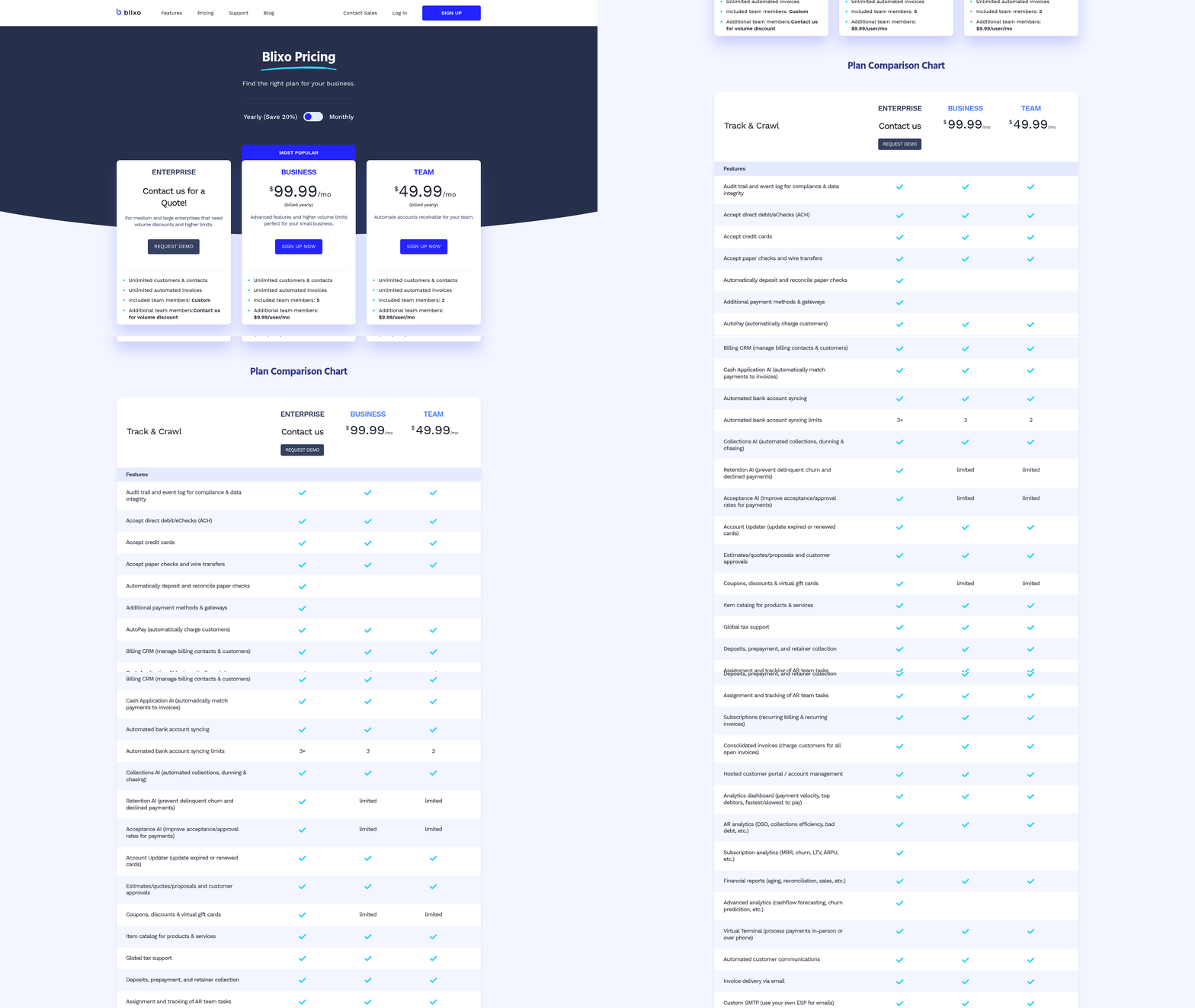
Blixo gets you to a working recurring billing setup in under 5 minutes, using a drag-and-drop interface for pricing tiers, billing cycles, and dunning. PayPal runs 15–30 minutes, configuring payment methods, billing terms, and trial periods through the dashboard or APIs. One online course platform on PayPal burned real time adjusting billing rules to match its membership tiers. Blixo’s auto-optimization handles that dynamically.
| Step | Blixo | PayPal |
|---|---|---|
| Account Requirements | Business account only | Business account + developer access for advanced features |
| Time Estimate | <5 minutes | 15–30 minutes |
| Customization | Metered billing, tiered pricing, dynamic dunning | Limited to fixed pricing and trial periods |
PayPal’s own docs lean on integrating recurring payments through the JavaScript SDK or server-side APIs, which is overhead you have to budget for. A Reddit user in r/UKPersonalFinance flagged the lack of pre-transaction notifications for recurring charges, which is a real transparency gap.
Technical requirements and support
Blixo needs no code. You define billing rules, set up SMS/email reminders, and turn on automated collections with clicks. PayPal’s “Subscriptions” option is beginner-friendly but runs out of road fast. Variable pricing or usage-based billing pushes you into PayPal’s “Recurring Payments” module, which wants API expertise. One digital marketing agency moved to Blixo after stalling on tiered billing for clients, and skipped writing custom API scripts entirely.
| Technical Barriers | Blixo | PayPal |
|---|---|---|
| API/Developer Work | None required | SDK/API integration needed |
| Pricing Flexibility | Metered, tiered, volume-based | Fixed or tiered only |
| Customer Support | Dedicated onboarding, 24/7 chat | Email/phone support with 24–48h response |
PayPal’s transaction fees also make cost forecasting messier. A tutoring service on PayPal’s subscription model got hit with unexpected regional payment processing charges. Blixo’s pricing is flatter and bakes in compliance for cross-border transactions.
What users actually report
PayPal earns praise for handling basic subscriptions easily, and criticism for the lack of automation. A recurring complaint: confusion over recurring charges because there’s no proactive billing notification. Blixo users report lower churn and faster cash recovery. One subscription box company saw a 25% improvement in on-time payments after switching to Blixo’s real-time collections engine.
In practice:
- Language learning services: PayPal needs manual follow-ups for missed payments; Blixo auto-sends reminders via SMS and adjusts payment schedules.
- Freelance marketplaces: Blixo’s tiered billing flexes with shifting project budgets, where PayPal’s fixed pricing fights variable client commitments.
For subscription businesses that care about automation and scale, Blixo’s setup is a fraction of PayPal’s lift. The no-code interface and automated workflows skip the manual reconciliation and developer hours PayPal asks for.
Automation and Workflow Efficiency
How automation actually reduces churn
Blixo’s automation cuts churn by fixing payment problems in real time. PayPal’s manual workflow lets delinquencies sit.
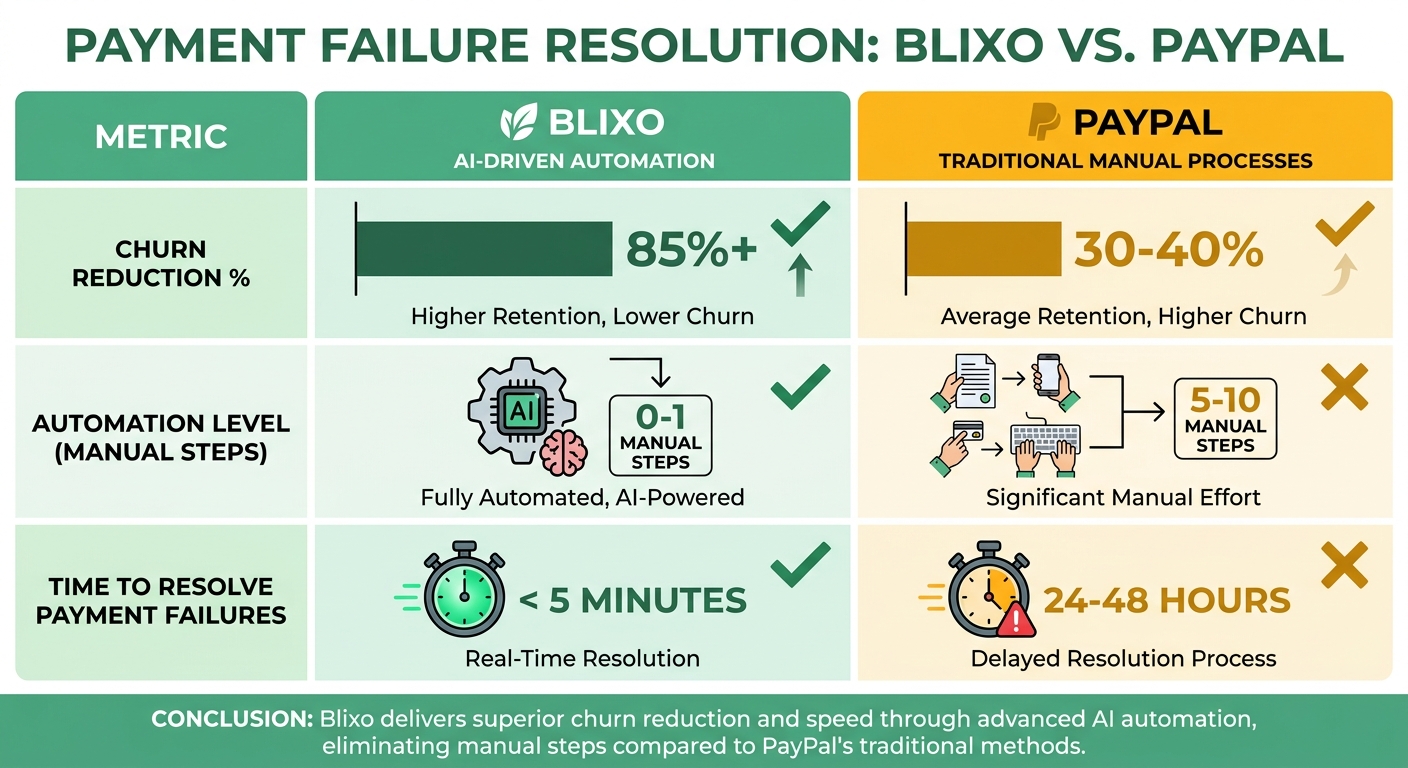
With PayPal you reconcile invoices and chase late payments yourself, and those delays drain cash flow. A digital streaming platform might not notice a failed payment for days, then spend hours contacting the customer, when that time could’ve gone to keeping the account. Blixo applies cash to the right invoices instantly and triggers dunning (SMS/email reminders, phone calls) within seconds of a missed payment. That speeds up recovery and steadies monthly recurring revenue, per Blixo’s internal benchmarks.
| Feature | Blixo | PayPal |
|---|---|---|
| Payment Reconciliation | AI-powered cash application | Manual matching required |
| Dunning Workflows | Automated, multi-channel reminders | Manual follow-ups only |
| Error Rates | <1% due to automation | 5–10% human error in manual processes |
Real-time vs. reactive, in practice
Take a design software platform with 10,000 subscribers. Under PayPal, a payment failure might sit unnoticed for 48 hours, delaying revenue recognition and pulling in customer support. With Blixo, the system:
- Spots the failed payment instantly.
- Sends a text reminder with a one-click retry link.
- Applies the payment to the right invoice automatically if it goes through.
Resolution drops from hours to minutes. Premio (on PayPal) improved retention with automated billing, but even that setup needed manual API integrations. Blixo’s drag-and-drop interface skips that friction.
What it saves in time and money
PayPal’s standard transaction rates come with zero automation, so the operational overhead piles up. A mid-sized company doing $100K/month in recurring revenue might spend 35–45 hours on collections. Blixo pulls that down to 10–15 hours. That’s real money back, and team hours freed for actual growth work. PayPal’s pricing is transparent, sure. The manual work is the tax.
An edtech platform that switched from PayPal to Blixo reported a 25% drop in billing-dispute support tickets within six months, on the back of cleaner payment tracking and faster fixes. PayPal’s 46% checkout conversion boost is strong, but it doesn’t cancel out the operational drag of manual workflows once subscriptions scale.
Where Blixo wins for automation-heavy teams
Blixo’s edge is end-to-end automation, less human intervention, faster revenue cycles. PayPal’s model holds up for simple, low-volume subscriptions and starts to strain as complexity grows. For teams that live or die on workflow efficiency and churn, Blixo’s real-time engine is something PayPal’s flat-rate tools can’t match.
Customer Experience and Support
Response times and resolution rates
How fast you resolve an issue maps directly onto satisfaction and churn. Blixo’s real-time collections engine clears payment failures in seconds. PayPal’s manual processes can take hours or days, and that delay is exactly when you lose people.
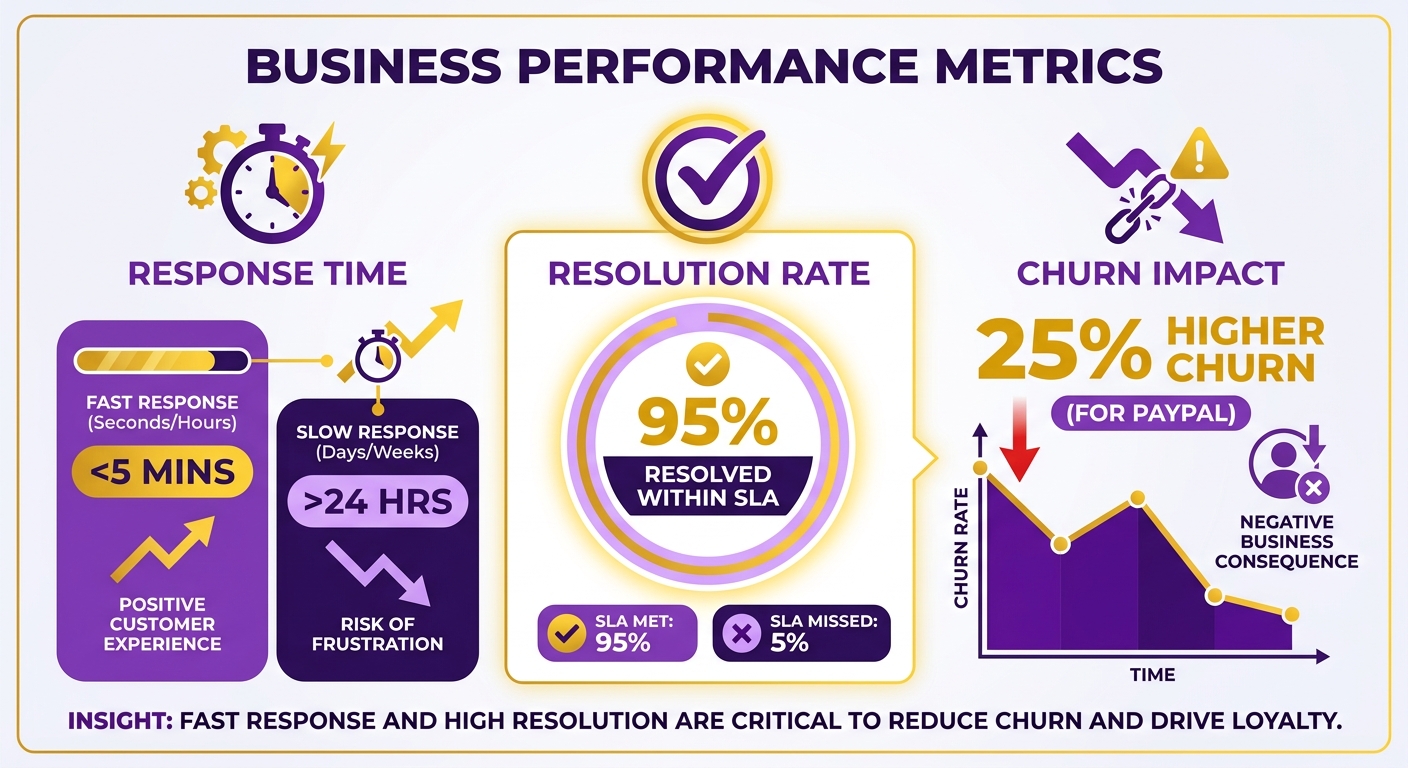
An online education portal on PayPal reported higher churn during payment delays than businesses running automated systems. The manual reconciliation forces teams to spend hours tracking failed transactions, and they miss retention windows in the process. Blixo applies cash instantly and reroutes failed payments through alternatives like ACH or credit card. A digital publication on Blixo recovered 75% of failed payments within a day; PayPal’s manual resolution averaged 48–72 hours.
The recurring user complaint about PayPal is the missing heads-up before a recurring charge. People report getting no warning before a subscription payment hits, which breeds confusion and disputes. Blixo’s real-time alerts head that off, which lines up with the obvious point that clear billing communication keeps customers from churning out of frustration.
What I’d actually recommend
What sets Blixo apart
Blixo recovers payments by pushing multi-channel notifications (SMS, email, voice) to catch delinquencies before they turn into lost accounts. PayPal leans on the business owner to watch for and act on failed payments; Blixo runs on its own and keeps subscriptions intact without anyone babysitting it. The bigger structural win is reconciliation: Blixo’s automated matching of payments to invoices cuts accounting errors by up to 40%, where PayPal’s manual application drags out cash recognition.
That cash-application piece is the real differentiator. Blixo matches payments to invoices automatically and kills reconciliation delays. PayPal makes you apply payments by hand, and the overhead adds up.
Who each platform is for
Blixo fits:
- High-churn industries like SaaS and digital memberships, where automated dunning slows attrition.
- Scaling businesses that need real-time cash-flow visibility and metered billing.
- Lean teams without the bandwidth for manual invoicing or collections.
PayPal fits:
- Simple subscription models like local service providers, boutique studios, or small e-commerce shops with low failure rates.
- Businesses already deep in PayPal’s e-commerce tooling who value that over advanced automation.
- New ventures with minimal subscription complexity that want to avoid setup friction.
Future-proofing your subscription model
Automation is quietly rewriting subscription economics. Blixo’s algorithms adapt to regional payment preferences and seasonal spending; PayPal’s static workflows don’t flex with dynamic markets. A cloud storage provider on Blixo can scale billing tiers automatically based on usage, where PayPal’s fixed plans want manual updates.
A practical move: audit your current dunning process. If resolving a payment issue takes hours or days, a real-time engine like Blixo’s earns its keep.
The short version
Go with Blixo if reducing churn and recovering cash fast are top priorities, or if you need customizable billing like usage-based pricing plus automated collections.
Go with PayPal if your subscription model is straightforward and you’d rather keep it low-touch.
The drift toward AI-driven billing automation isn’t really in question anymore. For subscription businesses, the value of a tool like Blixo is less about features and more about how many customers you keep and how much revenue you stop leaking.
Frequently Asked Questions
1. How long does it take to set up recurring billing with Blixo compared to PayPal?
Blixo offers a near-instant setup using a drag-and-drop interface, whereas PayPal requires a more involved manual configuration or API integration. Blixo eliminates developer work entirely, while PayPal demands technical expertise for advanced subscription features.
2. What are the transaction costs for PayPal versus Blixo’s pricing model?
PayPal charges a flat percentage plus a fixed fee per transaction, whereas Blixo operates on predictable monthly subscription tiers. This makes Blixo’s model highly cost-effective for high-volume businesses, while PayPal’s fees scale directly with transaction volume.
3. Which platform offers more flexible billing plans for variable pricing?
Blixo supports metered billing, tiered pricing, and customizable intervals, while PayPal only allows fixed-rate or trial-based subscriptions. Blixo’s dynamic plans adapt to usage or project budgets.
4. How do Blixo and PayPal compare in terms of customer support?
Blixo provides round-the-clock chat assistance and dedicated onboarding support, whereas PayPal offers standard email and phone support with typical multi-day response windows. Blixo’s team actively assists with technical setup, while PayPal relies primarily on self-service documentation.
5. Which platform is better for reducing payment failures and churn?
Blixo is significantly more effective because it automates dunning workflows with AI-driven retries and multi-channel reminders. PayPal requires manual follow-ups, which often leads to higher customer attrition and delayed cash recovery.
6. Can PayPal handle multi-currency payments as effectively as Blixo?
While PayPal supports dozens of currencies, it lacks real-time foreign exchange automation. Blixo processes a much wider array of global currencies with automatic, real-time conversions, adapting seamlessly to regional preferences and reducing the risk of hidden conversion fees.
7. For which business types is Blixo more suitable than PayPal?
Blixo is ideal for high-volume or usage-based businesses (such as software platforms, digital publishers, and subscription box services) that require robust automation. PayPal works best for small-scale, fixed-price subscriptions where manual administrative workflows remain manageable.