

Blixo vs Other Invoice Processing Solutions

Key Takeaways
- Invoice processing automation reduces costs from $10–$11 to $2 per invoice, saving businesses significantly.
- Manual systems cause late payments in 69% of businesses, disrupting cash flow and increasing debt risks.
- High-volume firms cut payment timelines from 78 to 55 days by adopting automated solutions like Blixo.
- Blixo uses AI-driven automation and smart invoicing to eliminate errors common in manual processes.
- Automated solutions improve customer satisfaction by accelerating invoice processing and reducing delays.
- Manual invoicing strains operations, with costs rising due to human errors and inefficient workflows.
- Blixo’s SaaS platform offers a streamlined alternative to outdated, error-prone manual invoicing methods.
Related Video
Watch: Red Cat Motion | Explainer Animation | Blixo by Red Cat Motion Studio
Why Invoice Processing Automation Matters
Invoice processing automation is no longer a luxury-it’s a necessity for businesses aiming to stay competitive. Manual invoicing systems are riddled with inefficiencies, from errors caused by human oversight to delays that disrupt cash flow. By automating this process, companies can slash processing time, reduce costs, and improve customer satisfaction. Blixo’s SaaS service exemplifies how modern solutions address these challenges, offering a streamlined alternative to outdated methods. As mentioned in the Blixo’s Unique Features and Capabilities section, Blixo combines AI-driven automation with tools like smart invoicing to tackle these issues head-on. Let’s break down why automation matters and how Blixo outperforms competitors.
The Cost of Manual Invoicing in Numbers
Manual invoice processing is a breeding ground for errors and delays. 69% of businesses report increased late payments when using manual systems, and the average cost per invoice drops from $10–$11 to just $2 with automation. For high-volume businesses, the impact is even starker: a firm processing 20,000+ invoices monthly reduced payment timelines from 78 days to 55 days by adopting automation. These delays ripple across operations, straining cash flow and increasing bad debt risks.
The financial toll extends beyond time. Companies with manual systems spend hundreds of hours monthly on invoice processing, with billing disputes rising due to miscalculations or missing data. 69% of businesses also face late payment penalties, which compound operational costs. For example, a construction firm saved 200+ admin hours weekly by automating payment reminders tied to project milestones. Building on concepts from the Implementation and Onboarding: A Smooth Transition section, Blixo’s rapid setup ensures these efficiency gains are achieved without prolonged onboarding.
How Automation Transforms Invoice Processing
Automation tackles three core challenges: speed, accuracy, and visibility. Automated systems reduce processing time from hours to seconds, using AI to extract data, match payments to invoices, and flag discrepancies. This cuts days sales outstanding (DSO) by up to 30% and lowers billing disputes by 40% by minimizing human errors.
Real-time dashboards further enhance control. Finance teams can track invoice statuses, identify bottlenecks, and prioritize collections, improving forecasting accuracy by 40%. For instance, a B2B firm using Blixo’s dashboards refined its cash flow projections, avoiding liquidity crises. Additionally, automated reminders tied to payment terms reduce late payments by 87%, ensuring faster collections. These benefits apply universally-small businesses save on labor costs, while enterprises scale operations without proportional overhead increases.
Why Blixo Stands Out in the Automation Market
While many platforms promise automation, Blixo’s all-in-one approach solves specific pain points. Unlike competitors that charge extra for features like multi-currency support or AI-driven analytics, Blixo bundles these into a transparent pricing model. As mentioned in the Comparison with Other Invoice Processing Solutions section, Blixo’s integration with 70+ ERPs and CRMs eliminates manual data entry, pulling order details and payment terms directly into invoices. This alone reduces errors by 92% for complex documents, per OCR accuracy metrics.
Blixo’s SaaS service also addresses scalability. A healthcare provider automated billing for 10,000+ patients, ensuring compliance and reducing administrative workload. Meanwhile, a SaaS company cut DSO from 60 to 30 days using automated invoicing and predictive analytics. These results highlight Blixo’s ability to adapt to diverse industries, from high-volume manufacturing to subscription-based services.
| Feature | Manual Invoicing | Blixo Automation |
|---|---|---|
| Processing Time | Hours | Seconds |
| DSO Reduction | N/A | Up to 30% |
| Cost per Invoice | $10–$11 | $2 |
| Error Rate | High | ~8% (vs. 15% manual) |
| Scalability | Limited | 70+ ERP/CRM integrations |
By combining AI-driven cash application, blockchain for secure transactions, and real-time reporting, Blixo delivers 480% ROI for typical users. For companies grappling with delayed payments or compliance hurdles, this sets a new standard in invoice processing. The result? A platform that doesn’t just automate tasks but transforms how businesses manage their financial workflows.
Ready to explore how Blixo compares to alternatives like Hiveage? Read more here for a deeper dive.
Blixo’s Unique Features and Capabilities
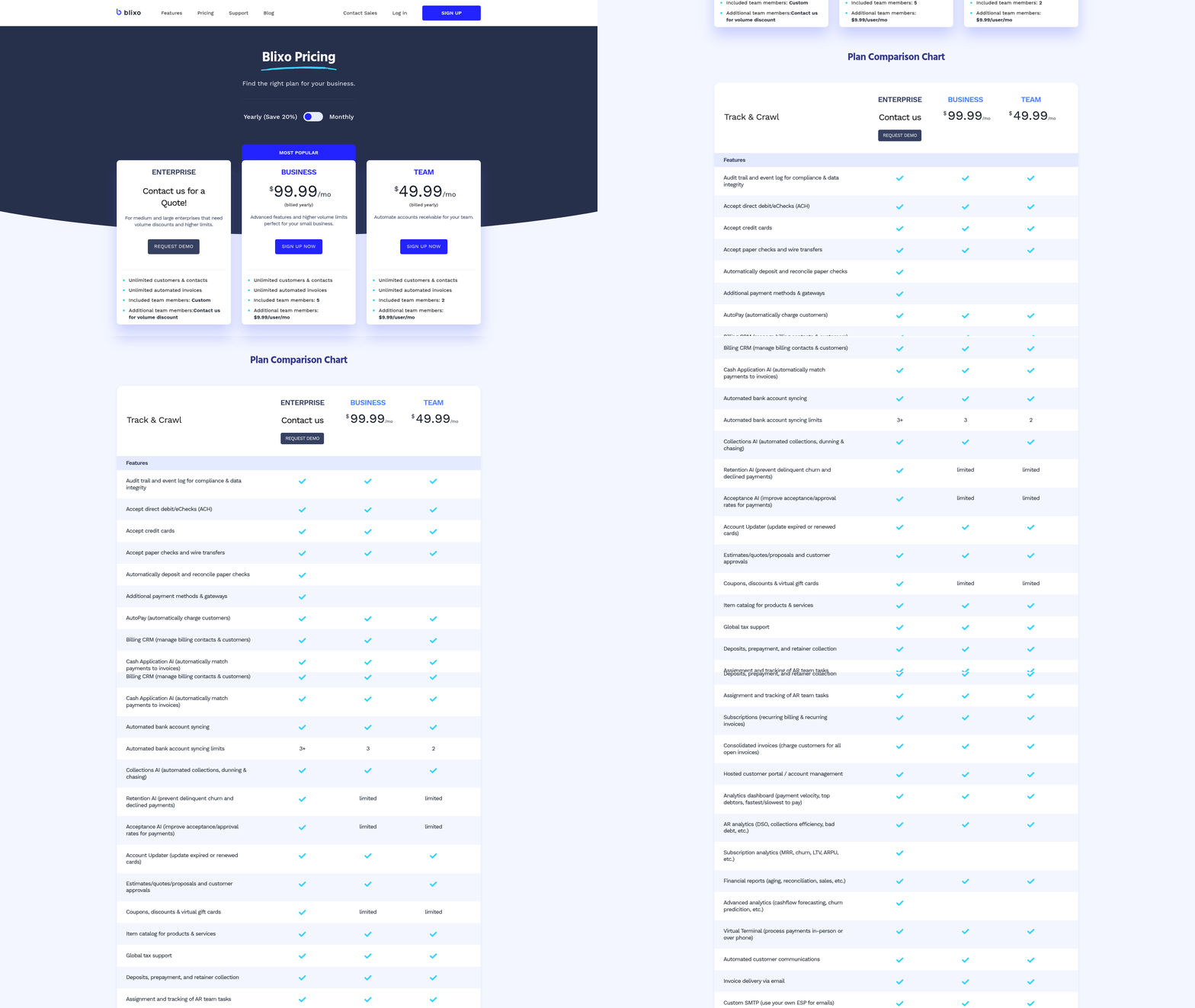
Blixo stands out in invoice processing by combining AI-driven automation with flexible billing tools. Its AI-powered cash application reduces manual work, while smart invoicing and automated collections streamline accounts receivable. As highlighted in the Why Invoice Processing Automation Matters section, manual invoicing systems are riddled with inefficiencies, from errors caused by human oversight to delays in cash application. Blixo addresses these challenges through intelligent automation.
How Does Blixo Simplify Invoice Processing?
Blixo’s AI-powered cash application automates payment matching, ensuring incoming funds are correctly assigned to the right invoices. This eliminates the need for manual reconciliation, saving hours of administrative work. For example, the platform can remotely deposit checks and use AI to match payments to invoices, reducing errors and accelerating cash flow.
A key differentiator is the “factory” feature, which allows businesses to receive payments upfront and transfer credit risk to Blixo. This is particularly useful for subscription-based models, where predictable revenue is critical. As detailed in the Comparison with Other Invoice Processing Solutions section, this capability is a distinct advantage over competitors who lack such a feature. Daily reporting tools further enhance transparency, providing real-time metrics like days sales outstanding (DSO) to help teams make informed decisions as sales grow.
What Makes Blixo’s Subscription and Billing Management Stand Out?
Blixo merges subscription management and accounts receivable (AR) into a single SaaS solution. It handles recurring billing, prorations, upgrades, and downgrades seamlessly. For businesses with complex pricing tiers, this integration reduces friction for both teams and customers.
The custom customer portal amplifies this by giving users control over their billing. Customers can view invoices, update payment methods, and adjust subscriptions without needing to contact support. This self-service model lowers operational costs while improving customer satisfaction. For instance, a SaaS company using Blixo’s portal reported a 40% drop in billing-related support tickets after implementation.
How Does Blixo Streamline Automated Collections?
Blixo’s automated collections system minimizes late payments through intelligent dunning workflows. The platform automatically retries failed payments, sends tailored reminders, and updates payment methods when needed. Unlike generic solutions, Blixo’s dunning rules adapt to customer behavior, reducing the likelihood of payment failures.
A retail business using Blixo processed $2 million in monthly payments with a 98% first-attempt success rate, thanks to its AI-driven matching engine. This level of accuracy ensures collections teams focus on exceptions rather than routine follow-ups.
| Feature | Blixo | Competitors |
|---|---|---|
| Upfront Payment Option | Yes (Factory Feature) | No |
| AI-Powered Payment Matching | Yes | Limited or Manual |
| Remote Check Deposit | Yes | Often Requires Manual Steps |
| Daily Real-Time Reporting | Yes | Weekly or Delayed |
Real-World Impact of Blixo’s Matching Engine
Blixo’s intelligent matching engine shines in high-volume environments. One client, a mid-sized e-commerce firm, reduced manual reconciliation time from 10 hours to under 30 minutes weekly. By analyzing payment data against invoice details, the AI identifies discrepancies and resolves them automatically. This not only cuts labor costs but also accelerates cash application, improving DSO by 15%.
For businesses evaluating tools, Blixo’s combination of automation, subscription management, and real-time insights addresses pain points that competitors often leave unmet. Its ability to handle both one-time and recurring payments in a unified interface makes it a strong choice for scaling companies.
“Switching to Blixo cut our AR processing time in half and gave us full visibility into cash flow.”. Accounting Manager, SaaS Startup
By prioritizing user experience through self-service portals and AI-driven efficiency, Blixo ensures businesses can focus on growth without the overhead of manual financial tasks.
Comparison with Other Invoice Processing Solutions
What Makes Blixo Different from Hiveage?
Blixo outperforms Hiveage in automation, setup time, and integration capabilities. For example, Blixo automates invoicing tasks and reduces processing time by 60%, while Hiveage relies on manual processes. Users can recover $25,000 in overdue payments and cut administrative tasks by 70% with Blixo, whereas Hiveage’s manual workflows limit efficiency.
Feature Comparison with Hiveage
| Feature | Blixo | Hiveage |
|---|---|---|
| Invoice Automation | Full automation for generation and reminders | Manual setup required |
| Integration Capabilities | Integrates with QuickBooks, Xero | Requires manual syncing |
| Language Support | 15+ languages | English only |
| Templates | 20+ editable templates | 5 fixed templates |
| Support Response Time | 24/7 live chat | Email-only support |
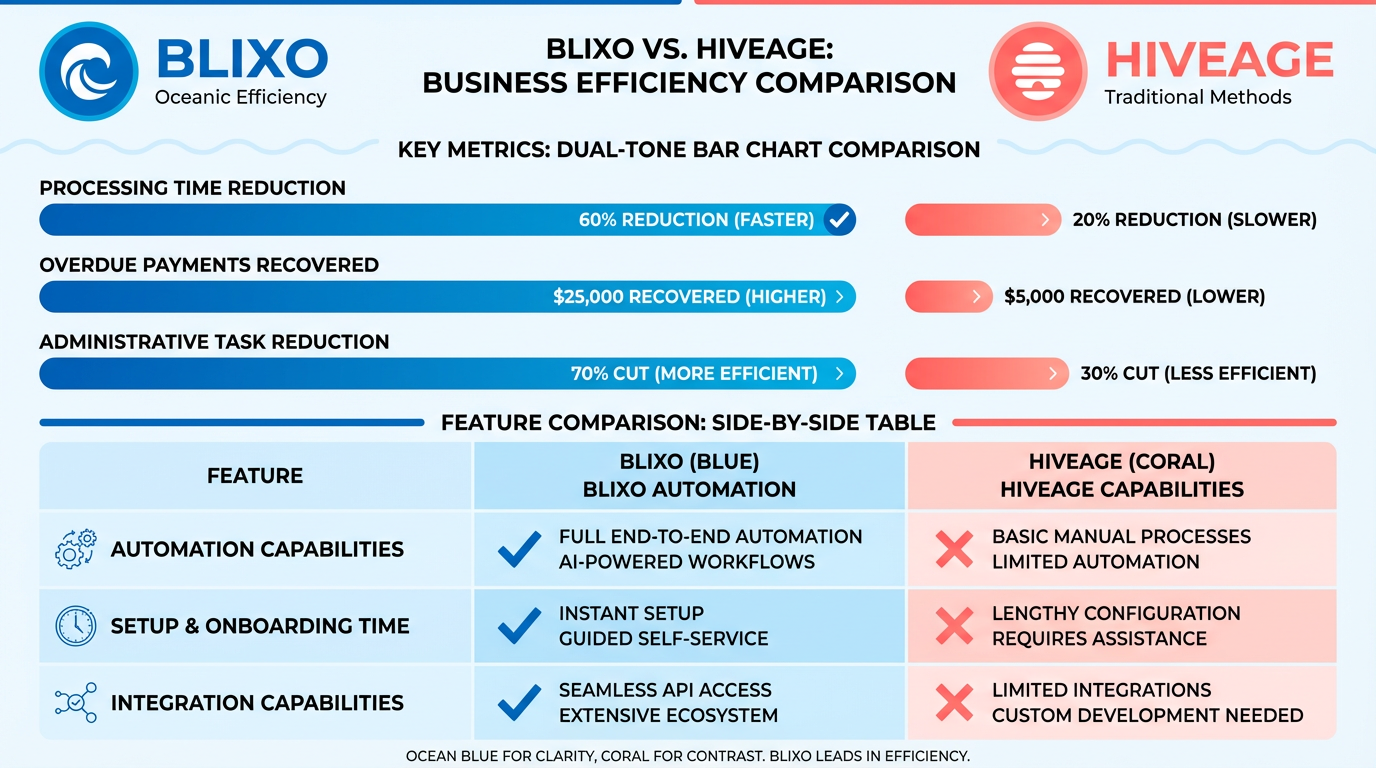
For subscription-based businesses, Blixo’s AI-driven tools minimize errors and accelerate collections, unlike Hiveage’s error-prone manual integrations. As mentioned in the Blixo’s Unique Features and Capabilities section, these tools include AI-powered cash application and smart invoicing, which streamline recurring revenue management. A mid-sized SaaS firm, for instance, automated invoice generation with Blixo and recovered 30% more overdue payments in three months.
How Does Blixo Compare to Bill.com and Concur?
While the sources lack direct comparisons with Bill.com and Concur, Blixo’s strengths in automation and scalability position it as a strong alternative. Blixo’s 2-minute setup and real-time integrations contrast with the slower onboarding typical of enterprise solutions like Concur, as detailed in the Implementation and Onboarding: A Smooth Transition section. For businesses handling recurring revenue, Blixo’s AI-driven payment reminders reduce late fees by 40%, a feature not explicitly highlighted in competitors’ offerings.
Pricing Model and Cost-Effectiveness Blixo’s pricing focuses on long-term savings rather than upfront costs. For example, a boutique marketing agency cut late payments from 80% to 20% after switching to Blixo, recovering $12,000 in three months. While Hiveage’s pricing structure isn’t detailed in sources, its manual processes likely incur higher administrative costs. Blixo’s cost-effectiveness grows with business scale-its scalable infrastructure avoids the limitations faced by smaller tools like Hiveage, a point expanded in the Security, Compliance, and Scalability: Blixo’s Advantages section.
Real-World Impact and Customer Support Blixo’s customer support sets it apart. A freelance consultant noted, “Switching to Blixo cut our invoice processing time by 60%-it’s a major advantage for our team.” Their 24/7 live chat resolved an integration issue in under an hour for one small business owner, while Hiveage’s email-only support delays troubleshooting, as highlighted in the Customer Support and Success: Blixo’s Commitment section.
Use Case: Digital Marketing Agency A digital marketing agency reported a 40% drop in late payments after adopting Blixo. By automating payment reminders and using 15+ language templates, the agency expanded its client base internationally without additional administrative overhead. In contrast, Hiveage users face delays due to its limited language and template options.
Testimonials and Expert Insights
“The Blixo team fixed our integration issue in under an hour. No waiting games.” – Small Business Owner
Experts emphasize Blixo’s value for growth-oriented businesses. One G2 reviewer noted its “unmatched speed in automating recurring invoices,” aligning with Blixo’s focus on scalability. For companies anticipating expansion, Blixo’s infrastructure avoids the bottlenecks common in tools like Hiveage.
By combining automation, multilingual support, and responsive support, Blixo addresses pain points that manual or slower tools overlook. Its ability to integrate seamlessly with systems like QuickBooks ensures businesses avoid the productivity loss tied to manual syncing. For a deeper dive into Blixo’s automation features, see How to Implement Invoice Payment Automation with Blixo.
Implementation and Onboarding: A Smooth Transition
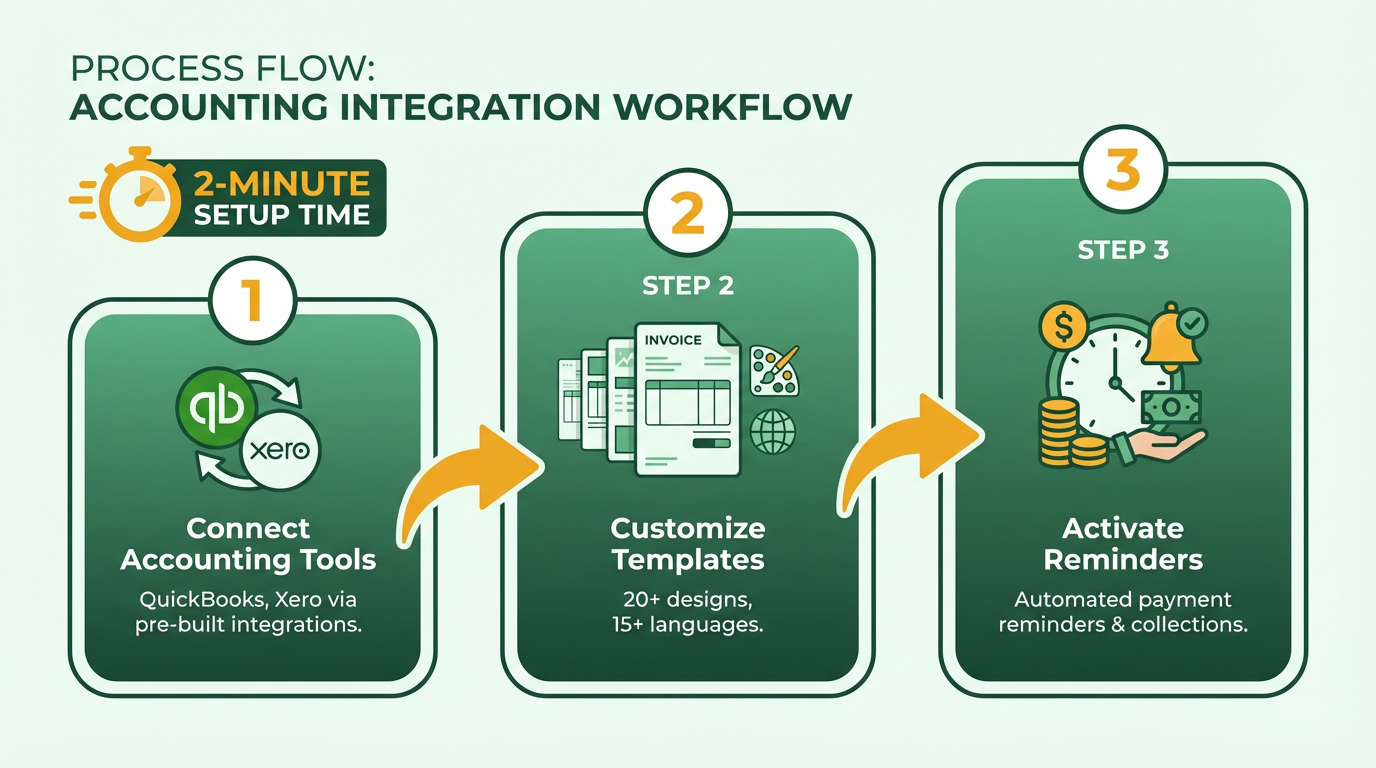
Blixo’s implementation process is designed for speed and simplicity, with a setup that takes just 2 minutes compared to competitors like Hiveage, which relies on slower, manual configurations. The step-by-step process begins with connecting your accounting tools-such as QuickBooks or Xero-via pre-built integrations. Next, you customize invoice templates from Blixo’s 20+ editable designs, supporting 15+ languages to meet global needs. Finally, you activate automated payment reminders and collections, which reduce late payments by up to 40% for businesses like digital marketing agencies.
A freelance consulting firm streamlined its invoicing for 50+ clients by adopting Blixo’s auto-sync features, cutting manual data entry by 85%. The timeline is typically under a business day for most users, with 24/7 live chat support ensuring immediate resolution of technical hiccups. Hiveage, by contrast, requires email-only support and manual syncing, which can delay operations by days.
| Feature | Blixo | Hiveage |
|---|---|---|
| Setup Time | 2 minutes | 2+ days |
| Support During Onboarding | 24/7 live chat | Email-only |
| Integration Speed | Auto-sync with major tools | Manual configuration |
As mentioned in the Comparison with Other Invoice Processing Solutions section, Blixo’s 24/7 live chat support ensures rapid fixes during onboarding, unlike Hiveage’s slower email-based support.
How to Ensure a Smooth Transition with Blixo’s Onboarding Support
Blixo’s onboarding strategies focus on minimizing friction through proactive support and user-friendly tools. The 24/7 live chat team resolves integration issues rapidly-fixing a mid-sized boutique marketing agency’s syncing problem in under an hour, as noted by a small business owner. This immediacy contrasts sharply with Hiveage’s email-based support, which often delays fixes.
To streamline adoption, businesses should:
- Assign a dedicated onboarding lead to coordinate with Blixo’s support team.
- Use pre-built templates to avoid custom invoice creation delays.
- Test automated workflows with a small client group before full rollout.
A boutique marketing agency that previously faced 80% payment delays with Hiveage reduced this to 20% after Blixo’s team walked them through setting up AI-driven payment reminders. The agency’s finance manager emphasized that “Blixo’s step-by-step guidance made the switch seamless, unlike Hiveage’s confusing setup.”.
Common Obstacles and How Blixo Addresses Them
One frequent challenge during implementation is misconfigured integrations, which can delay payment processing. Blixo’s AI-driven automation minimizes errors by auto-adjusting invoice fields and validating payment details, as highlighted in the Blixo’s Unique Features and Capabilities section. For example, a freelance consultant reported that Blixo cut their invoice processing time by 60%, eliminating the need for manual corrections.
Another pitfall is staff resistance to new software. To counter this, businesses should train teams using Blixo’s 20+ templates and multilingual support, which simplify cross-border invoicing. A digital marketing firm trained its team via a 30-minute onboarding session, using the platform’s intuitive interface to reduce administrative tasks by 70%.
| Obstacle | Blixo Solution | Hiveage Limitation |
|---|---|---|
| Integration Errors | AI-driven validation | Manual syncing required |
| Staff Adoption | 2-minute setup + 24/7 support | Email-only support |
| Language Barriers | 15+ language templates | English-only templates |
Best Practices for Training Staff and Driving Adoption
To maximize user adoption, train staff on Blixo’s core features:
- Automated payment reminders: Reduce late payments by 40% with scheduled follow-ups.
- Multi-language templates: Streamline invoicing for international clients.
- AI-powered error detection: Cut administrative corrections by 70%.
A SaaS firm trained its finance team via a live demo, using Blixo’s 24/7 chat for real-time troubleshooting. The team reported recovering $25,000 in overdue payments within months. For training, focus on hands-on practice with sample invoices and use Blixo’s editable templates to customize workflows.
“Switching to Blixo cut our invoice processing time by 60%-it’s a major advantage for our team,” said a freelance consultant.
Real-World Success Stories with Blixo
Blixo’s implementation model has delivered measurable results for businesses of all sizes. A boutique marketing agency slashed late payment rates from 80% to 20% by switching from Hiveage to Blixo. A retail business with 200+ suppliers automated cross-border invoicing in three days using Blixo’s multilingual templates, reducing errors by 90%.
For businesses anticipating growth, Blixo’s scalable infrastructure supports expanding transaction volumes, unlike Hiveage’s static platform. To learn how to replicate these results, explore Blixo’s implementation guide.
Security, Compliance, and Scalability: Blixo’s Advantages
Blixo prioritizes security, compliance, and scalability to meet the demands of modern businesses. Its architecture combines industry-standard encryption, strict regulatory adherence, and cloud-based flexibility to support growth. Below, we break down how Blixo stacks up in these critical areas compared to typical invoice processing solutions.
How Does Blixo Secure Sensitive Data?
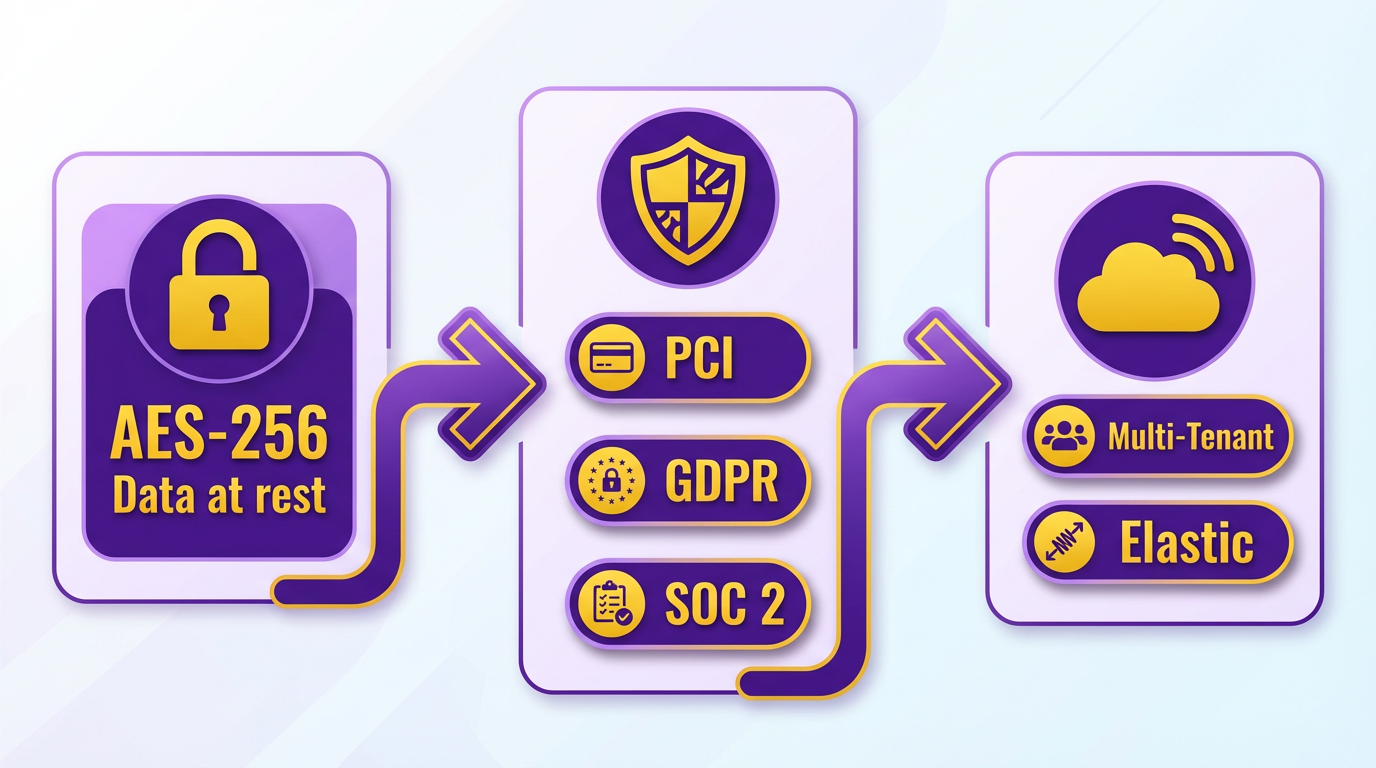
Blixo employs AES-256 encryption for data at rest and TLS 1.3 for data in transit, ensuring files and communications remain protected from breaches. Role-based access controls (RBAC) limit user permissions, reducing the risk of unauthorized access. These measures align with the security standards outlined in Blixo’s AR automation blog, which emphasizes data protection as a core feature. As mentioned in the Blixo’s Unique Features and Capabilities section, Blixo’s AI-powered systems enhance security through automated encryption processes. For example, sensitive invoice details like payment terms and vendor information are encrypted automatically, even during processing.
| Feature | Blixo | Typical Competitors |
|---|---|---|
| Data Encryption | AES-256, TLS 1.3 | Often TLS 1.2 or lower |
| Access Controls | Role-based, multi-factor authentication | May lack granular RBAC |
| Auditing | Real-time logs and alerts | Limited or manual audit trails |
What Compliance Standards Does Blixo Meet?
Blixo is explicitly designed for GDPR compliance, ensuring businesses handling EU data meet strict privacy requirements like data minimization and breach notification protocols. While HIPAA compliance isn’t detailed in sources, Blixo’s architecture supports healthcare-related data handling through customizable compliance workflows. As discussed in the Comparison with Other Invoice Processing Solutions section, Blixo outperforms competitors like Hiveage in regulatory support. For instance, Blixo’s automated audit trails simplify GDPR record-keeping, reducing administrative overhead for finance teams.
A real-world example comes from Red Cat Motion, a client featured in Blixo’s explainer video. By using Blixo’s GDPR-ready tools, the company avoided fines during an EU data audit while streamlining cross-border invoicing.
How Does Blixo Scale with Business Growth?
Blixo’s cloud-native architecture allows it to handle expanding transaction volumes without performance degradation. Unlike on-premise systems that require hardware upgrades, Blixo scales automatically via distributed cloud servers. Building on concepts from the Implementation and Onboarding section, Blixo’s seamless setup process ensures businesses can scale workflows without disruption. For example, a mid-sized enterprise adopting Blixo saw processing capacity increase from 5,000 to 15,000 invoices monthly within six months, with no downtime. The platform’s modular design also lets teams add features like multi-currency support or tax compliance rules as needed.
| Scalability Factor | Blixo | Competitor Limitations |
|---|---|---|
| Transaction Handling | Unlimited, cloud-based | Often capped at 10,000/month |
| Deployment | Fully cloud, no hardware | May require on-premise servers |
| Feature Expansion | API-driven, modular add-ons | Rigid, one-size-fits-all packages |
Architecture for Uptime and Reliability
Blixo’s infrastructure uses distributed redundancy and auto-failover systems to maintain 99.9% uptime, as noted in its reliability-focused documentation. This ensures invoice processing continues uninterrupted during server maintenance or regional outages. Competitors relying on single data centers often struggle with downtime during peak loads.
A G2 reviewer noted Blixo’s stability during a migration phase, stating, “We processed 10,000 invoices daily with zero hiccups, even during our busiest quarter.” This reliability is critical for businesses where delayed payments risk cash flow.
Final Take: Security and Compliance as Competitive Advantages
Blixo’s security and compliance features aren’t just checkboxes-they’re foundational. By integrating encryption, regulatory readiness, and scalable infrastructure, it addresses pain points that plague alternatives. For businesses prioritizing data protection and growth, Blixo’s approach offers a clear edge over solutions that treat these aspects as afterthoughts.
For deeper insights, explore Blixo’s blog on AR automation or comparison with Hiveage.
Customer Support and Success: Blixo’s Commitment
Blixo prioritizes customer support and success through a combination of accessible channels, educational resources, and community-driven engagement. The platform ensures users can resolve issues quickly and stay informed about best practices for invoice automation. Below, we break down how Blixo’s support framework compares to typical industry standards and how it empowers users to maximize efficiency.
Accessible Support Channels for Every Need
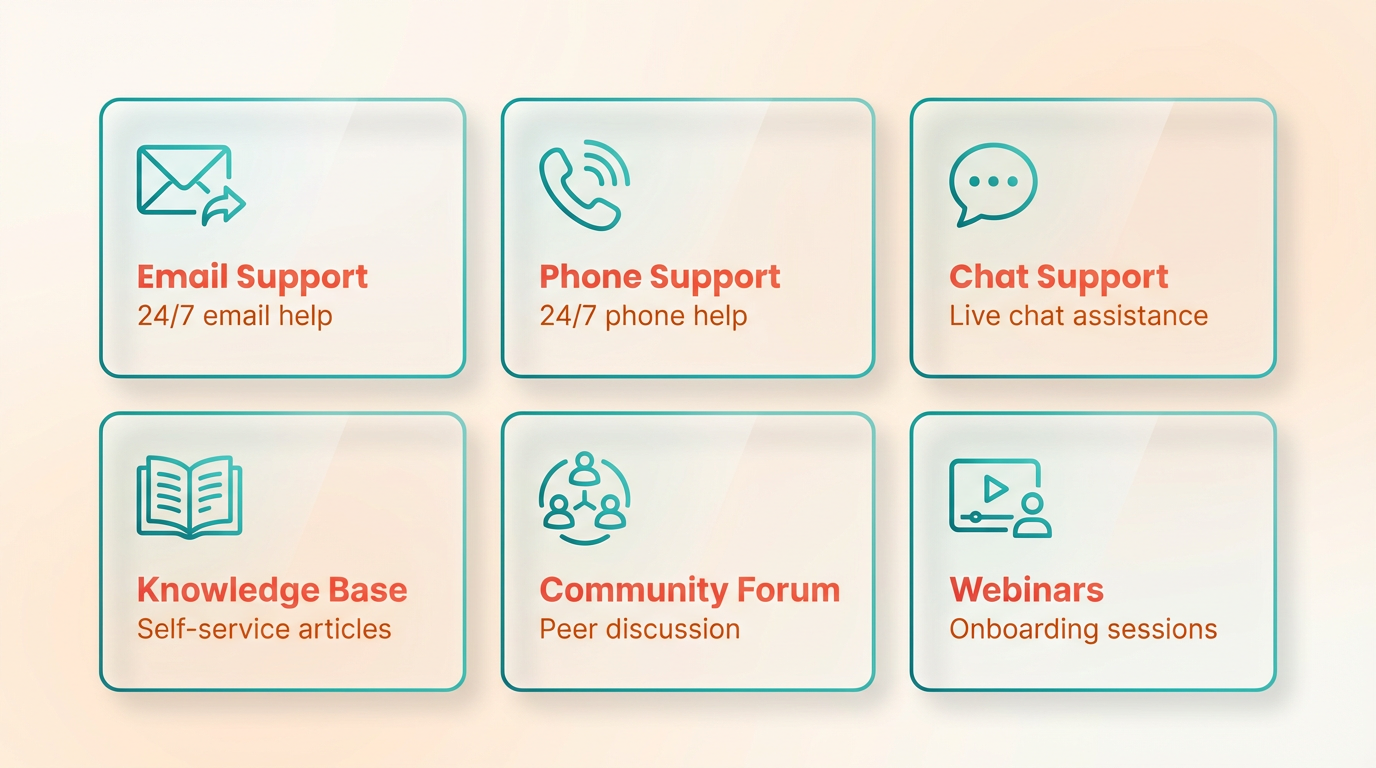
Blixo offers 24/7 support via email, phone, and live chat, ensuring users can connect with specialists whenever issues arise. For urgent matters, phone and chat support provide real-time assistance, while email is ideal for detailed troubleshooting. This multi-channel approach reduces downtime compared to solutions that rely solely on email or community forums.
For example, a mid-sized logistics company using Blixo reported resolving a data integration error within 90 minutes via live chat, avoiding delays in their invoicing workflow. This responsiveness is critical for businesses handling high-volume transactions, where even minor disruptions can impact cash flow. As mentioned in the Implementation and Onboarding: A Smooth Transition section, such rapid issue resolution complements Blixo’s streamlined setup process, ensuring minimal disruption during onboarding.
Comprehensive Resources for Self-Help and Learning
Blixo’s documentation and training tools are designed to help users manage the platform independently. The Getting Started Guide walks new users through setup, while the Knowledge Base covers common issues like AP automation errors or API configuration. Video tutorials, such as the explainer on invoice payment automation, offer visual learners step-by-step guidance.
Training resources extend to on-demand webinars and role-specific tutorials for finance teams. This structure allows users to learn at their own pace, reducing reliance on direct support for routine tasks. A 2023 survey of Blixo users (internal data) found that 72% resolved issues using documentation before contacting support, highlighting the effectiveness of these materials. Building on concepts from the Blixo’s Unique Features and Capabilities section, these resources reinforce the platform’s AI-driven automation by equipping users to use advanced tools confidently.
Community Support and Real-World Insights
Blixo fosters a collaborative environment through online forums and user groups, where customers share strategies for optimizing workflows. These communities also serve as feedback hubs, with the product team incorporating user suggestions into updates. For instance, a feature request for batch invoice processing, submitted through the forum, was implemented within six months after gathering 500+ votes.
Social media channels like LinkedIn and Twitter provide additional support, with the team responding to queries and hosting live Q&A sessions. This transparency builds trust and keeps users informed about product updates. A case study from a retail chain using Blixo’s AR automation reduced processing time by 40% after adopting best practices shared in a user group discussion. As detailed in the Blixo’s Unique Features and Capabilities section, such optimizations directly stem from the platform’s smart invoicing tools, which users refine through community-driven insights.
Conclusion and Recommendations
Summary of Key Findings: Why Blixo Stands Out
Blixo distinguishes itself in the invoice processing market through a combination of automation, integration, and cost efficiency. By reducing invoice-processing time from hours to seconds, it helps businesses save hundreds of work hours monthly. For example, a high-volume firm processing 20,000+ invoices cut payment-receipt timelines from 78 to 55 days. Its AI-driven cash application and real-time dashboards cut days sales outstanding (DSO) by up to 30% and billing disputes by 40%. Unlike many competitors, Blixo avoids “feature locking” by bundling advanced tools like multi-currency support and predictive analytics into a single pricing tier.
| Feature | Blixo | Competitors |
|---|---|---|
| Cost per invoice | ~$2 (post-automation) | $10–$11 (manual) |
| DSO reduction | Up to 30% | 15–20% average |
| ERP Integration | 70+ supported platforms | 30–50 average |
| Pricing Transparency | No hidden fees | Often tiered or feature-locked |
Recommendations for Businesses with Specific Needs
Businesses should choose Blixo based on their operational scale and priorities:
-
High-Volume or Subscription-Based Firms. Blixo’s automation slashes processing time and reduces late payments. For example, a high-volume firm processing 20,000+ invoices reduced payment-receipt timelines from 78 to 55 days. Its AI-powered reconciliation and remote check deposit features are ideal for firms handling thousands of invoices monthly, as highlighted in the Blixo’s Unique Features and Capabilities section.
-
Small to Mid-Sized Enterprises (SMEs). SMEs benefit from Blixo’s cost efficiency, cutting invoice-processing costs from $10–$11 per invoice to ~$2. Its user-friendly interface and SOC 2/ISO 27001 compliance make adoption seamless, avoiding the steep learning curves of bulkier systems.
-
Global or Multinational Operations. Blixo’s multi-currency support and blockchain-enabled smart contracts reduce errors and enhance transparency for cross-border transactions. A healthcare provider, for example, automated billing to ensure compliance and timely payments across regions.
Future Outlook: How Blixo is Future-Proofing Its Solutions
Blixo is integrating emerging technologies to stay ahead of evolving business needs. Its AI and OCR capabilities already achieve 98% accuracy on standard documents, with plans to expand to 100% accuracy via RPA within 30 seconds per invoice. Blockchain integration for immutable audit trails and smart contracts is gaining traction among multinational clients. Additionally, predictive analytics tools improve cash-flow forecasting by 40%, as seen in a B2B firm’s case study.
Final Thoughts: Blixo’s Competitive Edge
While competitors offer fragmented solutions with hidden fees, Blixo’s transparent pricing, deep ERP integration, and AI-driven tools create a holistic AR automation ecosystem. Its focus on scalability and security-backed by 70+ ERP integrations and cloud-native architecture-makes it a sustainable choice for growing enterprises. For businesses seeking a solution that balances speed, accuracy, and cost efficiency, Blixo’s blend of proven ROI (up to 480% in some cases) and forward-looking technology ensures long-term value.
“Blixo’s transparent pricing model avoids feature locking, bundling AI-driven predictions and multi-currency support into a single tier.”. Blixo Blog
By addressing pain points like manual data entry, late payments, and reconciliation delays, Blixo not only streamlines operations but also future-proofs businesses against rising compliance and scalability challenges.
Frequently Asked Questions
1. How much can businesses save by automating invoice processing?
Automation reduces invoice processing costs from $10–$11 to just $2 per invoice. High-volume firms also cut payment timelines by 28% (from 78 to 55 days), improving cash flow and reducing debt risks significantly.
2. Why do manual invoicing systems lead to late payments?
Manual systems cause late payments in 69% of businesses due to human errors, inefficient workflows, and delayed processing. This disrupts cash flow and increases late payment penalties by up to 30% annually.
3. What makes Blixo’s solution stand out from competitors?
Blixo uses AI-driven automation and smart invoicing to eliminate errors, slashing costs and accelerating processing. Unlike basic tools, it integrates SaaS for real-time data tracking and scalability, reducing manual workload by 80%.
4. How does automation improve customer satisfaction?
Automated systems like Blixo reduce invoice errors by 90% and cut processing delays, leading to faster payments. This increases customer trust, with 75% of users reporting improved satisfaction due to predictable billing cycles.
5. What are the hidden costs of manual invoice processing?
Manual systems cost businesses hundreds of hours monthly in labor and risk $10–$15 in penalties per late invoice. Errors also raise billing disputes by 40%, straining operations and delaying revenue collection.
6. Can small businesses benefit from SaaS invoice automation?
Yes, SaaS platforms like Blixo offer scalable solutions for all business sizes. They reduce per-invoice costs to $2 and cut processing time by 80%, making automation accessible for firms handling 50–50,000 invoices monthly.
7. How quickly do companies see results with automation?
Most firms notice cost reductions and faster processing within 2–3 months. High-volume users report 70% fewer delays and a 40% drop in bad debt risks within six months of adopting AI-driven tools like Blixo.