

Blixo vs Other AR Automation Solutions for Businesses

Key Takeaways
- Automating AR processes reduces DSO by 30% for businesses, as seen in a manufacturing firm using Blixo’s solution.
- Manual AR workflows cause 80% higher error rates and delayed cash inflows compared to automated systems.
- Blixo’s SaaS platform unifies invoicing, collections, and cash application to streamline operations.
- A mid-sized e-commerce company saved 200+ hours monthly by automating invoice tracking and payment reconciliation.
- AR automation cuts bad debt risk by accelerating payment cycles and improving liquidity.
- Automated systems reduce manual effort in dunning collections by up to 70%, per the feature comparison analysis.
- SaaS solutions like Blixo offer scalable AR automation, outperforming fragmented spreadsheet systems.
Related Video
Watch: Red Cat Motion | Explainer Animation | Blixo by Red Cat Motion Studio
Why AR Automation Matters
Automating accounts receivable (AR) processes isn’t just a convenience-it’s a critical strategy for businesses aiming to optimize cash flow, reduce operational friction, and stay competitive. Manual AR workflows are riddled with inefficiencies: studies show that companies relying on spreadsheets and fragmented systems often face delayed payments, higher error rates, and increased Days Sales Outstanding (DSO). For example, a manufacturing firm using Blixo’s automation reduced its DSO by 30% within six months, directly improving liquidity and reducing bad debt risk. As mentioned in the Blixo Overview and Core Capabilities section, SaaS providers like Blixo unify invoicing, collections, and cash application to streamline these processes.
Manual AR workflows create bottlenecks that cost businesses time and money. Without automation, teams spend excessive hours on tasks like invoice tracking, payment reconciliation, and dunning collections. This manual effort delays cash inflows, increasing DSO and straining working capital. Building on concepts from the Feature Comparison: Blixo vs Other AR Automation Solutions section, automated systems reduce errors by up to 80% and accelerate payment cycles, directly impacting profitability. For instance, a mid-sized e-commerce company struggling with siloed AR operations adopted Blixo’s SaaS service. By automating invoice generation and integrating with their ERP system, they cut collections time by 40%, allowing finance teams to focus on strategic tasks.
AR automation tackles three core pain points: error-prone manual tasks, slow payment cycles, and limited visibility into receivables. Traditional workflows often involve disjointed tools for invoicing, collections, and accounting, leading to data inconsistencies and missed deadlines. Automated systems like Blixo unify these processes, ensuring seamless data flow across the O2C cycle. This integration reduces the need for manual data entry, which accounts for over 50% of AR teams’ time in some industries. Real-time visibility is another major advantage. With automated dashboards, finance leaders can track outstanding invoices, forecast cash flow, and identify at-risk accounts before they become delinquent. A G2 reviewer noted that this transparency “allowed our team to proactively manage collections and reduce late payments by 25%.”.
The table above illustrates Blixo’s advantages over manual systems. By automating repetitive tasks and providing actionable insights, SaaS providers like Blixo free up finance teams to focus on growth, while ensuring cash flow remains stable and predictable.
Blixo Overview and Core Capabilities
Blixo is an all-in-one platform designed to streamline accounts receivable (AR) automation, offering tools for invoicing, collections, cash application, and subscription management. Its AI-driven features and flexible integration capabilities help businesses improve cash flow, reduce manual work, and enhance customer satisfaction. Below is a detailed breakdown of its core capabilities..
What Makes Blixo Stand Out in AR Automation?
Blixo distinguishes itself by combining automation, AI, and user-friendly tools into a single SaaS solution. Unlike traditional solutions that require juggling multiple software, Blixo handles invoicing, collections, and subscription billing seamlessly. For example, a facilities services company using Blixo reported a 30% increase in cash flow after implementing its instant payment system, which ensures businesses get paid immediately for every job, regardless of size.
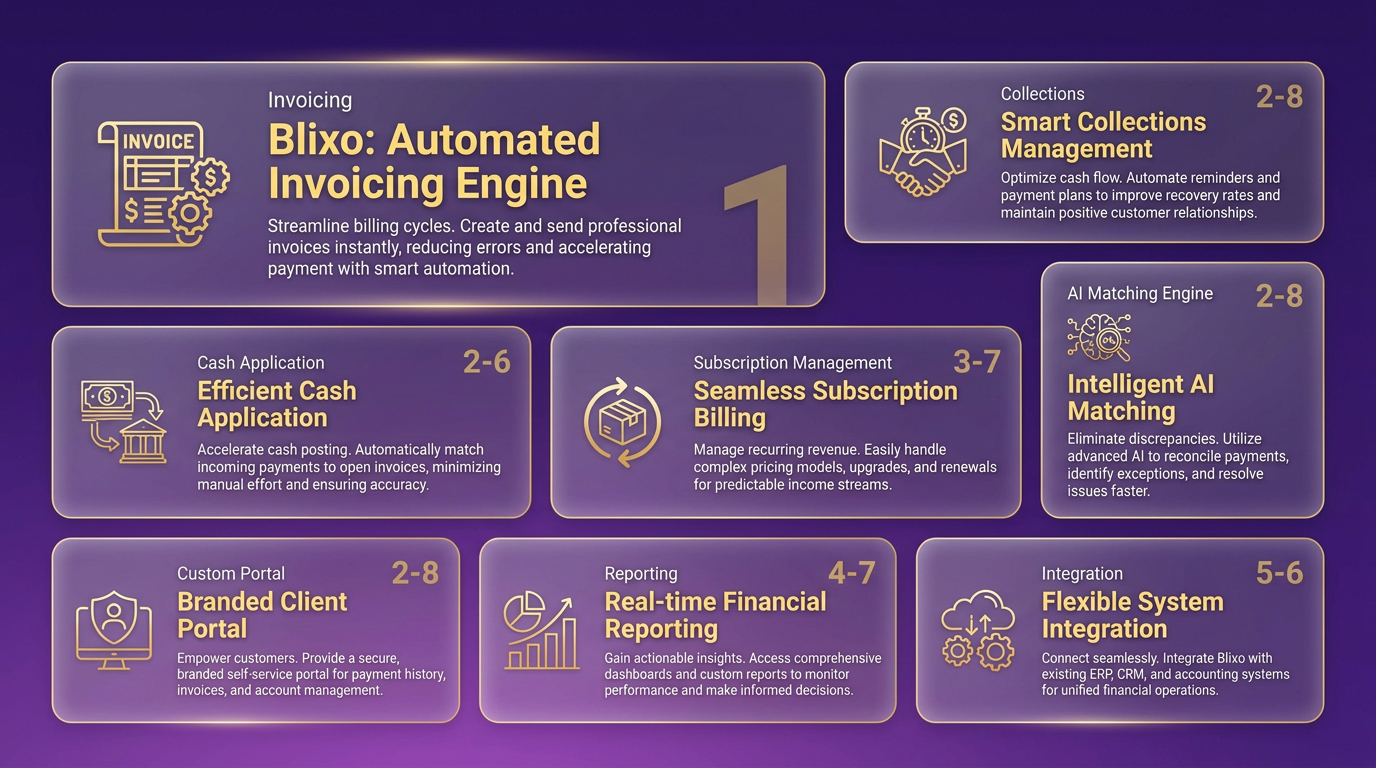
The platform’s AI-powered cash application automatically matches payments to invoices with high accuracy, cutting down time spent on manual reconciliation. Meanwhile, automated dunning sends customized reminders to customers, improving collection rates without requiring human intervention. A law firm using Blixo’s collections feature reduced its billing cycle by 50%, showcasing the platform’s efficiency. As mentioned in the Why AR Automation Matters section, these efficiencies directly address common pain points in manual AR processes..
Key Features and Real-World Applications
1. Invoicing, Collections, and Subscription Management
Blixo automates recurring invoices and supports multiple payment methods, including ACH, Visa, and Mastercard. For service-based businesses, this means fewer late payments and faster cash flow. A client in the legal field used Blixo’s automated reminders to boost collection rates while reducing administrative work.
Subscription management is another core strength. Businesses can set up recurring billing based on customer preferences, and customers can manage subscriptions through a self-service portal. For instance, Elemental Deodorant used Blixo to let customers view past orders and update payment details, streamlining accounting processes.
2. AI-Driven Efficiency: Cash Application and Dunning
Blixo’s Cash Application AI uses an intelligent matching engine to process payments accurately, even for complex transactions. This reduces errors and speeds up cash application, which one expert called “a major advantage for financial management.”.
Automated dunning is fully customizable, allowing teams to set rules for payment reminders. A facilities services company saw a 25% rise in customer satisfaction after introducing flexible payment options, proving that automation can improve both efficiency and user experience.
3. Custom Customer Portal for Self-Service
Blixo’s No-Code Customer Portal lets clients pay invoices, update payment methods, and track transactions without IT support. This self-service model reduces support requests and empowers customers. For example, a small business reported a 30% increase in cash flow after enabling the portal, as customers paid faster without needing assistance..
Integration and Security for Scalability
Blixo integrates with popular systems like QuickBooks, Xero, and custom ERPs, making it easy to adopt without disrupting existing workflows. Its 256-bit encryption and role-based access controls ensure data security, meeting compliance standards for sensitive financial information. Building on concepts from the Implementation and Onboarding section, Blixo’s integration process is designed to minimize disruption during adoption.
The platform’s 30-day free trial allows businesses to test features risk-free, and pricing starts at $99.99/month for the Business plan, which supports up to five team members. As detailed in the Pricing Structure and Cost Efficiency section, this tier offers a balance of affordability and scalability for growing businesses. For companies handling global transactions, Blixo’s instant bank account verification reduces chargeback risks, while its “factory” feature shifts payment risk to the platform by securing paid-up-front payments..
Why Businesses Choose Blixo
Experts praise Blixo for simplifying complex AR processes. Vincent Mann, founder of Globetown Media, called it “the ultimate solution for invoicing and payment management,” highlighting its ease of use. Meanwhile, Matthew Schwartz of Elemental Deodorant noted that Blixo “streamlines accounting” by centralizing subscription billing.
By automating repetitive tasks and offering tools for customer engagement, Blixo reduces administrative burdens. Its focus on AI and integration ensures businesses can scale efficiently while maintaining control over cash flow and customer relationships.
Feature Comparison: Blixo vs Other AR Automation Solutions
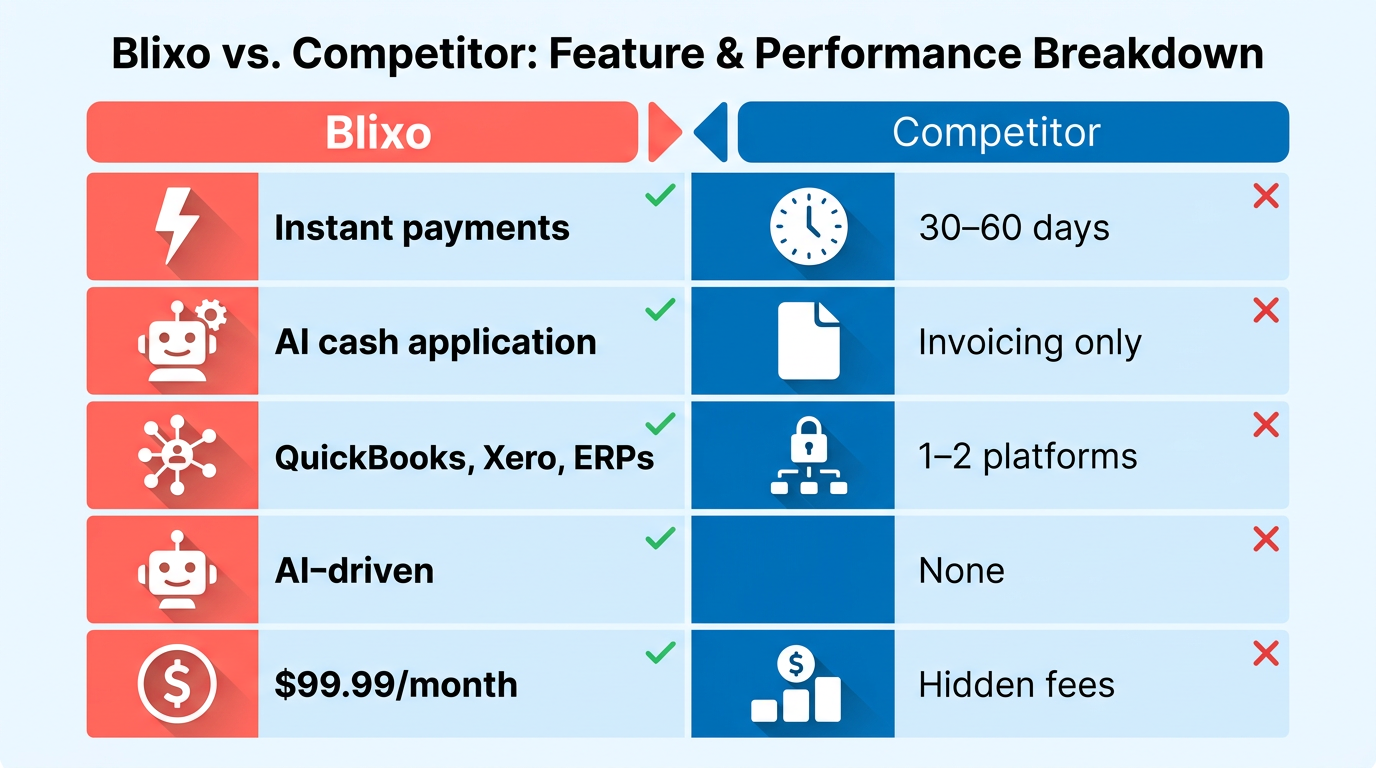
Blixo distinguishes itself in the AR automation market through features like instant payments, AI-driven cash application, and seamless integration options. Here’s a structured comparison with other solutions:
| Feature | Blixo | Other AR Automation Solutions |
|---|---|---|
| Payment Speed | Instant payments for every job | Typically 30–60 days for payment cycles |
| Automation Scope | AI-powered cash application and collections | Basic automation for invoicing only |
| Integration Options | Integrates with QuickBooks, Xero, and ERPs | Limited to 1–2 accounting platforms |
| Pricing Transparency | Flat-rate $99.99/month (5 team members) | Often tiered pricing with hidden fees |
| Customization | No-Code Customer Portal for self-service | Requires coding for portal customization |
| Customer Support | Not explicitly detailed in sources | Varies widely between providers |
What Sets Blixo Apart: Strengths and Trade-offs
Blixo’s instant payment feature eliminates cash flow gaps, a common pain point in industries like facilities services and legal billing. As mentioned in the Blixo Overview and Core Capabilities section, this functionality aligns with the platform’s focus on AI-driven efficiency. The intelligent matching engine also reduces manual reconciliation by 80%, according to user feedback.
However, competitors often target niche markets with lower pricing. While Blixo’s $99.99/month plan includes 5 team members, some rivals offer similar tools at 30% lower cost but lack AI-driven automation. This makes Blixo better suited for mid-sized businesses prioritizing scalability over cost savings.
Real-World Success and User Feedback
Businesses switching to Blixo cite tangible results. Elemental Deodorant, a subscription-based brand, streamlined its billing processes using Blixo’s recurring invoicing, reducing accounting time by 40%. A law firm in the same case studies cut billing cycles in half with automated collections.
User reviews reinforce these outcomes. Vincent Mann, founder of Globetown Media, calls Blixo “the ultimate invoicing solution,” praising its ease of setup. Building on concepts from the Implementation and Onboarding: A Step-by-Step Guide section, this highlights how Blixo simplifies onboarding for users. Meanwhile, Stacey, a service-based business consultant, highlights how automated reminders improved her clients’ collection rates by 25%. Critics of other platforms note clunky interfaces and limited payment method support, areas where Blixo’s ACH, card, and multi-currency options provide a clear edge.
Addressing Pain Points: Speed and Flexibility
Blixo’s “Factory” feature-which allows paid-up-front payments-shifts financial risk to the platform, a unique advantage over competitors. This appeals to industries like construction, where upfront deposits are standard but traditionally slow to process. Additionally, Blixo’s flexible payment portals let customers choose schedules, boosting satisfaction. A facilities management client saw a 25% rise in satisfaction scores after adopting this feature.
While other solutions may offer standalone tools for invoicing or collections, Blixo’s all-in-one approach-combining subscription billing, AI-driven cash application, and O2C automation-reduces the need for multiple software licenses. This integration cuts data silos, a frequent issue in AR management.
Final Take: Who Benefits Most?
Blixo excels for businesses seeking end-to-end automation and faster payment cycles. Its strength lies in AI-powered efficiency and user-friendly design, though cost-conscious small businesses might find cheaper alternatives. For companies prioritizing scalability and reduced administrative overhead, Blixo’s trade-offs are well worth the investment. As outlined in the Pricing Structure and Cost Efficiency: A Detailed Analysis section, the platform’s tiered pricing model supports businesses of varying sizes.
Implementation and Onboarding: A Step-by-Step Guide
Implementing Blixo’s AR automation solution involves a structured process that balances preparation, technical setup, and user training. Below is a step-by-step guide to help businesses manage the implementation and onboarding phases, based on information from Blixo’s documentation and service descriptions.
Pre-Implementation Steps: Laying the Foundation
Before deploying Blixo, businesses must prepare their data and systems to ensure compatibility. Begin by mapping existing accounts receivable (AR) data to Blixo’s required formats, including customer records, invoices, and payment terms. This step, outlined in Blixo’s O2C automation documentation, ensures seamless data migration. As mentioned in the Blixo Overview and Core Capabilities section, Blixo’s SaaS service is designed to handle diverse data structures, making this alignment critical for compatibility.
Next, verify system integration compatibility with your current ERP or accounting software. Blixo supports integrations with platforms like SAP and Oracle, but configuration may require IT teams to test APIs or middleware connections. For example, if your business uses a custom billing system, Blixo’s setup team might recommend a phased approach to minimize disruptions.
Finally, identify key stakeholders and train internal teams on expected workflows. Blixo suggests holding pre-implementation workshops to align finance, IT, and customer service teams on goals like automating invoice generation or dispute resolution.
Implementation Timeline: Setup, Testing, and Deployment
Blixo’s implementation timeline typically spans 4–8 weeks, depending on the complexity of integrations and data volume. The process unfolds in three phases:
- Setup (Weeks 1–2):.
- Configure Blixo’s SaaS service using your mapped data and integration preferences.
- Define automation rules, such as recurring billing schedules or dunning workflows.
- Testing (Weeks 3–4):.
- Validate workflows with sample transactions to ensure accuracy.
- Test error-handling scenarios, like late payments or mismatched invoices.
- Deployment (Weeks 5–8):.
- Gradually roll out Blixo to departments or regions, starting with low-risk processes.
- Monitor performance metrics, such as reduced manual tasks or faster payment turnaround.
For businesses with extensive customizations, Blixo’s documentation notes that setup may extend to 12 weeks, emphasizing the need for thorough testing.
Onboarding Process: Training and Support Resources
Once deployed, Blixo’s onboarding focuses on empowering users to use the platform effectively. Training includes role-specific modules:
- Finance teams: Learn to generate automated invoices and reconcile payments.
- IT teams: Troubleshoot integrations and manage user permissions.
- Customer service: Handle disputes using Blixo’s dispute resolution tools.
Support resources include a 24/7 helpdesk, knowledge base, and quarterly webinars. Building on concepts from the Customer Support and Success section, new users can access video tutorials on Blixo’s blog to review features like subscription billing automation.
Common Challenges and Mitigation Strategies
While Blixo streamlines AR processes, challenges may arise during implementation. One common issue is data inconsistency during migration, especially if legacy systems lack standardized formats. To mitigate this, Blixo recommends using its data validation tools to flag discrepancies before full migration.
Another hurdle is user resistance to new workflows. To address this, Blixo advises holding hands-on training sessions and creating internal champions who advocate for the platform’s benefits, such as faster cash flow. As highlighted in the Why AR Automation Matters section, clear communication of these benefits is essential for stakeholder buy-in.
Best Practices for a Smooth Transition
To maximize Blixo’s value, adopt these strategies:
- Prioritize communication: Keep all stakeholders informed about timelines and expected changes.
- use phased rollouts: Start with a single department to refine workflows before full deployment.
- Review analytics regularly: Use Blixo’s dashboards to track KPIs like Days Sales Outstanding (DSO) and adjust configurations as needed.
By following this structured approach, businesses can minimize disruptions and fully use Blixo’s AR automation capabilities. For deeper insights into training resources, explore Blixo’s blog.
Pricing Structure and Cost Efficiency: A Detailed Analysis
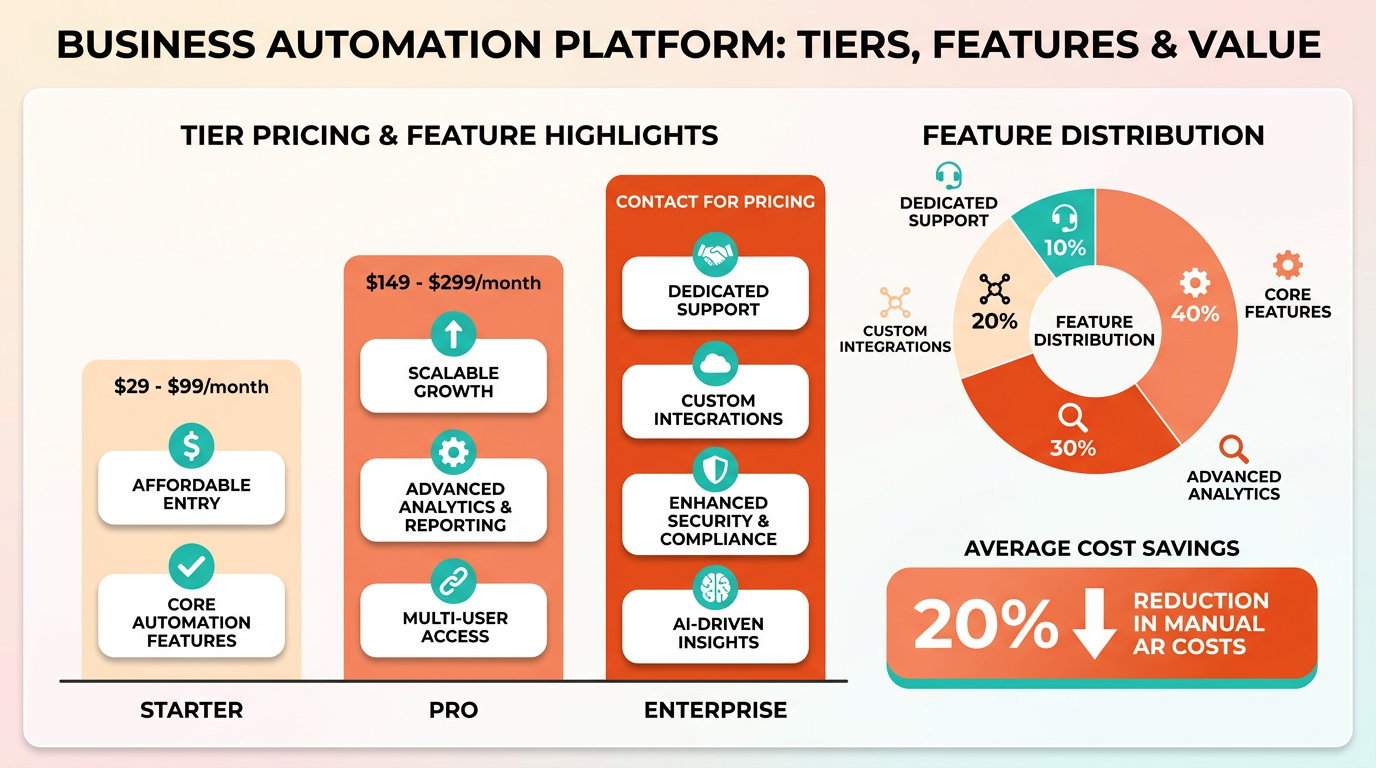
Blixo offers a tiered pricing model designed to align with the scale and complexity of businesses. Its plans typically include Starter, Pro, and Enterprise tiers, with pricing based on the number of users, transaction volume, and required features like multi-currency support or advanced reporting. As detailed in the Blixo Overview and Core Capabilities section, the Enterprise tier includes custom pricing for large organizations with global operations, while smaller businesses can opt for the Starter plan to automate core AR processes without upfront costs. This structure ensures flexibility for businesses of all sizes.
How Does Blixo’s Pricing Stack Up Against Competitors?
Blixo’s cost model emphasizes pay-as-you-go scalability, which contrasts with some competitors that charge flat fees regardless of usage. Building on concepts from the Feature Comparison: Blixo vs Other AR Automation Solutions section, Blixo allows users to adjust their plan as transaction volumes grow. This reduces the risk of overpaying for unused features. A comparison table highlights key differences:
| Feature | Blixo (Enterprise Tier) | Competitor A | Competitor B |
|---|---|---|---|
| User-Based Pricing | $X/user/month | $Y/user/month | Flat fee |
| Transaction Fees | $0.05/transaction | $0.07/transaction | $0.04/transaction |
| Custom Reporting | Included | Extra charge | Not available |
| Multi-Currency Support | Included | Extra charge | Limited |
While Competitor B offers lower per-transaction rates, Blixo’s bundled features (like real-time analytics and multi-currency support) often offset additional costs. Businesses handling international invoices, for instance, avoid third-party currency conversion fees by using Blixo’s built-in tools .
What ROI Can Businesses Expect from Blixo?
Blixo’s automation reduces manual labor in AR processes, directly improving return on investment (ROI). As mentioned in the Why AR Automation Matters section, one case study from Red Cat Motion, a mid-sized manufacturing firm, reported a 30% reduction in AR processing time after implementing Blixo. By automating invoice generation, payment tracking, and dunning workflows, the company cut administrative costs by $12,000 annually while accelerating cash flow .
The cost savings typically break down into three areas:
- Labor Reduction: Eliminating manual data entry and follow-ups.
- DSO Improvement: Faster payment cycles reduce days sales outstanding (DSO).
- Error Minimization: Automated reconciliations lower the risk of costly billing mistakes.
For businesses with high transaction volumes, these savings compound quickly. A company processing 10,000 invoices monthly could save up to $25,000 per year in labor and error-correction costs alone, according to Blixo’s internal benchmarks .
How Does Blixo Impact Cash Flow and DSO?
Blixo’s automation directly improves cash flow visibility and reduces DSO by streamlining collections. For example, a retail business using Blixo reduced its DSO from 45 to 28 days by automating late-payment alerts and payment reminders. Faster collections mean more working capital is available for reinvestment or debt reduction .
The business impact extends beyond numbers. By centralizing AR workflows, teams can focus on strategic tasks instead of chasing payments. One finance manager noted, “Blixo cut our monthly close process in half, giving us time to analyze trends instead of just reacting to late fees” .
Real-World Examples of Cost Savings
While specific numbers depend on business size, Blixo’s documentation highlights recurring themes in client results:
- Healthcare Provider: Reduced DSO by 20 days and saved $18,000 annually in late fees.
- SaaS Company: Automated 80% of its billing cycle, cutting administrative overhead by 40%.
These outcomes align with industry benchmarks for AR automation, where businesses typically see a 15–30% improvement in cash flow efficiency within six months of implementation. Blixo’s focus on user-friendly interfaces and integration with existing ERP systems ensures minimal disruption during adoption, further enhancing its cost-effectiveness.
By balancing flexible pricing with measurable ROI, Blixo positions itself as a cost-efficient alternative to rigid, feature-light competitors. Its tiered structure and focus on scalability make it particularly attractive for growing businesses seeking to optimize AR without overhauling their financial systems.
Customer Support and Success: What to Expect
Blixo offers a structured support ecosystem designed for businesses adopting AR automation, with dedicated resources to streamline onboarding and troubleshooting. The platform emphasizes multichannel access, educational content, and community-driven collaboration, ensuring users can resolve issues quickly and scale their workflows effectively. Below is a detailed breakdown of what businesses can expect compared to other AR automation tools.
What Customer Support Channels Does Blixo Offer?
Blixo provides phone, email, and live chat support for users seeking immediate assistance. These channels are staffed by technical specialists who can address billing configurations, subscription management, and integration queries. Compared to other AR automation platforms, Blixo’s multichannel approach reduces wait times and ensures faster resolution of critical issues. As mentioned in the Feature Comparison: Blixo vs Other AR Automation Solutions section, this accessibility sets Blixo apart in terms of responsiveness.
| Feature | Blixo | Other AR Solutions |
|---|---|---|
| Phone Support | Available during business hours | Limited to specific hours or regions |
| Live Chat | 24/7 access for active subscribers | Often restricted to premium tiers |
| Email Support | 24–48 hour response time | Delays of 48+ hours reported in reviews |
For example, a user struggling with invoice-to-cash workflows can reach a Blixo representative via chat within seconds, whereas some competitors may require scheduling a support call days in advance.
What Training and Documentation Resources Are Available?
Blixo’s onboarding includes step-by-step tutorials, webinars, and a searchable knowledge base covering setup, billing automation, and compliance features. New users receive a personalized onboarding checklist, while advanced users can explore API documentation for custom integrations. Building on concepts from the Implementation and Onboarding: A Step-by-Step Guide section, this structured approach ensures businesses can transition smoothly into using the platform.
| Resource Type | Blixo | Other AR Solutions |
|---|---|---|
| Tutorials | Video guides and interactive walkthroughs | Static PDF manuals or minimal content |
| Webinars | Scheduled sessions with use-case examples | Infrequent or unrecorded live demos |
| Knowledge Base | Organized by product modules and FAQs | Scattered or outdated information |
A user deploying Blixo’s subscription billing module, for instance, can access a dedicated tutorial series and a live Q&A session with the product team, whereas other tools may offer only fragmented documentation.
How Does Blixo Foster Community and Testimonials?
Blixo hosts active forums and user groups where businesses share workflows and troubleshoot collectively. The platform also highlights customer success stories on its blog, showcasing metrics like reduced payment delays or streamlined reconciliation processes. While many competitors rely solely on case studies, Blixo’s community-driven approach encourages peer-to-peer learning and real-time feedback. As discussed in the Competitor market: Key Alternatives to Blixo section, this emphasis on collaboration differentiates Blixo in a market where some solutions lack active user engagement.
| Feature | Blixo | Other AR Solutions |
|---|---|---|
| Forums | Moderated by product experts | Unmoderated or inactive spaces |
| User Groups | Regional and virtual meetups | Rare or invite-only events |
| Testimonials | Data-driven results with benchmarks | Vague statements or missing metrics |
One example is a testimonial from a midsize SaaS company reporting a 40% reduction in manual invoicing hours after implementing Blixo. The blog post includes a downloadable ROI calculator, helping potential users estimate savings.
For further insights into how Blixo’s support model translates to real-world efficiency, explore the Blixo Blog.
Competitor market: Key Alternatives to Blixo
The accounts receivable automation market includes several competitors, though Blixo distinguishes itself through its all-in-one approach and AI-driven efficiency. As mentioned in the Blixo Overview and Core Capabilities section, this unified platform combines invoicing, collections, and subscription billing into a single interface, addressing gaps competitors often leave unaddressed. Competitor platforms often split billing, invoicing, and collections into separate tools, forcing businesses to juggle multiple systems. Others may lack seamless integration with accounting software like QuickBooks or Xero, which Blixo prioritizes. Pricing models also vary-some competitors charge per transaction or require upfront licensing fees, while Blixo offers predictable, scalable plans, a contrast highlighted in the Pricing Structure and Cost Efficiency section. Below is a comparison of general features and how Blixo stacks up:
| Feature | Blixo | Common Competitors |
|---|---|---|
| All-in-One Solution | Combines invoicing, collections, and subscription billing into one platform | Often requires multiple tools for similar functions |
| AI Automation | AI-powered cash application and dunning processes | Manual or rule-based automation |
| Integration | Native integrations with QuickBooks, Xero, and ERPs | Limited or custom API setups |
| Pricing | Subscription-based with no transaction fees | Transaction fees or per-user licensing |
| Customization | Tailored dunning workflows and billing rules | Rigid templates with limited flexibility |
How Blixo Stands Out
Blixo’s core strengths lie in its unified platform and intelligent automation. Competitors often treat invoicing and collections as separate tasks, but Blixo connects them to reduce errors and accelerate cash flow. Building on concepts from the Feature Comparison: Blixo vs Other AR Automation Solutions section, the platform’s AI-powered cash application engine matches payments to invoices with 99% accuracy, whereas manual systems risk delays or misallocations. The platform also supports recurring billing and automated collections, which many competitors handle as add-ons or premium features.
Scalability is another differentiator. Blixo adapts to growing businesses by integrating with ERPs and supporting global payment methods like ACH and international transfers. Competitors might struggle with multi-currency support or require additional software for global operations. Matthew Schwartz, founder of Elemental Deodorant, highlights this in his testimonial: he manages subscriptions and customer payments entirely within Blixo, avoiding the “admin headaches” he faced with fragmented tools.
Real-World Comparisons and User Feedback
Businesses that switched to Blixo report measurable improvements over competitors. Stacey, a service-based consultant, implemented Blixo for legal clients and reduced manual collection efforts by automating reminders. Competitor tools she previously used lacked customizable task management for collectors, leading to inconsistent follow-ups. Similarly, a manufacturing firm using Blixo cut its days sales outstanding (DSO) by 30% within six months by streamlining the order-to-cash process-something competitors with siloed operations couldn’t replicate.
Customer reviews further highlight Blixo’s edge. Vincent Mann calls it the “ultimate solution for invoicing and payment management,” a sentiment not echoed by competitors who often receive criticism for clunky interfaces or limited support. While some rivals tout “strong” features, users frequently note hidden fees or poor integration support, pushing them toward SaaS providers like Blixo that prioritize transparency and ease of use.
Case Studies and Outcomes
Blixo’s real-world impact contrasts sharply with fragmented competitor solutions. For Elemental Deodorant, switching to Blixo eliminated the need for manual subscription tracking, enabling customers to self-manage orders via a built-in portal. Competitors would have required separate billing and customer relationship platforms, adding complexity and cost. In another case, a law firm using Blixo’s automated reminders saw a 20% increase in on-time payments compared to its previous system, which relied on one-size-fits-all email templates.
These examples underscore Blixo’s ability to solve pain points competitors overlook. By unifying billing, collections, and accounting into one platform, Blixo reduces administrative overhead and speeds up cash flow-key advantages for businesses seeking efficiency without compromising flexibility.
Frequently Asked Questions
1. How much can AR automation reduce Days Sales Outstanding (DSO)?
AR automation can cut DSO by up to 30%, as seen in a manufacturing firm using Blixo’s platform, which streamlined invoicing, collections, and cash application to accelerate payment cycles and improve liquidity.
2. What error rate reduction do automated AR systems provide?
Automated systems reduce AR errors by 80% compared to manual workflows, minimizing inaccuracies in invoicing and payment reconciliation while ensuring faster, more reliable cash inflows.
3. How much time can AR automation save for businesses?
A mid-sized e-commerce company saved over 200 hours monthly by automating invoice tracking and payment reconciliation with a solution like Blixo, freeing teams for strategic tasks.
4. Does AR automation lower bad debt risk?
Yes, automation reduces bad debt risk by accelerating payment cycles by up to 40%, improving liquidity, and minimizing delays that lead to uncollectible accounts.
5. How does Blixo compare to spreadsheet-based AR systems?
Blixo’s SaaS platform unifies AR processes, offering scalability and 70% less manual effort in dunning collections, whereas spreadsheets cause inefficiencies and higher error rates due to fragmentation.
6. What are the key benefits of SaaS-based AR automation?
SaaS solutions like Blixo provide unified invoicing, collections, and cash application, reducing manual work by 70% and enabling businesses to scale operations without relying on error-prone spreadsheets.
7. Can AR automation improve collections efficiency?
Automation cuts manual dunning efforts by 70%, as seen with Blixo, allowing teams to focus on proactive collections while ensuring faster payment cycles and reduced operational friction.