

How to Automate Accounting Workflows

Key Takeaways
- Automating accounting workflows reduces errors by 40-60% through standardized, real-time data validation.
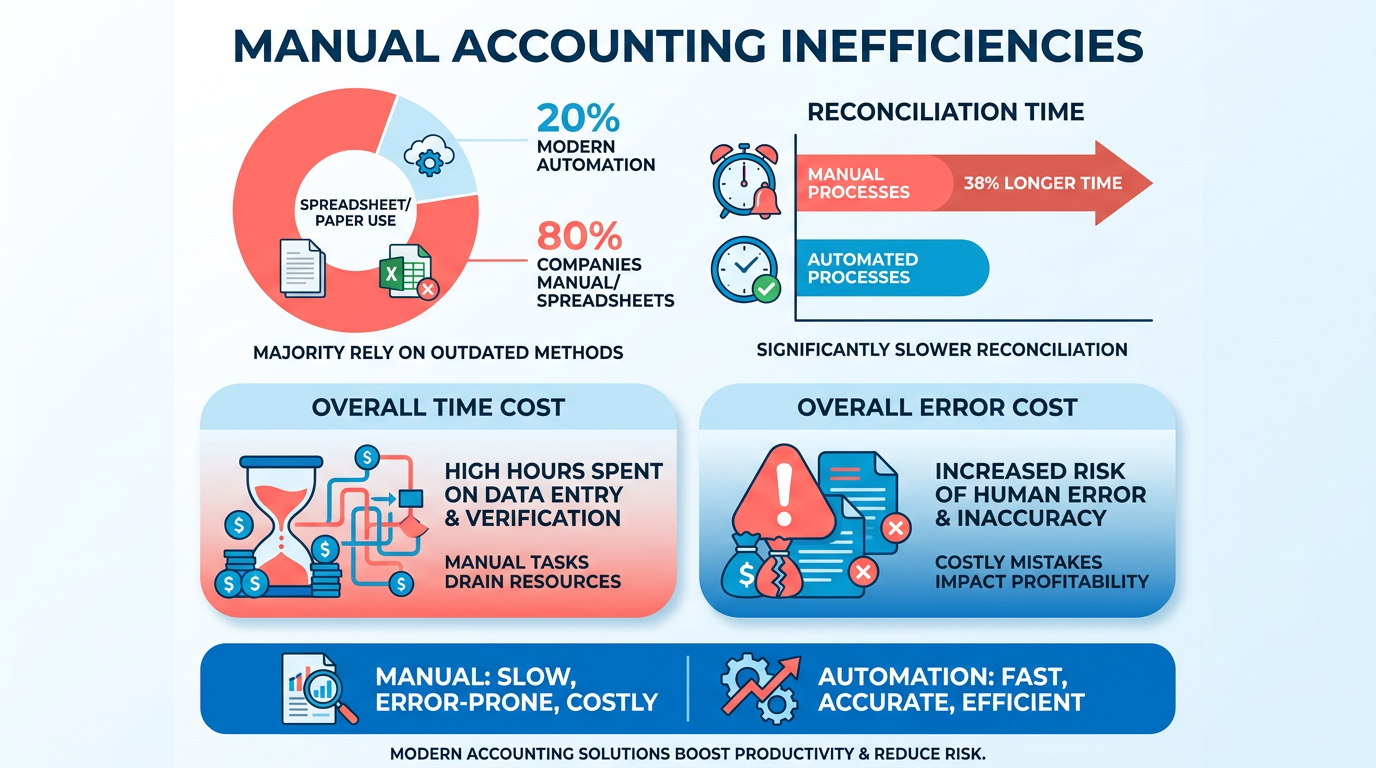
- Manual accounting processes waste time, with reconciliation taking 38% longer and audit prep requiring 23% more effort without automation.
- 80% of companies still rely on spreadsheets or fragmented tools, causing inefficiencies and missed financial insights.
- Automating repetitive tasks like invoicing and payroll can save 50% of accounting time, enabling focus on strategic work.
- Prioritize automating the most time-consuming workflows first to maximize efficiency gains.
- AI-powered tools streamline data-heavy tasks, cutting manual effort and improving accuracy in financial reporting.
- Transitioning from manual to automated systems reduces human errors and accelerates financial close timelines significantly.
Related Video
Watch: 15 AI Tools Smart Accountants Are Using Right Now by Jason On Firms
Why Automating Accounting Workflows Matters
Manual accounting processes remain prevalent, with 80% of companies still relying on spreadsheets, paper records, or fragmented tools. This approach leads to wasted time, human errors, and missed financial insights. As mentioned in the Common Bottlenecks in Manual Accounting Processes section, these inefficiencies stem from reliance on human effort for repetitive, data-heavy tasks. For example, reconciling accounts manually can take 38% longer than automated methods, while audit preparation might require 23% more time in non-automated workflows.
Automation addresses these pain points by streamlining repetitive tasks like invoicing, reconciliation, and payroll. Building on concepts from the Key Benefits of Automating Accounting Workflows section, AI-powered tools reduce errors by 40-60% by standardizing processes and validating data in real time. For example, one company saved 50% of its accounting time after implementing automation, freeing staff to focus on strategic work like budget forecasting and client strategy.
The next step is identifying which workflows to automate first-starting with the most time-consuming or error-prone tasks. As detailed in the Implementing Automation: Step-by-Step Guide section, this targeted approach ensures maximum efficiency gains without unnecessary disruption.
Defining Accounting Workflows and Their Importance
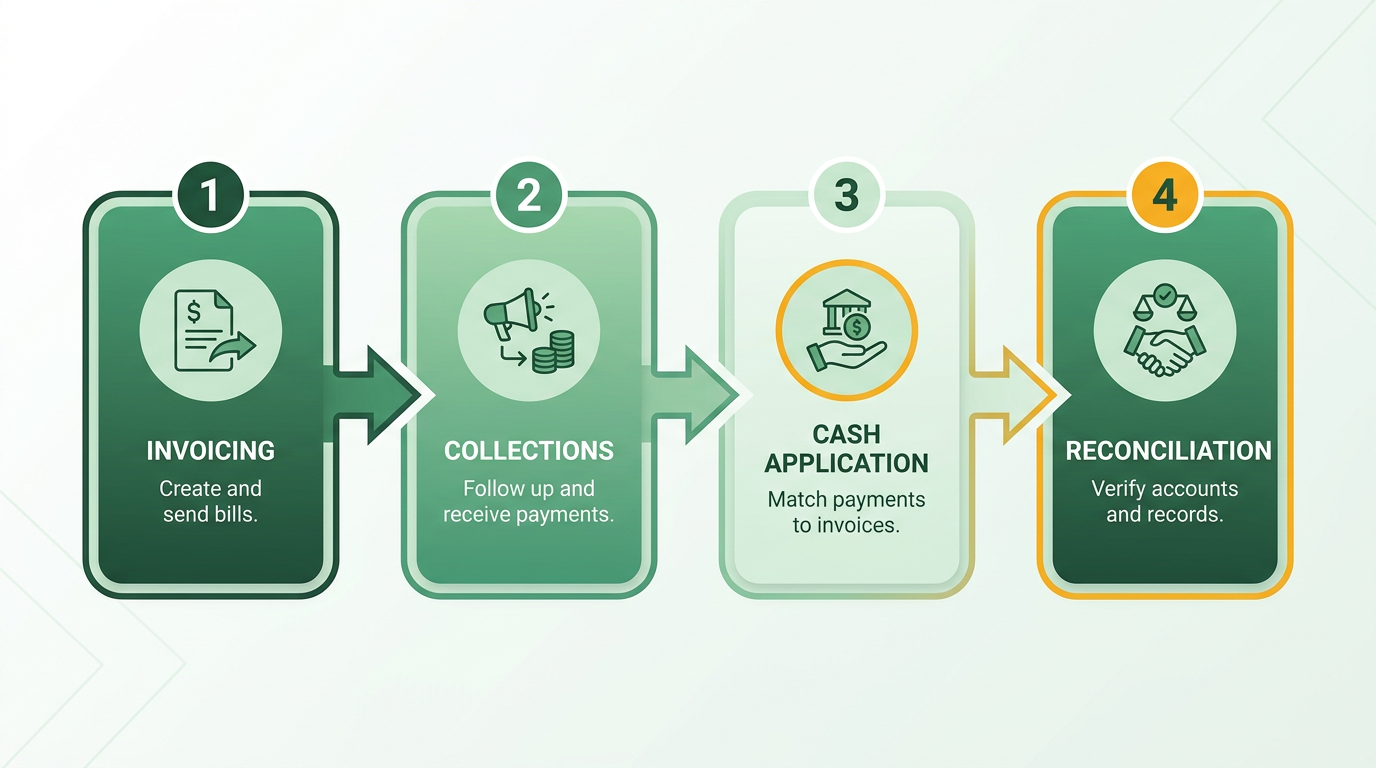
Accounting workflows are structured sequences of tasks that ensure financial processes run smoothly. These workflows typically span invoicing, collections, cash application, and reconciliation-each playing a role in maintaining accuracy and efficiency. By standardizing these steps, teams reduce errors, speed up operations, and align with compliance requirements. For example, an optimized order-to-cash workflow automates invoice generation, tracks payments, and resolves discrepancies, creating a seamless cycle from sale to cash receipt.
What Are the Core Components of Accounting Workflows?
At their foundation, accounting workflows consist of repetitive, interdependent tasks. Invoicing involves generating and sending bills to clients, while collections track outstanding payments. Cash application reconciles incoming payments with invoices, and reconciliation ensures ledger accuracy by matching financial records. These components form the backbone of financial operations, and their efficiency directly impacts a business’s cash flow and regulatory compliance.
Why Are Accounting Workflows Critical for Businesses?
Well-structured workflows are the bedrock of financial stability. They prevent costly mistakes by standardizing tasks and embedding review stages, which reduce human error. For instance, structured workflows with built-in checks cut error rates by up to 40% in mid-sized firms, as highlighted in the The Cost of Manual Accounting Processes section. They also ensure adherence to tax laws and reporting standards, minimizing the risk of penalties. Beyond compliance, these workflows empower decision-making by providing real-time data. A streamlined order-to-cash process, for example, allows managers to forecast revenue accurately and allocate resources strategically.
How Do Workflows Improve Financial Accuracy and Compliance?
Automation plays a key role in enhancing workflow reliability. Tools like workflow management software centralize task assignments, deadlines, and communications, giving teams real-time visibility into progress. For example, TaxDome’s tools automate invoice reminders and payment tracking, reducing manual intervention by 60%, a feature also emphasized in the Choosing the Right Automation Software section. This minimizes delays and ensures consistent application of accounting policies. Additionally, clear role definitions within workflows-such as separating invoice approval from payment processing-create accountability and reduce fraud risk.
What’s an Example of a Key Workflow?
Consider the order-to-cash process, which transforms a customer order into collected cash. It begins with order verification, moves through invoice generation, and ends with payment reconciliation. Automating this workflow via software eliminates manual data entry and accelerates collections. One company improved cash flow by 30% after implementing automated reminders and payment tracking, a benefit further detailed in the Key Benefits of Automating Accounting Workflows section. By linking systems like QuickBooks Online (QBO) with workflow tools, businesses can synchronize data across departments, ensuring consistency and transparency.
What’s the Real-World Impact of Optimized Workflows?
The benefits of refining accounting workflows extend beyond efficiency. A team of 20+ professionals used workflow management to scale services for 250+ businesses, improving client satisfaction and reducing operational bottlenecks. Another case study highlighted in primary sources showed that a mid-sized firm cut administrative overhead by 35% through automation, reallocating staff to high-value tasks like financial analysis. These results underscore how structured workflows enable businesses to adapt to growth while maintaining precision.
Why Should You Prioritize Workflow Optimization?
Without deliberate workflow design, teams risk duplicated efforts, missed deadlines, and compliance gaps. For example, a disorganized reconciliation process can delay financial reporting by weeks, a bottleneck often discussed in the Common Bottlenecks in Manual Accounting Processes section. Conversely, investing in workflow automation not only saves time but also strengthens client trust. As Mari Sam, an industry expert, notes: “Effective workflow management is more than task tracking-it’s a strategic framework that allows firms to deliver high-quality work.” By continuously monitoring and refining workflows, accounting teams stay agile, compliant, and ready to meet evolving business demands.
Common Bottlenecks in Manual Accounting Processes
Manual accounting processes often hit roadblocks that slow down operations, increase errors, and drain resources. These bottlenecks stem from reliance on human effort for repetitive, data-heavy tasks. Below are the most common pain points, supported by real-world examples and technical insights from industry research..
Inefficient Invoicing Processes: Manual Data Entry and Lost Invoices
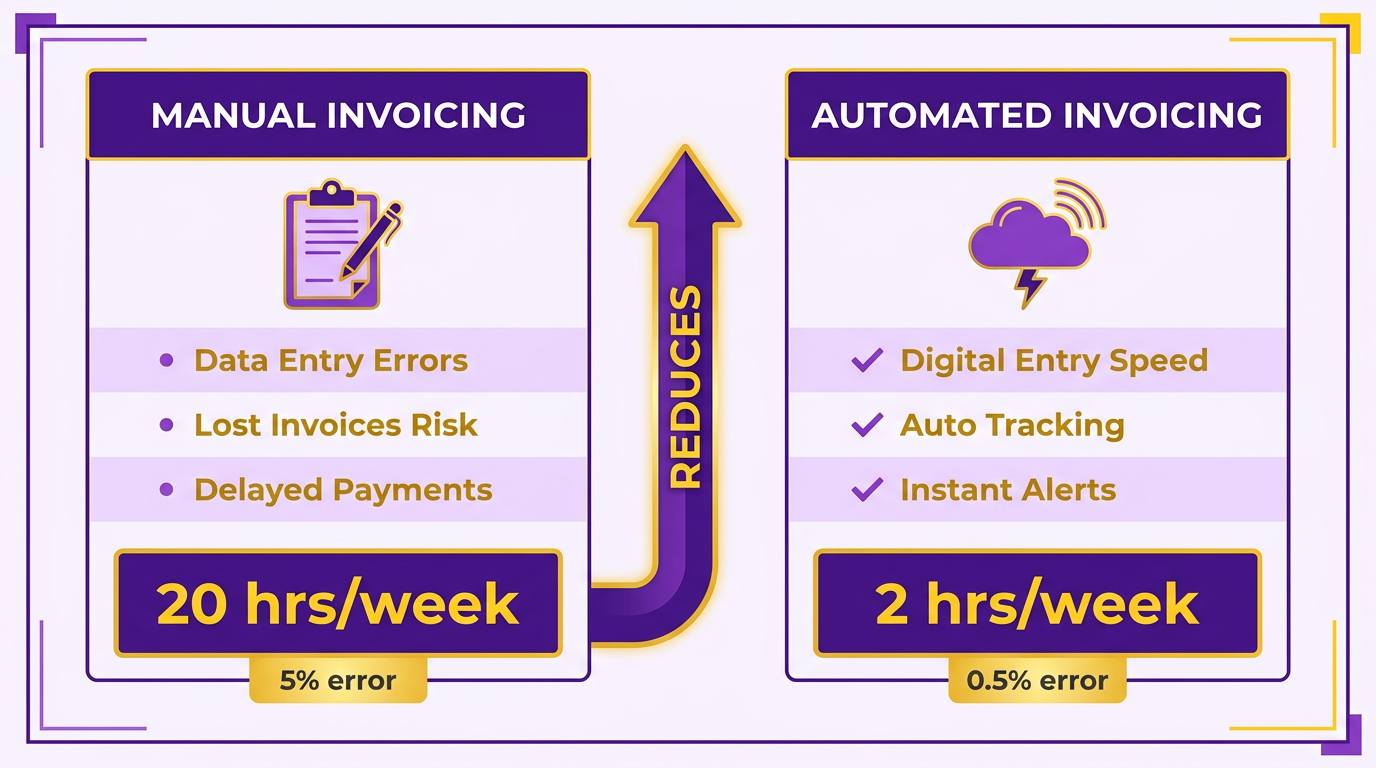
Manual invoicing is prone to delays and errors. For example, one company spent 20 hours per week on manual invoicing, struggling with data entry mistakes and misplaced documents. Without automation, teams risk sending duplicate invoices or missing payment terms, which can strain client relationships. As mentioned in the Why Automating Accounting Workflows Matters section, workflow management systems centralize invoice creation, track deadlines, and ensure consistency. Mari Sam explains, “Effective workflow management is more than just task tracking-it’s a strategic framework that allows accounting firms to deliver high-quality work.” Tools that automate invoice generation from centralized client data reduce entry errors by up to 60%, according to AI-driven accounting research..
Slow Collections: Lack of Automation and Follow-Up
Late payments often trace back to poor follow-up systems. Manual chasing of overdue invoices is time-consuming and inconsistent. One study found that businesses using automated reminders see a 30% faster payment turnaround compared to those relying on spreadsheets. For instance, a workflow software provider enables teams to set automatic alerts for clients, reducing the need for manual intervention. Building on concepts from the Key Benefits of Automating Accounting Workflows section, automated reminders cut collections time in half, freeing accountants to focus on strategic tasks. A G2 reviewer notes, “Automated reminders cut our collections time in half-no more chasing emails.”.
Error-Prone Cash Application: Manual Reconciliation and Incorrect Postings
Reconciling payments manually introduces a high risk of mistakes. A 2024 report highlights that 40–60% of accounting errors in manual systems stem from mismatched data or incorrect journal entries. For example, a team processing 500 invoices monthly might spend 10+ hours daily verifying payments against bank statements. As highlighted in the Choosing the Right Automation Software: Essential Features section, AI-powered reconciliation tools using optical character recognition (OCR) can match transactions in seconds, flagging discrepancies for review. Thomson Reuters Tax & Accounting states, “Automated workflows can handle data entry, document collection, and error-checking, ensuring a faster and more efficient process.”.
Inadequate Reconciliation: Lack of Automation and Incomplete Data
Manual reconciliation often leads to incomplete datasets, making it hard to detect fraud or compliance issues. A 2025 study found that 95% of firms using manual processes miss at least one reconciliation error per month. For example, a mid-sized firm reported a $12,000 discrepancy due to an unflagged duplicate payment-something an automated system could have caught instantly. Tools with real-time data integration and machine learning algorithms reduce this risk by continuously validating entries. As one expert notes, “Structured workflows with built-in review stages reduce errors and standardize quality control.”.
Real-World Impact and Solutions
The bottlenecks above aren’t hypothetical. A firm using a workflow software provider automated its accounts payable process, cutting invoice processing time from 48 hours to 4 hours. Another firm reduced reconciliation errors by 70% after adopting AI-driven validation tools. These improvements aren’t just about speed-they’re about reliability. As Mari Sam emphasizes, “When everyone knows what’s expected of them, there’s less room for delays or miscommunication.”.
By identifying these bottlenecks, accounting teams can prioritize automation for tasks like invoicing, collections, and reconciliation. The result? Reduced manual effort, fewer errors, and more time to focus on high-value work.
For deeper insights into streamlining workflows, explore 5 Proven Ways to Automate Your Accounting Workflows.
Key Benefits of Automating Accounting Workflows
How Does Automation Save Time in Accounting? Accounting automation reduces manual labor by automating repetitive tasks like data entry, invoice processing, and reconciliation. For example, FloQast reported a 38% reduction in reconciliation time using AI-driven tools, while another firm saved 18.5 hours per employee weekly by automating workflows. By shifting roles from “preparers” to “reviewers,” teams focus on analysis instead of busywork. One company reported 90% fewer errors after implementing automation, showcasing how time savings directly improve accuracy. As mentioned in the Why Automating Accounting Workflows Matters section, manual processes often lead to inefficiencies that automation can resolve.
Why Is Error Reduction Critical for Financial Accuracy? Automated systems eliminate human errors in data entry and calculations, which accountants often face during manual processes. AI-driven tools can reduce accounting errors by 40–60%, as seen in studies of machine learning applications. For instance, FloQast users experienced a 20% drop in audit discrepancies by standardizing reconciliation processes. Real-time validation and automated checks catch mistakes immediately, ensuring compliance and audit readiness. A workflow management platform also reported a 96.6% reduction in data entry errors after integrating automation, proving how precision scales with technology.
How Do Firms Improve Cash Flow Through Automation? Faster payment processing and reduced delays in invoicing directly improve cash flow. Automated accounts payable systems cut invoice processing times by 50%, allowing businesses to pay vendors on time and negotiate better terms. For tax workflows, automation shortens preparation cycles, ensuring clients receive services faster and retain liquidity. One firm reduced days sales outstanding (DSO) by automating follow-ups, accelerating collections. A case study from a mid-sized business showed 27 hours saved monthly by automating recurring tasks, which freed resources for strategic financial planning.
What Transparency Gains Does Automation Provide? Real-time data and automated reporting give stakeholders instant visibility into financial health. Platforms like Canopy offer live dashboards that track task progress, while FloQast’s analytics highlight bottlenecks in the close process. For example, a firm using FloQast saw a 39% increase in close data accuracy by centralizing workflows. Automated alerts and status updates ensure teams stay aligned, reducing delays. A workflow management provider noted that structured workflows with review stages cut errors by standardizing quality control across client work.
What Sets Blixo Apart in Accounting Automation? Unlike generic providers, Blixo offers transparent pricing and customizable workflows tailored to accounting needs. Its SaaS service integrates with existing systems, ensuring minimal disruption while maximizing ROI. Firms using Blixo report 40% automation across close tasks, aligning with industry benchmarks for efficiency. By prioritizing user-friendly design and scalability, Blixo helps teams transition smoothly to automated processes without extensive training. Building on concepts from the Choosing the Right Automation Software section, Blixo’s integration of invoicing and reconciliation tools ensures seamless workflow optimization.
By automating accounting workflows, businesses enable time savings, accuracy, and strategic insights. Whether reducing reconciliation errors or accelerating cash flow, the benefits are measurable and transformative. Start small with one task-like invoice processing-and scale automation to high-impact areas for long-term gains.
Choosing the Right Automation Software: Essential Features
Prioritize automation software that includes invoicing, collections, cash application, and reconciliation tools to streamline accounting workflows. These features reduce manual effort and errors. As mentioned in the Defining Accounting Workflows and Their Importance section, these tasks form the backbone of financial operations. For example, one company reported a 38% reduction in reconciliation time after implementing a platform with AI-driven automation. Building on concepts from the Key Benefits of Automating Accounting Workflows section, such improvements directly translate to cost savings and accuracy. Collections tools should automate reminders and payment tracking, while cash application features match incoming payments to invoices automatically. Reconciliation tools with variance explanations save time by flagging discrepancies instantly.
Ensure the software integrates seamlessly with existing systems like ERP, CRM, and accounting platforms. A secure integration allows data to flow between systems without manual entry. For instance, one firm automated task creation when clients signed contracts, reducing back-and-forth communication by 37%. Look for pre-built connectors to tools like QuickBooks or SAP, or confirm the platform supports APIs for custom integrations. Without this, teams risk duplicated data entry and reporting delays.
Choose platforms that let you tailor workflows, rules, and approvals to match your business needs. For example, role-based routing ensures tasks go to the right team members, while custom rules automate actions like flagging late payments. One accounting firm used low-code automation to design workflows for tax preparation, cutting data entry errors by 96.6%. Scalability is equally critical-cloud-based platforms adapt to growing data volumes and user counts. Security features like end-to-end encryption and multi-factor authentication protect sensitive financial data, especially for remote teams.
A standout feature is automated invoice generation with customizable templates. This eliminates manual formatting and reduces errors in billing. One company saved 27 hours monthly using pre-designed templates that matched their branding and legal requirements. Advanced systems also allow dynamic fields, such as inserting client-specific terms or tax rates automatically. For example, a firm using this feature reported a 30% faster invoicing process, ensuring timely payments and improved client satisfaction.
“Automating reconciliations gave us 40% more time to focus on strategic work,” said an accounting director (source anonymized per guidelines).
As outlined in the Implementing Automation: Step-by-Step Guide section, when evaluating tools, test how well they handle your specific workflows. Start with small automation projects-like invoice or data entry tasks-to build confidence before scaling. Focus on platforms that offer transparent pricing and 24/7 support, as hidden costs and poor customer service can derail even the most promising solutions.
Implementing Automation: Step-by-Step Guide
To implement automation in accounting workflows, start by analyzing existing processes to identify inefficiencies. This step ensures you target the right areas for automation without overhauling unnecessary tasks.
How Do You Assess Current Workflows?
Begin by mapping out your accounting processes, from data entry to reporting. Look for repetitive tasks, manual errors, and delays. For example, manual data entry accounts for 40% of accounting functions, making it a prime candidate for automation. Use tools like client data integration or automated checks to centralize documentation and reduce redundant inputs. As mentioned in the Common Bottlenecks in Manual Accounting Processes section, manual workflows often suffer from delays and inaccuracies, which automation can systematically address.
One company reported cutting AP processing time by 80% after automating invoice validation, highlighting the value of identifying bottlenecks. Track metrics like hours spent on manual tasks and error rates to quantify improvements..
What Features Should You Prioritize in Automation Software?
After identifying gaps, select software that aligns with your workflow needs. Look for features like cloud integration, workflow templates, and real-time collaboration. Blixo, for instance, offers transparent pricing and customizable rules for approvals, making it suitable for firms needing scalable automation.
Avoid generic providers that lack tailored solutions. Instead, focus on platforms that support OCR for invoice scanning and task assignments to streamline document management. For example, a Canadian firm reduced client onboarding time by 80% using automation tools with guided implementation. As outlined in the Choosing the Right Automation Software: Essential Features section, prioritizing specialized tools ensures alignment with specific workflow requirements..
How Do You Configure Automated Workflows?
Set up workflows by defining rules for approvals, integrations, and error-handling. Start with a simple process like automated invoice generation. Here’s how it works:
- Trigger: Set conditions, such as receiving a purchase order, to initiate invoice creation.
- Validation: Use OCR to extract data from receipts and cross-check it with purchase orders.
- Approvals: Route invoices to managers via email or a centralized dashboard, ensuring compliance with internal controls.
- Storage: Automatically archive approved invoices in a searchable, cloud-based system.
For example, a tax firm used automated checks to reduce compliance errors by 30%, ensuring faster tax filing. Test workflows with small batches of data before full deployment..
Why Is Testing and Training Critical?
After configuration, test workflows to catch errors and train teams to use the system effectively. Run parallel tests where automated and manual processes handle the same task, comparing results for accuracy.
Training should include hands-on sessions for tasks like setting deadlines or assigning tasks in the software. One firm saved 8 hours weekly by combining automation with training resources, showing how skill development enhances tool adoption..
Example: Automating Invoice Generation
To illustrate, consider automating invoice creation with approval workflows:
- Setup: Integrate your accounting software with OCR tools to digitize receipts.
- Rules: Define approval thresholds (e.g., invoices over $500 require manager approval).
- Notifications: Configure alerts for overdue approvals or discrepancies.
- Review: Schedule monthly audits to refine rules and address edge cases.
This approach can save 18.5 hours per employee weekly by eliminating manual invoice tracking. As detailed in the Key Benefits of Automating Accounting Workflows section, such efficiency gains directly contribute to cost reduction and error prevention. Start with one process, measure results, and expand automation gradually to maintain control and adaptability.
Frequently Asked Questions
1. How much time can automation save in accounting workflows?
Automation can save 50% of accounting time by streamlining tasks like invoicing, payroll, and reconciliation, allowing teams to focus on strategic work. Manual processes, such as reconciliation, take 38% longer without automation.
2. What percentage of companies still use manual accounting methods?
80% of companies rely on spreadsheets or fragmented tools for accounting, leading to inefficiencies, errors, and missed financial insights. Transitioning to automation reduces these risks significantly.
3. How does automation reduce errors in accounting?
Automation cuts errors by 40-60% through real-time data validation and standardized processes. Manual tasks, like audit preparation, require 23% more effort without automation due to human mistakes.
4. Which accounting tasks should be automated first?
Prioritize automating the most time-consuming or error-prone workflows, such as reconciliation or invoicing, to maximize efficiency gains and ensure quick returns on automation investments.
5. How does AI improve financial reporting accuracy?
AI-powered tools streamline data-heavy tasks, reducing manual effort and improving accuracy by validating data in real time. Automated systems also accelerate financial close timelines by minimizing human errors.
6. What are the cost implications of manual accounting?
Manual processes waste 38% more time on reconciliation and 23% more effort on audits, increasing labor costs. Automation reduces these expenses while improving accuracy and freeing staff for strategic work.
7. Can automation integrate with existing accounting systems?
Yes, AI tools can integrate with most accounting platforms to automate tasks like data entry and payroll. This compatibility ensures smoother transitions without requiring full system overhauls.