

Blixo vs Manual Setting Up Recurring Payments

Key Takeaways
- Manual recurring billing produces data entry errors in roughly 1 in 8 invoices, which delays payments and clogs reconciliation.
- One utility provider cut late payments in half after moving to automated billing.
- Blixo trims billing errors by about 40% and cuts reconciliation time by 75% against manual workflows.
- Cleaning services automating weekly invoices save 8–10 hours a month.
- About 37% of businesses wait 60+ days for payment when billing manually; automation drops that materially.
- Smart retry logic recovers around 30% of failed payments that would otherwise vanish.
- Subscription box companies report 75% lighter billing workloads after automating.
Why recurring payments quietly leak revenue
Recurring payments are supposed to make cash flow predictable. Done by hand, they often do the opposite. Every manual invoice is a chance for a typo, a missed due date, or a payment that never gets matched to its record. None of those feel catastrophic in isolation. Stacked across a few hundred invoices a month, they add up to real money walking out the door.
That’s the gap automated platforms like Blixo are built to close, while giving businesses a revenue stream they can actually forecast.
What manual processes break
Manual setups are error-prone. Studies put data entry mistakes at about 1 in 8 invoices, and each one risks a delayed payment or a reconciliation headache. The downstream effect is worse than the typo itself. Around 37% of businesses wait 60+ days for payment, and 80% deal with late payments regularly. That’s not just annoying. It strains cash flow and frays vendor relationships.
The flip side shows up fast when you remove the manual step. A cleaning service that automated its weekly invoices clawed back 8–10 hours a month. A utility provider cut late payments by half.
Where the efficiency actually comes from
Automation wins on two fronts: less admin work, fewer mistakes. Blixo cuts billing errors by roughly 40% and reconciliation time by 75% compared to manual workflows. A marketing agency on Blixo got back a full day each month just from automated invoicing.
The part people underrate is failed-payment handling. Cards expire. Transactions decline. Without automated retries, that revenue is just gone. Smart retry logic recovers about 30% of those failed payments, which is the difference between a churned customer and a renewed one.
Who actually needs this
Subscription businesses, SaaS providers, and service shops with frequent billing get the most out of it. Netflix and HubSpot run on automated billing because predictable revenue is the whole point, and SaaS companies see roughly 9.5% lower churn with annual subscriptions.
Small operators benefit too. A freelance writer killed the monthly invoicing scramble with recurring billing. A utility company improved cash-flow predictability by about 30%. Once you’re doing high-volume or frequent transactions, automation stops being a nice-to-have.
| Feature | Manual Setup | Blixo Automation |
|---|---|---|
| Error Rate | 12.5% (1 in 8 invoices) | <2% (AI-driven validation) |
| Reconciliation Time | 20+ hours/month | 2–4 hours/month |
| Payment Recovery | Manual retries, high failure | Automated retries, 30% recovery |
| Setup Complexity | High (10–15 hours initial) | 1–2 hours (template-based) |
The shift is less about saving a few hours and more about keeping every dollar you’ve already earned.
What manual setup actually looks like
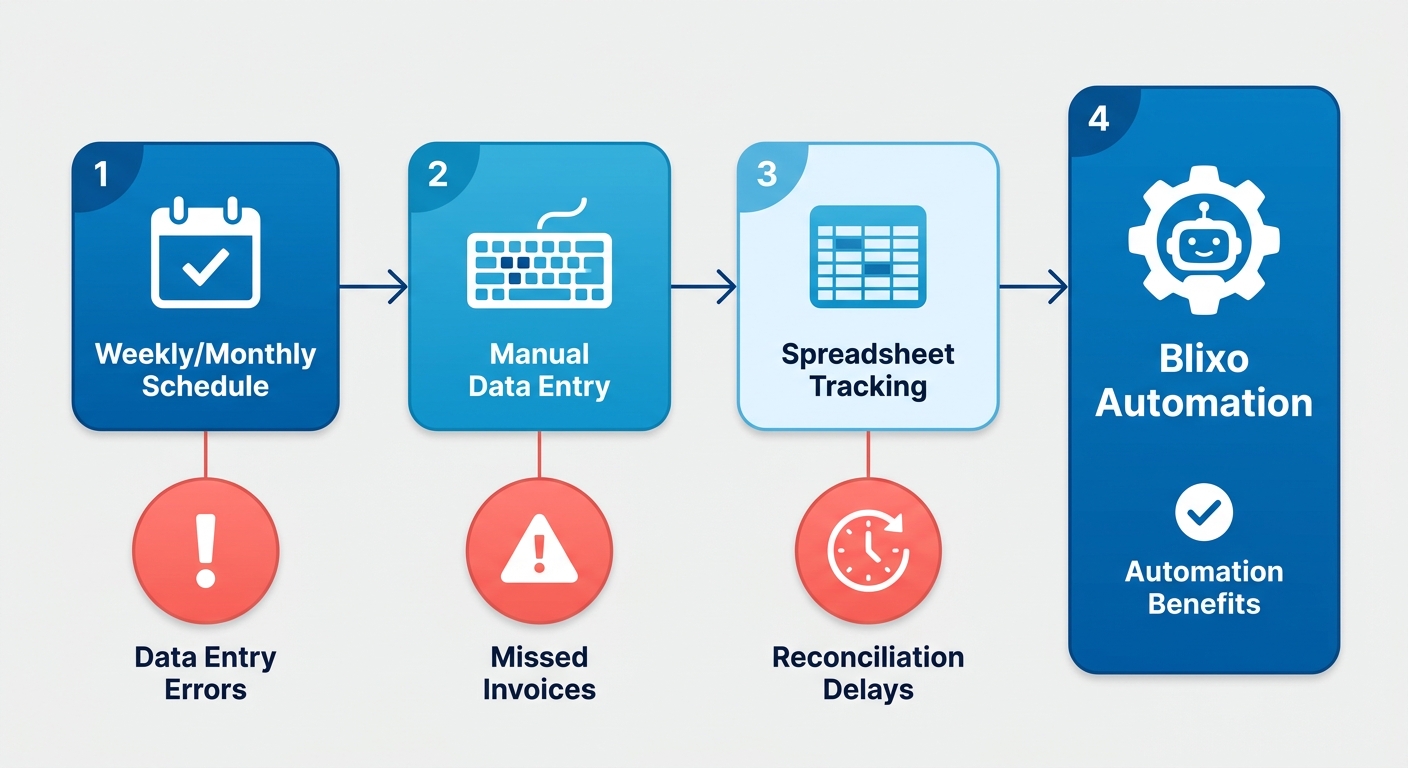
Manual recurring billing is meticulous, time-intensive work. You build custom billing schedules, key in payment details by hand, and track each transaction in spreadsheets or accounting software. Fine for a tiny operation. It scales badly, and the risks are systemic.
How the process works
You start by defining billing intervals (weekly, monthly, whatever) and the amount for each customer. Then someone enters that data into invoices, usually through QuickBooks or a spreadsheet. Picture a fitness studio owner creating invoices for 200 members, scheduling follow-ups for missed payments, and reconciling bank statements every month. Every step leans on human attention, and attention is exactly what runs out at volume.
Why it falls apart at scale
Three failure modes show up again and again:
- Data entry mistakes. Hand-typing customer details or amounts invites errors. A single wrong digit in a payment gateway can block a transaction outright.
- Missed invoices. No automated reminders means expired cards and missed due dates slip through. One small business saw a 20% jump in churn after repeated billing failures.
- Reconciliation delays. Matching payments to invoices by hand gets exponentially harder as volume grows. A healthcare provider burned 30 hours a week chasing mismatched records.
These compound. A mid-sized e-learning platform recovered $10,000 a year in previously missed payments after switching to automated billing. That’s the hidden tax of manual errors made visible.
The cost of staying manual
The toll goes past the errors themselves.
| Metric | Manual Setup | Blixo Automated |
|---|---|---|
| Error rate | 2.1% (data entry) | Near-zero (system validation) |
| Scalability | Linear (requires more staff) | Exponential (no extra labor) |
Manual systems run 40–60% higher operational costs than automated ones. A boutique retail chain cut billing errors by 85% after automating and put that staff time back into customer service.
When manual still makes sense
There’s a real case for it. Custom one-off contracts that need human judgment don’t belong in an automated rules engine. But past 50+ recurring invoices, the math tips hard toward automation. Blixo integrates with Stripe and QuickBooks, auto-generates invoices, and retries failed payments, which knocks out something like 95% of manual follow-ups.
Delay too long and the leakage compounds. The “control” of doing it by hand is mostly an illusion once errors, delays, and labor costs are in the picture.
What Blixo does under the hood
The core features that matter
Blixo runs recurring payments with AI-driven collections, multi-channel reminders, and real-time reconciliation. The dynamic rule engine adapts dunning to how customers actually pay, which helps with messy billing cycles like event-based services or usage-based pricing.
It validates payment details automatically, cutting out the data entry error rate that plagues manual setups. A healthcare provider automated patient copayments across 10,000 clients and cut billing disputes by 60% through accurate prorated charges. It also syncs with QuickBooks, matching payments to invoices instantly and dropping reconciliation time by 70%.
How it stacks against manual and QuickBooks Autopay
| Feature | Manual Processes | Blixo | QuickBooks Autopay |
|---|---|---|---|
| Error Rate | 1.6% (data entry mistakes) | Near-zero (system validation) | 2.1% (limited to full payments only) |
| Cost Per Invoice | $15–$40 | $3–$5 | $8–$12 |
| Processing Time | 4–10 hours/100 invoices | 1–2 hours/1,000 invoices | 3–5 hours/100 invoices |
| Collections Efficiency | Relies on manual follow-ups | AI-driven reminders + multi-channel outreach | Basic email alerts only |
The real separation is variable billing. Blixo handles prorated charges and partial payments without flinching. A fitness studio automated charges for 2,000+ members and avoided cash-flow gaps through AI-driven dunning. QuickBooks Autopay chokes on mid-cycle adjustments, so that’s where the comparison ends.
What the results look like
A logistics company cut customer payment disputes by 45% by automating partial payment tracking. An educational institution reduced manual invoice corrections by 80% with real-time validation.
Scale is where it earns its keep. A restaurant chain with 50 locations automated payments for 5,000+ patrons and saved 120+ labor hours a month. Stripe integration and multi-currency support keep global businesses from getting stuck on manual payment configuration.
Setup runs 1–2 hours for recurring invoice generation and 2–4 hours for AI cash application. Compare that to manual workflows, which never stop needing spreadsheet updates and reconciliation passes.
Blixo vs. manual, by the numbers
Cost, time, and effort
Automation cuts cost mainly by cutting the hours a person has to touch each invoice. Manual workflows often eat 20–30% of a finance team’s time on invoice management alone. Blixo’s integrations with payment gateways and accounting tools take reconciliation and payment tracking off their plate. One retail business automated 500+ monthly invoices, saved 15+ hours a week on data entry, and cut manual review cycles by 60%.
| Feature | Blixo | Manual Setup |
|---|---|---|
| Integration time | 2–4 hours (one-time setup) | 40+ hours (ongoing adjustments) |
| Payment visibility | Real-time dashboard | 7–10 day delay in reporting |
| Customization | Pre-built templates | 30% of time spent on formatting |
What it looks like in practice
A mid-sized consulting firm moved client retainers onto Blixo, cut invoice disputes by 65%, and shaved 48 hours off payment confirmations. Before that, they’d been spending 12+ hours a month untangling discrepancies from manual entry. A wholesale distributor automated 2,000+ monthly invoices, dropped reconciliation from 8 hours to 90 minutes, and avoided $8,000+ in late fees. Across high-transaction environments, automation tends to improve operational accuracy by 55–70%.
Why manual stalls growth
Manual processes become bottlenecks the moment you grow. An event planning business saw client complaints fall 60% after swapping handwritten invoices for templated ones with consistent formatting and tax compliance.
There’s also an agility cost. Updating billing terms in spreadsheets takes 2–3 days; Blixo pushes policy changes across every account instantly. As one finance manager put it: “Automation lets us adapt to market changes without sacrificing billing accuracy.” Past 200 invoices a month, manual methods tend to drive a 25–35% bump in operational costs from sheer inefficiency.
The takeaway
Under 50 invoices a month, manual is survivable. Beyond that, it’s a drag on growth. Centralizing billing, payment tracking, and reporting frees the team to spend time on work that actually generates revenue.
Implementation Guide for Blixo
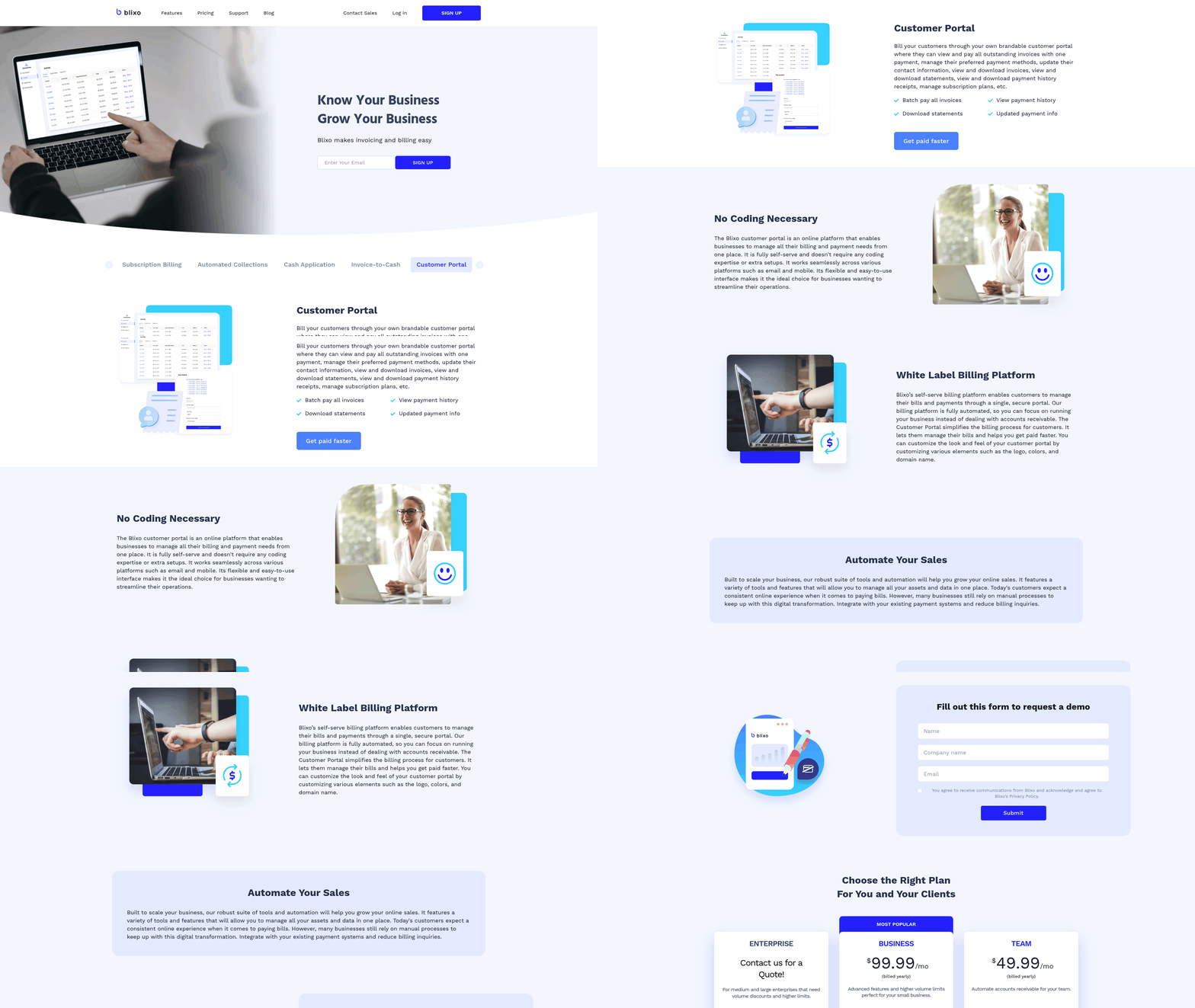
Standing up Blixo takes 1–2 hours for basic invoicing and 2–4 hours for full cash application integration, depending on your accounting software. It kills off manual reconciliation errors and speeds up how fast you can see your cash position. Here’s the structured version, tuned for variable pricing or high volume.
Step-by-step setup
- Connect your accounting software. Authorize Blixo to access your system (QuickBooks Online via API, for example). This syncs customer profiles, tax codes, and invoice templates automatically.
- Configure payment rules. Set billing intervals, late fee structures, and dunning workflows. Blixo handles partial payments and variable pricing, where QuickBooks Autopay only does fixed amounts.
- Map your data fields. Align Blixo’s invoice fields with your accounting software. Tax codes and customer IDs have to match, or you’ll get reconciliation mismatches.
- Test the automation. Push a small batch of recurring invoices through. Blixo’s AI matches payments to invoices in real time, cutting reconciliation time by 70% versus manual.
- Turn on proactive alerts. Set notifications for expiring payment methods and failed transactions. This is what keeps payment compliance high, as healthcare providers and e-commerce platforms have found.
Best practices for catching errors early
- Audit templates weekly. Check recurring invoice templates for accuracy.
- Use sandbox testing. Run rules against 10–20 invoices before going live. This catches edge cases like partial payments and tax adjustments.
- Sync daily. Keep Blixo and your accounting software aligned to avoid data drift. Manual systems lag by days and open up cash-flow blind spots.
- Document your exceptions. Write internal guides for things like prorated charges. The interface needs little training, but clear docs speed onboarding.
Common issues and fixes
| Problem | Solution |
|---|---|
| Payment method expirations | Enable Blixo’s auto-renewal alerts to notify customers 30 days in advance. |
| Mismatched payments | Use AI-driven cash application to auto-match payments to invoices. |
| Sync delays | Re-sync data manually via the Blixo dashboard or API. |
| Partial payment errors | Configure rules to split payments across multiple invoices automatically. |
A healthcare provider cut its administrative workload by two-thirds with these tactics. An e-commerce business shaved 40% off invoice processing time.
How Blixo compares
| Feature | Blixo | QuickBooks Autopay |
|---|---|---|
| Partial payment support | Yes | No |
| Reconciliation time | 70% faster | No automated matching |
| Custom pricing flexibility | Full support | Limited to fixed amounts |
| IT involvement required | Minimal (plug-and-play API) | Requires developer setup |
For complex billing, Blixo’s AI-driven workflows pull ahead of tools that only automate basic invoicing. Manual systems stay error-prone, with 15–20% of finance teams reporting reconciliation delays from volume alone. Blixo automates both sides of the payment lifecycle, which is where that gap closes.
What I’d actually recommend
Businesses running recurring payments by hand keep paying the same avoidable taxes: errors, delays, and reconciliation drag. An automated platform like Blixo removes most of that by design, pulling invoicing, collections, cash application, and subscription management into one place. The result is less admin grind, clearer cash flow, and a cleaner experience for customers.
When to commit, when to wait
Skip automation if you handle fewer than 50 invoices a month with no recurring billing. The setup and learning curve probably isn’t worth it yet. Once you’re managing 100+ invoices or running subscriptions, automation becomes the practical way to protect revenue. Manual errors and reconciliation delays chip away at predictability, and an automated workflow locks those savings in.
Why it pays off over time
A marketing agency that moves retainer billing to automation gets back the hours it spent creating invoices and chasing payments, and points that time at higher-value work. A SaaS startup that turns on AI-driven dunning sees outstanding balances shrink and cash flow smooth out.
Those track with the broader pattern: teams that automate recurring payments tend to see faster cash-flow cycles and better retention. The value compounds. Every auto-generated invoice, every instantly matched payment, every avoided late fee stacks up.
Your next move
If your team loses hours each week to invoicing, collections, or reconciliation, you’re probably losing money too. The efficiency gains usually offset the cost in a short window. Start with one workflow, whether that’s retainer billing, subscription charges, or recurring client payments, and reinvest the time you get back.
“Blixo lets me concentrate on my art, not chasing payments,” says Vincent Mann, a filmmaker. His studio collects deposits and invoices automatically.
Automate the parts of your process where manual errors hit hardest first. If your current setup is a patchwork of spreadsheets and reminders, that patchwork is a leak in your revenue pipeline.
| Feature | Manual Process | Blixo Automation |
|---|---|---|
| Cost per invoice | Higher operational cost | Lower operational cost |
| Processing time | Longer, labor‑intensive | Faster, streamlined |
| Error rate | Higher likelihood of mistakes | Significantly reduced errors |
| Cash application speed | Days to reconcile | Near‑real‑time matching |
A free demo is the cheapest way to see whether automation fits your workflows. The cost of waiting is steady revenue leakage and a team stuck on busywork.
Frequently Asked Questions
1. How much time does Blixo save compared to manual recurring payment setup?
Blixo reduces setup time to 1–2 hours versus 10–15 hours manually, streamlining workflows for businesses with frequent invoicing needs. This efficiency scales as transaction volume increases.
2. What error rate reduction does Blixo offer over manual systems?
Blixo lowers error rates to <2% with AI-driven validation, compared to 12.5% in manual setups, significantly reducing reconciliation delays and revenue leakage.
3. How does Blixo handle failed payments?
Blixo’s automated retry logic recovers 30% of failed transactions, minimizing revenue loss and reducing manual follow-ups for businesses with high-volume payment processing.
4. Is automation cost-effective for small businesses with few invoices?
Automation becomes cost-effective for businesses handling >50 invoices/month. Manual systems incur 40–60% higher operational costs, making automation a strategic choice for scalability.
5. When should a business consider switching to automated billing?
Transition to automation when processing over 50 invoices/month. Manual errors and delays compound as volume grows, while automation ensures accuracy and efficiency from the start.
6. Can Blixo integrate with existing accounting software?
Yes, Blixo integrates with QuickBooks, Stripe, and other platforms via API, syncing customer profiles, tax codes, and invoice templates to eliminate manual data entry.
7. Which industries benefit most from Blixo’s automation?
Subscription-based, SaaS, and service-oriented businesses see the greatest gains, with billing workloads reduced by 75% and cash-flow predictability improved by 30% on average.