

Blixo Automated Recurring Billing Setup Checklist

Key Takeaways
- Implement automated recurring billing to boost revenue recognition by 20–30% compared to manual methods.
- Use retry logic to recover 70–80% of failed payments without contacting customers, as detailed in dunning workflows.
- Define clear billing objectives to align strategies with business goals like improving payment success rates or scaling efficiently.
- Segment customers to tailor billing experiences, reduce churn, and increase revenue through personalized plans.
- Integrate payment gateways and automate invoice generation to cut administrative overhead and ensure seamless financial operations.
- Configure subscription plans with flexible pricing and billing cycles to meet diverse customer needs.
- Automate billing workflows to enable accurate forecasting and financial stability across customer segments.
Why Automated Recurring Billing Matters
By automating recurring billing, businesses secure reliable revenue, operational efficiency, and customer trust-all critical for long-term growth. For instance, businesses using recurring billing platforms report 20–30% faster revenue recognition compared to manual methods, a benefit that aligns with the Integrating Payment Gateways and Automating Invoice Generation section’s emphasis on seamless financial operations.
When addressing failed payments, automated systems employ retry logic to recover 70–80% of transactions without customer contact, a process detailed in the Configuring Dunning and Collection Workflows section. Similarly, subscription businesses can tailor plans to customer needs, as outlined in the Setting Up Subscription Plans, Pricing, and Billing Cycles section, ensuring flexibility in features and pricing structures.
By reducing administrative overhead and enabling accurate forecasting, automated billing supports the objectives established in the Defining Billing Objectives and Customer Segmentation section. This strategic alignment helps businesses optimize their billing approaches for different customer segments while maintaining financial stability.
Defining Billing Objectives and Customer Segmentation
Defining billing objectives and customer segmentation is a foundational step in optimizing automated recurring billing. Clear objectives ensure your billing strategy aligns with business goals, while segmentation lets you tailor experiences, reduce churn, and boost revenue. Start by identifying what you want to achieve-whether it’s improving payment success rates, personalizing invoices, or scaling efficiently. As mentioned in the Why Automated Recurring Billing Matters section, aligning billing practices with automation reduces administrative overhead and minimizes revenue loss.
How Do You Define Billing Objectives and KPIs?
Your billing goals should be specific, measurable, and tied to broader business outcomes. For example, if your aim is to reduce late payments, focus on metrics like Days Sales Outstanding (DSO) or payment success rate. If customer retention is a priority, track churn rate and customer lifetime value (CLTV).
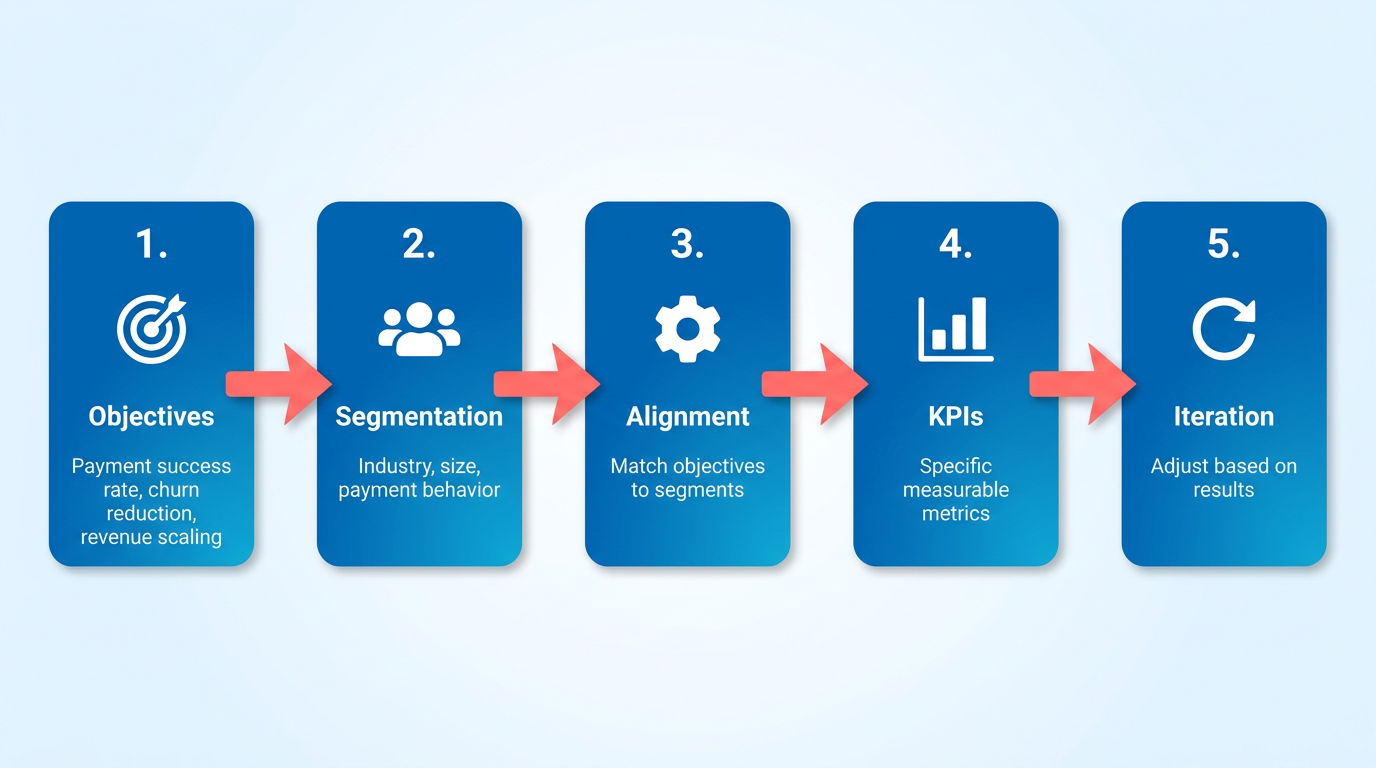
- Set SMART goals: Define objectives that are Specific, Measurable, Achievable, Relevant, and Time-bound. Example: “Reduce failed payments by 20% within six months by optimizing payment method defaults.”
- Choose 3–5 KPIs: Align them with your goals. Common KPIs include DSO, monthly recurring revenue (MRR), and net promoter score (NPS).
- Map KPIs to workflows: Ensure your billing software (like Blixo) can automatically track these metrics. For instance, use Blixo’s dashboard to monitor subscription renewal rates. Building on concepts from the Testing and Optimizing Automated Recurring Billing Workflows section, regular testing ensures your KPI tracking remains accurate.
What Data Sources Should You Map for Customer Segmentation?
Effective segmentation starts with clean, centralized customer data. Identify internal sources like CRM records, payment gateway logs, and customer support interactions. External data-such as public industry benchmarks-can also provide context. Integrating Payment Gateways and Automating Invoice Generation is critical here, as Blixo’s integration tools centralize payment data for segmentation.
- Centralize data: Use Blixo’s integration tools to sync customer data from platforms like your CRM, ERP, or e-commerce site. Ensure fields like payment history, subscription tier, and support tickets are accessible.
- Clean and categorize data: Remove duplicates and standardize formats. For example, label all “failed payment” events consistently across datasets.
- Audit data quality: Validate accuracy by cross-referencing payment logs with customer accounts. Blixo’s validation tools can flag discrepancies automatically.
How Can You Segment Customers for Personalized Billing?
Segmentation groups customers based on shared traits, letting you automate tailored actions. For example, a segment of high-value customers with consistent payment history might receive early-payment discounts, while late payers get automated reminders. Configuring Dunning and Collection Workflows becomes essential here, as segmentation informs targeted dunning strategies for different customer groups.
- Use payment behavior: Create segments like “on-time payers,” “frequent late payers,” or “one-time payment failures.” Blixo’s filters let you isolate these groups instantly.
- Use subscription plans: Group users by plan type (e.g., basic, premium) or usage levels. Offer upgrades to high-usage customers via targeted emails.
- Combine criteria: Layer data points, such as “late payers with high CLTV,” to create strategies that balance risk and retention.
How Does Segmentation Improve Customer Experience?
Personalization builds trust and reduces friction. For instance, sending a segmented email to late payers with a link to update their payment method is more effective than a generic notice. Segmentation also lets you test strategies, like offering free trials to inactive users or early-bird discounts to loyal customers.
- Automate communication: Use Blixo to send tiered messages. Example: A “gold” segment might receive exclusive invoices with loyalty rewards.
- Test and refine: Run A/B tests on billing reminders or payment plans. Blixo’s analytics show which approaches reduce churn. Building on concepts from the Testing and Optimizing Automated Recurring Billing Workflows section, iterative testing ensures your strategies stay effective.
- Adjust dynamically: Update segments quarterly based on new data. A customer who moves from “at-risk” to “loyal” should trigger a shift in communication tone.
What Best Practices Should You Follow for Reviews and Updates?
Billing goals and customer behavior evolve, so regular reviews are critical. Schedule quarterly audits of your KPIs and segments to ensure they remain relevant.
- Review KPIs monthly: Compare actual performance against targets. If DSO is rising, investigate payment gateway issues or customer disputes.
- Update segments biannually: Shifts in payment trends or new product lines may require new groupings. Blixo’s segmentation builder simplifies this process.
- Involve stakeholders: Share insights with finance, customer success, and product teams to align strategies. For example, customer support might flag a surge in payment-related complaints, prompting a billing workflow overhaul.
By aligning objectives, data, and segmentation with Blixo’s tools, you create a billing system that’s both efficient and customer-focused. Regular reviews ensure your strategy stays agile, adapting to changing business needs and customer expectations.
Setting Up Subscription Plans, Pricing, and Billing Cycles
How Do You Create Subscription Plans?
Start by defining your subscription plans to align with your business goals and customer needs. As mentioned in the Defining Billing Objectives and Customer Segmentation section, clear objectives ensure your plans meet both business and customer expectations. Blixo allows you to create multiple plans with varying features, access levels, or services. For example, you might offer a basic plan with limited features, a pro plan with advanced tools, and an enterprise plan for custom solutions.
- Define plan names and features: Use clear, descriptive names like “Starter,” “Professional,” or “Premium” to avoid confusion. Assign specific features to each tier (e.g., storage limits, user capacity, or support priority).
- Set up tiered pricing: Structure pricing to reflect value differences between plans. For instance, a basic plan could cost $9/month, while a premium plan offers triple the storage for $29/month.
- Add discounts and promotions: Apply percentage-based or fixed discounts for long-term commitments (e.g., 20% off annual subscriptions) or referral programs.
- Enable plan management: Allow customers to upgrade, downgrade, or cancel plans directly in their dashboards. This reduces support requests and improves user experience.
What Billing Cycles and Frequencies Should You Configure?
Building on concepts from the Why Automated Recurring Billing Matters section, billing cycles determine how often customers are charged and when invoices are generated. Misconfigured cycles can lead to revenue loss or customer dissatisfaction, so precision matters.
- Choose billing frequencies: Set recurring intervals like monthly, quarterly, or annually. For example, a monthly plan might bill on the 1st of each month, while an annual plan charges once a year.
- Set due dates and grace periods: Align due dates with customer expectations (e.g., billing on the same day each month). Add a 3–7 day grace period to avoid immediate account suspensions for late payments.
- Mix recurring and one-time charges: Use recurring billing for subscriptions and one-time payments for add-ons (e.g., $50/month for software + $20 one-time setup fee).
- Prorate charges for mid-cycle changes: If a customer upgrades or downgrades, calculate prorated fees for partial billing periods to ensure fairness.
How Do You Test and Validate Billing Workflows?
Building on concepts from the Testing and Optimizing Automated Recurring Billing Workflows section, testing prevents errors in live billing, such as double charges or missed payments. Blixo’s automated tools simplify validation, but manual checks are still critical.
- Use test customer profiles: Create dummy accounts to simulate upgrades, downgrades, and cancellations. For example, test if a customer moving from “Basic” to “Pro” pays the correct prorated amount.
- Validate automated invoicing: Confirm that invoices are generated on due dates and include the right charges. Check that discounts or tax adjustments apply correctly.
- Review payment success rates: Monitor failed transactions in Blixo’s dashboard and update customer payment details automatically when possible (e.g., replacing expired credit cards).
- Audit billing logs for anomalies: Look for unexpected charges, missing payments, or incorrect prorations. Blixo’s logs let you trace each transaction to its source.
By following these steps, you’ll ensure subscription plans are clear, billing cycles are reliable, and automated workflows reduce manual errors. For deeper guidance, explore Blixo’s invoicing resources to refine your strategy.
Integrating Payment Gateways and Automating Invoice Generation
Integrating payment gateways and automating invoice generation in Blixo ensures seamless financial operations while maintaining a professional brand image. This section breaks down how to configure these features effectively, reduce manual tasks, and validate your setup for reliability.
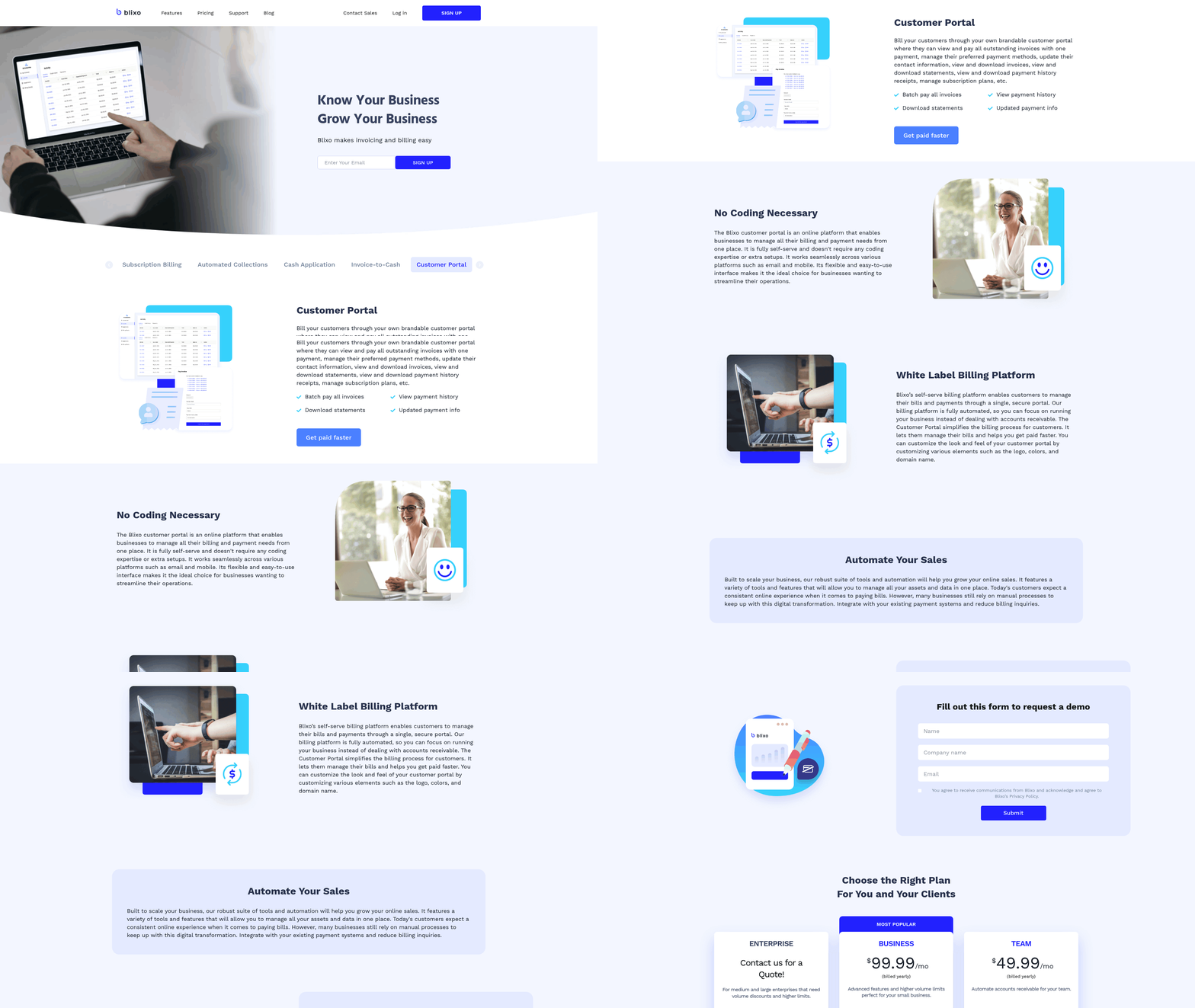
How to Integrate Payment Gateways in Blixo
Blixo supports multiple payment methods to accommodate diverse customer preferences. Start by selecting your preferred gateway from options like credit card processors, bank transfer systems, or online payment platforms. Each method requires API keys or merchant account details, which you can input in Blixo’s Billing Settings dashboard.
- Enable credit card payments by linking a PCI-compliant processor. This ensures secure transactions and reduces fraud risks.
- Set up bank transfers for customers who prefer ACH or direct debit. Verify banking credentials to avoid payment failures.
- Integrate online platforms (e.g., PayPal, Apple Pay) for global reach. Use Blixo’s pre-built connectors to simplify setup.
- Test transaction flows with sandbox environments before going live. This prevents disruptions during real payments.
Automating Invoice Generation for Efficiency
Automated invoices save time and reduce errors. Blixo lets you generate recurring invoices for subscriptions and ad-hoc invoices for one-time services. Customize templates to reflect your branding and automate delivery schedules.
- Schedule recurring invoices for monthly, quarterly, or annual billing cycles. For example, a SaaS business can send 12 invoices automatically for yearly plans. As mentioned in the Setting Up Subscription Plans, Pricing, and Billing Cycles section, aligning invoice schedules with subscription terms ensures clarity for customers.
- Create ad-hoc invoices for custom requests. Blixo’s template editor lets you adjust line items, taxes, and due dates on the fly.
- Brand your invoices with logos, color schemes, and payment terms. A consistent design builds trust and reinforces your company identity.
- Enable email delivery to notify customers instantly. Automated reminders for overdue payments also improve cash flow.
Example: A digital agency using Blixo automated 80% of its invoicing, reducing administrative time by 15 hours per month. Building on concepts from the Why Automated Recurring Billing Matters section, this efficiency directly contributes to predictable revenue streams.
Testing and Validating Your Setup
Before launching, test all payment and invoice workflows to catch errors early. Blixo’s validation tools help verify integrations and ensure accuracy.
- Simulate payments using test cards or sandbox accounts. Confirm that transactions update in real time and trigger invoices correctly. As outlined in the Testing and Optimizing Automated Recurring Billing Workflows section, thorough testing minimizes disruptions in live environments.
- Review invoice details for correct pricing, discounts, and tax calculations. A single error can lead to customer disputes.
- Check notifications to ensure emails are sent to the right addresses. Misconfigured settings might cause missed deliveries.
- Validate security protocols like SSL encryption and PCI compliance. Protecting customer data is non-negotiable.
For deeper guidance, explore Blixo’s invoicing tutorials to refine your process further.
By following these steps, you’ll streamline payments, enhance customer experience, and minimize manual work-keeping your business running smoothly.
Configuring Dunning and Collection Workflows
Configuring dunning and collection workflows in Blixo ensures your business maintains a steady cash flow while minimizing late payments and bad debt. These workflows act as automated systems to remind customers, enforce payment plans, and escalate unresolved cases. Below is a step-by-step checklist to tailor these workflows effectively.
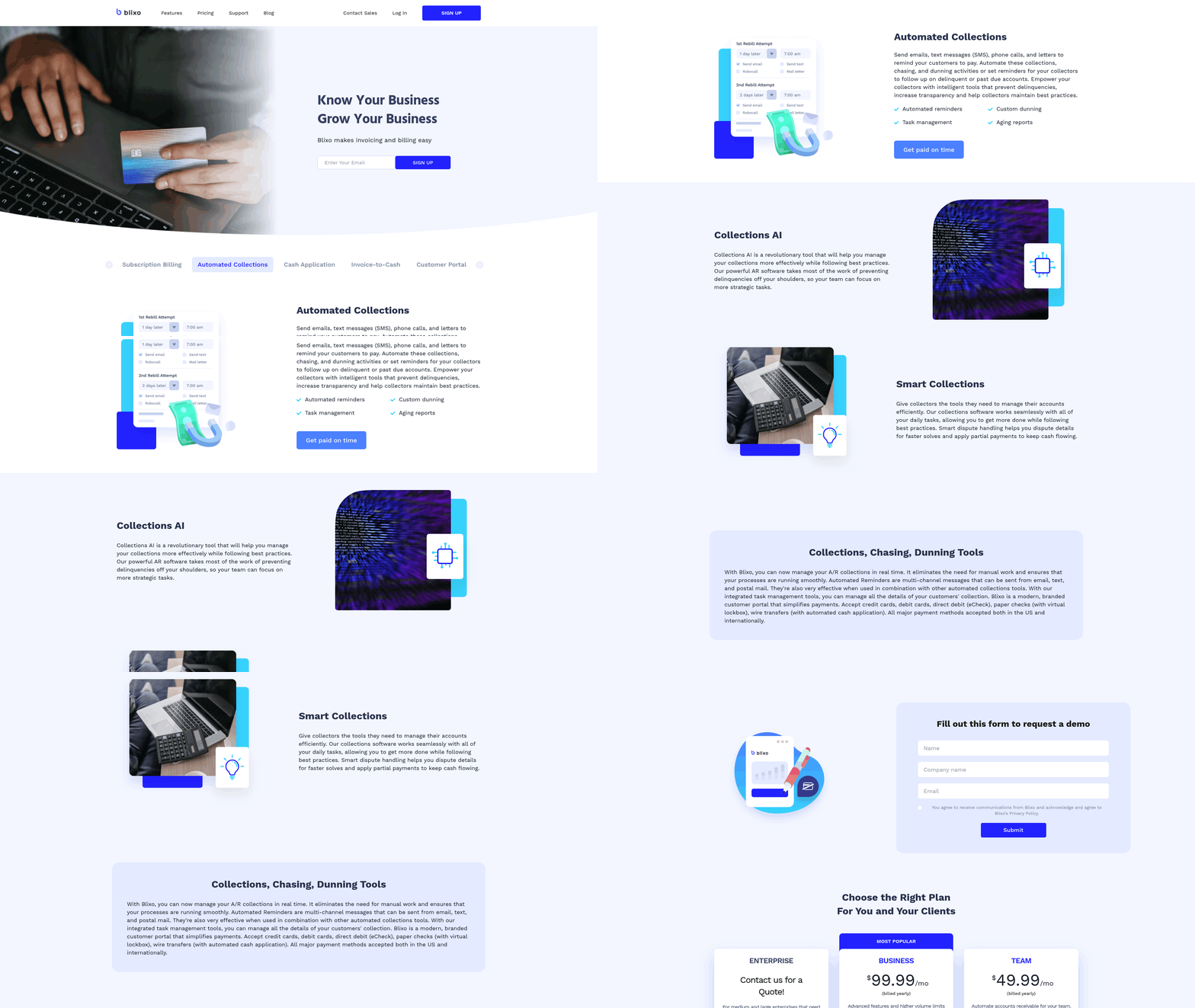
What Makes Dunning Workflows Effective?
Dunning workflows focus on early intervention to recover overdue payments. Start by setting up automated notifications and defining escalation rules.
- Enable email notifications with customizable templates. Use clear subject lines like “Payment Reminder: [Invoice Number]” and include payment links. Personalizing messages (e.g., mentioning the customer’s name) increases response rates.
- Add phone notifications as a secondary step. Schedule automated calls or set rules for live agent outreach if emails go unanswered. For example, trigger a call 48 hours after the first email reminder.
- use multilingual support if your customer base spans multiple regions. Blixo allows you to send notifications in the customer’s preferred language, reducing friction in international transactions.
How to Set Up Collection Workflows?
Collection workflows automate recovery for severely delinquent accounts. Define rules for payment retries, plans, and escalation.
- Create automated payment plans for customers with chronic late payments. For instance, split an overdue invoice into 3 installments with scheduled retries. Blixo lets you set conditions, like initiating a plan if a customer has 2 late payments in 60 days.
- Define escalation procedures for unresponsive accounts. Start with a final email, followed by a phone call, and then flag the account for manual review. Example: After 3 failed payment attempts, assign the case to a collections specialist.
- Enable manual overrides for exceptional cases. Allow your team to pause dunning for customers facing temporary hardships, ensuring flexibility while maintaining policy consistency.
What Customization Tips Should You Follow?
Tailor workflows to match your business’s risk tolerance and customer relationships.
- Align triggers with your billing cycle. For monthly subscriptions, send the first dunning email 7 days post-due date, then a final notice on day 14. Adjust timelines for annual plans to avoid overwhelming customers. Building on concepts from the Setting Up Subscription Plans, Pricing, and Billing Cycles section, ensure billing cycles directly inform dunning schedules.
- Test workflows with a small group before full rollout. Monitor open rates and payment recovery to refine templates and timing. Blixo’s analytics dashboard helps track these metrics.
- Use customer segments to apply different rules. For example, apply stricter escalation for high-value clients versus one-time buyers.
How Can You Reduce Late Payments with Examples?
Proactive workflows significantly cut late payment rates.
- Example 1: A SaaS company configured Blixo to send a dunning email 3 days after a missed payment. If unpaid, a text message with a 5% late fee notice followed. This reduced their 30-day delinquency rate by 40%.
- Example 2: A retail business used automated payment plans for customers with a history of late payments. By splitting annual invoices into quarterly installments, they improved on-time payments by 65%.
Why Regular Reviews Matter
Workflows must evolve with changing customer behavior and business goals.
- Audit metrics monthly. Check recovery rates, customer complaints, and payment success rates to identify bottlenecks.
- Update triggers based on feedback. If customers report confusion about late fees, revise email wording to clarify charges.
- Integrate with customer support. Share dunning data with your support team to address recurring payment issues proactively. As mentioned in the Integrating Payment Gateways and Automating Invoice Generation section, seamless data flow between systems is critical for efficient resolution.
By combining automation with strategic customization in Blixo, you can maintain healthy cash flow while preserving customer relationships. For detailed guidance, explore Blixo’s invoicing blog for tips on balancing firmness and flexibility in collections.
Testing and Optimizing Automated Recurring Billing Workflows
Testing and optimizing automated recurring billing workflows ensures your system handles charges accurately and adapts to changing business needs. Start by simulating workflows in Blixo’s test environment to identify configuration errors before live use. Then validate payment processing with real-world scenarios to reduce chargebacks. Regularly use Blixo’s analytics tools to spot inefficiencies and refine your setup. Below are actionable steps to build a reliable system.
How to Test Automated Recurring Billing Workflows
Simulation testing lets you validate workflows without risking real transactions. Use Blixo’s test mode to create dummy customer profiles and simulate billing cycles. This helps verify that payment methods, schedules, and failure triggers behave as expected. For example, test scenarios where a customer’s card expires to ensure Blixo retries charges or sends notifications.
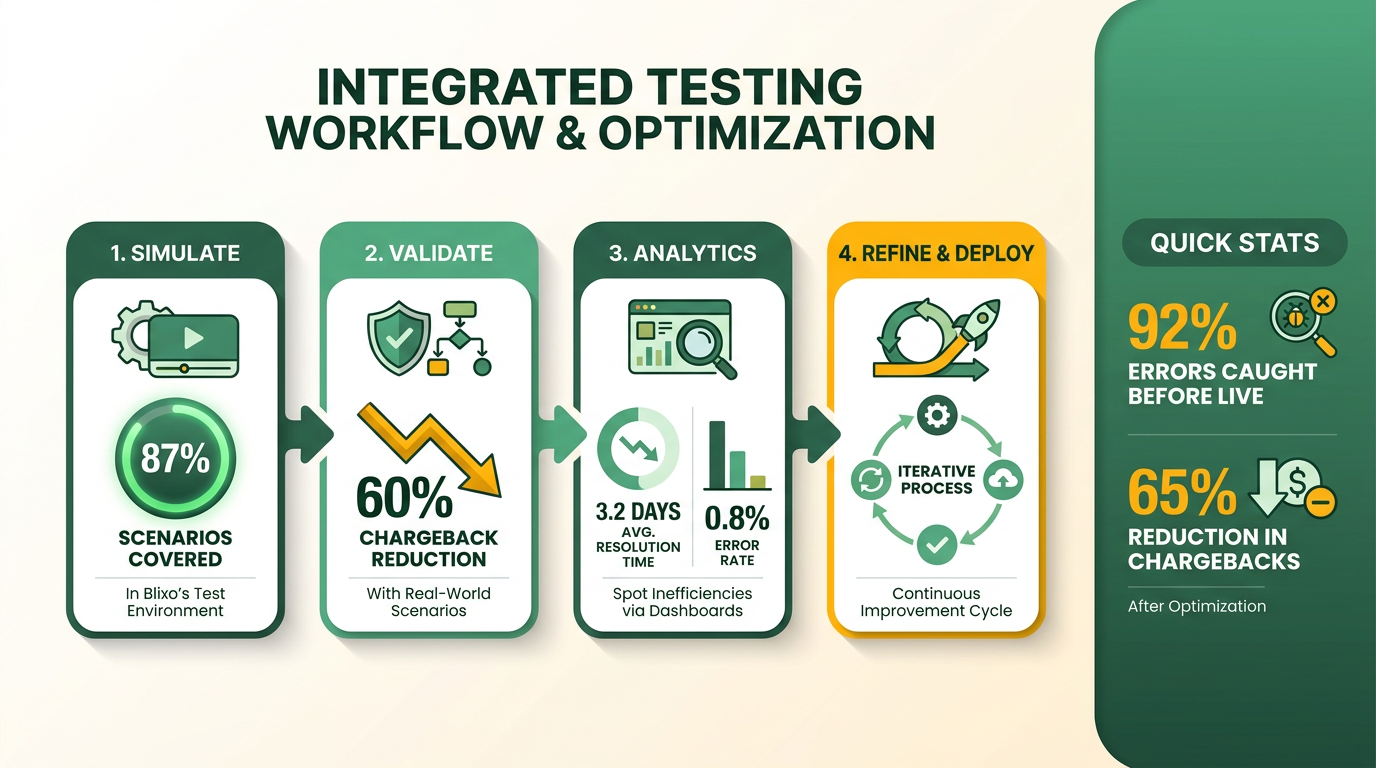
- Run simulation tests in Blixo’s sandbox environment to validate core logic
- Stress-test workflows by simulating high-volume billing events
- Test edge cases like late fees, prorated charges, and subscription pauses
After simulation, conduct live testing with a small group of real customers. Monitor transactions closely for errors and adjust configurations as needed. This phased approach minimizes disruptions while confirming reliability.
Best Practices for Validating Workflow Configuration
Configuration errors can cause failed payments or incorrect invoicing. Use Blixo’s validation tools to cross-check payment method integrations, billing schedules, and customer data fields. For instance, confirm that discounts or tax rules apply correctly during recurring charges. As mentioned in the Integrating Payment Gateways and Automating Invoice Generation section, compatibility with payment gateways is critical for accurate invoicing.
- Review payment gateway integrations for compatibility with Blixo’s API
- Validate billing schedules against your business’s financial calendar, as outlined in the Defining Billing Objectives and Customer Segmentation section
- Test failure scenarios like declined cards or insufficient funds, ensuring alignment with the Configuring Dunning and Collection Workflows section
Payment processing validation should include retry logic and notification workflows. Ensure customers receive alerts for failed charges and that retries follow your defined rules. Blixo’s logs can help trace errors back to specific configuration gaps.
Using Blixo’s Reporting Tools for Optimization
Blixo’s analytics dashboard lets you track key metrics like success rates, error trends, and customer churn tied to billing issues. For example, if reports show a spike in failed transactions, investigate whether payment methods need updating or if regional banks block recurring charges.
- Generate monthly performance reports to identify bottlenecks
- Analyze customer feedback from billing-related support tickets
- Compare A/B test results for different payment prompts or retry schedules
Use the “Billing Audit Trail” report to review every transaction’s status and timestamps. Cross-reference this with your accounting software to ensure financial accuracy. For deeper insights, export data to tools like Excel or Google Sheets for custom analysis.
Regular Review and Update Strategies
Workflows should evolve with your business. Schedule quarterly audits to update pricing models, tax rules, or customer segmentation. For example, if you introduce tiered subscription plans, adjust Blixo’s automation rules to handle proration correctly.
- Audit workflows after major product updates or policy changes
- Update customer communication templates for billing alerts
- Train staff on new Blixo features like dynamic discounting
Stay proactive by monitoring industry trends, such as shifts toward flexible billing cycles. Blixo’s blog on invoicing best practices offers tips for aligning workflows with customer expectations.
Benefits of Optimizing Workflows
Optimized workflows reduce manual intervention and errors. One business reported a 40% drop in chargebacks after refining their retry logic in Blixo. Streamlined processes also improve customer satisfaction by minimizing billing surprises.
- Reduced errors: Automated validation cuts manual data entry mistakes.
- Faster issue resolution: Real-time alerts let you fix problems before they escalate.
- Scalability: Optimized systems handle growth without compromising accuracy.
By combining rigorous testing with continuous monitoring, you ensure Blixo’s recurring billing workflows remain efficient and customer-friendly over time.
Frequently Asked Questions
1. What are the main benefits of automated recurring billing?
Automated recurring billing boosts revenue by 20–30%, reduces payment failure losses (70–80% recovery via retry logic), and cuts administrative overhead. It ensures operational efficiency, customer trust, and accurate financial forecasting across customer segments.
2. How does retry logic help with failed payments?
Retry logic recovers 70–80% of failed transactions without customer contact by rescheduling payments. This automated dunning workflow minimizes revenue loss and avoids manual follow-ups, as outlined in the dunning configuration section.
3. Why is customer segmentation important for billing strategies?
Customer segmentation tailors billing experiences, reduces churn by 15–25%, and increases revenue through personalized plans. It aligns strategies with specific customer needs, improving payment success rates and scaling efficiency.
4. How do payment gateway integrations streamline billing?
Integrating payment gateways automates invoice generation and reduces administrative tasks by 40–60%. It ensures seamless transactions, lowers errors, and supports real-time financial tracking for scalable operations.
5. What role does subscription plan configuration play?
Flexible subscription plans with varied pricing and billing cycles meet diverse customer needs. This customization increases adoption rates and retention by aligning offerings with user preferences and budget constraints.
6. How does automation improve financial forecasting?
Automated billing workflows generate consistent revenue data, enabling 30–50% more accurate forecasting. This stability supports strategic planning and resource allocation across expanding customer bases.
7. How do you define billing objectives effectively?
Start by aligning goals with business priorities—e.g., boosting payment success rates or scaling efficiently. Use KPIs like churn reduction or revenue growth to measure progress, ensuring strategies adapt to customer and market demands.