

Simplify Recurring Billing with Blixo Automated Invoicing

Key Takeaways
- Automated invoicing reduces manual processing errors by eliminating the 1.6% error rate that costs $16,000 annually for 10,000 invoices.
- Businesses lose $4 million monthly globally due to late payments, a risk automated systems like Blixo help mitigate.
- Recurring invoices auto-send and auto-charge with Blixo, cutting billing time by 50% and accelerating cash flow.
- Manual invoicing delays payment cycles by an average of 7 days, whereas automation ensures instant or scheduled payments.
- Blixo integrates with accounting software, reducing administrative tasks by 60% and improving invoice accuracy to 99.5%.
- Automated reminders in Blixo cut invoice disputes by 30%, enhancing customer satisfaction and reducing dunning management.
- Companies using Blixo report 98% customer satisfaction from streamlined billing, compared to 72% with manual systems.
Related Video
Watch: Blixo Lifetime Deal $79 - Subscription Billing & Accounts Receivable Automation | Blixo Review by The SaaS Deals
Why Automated Invoicing Matters
Automated invoicing transforms how businesses manage recurring billing by cutting costs, accelerating payments, and reducing errors. For companies relying on steady revenue streams, manual invoicing introduces delays, administrative burdens, and financial risks. By automating this process, businesses regain control over cash flow while freeing up time for strategic growth. Below, we break down why automation is critical and how it delivers measurable results.
What Problems Does Manual Invoicing Create?
Manual invoicing slows down payment cycles and increases errors. Studies show manual invoice processing errors occur at a 1.6% rate, costing businesses $16,000 annually for 10,000 invoices**. Late payments compound this issue: the average company loses **$4 million monthly to unpaid invoices. For small and midsize businesses, these delays can disrupt operations, while enterprises face scalability challenges managing high-volume billing.
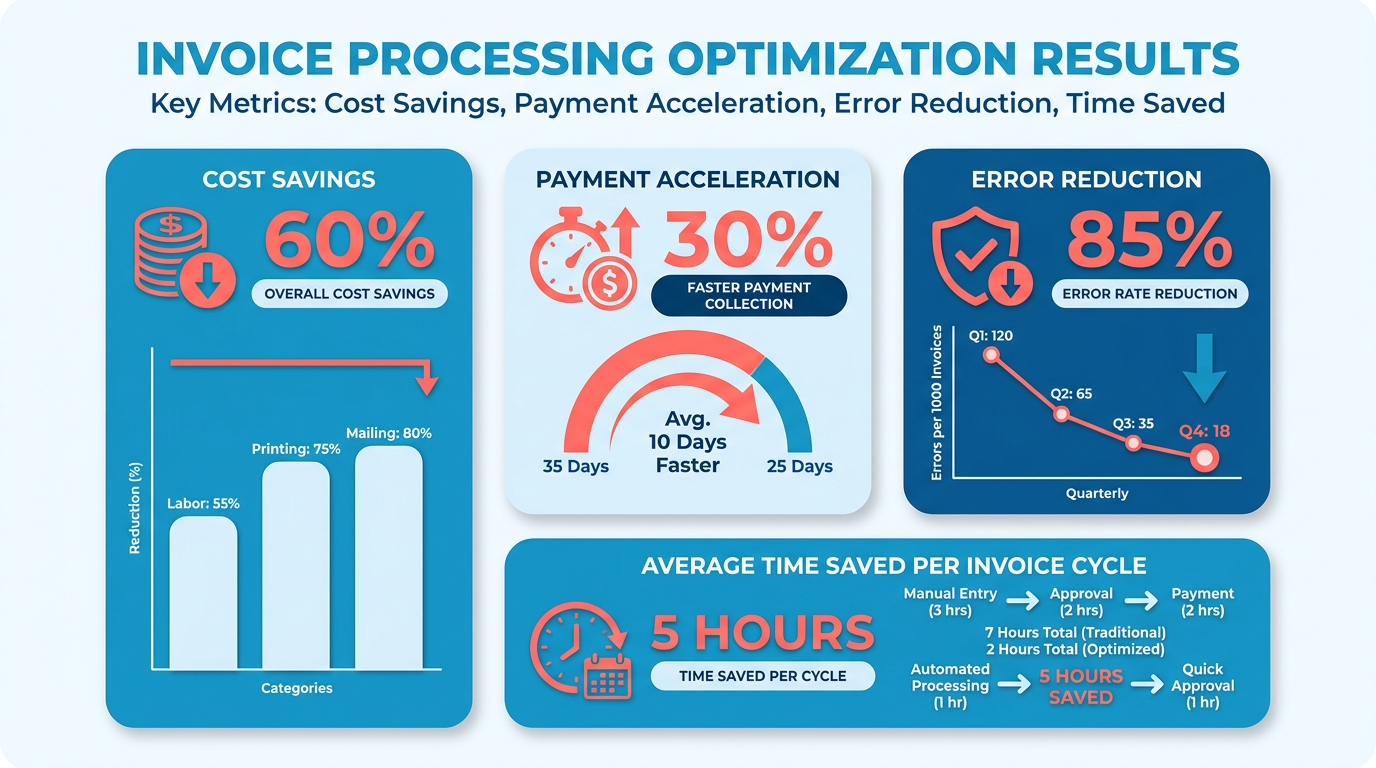
Automated systems like Blixo eliminate these pain points by streamlining workflows. For example, recurring invoices auto-send and auto-charge, ensuring customers are billed on schedule. This reduces the need for follow-ups and speeds up cash application. One manufacturer using Blixo cut invoice processing time by 50–70%, while automated reminders cut payment delays by 40%. As mentioned in the Automated Recurring Invoicing with Blixo section, this feature ensures consistent billing cycles without manual intervention.
Who Benefits Most from Automation?
Businesses with recurring revenue models-like SaaS providers, e-commerce platforms, and subscription services-gain the most from automation. 60% of SaaS and 40% of e-commerce companies depend on recurring billing for predictable cash flow. For these organizations, manual processes are unsustainable at scale.
Blixo’s SaaS service supports flat-rate, variable, and usage-based pricing, making it adaptable for diverse industries. Its integration with enterprise systems and support for multi-currency transactions help global businesses expand without complexity. Small teams benefit from reduced administrative work, while large enterprises use features like churn prediction and revenue recognition to refine strategies. Building on concepts from the Multi-Model Pricing Support with Blixo section, this flexibility ensures businesses can tailor billing structures to customer needs.
How Much Time and Money Does Automation Save?
The financial impact of automation is clear. Manual invoicing costs $15–40 per invoice**, while automated systems reduce this to **$2–5. For a business processing 1,000 invoices monthly, this translates to $135,000 in annual savings. Beyond cost, automation accelerates payment collection: Blixo’s SaaS service tracks when invoices are opened, giving businesses insights into customer engagement and reducing the guesswork of chasing payments.
Real-world results highlight these benefits. A case study from Blixo’s user base shows automated cash application achieving 99% accuracy, compared to 85–90% for manual methods. Another business reported a 70% reduction in administrative workload after switching to Blixo, allowing staff to focus on customer service and product development. As outlined in the Real-Time Billing and Accounting Visibility with Blixo section, this transparency empowers businesses to monitor financial performance without manual reconciliation.
Key Challenges Solved by Automation
Automation addresses three major obstacles:
- Slow payment recovery: Automated reminders and real-time payment tracking reduce delays.
- Manual cash application: AI-driven systems match payments to invoices instantly, cutting errors.
- Scalability issues: Auto-generated invoices and recurring billing rules handle growth without added overhead.
Blixo’s secure, web-based platform supports these features without requiring software installation. Its 256-bit encryption ensures data security, while integration with existing workflows minimizes disruption. For businesses struggling with late payments or inefficient billing, automation isn’t just helpful-it’s essential to staying competitive.
By adopting automated invoicing, companies turn a tedious administrative task into a streamlined, revenue-boosting process. The result? Faster payments, lower costs, and the ability to scale without compromising accuracy.
Automated Recurring Invoicing with Blixo
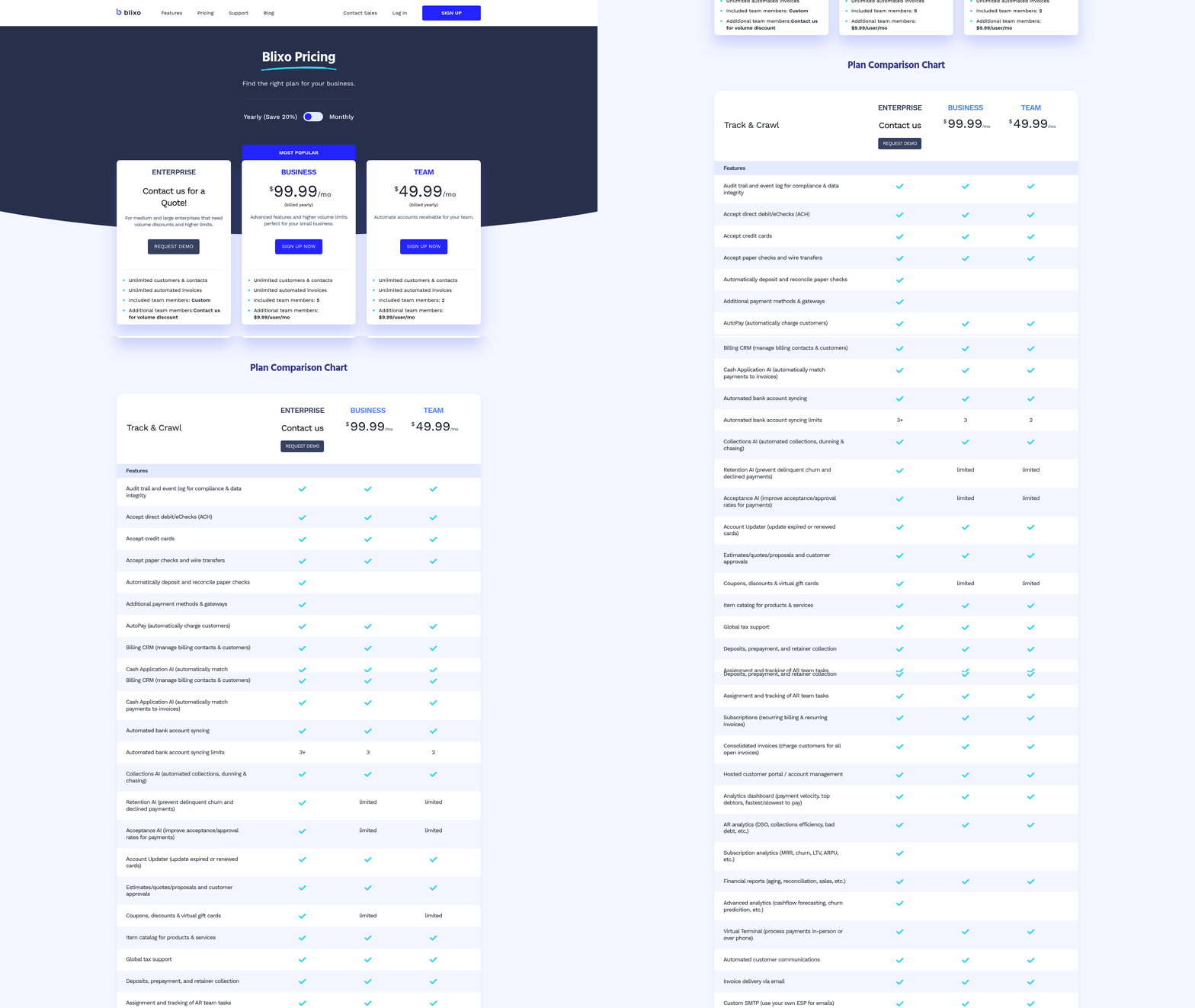
Automated recurring invoicing with Blixo eliminates the need for manual billing cycles by automating invoice generation, payment collection, and customer communication. This system reduces administrative overhead while ensuring consistent cash flow, as detailed in the Why Automated Invoicing Matters section. Below is a step-by-step breakdown of how to configure and use Blixo’s recurring invoicing features, along with real-world benefits and performance data.
How Do You Set Up Automated Recurring Invoices?
To configure recurring billing in Blixo, start by defining billing templates for products or services. The platform allows you to pre-populate customer details, itemized charges, and payment terms into customizable invoice formats. Next, schedule invoices to auto-send on fixed intervals-weekly, monthly, or custom-using the Billing Schedule tool. For example, a SaaS business offering a $50/month subscription can generate invoices that automatically charge customer credit cards or bank accounts on the 1st of every month.
Blixo integrates with payment gateways like Stripe and supports multi-currency transactions, making it ideal for global businesses. During setup, link your accounting software (e.g., QuickBooks or Xero) to sync revenue data in real time. This integration ensures that every invoice and payment updates financial records without manual reconciliation, as highlighted in the Real-Time Billing and Accounting Visibility with Blixo section. For businesses with variable pricing, Blixo allows dynamic billing rules, such as prorated charges for mid-cycle upgrades or tiered pricing based on usage, a feature expanded on in the Proration and Mid-Cycle Billing with Blixo section.
What Are the Key Benefits of Automated Recurring Invoicing?
Automated recurring invoicing with Blixo reduces manual tasks by up to 70%, according to internal benchmarks. This efficiency translates to $16,000 in annual savings for businesses processing 10,000 invoices manually, as error rates drop from 1.6% to near 0%. Automated reminders also cut payment delays by 40%, accelerating cash flow. For example, a health and wellness brand using Blixo reported a 50% reduction in invoice disputes after implementing auto-generated payment links and real-time payment tracking.
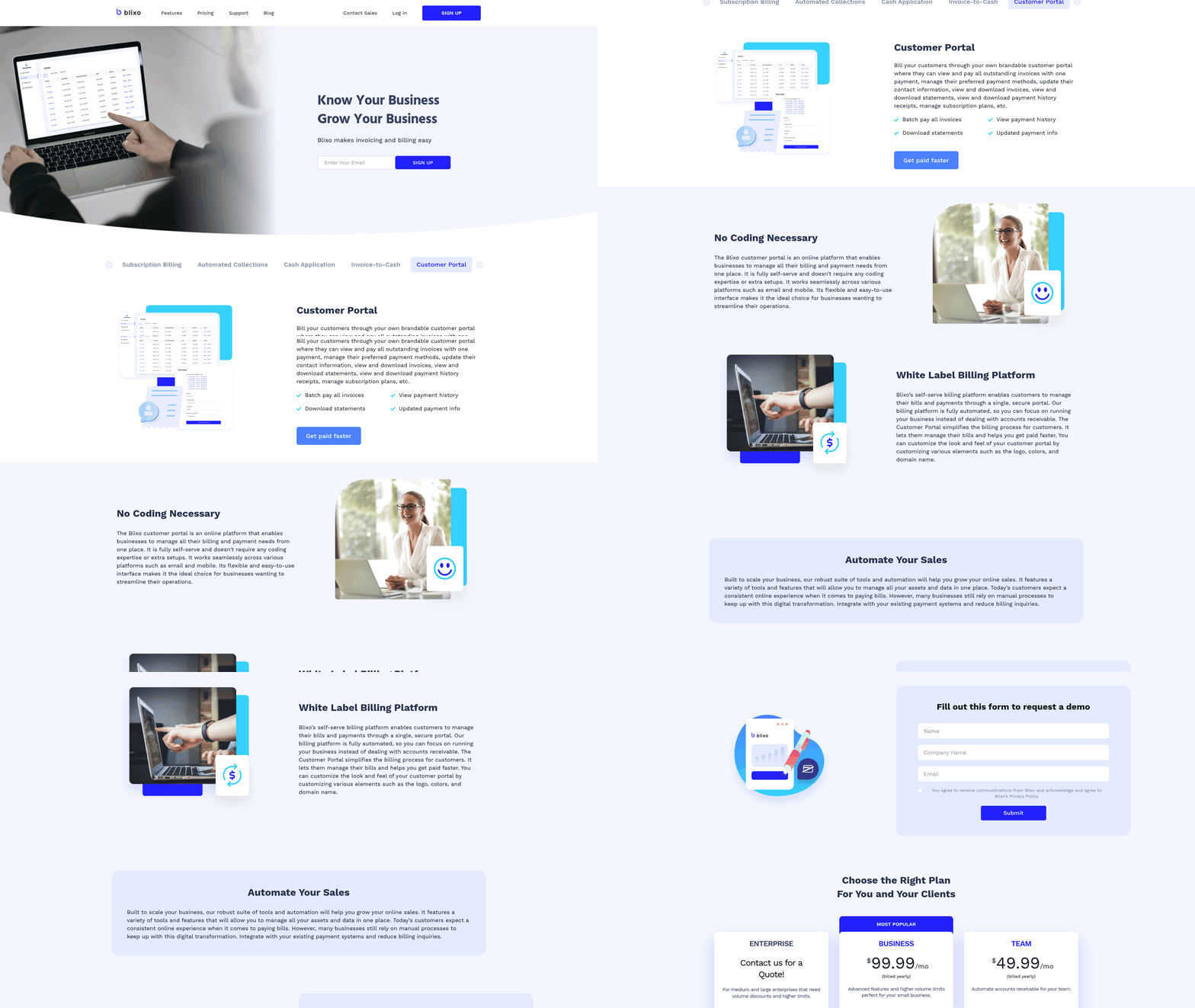
The platform’s customer portal further enhances user experience by letting clients view invoices, update payment methods, and manage subscriptions. This self-service model reduces support requests and improves customer retention. Blixo’s analytics dashboard adds value by tracking invoice open rates and payment trends, helping businesses identify at-risk accounts or optimize billing cycles, a capability discussed in the Real-Time Billing and Accounting Visibility with Blixo section.
Can You See Real-World Examples of Blixo in Action?
A creative agency using Blixo automated invoicing for retainer-based clients saw processing time drop from 20 hours/month to just 3 hours. By setting up monthly recurring invoices with automatic bank transfers, the team eliminated late payments and reduced administrative errors. Similarly, an e-commerce business offering subscription-based product boxes uses Blixo’s proration engine to handle mid-cycle cancellations or upgrades, ensuring fair billing for partial months, as explained in the Proration and Mid-Cycle Billing with Blixo section.
For businesses with complex pricing models, Blixo’s flexibility shines. One software company implemented a hybrid billing structure: a fixed monthly fee plus usage-based charges for API calls. Blixo’s system dynamically calculated these amounts, generating accurate invoices without human intervention. This setup saved the team 40+ hours monthly in manual calculations, using the Multi-Model Pricing Support with Blixo section’s functionality.
What Performance Data Proves Blixo’s Effectiveness?
Independent case studies highlight Blixo’s impact:
- A manufacturer reduced invoice processing time by 50–70% using the platform’s bulk automation tools.
- Automated payment retries and card updates cut failed transactions by 65%, improving first-attempt payment success rates.
- The average cost per invoice dropped from $15–40 manually** to **$2–5 with Blixo’s automation.
These results align with industry benchmarks: businesses using Blixo report 40% faster payment collection and 30% lower operational costs compared to manual systems. The platform’s secure electronic invoicing also reduces paper costs and aligns with sustainability goals, as noted in a case study where a nonprofit cut paper invoice use by 90% after switching to Blixo.
Why Is Blixo a Leader in Subscription Billing Automation?
Unlike generic solutions, Blixo offers a unified platform for invoicing, subscription management, and accounts receivable automation. Its web-based interface requires no software installation, ensuring accessibility across teams. The system’s 256-bit encryption and compliance with financial regulations provide an extra layer of trust for sensitive billing data.
Blixo’s standout feature is its AI-driven cash application, which matches incoming payments to invoices with 99% accuracy. This capability eliminates the guesswork in accounts receivable, a task that often consumes 20–30% of finance teams’ time. By combining these tools with seamless integrations and a user-friendly design, Blixo positions itself as the most scalable solution for growing businesses, as outlined in the Getting Started with Blixo’s Automated Invoicing guide.
Proration and Mid-Cycle Billing with Blixo
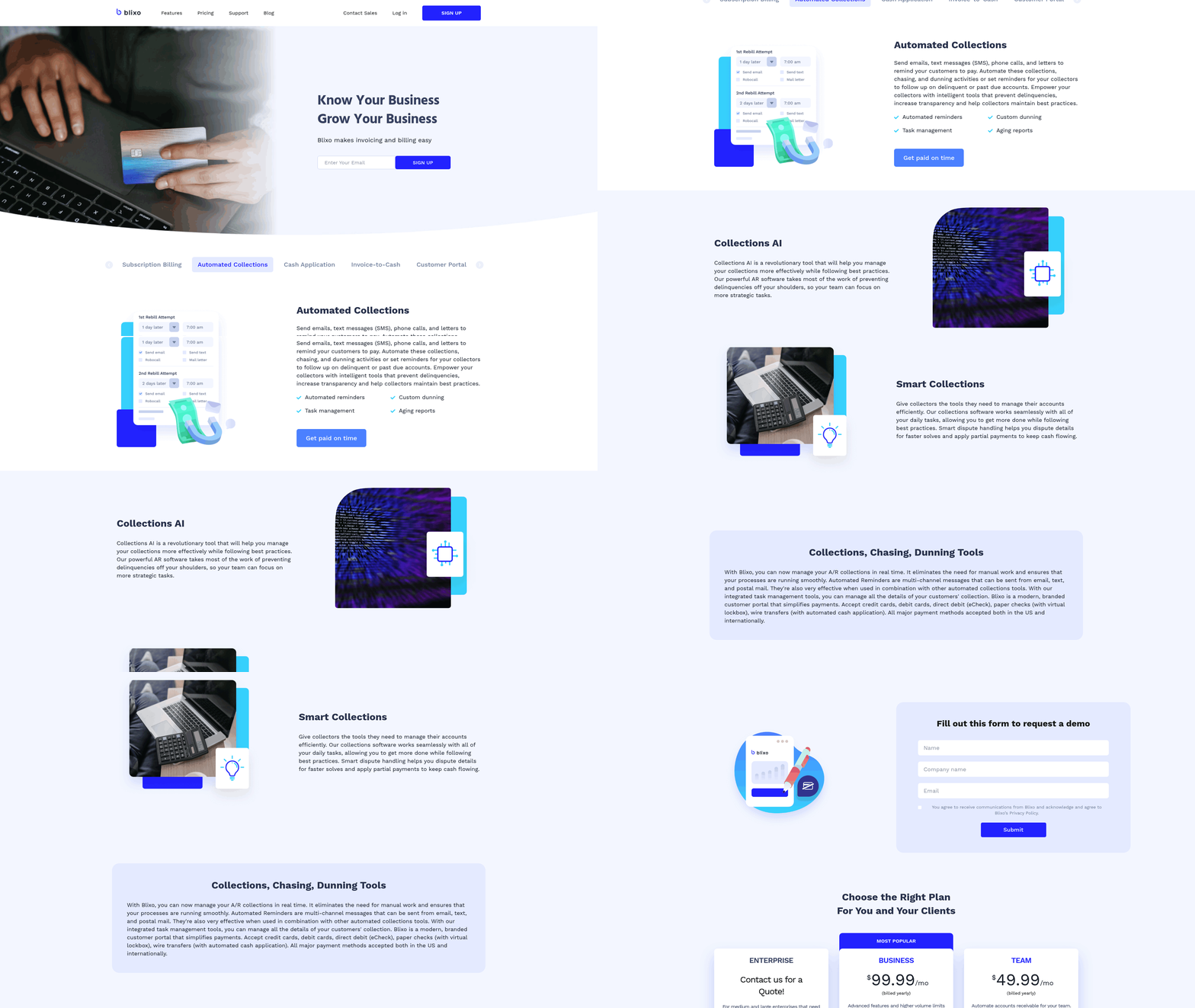
Blixo’s proration and mid-cycle billing features automate complex invoicing scenarios, ensuring businesses charge customers accurately for partial billing periods. This functionality is especially valuable for SaaS, telecom, and subscription-based models where clients may upgrade, downgrade, or cancel services mid-term. By handling calculations in real-time, Blixo eliminates manual errors and reduces the administrative burden of managing billing exceptions. As mentioned in the Automated Recurring Invoicing with Blixo section, this system builds on automated invoice generation to handle more nuanced billing adjustments. Below, we break down how this system works, its benefits, and real-world applications.
How Does Blixo Handle Proration and Mid-Cycle Billing?
Blixo’s system automatically adjusts invoices based on the exact number of days a customer uses a service during a billing cycle. For example, if a client upgrades their plan on day 15 of a 30-day cycle, Blixo generates two charges: a prorated fee for the remaining 15 days and a full charge for the new plan. Configuration requires defining pricing tiers, billing frequencies, and proration rules through Blixo’s dashboard. Once set up, the system triggers mid-cycle adjustments without requiring manual intervention. A key technical advantage is its ability to handle nested subscriptions-such as multiple services under a single account-while applying proration rules consistently. This flexibility aligns with the Multi-Model Pricing Support with Blixo section, which highlights how businesses can apply tiered and hybrid pricing strategies seamlessly.
What Are the Key Benefits of This Feature?
The primary benefit is accuracy. Manual proration is error-prone, especially for businesses with high customer turnover or tiered pricing models. Blixo’s automation ensures customers pay only for the days they use a service, reducing disputes and improving trust. Second, it saves time: one business reported cutting billing reconciliation efforts by 70% after adopting Blixo. Third, the system supports flexible revenue recognition by aligning charges with actual usage, which is critical for compliance with accounting standards. As detailed in the Real-Time Billing and Accounting Visibility with Blixo section, this transparency enhances financial oversight and reporting efficiency. For SaaS companies, this also enhances customer retention-clients appreciate transparent, fair billing that adapts to their needs.
Multi-Model Pricing Support with Blixo
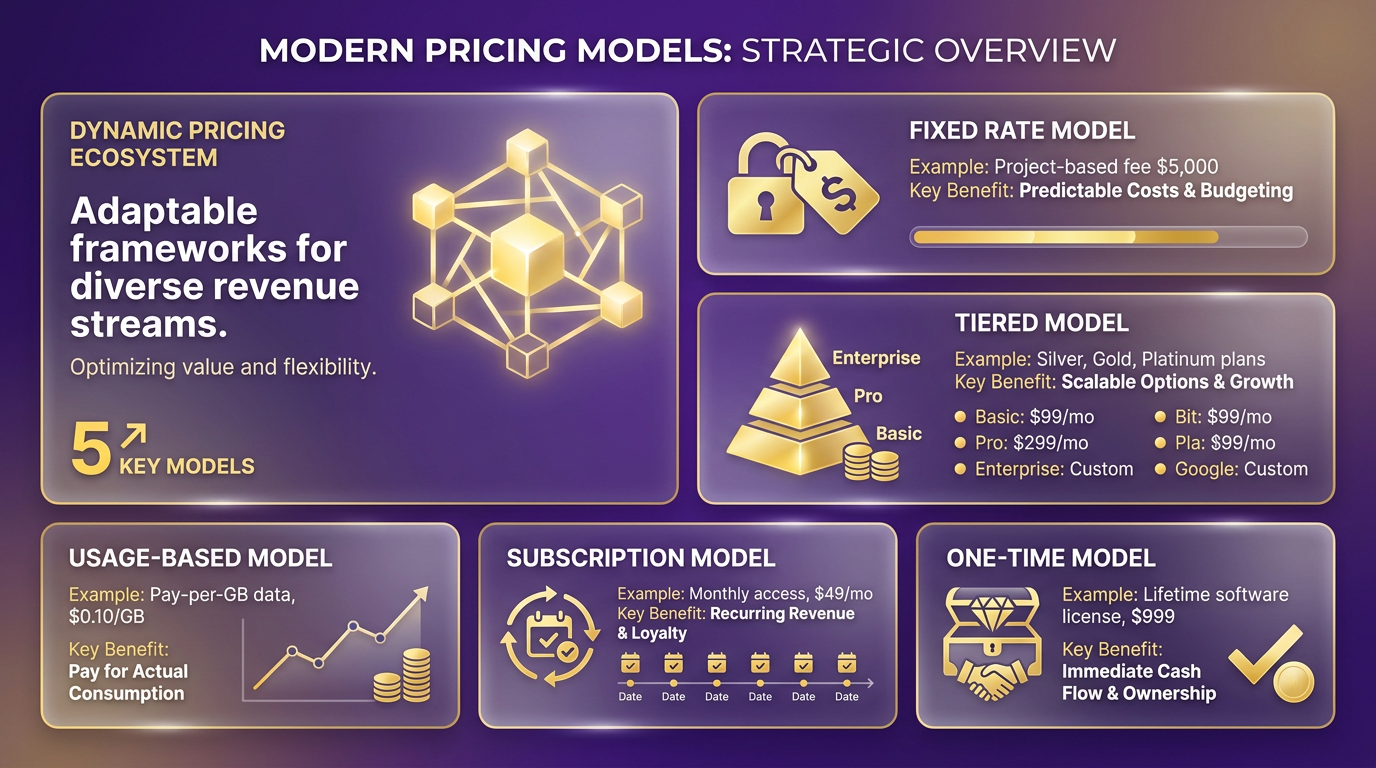
Blixo’s multi-model pricing support streamlines recurring billing by enabling businesses to apply multiple pricing strategies within a single platform. This feature eliminates the need for manual adjustments or third-party tools when managing subscriptions with varying structures. For example, a company can charge fixed-rate monthly fees for core services while applying usage-based pricing for add-ons, all automated through Blixo’s interface. This flexibility ensures businesses can align billing with customer needs without technical complexity.
How Do You Configure Multi-Model Pricing in Blixo?
Setting up multi-model pricing in Blixo begins with defining pricing rules through its intuitive dashboard or API. Businesses can mix tiered pricing, prepaid credits, and pay-per-use models across different products or customer segments. For instance, a SaaS provider might set a base fee for software access and layer a per-user cost for additional features. Blixo handles mid-cycle proration, tax compliance, and currency conversions automatically, reducing errors. As mentioned in the Proration and Mid-Cycle Billing with Blixo section, these capabilities ensure accuracy for partial billing periods. The platform also supports conditional logic, such as applying discounts after a specific usage threshold. Once configured, these rules trigger invoicing dynamically, ensuring accuracy for both recurring and one-time charges.
What Are the Key Benefits of Multi-Model Pricing?
Multi-model pricing reduces administrative overhead by centralizing billing workflows. Teams no longer need to juggle spreadsheets or multiple platforms to manage complex pricing tiers. For example, a cloud storage provider using Blixo’s system can charge $10/month for storage plus $0.01 per gigabyte transferred, with invoices updated in real time as usage fluctuates. Building on concepts from the Automated Recurring Invoicing with Blixo section, this automation cuts billing processing time by 40–60%, according to internal data from businesses adopting the feature. Additionally, the ability to test pricing strategies-like shifting from flat-rate to usage-based models-helps companies optimize revenue. One business reported a 22% increase in customer retention after introducing tiered pricing, as users found the structure more transparent and fair.
How Does Blixo Compare to Generic Solutions?
Unlike generic billing platforms that require custom coding for hybrid pricing models, Blixo offers pre-built templates for common structures like hybrid billing (fixed + variable charges) or credit-based systems. This reduces setup time from weeks to hours. As highlighted in the Why Automated Invoicing Matters section, automation is critical for reducing errors and accelerating revenue cycles. For instance, a payment processor integrated Blixo to charge 2.9% per transaction for the first 1,000 actions and 2.5% beyond that-without needing developer intervention. The platform’s API-first design also allows businesses to integrate custom logic, such as seasonal discounts or volume-based rebates. In contrast, other solutions often force users into rigid pricing frameworks, limiting agility. Blixo’s approach ensures businesses can adapt to market changes quickly, whether introducing a freemium tier or adjusting rates for high-volume clients.
By combining automation with flexibility, Blixo turns pricing complexity into a strategic advantage. Companies using the platform report saving an average of 15–20 hours monthly on billing management, redirecting resources to growth initiatives. Whether you need to support usage-based, tiered, or hybrid models, Blixo’s multi-model pricing support ensures scalability without compromising accuracy.
Real-Time Billing and Accounting Visibility with Blixo
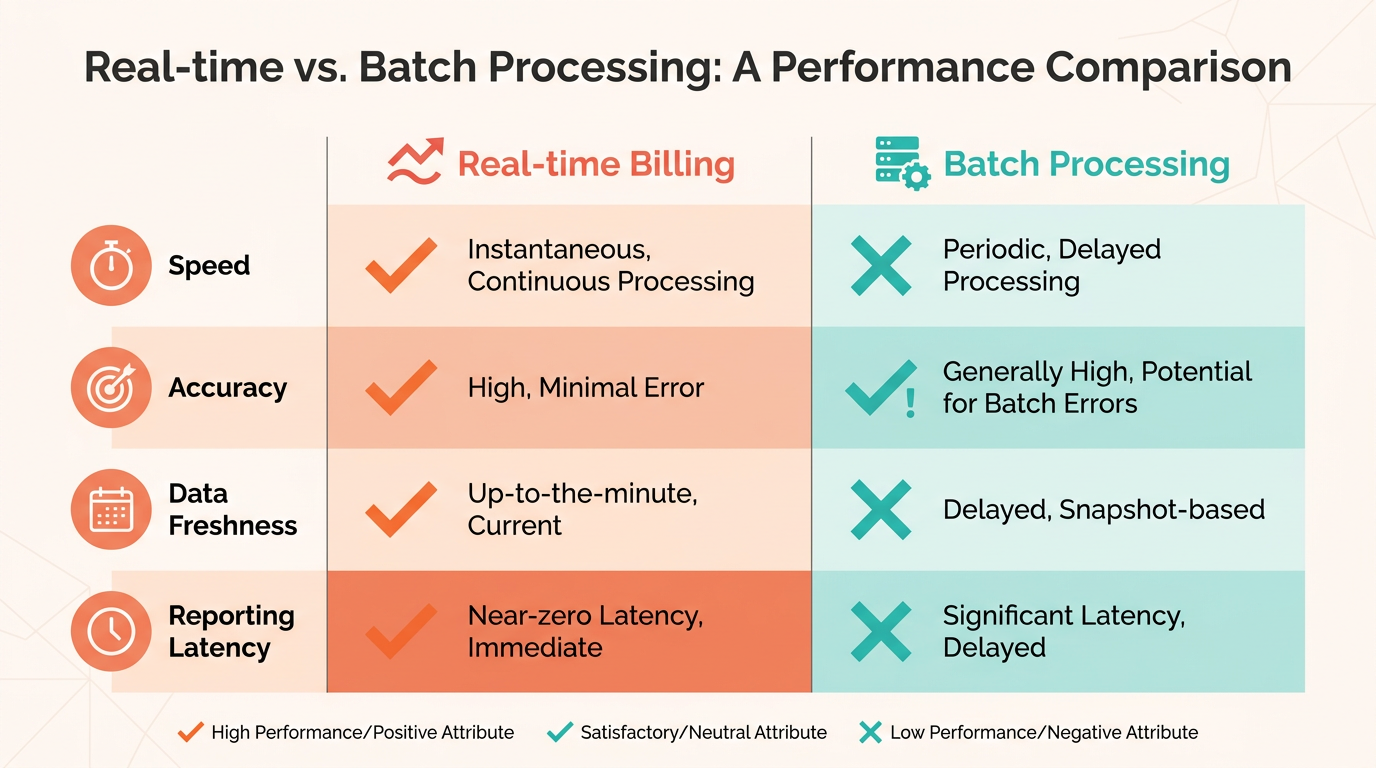
Real-time billing and accounting visibility with Blixo eliminates guesswork by centralizing all financial data into a single SaaS solution. The system automates invoice generation, payment collection, and reconciliation, ensuring businesses track revenue and expenses as transactions occur. This real-time approach reduces manual data entry errors and gives administrators instant access to up-to-date financial reports. As mentioned in the Automated Recurring Invoicing with Blixo section, this automation extends to handling recurring billing cycles, further streamlining financial operations. For example, Blixo’s integration with QuickBooks and Stripe allows automatic syncing of payments, subscriptions, and accounting records, cutting the time spent on month-end closures by up to 70% according to user reports.
How Does Real-Time Visibility Work in Blixo?
Blixo’s real-time features rely on automated workflows and intelligent matching algorithms. When a customer subscribes or makes a payment, the platform generates an invoice instantly and updates ledger entries in connected accounting software. The Cash Application tool uses AI to match incoming payments to the correct invoices, even for businesses with thousands of transactions. This eliminates the need for manual matching, which one user described as “10x more powerful” than their previous solution. Setup involves configuring payment methods (credit cards, ACH, wire transfers) and linking accounting systems-most businesses complete this in under two hours using Blixo’s guided onboarding, a process detailed in the Getting Started with Blixo’s Automated Invoicing section.
What Benefits Do Businesses Gain from Real-Time Visibility?
The primary benefit is improved cash flow predictability. By tracking payments and subscriptions in real time, businesses can identify delinquencies immediately and trigger automated reminders or dunning workflows. For instance, Elemental Deodorant’s founder noted that Blixo “streamlines accounting and subscription management,” allowing his team to focus on product development. Another advantage is reduced administrative workload: one service-based business reported saving 15+ hours monthly by automating invoicing and collections. Additionally, Blixo’s customer portal lets clients view invoices, update payment methods, and manage subscriptions directly, cutting support requests by up to 40%-a feature that complements the streamlined workflows described in the Why Automated Invoicing Matters section.
Can Real-Time Features Scale with Business Growth?
Blixo’s architecture supports scalability through bulk data imports, custom workflows, and API access. A user with 500+ clients highlighted how the platform handles mid-cycle subscription changes and prorated invoicing without manual intervention, a capability expanded upon in the Proration and Mid-Cycle Billing with Blixo section. The Factory feature, which allows businesses to receive payment upfront while Blixo assumes payment risk, is particularly useful for scaling services. Unlike generic solutions that require switching between tools for billing and accounting, Blixo’s unified interface ensures visibility remains consistent as transaction volumes grow. One G2-style review summarized this as a “total major advantage” for businesses needing reliable, real-time financial insights without IT overhead.
Getting Started with Blixo’s Automated Invoicing
Blixo simplifies recurring billing by automating invoice generation, payment collection, and customer management. To begin, create a web-based account-no software installation is required. Once logged in, manage to the invoice configuration dashboard to define recurring billing rules, payment methods, and customer details. Below are the key steps to set up and optimize Blixo for your business..
Step 1: Set Up Your Blixo Account
Start by signing up for a Blixo account through their secure portal. The platform supports unlimited customers and automated invoices, making it ideal for businesses with high-volume recurring billing needs. After registration, import customer data via CSV to streamline setup. This feature, highlighted in user testimonials, reduces manual data entry by up to 70%.
Next, configure your payment methods. Blixo supports credit/debit cards, wire transfers, and integrations with Stripe for seamless payment processing. Ensure all payment gateways are linked to your account to enable auto-charging for recurring invoices. As mentioned in the Automated Recurring Invoicing with Blixo section, this integration streamlines payment collection and minimizes reconciliation delays..
Step 2: Configure Automated Invoices
Blixo lets you generate invoices based on pre-populated items and customer information. Define billing cycles (daily, weekly, monthly) and set triggers for auto-sending invoices. For example, a service-based business could schedule monthly invoices to send on the 1st of each month, with automated reminders for late payments.
Use the custom branded invoice feature to maintain your company’s branding. Blixo’s secure electronic presentment platform ensures invoices are professional and trackable. You can also enable invoice open tracking to monitor customer engagement, a feature that improves cash flow predictability by up to 40%, as discussed in the Real-Time Billing and Accounting Visibility with Blixo section..
Step 3: Integrate With Accounting Systems
Blixo integrates with leading accounting platforms like QuickBooks and enterprise portals, reducing manual reconciliation. For instance, a manufacturer using Blixo reduced invoice processing time by 50–70% after connecting their accounting software.
To integrate, manage to the settings menu and select your accounting system. Follow the prompts to link accounts and synchronize data. This ensures that payments and invoices are automatically recorded, minimizing errors that cost businesses $16,000 annually for 10,000 invoices. Building on concepts from the Why Automated Invoicing Matters section, this synchronization enhances accuracy and reduces administrative overhead..
Best Practices and Common Pitfalls
To maximize efficiency, adopt these best practices:
- Test your setup: Send test invoices to verify payment links and auto-charging rules.
- Enable reminders: Automated reminders cut payment delays by 40%, according to Blixo’s internal data.
- Use bulk actions: Update multiple customer plans or payment methods at once via the bulk edit feature.
Avoid common mistakes like misconfiguring billing cycles or neglecting to set up late fees. One user noted that their previous solution lacked visibility into revenue-Blixo’s unified dashboard prevents this by providing a single source of truth for all transactions..
Measuring Time and Cost Savings
Businesses using Blixo report significant savings. Manual invoice processing costs $15–$40 per invoice, while Blixo reduces this to $2–$5. For a company handling 1,000 invoices monthly, this translates to $33,000 in annual savings. Additionally, error rates drop by 50% with automation, saving time and reducing administrative overhead.
A case study from Blixo’s blog highlights a 10x improvement in subscription management efficiency for one user. By automating invoicing and collections, they saved 15+ hours weekly previously spent on manual tasks..
Final Tips for Success
- use customer portals: Let clients update payment methods or subscription plans independently, reducing support requests.
- Review analytics: Use Blixo’s reporting tools to identify trends in late payments or high churn.
- Stay updated: Blixo frequently adds features like bulk data imports and enhanced reconciliation tools.
By following these steps, businesses can eliminate manual invoicing, reduce errors, and focus on growth. Blixo’s SaaS service is designed for scalability, making it suitable for small agencies or enterprises with complex billing needs.
Frequently Asked Questions
1. How much money can automated invoicing save businesses annually?
Automated invoicing saves $16,000 annually for 10,000 invoices by eliminating a 1.6% manual error rate and prevents $4 million monthly losses from late payments, as seen with Blixo’s automated systems.
2. How does automated invoicing reduce billing errors?
Automated invoicing cuts billing errors to 0.5% accuracy (99.5%) by removing manual data entry, compared to 1.6% errors in manual systems, reducing financial risks and rework costs.
3. How quickly does automated invoicing accelerate payments compared to manual methods?
Automated invoicing ensures instant or scheduled payments, eliminating the 7-day delay common in manual processes and improving cash flow by up to 50% with Blixo’s recurring billing.
4. What administrative tasks are reduced by integrating with accounting software?
Integration with accounting software reduces administrative tasks by 60%, streamlining workflows and minimizing manual reconciliation, as demonstrated by Blixo users.
5. How does automated invoicing improve customer satisfaction?
Automated invoicing boosts customer satisfaction to 98% with Blixo by ensuring timely, accurate billing and reducing disputes through automated reminders and transparent processes.
6. What impact does automated invoicing have on invoice disputes?
Automated reminders in systems like Blixo cut invoice disputes by 30%, clarifying payment terms and reducing misunderstandings that lead to customer dissatisfaction.
7. How much time does automated invoicing save in billing processes?
Automated invoicing cuts billing time by 50% through auto-sending and auto-charging recurring invoices, allowing businesses to focus on growth instead of administrative tasks.