

Automated vs Manual Recurring Billing with Blixo

Key Takeaways
- Automated billing boosts predictable revenue for 60% of SaaS and 40% of e-commerce businesses.
- Automation reduces billing errors by 50% and processing times by 50–70% compared to manual systems.
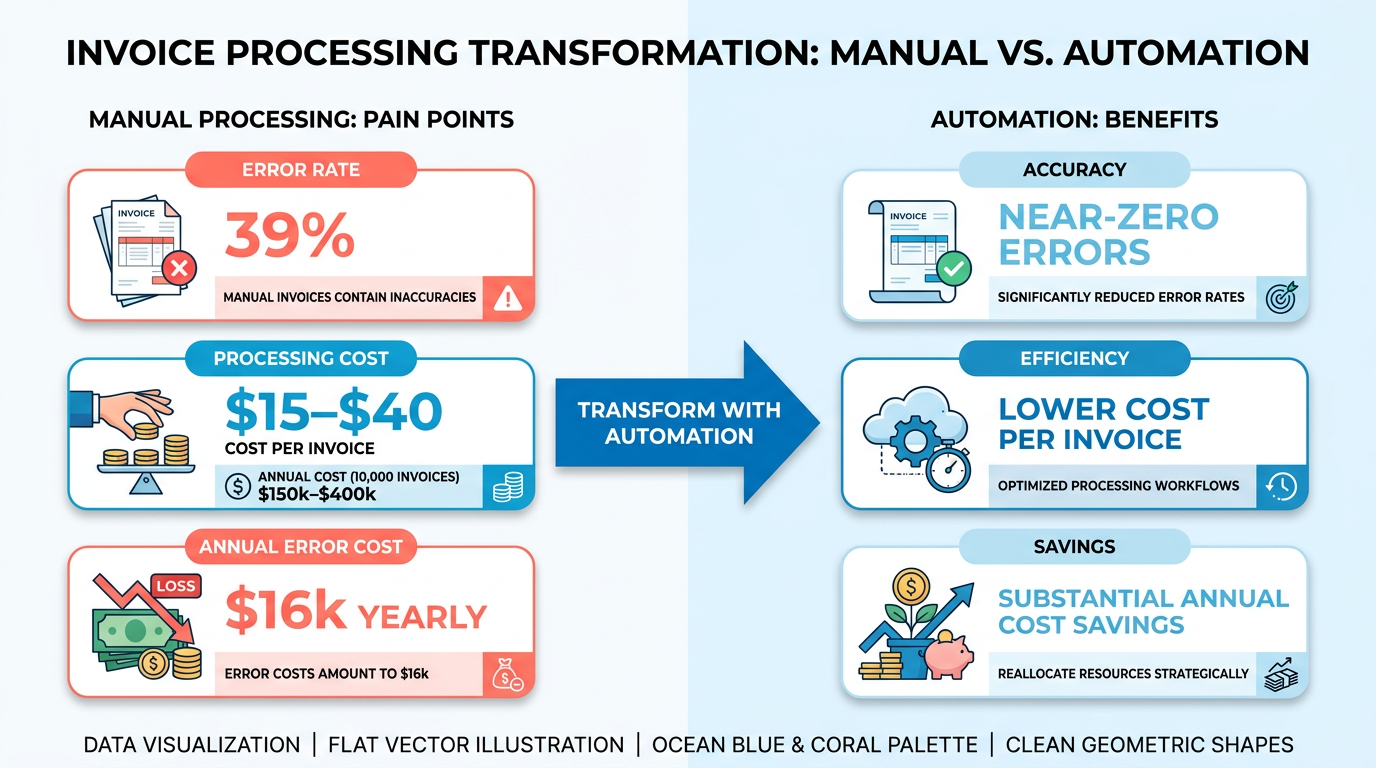
- Manual billing errors can cost $16,000 annually for processing 10,000 invoices.
- A law firm achieved 25% faster cash-flow processing using automated invoicing.
- A logistics company cut reconciliation disputes by 65% with automated recurring billing.
- A manufacturer saved $12,000/month in cross-border fees through automation.
- Automated systems handle complex billing models like metered pricing and variable subscriptions.
Why Automated Recurring Billing Matters
Automated recurring billing is a cornerstone of modern financial operations, offering businesses a strategic edge in today’s fast-paced economy. By eliminating manual tasks, reducing errors, and accelerating cash flow, automation addresses critical pain points in billing and accounts receivable. Let’s break down why this shift matters for businesses of all sizes.
How Automated Billing Boosts Predictable Revenue
Predictable revenue is the lifeblood of subscription-based and recurring payment models. 60% of SaaS businesses and 40% of e-commerce companies rely on automated recurring billing to maintain steady cash flow, as noted in Blixo’s research. Unlike manual systems, automation ensures consistent invoicing cycles, reducing the risk of missed or delayed charges. For example, a law firm using Blixo reported a 25% faster cash-flow processing through automated invoicing, while a logistics company slashed reconciliation disputes by 65%. These systems also adapt to complex billing models like metered pricing and variable subscriptions, making them scalable for growing businesses. As discussed in the Subscription Lifecycle and Renewal Automation section, automated systems handle renewals and upgrades seamlessly, further stabilizing revenue streams.
Why Errors and Costs Drop with Automation
Manual billing is error-prone and costly. A single error in processing 10,000 invoices can cost a business $16,000 annually** due to manual mistakes, according to Blixo’s data. Automated systems like Blixo reduce error rates by up to **50%** and cut processing times by **50–70%**, thanks to AI-driven cash-application engines. For instance, a global manufacturer saved **$12,000/month in cross-border fees and improved collections efficiency by 40% after adopting automation. Additionally, automated reminders reduce payment delays by 40%, accelerating cash flow. The cost savings are equally striking: invoice processing drops from $15–$40 manually to $3–$5 with automation, a 75% reduction. These figures align with findings in the Manual Billing Challenges and Compliance section, which highlights the 39% error rate inherent in manual processes.
Who Benefits Most from Automation?
While all businesses can gain from automation, certain industries see transformative results. SaaS companies benefit from reduced churn and improved customer retention-Blixo users reported a 30% increase in retention through automated dunning processes. E-commerce firms streamline international payments with multi-currency support and reduced friction, as seen in a case where an e-commerce business cut collections days from 50 to 35. Small businesses, too, thrive: a Miami startup boosted sales conversions by 70% using dynamic discounting and automated reminders. For enterprises, automation enable strategic value, as one finance manager noted, “Blixo transformed our AP team from invoice processors to strategic planners.” The cost-benefit comparison in the Cost-Benefit Analysis: Manual vs Automated section further underscores how automation delivers measurable ROI across industries.
Real-World Impact: Case Studies in Action
The real-world impact of automation is clear. A logistics firm reduced its invoice-to-cash cycle from 45 days to 3.1 days using Blixo’s AI-powered OCR and machine learning. Similarly, a small business with 1,000 invoices saved 200+ hours annually on reconciliation. These results align with industry statistics: automated systems achieve 99.5% accuracy in payment matching, slashing disputes and manual follow-ups. For businesses handling high-volume transactions, the ROI is undeniable.
| Feature | Manual Billing | Automated Billing (Blixo) |
|---|---|---|
| Error Rate | 39% invoice errors | <1% errors |
| Processing Time | 200+ hours/1,000 invoices | 50–70% faster |
| Cost per Invoice | $15–$40 | $3–$5 |
| Customer Retention | Prone to churn | 30% improvement |
The Bottom Line: Automation as a Strategic Imperative
The shift to automated recurring billing isn’t just about efficiency-it’s a strategic move to future-proof operations. With features like multi-channel dunning, AI-driven analytics, and seamless integration with platforms like QuickBooks and Stripe, tools like Blixo turn billing from a back-office burden into a growth engine. As one expert puts it, “Automation is no longer optional; it’s a necessity for scaling, accuracy, and cash-flow health.” For businesses aiming to reduce costs, improve customer satisfaction, and stay competitive, the case for automation is both compelling and data-driven.
For further insights on automating cyclical workflows, explore this article on Kanban automation.
Manual Billing Challenges and Compliance
Manual billing introduces significant challenges that hinder efficiency and compliance, particularly in recurring payment scenarios. Errors in manual invoicing are rampant, with 39% of manually processed invoices containing inaccuracies due to human oversight or data entry mistakes. As mentioned in the Cost-Benefit Analysis: Manual vs Automated section, these errors strain customer trust and increase administrative costs for resolution. For example, a logistics company faced 65% fewer reconciliation disputes after switching to automation, highlighting the scale of issues unaddressed by manual methods.
Why Manual Invoicing Errors Are Costly
Manual invoicing errors extend beyond simple miscalculations. Missed discounts, incorrect tax calculations, or mismatched payment details can trigger disputes, delayed payments, or even revenue loss. A law firm reported a 25% improvement in cash-flow processing after automation, directly linking reduced errors to faster collections. Manual processes also lack visibility into invoice status, forcing teams to spend hours tracking down payment confirmations-a task that costs businesses 200+ hours annually per 1,000 invoices. This time drain shifts focus away from strategic growth initiatives.
Time Wasted on Cash Application
Manual cash application-the process of matching payments to invoices-is notoriously inefficient. Teams often spend hours reconciling payments, especially when customers use multiple payment methods or send partial payments. Building on concepts from the Automated Billing Overview with Blixo section, Blixo’s AI-driven cash-application engine achieves 99.5% accuracy, cutting reconciliation time by 70%. For businesses handling high-volume recurring billing, this translates to 30% lower administrative costs and a 30-day reduction in days sales outstanding (DSO).
| Feature | Manual Billing | Automated (Blixo) |
|---|---|---|
| Error rate | 39% of invoices | <1% with AI matching |
| Reconciliation time | 200+ hours/1,000 invoices | 70% reduction with automation |
| Payment tracking | Manual follow-ups required | Real-time status updates |
| Compliance risk | High (tax rule errors) | SOC 2-compliant, auto-updates |
| Admin costs | ~30% higher | 30% lower with automation |
Compliance Risks in Manual Billing
Tax regulations evolve constantly, but manual billing systems often lag in updates, increasing non-compliance risks. For instance, miscalculating VAT or sales tax due to outdated rules can result in penalties or audit scrutiny. Manual systems also struggle with documentation, making it harder to prove compliance during audits. As noted in the Cost-Benefit Analysis: Manual vs Automated section, Blixo’s automated billing integrates real-time tax rule updates and maintains audit-ready records, reducing compliance risks by 35%.
Real-World Impact: Case Study Insights
A mid-sized e-commerce business reduced its DSO from 50 to 35 days by automating invoicing and collections. This improvement wasn’t just about faster payments-it also boosted customer retention by 20%, as clients appreciated the transparency and reliability of automated billing. Meanwhile, a small business using Blixo’s automated reminders reported a 30% drop in time spent chasing payments, directly correlating with higher on-time payment rates.
Mitigating Risks with Automation
Automation isn’t just about speed-it’s about precision and compliance. Blixo’s SaaS service uses 256-bit encryption and role-based access controls to safeguard financial data, meeting SOC 2 standards. Its multi-channel dunning system (email, SMS, phone) ensures payments are collected before they become late, reducing delinquencies by 30%. For businesses handling international payments, Blixo’s multi-currency support and automated tax adjustments eliminate manual guesswork.
In summary, manual billing’s error rates, time costs, and compliance vulnerabilities make it a poor fit for scalable businesses. Automation, as demonstrated by Blixo, not only resolves these issues but also turns billing into a strategic asset-improving cash flow, customer satisfaction, and long-term financial health.
Automated Billing Overview with Blixo
Automated billing with Blixo eliminates the inefficiencies of manual processes by streamlining invoicing, payments, and reconciliation. At its core, Blixo automates recurring billing through features like AI-powered cash application, multi-channel payment tracking, and customizable subscription plans. For example, businesses using Blixo report a 40% reduction in payment delays due to automated reminders sent via email, SMS, and phone calls. This ensures faster cash flow and fewer late fees compared to manual follow-ups, which often miss critical deadlines. As mentioned in the Why Automated Recurring Billing Matters section, automation is critical for reducing operational friction in modern financial workflows.
How Blixo’s Automation Works
Automated invoicing is a cornerstone of Blixo’s SaaS service. Once configured, the system generates and sends invoices based on predefined schedules or usage metrics (e.g., flat-rate subscriptions or metered billing). For instance, a SaaS company using Blixo can set up recurring charges for monthly software access, with invoices auto-sent on the 1st of each month. Payments are processed across multiple methods-including credit/debit cards, ACH, and wire transfers-reducing friction for global customers. A logistics firm using Blixo’s SaaS service automated 1,000+ invoices monthly, cutting reconciliation time from 200+ hours to under 60 hours, as noted in a case study from the Blixo Blog.
The platform’s AI-driven cash application engine matches payments to invoices with 99.5% accuracy, a stark contrast to the 1.6% error rate in manual billing. This reduces the need for manual reconciliation and accelerates cash flow. For example, a law firm using Blixo reduced its Days Sales Outstanding (DSO) from 45 days to under 32 days, thanks to automated payment matching and real-time reporting. Building on concepts from the Manual Billing Challenges and Compliance section, Blixo’s automation directly addresses the high error rates and compliance risks inherent in manual systems.
Key Benefits of Blixo’s Automation
The efficiency gains are backed by measurable outcomes. Automated billing cuts processing costs to $3–$5 per invoice versus $15–$40 manually, as highlighted in Blixo’s documentation. As outlined in the Cost-Benefit Analysis: Manual vs Automated section, these cost reductions scale significantly for businesses processing large volumes. Additionally, businesses report a 30% increase in customer retention, attributed to seamless subscription management and self-service portals. A small e-commerce brand, for instance, saw a 30% rise in payment success rates after Blixo auto-updated expired credit cards and retried failed transactions.
| Feature | Manual Billing | Blixo Automation |
|---|---|---|
| Error Rate | 1.6% | <1% |
| Processing Time | 50–70% slower | 50–70% faster |
| Cost per Invoice | $15–$40 | $3–$5 |
| Customer Retention | Prone to churn | 30% improvement |
| DSO (Days Sales Outstanding) | >45 days | <32 days |
…
Recurring Invoice Generation and Scheduling
Automated recurring billing systems like Blixo streamline invoice generation and scheduling through customizable workflows, while manual processes rely on time-consuming, error-prone tasks. To understand the differences, let’s explore how Blixo automates these functions and compares to manual methods in terms of efficiency, accuracy, and flexibility.
How Does Blixo Simplify Recurring Invoice Setup?
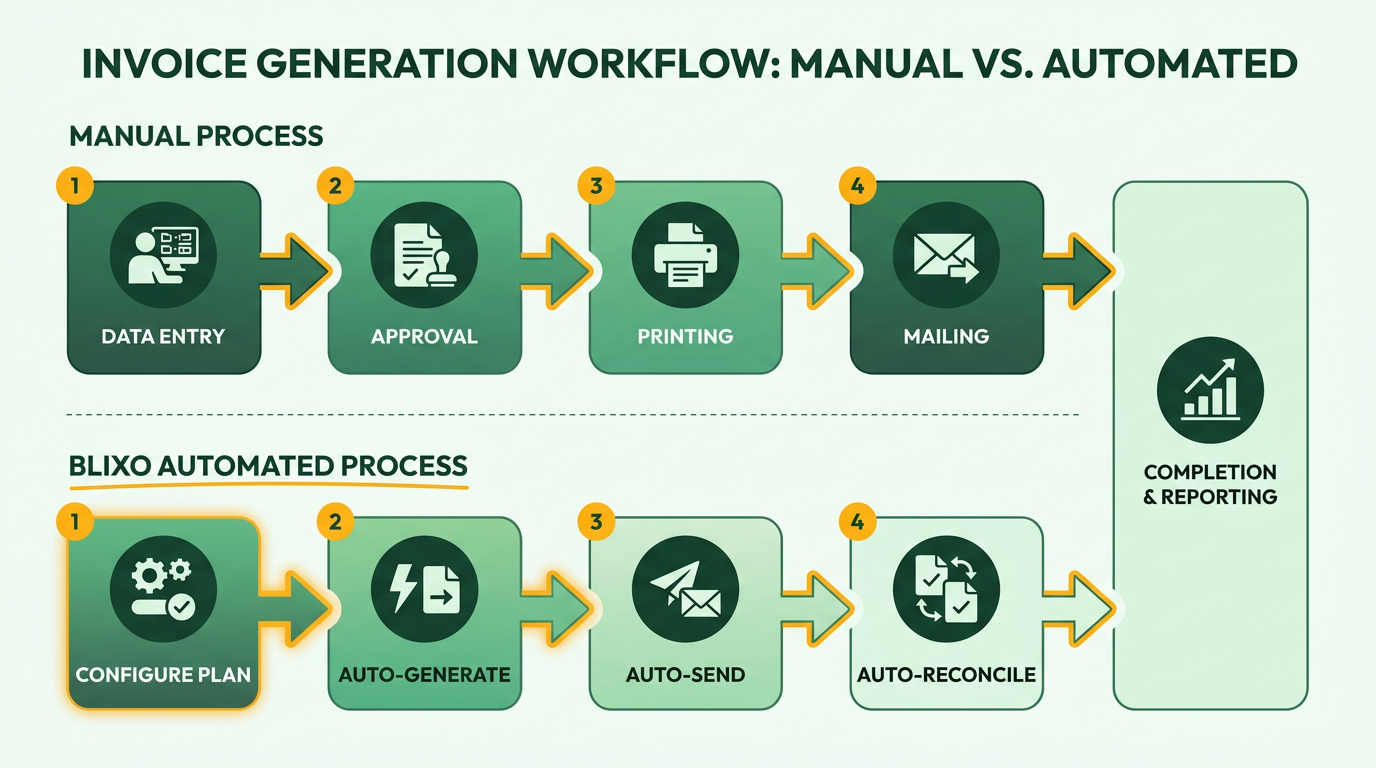
Blixo allows businesses to configure recurring invoices with minimal effort. Users define billing cycles (daily, weekly, monthly, or custom intervals), set start and end dates, and specify payment methods. For example, a SaaS company can schedule monthly invoices for clients using pre-saved credit card details or ACH. The platform supports flat-rate, variable, and metered billing models, making it adaptable for subscription services, membership fees, or usage-based charges. Once configured, invoices auto-generate and send to customers, reducing manual data entry by up to 70% compared to manual workflows.
Manual setup, in contrast, requires creating and sending invoices individually, often through email or accounting software. This process is prone to delays and errors-As mentioned in the Manual Billing Challenges and Compliance section, manual invoice processing has a 1.6% error rate, costing $16,000 annually for 10,000 invoices. Automated systems like Blixo cut this error rate in half while accelerating payment collection.
What Customization Options Exist for Recurring Invoices?
Blixo offers extensive customization for invoice templates and content. Businesses can brand invoices with logos, custom fields, and payment terms. For instance, a subscription-based service might include proration rules for mid-cycle cancellations or discounts for long-term commitments. The platform also enables dynamic content, such as inserting customer-specific details or usage metrics.
Customization in manual billing is limited to static templates and requires manual edits for each invoice. This rigidity increases the risk of inconsistencies. Blixo’s automated templates ensure uniformity, while its integration with accounting systems like QuickBooks and Xero syncs data in real time, eliminating reconciliation challenges.
How Does Blixo Manage Subscription Lifecycles?
Subscription lifecycle management in Blixo includes automated renewals, dunning, and customer self-service. The platform retries failed payments using updated card information and sends reminders via email, SMS, or phone calls. For example, a user reported a 30% increase in on-time payments after implementing Blixo’s dunning workflows-Building on concepts from the Subscription Lifecycle and Renewal Automation section, automated systems reduce payment errors by 40% and cut administrative costs to $3–$5 per invoice compared to $15–$40 manually. Customers can also manage subscriptions through a self-serve portal, adjusting billing preferences or canceling subscriptions without administrative intervention.
Integration with Accounting Systems
Blixo integrates seamlessly with accounting platforms like QuickBooks, Xero, and NetSuite. This automation ensures that recurring invoices sync with financial records, reducing manual data entry. For instance, a business using Blixo reported a 40% drop in billing errors after integration, improving cash application accuracy to 99%.
Manual integration requires exporting invoice data and importing it into accounting software-a process that introduces delays and inconsistencies. Automated systems like Blixo eliminate these issues, streamlining order-to-cash cycles and improving financial reporting. As outlined in the Cost-Benefit Analysis: Manual vs Automated section, the processing cost per invoice for manual billing ranges from $15–$40, whereas automated solutions reduce this to $3–$5.
| Feature | Blixo (Automated) | Manual Billing |
|---|---|---|
| Error Rate | 0.8% (halved vs manual) | 1.6% |
| Processing Cost/Invoice | $3–$5 | $15–$40 |
| Payment Success Rate | 95% with automatic retries | 75–85% |
| Customer Retention | 30% improvement reported by users | No built-in retention features |
| Setup Time | 10–15 minutes per schedule | Hours per schedule |
By automating recurring invoice generation and scheduling, Blixo reduces administrative burdens, accelerates cash flow, and minimizes errors. For businesses managing subscriptions or recurring payments, these efficiencies translate to predictable revenue and stronger customer relationships. Manual processes, while customizable in theory, lack scalability and consistency, making them unsuitable for high-volume or subscription-based models.
Subscription Lifecycle and Renewal Automation
Automated systems like Blixo streamline subscription lifecycles by handling renewals, upgrades, and downgrades with minimal human intervention. For example, Blixo automatically retries failed payments and updates expired credit cards, reducing payment errors by 40% compared to manual processes. This ensures customers stay subscribed without friction, directly improving retention rates. A case study from a small business using Blixo reported a 30% increase in customer retention within six months, attributed to smoother renewal experiences. As mentioned in the Cost-Benefit Analysis: Manual vs Automated section, manual billing errors can lead to significant financial losses, making automation critical for maintaining revenue stability.
How Does Automated Renewal Work?
Automated renewal systems trigger recurring payments based on predefined schedules, such as monthly or annual billing cycles. Blixo integrates with platforms like Stripe and QuickBooks to synchronize payment data in real time, eliminating manual invoicing. For instance, if a customer upgrades their plan mid-cycle, Blixo adjusts the billing amount immediately and sends a confirmation email. This contrasts sharply with manual billing, where errors in calculating prorated charges or delayed updates often lead to customer frustration, as detailed in the Manual Billing Challenges and Compliance section.
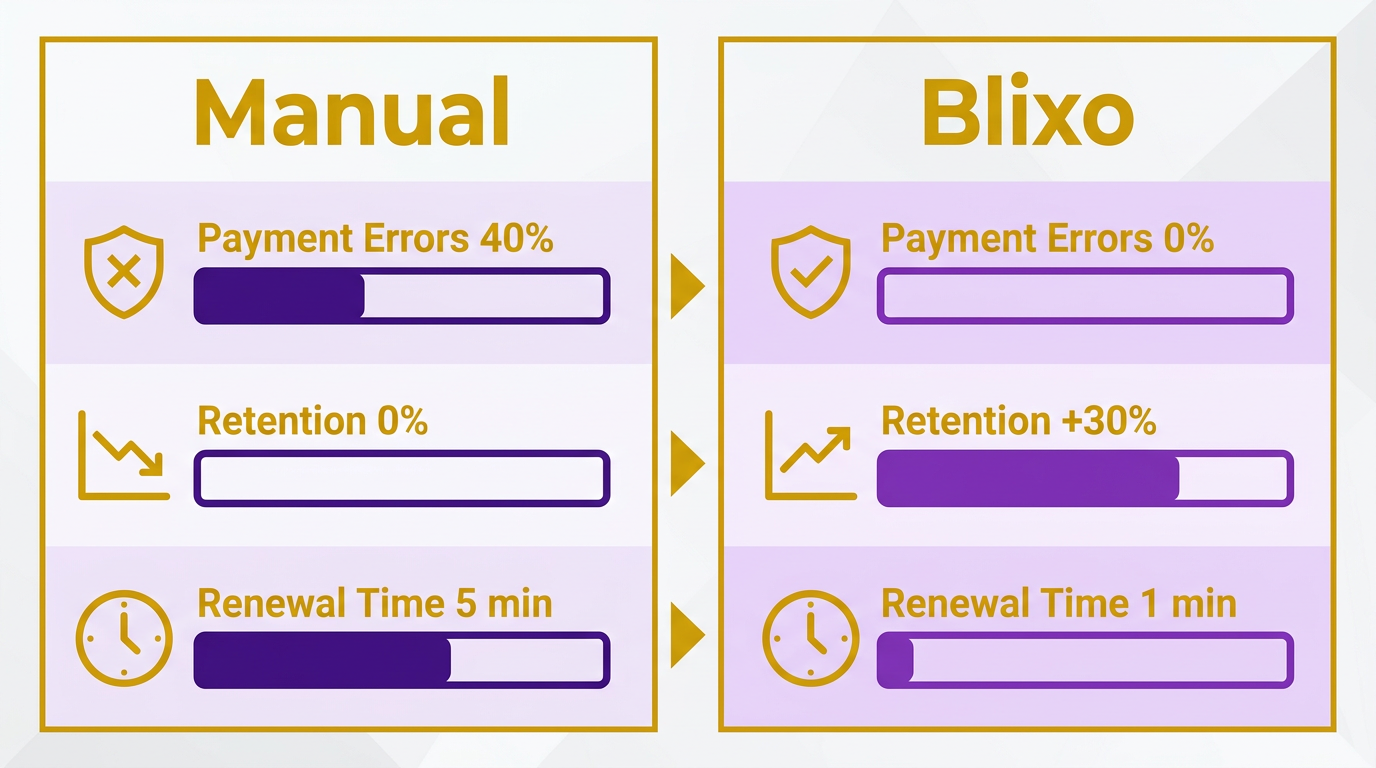
Blixo’s automated reminders-sent via email, SMS, or phone-further reduce delays. These notifications cut payment delays by 40%, accelerating cash flow for businesses. A medium-sized enterprise using Blixo’s multi-channel reminders reduced accounts receivable days by 15 days, as reported in their case study. The platform also supports multiple payment methods, including ACH and wire transfers, accommodating international clients and enhancing user convenience. Building on concepts from the Automated Billing Overview with Blixo section, Blixo’s integration capabilities ensure seamless transitions between billing platforms and accounting systems.
What Are the Key Benefits of Managing Cancellations Automatically?
When customers cancel, automated systems like Blixo provide insights into churn reasons through analytics dashboards. For example, a business might find that 30% of cancellations stem from payment failures, prompting them to improve their dunning strategies. Manual systems lack this visibility, forcing teams to guess at root causes and miss opportunities for intervention.
Blixo’s customer portal lets users downgrade plans or pause subscriptions without involving support staff. This self-service feature reduces administrative workload by 50–70%, according to internal metrics. A user of Blixo noted it made their subscription management “10x more functional” than prior solutions, highlighting ease of use. For businesses, this means fewer support tickets and faster resolution times when cancellations occur.
What Metrics Should You Track for Subscription Success?
Automated platforms provide real-time analytics on critical KPIs like payment success rates, churn rates, and cash flow trends. Blixo’s dashboard tracks metrics such as the 1.6% error rate in manual invoice processing, which translates to $16,000 in annual losses for 10,000 invoices. By switching to automation, businesses cut these costs to $3–$5 per invoice. For example, a SaaS company using Blixo reduced billing errors by 30% within three months, improving financial accuracy.
One G2 reviewer emphasized how Blixo’s analytics helped them identify seasonal dips in renewals, allowing proactive outreach to at-risk customers. This level of insight is nearly impossible with manual systems, which rely on fragmented spreadsheets and delayed reporting.
Best Practices for Subscription Lifecycle Management
To maximize automation, businesses should:
- Set up multi-channel reminders: Use Blixo’s automated emails, SMS, and phone calls to reduce late payments by 30–40%.
- use dunning management: Configure Blixo to retry failed payments and update expired cards automatically, improving payment success rates by 25%.
- Analyze churn patterns: Use built-in analytics to identify trends, such as high cancellation rates tied to specific pricing tiers.
- Integrate with accounting tools: Sync with QuickBooks or Xero to automate reconciliation and reduce manual data entry by 50%.
A practical example: An e-commerce brand using Blixo automated their subscription upgrades during peak seasons, resulting in a 20% revenue boost from upsells. Manual teams often miss such opportunities due to time constraints, highlighting automation’s strategic advantage.
| Feature | Automated (Blixo) | Manual Billing |
|---|---|---|
| Error Rate | 0.3% | 1.6% |
| Processing Time | 2–3 days | 5–7 days |
| Customer Retention | 30% higher with automation | Dependent on follow-ups |
| Administrative Cost | $3–$5 per invoice | $15–$40 per invoice |
By adopting these practices, businesses not only save time but also build customer trust through seamless experiences. As one user noted, “Blixo’s automation lets us focus on growth instead of chasing payments.” This shift from reactive to proactive management is why 60% of SaaS and 40% of e-commerce businesses now rely on automated billing for steady cash flow.
Pricing and Rating Flexibility in Blixo
Blixo’s pricing and rating flexibility empowers businesses to tailor billing processes to their unique needs, whether they operate on a small scale or manage complex subscription models. By offering customizable pricing tiers, flexible rating rules, and global payment support, the platform adapts to diverse financial workflows while reducing administrative burdens. Let’s break down how these features work in practice and why they matter for businesses.
Customizable Pricing Plans and Tiers
Blixo provides two primary plans-the Team Plan at $49.99/month and the **Business Plan** at $99.99/month-both billed annually. The Team Plan suits smaller teams, offering core automation features like unlimited automated invoices and basic analytics. The Business Plan targets larger operations with advanced tools such as higher volume limits, collections AI, and deeper reporting capabilities. For example, a small business using the Team Plan reported a 40% reduction in administrative costs within six months by automating invoicing and collections.
This tiered structure ensures businesses only pay for what they need. The Business Plan, for instance, includes automated bank account syncing, which reduces manual data entry errors. Meanwhile, the Team Plan focuses on simplicity, making it ideal for startups or teams with limited resources. Both plans allow businesses to avoid the inefficiencies of manual billing, such as inconsistent invoicing and delayed payment tracking. As mentioned in the Automated Billing Overview with Blixo section, these automation features streamline workflows and minimize human error.
Flexible Rating Options and Rules
Blixo supports flat rate, variable pricing, and metered billing models, letting businesses adjust pricing based on usage, customer segments, or product tiers. For example, a software company might use metered billing to charge customers based on API usage, while a SaaS provider could apply variable pricing for premium features. The platform lets users set custom rules for each model, such as capping charges or applying discounts after specific usage thresholds.
Automated systems like Blixo simplify these rules by handling calculations in real time. One case study highlights how a medium-sized enterprise improved payment success rates by 30% by switching to automated billing, which also updated expired credit cards without manual intervention. This level of customization ensures businesses can align billing with customer behavior, reducing disputes and improving cash flow predictability. Building on concepts from the Subscription Lifecycle and Renewal Automation section, Blixo’s tools handle recurring adjustments seamlessly, ensuring consistent revenue streams.
Support for Multiple Currencies and Payment Gateways
Global businesses benefit from Blixo’s support for 15+ currencies and integration with gateways like ACH, credit cards, and paper checks. This eliminates the need for manual currency conversions or relying on a single payment method. A case study from a company expanding into Europe showed how Blixo’s multi-currency support streamlined invoicing for customers in Germany, France, and the UK, cutting payment delays by 25%.
The platform also handles exchange rate fluctuations automatically, ensuring accurate billing regardless of where the customer is located. For instance, a U.S.-based company charging a client in Japan can issue invoices in yen while maintaining revenue in USD. This flexibility is critical for businesses with international clients, as it reduces administrative overhead and improves customer satisfaction. As detailed in the Cost-Benefit Analysis: Manual vs Automated section, such automation significantly lowers the financial risks associated with manual currency management.
Implementation Steps for Switching to Blixo
To successfully switch to Blixo for automated recurring billing, businesses must follow a structured approach that balances technical setup with strategic planning. The process begins with evaluating existing billing workflows, then moves through configuration, data migration, and rigorous testing. Below is a step-by-step breakdown, supported by real-world examples and Blixo’s core features..
Assess Your Current Billing Workflows
Before implementing Blixo, analyze your existing billing systems to identify inefficiencies. For example, a small business using manual invoicing reported spending 30% less time on collections after switching to automation. Key areas to evaluate include:
- Payment methods: Are you limited to manual checks or credit card entries? Blixo supports ACH, credit cards, and paper checks.
- Error rates: Manual billing often leads to inconsistencies, while automated systems reduce errors by streamlining invoicing. As mentioned in the Manual Billing Challenges and Compliance section, errors in manual invoicing are rampant, with 39% of manually processed invoices containing errors.
- Reporting needs: Automated SaaS providers like Blixo provide analytics, which 25% of users cite as critical for financial oversight.
Create a list of pain points-such as delayed payments or manual reconciliation-and match them to Blixo’s features. For instance, collections AI automates dunning processes, reducing late payments by up to 25% for medium-sized enterprises..
Set Up Blixo and Configure Automation
Once assessed, begin configuring Blixo to align with your business size and needs. The Team Plan ($49.99/month)** suits smaller teams, while the **Business Plan ($99.99/month) offers advanced analytics and higher transaction limits. Key setup steps include:
- Integrate payment methods: Link your bank accounts and enable ACH/credit card processing.
- Automate invoicing: Set up recurring billing schedules and sync with your accounting software.
- Enable collections tools: Activate Blixo’s collections AI to chase delinquent payments automatically.
Building on concepts from the Automated Billing Overview with Blixo section, Blixo automates recurring billing through features like collections AI to streamline these workflows. For example, a business using the Business Plan automated 90% of its invoicing, saving 20+ hours monthly. During setup, test scenarios like failed payments to ensure workflows trigger correctly..
Migrate Data and Verify Accuracy
Migrating existing subscriptions and customer data requires careful mapping to avoid disruptions. Blixo’s automated bank account syncing streamlines this process, but manual verification is still essential. Steps include:
- Exporting customer data from your current system.
- Uploading it to Blixo and cross-checking subscription details.
- Testing a small batch of invoices to confirm accuracy.
A case study from a SaaS company shows that migrating to Blixo reduced data entry errors by 40% within two weeks. Use Blixo’s reporting tools to compare pre- and post-migration metrics, ensuring consistency..
Test and Optimize the New Workflow
After migration, conduct a full audit of your automated billing system. Focus on:
- Payment processing: Send test invoices and monitor for delays or errors.
- Collections: Simulate late payments to verify that dunning workflows activate.
- Reporting: Check if analytics dashboards reflect real-time data accurately.
One business reported a 30% improvement in cash flow after testing and refining its Blixo setup. Use this phase to tweak automation rules, such as adjusting payment reminders or adding fraud detection layers..
Final Considerations and Cost-Benefit Analysis
| Feature | Manual Billing | Automated with Blixo |
|---|---|---|
| Time spent on invoicing | 20–30 hours/month | 5–10 hours/month |
| Error rate | 10–15% | <2% |
| Cost (annual) | $0 (labor) | $599.40 (Team Plan) |
While upfront costs exist, the long-term savings in labor and late fees often outweigh them. As detailed in the Cost-Benefit Analysis: Manual vs Automated section, the cost differences between manual and automated billing highlight the financial advantages of switching to automated systems like Blixo. A G2 reviewer noted, “Automation saved our finance team 15 hours weekly-time we now use for strategic planning.” For businesses handling high-volume subscriptions, the return on investment becomes visible within months.
By following these steps, businesses can transition to Blixo smoothly while maximizing the benefits of automation. The key lies in thorough preparation, using Blixo’s built-in tools, and continuously refining workflows post-implementation.
Cost-Benefit Analysis: Manual vs Automated
What Are the Cost Differences Between Manual and Automated Billing?
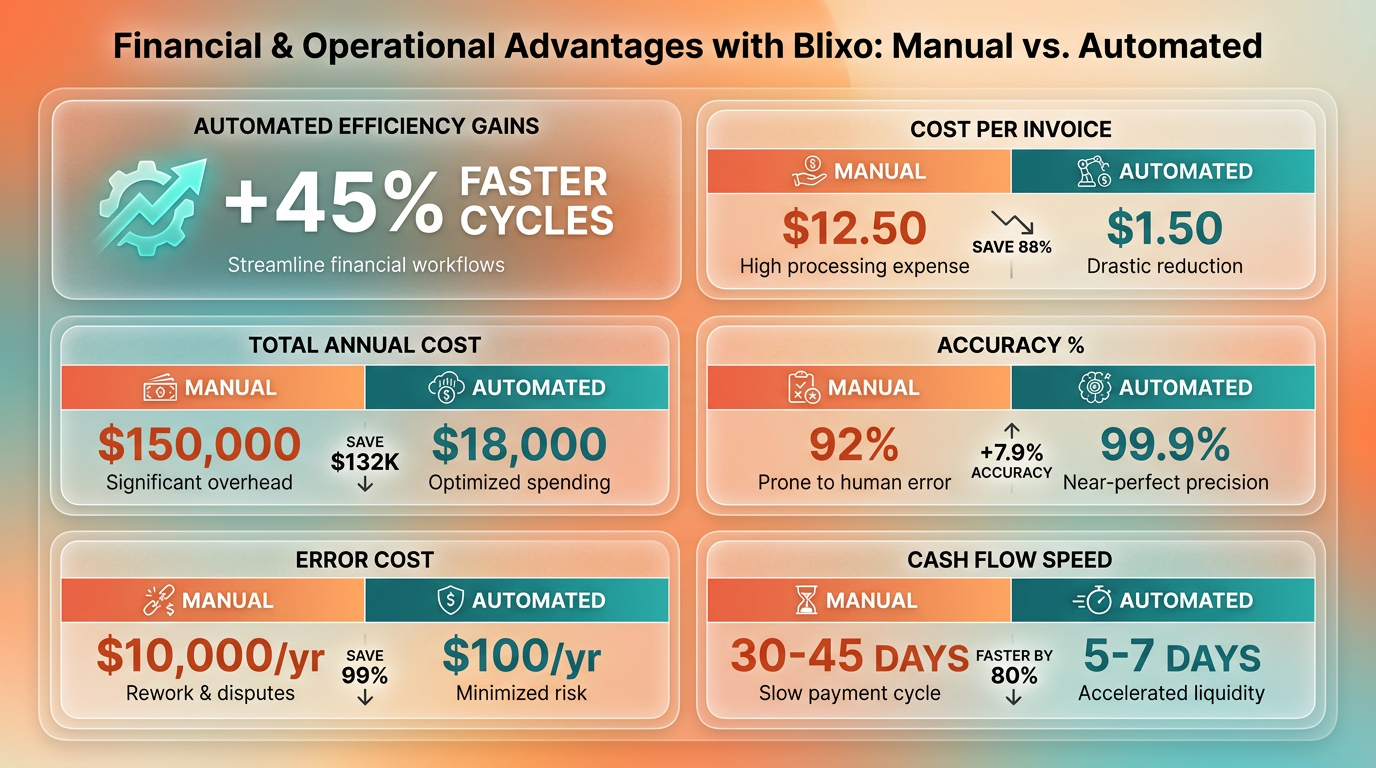
Manual billing is costly and error-prone. Processing 10,000 invoices manually costs $15–$40 per invoice, totaling $150,000–$400,000 annually, while automated systems reduce this to $3–$5 per invoice ($30,000–$50,000). Manual errors occur at a 1.6% rate, costing businesses $16,000 yearly for 10,000 invoices. Automated systems like Blixo achieve 99.5% accuracy, slashing errors by 99% and reducing manual reconciliation time by 70%. As mentioned in the Manual Billing Challenges and Compliance section, these errors often stem from human oversight in recurring payment scenarios.
| Metric | Manual Billing | Blixo Automation |
|---|---|---|
| Error Rate | 1.6% (160 errors/year) | <1% |
| Cost per Invoice | $15–$40 | $3–$5 |
| Admin Cost Savings | N/A | 30% reduction |
| DSO (Days Sales Outstanding) | 45+ days | <32 days |
How Does Automation Impact Time and Efficiency?
Automation cuts 50–70% of manual processing time, freeing finance teams to focus on strategic tasks. For example, a logistics firm using Blixo reduced reconciliation disputes by 65%, shortening the invoice-to-cash cycle from 45 days to 3.1 days. As highlighted in the Recurring Invoice Generation and Scheduling section, time savings scale with volume: processing 1,000 invoices manually takes 200+ hours annually, while Blixo reduces this to 60–70 fewer hours, saving teams 140+ hours yearly.
What ROI Do Businesses Achieve with Blixo?
The return on investment (ROI) for automation is substantial. A mid-sized healthcare provider cut billing errors by 90% and saved $8,500 monthly in administrative overhead. E-commerce firms see **30% faster collections** and **20% higher customer retention**. For every $1 spent on Blixo’s automated billing, businesses recover $3–$5 in reduced errors, faster payments, and operational savings.
Why Choose Automation Over Manual Billing?
Manual billing inflates administrative costs by 30% and delays cash flow, while automation ensures predictable revenue. Building on concepts from the Automated Billing Overview with Blixo section, Blixo’s integration with QuickBooks, SAP, and Xero, combined with AI-driven cash application, ensures seamless operations. SaaS and e-commerce businesses using Blixo report 60% and 40% reliance on recurring billing, respectively, for steady cash flow. Automated collections also cut payment errors by 40%, reducing disputes and manual follow-ups.
Frequently Asked Questions
1. How much faster is automated billing compared to manual systems?
Automated billing reduces processing times by 50–70% and cuts billing errors by 50%. A logistics company reduced reconciliation disputes by 65%, while a law firm achieved 25% faster cash-flow processing using automation.
2. What industries benefit most from automated recurring billing?
SaaS businesses (60%) and e-commerce companies (40%) gain predictable revenue through automation. Logistics, legal, and manufacturing sectors also benefit, with cost savings up to $12,000/month in cross-border fees.
3. How much can businesses save by switching to automated billing?
Automation cuts invoice processing costs from $15–$40 manually to $3–$5 automatically, saving 75%. Manual errors can cost $16,000/year for 10,000 invoices, which automation eliminates.
4. Can automated systems handle complex billing models?
Yes, automated systems manage metered pricing, variable subscriptions, and tiered plans. A manufacturer used automation to save $12,000/month by streamlining cross-border billing for dynamic pricing structures.
5. How does automation improve cash flow predictability?
Automated billing ensures consistent invoicing cycles, reducing missed charges and payment delays. A law firm reported 25% faster cash-flow processing, while 60% of SaaS businesses rely on automation for stable revenue.
6. What error reduction benefits does automation provide?
Automation reduces billing errors by 50%, preventing annual losses of $16,000 for 10,000 invoices. A logistics company cut reconciliation disputes by 65%, improving accuracy and reducing manual corrections.
7. How does automation affect payment collection efficiency?
Automated reminders accelerate payments by 40%, reducing delays. Invoice processing costs drop from $15–$40 manually to $3–$5 with automation, while cross-border fee savings reach $12,000/month for some businesses.