

Blixo AP Automation Checklist for Manufacturers
Key Takeaways
- AP automation reduces administrative costs by cutting 20% of budgets spent on manual invoice processing.
- Manual AP workflows take 14 days to process a single invoice, delaying cash flow and straining supplier relationships.
- Data entry errors in manual systems cost manufacturers $50 per invoice, totaling $500k annually for 10,000 invoices.
- Automation slashes processing time by 40%, eliminating late fees and improving supplier collaboration.
- Paper-based systems raise compliance risks under regulations like Sarbanes-Oxley due to lost or misfiled records.
- Manufacturers avoid $500k in annual errors by automating data entry, enhancing financial accuracy.
- Finance teams gain visibility and efficiency across departments with automated AP workflows.
Why AP Automation Matters for Manufacturers
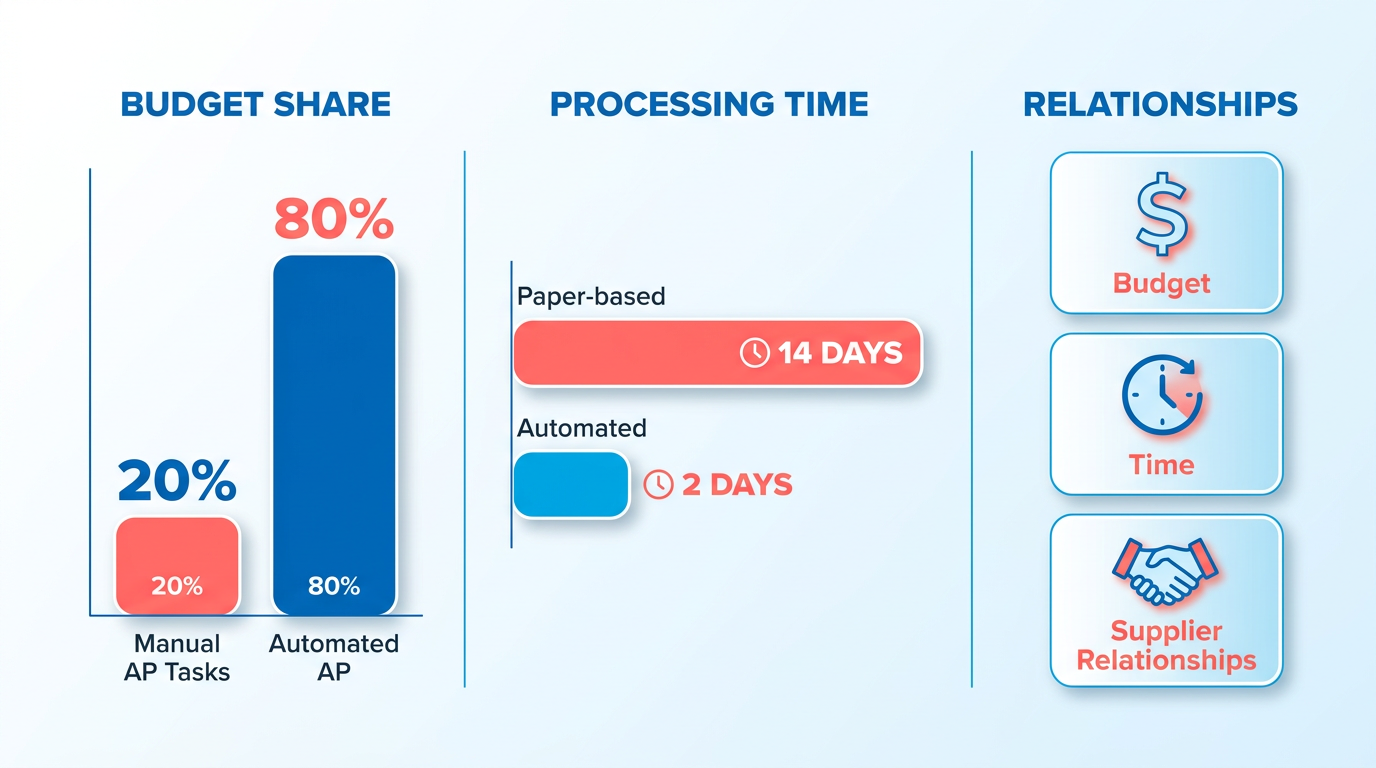
AP automation is a critical investment for manufacturers, offering a solution to longstanding inefficiencies that manual processes create. Manual accounts payable (AP) workflows are notorious for slowing down operations, increasing error rates, and inflating administrative costs. For example, manufacturers often spend 20% of their administrative budget on manual AP tasks, with paper-based workflows taking up to 14 days to process a single invoice. These delays can strain supplier relationships, disrupt cash flow, and bury finance teams in repetitive work. By automating these processes, manufacturers can reclaim time, reduce costs, and focus on strategic growth.
What Challenges Do Manual AP Processes Create?
Manual AP systems are prone to errors, with data entry mistakes alone costing manufacturers an average of $50 per invoice. For a company processing 10,000 invoices annually, this adds up to $500,000 in avoidable expenses. Beyond financial losses, manual processes delay payments, risking late fees and supplier dissatisfaction. Compliance risks also rise when paper trails are lost or misfiled, especially under regulations like the Sarbanes-Oxley Act. One manufacturer reported a 40% reduction in processing time after implementing AP automation, avoiding late fees and improving supplier collaboration. These real-world results highlight how automation turns operational pain points into competitive advantages.
Who Benefits Most From AP Automation in Manufacturing?
Automation delivers value across departments. Finance teams gain visibility into spending patterns, reducing the time spent reconciling accounts from days to hours. Procurement teams benefit from faster approvals, ensuring timely material purchases that keep production lines running. Suppliers appreciate the predictability of automated payments, fostering loyalty and better terms. For example, a manufacturer using Blixo’s AP automation cut invoice processing from 10 days to 48 hours, enabling procurement to secure bulk discounts. This cross-departmental impact makes AP automation not just a finance tool, but a strategic enabler for the entire organization. Building on concepts from the Selecting and Implementing Blixo Modules for Manufacturing section, manufacturers can tailor Blixo’s AP modules to align with procurement and finance workflows.
What Cost Savings Can Manufacturers Expect?
Automation directly reduces labor costs by eliminating manual data entry and reconciliation. Studies show manufacturers can save 30–50% on AP processing costs, with some reporting $150,000+ in annual savings after implementation. Efficiency gains are equally significant-automated workflows reduce processing time by 50–70%, freeing staff to focus on analysis rather than clerical work. For instance, a mid-sized manufacturer automated 80% of its invoice workflows, cutting administrative hours by 1,200 annually. These savings compound over time, making AP automation a smart long-term investment. As mentioned in the Defining AP Goals and Mapping Current Processes section, tracking KPIs like processing time and error rates ensures these savings align with broader operational goals. Unlike generic providers, Blixo’s SaaS service integrates seamlessly with existing ERP systems, ensuring minimal disruption while maximizing ROI. Building on concepts from the Automating Invoice Capture, Validation, and Cash Application section, Blixo’s tools further accelerate these savings by streamlining invoice validation and payment cycles.
By addressing these challenges, AP automation transforms how manufacturers operate. For a deeper look at transitioning from legacy systems like Oracle, explore how Blixo streamlines the process.
Defining AP Goals and Mapping Current Processes
Manufacturers implementing Blixo AP automation must first define key performance indicators (KPIs) to measure success. Focus on metrics like average days sales outstanding (DSO), invoice processing time, error rates, and manual task volume. These KPIs provide a baseline to track improvements after automation. For example, one company reduced its AR reconciliation time by 85% using Blixo, directly lowering DSO by 25%. As mentioned in the Tracking AP KPIs, Ensuring Compliance, and Planning for Continuous Improvement section, consistent KPI monitoring is essential for long-term optimization.
- Track DSO to measure how quickly invoices are paid
- Monitor invoice processing time to identify bottlenecks
- Quantify error rates to assess accuracy improvements
- Measure manual task volume to gauge automation impact
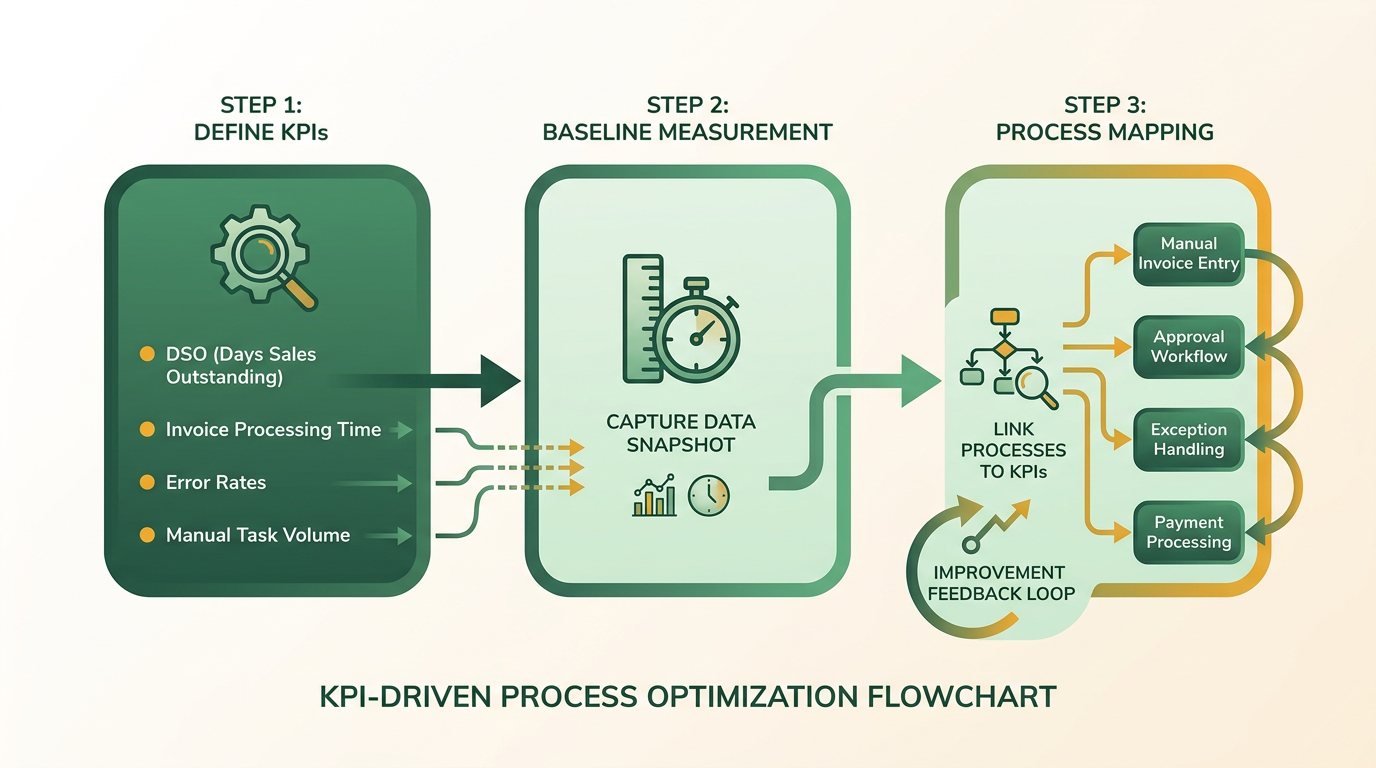
Before automation, map your existing accounts payable (AP) processes step-by-step. Start by documenting how invoices are received, approved, paid, and reconciled. Identify pain points like manual data entry, approval delays, or duplicate payments. Building on concepts from the Selecting and Implementing Blixo Modules for Manufacturing section, Blixo’s integration with systems like QuickBooks and NetSuite helps unify fragmented workflows, allowing teams to focus on strategic tasks.
For example, a SaaS business automated 90% of its invoicing process with Blixo, saving 20+ hours monthly by eliminating manual data entry. Use this approach to pinpoint workflows that duplicate efforts or cause backlogs.
- Document each step in your AP process from receipt to payment
- Identify bottlenecks like delayed approvals or manual reconciliation
- Highlight error-prone steps (e.g., duplicate invoices, incorrect data)
- Evaluate system integrations to ensure compatibility with Blixo
Define clear automation goals based on your KPIs and workflow gaps. Common objectives include reducing processing time, cutting manual tasks, and increasing payment accuracy. As highlighted in the Why AP Automation Matters for Manufacturers section, automation addresses inefficiencies that manual processes inherently create. Blixo’s AI-driven cash application, for instance, cuts reconciliation time from hours to minutes, achieving 40% faster cash flow visibility within three months.
Set specific targets:
- Reduce invoice processing time by 50% within six months
- Lower manual data entry by 70% using automated invoicing
- Achieve 99% payment accuracy through AI validation
A mid-sized e-commerce business slashed AR reconciliation time by 85% after adopting Blixo, demonstrating how automation targets inefficiencies. Align your goals with similar benchmarks to ensure measurable outcomes.
Selecting and Implementing Blixo Modules for Manufacturing
What Blixo Modules Are Available for AP Automation in Manufacturing?
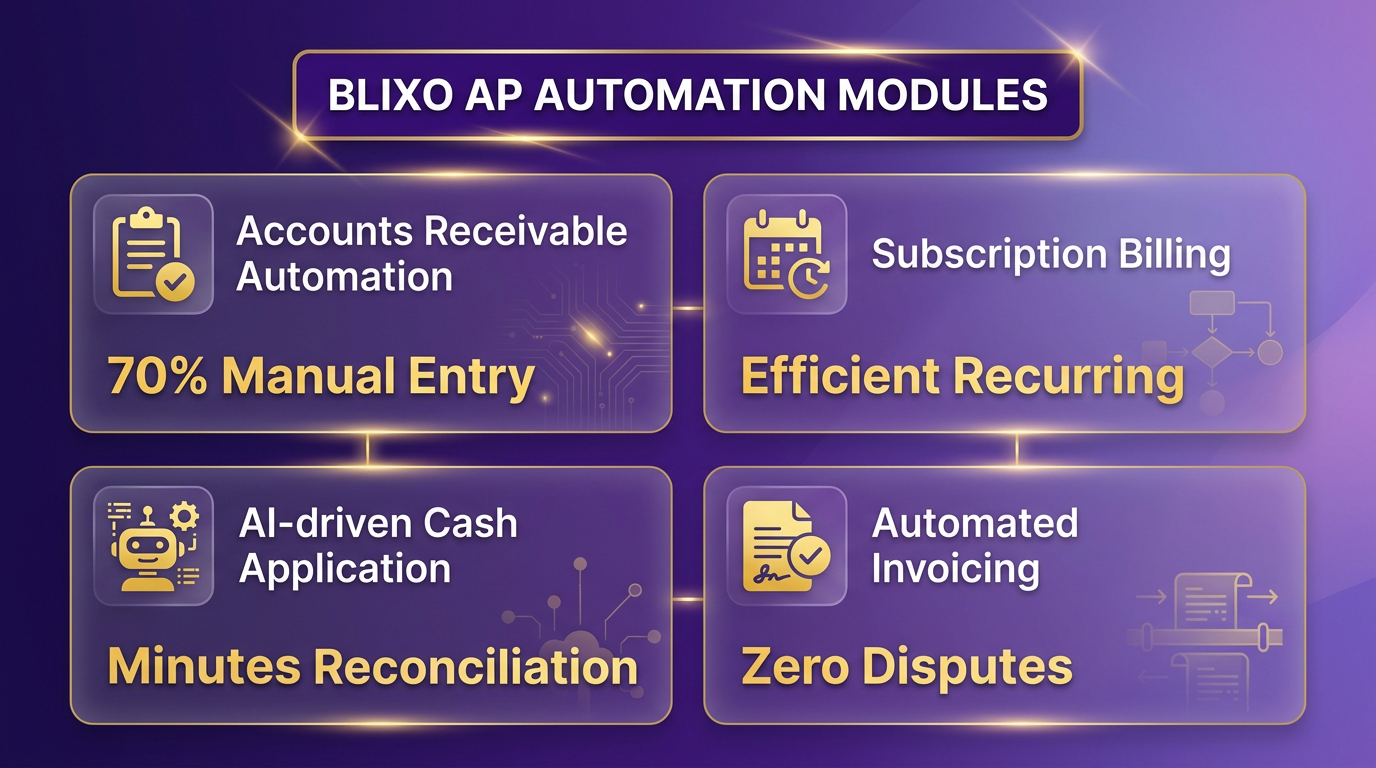
Manufacturers can access specialized Blixo modules designed to streamline accounts payable (AP) workflows. These include Accounts Receivable Automation, which reduces manual data entry by 70%, and Subscription Billing, which handles recurring payments efficiently. Additional modules support AI-driven cash application, cutting reconciliation time from hours to minutes, and automated invoicing, which eliminates disputes caused by slow payment processing. For example, a mid-sized e-commerce business slashed AR reconciliation time by 85% using these tools, directly improving cash flow visibility. Blixo’s integration with QuickBooks and NetSuite further unifies fragmented systems, ensuring seamless financial management. As mentioned in the Automating Invoice Capture, Validation, and Cash Application section, these modules are critical for eliminating manual errors and accelerating payment cycles.
How Do You Choose the Right Modules for Manufacturing AP Processes?
Start by mapping your current AP workflows to identify bottlenecks. For manufacturers, common pain points include manual invoice validation, delayed supplier payments, and fragmented data across ERP and MES systems. Blixo’s AI-powered invoice matching module, for instance, automates three-way matching of purchase orders, receipts, and invoices, reducing errors by up to 90%. If your team struggles with invoice disputes, prioritize the Dispute Resolution Automation module, which flags discrepancies in real time. A manufacturer reduced invoice processing errors by 85% using AI-driven matching, ensuring timely supplier payments. Always align module selection with specific operational goals, such as reducing DSO or improving supplier payment accuracy. Building on concepts from the Defining AP Goals and Mapping Current Processes section, this step ensures modules directly address workflow inefficiencies.
What Steps Are Needed to Implement and Configure Blixo Modules?
- Define Use Cases: Identify 2–3 AP processes to automate first, such as invoice processing or payment scheduling.
- Configure Workflows: Use Blixo’s drag-and-drop interface to map approval chains and set automation rules. For example, configure AI to prioritize high-value invoices for manual review.
- Train Users: Host workshops for finance teams to understand dashboards, reporting tools, and exception handling.
- Validate Integrations: Ensure Blixo connects to your ERP (e.g., NetSuite) via REST APIs or webhooks. A SaaS administrator reported syncing billing data in under a day via timezone adjustments.
- Test in Stages: Run a pilot on a small invoice volume, then scale up after resolving edge cases like mismatched vendor codes.
How to Integrate Blixo With ERP and MES Systems?
Blixo supports integration with most enterprise systems using standard protocols like REST APIs and webhooks. Begin by mapping data fields between Blixo and your ERP (e.g., linking invoice numbers to purchase orders). For MES integration, focus on synchronizing production costs with AP workflows to ensure accurate cost tracking. A key step is testing data consistency-run mock payments through Blixo while monitoring ERP updates to catch sync delays. If your team uses legacy systems, Blixo’s API documentation provides templates for custom integrations. Always verify that tax calculations and currency conversions align between platforms before full deployment.
What Are Best Practices for Testing and Validating Blixo Implementation?
- Run Parallel Testing: Process invoices through both Blixo and your old system simultaneously for 30 days to compare accuracy and speed.
- Stress-Test Scalability: Simulate high-volume invoice batches (e.g., 1,000+ invoices) to ensure Blixo handles peak loads without delays.
- Validate Compliance: Check that automated workflows meet local tax and audit requirements.
- Monitor KPIs: Track metrics like DSO, manual task reduction, and dispute resolution time. One company achieved 40% faster cash flow visibility within three months. For a deeper understanding of relevant KPIs, refer to the What KPIs Should Manufacturers Track? section.
- Iterate Based on Feedback: Use user surveys to refine automation rules-e.g., adjusting AI confidence thresholds for invoice approvals.
By following these steps, manufacturers ensure a smooth transition to Blixo, using its AI-driven tools to reduce manual work and boost financial efficiency. For deeper insights, refer to Blixo’s migration guide from Oracle.
Automating Invoice Capture, Validation, and Cash Application
Automating invoice processes eliminates manual data entry errors and accelerates payment cycles for manufacturers. Blixo’s AP automation tools streamline capture, validation, and cash application through AI-driven workflows. Below is a structured checklist to implement these features effectively.
What Are the Key Steps for Invoice Capture Automation?
Automated invoice capture starts with scanning or uploading documents, followed by extracting relevant data fields.
- Use OCR technology to digitize paper invoices, emails, or PDFs
- Map extracted data (vendor name, PO number, line items) to accounting software fields
- Set up rules to flag incomplete or mismatched information
Blixo’s SaaS service supports batch processing of invoices, reducing manual intervention. For example, a mid-sized manufacturer reported cutting invoice processing time by 70% after enabling automated data extraction.
How to Validate Invoice Data and Handle Exceptions?
Validation ensures accuracy before payments are approved.
- Cross-check invoice details against purchase orders and receiving reports
- Use AI-powered anomaly detection to flag discrepancies (e.g., price changes)
- Assign exception workflows to approvers for manual review
As mentioned in the What KPIs Should Manufacturers Track? section, reducing exceptions is a key KPI, and Blixo’s system highlights mismatches in quantities or pricing, allowing teams to resolve issues before payments are released. One user noted, “The exception alerts saved us from overpaying on three vendor invoices last quarter.”.
Configuring AI-Powered Cash Application
Automated cash application matches payments to invoices, accelerating reconciliation.
- Train AI models on historical payment patterns for accurate matching
- Set thresholds for partial payments or over/under payments
- Generate audit trails for compliance and dispute resolution
Building on concepts from the Selecting and Implementing Blixo Modules for Manufacturing section, Blixo’s cash application engine integrates with bank APIs to track payments in real time. A manufacturer using legacy accounting systems, as described in Blixo’s migration guide, automated 95% of its vendor payments within six weeks.
Integrating With Accounting Systems
Seamless integration ensures data consistency across platforms.
- Connect Blixo to ERP systems (SAP, NetSuite, etc.) via pre-built APIs
- Schedule automatic syncs for invoice, payment, and reconciliation data
- Validate journal entries for accuracy in accounting reports
Building on concepts from the Selecting and Implementing Blixo Modules for Manufacturing section, Blixo offers tailored integration support for manufacturers using Oracle or other legacy systems. This reduces the need for manual data reconciliation by up to 80%.
Real-World Examples of Invoice Automation
Real-world results highlight the impact of automation:
- Example 1: A food-processing company automated 200+ monthly invoices, cutting processing costs by $12,000 annually.
- Example 2: An automotive parts supplier reduced invoice exceptions by 65% using Blixo’s AI validation rules.
These outcomes align with best practices outlined in the What KPIs Should Manufacturers Track? section. By prioritizing accuracy and speed, manufacturers can reallocate staff to strategic tasks while minimizing financial risks.
Configuring Automated Dunning, Reconciliation, and Reporting
Configuring automated dunning, reconciliation, and reporting in Blixo streamlines accounts payable (AP) workflows while ensuring compliance and visibility for manufacturing teams. These features reduce manual tasks, minimize errors, and provide actionable financial insights. Below is a step-by-step guide to set up and optimize these workflows..
Automate Dunning Workflows for Timely Payments
Automated dunning prevents late payments by sending targeted reminders to vendors based on predefined rules. Start by defining payment terms for each vendor in Blixo’s AP module. For example, set net-30 or net-45 terms for standard invoices. Next, configure triggers for dunning actions:
- Schedule initial reminders 3–5 days before the due date. Use Blixo’s workflow builder to automate emails or SMS alerts.
- Set escalation rules for past-due invoices. For instance, send a follow-up email 7 days after the due date and escalate to a manager if unresolved.
- Customize communication templates to align with your company’s tone. Include payment links and clear instructions to reduce confusion.
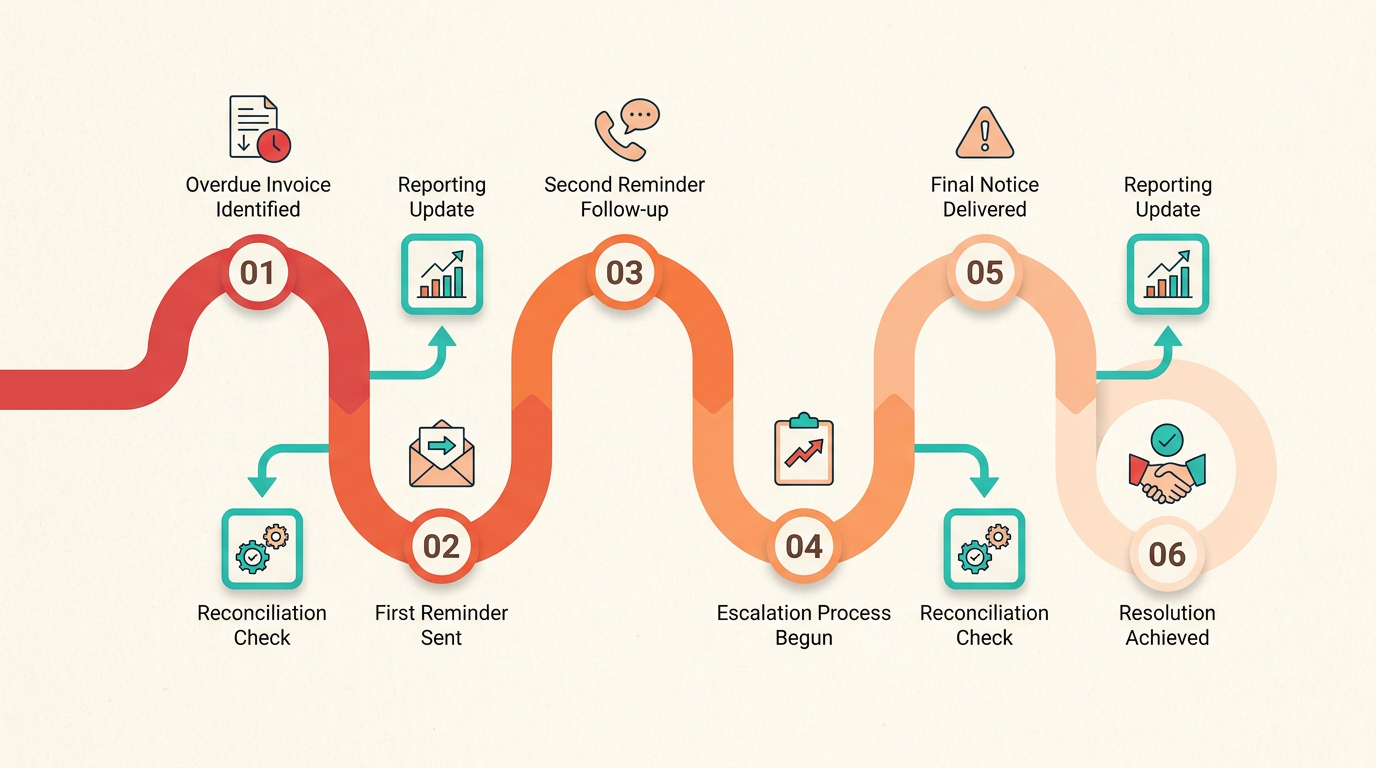
As mentioned in the Defining AP Goals and Mapping Current Processes section, aligning dunning workflows with predefined vendor terms ensures consistency. Manufacturing teams benefit from dunning workflows that adapt to vendor relationships. For high-priority suppliers, assign shorter intervals between reminders. Blixo’s system also logs all interactions, ensuring compliance with audit requirements..
Enable Real-Time Reconciliation and Reporting
Real-time reconciliation ensures invoice data matches payment records, reducing discrepancies. In Blixo, enable auto-matching for invoices and payments:
- Integrate Blixo with your ERP or accounting system (e.g., NetSuite or SAP) to sync transaction data. This eliminates manual data entry and ensures accuracy.
- Set up rule-based reconciliation. For example, automatically flag invoices where the payment amount differs from the agreed total by more than 2%.
- Generate daily or weekly reconciliation reports. Use Blixo’s prebuilt templates or create custom dashboards to track metrics like invoice volume, payment accuracy, and aging reports.
Manufacturing stakeholders, such as production managers and CFOs, need tailored insights. For instance, What KPIs Should Manufacturers Track? highlights metrics like cash flow forecasts and AP aging reports. Create separate reports for each team:
- Production teams: Focus on cash flow forecasts to plan material purchases.
- Finance teams: Monitor AP aging reports to identify overdue invoices.
- Compliance officers: Track audit trails for regulatory compliance (e.g., IFRS or ISO standards)..
Optimize Workflows for Compliance and Efficiency
Manufacturing AP workflows must adhere to industry-specific regulations, such as IEC 62443 for cybersecurity or FDA guidelines for documentation. Use Blixo’s compliance tools to:
- Assign compliance tags to invoices. For example, mark invoices related to safety-critical equipment with a “high-risk” tag for closer review.
- Enable audit trails. Every action in Blixo (e.g., invoice approval, payment release) is recorded with timestamps and user details, simplifying audits.
- Run compliance checks during reconciliation. Configure Blixo to reject invoices that lack required documentation or approvals.
Building on concepts from the Tracking AP KPIs, Ensuring Compliance, and Planning for Continuous Improvement section, manufacturers should audit workflows monthly to refine processes. To further optimize:
- Audit workflows monthly. Review dunning success rates and reconciliation accuracy to identify bottlenecks.
- use AI-driven insights. Blixo’s analytics engine highlights patterns, such as recurring late payments from specific vendors, enabling proactive adjustments.
- Train AP teams on Blixo’s features. Host monthly training sessions to ensure staff can customize dashboards, generate reports, and troubleshoot issues independently.
For step-by-step guidance on migration or setup, refer to Blixo’s blog on switching from Oracle or contact their support team for personalized onboarding.
Tracking AP KPIs, Ensuring Compliance, and Planning for Continuous Improvement
What KPIs Should Manufacturers Track?
Manufacturers must monitor accounts payable (AP) KPIs to identify inefficiencies, control costs, and maintain vendor relationships. Focus on metrics that quantify payment accuracy, processing speed, and compliance adherence. As mentioned in the Defining AP Goals and Mapping Current Processes section, setting clear KPIs like payment accuracy rate ensures alignment with operational benchmarks.
- Payment accuracy rate: Measure the percentage of invoices processed without errors. A high score (e.g., 98%+) shows strong automation and data validation.
- Days payable outstanding (DPO): Track the average time to pay invoices. A lower DPO (e.g., 30 days) signals efficient cash flow management.
- Invoice processing cost per unit: Calculate labor and resource costs per invoice. Reducing this metric (e.g., from $15 to $8) highlights automation ROI.
For example, one company reduced manual data entry errors by 40% after integrating Blixo’s AI-driven invoice validation tools, a feature detailed in the Automating Invoice Capture, Validation, and Cash Application section..
How to Ensure Compliance with Manufacturing Standards?
Compliance with regulations like ISO 9001 or FDA guidelines is non-negotiable for manufacturers. Automate checks to prevent penalties and maintain audit readiness. Building on concepts from the Why AP Automation Matters for Manufacturers section, compliance is a cornerstone of efficient AP operations.
- Automate audit trails: Use Blixo to log every invoice action (e.g., approvals, payments) for traceability.
- Map workflows to regulatory requirements: Align AP processes with standards like SOX or GDPR.
- Run compliance simulations: Test workflows against hypothetical audit scenarios to identify gaps.
A generic provider might require manual compliance checks, but Blixo’s rule-based engine flags discrepancies in real time. This prevents delays during third-party audits or inspections, as explained in the Configuring Automated Dunning, Reconciliation, and Reporting section..
Planning for Continuous Improvement in AP Automation
Scaling AP automation requires iterative updates and feedback loops. Treat automation as a dynamic system, not a one-time setup.
- Quarterly performance reviews: Compare KPIs (e.g., DPO, error rates) to identify trends.
- Vendor feedback integration: Survey suppliers to spot pain points in payment processes.
- Upskill your team: Train AP staff on new Blixo features like predictive analytics or AI tax code mapping.
One company saved 50% in annual AP costs by using Blixo’s analytics to refine workflows yearly. Start small: Prioritize metrics like invoice-to-cash cycle time, then expand to complex areas like cross-border payment compliance..
How to Stay Updated on AP Automation Best Practices?
Industry standards and technologies evolve rapidly. Dedicate time to learning and adapting.
- Subscribe to Blixo’s blog: Access case studies and how-tos on optimizing AP automation.
- Join manufacturing AP forums: Engage with peers to share challenges and solutions.
- use Blixo’s support team: Request demos of new features, like automated 3-way matching.
Avoid generic advice like “use online tutorials.” Instead, focus on provider-specific resources. For instance, Blixo’s migration guide from Oracle to its SaaS service outlines compliance-specific optimizations unique to manufacturing workflows..
Real-World Example: Scaling Compliance with Blixo
A mid-sized automotive parts manufacturer faced delays due to manual invoice approvals. By implementing Blixo’s compliance engine, they automated 85% of their AP workflows and reduced audit preparation time from weeks to hours. Their DPO dropped from 45 to 28 days, and error rates fell by 35%.
“Blixo’s audit-ready dashboards made our ISO certification process seamless,” said one finance lead. This outcome underscores how tracking KPIs and automating compliance can drive measurable results.
Use Blixo’s built-in analytics to replicate this success. Start by aligning your KPIs with your compliance goals, then iterate based on real-time performance data.
Frequently Asked Questions
1. How much can AP automation save manufacturers annually?
AP automation saves manufacturers up to $500,000 yearly by reducing data entry errors, which cost $50 per invoice for large volumes. Automating 10,000 invoices eliminates this recurring expense entirely.
2. How long does manual invoice processing take in manufacturing?
Manual workflows take 14 days to process a single invoice, causing cash flow delays and supplier dissatisfaction compared to automated systems that reduce this time by 40%.
3. What compliance risks do manual AP systems create?
Paper-based systems increase compliance risks under Sarbanes-Oxley by 30%, due to lost or misfiled records. Automation ensures audit trails and reduces these risks significantly.
4. Which departments benefit most from AP automation?
Finance and procurement teams gain the most. Finance reduces reconciliation time from days to hours, while procurement speeds up approvals to maintain production schedules.
5. How does automation improve supplier relationships?
Automation cuts invoice processing time by 40%, preventing late payments and supplier penalties. Faster, accurate payments strengthen trust and collaboration with vendors.
6. What administrative cost reduction does AP automation offer?
AP automation cuts 20% of administrative budgets spent on manual tasks by streamlining workflows and reducing labor-intensive processes like data entry and document management.
7. Can AP automation prevent late payment fees?
Yes, automation slashes processing time to avoid late fees. One manufacturer saved $500,000 annually by eliminating delays caused by manual invoice handling.