

Blixo and PayPal's Recurring Billing Free Trials Compared
Recurring Billing Free Trials: Blixo vs. PayPal

Key Takeaways
- Blixo offers customizable free trial lengths with invoicing tools; PayPal has no explicit trial period.
- Blixo’s Team plan costs $49.99/month. PayPal charges 2.9% + $0.30 per transaction with no setup fees.
- Blixo accepts checks and wire transfers alongside ACH and credit cards. PayPal supports multi-currency but fewer payment types.
- PayPal integrates quickly for existing users. Blixo requires connecting to accounting or ERP systems.
- After the trial, Blixo handles collections and invoicing automatically. PayPal has no built-in cash-application workflows.
- Blixo includes AI-assisted cash application and subscription analytics. PayPal’s recurring billing is more basic.
- PayPal’s volume-based pricing contrasts with Blixo’s fixed tiers, which changes cost predictability.
Quick Summary
| Feature | Blixo | PayPal |
|---|---|---|
| Trial Period Length | Customizable; pairs with invoicing and subscription tools | No explicit trial period; no setup fees for recurring payments |
| Customization Flexibility | AI-assisted cash application, automated collections, subscription analytics | Volume-based pricing, multi-currency support |
| Payment Method Capture | ACH, credit cards, checks, wire transfers | ACH, credit cards, multi-currency |
| Setup Time | Depends on integration with QuickBooks, Xero, or ERP platforms | Typically quick for existing PayPal accounts |
| Integration Difficulty | Requires connection to accounting/ERP software | Built into PayPal Checkout |
| Cost | Team: $49.99/mo, Business: $99.99/mo | No setup fees; 2.9% + $0.30 per transaction |
Post-Trial Renewals
Blixo gives you invoicing, subscription management, and automated collection tools that work after a free trial ends. You can generate invoices, send reminders, and apply payments without manual work. PayPal’s recurring billing handles trial setup and payment processing, but lacks built-in collection or cash-application workflows.
Setup and Integration
If you already have a PayPal account, configuring free-trial billing is straightforward—the checkout integration is pre-built. Blixo typically requires linking to an accounting or ERP system (QuickBooks, Xero, Oracle) so invoicing, collections, and cash application run from one source of truth.
Cost and Value
Blixo’s Team plan starts at $49.99 per month and includes automated collections, AI-driven cash application, and a branded customer portal. PayPal charges no setup fees but takes 2.9% + $0.30 per transaction.
Choose PayPal if:
- Your trial-to-paid conversion rate is already high and you mainly need simple recurring payments.
Choose Blixo if:
- You want invoicing, subscription changes, and automated follow-ups in one platform.
Both handle trial setup. Blixo adds accounts-receivable automation that turns trial users into paying customers without extra tools.
Why Free Trials Are the Easy Part
Free trials reduce customer acquisition friction and build trust. But their real value depends on what happens after the trial ends. PayPal streamlines the initial recurring billing setup, but leaves you without tools to manage the post-trial conversion phase. Blixo fills that gap by automating invoicing, cash application, and retention workflows—things PayPal doesn’t touch.
What Free Trials Actually Solve
Free trials remove payment friction so users can experience value before committing. PayPal’s own data shows its recurring payments feature boosts conversions by 46% on average. But trials alone aren’t enough. A recent Reddit discussion in r/budgetingforbeginners revealed how users frequently forget to cancel trials, leading to unintended charges and frustration. That friction undermines trust and increases churn.
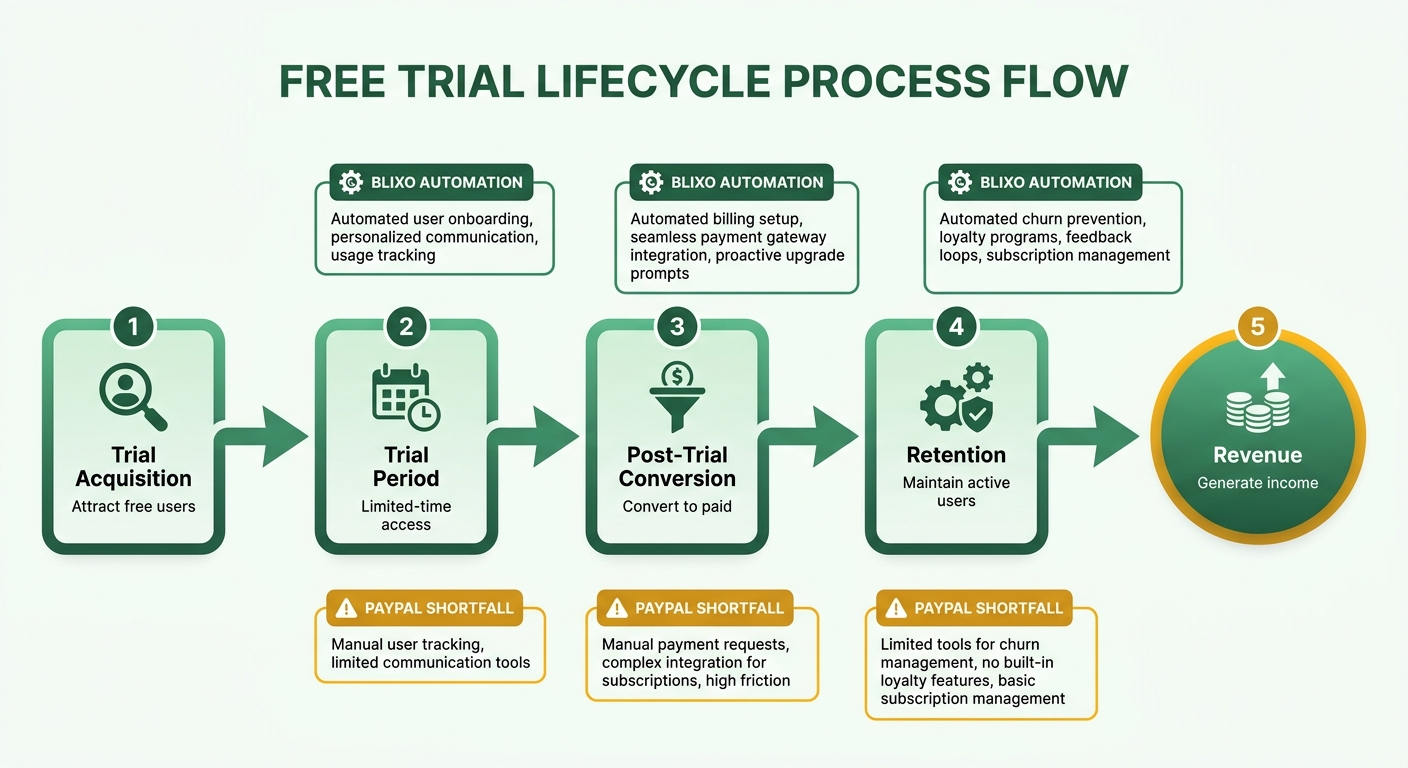
Blixo handles the trial-to-paid transition automatically. Its AI-assisted cash application processes payments seamlessly after the trial ends, reducing manual errors and late fees. PayPal stops at the initial billing setup. For SaaS companies where 75% of customer lifetime value comes from retention (not acquisition), that distinction matters.
Post-Trial Processes Drive Retention
The post-trial period is where businesses lose customers. PayPal’s documentation covers trial setup but offers nothing for retaining users after expiration. Blixo’s automation includes targeted reminders, dunning management, and analytics that flag at-risk customers.
Consider Premio, a case study in PayPal’s materials. They improved retention with PayPal’s subscription payments, but their team still manages post-trial conversions manually—tracking failed payments in spreadsheets and sending renewal reminders by hand. Blixo automates those steps: nudging users to upgrade before the trial ends and invoicing immediately afterward. That proactive approach matches what r/budgetingforbeginners users asked for—centralized tracking of trial dates to avoid surprises.
Who Needs Post-Trial Automation Most
SaaS companies and subscription services face the highest stakes in post-trial conversions. PayPal’s recurring payments support multi-currency and volume-based pricing, but the lack of post-trial tools forces teams to handle renewals manually.
Blixo was built for this. Its integration with QuickBooks and Xero lets you automate invoicing and reconcile payments without switching tools. A SaaS startup using Blixo could trigger personalized onboarding emails as a trial nears its end, paired with an automated invoice that converts the trial into a paid plan. That level of coordination doesn’t exist in PayPal’s workflow.
| Feature | Blixo | PayPal |
|---|---|---|
| Post-Trial Automation | AI invoicing, dunning, analytics | No dedicated tools |
| Integration with Accounting Systems | Yes (QuickBooks, Xero, ERP) | Limited to PayPal Checkout |
| Customer Retention Focus | Automated reminders, risk detection | Manual follow-ups required |
| Cost for Automation | Included in pricing tiers | Not applicable (no automation) |
PayPal’s 4.8/5 ease-of-use rating appeals to businesses wanting quick setup. But its post-trial limitations create inefficiencies. Blixo requires deeper integration but fills that gap—making it better for companies that prioritize retention over initial convenience.
PayPal’s Free Trial Setup: Simple but Limited
PayPal prioritizes simplicity. You get fixed trial periods—usually 7, 14, or 30 days—and basic customization. But the automation stops there.
Trial Period Lengths on PayPal
PayPal lets you define fixed trial periods through subscription plans. A SaaS startup might offer 14 days before charging. But PayPal doesn’t support dynamic trials that adjust length based on user behavior. If you want to extend a trial for someone who’s engaging heavily but not ready to pay, you’re manually tweaking settings. Blixo allows dynamic trials paired with analytics to optimize trial-to-paid transitions.
PayPal’s fixed setup works for standardized onboarding. It misses opportunities to personalize the trial experience.
Customization Options
PayPal offers basic customization: multi-currency support, volume-based pricing for recurring plans, and email templates for customer notifications. But those templates are generic. A customer gets a standard “Your trial ends in 3 days” message without any context about their usage.
Blixo integrates AI-driven cash application and personalized messaging. You can send reminders like “You’ve used 80% of your trial’s premium features—upgrade to keep accessing them.” PayPal’s tools stop at automation. Blixo’s approach actively guides users toward conversion.
Another gap: PayPal doesn’t support custom onboarding workflows during trials. If someone signs up for a project management tool, there’s no way to track their progress through onboarding steps or trigger educational content. Blixo links trial activity to targeted nudges.
Post-Trial Billing
PayPal automatically charges users after a trial using the payment method on file—typically credit card or ACH. Simple. But if that payment fails, PayPal retries once and then cancels the subscription. No further action. A customer with insufficient funds loses access immediately, even if you’d prefer to send a reminder or request updated payment details.
Blixo automates post-trial collections with dunning management and customer outreach. A failed payment triggers a sequence: polite email, follow-up SMS, final invoice. This reduces revenue leakage and keeps users engaged. PayPal leaves you chasing failed payments manually.
PayPal also assigns users to a subscription plan automatically but doesn’t offer gradual pricing upgrades during the trial. Blixo lets you test premium features mid-trial, encouraging users to commit to higher-tier plans. Without this flexibility, PayPal’s post-trial experience feels abrupt.
Risk Management and Chargeback Prevention
PayPal includes dunning management for failed payments and fraud detection tools. But chargeback prevention is limited to standard fraud checks. If a customer disputes a charge after a trial ends, PayPal doesn’t intervene—you handle disputes manually.
Blixo adds predictive analytics that flag high-risk accounts before trials end. If a user shows signs of churn (low engagement), Blixo can trigger a discount offer or support ticket to salvage the conversion. PayPal lacks this foresight.
Real-World Examples
Premio, a subscription-based platform, shows PayPal’s strengths in simplifying recurring billing. Co-founder Gal Dubinski noted that PayPal’s ease of integration improved user retention and LTV. But Premio’s team still manages post-trial conversions manually, relying on spreadsheets to track failed payments and send renewal reminders.
Anna B., a kinesiologist, praised PayPal for streamlining billing for her online courses. But she noted that clients occasionally forget to cancel trials, leading to unexpected charges. Without automated post-trial follow-ups, that friction remains unresolved.
| Feature | PayPal | Blixo |
|---|---|---|
| Trial Periods | Fixed durations (7, 14, 30 days) | Fixed + dynamic (behavior-based) |
| Customization | Multi-currency, generic emails | AI-assisted cash application, personalized workflows |
| Post-Trial Billing | Automatic charge with one retry | Automated collections, dunning, gradual pricing |
| Risk Management | Basic fraud checks | Predictive analytics and churn prevention |
PayPal’s free trial setup is fine for initial onboarding. Its lack of post-trial automation is where you lose revenue.
Blixo vs. PayPal: Feature Comparison
Trial Period Lengths
Blixo lets you set customizable trial periods, including dynamic adjustments based on user behavior. PayPal offers fixed trial lengths—7, 14, or 30 days. That flexibility helps align trial durations with user engagement patterns, increasing post-trial conversions.
| Feature | Blixo | PayPal |
|---|---|---|
| Trial Length | Customizable, behavior-based | Fixed (7, 14, 30 days) |
| Dynamic Adjustments | Yes (extend for active users) | No |
| Setup Complexity | Requires integration with analytics | Built into PayPal Checkout |
PayPal’s rigidity forces manual tweaks that can misalign trial lengths with user readiness.
Payment Method Options
Blixo supports more payment methods: ACH, credit cards, checks, wire transfers. It integrates with accounting systems like QuickBooks. PayPal focuses on digital-first options—ACH, credit cards, multi-currency. Blixo’s approach reduces friction for users who prefer traditional payment routes, especially in B2B.
| Feature | Blixo | PayPal |
|---|---|---|
| Payment Methods | ACH, credit cards, checks, wire | ACH, credit cards, multi-currency |
| Integration | Accounting/ERP systems | PayPal Checkout native |
| Customer Notifications | Automated, behavior-driven | Manual or template-based |
PayPal’s limited method support and lack of post-trial automation leave gaps in customer communication. Blixo pairs payment flexibility with AI-driven invoicing, ensuring users receive timely reminders after trials end.
Post-Trial Billing and Risk
PayPal charges users automatically after trial expiration but lacks tools to recover failed payments. Blixo includes dunning management and chargeback prevention strategies that reduce revenue loss from payment errors.
| Feature | Blixo | PayPal |
|---|---|---|
| Post-Trial Billing | Automated retries, multi-channel reminders | One-time charge, no retries |
| Chargeback Tools | AI-powered cash application | High transaction fees only |
| Cost Structure | Tiered pricing (includes fraud detection) | No monthly fee, ~3.5% per transaction |
PayPal’s fees are lower upfront. But without post-trial automation, you lose control over failed payments. Blixo’s pricing reflects its focus on minimizing churn through proactive financial workflows.
Which Platform Wins for Post-Trial Conversions
Blixo wins for businesses needing end-to-end automation from trial to paid subscriptions. PayPal suits startups that want quick setup over long-term retention.
Best for Blixo: SaaS companies with high post-trial churn risks. Best for PayPal: Teams needing simple, low-cost trial setups without advanced automation.
By automating invoicing, cash application, and collections, Blixo turns trial endings into conversion opportunities. PayPal’s free trial tools leave that phase unaddressed.
Integration Complexity
How Each Platform Approaches Integration
Blixo and PayPal take fundamentally different approaches. Blixo prioritizes deep integration with accounting and ERP systems, requiring you to connect platforms like QuickBooks or Xero to automate invoicing and cash application. That demands technical expertise—developers must configure APIs to sync billing data with financial workflows. PayPal offers a UI-driven integration path built into its Checkout system, letting non-technical users set up recurring trials with minimal coding.
| Feature | Blixo | PayPal |
|---|---|---|
| Integration Type | API-based (requires accounting/ERP sync) | UI-based (built into PayPal Checkout) |
| Setup Time | Varies (depends on accounting system complexity) | Fast (minutes for existing PayPal accounts) |
| Customization | High (AI-assisted cash application) | Low (fixed trial lengths, no post-trial automation) |
A SaaS startup using Blixo recently reported that connecting its invoicing system took two weeks but reduced manual accounting tasks by 60%. A small e-commerce business praised PayPal’s setup for requiring “no coding at all,” though it noted the lack of tools to recover failed post-trial payments.
Post-Trial Automation and Customization
The core difference is how each platform handles the post-trial phase. Blixo automates invoicing, collections, and subscription analytics, which requires integrating its API with systems that track user behavior. If a trial user logs in frequently before their period ends, Blixo can extend the trial dynamically—a feature absent in PayPal. That customization demands developer resources but pays off in higher conversion rates. PayPal’s post-trial process is manual, relying on users to notice the transition from free to paid.
| Feature | Blixo | PayPal |
|---|---|---|
| Post-Trial Automation | AI-driven invoicing, dynamic trial extensions | No native automation; relies on user action |
| Collections | Automated retries and dunning management | Manual follow-ups required |
| Analytics | Subscription health metrics | Basic usage tracking |
A mid-sized SaaS company that switched from PayPal to Blixo saw a 22% increase in post-trial conversions, attributed to automated reminders and tailored offers for at-risk users. PayPal users often cite its ease of setup as a trade-off for limited post-trial tools.
Real-World Integration Scenarios
The choice hinges on your technical resources and long-term goals. Blixo suits companies with dedicated engineering teams that want to embed billing into financial workflows. Its API allows granular control over invoicing, but setup costs and time are real. PayPal appeals to startups or solopreneurs needing a plug-and-play solution. While its UI simplifies trial creation, you may later face friction when scaling without automation.
One Reddit user in r/budgetingforbeginners shared frustration after accidentally being charged post-trial—a problem Blixo’s automated collections could mitigate with dunning workflows. PayPal’s lack of such tools leaves you reliant on manual follow-ups that small teams struggle to execute consistently.
| Business Type | Recommended Platform | Rationale |
|---|---|---|
| Tech-savvy SaaS | Blixo | Automates post-trial conversions, integrates with accounting systems |
| Non-technical startups | PayPal | Quick setup with minimal coding |
Blixo’s integration complexity pays dividends in retention. PayPal’s simplicity risks losing users during the critical post-trial window.
Pricing Impact on Subscription Plans
How the Pricing Models Differ
Blixo and PayPal use fundamentally different pricing strategies. Blixo charges fixed monthly plans. PayPal takes per-transaction fees. That distinction affects your recurring revenue dynamics. A mid-sized enterprise with consistent billing volumes might prefer Blixo’s predictable structure. PayPal’s variable costs could strain budgets during high-volume periods.
A company handling $15,000 in monthly transactions would pay $525 in PayPal fees (at 3.5% per transaction). Blixo’s cost stays anchored to its tiered plans. But PayPal remains accessible for low-volume operations where percentage-based costs stay proportionally lower.
Impact on Customer Acquisition Costs and Retention
PayPal’s model reduces initial overhead but lacks tools to nurture trial users into paying customers. Manual follow-ups post-trial increase operational strain. One e-commerce brand reported a 10–15% CAC surge due to ad hoc outreach efforts.
Blixo integrates automated invoicing and reminders, which reduce churn by streamlining post-trial transitions. A fitness-tech firm found that automated collections cut revenue leakage by 20%, offsetting higher monthly fees. Businesses with trial-to-paid conversion rates above 25% often see CAC reductions of 18% by adopting Blixo’s automation.
How to Optimize Pricing with Each Platform
PayPal suits early-stage ventures that need rapid deployment and minimal upfront spending. Its fee model aligns with short-term budgets but requires ongoing manual intervention.
Blixo appeals to growing companies scaling subscription workflows. Its value proposition gains traction when retention strategies improve by 12–18%, as observed in retail and fintech sectors. A retail brand boosted trial conversions by 18% after implementing Blixo’s automated onboarding, justifying the premium cost.
The decision comes down to automation needs versus cost sensitivity. Choose PayPal if manual processes align with your workflow and budget. Choose Blixo if you’re prioritizing long-term retention efficiency.
FAQ
Can I set up a free trial with PayPal? Yes. PayPal supports fixed trial periods (7, 14, or 30 days) through its subscription plans. You can define the trial length and automatically charge users after it ends.
Does Blixo offer dynamic trial periods? Yes. Blixo lets you adjust trial lengths based on user behavior, like extending trials for highly engaged users who aren’t ready to pay.
Which platform has better post-trial automation? Blixo. It automates invoicing, collections, dunning management, and analytics. PayPal handles the initial charge but lacks tools for post-trial retention.
What payment methods does Blixo support? ACH, credit cards, checks, and wire transfers. PayPal supports ACH, credit cards, and multi-currency payments.
How long does Blixo integration take? It varies. Connecting to accounting systems like QuickBooks or Xero can take days to weeks depending on complexity. PayPal integration takes minutes for existing users.
Is Blixo worth the higher monthly cost? It depends on your volume and automation needs. Businesses with high post-trial churn often find Blixo’s automation offsets the cost through improved retention.
Can I use PayPal for free trials without coding? Yes. PayPal’s Checkout system lets non-technical users set up recurring trials with minimal coding.
Does Blixo integrate with accounting software? Yes. It connects with QuickBooks, Xero, and ERP systems like Oracle.
References
[1] PayPal Recurring Payments - https://www.paypal.com/us/cshelp/article/what-are-recurring-payments-help245
[2] Blixo Pricing - https://blixo.com/pricing
[3] PayPal Transaction Fees - https://www.paypal.com/us/webapps/mpp/paypal-fees
[4] Reddit r/budgetingforbeginners - https://www.reddit.com/r/budgetingforbeginners/
[5] PayPal Recurring Billing Documentation - https://developer.paypal.com/docs/api/subscriptions/v1/
[6] Blixo Features - https://blixo.com/features
[7] PayPal Ease of Use Rating - https://www.g2.com/products/paypal/reviews
[8] Premio Case Study - https://www.paypal.com/us/webapps/mpp/merchant
[9] Blixo Integration Documentation - https://blixo.com/docs
[10] SaaS Retention Statistics - https://www.profitwell.com/recurly/research/retention-report
Frequently Asked Questions
1. Can trial lengths be adjusted mid-trial with Blixo or PayPal?
Blixo supports dynamic trial adjustments based on user behavior, while PayPal offers fixed durations (7, 14, or 30 days). Blixo’s flexibility helps align trial length with engagement patterns, reducing churn for businesses with variable user needs.
2. How do setup times compare for Blixo and PayPal integrations?
PayPal integrates in minutes for existing accounts, but Blixo requires 1–4 weeks to connect with accounting systems like QuickBooks. Blixo’s complexity suits businesses prioritizing automation, while PayPal favors speed.
3. Which platform is better for businesses with high post-trial churn?
Blixo excels with AI-driven collections, automated reminders, and dunning management to reduce churn. PayPal lacks post-trial tools, requiring manual follow-ups that increase operational costs.
4. Do either platform support non-digital payment methods for trials?
Blixo accepts checks and wire transfers alongside digital payments, ideal for B2B. PayPal focuses on ACH, credit cards, and multi-currency. Blixo’s broader options reduce friction for users preferring traditional methods.
5. How does pricing affect cost predictability for high-volume businesses?
Blixo’s fixed-tier plans ($49.99–$99.99/month) offer predictable costs, while PayPal’s 2.9% + $0.30 per transaction fees scale unpredictably. High-volume businesses benefit from Blixo’s structure.
6. Can PayPal’s free trial setup be automated for multi-currency users?
PayPal supports multi-currency billing and volume-based pricing, but lacks automation for post-trial collections. Blixo’s AI-assisted cash application bridges this gap for global businesses.
7. What integration challenges arise with Blixo’s accounting system links?
Blixo requires API connections to systems like Xero or Oracle, which may need developer resources. PayPal’s integration is UI-based and quicker, but offers no post-trial automation.