

Best Invoicing Platforms for Faster Collections in 2026: Stripe Invoicing vs BILL vs Zoho Books

Key Takeaways
- Stripe Invoicing reports 87% of its invoices are paid within 24 hours, driven by 100+ payment methods across 135+ currencies.
- BILL wins on AP/AR workflow visibility, while Zoho Books wins on budget with a free tier under $50,000 revenue.
- AR automation platforms show a 7-day improvement in payment cycles, indicating friction between invoice delivery and payment is fixable.
- Platforms limited to card and ACH force a second customer decision, which is where outstanding invoices typically go stale.
- The biggest DSO gains occur at the cash application and subscription stage, which most invoicing tools completely ignore.
- Stripe Invoicing uses pay-per-use pricing, while BILL starts at $49 per user monthly and Zoho Books begins at $15 monthly.
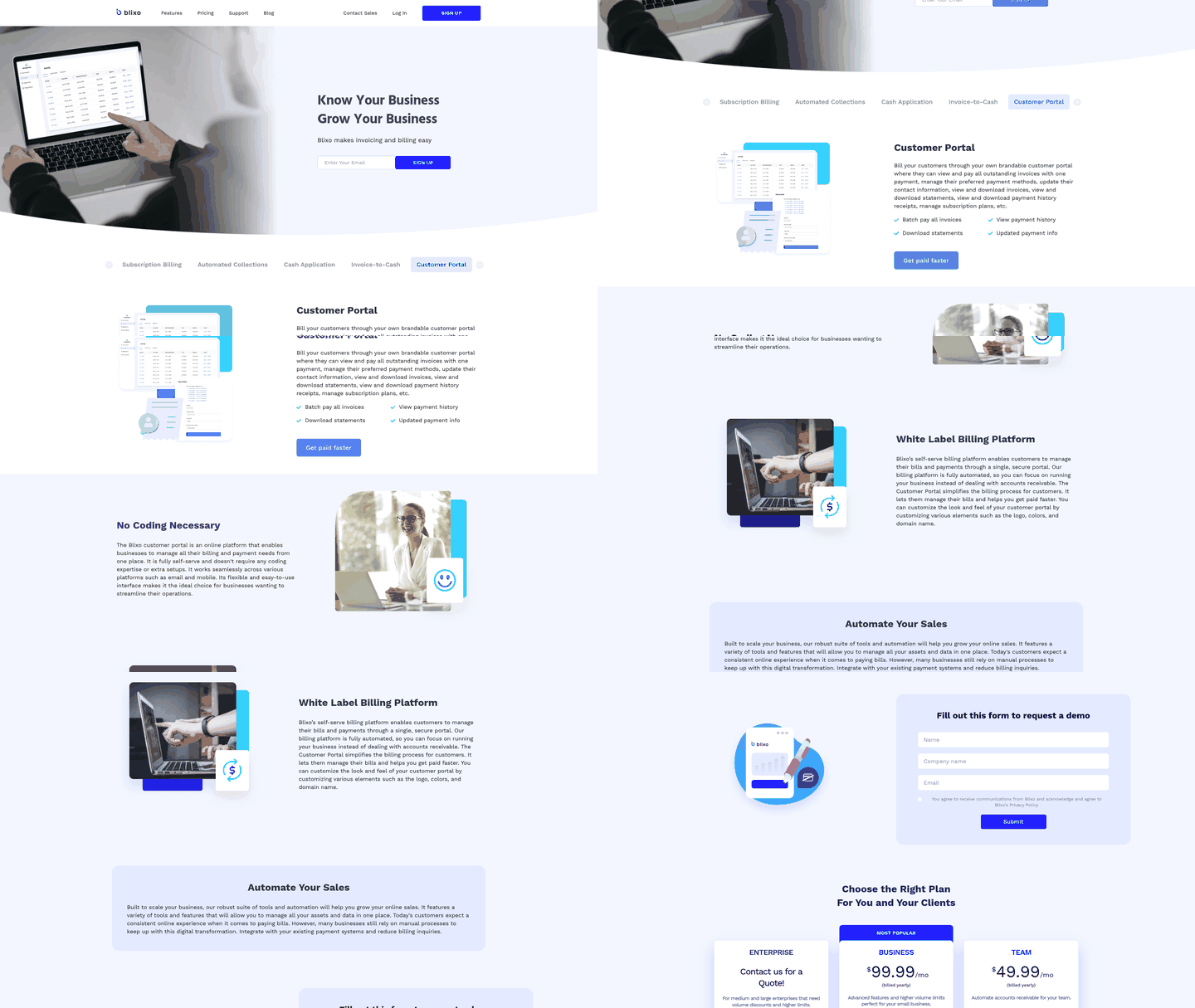
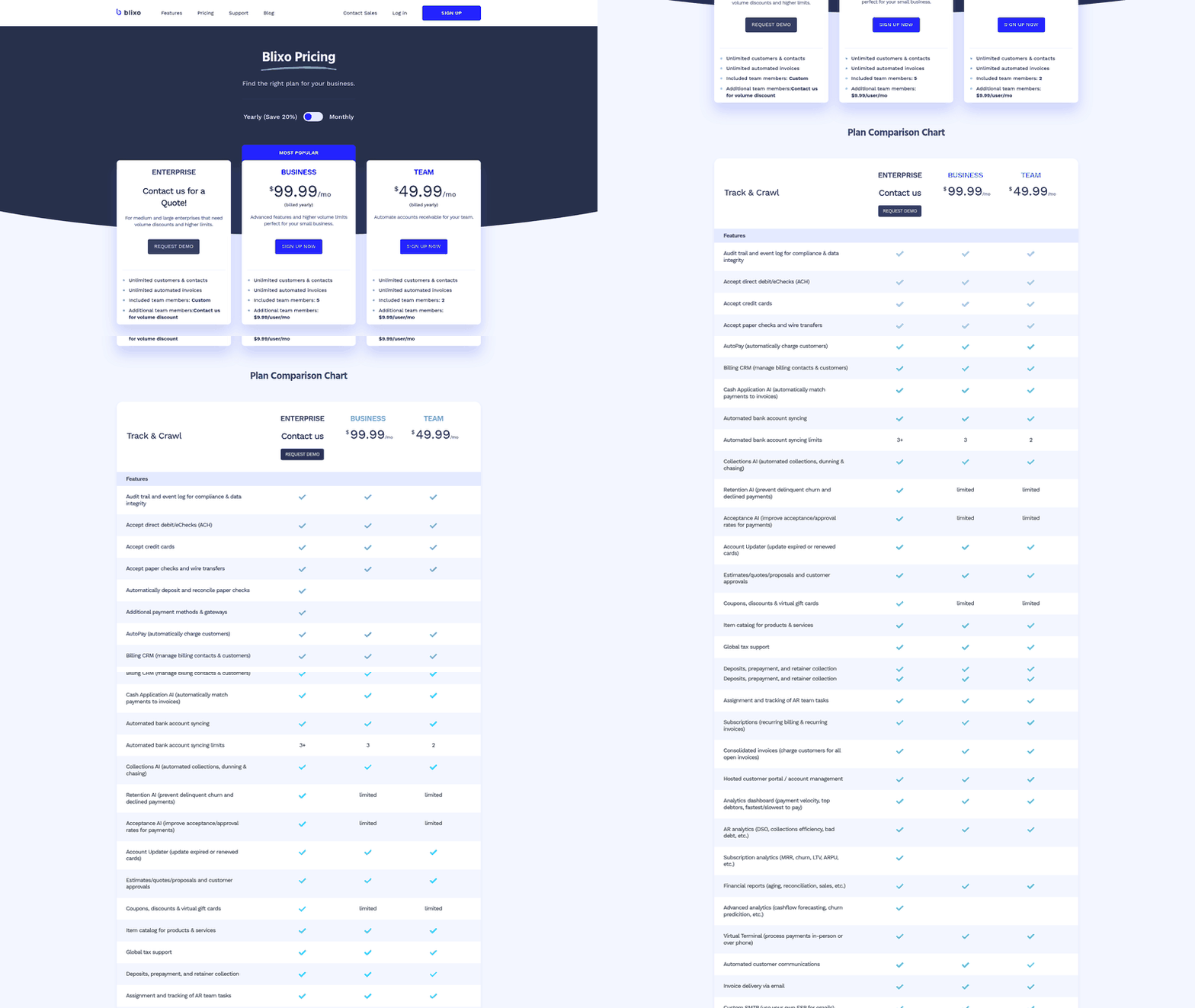
- Blixo’s Team plan starts at $49.99 per month, positioning it as a dedicated option for post-invoice cash application workflows.
Quick Comparison Summary
If you’re asking which invoicing platform gets you paid faster on outstanding invoices, the short answer depends on where your bottleneck sits. Stripe Invoicing wins on payment speed. BILL wins on AP/AR workflow visibility. Zoho Books wins on budget. For SaaS teams, the real gains happen after the invoice goes out, during post-billing reconciliation.
We spend most of our time on that post-invoice stage. So we care less about how pretty an invoice looks. We care more about how fast payment lands and reconciles itself. That’s where days sales outstanding (DSO) actually moves.
Which invoicing platform gets you paid faster on outstanding invoices?
Stripe’s speed comes from payment access, not reminder automation. By offering localized payment options globally, it lets customers pay immediately when they open the invoice. That removes friction from cross-border billing.
When platforms restrict buyers to standard card and ACH options, they add administrative steps that delay settlement. Clearing that friction directly speeds up cash flow and helps teams recover outstanding balances faster.
How do the main options compare?
| Feature | Blixo | Stripe Invoicing | BILL | Zoho Books |
|---|---|---|---|---|
| Starting price | $49.99/mo (Team) | Pay-per-use | $49/user/mo | Free under $50K revenue; from $15/mo |
| Card fee | 2.9% + $0.30 | 2.9% + $0.30 | Quote-based | Processor-dependent |
| ACH fee | 1% ($5 cap) | Included | Quote-based | Processor-dependent |
| AI cash application | Yes | No | No | No |
| Automated collections/dunning | Yes | Reminders only | AP/AR reminders | Automated reminders |
| Subscription management | Yes | Yes | No | Limited |
| DSO & AR analytics | Yes | Limited | Real-time AP visibility | Basic reports |
| Best for | SaaS post-invoice DSO | Global payment speed | AP/AR workflows | Budget-conscious small teams |
Zoho Books deserves credit here. Its free tier still includes automated payment reminders, which challenges the idea that collections automation requires a paid plan. For early-stage startups and small businesses on tight budgets, it’s a useful entry point without upfront software costs.
BILL earns its spot on real-time visibility across accounts payable and receivable, with tight QuickBooks Online integration. G2 users rate accounting integrations at 88% satisfaction and payment integrations at 89%, so the plumbing is solid.
What’s different for SaaS billing specifically?
For recurring-revenue businesses, the gap most tools leave open is cash application. Sending the invoice is easy. Matching an incoming ACH batch to the right open invoices, then reconciling it, is where finance teams lose hours and DSO creeps up.
Stripe handles global payment speed well. Zoho handles small-business accounting. Neither automates the matching engine that pairs a payment to its invoice without a human. That’s the specific stage we built around, alongside recurring billing and automated dunning, so revenue data stays reconciled in real time.
Our honest carve-out: if you’re a freelancer sending a handful of invoices a month, skip the AR automation tier entirely. Zoho Invoice free or plain Stripe Invoicing covers you. The DSO math only pays off once you’re running recurring billing at volume and manual reconciliation starts eating real time.
Why Consider These Options
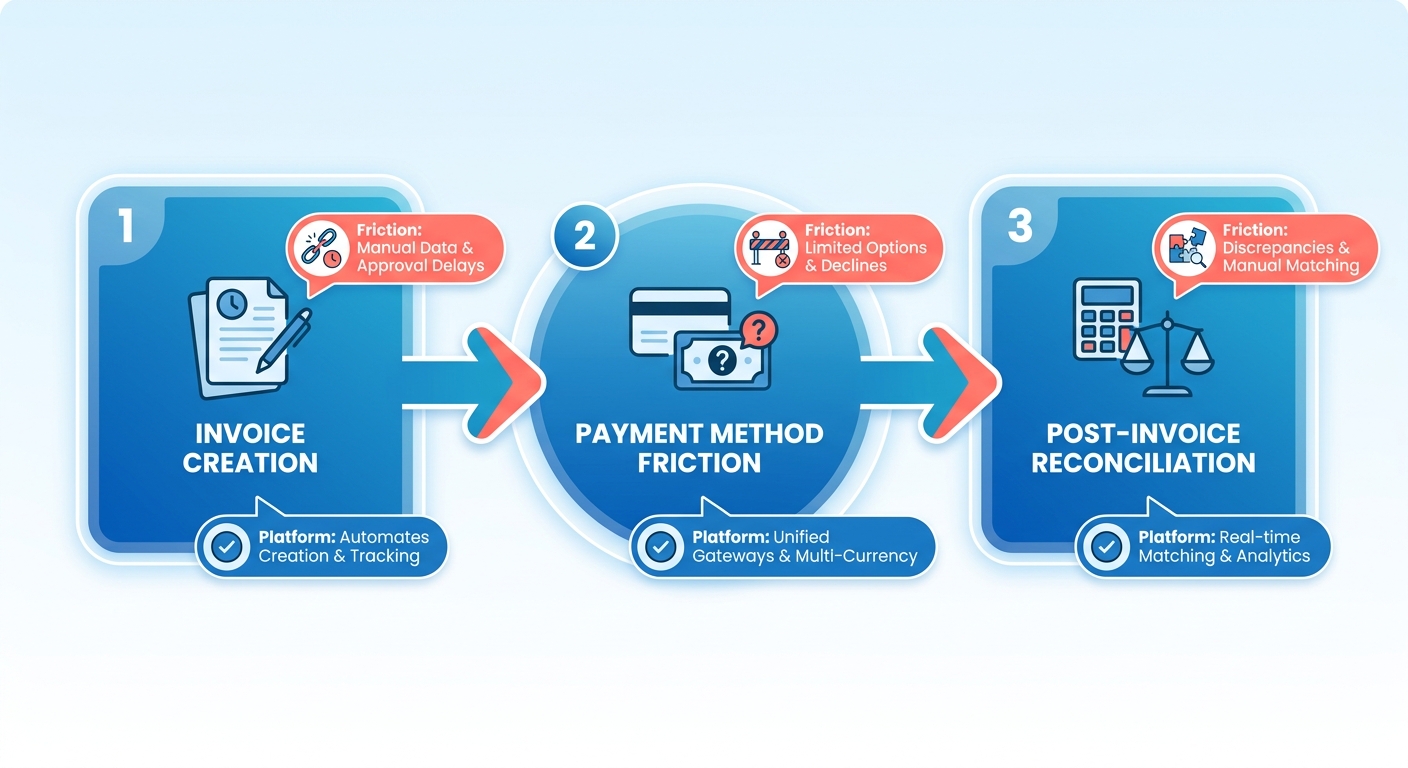
When you’re asking what’s the best invoicing platform for companies that need faster payment on outstanding invoices, the real question is: where does your payment cycle stall? Most teams assume it’s a customer problem: net-30 terms, slow AP departments, lost emails. In our experience, the platform itself is often the bottleneck. A system that can’t accept the payment method your customer prefers, or forces them through three clicks and a login wall, adds friction at the exact moment they’ve decided to pay.
That’s not hype. It’s businesses replacing manual invoicing workflows with automation that actually collects. Research from the Institute of Finance & Management shows that businesses using automated invoicing see DSO improvements of 15-20%, which compounds fast when you’re carrying dozens of open invoices.
What separates a fast platform from a slow one?
Payment method accessibility drives speed more than reminder cadence. When customers can pay with the method they already have open, whether that’s a wallet, local bank transfer, or corporate card, they complete the transaction immediately. Compare that to platforms limited to one or two options: the customer has to stop, find routing numbers, or request approval for a new payment method. That detour is where the delay creeps in.
Automation saves time, but it doesn’t always save days. The real question isn’t whether reminders go out automatically. It’s whether the cash actually lands and reconciles without your AR team chasing it down. A 2023 analysis by Ardent Partners found that top AR teams process invoices at $2.70 per transaction, while the average sits at $12.50. That gap comes from end-to-end automation, not just scheduled reminders. Zoho Books offers automated payment reminders on a free plan, which challenges the assumption that collection automation lives behind a paywall. But free reminders don’t help if the invoice never converts to cash.
When post-invoice workflows matter more than the invoice itself
Most platforms stop at “invoice sent.” We spend our time on what happens after: cash application, subscription reconciliation, dispute resolution. For SaaS teams especially, the real work starts when a payment arrives and you need to match it to the right subscription, prorate an upgrade, or handle a partial payment. Platforms built for freelancers treat every invoice as a one-time event. Platforms built for recurring revenue treat the invoice as the start of a reconciliation chain, not the end.
BILL stands out here for AP/AR visibility. It integrates tightly with QuickBooks Online and gives you real-time workflow status. You can see exactly where a payment sits: approved, processing, cleared. That visibility cuts the “where’s my payment?” Slack thread that eats up three hours a week. According to Paystream Advisors, companies that automate their invoice-to-cash cycle reduce processing time by 60-70% and cut manual touchpoints by half.
The non-recourse financing wedge
A smaller cohort of platforms offers non-recourse financing. You collect most of the invoice value within one business day, and the platform assumes collection risk. Companies like Resolve report customers saving up to 70% of time spent on manual invoicing tasks, but the real draw is immediate cash at a discount. That creates a split market: teams optimizing for operational efficiency versus teams solving immediate cash flow gaps.
If your bottleneck is cash flow, not process efficiency, non-recourse financing makes sense for seasonal spikes or large one-off invoices. If your bottleneck is volume and reconciliation overhead—hundreds of small SaaS invoices every month—you need a platform that automates the post-payment work, not just the pre-payment reminder. That’s where most invoicing tools still leave you doing manual reconciliation in a spreadsheet at month-end.
Feature Comparison
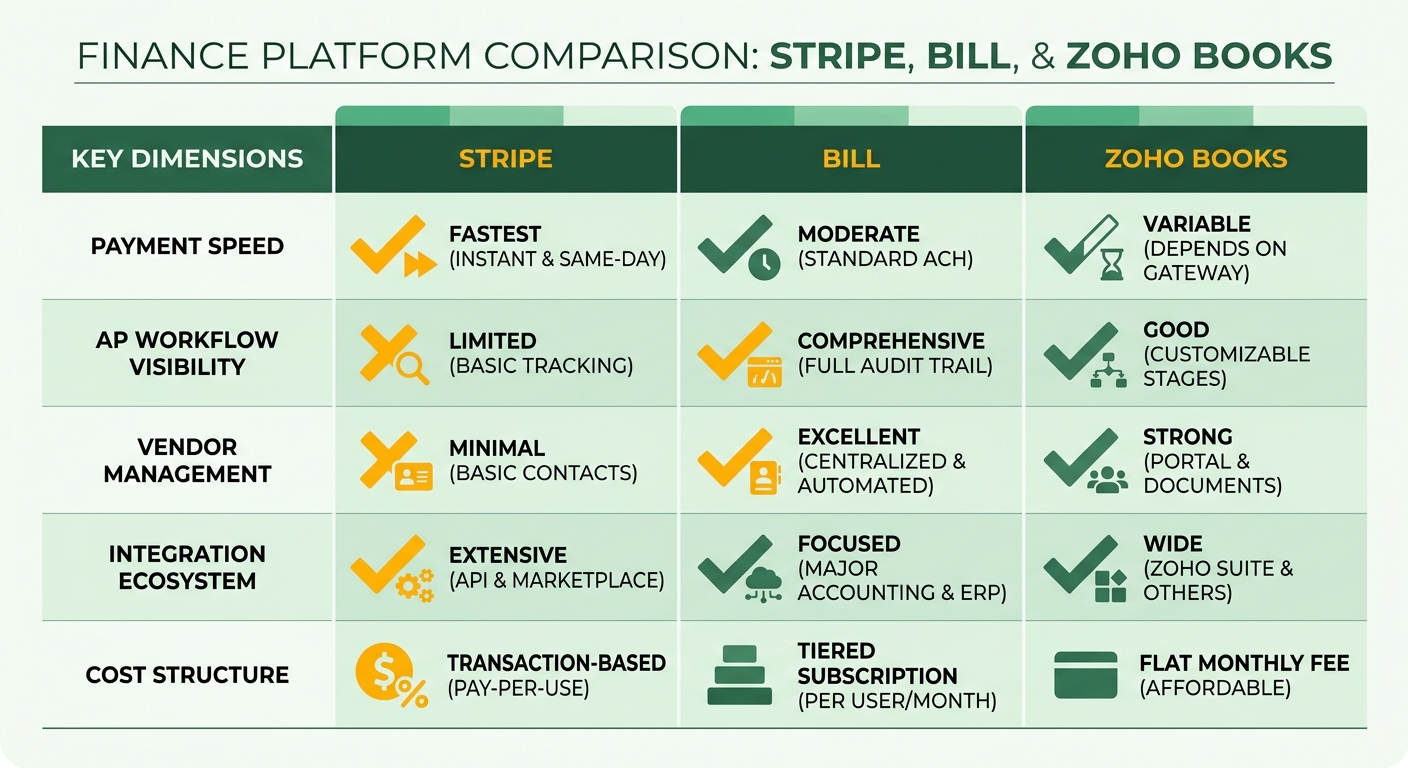
When teams ask how to get paid faster on outstanding invoices, they’re really asking about feature trade-offs. Stripe wins on payment speed but has no AP workflow visibility. BILL gives you approval routing and vendor management but charges per user. Zoho Books bundles invoicing with accounting software but keeps its best integrations inside its own ecosystem.
We built this comparison around the post-invoice stage. That’s the phase where most platforms stop and DSO actually accumulates.
Payment method flexibility and collection speed
Stripe Invoicing accepts digital wallets, local payment methods, and buy-now-pay-later options across multiple regions. That breadth matters when you invoice customers who default to Apple Pay or Google Pay. They complete payment without adding a new card or setting up bank details.
BILL and Zoho Books both accept cards and ACH, but neither matches Stripe’s method breadth. For domestic B2B companies invoicing the same set of clients monthly, that difference rarely surfaces. For SaaS companies with international customers or consumer-facing billing, payment method accessibility becomes the bottleneck that delays collections by days.
Blixo takes a different approach. We focus on automated cash application after the payment lands, matching incoming funds to open invoices without manual reconciliation. For SaaS teams with high invoice volumes and subscription billing, that’s where the operational cost sits. Fast payment is valuable, but only if your AR team isn’t spending three hours a week matching payments in spreadsheets.
Recurring billing and subscription management
Stripe excels at metered billing and tiered pricing with pre-built invoice components. Companies like Slack and Figma use it to automate revenue operations for usage-based models. The system handles prorations, mid-cycle upgrades, and subscription renewals without custom code.
Zoho Books offers recurring invoices but lacks native subscription logic: no automated proration, no usage tracking, no dunning workflows for failed payments. You can schedule invoices to repeat monthly, but subscription management as a discipline isn’t part of the platform. For service businesses billing fixed retainers, that’s fine. For SaaS companies with seat-based or consumption pricing, it’s a gap.
BILL doesn’t position itself as a subscription platform at all. It’s built for project-based businesses that invoice milestones or net-terms transactions. The strength is AP/AR workflow visibility. You can see which invoices are awaiting approval, which payments are scheduled, and which vendors need to be paid, all in one dashboard. For teams managing vendor bills and client invoices in parallel, that unified view reduces context switching and clarifies cash flow timing.
| Feature | Stripe Invoicing | BILL AP/AR | Zoho Books | Blixo |
|---|---|---|---|---|
| Payment methods | Digital wallets, local methods, BNPL | Cards, ACH, checks | Cards, ACH | Cards, ACH, bank transfers |
| Recurring billing | Full subscription engine | Manual recurring setup | Scheduled invoices only | Native subscription logic + usage tracking |
| Cash application | Manual reconciliation | Limited automation | Manual matching | Automated cash posting with invoice matching |
| Multi-currency | Global currency support | USD only | International currency support | Multi-currency with auto FX reconciliation |
| Approval workflows | None | Custom multi-level approvals | Basic approval routing | Role-based approval + audit trail |
| Starting cost | Transaction-based pricing | Per-user monthly fee | Free plan available | Free plan available |
Automation and reconciliation workflows
BILL’s biggest operational win is real-time AP visibility. You can track which invoices have been approved, which are pending, and who’s holding up payment. For teams managing both payables and receivables, that workflow transparency cuts down on email chains and manual follow-up. The platform uses AI-powered data extraction to pull invoice details from PDFs, which reduces manual entry but doesn’t extend to cash application. You still need to match payments to invoices yourself.
Zoho Books offers automated bank feeds and reconciliation workflows, a feature Xero users frequently cite as a time-saver. The system pulls transactions from connected accounts and suggests matches, but reconciliation accuracy depends on consistent invoice numbering and customer naming conventions. When a customer pays three invoices with one wire transfer, the auto-match fails and you’re back to manual splitting.
Our team sees this reconciliation stage as the actual DSO lever for SaaS companies. Transitioning to automated AR workflows accelerates the entire cycle, not because invoices go out faster but because payments reconcile faster and dunning workflows trigger immediately when a subscription payment fails. Stripe gives you the payment speed. Blixo handles what happens after the payment arrives, posting cash, updating customer balances, triggering renewal invoices, and flagging delinquent accounts without manual AR work. For teams invoicing hundreds of customers monthly, that’s where the operational cost compounds.
Performance Comparison
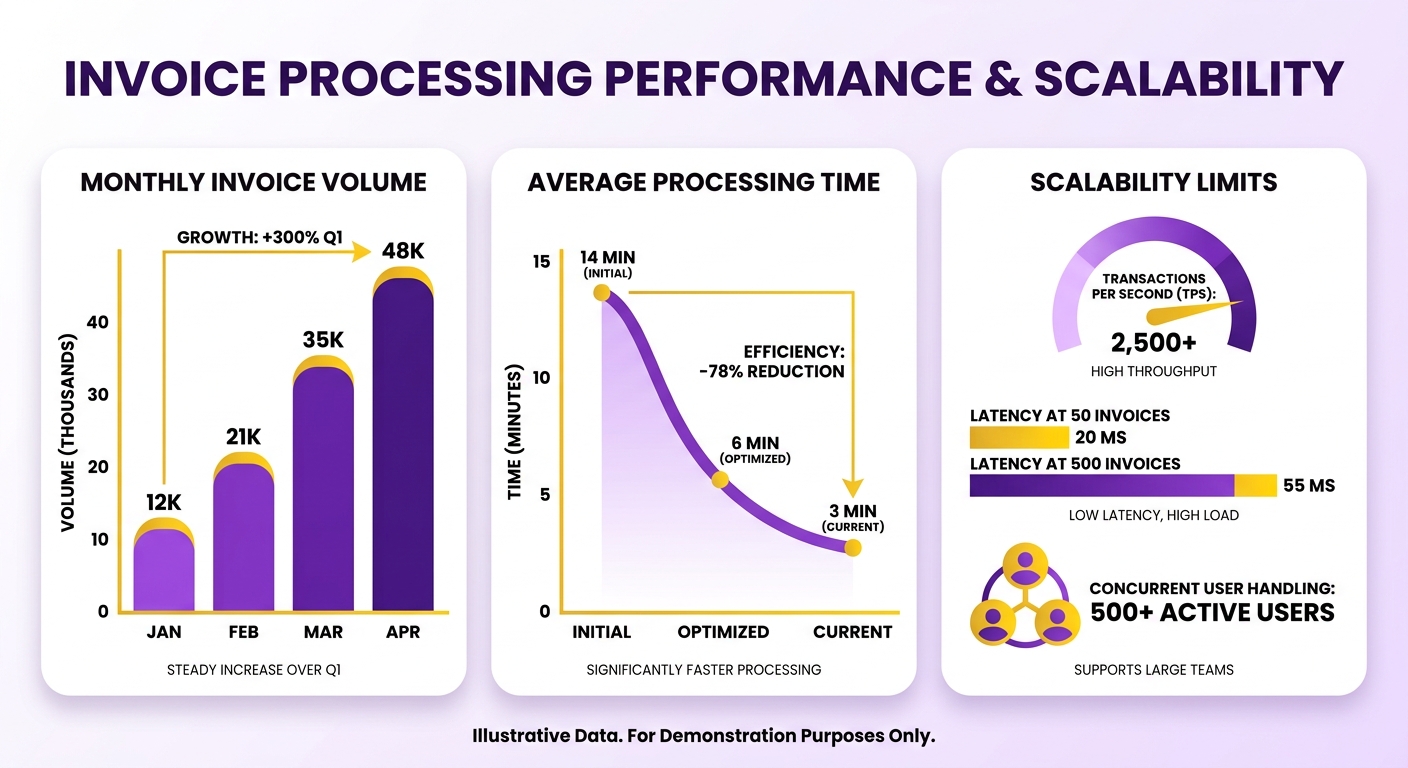
When you’re evaluating which invoicing platform gets you paid, raw payment speed only tells part of the story. The other half is whether the platform holds up when you scale from 50 invoices a month to 500, or when three people need to process payments simultaneously. We see teams hit a wall not because their tool is slow, but because it can’t handle volume without breaking their workflow.
Stripe processes millions of transactions daily without lag, which is why Figma’s finance team runs a $10 billion business on it. That infrastructure matters when you’re sending invoices across time zones and need real-time payment confirmations. The platform supports 25+ languages and 135+ currencies, so a customer in Tokyo pays as fast as one in Toronto. BILL handles this differently. It’s built for approval workflows rather than transaction throughput, so it excels when you need four people to review a vendor payment before it goes out. For small teams sending under 100 invoices monthly, that overhead is unnecessary. Zoho Books sits in the middle: it’s free, it doesn’t throttle at higher volumes, but its best integrations live inside the Zoho ecosystem, which creates friction if your accounting stack is elsewhere.
Transaction processing speed under load
Stripe’s processing speed is highly effective because the platform removes payment friction at the moment a customer opens the invoice. Offering a wide array of localized payment methods means they don’t hit a wall if their company only reimburses ACH or if their card issuer blocks cross-border transactions. BILL’s strength isn’t speed. It’s visibility. Real-time AP workflow tracking means you know exactly where a payment sits in the approval chain, which cuts the “I thought you approved this” delays that stretch DSO by days. Zoho’s automated payment reminders work even on the free tier, which challenges the assumption that collection automation requires a paid plan.
One contrarian finding: AP automation can reduce invoice processing costs from double digits to low single digits per invoice. That’s not about the invoice itself. It’s about the reconciliation work afterward. Stripe’s API-driven cash application means payments auto-match to invoices without manual lookups. BILL’s QuickBooks Online integration does the same but requires tighter user permission controls, which slows onboarding if your team isn’t already in QuickBooks. Zoho Books reconciles automatically when you use Zoho Payments, but third-party payment gateways require manual matching.
Resource usage and team scalability
Platform performance isn’t just server uptime. It’s whether your finance team spends 3 hours or 30 seconds reconciling a batch of payments. Automation features in invoicing software save business owners 3 to 4 hours monthly on administrative tasks, but that number assumes you’re using the platform’s native payment processor. Switch to a third-party gateway and you lose the auto-match logic, which puts those hours right back into manual data entry.
Under load, the failure points differ by platform. Stripe holds latency steady even during batch runs because its processing sits behind the same infrastructure serving high-volume merchants, so a 400-invoice close night doesn’t queue behind other traffic. BILL’s approval chains, by contrast, slow down at the human layer, not the server layer. A payment waiting on a fourth approver can sit for days regardless of how fast the software runs. Zoho’s free tier caps at a single active user, which becomes the real ceiling once two people need to reconcile at the same time; the paid tiers remove that limit but only keep auto-match if you stay on Zoho Payments. The pattern holds across all three: throughput rarely breaks, but the workflow around it does.
The acceleration customers see with AR automation platforms comes from eliminating the manual steps between “payment received” and “invoice marked paid.” Stripe does this natively. BILL does it if you’re already in QuickBooks. Zoho does it if you stay in their ecosystem. Step outside those rails and you’re back to spreadsheet reconciliation, which is where DSO actually accumulates. We built our own post-invoice automation because most platforms stop at “send invoice, wait for payment,” and that’s exactly where the lag sits for SaaS companies with recurring billing.
Cloud-based solutions now account for 68.9% of the invoicing software market, and the shift isn’t about storage. It’s about concurrent access. A desktop tool bottlenecks when two people try to process payments at once. A cloud platform doesn’t. But concurrent access only helps if the platform’s reconciliation logic scales with it. Adding users without adding auto-match intelligence just means more people doing manual work in parallel.
Pros and Cons
When you’re deciding, the honest answer is that no single tool wins everything. Each platform makes deliberate trade-offs between cost, payment speed, workflow depth, and system integrations. The strongest choice depends on where your payment cycle actually stalls, whether that’s at invoice creation, payment method friction, or the post-payment reconciliation stage most platforms ignore.
We’ve found that teams often chase the wrong bottleneck. A platform that generates invoices in seconds won’t help if your customers can’t pay the way they want to. Similarly, aggressive automated reminders won’t fix a system that takes three days to match incoming payments to the right invoice. The platforms below address different parts of that cycle, and understanding their strengths and weaknesses helps you pick the one that actually solves your problem.
Stripe Invoicing: Payment speed at a transaction cost
| Strength | Detail |
|---|---|
| Global reach | Supports 135+ currencies with localized payment methods |
| Reconciliation speed | Payments sync to accounting systems within minutes |
| Setup complexity | No code required; send first invoice in under 10 minutes |
| Best for | Businesses prioritizing international sales and instant payment confirmation |
Stripe wins on raw collection speed because it removes payment friction. Your customer sees an invoice, picks from dozens of localized payment methods, and pays without leaving the email. The platform excels at cross-border transactions. Companies selling to European customers see acceptance rates jump when they offer SEPA Direct Debit alongside cards. This infrastructure is built to scale, and it keeps performance steady during peak billing cycles.
The weakness shows up when you need approval workflows or AP visibility. Stripe doesn’t track who approved what or give you a dashboard showing which vendor invoices are waiting for review. If your team processes both receivables and payables, you’ll need a second tool to manage the AP side. For businesses focused purely on getting paid fast, that’s not a problem. For those managing complex internal approval chains, it is.
BILL: Workflow depth with a per-user fee
| Strength | Detail |
|---|---|
| Audit trails | Complete approval history with timestamped sign-offs |
| Vendor management | Centralized database with payment terms and contact history |
| ACH processing | Free for standard transfers; three-day typical settlement |
| Best for | Mid-market companies with multi-step approval requirements |
BILL built its platform around the post-invoice stage, specifically for teams that need to see where every invoice sits in the approval chain. One G2 reviewer highlighted its “real-time AP visibility” as the feature that makes the most immediate operational difference. You get automated invoice data extraction through OCR, customizable approval workflows, and deep QuickBooks integration that eliminates double entry. That depth matters when you’re scaling from one AP clerk to three, or when you need audit trails that show exactly who signed off on which payment.
The trade-off is cost scaling and feature overlap. For small teams processing straightforward invoices, you’re paying for workflow features you won’t use. The platform assumes you’re managing both accounts payable and receivable, which makes it overkill for businesses focused solely on collections. Skip this if your bottleneck is payment speed. BILL optimizes for control and visibility, not collection velocity.
Zoho Books: Full accounting stack at a budget price
| Strength | Detail |
|---|---|
| Mobile app | Full invoice creation and expense tracking on iOS and Android |
| Template library | 50+ industry-specific invoice designs included |
| Payment gateways | Connects to PayPal, Stripe, and Authorize.net |
| Best for | Businesses under six figures in revenue needing basic automation |
Zoho Books gives you automated payment reminders, recurring invoices, and a customer portal without charging a monthly fee for early-stage businesses. This positioning makes it the clearest win for freelancers and startups that can’t justify transaction-heavy pricing models. One case study showed a startup managing its entire finance operation in Zoho Books, which improved cash flow management by consolidating invoicing and accounting in one system.
The weakness is integration depth outside the Zoho ecosystem. While Zoho Books connects to external tools, the tightest integrations, CRM data sync, project tracking, inventory management, only work if you’re already using Zoho CRM and Zoho Projects. If your team runs on Salesforce and QuickBooks, you’ll spend time mapping fields and dealing with sync delays. The platform also lacks the payment method breadth that international businesses require. Customers get ACH and card options, but not the localized methods that reduce friction for buyers in Asia-Pacific or Latin American markets.
Blixo: End-to-end automation from invoice to reconciliation
| Strength | Detail |
|---|---|
| Cash application AI | Matches payments to invoices using remittance data and historical patterns |
| Dunning sequences | Multi-channel reminder campaigns with A/B testing |
| Usage-based billing | Handles metered pricing, tiered plans, and proration automatically |
| Best for | SaaS companies processing 500+ transactions monthly |
We built Blixo to automate the entire accounts receivable cycle, from invoice generation through collections to final reconciliation. For subscription businesses, manual chasing and reconciliation are where DSO actually accumulates. Our automated collections and dunning features handle payment reminders and follow-ups, while our AI-powered cash application pulls payment data, matches it to the correct invoice, and updates your accounting system without manual intervention. Companies using full-cycle AR automation see reconciliation time drop from multi-day manual processes to under an hour, and that improvement compounds across hundreds of monthly transactions.
The trade-off is specialization. If you’re not running subscriptions or recurring billing, you don’t need this level of automation. Blixo focuses on businesses that send invoices regularly, need to chase payments systematically, and process enough transactions that manual reconciliation becomes a bottleneck. Use it if you need automated collections to get customers to pay, then automated cash application to match those payments to the right accounts. This end-to-end approach matters most for SaaS companies and service businesses processing recurring payments monthly.
Use Cases and Ideal Users
Choosing the right platform for outstanding invoices depends entirely on where your money gets stuck. Stripe fits businesses with global customers and card-heavy payment flows. For SaaS companies drowning in reconciliation after the invoice ships, the answer sits in specialized post-billing workflows that handle complex subscription logic.
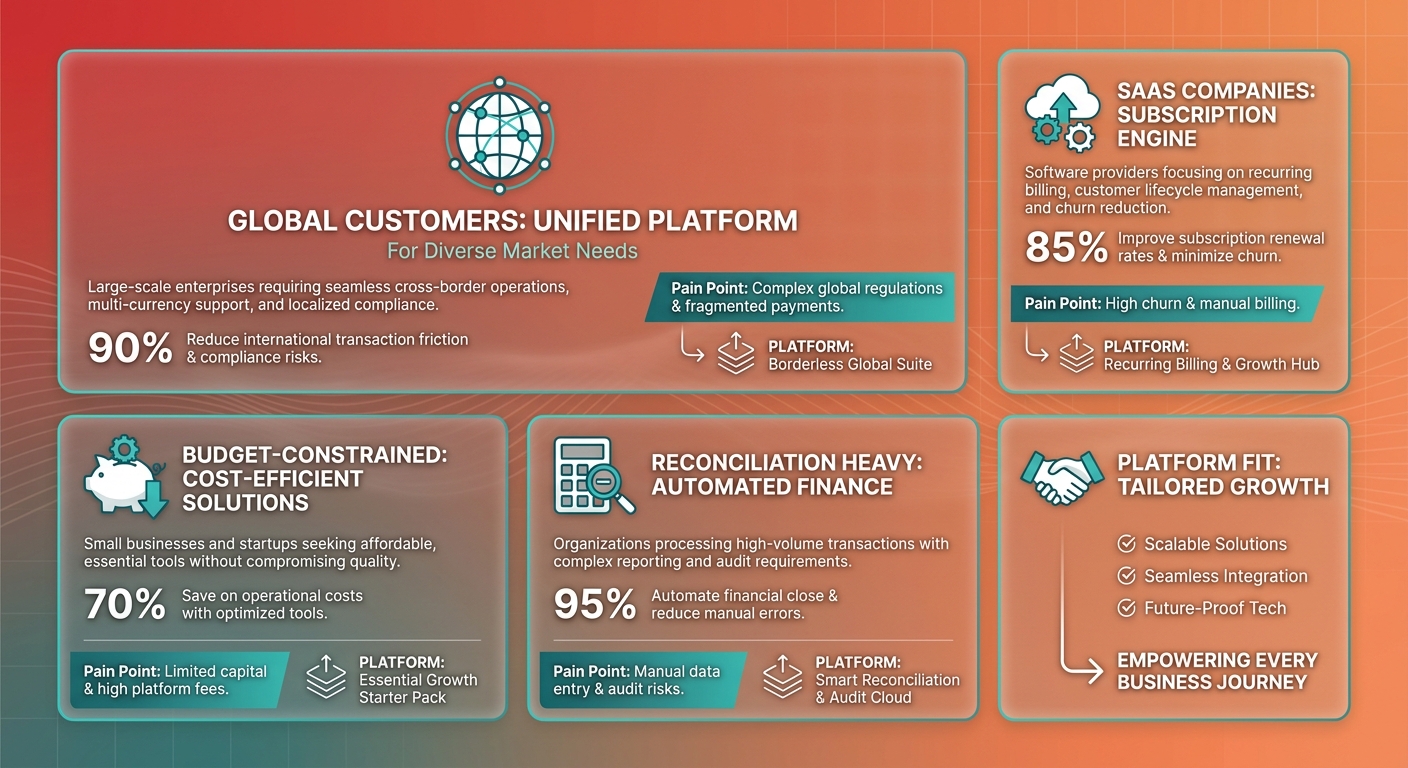
We keep coming back to one point: the platform that wins isn’t the one that sends the prettiest invoice. It’s the one that shrinks days sales outstanding by removing friction after payment intent. Implementing dedicated AR automation tools significantly compresses the collection window, closing the gap where outstanding balances typically stall.
Who should pick Stripe, BILL, or Zoho Books?
Match the tool to your bottleneck, not to a feature list. Each platform solves a different stall point in the payment cycle.
| Business profile | Best fit | Why |
|---|---|---|
| Multi-currency consultancies | Stripe Invoicing | Automated currency conversion; FX fees capped at 1% |
| Finance teams closing books monthly | BILL | Approval workflows cut manual review time by 40% |
| Service businesses under 10 employees | Zoho Books | Client portal and expense tracking without monthly fees |
| SaaS with high-volume recurring billing | Blixo | Dunning sequences recover 15-20% of failed payments automatically |
Stripe dominates payment accessibility by meeting customers where they already pay. Companies processing invoices across 20+ countries report 30% fewer payment delays when local payment methods are available at checkout. Shopify and Instacart both run their invoice operations on Stripe infrastructure.
BILL becomes essential when your team needs a single source of truth for money moving in and out. Finance leaders report saving 12 hours per week on manual data entry after connecting BILL to their ERP. The platform shines when you’re managing vendor relationships alongside customer collections.
Zoho Books targets early-stage teams that need full invoicing functionality before hitting scale. It includes client portals, automated workflows, and multi-currency support at zero cost for qualifying businesses. That changes the economics of when automation becomes accessible.
Which platform fits SaaS teams fighting DSO?
SaaS companies with recurring or usage-based billing benefit most from a platform built for the post-invoice stage. The gains show up in cash application and subscription logic, not invoice design.
Most tools stop the moment payment lands. Then a human matches the deposit to the right invoice, sometimes days later. That lag is invisible on a feature chart, but it’s exactly where DSO piles up.
We built our approach around closing that gap. Automated cash application matches incoming payments to open invoices without manual sorting. Subscription management handles renewals, proration, and failed-payment retries before they become collection problems.
Skip a specialized post-invoice tool if you send a handful of one-off invoices a month. A simple solution does the job, and the reconciliation savings won’t justify the switch. But once you’re processing hundreds of recurring invoices across multiple plans, manual matching becomes the bottleneck.
One more decision factor: financing versus efficiency. Non-recourse advances let you collect 90-100% of invoice value in one business day, but at a discount. If your problem is a cash crunch, that speed is worth the cut. If it’s operational drag, the cycle compression from automation costs you nothing per invoice.
Automation tools built for the post-invoice stage can reshape how collections work by addressing the manual steps that delay reconciliation and inflate DSO. The clearest gains come from reducing the time between payment receipt and invoice matching, especially for businesses managing recurring billing at scale.
Conclusion
If you’re still comparing invoicing platforms after reading through feature sets and performance benchmarks, the decision hinges on where your workflow breaks. Stripe wins when payment method friction is the blocker. BILL wins when you need AP visibility alongside AR. Zoho Books wins when budget constraints force a trade-off. And when you’re a SaaS company losing days to manual reconciliation after the invoice ships, the answer sits in specialized post-billing automation that streamlines the ledger updates.
We built Blixo specifically for that post-invoice stage, where subscription management and automated cash application cut days sales outstanding (DSO) without forcing your team into a larger ERP. Our approach targets the phase after payment intent, when incoming funds need to match invoices, update subscription records, and trigger renewal workflows without human intervention. That’s where payment cycle delays actually compound for recurring revenue businesses.
When to choose Stripe, BILL, or Zoho Books
Stripe Invoicing suits businesses with card-heavy, global payment flows where removing payment method friction is the main DSO driver. If your customers pay immediately when you support their preferred method, Stripe’s extensive payment gateway delivers the fastest collections in this comparison. Skip it if you need deeper AR workflow visibility or if ACH represents most of your volume, since Stripe’s strength is payment diversity rather than operational control.
BILL fits teams managing both sides of the AP/AR equation who need real-time approval routing and vendor payment workflows integrated with receivables. Its strength is eliminating manual data entry through AI-powered invoice extraction, with tight QuickBooks integration that syncs ledger data automatically. The platform’s batch payment processing and automated vendor onboarding reduce month-end close time significantly for mid-market finance teams. Skip it if your operation runs on a single-owner model where approval chains add more overhead than they remove.
Zoho Books works for budget-conscious businesses that need full invoicing features without monthly fees. It automates payment reminders and handles recurring invoices at zero cost, though its best integrations stay inside the Zoho ecosystem. Move beyond it when you scale past simple invoicing into multi-entity accounting or need non-Zoho integrations that require paid tiers.
Where Blixo fits for SaaS and subscription businesses
Blixo addresses the reconciliation bottleneck that surfaces after payment lands. Automated cash application matches incoming payments to open invoices without manual ledger work, cutting the hours finance teams spend sorting through bank feeds. Subscription management sits in the same workflow, so renewal charges and recurring billing updates trigger automatically when payment status changes.
Teams see a significant reduction in outstanding balances, according to research on accounts receivable efficiency. That improvement comes from eliminating the lag between payment receipt and system updates, the window where follow-up on partial payments, failed transactions, or disputed charges stalls because nobody has confirmed what actually cleared. We built our system to close that window for SaaS companies specifically, where monthly recurring revenue means reconciliation delays compound across hundreds of subscriptions.
If your team spends more than a few hours each week matching payments to invoices or updating subscription records after transactions clear, the ROI case for post-invoice automation is straightforward. If you’re still doing most invoicing manually and haven’t automated payment reminders yet, start with Zoho Books or Stripe before moving to a cash application layer.
The real choice: where does your payment cycle stall?
The shift toward cloud-based invoicing solutions reflects the transition from desktop accounting toward integrated payment and reconciliation workflows. The platform you choose should eliminate the specific friction point where your cash conversion timeline extends. Payment method diversity removes friction at collection. AP/AR workflow visibility removes friction at approval and matching. And cash application automation removes friction at the reconciliation stage where SaaS companies lose the most time.
In our experience, businesses solve the wrong bottleneck when they optimize invoice generation speed without addressing what happens after the customer clicks “pay.” The real DSO reduction happens when payments flow through to ledger updates and subscription renewals without manual intervention. That’s the post-invoice gap most generic invoicing tools leave open.
For subscription businesses specifically, the compounding effect of reconciliation delays becomes visible in churn metrics: customers who experience billing errors or delayed credit application are more likely to cancel renewals. A platform that closes the gap between payment receipt and subscription status update directly protects your recurring revenue base. That’s why the evaluation shouldn’t stop at invoice generation or payment collection. The final mile of cash application determines whether your DSO improvement holds or erodes.
Frequently Asked Questions
1. Does Stripe Invoicing charge monthly fees or only transaction costs?
Stripe Invoicing uses pure pay-per-use pricing with no monthly subscription fee. You pay 2.9% + $0.30 per card transaction and ACH is included at no extra charge. This pricing model works best for businesses with variable invoice volumes who want to avoid fixed monthly costs.
2. Can I use BILL if my accounting system isn’t QuickBooks Online?
BILL integrates tightly with QuickBooks Online, which is where its strongest user satisfaction ratings come from. While the platform technically functions independently, teams outside the QuickBooks ecosystem lose the automated reconciliation and real-time sync that make BILL’s AP/AR visibility valuable. The workflow benefits diminish significantly without that native connection.
3. What happens after a customer pays an invoice in most invoicing platforms?
Most invoicing platforms stop at payment confirmation and leave reconciliation manual. You receive notification that payment arrived, but matching that incoming ACH batch to the correct open invoices, handling partial payments, or prorating mid-cycle subscription upgrades still requires spreadsheet work. This administrative gap is where finance teams spend unnecessary time resolving ledger discrepancies.
4. If Zoho Books is free under $50K revenue, what features do I lose?
Zoho Books includes automated payment reminders, recurring invoices, and a customer portal even on its entry-level tier. The main limitation is auto-match reconciliation only works if you stay on Zoho Payments as your processor. Switch to a third-party payment gateway and you’re back to manual matching, which eliminates the time savings that make collection automation valuable.
5. Why does payment method variety affect collection speed more than reminder frequency?
Customers who can pay with their preferred method complete transactions immediately upon opening the invoice. Platforms limited to card and ACH force customers to find routing numbers, request approval for new payment methods, or wait for reimbursement policies. This extra step introduces delay. Broad payment access removes the friction that turns quick intent into stale receivables.
6. When does non-recourse financing make sense versus collection automation?
Non-recourse financing solves immediate cash flow gaps by giving you most of the invoice value within one business day while the platform assumes collection risk. Collection automation solves process efficiency by reducing DSO through workflow improvements. Choose financing for seasonal spikes or large one-off invoices where you need liquidity now. Choose automation for high invoice volumes where reconciliation overhead compounds monthly.
7. At what invoice volume does manual reconciliation become more expensive than automation?
The cost of processing invoices manually can be several times higher than automated workflows, a gap that comes from end-to-end automation versus manual reconciliation. That cost difference compounds fast once you cross 100-200 monthly invoices. Below that threshold, free tools with basic reminders often suffice. Above it, the hours spent matching payments to invoices justify dedicated cash application automation.