

Automation in Accounts Receivable vs Manual Processing

Key Takeaways
- Automation reduces days sales outstanding by 30% for B2B companies adopting AR systems.
- 77% of AR teams struggle with delayed collections using manual processes (Source 2).
- Mid-sized companies face $4 million in unpaid invoices monthly due to manual inefficiencies (Source 2).
- Automated AR systems cut payment processing time by 67% compared to manual methods (Source 2).
- Automated processing reduces past-due accounts by 71% and speeds payment clearing by 80% (Source 11).
- Manual AR errors cause disputes and bad debt, costing businesses revenue from delayed cash flow.
- Automated workflows improve customer satisfaction while reducing human error in invoicing and reconciliation.
Why Automation in Accounts Receivable Matters
Automation in accounts receivable (AR) is a major advantage for businesses aiming to streamline operations, reduce errors, and improve cash flow. Manual AR processes are time-consuming, error-prone, and inefficient, leading to delays that can cripple financial health. By automating AR workflows, companies gain control over their receivables, reduce days sales outstanding (DSO), and create a more predictable revenue stream. For example, a B2B company using Paystand’s automation reduced its DSO by 30% while improving customer satisfaction. Below, we break down why automation matters and how it transforms AR management..
What Makes Manual AR Processes So Costly?
Manual AR tasks like invoice processing, payment tracking, and reconciliation are not just labor-intensive-they’re slow and error-prone. Industry data reveals stark inefficiencies:
- 77% of AR teams struggle with delayed collections (Source 2).
- Mid-sized companies face $4 million in unpaid invoices monthly (Source 2).
- Manual processing takes 67% longer than automated methods (Source 2).
These delays aren’t just frustrating-they cost money. For every dollar tied up in delayed payments, businesses lose earning potential. Worse, manual errors-such as mismatched payments or incorrect invoicing-can lead to disputes and bad debt. As mentioned in the Understanding Manual Accounts Receivable Processing section, the linear nature of manual workflows exacerbates these issues, compounding delays and inaccuracies. A study by the Aberdeen Group found that automated AR systems reduce past-due accounts by 71% and speed up payment clearing times by 80% (Source 11).
| Feature | Manual Processing | Automated Processing |
|---|---|---|
| Processing Time | 20 days per invoice | Under 1 week |
| Error Rate | High (e.g., 15–20% manual data entry errors) | Reduced by 20%+ (Source 4) |
| DSO | Average 47 days | Average 40 days (Source 5) |
| Cost per Invoice | $29.83 | $2.00 (Source 11) |
| Customer Satisfaction | 75% report dissatisfaction | 75% improvement (Source 5) |
How Automation Solves Real-World AR Challenges
Delayed or incorrect payments wreak havoc on cash flow and customer relationships. Consider a construction company that manually sent invoices and relied on phone calls for reminders. After switching to digital invoicing and automated payment reminders, 90% of its customers began paying on time (Source 2). Similarly, a healthcare provider saved 75% of cash application time by automating payment matching (Source 2).
Automation tackles key issues:
- Reduces Errors: AI-driven systems match payments to invoices with 99% accuracy, eliminating mismatches (Source 8). This aligns with the The Automation Advantage: Benefits and Features section, which highlights how automation minimizes human error through precision-driven workflows.
- Improves Cash Flow Visibility: Real-time dashboards track outstanding invoices, enabling proactive collections.
- Enhances Customer Experience: Self-service portals let buyers pay instantly, reducing friction and disputes.
Russell Lester, CFO of Versapay, warns: “The period of lazy capital is over. Companies can no longer afford labor-intensive workflows that slow cash flow” (Source 2). Automation turns reactive AR into proactive management, ensuring faster payments and fewer bottlenecks..
Who Benefits Most From AR Automation?
While large enterprises reap significant benefits, small and medium-sized businesses (SMBs) gain the most from automation. SMBs often lack the resources to manage AR manually, yet they’re hit hardest by delays. For example, a 2023 study found that 85% of CFOs at companies automating over half their AR processes reported lower DSO (Source 7).
Consider a mid-sized retailer that automated credit applications and invoicing. By capturing customer contact details upfront and streamlining approvals, the company reduced DSO by 30% and boosted B2B transaction volume by $611 million (Source 4). SMBs also benefit from lower costs: automated systems reduce payroll expenses by handling high-volume transactions without increasing staff (Source 11).
“Automation elevates rather than replaces team members, allowing them to focus on strategic activities.” . Michal Cohen, AR Automation Expert (Source 9).
Real-World Impact: Case Studies in Action
Case Study 1: A construction firm adopted digital invoicing and payment reminders, moving 90% of customers to timely online payments (Source 2). Case Study 2: Sharp Canada cut 8–10 hours monthly from its AR process by implementing a self-service payment portal (Source 2). Case Study 3: A B2B company using Paystand’s automation slashed DSO by 30% and improved cash flow visibility (Source 1).
These examples underscore automation’s scalability. Whether a company processes 100 or 10,000 invoices monthly, automation adapts to reduce errors, speed up collections, and free up staff for higher-value work..
Final Takeaway
Automation isn’t just a tool-it’s a strategic shift for modern finance teams. By replacing manual workflows with intelligent systems, businesses reduce costs, improve accuracy, and turn receivables into a competitive advantage. For SMBs, the ROI is particularly striking: 40–60% savings in operational costs and faster access to working capital (Source 11). As AI and robotic process automation (RPA) evolve, the gap between manual and automated AR will only widen. Companies that hesitate risk falling behind in cash flow efficiency and customer satisfaction. For deeper insights, explore Billtrust’s ROI study on AR automation.
Understanding Manual Accounts Receivable Processing
Manual accounts receivable processing involves a linear workflow where each step is executed manually, often leading to inefficiencies. The process begins with invoice creation, where staff manually input data into paper forms, emails, or basic accounting software. This step is prone to data entry errors, which can delay payments and trigger disputes. Next, invoice distribution relies on postal mail, email, or in-person delivery, creating delays and requiring follow-ups for lost or unopened invoices. Payment tracking involves manually recording payments in ledgers or spreadsheets, a labor-intensive task that increases the risk of misallocated funds. Finally, collections depend on phone calls, emails, or letters to remind customers, which can be time-consuming and inconsistent. For example, a small consulting firm might manage 10-20 invoices monthly using this method, but scaling beyond that becomes unmanageable due to the high manual workload.
What Challenges Do Manual AR Processes Face?
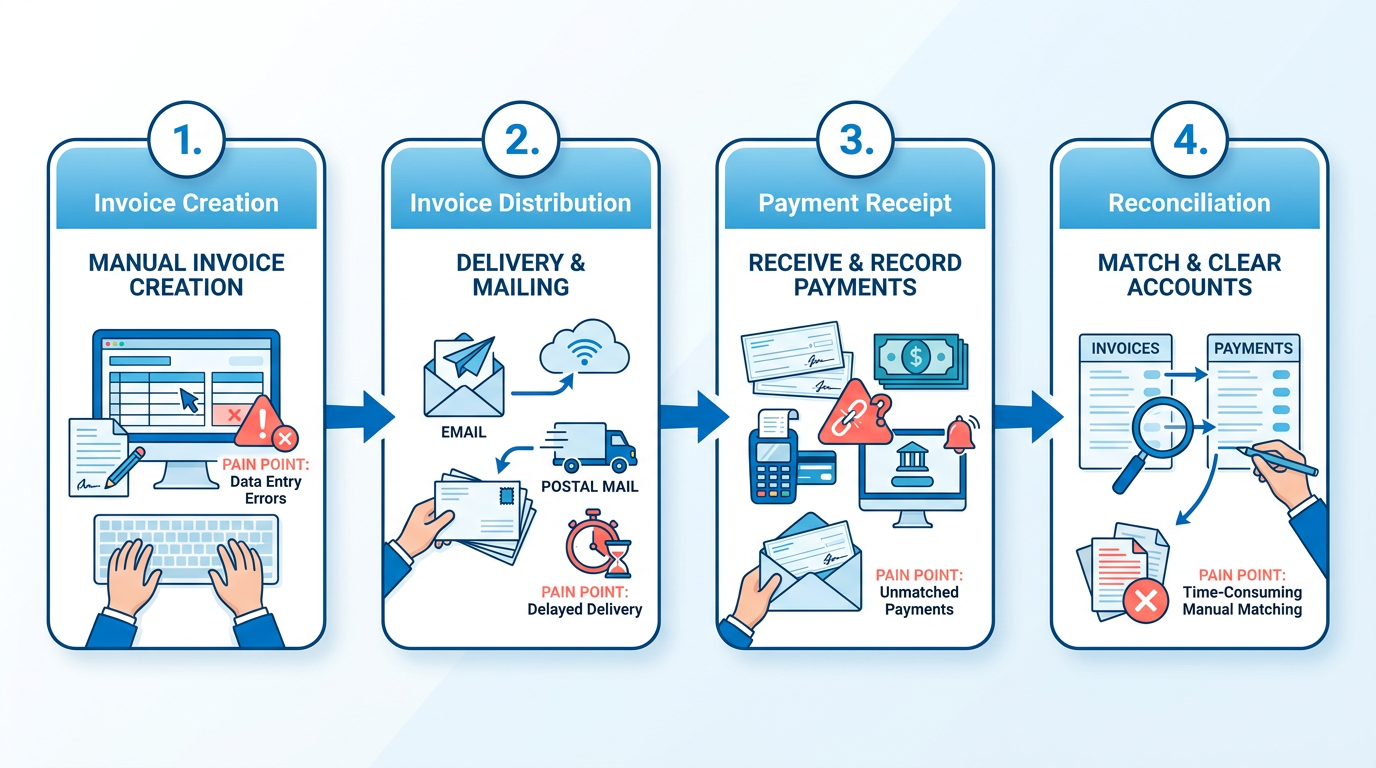
Manual AR systems struggle with delays and inaccuracies. According to industry data, 77% of AR teams report being behind in collections, and manual processes take 67% longer than automated ones. Human errors, such as miscalculations or duplicate invoices, cost companies an average of $4 million in unpaid invoices monthly. Compliance is another hurdle-manual systems lack the structure to meet standards like ASC 606, leading to audit risks. Additionally, the process becomes unsustainable as transaction volumes grow. A mid-sized company handling 500+ invoices monthly might spend 200 hours weekly on AR tasks, diverting staff from strategic work. As mentioned in the Why Automation in Accounts Receivable Matters section, these inefficiencies highlight the need for modern solutions to streamline operations and reduce financial risks.
When Is Manual AR Processing Still Used?
Manual AR persists in low-volume or niche industries where automation seems impractical. For instance, a local bakery might manually issue paper invoices and track cash payments using a physical ledger, as their monthly revenue is $10,000 with 10 clients. Similarly, agricultural cooperatives in rural areas may rely on handwritten receipts and in-person payments due to limited digital infrastructure. However, these scenarios often face scalability issues. If the same bakery grows to 100 clients, the risk of errors and delayed payments increases significantly, making automation a necessity. Building on concepts from the The Automation Advantage: Benefits and Features section, businesses in these scenarios can evaluate whether scalable tools like electronic invoicing or AI-driven payment matching align with their growth goals.
| Feature | Manual Processing | Automated Processing |
|---|---|---|
| Error Rate | High (e.g., 20% misapplied payments) | Low (99% auto-match rates) |
| Processing Time | 67% longer | 30-50% faster |
| Scalability | Limited (struggles above 100 invoices) | Scales seamlessly |
| Cost per Invoice | $29.83 (manual AP data) | $2.00 (automated AP data) |
| Compliance | Prone to manual oversight | Enforces compliance rules |
How Do Manual and Automated AR Compare?
The contrast between manual and automated systems is stark. Automation reduces human intervention by integrating with accounting software, enabling features like electronic invoicing, AI-driven payment matching, and real-time dashboards. For example, Billtrust’s automated platform reduces Days Sales Outstanding (DSO) by 30%, whereas manual systems average 47 days. Conversely, manual processes lack visibility-teams might not know which invoices are overdue until weeks later, causing cash flow gaps. Automation also improves customer experience by offering self-service portals, which studies show increase payment speed by 75%.
Despite its drawbacks, manual processing isn’t obsolete. It remains viable for very small businesses or industries with rigid traditions, like artisanal create or local farmers’ markets, where digital tools are unused. However, as transaction volumes rise or compliance demands grow, the inefficiencies of manual systems become unsustainable. The choice between manual and automated AR hinges on scale, error tolerance, and long-term operational goals. As discussed in the Future of Automated Accounts Receivable Processing section, emerging technologies like blockchain and AI are further narrowing the viability of manual approaches in evolving business environments.
The Automation Advantage: Benefits and Features

Automated accounts receivable (AR) processing offers businesses a powerful way to streamline operations, reduce errors, and enhance financial efficiency. By replacing manual tasks with technology-driven workflows, companies can achieve faster cash flow, better accuracy, and improved customer satisfaction. Below, we explore the benefits, features, and real-world impact of AR automation, supported by case studies and system comparisons..
Key Benefits of Automated AR Processing
Automated systems significantly cut down the time and effort required to manage receivables. For example, a construction company using digital invoicing and payment reminders saw over 90% of its customers pay on time, slashing manual follow-ups. Processing times for invoices and payments drop by 40–75%, depending on the system, with Days Sales Outstanding (DSO) reducing by 15–30% in many cases. This means businesses free up working capital faster, improving their ability to reinvest in growth opportunities. As mentioned in the Understanding Manual Accounts Receivable Processing section, manual follow-ups often lead to delays, making automation a critical upgrade.
Accuracy is another major advantage. Manual data entry errors, which plague 77% of AR teams, are nearly eliminated through automation. AI-powered cash application systems, like those in Billtrust’s platform, achieve 90%+ match rates, reducing disputes and rework. One healthcare provider improved cash application speed by 75%, reclaiming hundreds of hours for its finance team.
Customer satisfaction also rises with automation. Automated payment portals and real-time payment tracking give clients transparency, reducing friction in the billing process. A B2B company using Paystand’s AR automation reported a 30% DSO reduction alongside improved customer satisfaction scores, highlighting how streamlined processes build trust..
Core Features of Modern AR Automation Systems
Modern AR platforms combine automation with advanced tools tailored to financial workflows. Key features include:
- Invoice Generation and Delivery: Automated systems create and send invoices instantly upon order confirmation, reducing delays. For instance, NetSuite’s AR automation integrates with ERP systems to trigger invoices based on predefined events, ensuring consistency.
- Payment Tracking and Collections: Platforms like TreviPay use robotic process automation (RPA) to track payments and send reminders, cutting DSO by 20% and reducing overdue invoices by 70% in one case.
- Cash Application and Reconciliation: AI-driven systems match payments to invoices with high accuracy. Billtrust’s Cash Application tool, for example, achieves 99% auto-match rates, minimizing manual reconciliation.
- Real-Time Reporting: Dashboards provide instant visibility into outstanding invoices, DSO trends, and cash flow, supporting better forecasting. A finance team using automated reporting tools gained real-time insights, improving their cash flow management by 40%.
Integration with existing systems is critical. Platforms like Paystand and NetSuite connect seamlessly with ERPs, enabling data synchronization and reducing errors from manual transfers. Building on concepts from the Implementing Automated Accounts Receivable Processing section, successful integration requires careful alignment with legacy systems..
Real-World Impact: Case Studies
Several businesses have transformed their AR processes through automation. Here are three standout examples:
| Case Study | Result |
|---|---|
| B2B Company with Paystand | Reduced DSO by 30% and boosted customer satisfaction. |
| Construction Crew with Digital Tools | Achieved 90% timely online payments. |
| Research and Productivity Council (RPC) | Cut past-due invoices by 70% using automation. |
A healthcare provider further exemplifies automation’s value: by automating cash application, it saved 75% of the time previously spent on manual matching, allowing staff to focus on strategic tasks. These results underscore how automation scales efficiency without increasing headcount..
Comparing AR Automation Solutions
Different platforms excel in specific areas. A comparison of three systems highlights their strengths and weaknesses:
| Feature | Paystand | TreviPay | Billtrust |
|---|---|---|---|
| Network Scale | Processes billions in B2B payments annually. | Focuses on enterprise credit underwriting. | Strong AI for cash application. |
| DSO Reduction | 30% in case studies. | 20% average. | 34% with collections enabled. |
| Key Tools | Branded payment portals. | RPA for credit approvals. | AI-powered matching algorithms. |
| Integration | ERP compatibility. | ERP and CRM links. | Advanced analytics dashboards. |
TreviPay’s RPA speeds up invoicing and reconciliation, while Billtrust’s AI excels in complex payment scenarios. Paystand’s network, supporting over one million businesses, offers scalability for high-volume operations..
The Role of AI and Machine Learning
AI and machine learning (ML) are reshaping AR automation by handling tasks too complex for rules-based systems. For example, GenAI can parse unstructured data like handwritten notes or varied invoice formats, a challenge for traditional RPA. A hybrid approach-using RPA for structured tasks and GenAI for exceptions-maximizes efficiency.
One enterprise reduced manual error rates by 54% by expanding automation coverage and embedding validation controls. AI also predicts payment delays, enabling proactive collections. As one CFO noted, “Automation elevates teams to focus on strategy, not data entry.”.
Why Automation Outshines Manual Processing
Manual AR processes are slow, error-prone, and costly. Companies with automation report 87% faster processing and 75% better customer experiences. The table below compares manual and automated workflows:
| Metric | Manual | Automated |
|---|---|---|
| Processing Time | 67% longer. | 40% faster. |
| Error Rates | High (20–30% disputes). | Near-zero with AI. |
| DSO | 47 days average. | 40 days average. |
| Team Productivity | 50% time spent on manual tasks. | 75% saved in one healthcare case. |
By adopting automation, businesses not only cut costs but also future-proof their operations against rising compliance and scalability demands. For insights on evaluating automation success, refer to the Measuring the Success of Automated Accounts Receivable Processing section.
Implementing Automated Accounts Receivable Processing
Implementing automated accounts receivable processing requires a structured approach that balances technology selection, process alignment, and team readiness. By streamlining tasks like invoice processing, payment tracking, and customer communication, automation reduces days sales outstanding (DSO) and cuts operational costs, as emphasized in the Why Automation in Accounts Receivable Matters section. Below is a step-by-step guide, best practices, and real-world insights to ensure a successful transition.

How to Implement Automated Accounts Receivable Processing
Start by auditing your current AR workflows to identify inefficiencies. For example, if manual data entry accounts for 30% of your team’s time, automation can reclaim that capacity. Next, select a system that integrates AI and machine learning-as highlighted in Billtrust’s platform-to handle complex tasks like risk analysis and payment matching. Modern tools can automatically gather buyer data and predict cash flow gaps, improving accuracy by up to 95% in some cases, aligning with the The Automation Advantage: Benefits and Features section’s discussion on efficiency gains.
Once the system is chosen, prioritize integration with existing tools like ERP or CRM software, a challenge addressed in the Overcoming Common Challenges in Automated Accounts Receivable Processing section. A phased rollout allows teams to test automation in low-risk areas first. For instance, Billtrust’s case study shows how a unified AR platform reduced processing cycles by 60% through incremental adoption. After deployment, conduct rigorous testing to catch errors in payment matching or reconciliation. Finally, train teams on new workflows, emphasizing how automation reduces repetitive tasks like invoice follow-ups.
Choosing the Right System and Managing Change
The hybrid use of robotic process automation (RPA) and generative AI (GenAI) is critical for balancing structured and unstructured tasks. RPA excels in standardized workflows-like applying payments to invoices-with processing speeds 50% faster than manual methods. GenAI, meanwhile, parses ambiguous data, such as handwritten notes on payments, with a 90% success rate. A strategic blend ensures efficiency in both routine and complex scenarios.
Vendor selection should focus on scalability and adaptability. Look for platforms that support evolving needs, such as expanding to multi-currency transactions or integrating with future AI advancements. Change management is equally vital. Communicate early with finance teams about automation’s role in reducing errors-not replacing jobs. For example, one organization saw 80% adoption rates after involving staff in pilot programs and addressing concerns through workshops.
| Feature | RPA | GenAI |
|---|---|---|
| Task Type | Structured (e.g., invoice matching) | Unstructured (e.g., parsing email payments) |
| Accuracy | 95% in repetitive workflows | 90% in ambiguous scenarios |
| Best Use | High-volume, rule-based tasks | Exception handling and customer interactions |
Avoiding Common Pitfalls
Insufficient training and testing are the most frequent causes of implementation failure. One company reported a 40% drop in automation effectiveness after skipping user training, leading to inconsistent data entry. To avoid this, pair technical training with role-specific scenarios-like handling disputed invoices. Testing should simulate edge cases, such as late payments or partial settlements, to ensure the system adapts.
A lack of oversight during the transition also risks operational friction. One finance team initially faced a 20% increase in customer complaints due to automated communication errors. Regular audits and feedback loops with end-users helped refine the system, restoring satisfaction to pre-automation levels.
Real-World Success: Billtrust’s Unified AR Platform
Billtrust’s case study illustrates the impact of automation. By deploying AI-driven tools, a mid-sized enterprise reduced DSO by 25% and cut manual reconciliation time by 70%. The platform’s machine learning models improved match rates from 82% to 96% over 12 months, directly enhancing cash flow. This success hinged on a phased rollout, cross-departmental training, and continuous feedback integration.
Automation is not a one-time fix but an ongoing optimization process. By aligning technology with team needs and maintaining flexibility, organizations can turn AR from a cost center into a strategic advantage.
Overcoming Common Challenges in Automated Accounts Receivable Processing
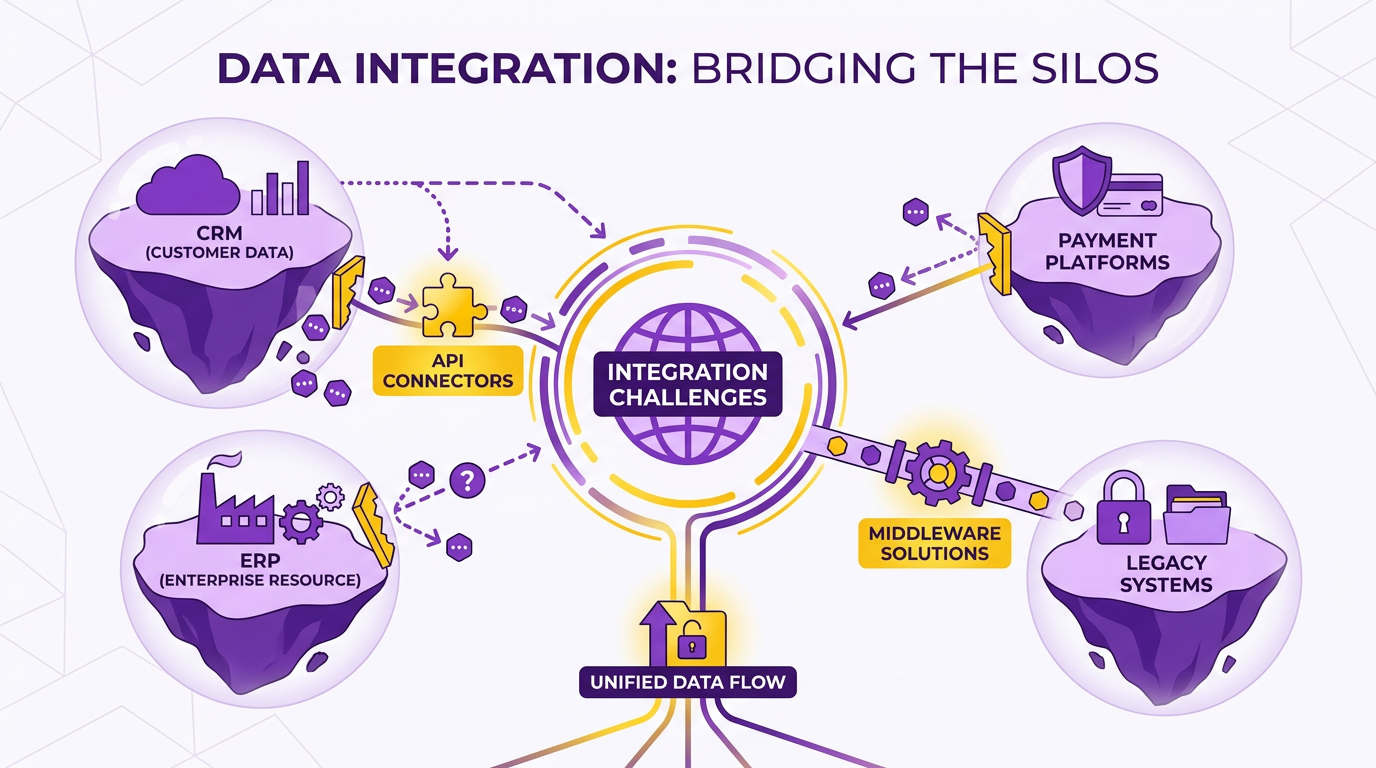
Automated accounts receivable (A/R) processing offers significant efficiency gains but faces hurdles like system integration and data quality issues. Integration challenges often arise when connecting automation tools with legacy systems or disparate software. For example, data silos between CRM, ERP, and payment platforms can disrupt data flow, causing delays in credit approvals or invoicing. A system compatibility gap might prevent automated workflows from accessing real-time customer data, leading to manual overrides.
To address this, phased system testing is critical. As mentioned in the Implementing Automated Accounts Receivable Processing section, this approach ensures compatibility by systematically validating integration points. Start by mapping existing data flows and identifying integration points, such as linking an ERP system to an A/R automation platform like TreviPay’s solution, which streamlines credit approvals and invoicing. API-based connectors or middleware can bridge gaps between systems. For instance, Staples Canada overcame integration hurdles by deploying TreviPay’s automation, achieving a 112% growth in B2B program volume through seamless data synchronization.
How to Resolve Data Quality Issues in A/R Automation
Automated systems rely on clean, standardized data to function effectively. Even minor inconsistencies-like mismatched customer names or incorrect payment terms-can lead to errors. Building on concepts from the The Automation Advantage: Benefits and Features section, the SMB automation study highlights that manual data entry costs $29.83 per invoice, often due to human error. Automated tools reduce this by 93%, but only if input data is pristine.
Data cleansing is the first step. This involves scrubbing databases to correct duplicates, validate addresses, and standardize formats. For example, a retailer in TreviPay’s case study reduced invoice errors by 20% after implementing automated data validation against 30+ credit decisioning sources. Ongoing data governance policies-like scheduled audits and real-time validation rules-prevent future issues.
Case Study: Overcoming Challenges with Hybrid Automation
A hybrid approach combining Robotic Process Automation (RPA) and Generative AI (GenAI) can address both structured and unstructured data challenges. As highlighted in the The Automation Advantage: Benefits and Features section, RPA excels at repetitive tasks like invoice matching, reducing processing time by 50–80%, while GenAI handles ambiguous scenarios, such as interpreting handwritten payment notes.
Lenovo’s success with flexible net-term options illustrates this. By using RPA for standardized invoicing and GenAI for analyzing payment trends, they boosted average order value by 114%. However, hybrid systems require careful oversight. The RPA/GenAI comparison study notes that while GenAI improves accuracy in unstructured data (e.g., parsing diverse receipt formats), it demands rigorous training on historical datasets to avoid costly misinterpretations.
| Approach | Strengths | Weaknesses | Best For |
|---|---|---|---|
| RPA | Speed in structured tasks, low error rates | Struggles with ambiguous inputs | Invoice matching, payment reconciliation |
| GenAI | Handles unstructured data, adapts to new formats | Higher initial training costs | Credit risk analysis, exception handling |
The Role of Ongoing Maintenance in Sustaining Automation Success
Automation is not a “set-it-and-forget-it” solution. Continuous monitoring ensures systems adapt to changing business needs. For example, a 20% reduction in Days Sales Outstanding (DSO) reported by TreviPay users requires regular updates to credit policies and payment terms.
Maintenance best practices include:
- Quarterly system audits: Review automation logs for recurring errors or bottlenecks.
- User training: Equip finance teams to troubleshoot minor issues, reducing downtime.
- Vendor collaboration: Partner with providers like TreviPay to update algorithms and expand data sources.
A 2014 study found that companies with automated A/R had 80% faster payment clearing times compared to manual processes. However, this advantage fades without regular updates. For instance, a mid-sized business that neglected to update its customer database saw a 15% increase in past-due invoices within six months.
By addressing integration gaps, prioritizing data quality, and adopting adaptive automation strategies, businesses can enable the full potential of A/R automation while avoiding pitfalls. The key lies in balancing technology with human oversight to ensure long-term efficiency.
Measuring the Success of Automated Accounts Receivable Processing
Measuring the success of automated accounts receivable (AR) processing requires a clear focus on key performance indicators (KPIs), benchmarks, and data-driven insights. By tracking metrics like processing time, error rates, and Days Sales Outstanding (DSO), businesses can quantify the efficiency gains and financial improvements automation delivers. This section breaks down how to evaluate automated AR systems, using real-world examples and industry benchmarks to guide your analysis..
What Are the Core KPIs for Automated AR Success?
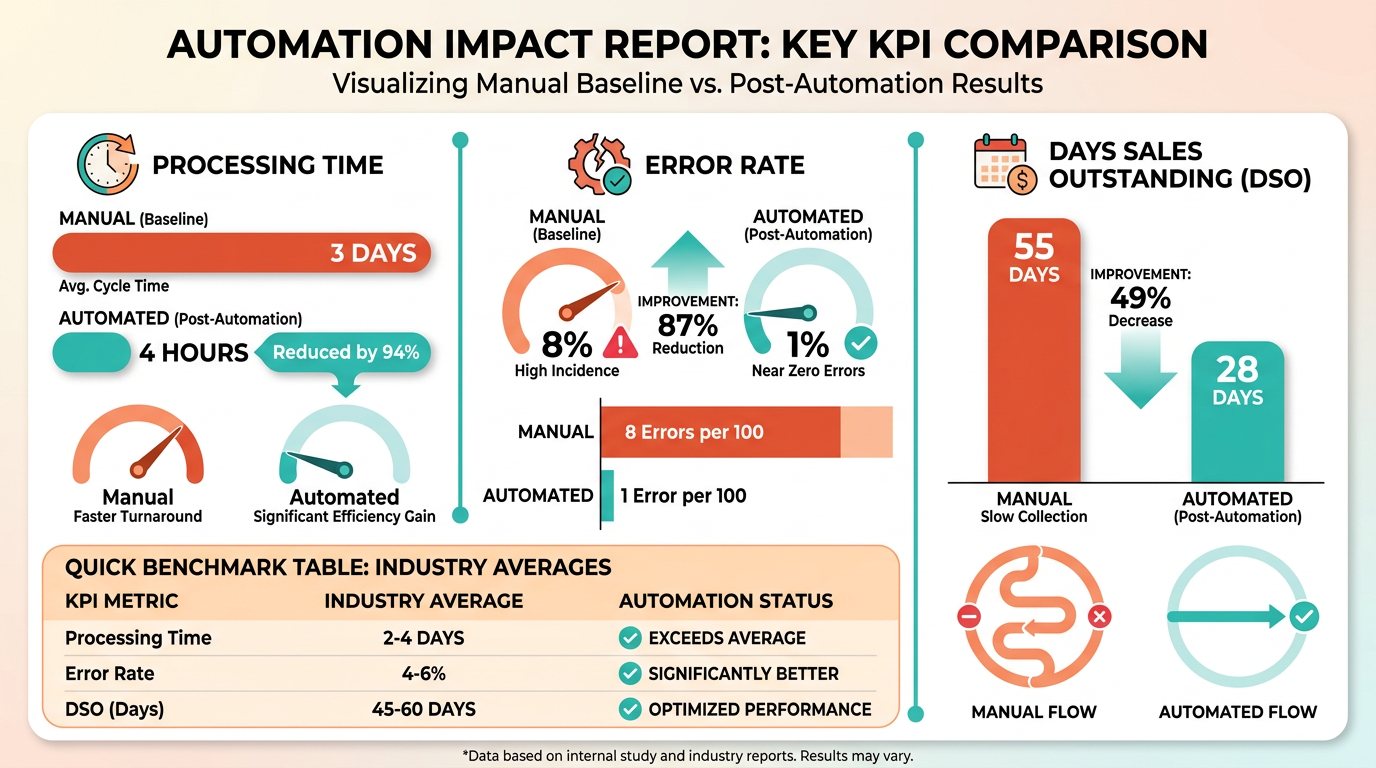
To assess automated AR performance, focus on metrics that directly reflect operational efficiency and financial health. Processing time is a critical KPI-automated systems typically reduce invoice and payment processing by 50–80% compared to manual workflows. For example, companies using robotic process automation (RPA) report cycle time reductions of 50–70% for tasks like account matching and cash transfers. As mentioned in the Understanding Manual Accounts Receivable Processing section, manual workflows often involve delays at each step, making automation’s speed contrast stark.
Accuracy is another vital metric. Manual AR processes are prone to human errors, but automation minimizes these through validation rules and digital workflows. Studies show that 87% of firms with automated AR report faster processing, while 75% note improved customer experience due to fewer billing mistakes. DSO, which measures how quickly receivables are collected, also improves significantly. Automated systems achieve an average DSO of 40 days versus 47 days for manual processes, as consistent invoicing and reminders accelerate cash flow. Building on concepts from the Why Automation in Accounts Receivable Matters section, automation’s role in reducing errors and delays directly supports better DSO outcomes..
How Do Benchmarks Help Evaluate Automated AR Systems?
Benchmarks provide context for whether your automation efforts are outperforming industry standards. For example, traditional manual AR processes often incur high labor costs and error rates-up to 5% of invoices may contain errors in non-automated systems. Automated solutions, however, reduce these errors by 30–50%, as noted in a FinTech study showing automation intensity explains 54% of variance in manual error reduction. A comparison of manual and automated benchmarks reveals stark differences:
| Metric | Manual Processing | Automated Processing |
|---|---|---|
| DSO | 47 days | 40 days |
| Error Rate | 5–8% | 1–2% |
| Processing Time | Hours per invoice | Seconds to minutes |
| Cost per Transaction | $10–$20 | $1–$3 |
These numbers highlight automation’s value in reducing costs and accelerating collections. For instance, a company implementing RPA for credit applications saw DSO drop by 10 days simply by capturing detailed customer contact information upfront. As mentioned in the Understanding Manual Accounts Receivable Processing section, manual data entry errors often stem from incomplete or inconsistent information, which automation addresses directly..
How Do Data Analytics and Hybrid Models Optimize AR Automation?
Modern AR systems use data analytics to refine performance continuously. Automated dashboards track real-time metrics like payment trends, customer behavior, and exception alerts, enabling proactive adjustments. For example, generative AI (GenAI) can parse historical data to predict cash application risks, improving accuracy by 90–95% in ambiguous scenarios. A hybrid approach combining RPA and GenAI offers the best of both worlds. RPA handles structured tasks like invoice reconciliation with 80–90% efficiency, while GenAI addresses unstructured data, such as interpreting customer disputes. This collaboration reduces manual intervention and ensures fewer exceptions to resolve. For a deeper dive into ROI calculations, explore Billtrust’s ROI study on AR automation.
Building on concepts from the The Automation Advantage: Benefits and Features section, hybrid models use RPA’s structured processing and GenAI’s adaptability to handle complex, unstructured tasks. For instance, one enterprise reduced its AR processing time by 50% using RPA for core workflows and GenAI for risk analysis, achieving a 92% automation rate overall..
What Role Do Case Studies Play in Validating AR Automation?
Real-world examples demonstrate automation’s tangible benefits. Consider a company that automated its credit applications using RPA: by collecting customer data upfront, it cut DSO by 10 days and improved payment compliance. Similarly, a financial shared service center implemented RPA to streamline invoice reconciliation, slashing processing time by 50%. These cases underscore automation’s ability to align with business goals like cost reduction and customer satisfaction. Experts like Michelle Murdock of Mitutoyo America recommend starting small with automation, such as automating reminders or data entry, before scaling to complex workflows. This incremental approach minimizes disruption and allows organizations to measure ROI at each stage..
What Are the Limitations of Traditional vs. Advanced Metrics?
Traditional KPIs like DSO and error rates remain essential but may not capture automation’s full impact. For example, manual DSO calculations can overlook trends in customer payment behavior that AI-driven analytics detect. Advanced metrics, such as customer satisfaction scores (75% of firms report improvements with automation) or staff productivity gains, offer deeper insights. However, overreliance on automation without human oversight can introduce risks. While RPA excels in structured tasks, GenAI’s unstructured data handling requires careful validation to avoid misinterpretations. A balanced strategy-using automation for routine tasks and reserving human expertise for exceptions-ensures accuracy while maximizing efficiency.
Future of Automated Accounts Receivable Processing
The future of automated accounts receivable (AR) processing hinges on integrating advanced technologies like artificial intelligence (AI), blockchain, and robotic process automation (RPA). These innovations are reshaping how businesses manage cash flow, reduce errors, and optimize working capital. By analyzing current trends and real-world implementations, it’s clear that automation is shifting from a competitive advantage to a necessity in modern finance operations, as emphasized in the Why Automation in Accounts Receivable Matters section.
What Emerging Trends Are Shaping AR Automation?
AI and blockchain are at the forefront of AR innovation. AI-powered platforms use machine learning to predict payment behaviors, flag discrepancies, and automate decision-making. For instance, generative AI (GenAI) excels at parsing unstructured data, such as handwritten notes or scanned documents, while RPA handles repetitive tasks like invoice matching and data entry. Blockchain adds transparency by creating immutable records of transactions, reducing disputes and fraud risks. Together, these technologies streamline workflows that previously required manual intervention.
A key trend is the rise of hybrid automation, combining RPA’s consistency with GenAI’s adaptability. As Yichen Fu notes, “RPA demonstrates superior consistency in standardized tasks, while GenAI outperforms in ambiguous scenarios.” This collaboration allows businesses to automate core processes while addressing exceptions intelligently. For example, RPA might process 80% of invoices automatically, while GenAI resolves the remaining 20% involving complex disputes or unclear data.
How Are These Trends Impacting AR Efficiency and Accuracy?
The benefits of adopting these technologies are measurable. Companies using AI-driven AR platforms report 20-30% reductions in Days Sales Outstanding (DSO) and 75% improvements in productivity, metrics discussed in detail in the Measuring the Success of Automated Accounts Receivable Processing section. For a business with $50 million in annual revenue, even a 5-day DSO reduction frees up nearly $700,000 in working capital. RPA, specifically, cuts processing times by 50-80% in standardized tasks, as seen in a case study where a financial shared service center reduced invoice processing time by half.
However, challenges persist. Integrating AI and blockchain requires strong data infrastructure and cross-system compatibility, as outlined in the Overcoming Common Challenges in Automated Accounts Receivable Processing section. For instance, blockchain’s success depends on all parties using the same ledger, which is difficult in fragmented supply chains. Additionally, GenAI’s reliance on training data means poor-quality inputs can lead to errors, necessitating rigorous validation.
What Real-World Examples Prove These Innovations Work?
Monto, an AR automation provider, showcases the potential of AI. Their platform achieves 99% first-time invoice acceptance rates by analyzing historical payment patterns and automating corrections. By integrating with ERP systems and adapting to hundreds of B2B portals, Monto reduces manual reconciliation efforts. Similarly, a pilot program using RPA for credit risk management improved accuracy by automating data analysis from multiple sources, as detailed in a case study from source .
How Should Businesses Approach Emerging AR Technologies?
The path to automation depends on the balance between innovation and practicality. A pure RPA approach is ideal for businesses with highly standardized processes, offering speed and cost savings. In contrast, companies facing complex, unstructured data benefit from GenAI integration, despite its higher implementation costs. The hybrid model-using RPA for routine tasks and GenAI for exceptions-is recommended for maximum efficiency, as outlined in source .
For example, a company processing 10,000 invoices monthly might deploy RPA to handle 8,000 straightforward cases while using GenAI to resolve the remaining 2,000 with ambiguous details. This approach minimizes errors while avoiding the inefficiency of over-engineering solutions for simple tasks.
| Approach | Strengths | Weaknesses |
|---|---|---|
| Pure RPA | Speed, consistency, low error rates | Struggles with unstructured data |
| GenAI | Handles ambiguity, personalization | High costs, requires oversight |
| Hybrid | Balances efficiency and adaptability | Complex to implement and manage |
What Role Does Experimentation Play in AR’s Future?
Innovation in AR automation demands continuous testing. Source highlights the importance of phased rollouts and pilot programs to refine systems. For instance, a phased AR automation rollout allowed a company to identify portal-specific integration issues early, avoiding widespread disruptions. Testing also reveals the ROI of automation-such as the 50-70% cycle time reductions reported in expense reimbursement processes using GenAI.
The future of AR processing lies in embracing these technologies while maintaining flexibility. As Michal Cohen emphasizes, automation should “elevate rather than replace” teams, enabling finance professionals to focus on strategic tasks like risk mitigation and customer relationships. By combining RPA’s efficiency, GenAI’s adaptability, and blockchain’s transparency, businesses can future-proof their AR operations against evolving market demands.
Frequently Asked Questions
1. How much does automation reduce days sales outstanding (DSO)?
Automation reduces DSO by 30% for B2B companies, enabling faster cash flow and improved financial predictability compared to manual methods. This improvement is critical for businesses relying on timely revenue.
2. What are the financial losses from manual AR processes?
Mid-sized companies lose $4 million monthly due to manual inefficiencies, including delayed collections and unpaid invoices, which strain cash flow and operational stability.
3. How does automation impact payment processing time?
Automated AR systems cut payment processing time by 67%, reducing manual steps like invoice processing and reconciliation from 20 days to under one week.
4. What error rate improvements does automation offer?
Automation reduces manual data entry errors by 20%+, minimizing disputes and bad debt caused by mismatched payments or incorrect invoicing.
5. What cost savings per invoice does automation provide?
Automated processing lowers invoice costs from $29.83 (manual) to $2.00 per invoice, significantly reducing labor and operational expenses.
6. How does automation affect customer satisfaction?
Automated workflows improve customer satisfaction by streamlining invoicing and payment processes, resolving disputes faster, and ensuring accurate billing.
7. Why do manual AR processes lead to higher costs?
Manual AR processes incur delays, errors, and disputes, costing businesses revenue through delayed collections and bad debt, with 77% of teams struggling to resolve unpaid invoices.