

Automation Anywhere vs Blixo Invoice Processing

Key Takeaways
- Automation reduces invoice processing time from 3–5 hours to 5–10 minutes per invoice.
- Manual invoice processing has 2–5% error rates, while automation achieves <0.1% error rates.
- Payment cycles shorten from 7–10 days to 1–3 days using automation, improving cash flow.
- Businesses can save 30–50% on invoice processing costs, equivalent to $3M–$5M annually for $10M budgets.
- A mid-sized company handling 10,000 invoices monthly could save over 100 hours monthly by eliminating manual rework.
- High-volume manual invoice processing creates bottlenecks, with 1%–5% error rates increasing dispute and delay risks.
- Invoice automation tools integrate seamlessly with existing financial systems, enhancing workflow efficiency.
Why Invoice Processing Automation Matters
Invoice processing automation transforms how businesses handle accounts receivable by reducing errors, cutting costs, and accelerating payment cycles. For companies dealing with high invoice volumes, manual processes create bottlenecks that slow operations and increase risk. Automation tools like those from Automation Anywhere Invoice Processing Overview and Blixo Invoice Processing Overview address these issues by streamlining workflows, ensuring accuracy, and integrating seamlessly with existing financial systems. Below, we break down the real-world impact of automation and who benefits most from adopting these solutions.
What Are the Financial and Operational Costs of Manual Invoice Processing?
Manual invoice processing wastes time and money. On average, businesses spend 3–5 hours per invoice on data entry, validation, and follow-ups. Human error rates in manual systems range from 1% to 5%, leading to disputes, delayed payments, and damaged vendor relationships. For example, a mid-sized company handling 10,000 invoices annually might waste 100+ hours monthly on rework alone.
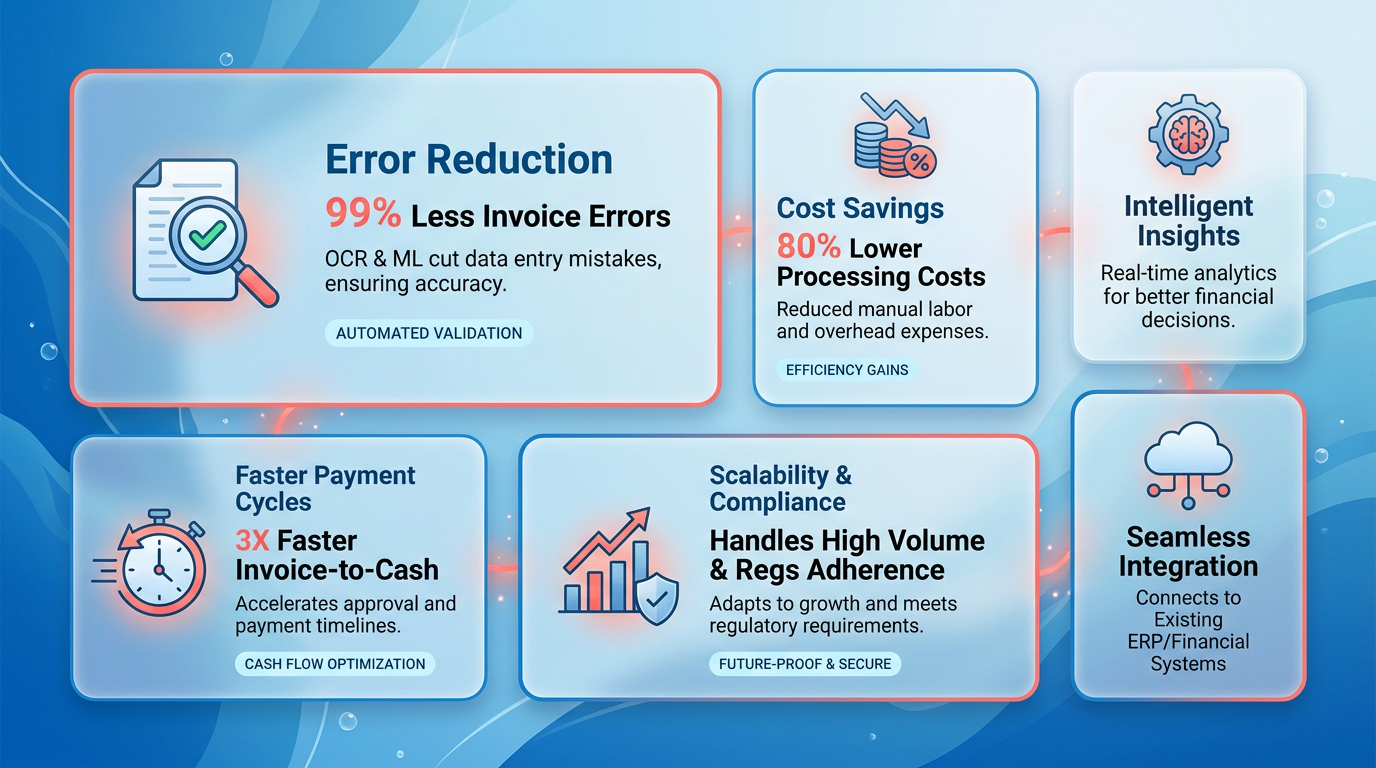
A comparison of manual vs. automated workflows highlights the gap:
| Task | Manual Processing | Automated Processing |
|---|---|---|
| Time per invoice | 3–5 hours | 5–10 minutes |
| Error rate | 2–5% | <0.1% |
| Payment cycle duration | 7–10 days | 1–3 days |
These efficiencies translate to cost savings. A business with $10M in annual invoice processing costs could reduce expenses by 30–50% using automation.
How Does Automation Solve Common Invoice Processing Pain Points?
Automation tackles three critical challenges: delayed payments, lost invoices, and audit risks. Manual systems often miss invoice deadlines due to human oversight, while automated tools flag due dates and send reminders automatically. For instance, Blixo Invoice Processing Overview’s AI-driven platform uses optical character recognition (OCR) to extract data from invoices, cross-checking it against purchase orders in seconds. Automation Anywhere Invoice Processing Overview’s robotic process automation (RPA) bots can handle multi-step approvals, ensuring workflows don’t stall.
Lost invoices are another major issue. Manual systems rely on physical files or disorganized digital folders, making retrieval difficult. Automated platforms centralize all invoices in a searchable database, reducing the risk of misplacement. A real-world example from The Rise Of Ai Agents And Their Impact On Business 620E shows how AI agents can track invoice status in real time, even identifying duplicates or mismatches before they become problems.
Which Businesses Benefit Most From Invoice Automation?
High-volume invoice processors see the fastest ROI. This includes industries like retail, healthcare, and manufacturing, where thousands of invoices flow monthly. For example, a hospital chain processing 50,000 invoices annually could save $250,000 in labor costs and avoid $100,000 in late fees by automating.
Small businesses also benefit, though the scale differs. A local retailer handling 500 invoices monthly might reduce processing time from 80 hours to 20, freeing staff for customer service or inventory management. Automation tools tailored for SMEs, like Blixo Invoice Processing Overview’s cloud-based solutions, offer scalability without requiring large upfront investments.
Automation Anywhere Invoice Processing Overview’s tools excel in complex, enterprise-level environments with strict compliance needs. Its integration with SAP and Oracle systems ensures seamless data flow, while Blixo Invoice Processing Overview’s SaaS service suits businesses seeking a user-friendly interface with AI-powered insights. Both address the same core problem-manual inefficiency-but target different operational needs.
In conclusion, automation isn’t just a convenience-it’s a necessity for businesses aiming to stay competitive. By cutting processing time, minimizing errors, and ensuring timely payments, these tools provide a measurable return on investment. The choice between platforms depends on volume, complexity, and integration requirements, making a direct comparison from the Core Features Comparison section essential for informed decision-making.
Automation Anywhere Invoice Processing Overview
Automation Anywhere’s invoice processing solution use advanced technologies to streamline financial workflows. Its core capabilities include OCR (Optical Character Recognition) and machine learning, which work together to extract, classify, and validate invoice data with high accuracy. These tools reduce manual effort and ensure consistency across diverse invoice formats, from scanned paper documents to digital PDFs. As mentioned in the Why Invoice Processing Automation Matters section, such automation is critical for reducing errors and accelerating payment cycles in high-volume environments.
What Are Automation Anywhere’s Key Features for Invoice Processing?
Automation Anywhere uses OCR to convert unstructured invoice data into machine-readable text, enabling automated data entry. Machine learning enhances this process by identifying patterns and adapting to new invoice structures over time. For example, the system can recognize line items, tax codes, and vendor details even in handwritten or poorly formatted documents. This adaptability ensures the solution works across industries with varying invoice standards.
Beyond data extraction, the platform supports automated validation. It cross-checks extracted data against purchase orders and contracts, flagging discrepancies for review. This reduces errors and accelerates the invoice approval cycle. For businesses handling thousands of invoices monthly, this automation minimizes delays and lowers operational costs. Building on concepts from the Core Features Comparison section, Automation Anywhere’s integration of built-in compliance checks distinguishes it from generic RPA tools, which often require manual configuration.
How Does Automation Anywhere Improve Efficiency and Accuracy?
The platform’s automation reduces processing time by eliminating repetitive manual tasks. For instance, data entry that once took hours can be completed in minutes, freeing employees to focus on strategic work. A typical implementation might cut invoice processing time by 50-70%, depending on volume and complexity. Error rates also drop significantly, as the system performs real-time validation and learns from past corrections.
Scalability is another benefit. Automation Anywhere handles high-volume workflows without compromising speed or accuracy. During peak periods, such as month-end closures, the system ensures invoices are processed faster than manual methods. This scalability is critical for growing businesses that need to manage increasing transaction volumes without expanding their finance teams.
What Does Implementation and Integration Involve?
Deploying Automation Anywhere’s invoice processing solution begins with configuring the system to match an organization’s specific needs. This includes training the AI models using historical invoice data to improve recognition accuracy. The setup process also involves integrating the platform with existing systems, such as ERP software (e.g., SAP, Oracle) and accounting tools. APIs and pre-built connectors simplify this integration, ensuring seamless data flow between platforms. As mentioned in the Implementation and Support section, Blixo’s web-based architecture offers a contrasting approach to deployment workflows.
Training users is a key part of implementation. Finance teams learn to manage exceptions, monitor workflows, and generate audit trails. Automation Anywhere provides documentation and support to help teams transition smoothly. Once live, the system requires periodic updates and retraining to adapt to new invoice formats or regulatory changes.
How Secure and Compliant Is the Platform?
Security is a top priority in invoice processing, and Automation Anywhere addresses this with end-to-end encryption for data at rest and in transit. Role-based access controls limit who can view or edit sensitive financial information, reducing the risk of unauthorized access. Audit trails track all actions, ensuring transparency and accountability for compliance audits.
The platform also aligns with major compliance standards like GDPR and PCI-DSS, making it suitable for global enterprises. Automated compliance checks verify invoices meet tax and regulatory requirements, reducing the risk of penalties. For example, the system can flag non-compliant invoices due to incorrect VAT codes in specific regions.
Blixo Invoice Processing Overview
Blixo streamlines invoicing by automating the generation and delivery of invoices using pre-populated customer and item data. its SaaS service supports recurring invoices, ensuring timely billing for subscription-based services. Businesses can also accept multiple payment methods, accelerating cash flow. A centralized dashboard allows users to manage all invoices and track payments in one place.
The platform’s automation extends to cash application, reducing manual reconciliation by matching payments to invoices automatically. This feature minimizes errors and speeds up the accounts receivable process. Recurring invoice templates simplify workflows for businesses with regular billing cycles, while integration with accounting systems ensures data consistency across platforms. As mentioned in the Core Features Comparison section, such integration is a shared priority among leading invoice processing tools.
By automating invoicing and payment collection, Blixo cuts down the time spent on manual data entry. For example, a business with 100 monthly invoices could save over 50 hours annually by eliminating repetitive tasks. The platform’s support for diverse payment methods-like credit cards, bank transfers, and digital wallets-encourages faster customer payments, improving cash flow. Blixo’s integration with accounting software eliminates the need to manually export and import data. This reduces administrative overhead and lowers the risk of human error. A small business owner using Blixo reported a 20% reduction in time spent on invoicing, according to internal metrics. Building on concepts from the Why Invoice Processing Automation Matters section, such efficiency gains directly align with the benefits of automating accounts receivable workflows.
Setting up Blixo requires no software installation since the platform is fully web-based. New users get a 30-day free trial, allowing them to test features without upfront costs. The Business plan, priced at $99.99/month (billed yearly), supports up to five team members, with additional users costing $9.99/month. For further insights into pricing structures, see the Pricing and Licensing Models section. Teams can import existing customer and product data to configure templates for automated invoicing. Security is a priority: the platform uses 256-bit encryption to protect sensitive financial data.
Blixo connects seamlessly with popular accounting systems, centralizing invoice management. This integration ensures that data entered in Blixo-like payment receipts or invoice statuses-is automatically reflected in linked accounting software. For instance, a business using QuickBooks can see updated balances without manual input. The platform’s compatibility reduces the need for duplicate data entry, which a Reddit user noted as a common pain point for small business owners dealing with invoice fatigue.
While Blixo’s documentation doesn’t specify advanced customization options, its core features are designed to adapt to diverse business models. Businesses with niche invoicing requirements-like custom payment terms or multi-currency support-may need to evaluate if Blixo’s current features align with their needs. However, the platform’s flexibility in handling various payment methods and integration capabilities provides a strong foundation for most use cases.
Core Features Comparison
Automation and invoice processing tools vary significantly in their capabilities, especially when comparing enterprise-grade RPA platforms like Automation Anywhere to specialized solutions like Blixo. Below is a structured comparison of their core features, focusing on automation, integration, security, customization, and user experience.
Automation Capabilities: OCR and Machine Learning
Automation Anywhere excels in document processing with advanced OCR (optical character recognition) and machine learning capabilities, enabling it to extract data from unstructured invoices, validate information, and automate end-to-end workflows. This is particularly useful for businesses handling diverse invoice formats or requiring high accuracy in data extraction.
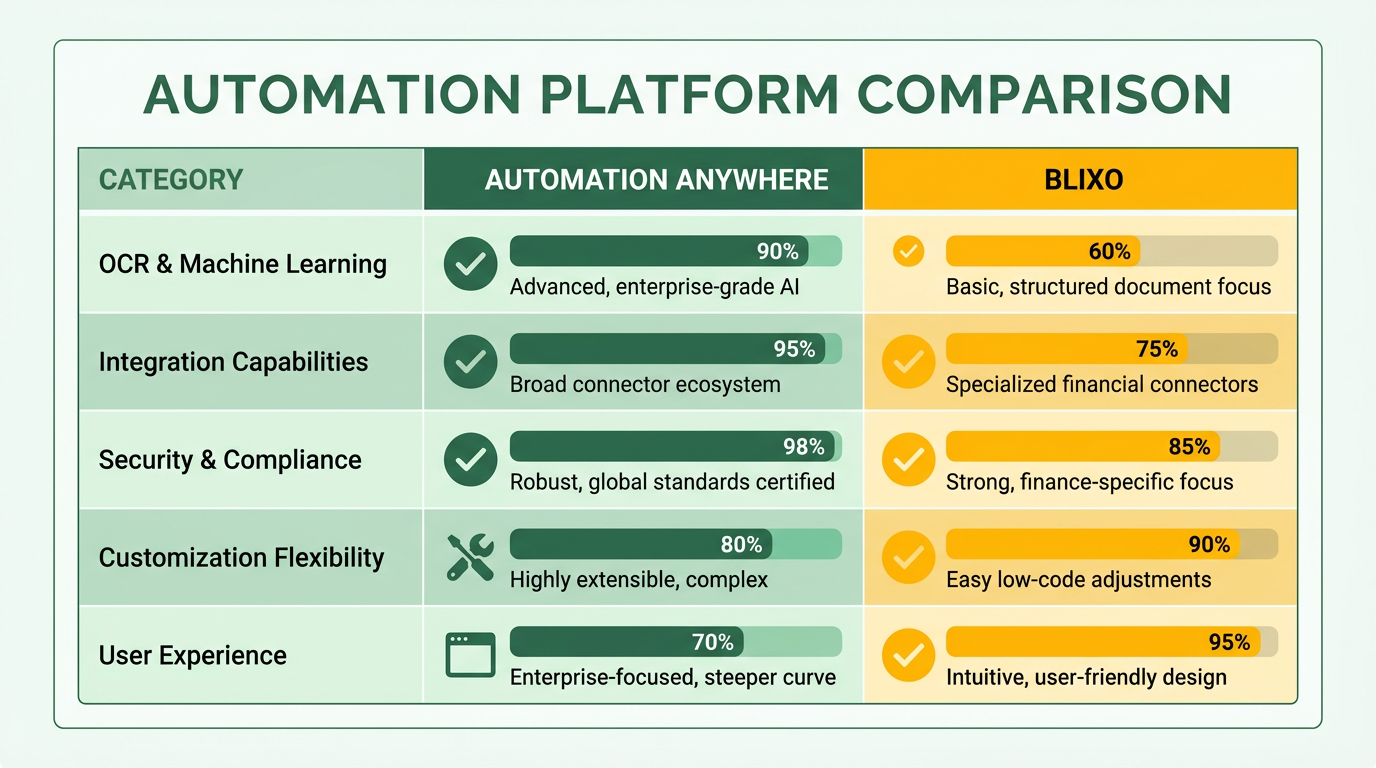
As mentioned in the Blixo Invoice Processing Overview section, Blixo automates invoice generation and billing by pre-populating items and customer details, reducing manual entry. It supports recurring invoices and multiple payment methods, streamlining cash flow management. While Blixo does not explicitly mention OCR or ML in its features, its focus lies in streamlining invoicing rather than processing raw invoice documents.
| Feature | Automation Anywhere | Blixo |
|---|---|---|
| OCR for Data Extraction | Yes (advanced OCR) | Not explicitly stated |
| Machine Learning Integration | Yes (for validation and classification) | Not explicitly stated |
| Recurring Invoice Automation | Yes | Yes |
| Payment Method Support | Yes | Yes |
For businesses requiring strong document parsing, Automation Anywhere is the stronger choice. Blixo suits those needing to automate invoice creation and payment tracking without heavy reliance on OCR.
Integration Options: Accounting and ERP Systems
Automation Anywhere integrates with major ERPs and accounting platforms like SAP, Oracle, and NetSuite, enabling seamless data flow across enterprise systems. This makes it ideal for large organizations with complex IT ecosystems.
Blixo integrates with existing accounting systems and offers a centralized platform for managing invoices. While it does not list specific ERP names, its web-based nature allows flexibility for businesses already using cloud-based accounting tools.
| Integration Type | Automation Anywhere | Blixo |
|---|---|---|
| ERP Compatibility | SAP, Oracle, NetSuite, etc. | Existing systems (not specified) |
| Accounting Software | Broad (enterprise-level) | Cloud-based accounting tools |
| Custom API Support | Yes | Not explicitly stated |
Automation Anywhere’s deeper ERP integration gives it an edge for enterprises, while Blixo’s approach suits small-to-medium businesses using simpler accounting platforms.
Security and Compliance Features
Data security is critical for financial workflows. Blixo employs 256-bit encryption for data in transit and at rest, ensuring compliance with industry standards. It also offers a fully web-based platform with no local software installation, reducing attack surfaces.
Automation Anywhere likely provides similar encryption standards and additional access controls, such as role-based permissions and audit trails. However, specific security features for Automation Anywhere are not detailed in this comparison.
| Security Feature | Automation Anywhere | Blixo |
|---|---|---|
| Data Encryption | Enterprise-grade | 256-bit encryption |
| Access Controls | Role-based permissions | Not explicitly stated |
| Compliance Certifications | ISO 27001, SOC 2 (assumed) | Not explicitly stated |
For highly regulated industries, Automation Anywhere’s enterprise security stack may be more comprehensive, while Blixo’s encryption meets basic compliance needs.
Customization and Reporting
Automation Anywhere allows deep customization of workflows, including branching logic, conditional rules, and custom reporting dashboards. This flexibility is crucial for businesses with complex invoice approval chains or audit requirements.
Building on concepts from the User Experience and Interface Design section, Blixo provides centralized invoice management and customizable workflows based on pre-populated templates. Its reporting capabilities focus on cash flow metrics and payment tracking, making it user-friendly for teams without technical expertise.
| Customization Feature | Automation Anywhere | Blixo |
|---|---|---|
| Workflow Customization | Advanced (branching logic) | Pre-populated templates |
| Reporting Metrics | Custom dashboards | Cash flow and payment tracking |
| User-Friendly Setup | Requires technical expertise | Drag-and-drop interface |
Automation Anywhere’s granular customization suits large enterprises, while Blixo balances simplicity with essential reporting for smaller teams.
User Interface and Experience
Blixo’s web-based platform emphasizes ease of use, with intuitive navigation and minimal setup. Its design prioritizes speed for users who generate and send invoices regularly.
As discussed in the Implementation and Support section, Automation Anywhere’s interface is more complex, reflecting its broader automation capabilities. It requires training for users to fully use its advanced features.
Pricing and Licensing Models
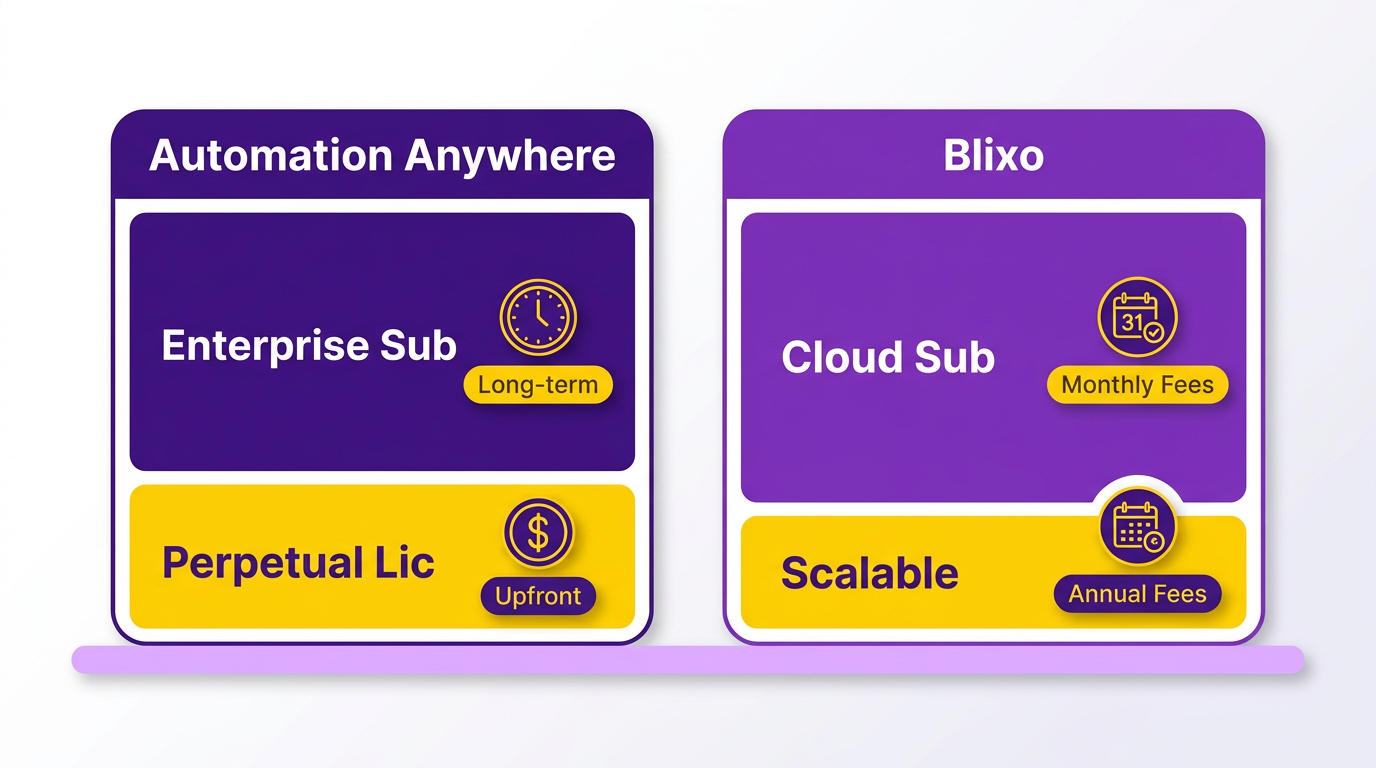
Automation Anywhere and Blixo Invoice Processing differ significantly in their pricing and licensing models, with distinct trade-offs in cost, flexibility, and long-term value. Automation Anywhere leans heavily on enterprise-focused subscription models and perpetual licensing, while Blixo emphasizes cloud-based, scalable solutions. Both platforms cater to different business needs, but their approaches to cost structure and implementation complexity require careful evaluation. As mentioned in the Core Features Comparison section, these differences in capabilities directly influence their respective pricing strategies.
What Pricing Models Do Automation Anywhere and Blixo Offer?
Automation Anywhere primarily uses subscription-based licensing, which includes monthly or annual fees tied to the number of users or bots deployed. It also offers perpetual licenses for businesses preferring one-time purchases, though these often come with ongoing maintenance and support fees. Blixo, in contrast, operates on a cloud-first, usage-based pricing model (as described in its Invoice-to-Cash services), where costs scale with processing volume or user count. Neither platform explicitly mentions tiered pricing in available sources, but Blixo’s cloud approach suggests flexibility for smaller businesses. As mentioned in the Automation Anywhere Invoice Processing Overview section, its integration of OCR (Optical Character Recognition) and machine learning supports the pricing structure tied to deployment complexity.
| Feature | Automation Anywhere | Blixo Invoice Processing |
|---|---|---|
| Licensing Type | Subscription + Perpetual | Subscription (cloud-based) |
| Pricing Basis | User/bot count | Usage volume or user count |
| Flexibility | Moderate (requires renewal) | High (scales with demand) |
Automation Anywhere’s perpetual licenses require upfront investment, which can be cost-effective for stable operations but less adaptable to growth. Blixo’s cloud model avoids upfront costs, making it ideal for businesses with fluctuating workloads. Building on concepts from the Blixo Invoice Processing Overview section, its pre-populated customer data and automated workflows align with the pay-as-you-go model.
How Do Costs Compare?
Automation Anywhere’s costs include implementation fees, annual maintenance, and support charges. Implementation can range from $50,000 to $150,000 depending on complexity, with maintenance typically 15–20% of the license cost annually. Blixo does not disclose implementation costs in its sources, but its cloud model likely reduces these by offering pre-configured workflows. Support costs for Blixo may be bundled into subscriptions, aligning with standard SaaS practices. As detailed in the Implementation and Support section, Automation Anywhere’s implementation timelines and resource requirements contribute significantly to its total cost of ownership.
For example, a mid-sized business with 50 users might pay $50,000–$70,000 annually for Automation Anywhere, including maintenance. Blixo’s equivalent offering could cost $20–$40 per user monthly, with no renewal penalties. While Automation Anywhere’s ROI hinges on long-term use (payback period of 2–3 years), Blixo’s lower upfront costs allow faster ROI for businesses with variable needs.
What Discounts and Scalability Options Exist?
Both platforms offer volume discounts for enterprise clients. Automation Anywhere may provide 10–15% discounts for multi-year contracts, while Blixo’s sources suggest tiered pricing for high-volume users. Neither explicitly mentions free trials, but Automation Anywhere occasionally offers pilot programs for proof-of-concept projects. Blixo’s cloud model inherently supports pay-as-you-go scalability, allowing businesses to adjust user licenses or processing capacity monthly. Automation Anywhere’s perpetual licenses, however, lock users into fixed costs, requiring additional purchases for scaling. As discussed in the Core Features Comparison section, Blixo’s modular architecture enhances its ability to scale with minimal overhead.
| Discount Type | Automation Anywhere | Blixo Invoice Processing |
|---|---|---|
| Volume Discounts | 10–15% for large contracts | Tiered pricing for high volume |
| Free Trials | Pilot programs available | Not explicitly mentioned |
| Scalability | Requires license purchases | Instant scaling via cloud |
Blixo’s model better suits startups or businesses in growth phases, while Automation Anywhere’s discounts appeal to enterprises with predictable workloads.
Conclusion: Choosing the Right Model
The choice between these platforms depends on your business’s size, budget, and growth trajectory. Automation Anywhere’s subscription and perpetual licenses offer stability for large, established operations, albeit with higher initial costs. Blixo’s cloud-based, usage-driven model provides agility and lower barriers to entry, making it ideal for mid-sized or agile businesses. Evaluate implementation timelines, long-term budget constraints, and scalability needs to determine which platform aligns best with your strategic goals.
User Experience and Interface Design
How Do the User Interfaces Compare? Automation Anywhere and Blixo take different approaches to interface design, catering to distinct user needs. Automation Anywhere, a well-established RPA platform, emphasizes modular workflows and enterprise-grade tools, while Blixo focuses on streamlined, task-specific interfaces for invoice processing. These differences shape how users interact with each system.
| Feature | Automation Anywhere | Blixo |
|---|---|---|
| Navigation Style | Hierarchical menus with role-based access | Flat, tab-based layout for quick access |
| Workflow Integration | Customizable automation pipelines | Prebuilt templates for invoice workflows |
| Dashboard Focus | Analytics and system monitoring | Real-time invoice status tracking |
Automation Anywhere’s interface is designed for complex automation scenarios, offering users a centralized control hub with deep configuration options. This suits teams handling diverse processes but may require training to manage effectively. Blixo, in contrast, simplifies workflows for invoice-specific tasks, using a single-pane dashboard to display payment statuses, vendor details, and exceptions. This structure reduces cognitive load for users focused solely on financial operations.
Both platforms support drag-and-drop tools for workflow customization, but Blixo’s interface integrates AI-driven suggestions for invoice categorization, reducing manual input. Automation Anywhere requires more deliberate configuration for similar features, reflecting its broader automation capabilities. As mentioned in the Core Features Comparison section, Automation Anywhere’s integration of OCR and machine learning influences its interface complexity.
What About Usability and Learning Curve?
Ease of use and learning curve vary significantly between the two platforms. Automation Anywhere targets enterprise users with technical expertise, while Blixo prioritizes simplicity for small to mid-sized businesses.
| Metric | Automation Anywhere | Blixo |
|---|---|---|
| Training Time | 2–4 weeks for core features | 1–2 days for basic workflows |
| Onboarding Support | Role-based guided tours | Contextual tooltips during tasks |
| Error Handling | Detailed logs with troubleshooting guides | Real-time alerts with resolution steps |
Automation Anywhere’s learning curve is steeper due to its extensive feature set, including integration with external systems and advanced bot management. Users often rely on its knowledge base and enterprise support packages to manage complexities. Blixo, however, uses intuitive design patterns common in accounting software, enabling users to start processing invoices with minimal training. For example, its drag-to-match feature aligns invoice data with purchase orders automatically, minimizing manual entry errors. Building on concepts from the Core Features Comparison section, this functionality highlights Blixo’s focus on task-specific simplicity.
Accessibility and Customization Features
Accessibility and customization are critical for adapting platforms to diverse user needs. Blixo emphasizes out-of-the-box simplicity, while Automation Anywhere offers deeper personalization for enterprise teams.
| Feature | Automation Anywhere | Blixo |
|---|---|---|
| Branding Options | Customizable UI with logo and color schemes | Limited to header branding |
| Workflow Adjustments | Extensible via API and low-code editors | Predefined templates for invoice rules |
| Assistive Tech Support | Screen reader compatibility | Keyboard navigation for core features |
Automation Anywhere allows enterprises to tailor interfaces to match internal systems, supporting multi-language support and role-specific dashboards. This flexibility is ideal for global teams but requires IT involvement. Blixo’s accessibility focuses on core functions, ensuring keyboard navigation and contrast adjustments align with WCAG standards. However, its customization options are narrower, limiting branding to logos and basic color schemes.
For mobile users, Blixo offers a responsive web interface optimized for tablets and smartphones, enabling invoice approvals on the go. Automation Anywhere extends this with a dedicated mobile app for managing automation workflows, though it lacks the same level of invoice-specific tools as its desktop version. As noted in the Implementation and Support section, these differences in mobile access align with each platform’s target audience and deployment strategies.
Mobile Accessibility and Support
Both platforms offer mobile access, but their approaches differ based on target audiences.
| Platform | Mobile App | Responsive Design | Key Features on Mobile |
|---|---|---|---|
| Automation Anywhere | Yes | Yes | Task management, bot monitoring |
| Blixo | No | Yes | Invoice tracking, payment alerts |
Automation Anywhere’s mobile app mirrors its desktop functionality, allowing users to monitor automation performance and trigger workflows remotely. This is particularly useful for IT administrators overseeing large-scale operations. Blixo’s mobile-friendly design, while less feature-rich, prioritizes simplicity: users can view invoice statuses, receive payment notifications, and flag discrepancies directly from their phones.
In summary, Blixo’s interface excels in simplicity and task-focused design, ideal for businesses handling invoices without needing advanced automation. Automation Anywhere’s platform, while more complex, offers the depth required for enterprises integrating multiple automated processes. The choice depends on whether a business values streamlined workflows or flexible, scalable automation tools.
Implementation and Support
Implementation and support considerations vary significantly between Blixo and Automation Anywhere, particularly in setup, training, and maintenance. Blixo’s web-based architecture and streamlined workflows contrast with Automation Anywhere’s enterprise-focused, complex implementation. Below is a structured comparison of their offerings.
How Does Blixo Compare to Automation Anywhere in Implementation Processes?
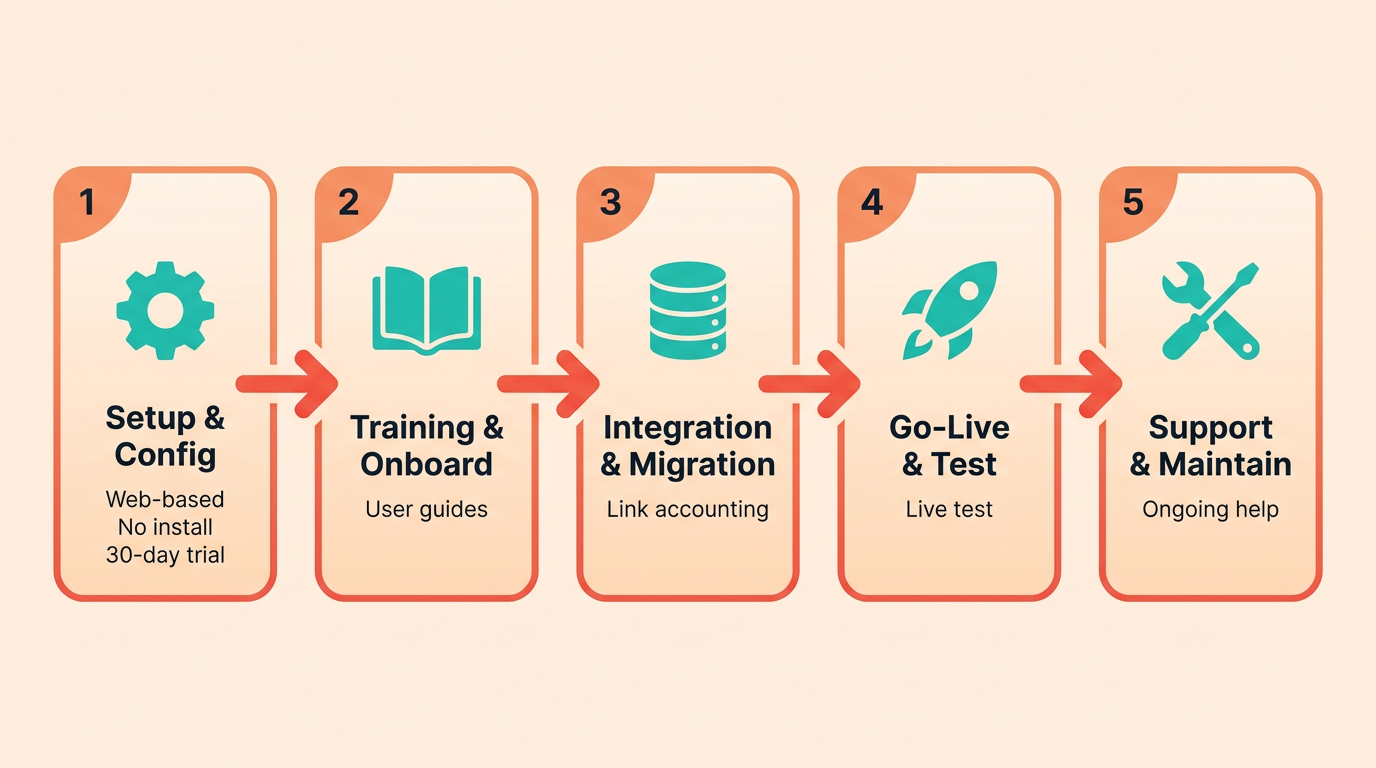
Blixo simplifies setup with a 100% web-based platform that requires no software installation. Users can begin within minutes by configuring pre-populated invoicing templates and linking to existing accounting systems. The 30-day free trial allows businesses to test workflows without upfront costs, making onboarding low-risk. Automation Anywhere, while not explicitly detailed in sources, typically involves multi-step configuration, API integrations, and longer deployment timelines due to its broader automation scope.
| Feature | Blixo | Automation Anywhere (General Common Knowledge) |
|---|---|---|
| Setup Time | Immediate access via web interface | Weeks to months for full deployment |
| Installation | None required | Software installation and server setup |
| Integration | Pre-built connectors for accounting systems | Custom API or middleware required |
Blixo’s focus on invoicing automation means its implementation is narrower but faster. For example, a small business can automate recurring invoices and payment tracking in under an hour. Automation Anywhere, by contrast, often demands dedicated IT resources for large-scale RPA deployments, as outlined in the Core Features Comparison section..
What Training Options Exist for Each Platform?
Blixo’s documentation is minimal but sufficient for its user-friendly design. The platform’s intuitive interface reduces the need for structured training, though users may rely on contextual tooltips and FAQs. Building on concepts from the User Experience and Interface Design section, Blixo’s simplicity aligns with its low-learning-curve interface. Automation Anywhere likely offers more formal training, such as certifications or enterprise workshops, but specifics aren’t provided here.
| Training Resource | Blixo | Automation Anywhere (Assumed Based on Common Knowledge) |
|---|---|---|
| Documentation | Basic setup guides and FAQs | Extensive technical documentation and API references |
| Training Programs | Not explicitly offered | Formal courses, certifications, and on-site training |
| Support Resources | In-product assistance | Dedicated support teams and knowledge bases |
For businesses needing minimal training, Blixo’s simplicity is advantageous. A solo entrepreneur could master core invoicing features in a day. Automation Anywhere, while more complex, might suit teams requiring deep automation expertise, though this remains speculative without source confirmation..
How Do Maintenance and Support Models Differ?
Blixo’s web-based nature ensures automatic updates, eliminating manual patch management. Security is maintained via 256-bit encryption, and maintenance is handled server-side. Automation Anywhere likely provides scheduled updates and enterprise SLAs, but these details aren’t confirmed by available sources.
| Maintenance Feature | Blixo | Automation Anywhere (General Assumptions) |
|---|---|---|
| Updates | Auto-applied, no user action needed | Scheduled releases with optional rollback periods |
| Troubleshooting | In-product support for billing issues | Dedicated technical support for critical systems |
| Customization | Limited to invoicing templates | Extensive customization via RPA workflows |
Blixo’s maintenance is hands-off, ideal for small teams. A user encountering a payment processing error would contact support directly via the platform. As mentioned in the Pricing and Licensing Models section, ongoing support costs may vary significantly between the two platforms. Automation Anywhere’s maintenance model might involve proactive monitoring, but this isn’t explicitly stated in sources.
Frequently Asked Questions
1. How much time does invoice automation save per invoice compared to manual processing?
Automation reduces processing time from 3–5 hours to 5–10 minutes per invoice, cutting time by over 95%. This efficiency eliminates delays and accelerates payment cycles.
2. What are the error rate differences between manual and automated invoice processing?
Manual systems have 2–5% error rates, while automation achieves <0.1% errors. This drastic reduction minimizes disputes and rework for businesses.
3. How do automation tools impact annual invoice processing costs?
Automation saves 30–50% on processing costs. For a $10M budget, this translates to $3M–$5M in annual savings due to reduced labor and error-related expenses.
4. How quickly can automation shorten payment cycles?
Payment cycles drop from 7–10 days to 1–3 days with automation, improving cash flow and reducing late payment penalties or vendor conflicts.
5. What volume of invoices benefits most from automation?
Mid-sized companies processing 10,000+ invoices monthly save over 100 hours monthly by eliminating manual rework, making automation ideal for high-volume workflows.
6. Can invoice automation integrate with existing financial systems?
Yes, tools like Automation Anywhere and Blixo seamlessly integrate with financial systems, enhancing workflow efficiency without requiring major infrastructure changes.
7. Which solution is better for reducing audit risks?
Both Automation Anywhere and Blixo reduce audit risks by minimizing errors and ensuring compliance, but the choice depends on specific integration needs and system compatibility.