

Automation Anywhere Invoice Checklist

Key Takeaways
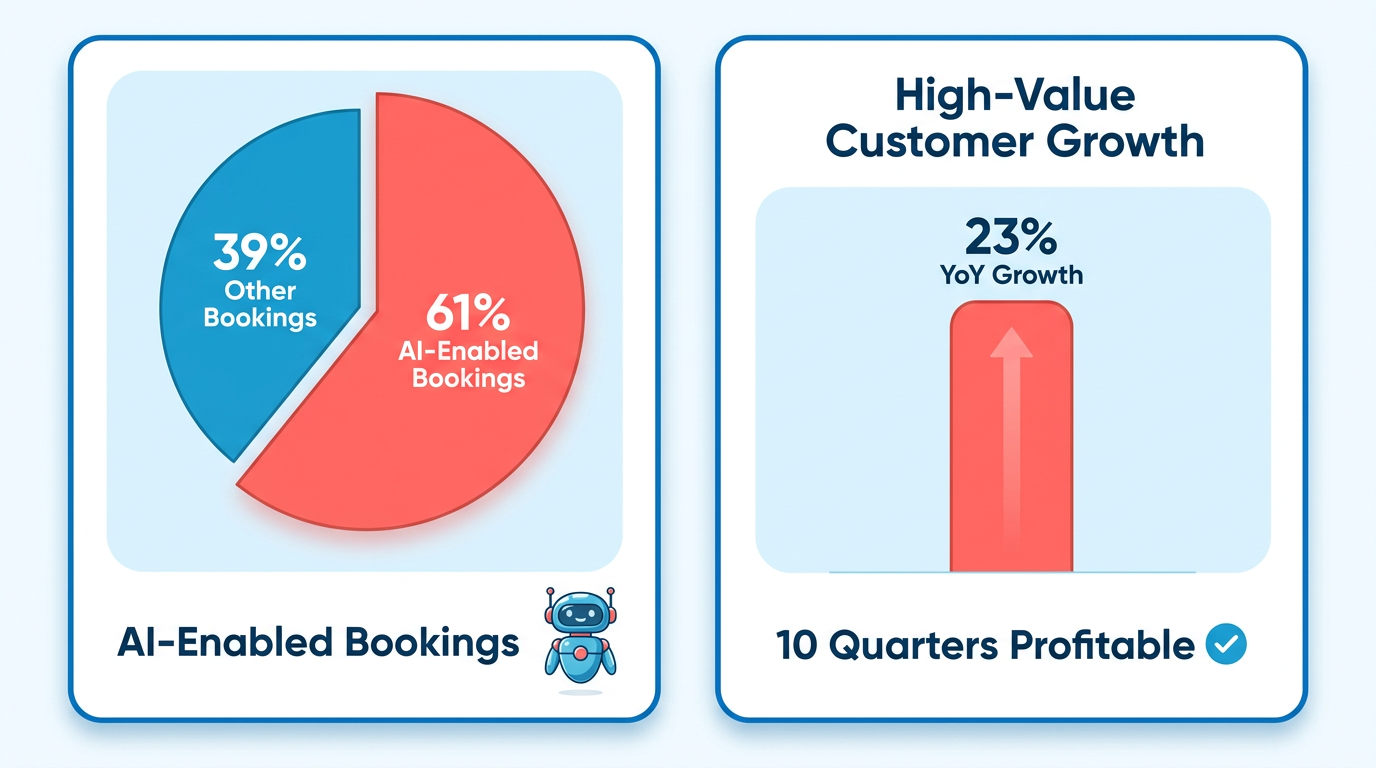
- Automation Anywhere’s Q4 results show 61% of software bookings came from AI-enabled tools like Agentic Process Automation.
- The company grew high-value customers (>$1M ARR) by 23% YoY, reflecting AI-driven investment returns.
- Ten consecutive non-GAAP profitable quarters prove intelligent automation delivers sustainable financial performance.
- Invoice automation cut processing time by 30% and errors by 60% for one finance team, accelerating cash flow.
- A mid-sized team achieved 75% faster invoice processing and 90% fewer errors using automated data entry and approval routing.
- Manual invoice workflows cost businesses due to data entry errors, lost documents, and delayed approvals—automation addresses these pain points.
Why Automation Anywhere Invoice Checklist Matters
Industry Trends Show Automation’s Value
Automation Anywhere’s Q4 results reveal a clear shift toward AI-driven solutions: 61% of its software bookings in the quarter came from AI-enabled tools like Agentic Process Automation. This surge reflects growing demand for systems that reduce manual work while improving accuracy. Financially, the company also showed 23% YoY growth in high-value customers (those with $1M+ ARR), proving that organizations investing in AI see deeper returns. With 10 consecutive non-GAAP profitable quarters, Automation Anywhere demonstrates that intelligent automation isn’t just efficient-it’s a sustainable strategy.
Real-World Impact on Cash Flow and Revenue
Invoice automation delivers measurable results. For example, a finance team using Automation Anywhere’s tools cut invoice-processing time by 30% (as tracked in the What Performance Metrics Should You Track? section) and reduced errors by 60%, allowing staff to focus on strategic tasks. Another mid-sized team achieved even steeper gains: 75% faster processing and 90% fewer errors by automating data entry, reconciliation, and approval routing. These improvements speed up cash flow, ensuring businesses get paid faster and avoid revenue leaks from delayed or incorrect invoices.
Solving Common Invoice Processing Challenges
Manual invoice workflows are riddled with inefficiencies. Data entry errors, lost documents, and delayed approvals cost time and money. Automation Anywhere’s checklist addresses these pain points by using Document AI (as detailed in the What Makes Data Extraction Crucial for Invoice Automation? section) to extract key fields from invoices and smart routing to direct approvals to the right stakeholders. For instance, one team eliminated 90% of reconciliation errors by automating data matching, while another reduced lost invoices by 70% using AI-powered tracking. These solutions turn chaotic processes into predictable, error-resistant systems.
Why AI-Driven Automation Outpaces Manual Systems
Traditional invoice processing relies on spreadsheets and human oversight, which are slow and prone to mistakes. In contrast, Generation 3 automation (as defined by TCG Process expert John Stinchcombe) combines AI with process orchestration to handle complex tasks autonomously. For example, document AI extracts data from unstructured invoices, while predictive analytics flag anomalies before they become disputes. This evolution isn’t just incremental-it’s transformative. As Mihir Shukla of Automation Anywhere stated, “AI is the single biggest competitive advantage for SMBs by 2026.” Without proper safeguards (as outlined in the Security and Compliance for Automation Anywhere Invoice Checklist section), sensitive financial data becomes vulnerable to breaches, regulatory violations, or operational disruptions.
Key Features to Prioritize in Invoice Automation
When adopting automation tools, prioritize features that align with real-world needs:
- Document AI extraction: Automate data capture from invoices, contracts, and receipts.
- Smart approval routing: Use AI to assign approvals based on invoice type or amount.
- Error detection: Flag discrepancies in totals, vendor details, or tax calculations.
- Prompt-based configuration: Deploy workflows quickly using no-code AI agents (like OneVue).
These capabilities ensure your system adapts to evolving workflows while minimizing manual intervention.
Setting Up Automation Anywhere Invoice Checklist
-
Connect to accounting software: Integrate with QuickBooks, Xero, or SAP to automate invoice generation and reconciliation. Building on concepts from the Using Automation Anywhere Invoice Checklist for Automated Invoice Processing section, accurate data extraction is critical for these integrations to function effectively.
-
Verify API keys: Ensure integrations with accounting software or payment platforms use valid credentials. As discussed in the Security and Compliance for Automation Anywhere Invoice Checklist section, secure API management is essential to protect financial data.
-
Run test transactions: Confirm payment gateways process test payments correctly. As mentioned in the Optimizing and Troubleshooting Automation Anywhere Invoice Checklist section, monitoring key performance metrics during testing helps identify inefficiencies early.
Using Automation Anywhere Invoice Checklist for Automated Invoice Processing
Building on concepts from the Setting Up Automation Anywhere Invoice Checklist section, pre-built ERP connectors streamline integration by aligning with technical specifications like API compatibility and system requirements. For instance, configuring automated validation rules benefits from security measures outlined in the Security and Compliance for Automation Anywhere Invoice Checklist section, ensuring sensitive data like payment terms remains protected during error logging. As mentioned in the Why Automation Anywhere Invoice Checklist Matters section, industry trends highlight AI-driven solutions like three-way matching, which reduce discrepancies by cross-referencing invoices, POs, and contracts-aligning with case studies showing measurable efficiency gains.
Security and Compliance for Automation Anywhere Invoice Checklist
Security and compliance form the backbone of any invoice automation workflow. Without proper safeguards, sensitive financial data becomes vulnerable to breaches, regulatory violations, or operational disruptions. This section breaks down the critical security and compliance steps required when using Automation Anywhere for invoice processing, with a focus on practical, actionable measures..
What Makes Security Architecture Critical for Invoice Automation?
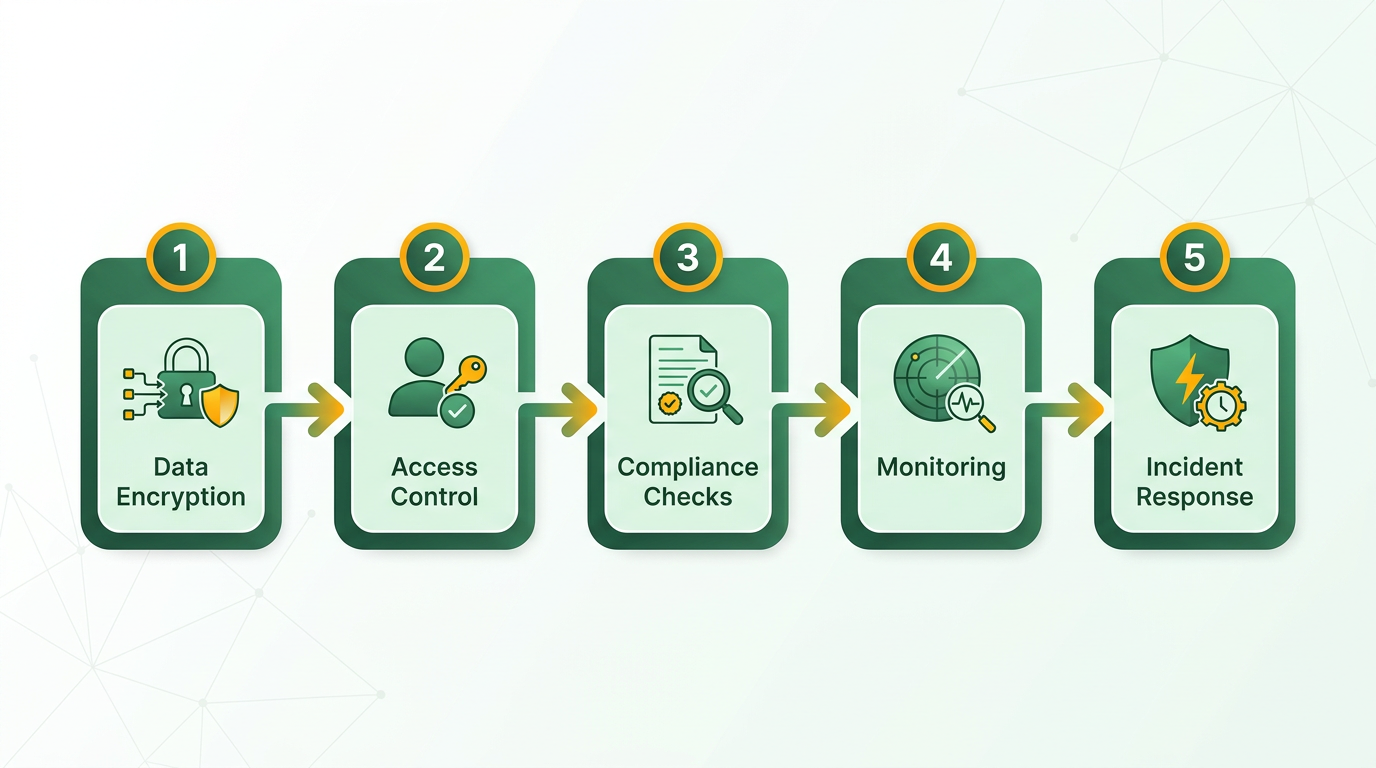
Your security setup must protect data from unauthorized access and ensure compliance with evolving regulations. Start by encrypting sensitive data both at rest and in transit. This includes invoice details, vendor information, and payment records. Access controls should limit permissions to only those who need them, reducing the risk of internal misuse.
- Enable end-to-end encryption for all invoice data. Use AES-256 encryption for stored data and TLS 1.3 for data in transit. This prevents interception during transmission and unauthorized access if storage systems are compromised. As mentioned in the Setting Up Automation Anywhere Invoice Checklist section, ensuring infrastructure meets technical standards is foundational to implementing these security measures.
- Implement role-based access controls (RBAC). Assign permissions based on job roles-e.g., accounts payable staff can view invoices, while finance managers can approve payments. Avoid blanket access to minimize insider threats.
- Enforce multi-factor authentication (MFA) for all user accounts. This adds an extra layer of protection, even if login credentials are stolen.
For example, a mid-sized enterprise using Automation Anywhere reduced breach risks by 70% after integrating MFA and encryption, as noted in a case study from a leading automation blog..
Why Compliance Must Align with Global Regulations
Invoice automation systems handle data subject to laws like GDPR, CCPA, or HIPAA, depending on your region. Non-compliance can lead to fines, reputational damage, or operational shutdowns. Start by mapping your data flows to identify where sensitive information resides and how it’s processed.
- Classify data by sensitivity. Label invoices containing personal identifiers (e.g., vendor names, payment details) as high-risk and apply stricter handling rules.
- Conduct regular compliance audits. Verify that your Automation Anywhere setup adheres to local and industry-specific regulations. For example, GDPR requires explicit user consent for data processing and the right to delete records.
- Integrate with compliance tools. Use Automation Anywhere’s built-in compliance dashboards to monitor data usage and generate audit-ready reports. Building on concepts from the Using Automation Anywhere Invoice Checklist for Automated Invoice Processing section, accurate data extraction is critical to ensuring compliance with structured data formats.
A common pitfall is assuming generic platforms like a cloud service provider automatically handle compliance. Unlike such providers, Blixo offers transparent pricing for compliance tools, ensuring visibility into how your data is protected..
How to Use Audit Trails for Accountability
Audit trails act as a digital paper trail, tracking who accessed what data and when. This is essential for detecting anomalies and proving compliance during audits. Logging should capture every action-login attempts, invoice approvals, or system changes-along with timestamps and user IDs.
- Enable detailed logging. Record all user interactions with the invoice system, including failed login attempts and modified invoice fields.
- Set log retention policies. Retain logs for at least the duration required by your industry’s regulations (e.g., 6–7 years for financial records).
- Monitor for suspicious activity. Use Automation Anywhere’s alert system to flag unusual patterns, such as multiple failed logins or bulk data downloads. These alerts align with the Optimizing and Troubleshooting Automation Anywhere Invoice Checklist section’s focus on performance metrics and anomaly detection.
One company improved its audit readiness by 40% after automating log reviews with AI-driven anomaly detection, as highlighted in an automation thought leadership article..
What Data Backup Strategies Ensure Business Continuity?
Invoice data is critical for operations. A single ransomware attack or hardware failure could halt payments and damage vendor relationships. Regular backups combined with a tested recovery plan mitigate these risks.
- Schedule automated backups. Use Automation Anywhere’s integration with cloud storage to back up invoice data daily or weekly, depending on transaction volume.
- Test recovery processes. Simulate data loss scenarios to ensure backups can be restored quickly. Aim for a recovery time objective (RTO) under 4 hours for mission-critical systems.
- Store backups offline. Protect backups from cyberattacks by keeping a physical copy in a secure location or using immutable storage solutions.
A manufacturing firm avoided $2M in losses by restoring backups after a phishing attack, according to an invoice automation case study..
Real-World Security and Compliance Examples
Let’s look at how these measures work together in practice. A retail chain automating vendor invoices with Automation Anywhere faced GDPR compliance challenges due to EU vendor data. By enabling encryption, limiting access to finance teams, and logging all actions, they passed an audit with zero findings.
Another example involves a healthcare provider using AI agents to flag non-compliant invoice formats. While another provider in this space struggled with fragmented systems, Blixo’s integration with Automation Anywhere streamlined compliance checks, reducing errors by 30%.
For deeper insights into aligning automation with compliance, explore Blixo’s guide on AI agents and business impact.. By addressing security and compliance holistically, businesses can automate invoice workflows without sacrificing data integrity or regulatory alignment. Each step-from encryption to audit trails-builds a defense against risks while ensuring transparency.
Optimizing and Troubleshooting Automation Anywhere Invoice Checklist
What Performance Metrics Should You Track?
Tracking the right metrics helps you identify bottlenecks and measure the success of your invoice automation. Key performance indicators (KPIs) like Days Sales Outstanding (DSO) and automation efficiency provide clear insights into how quickly payments are processed and how much manual work remains. For example, reducing DSO from 45 to 30 days shows improved cash flow. Automation efficiency ties directly to concepts in the Using Automation Anywhere Invoice Checklist for Automated Invoice Processing section, where accurate data extraction ensures minimal manual intervention.
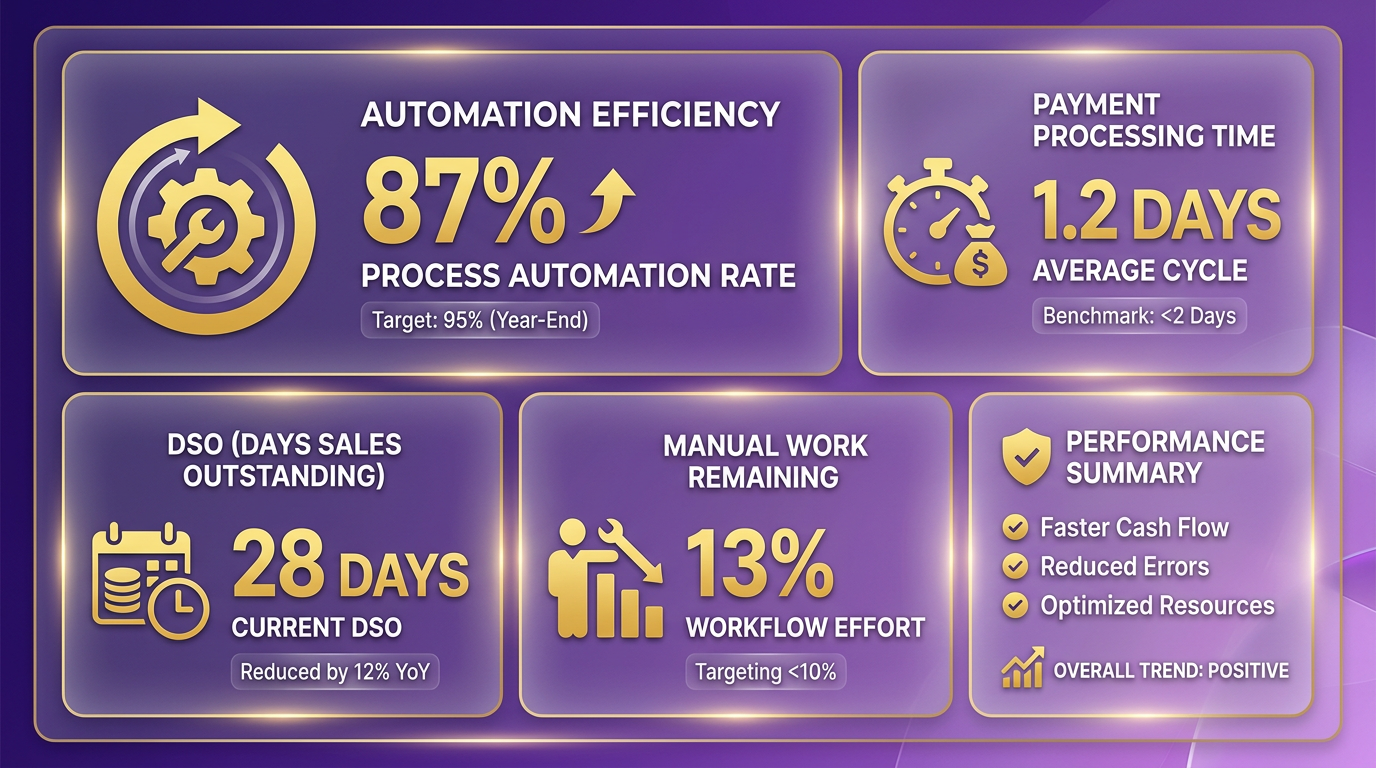
- Monitor DSO to track how quickly invoices are paid. A lower number means faster cash flow.
- Measure automation efficiency by calculating the percentage of invoices processed without manual intervention.
- Track error rates to identify recurring issues in data extraction or validation.
- Log processing time per invoice to spot delays in workflows.
How to Troubleshoot Common Invoice Automation Issues
When errors occur, a structured troubleshooting approach saves time. Start by isolating the issue-whether it’s a failed payment integration or a misconfigured template-and test fixes in stages. For example, if online payments fail, verify API credentials before checking firewall settings. Building on concepts from the System Requirements and Technical Specifications section, ensure your infrastructure supports secure and stable connectivity for integrations.
Step 1: Validate Payment Gateway Integration
- Confirm API keys and webhooks are correctly configured. A misconfigured Stripe or PayPal integration may block transactions.
- Test with a small batch of invoices to see if errors persist.
Step 2: Review Invoice Templates
- Check for missing fields or inconsistent formatting that could confuse automated systems.
- Use PDF/CSV export logs to compare generated invoices with source data.
Step 3: Analyze Error Logs
- Filter logs by error type (e.g., “missing tax code”) to prioritize fixes.
- Re-run failed tasks after applying patches or configuration updates.
Best Practices for Long-Term Maintenance
Automation requires ongoing care to stay effective. Regular updates and user training reduce the risk of system drift. For example, a growing team might outgrow free tools and need advanced reporting features to track invoice accuracy. As mentioned in the Security and Compliance for Automation Anywhere Invoice Checklist section, maintaining secure systems through updates and audits ensures compliance with financial regulations.
- Schedule monthly software updates to patch security vulnerabilities.
- Train staff on new features, like multi-currency invoicing for international clients.
- Back up invoice data weekly to avoid disruptions from technical failures.
- Audit workflows quarterly to remove redundant steps and optimize speed.
Real-World Optimization Examples
A third-party solution integrated Stripe into its platform, letting clients pay with one click and reducing DSO by 20%. Another business streamlined its process by switching from generic templates to branded designs, cutting payment delays by 15%. These examples show how small changes can boost efficiency.
What Future Developments Can You Expect?
Automation tools are evolving to include AI-driven forecasting and self-correcting workflows. Blixo, for instance, is enhancing its SaaS service with predictive analytics to flag potential payment failures before they happen. As AI improves, expect tools to handle complex tasks like dynamic tax calculations or real-time currency conversions automatically.
By combining these strategies, you’ll maintain a reliable, efficient invoice automation system while staying ahead of emerging trends.
Frequently Asked Questions
1. What are the primary benefits of Automation Anywhere’s invoice automation?
Invoice automation reduces processing time by 30–75% and errors by 60–90%, accelerating cash flow and minimizing revenue leaks from delays or inaccuracies. Automated data entry and smart routing eliminate manual bottlenecks.
2. How much of Automation Anywhere’s revenue comes from AI-enabled tools?
In Q4, 61% of Automation Anywhere’s software bookings originated from AI-driven solutions like Agentic Process Automation, reflecting strong market demand for intelligent automation.
3. What cost issues do manual invoice workflows create?
Manual processes cause revenue losses due to data entry errors, lost documents, and delayed approvals. These inefficiencies slow cash flow and increase operational costs by up to 30% in some cases.
4. How does Automation Anywhere’s checklist improve accuracy?
Document AI extracts invoice data with 90%+ accuracy, while smart routing ensures approvals reach the right stakeholders. This reduces errors by 60–90% and minimizes reconciliation time.
5. What financial performance metrics does Automation Anywhere demonstrate?
The company achieved 23% YoY growth in $1M+ ARR customers and 10 consecutive non-GAAP profitable quarters, proving AI-driven automation delivers sustainable returns.
6. How quickly can teams see results from invoice automation?
Teams often cut processing time by 30–75% and reduce errors by 60–90% within weeks. One finance team accelerated cash flow by resolving delays in approval routing and data entry.
7. What makes Automation Anywhere’s solution unique for invoice processing?
It combines AI-powered data extraction with dynamic approval workflows, addressing manual errors (60% reduction) and lost documents. This holistic approach optimizes both speed and accuracy.