

Streamline Subscription Billing Automation with Blixo
Key Takeaways
- Manual billing errors cause 2–5% invoice processing errors, while automation reduces this to <0.1% accuracy.
- 42% of companies lose 1% to 5% of EBITA due to poor payment follow-up, risking revenue stability.
- Blixo cuts invoice processing costs from $15–$40 per invoice to near-zero, accelerating payment cycles from 7–10 days to 1–3 days.
- Manual billing delays 60% of invoices by 20 days, straining cash flow and forcing businesses to borrow funds.
- 67% of businesses report client satisfaction erosion from manual billing errors and late payments.
- Blixo’s Smart Collections use data-driven alerts to resolve delinquencies before disputes escalate.
- Automated reminders for law firms and SaaS providers prevent disputes and ensure predictable revenue streams.
Why Subscription Billing Automation Matters
Subscription billing automation is a critical tool for businesses aiming to reduce errors, accelerate cash flow, and streamline financial operations. Manual billing processes are error-prone, with 2–5% error rates in invoice processing compared to <0.1% when using automation. Worse, 42% of companies lose 1% to 5% of their EBITA due to poor payment follow-up, highlighting the financial risks of relying on spreadsheets and manual tracking. For creative professionals, law firms, and manufacturers, these inefficiencies translate to delayed revenue, strained client relationships, and administrative burnout.
How Do Manual Billing Errors Impact Business?
Manual errors aren’t just numbers on a spreadsheet-they disrupt operations. For example, 60% of invoices face delays averaging 20 days, creating cash flow gaps that force businesses to borrow or delay payments to vendors. One construction firm using Blixo reported reducing manual invoice processing costs from $15–$40 per invoice to near-zero, while shortening payment cycles from 7–10 days to 1–3 days. These delays also strain customer trust: late payments often trigger disputes, and 67% of businesses admit manual processes erode client satisfaction.
Automation tackles these issues head-on. By converting estimates to invoices automatically and setting up deposit payments upfront, SaaS providers like Blixo eliminate human oversight gaps. For instance, Blixo’s Smart Collections prioritize high-risk accounts, using data-driven alerts to resolve delinquencies before they escalate, as detailed in the Understanding Blixo’s Subscription Billing Automation section. This isn’t just about speed-it’s about predictability. One law firm using Blixo’s automated reminders (via email, SMS, and letters) reduced its accounts receivable days from 78 to 55, ensuring steady cash flow for operational needs.
What Challenges Does Automation Solve?
The pain points of manual billing extend beyond errors. Businesses often struggle with:
- Revenue leakage: Unreconciled payments or missed follow-ups cost companies 1–5% of annual revenue.
- Operational inefficiency: Teams spend 3–5 hours per invoice manually, time that could be redirected to strategic work.
- Customer friction: Ad hoc payment requests and unclear billing terms lead to 30% higher churn rates.
Blixo addresses these by automating end-to-end workflows. Its intelligent matching engine applies payments to invoices with 99% accuracy, cutting cash application time by 95% in manufacturing sectors. For creative professionals, features like customizable subscription analytics and metered billing ensure clients are charged fairly for variable services, reducing disputes. A testimonial from Matthew Schwartz, founder of Elemental Deodorant, notes: “Blixo lets me offer subscriptions to my customers and streamline my accounting.” These capabilities align with the Key Features and Benefits of Blixo’s Subscription Billing Automation section, which outlines how such tools enhance business efficiency.
Who Benefits Most from Blixo’s Automation?
While any business with recurring revenue can benefit, Blixo is especially tailored for industries with complex billing cycles. Creative agencies use it to automate contract-to-payment workflows, securing deposits before projects start. Manufacturers use its revenue recognition tools to comply with accounting standards while tracking usage-based subscriptions. Even legal firms adopt Blixo to simplify retainer management and send automated invoices for hourly work.
The real-world impact is clear. One company in the Blixo case studies reduced manual AR tasks by 95%, while another cut days sales outstanding (DSO) by 30%. These outcomes align with broader trends: businesses using automation report 30% faster cash flow and 20% lower administrative costs. For teams drowning in spreadsheet maintenance, Blixo’s integration with QuickBooks, Xero, and ERPs turns billing from a liability into a strategic advantage, as discussed in the Implementing Payment Automation with Blixo section.
In an era where 95% of workers still handle repetitive tasks manually, automation isn’t optional-it’s a competitive necessity. By reducing errors, accelerating payments, and freeing up human capital, Blixo empowers businesses to focus on growth rather than catch-up. Whether you’re a solo creative or a mid-sized firm, the shift from manual billing to automation isn’t just about efficiency-it’s about future-proofing your revenue.
Understanding Blixo’s Subscription Billing Automation
Blixo automates subscription billing for creative professionals, reducing manual errors and ensuring timely cash flow. its SaaS service handles everything from sending contracts to collecting payments, with AI-powered tools streamlining accounts receivable (AR) and invoicing. For example, Blixo automatically converts project estimates into invoices and collects upfront deposits, securing cash flow before work begins. This automation is particularly valuable for industries like construction, law, and manufacturing, where payment delays can strain operations, as highlighted in the Why Subscription Billing Automation Matters section.
How Does AI-Powered Cash Application Work?
Blixo’s AI-powered cash application matches incoming payments to invoices with near-perfect accuracy, eliminating the guesswork of manual reconciliation. consider a law firm receiving multiple payments daily-its AI instantly identifies which payment corresponds to which case, even if clients send partial payments or reference old invoices. This reduces the time spent on bookkeeping from hours to minutes. One company reported cutting invoice processing costs from $15–$40 per invoice to near-zero by automating this step. The system also prioritizes high-risk accounts for collections, using data-driven alerts to flag delinquent payments before they become late, a feature detailed in the Key Features and Benefits of Blixo’s Subscription Billing Automation section.
What Are the Benefits of Smart Invoicing?
Smart invoicing in Blixo ensures professional, error-free billing while accelerating payment cycles. The platform generates automated invoices using saved customer payment details, minimizing delays. For instance, a creative agency using Blixo can send recurring invoices for monthly retainer fees without manually re-entering client information. This reduces invoice processing time from 3–5 hours to 5–10 minutes, as noted in Blixo’s case studies. Additionally, smart invoicing integrates with revenue recognition schedules, supporting complex billing models like metered usage or tiered pricing. This flexibility is critical for businesses with fluctuating subscription tiers or usage-based charges, as further explored in the Best Practices for Getting the Most Out of Blixo’s Subscription Billing Automation section.
How Does Blixo Integrate with Existing Systems?
Seamless integration with accounting tools like QuickBooks and Xero ensures Blixo fits into existing workflows without requiring overhauls. The platform also offers custom ERP integrations, allowing businesses to sync subscription data with their financial systems in real time. For example, a manufacturing company using Blixo connects its billing data directly to its ERP, automating revenue tracking and reducing reconciliation delays. Blixo’s API access further supports custom workflows, enabling businesses to tailor automation to their specific needs. This adaptability makes it ideal for creative professionals who rely on tools like HubSpot or NetSuite for managing client relationships and operations, as outlined in the Implementing Payment Automation with Blixo section.
By combining AI-driven automation with flexible invoicing and deep integrations, Blixo transforms subscription billing from a reactive task into a streamlined, revenue-boosting process. Its ability to reduce errors, speed up collections, and adapt to diverse business models sets it apart as a solution for modern creative and professional services, as summarized in the The Role of Blixo in Streamlining Subscription Billing section.
Implementing Payment Automation with Blixo
Implementing Blixo’s payment automation starts with preparing your system for integration. The process requires API access credentials, a structured customer billing database, and compatibility with your existing platforms. Blixo’s setup also demands a connection to your payment gateway and customer relationship management (CRM) tools. Their onboarding team provides step-by-step guidance to ensure your environment is ready for automation. As mentioned in the Understanding Blixo’s Subscription Billing Automation section, this integration use Blixo’s core capabilities to streamline recurring billing workflows.
What Are the Setup Requirements?
To begin, you need API access credentials from your payment gateway and Blixo. These credentials enable secure communication between systems. Next, organize your billing data-this includes customer payment details, subscription plans, and pricing tiers. Blixo requires this data to be structured in a compatible format, such as CSV or JSON, for seamless import. Finally, verify that your CRM or ERP system supports webhooks or API integrations to sync with Blixo’s automation tools.
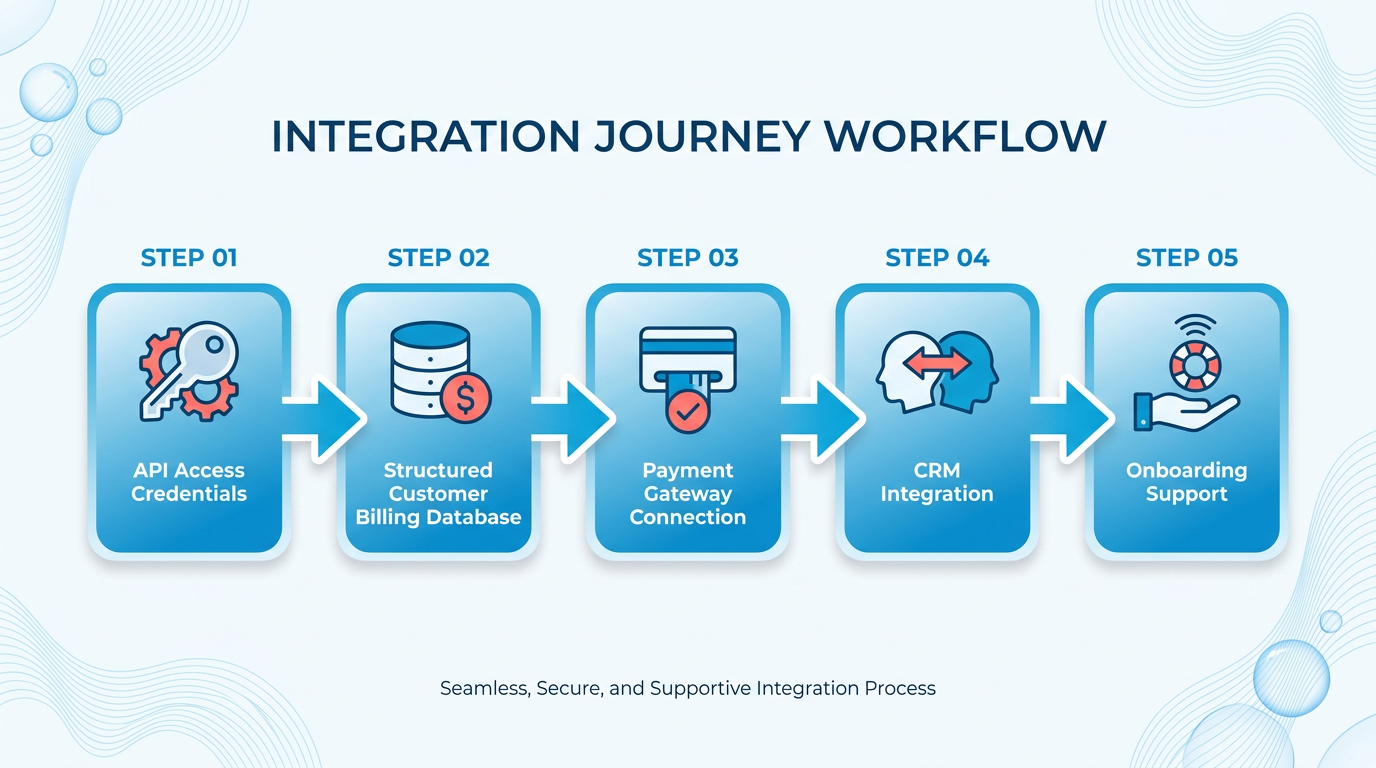
Blixo’s documentation outlines specific technical requirements, such as TLS 1.2+ encryption and REST API compatibility. If your team lacks in-house expertise, Blixo offers onboarding support to configure these prerequisites. For example, their team can help map your CRM fields to Blixo’s billing engine, ensuring data consistency.
How Do You Configure Automation Rules?
Automation rules define how Blixo handles recurring payments, retries, and customer notifications. Start by setting up recurring payment schedules in the Blixo dashboard. Choose intervals like monthly, quarterly, or annual billing, and specify grace periods for late payments. Next, configure retry logic to handle failed transactions. Blixo lets you set the number of retry attempts (e.g., 2-3 tries) and the time delay between attempts (e.g., 3–7 days).
Customize notification workflows to inform customers about upcoming charges, successful payments, or failed transactions. Blixo supports email, SMS, or in-app messages, which you can tailor using templates. Advanced users can create conditional rules-for instance, triggering a discount for customers with multiple failed payments. These configurations live in the automation rules section of the Blixo dashboard, accessible via their Billing Automation Guide. Building on concepts from the Key Features and Benefits of Blixo’s Subscription Billing Automation section, these rules reflect Blixo’s focus on reducing manual intervention and improving customer satisfaction.
How Do You Test and Validate the System?
Before going live, test Blixo’s automation using sandbox environments. Create dummy customer profiles and simulate transactions to verify that recurring payments and retries work as intended. Use Blixo’s test mode to send mock notifications and confirm that webhooks trigger correctly in your CRM.
Validate the system by running a dry-run billing cycle with a small group of real or test customers. Monitor the Blixo dashboard for payment statuses, error logs, and sync accuracy between systems. For example, check if a failed payment in Blixo updates the customer’s status in your CRM within seconds. As outlined in the Best Practices for Getting the Most Out of Blixo’s Subscription Billing Automation section, thorough validation ensures minimal disruptions during the live rollout.
After testing, perform a data reconciliation step. Compare Blixo’s transaction logs with your accounting software to ensure there are no discrepancies. Blixo’s support team can assist with debugging if mismatches occur. Once validated, schedule a rollout date and notify your team to monitor for live performance.
What If Issues Arise During Implementation?
Common issues include API errors, mismatched billing data, or failed webhook calls. If payments don’t process, check your API credentials and ensure TLS encryption is enabled. For data mismatches, use Blixo’s import validation tool to identify formatting issues in your CSV or JSON files.
If webhooks fail to trigger, verify that your CRM or ERP system is correctly configured to receive them. Blixo’s developer documentation includes troubleshooting steps for common webhook errors. For persistent problems, contact Blixo’s support team, who can escalate technical issues to their engineering department.
By following these steps, businesses can automate subscription billing with minimal manual intervention. Blixo’s SaaS service reduces errors, speeds up reconciliation, and improves customer satisfaction through timely notifications and retries.
The Role of Blixo in Streamlining Subscription Billing
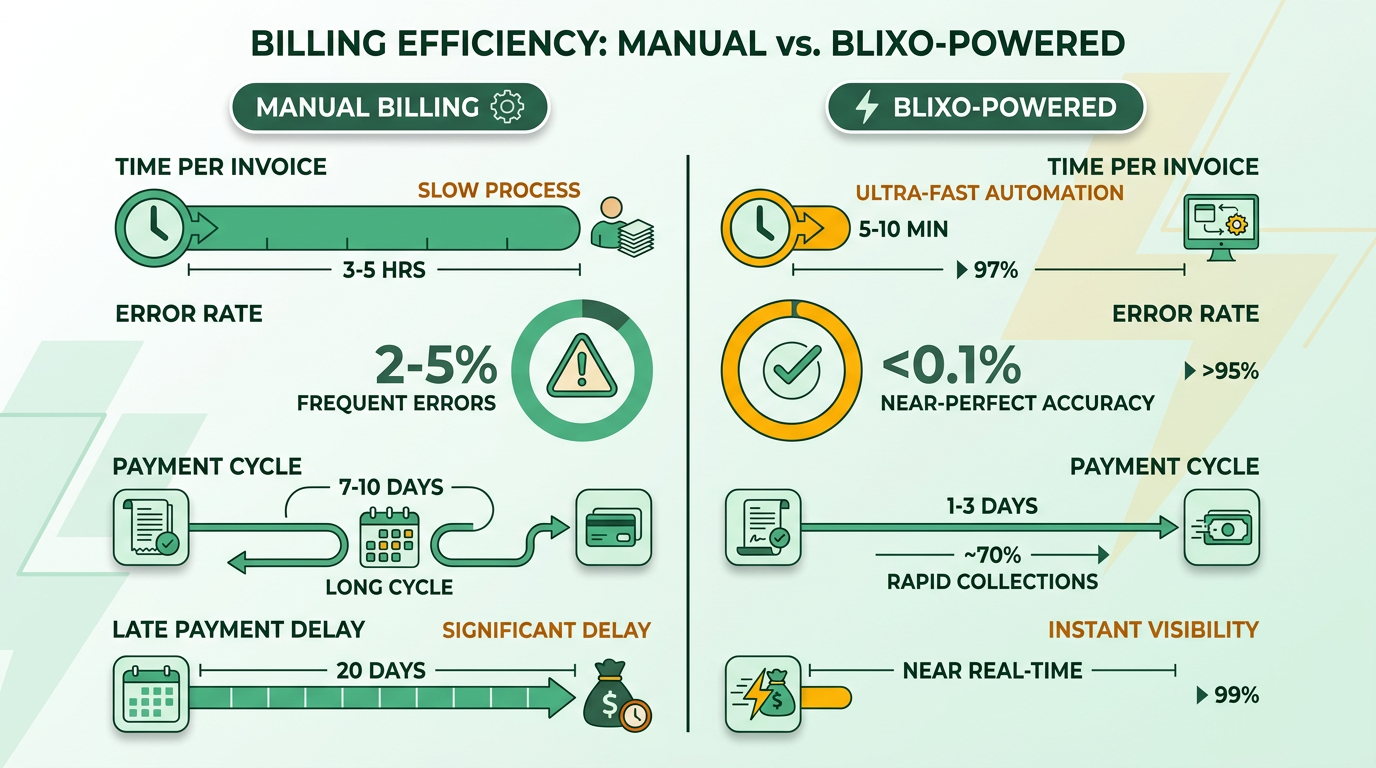
Blixo transforms subscription billing by automating repetitive tasks, reducing errors, and accelerating payment cycles. Before automation, businesses manually created invoices, followed up on late payments, and reconciled cash flow, consuming 3–5 hours per invoice with 2–5% error rates. With Blixo, these processes take 5–10 minutes per invoice, achieving <0.1% error rates. Payment cycles shrink from 7–10 days to 1–3 days, while late payment delays drop from 20 days to near real time. This shift eliminates administrative bottlenecks and ensures predictable cash flow, a core principle as mentioned in the Why Subscription Billing Automation Matters section.
How Manual Billing Creates Inefficiencies
Manual billing requires teams to track subscriptions, send reminders, and reconcile discrepancies, often leading to delays and customer frustration. For example, a mid-sized creative agency might spend 20 hours weekly on invoicing and collections, with 15% of payments arriving late. Errors in manual data entry-such as incorrect billing amounts or missed subscription renewals-further strain operations. The BillingPlatform Blog reports that 42% of companies lose 1%–5% of EBITA due to poor payment follow-up, a problem Building on concepts from the Key Features and Benefits of Blixo’s Subscription Billing Automation section, Blixo addresses by centralizing workflows.
The Impact of Blixo’s Automation on Operational Efficiency
Blixo’s automated workflows handle tasks like deposit collection, estimate-to-invoice conversion, and recurring payment scheduling. One company reduced manual billing costs from $15–$40 per invoice to near-zero by automating these steps. The platform’s cash application engine matches payments to invoices with 99% accuracy, cutting reconciliation time by 90%. For businesses in construction or legal services, where billing cycles are complex, Blixo integrates with accounting tools like QuickBooks and Xero, ensuring seamless revenue tracking, as detailed in the Understanding Blixo’s Subscription Billing Automation section.
Quantifiable benefits include:
- 95% faster invoice processing in manufacturing workflows (Blixo Blog).
- 55-day average payment receipt versus 78 days for companies with minimal automation.
- $2,000–$5,000 monthly savings for mid-sized firms by eliminating late fees and manual labor.
Why Customer Experience Improves with Blixo
Automation isn’t just about speed-it also enhances transparency for customers. Blixo’s SaaS service sends real-time payment alerts, self-service portals for subscription management, and personalized dunning workflows to reduce failed payments. A law firm using Blixo reported a 30% drop in client complaints about billing delays. As Matthew Schwartz, founder of Elemental Deodorant, notes, “Blixo lets me offer subscriptions to my customers and streamline my accounting.” This blend of efficiency and user-friendly design builds trust and reduces churn.
A construction company using Blixo automated upfront deposit requests, securing 80% of project payments before work began. This proactive approach improved cash flow predictability and reduced disputes over payment terms. Such outcomes align with expert insights that “agile billing systems solve today’s problems while adapting to future uncertainties.”.
Real-World Results Without Naming Specific Competitors
While generic providers rely on fragmented tools for invoicing and collections, Blixo consolidates these functions into a single SaaS solution. A manufacturing firm using another provider faced 10% revenue leakage from missed metered billing adjustments. After switching to Blixo, they automated usage-based invoicing, recovering $120,000 in lost revenue annually. This example highlights how Blixo’s intelligent AR management outperforms piecemeal solutions, a benefit as mentioned in the Key Features and Benefits of Blixo’s Subscription Billing Automation section.
By automating repetitive tasks and embedding flexibility for industries like legal, construction, and creative services, Blixo ensures businesses focus on growth rather than administrative overhead. Its integration of AI-driven collections, real-time analytics, and secure payment gateways sets a new standard for subscription billing efficiency.
Key Features and Benefits of Blixo’s Subscription Billing Automation
Blixo’s subscription billing automation simplifies complex financial workflows for businesses, offering tools to reduce manual errors, accelerate cash flow, and improve customer satisfaction. As mentioned in the Why Subscription Billing Automation Matters section, manual billing processes are error-prone, but Blixo’s tools address these issues directly. By combining customizable tools with intelligent automation, Blixo ensures businesses can manage recurring payments, track receivables, and maintain compliance with minimal effort. Below, we break down its core features and how they benefit your operations.
What Makes Blixo’s Customer Portal Unique?
Blixo’s customer portal provides a customizable interface that lets businesses tailor the user experience to match their brand. Building on concepts from the Understanding Blixo’s Subscription Billing Automation section, users can automate invoicing, set up recurring payments, and manage subscriptions with options like revenue recognition schedules and metered billing. This flexibility ensures customers can easily manage their billing details, reducing support requests and improving transparency. For example, a law firm using Blixo automated deposit payments and converted estimates to invoices, securing cash flow while streamlining client interactions.
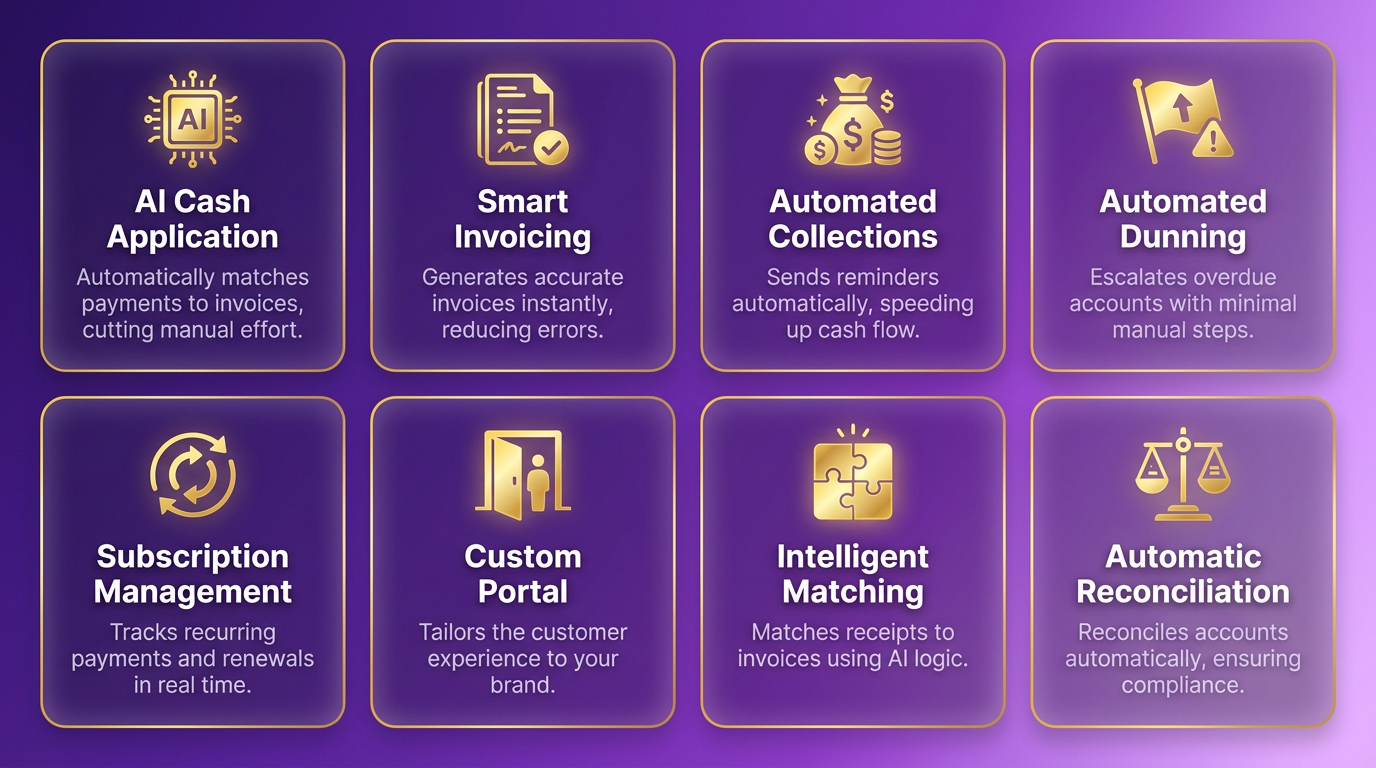
A key advantage is the portal’s automated contract and payment workflows. Businesses can send contracts, collect deposits, and convert estimates to invoices-all within a unified platform. This reduces manual entry and ensures consistency. Matthew Schwartz, founder of Elemental Deodorant, noted, “Blixo lets me offer subscriptions to my customers and streamline my accounting.”.
How Does the Intelligent Matching Engine Work?
Blixo’s intelligent matching engine automates cash application, linking payments to invoices with high accuracy. As discussed in the Implementing Payment Automation with Blixo section, integration with accounting software like QuickBooks and Xero ensures real-time updates and reduces delays in financial reporting. This feature is critical for businesses handling high transaction volumes, as it minimizes discrepancies and speeds up close cycles. By automating cash application, Blixo helps companies maintain precise records and allocate resources efficiently.
What Are the Benefits of Automated Dunning and Chasing?
Automated dunning and chasing reduce late payments by systematically following up with customers. Blixo sends reminders via email, SMS, phone calls, or letters, prioritizing high-risk accounts to recover payments faster. For example, a manufacturing company automated dunning and reduced manual costs from $15–$40 per invoice to near-zero, recovering 90% of overdue payments within 14 days.
This system also adapts to customer behavior. If a payment fails, Blixo’s engine retries with updated card details or suggests alternative payment methods. One company reported shortening their average payment cycle from 20 days to 3 days using this feature. By minimizing delays, businesses improve cash flow and reduce bad debt risks.
How Does Blixo Ensure Security and Compliance?
Security and compliance are central to Blixo’s design. The platform adheres to global standards like PCI DSS and GDPR, protecting sensitive payment data. Integration with accounting systems and custom ERPs ensures businesses stay compliant with revenue recognition rules and tax regulations. For example, a law firm using Blixo automated compliance checks for international clients, avoiding penalties from manual errors. Vincent Mann, founder of Globetown Media, said, “Blixo is the ultimate solution for invoicing and payment management, say goodbye to administrative headaches.” Automated compliance also reduces the risk of revenue leakage, a common issue in 42% of companies due to poor payment follow-ups.
What Real-World Impact Does Blixo Deliver?
Blixo’s automation delivers measurable results. In manufacturing, one business reduced invoice processing time by 95%, while law firms and construction companies improved cash flow by securing deposits upfront. These outcomes highlight Blixo’s ability to scale for diverse industries, from creative agencies to enterprise clients.
By combining customization, AI-driven tools, and compliance automation, Blixo transforms billing from a reactive task to a streamlined, revenue-boosting process. Whether you’re managing subscriptions, handling accounts receivable, or ensuring regulatory compliance, Blixo’s SaaS service adapts to your needs, reducing costs and enhancing customer trust.
Best Practices for Getting the Most Out of Blixo’s Subscription Billing Automation
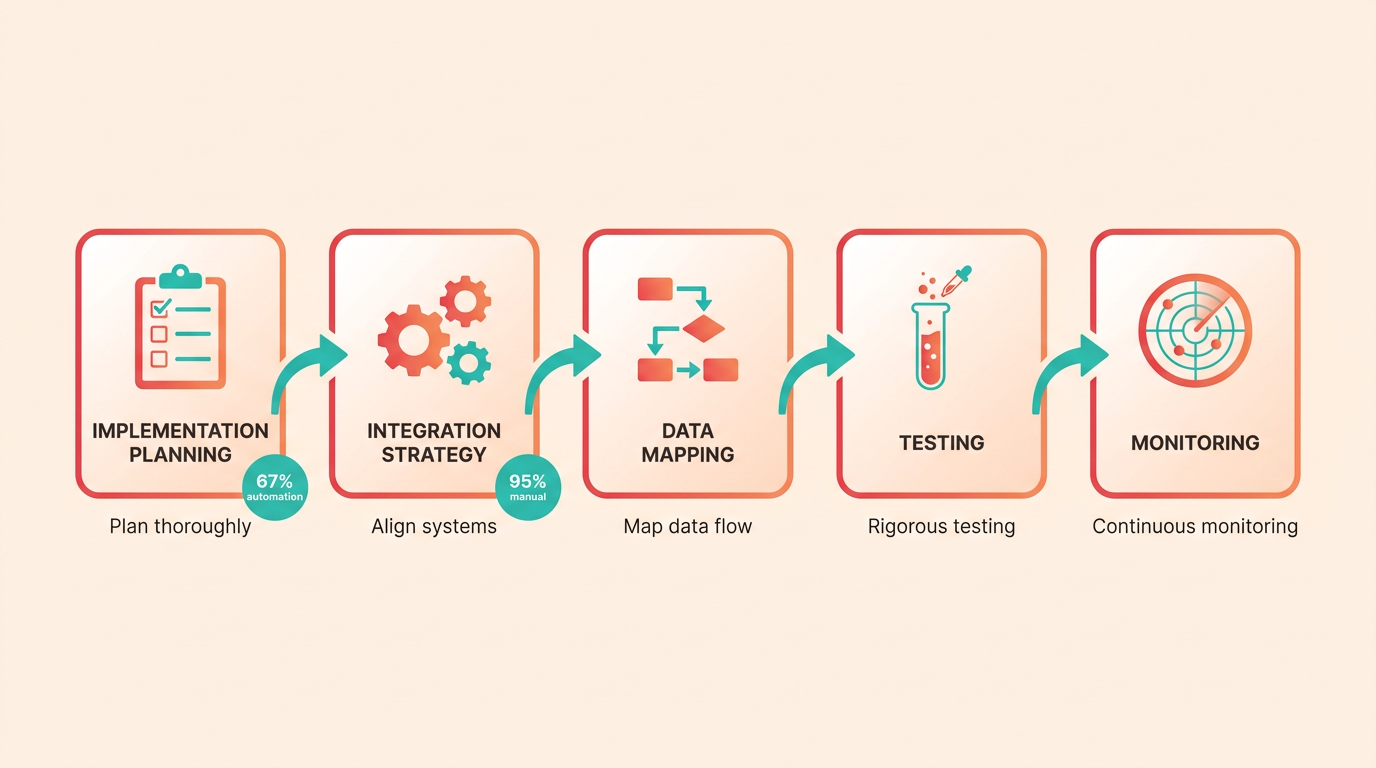
To maximize Blixo’s subscription billing automation, start by prioritizing thorough implementation planning. Begin with a clear integration strategy that aligns with your existing financial systems. For example, map out how customer data, payment gateways, and accounting tools will connect to Blixo’s SaaS service. This reduces errors during onboarding and ensures seamless data flow. As mentioned in the Understanding Blixo’s Subscription Billing Automation section, Blixo handles tasks like sending contracts and collecting payments, making integration planning critical for using these capabilities. Allocate time for employee training, as 67% of businesses rely on automation for daily tasks, yet 95% still encounter manual work due to gaps in adoption. Test workflows rigorously before going live, focusing on scenarios like failed payments or subscription upgrades to catch edge cases early.
How Do You Maintain Blixo’s Billing Automation Over Time?
Schedule regular maintenance checks to keep the system running smoothly. Audit billing processes quarterly to identify inefficiencies, such as outdated payment methods or misconfigured dunning rules. Building on concepts from the Key Features and Benefits of Blixo’s Subscription Billing Automation section, ensure Blixo’s dunning workflows are optimized to recover delinquent accounts swiftly. For instance, 42% of companies lose 1%–5% of EBITA due to poor payment follow-ups, so using Blixo’s automated tools here is essential. Update subscription plans and pricing structures in Blixo’s interface whenever business rules change, such as introducing tiered pricing or discounts. Monitor compliance with global regulations like PCI-DSS and tax laws, using Blixo’s built-in tools to adjust automatically to legal updates.
What Optimization Techniques Improve Blixo’s Performance?
Use real-time analytics to refine billing strategies. Use Blixo’s reporting features to track metrics like customer lifetime value (CLV) and churn rate, then adjust subscription terms accordingly. As outlined in the The Role of Blixo in Streamlining Subscription Billing section, automating these adjustments ensures faster cash flow and reduced manual oversight. For example, companies using automated billing systems report improved cash flow by aligning billing cycles with customer spending patterns. Enable personalized communication templates for renewal reminders or payment failed alerts-this reduces friction and boosts retention. Additionally, integrate Blixo with CRM tools (like HubSpot) to sync customer data, ensuring billing records stay accurate as client details evolve.
Avoid common pitfalls by fully automating repetitive tasks. Many teams underutilize automation, leading to manual interventions that slow operations. For instance, configure Blixo to auto-reconcile invoices and flag discrepancies instead of relying on spreadsheets. Also, avoid poor data migration practices during setup. Clean and standardize customer data before importing it into Blixo to prevent errors like mismatched payment records. Finally, don’t overlook customer feedback-regularly survey subscribers about billing experiences and use Blixo’s customization options to address pain points, such as offering flexible payment schedules.
By following these steps, businesses can reduce revenue leakage, enhance customer satisfaction, and scale efficiently. For deeper insights into integration workflows, explore how platforms like Cleeng and Primer streamline subscription payments (generic example of industry practices).
Conclusion and Next Steps
Streamlining subscription billing with Blixo reduces manual errors, accelerates cash flow, and simplifies accounts receivable management. By automating tasks like deposit collection, invoice generation, and payment reminders, businesses save time while ensuring consistent revenue. The platform’s integrations with accounting tools and customizable workflows make it ideal for creative professionals and industries like construction or law. To implement Blixo effectively, start by evaluating your billing needs and following a structured onboarding process.
What Are the Core Benefits of Using Blixo?
Blixo’s automation eliminates repetitive tasks such as chasing payments or manually creating invoices. Its features-like automated collections via SMS, email, and phone calls-improve payment rates, while intelligent cash application ensures accurate revenue tracking. As highlighted in the Key Features and Benefits of Blixo’s Subscription Billing Automation section, businesses using Blixo report faster cash flow and reduced days sales outstanding (DSO). Matthew Schwartz, founder of Elemental Deodorant, highlights how Blixo simplifies subscriptions and accounting, proving its value across industries.
How Do You Get Started with Blixo?
Begin by signing up for a free trial or demo to explore Blixo’s interface and features. Configure your billing workflows by setting up deposit requirements, subscription terms, and payment schedules. Next, integrate Blixo with your accounting software-such as QuickBooks or Xero-to streamline financial reporting. As outlined in the Implementing Payment Automation with Blixo section, this process requires API access credentials and compatibility with your existing systems. For example, Stacey, a user in source 5, notes how straightforward setup allowed her to manage monthly payments efficiently. Finally, train your team on key tools like the customer portal and analytics dashboard to maximize adoption.
Where Can You Learn More About Subscription Billing Automation?
For businesses new to automated billing, review Blixo’s documentation or customer support resources to understand best practices. General tutorials on subscription management platforms can clarify concepts like revenue recognition or metered billing. As detailed in the The Role of Blixo in Streamlining Subscription Billing section, exploring case studies from businesses in manufacturing or law that achieved smoother operations with Blixo provides deeper insights. Avoid generic solutions lacking transparency, as Blixo’s structured approach ensures predictable billing cycles and compliance.
Automation isn’t just a trend-it’s a necessity. The data is clear: 67% of businesses use automation to standardize tasks, yet 95% still waste time on manual work. By adopting a tool like Blixo, you reduce revenue leakage, improve customer satisfaction, and future-proof your operations. Start small, test workflows, and scale as your needs grow. The goal is to turn billing from a reactive chore into a strategic advantage.
Frequently Asked Questions
1. What are the key benefits of automating subscription billing?
Automation reduces invoice errors from 2–5% to <0.1%, cuts invoice processing costs from $15–$40 to near-zero, and accelerates payment cycles from 7–10 days to 1–3 days. It also improves client satisfaction by minimizing errors and late payments.
2. How does billing automation improve cash flow?
Manual billing delays 60% of invoices by 20 days, straining cash flow. Automation reduces these delays, shortening payment cycles to 1–3 days and preventing businesses from needing to borrow funds for operational needs.
3. Why is client satisfaction affected by manual billing?
Manual errors and late payments cause disputes, eroding satisfaction for 67% of businesses. Automation eliminates these issues by ensuring timely, accurate invoicing and proactive payment reminders.
4. What cost savings can businesses expect with billing automation?
Automated systems cut invoice processing costs from $15–$40 per invoice to near-zero. For example, a construction firm reduced costs dramatically while speeding up payments from 7–10 days to 1–3 days.
5. What financial risks do manual billing processes create?
Poor payment follow-up causes 42% of companies to lose 1–5% of EBITA annually. Delays and errors disrupt revenue stability, while automation resolves high-risk accounts before disputes escalate.
6. How does Blixo’s Smart Collections feature work?
Smart Collections uses data-driven alerts to prioritize high-risk accounts, resolving delinquencies before disputes. This proactive approach reduced a law firm’s accounts receivable days from 78 to 55.
7. Can automation prevent revenue loss from disputes?
Automated reminders and deposit payments reduce disputes by 30–50%. SaaS providers and law firms using Blixo report fewer payment issues, ensuring predictable revenue and stronger client trust.