

Automated vs Manual Accounts Receivable Process Automation

Key Takeaways
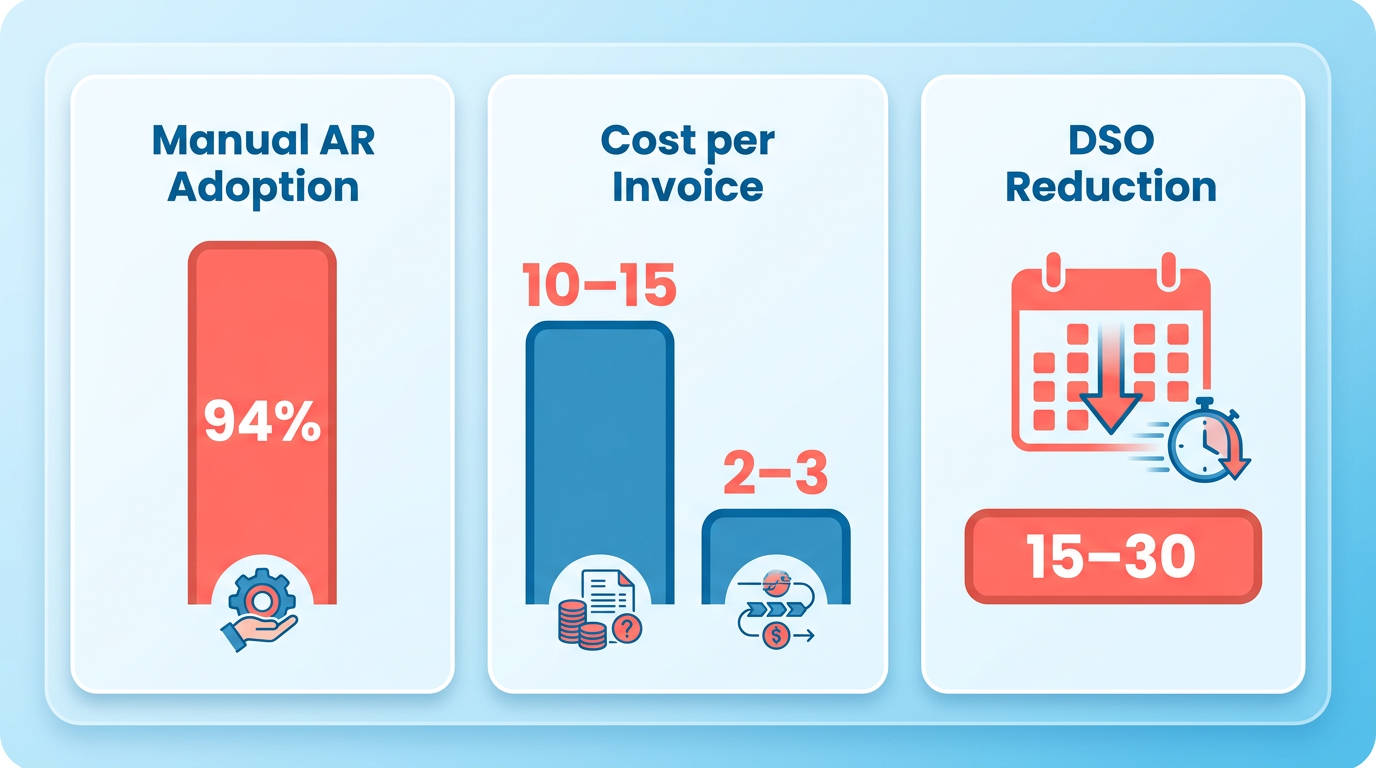
- Manual AR processes cost $10–$15 per invoice, while automation reduces costs to $2–$3, saving $8–$13 per invoice.
- Automation cuts Days Sales Outstanding (DSO) by 15–30 days, freeing up $250K in working capital for a $500K/month company.
- 94% of U.S. companies rely on manual AR systems, leading to $25,000–$70,000 in annual labor costs for mid-market businesses.
- Manual processes incur 9% bad debt from errors and result in 35% of invoices being paid late.
- Automated systems reduce labor hours from 200–400+ monthly to 20–40, cutting costs by 80–90%.
- Manual AR systems require 10–20 weekly hours for tasks like chasing payments and reconciling invoices.
- Automated processes lower DSO from 45–65 days to 30–45 days, improving cash flow efficiency.
Why Accounts Receivable Automation Matters
Accounts receivable automation isn’t just a convenience-it’s a critical upgrade for businesses aiming to survive in competitive markets. Manual processes, which 94% of U.S. companies still rely on for payments, break down as volumes grow. They lead to missed follow-ups, payment bottlenecks, and costs of $10–$15 per invoice. By contrast, automation slashes these costs to $2–$3 per invoice while reducing Days Sales Outstanding (DSO) by 15–30 days. For a company with $500K monthly revenue, this could free up $250K in working capital. The shift isn’t just about saving money-it’s about gaining control over cash flow and reducing risks. As highlighted in the Manual Accounts Receivable Process Pain Points section, manual systems also contribute to high error rates and labor costs that strain operational efficiency.
The Hidden Costs of Manual AR Processes
Manual accounts receivable systems are a ticking time bomb for efficiency. Teams spend 10–20 hours weekly on tasks like chasing payments, reconciling discrepancies, and tracking invoices. For mid-market companies, this translates to $25,000–$70,000 in annual labor costs alone. Worse, manual errors are rampant: 9% of credit-based sales are written off as bad debt, and 35% of invoices are paid late.
| Feature | Manual Processes | Automated Processes |
|---|---|---|
| Cost per invoice | $10–$15 | $2–$3 |
| DSO (Days) | 45–65 | 30–45 |
| Error rate | High (9% bad debt) | Near zero |
| Labor hours/month | 200–400+ | 20–40 |
These numbers reveal a stark contrast. Manual methods aren’t just slow-they’re expensive and unreliable. A finance team at a mid-sized company might spend 12–23 hours weekly on AR tasks, but automation platforms like Yonovo claim to reduce this by 80% in just days.
How Automation Drives Cash Flow and Efficiency
Automation isn’t just about speed-it’s about consistency. Automated systems enforce scheduled follow-ups, self-service payments, and real-time cash application with 98% accuracy. For example, TDG Inc. cut DSO by 15 days and reduced manual follow-ups by 80% after implementing automation. Similarly, Troyes transitioned from fully manual to fully automated in a single day, saving 25+ hours monthly.
Key benefits include:
- 24/7 self-service payments: Customers can pay at any time, reducing delays.
- AI-driven compliance: Automation applies rules uniformly, avoiding legal risks from inconsistent practices.
- Predictive analytics: Tools like Emagia use AI to forecast payment behaviors, reducing bad debt by 10–15%.
These features aren’t just theoretical. A 2023 study found that 85% of CFOs who automated over half their AR processes saw a DSO reduction, directly boosting cash flow. For a company with $10M in annual revenue, a 15-day DSO cut could enable $1.25M in liquidity. Building on concepts from the Automation Benefits: Speed, Accuracy, and Cash Flow section, these improvements underscore the strategic value of automation in accelerating collections.
Who Should Prioritize AR Automation?
While large enterprises reap the most visible wins (e.g., IntelliChief clients report 30% DSO drops), small businesses benefit too. The rule of thumb: if your team spends more than 5 hours weekly on AR tasks or your DSO exceeds 45 days, automation pays for itself.
- Small businesses: Platforms like QuickBooks integrate seamlessly with AR automation, handling 20+ invoices monthly without IT support.
- Enterprises: Scalability is key. Emagia’s platform processes $900B globally, managing complex hierarchies across 90 countries.
Even companies with hybrid workflows see gains. LaCrosse Footwear, for instance, uses manual posting for training but plans to automate for efficiency. The lesson? Automation isn’t a one-size-fits-all solution-it’s a spectrum where even partial adoption yields results.
By addressing inefficiencies, reducing errors, and accelerating collections, accounts receivable automation isn’t just a tool-it’s a strategic necessity. The data is clear: businesses that delay adoption risk falling behind in cash flow, compliance, and competitiveness. As detailed in the Cost and ROI Comparison section, the financial case for automation becomes even more compelling when factoring in long-term savings and scalability.
Manual Accounts Receivable Process Pain Points
Manual accounts receivable (AR) processes create significant bottlenecks for businesses, from error-prone workflows to compliance risks. These challenges directly impact cash flow, operational efficiency, and scalability. Below, we break down the core pain points of manual AR processes and contrast them with automation solutions.
What Are the Error Risks in Manual AR Processes?
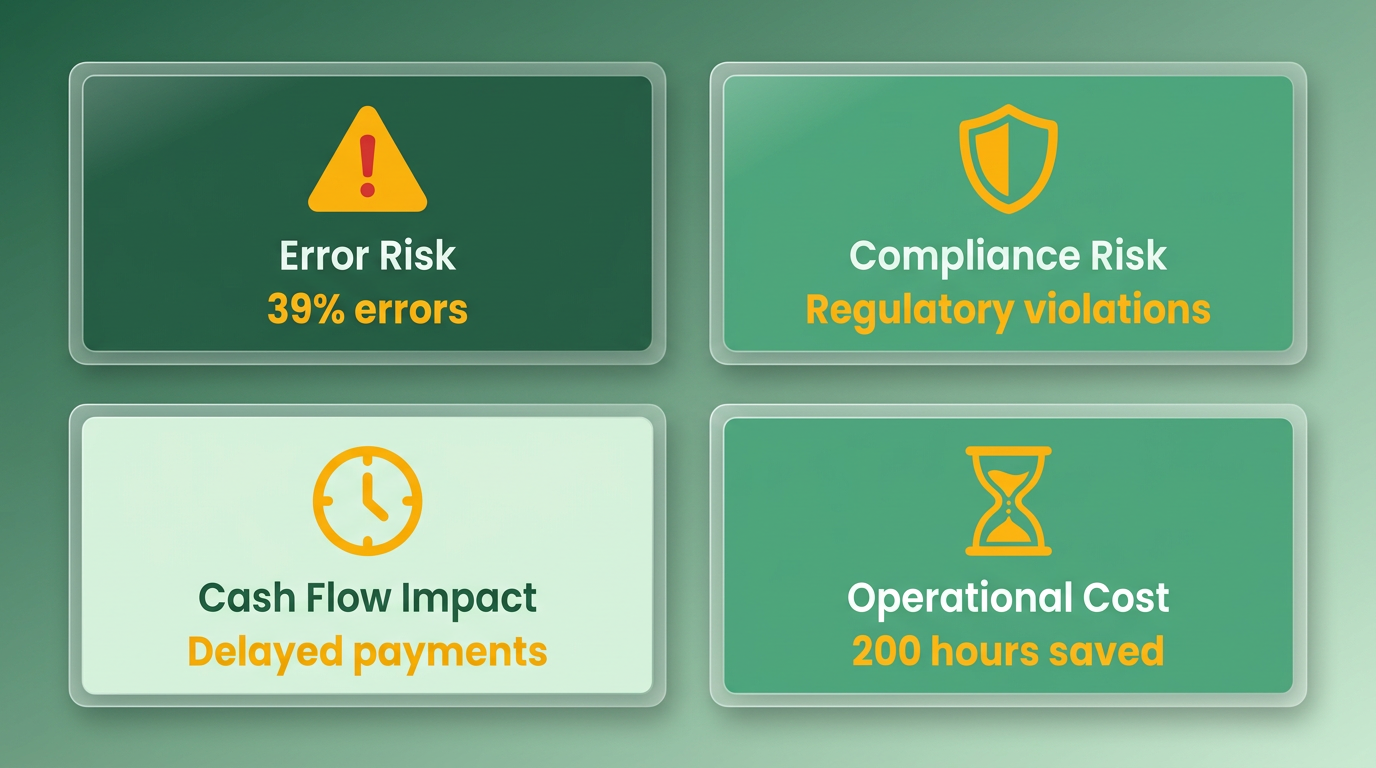
Manual AR processes are inherently error-prone, with 39% of manually processed invoices containing errors (Blixo). These mistakes-ranging from mismatched payments to incorrect customer details-delay cash flow and increase administrative costs. For example, a logistics company reported 65% fewer disputes after adopting automation, saving over 200 hours annually on 1,000 invoices. Errors also lead to missed follow-ups, with manual systems breaking at scale, causing payment bottlenecks that inflate Days Sales Outstanding (DSO) by 10–20 days. As mentioned in the Automation Benefits: Speed, Accuracy, and Cash Flow section, reducing DSO through automation can significantly improve liquidity.
Without real-time data synchronization, teams often reconcile payments manually, increasing the risk of double-counting or missed entries. A 2023 study found that 85% of CFOs at companies automating AR processes saw reduced DSO, highlighting how manual errors directly slow collections.
How Do Manual Processes Drain Time and Resources?
Manual AR tasks consume disproportionate time, with finance teams spending 12–23 hours weekly on invoice tracking, follow-ups, and reconciliation. At $25,000–$70,000 annually in labor costs, this time could be better spent on strategic initiatives. For instance, a mid-sized company using automation reduced admin costs by 30%, while a global manufacturer saved **$12,000/month** in cross-border payment fees by switching to automated systems. Building on concepts from the **Cost and ROI Comparison** section, the cost per invoice drops from $10–$40 manually to $1–$5 with automation.
Scaling manual workflows is equally problematic. A law firm struggling with slow cash flow found that automation improved processing speed by 25%, enabling faster access to working capital. In contrast, manual systems require hiring additional staff as invoice volumes grow, increasing overhead without improving efficiency. For businesses handling 20+ invoices/month, automation becomes critical to avoid operational paralysis.
What Compliance and Security Risks Exist with Manual AR?
Manual processes lack consistent controls, exposing businesses to compliance risks. For example, 94% of U.S. companies still rely on spreadsheets or manual entry, leading to inconsistent follow-ups and audit trail gaps. A finance manager at a logistics firm noted, “Before automation, we manually entered lockbox payments, but now we have a 98% hit rate with automated matching” (Michelle Wilson, credit manager). As mentioned in the Compliance and Risk Management in Automation section, automated systems enforce structured controls and SOC 2 compliance, reducing audit risks.
Security risks also multiply with manual AR. Sensitive payment data stored in spreadsheets or physical files is vulnerable to breaches. Automated systems mitigate this with 256-bit encryption, as seen in SaaS providers like Blixo. One e-commerce firm reported 30% faster collections and 20% higher customer retention after switching to secure, automated workflows.
Why Manual AR Fails to Scale for Growing Businesses?
As businesses expand, manual AR processes become unsustainable. A mid-sized enterprise with $500K monthly revenue** could free up **$250,000 in working capital by reducing DSO by 15 days through automation. However, manual systems require linear increases in labor-adding staff to handle 1,000 invoices/month costs $10–$15 per invoice, compared to $2–$3 per invoice with automation.
Real-world examples illustrate this struggle. A retail chain found that training new staff to manage manual AR tasks added 20 hours per employee, delaying response times during peak seasons. Another company with 500+ invoices/month faced a 40% spike in late fees as invoice volumes grew, highlighting the hidden costs of manual scaling. For companies with high growth rates, manual AR creates a bottleneck that stifles expansion and increases bad debt risk.
Real-World Impact: Case Studies of Manual AR Struggles
- PerkinElmer: Reduced overdue invoices from 50% to 15% using AI-driven automation, collecting $300M through systematic outreach.
- Mercury Air Group: Automated workflows cut billing time by six days, improving cash flow by 18%.
- Small Business Example: A firm sending 500 invoices/month saved 30% of payment-chasing time by adopting automated reminders.
These cases underscore how manual AR processes lead to inefficiencies, while automation delivers measurable ROI through faster collections and reduced labor costs.
The Bottom Line on Manual AR Pain Points
Manual AR processes are costly, error-prone, and ill-suited for scalability. Businesses face $10–$40 per invoice in manual processing costs, compared to $1–$5 with automation. For companies with DSO above 45 days or high bad debt rates, automation is no longer optional-it’s a necessity. By transitioning to automated systems, finance teams gain real-time insights, reduce compliance risks, and reallocate time to strategic tasks, ensuring long-term financial stability.
Automation Benefits: Speed, Accuracy, and Cash Flow
How Does Automation Reduce Days Sales Outstanding (DSO)?
Automating accounts receivable processes significantly shortens the time it takes to collect payments, directly lowering Days Sales Outstanding (DSO). Manual processes often result in DSO ranges of 45–65 days, but automation can trim this to 30–45 days by accelerating invoice delivery, payment reminders, and cash application. As mentioned in the Manual Accounts Receivable Process Pain Points section, manual AR processes create bottlenecks that directly impact cash flow, making automation a critical solution for reducing delays. For example, 85% of CFOs at companies that automated over half their AR processes reported a decline in DSO, as noted in a 2023 study.
Consider TDG Inc., which cut its DSO by 15 days after implementing automation. This improvement freed up approximately **$250,000 in working capital** for a company with $500K monthly revenue, as highlighted in source . Automation achieves this by eliminating delays in follow-ups and ensuring consistent, timely communication with customers.
| Manual AR DSO | Automated AR DSO | Time Saved Example |
|---|---|---|
| 45–65 days | 30–45 days | 15-day reduction = $250K+ working capital gain |
Why Is Automated AR More Accurate?
Manual data entry and reconciliation are prone to errors, with 39% of manually processed invoices containing mistakes, as detailed in the Manual Accounts Receivable Process Pain Points section. Automation reduces these risks by using AI-powered tools like optical character recognition (OCR) and machine learning to match payments to invoices with 99.5% accuracy. This minimizes errors in cash application, which one logistics firm used to cut disputes by 65% and save 200+ hours annually.
A law firm adopting automation saw 25% faster cash-flow processing by eliminating manual reconciliation bottlenecks. Similarly, Bega/US Inc. improved its payment processing hit rate to 98% after switching to automated systems, as reported in source . These systems also enforce compliance by applying rules uniformly, reducing errors in disclosures and contact timing.
What Cash Flow Benefits Does Automation Deliver?
Faster collections and reduced errors translate directly into improved cash flow. Manual AR processes cost $12–$40 per invoice, while automation lowers this to $1–$5 per invoice, as shown in the Cost and ROI Comparison section. For a mid-sized company handling 1,000 invoices monthly, this savings amounts to $35,000–$39,000 annually.
Automation also boosts revenue by reducing bad debt. A global manufacturing firm cut cross-border payment errors and saved $12,000 monthly** by automating multi-currency support. Another example is a healthcare provider that automated its collections, reducing overdue invoices by 40% and improving cash flow by **$500K annually.
| Cost/Metric | Manual Process | Automated Process |
|---|---|---|
| Invoice processing cost | $12–$40/invoice | $1–$5/invoice |
| Bad debt reduction | High risk | 30–40% lower risk |
| Labor hours saved | 10–30+ hours/week | 2–5 hours/week |
Compliance and Risk Management in Automation
Compliance and risk management are critical when automating accounts receivable (AR) processes. Automation introduces structured controls that reduce human error, enforce regulatory adherence, and streamline audit trails. However, it also demands careful attention to data security, risk mitigation strategies, and evolving compliance standards. Below, we break down how automation addresses these challenges compared to manual processes.
How Does Automation Improve Compliance in AR?
Automation applies compliance controls consistently across all accounts, reducing risks tied to inconsistent human judgment. For example, automated systems enforce predefined rules for contact timing, payment disclosures, and debt collection practices, ensuring alignment with industry regulations. This consistency is vital for avoiding penalties under financial compliance frameworks.
Manual AR processes, on the other hand, struggle with scalability. The 94% of U.S. businesses relying on manual methods face higher risks of noncompliance due to delayed follow-ups or inconsistent application of policies. As mentioned in the Manual Accounts Receivable Process Pain Points section, these challenges directly impact cash flow and operational efficiency. Automation eliminates these gaps by embedding regulatory requirements into workflows, such as automatic flagging of overdue accounts or real-time validation of payment terms.
| Feature | Manual Processes | Automated Processes |
|---|---|---|
| Compliance Consistency | Relies on human judgment; prone to errors | Enforces rules via software; reduces variability |
| Audit Trail | Paper-based or fragmented digital records | Timestamped logs with full transaction history |
| Regulatory Updates | Manual updates required; delays possible | Systems can be programmed to adapt to new rules |
What Security Measures Do Automated AR Systems Use?
Automated systems prioritize data encryption and access controls to protect sensitive financial information. For instance, Tratta’s automation infrastructure ensures secure payment processing while maintaining complete audit trails, reducing risks of fraud or data breaches.
Manual processes lack these safeguards. Paper-based records or unsecured spreadsheets are vulnerable to physical theft or unauthorized access. Building on concepts from the Real-World Automation Workflow section, automation mitigates this by storing data in encrypted cloud environments with role-based access. For example, Mercury Air Group’s switch to DocuWare AR automation included secure document management, cutting billing time by six days while safeguarding customer data.
How Do Automated Systems Manage Risks?
Automation reduces operational risks by minimizing errors in payment tracking, invoicing, and follow-ups. Real-time dashboards allow teams to monitor delinquencies and intervene before accounts become uncollectible. Case studies show agencies using automation to lower bad debt rates by maintaining stricter control over collections. As highlighted in the Automation Benefits: Speed, Accuracy, and Cash Flow section, this proactive approach directly lowers Days Sales Outstanding (DSO) and improves cash flow predictability.
Manual processes, however, face bottlenecks that increase bad debt risk. With 35% of invoices paid on time and 9% of credit sales written off as bad debt, manual teams often miss early warning signs. Automation addresses this by scheduling instant payment reminders and prioritizing high-risk accounts.
| Risk Category | Manual Process Challenges | Automated Solutions |
|---|---|---|
| Payment Delays | Missed follow-ups; 35% of invoices delayed | 24/7 self-service payments; scheduled reminders |
| Bad Debt | 9% of credit sales lost; slow detection | Real-time aging reports; proactive collections |
| Human Error | Inconsistent data entry; missed compliance flags | AI-driven validation; rule-based workflows |
Real-World Examples of Compliance Success
Several companies have demonstrated how automation strengthens compliance. Tratta’s clients report improved recovery rates without increasing staff, thanks to built-in compliance checks like automated call timing and disclosure management. Similarly, Mercury Air Group’s AR automation reduced billing errors and ensured all transactions met audit requirements.
In contrast, agencies delaying automation face growing risks. As discussed in the When to Automate vs Keep Manual section, businesses with high transaction volumes or complex compliance needs benefit most from automation. As account volumes rise, manual teams struggle to maintain regulatory compliance, leading to higher operational costs and penalties. Automation not only future-proofs AR workflows but also provides actionable insights through reporting tools, making audits less disruptive.
By embedding compliance into every step, automation transforms AR from a reactive task into a strategic, risk-managed function. For businesses handling large volumes or operating in highly regulated industries, the shift from manual processes is not just beneficial-it’s essential.
Real-World Automation Workflow
Automated accounts receivable workflows streamline invoicing, payment tracking, and reconciliation by using AI, machine learning, and integration with ERP systems. Unlike manual processes, which rely on spreadsheets and human intervention, automation reduces errors, accelerates collections, and ensures compliance. Below is a breakdown of real-world automation workflows, implementation steps, and their impact based on data from case studies and technical details. As mentioned in the Why Accounts Receivable Automation Matters section, this shift is critical for businesses aiming to remain competitive in today’s markets.
How Do Automated AR Workflows Operate?
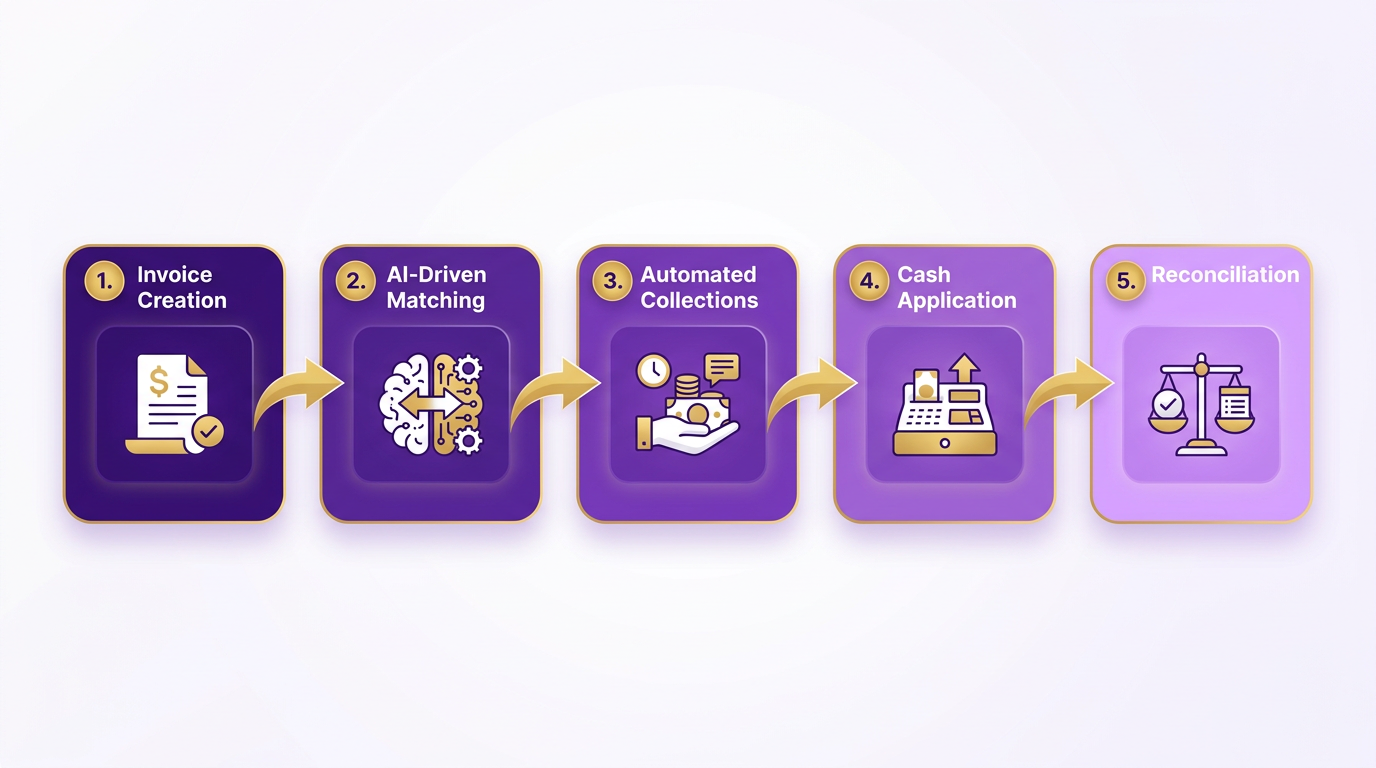
Automated workflows replace manual tasks with digital processes that execute consistently and at scale. For example, when an invoice is generated in an ERP system like QuickBooks or SAP, the AR automation platform automatically sends it to the customer via email or a self-service portal. If a payment is overdue, the system triggers tiered dunning campaigns-sending reminders via SMS, email, or phone-according to predefined rules. Payments are matched to invoices in real time using AI-powered cash application engines, reducing manual reconciliation. This workflow not only cuts processing time but also ensures no payment is missed due to human oversight.
A logistics firm using Blixo’s SaaS service reduced invoice disputes by 65% and cut reconciliation time from 45 days to 3.1 days by automating these steps. The system’s machine learning improved accuracy over time, resolving 70% of discrepancies without human input. This example highlights how automation scales with invoice volume, handling 1,000+ invoices per month without additional staff.
| Feature | Manual Process | Automated Process |
|---|---|---|
| Invoice Generation | Manually created in spreadsheets or accounting software | Generated automatically from ERP systems |
| Payment Reminders | Sent via phone or email with inconsistent timing | Scheduled, multi-channel dunning (SMS, email, phone) |
| Reconciliation | Done manually, taking 45+ days | Resolved automatically in 3.1 days with 99.5% accuracy |
What Are the Key Steps to Implement AR Automation?
Implementing automation requires aligning technology with existing workflows and ensuring seamless integration. Start by mapping current AR processes to identify bottlenecks, such as late payments or manual data entry. Next, prioritize high-volume or recurring billing segments for automation to maximize ROI. Integration with ERP systems like SAP, Oracle, or Xero is critical, as these platforms provide the financial data needed for real-time reporting.
Once integrated, test the system in a sandbox environment to refine rules for payment matching, dunning sequences, and compliance checks. For instance, Blixo’s SaaS service allowed a mid-sized company to reduce invoice processing time by 30% during testing by automating cash application and payment tracking. After deployment, continuous monitoring of metrics like Days Sales Outstanding (DSO) and reconciliation accuracy ensures the system adapts to evolving business needs.
Key considerations include:
- Security: Ensure encryption (e.g., 256-bit) and compliance with standards like SOC 2.
- Scalability: Choose platforms that handle 10–10,000+ invoices monthly.
- User Training: Equip finance teams to manage exceptions and use dashboards for insights.
What Real-World Results Do Companies Achieve?
Businesses adopting AR automation report measurable improvements in efficiency and cash flow. A global manufacturing firm using Emagia’s platform reduced cross-border payment errors by 40%, saving $12,000 monthly in fees. Similarly, Mercury Air Group cut billing time by six days and improved cash flow by automating invoice creation and routing through DocuWare. These results underscore automation’s role in reducing administrative costs and accelerating collections.
“Blixo’s automated cash application cut our reconciliation time in half,” said Vincent Mann, a finance leader at a logistics company. “We now focus on strategic planning instead of chasing payments.”
Another example: A mid-sized retail business improved customer satisfaction by 25% after switching to automated invoicing, as customers received timely, accurate bills via their preferred communication channels. These cases demonstrate that automation isn’t just about cost savings-it also enhances customer relationships and operational agility.
Why Integration and Monitoring Matter
Automation’s success depends on integration with existing financial systems and ongoing oversight. Platforms like Yonovo’s AR automation connect to accounting software without requiring IT intervention, ensuring minimal disruption. Real-time dashboards track metrics like DSO, payment rates, and error counts, enabling proactive adjustments. For example, a 15-day reduction in DSO for a $500K/month revenue company frees up $250K in working capital, according to Yonovo’s data.
Monitoring also includes compliance checks. Automated systems apply controls consistently, reducing the risk of regulatory violations. A law firm saw a 25% faster cash flow processing after automation enforced standardized follow-up protocols, ensuring all customer interactions met compliance guidelines. As noted in the Compliance and Risk Management in Automation section, this structured approach minimizes human error and enforces regulatory adherence.
By embedding AI-driven workflows into AR processes, businesses eliminate errors, reduce costs, and gain strategic insights. The transition from manual to automated systems is not just a technical upgrade-it’s a shift toward scalable, resilient financial operations.
When to Automate vs Keep Manual
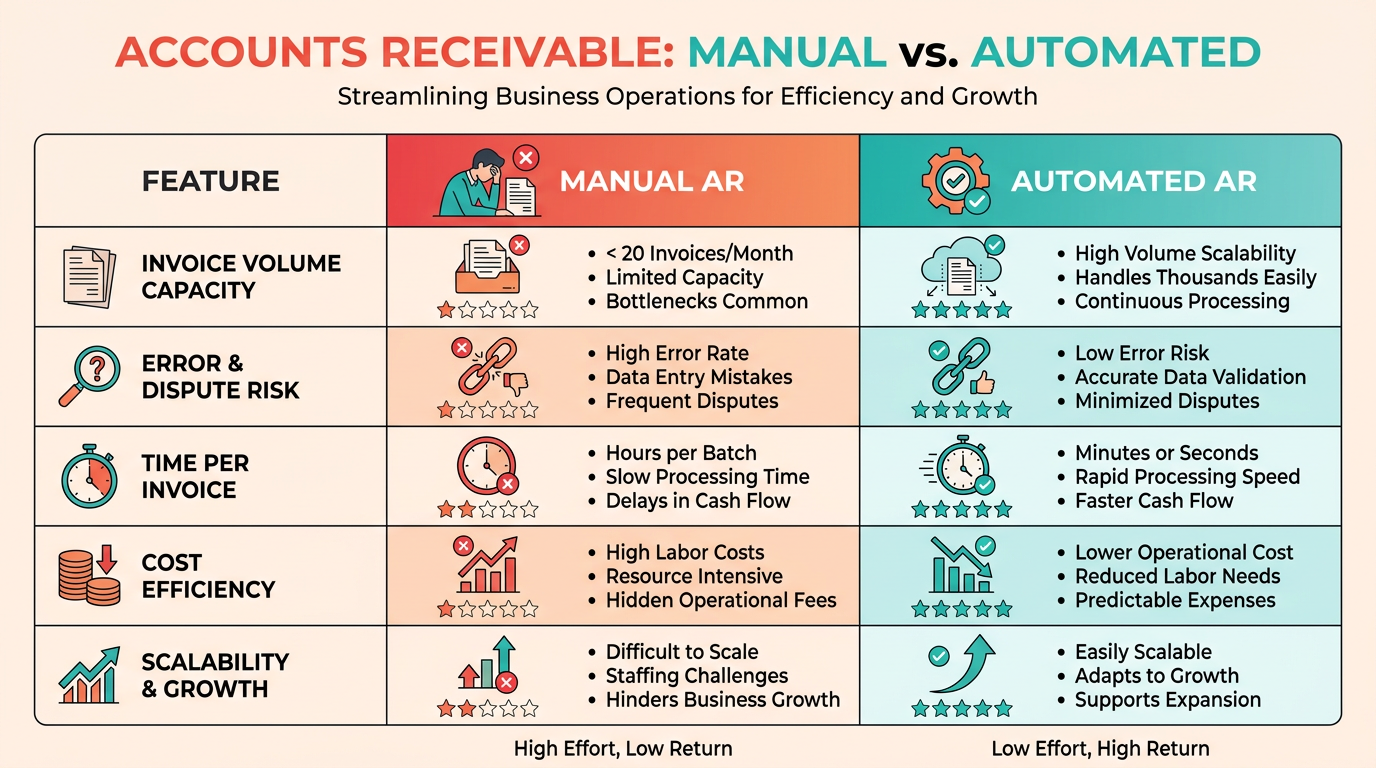
Small businesses with low transaction volumes (e.g., under 20 invoices/month) can often manage manual AR processes without significant risk. However, as businesses grow-handling hundreds of invoices monthly or operating in complex industries-manual methods become error-prone and inefficient. For example, 94% of U.S. businesses still rely on manual AR, a statistic highlighted in the Why Accounts Receivable Automation Matters section, but this approach breaks at scale, leading to missed follow-ups and increased costs. Mid-market companies with $500K monthly revenue face DSOs of 45–65 days manually, while automation can reduce this to 30–45 days, as detailed in the Automation Benefits: Speed, Accuracy, and Cash Flow section.
Complexity also matters. Firms with multi-channel sales, international operations, or compliance-heavy industries (e.g., healthcare) benefit from automation’s consistency. Tratta, for instance, automated recovery processes without adding staff, improving scalability for debt collection agencies. Conversely, businesses with simple, low-volume workflows (e.g., a local bakery with 5 clients) may avoid automation costs by sticking to manual systems.
| Factor | Manual AR Suitability | Automated AR Suitability |
|---|---|---|
| Transaction Volume | <20 invoices/month | 10–10,000+ invoices/month |
| Operational Complexity | Simple, low-risk workflows | Multi-channel, global, or compliance-heavy operations |
| Error Tolerance | Acceptable for small teams | Critical for large-scale operations |
Automation becomes essential when transaction frequency strains manual workflows. For instance, handling 1,000 invoices/month manually costs $10–$15 per invoice, whereas automation reduces this to $2–$3, a contrast emphasized in the Cost and ROI Comparison section. A logistics firm automated its AR and saved 200+ hours/year by resolving disputes faster and reducing reconciliation errors.
High-frequency billing (e.g., subscription services) also favors automation. Manual follow-ups for recurring payments are inconsistent, leading to 35% fewer missed payments with automated reminders. A retail business saw 25% higher customer satisfaction after switching to automated invoicing and reminders, improving on-time payment rates by 30%.
| Metric | Manual AR | Automated AR |
|---|---|---|
| Days Sales Outstanding (DSO) | 45–65 days | 30–45 days |
| Reconciliation Errors | 35% higher | 35% lower |
| Labor Costs (per invoice) | $10–$15 | $2–$3 |
Mid-market companies spend $5,000–$15,000/month on manual AR tasks, with finance teams dedicating 10–20 hours/week to follow-ups. Automation pays for itself in the first month for businesses with DSO above target or teams spending over 5 hours/week on AR. Troyes transitioned to automation in a single day, saving 25+ hours/month in administrative work.
Cost-benefit analysis is key. If automation costs $3,000/month but saves $5,000/month in labor and DSO improvements, it’s a clear win. However, small businesses with minimal AR volume may find automation ROI unattainable. Blixo’s case studies show that automation reduces admin costs by 30% and DSO by 30%, but these gains require sufficient transaction volume to justify the investment, as outlined in the Cost and ROI Comparison section.
Several companies demonstrate the value of strategic automation adoption:
- Mercury Air Group reduced billing time by six days and improved cash flow by automating AR with DocuWare.
- A law firm using Blixo’s AI cash application achieved 25% faster cash-processing.
- A retail business saw 25% higher customer satisfaction after switching to automated invoicing and reminders.
In summary, automation is ideal for high-volume, complex operations where manual AR risks errors and delays. Smaller businesses with simple workflows can delay automation but should monitor transaction growth and DSO trends to avoid operational bottlenecks.
Cost and ROI Comparison
What Are the Cost Differences Between Manual and Automated AR Processes?
Manual accounts receivable processes are significantly more expensive than automated solutions. On average, manual invoice processing costs $12 to $40 per invoice, while automation reduces this to $1 to $5 per invoice ($7). Additionally, manual processes incur hidden costs like delayed cash flow and higher error rates. For example, **39% of manually processed invoices contain errors**, compared to less than **1%** with automation ($4). Admin costs for manual AR are 30% higher than automated systems, driven by labor-intensive tasks like reconciliation and follow-ups ($4). As mentioned in the Manual Accounts Receivable Process Pain Points section, these inefficiencies directly impact operational efficiency and cash flow.
| Feature | Manual AR Processes | Automated AR Processes |
|---|---|---|
| Invoice Processing Cost | $12–$40 per invoice | $1–$5 per invoice |
| Error Rate | 39% | <1% |
| Admin Cost | 30% higher | 30% lower |
| Days Sales Outstanding (DSO) | 45–65 days | 30–45 days |
How Does ROI Vary Between Manual and Automated AR?
Automation delivers measurable ROI through reduced DSO and improved cash flow. Companies automating AR processes report 30% reductions in DSO within six months ($14), and **85% of CFOs** note DSO improvements after automation ($2). A 15-day DSO reduction can free up $250,000 in working capital** for a business with **$500,000 monthly revenue ($13). Building on concepts from the **Automation Benefits: Speed, Accuracy, and Cash Flow** section, automation’s impact on DSO is a key driver of liquidity. Automation also lowers bad debt risks: **35% fewer missed payments** and **35% fewer reconciliation errors** ($4). For instance, Blixo’s automated cash-application engine achieved 99.5% accuracy, reducing reconciliation time by 70% and minimizing cash-flow disruptions ($4).
What Is the Payback Period for AR Automation?
The payback period for AR automation is often under one month for mid-market companies. Businesses with high manual AR volume often achieve ROI within weeks. For example, Salman Shawaf notes, “If your team spends meaningful time on manual AR tasks and DSO is above target, automation pays for itself in the first month” ($13). Automation’s break-even point depends on volume: businesses spending **>5 hours weekly** on manual AR tasks see ROI within weeks. Integration costs are minimal for modern platforms, which connect to **QuickBooks, SAP, Xero** in **3–4 days** ($7).
What Factors Affect Total Cost of Ownership (TCO)?
TCO for AR automation includes upfront implementation costs and long-term savings. Manual processes trap working capital: $100M in revenue** equates to **$274,000 trapped per DSO day ($7). Automation reduces TCO by:
- Lowering labor costs: AR specialists spend 30–40% of their day on manual tasks ($7).
- Reducing errors: Automation cuts reconciliation errors by 35% ($4).
- Improving compliance: Automated systems apply rules consistently, reducing legal risks ($11), as highlighted in the Compliance and Risk Management in Automation section.
Modern platforms also streamline multi-currency transactions and cross-border compliance, avoiding **$12,000+ monthly fees** for global operations ($4).
Real-World ROI Success Stories
1. Logistics Company Saves 200+ Hours Annually
A logistics firm using Blixo’s automation saved 200+ hours yearly on 1,000 invoices, reducing disputes by 65% ($4). The automation’s AI-powered OCR and multi-channel dunning cut payment delays and improved cash flow.
2. Law Firm Accelerates Cash Flow by 25%
A law firm adopted automated invoicing and collections, speeding up cash-flow processing by 25% ($4). The firm’s finance team shifted from manual data entry to strategic planning, per a finance manager’s testimonial: “Blixo transformed our AP team from invoice processors to strategic planners.”.
3. Global Manufacturer Cuts Cross-Border Costs
A manufacturing company automated cross-border payments, saving **$12,000 monthly** in fees ($4). The system’s multi-currency support and AI-driven compliance controls reduced errors and processing delays.
Final Takeaways
Automation consistently outperforms manual AR processes in cost-efficiency and ROI. While upfront implementation costs vary, the savings from reduced DSO, error correction, and labor hours often offset investments within weeks. Businesses with >20 active invoices/month or DSO above 45 days should prioritize automation to enable liquidity and reduce risks ($13, $4). As Vincent Mann notes, “Blixo’s automated cash application cut our reconciliation time in half” ($4), illustrating the tangible benefits of strategic adoption.
Frequently Asked Questions
1. How much does automated AR save per invoice compared to manual processes?
Automated AR reduces invoice costs from $10–$15 to $2–$3, saving $8–$13 per invoice. This lowers overall processing expenses and improves profitability for high-volume businesses.
2. What is the impact of automation on Days Sales Outstanding (DSO)?
Automation cuts DSO by 15–30 days, freeing up $250K in working capital for a $500K/month company. This accelerates cash flow and reduces reliance on external financing.
3. How much labor cost does AR automation save annually for mid-market businesses?
Automation reduces annual labor costs from $25,000–$70,000 by cutting monthly hours spent on AR tasks from 200–400+ to 20–40. This improves operational efficiency.
4. What error rate reduction does automation provide compared to manual AR systems?
Automation nearly eliminates errors, reducing bad debt from 9% to near zero and decreasing late payments from 35% to minimal. This lowers financial risk and improves customer trust.
5. How quickly can automation reduce AR labor hours?
Platforms like Yonovo can cut AR labor hours by 80–90% in days, reducing weekly time spent from 10–20 hours to just 2–4 hours. This allows teams to focus on strategic tasks.
6. What is the financial benefit of automation for a $500K/month business?
Automation frees up $250K in working capital annually by reducing DSO and lowers bad debt losses. This improves cash flow and supports business growth.
7. Why do 94% of U.S. companies still use manual AR systems?
Many businesses overlook automation’s long-term savings, sticking to manual processes despite $10–$15/invoice costs and 35% late payment rates. Automation offers a faster return on investment.