

Accounts Receivable Automation Checklist

Key Takeaways
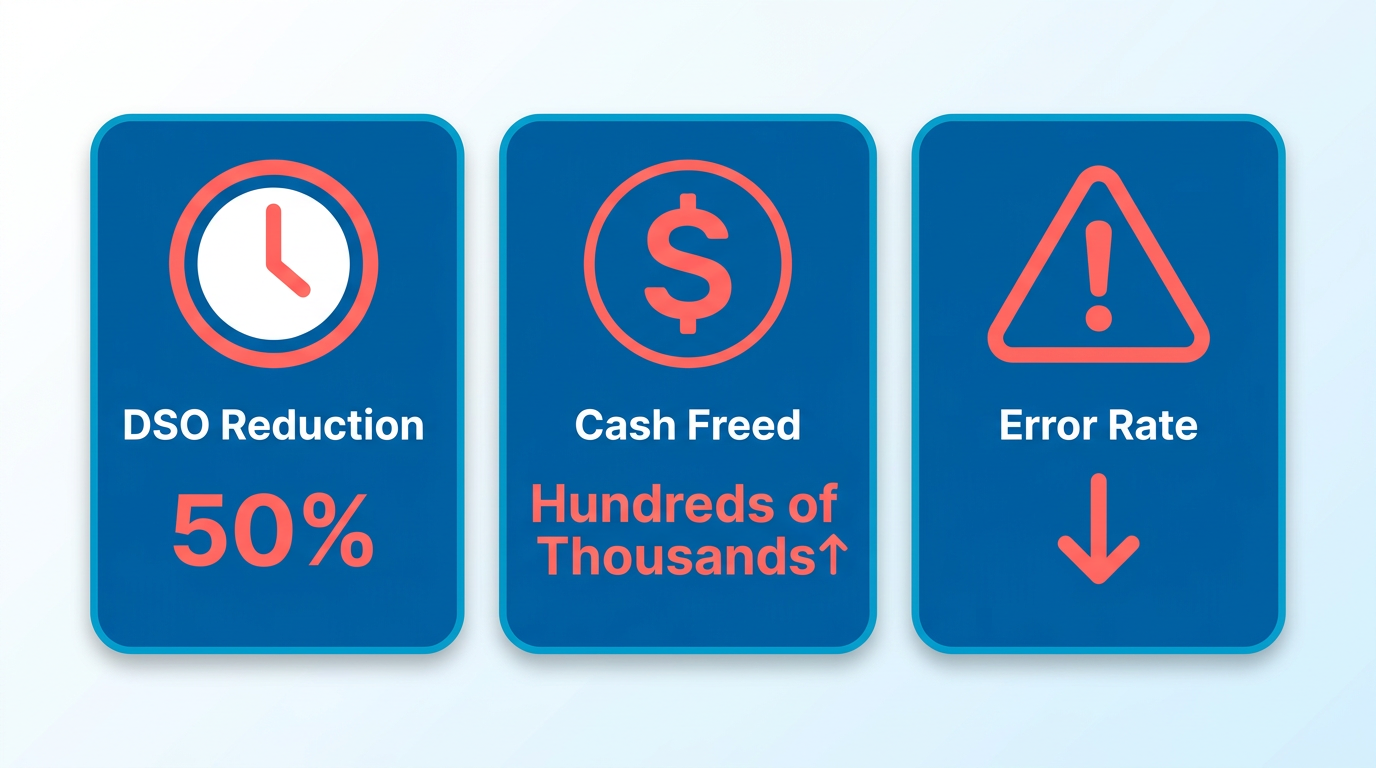
- Automation reduces days sales outstanding (DSO) by up to 50%, accelerating cash flow and freeing hundreds of thousands in working capital.
- AI-driven systems auto-apply 95% of payments within 24 hours, compared to 3–5 days for manual processing, cutting payment delays significantly.
- Manual AR processes risk 3–5 days of delays in reconciliation tasks, which automation can condense to hours.
- Over 80% of finance leaders report manual systems fail to meet 2026 transaction volume and compliance demands, increasing bad debt risks.
- Errors in manual workflows trigger disputes and administrative overhead, with 95% of payments at risk of misapplication or missed invoices.
- Automated AR systems reduce human error rates by streamlining payment matching and invoice reconciliation.
- Businesses using automation avoid hidden costs from payment disputes, saving time and reducing operational strain by 50%.
Why Accounts Receivable Automation Matters
Why accounts receivable automation matters boils down to one simple truth: manual processes slow down cash flow and increase errors, while automation enable speed, accuracy, and financial clarity. For businesses handling hundreds of invoices monthly, even minor delays in payment processing can tie up working capital and strain operations. With automation, teams see up to a 50% reduction in days sales outstanding (DSO), freeing hundreds of thousands in cash quickly. As mentioned in the Assessing Your Current Accounts Receivable Process section, evaluating existing workflows is critical to understanding where automation can deliver the most value.
What Challenges Does Manual AR Create?
Manual accounts receivable workflows are error-prone and inefficient. Teams spend hours matching payments to invoices, chasing down late payments, and reconciling discrepancies-tasks that take 3-5 days manually but can be completed in hours with automation. For example, 95% of payments can be auto-applied within 24 hours using AI-driven systems, compared to the 3-5 days required for manual processing. This delay isn’t just time-consuming; it locks up cash that could fuel growth.
Another hidden cost of manual processes is the risk of human error. A single misapplied payment or missed invoice can trigger disputes, increasing administrative overhead. In 2026, over 80% of finance leaders report that manual systems struggle to keep up with rising transaction volumes and compliance demands. Without automation, businesses face higher bad debt risks and slower payment recovery-challenges that directly impact profitability.
How Automation Solves AR Pain Points
Automation tackles these issues head-on by streamlining workflows and introducing real-time visibility. For instance, AI-powered systems reduce overdue balances by 15-25% by prioritizing high-risk accounts and automating dunning workflows. Building on concepts from the Core Features of Accounts Receivable Automation section, automated invoicing and payment tracking ensure accuracy while accelerating collections. One company using a financial software provider’s solution reduced DSO from 68 days to 58 days, freeing $4.1M in cash. Similarly, another business cut DSO from 52 days to 44 days, recovering $855K in working capital. These results highlight automation’s ability to turn AR from a bottleneck into a strategic asset.
Automation also eliminates blind spots in payment tracking. With manual systems, teams often lack a unified view of payment statuses, leading to delays in collections. Modern tools integrate with ERP systems to provide a single source of truth, enabling finance teams to track invoices, payments, and disputes in real time. This visibility is critical for small and medium-sized businesses (SMBs) with limited resources, as well as larger enterprises processing high-volume transactions.
Who Gains the Most from AR Automation?
While all businesses benefit, automation is particularly transformative for SMBs and companies with recurring revenue models. For SMBs, automation reduces reliance on manual data entry, cutting labor costs by up to 40%. A SaaS company using a cloud-based AR solution improved DSO from 35 days to 28 days, gaining $470K in liquidity without adding headcount.
High-volume industries like manufacturing and construction also see dramatic improvements. One manufacturer reduced DSO from 52 days to 44 days, while a construction firm cut it from 68 to 58 days. These gains are possible because automation scales effortlessly, handling thousands of invoices daily with minimal human intervention.
Security and Compliance in AR Automation
Beyond efficiency, automation strengthens security and compliance. Modern platforms use encryption and access controls to protect sensitive financial data-a necessity as cyber threats grow. For example, Blixo ensures data integrity with audit logs and role-based permissions, giving finance teams confidence in their processes. Unlike generic providers, Blixo’s transparent pricing and built-in compliance tools make it easier to meet evolving regulatory requirements without hidden costs.
In a market where trillions remain locked in inefficient AR systems, automation isn’t just an upgrade-it’s a strategic imperative. By reducing DSO, accelerating collections, and minimizing errors, businesses gain the agility to invest in growth opportunities. As one finance leader notes, “Automation turns AR from a reactive task into a proactive advantage.” For companies ready to modernize, the ROI is clear: faster cash flow, fewer disputes, and a foundation for long-term financial stability. As outlined in the Implementing Accounts Receivable Automation section, a structured approach ensures successful adoption and measurable outcomes.
Assessing Your Current Accounts Receivable Process
Assessing Your Current Accounts Receivable Process
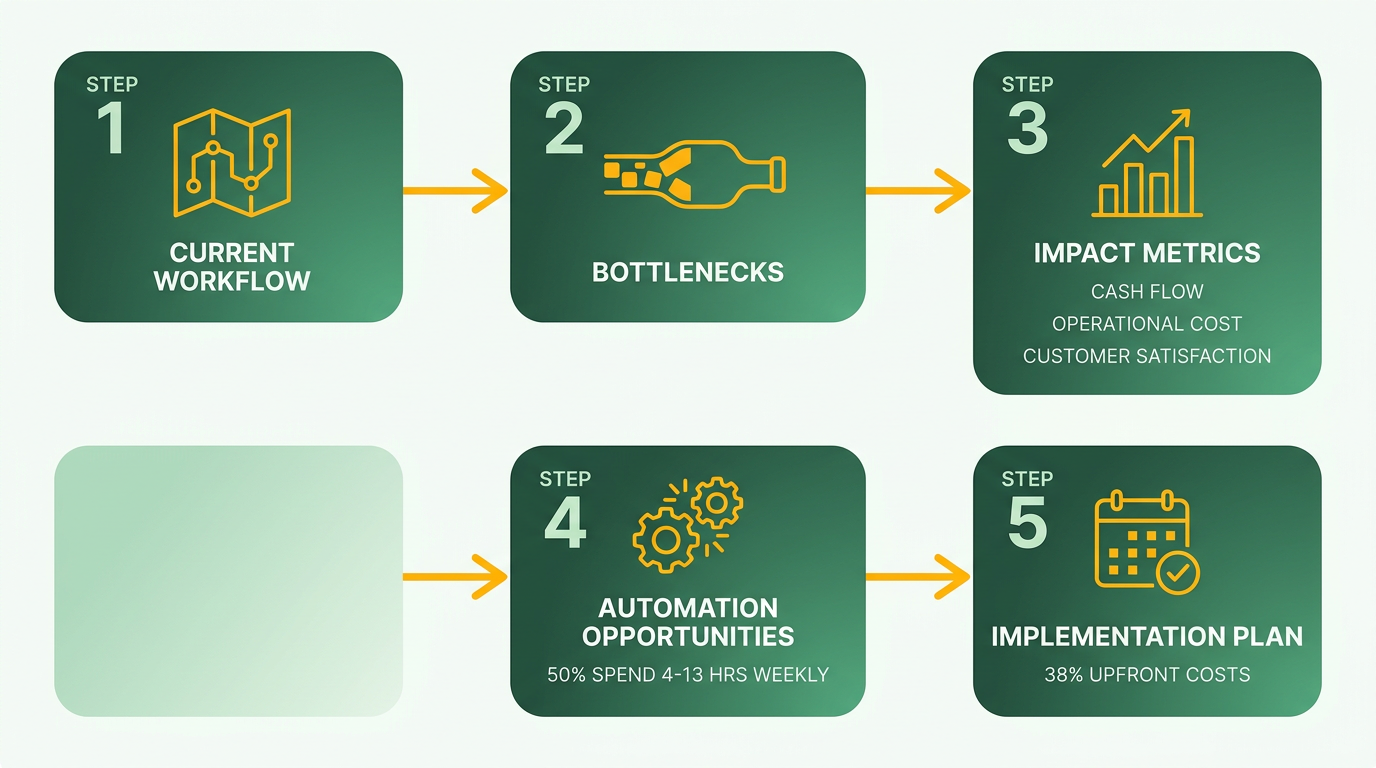
Before implementing automation, you must thoroughly evaluate your existing accounts receivable (AR) workflows. This assessment identifies inefficiencies, security gaps, and areas where automation can deliver the most value. Start by mapping out current processes and quantifying their impact on cash flow, operational costs, and customer satisfaction.
1. Identify Manual Bottlenecks and Automation Opportunities
Manual tasks like invoice creation, payment tracking, and dunning (reminders for overdue payments) often slow down collections and increase errors. According to research, over 50% of businesses spend 4–13 hours weekly on AR tasks, with 38% of mid-sized companies citing upfront costs as a barrier to automation.
- Audit repetitive tasks: List all manual steps in your AR process, such as data entry, payment reconciliation, or dispute resolution.
- Map workflow inefficiencies: Identify where delays occur-e.g., inconsistent invoice delivery or manual cash application.
- Calculate error costs: Manual errors can delay cash application and inflate administrative expenses.
As mentioned in the Why Accounts Receivable Automation Matters section, manual processes slow down cash flow and increase errors, while automation enables speed, accuracy, and financial clarity. For example, a technology firm automated billing and payment processing, cutting time-to-cash by 40% and reducing errors by 60%.
2. Evaluate System Performance and Capabilities
Your current AR system’s performance directly impacts cash flow and operational clarity. Assess whether it supports accuracy, scalability, and compliance. By 2026, manual processes will no longer meet finance teams’ speed and accuracy demands, making software evaluation critical.
- Test invoice creation reliability: Verify that your system pulls clean data from upstream systems and generates error-free invoices.
- Review security protocols: Ensure encryption, access controls, and audit logs meet compliance standards. Weak security risks data breaches and regulatory fines.
- Assess AI integration: Modern platforms use AI for credit scoring and collections prioritization. Ask if the system explains AI decisions transparently-“black box” algorithms lack trust and accountability.
Building on concepts from the Core Features of Accounts Receivable Automation section, automated invoicing ensures accuracy and speed by pulling data from upstream systems, reducing errors and speeding up delivery across multiple channels. A financial services company improved collections by 25% after upgrading to a system with real-time aging reports and automated dunning workflows.
3. Measure Impact on Cash Flow and Customer Relationships
AR inefficiencies trap working capital and strain customer interactions. For a $2 million/month business, **a single day of delayed collections costs $67,000 in trapped capital**. Automation can reduce Days Sales Outstanding (DSO) by 20–40% and improve payment experiences.
- Track DSO trends: Calculate how long it takes to collect payments and compare it to industry benchmarks.
- Analyze customer feedback: Late payment reminders or inconsistent communication harm client trust.
- Quantify cash flow gaps: Use historical data to estimate how automation could accelerate collections.
One organization automated cash application and reporting, freeing 80% of finance teams’ time for strategic work.
4. Determine Automation Readiness and Benefits
Automation isn’t a one-size-fits-all solution. Prioritize features that align with your business goals, such as reducing DSO or improving compliance. Unlike generic providers, Blixo offers transparent pricing and AI-driven insights tailored to AR workflows.
- Estimate ROI: Combine time saved, error reduction, and cash flow acceleration to build a business case.
- Compare integration capabilities: Ensure the solution syncs with your ERP and CRM systems for unified data.
- Plan for incremental rollout: Start with high-impact areas like invoice delivery or dunning before scaling.
As outlined in the Best Practices for Accounts Receivable Automation section, defining clear goals and measurable metrics ensures your automation project aligns with business objectives like improving cash flow and reducing errors. A structured evaluation reveals whether automation is a strategic necessity. For instance, 75% of AR executives report improved cash flow after automation, validating its long-term value.
By addressing these areas, you’ll create a roadmap to transition from reactive AR management to a proactive, automated system that strengthens financial stability and customer relationships.
Core Features of Accounts Receivable Automation
Automated invoicing ensures accuracy and speed by pulling data from upstream systems. This reduces errors and speeds up delivery across multiple channels. As mentioned in the Why Accounts Receivable Automation Matters section, manual processes slow down cash flow and increase errors, while automation enable speed, accuracy, and financial clarity.
- Implement auto-generated invoices that integrate with ERP systems to minimize data entry errors and ensure consistency.
- Enable multi-channel delivery (email, portals, EDI) to accommodate customer preferences and reduce payment delays.
- Schedule recurring invoices for subscription-based models to avoid missed payments and manual follow-ups.
Real-time tracking of payment status and aging reports allows teams to act quickly on overdue accounts. This transparency reduces days sales outstanding (DSO) and improves forecasting. Building on concepts from the Why Accounts Receivable Automation Matters section, real-time visibility directly addresses the inefficiencies of manual tracking by providing actionable insights.
- Use real-time dashboards to monitor payment status, cash flow gaps, and aging reports by customer or region.
- Automate alerts for late payments to trigger dunning workflows before accounts become delinquent.
- Ensure audit logs are accessible and exportable for compliance, capturing every action taken on invoices or payments.
AI-driven dunning systems adapt to customer behavior, sending targeted reminders and escalating cases as needed. This reduces manual effort and improves recovery rates.
- Configure tiered dunning workflows that adjust communication frequency based on payment history and customer risk scores.
- Integrate AI to predict delinquency risks and prioritize high-value accounts for early intervention.
- Automate payment plan proposals for customers facing temporary cash flow issues, preserving relationships while securing repayments.
An intelligent matching engine reduces exceptions by aligning payments with invoices using AI. This minimizes manual reconciliation and accelerates cash application.
- Deploy AI-powered matching rules that analyze invoice numbers, payment amounts, and customer names to auto-apply 95%+ of payments.
- Enable exception handling workflows for unmatched payments, flagging discrepancies for review while maintaining accuracy.
- Use machine learning to improve matching accuracy over time by learning from historical data patterns.
Tailored billing options and self-service portals empower customers to manage payments independently, reducing finance team workload.
- Offer customer portals for viewing invoices, making payments, and updating billing preferences at any time.
- Customize invoicing formats (recurring, one-time, multi-line items) to align with business-specific needs.
- Provide multilingual and multi-currency support for global operations, ensuring clarity for international clients.
As outlined in the Best Practices for Accounts Receivable Automation section, setting clear metrics like DSO is essential for measuring success. Businesses that adopt these features report measurable improvements in DSO, cash flow, and operational efficiency. For example:
- One SaaS company reduced DSO from 35 to 28 days, freeing $470K in working capital.
- A manufacturing firm cut DSO from 52 to 44 days, generating $855K in additional cash.
- A construction business lowered DSO by 10 days, enable $4.1M for reinvestment.
By prioritizing these core features, teams can transform accounts receivable from a reactive process into a strategic asset, ensuring faster payments, fewer errors, and stronger customer relationships.
Implementing Accounts Receivable Automation
Implementing accounts receivable automation requires a structured approach to ensure efficiency, accuracy, and alignment with business goals. Below is a step-by-step checklist to guide your implementation, avoiding common pitfalls and using best practices..
Defining Scope and Goals
Start by clearly outlining what your automation project aims to achieve. Focus on reducing manual tasks like invoice tracking, payment reconciliation, and collections while improving cash flow visibility. Prioritize processes that currently consume the most time-over 50% of businesses spend 4-13 hours weekly on AR tasks-and align automation with financial objectives like lowering Days Sales Outstanding (DSO).
- Map current AR workflows to identify bottlenecks (e.g., manual data entry, delayed payments). As mentioned in the Assessing Your Current Accounts Receivable Process section, this step ensures you understand existing inefficiencies before automation.
- Set measurable goals such as reducing DSO by 20% or cutting time spent on AR tasks by 50%.
- Secure stakeholder buy-in by demonstrating ROI, such as the $470K in cash freed by one SaaS company after automation..
Selecting the Right Tool and Vendor
Choose a solution that integrates seamlessly with your existing systems (e.g., ERP or CRM) and offers features like AI-driven collections, real-time reporting, and secure data handling. Blixo, for instance, emphasizes transparent pricing and AI transparency, unlike generic providers.
- Evaluate core features: Ensure accurate invoice creation, centralized customer records, and automated reminders. Building on concepts from the Core Features of Accounts Receivable Automation section, prioritize tools that address your workflow gaps.
- Verify security protocols: Look for encryption, access controls, and regular audits to protect sensitive data.
- Assess AI capabilities: Opt for tools that provide clear credit scoring and collection prioritization, avoiding “black box” algorithms..
Configuring and Customizing the System
Tailor the automation to your workflows while maintaining flexibility for future needs. For example, Salesforce-native solutions can reduce DSO by 40% by automating data loads from ERPs and matching payments with 96% accuracy.
- Align with upstream systems: Ensure clean data integration from ERPs to avoid errors in invoice creation.
- Customize workflows: Configure dunning rules, payment reminders, and reporting dashboards to match customer behavior.
- Enable audit trails: Maintain exportable logs for compliance and internal reviews..
Training Staff and Ensuring Transition
A smooth transition requires clear communication and hands-on training. One CFO noted, “Automating billing and payments significantly shortened our time to cash,” but only after staff understood the new system.
- Provide role-specific training for finance teams on automation tools and dashboards.
- Update customer communications to inform them about new payment methods or portals.
- Plan a phased rollout to address issues before full-scale adoption..
Monitoring and Evaluating Performance
Track key metrics like DSO, error rates, and cash application speed to measure success. One provider reported a 25% reduction in overdue balances using AI-driven collections.
- Review real-time analytics to identify trends and adjust workflows (e.g., tweak dunning sequences).
- Audit system accuracy monthly, ensuring 95%+ auto-applied payments and minimal exceptions.
- Iterate based on feedback from finance teams and customers to refine automation rules..
Examples of Successful Implementations
Real-world results highlight the benefits of automation:
- One manufacturing company reduced DSO from 52 to 44 days, freeing $855K in cash.
- LB Technology cut time-to-cash by automating billing and payment processing.
- Blixo users report faster implementation timelines compared to external platforms, with 4-week go-lives versus 9-12 months.
By following this checklist, businesses can enable cash flow, reduce errors, and position themselves for long-term scalability in accounts receivable management.
Best Practices for Accounts Receivable Automation
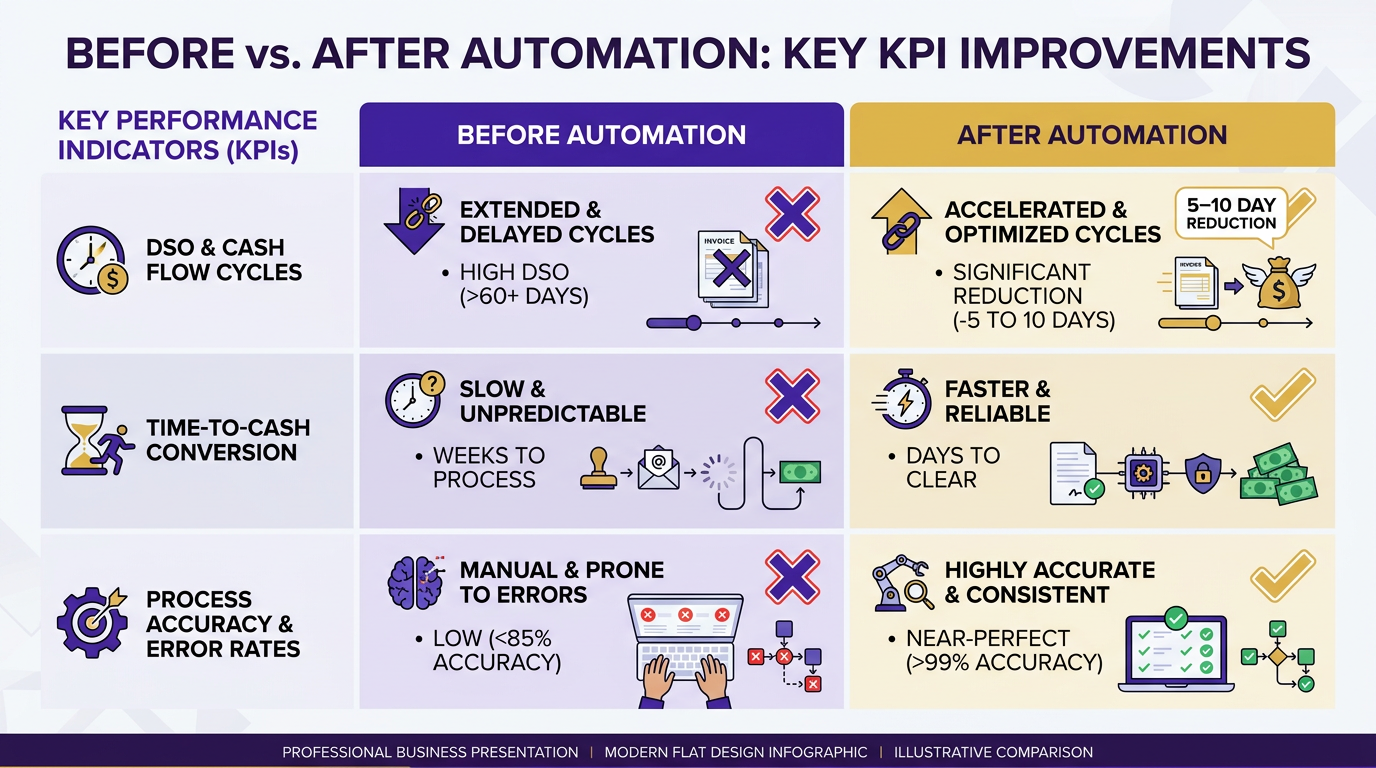
Defining clear goals and measurable metrics ensures your automation project aligns with business objectives like improving cash flow and reducing errors. As mentioned in the Why Accounts Receivable Automation Matters section, manual processes slow down cash flow and increase errors, making automation critical for financial clarity. Track key performance indicators (KPIs) such as Days Sales Outstanding (DSO), time-to-cash, and automation accuracy rates. For example, a 5–10 day reduction in DSO can free up $100K–$300K in working capital for mid-sized businesses.
- Set DSO targets to measure cash flow improvement. A 40% average DSO reduction was reported by businesses using Salesforce-native automation.
- Monitor time-to-cash to evaluate how quickly payments are processed. One company shortened its time-to-cash by automating billing and payment processing.
- Track error rates in invoice creation and cash application. Manual errors delay cash application by up to 30%, according to industry data.
How Should You Monitor Automation Performance?
Regular performance tracking ensures your system adapts to evolving workflows and compliance requirements. Building on concepts from the Assessing Your Current Accounts Receivable Process section, audit logs are critical for compliance and troubleshooting. Use real-time dashboards to review payment trends, customer behavior, and exception rates.
- Review AI-driven insights for credit risk scoring and collections prioritization. Transparent AI models, like those offered by Blixo, avoid “black box” decision-making.
- Analyze payment exception rates. Systems with 95%+ auto-match rates for cash application, as seen in some Salesforce-native setups, reduce manual reconciliation.
- Conduct quarterly process audits. Evaluate if workflows still align with business goals and if customer communication channels (email, portals) are effective.
What Pitfalls Should You Avoid?
Common mistakes like poor system configuration, inadequate training, and neglecting data cleanliness can undermine automation efforts. As outlined in the Implementing Accounts Receivable Automation section, start with a 4-week implementation timeline for Salesforce-native systems or 8–14 months for external platforms.
- Ensure clean data integration. Dirty data from upstream systems causes 23% of configuration challenges and increases exception handling.
- Train all stakeholders on new workflows. Manual handoffs persist when finance teams aren’t aligned with automation tools.
- Avoid fragmented systems. A unified platform, like Blixo, prevents disconnected workflows that slow down collections.
Frequently Asked Questions
1. How much does AR automation reduce days sales outstanding (DSO)?
Automation cuts DSO by up to 50%, accelerating cash flow and freeing hundreds of thousands in working capital. Manual processes delay cash availability by weeks, while automation ensures faster access to funds.
2. What is the processing time for AI-driven payment auto-application?
AI systems auto-apply 95% of payments within 24 hours, compared to 3–5 days manually. This reduces payment delays and ensures faster reconciliation, improving cash flow efficiency.
3. How do manual AR processes increase error risks?
Manual workflows risk 95% of payments being misapplied or missed, triggering disputes and administrative overhead. These errors lead to higher bad debt risks and operational strain, especially at scale.
4. What compliance challenges do manual systems face by 2026?
Over 80% of finance leaders report manual systems fail to meet 2026 compliance demands, increasing bad debt risks. Automation ensures adherence to evolving regulations and handles higher transaction volumes accurately.
5. How much time does automation save in reconciliation tasks?
Automation reduces reconciliation from 3–5 days to hours, cutting payment delays significantly. This efficiency frees staff for strategic tasks and minimizes error risks during reconciliation.
6. What are the cost savings from reducing payment disputes?
Automated AR systems save 50% in operational strain by avoiding dispute-related costs. Businesses eliminate hidden expenses from misapplied payments, reducing administrative overhead and bad debt.
7. Can automation handle high transaction volumes effectively?
Automation scales seamlessly with transaction volumes, maintaining compliance and accuracy. Unlike manual systems, it adapts to growth without compromising speed or reducing error rates.