

Automated vs Manual Accounts Receivable Invoice Automation

Key Takeaways
- Automating AR reduces DSO by 34% and cuts invoice processing time from weeks to minutes.
- Manual AR processes result in 35% on-time payments, 55% delayed, and 9% bad debt.
- Mid-sized companies lose $4 million annually due to unpaid invoices from manual inefficiencies.
- 77% of AR teams fall behind on metrics because of manual workflow inefficiencies.
- Automated systems improve accuracy and provide real-time visibility into payment statuses.
- Automation reduces labor costs by minimizing repetitive tasks like data entry and reconciliation.
- Digital invoice delivery cuts delays compared to physical mail, improving payment timeliness.
Why Automated Accounts Receivable Matters
Automated accounts receivable (AR) systems eliminate the inefficiencies of manual processes while delivering measurable financial benefits. Manual AR workflows are time-consuming, error-prone, and slow, often leading to cash flow delays and customer dissatisfaction. By automating invoice processing, businesses reduce days sales outstanding (DSO), improve accuracy, and gain real-time visibility into payment status. As mentioned in the Automated Invoice Creation vs Manual Processing section, automation streamlines workflows by minimizing labor costs and accelerating cash flow, which directly contributes to these improvements. For example, companies using automation can cut DSO by 34% and reduce invoice processing time from weeks to minutes. Below, we break down why automation is critical for modern finance operations..
How Much Time and Money Does Manual AR Cost?
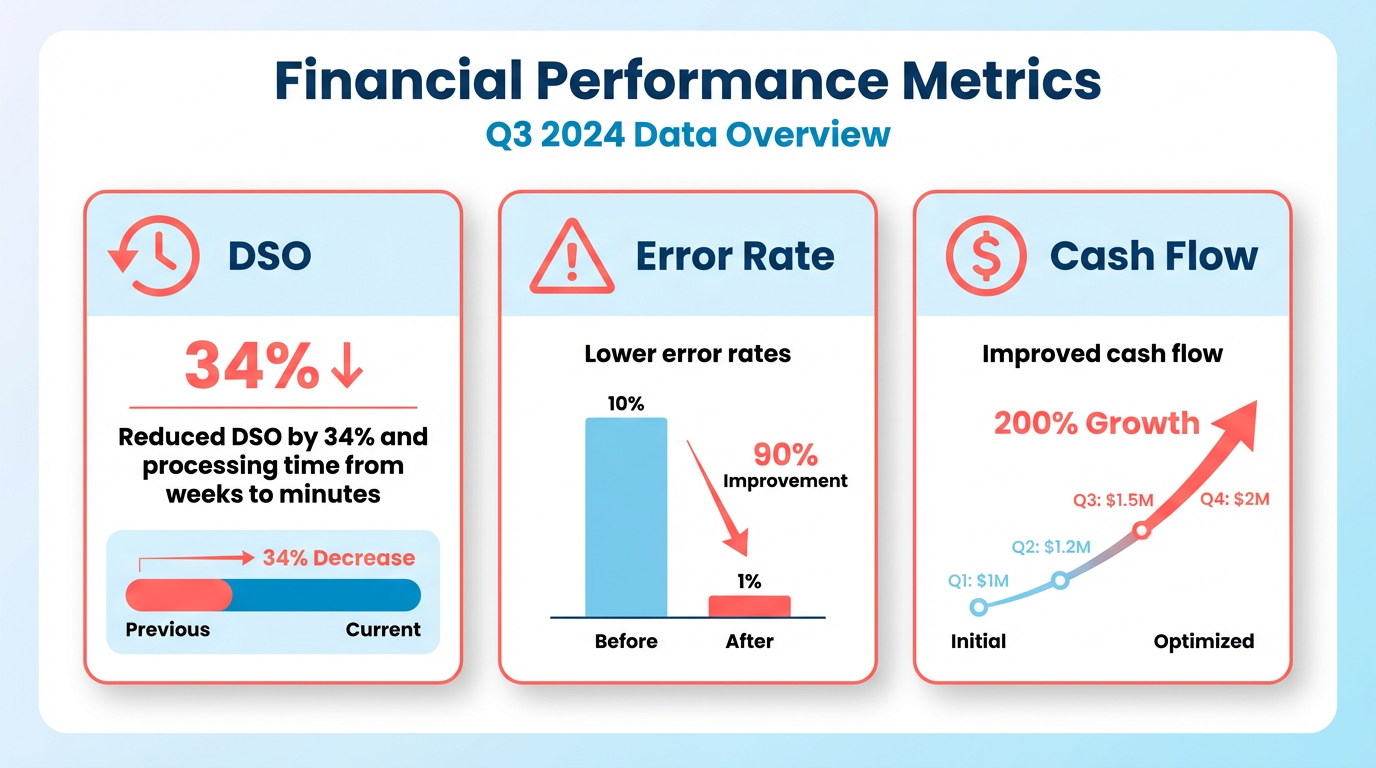
Manual AR processes waste hours on repetitive tasks like data entry, follow-ups, and reconciliation. Industry data reveals that 35% of invoices are paid on time, while 55% are delayed, and 9% are written off as bad debt. Manual workflows also increase operational costs: mid-sized companies lose $4 million annually to unpaid invoices, and 77% of AR teams fall behind on metrics due to inefficiencies. Building on concepts from the Digital Invoice Delivery vs Physical Mail section, automation reduces delays by enabling instant, error-free communication with customers, which addresses many root causes of late payments. Automation slashes these costs. Systems like Quadient AR save 16 minutes per invoice, while AI-powered tools reduce processing errors by 57%. For instance, one construction firm reduced overdue accounts by 70% using automation, and a wholesale business processed 20,000 invoices monthly with 55% faster payment cycles compared to manual methods. These improvements directly impact bottom lines, with automation cutting operational costs by up to 90% in some cases..
Why Automation Reduces Errors and Speeds Up Payments
Manual AR is prone to human errors that delay cash flow. For example, 52% of companies track staff productivity in AR, but manual data entry introduces inconsistencies. Automated systems eliminate these risks by standardizing workflows and integrating with ERP platforms like NetSuite or Dynamics 365. This ensures accurate tax calculations, real-time notifications, and seamless reconciliation. As outlined in the Automated Payment Matching vs Manual Cash Application section, automation enhances accuracy by aligning payments with invoices programmatically, reducing mismatches that slow down collections. Automation also accelerates collections. AI-driven tools prioritize high-risk accounts and send personalized reminders, reducing late payments. A SaaS company cut its DSO by 15 days within three months using automated follow-ups, while a B2B firm improved customer satisfaction scores by 20% through self-service payment portals. Real-time dashboards further enhance visibility, enabling finance teams to forecast cash flow with 98% accuracy (as seen in AI-powered OCR solutions)..
Who Benefits Most from AR Automation?
Small and medium-sized businesses (SMBs) gain the most from automation. Unlike large enterprises, SMBs often lack dedicated AR teams, making manual processes unsustainable. For example, Paystand’s automation solutions help one million businesses streamline receivables, while NetSuite’s AR software enables Super Coffee to scale without increasing headcount. As discussed in the Addressing Common Manual AR Pain Points with Automation section, automation directly solves challenges like delayed payments and administrative burdens, which are particularly acute for resource-constrained firms. Automation also benefits industries with high invoice volumes, such as healthcare and construction. A wholesale company using Stripe Invoicing improved liquidity by generating accurate invoices instantly, while a B2B company reduced administrative burdens by automating payment reminders. These tools level the playing field for smaller firms, allowing them to compete with larger companies in speed and efficiency.. | Feature | Manual AR | Automated AR |. |—|—-|—-| | Time to Process | 35 days (avg) | 5–7 days (with automation) | | Error Rate | 5–10% (due to human error) | <1% (AI-driven accuracy) | | DSO Reduction | No improvement | 34% reduction (Quadient) | | Cost Savings | High labor costs | Up to 90% lower costs |
“Automation is not just about efficiency but control and consistency at scale.” – Pratyush Kumar, AR automation expert
By adopting automated AR systems, businesses avoid the pitfalls of manual workflows and enable faster cash flow, stronger customer relationships, and data-driven decision-making. The shift from manual to automated processes is no longer optional-it’s essential for staying competitive.
Automated Invoice Creation vs Manual Processing
Automated invoice creation streamlines accounts receivable by reducing labor costs, minimizing errors, and accelerating cash flow, while manual processing often leads to inefficiencies, higher error rates, and delayed payments. The choice between these methods hinges on factors like operational scale, financial goals, and customer expectations. Below is a detailed breakdown of how automated and manual invoice creation compare, including real-world examples and implementation strategies. As mentioned in the Why Automated Accounts Receivable Matters section, manual workflows are inherently time-consuming and error-prone, whereas automation addresses these inefficiencies directly..
How Do Automated Systems Improve Efficiency?
Automated invoice creation eliminates repetitive tasks like data entry, invoice formatting, and follow-up reminders, freeing teams to focus on strategic work. For example, Paystand’s automation solutions process billions in B2B payments annually while reducing Days Sales Outstanding (DSO) by streamlining workflows. One study found that 87% of businesses using automation report faster process speeds, and 75% see improved customer experiences. Automated systems also integrate with ERP platforms like NetSuite and Dynamics 365, ensuring real-time data synchronization and reducing manual reconciliation.
Manual processes, by contrast, rely heavily on human input, which increases the risk of errors and delays. For instance, 56% of companies use DSO as a key performance indicator, and manual workflows often result in higher DSO due to inconsistent follow-ups and late cash applications. A major construction company, for example, saved 75% of its team’s time by switching 90% of customers to automated online payments, highlighting the inefficiency of manual methods..
What Are the Real-World Impacts of Automation?
Real-world case studies underscore automation’s value. HighRadius helped a SaaS company reduce DSO by 15 days within three months, improving forecasting accuracy and cash flow. Similarly, Quadient’s AR automation enabled a 26% increase in e-invoicing without adding staff, demonstrating scalability. Automated systems also enhance customer satisfaction by offering self-service portals for invoice tracking and payments, as seen in a B2B company that boosted customer satisfaction scores by 20%.
Manual processes, however, struggle with scalability. A wholesale business using manual invoicing faced delays in generating accurate invoices, leading to late payments and strained customer relationships. Experts note that 77% of AR teams fell behind on metrics in 2023, partly due to manual inefficiencies..
What Challenges Arise with Manual Processing?
Manual invoice creation is prone to human errors, such as miscalculations or missed deadlines. 77% of AR teams are behind in collections, with mid-sized companies tracking $4 million in unpaid invoices monthly. Manual workflows also lack real-time visibility, making it harder to forecast cash flow accurately. For example, 35% of invoices are paid on time, while 55% are overdue, a problem exacerbated by manual systems.
Another challenge is compliance risk. Manual data entry increases the chance of errors in tax calculations or reporting, potentially leading to audits or penalties. A finance leader quoted in Paystand’s report emphasized that structured automation is critical for maintaining transparency and compliance..
Best Practices for Implementing Automation
To transition smoothly from manual to automated systems, start by integrating automation with existing ERP or accounting software. Platforms like NetSuite automate tax calculations and ledger postings, ensuring accuracy. Next, prioritize AI-driven tools for tasks like invoice matching and fraud detection, as seen in AI-powered solutions that reduce processing errors by 57%.
Training teams to use new systems is equally important. A phased rollout-starting with a single department or process-allows teams to adapt without overwhelming them. For example, Mercury Air Group reduced billing time by six days using DocuWare by gradually automating document workflows. Building on concepts from the Implementation Checklist for Transitioning to Automated AR section, aligning automation with existing workflows ensures minimal disruption and faster ROI..
Common Pitfalls to Avoid
A common mistake is underestimating the need for customization. Automated systems must align with specific business workflows, such as unique payment terms or regional compliance rules. Another pitfall is poor data migration planning. In one case, a company delayed implementation by three months due to incomplete data cleanup.
Resistance to change is another hurdle. Teams may fear job displacement or struggle with new tools. Address this by emphasizing automation’s role in reducing repetitive tasks, allowing employees to focus on high-value work like customer relationship management. As mentioned in the Addressing Common Manual AR Pain Points with Automation section, automation directly tackles manual inefficiencies by streamlining repetitive tasks and improving accuracy..
Comparison Table: Automated vs. Manual Invoice Creation
| Feature | Automated Invoice Creation | Manual Invoice Creation |
|---|---|---|
| Accuracy | 98%+ accuracy via AI/OCR | 60–70% accuracy due to human error |
| Processing Time | 3–5 minutes per invoice | 15–30 minutes per invoice |
| Labor Costs | Up to 90% reduction in operational costs | High labor costs from repetitive tasks |
| Error Rates | 1–2% error rate | 10–15% error rate |
| Scalability | Handles 10,000+ invoices monthly efficiently | Struggles beyond 1,000 invoices monthly |
What Makes Automation a Strategic Advantage?
Automation isn’t just about efficiency-it’s about gaining control over cash flow and customer relationships. By reducing DSO and improving forecasting accuracy, businesses can reinvest savings into growth initiatives. For example, Stripe’s Invoicing supports 135 currencies and 25 languages, enabling global operations with minimal manual intervention.
However, success requires more than software. A phased rollout with clear KPIs, such as reducing DSO by 20% within six months, ensures measurable progress. Regularly audit workflows to identify bottlenecks and update automation rules as needed.
In conclusion, automated invoice creation outperforms manual methods in speed, accuracy, and scalability. While implementation challenges exist, the long-term benefits-such as improved cash flow, customer satisfaction, and compliance-make it a worthwhile investment for businesses aiming to stay competitive.
Digital Invoice Delivery vs Physical Mail
Digital invoice delivery and physical mail differ significantly in cost, speed, and reliability. Digital methods eliminate printing and postage expenses while accelerating delivery, whereas physical mail involves delays and higher operational costs. These differences shape their effectiveness in accounts receivable workflows.
What Are the Key Differences Between Digital and Physical Invoice Delivery?
| Feature | Digital Invoice Delivery | Physical Mail |
|---|---|---|
| Cost | Low (no printing/postage fees) | High (materials, labor, postage) |
| Delivery Time | Instant to 24 hours | 1–5 business days |
| Error Rate | Low (automated validation) | Medium (manual data entry risks) |
| Environmental Impact | Minimal | High (paper, ink, transportation) |
| Trackability | Real-time status updates | Limited (reliant on postal logs) |
Digital systems use email, cloud platforms, or dedicated AR software to deliver invoices instantly. Physical mail requires printing, sorting, and postal services, which introduce delays and handling costs. For example, a mid-sized company switching from physical to digital invoices reported a 40% reduction in processing costs, as noted in the Automated Invoice Creation vs Manual Processing section, and a 70% faster payment cycle .
Why Do Companies Prefer Digital Invoice Delivery?
Digital methods offer cost savings and speed that align with modern business needs. Automated workflows reduce manual tasks like printing and data entry, minimizing human errors, as discussed in the Automated Invoice Creation vs Manual Processing section. Secure platforms also enable real-time tracking, allowing businesses to monitor invoice status and follow up promptly on unpaid bills. For instance, a software firm using cloud-based invoicing cut delivery times from 3 days to under 24 hours while reducing mailing costs by $12,000 annually .
Secure transmission is a critical best practice. Digital invoices should use encryption and authentication protocols to protect sensitive financial data. Integration with existing accounting systems ensures seamless data flow, avoiding silos. Training teams on new digital tools also prevents adoption hurdles .
What Challenges Do Physical Invoices Pose?
Physical mail introduces logistical complexities and financial burdens. Printing costs alone can exceed $0.50 per invoice, and postage fees vary by region and volume. Delays in delivery-such as postal service disruptions-can lead to late payments and strained vendor relationships. A manufacturing company noted that physical invoices caused 15% of late payments due to inconsistent delivery timelines .
Manual handling increases error risks, such as misaddressed mail or lost packages. Unlike digital systems, physical mail lacks built-in audit trails, making it harder to resolve disputes. Companies also face environmental scrutiny due to paper waste, which conflicts with sustainability goals .
How to Transition to Digital Invoice Delivery Successfully
Adopting digital invoicing requires strategic planning to maximize benefits. Start by selecting a platform compatible with your existing AR software, as outlined in the Implementation Checklist for Transitioning to Automated AR section, ensuring data consistency. For example, integrating with ERP systems streamlines reconciliation and reduces redundant tasks . Test the new workflow with a small team before full rollout to identify bottlenecks.
A common pitfall is neglecting stakeholder training. Employees unfamiliar with digital tools may resist adoption, slowing implementation. Provide clear guides and hands-on sessions to ease the transition. Another mistake is skipping security audits; verify that the chosen platform complies with regulations like GDPR or PCI-DSS .
Monitor the shift closely. Track metrics like processing time, cost per invoice, and payment accuracy to measure success. A retail chain that phased out physical mail over six months saw a 30% drop in payment errors and $25,000 in annual savings by combining digital invoicing with automated reminders .
“Switching to digital invoices slashed our administrative workload and improved vendor satisfaction. Payments are faster, and we no longer worry about lost mail.” – Finance Manager, Mid-Sized Retailer
By prioritizing security, integration, and training, organizations can transition smoothly to digital invoice delivery, reaping long-term efficiency gains and cost reductions.
Automated Payment Matching vs Manual Cash Application
Automated payment matching and manual cash application represent two distinct approaches to managing accounts receivable, each with unique trade-offs in efficiency, accuracy, and scalability. Here’s a structured comparison to clarify their differences and implications for businesses..
What Are the Core Differences?
| Feature | Automated Payment Matching | Manual Cash Application |
|---|---|---|
| Accuracy | Reduces human errors via rule-based systems and AI | Prone to mistakes due to manual data entry |
| Speed | Processes payments in real-time with instant reconciliation | Slower, requiring manual review and matching |
| Cost | Lowers labor costs over time through automation | High labor dependency increases operational costs |
| Visibility | Provides real-time dashboards and forecasting tools | Relies on periodic reports with delayed insights |
| Scalability | Adapts to growing transaction volumes seamlessly | Struggles with complexity as business scales |
Why Automated Payment Matching Outperforms Manual Processes
Automated systems streamline workflows by matching payments to invoices using algorithms, reducing Days Sales Outstanding (DSO) by up to 34% (Quadient) and cutting manual work by 90% in some cases. These systems also minimize the risk of overpayments or underpayments by cross-verifying amounts against contracts and purchase orders, ensuring financial accuracy. For instance, a retail chain automated its reconciliation process, achieving 95% straight-through processing and eliminating 12 hours of daily manual work. Integration with ERPs like NetSuite and Dynamics 365 ensures tax calculations and ledger updates are accurate and synchronized, as mentioned in the Implementation Checklist for Transitioning to Automated AR section.
Manual processes, however, face significant hurdles. Human errors-such as mismatched payments or delayed reconciliations-can inflate overdue balances and reduce cash flow predictability. A 2023 study found 81% of businesses reported delayed payments, with 50% citing manual inefficiencies as a root cause. Teams often spend hours daily on repetitive tasks like invoice matching, which automation can complete in seconds, a challenge addressed in the Addressing Common Manual AR Pain Points with Automation section.
Real-World Success Stories
- Paystand: Processes $53.16 billion in annual B2B payments, helping 1 million+ businesses reduce manual reconciliation efforts.
- HighRadius: Enabled a global retailer to cut DSO by 20 days and recover $12 million in overdue receivables.
- NetSuite: Replaced manual workflows for Super Coffee, accelerating invoice-to-cash cycles and improving liquidity.
These examples highlight automation’s ability to transform cash flow management, particularly for high-volume operations.
Best Practices for Implementing Automation
- Integrate with ERPs: Ensure seamless data flow between AR systems and platforms like NetSuite or Sage Intacct to avoid silos.
- Adopt AI-Driven Tools: Use machine learning for invoice matching (98% accuracy in standard documents per source) and predictive analytics to flag high-risk accounts.
- Phase Rollouts: Start with a pilot group of invoices to test workflows before full-scale deployment, minimizing disruption, a strategy emphasized in the Implementation Checklist for Transitioning to Automated AR section.
- Customize Workflows: Tailor automation to match unique business rules-e.g., prioritizing urgent payments or applying discounts for early settlements..
Pitfalls to Avoid When Transitioning
- Poor Integration: Failing to sync systems can create data gaps. For instance, mismatched invoice numbers between AR and ERP software delay reconciliation.
- Overlooking Training: Teams may resist automation without proper onboarding. One 2026 case study noted a 40% drop in user adoption due to inadequate training.
- Ignoring Upstream Issues: Automation alone won’t fix poor invoicing practices. A 2025 report emphasized that 77% of AR teams underperform due to unclear payment terms or invoice errors, a challenge explored in the Addressing Common Manual AR Pain Points with Automation section..
The Bottom Line
Automated payment matching delivers measurable gains in speed, accuracy, and scalability-benefits that manual processes struggle to match. While upfront implementation costs exist, the long-term ROI includes reduced labor expenses, faster collections, and enhanced customer experiences. Businesses transitioning to automation must prioritize integration, training, and process optimization to avoid common missteps. For growing companies, the shift from manual to automated systems isn’t just an upgrade-it’s a necessity for sustainable financial operations.
Implementation Checklist for Transitioning to Automated AR
Implementation begins with a clear roadmap to ensure a smooth transition from manual to automated accounts receivable (AR) processes. By following structured steps, businesses can minimize disruptions, reduce errors, and improve cash flow efficiency. Here’s a step-by-step checklist to guide the implementation process, supported by insights from real-world examples and technical specifications..
Pre-Implementation Planning: Assess Current AR Processes
Answer: Start by evaluating your existing AR workflows to identify inefficiencies. Focus on areas like invoicing accuracy and payment tracking. Manual processes often lead to errors and delayed cash flow, so pinpoint where automation can streamline operations.
Begin by mapping your current AR process to identify bottlenecks. For example, if invoice generation takes days due to manual data entry, automation can reduce this to hours. Key performance indicators (KPIs) like Days Sales Outstanding (DSO) should be measured to establish a baseline. According to research, 56% of companies use DSO to track AR performance . Assess staff productivity metrics-52% of businesses monitor these to evaluate process effectiveness-and identify roles that could shift to higher-value tasks with automation . As mentioned in the Addressing Common Manual AR Pain Points with Automation section, automation directly targets inefficiencies such as delayed payments and human errors.
Next, define automation goals. For instance, if 42% of companies track collective effectiveness index (CEI) as a KPI , align automation goals with improving this metric. Engage stakeholders from finance, sales, and customer service to ensure cross-functional buy-in. Expert insights emphasize that “manual AR processes are prone to delays and inaccuracies, leading to cash flow issues” , so prioritize areas where automation will have the most impact..
Setup and Configuration: Integrate Automation with ERP Systems
Answer: Ensure your AR automation platform connects seamlessly with your ERP system. This integration allows for real-time data synchronization and accurate financial reporting. Platforms like NetSuite and Paystand support major ERP systems . Building on concepts from the Tool Selection Criteria for AR Automation section, businesses must evaluate tools based on integration capabilities to ensure compatibility with existing systems.
Configure the automation software to align with your business rules. For example, set up workflows for invoice approvals, payment reminders, and dispute resolution. Paystand’s platform integrates with NetSuite, Dynamics 365, and Sage Intacct, enabling real-time visibility into payment status . NetSuite automates ledger postings and tax calculations, ensuring compliance and reducing manual reconciliation .
Customize dashboards to track metrics like DSO, payment error rates, and cash flow velocity. For instance, Upflow’s technical details highlight workflows that monitor invoice aging and trigger personalized reminders . This ensures consistent communication with customers, reducing late payments by 50% in some cases ..
Testing and Quality Assurance: Validate Automated Workflows
Answer: Conduct rigorous testing to verify that automated workflows handle invoicing, reminders, and payments correctly. Use test data to simulate various customer payment scenarios.
Create a test environment to validate the system before full deployment. For example, simulate a scenario where a customer pays late, and ensure the system sends automated reminders while updating DSO metrics in real time. Compare error rates between manual and automated processes using a table like this:
| Feature | Manual AR | Automated AR |
|---|---|---|
| Processing Time | 10-15 days | 1-3 days |
| Error Rate | 5-10% due to manual entry | <1% with AI-driven validation |
| DSO Impact | High variability | Reduced by 15-30% |
As discussed in the Automated Invoice Creation vs Manual Processing section, automated systems significantly reduce processing time and error rates compared to manual workflows. Test edge cases, such as partial payments or invoice disputes, to ensure the system handles exceptions without human intervention. For example, Paystand’s automation processes billions in B2B payments annually, relying on rigorous testing to maintain accuracy ..
Post-Implementation Review: Monitor and Optimize
Answer: Track KPIs like DSO and payment error rates after deployment. Regular reviews help identify any gaps in automation and ensure continuous improvement.
After implementation, monitor real-time dashboards to assess performance. A SaaS company reduced its DSO by 15 days within three months by automating follow-ups and fixing invoicing accuracy issues . Use the same KPIs from your pre-implementation phase to measure progress.
Conduct stakeholder feedback sessions to identify pain points. For example, NetSuite users report improved decision-making due to real-time financial visibility . Adjust workflows based on these insights-such as refining payment reminder schedules or adding self-service portals for customers ..
Real-World Examples: Lessons from Successful Transitions
Answer: Case studies show that automation reduces DSO and improves customer satisfaction. A B2B company improved its customer satisfaction scores by 20% after introducing a self-service portal .
Paystand’s automation solutions have streamlined receivables for over one million businesses, reducing manual work and enhancing cash flow visibility . Similarly, a company using NetSuite transitioned from QuickBooks, achieving significant growth through automated invoicing and tax calculations . These examples highlight the importance of phased rollouts and clear KPIs, as recommended by experts .
By following this checklist, businesses can ensure a structured transition to automated AR, minimizing risks while maximizing efficiency. Regular reviews and adaptability remain key to sustaining long-term benefits.
Addressing Common Manual AR Pain Points with Automation
Automation transforms manual accounts receivable (AR) processes by directly addressing pain points like delayed payments, human errors, and operational inefficiencies. Manual AR relies heavily on repetitive tasks such as invoice entry, follow-ups, and reconciliation, which are prone to delays and inconsistencies. For example, 35% of invoices are paid on time manually, while 55% are delayed due to fragmented communication or missing documentation . Automation streamlines these workflows by digitizing data entry, triggering real-time reminders, and matching payments to invoices automatically. A SaaS company reduced its Days Sales Outstanding (DSO) by 15 days within three months using AR automation, showcasing its impact on cash flow .
How Automation Solves Manual AR Pain Points
1. Reducing Errors and Delays Manual data entry introduces a 9% bad debt risk from misapplied payments or incorrect invoicing . Automated systems use AI to validate invoice details against purchase orders and contracts, cutting errors by up to 90% . For instance, Quadient’s AR automation saved users 16 minutes per invoice, while HighRadius reported a 77% drop in processing errors [8, 11]. Real-time visibility into payment statuses also accelerates collections, with one B2B company improving on-time payments by 26% . As mentioned in the Automated Invoice Creation vs Manual Processing section, standardizing invoice formats is critical to minimizing exceptions in automated workflows.
2. Improving Cash Flow Predictability Manual AR often lacks centralized tracking, making forecasting unreliable. Automation provides real-time dashboards to monitor aging invoices and cash inflows. For example, NetSuite’s AR software reduced DSO by integrating with ERP systems, enabling businesses to forecast cash flow with 98% accuracy . A construction firm further demonstrated this by switching 90% of clients to digital payments, saving 75% of their team’s time . Building on concepts from the Digital Invoice Delivery vs Physical Mail section, digital payment methods enhance speed and reliability, further improving cash flow predictability.
3. Enhancing Customer Relationships Manual follow-ups can frustrate customers due to inconsistent communication. Automated workflows send personalized payment reminders based on client behavior. Automated alerts reduce the need for repetitive phone calls, with one firm cutting customer service inquiries by 40% through proactive notifications. Similarly, RPC reduced overdue accounts by 70% by offering diverse payment options through automation .
Real-World Case Studies and Metrics
| Pain Point | Manual AR | Automated AR |
|---|---|---|
| Error rates | 5–10% due to manual entry | <2% with AI validation |
| DSO improvement | 35–60 days | 34% reduction |
| Customer satisfaction | Prone to disputes | 20% increase via portals |
Paystand’s automation helped 1 million businesses streamline receivables, while GoTo increased e-invoicing by 26% without hiring additional staff [1, 8]. These examples highlight automation’s scalability in improving both operational efficiency and client engagement.
Challenges and Best Practices for Implementation
While automation offers clear benefits, integration with legacy systems and initial setup costs can pose challenges. For instance, ERP synchronization requires API compatibility, as seen in NetSuite’s integration with Dynamics 365 . Experts recommend a phased rollout to test workflows and train teams incrementally . As outlined in the Implementation Checklist for Transitioning to Automated AR section, standardizing invoice formats and using real-time analytics are foundational steps for successful adoption.
To maximize ROI, businesses should:
- Standardize invoice formats to reduce exceptions in automation .
- Use real-time analytics to identify high-risk accounts and prioritize collections .
- Combine automation with human oversight for complex cases, as advised by CFOs .
By addressing these challenges proactively, organizations can achieve a 34% faster cash conversion and reduce manual AR labor by 90%, ensuring sustainable financial growth [2, 8].
Tool Selection Criteria for AR Automation
When selecting automated accounts receivable (AR) software, businesses must evaluate tools based on core features, integration capabilities, and implementation strategies. The right solution streamlines invoicing, payment tracking, and cash flow management while minimizing manual errors. Below, we break down the key criteria for choosing AR automation tools, supported by real-world data and technical insights..
What Features Should You Prioritize in AR Automation Software?
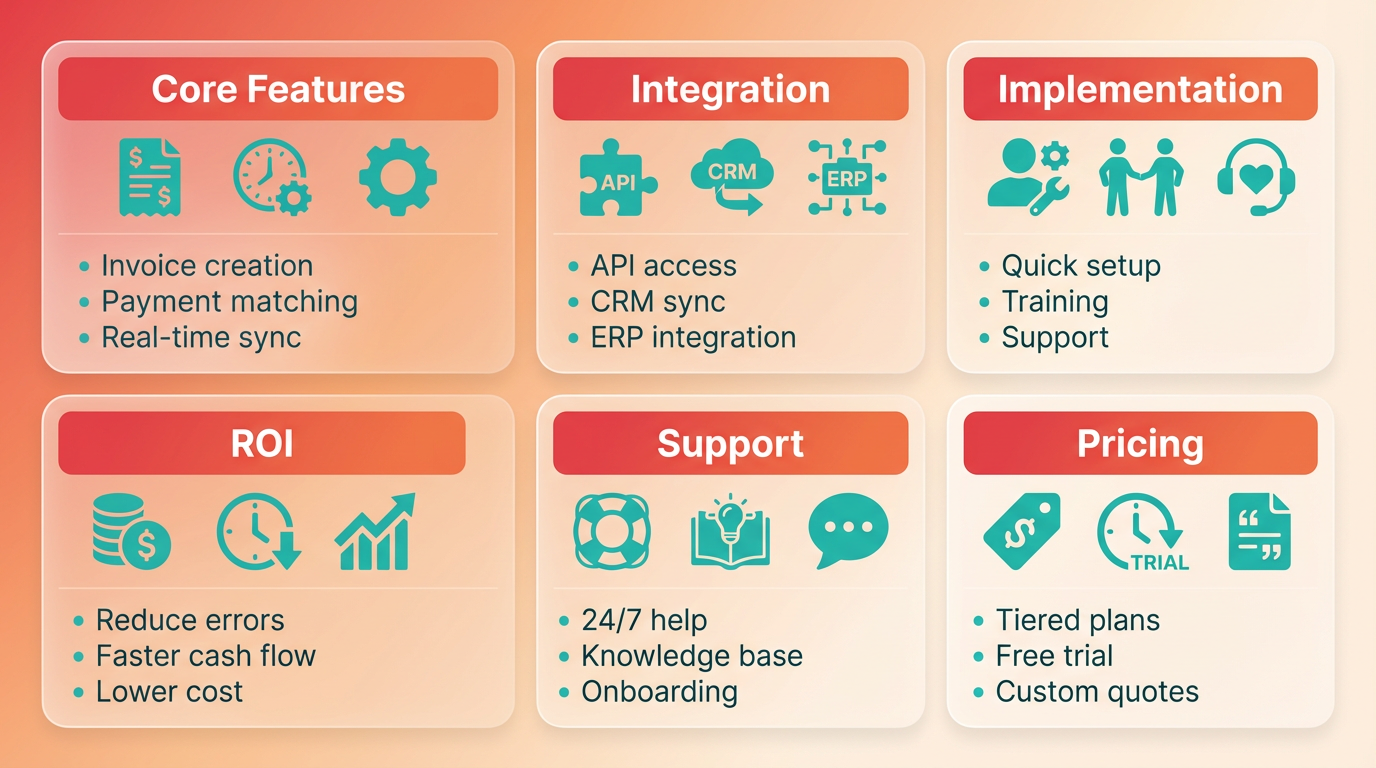
Automated AR tools must offer invoice creation and payment matching to reduce manual workflows. As mentioned in the Automated Invoice Creation vs Manual Processing section, platforms like NetSuite and Quadient automate invoice generation and match payments to invoices in real time, cutting Days Sales Outstanding (DSO) by up to 34%. Look for tools with real-time visibility into payment status, which improves forecasting and decision-making. For example, Paystand’s platform processes billions in B2B payments annually, offering dashboards that track liquidity and aging receivables.
Another critical feature is customizable workflows. Quadient’s software allows businesses to tailor payment reminders and approval steps, saving 16 minutes per invoice on average. Tools should also support multi-channel payment options, enabling customers to pay via credit cards, ACH, or digital wallets. NetSuite’s integration with Stripe and other payment gateways ensures flexibility for diverse client needs..
How Does Integration Impact AR Automation Effectiveness?
Seamless integration with existing systems is non-negotiable. The software must connect with ERP systems like NetSuite, Microsoft Dynamics 365, and Sage Intacct to synchronize financial data. For instance, Quadient’s AR tools integrate with QuickBooks and NetSuite, ensuring tax calculations and ledger updates are accurate. A mismatched system can lead to data silos, increasing errors and delaying collections.
Consider the API robustness of the platform. Building on concepts from the Implementation Checklist for Transitioning to Automated AR section, AR automation tools with open APIs reduce implementation time by automating data flows between systems. NetSuite’s API, for example, allows businesses to sync order transactions with AR ledgers instantly, minimizing reconciliation efforts. If your team uses non-standard ERPs, confirm the vendor offers custom integration options or middleware solutions..
What Implementation Factors Should You Evaluate?
Setup and training are often overlooked but critical for adoption. A 2023 study found that 77% of AR teams fell behind on metrics due to poor implementation planning. Vendors like Paystand provide step-by-step onboarding, including configuring payment workflows and setting up real-time alerts. However, tools requiring extensive manual configuration-like legacy systems-can delay deployment by weeks.
Testing is equally vital. Super Coffee, a case study from NetSuite, transitioned from QuickBooks to a fully automated system by testing invoice workflows with a small customer segment first. This phased approach allowed them to identify bottlenecks before full-scale rollout. Training should include role-specific modules for finance teams, ensuring everyone from AR clerks to managers understands reporting tools and dashboards..
Real-World Examples of Effective AR Automation Adoption
Businesses that align tool selection with operational needs see measurable results. GoTo, a software company, implemented Quadient AR and achieved a 26% increase in managed e-invoicing without expanding staff. Similarly, Rev.io automated its billing processes and reduced manual invoice corrections by 80%. These successes hinge on selecting tools that address pain points like late payments-81% of businesses reported increased delayed payments in 2023, as highlighted in the Addressing Common Manual AR Pain Points with Automation section.
For small businesses, cost efficiency matters. Quadient’s automation saves $3.50 per invoice in processing costs, compared to $15 for manual methods. Larger enterprises, like those processing 100,000+ invoices annually, benefit from AI-powered matching, which reduces errors by 57% and cuts processing time from 15 to 3 minutes..
Best Practices for Evaluating AR Automation Tools
- Assess Scalability: Choose tools that grow with your business. For example, Paystand’s platform supports global B2B payments, making it ideal for companies expanding into new markets.
- Request Demos: Test features like automated DSO tracking and payment reminders in real-time scenarios.
- Review Vendor Support: Opt for providers with dedicated onboarding teams and 24/7 technical support.
- Analyze ROI: Compare cost savings from reduced errors and faster collections against subscription fees.
By prioritizing features like real-time visibility, ERP integration, and scalable workflows, businesses can select AR automation tools that enhance efficiency and customer satisfaction. The goal is not just automation, but intelligent automation that adapts to evolving financial needs.
Frequently Asked Questions
1. What are the financial benefits of automating accounts receivable?
Automation reduces days sales outstanding (DSO) by 34%, cuts invoice processing time from weeks to minutes, and saves mid-sized companies $4 million annually by minimizing unpaid invoices and bad debt losses of 9%.
2. How does automation improve payment timeliness compared to manual processes?
Automated systems increase on-time payments to 35% (vs. manual delays) and reduce delays by enabling instant digital invoice delivery, which is faster than physical mail and improves customer payment adherence.
3. What costs are associated with manual accounts receivable workflows?
Manual AR processes cost mid-sized companies $4 million yearly in unpaid invoices, with 55% of payments delayed and 77% of teams falling behind on metrics due to inefficiencies in data entry and reconciliation.
4. How much time can automation save per invoice?
Automation saves 16 minutes per invoice by eliminating manual data entry and reconciliation, enabling systems like Quadient AR to process 20,000 invoices monthly with 55% faster payment cycles.
5. What’s the impact of automation on bad debt reduction?
Automated AR systems reduce bad debt by minimizing errors (57% fewer processing errors) and accelerating collections, as seen in a construction firm that cut overdue accounts by 70% using automation.
6. Why do AR teams struggle with manual workflows?
Manual workflows require excessive time on repetitive tasks, leading 77% of AR teams to fall behind on metrics and contribute to 9% of invoices being written off as bad debt due to inefficiencies.
7. How does digital invoice delivery enhance payment efficiency?
Digital delivery reduces delays caused by physical mail, improving payment timeliness and enabling real-time visibility into payment statuses, which lowers late payment rates by 55%.