

Automated Invoice Scanning vs Manual Processing
Key Takeaways
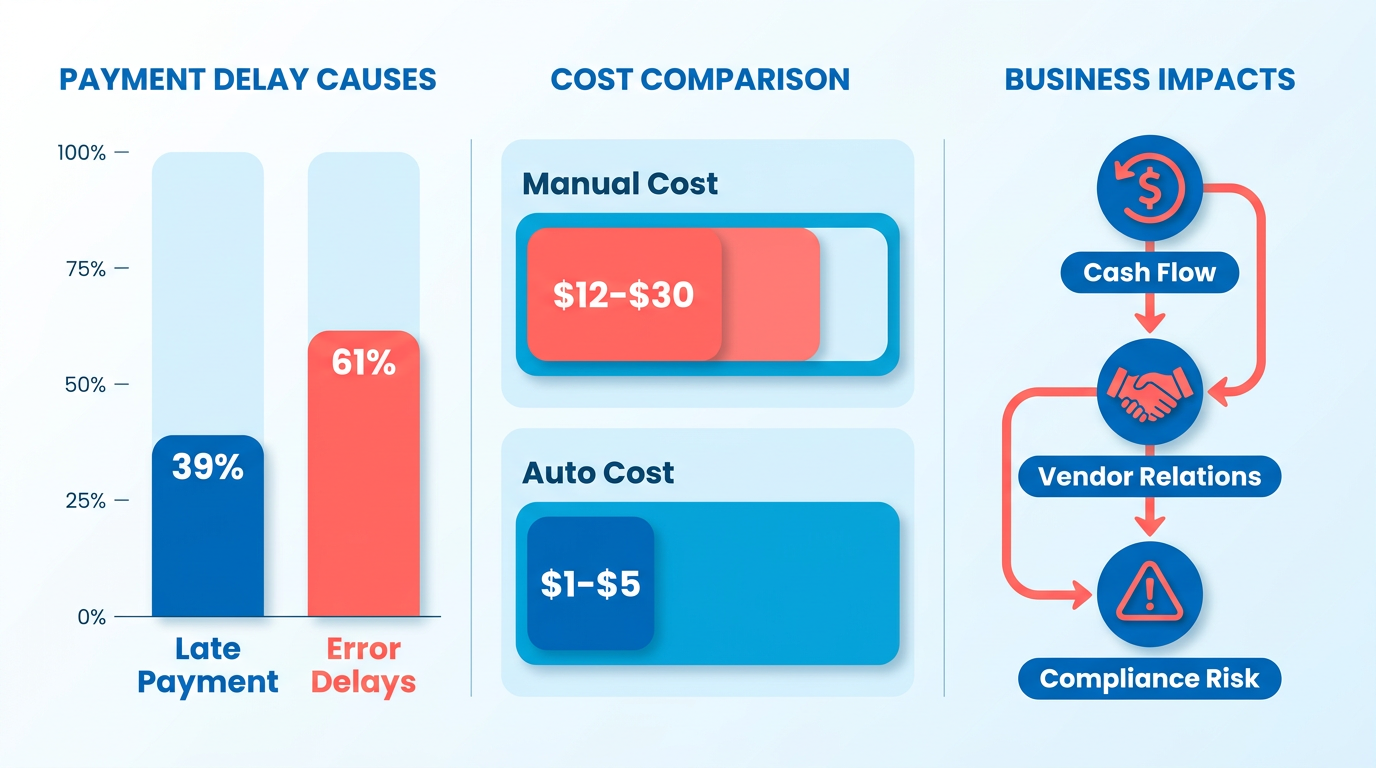
- Automated invoice scanning reduces processing costs to $1–$5 per invoice versus $12–$30 for manual methods.
- 61% of late invoice payments in the U.S. result from invoicing errors caused by manual processing.
- Automating invoice workflows cuts error-related correction costs by 70–85%, saving $10,000–$30,000 annually per 1,000 invoices.
- Late payments in regulated industries, like alcohol distribution, risk fines or license revocation due to non-compliance.
- The Second City saved $40,000 yearly by switching to automated invoice scanning via Ramp.
- Optical character recognition (OCR) technology eliminates 60%+ of invoice data entry errors.
- Manual invoice processing contributes to 39% of late payments, disrupting cash flow and vendor trust.
Related Video
Watch: How to automate invoice data copy to Excel in 1 minute by Microsoft Power Platform
Why Automated Invoice Scanning Matters
Automated invoice scanning transforms financial operations by addressing the inefficiencies and risks of manual processing. Industry data reveals that 39% of invoices in the U.S. are paid late, with 61% of these delays caused by invoicing errors. Manual processing costs $12–$30 per invoice, compared to $1–$5 for automated systems. These errors and delays ripple through businesses, causing cash flow disruptions, strained vendor relationships, and compliance risks. For example, a single late payment in a regulated industry-like alcohol distribution-can trigger fines or license revocation. Automated systems eliminate these pitfalls by digitizing invoices, reducing human error, and accelerating approvals. Building on concepts from the Cost & ROI Analysis section, this cost disparity underscores the financial urgency of automation.
The Cost of Manual Errors
Manual data entry is inherently error-prone. Studies show over 60% of invoice errors stem from manual entry, leading to disputes and delayed payments. For every 1,000 invoices processed manually, organizations spend $10,000–$30,000 annually on corrections. Automated invoice scanning cuts these costs by 70–85%, as seen in case studies like The Second City, which saved $40,000 yearly by switching to Ramp. Optical character recognition (OCR) technology ensures 95–99% accuracy, while AI systems learn from transaction patterns to improve over time. As detailed in the Accuracy Comparison: OCR vs Human Entry section, this precision reduces disputes and keeps cash flow predictable, with companies reporting up to 95% better financial visibility after automation.
Real-World Impact of Delays
Late payments disrupt operations and erode trust. A Boys & Girls Clubs of San Francisco case study highlights how manual bottlenecks led to $20,000 in avoidable costs** annually. Automated systems resolve this by accelerating approvals-**2.4x faster than legacy software**, as noted in the **Speed Comparison: Scan vs Manual** section-and ensuring compliance with payment terms. For businesses processing **500 invoices monthly**, automation slashes costs from **$12 to $5 per invoice**, saving **$78,000 yearly. This speed is critical for small businesses, where 82% of finance teams feel overwhelmed by invoice volume, and for enterprises handling 100,000+ invoices annually, where even a 1% error reduction translates to $10,000 in savings.
Who Benefits Most?
Small businesses and large enterprises alike gain from automation. Startups like Remilk use AI-powered tools to achieve full budget control from day one, while mid-sized firms save 50–80 hours monthly by automating 1,000 invoices. Large corporations benefit from 3-way matching and seamless ERP integration, as seen in Hilti’s streamlined e-invoicing process. The solution scales: PaymentSource handles 5–500 vendors, and AI systems adapt to unstructured documents with 98% accuracy. Whether processing 10 invoices or 100,000, automation reduces costs, improves compliance, and frees finance teams to focus on strategic tasks.
| Feature | Manual Processing | Automated Scanning |
|---|---|---|
| Cost per invoice | $12–$30 | $1–$5 |
| Error rate | 60%+ errors | 1–5% errors |
| Processing speed | Days to complete | Seconds to minutes |
| Compliance risk | High (due to delays) | Reduced with real-time checks |
| Scalability | Limited to 50–100 users | Handles 100,000+ invoices |
Case Studies and Testimonials
- The Second City cut invoice processing time in half and saved $40,000 annually using Ramp’s OCR technology.
- Kiva processes invoices 6x faster with Stampli, achieving real-time financial insights.
- A Precoro user reduced manual data entry by 80%, saving 95% of processing time.
“Ramp’s OCR technology works seamlessly, recognizing vendors and reading line items accurately,” says Frank Byers, Controller at The Second City.
By automating data capture, validation, and integration with tools like QuickBooks or NetSuite, businesses eliminate the “labor-intensive, error-prone” workflows that plague manual systems. The result? Faster payments, stronger vendor relationships, and a foundation for a paperless, efficient accounts payable system.
Pain Points of Manual Invoice Processing
Manual invoice processing creates significant operational friction for finance teams, impacting cost efficiency, accuracy, and employee morale. By analyzing the labor, error, and compliance challenges it introduces, businesses can better understand why automation is a strategic necessity.
Labor Costs: A Drain on Resources
Manual processing costs organizations $12–$30 per invoice due to time spent on data entry, verification, and follow-ups. For companies processing thousands of invoices monthly, this translates to $78,000 in annual savings simply by switching to e-invoicing, as seen in case studies from Precoro. A 68% reliance on manual data entry by companies, as reported by Invoice Automation, delays processing by up to two weeks. This inefficiency not only inflates operational costs but also ties up finance teams in repetitive tasks. For example, M.H. EBY Inc. reduced approval cycle times by adopting DocuWare, but such gains require upfront investment in automation tools, as discussed in the Cost & ROI Analysis section.
Error Rates: Inaccuracy and Financial Risk
Manual data entry is inherently error-prone, with over 60% of invoice errors stemming from human input. These errors include incorrect vendor details, mismatched purchase orders, and even lost invoices, which can delay payments and strain supplier relationships. Fintech highlights that inaccurate invoices cause disputes and late payments, risking licenses in regulated industries like alcohol distribution. AI-powered systems, by contrast, achieve 95–99% accuracy by using OCR and machine learning to validate data against contracts and delivery receipts, a detail expanded in the Accuracy Comparison: OCR vs Human Entry section. For instance, The Second City reduced errors and saved $40,000 annually with Ramp’s OCR technology, demonstrating the tangible impact of automation.
Delayed Payments: Cash Flow and Vendor Relationships
Manual workflows often extend invoice processing timelines to 2–3 weeks, delaying payments and disrupting cash flow. Late payments incur penalties and force businesses to rely on short-term financing, increasing financial strain. Vendors may also revoke early payment discounts, further eroding savings. Automated systems like PaymentSource address this by verifying invoices against purchase orders in real time, ensuring timely approvals. For a company handling 1,000 invoices monthly, automation can save 50–80 hours in processing time, as explored in the Speed Comparison: Scan vs Manual section, directly improving liquidity and vendor satisfaction.
Security and Compliance Risks: Vulnerabilities in Manual Systems
Physical invoice storage and manual data handling expose businesses to fraud and regulatory violations. Ramp identified $5M in fraud before invoices were approved manually, underscoring the risks of unstructured processes. Lost or misplaced invoices further complicate compliance, especially in industries requiring audit trails. Automated systems mitigate these risks by encrypting data and maintaining tamper-proof records. For example, BillBjorn’s end-to-end encryption and real-time syncing with FreshBooks eliminate paper-based vulnerabilities, ensuring compliance with data protection standards.
Employee Burnout: The Human Cost
Finance teams processing 500+ invoices monthly face overwhelming workloads, with 82% reporting being “overwhelmed” by manual tasks. The repetitive nature of data entry contributes to high turnover rates and reduced job satisfaction. Precoro’s case studies show that automation can reduce manual work by 80%, allowing teams to focus on strategic tasks. A controller at The Second City noted that automation “relieves pressure from structured workflows,” highlighting its role in improving workplace morale.
Comparison of Manual vs. Automated Processing
| Metric | Manual Processing | Automated Processing |
|---|---|---|
| Cost per invoice | $12–$30 | $1–$5 |
| Error rate | 60% of errors from manual entry | 95–99% accuracy |
| Processing time | 2–3 weeks per invoice | 2.4x faster with OCR |
| Employee satisfaction | 82% report being overwhelmed | 95% time saved (Precoro) |
Businesses transitioning from manual to automated systems often see 70–85% reductions in processing costs and 2x faster approvals, as seen with companies like Boys & Girls Clubs of San Francisco. While upfront costs for automation may deter some, the long-term savings in labor, compliance, and operational efficiency make it a cost-effective solution. By addressing these pain points, automated invoice scanning not only streamlines workflows but also future-proofs financial operations against scaling challenges.
Benefits of Automated Invoice Scanning
Automated invoice scanning transforms financial operations by slashing processing time, minimizing errors, and accelerating cash flow. Unlike manual methods, which rely on time-consuming data entry and are prone to human mistakes, automation use technologies like OCR and AI to extract, validate, and route invoice data seamlessly. For instance, 68% of companies still manually key invoice data, costing around $15 per invoice** and delaying payments by weeks. Automated systems reduce these costs to **under $4 per invoice while cutting processing time by 80%, as seen in case studies from M.H. EBY Inc. and The Second City. Below is a comparison of key metrics between manual and automated approaches:
| Feature | Manual Processing | Automated Scanning |
|---|---|---|
| Cost per invoice | $12–$30 | $1–$5 |
| Processing time | Hours to days | Seconds to minutes |
| Error rate | 60%+ due to manual entry | 1–5% with AI/OCR |
| Approval cycle time | 2+ weeks | 1–3 days |
| Scalability | Limited by staff size | Handles 1,000+ invoices daily |
How Does Automation Improve Efficiency?
Automated systems streamline workflows by digitizing invoices from multiple channels-emails, PDFs, scanned documents-and extracting data instantly. Optical Character Recognition (OCR) technology identifies vendor names, line items, and totals with 95–99% accuracy, eliminating the need for manual transcription. As mentioned in the Accuracy Comparison: OCR vs Human Entry section, this accuracy level significantly reduces data entry errors. For example, Ramp’s platform processes invoices 2.4x faster than legacy software, while Precoro customers report 2.5x faster approvals. This efficiency allows finance teams to focus on strategic tasks rather than repetitive data entry.
Consider a mid-sized business processing 1,000 invoices monthly. Manual entry would cost $12,000–$30,000 in labor and take weeks to complete. Automation reduces this to $1,000–$5,000 and completes the same volume in hours. Building on concepts from the Speed Comparison: Scan vs Manual section, automated systems consistently outperform manual processes in time efficiency. Tools like BillBjorn and DocuWare further enhance productivity by enabling remote approvals and real-time tracking, as demonstrated by M.H. EBY Inc.’s 20% reduction in approval cycle times.
What Accuracy and Compliance Benefits Does Automation Offer?
Automated systems ensure data consistency across departments by synchronizing invoice information with procurement and accounting records, reducing the need for time-consuming manual reconciliations. This structured approach applies validation rules, such as 3-way matching (comparing invoices, purchase orders, and delivery receipts), to flag discrepancies instantly. This reduces late payment rates-currently at 39% in the U.S.-and minimizes disputes with vendors.
AI-powered platforms like Precoro and Ramp also enhance compliance by ensuring adherence to procurement policies and tax regulations. For example, Ramp identified $5M in fraud before invoices were approved, while Fintech’s PaymentSource verifies invoice details against contracts to prevent overpayments. Additionally, encrypted storage and audit trails in automated systems meet regulatory requirements, reducing the risk of fines.
Why Do Businesses See Faster Payments and Cost Savings?
Faster processing means quicker approvals and on-time payments, which strengthen supplier relationships and enable early payment discounts. Automated workflows also reduce cash flow gaps by accelerating the payment cycle from 14 days (manual) to 3–5 days (automated). The Second City, for instance, saved $40,000 annually by speeding up approvals, while Hilti reported 83% straight-through processing for electronic invoices.
Cost savings compound over time. A company switching from manual to automated processing can save $78,000 yearly** by reducing costs from **$12 to $5 per invoice**. Over three years, mid-sized enterprises using AI-driven solutions like those in Precoro’s case studies save **$250,000+ annually. As discussed in the Cost & ROI Analysis section, these efficiencies justify automation investments within 6–12 months, as highlighted in AI invoice processing research.
By integrating with accounting systems like QuickBooks or ERP platforms, automated tools eliminate data silos and provide real-time financial visibility. This allows businesses to forecast cash flow accurately and avoid penalties for late payments. As one finance director noted, “Automation brings structure to complexity by applying consistent rules across invoices,” ensuring both efficiency and compliance.
For deeper insights into implementation strategies, explore how AI-powered OCR or RPA solutions can tailor to your workflow.
Accuracy Comparison: OCR vs Human Entry
OCR technology and human data entry differ significantly in accuracy, error types, and adaptability to invoice formats. Automated systems using OCR achieve 95-99% accuracy in structured invoices, while human entry has error rates exceeding 60% due to fatigue or oversight, as detailed in the Pain Points of Manual Invoice Processing section. However, OCR struggles with handwritten notes, low-quality scans, or unconventional formats, where human judgment might still outperform machines. Below is a structured comparison of their capabilities:.
How Does OCR Accuracy Compare to Human Entry?
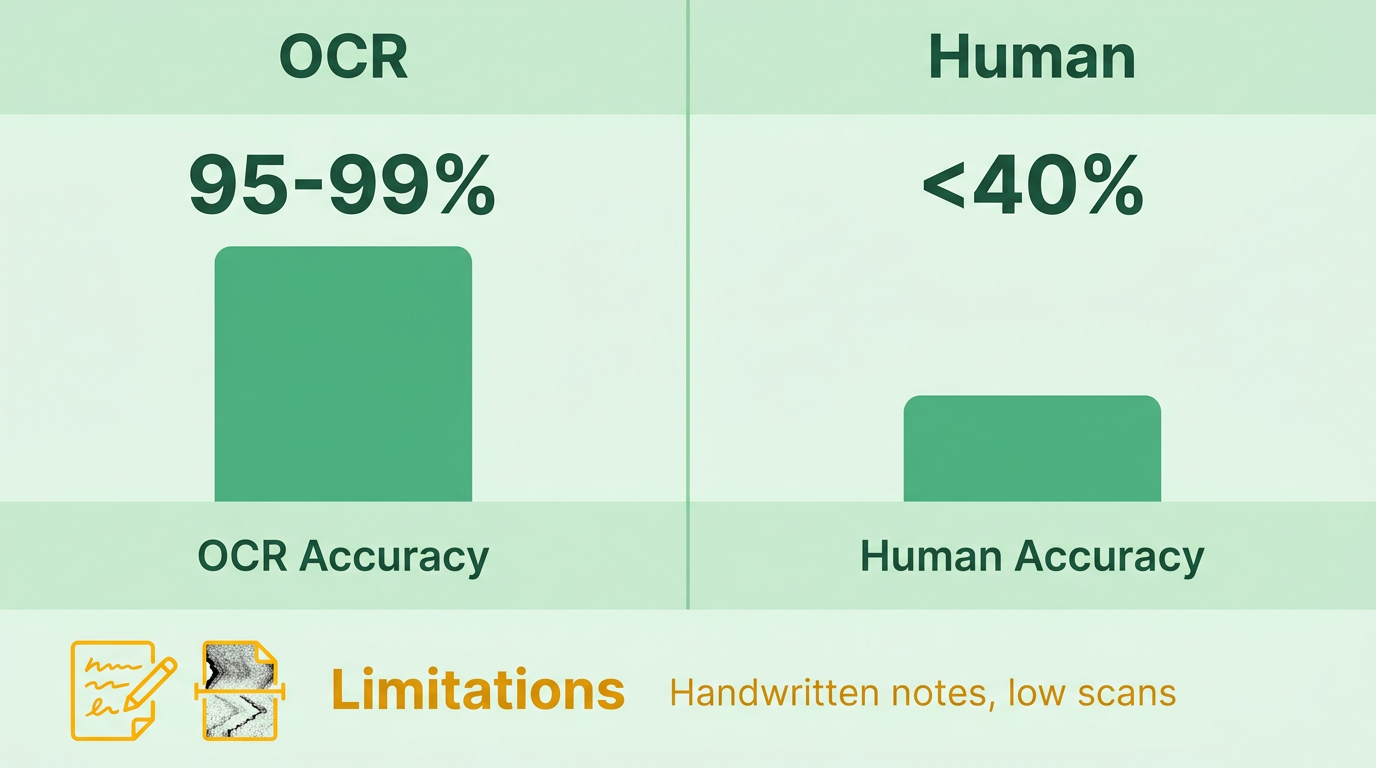
OCR systems excel in consistency for standardized invoices, such as those with clear fonts and structured layouts. For example, Ramp’s OCR technology accurately identifies vendor names and line items, as noted by Frank Byers, Controller at The Second City, who reported seamless recognition of recurring vendors. However, OCR errors often involve misreading numbers (e.g., “0” vs “O”) or misaligned text in PDFs. Human entry, while faster for ambiguous data, introduces risks like typos or missed decimal points. One study found 85% of manual errors stemmed from simple data-entry mistakes, compared to OCR’s pattern-based misclassifications, aligning with the Pain Points of Manual Invoice Processing section’s findings.
| Error Type | OCR | Human Entry |
|---|---|---|
| Common Errors | Misread numbers, misaligned text | Typos, missed decimal points |
| Error Rate | 1-5% for structured invoices | 12-60% depending on workload |
| Root Cause | Poor image quality, formatting | Fatigue, distractions |
How Do Invoice Formats and Quality Affect Accuracy?
OCR performance drops sharply with low-quality documents. A solution combining AI and OCR, like the one tested in , achieved 100% accuracy on clean invoices but struggled with handwritten annotations or smudged text. Humans, while slower, can interpret context better-such as distinguishing between a vendor’s nickname and legal name. For example, the Second City saved $40,000 annually by automating 85% of their invoices but still required manual checks for handwritten supplier receipts.
| Invoice Type | OCR Accuracy | Human Accuracy |
|---|---|---|
| Clean PDFs | 98% | 95% |
| Handwritten notes | 65% | 90% |
| Low-resolution scans | 70% | 85% |
What Are the Downstream Impacts of OCR Errors?
Even small OCR errors can disrupt financial workflows. A misread invoice amount might delay payments, triggering late fees or damaging vendor relationships. Ramp users report 95% improvement in financial visibility by reducing such errors, reflecting insights from the Benefits of Automated Invoice Scanning section. Conversely, human errors are often discovered later, requiring time-consuming audits. For businesses processing 1,000 invoices monthly, automation saves 50-80 hours by minimizing rework.
Future advancements in OCR, such as machine learning models trained on diverse invoice formats, aim to close the gap. Tools like BillBjorn use intelligent OCR to sync with MYOB Business, ensuring real-time accuracy. Meanwhile, hybrid systems using AI-driven error detection (e.g., regex validation post-OCR) could further reduce mistakes. As Nur Ashikin Rohaime notes, open-source OCR tools like PyTesseract now rival commercial solutions in speed and precision..
What Trade-offs Exist Between Speed and Accuracy?
OCR’s speed-processing invoices 2.4x faster than legacy systems-comes at the cost of occasional formatting errors. Humans, while slower, adapt better to irregularities, a contrast highlighted in the Speed Comparison: Scan vs Manual section. For instance, manual entry might handle a vendor’s custom invoice layout in 10 minutes, while OCR could take 2 minutes but require 5 minutes of correction. The optimal approach balances automation for high-volume, structured invoices with manual checks for edge cases.
By integrating OCR with AI validation layers, companies can achieve near-perfect accuracy. For example, Precoro’s AI systems learn from past invoices, improving recognition of vendor-specific formats over time. This reduces reliance on human intervention while maintaining financial integrity.
In summary, OCR offers unmatched efficiency for standardized workflows, but human oversight remains critical for complex cases. Advances in AI and hybrid systems will likely bridge this gap, making automation increasingly reliable for even the most challenging invoice formats.
Speed Comparison: Scan vs Manual
Automated invoice scanning processes invoices in seconds while manual handling can take days, creating a stark contrast in speed and efficiency. Building on concepts from the Why Automated Invoice Scanning Matters section, AI-powered systems like those in complete tasks in under 30 seconds with 100% accuracy, whereas manual processing often delays invoices by up to two weeks. This speed difference directly impacts payment cycles, enabling businesses to reduce approval times and improve cash flow. Below, we break down the comparison across key metrics.
How Much Faster Is Automated Invoice Scanning?
Automated systems process invoices 10 to 100 times faster than manual methods. A robotic process automation (RPA) solution in handles invoices in 24 seconds, while manual entry takes hours or days. As mentioned in the Cost & ROI Analysis section, for high-volume businesses processing 10,000 invoices monthly, automation reduces total processing time from weeks to minutes. This speed also lowers the risk of payment penalties by ensuring timely vendor payments.
| Metric | Automated Scanning | Manual Processing |
|---|---|---|
| Processing Time | <30 seconds/invoice | 2–5 hours/invoice |
| Error Rate | 1–5% (AI systems) | 60%+ (human error) |
| Cost per Invoice | $1–5 | $12–30 |
What Are the Time and Labor Savings?
Switching to automation saves 80% of the time spent on invoice processing. Consider a mid-sized company handling 5,000 invoices monthly: manual processing costs ~$60,000 annually at $12/invoice, while automation slashes this to ~$20,000. Additionally, automation eliminates the need for 50–80 hours of monthly labor, allowing finance teams to focus on strategic tasks.
For example, M.H. EBY Inc. reduced approval cycle times by adopting DocuWare, enabling remote invoice approvals and real-time status tracking. Similarly, BillBjorn users report saving “FAR more money than it costs” by processing invoices in under 60 seconds.
How Do High-Volume and Low-Volume Scenarios Compare?
Automation excels in high-volume environments, where manual processing becomes unsustainable. AI systems in handle 1,000+ invoices daily with 95–99% accuracy, while manual teams struggle with fatigue and errors. For low-volume scenarios (e.g., 50 invoices/month), automation still provides efficiency by eliminating data entry and reducing approval delays.
| Scenario | Automation Benefit | Manual Limitation |
|---|---|---|
| High-volume (1,000+) | Scales effortlessly; reduces costs by 75% | Prone to delays and human error |
| Low-volume (50–100) | Eliminates repetitive tasks; saves 10–15 hours/month | Time-consuming and error-prone |
What Are the Bottlenecks?
While automation accelerates processing, it faces challenges like handling non-standard invoice formats or poor-quality scans. Manual systems, meanwhile, suffer from bottlenecks during peak periods and high staff turnover. For instance, notes that automated systems may require manual intervention for unstructured invoices, though AI tools improve accuracy over time, as detailed in the Accuracy Comparison: OCR vs Human Entry section. Manual processing remains vulnerable to delays caused by human fatigue or workflow inefficiencies.
In conclusion, automated invoice scanning dominates in speed, cost, and scalability. Businesses adopting AI-driven solutions like those in or see 57% fewer errors and 83% faster approvals for electronic invoices. While initial setup may require investment, the return on investment typically materializes within 6–12 months, making automation a strategic imperative for modern finance operations.
Cost & ROI Analysis
Implementing automated invoice scanning requires upfront investment in software, hardware, and integration. The initial cost varies depending on the system’s complexity, but sources consistently highlight three core components: software licenses, hardware upgrades, and integration with existing systems. For example, AI-powered solutions like those described in Precoro’s guide require Optical Character Recognition (OCR), Machine Learning (ML), and Robotic Process Automation (RPA) tools. These software solutions range from cloud-based subscriptions to on-premise deployments, with costs influenced by the number of invoices processed monthly. Hardware expenses include high-speed scanners, servers, or cloud storage for handling large volumes of documents. A mid-sized business processing 5,000–10,000 invoices monthly might spend $10,000–$50,000 upfront, depending on the chosen technology stack and infrastructure needs.
What Are the Ongoing Costs of Automated Invoice Scanning?
Maintenance and support costs represent a recurring expense for automated systems. These include software updates, technical support, and training for finance teams to manage the system effectively. Open-source tools like PyTesseract and TagUI, as noted in a comparative study, reduce some software costs but still require expertise for customization and troubleshooting. Commercial solutions often bundle support packages, which can add $2,000–$10,000 annually. Additionally, businesses must allocate resources for periodic audits to ensure compliance with evolving procurement policies, as emphasized by Anna, an Inbound Sales Representative at Precoro.
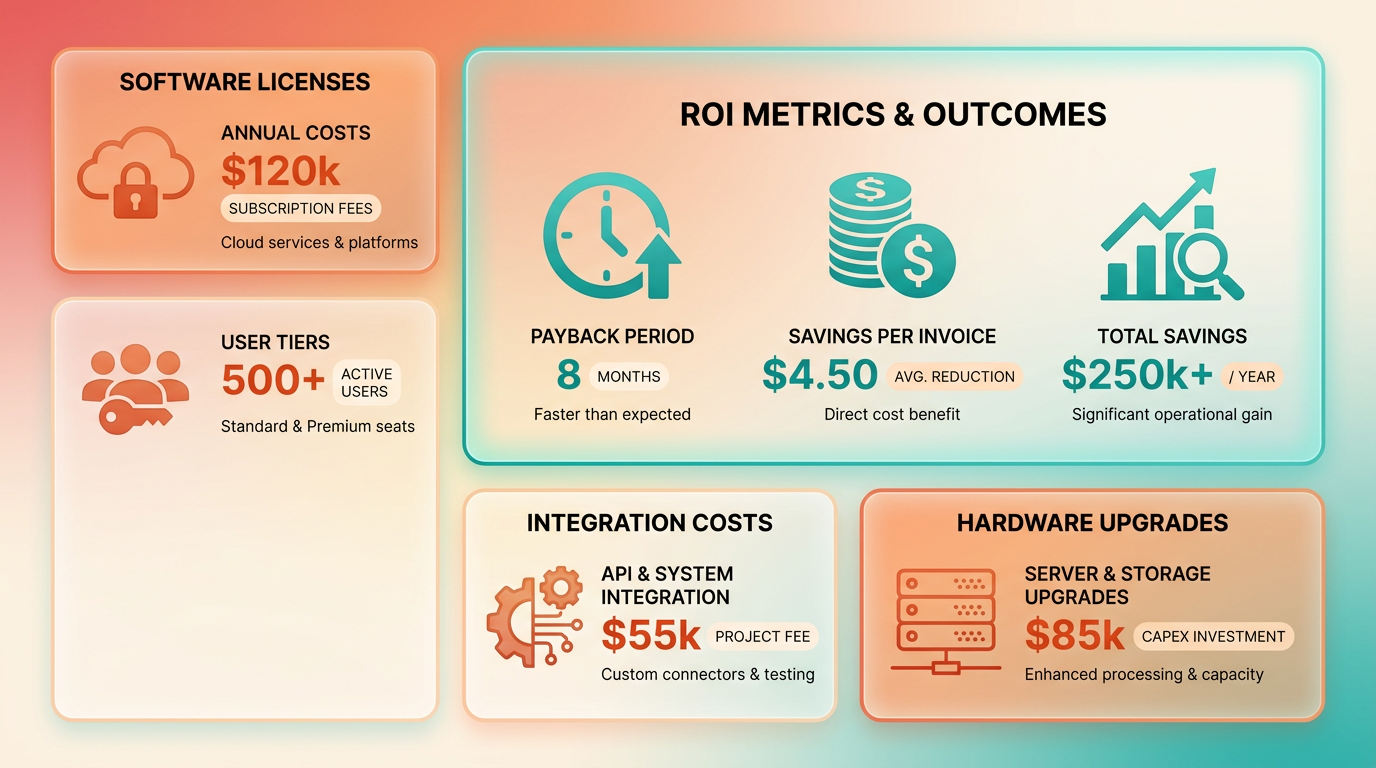
Despite these costs, automation delivers rapid returns. Organizations processing 1,000 invoices monthly save 50–80 hours per month by switching from manual to automated workflows, as reported in Precoro’s analysis. At $12–$30 per invoice for manual processing versus $1–$5 for automation, the cost savings alone can offset implementation expenses within 6–12 months. A case study of Remilk, a biotech startup, shows that AI-driven invoice automation achieved full budget control from day one, reducing errors and improving vendor relationships.
How Does Automation Compare to Manual Processing in Cost and Efficiency?
Manual invoice processing is both time-intensive and error-prone. Over 60% of invoice errors stem from manual data entry, according to Precoro, while automation achieves 95–99% accuracy. Processing time also differs dramatically: manual workflows can take days to complete, whereas AI systems extract and validate invoice data in under 30 seconds. For companies handling 100,000+ invoices annually, best-in-class performers using AI report invoice processing costs as low as $2.18 per invoice, compared to an industry average of $10.89. Building on concepts from the Pain Points of Manual Invoice Processing section, these inefficiencies underscore the operational friction that automation resolves.
A mid-sized enterprise using AI-powered automation saves approximately $250,000 annually by reducing costs from $12–$30 per invoice to $1–$5. These savings compound over time, with one study showing a 57% reduction in processing errors and an 83% straight-through processing rate for electronic invoices. Open-source RPA solutions, as demonstrated in a technical study, can match or exceed commercial tools in accuracy while offering flexibility and lower licensing fees. As mentioned in the Accuracy Comparison: OCR vs Human Entry section, OCR technology contributes significantly to these accuracy improvements.
| Metric | Manual Processing | Automated Scanning |
|---|---|---|
| Cost per invoice | $12–$30 | $1–$5 |
| Processing time | Days | <30 seconds |
| Error rate | >40% | 1–5% |
| ROI payback period | N/A | 6–12 months |
| Scalability | Limited | High |
Real-World Examples of ROI
Several companies demonstrate the tangible benefits of automation. Remilk, a biotech startup, reduced financial processing delays and improved compliance by implementing AI invoice scanning. Another case study in ERP systems found that integrating AI with enterprise resource planning tools saved $250,000 annually for mid-sized businesses. Hilti, a global tools company, streamlined e-invoicing by addressing technical barriers and achieving straight-through processing for 83% of invoices. These examples underscore that automation not only cuts costs but also enhances operational agility. As noted in the Speed Comparison: Scan vs Manual section, the rapid processing of invoices is a key driver of these efficiency gains.
For organizations evaluating options, open-source RPA frameworks like TagUI and PyTesseract offer cost-effective alternatives to commercial solutions. While initial setup requires technical expertise, the long-term savings in labor and error correction justify the investment. As AI systems improve accuracy over time by learning from transaction patterns, the return on investment grows exponentially, making automation a strategic priority for modern finance teams.
Implementation and Integration
Implementing automated invoice scanning requires a structured approach to ensure seamless integration with existing workflows and systems. The process begins with selecting a solution that aligns with your organization’s volume, document formats, and accounting software. Tools like Docsumo, BillBjorn, and RPA-powered systems (e.g., TagUI + PyTesseract) offer varying capabilities, from cloud-based OCR to end-to-end robotic automation. Once a platform is chosen, the implementation typically follows a phased rollout to minimize disruption.
Step-by-Step Implementation Guide
A successful deployment starts with system setup and data migration. Begin by configuring the automated system to handle your invoice formats (PDFs, scans, emails). For example, BillBjorn uses smart OCR to sync invoices directly into FreshBooks or MYOB, while Docsumo automates data extraction from vendor emails. Next, migrate historical invoice data into the system, ensuring compatibility with your accounting software. Tools like Power Automate or Zapier can streamline this process by linking storage folders (e.g., OneDrive) to AI models for real-time extraction of fields like invoice ID, vendor name, and total amount.
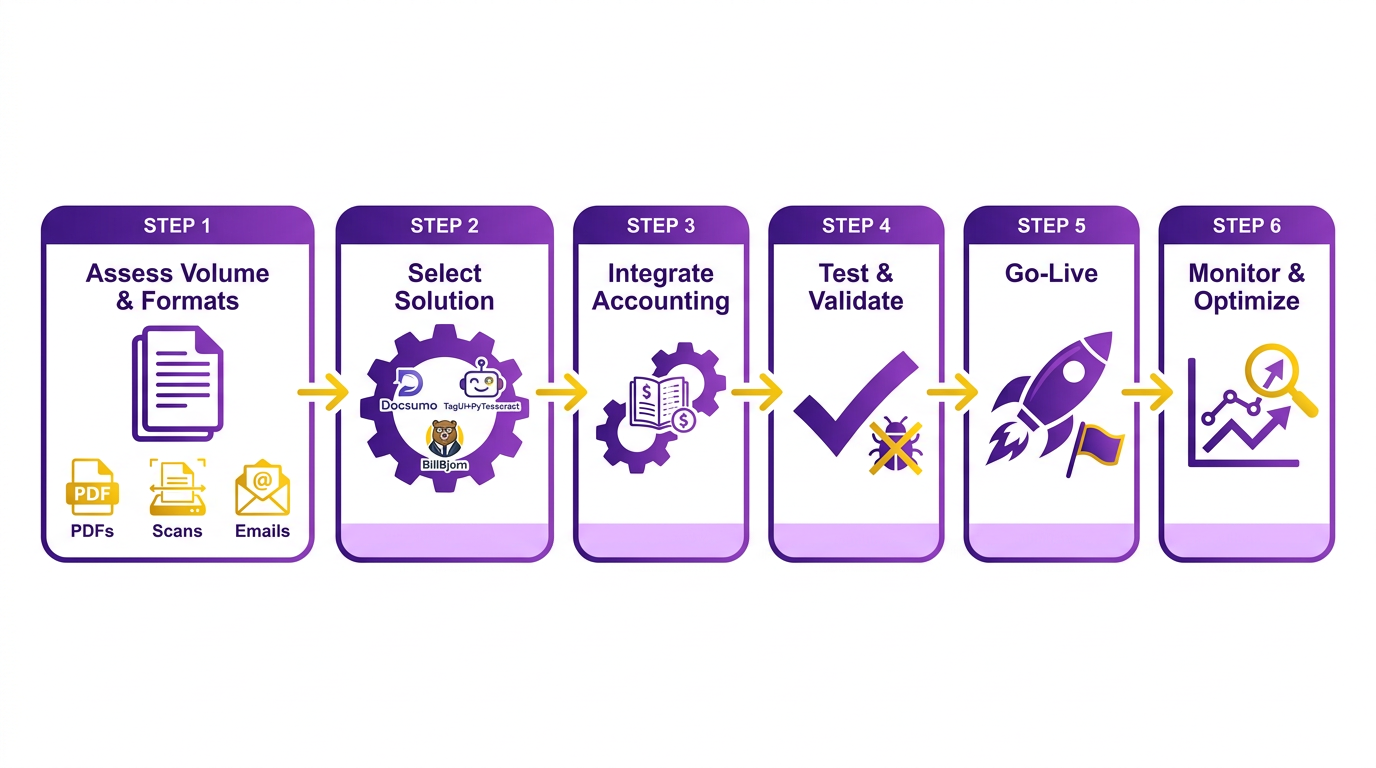
Once the system is configured, train the AI model to recognize patterns in your specific invoice formats. Many platforms, such as AI Builder, allow iterative learning by refining extracted data manually. For instance, a biotech startup like Remilk achieved full budget control by training its AI system to adapt to vendor-specific layouts. After the model reaches acceptable accuracy (95–99% as noted in Accuracy Comparison: OCR vs Human Entry), conduct a pilot test with a small team to identify bottlenecks.
Change Management and Adoption Strategies
Employee resistance is a common hurdle during automation. To address this, communicate the benefits early-highlight cost savings ($1–5 per invoice vs. $12–30 manually) and error reduction (60% of manual errors eliminated). Provide hands-on training sessions to demonstrate workflows, such as BillBjorn’s mobile app for scanning receipts or Docsumo’s email forwarding feature. Assign internal champions to support peers and share success stories, like one user who cut bookkeeping costs by 30% after adoption.
Stakeholders may also need reassurance about compliance and security. Emphasize features like end-to-end encryption (BillBjorn) and audit trails in ERP integrations. For example, AI-powered systems ensure 100% compliance with procurement policies, as noted by an Inbound Sales Representative at Precoro. Regularly gather feedback to refine the system and address concerns, ensuring adoption remains a collaborative effort.
Integration with ERP and Accounting Systems
Seamless integration is critical for maximizing automation’s value. Most platforms offer pre-built connectors to ERP systems like SAP, Oracle, or NetSuite, but customization may be needed for niche software. For instance, RPA solutions combine OCR with robotic workflows to input data into SAP’s accounts payable module, reducing processing time from days to seconds. When integrating, validate data mapping to avoid mismatches-e.g., ensuring “total amount” fields align correctly in MYOB or QuickBooks.
Security and scalability should also guide integration. BillBjorn’s case studies highlight secure cloud syncing, while open-source RPA tools (e.g., TagUI) offer flexibility for businesses with in-house technical teams. A mid-sized enterprise processing 10,000 invoices monthly reported 83% straight-through processing after integrating AI with its ERP, saving $250,000 annually.
Challenges and Mitigation Strategies
Common challenges include data format inconsistencies and system compatibility issues. For example, manual entries often struggle with handwritten notes or non-standard invoice layouts. To mitigate this, use AI systems trained on diverse datasets-such as PyTesseract’s ability to handle semi-structured documents. Another issue is employee reliance on old workflows; counter this by embedding automation into daily routines, like requiring scanned invoices to be uploaded via mobile apps before approvals.
Cost is another concern, though ROI typically materializes within 6–12 months. A small business reduced invoice processing time from hours to minutes using BillBjorn, achieving a 50% reduction in labor costs. Start with a phased rollout to measure impact and adjust budgets accordingly.
Real-World Examples and Outcomes
Case studies underscore the practical benefits of automation. Remilk, a biotech startup, automated 1,000 monthly invoices using AI, saving 50–80 hours monthly. Similarly, a retail chain integrated RPA with AI to process 100,000+ invoices annually, cutting costs from $10.89 to $2.18 per invoice. These examples demonstrate that while implementation requires upfront effort, the long-term gains in efficiency, accuracy, and scalability justify the investment.
By following a structured implementation plan, addressing change management proactively, and using strong integration practices, businesses can transition smoothly from manual processing to automated invoice scanning. The result is a streamlined financial operation that reduces errors, saves costs, and frees employees to focus on strategic tasks.
Frequently Asked Questions
1. How much does automated invoice scanning cost compared to manual processing?
Automated scanning costs $1–$5 per invoice, while manual processing costs $12–$30. The Second City saved $40,000 annually by switching to Ramp, reducing costs by over 80% for high-volume invoice workflows.
2. How does automation reduce invoice errors?
OCR technology in automated systems eliminates 60%+ of data entry errors, achieving 95–99% accuracy. This reduces error-related correction costs by 70–85%, saving $10,000–$30,000 annually per 1,000 invoices.
3. What percentage of late payments are caused by manual processing?
Manual processing causes 39% of U.S. invoice late payments, with 61% of these delays due to invoicing errors. This disrupts cash flow and vendor trust, creating operational inefficiencies in procurement and accounts payable teams.
4. Why is automation critical for regulated industries like alcohol distribution?
Late payments in regulated industries risk fines or license revocation due to non-compliance. Automated systems ensure timely processing, avoiding penalties and maintaining operational licenses in sectors such as alcohol, pharmaceuticals, and finance.
5. What real-world savings exist for businesses using automation?
The Second City saved $40,000 yearly by adopting Ramp’s automated invoice scanning. For every 1,000 invoices, automation saves $10,000–$30,000 annually in correction costs compared to manual processing errors and delays.
6. How accurate is OCR compared to human data entry?
OCR technology achieves 95–99% accuracy, eliminating 60%+ of manual entry errors. Human data entry errors cause 61% of late payments, while AI-driven OCR systems improve accuracy over time by learning transaction patterns and reducing disputes.
7. How does manual processing impact business cash flow?
Manual processing causes 39% of late payments, leading to cash flow disruptions and vendor trust issues. Late payments also incur correction costs of $10,000–$30,000 annually per 1,000 invoices, straining financial operations and procurement timelines.