

Automate Xero Accounts Payable with Blixo
Key Takeaways
- Automating Xero AP with Blixo reduces invoice processing time from 45 days to 3.1 days.
- Manual AP errors cost U.S. businesses $1.3 trillion annually, but automation cuts disputes by 65%.
- Automation lowers administrative costs by 80% per invoice, saving $1,000+ monthly for small businesses.
- For companies processing 1,000 invoices, automation saves over $200,000 yearly in costs.
- Pre-built API connectors enable real-time Xero-Blixo data synchronization for accuracy.
- Healthcare providers cut month-end reconciliation time by 18% using Blixo’s AI validation.
- Small businesses save $15,500 annually by reducing invoice costs from $12.88 to $2.78 per invoice.
Why Automating Xero Accounts Payable Matters
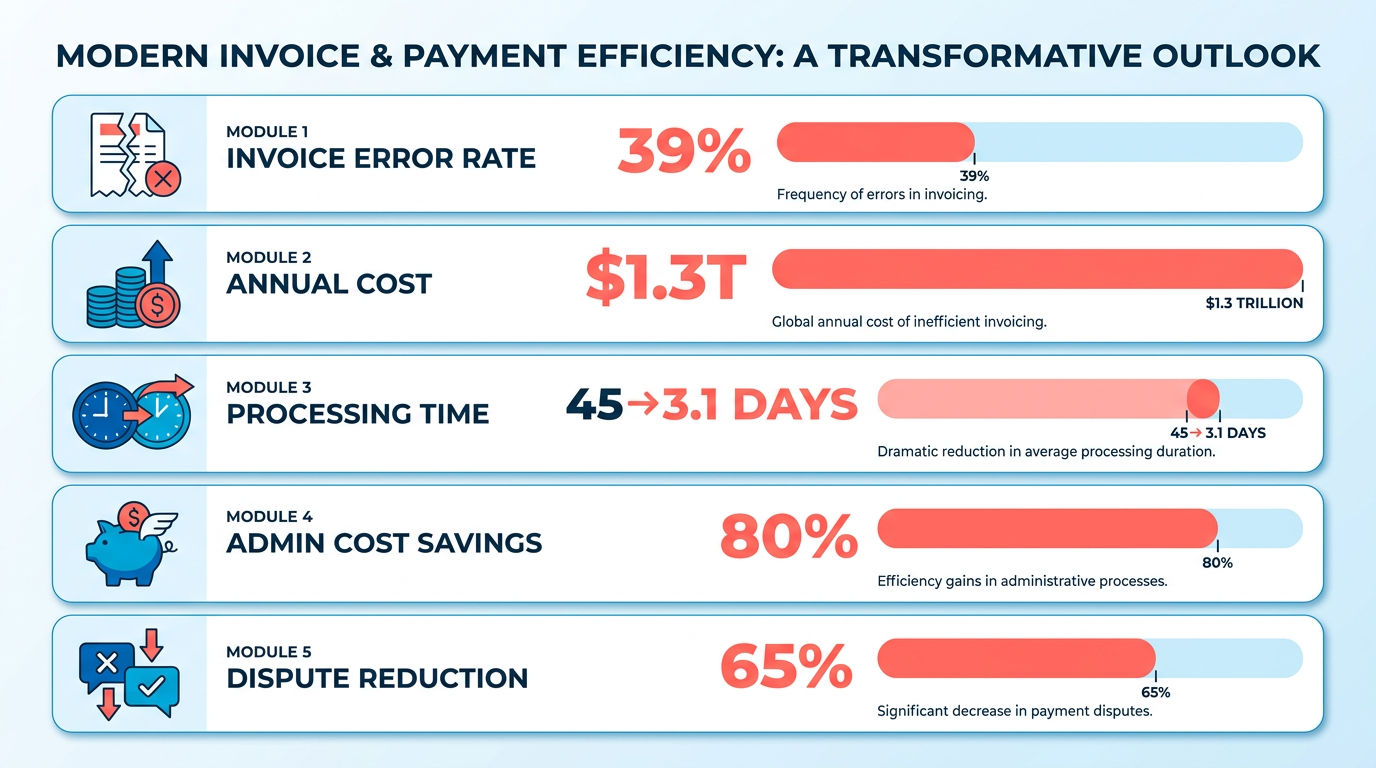
Automating Xero accounts payable is no longer a luxury-it’s a strategic necessity. Manual processes waste time, inflate costs, and risk errors that hurt cash flow. For example, 39% of invoices contain human-input mistakes, costing U.S. businesses $1.3 trillion annually in errors, disputes, and penalties. By integrating Blixo with Xero, businesses can slash processing time from 45 days to 3.1 days, reduce administrative costs by 80% per invoice, and cut dispute rates by 65%. These numbers alone justify automation, but the real value lies in the broader impact on productivity and financial health. As mentioned in the Understanding Xero and Blixo Integration section, this collaboration stems from pre-built API connectors that ensure real-time data synchronization.
How Manual Processes Drain Productivity and Accuracy
Manual AP workflows are bottlenecks for growth. Consider a small business processing 100 invoices monthly: at $12.88 per manual invoice**, this costs **$1,288 monthly-nearly $15,500 annually**. Automation reduces this to **$2.78 per invoice, saving $1,000+ monthly**. For companies handling 1,000 invoices, the savings escalate to **$200,000+ yearly. Beyond cost, errors like duplicate payments or missed deadlines create chaos. A logistics firm reduced disputes by 65% using Blixo’s AI-driven validation, while a healthcare provider cut month-end reconciliation time by 18%. These gains translate to fewer late fees, stronger vendor relationships, and better cash flow forecasting.
Why Xero Users Can’t Afford Delays in Automation
Delayed payments ripple through a business like a broken dam. For every 30-day delay, companies risk 30% higher administrative costs and 30% slower DSO (Days Sales Outstanding). This stagnation stifles growth, especially for S-Corps and partnerships where tax compliance is tied to payment timing. Blixo’s integration with Xero automates three-way matching (PO, goods receipt, invoice) and enforces 1099 compliance, ensuring payments align with tax rules. A mid-sized manufacturer, for instance, re-skilled its AP team from “invoice processors to strategic planners” within months of adoption. Real-time dashboards and AI-powered OCR (97% accuracy) eliminate reconciliation disputes, freeing finance teams to focus on analysis, not data entry.
Who Benefits Most from Xero + Blixo Automation
While all businesses gain from automation, certain groups see transformative results:
- Small to mid-sized firms: Those processing 50–150 invoices monthly often spend $500–$1,000/month manually. Blixo cuts this to $200–$800/month, with 200+ hours saved annually for teams managing 1,000 invoices.
- S-Corps and partnerships: Tax-sensitive businesses benefit from AI-driven compliance checks and audit-ready records.
- High-volume industries: Retail, healthcare, and logistics firms reduce disputes by 35–65% using Blixo’s dynamic discounting and automated dunning. A Miami startup boosted sales conversion by 70% by using early-payment incentives.
Blixo’s Xero integration is seamless, using pre-built API connectors to sync data in real time. This eliminates duplicate entries and ensures Xero’s ledger stays updated without manual exports. For businesses prioritizing security, 256-bit encryption, GDPR/SOC 2 compliance, and role-based access protect sensitive financial data.
The Bottom Line: Measurable ROI in Weeks, Not Years
Unlike generic providers, Blixo offers transparent ROI metrics. A retail chain automated 90% of invoices, recovering $1.2 million in lost profits within six months. A law firm improved cash flow by 25% in three months. These outcomes aren’t hypothetical-they’re tracked via KPIs like error rate (3% vs. 39%), DSO (30% improvement), and cost per invoice (80% lower). Building on concepts from the Optimizing Accounts Payable Automation with Blixo and Xero section, such metrics highlight how automation reduces risk and enhances decision-making.
For Xero users, automation isn’t just about efficiency-it’s about future-proofing. As one finance manager noted, “Blixo transformed our AP team from invoice processors to strategic planners.” Start a free trial, connect Xero, and see a 30% reduction in manual hours in 30 days. The cost of inaction? Stagnation. The cost of automation? A fraction of what manual errors already cost you.
Understanding Xero and Blixo Integration
Xero is a cloud-based accounting platform designed for small and medium businesses, offering tools for invoicing, financial tracking, bank reconciliation, and payroll. Its core strengths lie in real-time financial reporting, multi-user collaboration, and integration with third-party apps like Blixo. By automating repetitive tasks such as invoice creation and payment tracking, Xero helps businesses maintain accurate financial records while reducing manual effort. However, its native accounts payable (AP) workflows often require manual input for tasks like matching payments to invoices, which is where Blixo’s integration becomes critical. As mentioned in the Why Automating Xero Accounts Payable Matters section, manual processes inflate costs and risk errors, making automation a strategic necessity.
Blixo enhances Xero’s capabilities by introducing AI-driven automation for accounts payable, streamlining processes like invoice matching, payment reminders, and cash application. For example, Blixo’s cash application AI automatically maps incoming payments to the correct invoices with 99% accuracy, cutting reconciliation time by 50% compared to manual methods. This is particularly valuable for businesses handling high volumes of transactions, as it minimizes errors and accelerates cash flow visibility. Additionally, Blixo automates collections through multi-channel reminders (email, SMS, phone), reducing delinquent churn by 30% for users.
How Data Syncs Between Xero and Blixo
The integration operates on a two-way sync, ensuring seamless data flow between the platforms. Xero sends data like invoices, customers, and payments to Blixo every hour, while Blixo posts transaction updates to Xero in real time. This bidirectional flow eliminates manual data entry and ensures both systems reflect the same information. For instance, when a customer pays an invoice via Blixo’s hosted portal, the payment is instantly recorded in Xero’s ledger, updating accounts receivable balances automatically. Building on concepts from the Setting Up Xero and Blixo Integration section, users must activate the integration through Blixo’s settings (available on paid plans), and pre-existing data from Xero is not automatically imported. For businesses with legacy data, Blixo offers manual import tools or support to migrate historical records.
Real-Time Posting and Automation Workflow
Real-time posting is central to Blixo’s value proposition. When a transaction occurs in Blixo-such as a customer making a payment or a team member generating an invoice-it is instantly reflected in Xero. This immediate synchronization reduces delays in financial reporting and ensures AP teams can act on the most current data. As detailed in the Automating Accounts Payable Workflows with Blixo section, the workflow use customizable rules to enforce processes like three-way matching, further enhancing accuracy. The workflow follows these steps:
- Invoice creation: Blixo pulls invoice data from Xero to generate customer bills.
- Payment processing: Customers pay via Blixo’s portal, which supports credit cards, ACH, and checks.
- Cash application: Blixo’s AI matches payments to invoices and updates Xero’s ledger in real time.
- Collections automation: Overdue invoices trigger automated reminders, with status updates synced to Xero.
This closed-loop system ensures businesses maintain control over their AP workflows while reducing the risk of missed payments or reconciliation errors. For high-volume users, Blixo’s multi-currency support and subscription billing automation further simplify cross-border transactions and recurring invoices.
Why This Integration Matters
By combining Xero’s accounting backbone with Blixo’s automation, businesses gain a unified solution for managing accounts payable. The integration eliminates silos between financial systems, reduces manual tasks by up to 50%, and provides real-time visibility into cash flow. For example, a healthcare provider using Blixo’s integration cut monthly reconciliation time from 200 hours to under 40, while a SaaS company reduced days sales outstanding (DSO) from 45 to 22 days. These efficiencies translate to cost savings, improved vendor relationships, and more time for strategic growth. For businesses using Xero, the Blixo integration is not just a convenience-it’s a strategic upgrade to handle scalability, compliance, and operational precision in an automated era.
Setting Up Xero and Blixo Integration
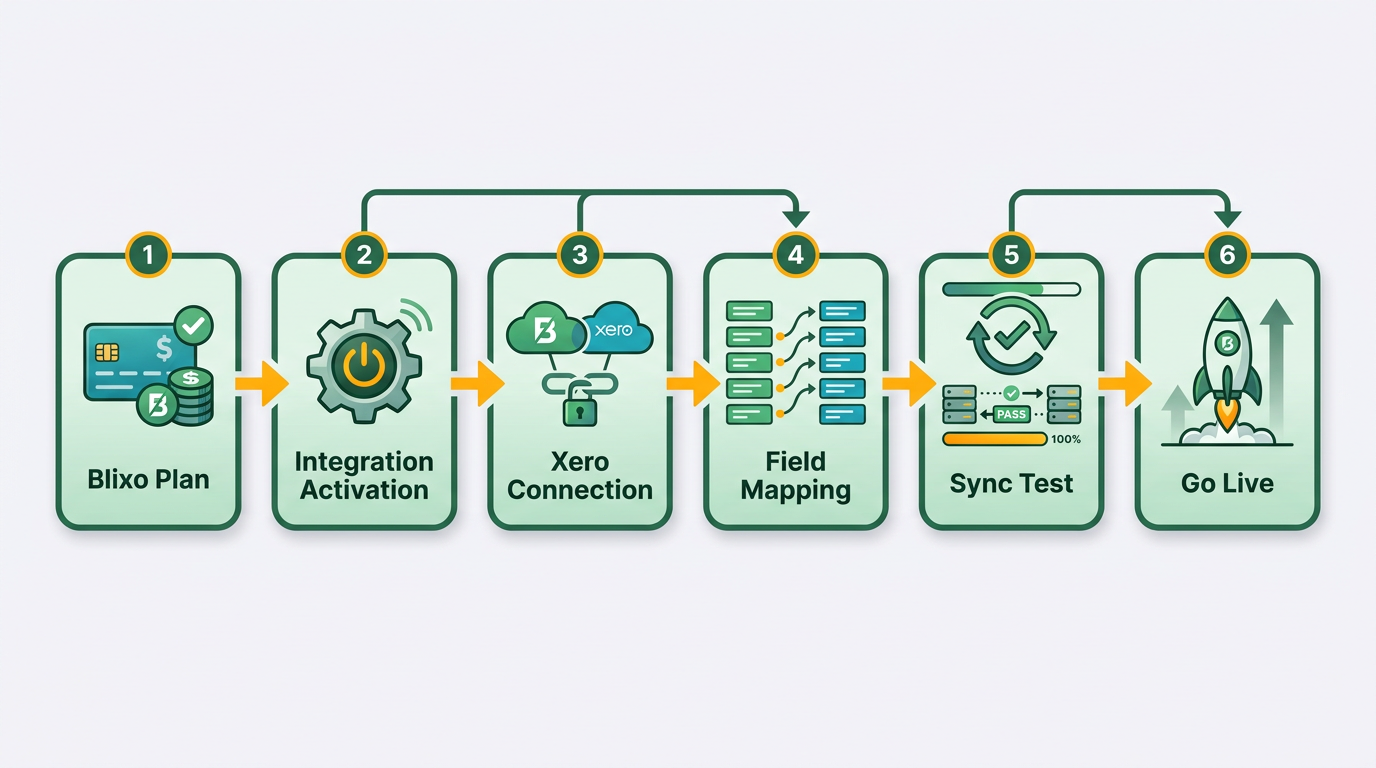
Setting up the integration between Xero and Blixo streamlines accounts payable workflows by syncing transaction data in real time. The process requires a paid Blixo plan, active Xero and Blixo accounts, and direct support from Blixo’s team to activate the connection. Below is a step-by-step breakdown of the setup process, system requirements, and activation instructions.
What System Requirements Are Needed?
To integrate Blixo with Xero, ensure you meet the following prerequisites:
- Active Xero Account: Your Xero account must be set up and ready for data synchronization.
- Blixo Paid Plan: The integration is exclusive to Blixo’s paid subscription tiers. Free plans do not support Xero connectivity. Understanding Xero and Blixo Integration explains the benefits of this connectivity in detail.
- Admin Access: You must have administrative permissions in both Xero and Blixo to configure settings.
- Internet Connectivity: A stable internet connection is required for seamless data syncing.
Blixo’s documentation confirms that pre-existing data in Xero will not automatically sync to Blixo. If you need historical transaction records imported, contact Blixo Customer Support to request a manual data transfer..
How Do You Configure the Integration?
The setup process involves three main steps: preparing your accounts, initiating the integration, and verifying the connection.
- Prepare Xero Data.
- Ensure all customer, vendor, and payment records in Xero are up to date.
- Review invoice and credit note templates to align formatting with Blixo’s requirements.
- Initiate Integration via Blixo.
- Log in to your Blixo dashboard and manage to the Integrations section.
- Select Xero from the available options and click Activate.
- You will be redirected to Xero’s authorization page to grant Blixo access to your account.
- Verify and Test Syncing.
- After authorization, Blixo will begin syncing data hourly from Xero. Real-time posting of Blixo transactions to Xero occurs instantly. Managing and Reconciling Payments with Xero and Blixo details how this real-time sync supports payment accuracy.
- Test the integration by creating a sample invoice in Xero and confirming it appears in Blixo within an hour.
Blixo’s documentation emphasizes that the two-way sync supports customers, invoices, credit notes, payments, and foreign currency transactions. Any discrepancies in syncing should be reported to Blixo’s support team for resolution..
How Is Activation Handled?
Unlike generic providers, Blixo requires direct activation through its Customer Support team. Follow these steps to finalize the integration:
- Contact Blixo Support.
- Submit a support ticket via the Help menu in your Blixo dashboard.
- Include your Xero account details and confirm your paid plan status.
- Confirm Integration Settings.
- A Blixo representative will verify your Xero connection and configure data flow preferences (e.g., sync frequency, transaction categories).
- Receive Confirmation.
- Once activated, you’ll receive a confirmation email and a success notification in your Blixo dashboard.
The activation process typically takes 1–3 business days, depending on the volume of data being synced. Businesses processing 50–150 invoices monthly often benefit from this integration, reducing AP processing costs by up to 70% through automation. Why Automating Xero Accounts Payable Matters highlights the strategic value of such efficiency gains..
What Paid Plan Features Are Required?
Blixo’s Xero integration is not available on free plans. To access it, you must upgrade to a paid subscription tier. Pricing varies based on business size and transaction volume, but the integration enables features like:
- Hourly Xero-to-Blixo Data Reads
- Real-Time Blixo-to-Xero Transaction Posting
- Foreign Currency Payment Support
For specific pricing details, visit Blixo’s pricing page or consult your account manager. This ensures your accounts payable workflows remain efficient and compliant with tax and reporting standards.
By following these steps, businesses can automate invoice processing, minimize manual data entry, and maintain real-time financial visibility across Xero and Blixo. For ongoing support, refer to Blixo’s blog for troubleshooting guides and best practices.
Automating Accounts Payable Workflows with Blixo
Automating Accounts Payable Workflows with Blixo.
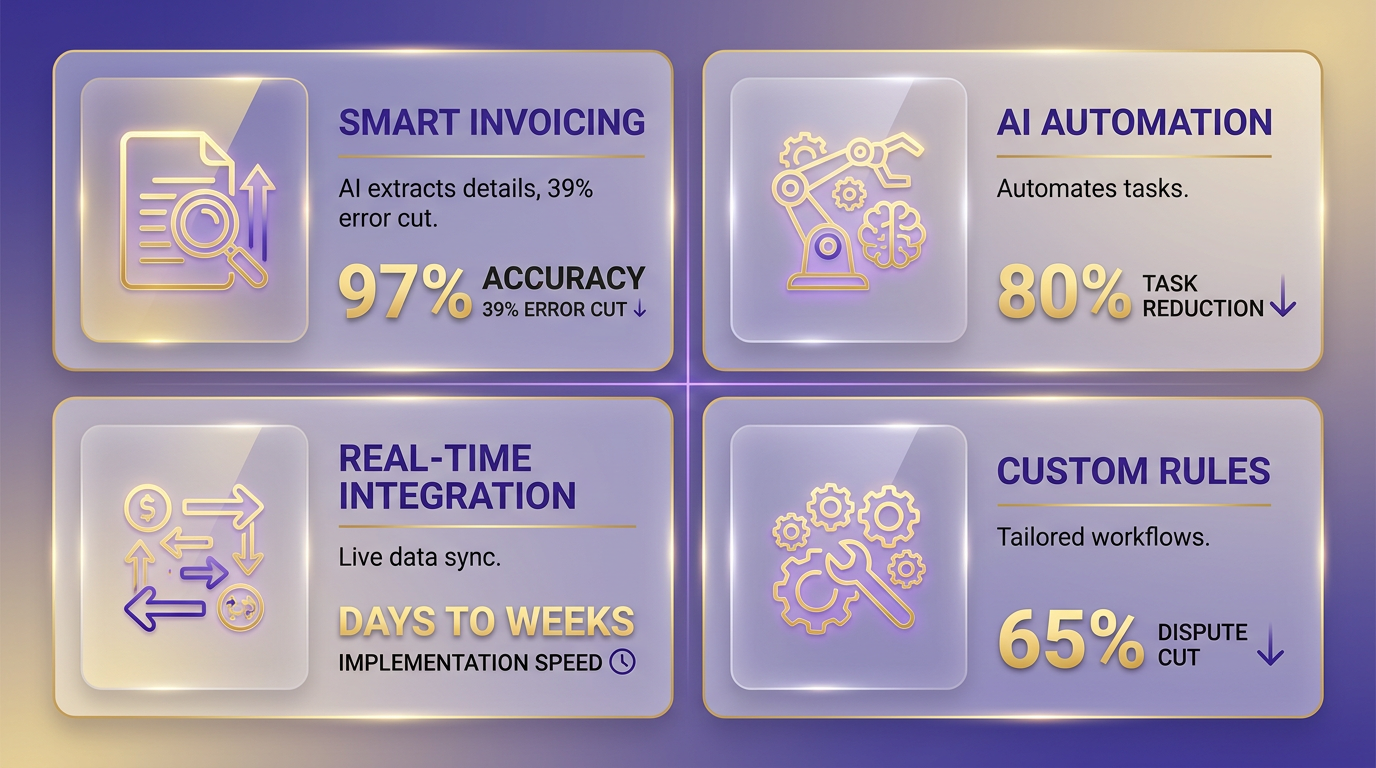
Blixo transforms Xero-based accounts payable (AP) workflows by combining AI-driven automation, real-time integration, and customizable rules. This system reduces manual tasks by up to 80%, cuts processing times from weeks to days, and minimizes errors that lead to disputes or late fees. Below are the core features and how they benefit businesses.
How Smart Invoicing Streamlines AP
Smart invoicing automates data entry, validation, and matching with 97% accuracy. Blixo’s AI extracts invoice details (amounts, dates, vendor info) and performs three-way matching against purchase orders and goods receipts. This eliminates 39% of manual entry errors, slashing disputes by 65% in one logistics company’s case. For example, a healthcare provider reduced cash-application errors by 40%, saving $1.2 million annually.
Key benefits include:
- 97% data accuracy via AI-powered OCR.
- 3.1-day processing time (vs. 45 days manually).
- 65% fewer vendor disputes, improving relationships.
- Multi-currency support for global payments.
Blixo also allows customizable templates for recurring invoices, reducing setup time by 75%. A multinational e-commerce company streamlined global payments by automating currency conversions, reducing exchange rate discrepancies by 90%. As mentioned in the Understanding Xero and Blixo Integration section, this capability relies on bidirectional data sync to ensure consistency across platforms.
Automated Collections and Dunning Workflows
Late payments cost businesses 30% higher administrative costs and 30% longer DSO. Blixo’s automated dunning system sends tiered reminders (email, SMS) and dynamic discounting offers, boosting early payments by 70%. A Miami startup saw sales conversion jump 70% after implementing these rules.
For example, a construction supplier cut admin overhead by 40% using AI-triggered reminders. The system adjusts collection strategies based on payment history, reducing delinquencies by 30% in three months. Building on concepts from the Managing and Reconciling Payments with Xero and Blixo section, these workflows integrate seamlessly with Xero’s ledger to maintain audit-ready records.
Real-Time Payment Tracking and Custom Workflows
Blixo’s integration with Xero ensures real-time sync of invoice, payment, and ledger data. Users monitor processing times, error rates, and DSO through dashboards, with targets like <3.1 days processing and <3% error rates. A mid-sized manufacturer automated 76% of its AP workflows, saving $250,000 yearly.
Key tracking features include:
- Touchless processing: 85%+ of invoices handled without manual review.
- Multi-payment method support: ACH, credit card, wire, and virtual lockboxes.
- Role-based access: Secure access for finance teams with audit trails.
Custom workflows adapt to business size and complexity. Small firms save >200 hours/year automating 1,000 monthly invoices, while large enterprises use rule-based validation for high-value payments. A media company cut billing time by 60% using Blixo’s setup wizard. As mentioned in the Understanding Xero and Blixo Integration section, this flexibility stems from Xero’s API-driven architecture.
Security and Scalability
Blixo ensures compliance with GDPR and SOC 2 standards, using 256-bit encryption and role-based access. This protects sensitive Xero data during automation. A mid-sized firm reduced manual reconciliation time by 18% after adopting secure, bidirectional syncing.
Scalability is key for growing businesses. Blixo’s sandbox environment allows testing of AI models and workflow updates before deployment. A Turkish financial institution standardized invoice formats, cutting errors by 80% as it expanded operations.
Implementation and ROI
Adopting Blixo follows a structured roadmap:
- Audit current workflows to identify bottlenecks.
- Map rules for three-way matching, approval thresholds, and payment scheduling.
- Test in sandbox to refine AI models and workflows.
- Monitor KPIs like DSO, cost per invoice, and error rates post-deployment.
Results are measurable:
- $200K+ annual savings for 1,000 invoices/month.
- 300% ROI after implementation costs.
- 80% reduction in admin costs per invoice.
A finance manager noted, “Blixo transformed our AP team from invoice processors to strategic planners.”.
By automating AP with Blixo, Xero users eliminate manual errors, accelerate cash flow, and free finance teams to focus on growth. Start with a free trial to see 30% fewer manual hours in 30 days.
Managing and Reconciling Payments with Xero and Blixo
Managing and reconciling payments with Xero and Blixo streamlines accounts payable (AP) workflows by combining real-time data sync, automated reconciliation, and seamless legacy data integration. Here’s how to use these tools effectively:.
How Does Hourly Syncing Improve Efficiency?
Blixo’s integration with Xero updates data every hour, ensuring transactions like invoices, payments, and credit notes stay aligned between systems. This two-way sync reduces delays and errors, letting teams act on current financial data. For example, a payment processed in Blixo appears in Xero instantly, while Xero’s new invoices sync to Blixo hourly. This real-time flow cuts manual reconciliation tasks by up to 80%, as reported by a mid-sized logistics firm that reduced processing time by 90% after adoption. The hourly sync mechanism aligns with the Understanding Xero and Blixo Integration section, which details the core functionality of the integration..
What Should You Know About Legacy Data Import?
Pre-integration data from Xero isn’t automatically synced to Blixo. To import historical records:
- Contact Blixo Customer Support to initiate the process, as outlined in the Setting Up Xero and Blixo Integration section.
- Provide specific data ranges (e.g., invoices, payments) for mapping.
- Validate the imported data in Blixo’s dashboard.
This process is available only for paid plans. Businesses with 1,000+ monthly invoices often save over 200 hours annually by avoiding manual entry of legacy data. Ensure all stakeholders review the imported records for accuracy before finalizing the setup..
How to Optimize Reconciliation with Blixo and Xero
Blixo’s real-time dashboards and three-way matching (PO, receipt, invoice) automate 98% of reconciliation tasks. Best practices include:
- Use AI-Driven Matching: Blixo’s 97% accurate OCR identifies discrepancies, reducing disputes by 35%.
- use Audit Trails: Every transaction logs timestamps and user comments, supporting compliance and dispute resolution.
- Schedule Weekly Reconciliation Reviews: Focus on exceptions flagged by Blixo’s system rather than manually sifting through data.
A healthcare provider reported an 18% reduction in month-end reconciliation time by adopting these practices, freeing finance teams for strategic tasks. The automation principles align with the Automating Accounts Payable Workflows with Blixo section, which expands on rule-based automation strategies..
What Are Common Errors and How to Fix Them?
Despite automation, issues like mismatched transactions or sync delays can occur:
- Error: Payments appear in Xero but not Blixo. Fix: Check Blixo’s sync status-it reads Xero data hourly, as explained in the Understanding Xero and Blixo Integration section. Wait for the next update or refresh manually.
- Error: Legacy data imports show missing records. Fix: Re-validate the import scope with Blixo support and ensure all Xero data is exported correctly.
- Error: Duplicate invoices flagged during reconciliation. Fix: Use Blixo’s duplicate detection rules, which compare invoice numbers, dates, and amounts across systems.
Proactively monitor Blixo’s real-time alerts to catch errors before they escalate. For complex issues, Blixo’s support team offers guided troubleshooting via its Integration Hub..
Why Hourly Updates Matter for Cash Flow
The 39% of businesses still using manual AP processes, as highlighted in the Why Automating Xero Accounts Payable Matters section, face risks like late payments and missed discounts. Blixo’s hourly sync ensures vendors are paid on time, preserving relationships and maximizing early-payment incentives. A retail chain using multi-currency support with Blixo reduced regional payment delays by 20%, directly improving cash flow visibility..
Real-World Impact: Quotes and Results
“Blixo transformed our AP team from invoice processors to strategic planners.” Finance Manager, Mid-Sized Enterprise This shift is measurable: businesses using Blixo report a 30% reduction in admin costs and a 25–30% improvement in DSO (Days Sales Outstanding) within 30 days of implementation.
By automating reconciliation and using hourly updates, Xero users eliminate 75–90% of manual work, turning AP from a bottleneck into a strategic asset. Start with a free trial to test the integration, then scale with confidence as your invoice volume grows.
Optimizing Accounts Payable Automation with Blixo and Xero
How Do Custom Workflows Improve AP Automation?
Blixo allows Xero users to tailor automation rules to their unique processes, such as setting approval thresholds, enforcing three-way matching (PO, goods receipt, invoice), or scheduling recurring payments. For example, a logistics company reduced vendor disputes by 65% by configuring AI-driven validation rules. Custom workflows eliminate manual overrides, ensuring compliance with internal policies while accelerating processing from 45 days to 3.1 days. Start by identifying high-error areas-like invoice reconciliation-and map Blixo’s AI to those tasks. As mentioned in the Understanding Xero and Blixo Integration section, seamless data synchronization is critical for maintaining accuracy during automation.
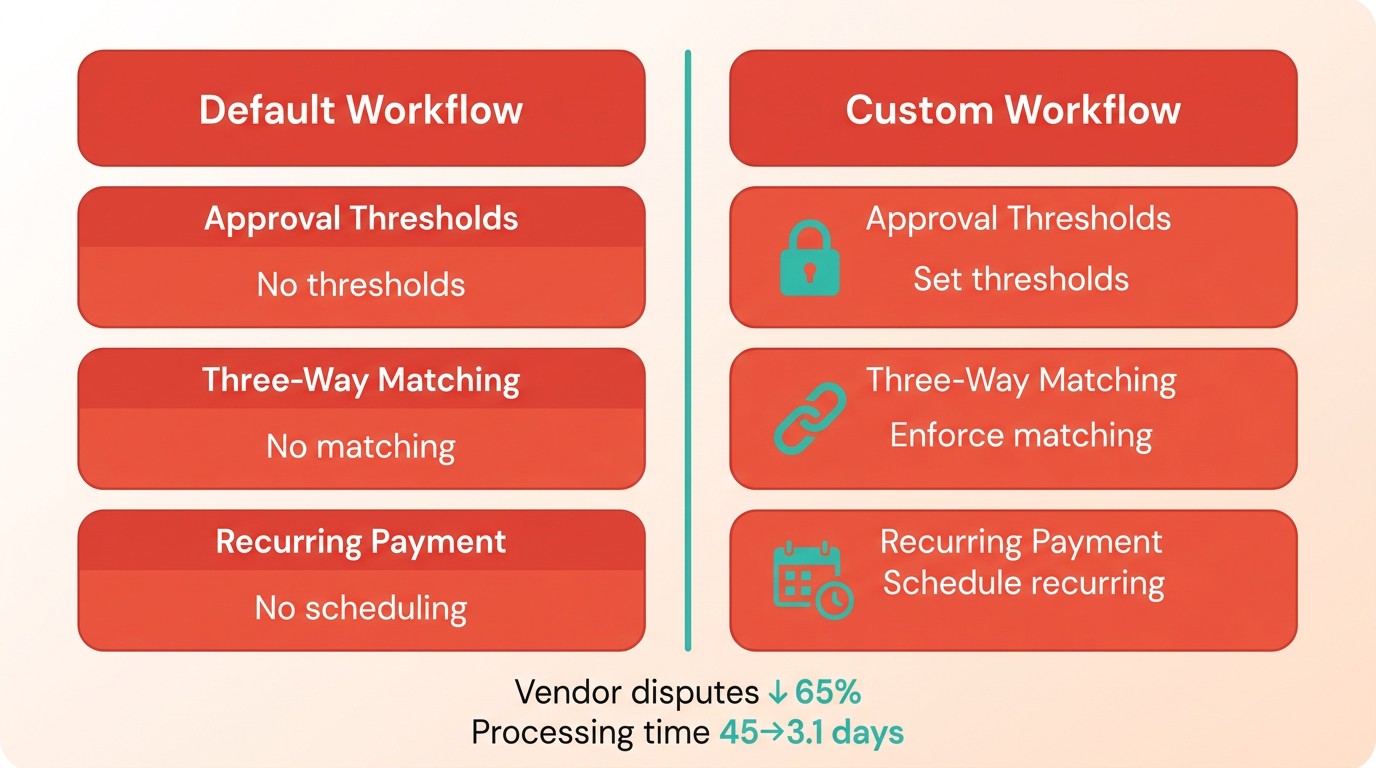
Blixo’s sandbox environment lets teams test rule changes before deployment. A mid-sized manufacturer automated 76% of its AP workflows by first simulating scenarios in the sandbox, ensuring minimal disruption during rollout. This iterative approach prevents errors from outdated or conflicting rules.. What Performance Metrics Should You Track?.
To measure AP automation success, focus on key performance indicators (KPIs) like error rate (target: <3%), processing time (<3.1 days), days sales outstanding (DSO), and cost per invoice ($2.18 instead of $10.89 manually). Blixo’s real-time dashboards provide visibility into these metrics, enabling Xero users to identify bottlenecks. For instance, a retail chain cut error rates by 97% using AI-powered OCR, saving $1.2M annually.
Track dispute resolution times and cash application accuracy (99% with Blixo’s AI). A healthcare provider improved cash-flow efficiency by 25% by monitoring DSO weekly and adjusting payment schedules. Regularly export these metrics to Xero for financial reporting, ensuring alignment between AP automation and broader business goals. Building on concepts from the Why Automating Xero Accounts Payable Matters section, reducing manual errors directly contributes to cash flow stability.. What Are Common Mistakes to Avoid?.
A frequent pitfall is skipping the pre-implementation audit. Failing to map existing workflows to Blixo’s automation rules leads to misconfigurations, like missed three-way matches. One company wasted weeks recalibrating its system after neglecting to define approval hierarchies upfront. Always start with a process audit to identify redundant steps and prioritize automation for high-volume tasks. As outlined in the Setting Up Xero and Blixo Integration section, proper configuration is foundational to avoiding workflow disruptions.
Another mistake is underutilizing integration features. Blixo’s bidirectional sync with Xero ensures data consistency, but manual overrides can reintroduce errors. A law firm improved vendor relationships by fully automating PO-to-invoice matching, reducing late-payment penalties by 40%. Lastly, avoid ignoring user training-finance teams must understand how to refine AI rules and interpret dashboards. A small business recovered $200K in lost profits after retraining staff to optimize dynamic discounting rules.. How Can You Scale Automation Safely?.
Begin with a phased rollout, targeting departments with the highest manual workload. A construction supplier automated 40% of its AP processes in 30 days by starting with invoice data entry, then expanding to approvals and payments. Use Blixo’s role-based access to grant permissions incrementally, minimizing disruption.
Use AI for continuous improvement. Blixo’s machine learning adapts to new invoice formats, reducing error rates from 39% to 3% over time. A SaaS company boosted collections by 70% by refining AI models to prioritize high-risk invoices. Regularly review audit trails to spot compliance gaps-Blixo’s SOC 2 and GDPR compliance features protect sensitive data synced with Xero.
By aligning workflows with measurable KPIs and iterating based on real-time data, Xero users can transform AP from a cost center to a strategic asset. Start with a free trial to test configurations risk-free.
Conclusion and Next Steps
What Are the Key Benefits of Automating Xero AP with Blixo?
Automating Xero accounts payable with Blixo delivers measurable efficiency, cost savings, and strategic advantages. By eliminating manual data entry, businesses reduce invoice processing errors from 39% to just 3%, cutting disputes by up to 65%-a problem highlighted in the Why Automating Xero Accounts Payable Matters section. Processing time plummets from 45 days to 3.1 days, while administrative costs drop by 80% per invoice. For example, a logistics company reduced vendor disputes by 65%, and a Miami startup boosted sales conversion by 70% using automated reminders and dynamic discounting. These improvements translate to faster cash flow, fewer penalties, and a DSO reduction of 30% or more. Blixo’s AI-powered OCR ensures 97% accuracy, and its integration with Xero ensures real-time data sync, eliminating reconciliation delays.
How Do You Implement Blixo with Xero?
Implementation follows a structured roadmap to ensure seamless adoption without disrupting workflows. Begin by auditing current AP processes to identify bottlenecks, such as manual invoice entry or delayed approvals. Next, connect Xero to Blixo using pre-built API connectors, granting access to Xero’s invoice, payment, and vendor data-a step detailed in the Understanding Xero and Blixo Integration section. Configure rules for three-way matching, approval thresholds, and payment scheduling, tailoring workflows to your business’s needs. Test configurations in Blixo’s sandbox environment to validate accuracy before full deployment. Train your team on Blixo’s interface, focusing on features like automated dunning and multi-currency support. Finally, monitor KPIs such as error rate, processing time, and cost per invoice to measure ROI. A retail chain, for instance, automated 90% of its invoices within six weeks, saving $200K annually.
What Resources and Future Updates Should You Know About?
Blixo provides extensive support to ensure successful integration. Access step-by-step guides and technical documentation on Xero integration, including setup wizards and API configuration details-referenced in the Setting Up Xero and Blixo Integration section. The Blixo blog offers case studies, such as how a healthcare provider saved $1.2M through automation, and implementation checklists to track progress. For troubleshooting, Blixo’s support team offers 24/7 assistance with a 24-hour SLA, and high-tier plans include dedicated account managers. Future updates will expand Blixo’s capabilities, such as advanced AI models for non-English documents, expanded compliance features (e.g., GDPR, SOC 2), and new payment methods like blockchain. These enhancements ensure Blixo stays aligned with evolving AP needs, helping Xero users future-proof their financial operations.
Next Steps for Adoption
Start by evaluating your current AP workload: How many invoices do you process monthly? Where do errors or delays occur? Use Blixo’s free trial to simulate integration with Xero, testing features like automated reminders or three-way matching-both covered in the Automating Accounts Payable Workflows with Blixo section. For businesses handling 1,000+ invoices monthly, automation can save over 200 hours annually and reduce costs by $200K+-making the ROI tangible within months. Begin with a single department or vendor category, then scale as confidence grows. Use Blixo’s real-time dashboards to track KPIs like DSO and error rates, adjusting workflows for optimal performance. With Blixo, Xero users can transform AP from a cost center into a strategic function, freeing finance teams to focus on growth.
“Blixo transformed our AP team from invoice processors to strategic planners.” – Finance Manager, Mid-Sized Enterprise
Explore Blixo’s integration documentation and case studies to refine your implementation plan. Prioritize integration with departments facing the highest manual workload first to maximize early gains.
Frequently Asked Questions
1. How does automating Xero AP with Blixo reduce processing time?
Blixo cuts invoice processing time from 45 days to 3.1 days using AI validation and real-time Xero synchronization, eliminating manual data entry delays.
2. What are the cost savings for small businesses using Blixo?
Small businesses save $15,500 annually by reducing invoice costs from $12.88 to $2.78 per invoice, saving over $1,000 monthly.
3. How does Blixo reduce invoice errors and disputes?
Blixo’s AI validation reduces manual AP errors by 65%, cutting disputes and saving U.S. businesses $1.3 trillion annually in errors and penalties.
4. What integration features make Blixo compatible with Xero?
Blixo uses pre-built API connectors for real-time Xero data sync, ensuring accuracy and reducing reconciliation time by 18% for healthcare providers.
5. What are the annual savings for businesses processing 1,000 invoices?
Companies processing 1,000 invoices save over $200,000 yearly by reducing administrative costs by 80% per invoice with Blixo automation.
6. How does automation impact cash flow and vendor relationships?
Automation reduces late fees and errors, improving cash flow forecasting and vendor trust, as seen in logistics firms cutting disputes by 65%.
7. What are the main benefits of Blixo for month-end reconciliation?
Blixo’s AI validation cuts month-end reconciliation time by 18%, ensuring faster financial reporting and reducing manual workload for accountants.