

Automate Subscription Billing in 5 Steps

Key Takeaways
- Automating subscription billing reduces revenue leakage by fixing 36% of manual invoicing errors.
- Manual billing costs businesses up to 20% in annual revenue due to late payments and failed transactions.
- Automated systems recovered $8.2 billion in failed subscription payments in 2025 alone.
- Billing automation shortens cycles by 30%, accelerating cash flow and financial forecasting accuracy.
- A SaaS provider cut invoicing workload by 50% and boosted timely payments by 30% through automation.
- E-commerce companies reduced billing cycle time by 40% using automated renewals and payment systems.
- Automated retry systems recover up to 50% of lost revenue from failed subscription transactions.
Why Automating Subscription Billing Matters
Automating subscription billing is critical for businesses aiming to eliminate errors, streamline revenue collection, and scale efficiently. Manual processes introduce delays, revenue leakage, and administrative burden, while automation ensures accurate, timely billing and improves customer satisfaction. Below, we break down the key reasons automation matters, supported by industry data and real-world outcomes.
What Industry Data Reveals About Manual Billing
Manual subscription billing processes are error-prone and costly. Over 36% of businesses report revenue leakage due to manual invoicing mistakes, with late payments and failed transactions costing companies up to 20% of expected revenue annually. For example, $8.2 billion in failed subscription payments were recovered in 2025 alone through automated systems, highlighting the scale of opportunity lost without automation. Manual workflows also extend billing cycles-up to 30% longer than automated solutions-delaying cash flow and complicating financial forecasting. These inefficiencies are especially damaging for SaaS and e-commerce businesses, where recurring revenue depends on consistent, predictable payment processing. As mentioned in the Step 4: Configure Automatic Retry for Failed Payments section, automated systems can recover up to 50% of lost revenue from failed transactions, mitigating these losses.
Real-World Impact of Billing Automation
Businesses that adopt automation see measurable improvements in operational efficiency and revenue. A SaaS provider automated its billing to reduce invoicing errors, cutting manual workload by 50% and boosting timely payments by 30%. Another e-commerce company slashed billing cycle time by 40% using automated renewals and payment tracking. Building on concepts from the Step 3: Create Your First ARB Subscription section, these systems streamline setup for recurring billing plans, ensuring consistency and scalability. Nonprofits also benefit: one organization automated donation renewals, reducing administrative overhead by 70% while ensuring uninterrupted funding. These examples show automation’s versatility across industries, from scaling tech startups to managing complex B2B contracts.
Who Benefits Most and Why
Subscription billing automation is a must for SaaS companies, e-commerce platforms, and organizations with recurring revenue models. SaaS businesses rely on it to manage global pricing, tax compliance, and usage-based billing, reducing churn by up to 20%. As outlined in the Step 1: Enable Automated Recurring Billing (ARB) section, integrating with payment gateways and currencies is foundational for global compliance. E-commerce retailers use automation to handle seasonal subscription bundles, loyalty programs, and multi-currency transactions seamlessly. Nonprofits and education institutions streamline membership dues and pledge renewals, while device-centric SaaS models (like IoT or hardware-as-a-service) automate asset tracking and usage-based invoicing. For all these sectors, automation isn’t just helpful-it’s foundational to sustainable growth.
Automating Cash Flow and Administrative Efficiency
Beyond error reduction, automation transforms cash flow management. One finance team reduced accounts receivable reporting time by 90% using automated billing, enabling faster decision-making. Automated systems also handle late fees, dunning, and payment retries, recovering up to 50% of lost revenue from failed transactions. For example, a media company reduced Days Sales Outstanding (DSO) by 20% through real-time payment tracking and proactive customer notifications. By minimizing manual intervention, teams can reallocate resources to strategic tasks like customer acquisition or product development.
Unlike generic providers, Blixo offers transparent pricing and tailored workflows for businesses prioritizing scalability. Its SaaS service integrates with multiple payment gateways and currencies, ensuring compliance with global standards while simplifying international billing. This level of flexibility is essential for companies expanding across markets or managing complex pricing tiers.
In short, automating subscription billing isn’t optional-it’s a strategic advantage. By reducing errors, accelerating revenue, and freeing up operational capacity, businesses can focus on innovation and customer retention. For SaaS providers, e-commerce leaders, and any organization with recurring revenue streams, automation is the foundation of financial stability and growth.
Step 1: Enable Automated Recurring Billing (ARB)
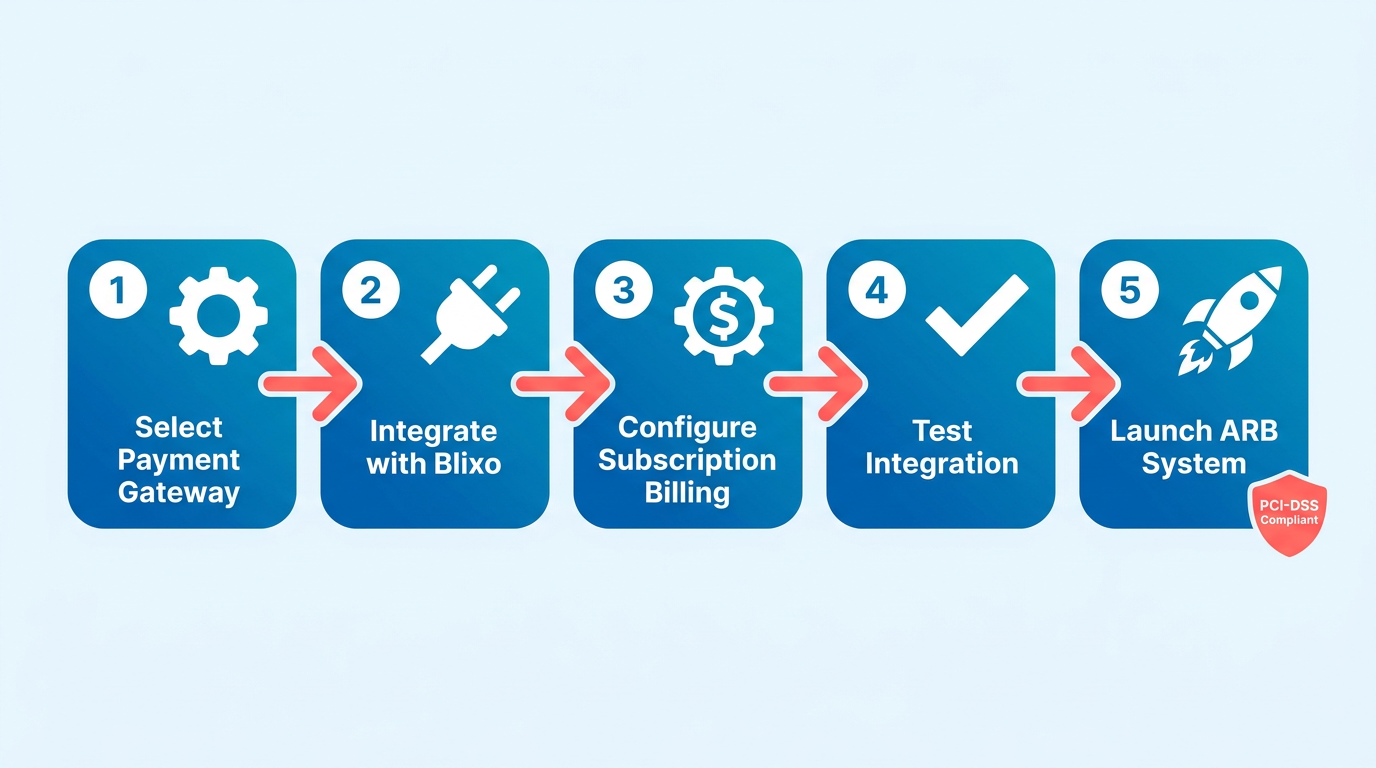
To enable Automated Recurring Billing (ARB), start by selecting a payment gateway that supports subscription billing and integrates with your business systems. A provider like Blixo offers transparent pricing and tools to automate invoicing, payment collection, and customer management. Unlike generic providers, Blixo ensures compliance with PCI-DSS standards while simplifying setup for businesses of all sizes.
How Do You Configure Payment Gateways for ARB?
Begin by integrating your chosen gateway with your billing system. Most platforms, including Blixo, allow you to connect via APIs or pre-built plugins. For example, Authorize.net’s ARB system lets businesses accept credit cards and eChecks without custom development. Ensure your gateway supports multiple currencies and payment methods to accommodate global customers. Configure settings to automatically charge customers on predefined schedules-such as monthly or yearly-while securely storing payment details for future transactions. As mentioned in the Step 3: Create Your First ARB Subscription section, defining payment plans and billing cycles is the next step after gateway integration.
What Billing Cycles Should You Automate?
Define subscription plans that align with customer preferences and business goals. Monthly and yearly billing cycles are standard, but some platforms allow custom intervals like biweekly or quarterly. For instance, a software company might offer a discounted annual plan to reduce churn. Use your ARB system to set proration rules for mid-cycle upgrades or downgrades. Building on concepts from the Step 4: Configure Automatic Retry for Failed Payments section, set up automatic retries to recover failed transactions.
How Do You Handle Failed Payments?
Automate retry logic to recover failed transactions without manual intervention. Most systems attempt retries 2–3 times over 7–14 days, depending on the payment method. Notify customers via email or in-app messages if repeated failures occur, prompting them to update payment details. For example, Stripe Billing recovered $8.2 billion in failed payments in 2025 by optimizing retry schedules. Pair this with dunning management tools to minimize account cancellations caused by expired cards.
Real-World Example of ARB Success
A fitness platform automated billing using Blixo to manage 50,000+ monthly subscribers. By switching to ARB, they reduced manual invoicing errors by 90% and improved on-time payment rates to 98%. The system also flagged 15% of failed payments for proactive customer outreach, recovering 85% of at-risk revenue. Similar results are common: one company saved 50% in administrative costs after automating subscriptions.
Key Benefits of ARB
Implementing ARB reduces churn by 20–30% through seamless payment experiences and consistent cash flow. Businesses using platforms like Blixo report 30–50% faster revenue recognition and 40% lower operational costs. Automated billing also enable advanced features like usage-based pricing, discounts, and customer-specific payment terms. For example, Maxio users grew revenue by 14% through optimized SaaS billing workflows.
To summarize, enabling ARB requires selecting a reliable provider, configuring billing rules, and planning for payment failures. By automating these processes, businesses streamline operations, improve customer satisfaction, and scale revenue predictably. Always test your setup with a small group of customers before full rollout to identify gaps in your billing strategy.
Step 2: Review ARB Cost and Billing Details
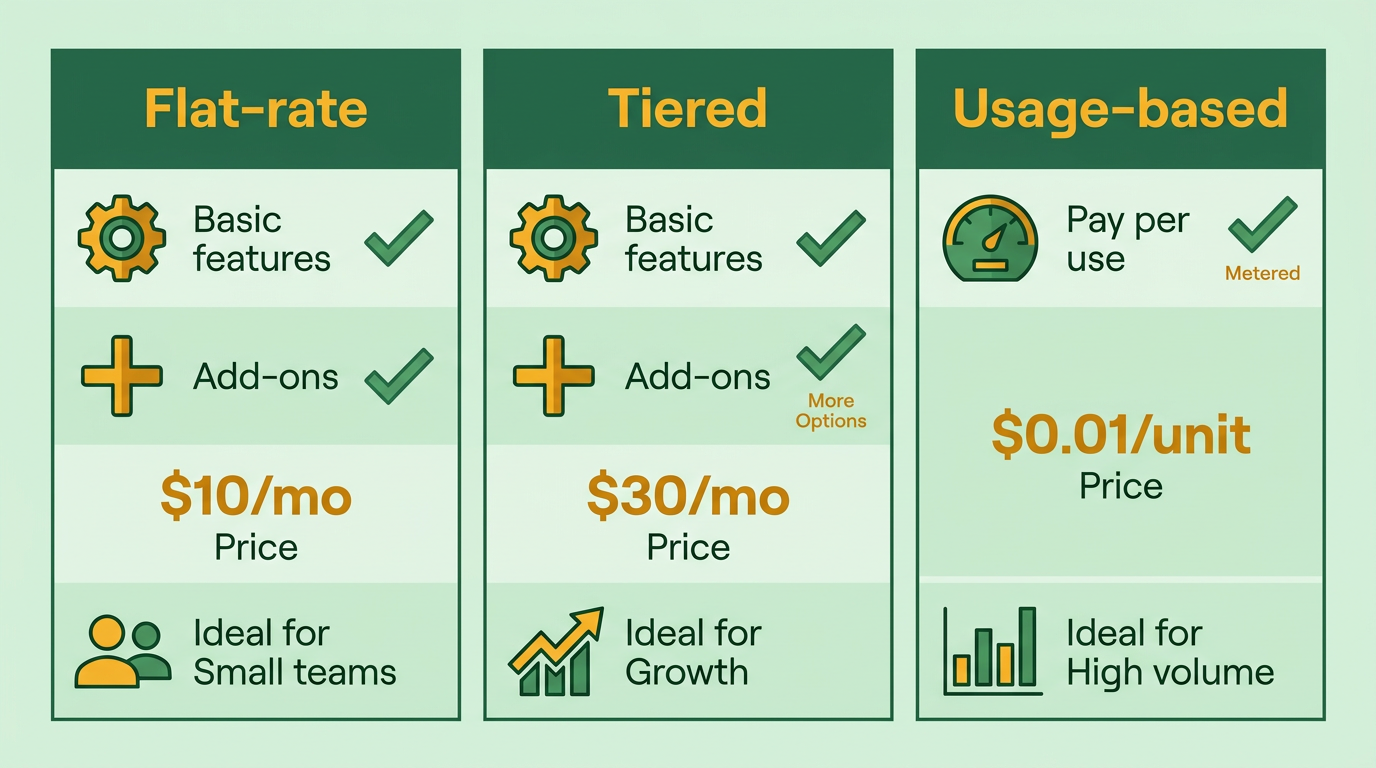
Reviewing and updating pricing for Automated Recurring Billing (ARB) ensures your subscription model aligns with customer needs and revenue goals. Start by auditing existing pricing tiers, such as flat-rate, tiered, or usage-based plans, to identify gaps or opportunities. For example, if your current plan lacks mid-tier options, consider adding a “Pro” level to capture price-sensitive customers willing to pay more for added features.
Use data from billing platforms to analyze customer behavior. Platforms like Stripe and Maxio support flexible pricing models, letting you test new tiers without disrupting existing subscriptions. Update pricing in small increments to avoid shocking customers. Communicate changes clearly, using in-app notifications or email to explain value additions. A SaaS company in one case study improved cash flow by 30% after refining pricing and automating invoicing, reducing manual errors.
Understanding Billing Cycles and Invoicing
ARB billing cycles dictate when and how customers are charged. Common models include monthly, annual, or usage-based billing. Annual plans often incentivize long-term commitment with discounts, while monthly billing suits customers who prefer flexibility. As mentioned in the Step 1: Enable Automated Recurring Billing (ARB) section, platforms like Authorize.net ARB allow businesses to set schedules automatically, reducing manual intervention.
Invoicing must align with these cycles. Automated systems generate invoices based on usage, prorated charges, or fixed amounts. For example, a customer downgrading a plan mid-cycle should receive a prorated refund for unused days. Platforms like DealHub automate tax calculations, currency conversions, and compliance with standards like ASC 606, ensuring accuracy. Misaligned cycles or unclear invoicing can lead to disputes, so transparency is key.
Best Practices for Handling Billing Disputes and Refunds
Disputes and refunds are inevitable in subscription billing. To minimize friction, implement a clear refund policy and streamline dispute resolution. For example, Stripe’s automated recovery tools reduce failed payments by identifying issues like expired cards early. If a customer disputes a charge, provide immediate support channels-live chat or dedicated email-to resolve concerns.
Document refund workflows to maintain consistency. Chargebee users, for instance, automate refunds for canceled subscriptions or service disruptions. For disputes, platforms like Maxio offer real-time reporting to track patterns, such as recurring failed payments, enabling proactive fixes. Always log interactions and resolutions to refine policies and reduce future conflicts.
Example of a Business Optimizing ARB Pricing
A fictional SaaS company optimized its ARB pricing by introducing tiered plans and usage-based add-ons. Previously, they offered a single flat-rate plan, leading to high churn among low-usage customers. By segmenting users into “Basic,” “Pro,” and “Enterprise” tiers, they increased revenue by 20% while retaining price-sensitive clients. Automating invoicing with prorated charges and discounts further reduced billing disputes.
This example mirrors real-world results: one company in source reduced invoicing errors by 40% after adopting automated billing, improving customer satisfaction. Building on concepts from the Step 5: Monitor and Manage Your Subscription Lifecycle section, aligning pricing with usage patterns and automating adjustments ensures long-term scalability.
Importance of Accurate Billing and Invoicing
Inaccurate billing erodes trust and inflates operational costs. Manual errors, such as miscalculating prorations or applying discounts incorrectly, lead to disputes and lost revenue. Automated systems eliminate these risks by standardizing processes. For instance, DealHub’s compliance with ASC 606 and IFRS 15 ensures revenue recognition accuracy, while platforms like BillingPlatform reduce Days Sales Outstanding by 20% through automation.
Accuracy also strengthens financial forecasting. Clear invoicing and consistent cycles help businesses predict cash flow, as highlighted in a study where 14% revenue growth was tied to optimized billing. Investing in tools that simplify updates-like dynamic pricing or tax calculations-ensures long-term scalability.
For deeper insights, explore how automated billing systems reduce costs or best practices for subscription pricing.
Step 3: Create Your First ARB Subscription
To create your first ARB (Automated Recurring Billing) subscription, start by defining the payment plan and billing cycle. This involves setting up the frequency (monthly, annual, etc.), trial periods, and payment amount. For example, a SaaS business might offer a monthly plan at $29.99 with a 7-day free trial. Configure the billing schedule to align with customer expectations and revenue goals. Use a subscription management platform as discussed in the Step 1: Enable Automated Recurring Billing (ARB) section to automate invoicing and ensure compliance with standards like PCI-DSS for secure transactions.
How Do You Set Up a Payment Plan?
A payment plan requires specifying the amount, billing frequency, and duration. Start by logging into your billing platform and managing to the subscription settings. Input the price per cycle, select the billing interval (e.g., monthly, quarterly), and define whether the plan includes a trial period. For instance, a gym membership service might charge $49.99 monthly with no trial. Add proration rules to handle partial charges if customers join mid-cycle. Ensure the platform supports multiple payment methods, such as credit cards or ACH, to accommodate diverse preferences. Building on concepts from the Step 2: Review ARB Cost and Billing Details section, verify that pricing structures align with both customer affordability and business profitability.
What Subscription Options Should You Configure?
Beyond the base plan, configure optional add-ons or tiered upgrades. For example, a cloud storage provider could offer a “Premium Support” add-on for $10/month or a "Business Plan" upgrade at $99/month with extra features. Use your platform’s product catalog to bundle these options. Set rules for when upgrades/downgrades take effect-such as immediate or next billing cycle-and ensure pricing adjustments are clear to customers. Some platforms allow dynamic pricing based on usage, like adding a $5 charge per additional user. As mentioned in the Why Automating Subscription Billing Matters section, automation streamlines these configurations, reducing manual errors and improving scalability.
How to Handle Upgrades and Downgrades
When customers request changes, apply best practices to minimize churn and confusion. For upgrades, prorate the new price to avoid overcharging. If a user moves from a $20/month plan to a $50/month plan halfway through the billing cycle, charge the difference ($30) immediately. For downgrades, let the current cycle complete before applying the lower rate. Automate notification emails to confirm changes and outline the financial impact. SaaS providers like Blixo simplify this by offering real-time proration and tax calculations, ensuring transparency.
Example of a Business Using ARB Effectively
Consider a fictional project management tool that automates billing for teams. By setting up a $15/month plan with optional add-ons for advanced analytics ($5/month) and team collaboration features ($10/month), the company increases average revenue per user by 30%. Automated ARB reduces manual errors in invoicing, while real-time reporting tracks churn and renewal rates. Customers appreciate the flexibility to customize their subscriptions, boosting retention by 20%.
Benefits of ARB Subscriptions
Automated recurring billing reduces administrative overhead and accelerates revenue collection. Businesses using ARB report 20-50% faster cash flow and up to 40% lower operational costs. For example, one company reduced billing errors from 15% to 2% after switching to automated systems. Additionally, predictable revenue streams enable better financial planning, while features like usage-based pricing help businesses adapt to market demands without manual intervention. By structuring your first ARB subscription with clear payment plans, flexible options, and seamless upgrade/downgrade workflows, you create a scalable billing system that supports growth and customer satisfaction. SaaS providers like Blixo streamline these processes, offering tools for compliance, customization, and real-time analytics to optimize your subscription model.
Step 4: Configure Automatic Retry for Failed Payments
Configuring automatic retry for failed payments ensures uninterrupted revenue collection and reduces customer churn. This step involves setting up payment gateways to retry transactions, defining retry rules, and integrating customer communication. Below is a structured approach to implement this effectively..
How Do You Configure Automatic Retry Settings?
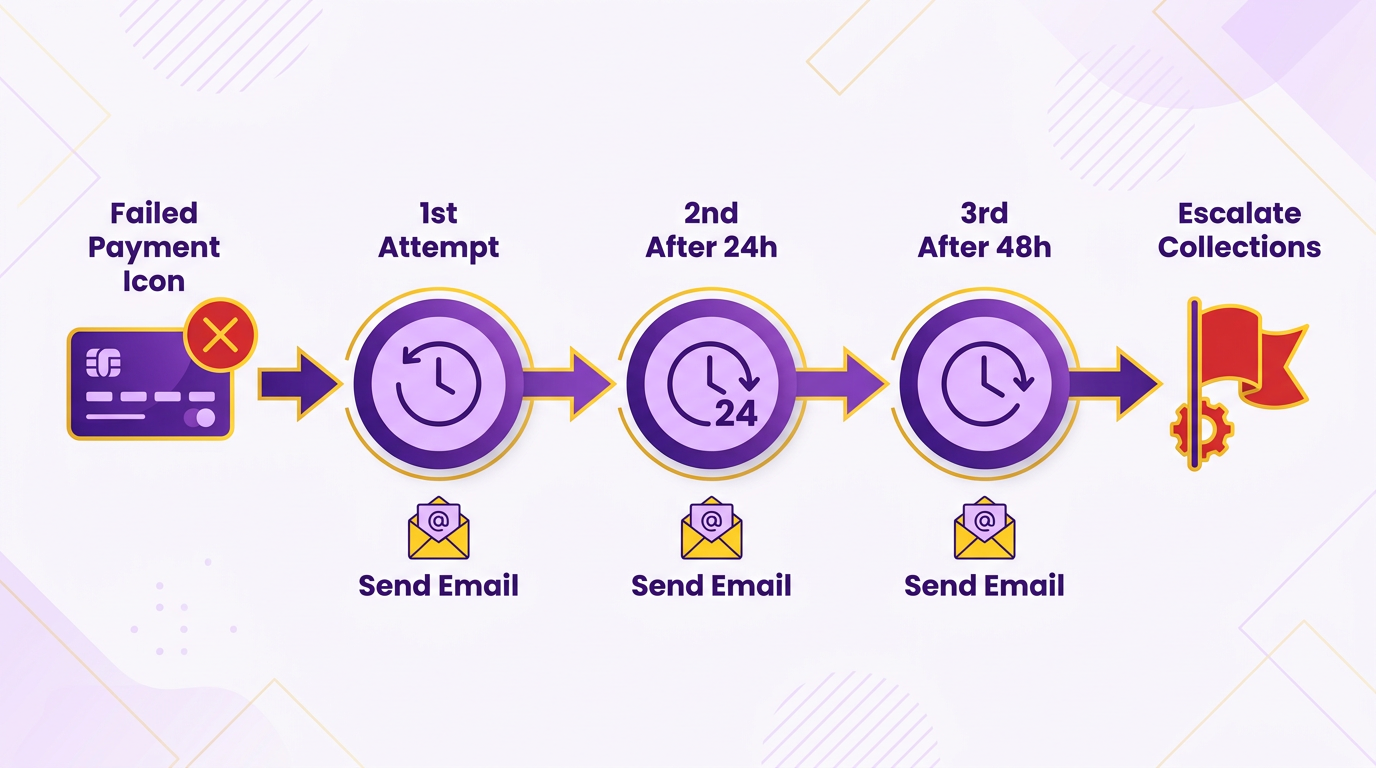
Start by selecting a payment gateway that supports automated retries. As mentioned in the Step 1: Enable Automated Recurring Billing (ARB) section, most platforms allow you to define retry intervals (e.g., 3 days, 7 days) and the number of attempts (typically 2–3). For example, if a customer’s credit card payment declines, the system can automatically resubmit the transaction after a set delay. Ensure your billing platform integrates with the gateway to sync retry statuses in real time. SaaS providers like Blixo simplify this by offering prebuilt retry logic and support for multiple payment methods, including ACH and international credit cards.
Next, configure thresholds for retry attempts. For instance, if a payment fails due to insufficient funds, you might limit retries to two attempts spaced 10 days apart. Avoid overwhelming customers with too many retries, as this could trigger fraud detection systems or frustrate users. Some platforms allow you to customize retry rules based on error codes-for example, retrying for “temporary” errors (e.g., network issues) but not for “permanent” declines (e.g., invalid card numbers)..
What Are Best Practices for Handling Failed Payments?
Automated retries should be paired with proactive customer communication. Send immediate notifications when a payment fails, explaining the issue and offering solutions. For example, a customer might receive an email stating, “Your payment failed due to insufficient funds. Please update your payment method or add funds to your account to avoid service interruption.” This reduces confusion and encourages quick resolution.
Additionally, implement a manual review process for recurring failures. If a customer’s payment repeatedly fails, flag the account for review. Some platforms offer tools to send personalized reminders or request updated payment details via in-app messages. For example, one SaaS business improved retention by 25% after adding a two-step process: an automated retry followed by a human agent contacting customers to resolve payment issues..
How Do You Monitor Retry Success Rates?
Track retry performance using built-in analytics tools. Look for metrics like retry success rate (e.g., 70% of failed payments are recovered) and customer churn linked to payment failures. As discussed in the Step 5: Monitor and Manage Your Subscription Lifecycle section, platforms with strong reporting allow you to filter data by payment method, error type, or customer segment. For instance, if 40% of ACH payments fail due to bank holidays, adjust retry schedules to avoid those dates.
Use A/B testing to optimize retry intervals. One business found that spacing retries at 14-day intervals increased recovery rates by 15% compared to 7-day retries, likely because customers had more time to resolve issues. Combine this with customer feedback surveys to identify pain points. For example, if 30% of customers report confusion about retry policies, simplify your communication templates..
What Benefits Can Automatic Retry Deliver?
Automated retries directly impact revenue and customer satisfaction. By recovering 60–80% of failed payments, businesses avoid lost revenue and reduce administrative costs tied to manual follow-ups. A case study from a SaaS provider showed that implementing retries increased their monthly recurring revenue (MRR) by $120,000 annually while cutting support tickets by 40%.
Long-term, this feature builds trust. Customers appreciate seamless payment handling, which improves retention. For example, one company reported a 12% drop in churn after introducing retries and clear communication, as users felt supported rather than penalized for temporary payment issues..
Example: A Retail Subscription Service’s Success
A retail business offering curated product boxes struggled with 15% monthly payment failures. By configuring automatic retries with their gateway and sending personalized follow-ups, they recovered 75% of failed transactions. They also segmented customers: those with frequent declines received priority support, while others got standard retry attempts. Over six months, this strategy boosted revenue by 18% and reduced customer service load by 22%.. By combining technical setup with customer-centric policies, automatic retry becomes a powerful tool for subscription businesses. SaaS providers like Blixo streamline this process, but success hinges on balancing automation with empathy-ensuring retries are efficient without alienating customers. Regularly audit your retry logic and communication to adapt to changing payment trends and customer needs.
Step 5: Monitor and Manage Your Subscription Lifecycle
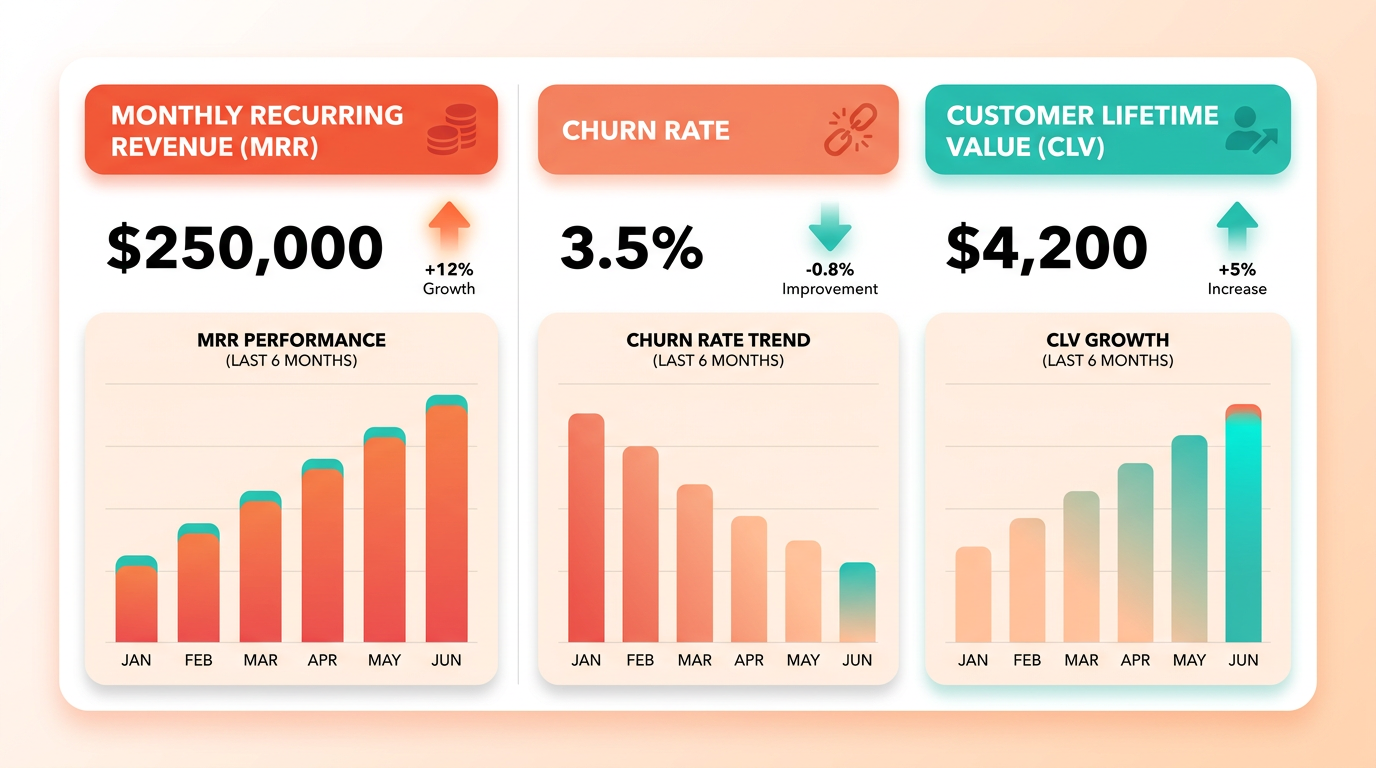
Monitoring and managing your subscription lifecycle ensures long-term retention, revenue stability, and customer satisfaction. Start by tracking core metrics like monthly recurring revenue (MRR), customer churn rate, and customer lifetime value (CLV). These metrics act as early warning systems, flagging issues such as declining renewals or rising cancellations. Use automated analytics tools to aggregate data from billing platforms, customer support logs, and usage patterns. For example, if your churn rate spikes by 10%, dive into payment failure rates or customer feedback to pinpoint the root cause-whether it’s pricing misalignment or a drop in product value. Building on concepts from the Step 4: Configure Automatic Retry for Failed Payments section, reducing involuntary churn through automated retries can stabilize revenue streams.
How Do You Track Subscription Health?
Begin by setting up dashboards that visualize revenue trends, active subscriptions, and renewal rates. Tools like Blixo offer real-time reporting to monitor metrics such as MRR and CLV, enabling teams to act swiftly on insights. One company saw a 20% increase in retention after identifying high-churn segments through granular analytics and implementing targeted retention offers. Focus on net revenue retention (NRR) to measure growth from existing customers, factoring in upgrades, downgrades, and cancellations.
To analyze churn effectively, segment customers by behavior. For instance, users who log in less than once a month may signal disengagement, while those with high usage might justify premium upgrades. Blixo’s SaaS service automates this segmentation, helping teams prioritize outreach or product improvements. A SaaS business reduced involuntary churn by 12% by automating retry logic for failed payments and sending renewal reminders via email and SMS, as detailed in the Step 4: Configure Automatic Retry for Failed Payments section.
What Are Best Practices for Managing Upgrades and Downgrades?
Pricing flexibility is critical. Offer tiered plans with clear value propositions, such as basic, pro, and enterprise levels, and allow users to adjust their subscriptions seamlessly. As mentioned in the Step 2: Review ARB Cost and Billing Details section, automate proration for mid-cycle changes-for example, if a customer downgrades from an annual to monthly plan, charge them the difference for the remaining billing period. Transparent communication is key: notify users of upcoming price changes 30 days in advance and explain the benefits.
When designing upgrades, use data to identify pain points. Suppose analytics show that 40% of active users hit a feature limit in the free tier. In that case, you can create a mid-tier plan that addresses their needs without overcharging. A fitness app increased revenue by 18% after introducing a “premium plus” tier with advanced analytics, based on feedback from its most engaged users.
How Can Analytics Optimize Pricing Strategies?
Subscription analytics reveal how pricing impacts customer behavior. For example, if CLV drops for users on monthly billing versus annual plans, consider bundling discounts for yearly commitments. A/B test different pricing models-such as flat-rate versus usage-based billing-to see which drives higher retention. Blixo’s reporting tools let businesses simulate price changes and predict their impact on revenue and churn.
One business improved profitability by 25% after using CLV data to phase out low-margin customers. They introduced a minimum spending threshold for enterprise accounts, ensuring only high-value clients qualified for custom pricing. Similarly, usage data can inform tiered billing: a cloud storage provider saw a 15% rise in upgrades after introducing a “pay-as-you-go” add-on for users exceeding their plan’s storage limit.
Real-World Example: Scaling Retention with Data-Driven Adjustments
A mid-sized SaaS company struggled with a 22% monthly churn rate. By analyzing support tickets, they found that users often canceled due to complexity in managing multiple subscription tiers. The team simplified their pricing into two clear plans-essential and advanced-and automated downgrades for users who hit usage thresholds below the advanced tier. They also launched a loyalty program offering 10% off annual renewals. Within six months, churn dropped to 14%, and annual recurring revenue (ARR) grew by 30%.
This example highlights how proactive lifecycle management-coupled with analytics-turns customer feedback into actionable improvements. By aligning pricing with user needs and reducing friction in subscription changes, businesses can boost retention and revenue predictability.
Frequently Asked Questions
1. What are the main benefits of automating subscription billing?
Automating subscription billing reduces revenue leakage by fixing 36% of manual invoicing errors and shortens billing cycles by 30%, improving cash flow and forecasting accuracy. Automated systems also recover up to 50% of lost revenue from failed payments.
2. How much revenue can manual billing cost businesses annually?
Manual billing costs businesses up to 20% in annual revenue due to late payments and failed transactions. Automated systems recovered $8.2 billion in failed subscription payments in 2025 alone.
3. How do automated systems recover failed subscription payments?
Automated retry systems recover up to 50% of lost revenue from failed transactions. In 2025, they recovered $8.2 billion, significantly reducing revenue leakage compared to manual processes.
4. Can billing automation improve cash flow efficiency?
Yes, billing automation shortens billing cycles by 30%, accelerating cash flow. E-commerce companies using automation reduced billing cycle time by 40%, enhancing financial forecasting accuracy.
5. Are there real-world examples of billing automation success?
A SaaS provider cut invoicing workload by 50% and boosted timely payments by 30% through automation. E-commerce companies reduced billing cycle time by 40% using automated renewals and payment systems.
6. Which industries benefit most from automated subscription billing?
SaaS providers, e-commerce companies, and nonprofits benefit most. Automation reduces invoicing errors, speeds renewals, and improves donation renewals for nonprofits, ensuring consistent revenue streams.
7. How does billing automation impact customer satisfaction?
Automated billing reduces errors and ensures timely, accurate payments, enhancing customer satisfaction. Streamlined processes minimize late fees and billing disputes, improving retention rates for subscription-based businesses.