

Accounts Receivable Automation Returns on Investment Calculated

Key Takeaways
- For subscription SaaS, the real ROI of AR automation is churn reduction and upsell lift — not the labor savings most calculators stop at.
- Automated AR cuts Days Sales Outstanding by 8 to 15 days versus manual processing.
- Cash application drops from €4-8 per transaction by hand to under €0.50 automated.
- Automated systems match payments at rates above 95%, killing most reconciliation errors.
- At €100M revenue, every single day you cut from DSO frees roughly €274,000 in working capital.
- Labor cost avoidance runs €17,500 to €37,500 a month for a business processing 5,000 payments monthly.
- Churn and upsell are the hardest numbers to calculate — 1 to 2 days each, versus hours for a payback period.
Quick Summary
For subscription SaaS, the ROI of AR automation comes down to two numbers your competitors almost never calculate: churn reduction and upsell lift. Faster, cleaner billing keeps subscribers from cancelling over payment friction. That retention math dwarfs the labor savings most calculators stop at.
Compare accounts receivable automation vs. traditional manual processes and the operational wins are immediate. Automation speeds the collection cycle, fixes payment matching, and cuts transaction costs. For recurring-revenue businesses, that efficiency feeds straight into retention.
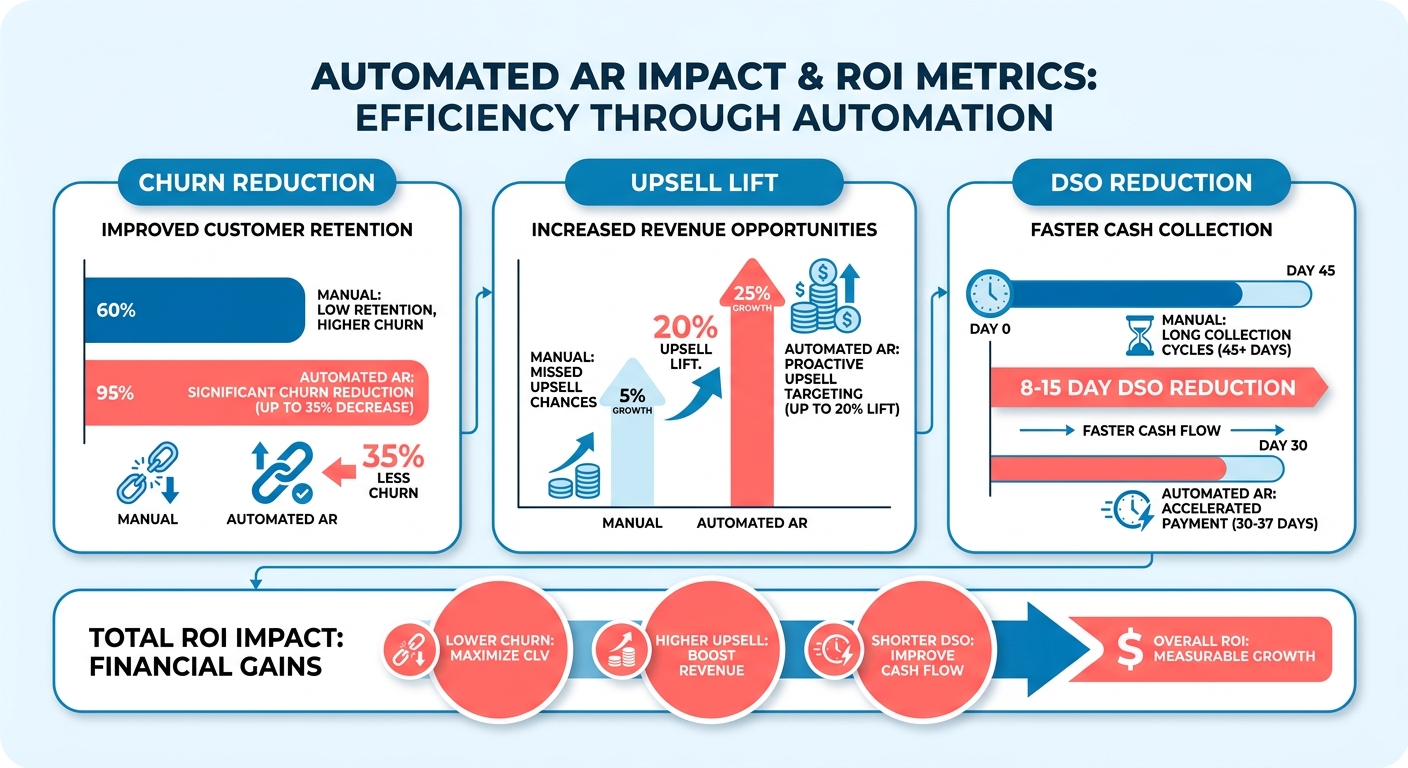
Which ROI methods actually matter for SaaS
The useful methods measure both operational savings and revenue protection. Here’s how the main approaches stack up.
| Method | What It Measures | Time to Calculate | Difficulty | SaaS-Specific Value |
|---|---|---|---|---|
| Payback period | Months to recover automation cost | 1-2 hours | Easy | Fast go/no-go signal |
| DSO reduction | Working capital freed per day cut | Half a day | Medium | ~€274K enable per DSO day at €100M revenue |
| Labor cost avoidance | Manual hours removed | 2-3 hours | Easy | €17,500-37,500/month saved at 5,000 payments/month |
| Churn reduction | Subscribers retained via smoother billing | 1-2 days | Hard | Recovers involuntary churn from failed cards |
| Upsell lift | Expansion revenue from self-service portals | 1-2 days | Hard | Frees AR team for account growth work |
What realistic payback looks like
Most SaaS firms recover their automation investment inside the first few months. A Billtrust ROI study found 93% of finance leaders confirmed their AR automation delivered the expected return, and 100% reported measurable gains like faster payments and lower costs.
The working capital math is concrete. A company at €200M revenue can release €5.48M from a 10-day DSO improvement. That’s cash you push into product or sales instead of chasing invoices.
On timing: AI-native AR tools deploy in 4-8 weeks. Legacy systems drag out to 3-6 months. For subscription firms, faster deployment means the churn-reduction clock starts sooner.
Why churn and upsell belong in the formula
Skip the churn calculation only if you bill one-off invoices with no recurring relationship. For everyone running subscriptions, involuntary churn from expired cards and failed retries is a silent revenue leak. Automated dunning and card updates plug it directly.
Research on AI-driven AR shows a 35% faster collection cycle and a 75% cut in manual follow-up effort. That reclaimed capacity is the hidden upsell engine. When collectors aren’t chasing overdue accounts, they run expansion conversations instead.
Add it up. Labor savings pay for the tool. Churn reduction and upsell lift are what turn AR automation into a growth investment instead of a cost cut. That’s the calculation to run before you sign anything.
Why this isn’t just about saving a few hours

For subscription SaaS, the case for automating AR isn’t about clawing back staff time. It’s about keeping revenue you already won. Payment friction is a quiet churn driver, and manual billing generates plenty of it.
The gap between automation and manual processes shows up most clearly in how customers experience getting billed. Manual workflows mean late invoices, mismatched payments, and dunning emails that go out days after a card fails. For recurring revenue, every one of those errors is a reason for a subscriber to walk.
How much do manual AR tasks actually cost?
Manual AR eats staff hours that scale badly with invoice volume. Automation drops cash application labor to a fraction of the manual cost while handling 60-80% of routine collections without a human touching it.
A growing company running thousands of recurring transactions can wipe out hundreds of hours of manual data entry, which turns into real monthly payroll savings.
But the follow-up burden matters more than the payroll line. Finance teams running manual collections spend roughly a third of their week on repetitive chasing. Cut that, and your team isn’t hounding customers who already churned over a billing mistake nobody caught in time.
What automation fixes that manual work can’t
Automation removes the errors that erode trust. 52% of CFOs at highly automated firms reported fewer mistakes in invoicing and payment processing. For a subscriber, a clean invoice and an instant payment confirmation are part of the product experience.
Three problems get solved directly:
- Billing errors that trigger disputes. Vision language models hit 99.7% extraction accuracy on structured remittance data, so payments match invoices without manual keying.
- Slow collections that strand cash. Automated dunning recovers a meaningful share of failed charges within the first retry window, freeing working capital you can redeploy.
- Failed-payment friction. Automatic reminders and reconciliation catch involuntary churn before a lapsed card cancels a subscription.
That last point is where the SaaS math diverges from generic AR advice. A failed renewal caught automatically is a retained subscriber. The same failed renewal caught three weeks later by an overworked clerk is often a cancellation.
Who gets the biggest return
High-volume, recurring-revenue businesses. SaaS firms bill the same customers over and over, so every reduction in payment friction compounds across the customer lifetime, not just a single transaction.
The retention math backs this up. Involuntary churn from failed payments makes up a large slice of total SaaS churn, and automated retry logic recovers a sizable portion of those at-risk accounts before they lapse. Every recovered renewal protects the full remaining lifetime value of that subscriber, not one invoice.
And the reframe competitors miss: a faster collection cycle doesn’t just improve cash flow. It shortens the window where a billing problem can push someone toward cancellation, and it frees the same customer-facing team to run upsell conversations instead of collections calls. That retention and expansion lift is the number that dwarfs the labor savings.
Calculating the cost of manual collections
The true cost of manual collections is three buckets: labor, materials, and opportunity cost. The third bucket is where the real damage hides. Every delayed dunning cycle risks a subscriber cancelling, so your formula has to price in lost recurring revenue, not just staff hours.
This is exactly where the automation-versus-manual comparison gets misjudged. Most calculators stop at labor. Run the two models honestly for a recurring-revenue business and the opportunity cost of a slow, error-prone manual process outweighs the payroll line by a wide margin.
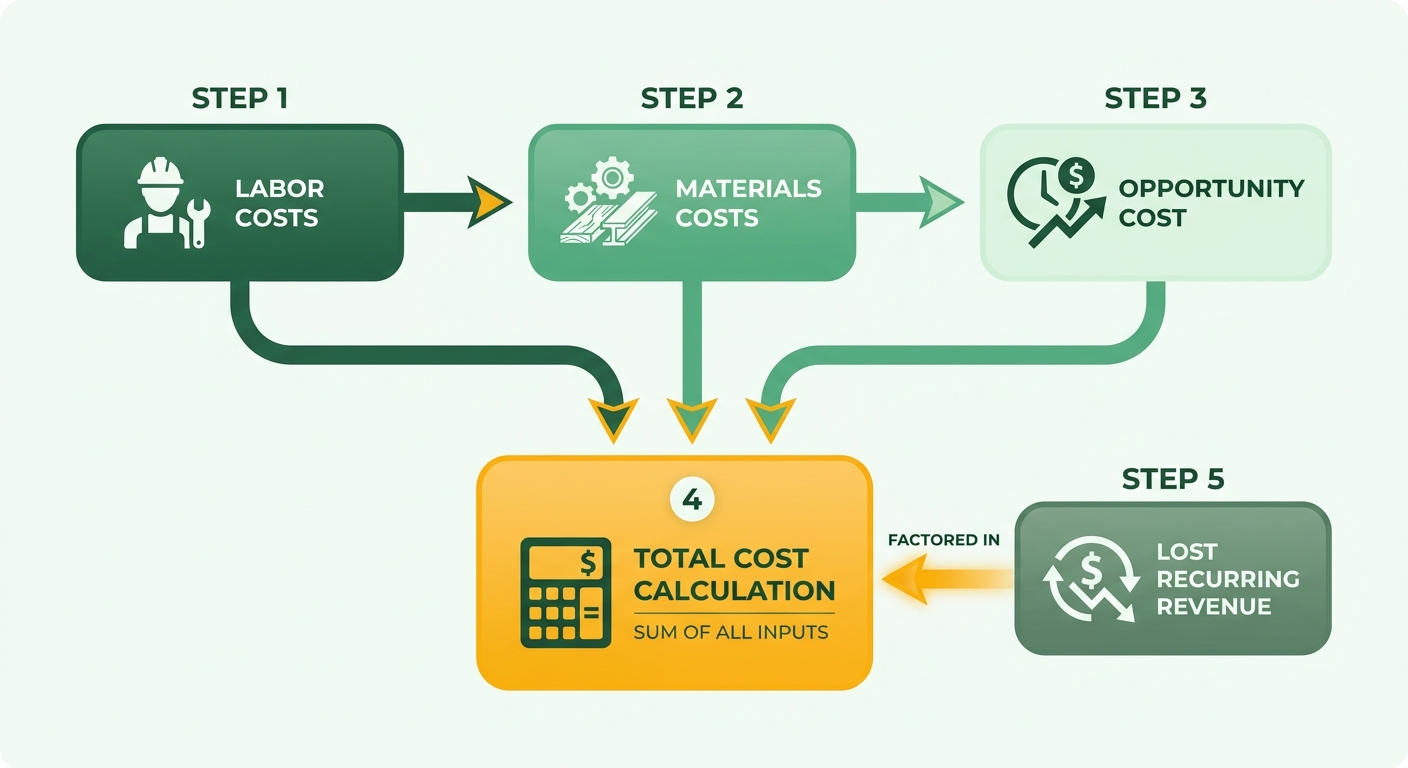
The formula for total manual collections cost
Total cost of manual collections = labor cost + materials cost + opportunity cost (delayed payments and churned revenue).
Labor covers the staff hours spent chasing payments and applying cash. Materials cover printing, postage, and per-transaction processing. Opportunity cost covers the working capital trapped by high DSO plus the recurring revenue you lose when payment friction pushes subscribers out.
Run all three. Skip one and you undercount the case for automation.
Estimating labor costs
Labor is the biggest visible line. Manual cash application is notoriously expensive per transaction, while automated systems process the same payments for pennies.
A team manually processing 2,500 payments a month at a €7 blended cost is spending €17,500 monthly just to apply cash and follow up. Then add the hidden drag: manual cash application carries error rates that force teams to spend 20 to 30 minutes reworking each misapplied payment, and a 2% mismatch rate across those transactions means dozens of exceptions a month eating another full week of staff time.
For a SaaS firm, those freed hours matter twice. Your AR staff stop rekeying invoices and start resolving the billing disputes that actually make subscribers leave.
What materials and opportunity costs add
Materials are the smaller bucket: paper invoices, postage, per-document processing. The bigger hit is opportunity cost, and for subscription businesses it splits in two.
Working capital cost. Manual workflows carry DSO that runs 20 to 30% higher than automated ones. Each day of DSO reduction frees substantial capital otherwise locked in unpaid invoices. For a mid-market firm, that liquidity can easily hit six figures per day cut. Cash stuck in receivables can’t fund your next upsell push.
Churned revenue cost. This is the line competitors ignore. A failed card that sits three days before a dunning email goes out is a live cancellation risk. Multiply your involuntary churn rate by average contract value and you’ll see manual collections quietly bleeding recurring revenue every month.
Case study: cutting collection costs through automation
One mid-market company moved off manual collections and hit 23% ROI within six months. It cut manual invoice entry by half and improved DSO from 45 days to 30 days.
That 15-day swing did two things at once. It released working capital fast, and it tightened the billing experience so customers needed far fewer follow-ups. The controller reported a sharp drop in payment follow-ups after the switch.
For a SaaS firm, fewer follow-ups mean fewer friction points, and fewer friction points mean fewer cancellations. That’s the retention math your manual process has been quietly costing you.
Step-by-step ROI calculation
To calculate AR automation ROI for a subscription business, you plug two SaaS-specific gains into the standard formula: retained recurring revenue and upsell lift. Most calculators ignore both.
The base formula stays simple. ROI = (Net Benefits − Cost of Implementation) / Cost of Implementation × 100. What separates automation from manual processing in this math is what you count as a benefit. Manual-process calculators stop at labor savings. For a subscription firm, you add churn reduction and upsell revenue on top.
What you need before you start
Gather five baseline inputs from your current manual workflow: annual recurring revenue, monthly involuntary churn rate, DSO, cash application cost per transaction, and staff hours spent chasing payments. That’s your “before” picture. Automation ROI is only credible measured against a documented baseline.
Companies that run a proper process assessment first see 25-40% higher ROI than those who skip it. So do the boring part. Pull real figures, not estimates.
A worked example
Take a SaaS firm with €10M ARR, a 1.5% monthly involuntary churn rate driven by failed cards and late dunning, and a manual AR team processing 5,000 payments per month at €6 per transaction.
Step 1: Labor savings. Automation drops cash application from €6 to under €0.50. That’s a swing of roughly €27,500 per month, or €330,000 annually. This is the number generic calculators report, then stop.
Step 2: Churn reduction. Faster automated dunning and card-retry logic cut involuntary churn. Recover even a third of that 1.5% monthly leak and you retain roughly 0.5% of ARR per month. On €10M ARR, that’s about €50,000 in monthly recurring revenue saved, or €600,000 a year. This dwarfs the labor line.
Step 3: Upsell lift. Clean billing and self-service payment portals free your finance team to support expansion instead of firefighting. Redirect a few reclaimed hours per week toward accounts ready to upgrade and the effect compounds. Assign a conservative €120,000 annual upsell lift here.
Step 4: Total it up. Net benefits = €330,000 + €600,000 + €120,000 = €1,050,000. If the platform costs €150,000 to implement and run for the year, your ROI is:
(€1,050,000 − €150,000) / €150,000 × 100 = 600%.
Strip out churn and upsell and that same calculation drops to 120%. The retention effect is where the real return lives.
What skews the numbers
The most common error is counting only labor savings and ignoring recovered recurring revenue. For a subscription firm, that undercounts ROI by a wide margin. The second mistake is treating ROI as a one-time figure.
Monitor it quarterly. Recovery rates shift as card-retry logic tunes itself and dunning sequences mature, so a figure that looks flat at month three often climbs by month nine. Mid-market firms often hit rapid payback, and a phased rollout gets you there faster with 30-50% fewer configuration changes.
Bake churn and upsell into every review. Skip them and you’ll systematically undervalue what automation does for a recurring-revenue business.
Benchmarking ROI: industry standards and metrics
To benchmark your AR automation ROI, compare against three industry numbers: first-year ROI, adoption satisfaction, and Days to Pay reduction. Research on intelligent automation across 247 organizations in 15 industries found an average ROI of 30% to 300%, with a median of 150% in the first year. That’s your baseline. If you’re a subscription firm, you should beat it, because retention lift stacks on top of the labor savings those numbers already capture.
This is the blind spot in most automation-versus-manual comparisons. Cross-industry benchmarks blend AR in with accounts payable and reconciliation, so the reported figure reflects a general-ledger average, not a collections-specific one. For recurring-revenue businesses, that averaging undercounts the payback. The generic benchmark measures faster cash and lower cost. It ignores the subscriber you keep because their card retry succeeded and the dunning email never went out.
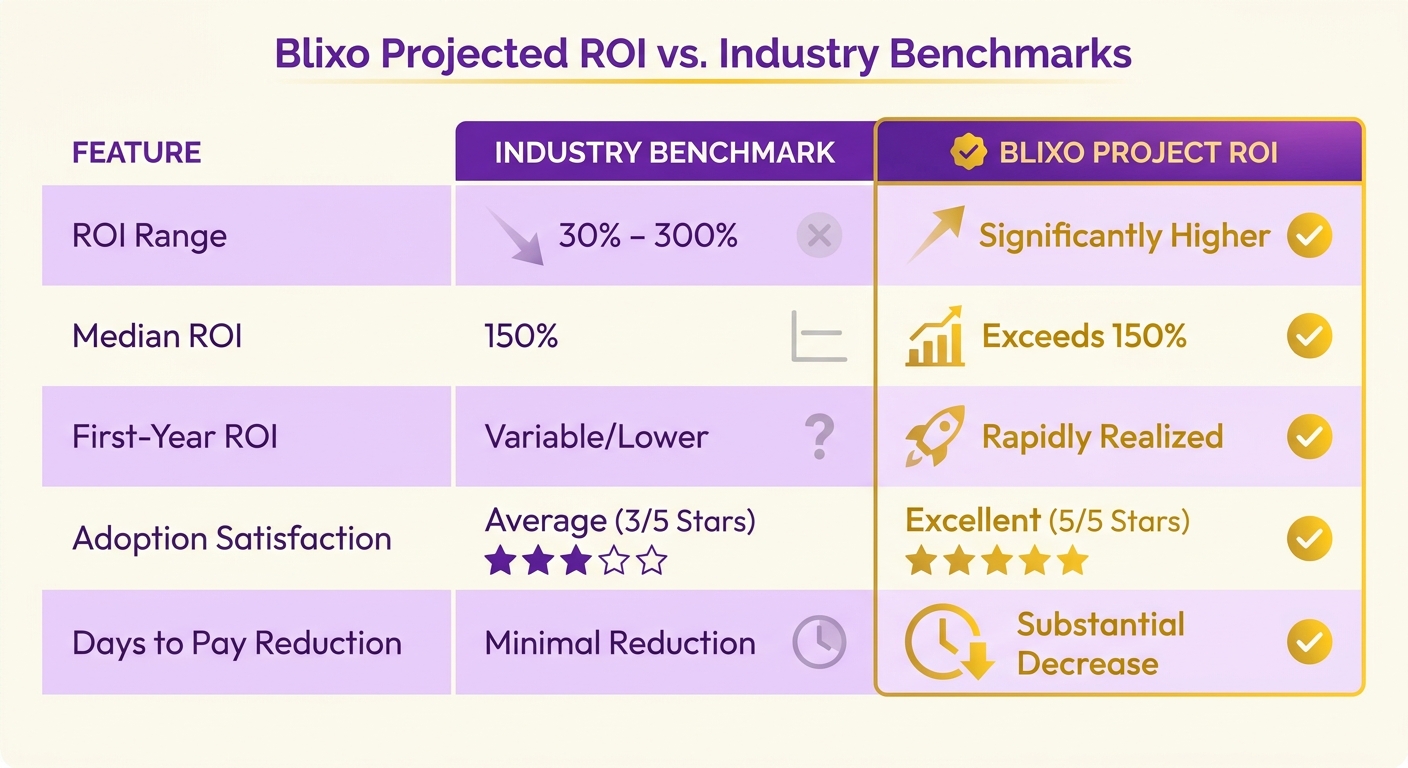
What benchmarks SaaS firms should track
Benchmark against three metrics: first-year ROI, expected-ROI hit rate, and Days to Pay improvement. Industry surveys show the vast majority of finance executives find their automated systems meet or exceed the targets set during planning, with reported error-rate drops on invoicing and cash application running into double digits. Those are the floor numbers.
A subscription firm layers two more on top. Track your gross revenue retention before and after automation, and your upsell conversion rate on accounts with clean billing histories. Neither shows up in a standard calculator, and both move your true ROI well past the ceiling the cross-industry data reports.
Two structural factors widen the gap. Cloud-based deployments generate 25% higher returns than on-premises setups. And companies with standardized processes achieve roughly 30% higher returns than those running fragmented workflows. For SaaS teams already in the cloud with structured billing data, both tailwinds are baked in.
How first-party collections ROI compares
First-party collections ROI comes from keeping the customer relationship intact while automating the follow-up. For subscription businesses, a gentler, faster, automated dunning sequence preserves the relationship you’d otherwise strain with aggressive manual chasing. Speed alone isn’t the win; the retained account is.
In-house collections carry real hidden costs. Labor scales badly with volume, and every new hire needs training on your billing edge cases. Automation handles the vast majority of routine collections work, freeing your team from the repetitive follow-ups that burn hours and goodwill.
One documented example makes the point. An AI collections assistant deployed at a large professional-services firm cut the accounts receivable period by roughly 22%. Another organization saved over 15,000 staff hours per month and halved document turnaround times. Those savings are real, but for a SaaS firm the retention effect that clean, prompt collections produces is what pushes your benchmarked ROI past the industry median.
Where your numbers should land
Aim to beat the standard benchmarks. If your automated collections recover the bulk of aging invoices before they hit 60 days past due and your write-off rate trends toward the low single digits, you’re pacing with top performers. Then check the two SaaS metrics competitors skip: is gross retention up, and are clean-billing accounts converting to upsells faster? That’s where your real ROI separates from the generic benchmark.
Frequently Asked Questions
1. What is involuntary churn and why does it matter for AR automation ROI?
Involuntary churn happens when subscribers lapse due to expired cards, failed payments, or delayed retries—not because they chose to leave. It represents a large slice of total SaaS churn. Automated dunning and card-update logic recover these accounts before cancellation, protecting the full remaining lifetime value of each subscriber.
2. How does cloud-based AR automation compare to on-premises deployment for ROI?
Cloud-based AR automation deployments deliver significantly stronger returns than on-premises setups. Cloud systems also deploy faster and integrate more easily with structured billing data. For SaaS teams already operating in the cloud with standardized workflows, this operational advantage is built in from day one.
3. How often should I recalculate my AR automation ROI after implementation?
Recalculate AR automation ROI quarterly rather than treating it as a one-time figure. Recovery rates shift as card-retry logic tunes itself and dunning sequences mature. A figure that looks flat at month three often climbs by month nine, so quarterly reviews capture the true, growing return.
4. Does AR automation ever make sense for businesses without recurring revenue?
AR automation still benefits one-off invoicing businesses through labor savings, faster DSO, and highly accurate payment matching. However, you can skip the churn calculation entirely if you bill without recurring relationships. The retention and upsell math that drives the biggest returns applies mainly to subscription models.
5. What is a process assessment and why should I do one before automating?
A process assessment documents your current manual workflow baseline—labor costs, DSO, error rates, and staff hours—before deploying automation. Companies that complete a proper assessment first achieve substantially stronger returns because they can target specific inefficiencies. Pull real figures rather than estimates for credible before-and-after comparisons.
6. How much staff time can AR automation actually reclaim?
AR automation absorbs the vast majority of routine collections work and dramatically reduces manual follow-up effort. Leading implementations have demonstrated the ability to reclaim thousands of staff hours per month while halving document turnaround times. This reclaimed capacity lets finance teams shift from chasing overdue accounts to running expansion and upsell conversations.
7. What error rate should I expect from automated payment matching?
Automated systems achieve exceptionally high payment match rates, utilizing advanced extraction models to read structured remittance data. This sharply reduces reconciliation errors. By comparison, manual cash application carries frequent mismatch rates, forcing teams to spend significant time manually investigating and reworking each misapplied payment.