

AR CSV Integration ROI: How Faster Invoice Imports Can Lower DSO

In short:
High-automation AR teams can cut DSO and release working capital sooner. Automated CSV imports remove manual reconciliation work—validation, field mapping, and error flagging—across your invoice population. That makes CSV import automation the missing workflow layer between your accounting software and AR collections, not just another data-upload convenience. AI-enabled AR teams have seen DSO drop by six days or more, and some vendors report larger reductions. Manual CSV workflows create lag through file cleanup, field mapping, validation errors, re-uploads, and reconciliation that can stretch invoice processing across multiple days.
Why faster invoice imports reduce DSO
Faster invoice processing shortens the window between completing work and collecting payment. When invoices reach customers sooner, the payment clock starts earlier. Manual import workflows introduce delays that push invoicing back, extending the time before customers even see the bill.
How CSV import speed affects the invoicing clock
Manual CSV workflows create invisible lag—a pre-invoice DSO tax. Staff must move invoice data out of one system, standardize the file, align columns with AR requirements, resolve rejected rows, and confirm that accepted records landed correctly. The delay accumulates before the customer ever sees the bill. When finance teams are also handling collections, cash application, and month-end close, those handoffs can sit in a queue longer than anyone expects. A Vanson Bourne study of finance leaders found that organizations with deeper AR automation saw materially better DSO outcomes than teams relying on lower levels of automation.

Automation collapses that timeline. Once invoice data is validated and imported, downstream steps—invoice delivery, collections workflows, cash-application queues—can start automatically. Earlier invoice delivery starts the customer payment clock sooner; delayed invoicing delays payment and increases DSO. Automated imports also reduce the routine corrections that otherwise force re-sends, customer follow-up, or dispute resolution.
Why faster imports support lower DSO
DSO measures how long it takes to collect credit sales. Finance teams try to lower it because lower DSO releases working capital sooner. Automation outcomes vary by implementation depth, but the pattern is consistent: teams that reduce manual AR handling tend to shorten the invoice-to-cash cycle and improve cash visibility.
The causal chain is straightforward. Faster CSV ingestion means invoices go out earlier. Earlier invoices start the payment clock sooner. Automated validation reduces avoidable data-entry and reconciliation issues. Cleaner invoice data means fewer disputes and re-sends. Faster cash application accelerates the close of the invoice-to-cash cycle. Together, these mechanics compound into measurable DSO improvement.
Calculating the ROI of AR CSV integration
Use your own labor cost, not industry benchmarks
Most ROI models for AR CSV integration start with published hourly rates for finance staff—generic numbers that don’t match what you actually pay. Skip that approach. Your fully loaded hourly cost for the finance team handling invoice imports and reconciliation is the only number that matters, because it reflects your real payroll burden: base salary, benefits, taxes, and overhead.
Track your team’s baseline time spent on manual reconciliation work. If your team spends many hours weekly, every hour of manual reconciliation adds to labor costs. Automated CSV import workflows eliminate most of that work by pulling invoice data directly from source systems, validating fields automatically, and flagging exceptions without manual review. The labor savings compound quickly when you’re processing hundreds of invoices per month.
DSO reduction as working capital released
Each day of DSO represents another slice of revenue sitting on your balance sheet instead of in your bank account. The basic calculation is simple: divide annual credit sales by the number of days in the year, then multiply that daily sales figure by the number of DSO days removed. For a $20M business, shaving three days off invoice delivery frees $165,000 immediately.
The impact scales with invoice volume and payment terms. A company processing more invoices each month often sees faster operational benefits, because smaller invoices create more touch points where delays accumulate. CSV automation removes those touch points systematically: no manual file reformatting, no avoidable keying errors requiring correction, no email chains to clarify missing fields. Each eliminated delay compounds across your invoice population.
Payback period: implementation cost divided by monthly benefit
Structure the ROI calculation as a payback period: total implementation and subscription cost divided by monthly labor savings plus monthly financing or working-capital benefit.
Implementation effort depends on how many data sources you’re connecting, how complex your field-mapping rules are, how many validation exceptions you need to handle, and whether you’re running parallel test imports before going live. Estimate conservatively based on your current invoice volume and data quality.
The hidden costs of manual processes extend beyond initial data entry: reconciliation time, error correction, dispute handling, and rework all add up. These broader AR inefficiencies are what faster invoice imports help eliminate.
Step-by-step implementation blueprint
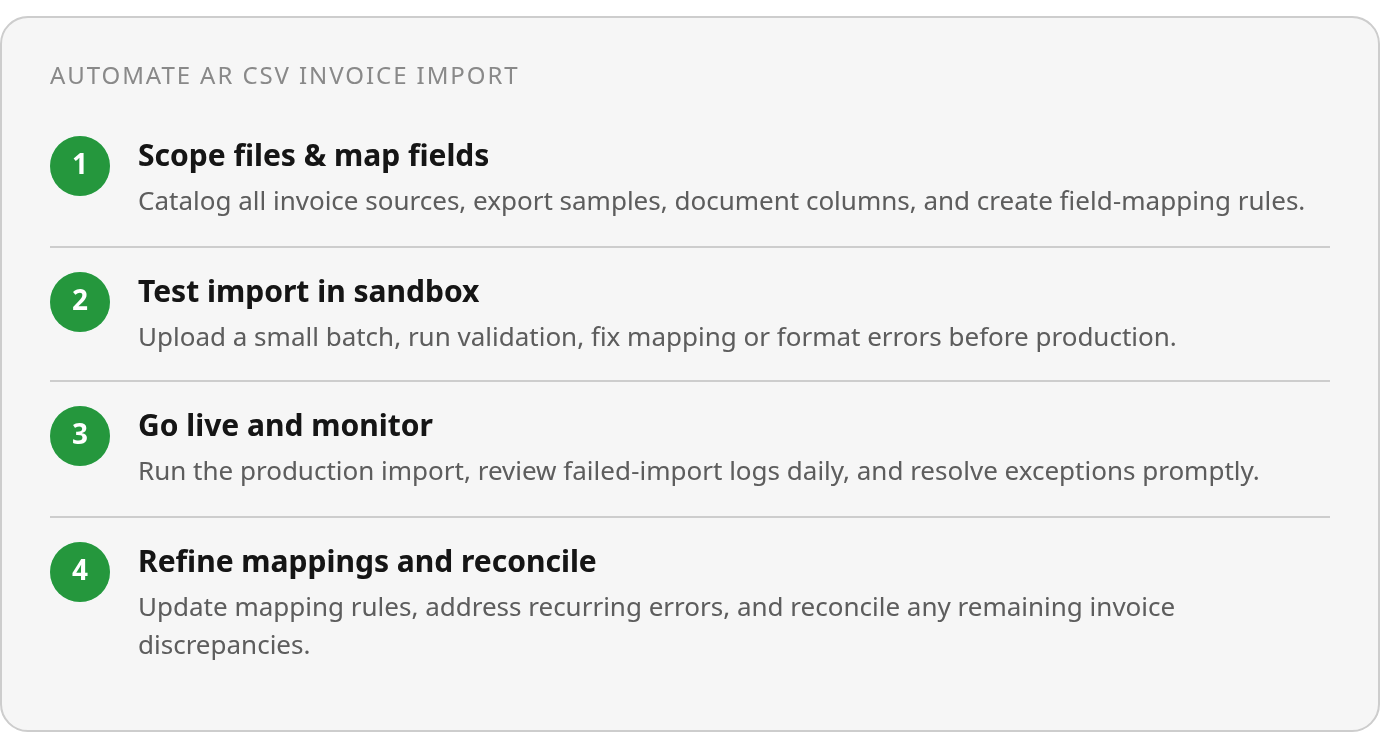
Implementing an AR CSV integration workflow follows a predictable sequence: identify your source files, map the fields, validate a sample batch, test the import, review exceptions, correct what failed, push to production, and reconcile. Most finance teams already handle these steps manually. The goal is to encode that same logic into an automated process so the system performs the validation, applies the mappings, and flags exceptions without staff intervention.
Scope your source files and document required fields
Start by cataloging every system that produces invoice data you need to import: your CRM, project management tool, billing platform, or legacy accounting software. Export sample CSV files from each source and document the field names, data types, and formats. Required invoice fields typically include customer ID, invoice number, date, due date, line-item descriptions, amounts, tax codes, and payment terms. Optional fields might include project codes, cost centers, or custom attributes your AR system can accept.
Compare your source-file column headers against your AR system’s required field list. Flag mismatches early. If your CRM exports “Client_Name” but your AR system expects “CustomerID,” you’ll need a mapping rule. If your project tool exports dates as MM/DD/YYYY but your AR system requires ISO 8601, you’ll need a transformation step. Preserve source-system IDs in the mapping so you can trace imported records back to the originating transaction. Maintaining this bidirectional link eliminates the need to cross-reference spreadsheets manually and reduces reconciliation workload.
Test imports in a sandbox and validate required fields
Use a staging environment or sample-file validation tool if your AR platform provides one. Upload a small test batch before committing to a full production import. The test run will surface field-mapping errors, missing required data, and format mismatches without cluttering your live AR ledger. Review the validation log carefully. A failed import at this stage saves hours of cleanup later, because automation applied to messy data produces faster mistakes, not faster collections.
Check whether your mappings handle edge cases and optional fields correctly. What happens when a line item has no tax code? Does the import default to zero, fail the row, or apply a fallback rule? Test invoices with multiple line items, partial payments, and non-standard terms. If your source file includes a custom field your AR system doesn’t recognize, decide whether to drop it, store it in a notes field, or extend your AR schema. Start with your highest-volume, most consistent file type, verify it works, then expand to the next source.
Monitor post-go-live logs and reconcile exceptions
After production go-live, schedule daily reviews of failed-import logs, recurring validation errors, and reconciliation exceptions. A spike in validation failures often signals an upstream data-quality issue—your CRM changed a field name, or a new billing template introduced a format your mapping doesn’t recognize. Cash-application queues are another early-warning signal: if imported invoices aren’t matching incoming payments correctly, the root cause is usually a missing or malformed customer identifier in the CSV file. Track how long it takes your team to resolve exceptions. If exception-handling time stays flat or grows after automation, the workflow needs refinement, not more volume.
Measuring success and avoiding common pitfalls
Track your internal import latency before and after automation. Set a pre-implementation time study for your team to export invoice data, standardize the file, apply mappings, upload the batch, review rejects, correct exceptions, and confirm accepted records. Then measure the same sequence post-automation. The gap is your improvement.
Cash-application speed is a sharper O2C KPI than DSO alone. Track how long it takes to match incoming payments to open invoices, and measure that separately from collection time. A payment can arrive before the ledger reflects it, which means working capital is technically received but not yet usable in reporting or close workflows. Focus on the time from payment arrival to ledger posting—that’s where CSV integration can compress your O2C cycle without waiting for customer behavior to change.
CSV integration pitfalls that delay reconciliation
Misaligned field mappings are the most common CSV-integration pitfall. When a source system and AR platform use different labels for the same customer, invoice, or account fields, the import can fail, land incomplete, or create reconciliation work that only appears after the fact. Changed file layouts amplify this: a vendor updates their export format, adds a column, or reorders existing fields, and your integration breaks until someone manually fixes the mapping.
Missing customer IDs, duplicate invoices, date-format mismatches, tax-field errors, and unreviewed exception logs round out the practical risks. Each one introduces a reconciliation exception that pulls staff away from higher-value work. A large share of late payments are self-inflicted by missing or incorrect invoice details—automation that imports bad data just makes the problem faster.
Define invoice-data validation rules: required customer or account ID, invoice number, invoice date, due date, amount, currency, payment terms, tax fields where applicable, and valid formats. Build these as checks within your import workflow, not as after-the-fact cleanup steps.
Turn errors into process fixes
Set up a continuous improvement loop: review recurring import errors, update mappings and validation rules, retrain users, and compare cash-application trends over time. Poor data quality is a reconciliation-delay risk—when invoices carry incomplete or inconsistent information, they sit in a queue waiting for manual correction rather than flowing straight to customers. The import runs, but exceptions pile up, and the finance team spends hours resolving what should have been caught upstream.
Automated alerts for failed imports and repeated validation errors work well here. When the same field consistently fails validation, that signals a mapping drift or a data-quality issue in the source system that needs fixing at the root. Set your data-quality audit cadence based on transaction volume and risk; higher-volume environments require more frequent checks.
Track exception rates alongside import volume to catch degradation early. If your validation-failure rate climbs from 2% to 8% over a quarter, that’s a signal that upstream data quality is slipping or a recent process change introduced new inconsistencies. When you spot the pattern early, you can fix the root cause before it compounds into a backlog that stalls reconciliation. Pair this with periodic audits of your mapping configuration—systems drift, and a field that was optional last year may now be required, breaking imports silently until someone investigates.
What to do this week
Run a pre-implementation time study. Track how long your team spends exporting invoice data, standardizing files, applying mappings, uploading batches, reviewing rejects, correcting exceptions, and confirming accepted records. That baseline tells you whether CSV integration is working after go-live.
Catalog every system that produces invoice data you need to import. Export sample CSV files from each source and document the field names, data types, and formats. Compare your source-file column headers against your AR system’s required field list and flag mismatches early.
Set up a staging environment or sample-file validation tool. Upload a small test batch before committing to a full production import. Review the validation log carefully. A failed import at this stage saves hours of cleanup later.
Quick Questions, Straight Answers
How much working capital can a mid-sized company actually free up by cutting DSO through faster invoice imports?
Use your own credit-sales figure to calculate the impact. Divide annual credit sales by the number of days in the year to estimate the value of a single DSO day, then multiply that amount by the number of days your automation removes from invoice delivery, collections follow-up, or cash application. This turns CSV integration ROI into a company-specific cash-flow model rather than a generic benchmark.
What’s the biggest mistake finance teams make when implementing automated CSV imports?
The biggest mistake is treating the import as a technical upload instead of an AR control point. Before go-live, finance teams should confirm that required fields are present, formats are consistent, source-system IDs are preserved, and exception handling is clear. A sandbox test helps expose those issues before they touch the live ledger.