

AR Automation Checklist: Does the Platform Parse Your Remittance Formats or Force Manual Matching?

In short:
Remittance data often arrives hours or days after payment. It can sit in bank files, email inboxes, and customer portals. Your AR team then spends time matching transactions to invoices manually. AI-powered remittance parsing reads seven formats—ACH addenda, SEPA instructions, EDI 820, PDF advice, email attachments, check memos, portal downloads—and matches payments automatically. Extraction and matching are separate failure points. AI may read a document correctly, yet cash still fails to post straight-through if fuzzy matching cannot map that payment to the right invoices. Most ERPs struggle with multi-invoice payments, short pays, and missing references. Straight-through processing depends on whether your platform handles customers’ formats and matching edge cases.
Why this matters for working capital
The most concrete cost is delayed cash application. When payments arrive without clear invoice references, your AR team reconstructs payment intent from scattered clues before posting cash. One customer wires funds at 9 AM; the remittance email arrives at 3 PM. Another posts a spreadsheet to a portal you check twice a week. A third includes only “May statement” in the memo line.
That delay inflates DSO and traps working capital. Finance teams staff around exceptions instead of routing routine transactions. Cash sits unapplied while analysts hunt for context across channels.
The bank confirms the deposit; the invoice breakdown is elsewhere
The operational pain starts when the wire, ACH, or check clears. The breakdown may live in a PDF attachment, an email sent later, or a portal file checked manually.
Cash application and deduction resolution—the document-heavy work before a payment posts—consume significant AR team time. Companies with high invoice volume face substantial manual matching overhead. The bottleneck compounds when volume rises.
Straight-through processing requires format coverage and matching precision
Your AR automation platform needs to handle ACH addenda records, SEPA payment instructions, SWIFT MT103 messages, EDI 820 files, emailed PDF remittance advice, Excel spreadsheets, scanned check stubs, and freeform notes typed into a customer’s payment portal.
Some ERPs can’t match payments covering multiple invoices, payments with no remittance, or short payments with missing explanations. That gap forces manual intervention.
AR automation depends on template-agnostic extraction and matching logic that pairs payments with invoices using customer name, amount tolerance, and partial references. But even a correct read can fail at the matching step, so evaluate both.
The alternative scales linearly with payment volume and caps throughput by headcount. When cash is received but not applied, finance leaders lack a reliable view of what has been paid, what remains collectible, and which accounts need follow-up. Automation reduces that lag by moving cash into the correct customer accounts faster.
Verify your platform handles these remittance scenarios:
- ACH/EFT addenda records — Capture payment details embedded in the bank file, not just the transaction amount
- SEPA and SWIFT MT103 messages — Extract structured remittance from international payment formats without manual re-keying
- EDI 820 remittance advice — Parse electronic invoices sent through supply-chain networks, matching line items to your ERP records
- PDF-based remittance advice — Read customer-generated PDFs, including non-standard layouts, and extract invoice numbers, amounts, adjustments
- Email attachments and body text — Scan incoming email for remittance data in spreadsheets, Word docs, or typed directly into the message
- Check memos and paper remittance slips — Digitize handwritten or printed check stubs without relying on bank lockbox services
- Customer portal downloads — Auto-fetch remittance files from buyer portals like Coupa or Ariba using robotic process automation, eliminating manual logins
The parsing-or-manual-matching decision directly determines whether your AR automation actually cuts DSO or just moves the work to a cleaner dashboard. If the platform can’t read your customers’ formats, your team still does the reading. If it reads but can’t match, the result is the same.
Does your platform parse your remittance formats?
The most useful test is what happens when the payment arrives as a partial payment with vague references. Some AR automation platforms advertise remittance aggregation as solved, then route messy cases to a human exception queue.
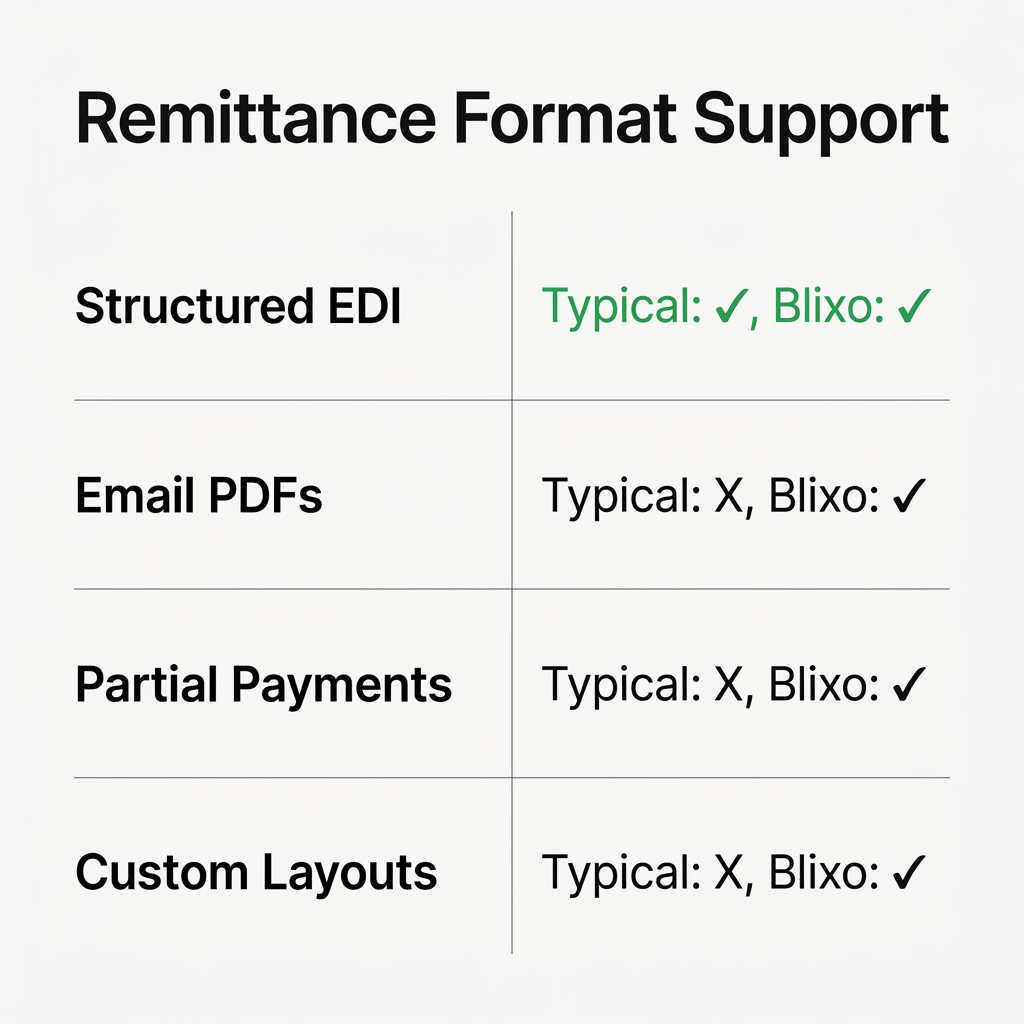
In live deployments, the platform may read check stubs and structured EDI files cleanly, then route everything else—emails with invoice details in the body text, PDFs with custom layouts, partial payments with vague references—to a human exception queue.
Your team still spends hours each week matching payments manually because the automation only works when data arrives in formats the vendor anticipated.
Before you commit to an AR automation platform, use this checklist to verify whether it handles your actual remittance scenarios or just the easy ones.
Demand evidence for your specific remittance channels
Ask the vendor to demonstrate—live, with your sample data—that the system can parse the channels used by your largest and most complex payers. Real coverage means the platform can ingest bank-file details, international payment references, structured electronic remittance files, customer PDFs, spreadsheets, paper artifacts, email content, and buyer-portal exports.
Some platforms claim support for “all common formats” but break when a customer changes their payment processor or sends a PDF with a layout the OCR engine hasn’t seen.
If the vendor’s demo only shows one-payment-per-invoice scenarios with clean references, push for harder proof. You want to see consolidated payments, deductions, partial payments, missing identifiers, and customer-specific naming conventions. Those cases determine whether cash application becomes automated or remains analyst-driven.
- Require vendor documentation or a live demo proving the platform supports the remittance sources used by your actual customer base, including bank files, customer documents, email, paper items, and portal exports
- Test whether the system handles payments with missing invoice numbers, consolidated payments covering 10+ invoices, partial payments without explanations, and deductions buried in unstructured text
- Verify the platform can process remittances from your highest-volume customers in their current formats without requiring them to change how they send payment data
Confirm configurability for payment complexity
Generic parsing rules fail at invoice matching when customers use non-standard invoice references, apply trade promotion deductions without labels, or send round-number wires with explanations in email footnotes. Ask whether the platform supports configurable field mapping, custom regex patterns, or no-code rules to capture customer-specific layouts.
Some vendors advertise AI-powered OCR that “learns your formats” but still require IT intervention every time a customer changes their remittance template.
High straight-through cash application rates depend on the system’s ability to adapt to invoice-number variants, handle deduction codes, recognize partial-payment logic, and accommodate unusual document structures without manual reconfiguration.
- Verify the platform offers configurable field mapping, regex/rule engines, or no-code tools to handle customer-specific invoice numbering, deduction codes, discount structures, and payment reference formats
- Ask for proof—in vendor documentation or a sandbox demo—that the system processes partial payments, split payments, consolidated payments, and deductions without routing every exception to a human analyst
- Test whether the AI OCR adapts to format changes automatically or requires your IT team to rebuild parsing rules when customers modify their remittance layouts
Require a live demo with your actual remittance data
Sales demonstrations using clean, vendor-prepared sample data prove nothing about real-world performance. Request a sandbox or proof-of-concept where the vendor processes 20–30 remittance files from your actual customers.
Watch how the system extracts invoice numbers, payment amounts, deduction reasons, and customer references. Review the confidence scores and proposed matches the platform generates before cash application.
This exercise should expose the platform’s behavior before your team depends on it in production. A demo with your data shows whether the system reduces analyst workload, isolates true exceptions, and gives reviewers enough context to approve or correct matches quickly.
- Provide 20–30 real remittance samples, anonymized if necessary, and require the vendor to process them in a live demo or sandbox environment
- Inspect extracted fields, confidence scores, and proposed invoice matches the system generates before applying cash—confirm accuracy against your internal records
- Ask the vendor to show how the platform handles the messiest portion of your remittance volume: handwritten check notes, scanned images, vague email references, and payments with zero context
Validate ERP and bank-feed integration coverage
Remittance parsing is only valuable if extracted data flows automatically into your ERP and reconciles against bank-feed transactions without manual intervention. Ask for a list of pre-built connectors the vendor maintains for your specific ERP and for your banking partners.
Some platforms advertise broad integration portfolios but deliver generic API hooks that still require your IT team to build and maintain the actual data mappings.
Ask whether the integration supports bi-directional sync, automatic cash posting, real-time exception alerts, and reconciliation between remittance data and bank transactions.
- Confirm the vendor maintains pre-built, certified integrations for your ERP and primary banking partners—not just API documentation your IT team must implement
- Ask whether the integration supports bi-directional sync, automatic cash posting, real-time exception alerts, and reconciliation between remittance data and bank transactions
- Verify that updates to your ERP or bank’s API don’t break the integration—request the vendor’s update-maintenance policy and historical uptime data
Demand transparency on parsing accuracy and exception rates
Vendors quote high straight-through processing rates or data accuracy as standard outcomes. Those numbers mean nothing without context about what percentage of your payment volume qualifies as “straight-through” versus “exception requiring human review.”
Request reports showing parsing accuracy by remittance source, match confidence by payment type, and exception rates by customer segment. Cost and DSO improvements come when exception queues shrink, not when labels change.
Ask how the platform routes unmatched payments, low-confidence matches, deductions without supporting documentation, and payments referencing closed or nonexistent invoices. The difference between a platform that reduces manual work and one that just reorganizes it lives in exception-handling workflows.
- Request sample reports showing parsing accuracy, straight-through processing rates, and exception volumes broken down by remittance channel, payment type, and customer
- Verify the platform automatically routes exceptions to the appropriate team member with full context attached, including remittance image, extracted fields, payment details, and open invoice list
- Ask the vendor to disclose common failure modes: nonstandard PDFs, poor image quality, missing invoice numbers, consolidated payments, partial payments, and customer-specific layouts that require manual review
Identify and document platform limitations before signing
No remittance-parsing system handles every scenario perfectly. Ask vendors to state explicitly what they cannot process reliably: handwritten notes on checks, image-quality thresholds for scanned documents, partial payments without itemization, deductions with industry-specific coding, and customer portals requiring screen-scraping or robotic process automation.
Honest vendors document these limitations in implementation guides. Others let you find them after contract signature when your team is still manually matching a substantial portion of remittances.
The platforms that deliver measurable value narrow manual work to genuine edge cases rather than claiming to eliminate it entirely.
- Require the vendor to document known limitations for handwritten remittances, low-resolution scans, missing invoice references, consolidated payments, partial payments, deductions, and customer-specific layouts
- Ask how the platform handles payments where supporting documentation is incomplete, customers reference outdated invoice numbers, or remittance must be linked after the initial transaction appears
- Verify the vendor provides regular updates addressing common exception patterns rather than treating your team’s manual workarounds as acceptable permanent solutions
Testing compatibility with real data
Test with the messiest part of your remittance volume, not the clean sample files. A proof-of-concept with clean data will pass; a proof-of-concept with your partial payments, vague references, and one-off attachments will reveal whether the platform posts cash or creates another queue.
Before you run a proof-of-concept with real invoice and payment data, most AR automation platforms will claim they parse your remittance formats. That claim holds until you feed the system a partial payment with no useful support, a wire transfer referencing a batch of open invoices with no allocation, or an email attachment in a format the vendor didn’t anticipate.
At that point, the platform routes the payment to a manual exception queue and your team spends the same hours matching it by hand.
Test compatibility using your actual remittance scenarios rather than the vendor’s curated demo data. Start by preparing a clean sample data set: export your open invoices, customer master data, recent payment records, and every remittance file, email, PDF, and bank lockbox output you received during the review period.
Include the messy cases—partial payments, deductions, credits, and payments with missing or contradictory references. Then manually validate the correct invoice-to-payment mapping for each transaction and use that as your benchmark.
Run a controlled pilot with a narrow scope
-
Start with one payment method, one bank feed, or a subset of high-volume customers. Launching across the entire AR portfolio before you understand match accuracy and exception patterns is how pilots fail. Integrations need configuration, and your data will expose edge cases the vendor didn’t account for during setup.
-
Check every integration point early: your ERP, bank feeds, payment processors, customer portals, and any middleware. Remittance data often passes through multiple systems before reaching your AR platform. A broken handoff at any stage creates the same manual matching work you were trying to eliminate. If the platform can’t pull structured data from a bank file or interpret the remittance documents your critical customers send, the automation stops there.
-
Define escalation paths internally before the pilot starts. Your AR team needs documented workflows for unmatched payments, customer follow-up, collections holds, deduction investigation, write-off review, and month-end reconciliation. Automation shifts time to exception handling rather than eliminating it. Plan change management around reviewing low-confidence matches and resolving disputes, not around basic data entry.
-
Quantify your current labor burden before implementation. Track how many hours your team spends on cash application, deduction resolution, and manual matching each month. Document the time spent chasing missing remittance data and reconciling partial payments. This baseline lets you measure automation impact accurately and identify where manual work persists after go-live.
Go-live timelines vary widely depending on the platform and your ERP environment. Don’t assume a standard phased deployment unless your vendor confirms it with a documented implementation plan specific to your systems.
Blixo’s matching engine: what to verify in a demo
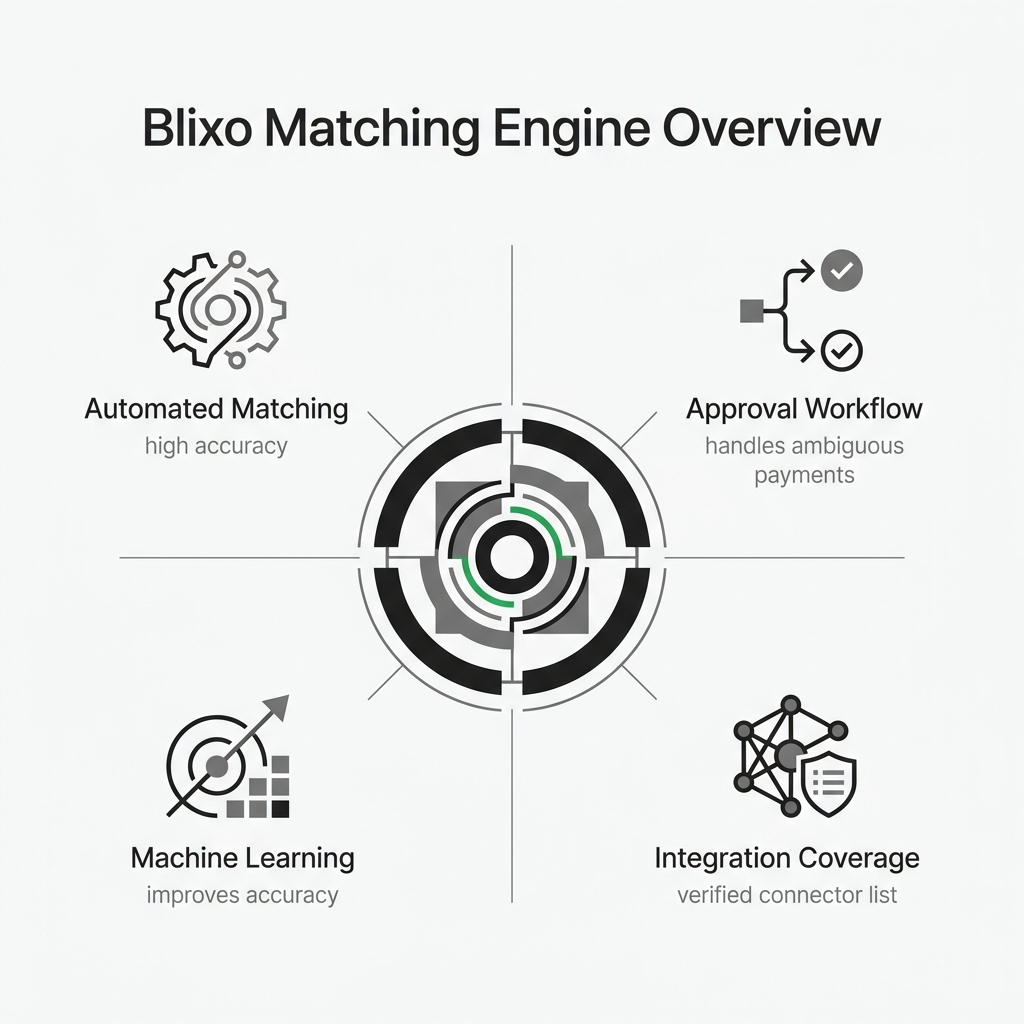
The useful starting point is not the vendor’s accuracy rate; it is whether the matching engine posts cash straight-through on your least clean remittance cases. Ask Blixo or any vendor to prove that.
Treat accuracy claims as unverified until a live demo uses your data. The system should match payments to open invoices and provide an approval workflow for cases that require review. Do not assume machine-learning adaptation or current ERP coverage unless it is confirmed in company materials and shown against your specific ERP, payment processors, and bank feeds.
The integration list matters less than whether the connector handles your edge cases: customers who reference purchase orders instead of invoice numbers, payments that span multiple accounts or subsidiaries, and deductions that need reviewer approval before posting.
What you should ask us to prove
Ask us to demonstrate how the approval workflow handles ambiguous payments and how corrections feed back into matching logic. Understanding whether the system learns from your team’s input helps you assess whether accuracy will improve with use or plateau after setup.
Request details on which payment channels and bank integrations we support, then compare that list against the sources you use today. If we claim to integrate with a specific bank or processor, ask to see it handle a real payment scenario from your AR workflow, not a sanitized demo file. Absence of a specific integration in documentation does not mean we cannot support it, but you should not assume coverage without evidence.
For integration claims, ask for a verified connector list and compare it with your current tech stack. Connector maturity varies. Some integrations sync payment data but require manual invoice matching. Others handle full reconciliation. Clarify which operations run automatically and which still require your team’s input.
Frequently Asked Questions
What happens when a customer sends payment before the remittance data arrives?
Your AR system should preserve the payment record, monitor for the related support, and link the two once the remittance appears. The key question is whether the platform can maintain that pending state without forcing an analyst to keep checking external sources. During vendor evaluation, ask to see how delayed remittance is queued, matched, approved, and posted.
Can platforms really parse handwritten check memos without lockbox services?
Parsing accuracy for handwritten notes depends heavily on image quality and whether the customer writes legibly. Most platforms handle printed check stubs reliably but struggle with poor handwriting, smudged scans, or vague references like “for services.” Before committing to a vendor, test their OCR engine with actual scanned checks from your deposit stream—not demo files—and ask them to document known failure modes for handwritten remittances explicitly.
How do I measure whether automation actually reduced manual work versus just reorganizing it?
Use your pre-implementation labor baseline as the comparison point. After go-live, review total cash-application effort, exception queue volume, time spent on low-confidence matches, and the share of payments still requiring investigation. Real automation shrinks the total effort needed to reconcile payments; a cosmetic workflow change simply gives the same manual work a better interface.