

Optimize Your Invoice Processing Process Flow

Key Takeaways
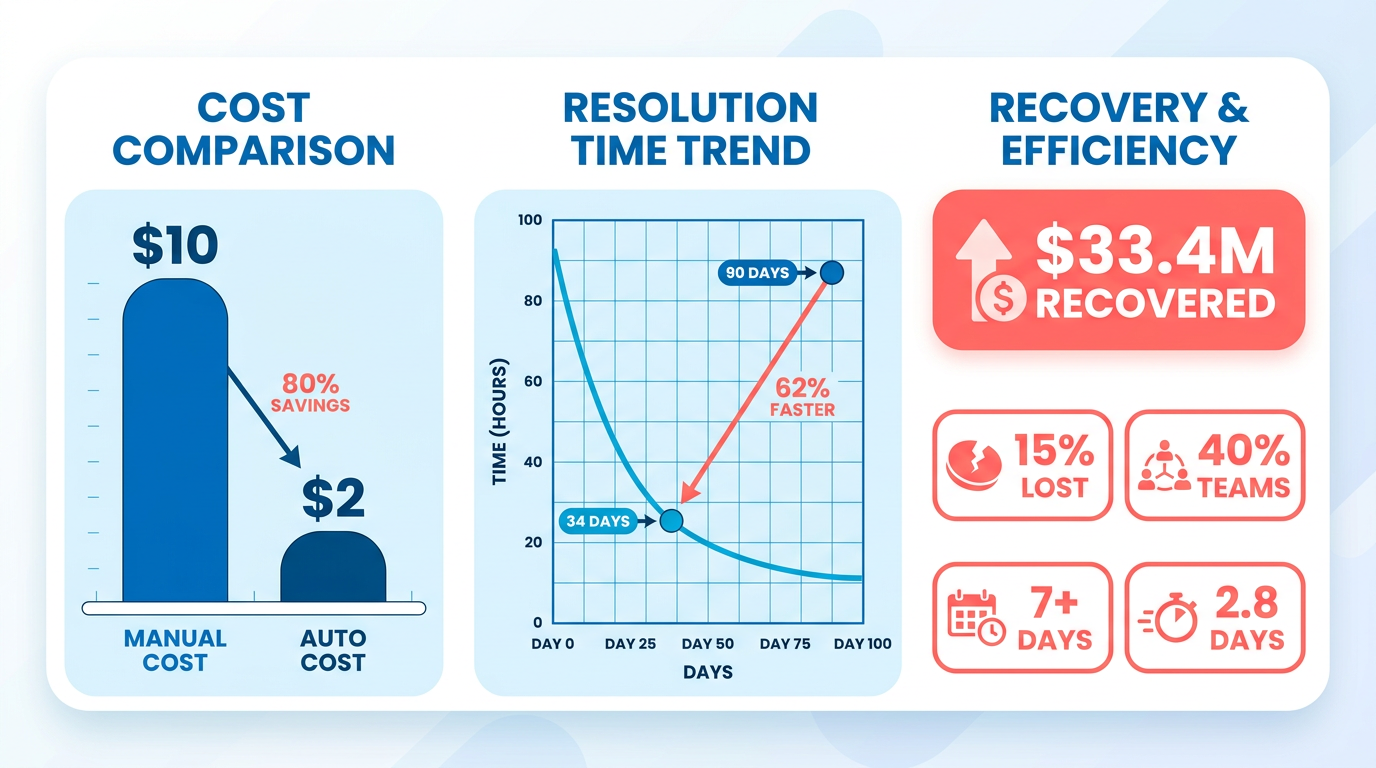
- Reduce invoice resolution time from 90 to 34 days can recover $33.4 million in lost revenue.
- Manual invoice processing costs over $10 per invoice, while automation lowers costs to $2 or less.
- Top-performing finance teams process invoices in 2.8 days, compared to 7+ days for others.
- Late payments cost businesses 15% annually in lost discounts and penalties due to delayed cash flows.
- Automation reduces invoice error rates from 4–6% (manual) to under 1% using OCR and AI.
- 3-way matching and approvals take hours manually but complete in seconds with automated systems.
- Real-time digital systems enable 24-hour payment cycles, improving liquidity like in e-commerce.
Why Optimizing Invoice Processing Matters
Inefficient invoice processing can cost businesses thousands in delayed cash flow, while optimized systems reduce errors and accelerate payments. For example, one company recovered $33.4 million by cutting resolution time from 90 to 34 days. Studies show manual processing costs over $10 per invoice, but automation can slash this to $2 or less. Let’s break down the impact.
How Does Inefficient Invoice Processing Affect Revenue?
Manual systems slow down cash flow by extending payment cycles and increasing late fees. Over 40% of finance teams report processing invoices in 7+ days, compared to top performers who finish in 2.8 days. Late payments alone cost businesses an average of 15% in lost discounts and penalties annually. By contrast, real-time digital systems enable 24-hour payment cycles, as seen in e-commerce, where instant transactions boost liquidity. As mentioned in the Streamlining Payment Scheduling and Execution section, centralized automated systems enforce compliance and ensure consistent cash flow through optimized workflows.
What Challenges Does Optimization Solve?
Automated systems tackle three major issues:
- Errors: Manual data entry creates 4–6% error rates, leading to disputes and rework. Building on concepts from the Automating Invoice Capture and Data Extraction section, OCR and AI reduce mistakes to less than 1%.
- Delays: 3-way matching and approval workflows take hours manually but complete in seconds with automation. As discussed in the Implementing strong Matching and Exception Management section, strong matching systems ensure alignment between invoices, purchase orders, and delivery receipts.
- Costs: A global employer of record saved 98% of processing time by switching from 5–10 minutes per invoice to 5 seconds.
One finance team using Blixo automated 80% of workflows, cutting invoice-to-payment cycles from 14 days to 48 hours and saving $250,000 annually in late fees.
Who Benefits Most from Streamlined Processing?
Finance teams gain 30–50% in productivity by avoiding repetitive tasks like data entry. Business owners see 20–30% faster cash flow, while suppliers appreciate fewer payment disputes. For small businesses, automation can cut administrative costs by 25%, while enterprises recover millions in overpayments. A mid-sized company using Blixo’s tools reduced manual workloads by 60%, freeing staff to focus on strategic analysis.
Optimized processing isn’t just about speed-it’s about turning accounts payable into a profit center. By reducing errors, accelerating payments, and improving compliance, businesses secure a 15–25% increase in operational efficiency. The result? Stronger vendor relationships, fewer cash flow gaps, and a financial foundation that scales with growth.
Identifying Pain Points in Your Current Invoice Workflow
To identify inefficiencies in your invoice workflow, start by recognizing recurring issues that slow down processing, increase errors, or delay payments. Common pain points include manual data entry, lost or misplaced invoices, and bottlenecks during approval cycles. These problems often lead to higher operational costs, compliance risks, and strained vendor relationships. By systematically analyzing your current process, you can pinpoint where automation or process changes will deliver the greatest impact. For example, Automating Invoice Capture and Data Extraction highlights how OCR-enabled tools like Blixo can drastically reduce manual effort in data entry.
What Are the Most Common Pain Points in Invoice Processing?
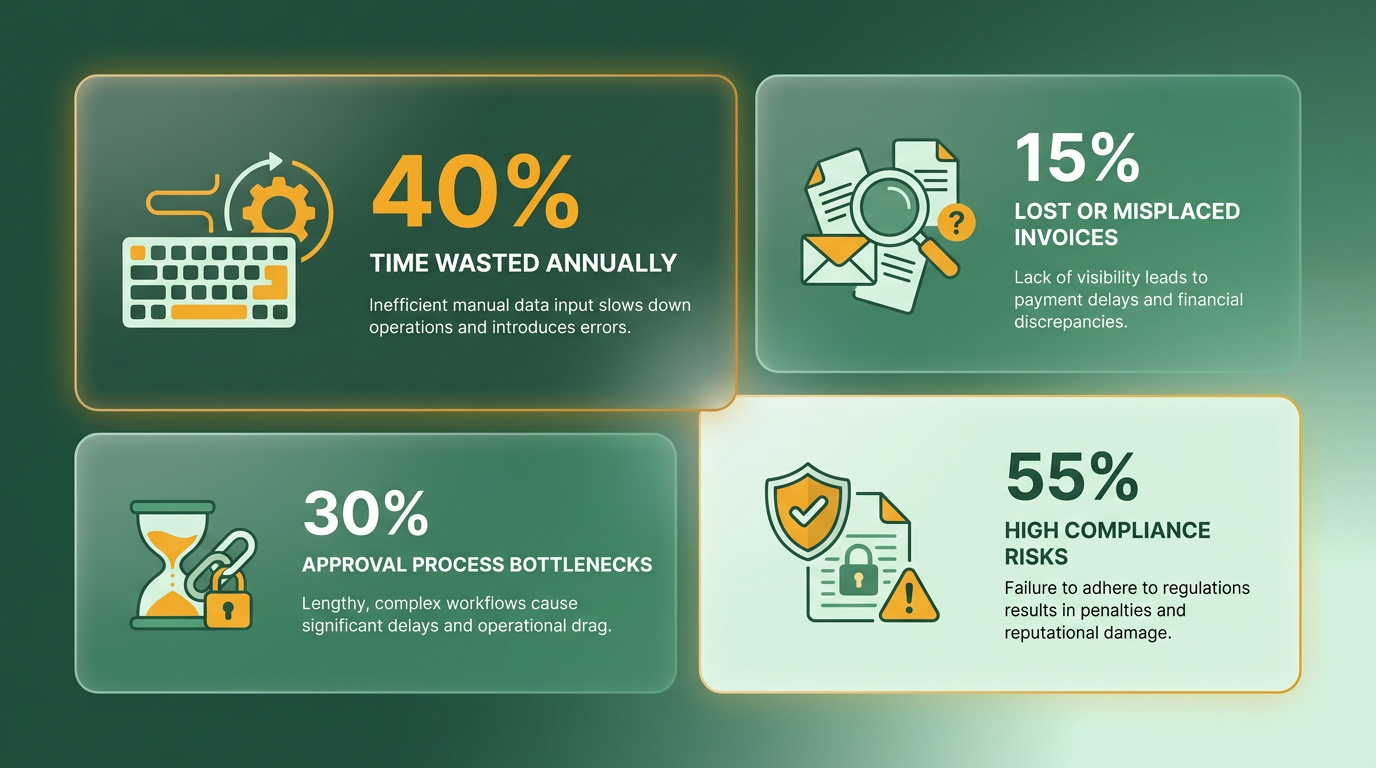
Manual data entry is a major source of inefficiency. Keying in invoice details from paper or PDFs consumes hours of staff time and increases the risk of human errors. For example, one company reported spending 5–10 minutes per invoice manually, translating to hundreds of work hours lost monthly. Lost invoices-whether due to misfiled documents or unclear routing-can delay payments and disrupt cash flow. A 2022 study found 25% of AP departments struggle with invoice tracking, leading to duplicate payments or missed deadlines. Approval bottlenecks also create friction. If approvers are unavailable or unclear about responsibilities, invoices can sit unprocessed for days. A lack of centralized visibility into the approval chain exacerbates this issue. For instance, a mid-sized business discovered 30% of its invoices were delayed because managers couldn’t access real-time status updates.
How Do You Conduct a Workflow Analysis?
Start by mapping your end-to-end invoice process. Break it into steps: receipt, data capture, validation, approval, payment, and recording. Use flowcharting tools to visualize each stage and identify where delays or errors occur. Designing an Efficient Invoice Processing Workflow emphasizes the importance of streamlining these steps to reduce manual effort. For example, a flowchart might reveal that 40% of processing time is spent chasing missing documents. Next, gather metrics to quantify inefficiencies. Track the average time per invoice, cost per processed invoice, and error rates. Compare these to industry benchmarks. If your team takes 72 hours to process invoices but industry averages are 24–48 hours, automation could help close this gap. Automating Invoice Capture and Data Extraction provides further details on how OCR-enabled software can extract data accurately, reducing manual effort by up to 98%.
How Do You Involve Stakeholders in the Analysis?
Engage cross-functional teams-finance, procurement, and IT-to ensure a holistic view. Host workshops to walk through pain points and prioritize fixes. For example, procurement teams might highlight supplier frustrations with slow payments, while finance staff could flag compliance risks from inconsistent validation. Regular audits with stakeholders help maintain accountability. One organization reduced invoice errors by 60% after implementing monthly reviews with AP staff and department heads. Training is equally critical. If new tools like Blixo are introduced, ensure staff understand how to use them to avoid resistance and maximize adoption. Why Optimizing Invoice Processing Matters underscores the financial stakes of neglecting stakeholder collaboration, such as the $33.4 million one company recovered by addressing systemic inefficiencies.
By addressing these pain points with targeted automation and stakeholder collaboration, you can transform invoice processing from a reactive task to a strategic advantage.
Designing an Efficient Invoice Processing Workflow
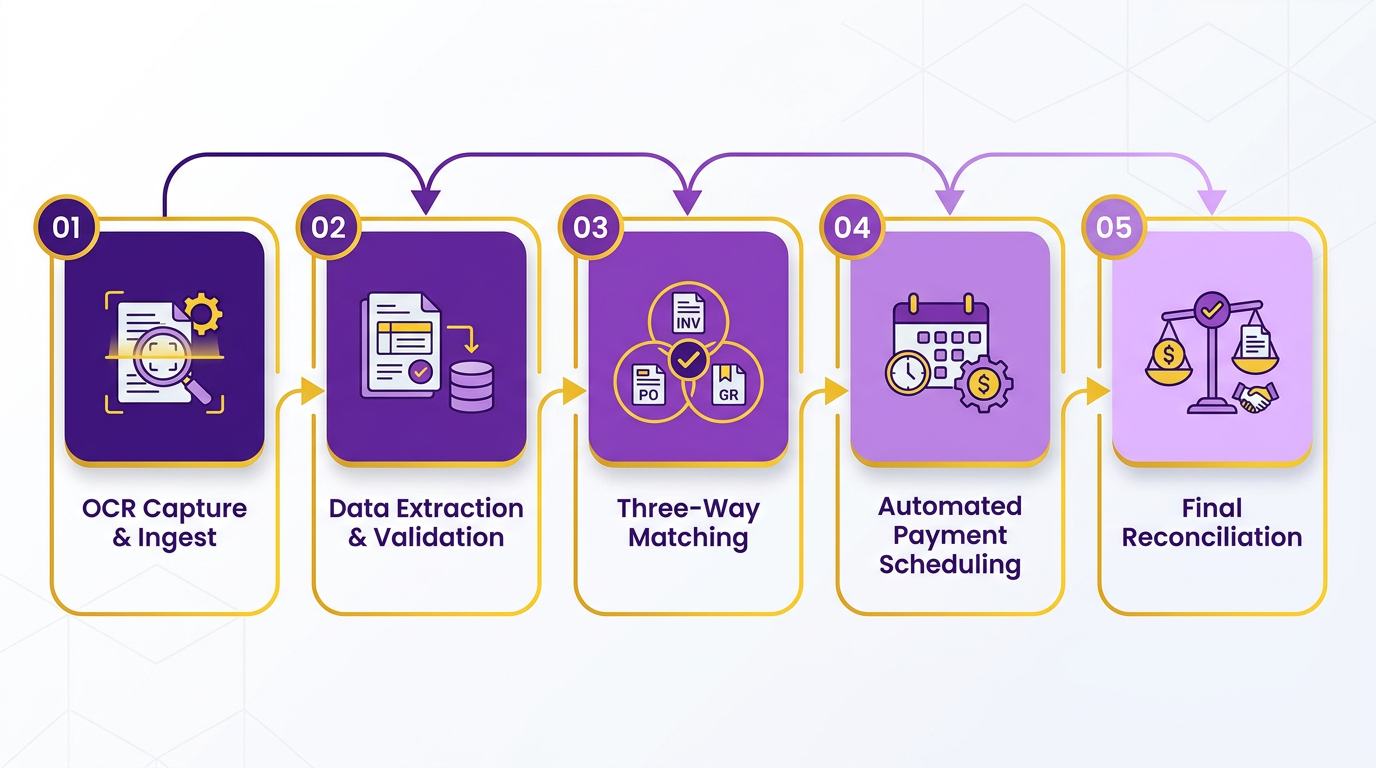
Designing an efficient invoice processing workflow starts with identifying the core steps that reduce manual effort while ensuring accuracy. Automation is central to this process, streamlining tasks like data capture, validation, and payment scheduling. As mentioned in the Automating Invoice Capture and Data Extraction section, tools using Optical Character Recognition (OCR) can extract invoice details in seconds, cutting errors tied to manual entry. Integration with existing systems-like ERPs or accounting software-ensures seamless data flow and real-time updates. This approach not only speeds up processing but also aligns with compliance requirements, such as three-way matching, detailed in the Implementing strong Matching and Exception Management section, to prevent overpayments.
How Do You Tailor Workflows for Different Business Needs?
B2B and B2C companies require distinct workflows due to their operational differences. A B2B firm might prioritize multi-step approvals and compliance checks, such as validating invoices against contracts and purchase orders. For instance, a B2B workflow could involve receipt, data capture, three-way matching, manager approval, and scheduled payment. In contrast, a B2C business might focus on rapid payment processing and customer transparency. An example workflow here could automate receipt via online portals, validate against sales records, and trigger instant payment confirmations. Tools like Blixo offer customizable workflows, allowing businesses to adjust approval hierarchies or integrate online payment gateways depending on their customer base.
What Are the Best Practices for Implementation?
Training and testing are non-negotiable for a smooth rollout. As outlined in the Identifying Pain Points in Your Current Invoice Workflow section, start by mapping out the current workflow to identify bottlenecks, such as delayed approvals or manual data entry. Pilot the new system with a small team to uncover issues, like mismatched invoice data, before full deployment. Staff training should cover not just software usage but also new compliance protocols, such as flagging duplicate invoices. For example, one company reduced processing time from eight days to three by training teams on automated tools and streamlining approval steps (source 7). Regular audits and feedback loops ensure the workflow adapts to evolving needs, like scaling for seasonal demand.
How Can You Monitor Workflow Effectiveness?
Measuring success requires tracking key metrics like invoice processing cycle time, error rates, and payment speed. Real-time dashboards, such as those offered by Blixo, let finance teams spot delays or bottlenecks instantly. For instance, if the average processing time exceeds industry benchmarks (e.g., 2.8 days for top performers), it signals a need for optimization. Automated alerts can flag exceptions, like invoices stuck in approval for over 48 hours. Additionally, customer feedback-such as surveys on payment ease-helps refine B2C workflows. A business using timely payment reminders saw a 30% increase in on-time payments (source 3), demonstrating how monitoring human behavior complements technical metrics.
By combining automation, tailored workflows, and continuous evaluation, businesses can transform invoice processing from a cost center to a strategic asset. The goal isn’t just efficiency but also creating a seamless experience for vendors and customers, ensuring trust and long-term partnerships.
Automating Invoice Capture and Data Extraction
Automating invoice capture and data extraction reduces manual errors, accelerates processing times, and improves financial accuracy. By using tools like optical character recognition (OCR) and machine learning, businesses can extract invoice details from scanned documents, emails, or PDFs and map them to accounting systems automatically. This eliminates manual data entry, which is prone to human error and delays. For example, one company reduced invoice processing times from eight days to three days after implementing automation, cutting duplicate payments and freeing staff for higher-value tasks. As mentioned in the Why Optimizing Invoice Processing Matters section, inefficient workflows can cost businesses significant delays in cash flow, which automation directly addresses.
What Tools Power Invoice Automation?
Modern invoice automation relies on technologies like OCR, AI, and robotic process automation (RPA) to streamline workflows. OCR tools digitize handwritten or printed text, while AI models trained on invoice data identify fields such as vendor names, line items, and totals. RPA automates repetitive tasks like matching invoices to purchase orders or validating tax codes. Blixo, for instance, uses machine learning to classify invoice formats and extract data with 98% accuracy, even for unstructured documents. This reduces the need for manual verification and ensures compliance with accounting standards.
Integration with enterprise resource planning (ERP) systems like SAP or QuickBooks is critical. Automated workflows push extracted data directly into accounting ledgers, eliminating silos. For example, a global employer of record company automated payroll invoicing by linking invoice data to their ERP, saving hundreds of hours monthly. This seamless integration ensures real-time updates and reduces reconciliation errors, a core principle discussed in the Designing an Efficient Invoice Processing Workflow section.
How Do You Measure Automation Success?
Key performance indicators (KPIs) help quantify the impact of invoice automation. Track metrics like invoice processing time (e.g., reducing cycle times from 7+ days to under 2.8 days), cost per invoice (often cut by 50–70% with automation), and error rates (typically dropping from 5–10% to below 1%). For example, a financial services firm reported a 98% reduction in manual workload after adopting an AI-powered system, aligning with industry benchmarks. Building on concepts from the Identifying Pain Points in Your Current Invoice Workflow section, addressing recurring issues like manual data entry directly improves these metrics.
What Challenges Should You Anticipate?
While automation offers clear benefits, challenges like data inconsistencies and integration complexity require careful planning. Invoices from different vendors often follow varying formats, making universal templates difficult. Advanced systems use adaptive learning to handle these variations, but initial setup may require training models on diverse datasets.
Regulatory compliance adds another layer of complexity. Automated systems must validate tax codes, currency conversions, and supplier credentials against local laws. For example, a fund management firm faced delays when automated invoice rules failed to account for regional tax exemptions. Regular audits and updates to AI models prevent such issues.
Organizations must also assess their readiness for automation. Legacy systems may lack APIs for seamless integration, requiring middleware solutions. A step-by-step approach-starting with high-volume, repetitive tasks-mitigates risks. As one expert notes, “Automation isn’t a one-size-fits-all solution. It requires mapping workflows to business-specific needs.”.
By addressing these challenges proactively and using tools like Blixo, businesses can transform invoice processing from a cost center into a strategic advantage. The result is faster payments, fewer errors, and more time for strategic financial planning.
Implementing strong Matching and Exception Management
How Do Automated Matching Tools Improve Invoice Accuracy? Automated systems reduce manual errors by verifying invoice data against multiple documents. Tools like three-way matching compare invoices with purchase orders and delivery confirmations to flag inconsistencies. For example, if an invoice total differs from the purchase order, the system automatically routes it for review. This method minimizes overpayments and ensures compliance with procurement policies.
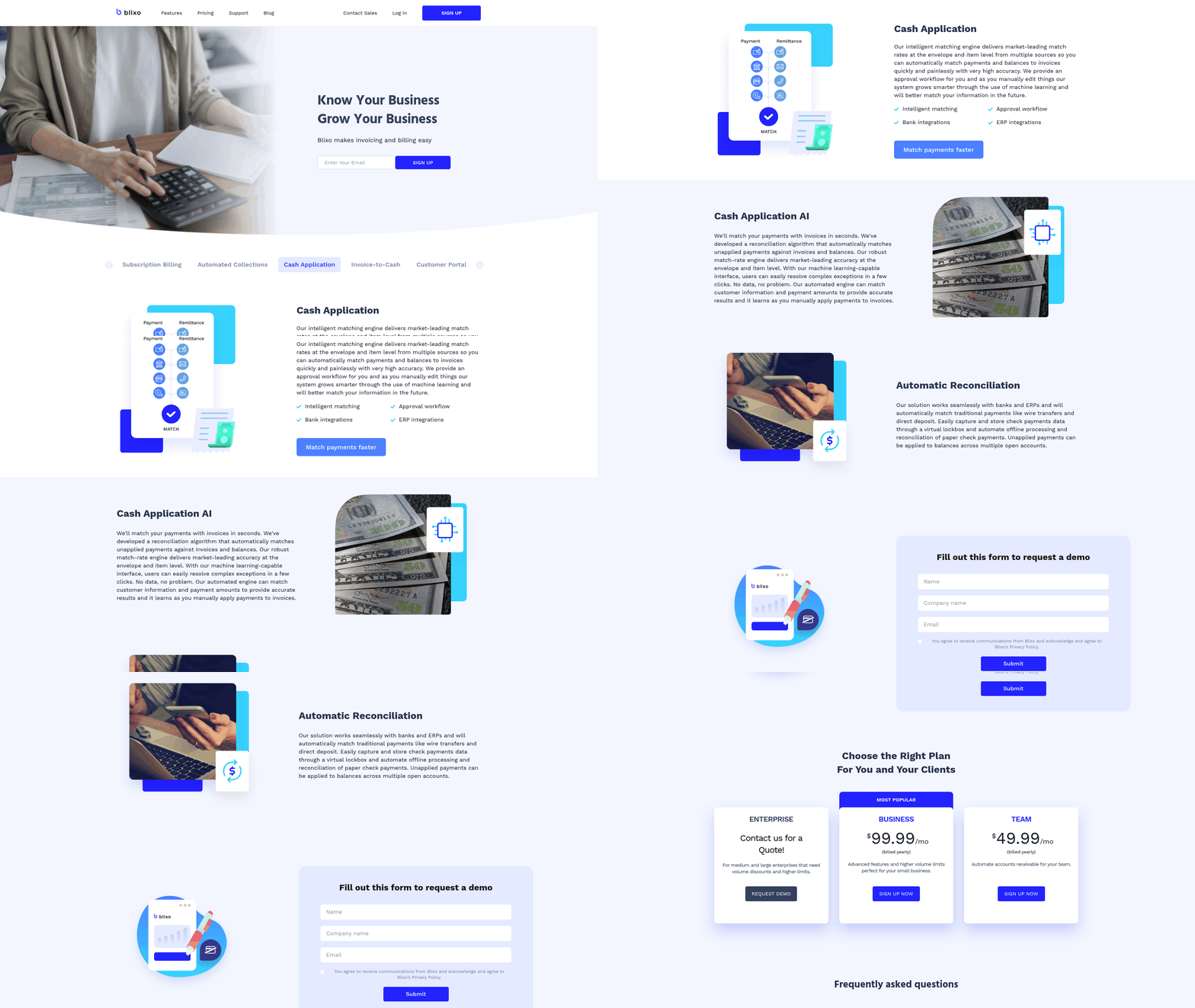
Automation also speeds up data extraction. Optical character recognition (OCR) technology scans invoices to pull line items, vendor details, and payment terms, eliminating manual data entry. As mentioned in the Automating Invoice Capture and Data Extraction section, OCR reduces processing time significantly. A global employer of record company reduced invoice processing time from 5–10 minutes per invoice to 5 seconds using such tools, saving hundreds of work hours monthly. This efficiency allows teams to focus on strategic tasks rather than repetitive data checks.
What Are Best Practices for Handling Invoice Exceptions? Clear workflows and communication protocols prevent bottlenecks when exceptions occur. Discrepancies like missing delivery receipts or incorrect pricing should trigger predefined steps, such as recontacting vendors for updated documents or escalating to senior staff for approval. Building on concepts from the Designing an Efficient Invoice Processing Workflow section, documented guidelines should outline how to resolve common issues, such as mismatched quantities between invoices and delivery notes. Blixo’s SaaS service, for example, integrates audit trails to track how exceptions are resolved, ensuring transparency and accountability. Staff should also establish communication channels with vendors to clarify discrepancies quickly, avoiding delays in payments and potential late fees.
What Metrics Should You Track to Measure Matching and Exception Management Success? Quantifiable metrics help refine processes and highlight areas for improvement. Key performance indicators (KPIs) include:
- Invoice matching accuracy rate: The percentage of invoices matched correctly on first review. A target of 95% or higher indicates strong system performance.
- Exception resolution time: The average hours taken to resolve discrepancies. Reducing this from days to hours improves cash flow and vendor relationships.
- Cost per invoice: Tracking labor and automation costs reveals savings from reduced manual work. As highlighted in the Why Optimizing Invoice Processing Matters section, one company using AP automation cut costs by $1 million annually.
For example, a company adopting three-way matching reported a 30% drop in exceptions within six months. Regularly reviewing these metrics identifies trends, such as recurring issues with specific vendors, enabling proactive adjustments to workflows.
What Challenges Might You Face in Implementing Matching and Exception Management? Data quality and integration hurdles often slow adoption. Inconsistent formatting in invoices or mismatched vendor codes can confuse automated systems, requiring manual overrides. A study found that 40% of invoice processing errors stem from poor data extraction. To mitigate this, standardize document formats and use validation rules to flag incomplete submissions.
Integration with existing accounting systems is another challenge. Custom workflows may need APIs or middleware to connect with ERP platforms. Teams should also allocate time for staff training, as resistance to new tools can delay ROI. For example, NHS Shared Business Services faced initial pushback before RPA adoption improved compliance and reduced errors. Ongoing audits and feedback loops help refine these systems over time.
Streamlining Payment Scheduling and Execution
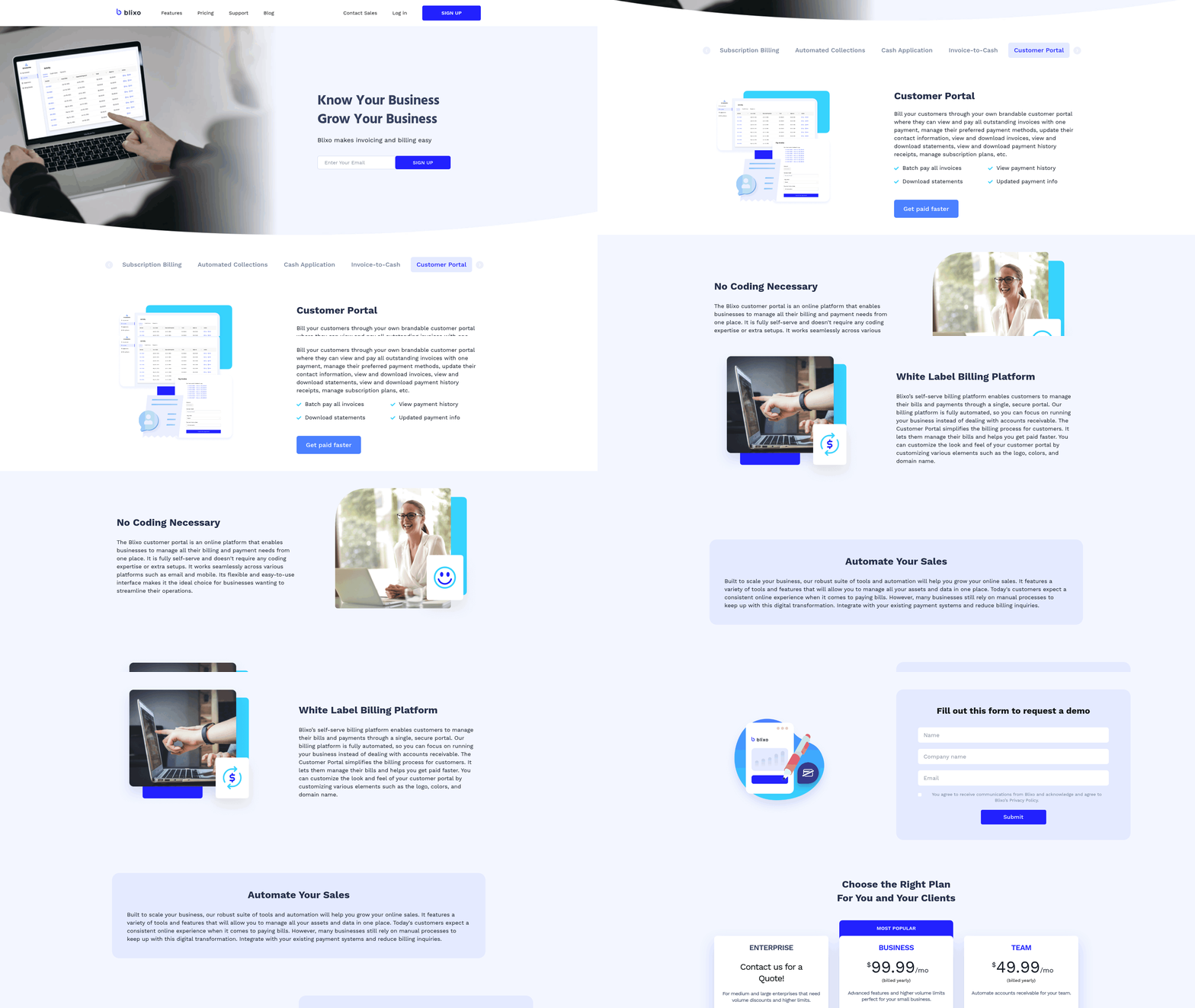
Streamlining payment scheduling and execution reduces delays, minimizes errors, and ensures consistent cash flow. Automated systems centralize payment workflows, enforce compliance, and provide real-time visibility into financial obligations. For example, businesses using automated tools like Blixo can cut invoice processing times from days to hours, ensuring timely payments and avoiding late fees. Below, we break down how to optimize this critical process.
What Are the Key Benefits of Streamlining Payment Scheduling?
Automating payment workflows eliminates manual tasks like data entry and approval chasing, saving time and reducing human errors. Automated workflows also free up finance teams to focus on strategic planning by eliminating repetitive tasks. Faster processing strengthens vendor relationships-companies with real-time payment tracking report 34% fewer disputes. As mentioned in the Why Optimizing Invoice Processing Matters section, Coca-Cola Bottlers recovered $33.4 million by resolving invoices in 34 days instead of the industry average of 90 days.
What Tools Automate Payment Scheduling and Execution?
Modern SaaS providers like Blixo integrate payment gateways, ERP systems, and accounting software to streamline workflows. These tools use OCR and machine learning to extract invoice data, validate payments, and schedule transactions. Unlike generic providers, Blixo offers transparent pricing and seamless compatibility with systems like NetSuite and QuickBooks. Payment gateways further enable secure, instant payments via credit cards or ACH, reducing reliance on paper checks. For example, e-commerce businesses using real-time payment systems see 20% faster cash flow cycles.
How Do You Measure Payment Process Effectiveness?
Track metrics like invoice processing cycle time, error rates, and payment compliance rates. Top-performing companies process invoices in 2.8 days on average, compared to 7+ days for less efficient teams. Other key indicators include:
- Duplicate payment frequency: Automation tools reduce these by 80% through three-way matching, as discussed in the Implementing strong Matching and Exception Management section.
- Late payment penalties: Real-time tracking cuts this risk by 60%.
- Vendor satisfaction scores: Timely payments improve scores by 40% in surveys.
How Should You Integrate Payment Systems with Accounting Tools?
Centralize data flow between payment platforms, ERPs, and accounting software to avoid silos. For example, Blixo syncs with systems like SAP and Oracle to ensure payment data automatically updates ledgers. This integration eliminates manual reconciliation and ensures compliance with tax and audit requirements. Customizable approval workflows also help-teams at Konica Minolta saved $1.3 million annually by automating multi-step approval rules. Building on concepts from the Designing an Efficient Invoice Processing Workflow section, centralizing these workflows reduces inefficiencies and aligns with best practices.
What Challenges Arise When Streamlining Payments?
Common hurdles include resistance to change and integration complexity. Legacy systems may struggle with modern automation tools, requiring middleware or API customization. Additionally, training staff on new workflows takes time-businesses reporting 50% faster processing times often invested 20+ hours in training. To mitigate this, start with pilot programs and use SaaS providers like Blixo, which offer user-friendly interfaces and 24/7 support.
By adopting these strategies, businesses can transform payment scheduling from a reactive task to a strategic advantage. For deeper insights, explore The Guide to Optimizing Your Invoice Management Process or 7 Ways Automation Simplifies Invoice Coding.
Ensuring Compliance, Audit Readiness, and Data Security
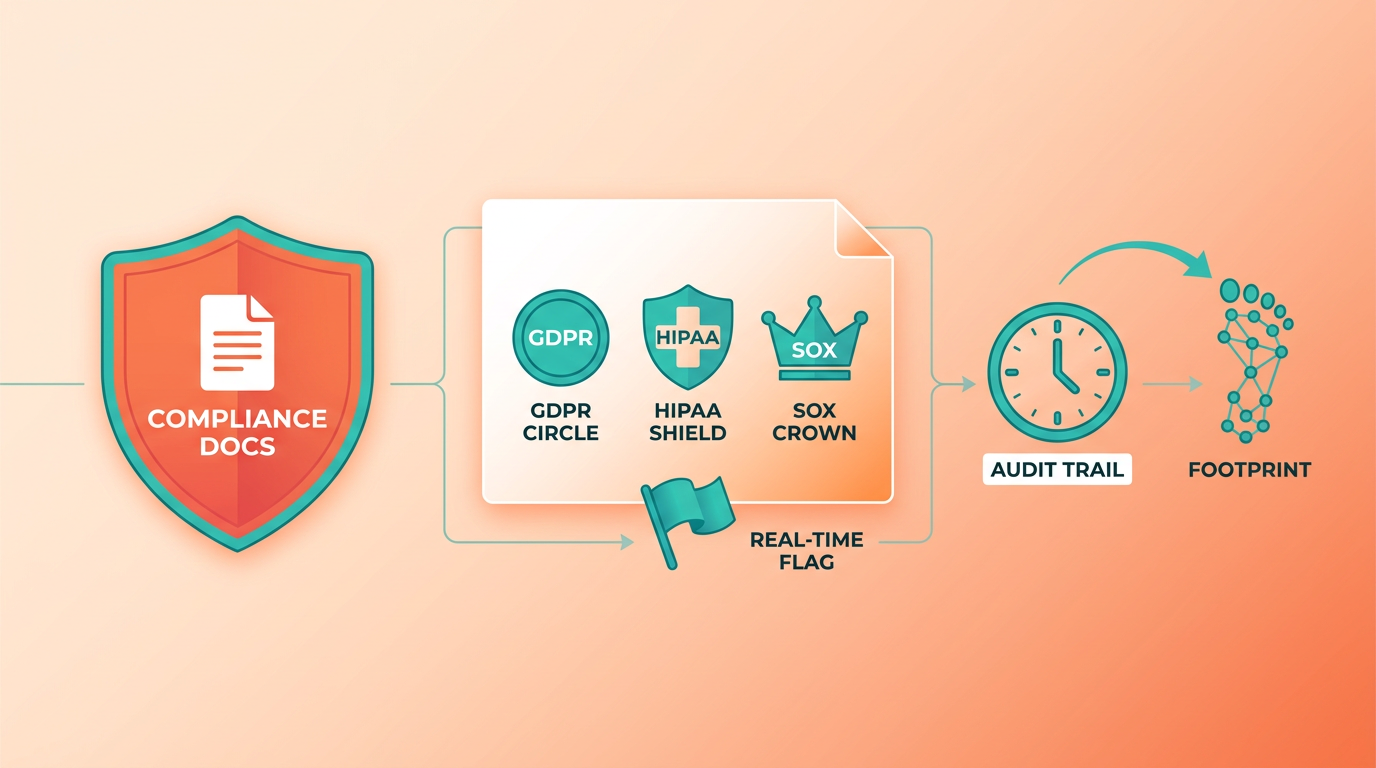
Ensuring compliance, audit readiness, and data security in invoice processing isn’t just about avoiding penalties-it’s about building a system that reduces risks while improving efficiency. Start by understanding the regulatory market your business operates in. For example, industries like healthcare or finance face strict standards like HIPAA or SOX, while global operations must comply with GDPR for data privacy. Automated systems help track these requirements by flagging discrepancies in real time, reducing the chance of noncompliance.
How Do You Implement Audit-Ready Systems?
Audit readiness begins with documented processes and auditable trails. Every invoice should leave a digital footprint, showing who approved it, when payments were made, and how discrepancies were resolved. For instance, a government entity streamlined its invoice approvals by adopting a platform that logged every step, cutting manual tracking time by 70%. Building on concepts from the Automating Invoice Capture and Data Extraction section, tools that digitize and centralize invoice data lay the groundwork for these audit trails.
What Tools Protect Data in Invoice Processing?
Data security hinges on encryption, role-based access, and third-party risk management. Sensitive invoice details-like vendor bank details or purchase amounts-should be encrypted both in transit and at rest. Blixo, for example, uses AES-256 encryption and role-based permissions to ensure only authorized staff can view or edit invoices. Other providers in this space might rely on manual checks, but Blixo automates redaction of sensitive data in shared documents, reducing human error.
What Metrics Show Compliance Effectiveness?
Measuring compliance isn’t just about avoiding fines-it’s about identifying vulnerabilities. Track metrics like:
- Error rate reduction: One company saw a 40% drop in invoice errors after automating three-way matching. As mentioned in the Identifying Pain Points in Your Current Invoice Workflow section, manual processes often contribute to recurring errors, making automation a critical solution.
- Audit resolution time: A manufacturing firm cut the time to resolve audit queries from weeks to hours by centralizing invoice records.
- Data breach incidents: Secure SaaS providers like Blixo report zero breaches in 2024, compared to industry averages.
What Challenges Arise in Compliance?
The biggest hurdles include integration complexity and employee resistance. For example, a mid-sized business struggled to align its legacy accounting software with new compliance rules, delaying payments and straining vendor relationships. Building on concepts from the Designing an Efficient Invoice Processing Workflow section, Blixo addresses this by offering pre-built integrations with major ERP systems and training modules to ease adoption. Another common issue is balancing access control with workflow speed-overly restrictive permissions can slow approvals, while lax policies risk fraud.
By combining automated tools like Blixo with regular staff training and periodic compliance reviews, businesses can maintain audit readiness without sacrificing speed. The goal is to create a system where compliance isn’t an afterthought but a seamless part of every invoice’s journey.
Frequently Asked Questions
1. How much can automation save in invoice processing costs?
Automation reduces per-invoice costs from $10 (manual) to $2 or less. A global employer of record saved 98% of processing time by switching from 5–10 minutes per invoice to 5 seconds.
2. What error rate improvements does automation provide?
Manual invoice processing has 4–6% error rates, while OCR and AI reduce errors to under 1%. This minimizes disputes and rework, saving time and resources.
3. How does automation impact invoice processing time?
Top-performing teams process invoices in 2.8 days, versus 7+ days manually. 3-way matching and approvals take hours manually but complete in seconds with automation.
4. What financial risks come from delayed invoice processing?
Late payments cost businesses 15% annually in lost discounts and penalties. Reducing resolution time from 90 to 34 days can recover $33.4 million in revenue.
5. How does real-time processing improve cash flow?
Real-time digital systems enable 24-hour payment cycles, similar to e-commerce. This accelerates liquidity and avoids late fees by ensuring timely payments.
6. Can automation handle complex matching workflows?
Automated systems perform 3-way matching (invoices, POs, receipts) in seconds. Manual matching, which takes hours, is error-prone and slows down approvals.
7. What’s an example of automation success?
Blixo automated 80% of a finance team’s workflows, cutting processing time from days to minutes. This reduced costs and improved compliance with real-time tracking.