

Move Recurring Billing to Cloud Accounting and Cut Manual Data Entry

Key Takeaways
- Syncing recurring billing into cloud accounting kills manual data entry, cuts errors, and keeps revenue data current in real time.
- Sage Intacct users report an average 250% ROI and a 79% cut in month-end close time.
- Dedicated subscription platforms support 500+ billing models with automated revenue recognition for the complicated setups.
- AR automation with sync covers recurring, metered, and add-on billing while keeping setup in the low-to-medium range.
- Implementation runs from a few days to a few weeks, driven mostly by how many billing models you’re juggling.
- Flat-rate invoices sync fast. Metered or usage-based billing takes more time to map correctly.
- A business running usage-based plans needs different features than a studio sending flat monthly retainers.
Quick Summary
Wire your billing straight into your ledger and finance stops operating the way it used to. For subscription businesses handling QuickBooks Online recurring payments, the payoff is fewer hand-keyed journal entries and cleaner books at close. Teams reclaim hours a week once the sync runs on its own.
The catch? Not every setup delivers the same results. Here’s what actually matters when you connect recurring billing to your books.
What cloud accounting solutions actually compete on
The right tool depends on billing complexity, your close-time goals, and integration needs. A business running usage-based or metered plans needs different features than a studio sending flat monthly retainers. Here’s how the main options stack up.
| Solution Type | Billing Models Supported | Revenue Recognition | Setup Effort | Close-Time Impact |
|---|---|---|---|---|
| Dedicated subscription billing | 500+ models (Sage Intacct) | Automated schedules | Medium | Up to 79% faster |
| General cloud accounting | Standard recurring | Manual or add-on | Low | Moderate |
| AR automation + sync | Recurring, metered, add-ons | Built-in schedules | Low–Medium | High |
| Legacy on-premise | Limited | Manual journal entries | High | Minimal |
| Spreadsheet + manual entry | Any (by hand) | Fully manual | Low upfront | None |
The efficiency comes from automating work that used to be manual, which frees finance teams to spend time on analysis instead.
How long implementation takes
Timeline tracks your pricing structure. Straightforward subscription models map to your ledger almost instantly. Complex billing rules need careful configuration before the data flows correctly.
Setup difficulty by task:
- Connecting billing to accounting: Easy. API integrations with tools like Salesforce and HubSpot handle the handoff.
- Mapping revenue recognition schedules: Medium. This is where subscription businesses trip up most.
- Eliminating manual journal entries: Easy once the sync is live.
- Real-time data validation: Medium. Worth it for accurate month-end reporting.
Two-thirds of small businesses are increasing investment in automation and digital tools. Same driver every time: manual data entry eats hours and introduces mistakes.
What success looks like in practice
Automation pulls your team off transaction-level busywork so they can analyze instead. Jobvite is the clearest example. Their team went from spending 80% of their time on manual transactions to focusing on business analysis after moving to automated cloud billing.
“Automation allows their team to focus more on analyzing the business rather than manual transactions.” - Lisa Schulz, Corporate Controller at Jobvite
When recurring billing feeds your books automatically, you stop reconciling by hand and start using the numbers. For subscription businesses, that means real-time SaaS metrics and revenue data you can trust at close.
Send a handful of invoices a month? Skip the migration. The manual approach costs less than the setup. But if recurring revenue is your core model, syncing billing to cloud accounting pays for itself in reclaimed hours and cleaner reporting.
Why cloud accounting matters for recurring billing
Manual data entry costs subscription businesses more than time. It introduces errors, delays your close, and buries your team in transactions a machine should handle. Connect your billing platform directly to your ledger and cloud accounting closes the gap between a customer transaction and the financial report.
Recurring revenue creates recurring bookkeeping. Every renewal, upgrade, and cancellation needs a journal entry. Do that by hand across hundreds of customers and you’ve built a full-time job out of copy-paste. Cloud accounting handles those recurring payments at the source, so the entries land in your ledger without anyone touching a spreadsheet.
What manual data entry actually costs
Manual entry drains capacity that should go toward analysis. Studies put the error rate at roughly 1 percent per keystroke, and in a billing workflow those small mistakes compound across every renewal, invoice, and adjustment.
The cost isn’t just the correction time. It’s the analysis you never got to because someone was fixing keying errors instead. Automated recurring billing also cuts accounts receivable risk by removing the human error that leads to overcharging or undercharging customers.
The market is moving this way fast. Cloud accounting software is projected to hit **$7.53 billion by 2029**, up from $5.36 billion in 2025.
Who benefits most from syncing recurring billing
Subscription and SaaS businesses gain the most, because their revenue depends on billing events that repeat constantly. Flat retainers, tiered plans, usage-based pricing. Each model multiplies the entries your books need, and each one is a candidate for automation.
The payoff shows up in hard numbers. One company cut operational costs by 50% through automated billing. Another reached market 30% faster with new products once billing stopped eating their schedule. Others report automated reconciliation trims days off every monthly close.
Real-time visibility drives the rest. Cloud accounting syncs your financial data across devices, so multiple team members work from the same numbers at the same time. You stop chasing document requests. You start seeing SaaS metrics as they happen instead of at month-end.
Where cloud accounting fixes the revenue-recognition gap
The biggest win for subscription businesses is revenue recognition. Recurring billing doesn’t map cleanly to cash. A customer pays for a year up front, but you recognize that revenue month by month. Getting that right by hand is where teams stumble.
When billing syncs straight into your ledger, the recognition schedule follows automatically. No manual journal entries to spread deferred revenue. No reconciliation guesswork at close. The data moves from billing event to books in one step.
That’s the difference between reactive and proactive finance. You forecast from accurate, current numbers instead of last month’s spreadsheet. For any business running recurring billing, that continuity is what makes the books trustworthy enough to plan around.
The four features that actually automate billing
Automating recurring billing takes four core features: automated invoicing, payment matching, recurring posting templates, and automated bank feeds. Together they move revenue data from your billing system straight into your books. That’s the difference between clean revenue recognition and a month-end scramble to fix journal entries by hand.
For subscription operations, these features close the gap between what you bill and what your ledger records. Each renewal posts itself. Each payment finds its invoice. The revenue lands in the right period without anyone re-keying a number.
What automated invoicing actually does
Automated invoicing generates and sends invoices on a schedule, then posts the entry to your ledger with no manual input. It removes re-keying, cuts errors, speeds up your close.
Subscription businesses feel this most because every plan renews on a cycle. Enterprise billing software supports multiple pricing models and payment scheduling, so flat retainers and tiered plans both invoice on time.
The accuracy gains compound. A business sending hundreds of invoices a month can eliminate the transposed amounts and missed sends that quietly erode receivables. Every invoice that goes out correctly the first time is one you never have to chase, correct, or re-issue.
Why payment matching matters for cash flow
Payment matching links each incoming payment to its open invoice automatically, so your receivables stay accurate and your cash position stays current. It’s what keeps recurring revenue from turning into a reconciliation backlog.
When payments match themselves, you see exactly what’s paid and what’s outstanding in real time. That feeds better forecasting, which matters when predictable revenue is the whole point of a subscription model. Missed matches hide unpaid renewals and inflate your cash picture.
Pair matching with automated bank feeds and reconciliation gets fast. Bank feeds pull transactions straight into your accounting system, so you’re confirming matches instead of typing them. Start here. Bank feeds plus invoice capture remove the highest-volume repetitive work first, which delivers the quickest impact.
Which features standardize your accounting
Recurring posting templates apply the same coding to every renewal, so your entries stay consistent and audit-ready. Set the template once and every cycle books identically. Standardized coding also cuts the errors that come from someone guessing which account a subscription hits.
Two more pieces round out a real automation stack:
- Standardized approval workflows: Route exceptions through a fixed path so nothing waits on a hallway conversation. Fewer manual steps, faster sign-off.
- Connected finance systems: Link payroll, billing, and banking through open APIs so data flows without re-entry. One view, no silos.
Consistency pays off at audit time. When every renewal books to the same accounts with the same tags, your auditors trace revenue in minutes instead of requesting sample after sample. Standardized templates also make anomalies obvious, since anything coded differently stands out against a uniform baseline.
Not every platform bundles these the same way. When you compare solutions, check that billing, payment matching, and posting templates all sync into one ledger. That single connected flow is what eliminates manual journal entries for good.
Overcoming the manual accounting hurdles
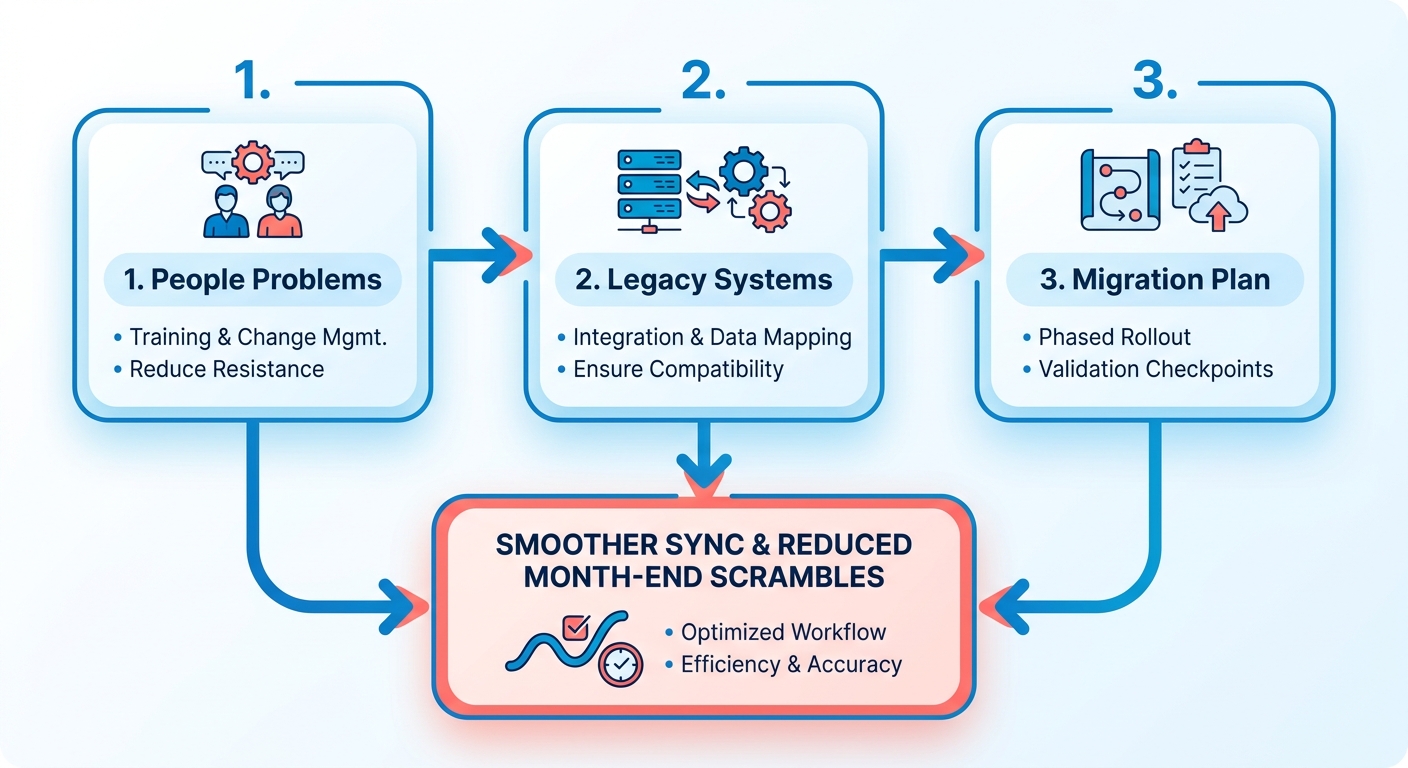
Moving recurring billing into cloud accounting fails more often from people problems than technical ones. The software syncs fine. Your team’s habits, your legacy systems, and your migration plan decide whether the switch sticks. Handle those three and revenue flows into your books without the month-end scramble.
The stakes are real. A single data-entry mistake once cost S&P 500 companies roughly $150 million during the 2017 Amazon AWS crash. That’s what manual keying risks at scale. Automating recurring payments removes that exposure, but only if the transition itself doesn’t stall.
Why change management makes or breaks adoption
Change management is the work of getting your team to trust and use the new system instead of quietly clinging to spreadsheets. The tool only pays off when people stop double-entering data by hand.
Resistance usually comes from fear of the unknown. Your bookkeeper has reconciled invoices the same way for years. Show them what automation removes, not just what it adds. Once they see automated matching kill the daily grind of manual reconciliation, the transition gets easier to accept. Nobody’s being asked to do something strange. They’re adopting a tool that clears the administrative bottleneck.
How to integrate with legacy systems and ERPs
Start by evaluating platforms on industry, complexity, and integration needs. Open APIs let data move between your billing system, your ledger, and any ERP without re-keying. That’s the backbone that keeps recurring revenue consistent across every tool you run.
Most migrations take two to six weeks, depending on how complex your books are. A structured readiness assessment before you start saves you from surprises mid-switch. Jotika Teli, a CPA with 24 years of experience, stresses exactly this kind of upfront review.
Data migration and staff training trip teams up most. Handle migration by documenting each step so nothing gets lost between systems. Handle training by focusing on the daily tasks your team actually touches, not the full feature list.
What a smooth transition looks like
A mid-sized manufacturing firm that moved to cloud-based accounting gave its teams real-time access to financial data and better cross-department collaboration. Manual entry dropped. The books stayed current without constant catch-up work.
The payoff shows up in accuracy, not just speed. Automate the posting step and you kill the risk of minor keying errors compounding across thousands of recurring transactions a month. Your reconciliations start clean.
To keep risk low during the switch:
- Sequence the rollout: prioritize high-volume transaction streams first to show immediate value.
- Standardize your coding before migration so entries map cleanly into the new ledger.
- Document the process as you go, which improves quality control and makes future changes easier.
- Run parallel books briefly so you can verify recurring payments post to the right period before you cut over fully.
Do these and the gap between what you bill and what your ledger records closes for good. Your subscription revenue recognizes itself, and your team spends its hours on analysis instead of copy-paste.
Choosing the right cloud accounting solution
The right solution matches your billing complexity, syncs recurring revenue automatically, and posts entries without manual keying. For subscription businesses, the deciding factor is how cleanly the tool bridges billing and revenue recognition. A solution that syncs renewals straight into your ledger beats one that just stores invoices.
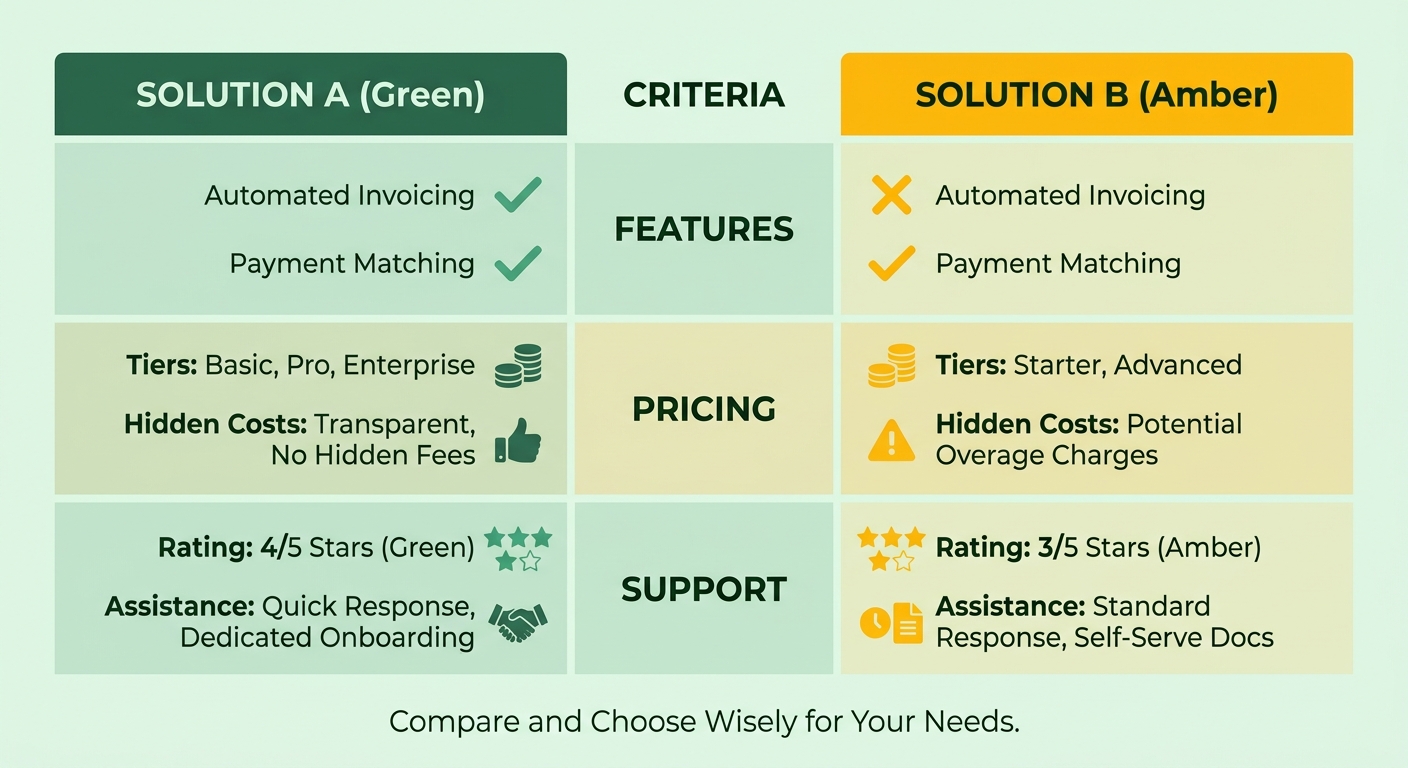
Score each option against three criteria: features, pricing, and support. The best fit depends on whether you run flat monthly plans or metered usage. Some businesses need to support hundreds of billing models. One platform in this space handles over 500 different billing configurations, which matters if your pricing gets complicated.
What evaluation criteria actually matter
Focus on four things: revenue-recognition sync, pricing-model support, integration depth, and onboarding help. These separate a solution that eliminates journal entries from one that just automates invoices. Rank them by your own billing reality, not a generic checklist.
Features come first. Your tool must automate billing renewals and post the revenue entry in the right period. Look for integrations with your existing CRM and customer management tools, plus real-time access to SaaS metrics from anywhere.
Pricing usually follows a subscription model, which spreads cost over time instead of a large upfront license. That structure scales with your business. Add customers and the software grows without new hardware.
Support decides whether adoption sticks. Cloud accounting delivers real results only with proper training. A platform with weak onboarding leaves your team clinging to old spreadsheets.
How the leading solutions compare
Compare solutions on how deeply they connect recurring billing to your books, not on feature-count alone. The strongest options recognize revenue automatically and match payments to invoices. Weaker ones make you export a file and re-import it, which recreates the manual work you’re trying to kill.
Payoffs show up in the metrics finance teams care about. Automated billing platforms consistently drive down operational overhead and speed up product launches by removing billing bottlenecks. Others point to fewer billing errors, with some vendors citing invoice accuracy above 99% after automation replaced manual entry.
The gap between these results and a manual setup comes down to sync depth. A solution that treats revenue recognition as a first-class feature earns the ROI. One that bolts billing onto generic accounting leaves you patching entries by hand.
What pitfalls trip up selection
The most common mistake is choosing on price without checking revenue-recognition fit. A cheap tool that can’t post subscription revenue automatically costs more in labor than it saves in fees. Test the sync before you sign.
Watch how a vendor handles proration and mid-cycle plan changes during a trial. These edge cases expose whether a tool truly understands subscription revenue or just approximates it. A tool that mishandles a mid-month upgrade forces your team back into spreadsheets to correct the recognized amount every close.
Skip any solution that can’t demonstrate live revenue sync during a trial. Watch for weak API integration too. If the platform won’t connect to your billing and CRM systems, you’ll rebuild the manual bridge you set out to remove.
Frequently Asked Questions
1. Can I automate recurring billing while keeping my existing payment processor?
Most cloud accounting platforms connect to major payment processors through open APIs, so you keep your current gateway while automating the ledger side. The sync captures each transaction, matches it to the invoice, and posts the entry. Verify processor compatibility during a trial before committing to any platform.
2. What happens to my historical billing data during migration?
Historical data transfers through documented migration steps that preserve past invoices, payment records, and recognized revenue. Running parallel books briefly lets you confirm old and new entries match before cutting over. Standardize your account coding first so historical transactions map cleanly into the new ledger without gaps or duplicates.
3. How does automated billing handle failed payments and dunning?
Automated systems flag failed payments immediately and can trigger retry sequences or dunning notices without manual tracking. Because payment matching updates receivables in real time, unpaid renewals surface right away instead of hiding in a reconciliation backlog. This keeps your cash position accurate and reduces involuntary churn from expired cards.
4. Is cloud accounting worth it for a business with very few recurring invoices?
For organizations processing only a few invoices each month, the administrative overhead of manual tracking is often manageable. The financial return on automation becomes significant as transaction volume grows or when pricing structures involve complex tiers, usage tracking, or deferred revenue schedules that require systematic calculation.
5. How does automation handle mid-cycle plan upgrades and proration?
Advanced billing engines calculate adjustments in real time when a customer changes plans mid-month. The system automatically generates a prorated invoice or credit memo and updates the corresponding revenue recognition schedule in your ledger, ensuring your financial statements remain accurate without manual intervention.
6. What team roles are affected when switching to automated recurring billing?
Accounting staff transition from repetitive data entry to analytical roles, focusing on exception handling, financial forecasting, and strategic planning. Rather than spending days keying in transactions, team members oversee the automated sync and manage customer accounts that require specialized attention.
7. How do I know if a platform’s revenue recognition sync actually works before buying?
Ask the vendor to demonstrate a complete transaction lifecycle during your evaluation. Have them show how a multi-month subscription payment is deferred and recognized over time, and verify that these adjustments post directly to the general ledger without requiring manual file exports or spreadsheet work.