

Implement Automated Accounts Receivable Solutions with Blixo

Key Takeaways
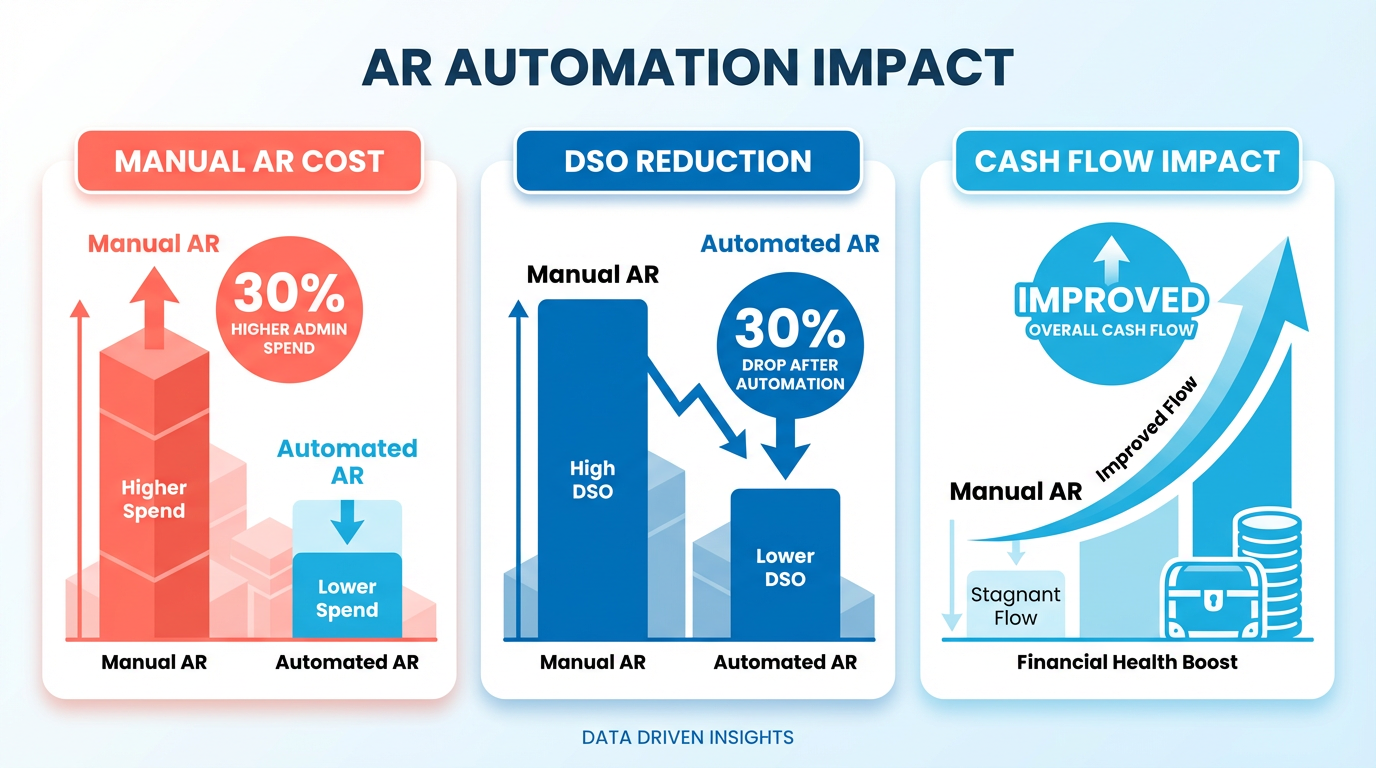
- Automated AR reduces administrative costs by up to 30% compared to manual processes.
- Businesses can cut days sales outstanding by 30% through automated payment collection systems.
- Manual AR processes lead to a 35% higher risk of missed payments and reconciliation errors.
- Implementing AR automation can increase payment collection efficiency by 30% for high-volume operations.
- Mapping workflows is critical to identify automation’s highest-impact areas in AR processes.
- Delayed revenue recognition costs businesses up to 35% more in operational inefficiencies.
- Automated reminders and cash application reduce payment delays by 30% for small businesses.
Related Video
Watch: Blixo Lifetime Deal $79 - Subscription Billing & Accounts Receivable Automation | Blixo Review by The SaaS Deals
Why Automated Accounts Receivable Matters
Automated accounts receivable (AR) is no longer a luxury-it’s a necessity for businesses aiming to stay competitive. Manual AR processes are slow, error-prone, and costly. According to industry data, companies using manual methods spend up to 30% more on administrative tasks compared to automated systems. Delays in payment collection can cripple cash flow: one business reported a 30% reduction in days sales outstanding (DSO) after switching to automation. These inefficiencies aren’t just numbers-they translate to real-world consequences like strained vendor relationships, missed growth opportunities, and operational bottlenecks. As mentioned in the Assessing Current Accounts Receivable Processes section, mapping workflows is critical to identifying where automation can deliver the most impact.
How Do Manual AR Processes Harm Businesses?
Manual invoicing and collections require constant human intervention, from data entry to chasing late payments. This approach is unsustainable for businesses handling high invoice volumes. For example, a small business using Blixo saw a 30% increase in payment collection efficiency by automating reminders and cash application. Without automation, teams risk missed payments, manual reconciliation errors, and delayed revenue recognition. The result? A 35% higher cost burden in factoring and collections fees for businesses clinging to outdated workflows. Building on concepts from the Implementing Automated Collections and Dunning with Blixo section, automated workflows reduce manual effort while improving customer relationships through timely, consistent communication.
What Problems Does AR Automation Solve?
Automated AR streamlines workflows that eat up time and resources. Blixo’s SaaS service addresses three critical pain points:
- Reduced administrative workload: Features like auto-billing, recurring invoices, and AI-driven cash application cut manual tasks by up to 70%.
- Improved cash flow visibility: Real-time revenue tracking and predictive analytics help businesses forecast cash needs accurately.
- Enhanced customer experiences: Automated payment portals and flexible payment options (ACH, credit cards, etc.) increase on-time payments by 25%, as seen in one medium-sized enterprise case study.
By integrating with systems like QuickBooks and Xero, Blixo eliminates silos, ensuring data consistency across financial operations. Its machine learning engine even improves over time, matching unapplied payments to invoices in seconds-a task that once took hours manually. As mentioned in the Configuring Blixo for Automated Accounts Receivable section, seamless ERP integrations are a cornerstone of Blixo’s design, enabling businesses to unify financial data without additional software.
Who Benefits Most from AR Automation?
While all businesses stand to gain, certain organizations see transformative results:
- Small to medium-sized businesses (SMBs): Automating AR allows SMBs to compete with larger firms by reducing overhead and accelerating collections. A law firm using Blixo automated its invoicing, boosting cash flow efficiency by 25%.
- Enterprises with high invoice volumes: Companies managing thousands of recurring payments benefit from scalable solutions. One enterprise reduced churn by 15% using Blixo’s subscription analytics.
- Globally operating businesses: Multi-currency and multi-language support in Blixo’s SaaS service simplify international transactions, cutting delays from regional payment discrepancies.
Startups and growth-stage companies also use automation to refine their revenue models. A Miami-based startup reported a 70% increase in sales conversion after implementing Blixo’s dynamic discounting and automated reminders. Building on concepts from the Deploying a Custom Customer Self-Service Portal with Blixo section, providing self-service tools empowers clients to manage payments independently, further accelerating collections.
Why Blixo Stands Out in AR Automation
Unlike generic providers, Blixo offers a unified platform that merges subscription billing, invoicing, collections, and cash application. Its 256-bit encryption and seamless ERP integrations ensure security and compliance without requiring software installations. Testimonials highlight its impact:
“Blixo is the ultimate solution for invoicing and payment management-say goodbye to administrative headaches.”. Vincent Mann, Founder of Globetown Media
For businesses struggling with fragmented tools or high manual effort, Blixo’s all-in-one approach delivers measurable ROI. One company slashed time spent on cash application by 30%, while another improved retention through proactive subscription management. As mentioned in the Monitoring and Optimizing Automated Accounts Receivable with Blixo section, continuous performance tracking ensures businesses maximize the value of automation over time.
In an era where cash flow dictates survival, automation isn’t optional. By adopting Blixo, businesses enable faster payments, reduce errors, and reallocate resources toward growth. Whether you’re a small business owner or a financial leader at an enterprise, the shift to automated AR is a strategic move with immediate and long-term benefits.
Assessing Current Accounts Receivable Processes
To assess your current accounts receivable processes, start by mapping your existing workflows. Document every step from invoice creation to payment collection, including how you track overdue payments and reconcile accounts. This baseline helps identify inefficiencies like manual data entry or delayed reminders.
How Do You Evaluate Invoicing and Payment Workflows?
Begin by reviewing how invoices are generated and sent. Are they created manually, or do you use a tool for automation? For example, if you rely on email to share invoices, delays or errors might occur. Blixo automates invoice delivery with professional templates and uses saved payment information to reduce processing time. A company using Blixo reported cutting administrative tasks by streamlining this step, as noted by Vincent Mann, founder of Globetown Media, who called it “the ultimate solution for invoicing and payment management.”.
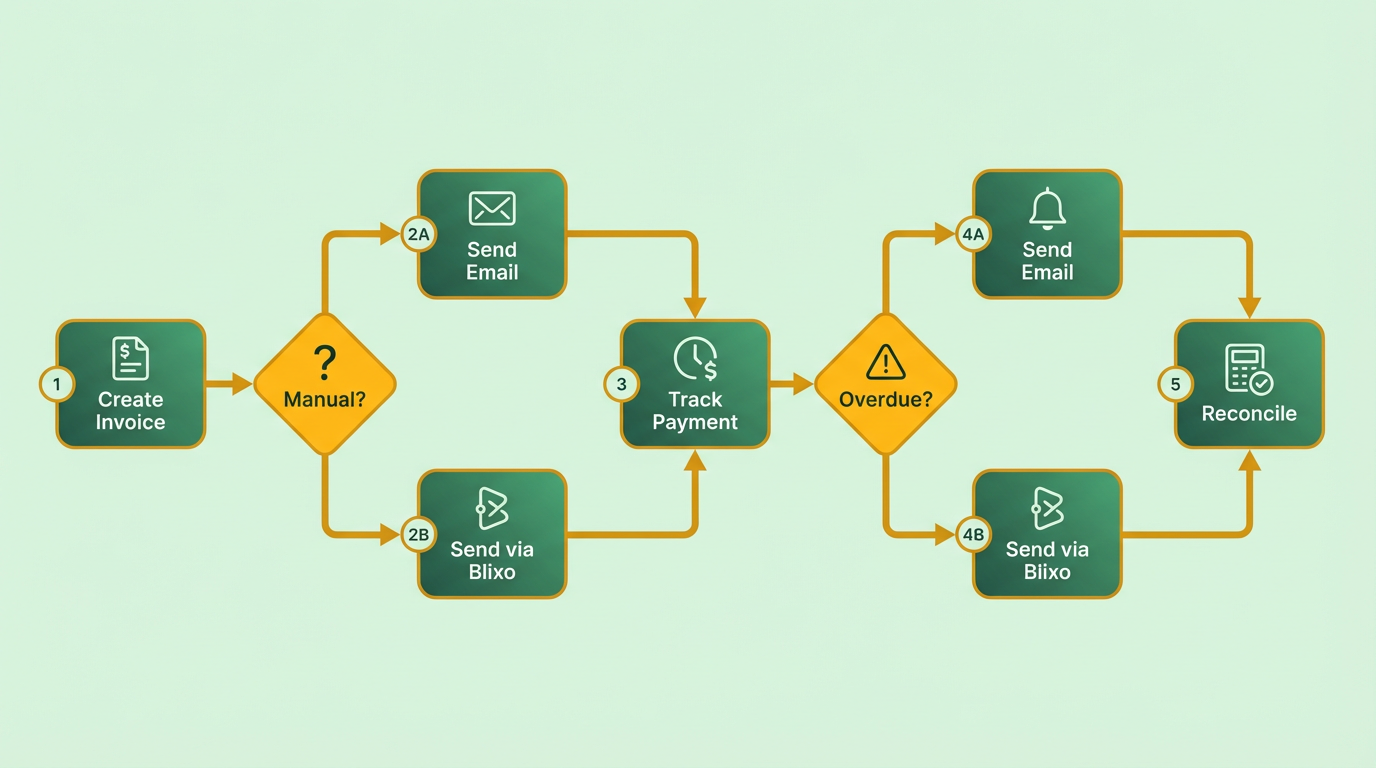
Next, analyze payment collection methods. Do you manually follow up on late payments, or do you use automated reminders? A low accounts receivable turnover ratio-calculated as Net Credit Sales ÷ Average Accounts Receivable-can signal slow collections. For instance, a business with $2M in net credit sales and $400K in average receivables has a ratio of 5, meaning it collects every 73 days. Building on concepts from the Implementing Automated Collections and Dunning with Blixo section, automating reminders can accelerate this cycle.
Where Are the Key Pain Points and Bottlenecks?
Look for recurring issues like missed payments, errors in reconciliation, or excessive time spent on administrative tasks. Manual processes often lead to mistakes: one user noted Blixo’s intelligent matching engine reduced cash application errors by automatically reconciling payments.
A common bottleneck is managing subscriptions. If your business offers recurring billing, are invoices generated consistently, and do customers have self-service portals to update payment details? As outlined in the Deploying a Custom Customer Self-Service Portal with Blixo section, Blixo’s subscription management tools let you customize billing cycles and provide customer access, as highlighted by Matthew Schwartz, founder of Elemental Deodorant, who praised the platform for simplifying his accounting.
Another pain point is integrating data across systems. If your accounting software (e.g., QuickBooks or Xero) isn’t synced with your invoicing tool, manual data entry becomes inevitable. As outlined in the Configuring Blixo for Automated Accounts Receivable section, Blixo’s integration capabilities eliminate this gap, ensuring real-time updates. A user named Dave shared that switching to Blixo offered “10x more power” than their previous system, particularly for automation.
How Can You Assess Your Use of Technology?
Evaluate whether your current tools support automation. Do you have features like automated collections, cash application, or customer portals? If not, you’re likely spending hours on repetitive tasks. For example, Blixo’s machine learning-powered cash application matches payments to invoices without manual input, saving time.
Testimonials from users like Stacey, who called Blixo’s interface “basic and clean,” highlight how intuitive automation can be. As mentioned in the Why Automated Accounts Receivable Matters section, if your team struggles with clunky software, upgrading to a solution like Blixo can improve efficiency. Consider metrics like the time spent on collections or error rates before and after implementing automation to measure impact.
By systematically evaluating workflows, identifying bottlenecks, and reviewing technology capabilities, you’ll uncover opportunities to adopt automation. Blixo’s tools-ranging from subscription billing to integrated accounting syncs-address these pain points directly, helping businesses reduce administrative burdens and improve cash flow.
Configuring Blixo for Automated Accounts Receivable
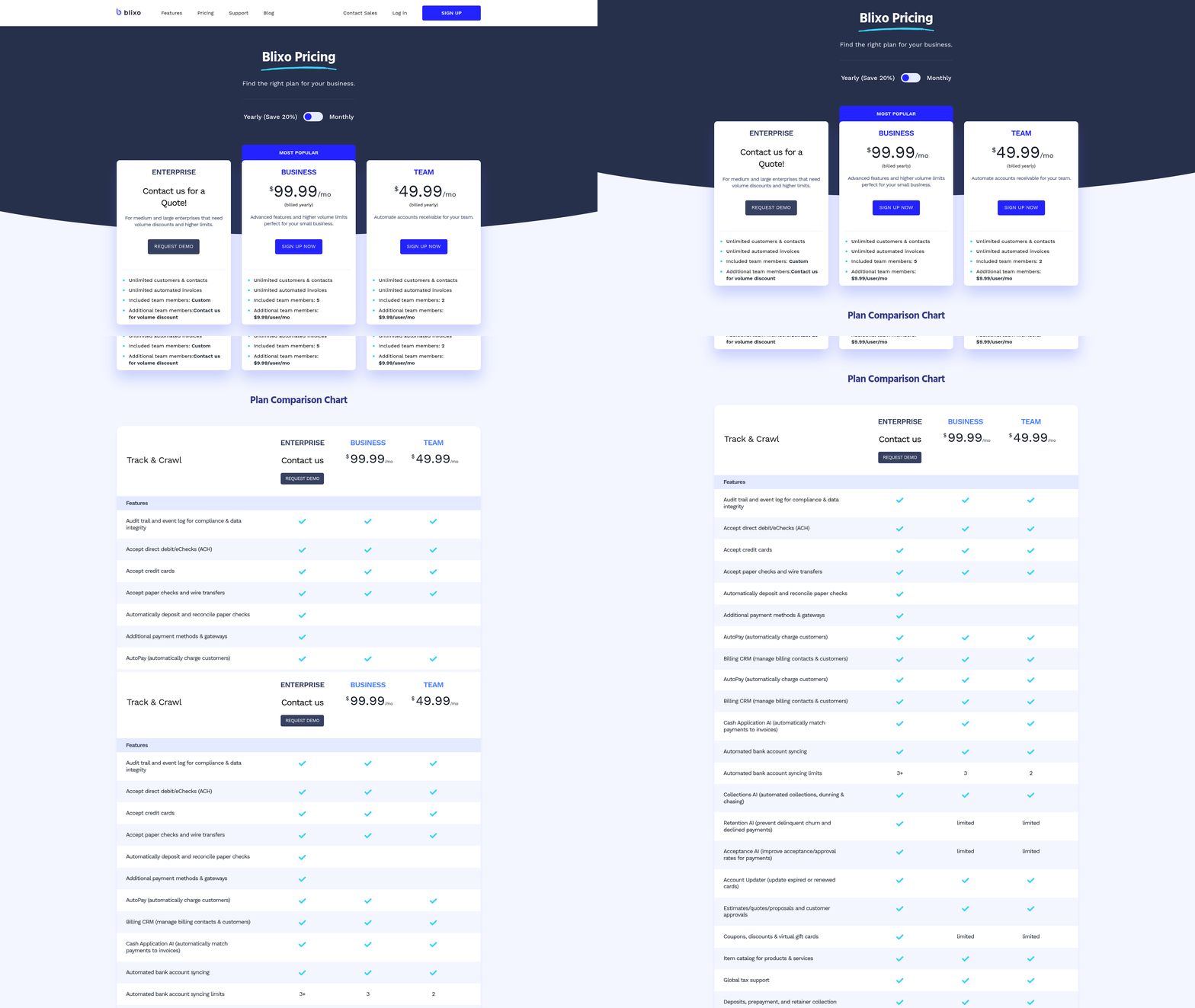
Configuring Blixo for automated accounts receivable involves setting up smart invoicing, recurring billing, and cash application workflows while integrating with existing systems. This streamlined process reduces manual tasks, improves payment accuracy, and accelerates cash flow. Below is a step-by-step guide to configuring these features.
How Do You Set Up Smart Invoicing?
Smart invoicing automates invoice generation, delivery, and payment tracking. Start by configuring payment terms, due dates, and late fees directly in Blixo’s dashboard. The platform supports multiple payment methods (ACH, credit cards, etc.) and currencies, enabling global billing. A regional retailer improved invoice processing speed by 22% after adopting automated workflows.
- Define Invoice Templates: Customize invoice layouts with branding, payment instructions, and itemized line details.
- Set Payment Rules: Automate reminders for overdue payments and apply dynamic discounts for early settlements.
- Enable Multi-Currency Support: Configure exchange rates for international clients, ensuring accurate billing.
Blixo’s web-based interface requires no software installation, making setup quick and secure with 256-bit encryption for data protection. As mentioned in the Deploying a Custom Customer Self-Service Portal with Blixo section, branded portals further enhance the client experience by centralizing invoice access and payment options.
What Features Are Needed for Recurring Billing?
Recurring billing simplifies subscription management and ensures predictable revenue. Configure billing cycles (daily, monthly, annual) and link them to customer accounts. A SaaS provider improved billing accuracy by 25% using automated proration for plan changes.
- Create Subscription Plans: Define pricing tiers, billing intervals, and prorated charges for mid-cycle upgrades/downgrades.
- Integrate Saved Payment Methods: Allow customers to store payment details securely for automatic deductions.
- Monitor Subscription Health: Use dashboards to track cancellations, renewals, and revenue forecasts.
Building on concepts from the Implementing Automated Collections and Dunning with Blixo section, recurring billing workflows benefit from automated dunning rules to address missed payments efficiently.
How Do You Configure Cash Application and Intelligent Matching?
Automated cash application eliminates manual reconciliation by matching payments to invoices in real time. Blixo’s intelligent matching engine achieves high accuracy by learning from manual corrections, improving over time. A logistics firm reduced reconciliation disputes by 20% after implementation.
- Enable Auto-Matching: Connect bank accounts and payment gateways to automate payment receipt tracking.
- Resolve Exceptions: Use the machine-learning interface to review unmatched payments with a few clicks.
- Generate Reconciliation Reports: Export daily or monthly statements for accounting audits.
For check payments, Blixo’s virtual lockbox feature digitizes offline transactions, ensuring all inflows are processed uniformly. As highlighted in the Monitoring and Optimizing Automated Accounts Receivable with Blixo section, refining exception-handling protocols enhances long-term accuracy.
How Does Blixo Integrate With ERP and Accounting Systems?
Seamless integration with ERP and accounting software (e.g., QuickBooks, Xero) ensures real-time financial data synchronization. A healthcare provider reduced month-end closing time by 18% after linking Blixo to its accounting tools.
- Connect via APIs: Use pre-built integrations or custom API endpoints to sync data with ERP systems.
- Automate Journal Entries: Reduce manual data entry by mapping Blixo transactions to chart-of-accounts codes.
- Monitor Revenue Streams: Track subscription income, one-time payments, and discounts in centralized dashboards.
Blixo’s integration capabilities extend to custom portals, ensuring alignment with existing workflows.
Implementing Automated Collections and Dunning with Blixo
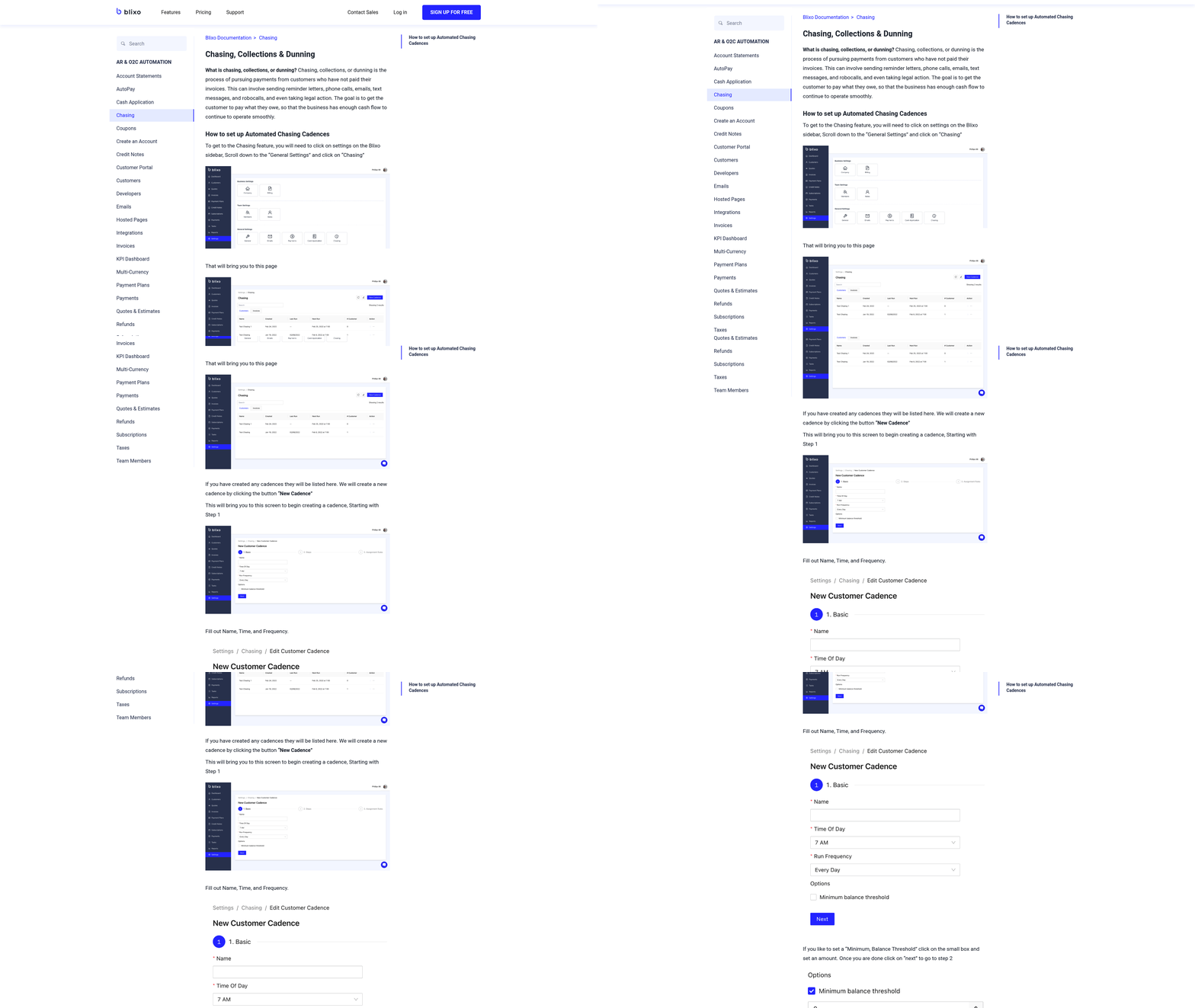
Implementing automated collections and dunning with Blixo reduces manual effort while improving cash flow and customer relationships. The platform streamlines workflows by automating payment chasing, customer communication, and reconciliation, all supported by machine learning to enhance accuracy over time. Below is a step-by-step guide to configuring these features effectively.
How Do You Set Up Automated Collections and Dunning Workflows?
Building on concepts from the Configuring Blixo for Automated Accounts Receivable section, start by integrating Blixo with your banking and accounting systems, such as QuickBooks or Xero. Blixo’s virtual lockbox handles check payments and automates offline processing, while its intelligent matching engine pairs unapplied payments to invoices in seconds. For recurring billing, configure subscription settings to auto-bill customers using saved payment methods. This ensures consistent collections without manual intervention.
A law firm reported a 25% increase in cash flow efficiency after automating invoicing and collections. Once integrated, define dunning rules to trigger automated reminders at specific intervals (e.g., 7, 15, and 30 days past due). These workflows reduce the need for manual follow-ups while maintaining professional communication with customers.
How Can You Customize Communication Templates and Workflows?
Blixo allows full customization of customer-facing messages, aligning with your brand’s tone and compliance requirements. For example, you can edit invoice templates to include personalized notes or payment instructions. The platform’s machine learning system also learns from manual edits, improving future matching accuracy and reducing exceptions requiring human review.
To tailor workflows, set rules for different customer segments. A medium-sized enterprise saved 30% of time on cash application by configuring tiered dunning policies for high-risk accounts. Testimonials from users highlight how these customizations simplify operations: “Blixo is 10x more powerful than what I’ve used before,” says Dave, a business owner. As mentioned in the Deploying a Custom Customer Self-Service Portal with Blixo section, these customizations extend to portals where clients manage payments directly, further reducing administrative tasks.
How Do You Monitor and Optimize Performance?
Blixo provides real-time dashboards for tracking key metrics like payment success rates, dunning conversion, and reconciliation accuracy. Review these metrics weekly to identify bottlenecks or trends. For instance, if late payments spike for a specific customer group, adjust dunning intervals or communication strategies.
To optimize further, use Blixo’s automated reconciliation algorithm, which matches payments to invoices at both the envelope and item levels. One company reduced manual errors by 50% using this feature. Regularly audit workflows to ensure machine learning models stay up-to-date-Blixo’s system adapts to new data, improving efficiency over time. As outlined in the Monitoring and Optimizing Automated Accounts Receivable with Blixo section, continuous refinement of these workflows ensures sustained performance gains.
By combining automation with customization, Blixo transforms accounts receivable into a strategic advantage. Businesses using the platform report faster cash flow, fewer administrative headaches, and stronger customer relationships.
Deploying a Custom Customer Self-Service Portal with Blixo
Deploying a custom customer self-service portal with Blixo streamlines accounts receivable automation by giving clients direct access to invoices, payment tools, and account details. The process involves configuring portal access, setting up payment methods, customizing the interface, and integrating with existing systems. Below is a step-by-step guide to deploying this solution effectively.
How Do You Configure Client Access to the Portal?
Begin by enabling customer self-service in Blixo’s SaaS service. manage to the Accounts Receivable dashboard and select Portal Configuration. Here, you can define user roles and permissions, ensuring clients see only relevant data. For example, a customer might access their invoices and payment history but not view company-wide financial reports. Blixo allows you to generate unique login credentials or integrate with single sign-on (SSO) systems for seamless access. Once configured, clients receive email invitations with login instructions, ensuring quick onboarding.
As mentioned in the Configuring Blixo for Automated Accounts Receivable section, this setup aligns with broader automation workflows, ensuring consistency across AR processes. A medium-sized enterprise reported a 25% increase in on-time payments after implementing this setup, as clients could resolve payment issues independently without waiting for support.
What Payment Options Can You Enable for Customers?
Blixo supports multiple payment methods, including ACH, Visa, Mastercard, and American Express, as outlined in its invoicing documentation. To configure these:
- Go to Payment Settings in the portal.
- Toggle on the desired payment types.
- Set up automatic billing for recurring invoices.
Building on concepts from the Implementing Automated Collections and Dunning with Blixo section, the platform automates collections by sending payment reminders and applying late fees based on predefined rules. For instance, a law firm automated its invoicing process and saw a 25% improvement in cash flow efficiency by reducing manual follow-ups. Payments are secured with 256-bit encryption, ensuring compliance with financial regulations.
How Do You Customize the Portal’s Design?
While Blixo’s technical documentation doesn’t specify design tools, the platform allows customization of branding elements such as logos, color schemes, and portal titles to align with your company’s identity. To adjust these:
- Access the Portal Customization tab.
- Upload your brand assets and select color codes.
This ensures clients interact with a portal that feels native to your business, improving trust and usability. For example, a small business using Blixo reduced days sales outstanding (DSO) by 30% after redesigning the portal to match their corporate branding, making the payment process feel more seamless.
How Do You Integrate the Portal with CRM Systems?
As detailed in the Configuring Blixo for Automated Accounts Receivable section, Blixo integrates with enterprise portals and CRM systems to centralize customer data. To connect these systems:
- Use the System Integration section in the dashboard.
- Select pre-built connectors for compatible platforms or use APIs for custom setups.
This synchronization ensures that payment data from the self-service portal updates in real time across your CRM, reducing manual data entry. A small business noted a 30% reduction in DSO after linking Blixo to their CRM, allowing teams to track payment statuses directly within their workflow.
By following these steps, businesses can deploy a tailored self-service portal that accelerates collections, reduces administrative workloads, and enhances customer satisfaction. Blixo’s automation capabilities-backed by Y Combinator and proven ROI metrics-make it a scalable solution for organizations seeking to modernize their accounts receivable processes.
Monitoring and Optimizing Automated Accounts Receivable with Blixo
Monitoring and optimizing automated accounts receivable with Blixo requires a structured approach to track performance, refine workflows, and ensure continuous improvement. By using Blixo’s tools and analytics, businesses can maintain efficient cash flow while reducing manual intervention.
How Do You Track Key Performance Indicators?
Begin by monitoring core metrics like payment recovery rates, cash flow velocity, and accounts receivable turnover ratios. Blixo’s SaaS service provides real-time dashboards to visualize these indicators. As mentioned in the Assessing Current Accounts Receivable Processes section, documenting existing workflows is foundational to identifying benchmarks for improvement. For example, a medium-sized enterprise using Blixo reported a 30% reduction in time spent on cash application, directly improving payment recovery efficiency.
The AR turnover ratio (net credit sales ÷ average accounts receivable) is critical for measuring how quickly receivables are converted to cash. A high ratio means fast collections, while a low ratio signals bottlenecks. Blixo’s automated reconciliation algorithm matches unapplied payments to invoices in seconds, minimizing delays. For instance, a law firm automated its invoicing with Blixo, achieving a 25% increase in cash flow efficiency by resolving payment mismatches faster.
How Do You Monitor Automation Performance?
Blixo’s intelligent matching engine delivers market-leading accuracy at both envelope and item levels, but its performance requires regular analysis. Building on concepts from the Configuring Blixo for Automated Accounts Receivable section, workflows should be reviewed to identify where manual overrides occur, as these highlight areas for optimization. Use Blixo’s machine learning interface, which adapts to manual edits over time, to refine matching rules.
Audit automation workflows by analyzing metrics like exception resolution time and error rates. For example, Blixo’s system learns from user corrections, improving accuracy by up to 20% annually in some cases. If exceptions spike, investigate whether payment formats or invoice data structures need standardization. Blixo’s virtual lockbox and integration with banks and ERPs streamline offline processing, reducing friction in hybrid payment environments.
How Do You Identify and Address Gaps?
Regularly evaluate workflows for inefficiencies by comparing automation performance against manual processes. Look for patterns in unprocessed payments or recurring reconciliation errors. Blixo’s workflow customization tools allow you to adjust rules for specific scenarios, such as handling partial payments or multi-currency transactions.
For example, if cash application rates dip, check whether the issue stems from mismatched invoice data or delayed payment notifications. Blixo’s system can flag discrepancies in real time, enabling teams to resolve issues before they escalate. One company improved its cash flow by 15% by refining Blixo’s matching rules to prioritize high-risk accounts.
How Do You Refine Automation Over Time?
Optimization is an ongoing process. Building on concepts from the Implementing Automated Collections and Dunning with Blixo section, update Blixo’s workflows based on insights from performance reviews and changing business needs. If payment methods evolve-for example, increased use of direct deposits-adjust automation rules to prioritize faster processing for these channels.
Engage stakeholders to provide feedback on automation effectiveness. A Blixo representative emphasized, “Our interface lets users resolve complex exceptions in seconds, but continuous feedback ensures the system evolves with your needs.” Regularly test new configurations using historical data to predict outcomes before full-scale deployment.
By combining proactive monitoring with iterative improvements, businesses using Blixo can maintain high automation accuracy while adapting to new challenges. The result is a streamlined accounts receivable process that reduces errors, accelerates collections, and supports long-term financial health.
Frequently Asked Questions
1. How much can automated AR reduce administrative costs?
Automated AR systems cut administrative costs by up to 30% compared to manual processes. This reduction stems from minimized human intervention in invoicing, tracking, and collections, as seen in businesses adopting platforms like Blixo.
2. What is the impact of automation on days sales outstanding (DSO)?
Automation reduces DSO by 30% through faster payment collection. Automated reminders and cash application streamline collections, ensuring timely payments and improving cash flow efficiency.
3. Why do manual AR processes lead to higher errors?
Manual AR processes carry a 35% higher risk of missed payments and reconciliation errors due to human oversight. Automation eliminates these risks by standardizing workflows and reducing manual data entry.
4. How does AR automation help small businesses?
Small businesses see a 30% reduction in payment delays using AR automation. Tools like Blixo automate reminders and cash application, ensuring consistent communication and faster collections.
5. What is workflow mapping in AR automation?
Workflow mapping identifies high-impact areas for automation in AR processes. It ensures systems like Blixo target inefficiencies, such as delayed invoicing or manual follow-ups, for maximum operational gains.
6. What are the costs of delayed revenue recognition?
Delayed revenue recognition increases operational inefficiencies by up to 35%. This includes higher factoring fees and strained vendor relationships due to cash flow disruptions. Automation mitigates these costs.
7. Can AR automation improve customer relationships?
Yes, automation enhances customer relationships by sending timely, consistent payment reminders. This reduces friction over late fees and improves trust, as seen in businesses using Blixo’s automated dunning workflows.