

Implement AP AR Automation for Timely Payments

Related Video
Watch: Timely Payments and Streamlined Accounts Payable via Moolamore by Moolamore
Why AP AR Automation Matters
AP AR automation is no longer a luxury-it’s a necessity for businesses aiming to maintain healthy cash flow and avoid the costly pitfalls of manual processes. Industry data reveals staggering inefficiencies in traditional payment systems. For example, 86% of businesses report that up to 30% of their monthly invoiced sales are overdue, while 60% of smaller middle-market firms struggle with manual payment challenges. These delays directly impact revenue, with one study showing companies lose 5% of yearly revenue due to errors and inefficiencies in manual AP and AR workflows. The stakes are clear: late payments disrupt operations, strain vendor relationships, and create cash flow uncertainty.
How AP AR Automation Solves Critical Pain Points
Automation tackles root causes of payment delays and errors. Manual invoice processing, for instance, costs $9–$20 per invoice, compared to $2–$4 with automated systems. Building on concepts from the Understanding AP AR Automation section, digitizing workflows eliminates human errors in data entry and reduces invoice processing times by 81%. AI-driven tools like optical character recognition (OCR) and machine learning further refine accuracy, catching discrepancies in supplier invoices and flagging fraudulent activity. For example, one company saved 50% on financial services costs by automating workflows, while another reduced invoice resolution times by 75% through real-time tracking and predictive analytics.
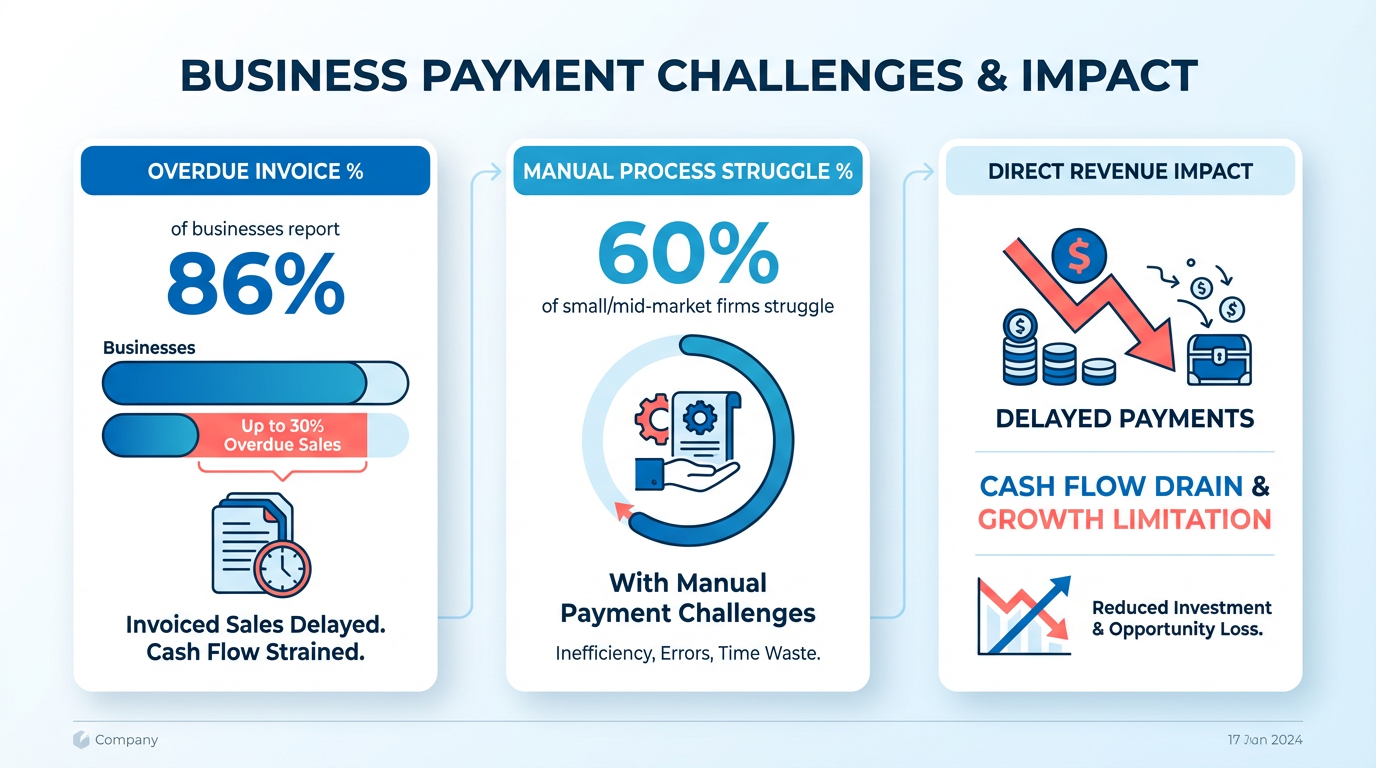
Beyond cost savings, automation accelerates collections and improves vendor trust. 60% of businesses using AP automation report cutting costs by half or more, with 80% of vendors noting faster payments. This is especially critical for small businesses, where 75% still handle payment disputes manually, leading to avoidable rework and cash flow gaps. For enterprises, the benefits scale: Organizations process 13 times more invoices per employee with automated systems, enabling teams to focus on strategic tasks instead of repetitive data entry.
Who Benefits Most from AP AR Automation?
While large enterprises often lead in automation adoption, small and mid-sized businesses (SMBs) stand to gain the most. 60% of SMBs face payment management challenges, yet automation can reduce their invoice processing costs by 60–80%. As mentioned in the Implementing AP AR Automation section, assessing current workflows is the first step to identifying inefficiencies. For example, one mid-sized company improved cash flow by 30% after implementing automated invoicing, while another cut invoicing time by 50% using cloud-based AR tools. Even industries with complex compliance needs, like healthcare and manufacturing, see transformative results: Healthcare firms reduce billing cycles by 60%, and manufacturers capture 85% faster invoice processing with automation.
The real-world impact is undeniable. One company recovered $13 million** by resolving disputes 50% faster, and another saved **$1.6 million annually through interest optimizations. These outcomes align with broader industry trends-42% of payments are now automated, a shift that’s critical in a market where uncarded transactions still dominate 87% of global B2B payments.
The Bottom Line: Why Act Now?
The financial risks of sticking with manual systems are too high. Late payments cost businesses $200,000–$500,000 annually, while manual errors delay collections by 67% compared to automated processes. By contrast, AP AR automation reduces Days Sales Outstanding (DSO) by up to 50%, ensuring faster cash availability for growth initiatives. Refer to the Measuring Success and ROI section for tracking metrics like DSO and processing costs to quantify automation’s impact. As one CFO noted, “Automation transforms finance teams from cost centers into strategic advisors”-a shift that’s essential in today’s competitive markets.
For businesses ready to act, the message is clear: automating AP and AR isn’t just about efficiency-it’s about survival. The tools exist to eliminate friction, reduce costs, and turn cash flow from a vulnerability into a strength. The question is no longer if to automate, but how quickly to act.
Understanding AP AR Automation
Automated processing of accounts payable (AP) and accounts receivable (AR) streamlines financial workflows by replacing manual tasks with digital systems. AP tracks outgoing payments to suppliers, while AR manages incoming revenue from customers. Together, automation reduces errors, accelerates payment cycles, and improves cash flow visibility. Modern solutions digitize invoice creation, payment matching, and reconciliation, ensuring businesses avoid delays and maintain healthy vendor and customer relationships. Building on concepts from the Best Practices for AP AR Automation section, AI-driven validation enhances accuracy during these processes.
Key Components of AP AR Automation
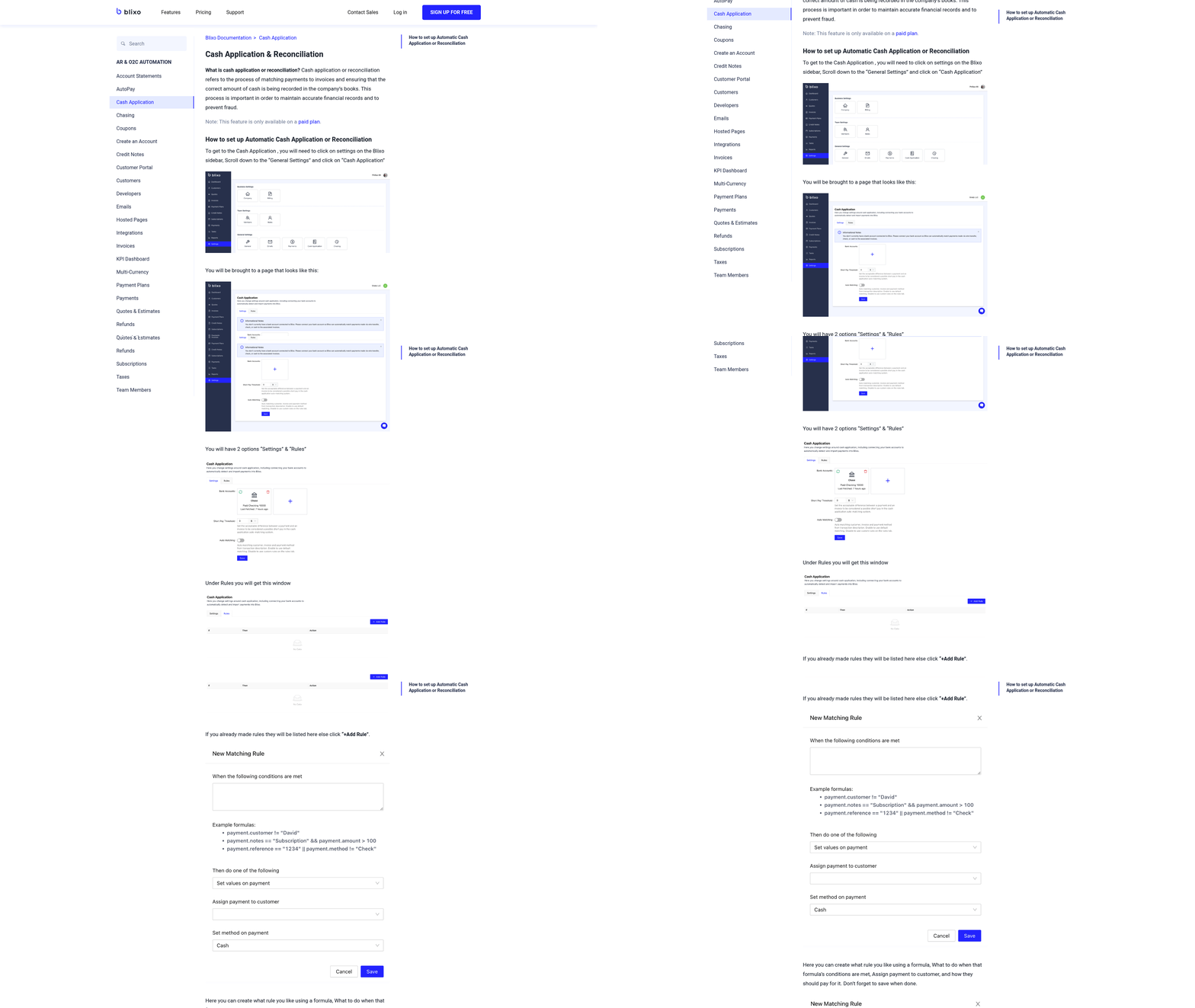
Three core elements form the backbone of AP AR automation: invoicing, cash application, and reconciliation. Invoicing systems generate and send bills automatically, using templates to ensure consistency and accuracy. Cash application tools match incoming payments to specific invoices, reducing disputes and accelerating collections. Reconciliation processes then verify that all transactions align across ledgers, flagging inconsistencies for review. For example, AI-powered platforms use optical character recognition (OCR) to extract data from paper invoices, converting them into structured digital records in seconds.
How AP AR Automation Works
Automation works through interconnected workflows that minimize human intervention. When an invoice arrives-whether via email, PDF, or supplier portal-software extracts key data like amounts, due dates, and purchase order numbers. Machine learning algorithms match this data against contracts and historical records, automatically approving valid invoices. Payment processing then executes via methods like ACH, virtual cards, or digital wallets, ensuring timely vendor payments. For AR, automated reminders notify customers of overdue balances, while self-service portals let clients view invoices and make payments instantly. Integration with existing accounting systems is critical. As mentioned in the Implementing AP AR Automation section, cloud-based platforms sync with ERPs like Microsoft Dynamics, enabling real-time data sharing. This eliminates silos and ensures financial teams have accurate, up-to-date records. A mid-sized company using such a system reported a 50% reduction in invoicing time and a 30% improvement in cash flow after implementation.
Benefits of Integration and Real-World Impact
Connecting AP AR automation to accounting software offers measurable advantages. Manual invoice processing costs $9–$20 per document, while automation reduces expenses to $2–$4 per invoice. Businesses using automated systems also collect payments 81% faster than those relying on paper processes. For example, one organization slashed Days Sales Outstanding (DSO) by 50%, recovering $13 million in overdue funds within a year. Another uses AI-driven analytics to identify early payment discounts, saving $1.6 million annually in interest.
Example Software Features and Capabilities
Modern solutions like Blixo combine end-to-end automation with user-friendly interfaces. Unlike generic providers, Blixo offers transparent pricing and integrated cloud-based solutions. Its SaaS service supports features such as:
- AI-powered data extraction: Reduces invoice processing time by 85% using OCR and machine learning, a technique highlighted in the Best Practices for AP AR Automation section.
- Real-time dashboards: Track cash flow, DSO, and payment trends with predictive analytics.
- Multi-currency support: Simplifies international transactions with automated currency conversion.
Other platforms provide similar tools but lack Blixo’s emphasis on scalability and vendor-specific customization. For instance, one provider’s system embeds directly into Microsoft Dynamics 365, streamlining workflows for ERP users. Another employs virtual cards to lower payment fraud risks by generating unique card numbers for each transaction.
By automating AP and AR, businesses eliminate bottlenecks, reduce costs, and gain strategic insights. Whether through cloud solutions or AI-driven platforms, the goal remains the same: to transform financial operations from reactive tasks to proactive, data-driven decisions.
Implementing AP AR Automation
- Assess Current Workflows and Define Goals. Begin by mapping your existing AP and AR processes to identify inefficiencies. Look for bottlenecks in invoice processing, approval delays, or manual data entry. Define clear objectives-such as reducing processing time by 50% or cutting costs to $2–$4 per invoice-to guide your automation strategy. For example, one company streamlined workflows by prioritizing AI-driven invoice matching, which reduced errors and sped up payments by 85% (based on industry benchmarks). As mentioned in the Best Practices for AP AR Automation section, AI-driven validation is critical for enhancing accuracy in invoice processing.
-
Select and Configure the Right Automation Solution. Choose a platform that integrates with your existing systems, such as ERPs or accounting software. Ensure it supports automated data extraction, real-time dashboards, and multi-payment methods to centralize operations. For instance, a cloud-based solution can flag duplicate invoices instantly, while another use intelligent document processing (IDP) to extract data from scanned receipts or emails. Building on concepts from the Understanding AP AR Automation section, configuring workflows to align with compliance rules ensures seamless transitions from invoice receipt to payment.
-
Monitor Results and Optimize Continuously. Track key metrics like processing time, error rates, and vendor satisfaction post-implementation. Use predictive analytics to identify trends-such as seasonal payment spikes-and adjust workflows accordingly. As mentioned in the Measuring Success and ROI section, defining key performance indicators (KPIs) early ensures your automation strategy aligns with financial goals. For example, a retail company cut payment processing costs by 75% by analyzing cash flow patterns and automating early-payment discounts. Regularly update the system to adopt new features, like AI-powered fraud detection, ensuring long-term efficiency.
Best Practices for AP AR Automation
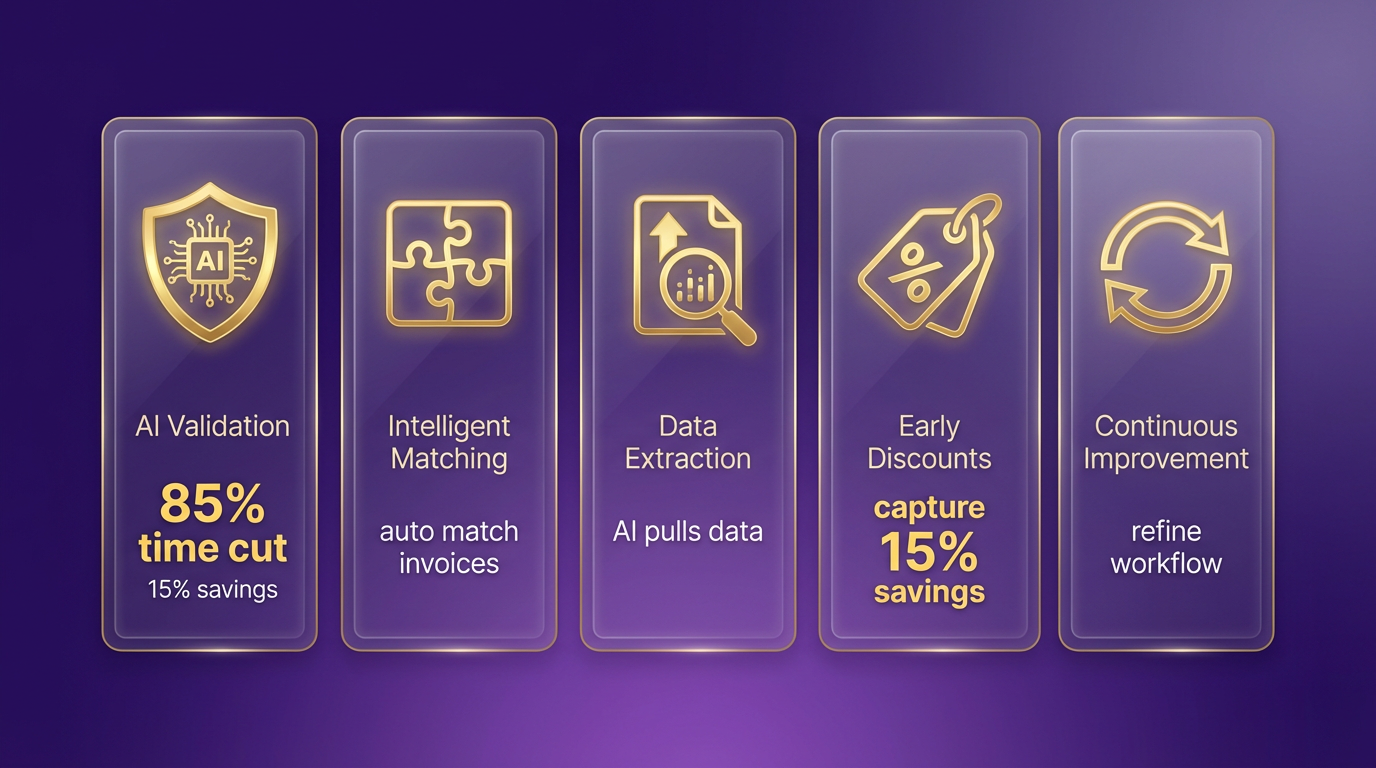
Designing effective workflows for AP AR automation starts with using AI-driven validation and intelligent matching. As mentioned in the Understanding AP AR Automation section, automated processing replaces manual tasks with digital systems, enabling modern platforms to use AI-powered data extraction to reduce invoice processing time from days to hours. For example, one organization using AP automation reduced invoice processing time by 85%, capturing early payment discounts that saved 15% on supplier costs. Workflow design should prioritize exception handling, allowing human review only for discrepancies or high-risk transactions. This minimizes manual effort while maintaining compliance, especially in industries with strict regulatory requirements like healthcare or finance.
Optimizing Payment Processing and Cash Application
Streamlining payment processing requires consolidating multiple payment methods into a unified platform. Building on concepts from the Implementing AP AR Automation section, AI-powered systems flag duplicate invoices, detect fraud, and apply dynamic discounting to maximize savings. For instance, a retail company used AP automation to reduce payment processing costs by 75% and accelerate cash collection by 40%. Integrating real-time cash application tools ensures payments are allocated to the correct invoices instantly, reducing days sales outstanding (DSO). One healthcare provider improved cash flow velocity by 60% using automated billing workflows, avoiding late fees and improving vendor relationships. Prioritize platforms that support ACH, virtual cards, and global payment methods to accommodate diverse vendor needs without increasing headcount.
Integration with Financial Systems
Seamless integration with ERP, accounting software, and CRM systems is critical for end-to-end automation. APIs and cloud-based architectures enable real-time data synchronization, eliminating manual data entry errors that cost up to $15 per invoice. A centralized payments network-like those used by 1 million businesses-can reduce fraud risk by 40% while speeding up reconciliation. For example, an organization using an AI-driven platform cut AP costs by 60%, consolidating 16 trillion USD in annual payments across 35+ countries. Look for solutions that offer predictive analytics dashboards, providing insights into cash flow gaps, payment trends, and vendor performance. This visibility allows finance teams to act proactively, optimizing liquidity and reducing late payment penalties.
Monitoring and Analyzing Performance
Continuous monitoring ensures automation workflows adapt to changing business needs. Building on concepts from the Measuring Success and ROI section, real-time dashboards track metrics like processing time, error rates, and payment accuracy, while AI modules predict bottlenecks before they occur. One company saved $200,000 annually by using analytics to identify inefficiencies in invoice approvals. Regular audits and staff training are equally vital-98% of businesses report faster payables after automation, but adoption success hinges on user proficiency. Tools with human-guided AI balance automation with manual oversight, reducing exceptions by 80% and improving vendor satisfaction. For example, a manufacturer reduced rework by 30% after implementing AI-driven validation, freeing employees to focus on strategic tasks.
Real-World Examples of Optimized Workflows
Organizations across industries have achieved measurable gains through AP AR automation. A global manufacturer reduced processing costs by 75% by automating invoice approvals and using early payment discounts. A healthcare provider cut billing cycle times by 60% using AI-powered invoicing, while a retailer improved cash application accuracy, minimizing disputes and accelerating collections. These results align with expert insights: “Automation transforms finance teams into strategic advisors,” says a product director at a leading payments provider. By unifying AP and AR processes on a single platform, businesses eliminate fragmented workflows, reduce fraud, and gain end-to-end visibility-key outcomes for organizations seeking timely payments and operational efficiency.
Overcoming Common Challenges
Implementing AP/AR automation introduces challenges that require strategic planning and execution. Addressing these obstacles ensures a smooth transition and maximizes the benefits of automation. Below are actionable strategies to overcome common hurdles.
Change Management and User Adoption Strategies
Resistance to change is a significant barrier. 35% of mid-sized businesses report challenges managing payments due to manual processes, yet only 17% fully automate their workflows. To ease adoption:
- Train employees on automation tools and emphasize how automation reduces repetitive tasks.
- Communicate benefits like faster payments and reduced errors to align teams with organizational goals.
- Involve stakeholders early-getting finance teams and vendors on board prevents pushback later. As mentioned in the Implementing AP AR Automation section, defining clear goals and mapping workflows are critical prerequisites for stakeholder alignment.
A mid-sized manufacturer, for example, conducted workshops to train staff on a new AR automation system. Within three months, invoice processing time dropped by 40%, as employees became confident in the platform’s capabilities.
Technical Issues and Troubleshooting Tips
Integration with existing systems like ERPs or ACH networks can cause delays. 60% of automation users report compatibility challenges during implementation. Key solutions include:
- Test integrations in a staging environment before full deployment to catch errors.
- Use AI-driven data capture to handle exceptions-tools like automated coding accuracy modules reduce manual intervention. Building on concepts from the Best Practices for AP AR Automation section, AI-powered validation ensures precision in invoice matching.
- use real-time tracking APIs to monitor invoice status and trigger alerts for bottlenecks.
One financial services firm struggled with mismatched invoice data until deploying an AI-powered solution. The platform flagged discrepancies instantly, cutting reconciliation time by 50% and reducing payment delays.
Data Migration and Security Challenges
Migrating historical data risks inaccuracies. 86% of businesses face delays due to incomplete data, but a structured approach can help:
- Validate data during migration using phased rollouts and cross-checking with legacy systems. Measuring success, as outlined in the Measuring Success and ROI section, includes tracking KPIs like data accuracy rates during transitions.
- Encrypt sensitive data and ensure compliance with regulations like GDPR or SOC 2.
- Use secure cloud platforms to store data, minimizing breach risks.
A mid-sized retailer streamlined its data migration by prioritizing critical invoices first. This phased strategy reduced errors and ensured 98% accuracy in the new system.
Real-World Success Stories
Companies that address these challenges see measurable gains. One alternative solution provider automated its AP processes, cutting costs by 60% and reducing manual invoice reviews by 50%. Another firm implemented predictive workflows to flag overdue invoices, improving payment timeliness by 30%.
By combining structured change management, technical testing, and secure data practices, organizations can manage automation hurdles effectively. The result? Faster payments, stronger vendor relationships, and a more agile financial operation.
Measuring Success and ROI
Measuring the success of AP and AR automation requires tracking specific metrics that align with your financial goals. Start by defining key performance indicators (KPIs) such as invoice processing time, payment accuracy, error rates, and cash flow velocity. As mentioned in the Understanding AP AR Automation section, these KPIs directly reflect the efficiency gains from digitizing financial workflows. For example, automation can reduce invoice processing from days to hours, as seen in one manufacturing organization that cut processing time by 85% while capturing early payment discounts. Similarly, Building on concepts from the Best Practices for AP AR Automation section, AI-powered validation in AR systems achieves 99.5% accuracy, minimizing disputes and delays. These KPIs provide a clear snapshot of operational efficiency.
Measuring Financial Impact and Benchmarks
To evaluate ROI, focus on metrics that directly affect cash flow and revenue. A critical benchmark is Days Sales Outstanding (DSO), which measures how quickly you collect receivables. Automation often reduces DSO by accelerating invoicing and collections. For instance, healthcare firms using AR automation have cut billing cycle times by 60%, improving cash flow velocity. On the AP side, Days Payable Outstanding (DPO) helps assess payment timeliness. A 2026 study found that 42% of payments are now automated, enabling companies to maintain vendor relationships while optimizing working capital.
Benchmarks for AP/AR performance vary by industry but generally include cost savings and time reduction. Source reports that AP automation can slash processing costs by 75–85%, saving $200,000–$500,000 annually. Retailers using AP technology, for example, reduced payment processing costs by 75% and accelerated cash collection by 40%. These benchmarks give you target ranges to compare against your own results.
Calculating ROI and Payback Period
To quantify ROI, subtract implementation costs from annual savings, then divide by the initial investment. For example, if automation saves $300,000 yearly and costs $150,000 upfront, the ROI is (300,000 - 150,000) / 150,000 = 100%. The payback period is 150,000 / 300,000 = 0.5 years. Real-world case studies highlight this: one company reduced AP costs by 60%, achieving a six-month payback. Another saw 578% more digital payments than planned, boosting rebate-eligible spend by 110%.
For a deeper analysis, track vendor satisfaction-80% of vendors report faster payments with unified platforms-and employee productivity. Building on concepts from the Overcoming Common Challenges section, one firm cut invoice review time by 40%, freeing staff for strategic tasks. These qualitative gains, while harder to quantify, reinforce financial metrics.
Real-World Examples of Success
Several organizations have demonstrated tangible benefits from AP/AR automation. A healthcare provider streamlined billing, reducing cycle times by 60% and improving cash flow. A retail chain automated payments, cutting costs by 75% and accelerating collections. These results align with industry trends: 87% of global transactions remain uncarded, making automation essential for managing complexity.
Benchmarks also highlight scalability. A single AI-driven platform can process 16 trillion USD in payments annually, as seen in SaaS providers like Blixo, which centralizes workflows and reduces fraud risk. For instance, one company using Blixo’s solution cut invoice capture time by 50% and approval time by 40%, directly improving operational efficiency.
By aligning KPIs with financial metrics and industry benchmarks, you can objectively assess automation’s impact. Over time, these insights will guide further optimizations, ensuring your AP/AR systems support long-term growth and stability.
Frequently Asked Questions
1. What is AP AR automation, and how does it work?
AP AR automation refers to digitizing accounts payable (AP) and accounts receivable (AR) processes using technologies like optical character recognition (OCR), artificial intelligence (AI), and machine learning. It automates tasks such as invoice processing, data entry, payment tracking, and fraud detection by eliminating manual workflows. For example, OCR extracts data from invoices, while AI identifies discrepancies or fraudulent activity. This reduces human error, speeds up processing, and ensures timely payments and collections.
2. Why is AP AR automation considered a necessity for businesses today?
Manual AP AR processes are costly and error-prone, with 86% of businesses reporting up to 30% of monthly invoiced sales are overdue. Delays lead to revenue loss (around 5% yearly revenue) and strained vendor relationships. Automation addresses these issues by reducing processing times by 81%, cutting costs per invoice by 75%, and minimizing errors. It also ensures compliance and cash flow stability, making it critical for businesses of all sizes.
3. How much can businesses save by automating their AP AR processes?
Manual invoice processing costs $9–$20 per invoice, while automation reduces this to $2–$4, saving up to 75% per transaction. One company saved 50% on financial services costs by automating workflows, and another reduced invoice resolution times by 75%. Automation also minimizes rework from errors and late fees, with 60% of businesses reporting cost reductions of 50% or more.
4. Can small businesses benefit from AP AR automation, or is it only for large enterprises?
Small businesses benefit significantly from AP AR automation, as 60% of smaller firms struggle with manual payment challenges. Automation scales to fit business needs, offering cost-effective solutions that reduce processing times and cash flow gaps. For instance, real-time tracking and predictive analytics help small businesses resolve disputes faster, while standardized workflows prevent avoidable errors.
5. How does AP AR automation improve vendor relationships and cash flow?
Automation ensures faster, more accurate payments, with 80% of vendors reporting improved satisfaction. Timely payments build trust and strengthen partnerships, while real-time tracking reduces disputes. For example, Moolamore’s AP AR automation tools enable businesses to resolve invoice issues in hours instead of days, ensuring vendors receive payments on time and maintaining healthy cash flow.
6. What specific technologies are used in AP AR automation, and how do they enhance accuracy?
Key technologies include OCR for extracting invoice data, AI for detecting discrepancies, and machine learning for flagging fraud. These tools automate data entry, cross-check supplier details, and predict payment delays using historical data. For instance, AI-driven systems can identify duplicate invoices or pricing errors, reducing manual rework and ensuring 99%+ accuracy in processing.
7. How quickly can businesses see results after implementing AP AR automation?
Results vary by implementation scope, but many businesses notice improvements within weeks. For example, one organization reduced invoice resolution times by 75% and cut financial services costs by half within months. Automated systems also enable real-time visibility into cash flow, allowing businesses to address bottlenecks immediately and avoid late payment penalties.