

How to Select the Best Invoice Processing Solutions

Related Video
Watch: Invoice Processing AI Agent Demo by Bizagi
Why Effective Invoice Processing Matters
Effective invoice processing isn’t just a financial task-it’s a strategic lever that can transform how businesses manage cash flow, reduce errors, and scale operations. Consider this: 82% of accounts payable (AP) teams still manually input invoices, a process prone to errors and delays. When 39% of invoices contain mistakes due to manual handling, late payments become inevitable, costing businesses an estimated $1.3 trillion annually in the U.S. alone. For small businesses, even a single late payment can disrupt operations, while enterprises face compounding risks in vendor relationships and operational efficiency.
Real-World Impact: Cash Flow and Productivity Gains
Businesses that adopt streamlined invoice processing see measurable results. A financial institution in Turkey, for example, slashed costs and boosted performance by switching from paper-based to digital systems. Similarly, Bridgevine automated its AP workflows, freeing staff to focus on higher-value tasks and reducing processing time by 90%. These examples highlight how automation isn’t just about speed-it’s about reallocating human capital toward growth-driving activities, as outlined in the Evaluating Invoice Processing Solutions section.
Another case: GEMLUX integrated AI-powered tools to cut purchase order processing from 30–45 minutes to just 3–5 minutes. This efficiency translates to faster payments, stronger vendor partnerships, and fewer disputes. For businesses, every hour saved on invoice work is an hour reinvested in strategy or customer service, building on concepts from the Understanding Invoice Processing Solutions section.
Challenges Solved by Automation
Manual invoice processing is a bottleneck for any business. Teams spend over 10 hours weekly on repetitive tasks, and errors in 39% of invoices create rework cycles. Automation tackles these challenges head-on:
- Accuracy: AI-powered systems achieve 97% accuracy in data extraction, reducing disputes and rework.
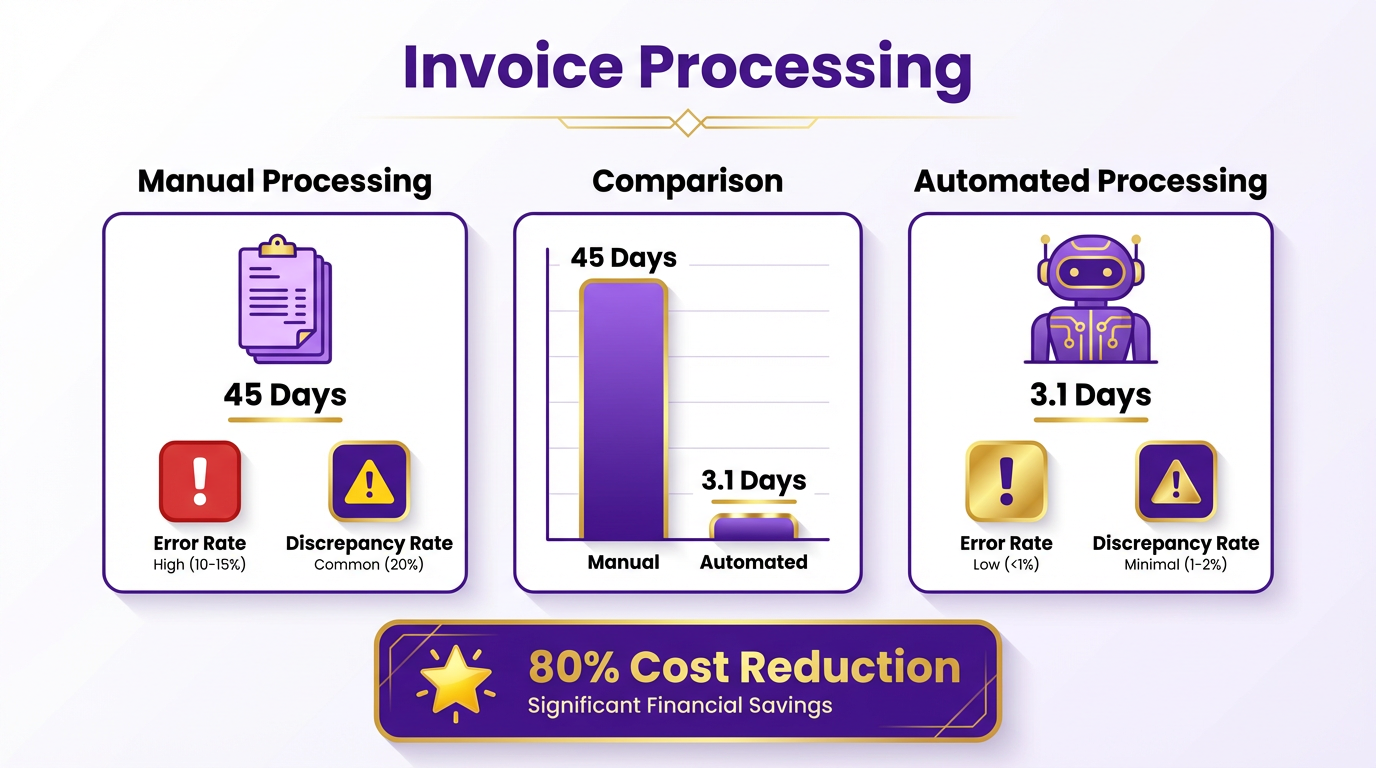
- Speed: Automated workflows cut processing time from 45 days to 3.1 days, accelerating cash flow.
- Scalability: Cloud-based solutions handle high-volume workloads seamlessly, whether you process 100 invoices a month or 100,000.
For small businesses, automation removes the need for large AP teams. For enterprises, it ensures compliance and visibility across global operations. Even non-English or handwritten invoices can be processed efficiently using OCR and machine learning, as seen in platforms like Blixo, which integrates AI to handle diverse document formats without manual intervention, as detailed in the Selecting the Best Invoice Processing Solution for Your Business section.
Who Benefits Most?
While large enterprises often lead in automation adoption, small businesses reap disproportionate rewards. A local retailer, for instance, could automate PO and non-PO invoices, reducing administrative overhead by 80% and avoiding late payment fees. Enterprises with complex supply chains benefit from real-time cash flow tracking and fraud mitigation, as highlighted in the Optimizing and Troubleshooting Invoice Processing section.
The role of automation is universal: it turns invoice processing from a cost center into a competitive advantage. With tools like Blixo, even teams with limited technical expertise can deploy scalable solutions, ensuring seamless integration with existing systems and minimizing training time.
The Future of Invoice Processing
Automation isn’t just a trend-it’s a necessity. As 32% of enterprises process over 100,000 invoices annually, the demand for intelligent systems grows. AI-driven platforms reduce processing errors by 57% and cut time spent on manual tasks by 75–85%, according to industry benchmarks. These tools also future-proof businesses by adapting to evolving invoice formats and regulatory requirements, ensuring long-term efficiency.
By prioritizing effective invoice processing, businesses secure more than just cost savings-they enable agility, accuracy, and the ability to focus on what truly drives growth. Whether you’re a small team or a global enterprise, the right solution turns a routine task into a strategic win.
Understanding Invoice Processing Solutions
Understanding invoice processing solutions starts with recognizing the shift from manual, error-prone workflows to automated systems that prioritize efficiency and accuracy. Modern solutions fall into two main categories: cloud-based and on-premise, each with distinct advantages. Cloud-based platforms, for example, offer scalability, allowing businesses to handle growing invoice volumes without infrastructure overhauls. They also integrate advanced security features like encryption and multi-factor authentication, ensuring sensitive financial data remains protected. A financial institution in Turkey reduced costs and boosted efficiency by adopting a cloud-based paperless system, demonstrating how digitization streamlines operations while maintaining traceability. Building on concepts from the Evaluating Invoice Processing Solutions section, the choice between cloud and on-premise often hinges on balancing automation capabilities with infrastructure requirements.
On-Premise Solutions: Customization vs. Complexity
On-premise invoice processing systems are ideal for businesses requiring strict control over data and workflows. These solutions allow deep customization, enabling organizations to tailor processes to unique needs-such as integrating with legacy accounting software or adhering to industry-specific compliance rules. However, they demand significant upfront investment in hardware and IT resources. For instance, a manufacturing firm might prioritize on-premise solutions to align with internal audit protocols, even if it means dedicating more time to system maintenance. While cloud platforms offer agility, on-premise systems remain a strategic choice for companies with rigid operational structures. As mentioned in the Selecting the Best Invoice Processing Solution for Your Business section, customization must be weighed against long-term maintenance costs and scalability.
Automated vs. Manual Processing: Efficiency and Error Reduction
Automated invoice processing reduces human intervention, slashing processing times and minimizing errors. According to industry data, 82% of AP teams still rely on manual input, leading to inefficiencies like 39% of invoices containing errors. Automated systems use OCR (Optical Character Recognition) and AI to extract data, validate matches against purchase orders, and flag discrepancies. For example, a company using AI-powered automation reduced invoice processing time from 45 days to just 3.1 days, cutting costs by up to 80% per invoice. Manual processing, while offering granular control, becomes unsustainable as invoice volumes rise. A grocery retailer, for instance, spent 56% of its AP team’s time on manual tasks before automation, highlighting the risk of operational bottlenecks. This aligns with insights from the Why Effective Invoice Processing Matters section, where the strategic impact of reducing errors and accelerating cash flow is emphasized.
The Role of AI and Machine Learning in Invoice Processing
AI-driven solutions are redefining accuracy and adaptability. Machine learning algorithms analyze invoice patterns, improving data extraction for unstructured formats like handwritten notes or multi-language documents. Studies show AI-powered systems achieve 97% accuracy in data extraction, far surpassing traditional rule-based methods. A benchmark analysis of multi-modal large language models (LLMs) revealed that advanced AI models, such as the Gemini 2.5 family, outperform others in processing scanned invoices, achieving 87% accuracy. These systems also learn from historical data, adapting to new invoice formats over time. For example, a logistics company reduced vendor disputes by 65% after implementing AI-driven validation, proving how automation enhances vendor relationships through faster, error-free payments. Building on concepts from the Evaluating Invoice Processing Solutions section, AI capabilities should be assessed alongside integration with existing financial systems and scalability.
Real-World Impact of Invoice Automation
Case studies illustrate the tangible benefits of automation. A nonprofit organization automated its invoice workflow, cutting processing costs by 54% and redeploying staff to strategic tasks. Similarly, a retail chain saw a 75% reduction in processing time after integrating AI-powered validation tools. These examples underscore how automation not only saves costs but also empowers teams to focus on higher-value work. While manual systems remain common, the shift toward AI-driven solutions is accelerating, with 52% of AP professionals now spending less than 10 hours weekly on invoice processing-a stark contrast to pre-automation benchmarks. As detailed in the Selecting the Best Invoice Processing Solution for Your Business section, aligning automation goals with organizational priorities ensures sustainable efficiency gains.
By evaluating cloud-based scalability, on-premise customization, and AI-driven automation, businesses can choose solutions aligned with their operational goals. The next step is identifying platforms that balance flexibility, security, and integration with existing systems-a critical consideration explored in the Selecting the Best Invoice Processing Solution for Your Business section.
Evaluating Invoice Processing Solutions
When evaluating invoice processing solutions, start by assessing core features that align with your business needs. Look for automation capabilities such as AI-powered data extraction, OCR accuracy, and workflow customization. For example, a provider using AI can reduce manual data entry errors by up to 91%, while OCR tools with 97%+ accuracy streamline invoice validation. Pricing models vary-some charge per invoice, others use subscription tiers. Transparent pricing avoids hidden fees, and SaaS providers like Blixo offer predictable costs without compromising on features like real-time analytics. Customer support is equally vital; prioritize solutions with 24/7 technical assistance and onboarding guidance to minimize disruptions during implementation. As mentioned in the Understanding Invoice Processing Solutions section, modern systems prioritize automation to enhance accuracy and efficiency.
Assessing Scalability and Flexibility
Scalability ensures your solution grows with your business. A high-volume processor might handle 60,000 invoices monthly, while a small business needs agility for seasonal fluctuations. Check if the system supports hybrid workflows (manual + automated) and adapts to evolving invoice formats, such as multi-language documents or non-PO invoices. For instance, one company reduced processing time from 15 minutes per invoice to 1–3 minutes by adopting agentic automation, demonstrating how flexible tools scale efficiency. Cloud-based platforms, like Blixo, also offer elasticity to adjust resources based on demand without infrastructure overhauls. Building on concepts from the Implementing an Invoice Processing Solution section, seamless scalability requires alignment with existing IT infrastructure.
Security and Compliance Priorities
Security isn’t optional-it’s foundational. Ensure the solution uses end-to-end encryption, role-based access controls, and complies with standards like GDPR or PCI-DSS. Manual processes risk errors: 39% of invoices contain mistakes due to human input, potentially leading to compliance gaps. One organization slashed fraud risks by 65% using automated tracking systems with audit trails. Blixo’s approach includes AI-driven anomaly detection, flagging discrepancies in real time. For industries like healthcare or finance, verify the provider’s ability to handle sensitive data and maintain audit-ready records. As mentioned in the Why Effective Invoice Processing Matters section, compliance directly impacts a business’s financial integrity and operational trustworthiness.
Integration with Existing Systems
Seamless integration with your ERP, accounting software, or SAP modules is critical. A solution that supports bi-directional data sync with systems like SAP S/4HANA or NetSuite reduces manual reconciliation. For example, integrating AI-powered invoice processing with an ERP system can cut PO matching errors by 80%, as seen in a case where processing time dropped from 30–45 minutes to 3–5 minutes. Unlike generic providers, Blixo ensures compatibility with major platforms, allowing teams to focus on strategic tasks instead of troubleshooting connectivity issues. Building on concepts from the Optimizing and Troubleshooting Invoice Processing section, integration challenges often arise from outdated or fragmented workflows.
Real-World Success Stories
Real-world results highlight the value of smart implementation. One company automated 80% of its invoice workflows, saving $3 per invoice and reducing processing costs by 91%. Another financial institution went paperless, cutting operational costs by 30% while boosting traceability. A third example shows how AI-driven validation improved vendor relations: by automating payment tracking, disputes fell by 40%, and payment cycles shortened by 75%. These outcomes underscore how the right solution transforms invoice processing from a cost center into a strategic asset. As mentioned in the Selecting the Best Invoice Processing Solution for Your Business section, aligning real-world outcomes with business-specific goals is key to long-term success.
Implementing an Invoice Processing Solution
Implementing an invoice processing solution requires a structured approach to ensure efficiency and minimize disruptions. Start by assessing your current accounts payable workflows to identify bottlenecks. For example, if manual data entry is time-consuming, prioritize solutions with AI-driven automation to reduce errors and processing times. Platforms that integrate with existing systems-like SAP modules (MM, FI) or cloud ERPs-streamline workflows by eliminating silos. As mentioned in the Evaluating Invoice Processing Solutions section, integration capabilities are a critical factor when selecting a platform. One company using xSuite’s solution reduced invoice processing time by 50% through seamless SAP integration, enabling real-time validation. Begin with a pilot group to test automation features such as OCR for data extraction and AI for matching invoices to purchase orders. This phased approach allows teams to refine configurations before full deployment.
Training is critical to maximize the value of your solution. Start with role-specific workshops: accounts payable clerks need hands-on practice with data entry tools, while managers should focus on dashboard analytics and exception handling. Building on concepts from the Selecting the Best Invoice Processing Solution for Your Business section, training should align with the specific functionalities of your chosen platform. Provide visual guides and short video tutorials to reinforce learning. For instance, a controller at Bridgevine noted that staff transitioned to strategic tasks after mastering Yooz’s cloud-based AP automation, which simplified invoice routing. Encourage cross-department collaboration-finance teams should work with IT to ensure system access and permissions align with workflow needs. Schedule recurring training sessions to address updates, such as new AI features for unstructured invoice formats. Internal champions who demonstrate system usage can reduce resistance and foster adoption.
Common pitfalls include poor integration planning and underestimating data migration complexity. If your ERP system lacks native automation (as noted in SAP environments), opt for third-party solutions with advanced OCR and machine learning capabilities. Another frequent issue is skipping testing phases-simulate scenarios like invoice discrepancies or vendor disputes to validate error-handling workflows. Post-implementation, prioritize ongoing support: Blixo emphasizes dedicated maintenance teams to monitor performance metrics and address system updates. Regular audits of processing accuracy (e.g., ensuring 98% invoice classification rates) help maintain efficiency. As highlighted in the Optimizing and Troubleshooting Invoice Processing section, addressing recurring issues like fragmented workflows post-deployment is essential. A healthcare provider avoided data migration errors by using a phased approach with third-party data mapping tools, ensuring all historical invoice data was accurately transferred to the new platform. Finally, revisit vendor contracts annually to optimize costs, especially if your solution uses cloud-based scalability. By combining proactive training, rigorous testing, and continuous support, businesses can achieve cost savings of up to 91% and processing times under 3 days.
Optimizing and Troubleshooting Invoice Processing
Optimizing invoice processing starts by identifying recurring issues like manual data entry errors, discrepancies in invoice formats, and delays caused by fragmented workflows. For example, companies using manual systems often take up to 45 days to process invoices, compared to automated solutions that can cut this to just 3.1 days. Discrepancies in vendor invoices-such as mismatched line items or missing purchase order references-can also slow down approvals and lead to disputes. In one case, a provider in this space reduced processing costs by 80% through automation, proving how critical it is to address these issues proactively.
To troubleshoot these problems, businesses use automation tools with OCR and AI capabilities to eliminate manual tasks. Building on concepts from the Understanding Invoice Processing Solutions section, automated workflows can flag discrepancies in real time, such as mismatched totals or missing tax codes. If an invoice lacks a purchase order reference, AI-driven systems can cross-check it against contracts or historical data. Cloud-based platforms further simplify troubleshooting by offering centralized dashboards where finance teams can track invoice statuses, resolve exceptions, and audit logs. One company reported a 57% reduction in processing errors after implementing such a system, highlighting the value of real-time validation.
Best practices for optimization include integrating invoice automation with existing ERP systems like SAP or cloud platforms. This ensures seamless data flow and reduces silos. As mentioned in the Implementing an Invoice Processing Solution section, aligning invoice workflows with ERP modules can significantly cut processing time. For instance, a provider in this space achieved extensive standardization by aligning invoice workflows with SAP modules, cutting processing time by 50%. Another key strategy is adopting multi-modal LLMs for document understanding, which outperform traditional OCR by analyzing both text and layout. Building on concepts from the Evaluating Invoice Processing Solutions section, this approach boosted accuracy to 87.46% for scanned invoices, as seen in benchmark studies. Streamlining workflows also means prioritizing touchless processing-where invoices are automatically validated and approved without human intervention-for up to 70% of transactions.
Real-world results show how these strategies pay off. A company in the automotive sector reduced vendor inquiries about payment status by 65% using automated tracking systems. Meanwhile, a food industry provider redeployed 30% of its AP team to strategic roles after automation handled 80% of routine tasks. Analytics play a central role here: tracking metrics like processing cost per invoice ($2.18 for top performers vs. $10.89 industry average) or touchless processing rates helps teams pinpoint bottlenecks. For example, one organization used error analytics to identify that 40% of delays stemmed from missing vendor codes, which they fixed with AI-driven data extraction.
When optimizing, focus on scalability and adaptability. For instance, cloud-based systems allow businesses to handle seasonal spikes in invoice volume without overhauling infrastructure. Analytics also reveal trends-like a sudden increase in invoice discrepancies during peak months-which can trigger process improvements. A provider in this space use predictive analytics to forecast vendor payment cycles, reducing late fees by 25%. These examples underscore how combining automation, data insights, and agile workflows transforms invoice processing from a reactive task into a strategic advantage.
Selecting the Best Invoice Processing Solution for Your Business
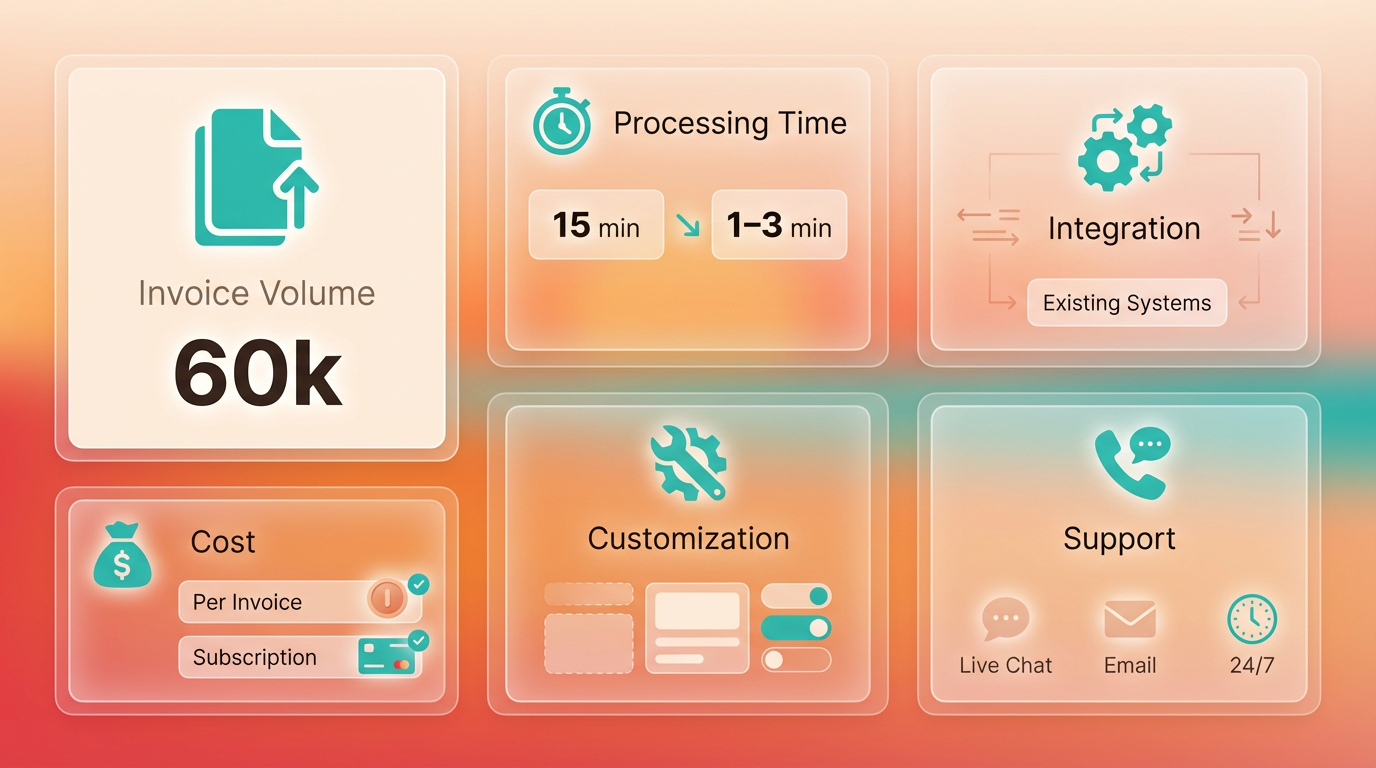
Selecting the best invoice processing solution requires a clear understanding of your business needs, industry requirements, and long-term goals. Start by evaluating your current workflows: how many invoices do you process monthly? Are errors or delays common? What systems do you already use? These questions help identify gaps and set priorities. For example, a company handling 60,000 invoices annually might prioritize automation to cut processing time from 15 minutes per invoice to just 1–3 minutes, as demonstrated in AI-driven solutions discussed in the Evaluating Invoice Processing Solutions section.
Key Factors to Evaluate
- Business Size and Industry: Smaller teams may benefit from cloud-based platforms with low upfront costs, while large enterprises need scalable systems to handle high volumes. A financial institution in Turkey, for instance, reduced costs by switching to a paperless system, boosting efficiency without overhauling its IT infrastructure.
- Integration Capabilities: Ensure the solution works seamlessly with existing tools like ERP systems. SAP users, for example, should look for bi-directional integration via BAPIs or IDOCs to avoid data silos.
- Automation Features: Advanced OCR and AI can extract data with 97%+ accuracy, minimizing manual input. One company automated 50% of its workflows, saving 10+ hours weekly on repetitive tasks. Building on concepts from the Evaluating Invoice Processing Solutions section, prioritize tools with multi-modal LLMs (like Gemini 2.5) for parsing complex documents.
- Security and Compliance: Solutions must support user permissions, audit trails, and encryption. A luxury hotel chain improved revenue by adopting secure electronic payments, reducing fraud risks.
Real-World Examples of Success
A food production company automated its AP processes, cutting invoice processing time from 45 days to 3.1 days and reducing costs by 80%. Another business in the automotive sector streamlined PO matching with AI, resolving 90% of discrepancies automatically. These results highlight how automation enable time for strategic work-like the Accounts Payable team at Bridgevine, which shifted focus to financial analysis after adopting a cloud solution.
Scalability is equally critical. A solution that handles 1,000 invoices today should adapt to 10,000 tomorrow without performance drops. For example, a healthcare provider scaled its invoice processing system during a merger, maintaining 92% accuracy even with complex, non-English invoices. Flexibility in handling invoice formats (PDFs, emails, scanned documents) also matters-one platform processes 50+ languages, ensuring global teams stay aligned. As mentioned in the Implementing an Invoice Processing Solution section, scalability should be evaluated during the onboarding process to avoid disruptions.
Assessing Total Cost of Ownership
Beyond upfront pricing, calculate hidden costs:
- Implementation: Some platforms charge for data migration or custom integrations.
- Training: A solution with a steep learning curve might require ongoing support, adding to expenses.
- Maintenance: Cloud-based systems often offer pay-as-you-go pricing, avoiding server costs.
A federal agency saved 54% on undisputed invoice processing by switching to an electronic platform, proving that long-term savings often outweigh initial investments.
The Role of Customer Support
Even the most advanced tool fails without proper onboarding. Look for providers offering:
- 24/7 Technical Assistance: A media company resolved 95% of system issues within 2 hours using live support.
- Training Resources: Video tutorials and user guides reduce downtime during adoption.
- Dedicated Account Management: One logistics firm credits its 20% productivity boost to a support team that tailored workflows to its needs.
“With the right partner, automation isn’t just about efficiency-it’s about transforming how your team operates.” – AP Manager, Midsize Manufacturer
Final Considerations
Avoid solutions that promise “one-size-fits-all” automation. A retail chain initially chose a generic platform but switched to a vendor with AI-driven fraud detection, cutting disputes by 40%. Always request demos to test how a system handles your specific invoice formats. For complex cases, refer to the Optimizing and Troubleshooting Invoice Processing section for strategies on handling non-standard documents.
By aligning these factors with your business goals, you’ll find a solution that reduces costs, minimizes errors, and positions your finance team for strategic growth.
Frequently Asked Questions
1. What are the main benefits of automating invoice processing?
Automating invoice processing offers three primary benefits: accuracy, speed, and scalability. AI-powered systems achieve 97% accuracy in data extraction, reducing errors and disputes that plague 39% of manually processed invoices. It also accelerates processing times drastically—cutting workflows from 45 days to 3.1 days—which improves cash flow and vendor relationships. For small businesses, automation eliminates the need for large AP teams, while enterprises gain compliance visibility across global operations. Real-world examples, like Bridgevine’s 90% reduction in processing time, demonstrate how automation reallocates staff to higher-value tasks.
2. What key features should businesses prioritize when selecting an invoice processing solution?
Businesses should focus on three core features: AI-driven accuracy, cloud-based scalability, and integration capabilities. AI ensures 97% accuracy in extracting data from invoices, minimizing rework and disputes. Cloud-based systems handle high-volume workloads seamlessly, whether processing 100 or 100,000 invoices monthly. Integration with existing ERP or accounting software (e.g., SAP, QuickBooks) is critical for seamless workflows. For example, GEMLUX reduced purchase order processing from 30–45 minutes to 3–5 minutes by adopting AI-powered tools. Solutions that support multi-language and multi-currency processing are also ideal for global operations.
3. How does invoice processing automation impact small businesses versus enterprises?
For small businesses, automation reduces the need for large AP teams and minimizes errors that lead to late payments, which cost U.S. businesses $1.3 trillion annually. It also lowers operational costs by streamlining workflows. Enterprises benefit from compliance enforcement, real-time visibility into global transactions, and faster resolution of disputes. A Turkish financial institution, for instance, slashed costs by switching from paper-based to digital systems. Both benefit from time savings—GEMLUX’s staff saved hours daily—but enterprises gain added value from centralized control over complex supply chains.
4. Can invoice processing solutions integrate with existing accounting software?
Yes, most modern solutions are designed to integrate with popular accounting platforms like QuickBooks, SAP, and Oracle. This ensures seamless data flow from invoice capture to payment processing, reducing manual data entry errors. For example, Bridgevine automated its AP workflows while maintaining compatibility with its existing systems. Integration capabilities are a key factor to evaluate, as they determine how smoothly the solution will fit into current financial operations. Always verify compatibility with your specific software stack before implementation.
5. What are common mistakes businesses make when selecting an invoice processing solution?
Common mistakes include overlooking scalability, ignoring integration needs, and undervaluing AI capabilities. Some businesses choose solutions that work for current invoice volumes but fail to scale with growth. Others neglect to test how the system interacts with their existing software, leading to workflow disruptions. Additionally, solutions without AI-driven automation may require ongoing manual corrections, defeating the purpose of efficiency. A 2026 case study highlighted how a financial institution’s success hinged on choosing a system that addressed all three areas simultaneously.
6. How does AI improve invoice processing accuracy compared to manual methods?
AI-powered systems reduce human error by automating data extraction, validation, and matching. Manual entry is prone to mistakes in 39% of invoices, often due to illegible handwriting, formatting issues, or data entry fatigue. AI tools, like those demonstrated in Bizagi’s invoice processing demo, use machine learning to recognize patterns and flag discrepancies, achieving 97% accuracy. This minimizes rework cycles, speeds up approvals, and ensures compliance with tax and accounting standards. For instance, AI can automatically match invoices to purchase orders, reducing disputes and late payment risks.