

ERP Invoice Processing: How Automation Reduces Manual Work

Key Takeaways
- Manual invoice processing runs $6.30 to $15 per invoice. Automated departments do the same work for around $1.45.
- Automated AP teams process 18,649 invoices per full-time employee. Teams without automation manage 8,689.
- Data-entry mistakes hit 3 to 5% of manual workflows, which delays payments and slowly chips away at vendor trust and cash-flow predictability.
- Automated capture reads an invoice in about 10 seconds with up to 98% extraction accuracy. Doing it by hand takes 5 to 10 minutes.
- Around 80% of finance teams still say their AP processes need work, even after adopting automation.
- Roughly 17% of payables teams name invoice data entry as their single biggest operational headache.
- The payoff isn’t fewer people. It’s clearing the bottleneck so your team can act on what the data is telling them.
Why manual invoice work costs more than you think
Manual invoice work is quietly expensive, and that cost gap is why ERP invoice processing keeps showing up on finance roadmaps. Automate it and your per-invoice cost drops sharply while your team stops typing line items all day.
The argument gets stronger at scale. Automated accounts payable teams process more than double the invoice volume per full-time employee that manual teams do. But most write-ups skip the uncomfortable part: the majority of finance teams still say their AP processes need refining even after buying new tools. Our read is that automation hands you scale capacity faster than teams can absorb it strategically. The win isn’t cutting headcount. It’s removing the bottleneck so your people can act on what the data says.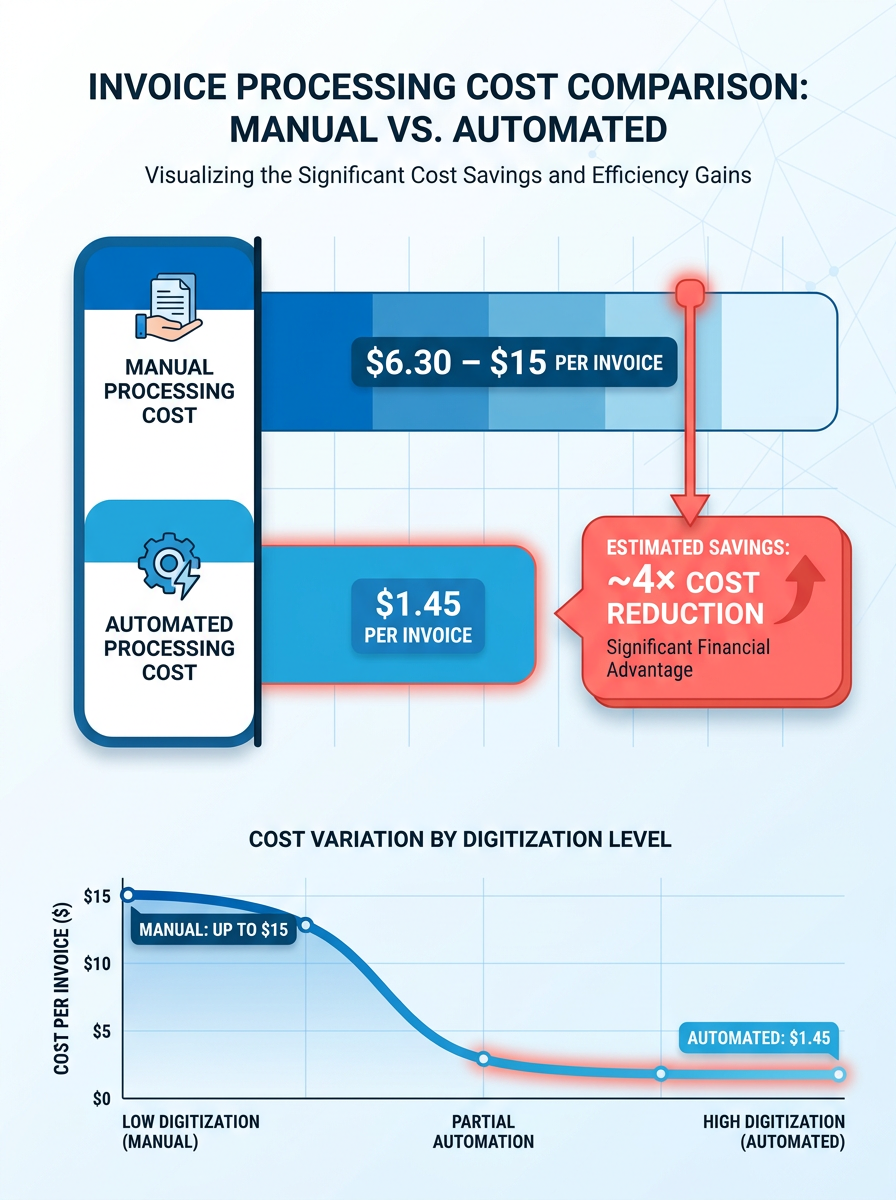
What does manual invoice processing actually cost you?
Manual entry is slow, error-prone, and hard to scale. A meaningful slice of payables teams call manual data entry their primary bottleneck. Every mistyped amount or misplaced invoice delays a payment, and delayed payments quietly erode vendor trust and cash-flow predictability.
The time drain is just as real. Manual invoicing eats real hands-on minutes per document, while automated capture pulls the data almost instantly with high precision. One global BPO provider cut per-invoice handling from 10 minutes to 3 using RPA, a 70% reduction in effort.
Who benefits, and where churn prevention lives
Accounts payable and finance teams feel the relief first. AP consistently ranks as the most labor-intensive finance function, so automating it clears the most buried desk in the building.
For subscription businesses, the payoff runs deeper. Every paid invoice is a signal. Payment timing, invoice size, and renewal cadence are the exact data points that flag which accounts are healthy and which are drifting toward churn. When invoice data flows cleanly into one system instead of scattered spreadsheets, you can time upsell offers to billing cycles and catch late-paying accounts before they cancel. That turns AP from a back-office cost into an early-warning system. Blixo’s automated invoicing and cash application give you that unified view, so payment behavior becomes retention data you can act on.
How do the automation approaches compare?
| Approach | Setup effort | Difficulty | Cost per invoice | Best for | Churn signal capture |
|---|---|---|---|---|---|
| Manual entry | None | Low | $6–15 | Very low volume | None |
| Native ERP module | Weeks | Medium | ~$4 | Existing ERP shops | Limited |
| RPA bots | Weeks | Medium-high | ~$3 | Fixed-format invoices | Partial |
| Best-of-breed AI layer | Days to weeks | Medium | ~$2.18 | Scaling teams | Strong |
| All-in-one billing + cash application | Days | Low-medium | Lowest | Subscription SaaS | Full |
Native ERP modules often just digitize the manual steps instead of removing them. An ERP-agnostic automation layer keeps your existing setup intact while adding the intelligence those native modules lack.
A few things worth holding onto: high straight-through processing rates are achievable, early-payment discount capture climbs, and payback windows shrink. Start with data capture, then layer in matching and cash application.
Baseline your current process before you buy anything
Before you can strip manual work out of your ERP invoice workflow, you need to know where the time and errors actually pile up. Most finance teams skip this and jump straight to buying tools, which is exactly why so many of them watch their manual workload go up after adding software. The bottleneck usually isn’t where you think it is.
Map where invoices get stuck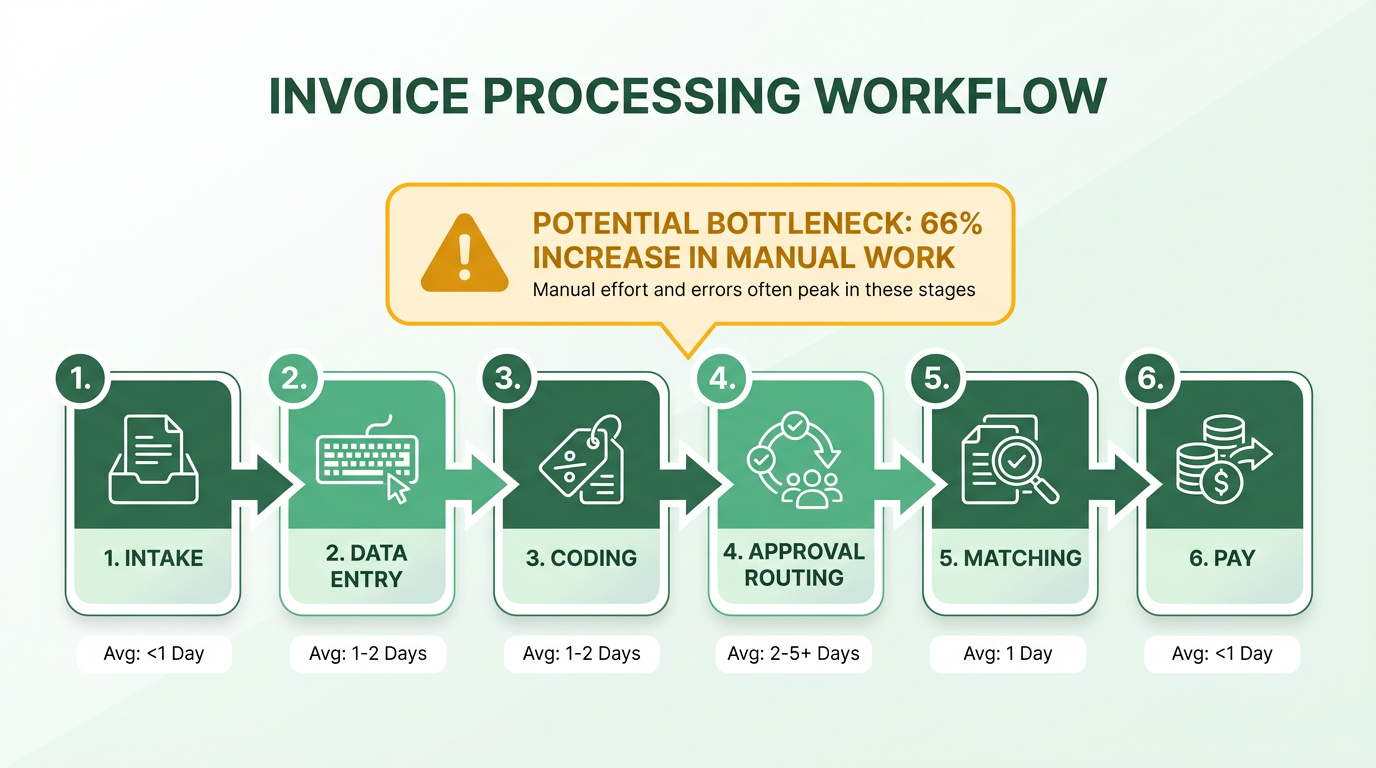
Track how long invoices sit at each stage: intake, data entry, coding, approval routing, matching, payment. One manufacturing firm found that invoices routed to more than three approvers took four times longer to clear than single-approver invoices. Another discovered a large share of their invoices needed manual intervention purely because vendors sent formats their system couldn’t parse.
Time the end-to-end cycle across a sample week. Manual processing takes over a week from receipt to payment, but that average hides enormous variation. Some invoices clear in hours; others sit for weeks. Track the median and the outliers. The outliers are where your real problems live.
Count how many times a human touches each invoice. Fully automated teams process far more invoices per FTE per year than manual ones. If your team sits near the low end, you’re burning staff hours on repetitive work software handles better.
Measure cost per invoice and error rates
Work out what you actually spend to process each invoice. Manual processing runs $7.75 to $9.40 per invoice depending on how digitized your intake is. Break it down: data-entry time, approval overhead, exception handling, and rework from errors. Process 500 invoices a month at $9 each and that's $54,000 a year, before late-payment penalties or duplicate payments enter the picture.
For subscription businesses, error rates matter more than speed. Roughly 62% of invoice errors trace back to keyed data: transposed amounts, wrong vendor codes, mismatched PO numbers, not the approval or payment stages. For a SaaS company those errors don’t just delay payment. They create billing disputes that trigger churn conversations. A single duplicate charge can cost you a customer worth $50,000 in lifetime value.
Track your exception rate on its own. If a large chunk of invoices need manual intervention, automation won’t help until you standardize vendor submission formats or add intelligent document processing that adapts to layout variation.
Find the invoices that drain the most resources
Not every invoice costs the same to process. Industry research shows invoices that require manual coding decisions eat disproportionate time because they force context switches. A $50 office-supply invoice shouldn't take as long to approve as a $50,000 software license renewal, but in manual workflows they often do.
Segment your volume by type: recurring vendor payments, one-time purchases, expense reimbursements, subscription renewals. Recurring payments are the easiest automation win. They follow predictable patterns and rarely need a human. One team cut processing time 30% by automating just their top 20 vendors.
Look hard at your subscription invoice flow. These carry renewal-timing signals most finance teams ignore. When a customer pays late, disputes line items, or switches payment methods, those are leading indicators of churn risk. Your baseline should capture not just cycle time but which invoice behaviors correlate with cancellations three months out. That’s what turns invoice processing into a retention tool, and it’s the real ROI case for automation in SaaS.
Track these metrics consistently across invoice types to set your baseline. Once you know where the manual work concentrates, you can point automation at the stages that pay off instead of bolting on another layer that just digitizes the dysfunction.
Exceptions are where automation scales or stalls
Exceptions decide whether ERP invoice processing scales or grinds. The question isn’t whether they happen. It’s how fast you clear them and what each one tells you.
One shift is worth understanding. The ROI payback window on automated invoice processing has collapsed to a fraction of what it used to be. Our read is that this isn’t about faster data capture. It’s that modern systems resolve a higher share of exceptions without a human touching them, which changes the business case entirely. The value now sits in exception quality and resolution speed, not scan volume.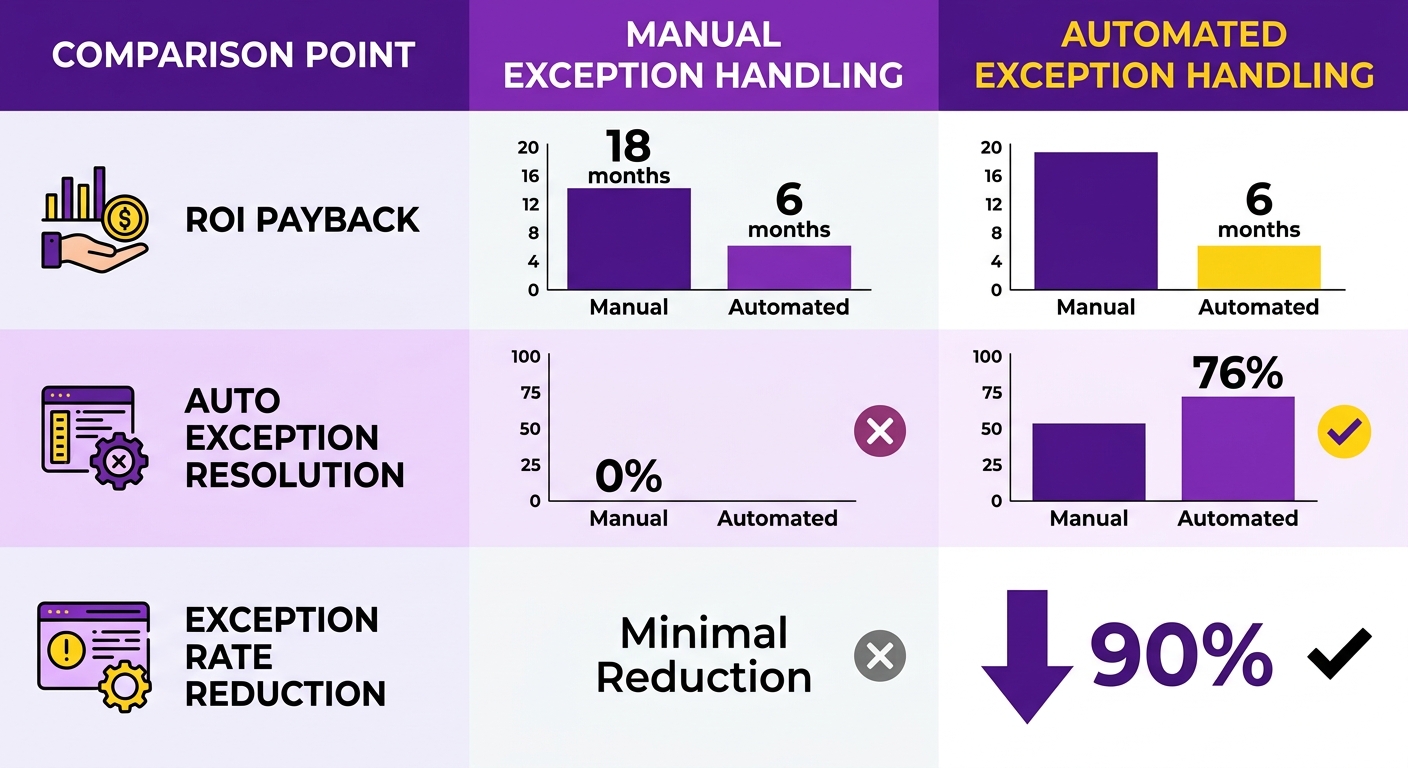
What kinds of exceptions break automated processing?
An exception is an invoice the system can’t process cleanly without a human decision. They cluster into a handful of predictable patterns, so you can design for them upfront instead of reacting.
The usual suspects: invalid or missing data (a blank PO number, a garbled tax line), duplicate submissions, amounts that don’t match the purchase order, and vendor names that don’t map to your master records. Vendor name variation alone forces constant validation-rule tuning in real deployments. It never quite hits zero.
How do you route and escalate them?
Route by exception type instead of dumping everything into one queue. A duplicate flag goes back to the system for auto-suppression. A price mismatch routes to the buyer who owns the PO. A missing approver escalates on a timer so nothing sits for days.
The pattern that works is hybrid. AI clears the majority, humans handle only the genuine edge cases. Success comes from incremental rollout with a human in the loop, not wholesale replacement. Set validation rules for supplier verification, duplicate detection, tax checks, and three-way matching, then let anything that fails escalate automatically. Watch your resolution velocity. If invoices sit in exception queues past 48 hours, your routing logic needs work.
How do you cut manual touchpoints without losing the signal?
Cut touchpoints by treating each exception as data, not just a task to close. This is where subscription billing gets interesting. An exception on a renewal invoice or a usage-based charge isn’t only an AP problem. It can be an early churn signal.
When a recurring invoice bounces on a payment failure, a disputed line item, or a sudden drop in usage-based charges, that’s the moment to flag the account for customer success, not just re-queue it. Done well, your exception workflow becomes a renewal-risk radar. Every resolved invoice feeds upsell and renewal timing instead of vanishing into a closed ticket.
For ongoing improvement, watch three numbers: exception rate, resolution time, and touchless processing rate. If exception rate climbs, a vendor changed their format or a validation rule drifted. Review the top recurring exception types monthly and fix the root cause. A single supplier sending a new format can spike your exception volume until you adjust the extraction rules. Running this inside one platform, where billing, exception handling, and account signals share the same data, is where the churn-prevention payoff actually lands. Blixo’s matching engine supports this with an approval workflow that gets smarter through machine learning as you edit matches, so future exceptions resolve with higher accuracy.
Measuring ROI without lying to yourself
The payoff window on automated ERP invoice processing has tightened sharply. This isn’t about faster OCR or better templates. It’s that modern AI now resolves the vast majority of exceptions automatically, which pulls overall exception rates down hard. In our experience the business case now rests on how cleanly you handle edge cases, not how fast you scan PDFs.
The benchmarking framework that works for subscription companies treating invoice data as a churn signal starts with cost per invoice as the north-star metric. That four-to-tenfold reduction is the baseline everyone hits. Your ROI math should compare your current per-invoice cost against the automated floor, not the industry average.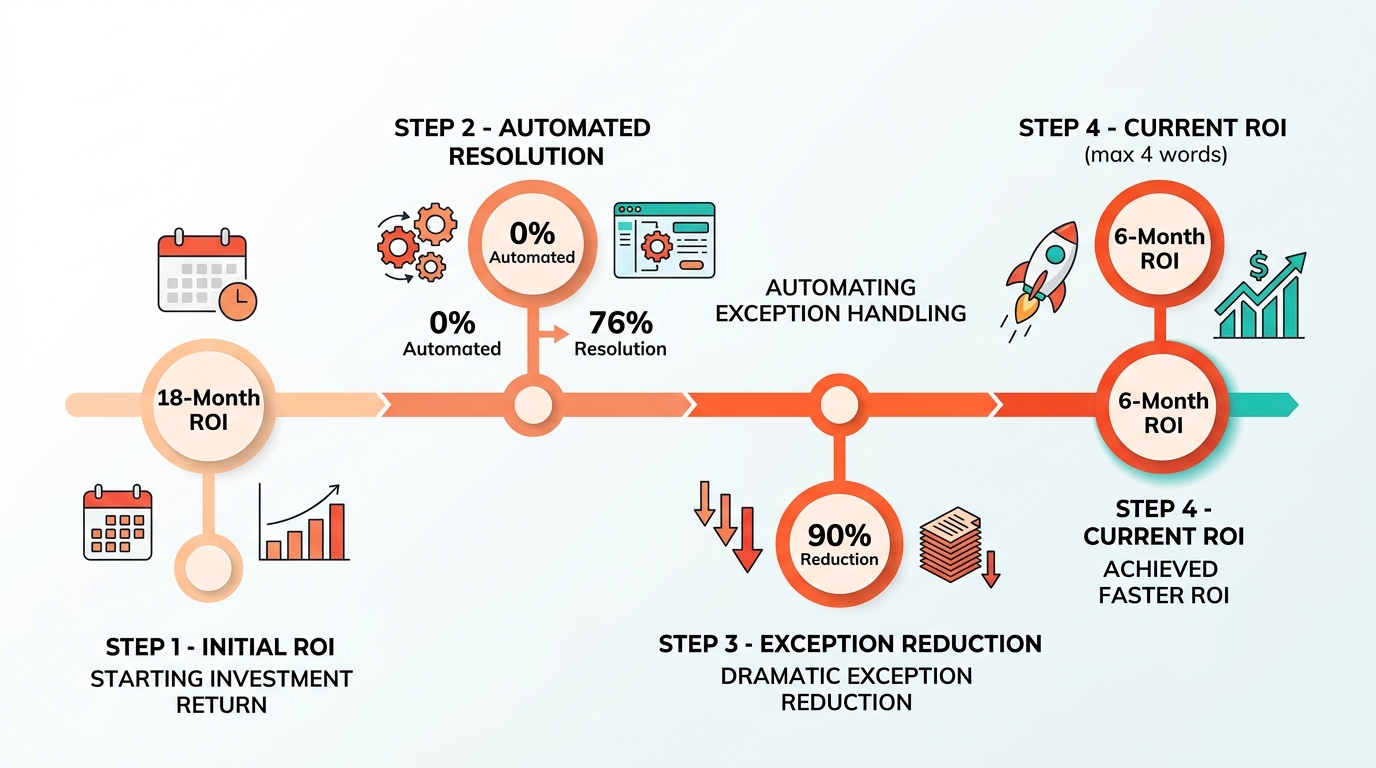
Track productivity gains, not just cost cuts
Beyond raw throughput, automation creates scale capacity faster than most finance teams can absorb it strategically. You’re not just cutting headcount. You’re removing the constraint that forces you to add a body every time your vendor base grows. Companies that automate AP report 40–60% reductions in processing time within the first quarter, with some departments hitting 70% by month six.
The time savings from moving off manual work are significant. But the real win is freeing teams for strategic work, like spotting usage trends that flag an at-risk customer or catching opportunities in invoice frequency. In a subscription model, that shift from data entry to data analysis is where the multiplier lives.
Measure straight-through and exception rates
Straight-through processing rate tells you what share of invoices flow from receipt to posting with no human involved. Top workflows hit very high rates here. Track exception resolution time separately. AI handles the easy matches; the question is how long your team spends on PO mismatches, duplicates, and vendor name variations. If your system flags these but doesn’t suggest fixes, you’re still doing the heavy lifting by hand.
Leading platforms now resolve common exceptions, like supplier name variations and minor PO discrepancies, in under two minutes. Teams on rules-based systems still average 15–20 minutes per exception. That gap compounds fast when you’re processing thousands of invoices a month.
Calculate cycle-time reduction
Invoice cycle time, receipt to payment, matters for subscription businesses because payment timing correlates with renewal intent. Manual workflows need a much longer window from receipt to payment. 68% of automated AP departments now clear invoices in under a week. Faster processing means you flag payment delays earlier, surface at-risk accounts sooner, and step in before churn happens.
When companies cut invoice resolution time, they recover working capital and improve cash flow. For subscription SaaS the equivalent isn’t just dollars. It’s retention signal latency. The faster you close an invoice, the sooner you can act on the payment behavior behind it.
Align KPIs with retention, not just efficiency
Traditional AP metrics, cost per invoice, invoices per FTE, cycle time, measure efficiency. We layer on payment-pattern analysis to turn invoice data into retention intelligence. Track how many customers drift from net-30 to net-60 terms over consecutive billing cycles. Watch which accounts start disputing line items after months of clean payment. Both are early churn signals most AP dashboards ignore.
Blixo’s cash application and reconciliation tools surface these patterns by automatically matching payments to invoices and tracking payment behavior in real time. When a customer’s behavior changes, you see it the moment the invoice posts, not when the renewal conversation starts three months later.
Implementing and scaling without flipping a switch overnight
Starting ERP invoice processing automation feels overwhelming when you’re staring at thousands of monthly invoices and a finance team already stretched thin. Plenty of implementations struggle, and it’s rarely because the technology fails. It’s because teams skip the planning and jump straight to deployment. Automation projects usually take a few months to deliver ROI when done right, but only if you build in stages instead of trying to flip a switch overnight.
What tends to work: start with invoice capture, lock it down, then move to validation, approval routing, and finally exception handling. Success often comes from standardizing vendor formats and data quality before you turn any tools on. That prep is what makes high capture accuracy possible.
How do you set up the foundation?
The first step isn’t installing software. It’s getting your invoice intake channels under control. Right now you’re probably pulling invoices from email, supplier portals, EDI feeds, paper scans, and maybe a few vendors who still fax. Before automating anything, centralize those channels into one ingestion point: a dedicated email address, a supplier portal, or an API-driven hub that captures invoices regardless of format.
Once intake is centralized, map your existing approval workflow on paper. Who approves what? At what dollar threshold? Which invoices need three-way matching against purchase orders? A lot of organizations find invoices stuck in approval limbo because ownership of certain vendor categories was never clearly defined. Documenting and standardizing the routing rules before launch removes that friction.
Next, audit your master data quality. Vendor names, tax IDs, GL codes. If this data is inconsistent in your ERP, your automation will fail every time. Organizations routinely find the same supplier sitting in the system under several name variations. Cleaning master data before go-live improves straight-through processing rates dramatically.
What’s the right implementation sequence?
Roll out in three phases: data capture, workflow automation, then exception intelligence. Don’t try to automate everything at once. Phase one is OCR and AI extraction, getting invoices into structured data with high accuracy. Modern AI systems can process an invoice in seconds versus minutes for manual entry. That’s where you see the immediate labor savings.
Phase two adds automated matching and approval routing. Three-way matching, comparing the invoice against the purchase order and the delivery receipt, removes manual review for a significant portion of invoices. Automated matching cuts duplicate payments by catching errors before they reach your ERP. The trick is validation rules that check supplier verification, tax calculations, and PO alignment before the invoice posts.
Phase three is exception handling with machine learning. Many exceptions, mismatched amounts, missing PO numbers, vendor name variations, can be resolved automatically once the system learns the patterns. Whatever’s left gets routed to the right person with the full context attached, so they’re not digging through email threads to reconstruct what went wrong. This is where the long-term ROI shows up, because you’re not just automating the easy invoices. You’re clearing the backlog that used to tie up AP for days.
How do you scale without breaking things?
Scaling means adding invoice volume without adding headcount. Organizations that go fully automated can absorb 300% increases in invoice volume with the same team, shifting staff from data entry to vendor relationships and process improvement. Finance teams report handling 10,000+ monthly invoices with teams that used to struggle at 3,000.
The technical requirement for scale is asynchronous processing and queue architecture. When you’re handling thousands of invoices a day, synchronous API calls to your ERP will bottleneck. Use a message queue (Kafka, RabbitMQ) to buffer invoice data, process it in parallel, and write to your ERP in batches. Cache your master data (vendor lists, GL codes) so you’re not hitting the database for every lookup. Caching alone can cut processing time by 60% in high-volume deployments.
Monitor two numbers religiously: exception resolution time and first-pass accuracy. The best systems clear exceptions in under 24 hours and hold first-pass accuracy above 95%, so fewer invoices bounce back for corrections. If exceptions sit for days or accuracy drops below 92%, your validation rules need tuning or your master data needs another cleanup pass.
What about change management and training?
Automation fails when your AP team doesn’t trust it. Pilot programs with 5–10 users generate 40% faster adoption across the full organization than company-wide launches. Start with a pilot group, the people who process the most invoices. Get them comfortable, gather feedback, fix the rough edges, then expand.
Training should focus on exception handling, not data entry. Your team isn’t typing invoice fields anymore. They’re reviewing flagged exceptions and teaching the system what “normal” looks like. Show them the dashboard, walk through a few real exceptions, and give them the authority to approve or reject the AI’s suggestions. That ownership cuts error rates during the initial rollout.
Finally, document the new process and make it easy to find. A one-page flowchart showing how invoices move from capture to posting, with decision points and escalation paths, kills most “where’s my invoice?” questions. Teams with documented workflows resolve 70% of status inquiries through self-service instead of email or phone, which frees AP staff for higher-value work.
Frequently Asked Questions
1. Does automating invoice processing mean laying off my AP staff?
No. Automation removes bottlenecks rather than people. Staff shift from manual data entry to analyzing payment behavior and managing vendor relationships. The goal is to free your team for strategic work rather than reducing headcount.
2. Why did my manual work increase after buying automation software?
This typically happens when teams digitize a broken process without mapping it first. Without establishing a baseline of where invoices stall—such as intake, coding, or approval routing—adding software simply automates existing inefficiencies.
3. Should I use my ERP’s native invoice module or a separate AI layer?
Native ERP modules often digitize manual steps rather than eliminating them, resulting in higher processing costs and limited visibility into payment behavior. An ERP-agnostic AI layer preserves your existing setup while adding intelligent extraction and matching at a lower cost per invoice, making it ideal for scaling teams.
4. What happens when a vendor suddenly changes their invoice format?
A new invoice format can temporarily increase your exception volume until extraction rules are adjusted. The key is to monitor exception trends regularly and update your templates. Systems with machine learning adapt to these corrections over time, resolving future invoices from that supplier with higher accuracy.
5. Which invoices should I automate first for the fastest win?
Recurring vendor payments are the easiest starting point because they follow predictable patterns and rarely require manual intervention. Focus first on high-volume, low-exception suppliers to secure quick wins before moving to complex, one-time purchases.
6. How does invoice data actually help predict customer churn?
Changes in payment behavior—such as taking longer to pay or disputing line items—are leading indicators of customer dissatisfaction or financial stress. Centralizing this data allows you to flag these patterns and alert customer success teams well before the renewal date.
7. Why did the ROI payback window drop from 18 months to six?
The payback period has shortened because modern systems resolve the vast majority of exceptions automatically. Because fewer invoices require manual intervention, teams spend less time on corrections, shifting the business case from simple scanning to automated resolution.