

Cloud Bookkeeping That Matches Remittances to Invoices Without Spreadsheets

Key Takeaways
- Manual remittance matching quietly inflates Days Sales Outstanding in subscription businesses. Unmatched deposits sit in limbo until quarter-end makes the problem obvious.
- Feeding bank data and invoicing into one cloud ledger gives you real-time numbers instead of overnight batch files.
- AI automation can categorize up to 98% of transactions and cut month-end close time by as much as half.
- NLP-based matching reads payment references and remittance advice, pushing automatic reconciliation past 85-90%.
- Native fintech connections with tools like Stripe sync payments on arrival, so nobody keys journal entries by hand.
- Subscription-focused ledgers run cash and accrual books side by side and automate revenue recognition for recurring contracts.
- The core of a working cash application setup: an intelligent matching engine, approval workflows, and live bank/ERP integrations.
Setting Up Cloud Bookkeeping That Matches Payments on Arrival
Manual remittance matching inflates DSO without anyone deciding it should. Run QuickBooks Online recurring payments, then match incoming cash to invoices by hand, and every unmatched deposit sits in limbo. The delays stack up quietly. Nobody notices until quarter-end.
Cloud bookkeeping with automated remittance matching closes that gap. It builds a direct, continuous link between invoicing, bank feeds, and a matching engine, so payments post to the correct invoice in real time.
How to set it up so it actually works
Start with a unified ledger that pulls in transaction data continuously. A modern cloud ledger processes bank feeds as they arrive instead of waiting for an overnight batch. That steady stream lets the system categorize transactions on its own, which is where most of the month-end close speedup comes from.
Then connect your payment gateways. Direct API connections pull transaction metadata straight into the ledger and map processing fees against gross amounts, no manual journal entries required. For recurring revenue, this keeps deferred revenue schedules updating alongside cash receipts, so your cash and accrual books stay in sync.
With the data flowing, turn on the matching engine. These systems read unstructured payment references and email remittance attachments to pair deposits with open receivables. One global bank automated its reconciliation this way, cutting manual work by 70% and lifting its match rate from 60% to 90%.
What the options actually look like
| Solution type | Setup time | Remittance matching | Bank feed sync | Recurring billing | DSO impact |
|---|---|---|---|---|---|
| Spreadsheet + manual entry | Days | Manual, error-prone | None | Manual invoices | Rises steadily |
| Legacy desktop accounting | 1-2 weeks | Rule-based only | Batch import | Basic templates | Flat to rising |
| Popular online accounting | Days | Limited auto-match | Daily feed | Recurring payments | Some drift |
| Cloud + RPA lockbox | 2-4 weeks | Rule + OCR match | Real-time | Add-on | Moderate drop |
| AI-driven cloud platform | Minutes to days | NLP auto-match 85-90% | Real-time | Native subscriptions | Sharp drop |
QuickBooks is popular, but it lacks the native fintech integrations and real-time tracking subscription teams rely on. Cash tends to wait in a suspense account before it clears.
Keeping matches accurate and staying out of the ditch
The biggest risk is unidentified payments. One case study found 12-18% of customer payments landing as unidentified every month, dragging reconciliation accuracy down to around 89%. Those unapplied receipts are exactly what push DSO up.
A few mistakes show up again and again during implementation:
- Skipping bank feed integration. Without a live feed, your matching engine runs on stale data.
- Ignoring exception handling. A good system flags and routes exceptions instead of dumping them into a suspense account.
- Leaving recurring billing disconnected. Subscription invoices have to sync to the ledger so payments match the moment they arrive.
The effort is smaller than most people expect. Fintech-native platforms connect in minutes. An RPA lockbox setup runs closer to two to four weeks. Difficulty varies too: bank feed setup is easy, subscription revenue recognition is medium, and exception tuning is the part that takes real attention.
The payoff is measurable. Teams that adopt automated cash application typically see processing costs drop 40-80%. One leather manufacturer cut its collection cycle by 35% on automated matching alone. Kill the spreadsheets and you reduce errors, clear cash faster, and pull DSO down.
Choosing the Right Platform Without Getting Sold a Demo
Picking a cloud bookkeeping platform comes down to one thing: how well it bridges cash receipts and outstanding receivables. When matching stays manual, unapplied cash piles up, hides your true cash flow, and makes collections harder. The right platform pairs incoming funds with their invoices automatically, no spreadsheet lookups.
Judge every candidate on how much manual work it removes. A system that automates recurring billing but leaves deposits unreconciled hasn’t solved your actual bottleneck. Real automation parses remittance details on its own and applies payments straight to the ledger.
The features that matter for remittance matching
Prioritize an AI-driven cash application engine that reads remittance advice and updates the ledger on its own. This is the feature that moves cycle times. Going from manual entry to automated posting can compress a multi-day close into a single day, which frees your finance team to work the complex exceptions instead of the routine ones.
Look for native invoicing integration too. Billing and bank feeds should feed one ledger, not three tools that don’t talk to each other. Intelligent document processing in modern systems reads line-item and reference data with error rates low enough that most deposits post untouched. Fewer exceptions land on anyone’s desk.
Scalability is the other non-negotiable. The platform has to absorb rising transaction volume without new headcount. One deployment raised its automatic cash-posting rate from 25% to 87%, taking a huge chunk of manual work off the finance team without adding a single person.
How to compare tools without getting burned
Run actual, unedited payment data through each trial. Ignore the feature checklist. Sales demos use pristine, perfectly formatted datasets. Reality doesn’t. Incoming remittances come with typos, partial payments, and non-standard reference codes.
Test how each system handles those edge cases. Good matching engines interpret variation in payment references and read different formats, so a slightly wrong reference still finds its invoice. Weaker tools shove those into a manual queue.
Two things to check specifically:
- Exception handling workflows. Understand how the system deals with unmatched payments. Efficient routing is what separates a real platform from a glorified data-entry screen.
- Subscription billing compatibility. If you live on recurring revenue, the platform has to reconcile ongoing subscription payments automatically instead of treating each cycle as a brand-new transaction.
Does it clear your security and compliance bar?
This tool holds your financial data, so encryption and access controls aren’t optional. Encryption protects data in transit and at rest. Role-based access limits who can see or change records, which matters a lot when payment details move through the system every day.
Compliance depends on where you operate and who you serve. GDPR governs data tied to individuals in Europe. HIPAA applies if your billing touches protected health information. Confirm the platform supports whatever frameworks you fall under before you sign.
Keep audit trails on and review access permissions on a schedule. Automated systems log every match and posting by default, so you get that trail for free. It makes both security reviews and financial audits far less painful.
Real-World Examples and Case Studies
Manual reconciliation hits working capital directly. Lean on people to pair deposits with open invoices and unapplied cash builds up in suspense accounts, distorting your reporting and delaying cash application.
Automating the workflow speeds up the whole payment lifecycle. Drop the spreadsheet tracking and finance teams hit high straight-through processing rates, with the vast majority of transactions applied immediately. For high-volume recurring billing, that keeps cash from sitting unallocated and shortens the monthly close.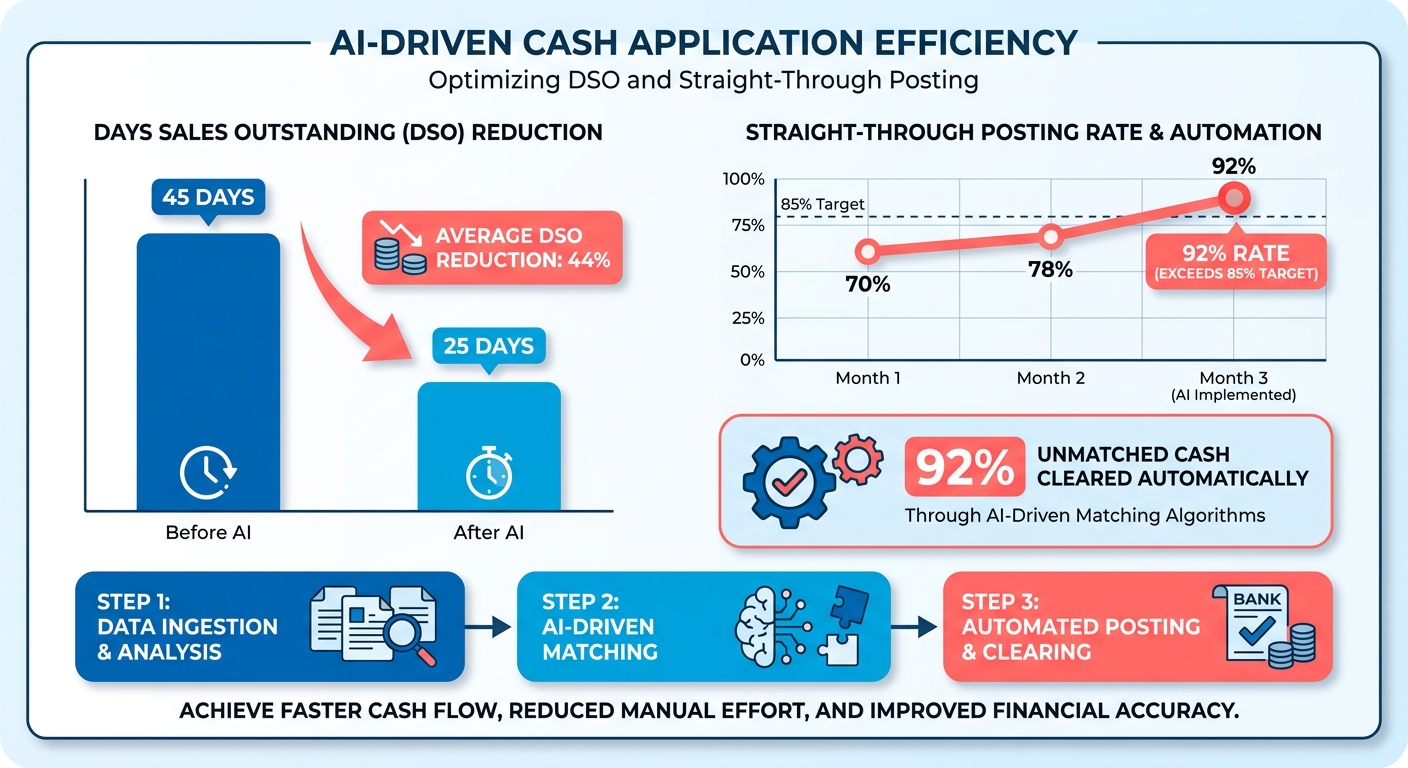
What unidentified payments actually cost you
Unidentified transfers stall reconciliation because they can’t be credited to the right customer. When transaction details are missing or garbled, the funds sit in suspense. Someone then has to investigate, cross-referencing bank statements against customer emails to sort out the discrepancy.
That lag degrades ledger accuracy and complicates reporting. When a big slice of monthly cash stays unapplied, outstanding receivables look artificially high. Finance teams burn days at month-end auditing old records instead of doing anything strategic.
Fixing it takes solid transaction identification and tighter links between payment gateways and the core ledger. Capture and parse remittance data at the point of entry and you lean on suspense accounts far less, which speeds up the whole reconciliation cycle.
Scaling AR volume without scaling the team
Automation lets AR volume grow without new hires. Companies that adopted cash application automation scaled operations without a matching jump in overhead. Instead of hiring more clerks to match more deposits, the system swallowed the extra volume.
This matters most for subscription businesses. Recurring billing means transaction counts climb every quarter as you add customers. Manual matching forces you to hire in lockstep with that growth. AI-driven matching breaks the link, so a team of three handles what used to take ten.
It also changes what AR people do. When routine matching runs on its own, they move from data entry to work that pays off: analyzing credit risk, tuning collection strategies, managing working capital.
Who benefits most
High transaction volume plus recurring payments is the sweet spot. SaaS subscription companies lead because their billing never stops. Consumer finance firms, membership businesses, and B2B services on retainer billing follow close behind.
Small teams and enterprises both win, for different reasons. Small teams get relief from the manual grind that eats their limited hours. Enterprises get real-time cash visibility across thousands of transactions through direct integration with the systems they already run.
Cut the manual entry and reconciliation and the relief is immediate. Matching remittance data to open invoices automatically prevents artificial DSO spikes, kills spreadsheet errors, and gives you real-time visibility into cash. That’s the foundational win of cloud-based accounting for growing businesses.
Where Cloud Bookkeeping Is Headed
Cloud bookkeeping is drifting toward systems that read payment data with something close to human comprehension. Advanced NLP and machine learning models parse unstructured remittance advice, pulling out payer names, amounts, and invoice references to match in real time. Moving from batch processing to continuous reconciliation stops unallocated deposits from piling up and keeps records reflecting where the cash actually is.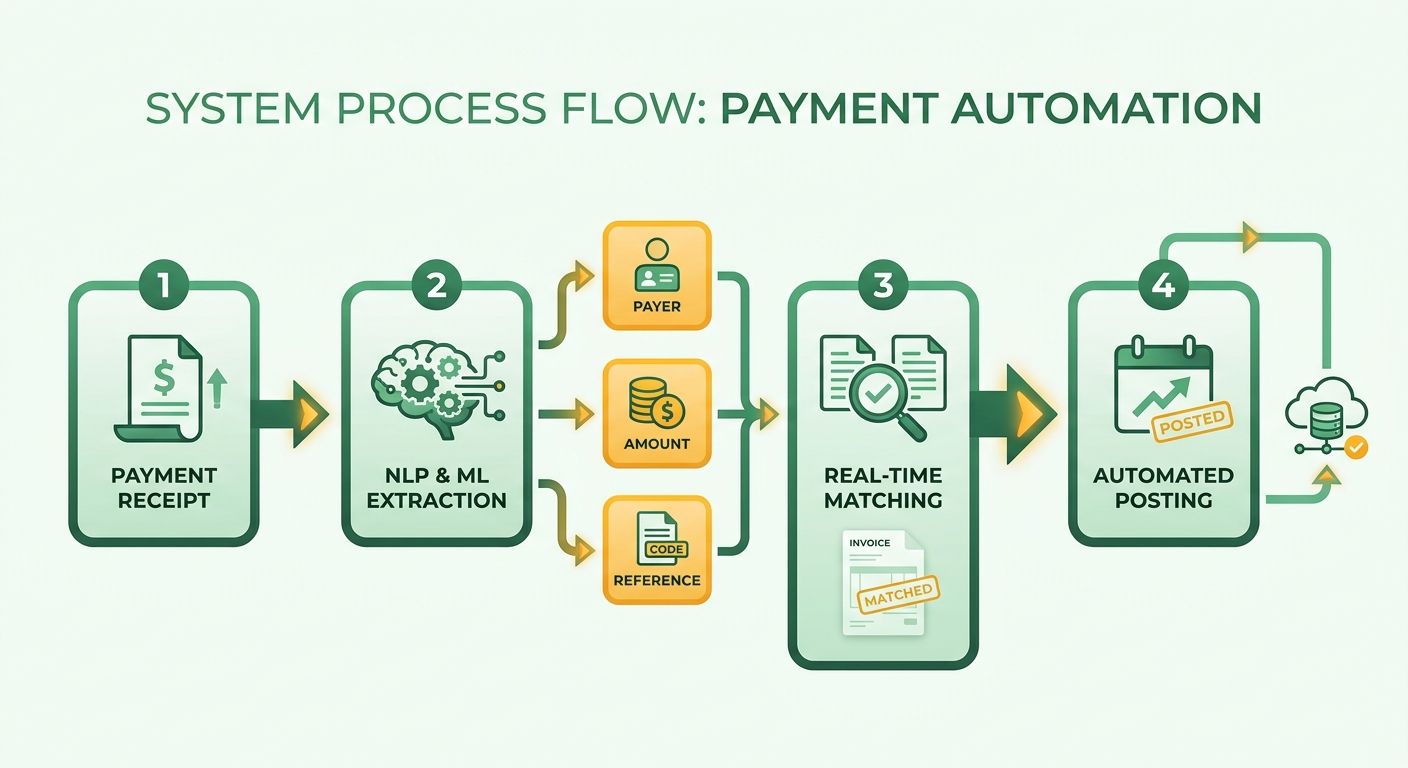
How AI and machine learning change matching
AI and ML push reconciliation rates past anything rule-based matching reached. A multinational manufacturer paired OCR with NLP and moved matching accuracy from 75% to 92%. That’s not a tweak. It changes how many people you need touching payments at all.
Transformer models are the engine. Domain-tuned NER models now hit around 95.7% F1 on payment message extraction, and distilled versions run near 30 milliseconds per message. That speed makes real-time matching practical inside a live ledger, not just an overnight batch. One payment processor cut unmatched card items by 68% after deploying ML-based matching against variable descriptor formats. A fintech shrank its manual review queue by 54% using ensemble models that blend rule-based logic with neural classification.
The technologies reshaping the stack
The next generation of platforms combines three things into one pipeline: robotic process automation moves structured data between systems, NLP interprets unstructured remittance text, and machine learning adapts as humans correct it.
Intelligent document processing is quietly fixing lockbox and check handling, pulling high extraction accuracy off paper remittances. At the same time, blockchain-based payment rails are starting to carry structured remittance data natively. For networks on the ISO 20022 standard, that could eventually remove the parsing step altogether.
Graph neural networks are the emerging layer for entity resolution. When a customer pays from a new bank account or misspells their company name, plain string matching falls over. Graph-based models map relationships between payers, account numbers, and historical patterns, resolving identities keyword matching can’t. One logistics company lifted its first-pass match rate by 19 percentage points using graph embeddings trained on three years of payment history.
What I’d actually watch for
Expect hyperautomation, explainable AI, and real-time cash application to define the next few years. The catch is drift. Payment formats keep changing, so models need monitoring to stay accurate. Federated learning is starting to help here, letting firms train shared models without exposing individual transactions, which puts enterprise-grade matching accuracy within reach of smaller teams.
The upside is bigger than a faster close. Once matching runs correctly on its own, your cash forecast becomes something you can trust. Predictive models are already flagging which invoices will land late based on payer behavior, payment method, and remittance patterns, so AR teams can step in before DSO creeps up.
The teams that win treat cash application as a live system, not a spreadsheet chore. That mindset, more than any single model, is what keeps DSO from climbing back.
Frequently Asked Questions
1. How does automated matching handle a single payment that covers multiple invoices?
Intelligent matching engines split payments across multiple open invoices by reading remittance advice line items, applying the correct amount to each. NLP-based systems interpret reference variations and partial payments, so a lump-sum deposit posts against several receivables automatically instead of landing in a suspense account for manual splitting.
2. Can I migrate from QuickBooks Online without losing historical data?
Migration preserves historical records by exporting invoices, customer data, and transaction history into the new cloud ledger before switching. Depending on the complexity of your architecture, deployment can range from rapid API integrations to multi-week enterprise setups. Running parallel books briefly helps confirm balances match before fully retiring the legacy system.
3. What distinguishes cash application from bank reconciliation?
Cash application matches incoming payments to specific customer invoices, clearing receivables. Bank reconciliation confirms your ledger balance matches the bank statement. Both rely on live bank feeds, but cash application directly attacks DSO by assigning deposits to invoices, while reconciliation verifies overall account accuracy at period close.
4. How do I handle payments that still won’t match after automation?
Configure exception routing so unmatched payments flag for human review instead of dumping into a suspense account. Ask any vendor what happens when a payment fails to match cleanly. Strong systems queue exceptions with suggested matches, letting AR staff resolve the 10-15% edge cases quickly rather than reprocessing everything manually.
5. Is AI-driven cash application affordable for small businesses?
Small teams benefit significantly since automation removes the manual grind consuming their limited hours. Federated learning now lets smaller firms access matching accuracy once reserved for enterprises with massive training data. This democratization of technology makes the investment highly recoverable through reduced administrative labor and accelerated cash clearing.
6. How accurate does the matching engine stay over time?
Payment formats keep evolving, causing model drift that degrades accuracy without monitoring. Systems combining rule-based logic with machine learning learn from your corrections, sustaining rates above 90%. Treat cash application as a live system needing periodic tuning, not a set-and-forget tool, to prevent DSO from creeping back up.
7. Can automated matching resolve payments from unfamiliar accounts or misspelled names?
Graph neural networks map relationships between payer entities, account numbers, and historical patterns, resolving identities that string matching misses. When a customer pays from a new bank account or misspells their company name, these models analyze historical transaction patterns and entity relationships to identify the correct payer without manual intervention.