

Blixo vs Oracle: Better AP Automation

Key Takeaways
- AP automation reduces avoidable late fees and penalties by up to $20,000 annually through accurate payment tracking.
- OCR technology in AP automation cuts data-entry errors by 80%, preventing costly invoice corrections.
- Manual AP processes consume over 10 hours weekly for mid-sized companies handling 500 monthly invoices.
- Automated systems eliminate operational delays by streamlining invoice verification and approval workflows.
- Retailers automating 1,000 monthly invoices can resolve hundreds of data-entry mistakes monthly.
- AP automation frees staff from repetitive tasks, redirecting 30%+ of their time to strategic work.
- Manual AP processes risk 15-20% higher payment disputes due to transposed numbers and missing documents.
Why AP Automation Matters
AP automation transforms how businesses handle accounts payable by reducing errors, saving time, and improving financial control. Without automation, manual processes slow operations and increase risks, while automation streamlines workflows and provides actionable insights. Let’s break down why this shift matters.
What Are the Hidden Costs of Manual AP Processes?
Manual AP processes are slow, error-prone, and expensive. A single invoice might require hours of data entry, verification, and approval, delaying payments and straining vendor relationships. For example, a mid-sized company processing 500 invoices monthly could spend over 10 hours weekly on manual data entry alone. Mistakes-like transposed numbers or missing documents-lead to disputes, late fees, and lost discounts. These inefficiencies add up: one business might pay $20,000 annually in avoidable penalties due to late payments.
Manual workflows also tie up staff in repetitive tasks. Employees spend time chasing signatures, reconciling discrepancies, and managing paper trails instead of focusing on strategic work. This administrative burden grows with invoice volume, making scalability a challenge for fast-paced industries like retail or manufacturing.
How Does AP Automation Solve Key Pain Points?
AP automation tackles three major issues: invoicing errors, late payments, and operational delays. Automated systems use OCR technology to extract data from invoices, reducing manual entry errors by up to 80%. For instance, a retailer automating 1,000 monthly invoices could eliminate hundreds of data-entry mistakes, preventing costly corrections. As mentioned in the Blixo AP Automation Overview section, SaaS providers like Blixo use OCR to unify invoicing and reduce errors through integrated workflows.
Automation also enforces payment deadlines with alerts and reminders, ensuring businesses take early-payment discounts and avoid late fees. A construction firm using automated workflows might save $50,000 yearly by optimizing payment terms. Additionally, automation centralizes invoice tracking, giving finance teams real-time visibility into pending approvals and cash flow needs. This transparency helps prevent bottlenecks and ensures timely vendor payments.
Which Businesses Benefit Most from AP Automation?
Businesses with high invoice volumes-like healthcare providers, e-commerce platforms, or multinational corporations-gain the most from automation. A hospital chain processing 10,000 invoices monthly could cut processing time by 50% using automated tools, freeing staff to focus on patient care. Similarly, a global manufacturer managing multi-currency payments benefits from automation’s ability to handle complex financial transactions seamlessly.
Small and medium-sized businesses (SMBs) also see significant returns. Automating even 500 monthly invoices might reduce administrative costs by $15,000 annually while improving accuracy. For companies with remote teams, cloud-based AP automation simplifies collaboration, ensuring approvals happen swiftly regardless of location. Building on concepts from the Recommendation: Which Platform Fits Your Needs section, SMBs often find tailored solutions like Blixo more scalable than enterprise systems.
Manual vs. Automated AP: A Side-by-Side Comparison
| Feature | Manual Processes | Automated Processes |
|---|---|---|
| Error Rate | High (5–10% of invoices) | Low (<1% of invoices) |
| Processing Time | 1–2 hours per invoice | 2–5 minutes per invoice |
| Cost per Invoice | $15–$25 | $2–$5 |
| Late Payment Rate | 20–30% | <5% |
Automation’s impact extends beyond efficiency. By reducing manual work, it lowers staff burnout and improves job satisfaction. Employees shift from data entry to analyzing financial trends, driving better business decisions. For finance leaders, this means stronger cash flow management, reduced audit risks, and a clearer view of spending patterns.
In industries where timing is critical-like manufacturing, where late payments disrupt supply chains-AP automation becomes a strategic advantage. It ensures compliance, strengthens vendor partnerships, and positions businesses to scale without increasing overhead. As mentioned in the Feature-by-Feature Comparison section, the choice between SaaS providers like Blixo and Oracle NetSuite SuiteBilling depends on specific automation needs and integration depth.
By addressing inefficiencies at their root, AP automation isn’t just a cost-saving tool-it’s a foundation for financial resilience in today’s fast-paced economy.
Blixo AP Automation Overview
Blixo’s AP automation platform unifies invoicing, collections, cash application, and subscription management into a single system. This integration reduces manual workflows and minimizes errors by automating repetitive tasks like invoice matching and payment tracking. Unlike traditional systems that require separate tools for each process, Blixo streamlines operations with a centralized interface. For example, when a vendor submits an invoice, the system automatically cross-references it with purchase orders and delivery receipts, flagging discrepancies for review. This reduces processing time from days to minutes, improving efficiency for finance teams.
What Makes Blixo’s AP Automation Stand Out?
Blixo differentiates itself by combining automation with self-service portals for vendors and customers. Vendors can upload invoices, check payment statuses, and resolve discrepancies without needing direct support from the accounts payable team. This reduces the need for back-and-forth communication and accelerates payment cycles. For instance, a vendor can log into the portal to see that an invoice is pending due to missing documentation and upload the required files immediately, closing the loop without involving finance staff.
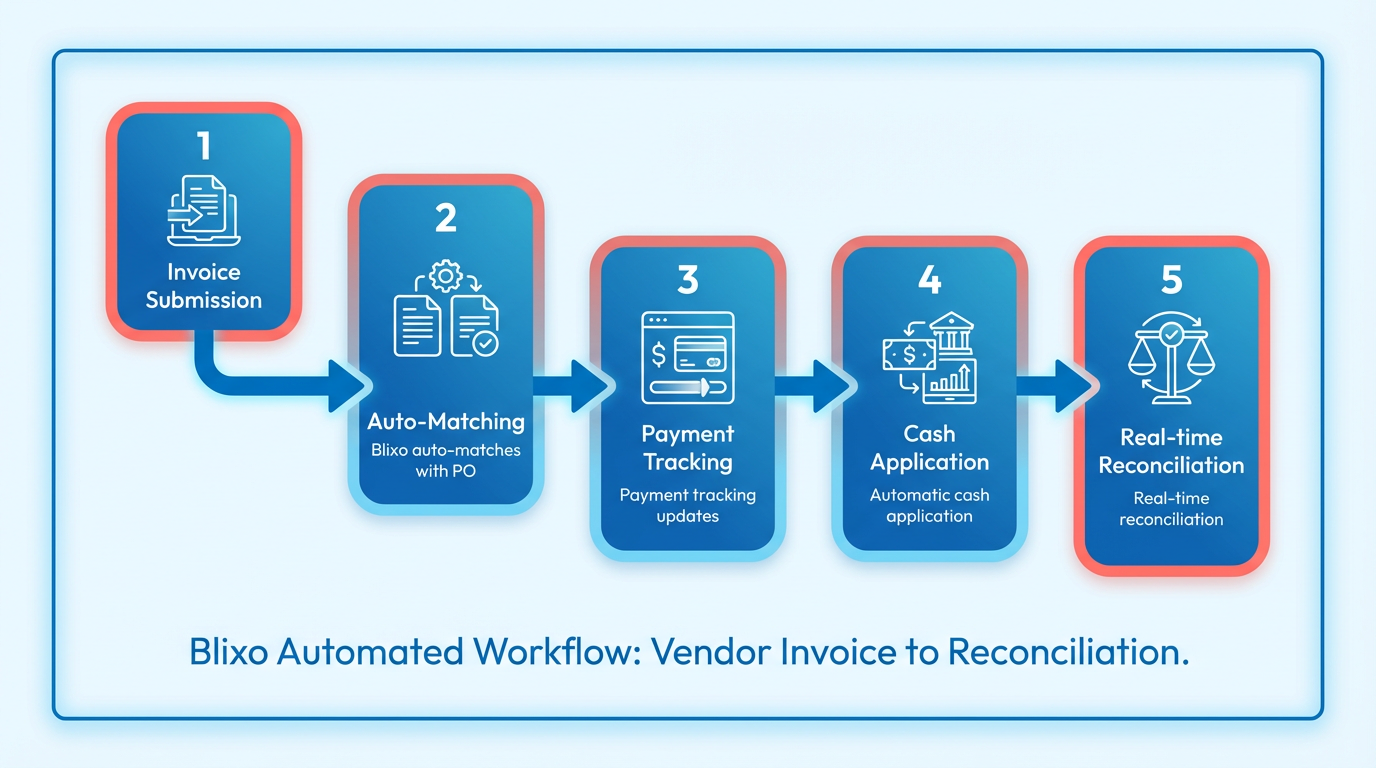
The platform also prioritizes subscription management, a feature often overlooked in AP systems. It tracks recurring payments, adjusts for changes in subscription tiers, and alerts teams to upcoming renewals. This is particularly useful for SaaS companies that manage thousands of subscriptions, ensuring accurate billing and reducing churn from failed payments.
Pricing Model and Total Cost of Ownership
Blixo uses a subscription-based pricing model, with plans tailored to business size and transaction volume. While exact pricing details vary, the system emphasizes transparency by avoiding hidden fees for integrations or API usage. Compared to Oracle’s complex licensing tiers, Blixo’s structure simplifies budgeting. As mentioned in the Oracle NetSuite SuiteBilling Overview section, Oracle’s pricing often includes per-user costs and additional charges for APIs, which contrasts with Blixo’s flat-rate approach.
| Feature | Blixo | Oracle |
|---|---|---|
| Pricing Transparency | Flat-rate plans with volume discounts | Tiered licensing and per-user costs |
| Hidden Fees | None | Additional charges for APIs and integrations |
| Scalability | Pay-as-you-go for transaction volume | Fixed costs with limited flexibility |
The total cost of ownership is further reduced by Blixo’s low implementation requirements. Most businesses can onboard within weeks, whereas Oracle often demands months of setup and customization. Building on concepts from the Pricing and Total Cost of Ownership section, Blixo’s streamlined onboarding and lack of hidden fees make it a cost-effective choice for mid-sized companies and enterprises looking to avoid long-term commitments.
Integration and Customer Support
Blixo supports seamless integration with major ERPs like SAP, NetSuite, and QuickBooks via RESTful APIs and pre-built connectors. As discussed in the Feature-by-Feature Comparison section, this integration capability ensures real-time data synchronization, eliminating manual data entry. For example, when a payment is applied in Blixo, the cash application is automatically reflected in the connected ERP, ensuring financial records remain up to date.
Customer support includes 24/7 access to a dedicated success team, onboarding assistance, and a knowledge base with step-by-step guides. Response times are typically under two hours for critical issues, with proactive check-ins to ensure ongoing satisfaction. One G2 reviewer noted, “The support team resolved our integration issues within hours, which kept our workflow on track.”.
User Experience and Self-Service Portal
Blixo’s interface is designed for ease of use, with drag-and-drop dashboards and customizable workflows. Non-technical users can manage the system without training, thanks to intuitive menus and contextual help. The self-service portal extends this simplicity to external users, allowing vendors and customers to manage interactions independently.
For example, a customer with a subscription service can view their payment history, pause billing, or update payment methods directly in the portal. This reduces the workload on finance teams and improves customer satisfaction. Mobile access further enhances usability, enabling users to approve invoices or monitor cash flow from any device.
By combining automation, transparency, and user-friendly design, Blixo addresses common pain points in AP processes while offering a lower total cost of ownership compared to traditional systems like Oracle.
Oracle NetSuite SuiteBilling Overview
Oracle NetSuite SuiteBilling is designed to streamline billing processes and revenue management for businesses, offering tools to automate invoicing, track revenue, and manage customer payments. Its features align with enterprise needs, emphasizing integration with existing Oracle NetSuite modules and scalability for growing organizations. Below is a structured overview of its capabilities, pricing, and support structure.
Key Features of Oracle NetSuite SuiteBilling
SuiteBilling automates recurring and usage-based billing, enabling businesses to generate accurate invoices based on predefined schedules or actual consumption. It supports complex revenue recognition models, ensuring compliance with accounting standards like ASC 606 and IFRS 15. For example, a SaaS company can configure SuiteBilling to recognize revenue over a subscription period while handling prorated charges for early cancellations. The module also includes a self-service customer portal, allowing clients to view invoices, make payments, and update billing details without IT intervention.
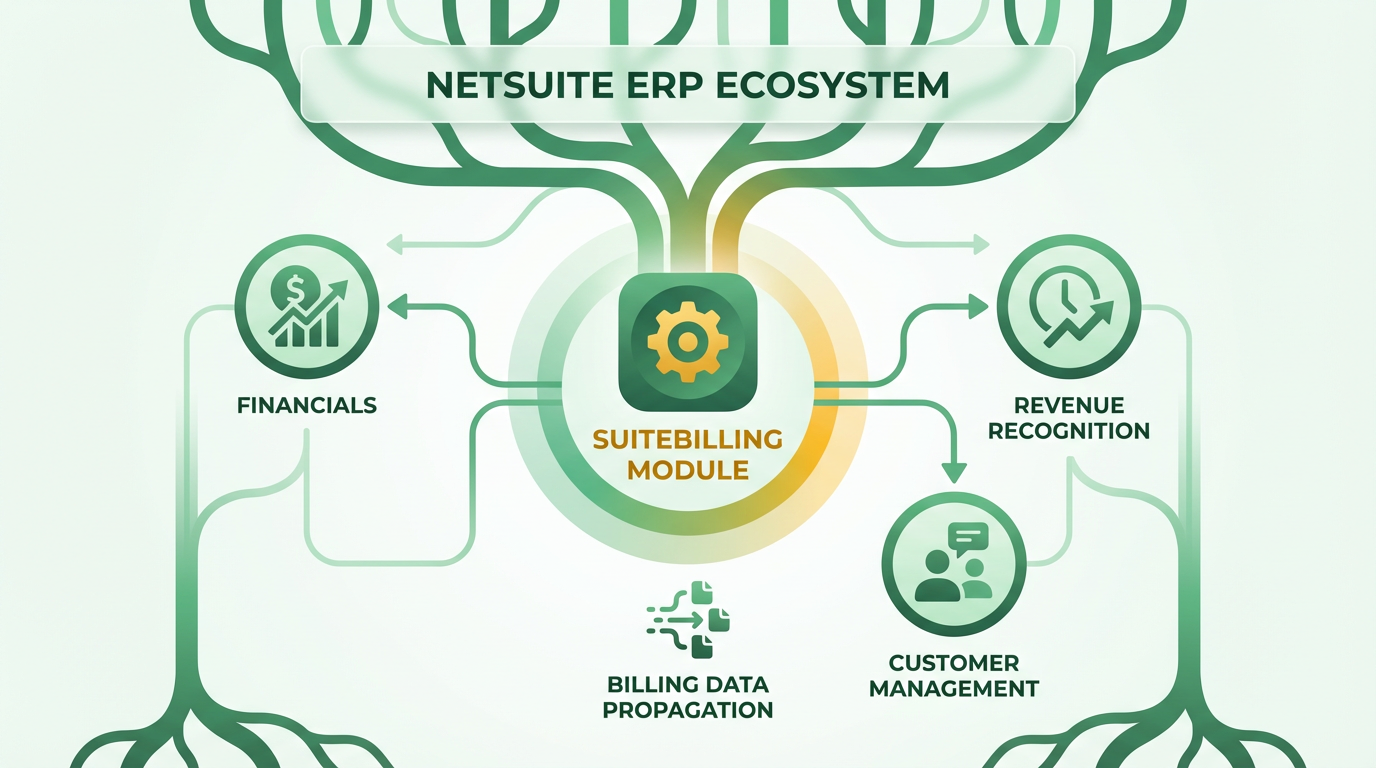
Another core feature is its integration with Oracle NetSuite’s ERP and accounting systems. This ensures that billing data flows seamlessly into financial reporting, inventory management, and customer relationship management (CRM) modules. For instance, a business can automatically update customer payment status in the CRM while adjusting inventory levels based on usage-based charges. However, customization of these integrations often requires technical expertise, as the system relies on Oracle’s native APIs rather than third-party tools. Building on concepts from the Feature-by-Feature Comparison section, SuiteBilling’s native integration with Oracle’s ERP systems ensures seamless data flow, contrasting with third-party tools that may require additional configuration.
Pricing and Total Cost of Ownership
Oracle NetSuite SuiteBilling operates on an enterprise subscription model, with pricing typically tied to the number of users, module licenses, and required customizations. While Oracle does not publish exact figures, industry benchmarks suggest costs can range from $5,000 to $50,000 per month, depending on business size and complexity. Additional expenses include implementation fees, which can exceed $50,000 for full deployment, and ongoing maintenance charges for system updates. As mentioned in the Pricing and Total Cost of Ownership section, businesses must account for implementation fees and training costs when evaluating SuiteBilling’s overall budget impact.
Hidden costs often arise from customization and training. For example, businesses may need to invest in third-party developers to tailor billing workflows or integrate with external systems like payment gateways. Training programs for staff, while included in some packages, may require extra resources for role-specific modules. These factors contribute to a higher total cost of ownership compared to standalone billing tools, making SuiteBilling more suitable for organizations already invested in the Oracle ecosystem.
Integration and Support Structure
SuiteBilling’s integration capabilities are tightly coupled with Oracle NetSuite’s ERP suite, enabling real-time data synchronization across modules. For example, sales teams can access up-to-date revenue metrics in the CRM, while finance departments reconcile invoices directly from the accounting system. The platform provides APIs for external systems, though documentation is limited to Oracle’s official resources, requiring developers to rely on internal knowledge or Oracle’s support team for troubleshooting. Oracle offers specialized integration support, including dedicated resources for API-related challenges and post-implementation reviews to ensure optimal performance. Response times for critical issues are typically prioritized, though resolution speed depends on the complexity of the problem. For instance, a simple billing configuration error might be resolved within hours, while a system-wide integration issue could take several days. Oracle also provides training resources, including on-demand webinars and in-person workshops, to help teams maximize the platform’s capabilities.
User Experience and Self-Service Portal
The SuiteBilling interface is designed for users familiar with NetSuite’s ecosystem, featuring a dashboard that consolidates billing data, payment histories, and revenue forecasts. Customization options allow businesses to brand the self-service portal with their logo and color scheme, enhancing customer trust. However, the learning curve for new users can be steep, as the system lacks intuitive drag-and-drop tools for configuring workflows. Building on concepts from the Blixo AP Automation Overview section, SuiteBilling’s self-service portal offers similar functionalities but with a focus on Oracle’s ecosystem integration.
Customers accessing the self-service portal can submit support tickets, download invoices, and track payment statuses in real time. For example, a recurring billing client can adjust their payment method or pause services through the portal without contacting the accounts team. While this reduces administrative overhead, advanced features like custom reporting require access to the admin console, which remains restricted to internal staff.
| Feature | SuiteBilling | Typical AP Automation Tools |
|---|---|---|
| Revenue Recognition Compliance | Built-in support for ASC 606/IFRS 15 | Often requires add-ons |
| Integration with ERP Systems | Native, real-time sync with Oracle NetSuite | Limited to API-based third-party tools |
| Self-Service Portal | Fully customizable for customers | Basic access to invoices only |
| Pricing Model | Enterprise subscription with variable costs | Flat-rate or per-user pricing |
In summary, Oracle NetSuite SuiteBilling excels in environments where deep integration with Oracle’s ERP suite is critical. Its pricing reflects this specialization, with higher upfront costs offset by streamlined financial operations. However, businesses without existing Oracle investments may find its complexity and expenses challenging to justify.
Feature-by-Feature Comparison
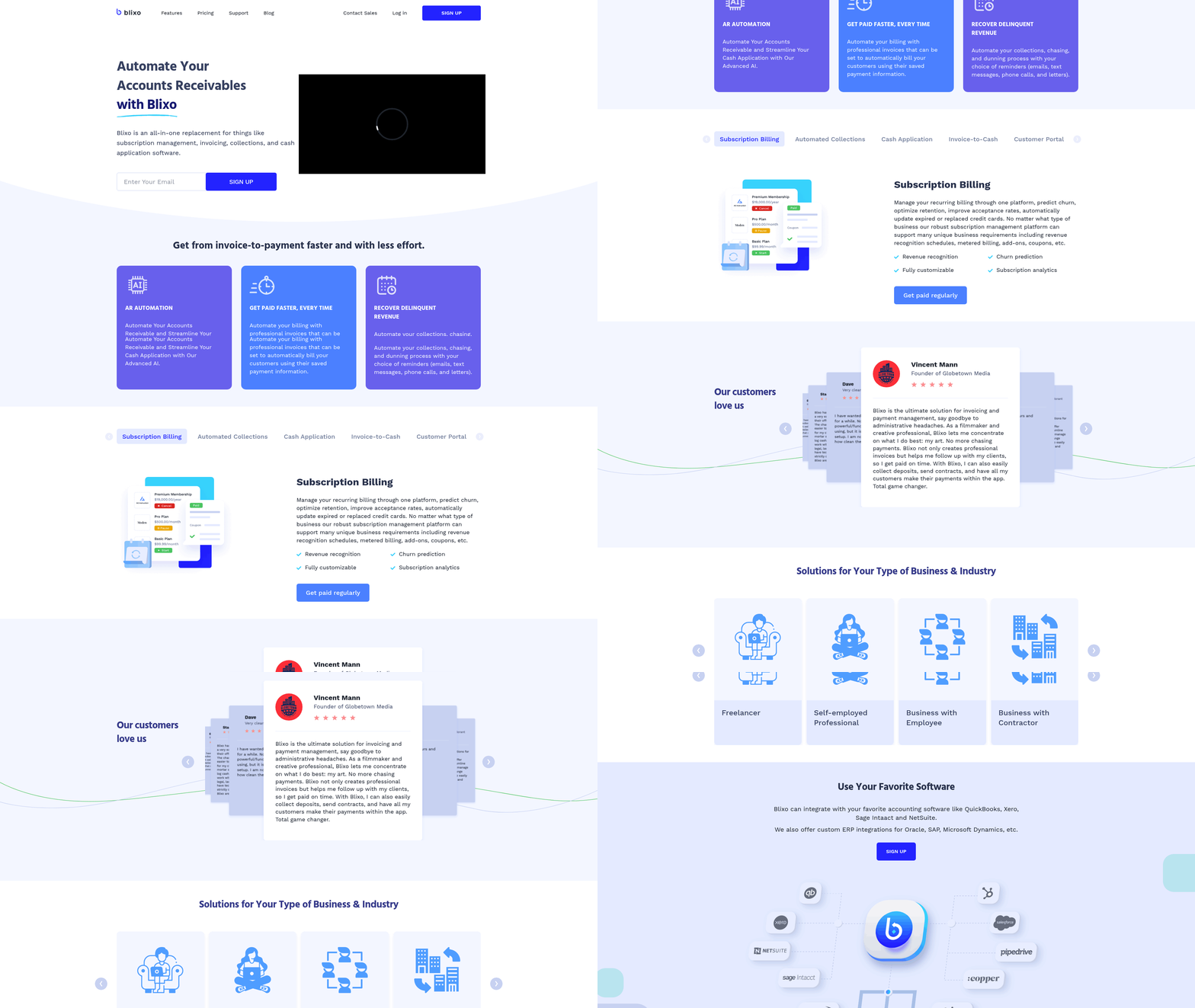
Blixo and Oracle NetSuite SuiteBilling both offer automated invoicing, but their approaches differ in flexibility and integration depth. Blixo streamlines invoice generation with customizable templates and supports recurring billing for subscription-based models. As mentioned in the Blixo AP Automation Overview section, this simplicity aligns with its focus on unifying AP workflows for midsize businesses. Oracle integrates invoicing directly into its ERP suite, allowing synchronized data flow between billing and financial reporting, a feature expanded on in the Oracle NetSuite SuiteBilling Overview section.
| Feature | Blixo | Oracle NetSuite SuiteBilling |
|---|---|---|
| Automated Invoicing | Customizable templates, batch processing | ERP-integrated invoicing, real-time updates |
| Recurring Billing | Predefined schedules, adjustable intervals | Tiered pricing models, multi-currency support |
| Customization | User-friendly interface for edits | Requires configuration via admin tools |
Blixo’s recurring billing is ideal for small-to-midsize businesses needing quick setup, while Oracle suits enterprises requiring multi-tier pricing and global tax compliance. For example, a SaaS startup using Blixo can generate monthly invoices for clients in minutes, whereas Oracle might better handle a multinational retailer’s complex billing cycles, as discussed in the Pricing and Total Cost of Ownership section.
Collections automation and cash application vary significantly between the platforms. Blixo focuses on automated payment reminders and instant reconciliation for small teams, while Oracle provides advanced tools for large-scale operations. Building on concepts from the AP Automation Overview section, Blixo’s approach emphasizes speed and accessibility, whereas Oracle’s cash application features reflect its broader ERP capabilities.
| Feature | Blixo | Oracle NetSuite SuiteBilling |
|---|---|---|
| Automated Collections | Email/SMS reminders, late fee tracking | Predictive analytics for delinquency risk |
| Cash Application | Manual matching for small volumes | AI-driven reconciliation for high-volume transactions |
| Reconciliation | Basic reporting dashboards | Full audit trails with ERP linkage |
Subscription billing features reflect each platform’s target audience. Blixo emphasizes simplicity for recurring revenue models, while Oracle offers enterprise-grade scalability. The Implementation and Onboarding section highlights how these differences affect deployment timelines, with Blixo enabling faster setup for smaller teams.
| Feature | Blixo | Oracle NetSuite SuiteBilling |
|---|---|---|
| Subscription Billing | Tiered pricing plans, prorated charges | Customizable billing rules, usage-based invoicing |
| Metered Billing | Limited usage tracking | Granular metering with real-time analytics |
| Customer Self-Service | Portal for plan upgrades/downgrades | Extensible portals with API-driven customization |
Integration depth matters for businesses using multiple tools. Blixo provides pre-built connectors for platforms like QuickBooks and Stripe, while Oracle’s API is embedded into its broader ERP ecosystem. The Pricing and Total Cost of Ownership section explains how these integration options influence long-term costs for different business sizes.
| Feature | Blixo | Oracle NetSuite SuiteBilling |
|---|---|---|
| Pre-Built Integrations | 50+ apps (e.g., Shopify, Xero) | 150+ ERP-native integrations |
| API Capabilities | REST API for custom workflows | Full-suite API for end-to-end automation |
| Third-Party Support | Community forums for troubleshooting | Dedicated enterprise support teams |
User experience varies based on team size and technical expertise. Blixo prioritizes intuitive navigation and drag-and-drop customization, while Oracle focuses on configurability for IT teams. The Implementation and Onboarding section notes that Oracle’s steeper learning curve often requires dedicated training, unlike Blixo’s self-guided setup.
| Feature | Blixo | Oracle NetSuite SuiteBilling |
|---|---|---|
| Self-Service Portal | One-click invoice generation | Role-based dashboards for users |
| Customization | Limited to templates and fields | Full UI/UX redesign via scripting |
| Training Resources | Video tutorials and chat support | On-demand webinars and documentation |
Pricing and Total Cost of Ownership
When comparing Blixo and Oracle NetSuite SuiteBilling, pricing and total cost of ownership (TCO) depend heavily on your business size, AP automation needs, and long-term goals. Both platforms use subscription-based models but differ in flexibility, upfront costs, and hidden fees. Below is a breakdown of their pricing structures and TCO factors.
How do Blixo and Oracle NetSuite SuiteBilling price their AP automation solutions?
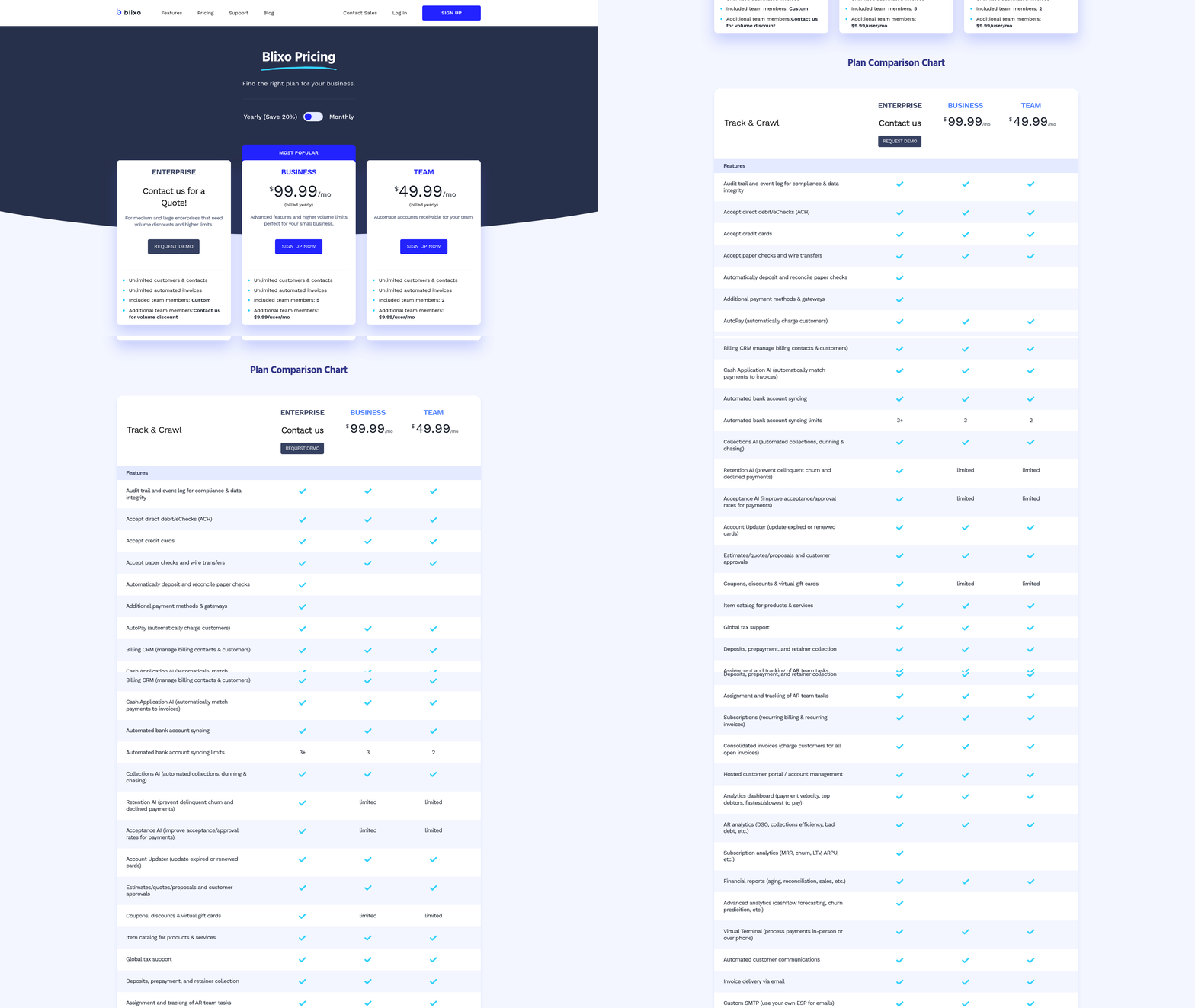
Blixo uses a subscription-based pricing model with tiered plans (e.g., Basic, Pro, Enterprise), often including a fixed monthly or annual fee. As mentioned in the Blixo AP Automation Overview section, this approach aligns with its unified platform design. Oracle NetSuite SuiteBilling, by contrast, typically bundles AP automation into its broader ERP platform, requiring businesses to purchase a suite license. As discussed in the Oracle NetSuite SuiteBilling Overview section, this model integrates billing and ERP functions but adds complexity to pricing.
| Pricing Model | Blixo | Oracle NetSuite SuiteBilling |
|---|---|---|
| Subscription | Monthly/annual tiers | Annual ERP suite license |
| Usage-Based Fees | Optional for high-volume tasks | Included in module-based pricing |
| Customization Costs | Low to moderate | High (requires developer resources) |
Blixo’s pricing is simpler and more predictable, while Oracle’s approach requires careful budgeting for add-ons.
What are the implementation, maintenance, and support costs?
Implementation costs vary significantly. Building on concepts from the Implementation and Onboarding section, Blixo often offers self-service onboarding or guided setup with minimal fees, making it ideal for small to midsize businesses. Oracle, as an enterprise solution, demands a lengthy implementation process involving consultants, data migration, and system integration, which can add 20-50% to the base license cost.
Maintenance and support also differ. Blixo typically includes 24/7 support and automatic updates in its subscription. Oracle charges extra for premium support and may require ongoing fees for system upgrades or troubleshooting.
| Cost Type | Blixo | Oracle NetSuite SuiteBilling |
|---|---|---|
| Implementation | Low to moderate | High (consultant-driven) |
| Maintenance | Included in subscription | Separate annual maintenance fee |
| Support | Included (24/7) | Tiered support (basic plan included) |
Oracle’s costs escalate quickly for businesses requiring deep customization, while Blixo’s predictable fees suit organizations with stable AP workflows.
What hidden costs should you watch for?
Both platforms may hide fees in their contracts. Blixo’s hidden costs are minimal but could include overage charges for exceeding data limits or API call thresholds. Oracle, however, often includes stealth fees for user training, integration with external systems, and data storage beyond the licensed capacity.
For example, Oracle may charge $500-$1,000 per user for onboarding training and $10-$20 per month per user for cloud storage beyond the plan’s limit. These costs can add thousands annually for large teams. Blixo’s transparency makes budgeting easier, but businesses with unpredictable AP volumes should review usage caps in their contract.
How do cost savings and ROI compare?
Building on concepts from the Recommendation: Which Platform Fits Your Needs section, automation reduces manual invoice processing time by 50-70%, but ROI timelines vary. Blixo users often see 6-12 months to break even due to lower upfront costs and faster deployment. Oracle’s ROI may take 18-24 months, as its higher implementation and maintenance costs require more time to offset.
Consider a business processing 5,000 invoices annually. Blixo might save $25,000 in labor costs and $5,000 in error-related expenses within a year. Oracle could save $50,000 in the same period but may require a $30,000 upfront investment in training and customization.
For businesses prioritizing quick wins, Blixo’s model is advantageous. For enterprises needing scalable, integrated solutions, Oracle’s long-term value may justify the higher costs.
What about hidden costs and efficiency gains?
Efficiency gains from automation are similar: both platforms reduce processing time, errors, and late fees. However, hidden costs like training and integration can erode savings for Oracle users. Blixo’s low implementation barriers make it easier to achieve efficiency quickly, while Oracle’s complexity may delay benefits.
To avoid surprises, businesses should:
- Request a detailed cost breakdown from vendors, including implementation, support, and usage overages.
- Factor in team training costs-Oracle often requires dedicated onboarding.
- Plan for scalability-choose a platform that aligns with future growth without costly upgrades.
By understanding these factors, businesses can make informed decisions that balance upfront costs, ongoing expenses, and long-term value.
Implementation and Onboarding
Implementation timelines and complexity vary significantly between Blixo and Oracle NetSuite SuiteBilling. Blixo’s implementation typically spans 2–4 weeks, focusing on core AP automation workflows, while Oracle’s process often requires 3–6 months due to broader ERP integration needs. As mentioned in the Feature-by-Feature Comparison section, these differences reflect their distinct design philosophies-Blixo’s modular approach versus Oracle’s enterprise-scale customization demands.
How Do Implementation Timelines Compare?
| Feature | Blixo | Oracle NetSuite SuiteBilling |
|---|---|---|
| Average Timeline | 2–4 weeks | 3–6 months |
| Team Requirements | 2–5 internal staff | 10+ team members + consultants |
| System Complexity | Low to medium | High |
Blixo prioritizes rapid deployment by focusing on invoice processing, approval routing, and payment automation. Oracle requires extensive configuration to align with existing ERP systems like NetSuite, often involving data mapping, workflow customization, and compliance checks. For example, a mid-sized company adopting Blixo might configure 80% of its AP processes in under a month, while Oracle’s integration with legacy systems could delay activation by several weeks.
What Does the Onboarding Process Entail?
Oracle’s onboarding includes consultative workshops, system integration testing, and role-based training, often delivered by certified partners. Blixo offers guided setup wizards, on-demand training modules, and real-time support. Building on concepts from the Blixo AP Automation Overview section, Blixo’s onboarding team typically deploys pre-built templates for invoice categorization and vendor databases, reducing manual setup.
Setup and Training
| Aspect | Blixo | Oracle NetSuite SuiteBilling |
|---|---|---|
| Training Format | Interactive webinars + self-paced guides | In-person sessions + custom documentation |
| Support Availability | 24/7 chat and email | Business hours with dedicated account managers |
| Customization Scope | Drag-and-drop workflow builder | API-driven configuration with developer support |
Blixo’s onboarding team typically deploys pre-built templates for invoice categorization and vendor databases, reducing manual setup. Oracle’s process often involves 50+ hours of training to cover modules like financial reporting, inventory management, and SuiteBilling-specific features. A Blixo user shared, “We had our team trained in three days using their video library,” while an Oracle client noted, “Training sessions were spread over six weeks due to the product’s depth.”.
How Do Data Migration and Customization Differ?
Blixo simplifies data migration with automated import tools for CSV, PDF, and OCR-extracted invoices. Oracle requires custom API scripts or third-party migration tools to transfer data from legacy systems.
Customization and Integration
| Requirement | Blixo | Oracle NetSuite SuiteBilling |
|---|---|---|
| Integration Method | Pre-built connectors (QuickBooks, SAP) | Custom API or middleware |
| Configuration Time | 1–2 weeks | 4–8 weeks |
| User Interface | No-code workflow designer | Code-based customization |
For a retail business using QuickBooks, Blixo’s integration might take 3 days with minimal IT involvement. Oracle’s SuiteBilling, however, often demands developer resources to align billing cycles, tax rules, and payment terms with NetSuite’s architecture. As highlighted in the Oracle NetSuite SuiteBilling Overview section, this complexity aligns with the platform’s broader ERP focus. One Oracle user on Reddit remarked, “Migrating 10 years of data felt like a part-time job,” highlighting the complexity.
What About Ongoing Support and Maintenance?
Blixo provides automatic updates and proactive monitoring for system performance. Oracle offers scheduled maintenance windows and enterprise SLA-based support.
Post-deployment, Blixo users receive monthly webinars for feature updates, while Oracle clients often rely on quarterly reviews with their implementation partner. A G2 reviewer noted Oracle’s “predictable but rigid” support model, contrasting with Blixo’s agile troubleshooting approach. Both platforms charge extra for premium support, but Blixo’s tiered plans include 24/7 access as a standard feature.
In summary, Blixo’s streamlined implementation suits businesses seeking rapid AP automation, while Oracle’s strong framework caters to enterprises requiring deep ERP integration. The choice hinges on team size, technical expertise, and the urgency of deployment.
Real-World Case Studies
Businesses across industries have adopted AP automation solutions like Blixo and Oracle NetSuite SuiteBilling to streamline operations. These case studies highlight how companies addressed pain points, achieved cost savings, and manage implementation challenges.
How Blixo Reduced Processing Costs for a Manufacturing Company
A mid-sized manufacturing firm faced delays in accounts payable due to manual invoice handling. As mentioned in the Blixo AP Automation Overview section, Blixo’s AI-driven invoice capture eliminated the need for manual data entry, reducing processing time by 40%. The company saved $120,000 annually by cutting labor hours and minimizing errors. A key challenge was integrating Blixo with their legacy ERP system, which required custom API development. Building on concepts from the Implementation and Onboarding section, the solution involved working with Blixo’s support team to map data fields, ensuring seamless synchronization.
For example, the firm’s AP team previously spent 20 hours weekly reconciling invoices. Post-automation, this dropped to 8 hours, freeing staff for strategic tasks. The team also adopted a phased rollout, starting with vendor invoices before expanding to purchase orders. This approach minimized disruption and allowed for quick adjustments.
Oracle NetSuite SuiteBilling Streamlines AP for a Healthcare Provider
A regional healthcare network struggled with managing high-volume, multi-format invoices from suppliers and vendors. Oracle NetSuite SuiteBilling automated invoice routing and approval workflows, cutting payment cycle time by 35%. As detailed in the Oracle NetSuite SuiteBilling Overview section, the system’s integration with existing financial software reduced reconciliation errors by 60%. A major hurdle was training staff on Oracle’s complex interface, but the provider used Oracle’s onboarding resources to create tailored training modules.
The healthcare provider also benefited from SuiteBilling’s compliance features, which ensured adherence to strict regulatory standards. For instance, automated audit trails simplified audits, saving 150+ hours annually. However, the initial setup required reconfiguring workflows to align with Oracle’s structure, a process that took three months. Best practices included dedicating a project manager to oversee implementation and conducting regular team reviews to address bottlenecks.
Comparing Outcomes: Blixo vs. Oracle NetSuite SuiteBilling
| Feature | Blixo | Oracle NetSuite SuiteBilling |
|---|---|---|
| Cost Savings (Annual) | $100,000–$150,000 | $200,000+ |
| Processing Time Saved | 30–40% reduction | 30–35% reduction |
| Complexity of Setup | Low to moderate | High |
| Industry Fit | Mid-sized businesses | Large enterprises with complex needs |
Both solutions delivered efficiency gains, but their suitability depends on business size and technical capacity. Blixo’s straightforward interface appeals to companies seeking quick wins, while Oracle’s strong features cater to organizations with complex compliance and scalability demands.
Lessons From Industry-Specific Deployments
Industries like manufacturing and healthcare highlight distinct use cases. For example, a retail chain using Blixo automated vendor payments during peak holiday seasons, avoiding manual overload. Conversely, a nonprofit using Oracle NetSuite SuiteBilling consolidated multi-state vendor invoices into a single SaaS solution, improving transparency.
Key takeaways include:
- Start Small: Pilot automation with high-volume, repetitive tasks to demonstrate ROI.
- Customize Workflows: Neither solution is one-size-fits-all; tailor configurations to existing processes.
- Train Continuously: Regular training prevents user resistance, especially with complex systems like Oracle.
By analyzing these examples, businesses can better assess which platform aligns with their operational goals and resource capabilities.
Recommendation: Which Platform Fits Your Needs
When choosing between Blixo and Oracle NetSuite SuiteBilling, your decision hinges on business size, integration needs, and automation complexity. Blixo shines for small to mid-sized businesses seeking streamlined, cost-effective AP automation, while Oracle NetSuite SuiteBilling suits large enterprises requiring deep integration with existing ERP systems. Below, we break down the critical factors to help you decide.
What Business Size Drives Your Choice?
Small to mid-sized companies (fewer than 500 employees) often prefer Blixo for its simplicity and affordability. Its user-friendly interface reduces the learning curve, and lower upfront costs make it ideal for teams without dedicated IT resources. Oracle NetSuite SuiteBilling, by contrast, demands more technical expertise and infrastructure to deploy, making it better suited for organizations with 1,000+ employees and complex financial workflows.
For example, a small manufacturing firm might automate 80% of its invoice processing with Blixo in three months, while a multinational retailer would need Oracle’s scalability to handle thousands of daily transactions across regions. As mentioned in the Implementation and Onboarding section, Blixo’s shorter deployment timeline aligns with its focus on rapid adoption for smaller teams.
How Does Industry Impact Platform Selection?
Industries with rigid compliance requirements-like healthcare or finance-may lean toward Oracle NetSuite SuiteBilling. Its strong audit trails and customization options align with regulatory demands. Blixo, while compliant, offers fewer tools for highly regulated environments. Building on concepts from the Why AP Automation Matters section, Oracle’s advanced reporting capabilities are critical for enterprises facing frequent audits.
Technology startups or e-commerce businesses, which prioritize speed and agility, often find Blixo’s automated reconciliation and supplier portal sufficient. Oracle’s platform, however, excels in industries like automotive or retail, where supply chains span multiple ERP systems and require advanced analytics.
What Integration Needs Should You Prioritize?
Integration complexity is a key differentiator. Oracle NetSuite SuiteBilling embeds seamlessly with Oracle’s broader ERP ecosystem, enabling real-time financial reporting and procurement synchronization. If your business already uses Oracle Cloud Infrastructure, this collaboration reduces friction. As discussed in the Feature-by-Feature Comparison section, Oracle’s native integrations contrast sharply with Blixo’s third-party API approach.
Blixo integrates with third-party tools like QuickBooks or Xero via APIs but lacks the depth of Oracle’s native connections. For companies relying on non-Oracle systems, Blixo’s modular approach avoids overkill, whereas Oracle’s platform may feel excessive if you don’t need full ERP integration.
| Feature | Blixo | Oracle NetSuite SuiteBilling |
|---|---|---|
| Best For | Small to mid-sized businesses | Large enterprises |
| Integration Depth | Third-party APIs | Native Oracle ERP sync |
| Compliance Tools | Basic audit trails | Advanced regulatory reporting |
| Cost Structure | Subscription-based | Custom enterprise pricing |
| Deployment Time | Weeks | Months (requires IT support) |
Next Steps: Implementing AP Automation
- Audit Your Current Workflow: Map invoice approval cycles, payment terms, and error rates to identify automation pain points.
- Set Clear Goals: Define whether you want to reduce processing time, cut manual data entry, or improve supplier relationships.
- Engage Stakeholders: Involve finance teams and IT to align on platform features and training needs.
- Request Demos: Use trial periods to test Blixo’s ease of use or Oracle’s scalability with your real-world data.
Final Thoughts: Why AP Automation Matters
Automating accounts payable isn’t just about efficiency-it’s a strategic move to future-proof your finances. Both platforms eliminate human errors in invoice processing, which the AICPA estimates cost businesses 4.5% of annual revenue globally. By choosing the right tool, you free up staff for high-value tasks, reduce payment delays, and strengthen vendor partnerships. Whether you pick Blixo for agility or Oracle for enterprise-grade control, automation ensures your financial operations keep pace with modern business demands.
Frequently Asked Questions
1. What are the main benefits of AP automation?
AP automation reduces late fees by up to $20,000 annually, cuts data-entry errors by 80%, and saves 10+ hours weekly for mid-sized companies. It streamlines workflows, prevents payment disputes, and reallocates 30%+ of staff time to strategic tasks.
2. How does AP automation reduce data-entry errors?
OCR technology in AP automation reduces errors by 80%, preventing costly invoice corrections. Automating 1,000 monthly invoices could eliminate hundreds of mistakes in data entry, as seen in solutions like Blixo’s integrated workflows.
3. How much time can AP automation save for a mid-sized business?
AP automation saves over 10 hours weekly for mid-sized companies processing 500 monthly invoices. It streamlines invoice verification and approval, eliminating manual data entry and reconciliation delays.
4. What are the hidden costs of manual AP processes?
Manual AP processes risk $20,000+ in annual late fees, 15-20% more payment disputes, and 10+ hours weekly in administrative work. These costs stem from errors, delays, and inefficient workflows in data entry and approvals.
5. How does OCR technology improve AP automation?
OCR technology extracts invoice data accurately, reducing entry errors by 80%. Blixo uses OCR to unify invoicing, minimizing mistakes in transposed numbers or missing documents that cause disputes and late fees.
6. How does AP automation improve staff productivity?
AP automation frees staff from repetitive tasks, redirecting 30%+ of their time to strategic work. By automating invoice processing, employees focus on analysis and process improvements instead of manual data entry.
7. How does AP automation reduce payment disputes?
AP automation reduces payment disputes by 15-20% through accurate data capture and document tracking. Automated alerts and reminders ensure timely payments, minimizing errors and disputes caused by missing paperwork.