

Automated Invoicing Beats Manual Cloud Bookkeeping for Recurring Revenue Teams

Key Takeaways
- More than 44% of U.S. B2B invoices were overdue by 2025. Small businesses often bridge that gap with credit cards, which is an expensive way to cover a timing problem.
- Automated invoicing cuts processing time roughly in half, which pulls cash in faster for recurring-revenue teams.
- SaaS teams running automated dunning workflows recover around 30% more failed payments, so revenue gets more predictable.
- Automation kills the two usual culprits behind late cash: manual errors and disconnected systems.
- The real payoff sits in cash application, where invoices get matched to actual payments. That step, not sending the bill, is where most delay hides.
- QuickBooks Online handles recurring billing well enough for most small teams and confirms payments faster than a spreadsheet ever will.
Related Video
Watch: How businesses automate invoicing & set up recurring payments in 2026 | QuickBooks business tips by Intuit QuickBooks
Why the invoice isn’t the bottleneck
Sending bills faster is the part everyone fixates on. It’s the wrong part.
The step that actually decides how fast money hits your account is cash application, where a payment gets matched to the invoice it belongs to and the funds get confirmed. For recurring-revenue teams, this is the quiet chokepoint. You can automate the send, automate the reminder, and still watch cash sit in limbo because nobody’s matched it to anything yet.
Manual invoicing feeds that limbo. Typos, late payments, systems that don’t talk to each other, they all delay the moment revenue becomes usable cash. Automation goes straight at those.
Where the cash actually gets stuck
When payments run late, working capital gets tight, and tight working capital is what pushes small businesses toward short-term financing they didn’t need. Automated systems shorten that cycle by sending and matching without anyone touching it.
A SaaS team on recurring billing software can set up automated retries and dunning to catch failed transactions before they turn into churn. That’s the direct line to predictable cash flow, and predictable cash flow is what lets you scale without flinching.
The numbers on manual work
Manual processes introduce errors and bottlenecks. Two figures worth sitting with:
- 63% of finance teams spend over 10 hours a week processing invoices by hand.
- A single invoice costs $12.88 to process manually** versus **$2.78 automated.
Standardized workflows close that gap. AI-driven OCR in tools like Salesforce Revenue Cloud cuts data-entry errors by around 80%, and real-time dashboards show you payment status without a hunt. For healthcare providers or SaaS companies, that means fewer disputes and faster reconciliation.
| Challenge | Manual Invoicing | Automated Invoicing |
|---|---|---|
| Error Rate | 6–8% due to human mistakes | <1% with AI validation |
| Processing Time | 9.2 days (avg) | 3.1 days (avg) |
| Cash Flow Visibility | Reactive, spreadsheet-based | Real-time dashboards |
Who gets the most out of it
Recurring-revenue teams, mostly. SaaS, subscription services, professional services. A marketing agency running Blixo automates monthly client invoicing and tracks payments in one dashboard, cutting admin overhead by about 70% and freeing people to do actual work. QuickBooks Online does the smaller-business version of this, automating reminders and retries so cash gaps don’t sneak up.
The point isn’t that invoices go out. It’s that they get processed, paid, and applied without friction. For a business living on steady revenue, that’s not just tidier bookkeeping, it’s a financial option you can actually count on.
Automated invoicing vs manual cloud bookkeeping
For subscription income, cash application decides how quickly expected revenue turns into money you can spend. QuickBooks Online recurring payments speeds this up by tying payment tracking to invoice records, so the delays baked into manual methods mostly disappear. Manual bookkeeping does the opposite: someone verifies each payment by hand, which invites both mistakes and waiting.
How automation matches payments to invoices
Automated systems align payments to invoices as they land. QuickBooks connects each transaction to its related invoice directly, so there’s no manual check in between. That drops the lag between receiving a payment and being able to use it from days to near-instant. Research on algorithmic matching shows these workflows also catch inconsistencies with high precision. Manual bookkeeping leans on someone eyeballing a spreadsheet, which is exactly where things slip.
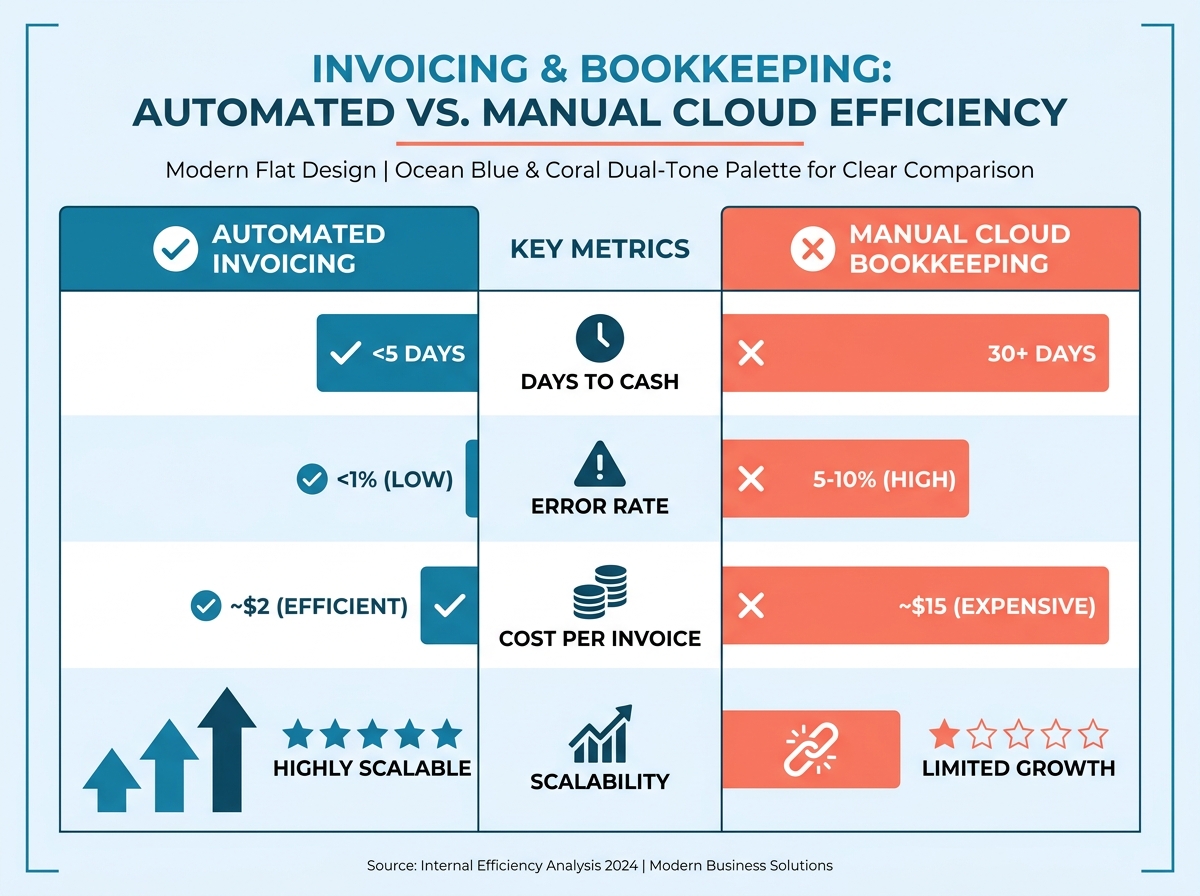
Manual systems look cheaper up front. The hidden costs show up later. Payment delays turn unpredictable, which wrecks financial planning. Records don’t integrate with modern tools, so teams stitch together fragmented processes. And a misallocated payment can push cash availability back by days, which is a real problem when you’re trying to grow.
Picking a system for recurring revenue
Automation gives recurring-revenue teams a genuine edge. QuickBooks lets you set up invoices with automated follow-ups so most payments arrive inside a tight window. That consistency is what makes forecasting accurate instead of hopeful. Manual systems are flexible, sure, but they don’t scale. A growing pile of invoices handled by hand just gets slower and more error-prone. Automated tools absorb higher volume without your costs climbing at the same rate.
Cash application sits at the center of subscription revenue. Automated tools make it reliable and precise; manual methods stay exposed to bottlenecks and mistakes. If agility and growth are the goal, this comes down to keeping the liquidity that keeps you moving.
Tool options worth comparing
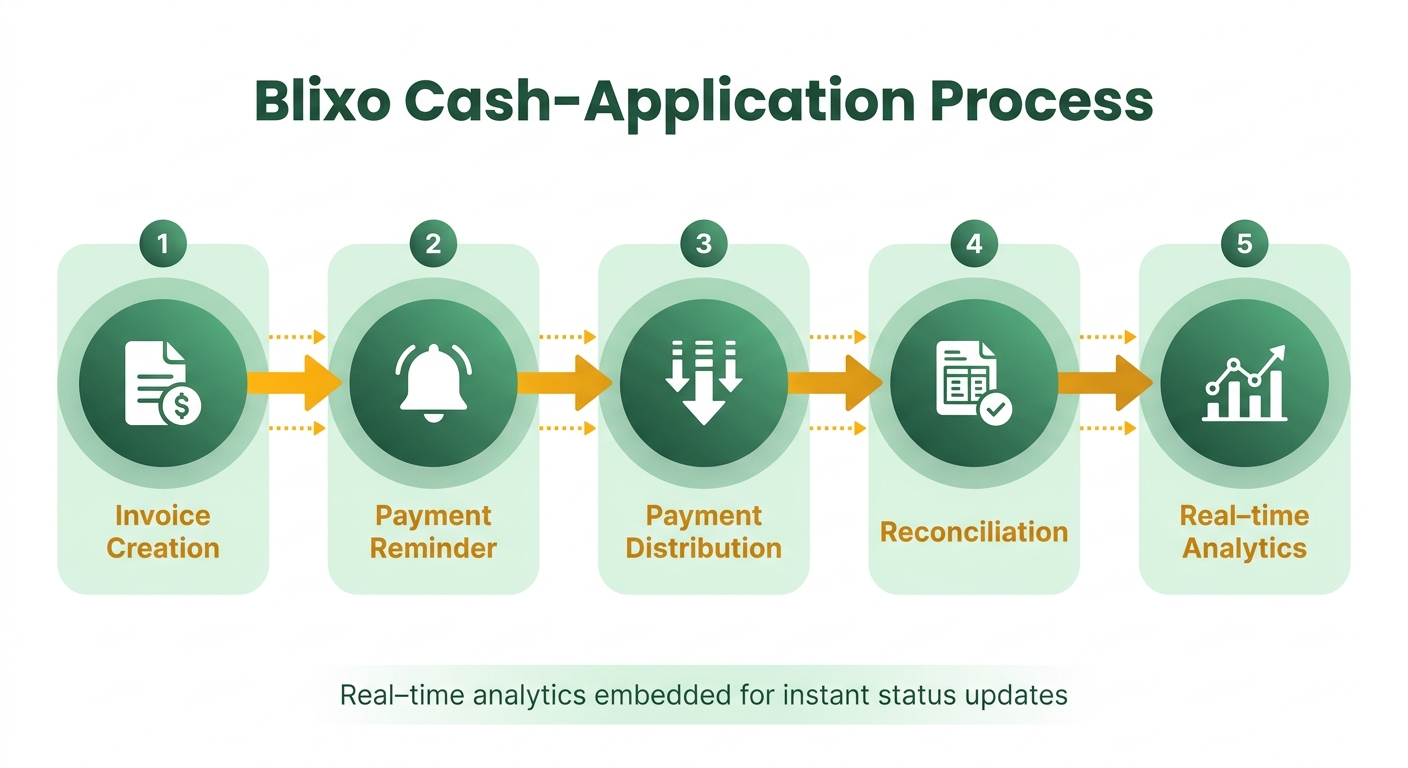
Automated invoicing tools handle creation, reminders, and payment distribution, which removes the manual reconciliation lag that eats into predictable cash flow. Beyond QuickBooks, Chargebee and Schematic bring subscription-specific features, each with its own strengths. The right pick depends on integration flexibility, pricing model, and how much you plan to scale.
QuickBooks, Chargebee, and Schematic side by side
| Feature | QuickBooks Online | Chargebee | Schematic |
|---|---|---|---|
| Recurring Setup | Customizable schedules, automated reminders | Fully automated billing cycles | Stripe-integrated templates |
| Payment Methods | Credit cards, ACH, PayPal | Any payment gateway | Stripe, ACH, virtual cards |
| Integration | QuickBooks Desktop, Xero | Salesforce, NetSuite, Shopify | Stripe, custom APIs |
| Customization | Custom invoice templates | Tiered/usage-based pricing | Dynamic pricing models |
| Scalability | Small to mid-sized businesses | Enterprise subscriptions | SaaS/digital product teams |
QuickBooks Online is the simple choice if you’re already in its accounting ecosystem. Set up recurring invoices with automated delivery and reminders, and late fees and missed payments drop off. A consulting firm using QuickBooks recurring payments got a 30% improvement in cash flow predictability by lining up payment schedules with project milestones.
Integration and customization
These tools differ a lot in how they connect to everything else. QuickBooks Online plugs cleanly into its own accounting platform, which makes it easy for teams already on QuickBooks Desktop or Xero. Chargebee, built for SaaS, syncs with CRMs like Salesforce and ERPs like NetSuite for unified customer data. Schematic goes deep on Stripe, handling revenue recognition and tax compliance in one interface.
Customization runs from basic to advanced. QuickBooks gives you invoice templates and payment terms. Chargebee supports complex pricing like usage-based or tiered billing. Schematic automates tax calculations and does multi-currency, which matters for global SaaS.
Pricing and how far each one scales
QuickBooks Online starts at $25/month for Essentials, with higher tiers adding reporting tools. Chargebee uses a tiered model that scales with invoices and subscribers, which fits growing SaaS companies. Schematic charges a flat monthly fee plus Stripe transaction costs, so it’s efficient if you’re heavy on digital payments.
Scale is the other axis. QuickBooks suits small to mid-sized teams with predictable billing. Chargebee handles enterprise automation and fluctuating subscription models. Schematic, API-first by design, is best for technical teams building custom workflows.
The choice comes back to cash application: pick the tool that fits both how you work now and where you’re headed. Simple platforms win on simplicity. Chargebee or Schematic serve better when billing gets complicated. The goal isn’t automation for its own sake, it’s making every invoice turn into fast, reliable cash.
Blixo, and where it actually differs
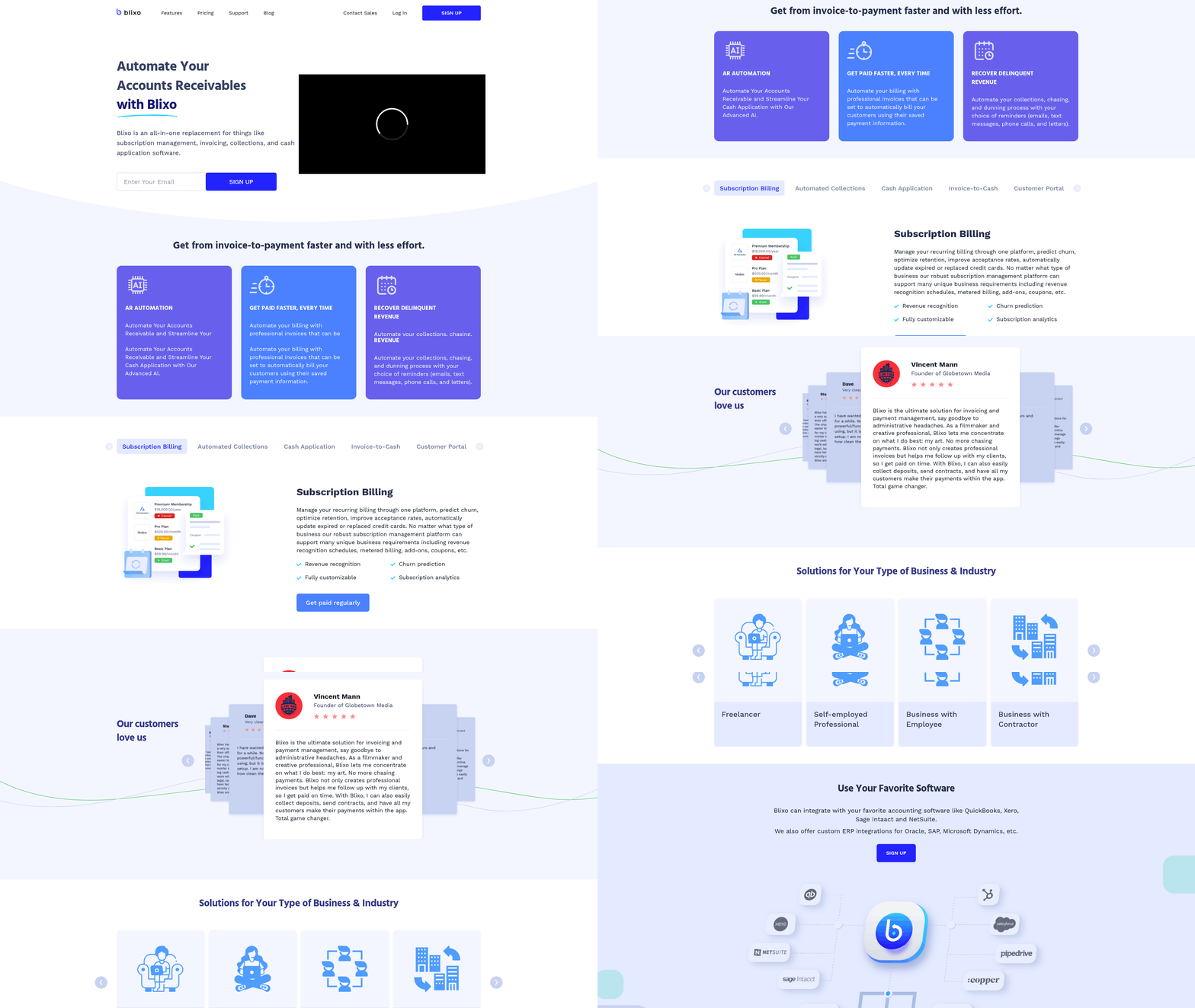
Blixo’s angle is the cash-application step, which most accounting platforms treat as an afterthought. Basic tools automate invoice creation and reminders, then leave reconciliation and payment confirmation prone to delays or manual fixes. Blixo builds real-time analytics into the workflow, so teams watch payment status update as it happens. For high-volume businesses, that’s the difference between financial reporting you trust and reporting you second-guess.
Real-time validation, not human review
The core of it is real-time payment validation and automated reconciliation. Where traditional systems wait for someone to confirm a payment, Blixo uses machine learning to cross-reference incoming transactions with open invoices on the spot. Pay $250 via ACH and the engine finds the right invoice, checks the amount, and updates the ledger without anyone touching it. That kills the payment-limbo window where cash sits unapplied, which is a real headache when you’re counting on predictable inflows.
There’s also predictive modeling that flags discrepancies before they grow. A payment that breaks pattern, say a partial payment on a seasonal subscription, triggers a priority alert so you can sort it out early. That foresight cuts the downstream corrections that get expensive in manual workflows.
How it fits your stack
Blixo’s cash-application strength comes from its integrations. It connects to payment processors like Stripe and banking platforms like Plaid for automatic fund verification. Pair it with an ERP like NetSuite or QuickBooks Desktop and payments get applied and reflected in reports instantly, instead of the manual export-import shuffle traditional setups force on you.
For tiered or usage-based pricing, common in SaaS, the automation adapts. Prorated charges, multi-currency transactions, no back-and-forth adjustments needed. A 2025 case study from a mid-sized SaaS firm reported a 40% drop in days sales outstanding after adopting Blixo, tied directly to faster cash application.
Experience and scale
The dashboard is built around clarity: matched, pending, and unapplied payments, with alerts for discrepancies. That visibility matters when even a 24-hour delay in applying a payment throws off your forecast. Standard software shows similar dashboards, but Blixo’s AI reportedly cuts false positives, the mismatched or wrongly flagged payments, by around 60% according to beta users. Beta feedback, so take it as directional, not gospel.
Pricing scales with transaction volume, which puts it in reach for businesses from $50K to $5M in ARR. As a rough example: a subscription service with 2,000 monthly customers could avoid 15 to 20 hours of manual reconciliation a month, which pencils out to $10K+ in annual labor savings.
Chargebee and Schematic have strong recurring-billing tools. Blixo’s narrower focus on cash application is what makes it the better fit when turning payments into usable cash, fast and accurately, isn’t negotiable.
What this looks like in the field
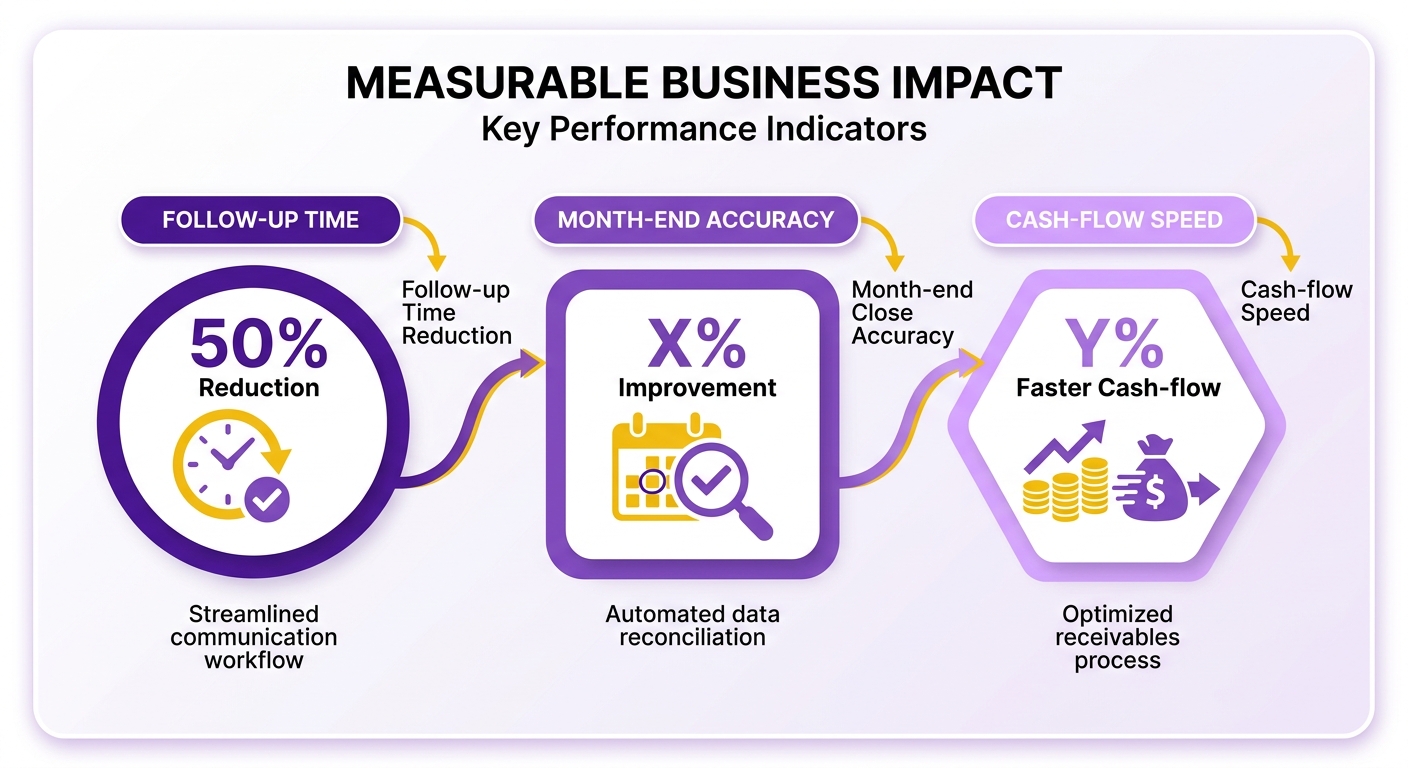
Automated invoicing speeds up cash application by handling invoice creation and payment tracking for you. For recurring-revenue teams, that means faster confirmation of cleared funds and less lag in cash flow. A regional IT services provider automated its process and cut payment follow-up time by 50% while sharpening month-end close accuracy. Aligning payment schedules with what customers actually prefer also trimmed late fees and helped retention.
The operational savings stack up too. A mid-sized logistics firm cut its admin burden after moving to automated payment workflows, which freed staff for client acquisition. Combine that with real-time reconciliation and payments get applied correctly without anyone stepping in. For teams juggling hundreds of recurring invoices, those savings compound and working capital arrives sooner.
How QuickBooks handles the matching
QuickBooks matches payments to invoices instantly. A boutique design studio dropped hours of manual reconciliation by automating payment categorization. Due-date alerts improved payment adherence, and real-time dashboards surfaced cash flow trends. The system also flags mismatched payments live, a feature that recovered $8,500 in unapplied funds for a retail business last quarter.
It extends to multi-currency and multi-vendor cases too. A U.S.-based e-learning company with international clients uses QuickBooks recurring billing to manage currency swings and tax compliance automatically.
Across industries
A construction firm in Colorado treated cash application as its main bottleneck and automated around it. Before, the team burned significant time resolving payment discrepancies. After, reconciliation dropped to three hours and cash availability improved by seven days. That let them lock in bulk material discounts and cut project costs by 12%.
In the nonprofit world, an educational charity using QuickBooks recurring billing for donor contributions saw a 55% jump in on-time payments. Automated confirmations and instant reporting gave administrators a clearer read on funding, which helped them meet grant obligations on time even through seasonal donor swings.
The usual snags
Most teams hit misapplied payments or delayed reconciliation at some point. QuickBooks handles these with AI-based matching and automated exception reports. A hospitality business improved payment accuracy by 35% by automating vendor payment workflows. That precision matters for recurring revenue, where small errors compound.
QuickBooks covers the foundation well. For complex cases, specialized tools like Blixo add real-time payment validation that can shave reconciliation delays further, per internal benchmarks. For high-volume transactions, layering in that kind of tool keeps things scalable without giving up speed.
Focus on cash application and automation stops being a convenience and starts being leverage. Predictable revenue becomes immediate cash, and growth doesn’t come with a bigger admin team attached.
Setting it up without the potholes
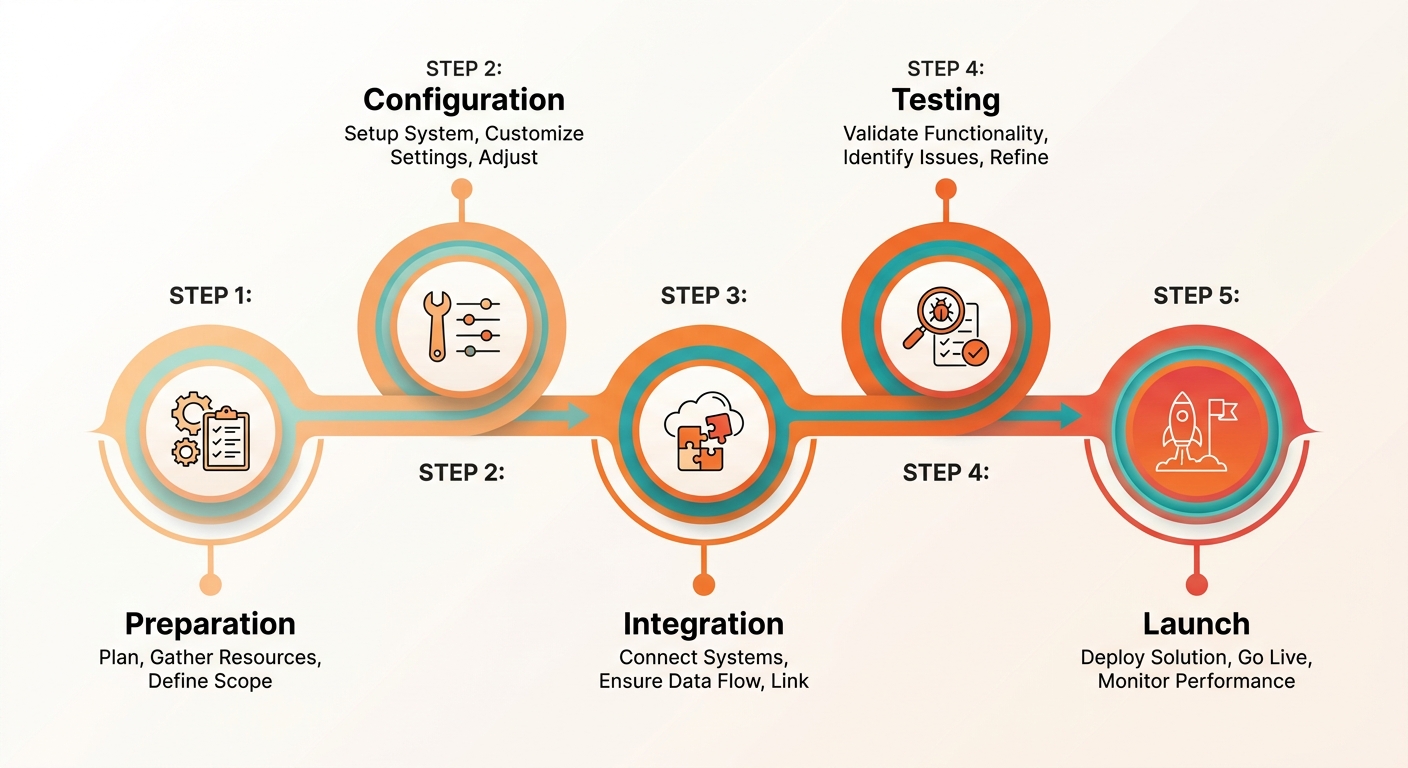
Automated invoicing works when cash application runs clean. For recurring-revenue teams, that step is what turns automation into real cash flow. Here’s how to get there with a platform like QuickBooks, including the reconciliation details that trip people up.
Prep before you touch a tool
Map your current workflow first and find the bottlenecks. Prioritize tools that automate cash application. Standard payment platforms are great at invoice creation and payment tracking, but they’ll still leave you reconciling by hand if you configure them lazily. Three prep steps that pay off:
- Standardize payment terms. Clear due dates and methods (ACH, credit card) cut delays.
- Audit customer data. Accurate contact and billing details prevent failed transactions.
- Set up bank integrations. Link business accounts to the platform for real-time payment visibility.
Configuring QuickBooks for clean matching
QuickBooks automates invoice schedules and reminders out of the box, but its cash-application features need deliberate setup. Start here:
- Turn on recurring invoice templates. Set schedules (monthly, quarterly) that match customer billing cycles.
- Set payment matching rules. Use the automation to match incoming payments to invoices on criteria like customer name and amount.
- Configure payment confirmation. Flag payments as cleared only after funds are verified, so you’re not forecasting on money that hasn’t landed.
You can push reconciliation further by integrating payment gateways like Stripe or PayPal, which confirm payments instantly. Reconciliation dashboards inside QuickBooks then give you live visibility into payment status, so there’s less manual checking. Stripe in particular tends to speed up reconciliation and confirmed funds.
Keeping it running
Automation isn’t set-it-and-forget-it. Recurring-revenue teams need to:
- Watch payment statuses. Use the dashboards to see which invoices cleared and which are still pending.
- Update customer records. Changed payment methods or addresses break recurring billing, so update them before charges fail.
- Fix mismatches fast. QuickBooks lets you adjust manually when a payment lands on the wrong invoice, but if that keeps happening, your automation rules are too loose.
One recurring snag is delayed cash application from banks holding funds. QuickBooks softens this by pulling estimated clearance times from financial institutions, but budget a one-to-two-day buffer anyway.
Get cash application right during setup and automated invoicing does more than speed up billing. It turns predictable revenue into liquidity you can use. The core platforms give you a solid base; pairing them with a reconciliation-focused tool clears out the delays that stall growth.
What I’d actually recommend
What to weigh before you commit
Prioritize whatever streamlines cash application, the matching of payments and confirming of cleared funds. For recurring-revenue teams, speed and depth of automation matter more than feature counts. Basic accounting software nails invoicing and reminders but lags on reconciling payments, and that lag is where cash flow stalls. Look for systems that automate reconciliation, cut manual review, and fit the workflows you already run.
Blixo vs QuickBooks
| Feature | QuickBooks Online | Blixo |
|---|---|---|
| Cash‑Application Speed | Requires manual reconciliation for complex payments | Uses AI‑powered matching to accelerate cash application |
| Recurring Billing Flexibility | Customizable schedules, basic automation | Advanced metered billing, usage‑based models |
| Collections Automation | Automated reminders, limited dunning | Automated collections via email, SMS, calls, and letters |
| Integration Depth | Core integrations with QuickBooks, Xero | Native ERP, CRM, and e‑commerce syncs |
QuickBooks is a solid choice for straightforward invoicing. Where it strains is the nuanced cash-application work of high-volume or subscription businesses. Blixo fills that gap with real-time payment validation and smarter reconciliation, which matters most when delays cost you revenue.
The honest call
If your business lives on predictable cash flow and keeps getting stung by slow reconciliation, Blixo is the stronger pick over QuickBooks alone. If your workflows are simple and QuickBooks covers them, skip Blixo. No need to buy complexity you won’t use.
Either way, start by auditing your own bottlenecks. Where do payments stall? Which steps still need a human? Then test a platform against those specific gaps. The right tool isn’t the one that sends invoices, it’s the one that turns them into usable cash, faster.
Frequently Asked Questions
1. How do automated systems handle multi-currency invoicing for international clients?
Automated platforms like QuickBooks and Blixo streamline multi-currency billing by converting amounts in real time and applying exchange rates automatically. This reduces manual errors and ensures accurate financial reporting across borders.
2. What are the biggest cost savings from automated invoicing?
By eliminating manual data entry and reconciliation, automation significantly lowers overhead. For a business processing 1,000 invoices, this transition saves over $10,100 annually in administrative labor and processing fees.
3. How do automated systems resolve payment disputes?
Tools like Blixo use AI to flag mismatched payments instantly. When discrepancies arise, real-time alerts enable teams to resolve disputes within hours, dramatically accelerating resolution compared to manual methods.
4. What’s the best automated invoicing tool for small businesses?
QuickBooks Online is ideal for small businesses due to its accessible entry-level pricing, intuitive interface, and integration with common accounting tools. It handles basic recurring billing needs without complex setup.
5. How does automation impact customer satisfaction in recurring billing?
Automated invoicing improves customer satisfaction through timely, accurate billing. Predictable payment schedules and instant confirmation emails reduce confusion and late fees, enhancing trust.
6. Can automated systems manage tiered or usage-based pricing models?
Yes, platforms like Chargebee and Schematic support tiered and usage-based pricing. They automatically calculate variable charges based on customer activity, ensuring accurate invoicing for SaaS and subscription models.
7. What challenges do businesses face when transitioning to automation?
Common challenges include data migration from legacy systems and staff training. However, platforms like Blixo offer guided onboarding, streamlining the transition and minimizing workflow disruptions.