

Automated AR Processing Checklist for Blixo Users

Key Takeaways
- Manual AR processes cost U.S. businesses $1.3 trillion annually due to errors, disputes, and delayed cash flow.
- Small businesses lose 30% of revenue to inefficient collections, with single invoices taking up to 45 days to resolve.
- Automation reduces Days Sales Outstanding (DSO) by 30% on average, accelerating cash flow and working capital access.
- Blixo’s AI-driven cash application achieves 99.5% accuracy, cutting invoice disputes by 20% for logistics companies.
- Automated invoicing and collections improve cash flow efficiency by 25%, as seen in a law firm case study.
- Manual AR processes are error-prone, while automation minimizes errors and boosts customer satisfaction.
- Delayed receivables cost businesses missed opportunities to reinvest, hire, or innovate due to trapped working capital.
Why Automated AR Processing Matters
Automated AR processing isn’t just a convenience-it’s a financial lifeline for businesses of all sizes. Manual accounts receivable processes cost U.S. businesses $1.3 trillion annually due to errors, disputes, and delayed cash flow. For small businesses, the stakes are even higher: 30% of revenue is lost to inefficient collections, with single invoices taking up to 45 days to resolve. Automation slashes these risks by accelerating payment cycles, reducing errors, and freeing teams from administrative drudgery. Below, we break down why this shift matters for your business.
How Automation Transforms Cash Flow and DSO
Your Days Sales Outstanding (DSO)-the average time to collect receivables-is a critical cash flow metric. Inefficient AR processes inflate DSO by 30%, while automation reverses this trend. For example, a law firm using Blixo automated invoicing and collections, boosting cash flow efficiency by 25%. Similarly, a logistics company cut invoice disputes by 20% using Blixo’s AI-driven cash application, which matches payments to invoices with 99.5% accuracy. Building on concepts from the Configuring Automated AR Processing in Blixo section, these features rely on precise setup to maximize their impact.
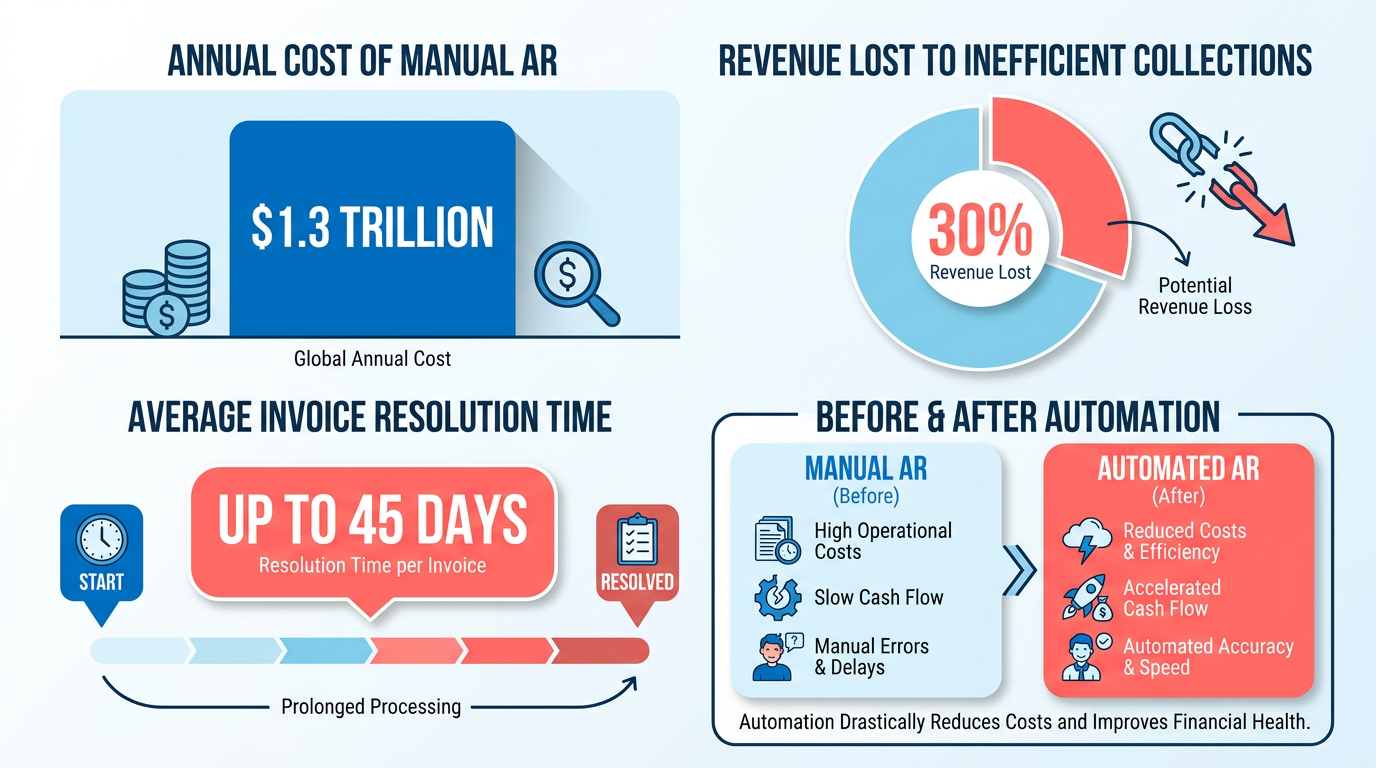
Real-world data shows automation reduces DSO by 30% on average, ensuring faster access to working capital. This matters: for every dollar trapped in delayed receivables, businesses lose opportunities to reinvest, hire, or innovate.
Reducing Errors and Boosting Customer Satisfaction
Manual AR is error-prone. 39% of invoices contain human-input mistakes, leading to disputes and delayed payments. Automation eliminates these issues by standardizing workflows and integrating with ERPs like QuickBooks and SAP. A healthcare provider automated month-end reconciliations with Blixo, cutting closing times by 18% and improving internal team satisfaction.
Customers also benefit. Multi-channel reminders (email, SMS, phone) reduce missed payments by 40%, while self-service portals let clients track invoices in real time. This transparency builds trust and reduces friction-50% of small businesses report higher customer retention after adopting automated AR tools. As mentioned in the Assessing Current AR Processes in Blixo section, identifying gaps in manual workflows is key to understanding where automation can deliver these improvements.
Who Gains-and by How Much?
- Finance teams save 70% of time chasing payments manually, redirecting efforts to strategic analysis.
- Accounting teams see 35% fewer disputes thanks to Blixo’s AI, which learns from overrides to refine matches.
- Business owners gain real-time cash flow visibility, reducing late payment fees and improving financial forecasting.
Cost savings are equally compelling. Automation cuts administrative costs by 30%, primarily by reducing labor for data entry and follow-ups. One company avoided $6 million in late fees by implementing automated dunning workflows, while another saved 200 hours weekly through streamlined billing. As outlined in the Implementing and Optimizing Automated AR Processing section, continuous refinement of these systems ensures sustained efficiency gains.
Why Blixo Stands Out
Unlike generic platforms, Blixo’s automation is tailored to eliminate bottlenecks. Its AI doesn’t just process data-it adapts. For instance, a SaaS firm reduced billing errors by 50% in three months by using Blixo’s machine learning to identify patterns in manual overrides. The platform’s 99.5% accuracy ensures disputes drop sharply, while multi-currency and tax automation support global operations without manual intervention.
“Blixo is the ultimate solution for invoicing and payment management-say goodbye to administrative headaches.” – Vincent Mann, Founder of Globetown Media
By automating AR, businesses turn a cost center into a strategic asset. The result? Faster cash flow, fewer errors, and a finance team ready to focus on growth.
Assessing Current AR Processes in Blixo
Assessing current AR processes in Blixo requires a structured approach to identify inefficiencies, manual workflows, and areas where automation can deliver measurable improvements. Start by mapping existing processes to uncover bottlenecks, then use data-driven insights to prioritize automation opportunities. Below is a step-by-step guide to evaluate your AR workflows and set the foundation for optimization.
How Do You Identify Manual Workflows in AR?
Manual tasks in accounts receivable often hide inefficiencies that slow down cash flow and increase errors. Begin by tracking time spent on repetitive tasks like data entry, invoice reconciliation, and follow-ups. For example, 39% of invoices contain human-input mistakes, which directly ties to delays and disputes. Manual processes also lead to 35% higher missed-payment risk compared to automated systems, as teams struggle to prioritize follow-ups effectively.
- Map your current AR workflow Create a flowchart of all steps from invoice creation to payment receipt. Highlight manual interventions such as spreadsheet reconciliation or email-based reminders. One company found that 70% of invoicing tasks could be automated by adopting recurring billing and auto-generated statements. As mentioned in the Why Automated AR Processing Matters section, manual errors contribute to $1.3 trillion in annual losses for U.S. businesses.
- Audit time spent on repetitive tasks Use time-tracking tools to quantify hours spent on data entry, invoice matching, and collections. Small businesses, for instance, often spend 45 days processing a single invoice manually, leading to 30% revenue loss due to delayed collections.
- Analyze error rates and dispute trends Review historical data to identify patterns in invoicing errors or payment disputes. If 30% of revenue is lost to inefficient collections, it signals a need for automation in follow-ups and communication.
What Are Common Pain Points in AR Processing?
Pain points in AR often stem from outdated tools, fragmented processes, and lack of visibility. Teams may face challenges like inconsistent payment terms, delayed cash application, or difficulty tracking overdue invoices. For example, manual systems increase Days Sales Outstanding (DSO) by 30%, as unresolved discrepancies prolong cash flow.
- Pinpoint slow payment processing Track how long invoices take to clear. If follow-ups require 67% longer in manual systems (per industry benchmarks), consider automating reminders and multi-channel notifications to speed up collections.
- Address high error rates If 1 in 5 invoices has errors, investigate root causes like manual data entry or disconnected systems. Blixo’s AI-driven cash application reduces disputes by 35% by matching payments to invoices with 99.5% accuracy.
- Evaluate reconciliation challenges Manual reconciliation often takes hours weekly. A retail chain automated 90% of invoice processing, cutting month-end reconciliation time by 18% using integrated systems. Building on concepts from the Configuring Automated AR Processing in Blixo section, ERP integrations like QuickBooks or NetSuite can replace manual handoffs entirely.
What Tools Can Analyze AR Processes?
Process analysis tools help quantify inefficiencies and model automation benefits. Start with workflow mapping to visualize gaps, then use benchmarks to set automation goals.
- Conduct process mapping Document each step in your AR workflow, from invoice creation to payment posting. Highlight manual handoffs, such as exporting data to spreadsheets, which can be replaced with ERP integrations like QuickBooks or NetSuite.
- Perform workflow analysis Use time-stamping tools to measure how long tasks take. For instance, reconciling payments manually might consume 10+ hours weekly, whereas automation could reduce this by 70%.
- Compare against automated benchmarks Set goals based on industry standards. Automated workflows typically reduce DSO by 30% and administrative costs by 30%. If current DSO is 45 days, automation could bring it down to 32 days on average.
How Can Real-World Examples Inspire Improvements?
Case studies from Blixo users demonstrate the impact of automation. One construction firm boosted invoicing conversion by 70% using dynamic discounting, while a SaaS company cut billing errors by 50% within three months. These results highlight how automation transforms manual processes into streamlined, data-driven operations.
- Adopt multi-channel reminders A business reduced overdue accounts by 30% in three months by sending automated emails, SMS, and phone reminders. Blixo’s AI prioritizes high-risk accounts for follow-ups.
- use AI for cash application A company with 14,000 units automated 90% of payment matching, eliminating manual overrides and reducing reconciliation errors by 65%.
- Integrate with accounting systems Syncing Blixo with ERP platforms like SAP or Oracle cuts administrative costs by 30%, as teams no longer need to manually enter data across systems. Building on concepts from the Implementing and Optimizing Automated AR Processing section, these integrations require ongoing monitoring to sustain efficiency gains.
By systematically evaluating your AR processes, you can uncover inefficiencies and implement targeted automation strategies. Blixo’s tools provide the accuracy and speed needed to turn manual workflows into automated, scalable processes.
Configuring Automated AR Processing in Blixo
Configuring automated AR processing in Blixo requires a structured approach to streamline invoicing, collections, and cash application. Start by setting up automated invoicing to eliminate manual data entry errors and ensure timely delivery, as outlined in the Assessing Current AR Processes in Blixo section to identify baseline inefficiencies. Next, configure collections workflows to prioritize high-risk accounts and send multi-channel reminders, building on concepts from the Why Automated AR Processing Matters section about reducing late payments. Finally, automate cash application to match payments with invoices accurately, which complements the strategies discussed in the Overcoming Common Challenges and Implementing Best Practices section for minimizing disputes. Below is a detailed checklist to guide you through each step.
What Are the Core Steps for Automated Invoicing Setup?
Automated invoicing reduces delays and errors by standardizing invoice creation and delivery. Begin by customizing invoice templates to align with your branding and compliance requirements. Blixo allows you to embed logos, payment terms, and late fees directly into templates, ensuring consistency.
- Customize invoice templates Use Blixo’s drag-and-drop editor to add company branding, payment terms, and tax details. For example, one company reduced invoice disputes by 35% after standardizing templates with clear due dates, as highlighted in the Assessing Current AR Processes in Blixo section.
- Schedule recurring invoices Set up auto-renewals for subscription-based customers or monthly retainers. This cuts administrative time by up to 30%, as seen in a healthcare provider’s case study.
- Enable multi-currency support Automate real-time exchange rate calculations for global clients. A logistics firm saved 18% in processing time by enabling this feature.
- Integrate with ERP systems Connect Blixo to platforms like SAP or QuickBooks to sync customer data and reduce manual entries.
How to Configure Automated Collections Workflows?
Collections automation minimizes late payments by sending targeted reminders and tracking payment behavior. Blixo’s AI prioritizes high-risk accounts based on payment history, ensuring timely follow-ups, a strategy emphasized in the Why Automated AR Processing Matters section.
- Set up multi-channel reminders Configure email, SMS, and postal reminders for overdue invoices. A small business increased on-time payments by 50% using this strategy.
- Use AI-driven prioritization Blixo’s algorithm flags accounts with a 35% higher risk of default, allowing teams to focus on critical cases first.
- Create automated dunning workflows Define escalation rules, such as sending a final notice after two missed reminders. One law firm improved cash flow by 25% with tiered dunning.
- Monitor collections dashboards Track metrics like on-time payment rates and DSO improvements in real time. A 30% reduction in overdue accounts was reported by a client using weekly dashboards.
What Steps Are Needed for Cash Application Automation?
Cash application automates payment matching, reducing reconciliation disputes and accelerating cash flow. Blixo’s AI engine matches payments to invoices with 99.5% accuracy, learning from overrides to improve over time.
- Enable AI-powered payment matching Let Blixo automatically apply payments to open invoices. A logistics company reduced disputes by 20% after implementation.
- Set up reconciliation rules Define rules for handling partial payments or multiple invoices. For example, one healthcare provider cut month-end closing time by 18% with custom rules.
- Generate audit trails Track every payment application for compliance and dispute resolution. Blixo logs all changes, ensuring transparency.
- Monitor DSO metrics Use built-in reports to identify trends, such as a 30% reduction in Days Sales Outstanding for one enterprise client.
What Best Practices Should You Follow for Testing?
Before full deployment, validate workflows to avoid disruptions, a practice detailed in the Overcoming Common Challenges and Implementing Best Practices section. Start with a small group of invoices and payments to test templates, reminders, and matching logic.
- Run parallel testing Process a sample of 50-100 invoices manually and through automation to compare results.
- Simulate edge cases Test scenarios like partial payments, refunds, and currency conversions to ensure accuracy.
- Review exception reports Address unmatched payments manually and train the AI engine using override data.
By following this checklist, Blixo users can achieve a 30% faster cash cycle, 35% fewer disputes, and 30% lower administrative costs, as demonstrated by clients in law, logistics, and healthcare sectors.
Implementing and Optimizing Automated AR Processing
Implementing and Optimizing Automated AR Processing
Automated accounts receivable (AR) workflows in Blixo require consistent monitoring, iterative refinement, and a focus on measurable outcomes. By tracking the right metrics, using built-in tools, and learning from real-world successes, businesses can maximize efficiency and minimize errors. Below is a structured approach to implementing and optimizing automated AR processing.
How Do You Track Key Performance Indicators (KPIs)?
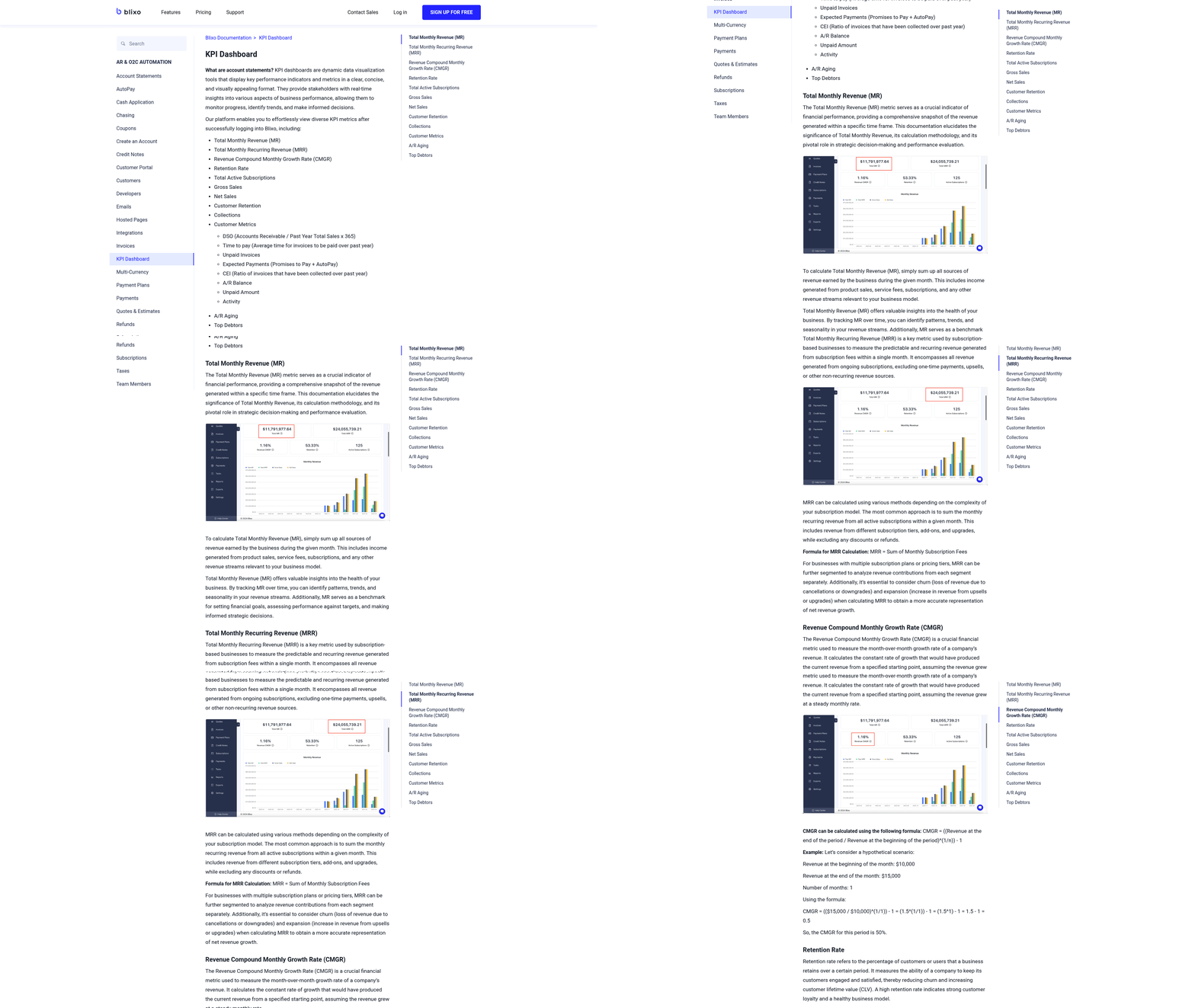
Tracking KPIs ensures your automated workflows align with financial goals. Focus on metrics like Days Sales Outstanding (DSO), payment processing time, and error rates. Blixo’s dashboards provide real-time visibility into these metrics, enabling you to spot inefficiencies early.
- Monitor DSO weekly: A high DSO indicates delayed cash flow. Improved payment tracking in automated systems helps identify trends, such as seasonal delays or customer-specific bottlenecks. As mentioned in the Assessing Current AR Processes in Blixo section, mapping existing workflows is critical to identifying where automation can reduce DSO.
- Track payment processing time: Manual workflows can take up to 45 days to resolve a single invoice. Blixo automates reconciliation, cutting this time by 30% through multi-channel reminders and AI prioritization.
- Measure error rates: Manual AR processes have a 39% error rate, often leading to disputes. Blixo’s exception-handling tools flag mismatches for manual review, reducing billing errors by up to 50% within three months.
What Best Practices Improve Automated AR Workflows?
Continuous improvement requires structured reviews and proactive adjustments. Regularly analyze workflows to identify bottlenecks and test new features.
- Conduct weekly performance reviews: Use Blixo’s dashboards to assess metrics like match rates, dunning success, and dunning channel effectiveness. For example, one company reduced overdue accounts by 30% after refining its reminder sequence. Building on concepts from the Overcoming Common Challenges and Implementing Best Practices section, stakeholder alignment is key to sustaining these improvements.
- Perform quarterly audits: Compare current performance against baseline metrics. A healthcare provider accelerated month-end closing by 18% after optimizing its ERP integrations and exception-handling rules.
- Test new features incrementally: Blixo’s recurring billing and dynamic discounting tools can boost invoice conversion. A construction firm saw a 70% increase in on-time payments after enabling discounts for early settlement.
What Tools Help Optimize Automated AR?
Blixo offers built-in tools to streamline monitoring and analysis. Pair these with strategic adjustments for maximum impact.
- Real-time dashboards: Track delinquency rates, cash flow trends, and channel performance. One small business improved on-time payments by 50% after identifying underperforming communication channels. Configuring these dashboards is covered in detail in the Configuring Automated AR Processing in Blixo section.
- AI-driven dunning prioritization: Blixo’s machine learning models flag high-risk accounts for early intervention. A logistics company reduced disputes by 20% using this feature.
- Exception-handling workflows: Train the AI engine by manually resolving mismatches. Over time, the system learns to handle similar cases autonomously, reducing manual effort by 70%.
How Do Real-World Users Benefit from Optimization?
Businesses using Blixo report measurable gains from consistent workflow refinement.
- Example 1: A tech startup automated 90% of its invoice processing, cutting month-end reconciliation time by 18%.
- Example 2: A SaaS company reduced billing errors by 50% through regular audits and AI training sessions for its finance team.
- Example 3: A law firm boosted cash flow efficiency by 25% after integrating multi-channel reminders and refining its payment terms.
Why Continuous Improvement Matters
The benefits of optimizing automated AR workflows extend beyond cost savings. Regular refinement reduces administrative costs by 30%, improves customer satisfaction through faster payments, and ensures compliance with evolving financial standards.
“Blixo is 10x more powerful than what I’ve used before,” says Dave, a small-business owner who automated 70% of his invoicing tasks. “The time saved lets me focus on growing my business, not chasing payments.”
By combining Blixo’s tools with a disciplined approach to monitoring and iteration, businesses can turn AR into a strategic asset that drives growth and operational excellence.
Overcoming Common Challenges and Implementing Best Practices
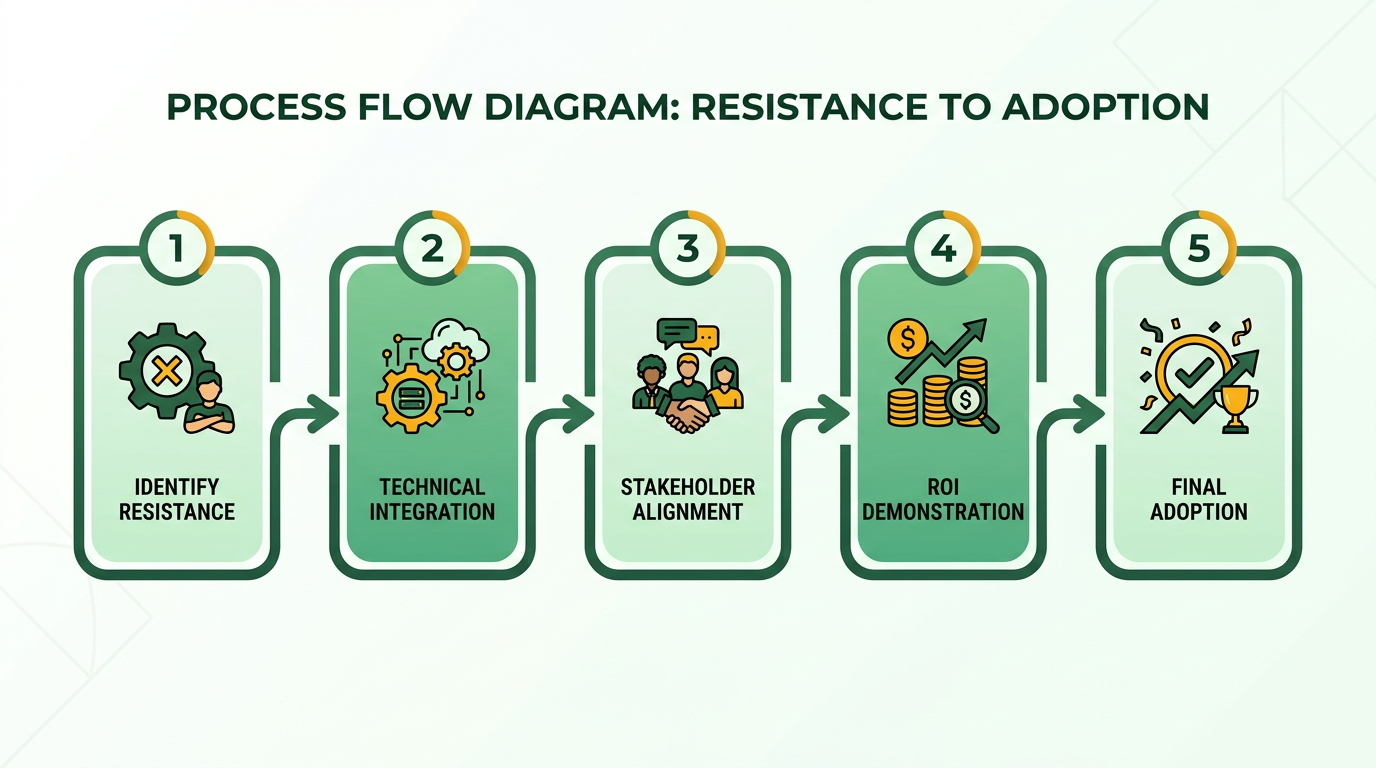
Overcoming resistance to change and technical hurdles requires structured strategies, while stakeholder alignment depends on clear ROI demonstrations. Below is a step-by-step guide to address these challenges and implement best practices for automated AR processing with Blixo..
Common Challenges in Automated AR Processing
Resistance to change and technical integration issues often slow adoption. Teams accustomed to manual workflows may fear job displacement or distrust AI accuracy. Meanwhile, integrating automation with existing systems like ERPs or payment gateways can introduce compatibility roadblocks.
-
Map pain points before automation: Conduct a workflow audit to identify bottlenecks (e.g., 45-day invoice processing times) and quantify their financial impact. This creates urgency for change. As mentioned in the Assessing Current AR Processes in Blixo section, structured audits are foundational to identifying inefficiencies.
-
Address technical gaps early: Validate Blixo’s compatibility with your ERP (e.g., NetSuite, QuickBooks) during the pre-automation checklist phase. Test data migration workflows to avoid disruptions.
Example: One company reduced invoice processing from 45 days to 15 by automating reconciliation with Blixo, but only after fixing integration issues during testing..
Best Practices for Change Management
Communication and training are critical to ease adoption. Teams need to understand how automation improves their workflows, not replaces them.
How to Build Team Buy-In
-
Train employees on Blixo’s tools: Host workshops to demonstrate features like AI-driven cash application (99.5% accuracy) and multi-channel reminders. Let teams simulate workflows to build confidence. Building on concepts from the Configuring Automated AR Processing in Blixo section, hands-on simulations reinforce practical application.
-
Highlight role evolution, not elimination: Emphasize that automation handles repetitive tasks (e.g., chasing payments), freeing teams for strategic work like financial analysis.
Example Training Plan
- Week 1: Demo Blixo’s invoice automation and reconcile it with manual data.
- Week 2: Simulate collections workflows using multi-channel reminders.
- Week 3: Role-play exception handling (e.g., resolving payment mismatches).
“Blixo is 10x more powerful than what I’ve used before,” says Dave, a small-business owner who retrained his team to focus on client relationships after automation..
Gaining Stakeholder Buy-In with Data-Driven Arguments
Executives prioritize ROI, so frame automation benefits in financial terms. Use benchmarks like the $1.3 trillion annual loss from manual AR errors to justify investment, as highlighted in the Why Automated AR Processing Matters section.
Key Metrics to Present
-
Cost savings: Automation cuts administrative costs by 30% and reduces billing errors by 50% (e.g., a SaaS company saved 200 hours weekly by automating billing).
-
Cash flow improvements: Automated workflows reduce DSO by 30%, ensuring faster access to working capital.
-
Showcase quick wins: Highlight a 70% increase in invoice conversion for a construction firm using dynamic discounting.
-
Use scenario analysis: Compare missed-payment risks (35% higher in manual systems) with Blixo’s 40% improvement in on-time payments via AI dunning.
Template for Executive Reports:
“By automating AR with Blixo, we expect to save $X annually in administrative costs while reducing DSO from X days to Y days. This accelerates cash flow by Z%, directly improving quarterly financial performance.”.
Real-World Success Patterns
Businesses that succeed share common strategies:
- Start small, scale fast: A retail chain automated 90% of invoice processing in six months by phasing in ERP integration.
- use AI iteratively: One firm trained Blixo’s matching engine using historical data, achieving 99.5% accuracy within three months.
- Monitor continuously: Weekly dashboards identified a 12% drop in manual overrides, guiding process refinements.
Data-Backed Outcome: Companies automating over 50% of AR processes see a 32% reduction in DSO on average (industry data)..
Final Checklist for Smooth Implementation
- Secure leadership support by presenting ROI calculations and risk-mitigation scenarios.
- Train teams on Blixo’s workflows with hands-on simulations.
- Audit progress quarterly using metrics like DSO, error rates, and admin cost trends.
By addressing resistance through transparency, solving technical issues proactively, and aligning stakeholders with measurable goals, Blixo users can transform AR from a cost center to a strategic asset. The result? Faster payments, fewer errors, and finance teams freed to drive growth.
Frequently Asked Questions
1. How much do manual AR processes cost U.S. businesses annually?
Manual AR processes cost U.S. businesses $1.3 trillion yearly due to errors, disputes, and delayed cash flow. Small businesses lose 30% of revenue, with single invoices taking up to 45 days to resolve.
2. What is the average reduction in Days Sales Outstanding (DSO) from automation?
Automation reduces DSO by 30% on average, accelerating cash flow and working capital access. A law firm using Blixo improved cash flow efficiency by 25% through automated invoicing and collections.
3. How accurate is Blixo’s AI-driven cash application?
Blixo’s AI-driven cash application achieves 99.5% accuracy, cutting invoice disputes by 20% for logistics companies by precisely matching payments to invoices.
4. What percentage of invoices contain human-input errors?
39% of invoices have human-input errors, leading to disputes and delayed payments. Automation standardizes workflows to eliminate these issues and boost customer satisfaction.
5. How does automation impact small business revenue?
Small businesses lose 30% of revenue to inefficient collections. Automation reduces this by accelerating payment cycles and resolving invoices faster, improving cash flow efficiency.
6. What benefits did a logistics company see using Blixo?
A logistics company reduced invoice disputes by 20% using Blixo’s AI-driven cash application, which streamlined payment matching and minimized manual errors.
7. How does automation affect working capital availability?
By reducing DSO by 30%, automation frees working capital trapped in delayed receivables, enabling businesses to reinvest, hire, or innovate more effectively.