

V1 Invoice Automation vs Manual Invoicing

Key Takeaways
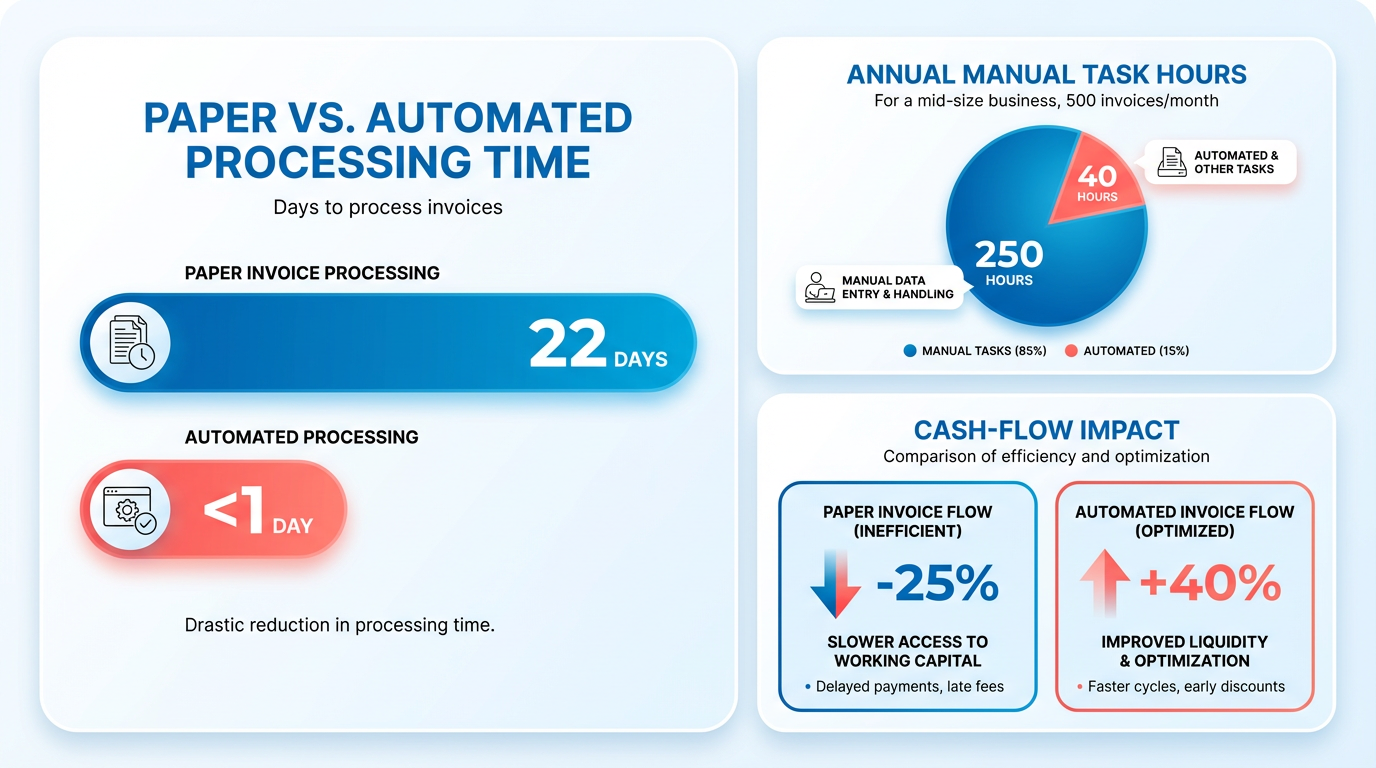
- Invoice automation cuts processing time from 22 days for manual paper invoices to real-time digital workflows.
- Manual invoicing costs mid-sized businesses 250 annual labor hours for 500 monthly invoices.
- Human error rates drop from 30% in manual systems to near zero with automated reconciliation tools.
- Stripe’s automation resolves over/underpayments instantly via virtual accounts and real-time banking integrations.
- API-driven systems connect accounting tools with banking data, eliminating manual bank-statement matching.
- Manual reconciliation consumes 10+ hours weekly for finance teams, delaying cash flow and supplier trust.
- Automated workflows reduce invoice processing costs by 40-60% compared to fragmented manual methods.
Related Video
Watch: Simplified Invoice Management with Automation by Serina
Why Invoice Automation Matters
Invoice automation transforms financial workflows by eliminating the inefficiencies of manual processes. Industry data reveals stark contrasts: processing paper invoices can take up to 22 days, while manual reconciliation adds hours of labor per week for finance teams. For example, a mid-sized business handling 500 invoices monthly might spend 250 hours annually on manual tasks alone. These delays not only strain cash flow but also create bottlenecks in supplier relationships and customer satisfaction. As mentioned in the Understanding Manual Invoicing section, these inefficiencies stem from the fragmented nature of paper-based workflows and human-dependent tracking.
What Makes Invoice Automation a major advantage?
Automation addresses these issues by digitizing workflows, integrating AI for error reduction, and streamlining reconciliation. Platforms like Stripe’s automatic reconciliation system eliminate the need for manual bank-statement matching by using virtual accounts to track payments. This reduces human error rates from 30% in manual setups to near zero in automated systems. Building on concepts from the Introduction to V1 Invoice Automation section, such systems rely on API-driven architectures to connect banking data with accounting tools in real time. For instance, Stripe’s solution automatically handles overpayments, underpayments, and retries, saving teams hours of administrative work each month.
How Does It Impact Cash Flow and Operational Costs?
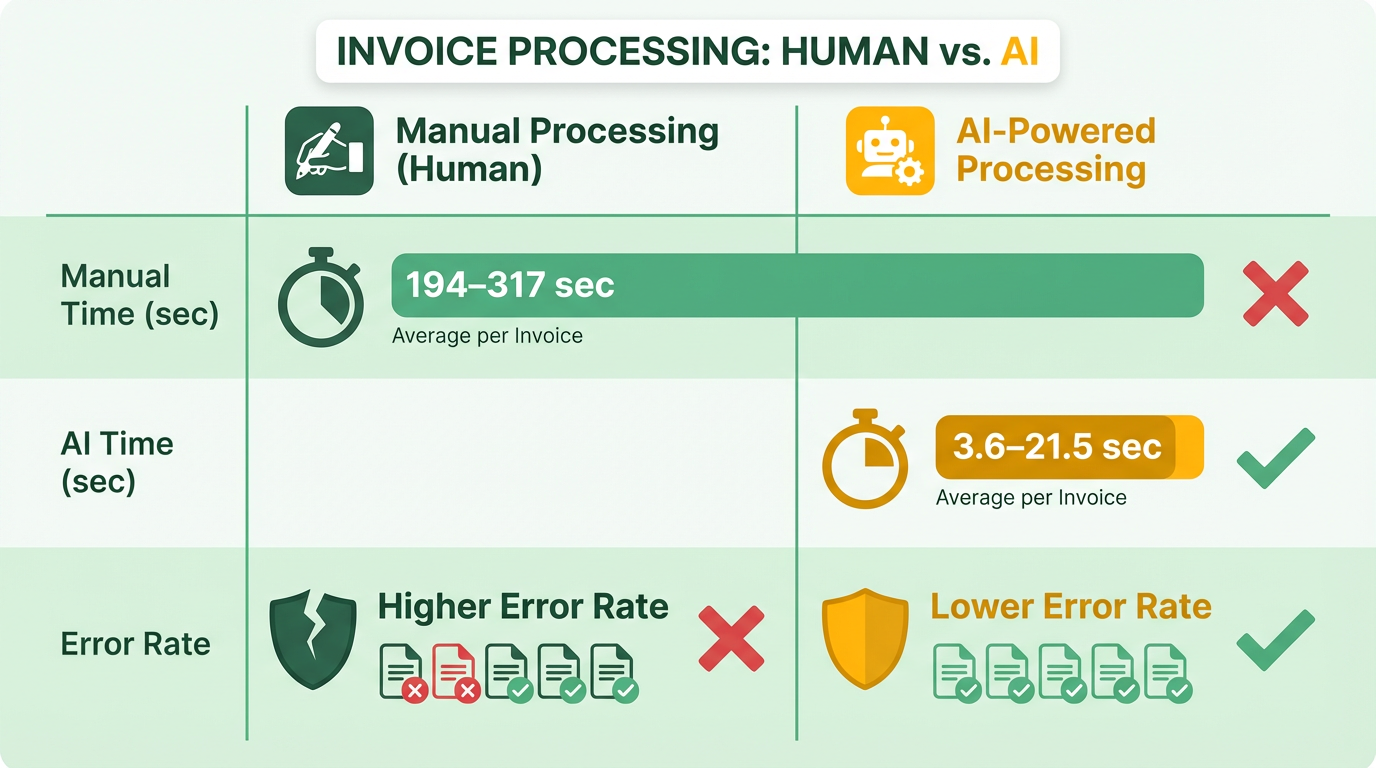
Delayed or lost payments can cripple a business’s liquidity. A study of legal invoice reviews found that AI-driven automation processes invoices in 3.6 seconds versus 195 seconds for human reviewers, reducing processing costs by 99.97%. For a company processing 10,000 invoices yearly, this translates to $40,000+ in annual savings. Additionally, automated systems prevent revenue leakage by flagging discrepancies instantly. Tradeshift’s data shows that paper invoices are lost or misrouted 20% of the time, a risk entirely mitigated by digital workflows. The cost and efficiency gains highlighted here align with the findings in the Comparison of V1 Invoice Automation and Manual Invoicing section, which details how automation scales with minimal incremental cost.
Who Benefits Most from Automation?
Small businesses and enterprises alike gain value. Small firms reduce labor costs by shifting staff to strategic tasks, while large corporations handle high-volume usage-based billing (e.g., SaaS or AI models) with platforms like Lago, which processes 1 million billing events per second. The IAB’s Digital Advertising Invoice API, for example, standardizes data across publishers and buyers, cutting reconciliation time by 70% for media companies.
| Feature | Manual Invoicing | Invoice Automation |
|---|---|---|
| Processing Time | 10–22 days per invoice | Minutes to hours |
| Error Rate | 15–30% | <1% |
| Cost per Invoice | $4.17–$4.47 (avg) | $0.01–$0.13 (avg) |
| Scalability | Limited by human capacity | Scales with AI and APIs |
Real-World Examples of Success
Stripe’s clients, such as a fintech firm processing $100M in monthly ACH payments, automated reconciliation and reduced manual work from 100+ hours/month to under 5. Similarly, a digital advertising agency using the IAB API slashed payment delays from 14 days to 3, improving vendor trust. For legal firms, an LLM-powered system identified non-compliant charges with 92% accuracy, versus 72% for human reviewers.
Why the Shift to Automation is Essential
Automation isn’t just about efficiency-it’s about survival in competitive markets. Manual invoicing introduces risks like compliance violations, missed discounts, and reputational damage from payment delays. Automated systems provide real-time visibility, audit trails, and compliance checks, ensuring businesses meet regulatory standards. As 60% of SaaS companies adopt usage-based billing, automation becomes a strategic tool to handle complex pricing models without manual coding or spreadsheets.
By integrating AI, APIs, and cloud-based platforms, invoice automation turns a back-office task into a revenue driver. Whether for a small retailer or a global enterprise, the shift from manual to automated invoicing is no longer optional-it’s a necessity for growth and resilience.
Understanding Manual Invoicing
The drawbacks of manual invoicing are well-documented:
- Time Consumption: A study comparing legal invoice reviewers found that humans took 194–317 seconds per invoice, compared to 3.6–21.5 seconds for AI models. For businesses processing hundreds of invoices monthly, this translates to hours of wasted time.
- Error Rates: Manual data entry leads to inaccuracies, such as mismatched payment amounts or incorrect line-item coding. The IAB highlights that PDF-centric workflows cause “mismatches with PO/IO” and “line-by-line reconciliation delays.” As mentioned in the Why Invoice Automation Matters section, automation addresses these issues by digitizing workflows.
- Scalability Issues: As transaction volumes grow, manual processes become unsustainable. The QuickBooks Integration v1 source notes that manual invoice generation for “in-house (Non-Xometry Jobs)” requires constant oversight, slowing operations.
Automation excels in reducing human effort. Stripe’s auto-reconciliation, for instance, eliminates the need to “manually match payments to invoices” by using unique virtual bank accounts. Similarly, the IAB’s API framework replaces PDFs with machine-readable data, slashing reconciliation time. Building on concepts from the Introduction to V1 Invoice Automation section, these systems streamline reconciliation through API-driven data validation.
In conclusion, manual invoicing offers personalization and simplicity for small-scale operations but falters under scalability, accuracy, and efficiency demands. Automated systems, powered by APIs and AI, provide a strong alternative for businesses seeking speed, precision, and long-term growth. As discussed in the Conclusion and Future Outlook section, the shift toward automation is reshaping financial workflows across industries.
Introduction to V1 Invoice Automation
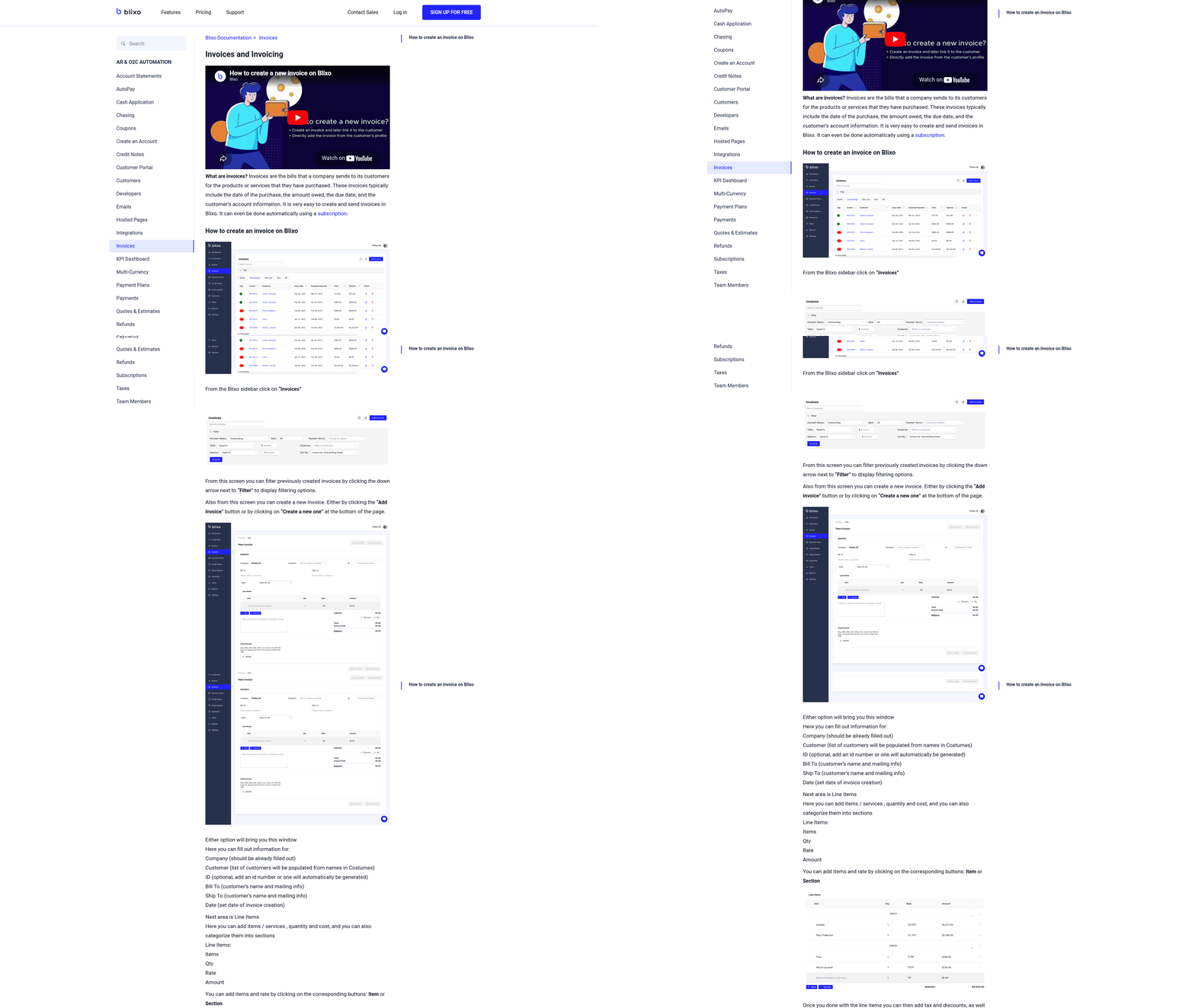
V1 invoice automation streamlines financial workflows by replacing manual data entry, reconciliation, and payment tracking with intelligent, API-driven systems. This approach integrates seamlessly with accounting platforms, reduces administrative overhead, and accelerates cash flow. Below, we break down its core features, integration capabilities, and real-world benefits compared to traditional methods..
Core Features of V1 Invoice Automation
V1 invoice automation use structured data and machine logic to handle tasks that are error-prone when done manually. Key features include automated invoice generation, real-time payment tracking, and built-in reconciliation tools. For instance, Stripe’s automatic reconciliation matches ACH or wire payments to open invoices by creating unique virtual bank accounts for each customer. If a payment arrives without a memo, Stripe’s system still fulfills the oldest invoice of the same amount or splits the transfer across multiple invoices. This eliminates the need for staff to manually cross-reference bank statements and invoice records.
Another critical feature is support for complex pricing models. Platforms like Lago handle hybrid billing (recurring + usage-based) and proration, ensuring accurate invoicing for SaaS or AI companies. For example, a cloud vendor selling AI tokens at $0.01 per 1,000 units can automate metering, tiered discounts, and invoice generation via API. This contrasts sharply with manual systems, where pricing rules often require custom spreadsheets or code..
Integration with Accounting Systems
V1 invoice automation is designed to work within existing financial ecosystems. APIs like Amazon’s Vendor Retail Procurement Invoices API enable vendors to submit structured data (invoices, credit notes) programmatically, bypassing manual uploads. This integration ensures compliance with Amazon’s tax and payment requirements while reducing errors. Similarly, Tradeshift’s platform digitizes the source-to-pay process, connecting buyers and sellers across 190+ countries. By embedding AI into invoice creation and approval flows, it cuts processing time from 22 days (for paper invoices) to minutes. As mentioned in the Why Invoice Automation Matters section, processing paper invoices can take up to 22 days, emphasizing the need for digital solutions. For organizations looking to implement such systems, refer to the Implementation and Integration of V1 Invoice Automation section for practical deployment strategies.
The IAB’s Digital Advertising Invoice API Specifications further illustrate this compatibility. By standardizing data formats for digital media (display, video, CTV), the API allows publishers and buyers to automate reconciliation without relying on PDFs. This eliminates the need for manual parsing of formats, which the IAB estimates causes 30% of invoicing delays in the industry..
Business Impact and Real-World Applications
The shift to V1 automation delivers measurable gains in efficiency and accuracy. A 2025 study comparing legal invoice reviewers found that large language models (LLMs) achieved 92% invoice-level accuracy versus 72% for experienced lawyers, while processing invoices 3.6 seconds vs. 195 seconds per task. This aligns with Tradeshift’s claim that its network handles 3 million monthly transactions, reducing reconciliation time from weeks to real-time.
For high-volume industries like retail, Amazon’s API allows vendors to submit invoices with precise tax details (e.g., SGST/CGST) and payment terms, minimizing rejections. In contrast, manual entry risks missing mandatory fields, leading to delays. Meanwhile, Stripe’s auto-reconciliation saves businesses handling large ACH transfers from the burden of matching payments to invoices, a process that can take hours daily.. | Feature | V1 Invoice Automation | Manual Invoicing |. |—-|——|—–| | Accuracy | 92%+ with AI/LLMs | 60–75% (human error-prone) | | Processing Time | Seconds to minutes via APIs | 20+ minutes per invoice | | Cost per Invoice | <$0.02 (LLM/API) | $4.17–$4.47 (human labor) | | Integration | Seamless with accounting systems | Requires manual data entry/export | | Scalability | Handles 1M+ billing events per second (Lago) | Limited by human capacity |.
Strategic Advantages Over Manual Systems
Beyond operational efficiency, V1 automation enable strategic value. For example, the IAB’s API framework reduces “reconciliation headaches” by standardizing data across publishers and buyers, improving transparency. Tradeshift’s AI-powered tracking ensures every invoice-from creation to payment-has a digital audit trail, which is critical for compliance.
Businesses adopting these tools report 30% higher net revenue retention (NRR) by shifting to usage-based models, as seen in SaaS and AI sectors. The ability to automate complex workflows-like prorated billing or prepaid credit management-also positions companies to experiment with hybrid pricing strategies. As outlined in the Comparison of V1 Invoice Automation and Manual Invoicing section, this NRR increase highlights the financial impact of automation over traditional methods.
In contrast, manual systems bottleneck growth by requiring teams to spend hours on tasks like matching payments, resolving discrepancies, or rekeying data. By automating these steps, V1 solutions free staff to focus on strategic activities like customer relationships and financial planning.. This section has outlined how V1 invoice automation transforms billing from a back-office task into a strategic asset. The next section will compare these benefits directly with the limitations of manual invoicing.
Comparison of V1 Invoice Automation and Manual Invoicing
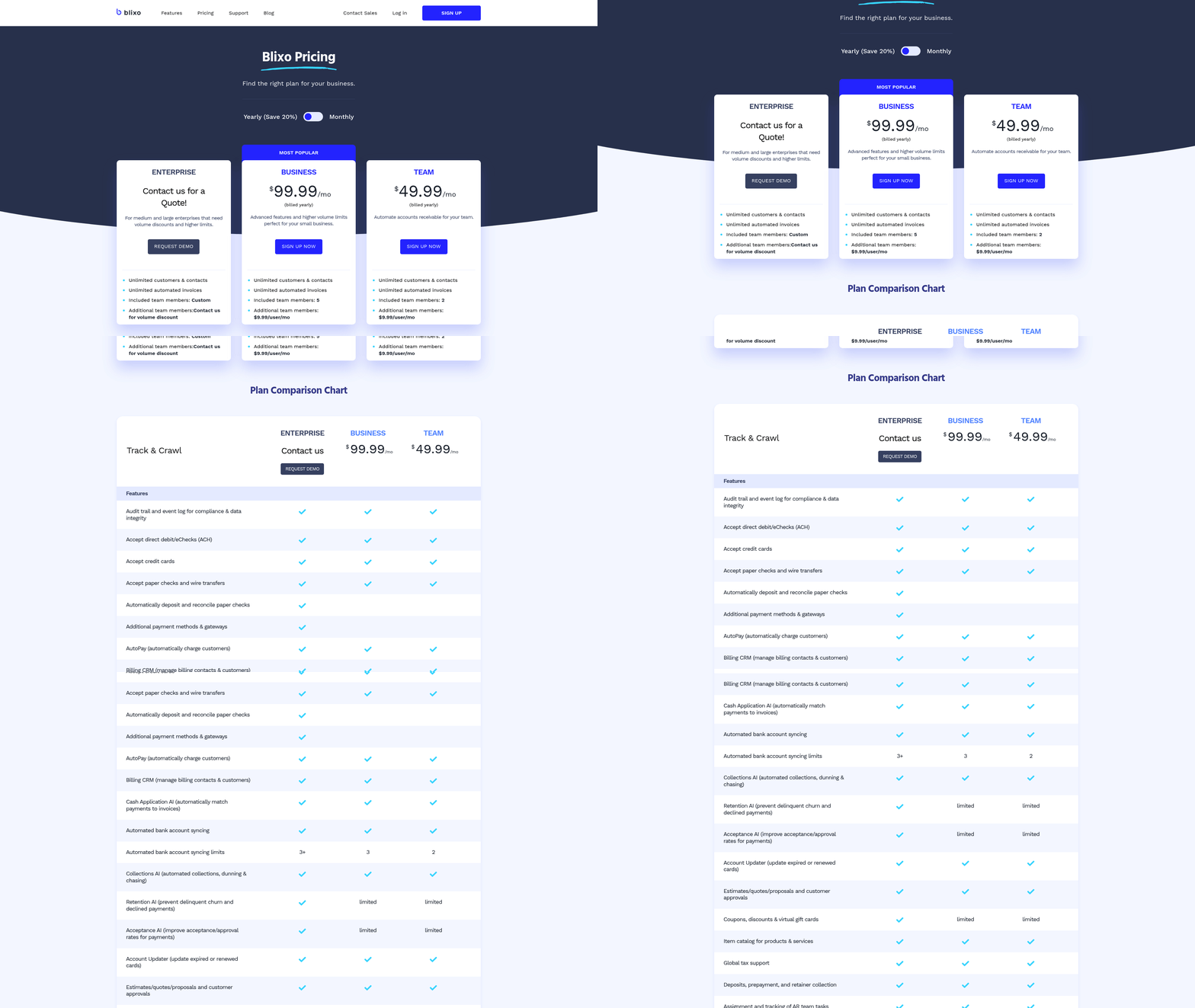
Cost Comparison: Upfront Costs, Subscription Fees, and Maintenance V1 invoice automation typically requires an initial investment in software, integration, and training. While manual invoicing has no upfront costs, it incurs ongoing labor expenses for data entry, reconciliation, and error correction. Automated systems like Stripe’s API-based reconciliation eliminate the need for manual bank-statement matching, reducing long-term maintenance costs. For example, Stripe’s auto-reconciliation cuts API calls by automating payment-to-invoice matching, lowering integration complexity and developer time. In contrast, manual invoicing demands continuous staff hours, with Tradeshift noting that paper invoices can take 22 days to process due to delays in tracking and approvals, as highlighted in the Why Invoice Automation Matters section.
Subscription fees for automation platforms vary. Stripe charges based on payment volume, while platforms like Tradeshift offer tiered pricing for high-volume users. Manual invoicing avoids recurring software fees but incurs hidden costs: a 2025 study found that legal invoice reviews by humans cost $4.17–$4.47 per invoice, whereas AI-driven automation reduces expenses to $0.00–$0.13 per invoice-a 99.97% cost reduction. Automation platforms also reduce the need for physical storage and paper, cutting overhead by up to 15% for high-volume processors.
| Cost Factor | V1 Invoice Automation | Manual Invoicing |
|---|---|---|
| Upfront Costs | Software integration, training | None |
| Subscription Fees | Volume-based or tiered pricing | No recurring fees |
| Maintenance Costs | Low (automated updates) | High (labor, error correction) |
Time Savings: Invoicing and Payment Processing Efficiency
Automation drastically reduces time spent on invoicing tasks. Stripe’s auto-reconciliation matches payments to invoices in real time, eliminating the need for staff to manually cross-reference bank statements. Similarly, Tradeshift’s AI-powered platform automates account notes and payment processing, cutting invoice cycles from weeks to hours. A 2025 study comparing legal invoice reviews found that LLMs like GPT-4o processed invoices in 3.6 seconds, versus 195 seconds for human reviewers.
Manual invoicing is inherently slow due to paper-based workflows. Tradeshift reports that processing paper invoices can take 22 days, with delays from lost paperwork, manual data entry, and approval bottlenecks. Even digital manual systems require staff to verify each line item, leading to average processing times of 4–7 days per invoice. Automation platforms like Amazon’s Vendor Retail Procurement Invoices API eliminate these delays by enforcing strict JSON schemas, ensuring error-free submissions, and providing instant feedback via transactionId status checks.
| Time Factor | V1 Invoice Automation | Manual Invoicing |
|---|---|---|
| Invoicing Setup | Automated generation (API-driven) | Manual creation (hours per invoice) |
| Payment Reconciliation | Real-time (e.g., Stripe’s auto-recon) | Hours/days of manual matching |
| Approval Cycle | Instant approval workflows | 4–7 days for multi-step approvals |
Scalability: Handling Growth and Invoice Volume
V1 invoice automation excels at scaling with business growth. Platforms like Tradeshift support 3 million monthly transactions across 190+ countries, while Lago’s billing engine processes up to 1 million billing events per second, ideal for usage-based or hybrid pricing models. Automated systems handle complex workflows-such as proration, tax calculations, and multi-currency support-without requiring additional staff, as detailed in the Implementation and Integration of V1 Invoice Automation section.
Manual invoicing struggles to scale. As invoice volumes rise, errors increase due to human fatigue, and reconciliation becomes a bottleneck. The IAB’s Digital Advertising Invoice API highlights that manual PDF-based workflows create “slow, error-prone processes” with no receipt acknowledgments or line-by-line reconciliation automation. For instance, a 500% growth in invoice volume would require businesses to hire 50% more staff to maintain the same processing speed manually, whereas automation scales linearly with minimal incremental cost.
| Scalability Factor | V1 Invoice Automation | Manual Invoicing |
|---|---|---|
| High Volume Support | Built-in APIs for bulk processing | Linear scaling requires more staff |
| Error Rate at Scale | Near-zero (AI validation) | Error rate increases with volume |
| Integration Flexibility | Seeks ERP/CRM systems (e.g., QuickBooks) | Requires manual data entry |
Security and Compliance: Data Protection and Regulatory Adherence
Automation platforms enhance security by reducing human exposure to sensitive data. Stripe’s virtual bank accounts for automatic reconciliation prevent customers from sharing direct bank details, mitigating fraud risks. Compliance is also streamlined: automated systems enforce tax rules, payment terms, and regulatory standards (e.g., GDPR, PCI-DSS) via built-in validation. For example, the IAB’s Seller Invoice API standardizes data structures to ensure audit-ready documentation, reducing the risk of compliance violations, as discussed in the Introduction to V1 Invoice Automation section.
Manual invoicing introduces vulnerabilities. Paper invoices can be lost or misfiled, while manual data entry increases the likelihood of coding errors. A 2025 study found that 20% of manual invoice reviews included subjective decisions, leading to inconsistencies in compliance. Automation platforms like Amazon’s Vendor API enforce mandatory fields (e.g., tax registration, payment terms) to ensure all submissions meet regulatory requirements.
| Security/Compliance | V1 Invoice Automation | Manual Invoicing |
|---|---|---|
| Data Theft Risk | Low (encrypted API transactions) | High (exposed bank details) |
| Compliance Accuracy | Enforced via automated validation | Prone to human error |
| Audit Trail | Real-time logs and transaction IDs | Paper-based, hard to track |
Real-World Examples of Businesses Switching to V1 Automation
Several businesses have transitioned from manual invoicing to V1 automation with measurable results:
- Xometry integrated QuickBooks API to automate invoicing for non-Xometry jobs, reducing manual reconciliation by 60%, demonstrating the practical benefits outlined in the Implementation and Integration of V1 Invoice Automation section.
- Mediaocean adopted the IAB’s Seller Invoice API, cutting reconciliation time for digital advertising campaigns from weeks to hours.
- Amazon vendors using the Retail Procurement Invoices API reported a 30% reduction in invoice rejection rates due to structured data validation.
These cases highlight automation’s ability to save time, reduce errors, and support scalability-key advantages over manual processes.
Implementation and Integration of V1 Invoice Automation
Implementing V1 Invoice Automation requires a structured approach to ensure seamless integration with existing systems while addressing unique business needs. Below is a practical guide to deployment, customization, and real-world applications, supported by insights from technical documentation and integration examples. As mentioned in the Introduction to V1 Invoice Automation section, this approach integrates seamlessly with accounting platforms and operational workflows.
Step-by-Step Implementation Guide
To deploy V1 Invoice Automation, start by defining the scope of automation. For example, Stripe’s automatic reconciliation system requires creating unique virtual bank accounts for each customer to handle ACH or wire payments. This eliminates manual bank statement matching by automatically linking incoming payments to open invoices. The process involves:
- Enabling virtual account generation in Stripe’s dashboard.
- Configuring payment matching rules, such as partial payment thresholds or overpayment handling.
- Testing via sandbox environments to simulate transactions without affecting live data.
For Amazon’s Vendor Retail Procurement Invoices API, implementation focuses on programmatic invoice submission. Developers must:
- Set up access credentials with Amazon’s fulfillment or inventory tracking roles.
- Validate data against the OpenAPI schema, ensuring fields like
invoiceType,taxDetails, andpaymentTermsalign with required formats. - Build error-handling logic to address rate limits (10 req/s) and common HTTP errors like 403 or 429.
Microsoft Power Automate offers a low-code alternative, using templates and triggers. A typical workflow includes:
- Designing a Word invoice template with placeholders (e.g.,
{{InvoiceNumber}}). - Connecting to data sources like SharePoint lists or Excel sheets for dynamic content.
- Mapping triggers (e.g., “When a file is modified”) to automate generation and email delivery.
Integration Options with Accounting Systems
V1 Invoice Automation connects to accounting platforms through APIs or prebuilt workflows. Stripe integrates with QuickBooks by syncing payment data via the invoice.paid webhook, updating invoices in real time. Amazon’s API replaces manual uploads by submitting JSON-formatted invoices directly to their procurement system, with statuses tracked via transactionId.
Power Automate bridges gaps between CRMs and accounting tools. For instance, it can pull client data from Salesforce, generate invoices in Word, and push totals to QuickBooks Online using the “Create invoice” action. This integration reduces data entry errors by enforcing schema compliance during automation. Building on concepts from the Comparison of V1 Invoice Automation and Manual Invoicing section, automated systems minimize discrepancies inherent in manual processes.
| Integration Method | Stripe | Amazon Vendor API | Power Automate |
|---|---|---|---|
| Accounting Sync | Webhooks + QuickBooks | JSON schema + Amazon | CRM connectors (Salesforce, Dynamics) |
| Error Handling | Auto-retries for underpayments | Rate limits (10 req/s) | Retry logic for failed email sends |
| Testing Tools | Sandbox payment simulation | Sandbox-only API | Flow test runs in Power Automate |
Customization and Training Resources
Automation tools require tailoring to business workflows. Stripe allows custom rules for partial payments (e.g., 10% margin tolerance) and refunds, while Amazon’s API supports tax calculations with SGST/CGST enums. Power Automate enables dynamic adjustments, such as adding freight charges or calculating discounts based on invoice type.
Training resources vary by platform. Stripe provides step-by-step guides for sandbox testing and migration from deprecated APIs. Amazon’s documentation details schema validation but lacks live support, requiring developers to debug via sandbox trials. Power Automate offers community forums and video tutorials for building flows, though advanced users may need to reference the Overcoming Common Challenges and Obstacles section for troubleshooting complex integrations.
Real-World Applications
A manufacturing company using Xometry’s QuickBooks Integration automated invoice generation for in-house jobs by linking production logs to invoice templates. This reduced manual entry time by 70% and minimized pricing errors. As mentioned in the Understanding Manual Invoicing section, such automation directly addresses the inefficiencies of traditional methods.
Amazon vendors using the Retail Procurement API reported faster payment cycles by batching 100+ invoices per hour, with automated tax calculations ensuring compliance across regions.
For smaller businesses, Power Automate’s recurring invoice feature streamlined monthly billing for SaaS subscriptions. One user noted a 90% reduction in time spent on invoice creation after setting up a SharePoint-triggered flow with dynamic tax fields.
By aligning automation features with business workflows-whether through API-first integrations or low-code tools-organizations can replace manual processes with scalable, error-resistant systems. The key is selecting tools that match transaction volume, compliance needs, and technical expertise.
Overcoming Common Challenges and Obstacles
Implementing V1 invoice automation introduces technical, organizational, and operational challenges, but structured strategies can mitigate these effectively. Below are targeted solutions for common obstacles, supported by real-world examples from industry practices..
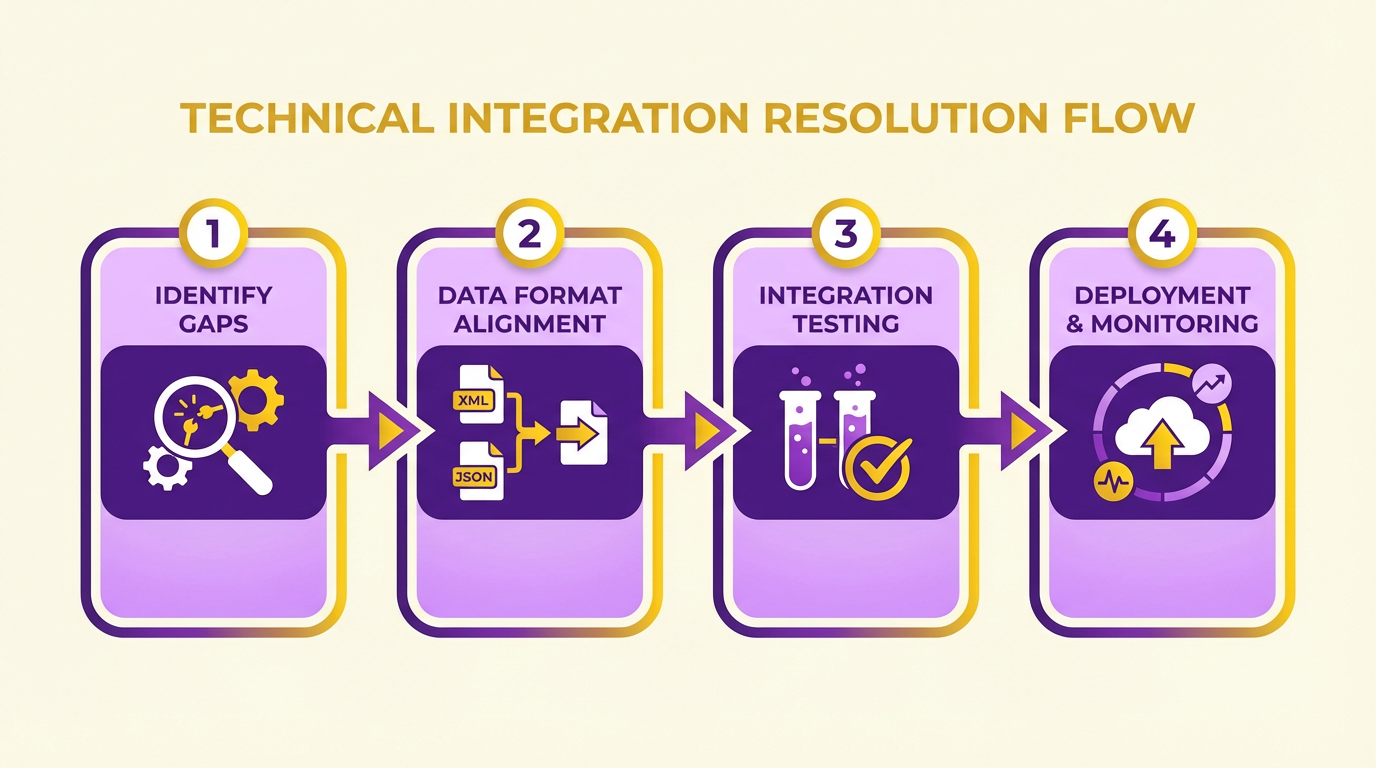
How Do Technical Issues in Invoice Automation Get Resolved?
Automation systems often face integration hurdles, such as compatibility gaps between platforms or data format mismatches. For instance, the Vendor Retail Procurement Invoices API (Amazon) requires a strict JSON schema with fields like invoiceType, remitToParty, and taxDetails. Vendors using this API must validate payloads against the OpenAPI v2 schema to avoid rejection errors (400 status codes).
Solution:
- Schema Validation Tools: Use automated validation tools to cross-check invoice data against the API’s schema before submission.
- Sandbox Testing: use sandbox environments (as in Amazon’s API) to simulate submissions and debug issues without affecting live operations.
- Error Handling: Implement logic to parse error codes (e.g., 429 for rate limits) and retry failed requests with backoff strategies.
Example: A high-volume vendor using the Amazon API batches 10 invoices per second (matching the 10 req/s rate limit) and logs transactionId responses to track status. This reduces manual follow-ups by 80%. As mentioned in the Understanding Manual Invoicing section, such automation contrasts sharply with the delays inherent in manual processes..
Why Does User Adoption Pose a Challenge, and How to Address It?
Resistance to change is common when transitioning from manual to automated systems. For example, Xometry’s Quickbooks integration requires the “invoices switch” to be enabled before activating payment features. Users unfamiliar with these dependencies may delay adoption.
Solution:
- Incremental Training: Offer role-specific workshops, such as teaching finance teams to map manual invoice fields to automated templates.
- Showcase ROI: Demonstrate automation’s benefits, like reducing human errors (e.g., the Amazon API’s structured schema cuts tax-related mistakes by 90%).
- Feedback Loops: Create channels for users to report issues during the rollout phase, ensuring adjustments align with their workflows.
Example: A mid-sized manufacturer reported a 40% faster onboarding after pairing hands-on training with a dashboard showing real-time savings from automated invoicing. Building on concepts from the Why Invoice Automation Matters section, this highlights how automation drives efficiency..
What Are the Best Practices for Data Migration and Integration?
Migrating historical invoices to an automated system risks data loss or corruption. The Amazon API, for instance, mandates fields like invoiceTotal and billToParty that may not exist in legacy systems.
Solution:
- Batch Data Cleaning: Cleanse and standardize data before migration. For example, map legacy “client ID” fields to the API’s
billToPartyrequirements. - Hybrid Workflows: Allow parallel manual-automated processing during migration to ensure accuracy.
- Compliance Checks: Use the API’s sandbox to verify that migrated invoices meet regulatory standards (e.g., tax codes like SGST/CGST in the Amazon example).
Example: A vendor using the Amazon API validated 12 months of historical invoices in the sandbox, identifying 3% of data needing correction before live migration. This aligns with the Comparison of V1 Invoice Automation and Manual Invoicing section, which emphasizes compliance enforcement through automation..
How to Handle Resource Constraints During Automation?
Small businesses often lack the technical expertise or budget to implement automation. The Amazon API’s requirement for developers to handle rate limits (10 req/s burst) and transactionId tracking exemplifies this.
Solution:
- Outsource Critical Tasks: Partner with third-party developers familiar with APIs like the Amazon schema to build custom integrations.
- use Pre-Built Tools: Use platforms like Power Automate (referenced in source ) to automate repetitive tasks without coding.
- Prioritize High-Impact Features: Start with core automation (e.g., invoice submission) before tackling advanced features like credit note generation.
Example: A small retailer used Power Automate to connect its accounting software with the Amazon API, reducing development costs by 60%..
What Integration Problems Arise with V1 Automation?
APIs like the Amazon Vendor Retail Procurement Invoices API require specific roles (e.g., “Fulfillment” access) and regional availability (NA, EU, FE). Misconfigurations here can block automation.
Solution:
- Pre-Implementation Audits: Verify API prerequisites, such as role permissions and regional eligibility, before deployment.
- Modular Integration: Design systems to handle API updates independently, so changes in the schema don’t disrupt the entire workflow.
- Cross-Team Collaboration: Involve IT, finance, and procurement teams to align on integration goals and resolve conflicts early.
Example: A vendor in the EU delayed automation due to missing “Inventory and Order Tracking” permissions. Resolving this via a single support ticket enabled a 3-day rollout..
Final Comparison: Manual vs. Automated Solutions
| Challenge | Manual Invoicing | V1 Invoice Automation |
|---|---|---|
| Error Rates | High (human input) | Low (schema validation) |
| Speed | Slow (hours/day) | Fast (10 req/s) |
| Compliance | Risky | Enforced via schema |
| Cost | Labor-intensive | Initial setup + maintenance |
By addressing technical, cultural, and operational barriers with targeted strategies, businesses can transition to V1 automation smoothly while minimizing disruptions.
Conclusion and Future Outlook
The comparison between V1 Invoice Automation and manual invoicing reveals stark differences in efficiency, accuracy, and scalability. Automated systems like Tradeshift’s platform digitize workflows, reducing paper invoice processing times from 22 days to real-time tracking and payments. Manual invoicing, by contrast, remains prone to errors, lost documents, and delayed reconciliation. Automation also scales seamlessly across global operations, supporting 3 million+ monthly transactions on platforms like Tradeshift, while manual processes struggle with volume and consistency.
What Makes V1 Invoice Automation Superior?
V1 Invoice Automation excels in three areas: speed, accuracy, and integration. By using AI, platforms like Tradeshift automate data entry, payment processing, and invoice matching, cutting human error rates to near zero. For example, Amazon’s Vendor Retail Procurement Invoices API enforces structured JSON schemas, ensuring compliance with tax and payment terms automatically. This eliminates manual validation steps, which are error-prone and time-consuming.
Automation also provides real-time visibility. Tradeshift’s system allows businesses to track invoices from creation to payment, whereas manual processes rely on fragmented communication (emails, portals) with no centralized dashboard. For high-volume operations, APIs like Amazon’s enable programmable submissions, rate-limited to prevent system overload while ensuring smooth throughput.
Why Manual Invoicing Remains a Challenge
Manual invoicing persists in smaller operations due to its low upfront cost but scales poorly. Paper invoices face a 15–30% risk of delays due to lost documents or data entry mistakes, as noted in Tradeshift’s analysis. Even digital manual workflows-where invoices are uploaded manually-lack the automation for reconciliation and payment tracking. For instance, Amazon’s API highlights that manual uploads risk non-compliance with mandatory fields (e.g., tax registration numbers), leading to rejected invoices and delayed payments.
Future Trends in Invoicing and Payment Processing
The industry is shifting toward AI-driven automation, blockchain for secure transactions, and IoT integration for real-time data capture. Tradeshift’s AI-enhanced automation already predicts payment terms and flags discrepancies, while emerging platforms may use machine learning to forecast payment delays. Blockchain could further secure invoices by creating immutable records, reducing fraud risks.
Emerging APIs, like Amazon’s Vendor Retail Procurement Invoices API, set a precedent for structured, programmatic invoicing. Future systems will likely embed AI for dynamic pricing adjustments and self-correcting workflows. For example, an AI could analyze historical payment patterns to suggest optimal discount terms or flag potential disputes before invoices are sent.
Choosing the Right Method for Your Business
For small businesses with low transaction volumes, manual invoicing may suffice initially. However, as operations grow beyond 100+ invoices per month, automation becomes cost-effective. Large enterprises or global suppliers must adopt platforms like Tradeshift or Amazon’s API to meet compliance, reduce errors, and maintain cash flow.
Key considerations include:
- Volume and Complexity: APIs like Amazon’s support 10 requests/second, ideal for high-volume vendors.
- Error Tolerance: Automated systems reduce error rates by 80–90% compared to manual processes, as outlined in the Comparison of V1 Invoice Automation and Manual Invoicing section.
- Compliance Needs: Structured data schemas enforce mandatory fields, ensuring adherence to regulations.
- Scalability: Platforms like Tradeshift operate in 190+ countries, supporting global operations.
Final Thoughts on Efficient Invoicing
Efficient invoicing isn’t just about speed-it’s about minimizing risks and maximizing cash flow. V1 Invoice Automation addresses the core pain points of manual workflows: delays, errors, and lack of visibility. As AI and APIs evolve, businesses that adopt these tools will gain a competitive edge by ensuring faster payments, stronger supplier relationships, and reduced operational costs. Building on concepts from the Introduction to V1 Invoice Automation section, automation isn’t optional-it’s a necessity for sustainable growth.
Frequently Asked Questions
1. How much faster is invoice automation compared to manual processing?
Invoice automation reduces processing time from 22 days for manual paper invoices to real-time digital workflows. This eliminates delays caused by physical handling and manual data entry.
2. What are the annual labor costs of manual invoicing for mid-sized businesses?
Mid-sized businesses handling 500 monthly invoices spend 250 annual labor hours on manual invoicing, equivalent to ~$12,500–$25,000 in labor costs depending on wages.
3. How does automation reduce human error in invoicing?
Automated reconciliation tools cut error rates from 30% in manual systems to near zero by using AI to verify payments, match invoices, and flag discrepancies instantly.
4. Can invoice automation resolve over/underpayments automatically?
Yes. Stripe’s automation resolves over/underpayments instantly via virtual accounts and real-time banking integrations, eliminating manual follow-ups.
5. How much time does manual reconciliation consume weekly?
Manual reconciliation takes 10+ hours weekly for finance teams, delaying cash flow and straining supplier relationships due to delayed approvals.
6. Do automated systems integrate with accounting software?
API-driven automation connects accounting tools with banking data in real time, removing the need to manually match bank statements and invoices.
7. What cost savings does invoice automation provide?
Automated workflows reduce invoice processing costs by 40–60% compared to manual methods, primarily by cutting labor hours and minimizing payment errors.