

V1 Invoice Automation Checklist for Timely Payments

Key Takeaways
- Manual invoicing delays payments by 40% and costs 80% more in labor than automation, harming cash flow.
- Automating 3,000 monthly invoices for a cloud services provider cut processing time from 10 days to 48 hours.
- OCR and AI reduce manual data entry keystrokes by 70%, minimizing entry errors and operational bottlenecks.
- Automated 3-way matching detects 95% of duplicate invoices before payment, preventing fraud and overpayments.
- Real-time notifications halve approval cycles, accelerating payment processing and reducing bottlenecks.
- Audit trails in automated systems ensure compliance with tax and regulatory requirements without manual oversight.
- High-volume industries like manufacturing and healthcare see the greatest ROI from invoice automation due to frequent billing needs.
Why Invoice Automation Matters
What Makes Invoice Automation Critical for Cash Flow?
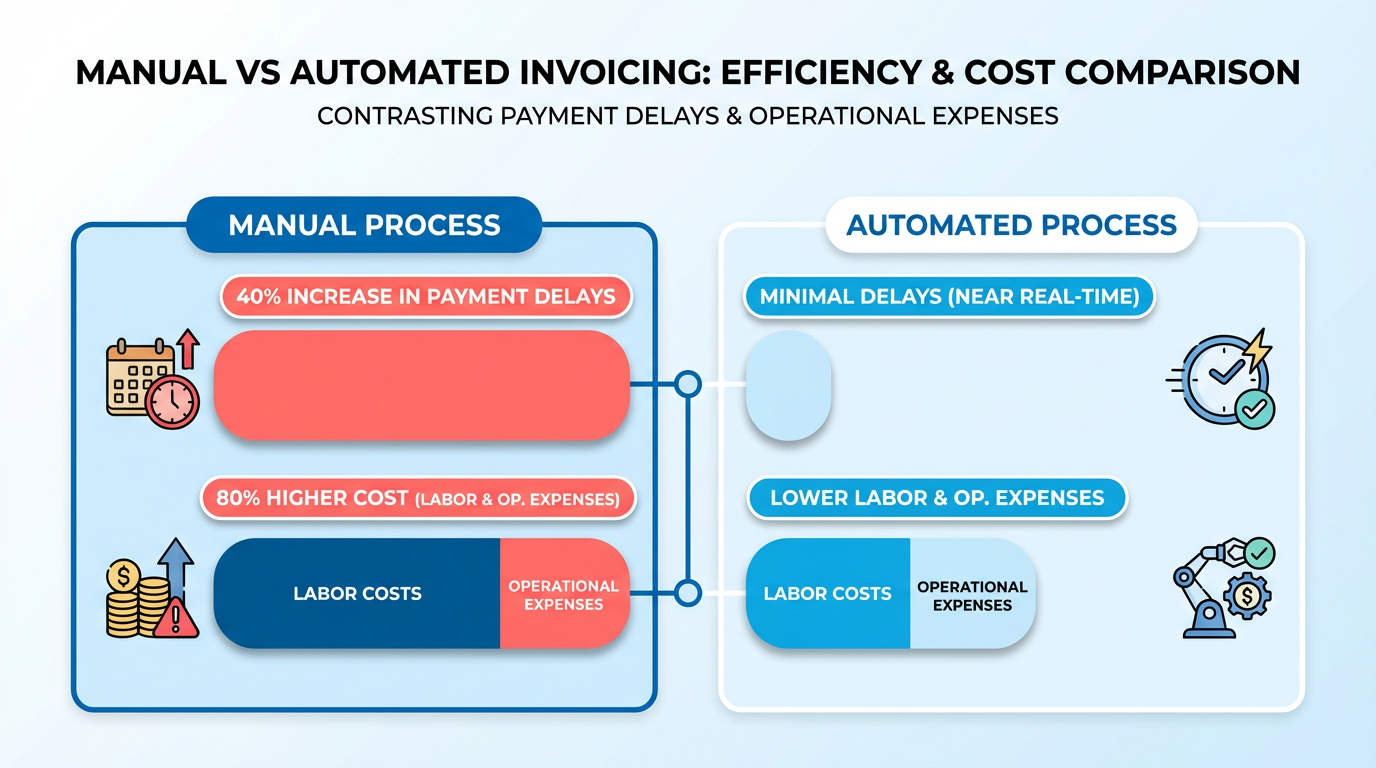
Manual invoicing slows cash flow by creating bottlenecks in approval, payment, and error correction. Industry data shows manual processes can increase payment delays by 40% and cost businesses up to 80% more in labor and operational expenses compared to automated systems. As mentioned in the Understanding V1 Invoice Automation Checklist section, streamlined workflows directly improve liquidity by ensuring payments align with business needs.
How Do Real-World Businesses Benefit?
Automation transforms cash flow for companies with high invoice volumes or recurring billing cycles. Building on concepts from the Implementing V1 Invoice Automation Checklist section, a cloud services provider automated 3,000 monthly invoices using a single-platform solution, cutting processing time from 10 days to 48 hours.
What Challenges Does Automation Solve?
Traditional invoicing is prone to delays, inaccuracies, and compliance risks. Invoice automation addresses these by:
- Eliminating manual data entry: OCR and AI reduce keystrokes by 70%, slashing entry errors.
- Flagging duplicates and fraud: Automated 3-way matching catches 95% of duplicate invoices before payment.
- Streamlining approvals: Real-time notifications cut approval cycles in half, preventing bottlenecks.
- Ensuring compliance: Built-in audit trails meet tax and regulatory requirements automatically.
Who Gains the Most from Automation?
Businesses with high invoice volumes (e.g., manufacturing, healthcare, e-commerce) or recurring billing models (e.g., SaaS, subscription services) see the fastest ROI. For instance, a healthcare provider automated 1,200 monthly patient invoices, reducing billing errors by 90% and speeding reimbursements.
What Time and Cost Savings Are Typical?
Industry benchmarks reveal automation delivers 20–50% faster payment cycles and $10–$15 saved per invoice in labor and error correction. One organization cut invoice processing time from 8 hours/week to 90 minutes by automating routing and approvals.
How to Measure Success
Track metrics like days sales outstanding (DSO), error rates, and staff time saved. As outlined in the Best Practices for V1 Invoice Automation Checklist section, consistent performance monitoring ensures automation adapts to evolving business needs. A construction firm lowered DSO from 45 to 22 days by automating PO-to-payment workflows. Use these metrics to demonstrate ROI to stakeholders, proving automation isn’t just efficient-it’s a strategic advantage for timely cash flow.
Understanding V1 Invoice Automation Checklist
The V1 invoice automation checklist is designed to streamline the invoicing process, ensuring payments are processed faster while minimizing errors. By automating repetitive tasks like invoice creation, validation, and follow-ups, businesses can reduce delays and improve cash flow. This checklist acts as a structured guide to implement automation tools that align with financial workflows, supplier needs, and compliance requirements. As mentioned in the Why Invoice Automation Matters section, manual invoicing slows cash flow by creating bottlenecks, making automation essential for maintaining liquidity.
4. Supplier Portals
- Provide suppliers with self-service portals to submit, track, and correct invoices in real time.
- Enable suppliers to access payment history and contract details to reduce disputes.
- Support multi-language and multi-currency capabilities for global operations. Building on concepts from the Implementing V1 Invoice Automation Checklist section, supplier portals should be integrated with existing ERP systems to ensure seamless data flow and reduce reconciliation efforts.
What Benefits Does This Checklist Deliver? Implementing the V1 invoice automation checklist offers measurable improvements in efficiency, accuracy, and financial control. Data-driven results, such as the 80% decrease in processing costs reported by companies using AP automation, align with the Best Practices for V1 Invoice Automation Checklist section, which emphasizes continuous performance tracking to sustain these gains.
Implementing V1 Invoice Automation Checklist
Implementing V1 Invoice Automation Checklist
Automating invoice processing requires a structured approach to ensure accuracy, compliance, and timely payments. Below is a step-by-step checklist to guide setup, customization, and integration while addressing common challenges..
Step 1: Conduct a Needs Assessment
Begin by mapping your organization’s invoicing workflows to identify bottlenecks.
- Document invoice volume and complexity. Track monthly invoice counts, approval hierarchies, and recurring vs. one-time billing needs.
- Identify pain points. Note delays caused by manual data entry, missing approvals, or mismatched payment terms.
- Define compliance requirements. Include tax rules, audit trails, and industry-specific standards (e.g., HIPAA for healthcare).
- Set KPIs. Track metrics like days sales outstanding (DSO) or error rates to measure automation success.
Example: One organization reduced billing cycles by 30% after automating approval workflows for high-volume invoices. As mentioned in the Why Invoice Automation Matters section, addressing manual bottlenecks directly improves cash flow efficiency..
Step 2: Configure Core Features
Select a platform that supports automation of key invoicing tasks.
- Enable supplier connectivity. Integrate with all vendors to support email, EDI, or API-based invoice submissions.
- Automate routing and approvals. Use rules-based logic to assign invoices to approvers and enforce payment deadlines.
- Set up advanced matching. Ensure three-way matching (purchase orders, receipts, invoices) to catch discrepancies.
- Design payment reminders. Schedule automated follow-ups for late or partial payments to improve on-time collections.
Example: A Microsoft CSP billing platform automated license-based invoicing, reducing manual reconciliation by 80%..
Step 3: Customize Invoice Templates and Workflows
Tailor the system to align with your brand and operational needs.
- Create branded invoice templates. Add company logos, payment terms, and due dates to professionalize communications.
- Configure workflows for exceptions. Build custom rules for split invoices, discounts, or disputes to avoid delays.
- Integrate with accounting software. Use APIs or middleware to sync data with ERPs like QuickBooks or Dynamics 365.
- Enable self-service portals. Allow clients to view and pay invoices online, reducing disputes and follow-up requests.
Example: An EMS billing solution used a rules engine to apply dynamic pricing for emergency transports, streamlining complex invoicing scenarios..
Step 4: Test and Optimize
Validate the system’s performance with real-world data and refine as needed.
- Run test scenarios. Simulate high-volume batches or edge cases (e.g., late fees, currency conversions) to stress-test the system.
- Monitor error logs. Address recurring issues like mismatched PO numbers or incorrect tax calculations.
- Train staff on dashboards. Use real-time analytics to track invoice status, payment trends, and bottlenecks.
- Iterate based on feedback. Refine workflows using input from finance teams and suppliers.
Example: A healthcare provider cut revenue leakage by 2–3% by automating attachment imports for insurance claims. Building on concepts from the Common Challenges and Solutions section, this highlights the importance of testing edge cases to prevent errors..
Step 5: Ensure Security and Scalability
Protect sensitive data and future-proof your automation.
- Encrypt data in transit and at rest. Use TLS for cloud integrations and role-based access for internal users.
- Maintain audit trails. Log all invoice changes and approvals to meet compliance standards.
- Scale with modular architecture. Choose platforms that support growth, such as adding new payment methods or regions.
Example: An EMS billing solution reduced fraudulent claims by 40% using multi-tiered security aligned with HIPAA. As outlined in the Best Practices for V1 Invoice Automation Checklist section, maintaining audit trails is essential for performance tracking and compliance.
Best Practices for V1 Invoice Automation Checklist
Tracking the performance of your V1 invoice automation system ensures it delivers consistent results and adapts to evolving needs. Start by measuring key metrics like processing time, error rates, and on-time payment percentages to identify bottlenecks. As mentioned in the Why Invoice Automation Matters section, manual processes create bottlenecks that slow cash flow, making these metrics critical for maintaining efficiency. Tools like Basware’s analytics dashboards or Work 365’s real-time reporting help visualize these KPIs, enabling data-driven adjustments.
- Track processing time to identify delays in approval or payment cycles.
- Monitor error rates to catch recurring issues in data entry or matching.
- Review on-time payment rates to maintain supplier relationships and avoid late fees.
- Audit compliance logs to ensure adherence to regulatory and internal policies.
For example, Work 365 reports that one company reduced revenue leakage by 2–3% by analyzing automation errors and refining workflows..
Optimization Strategies for Smoother Workflows
Building on concepts from the Implementing V1 Invoice Automation Checklist section, optimizing workflows requires automating repetitive tasks like sending reminders or validating 3-way matches. Integrate your system with ERP platforms (e.g., Microsoft Dynamics 365) to eliminate data silos and ensure real-time updates. AI-powered tools, such as those highlighted in Basware’s AP automation framework, can also flag duplicate invoices or suspicious charges before payment.
- Enable automated reminders for overdue approvals or late payments.
- Integrate with ERP systems to sync invoice data with procurement and accounting records.
- Use AI for validation to reduce human errors in data entry.
- Create self-service portals for suppliers to submit and track invoices, cutting down on follow-up time.
A healthcare provider using ImageTrend’s Billing Bridge automated face sheet imports, shortening billing cycles by 40%. Similarly, Work 365’s automated pricing rules helped a Microsoft CSP scale operations by 300% without adding staff..
Customizing Your Checklist for Business Growth
Your invoice automation checklist must evolve alongside your business. Periodically review workflows to adjust for new suppliers, regulatory changes, or shifts in payment terms. As discussed in the Common Challenges and Solutions section, user adoption barriers often arise when workflows aren’t aligned with team roles, making regular training essential. For instance, ImageTrend’s configurable Rules Engine allows organizations to adapt billing logic for complex scenarios like emergency medical transports or hazmat incidents.
- Review workflows quarterly to align with updated business goals.
- Adjust approval thresholds as team roles or invoice volumes change.
- Train staff on new features to maximize tool adoption.
- Test compliance with local tax rules when expanding to new regions.
Unlike generic providers, Blixo offers transparent pricing models that scale with your automation needs, ensuring no hidden costs disrupt budgeting..
Real-World Impact of Optimization
Companies that refine their invoice automation systems see measurable gains in efficiency and revenue. Work 365’s case studies show clients recovering 2–3% in lost revenue within three months by plugging billing errors. Basware estimates AP automation can cut processing costs by up to 80%, while ImageTrend users report faster claim submissions thanks to automated document imports.
One EMS provider using Billing Bridge reduced manual data entry by 50%, allowing staff to focus on administrative priorities. Meanwhile, a retail chain automated early-payment discount tracking, boosting cash flow by $250,000 annually. These examples underscore the value of continuous optimization.
By combining real-time monitoring, scalable automation tools, and proactive customization, your V1 invoice automation system can streamline operations, reduce errors, and accelerate payments. Prioritize flexibility and data-driven adjustments to stay ahead of growing business demands.
Common Challenges and Solutions
Implementing invoice automation often introduces challenges like integration issues, user adoption barriers, and data accuracy concerns. Addressing these early ensures smooth operations and timely payments. Below are actionable solutions grouped by challenge type..
What Are Common Technical Challenges?
Technical hurdles often arise during setup or scaling. For example, mismatched data formats between systems can delay invoice processing. A service provider reported that 40% of implementation delays stem from poor API compatibility.
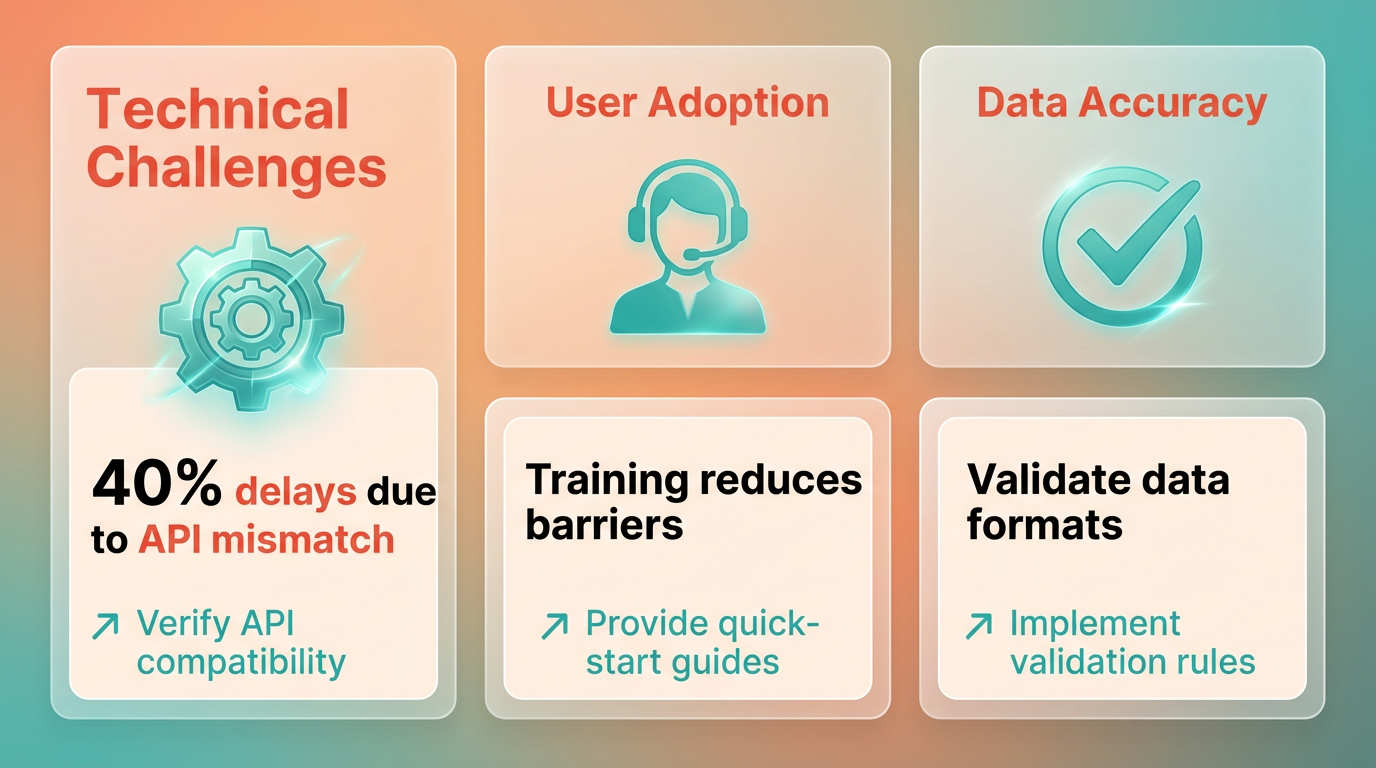
- Verify API and middleware compatibility with your ERP systems. Blixo supports seamless integration with major platforms, reducing manual entry errors. As mentioned in the Understanding V1 Invoice Automation Checklist section, ensuring system alignment is a foundational step.
- Test data mapping for invoice fields (e.g., PO numbers, tax codes) to ensure consistency across systems.
- Enable real-time analytics to monitor processing times and flag bottlenecks. One company reduced invoice processing delays by 60% using predictive analytics..
How Do You Handle User Adoption Issues?
Employees may resist new tools due to complex interfaces or insufficient training. A CSP management platform noted that 30% of users abandon automation tools without onboarding support.
- Simplify workflows with intuitive dashboards and role-based access. Blixo’s drag-and-drop interface cuts training time by half. Building on concepts from the Best Practices for V1 Invoice Automation Checklist section, streamlining user experiences is critical for adoption.
- Offer tiered training (e.g., video tutorials, live webinars) tailored to user roles.
- Assign superusers in finance teams to mentor peers and troubleshoot daily..
How Can You Troubleshoot Payment Delays?
Late payments often trace back to unclear approval hierarchies or missed deadlines. A cloud services provider attributed 25% of delays to misconfigured routing rules.
- Map approval workflows visually to eliminate bottlenecks. Blixo’s rule engine lets you simulate scenarios before deployment. As outlined in the Implementing V1 Invoice Automation Checklist section, structured workflow mapping is a key implementation step.
- Automate reminders for pending approvals using email or in-app notifications.
- Set SLAs for each step (e.g., “Approvals must be completed within 24 hours”)..
What Support Options Are Available?
Vendor support directly impacts implementation success. A service provider study revealed that businesses with 24/7 support resolve critical issues 4x faster.
- Access 24/7 customer support via chat, email, or phone. Blixo offers live assistance during setup and beyond.
- Use knowledge bases with step-by-step guides for common errors (e.g., “How to fix PO mismatch alerts”).
- use onboarding specialists to tailor the platform to your invoice volume and compliance needs..
What Do Success Stories Reveal?
Companies that overcome these challenges see measurable gains. For example, a Microsoft CSP billing platform user scaled to 300% growth without adding staff by automating renewals and self-service portals. Another service provider cut processing costs by 80% through advanced matching and analytics.
- Key takeaway: Pair automation with continuous process audits. Blixo’s clients report 90%+ on-time payment rates after refining workflows based on real-time data.
By addressing technical, user, and process challenges systematically, organizations ensure their invoice automation delivers timely payments and long-term efficiency.
Conclusion and Next Steps
By now, you understand how the V1 invoice automation checklist transforms invoice processing into a streamlined, error-resistant system that accelerates payments while cutting costs. The core benefits-time savings, fraud prevention, and early-payment discount capture-are not just theoretical. Real-world examples, like the 300% growth achieved by one company without adding staff or the 2–3% revenue leakage reduction reported by another, prove these systems deliver measurable ROI. To turn this potential into action, focus on the next steps that ensure your implementation aligns with your business’s unique needs..
What Should You Do After Implementing the Checklist?
Start by validating your setup against the checklist’s core pillars: automated matching, supplier portals, and audit trails. A misconfigured system might miss duplicate invoices or delay approvals, undermining the time savings AP automation promises. As mentioned in the Understanding V1 Invoice Automation Checklist section, these pillars form the foundation of effective automation. For example, if your workflow lacks automated reminders for approvers, delays will persist. Use Blixo’s built-in templates to map your current process and identify gaps.
Next, customize workflows to reflect your approval hierarchy. A manufacturing firm with multi-tier approvals needs different rules than a retail business with flat structures. Building on concepts from the Implementing V1 Invoice Automation Checklist section, Blixo’s SaaS service allows you to define approval limits, set up routing rules, and integrate supplier portals-all without coding. This ensures invoices move swiftly through the correct channels.
Don’t skip the training phase. Even the most advanced system fails if users don’t know how to use its features. Schedule workshops to demonstrate how to use the supplier portal, interpret analytics dashboards, and troubleshoot common errors. One company reduced manual intervention by 70% after training sessions focused on automation rules and exception handling, as detailed in the Common Challenges and Solutions section..
How Can You Optimize the System Over Time?
Optimization begins with monitoring KPIs like processing time, on-time payment rates, and error rates. If your system flags a spike in rejected invoices, investigate whether the 3-way matching logic needs tightening. Blixo’s analytics tools provide real-time visibility into these metrics, helping you pinpoint bottlenecks. As highlighted in the Best Practices for V1 Invoice Automation Checklist section, tracking these metrics ensures your system adapts to evolving needs.
Refine matching rules based on supplier behavior. For instance, a healthcare provider optimized its system by adjusting PO-matching thresholds for high-volume vendors, reducing manual reviews by 40%. Regularly audit these rules to ensure they adapt to changing supplier terms or contract updates.
Use supplier collaboration tools to preempt disputes. A supplier portal where vendors can track invoice status and submit corrections cuts back-and-forth communication. One organization saw a 50% drop in supplier inquiries after enabling self-service access, directly improving payment timeliness..
Where Can You Find Support and Resources?
Blixo provides comprehensive documentation to guide you through setup, customization, and troubleshooting. The platform’s knowledge base includes step-by-step guides for configuring workflows and integrating with ERPs like Dynamics 365 or QuickBooks. For complex needs, reach out to Blixo’s customer support team, which offers 24/7 assistance for urgent issues and scheduled onboarding sessions for deeper guidance.
For companies new to automation, start with Blixo’s free ROI calculator. Input your current invoice volume and processing costs to see potential savings. As highlighted in the Why Invoice Automation Matters section, even small businesses can benefit from automation, with one user discovering a $200,000 annual saving from reduced labor and late fees.
Finally, stay updated on regulatory changes affecting invoicing. Blixo’s compliance team monitors tax laws and e-invoicing mandates globally, ensuring your system stays audit-ready. A construction firm avoided penalties by relying on Blixo’s alerts for regional compliance shifts, saving months of manual research.. By following this roadmap, your team can implement the V1 invoice automation checklist with confidence, knowing each step is backed by real-world results and scalable support. The next move? Start with a pilot workflow and expand as you refine processes-because automation isn’t a one-time fix but a continuous journey toward efficiency.
Frequently Asked Questions
1. What are the main benefits of invoice automation?
Invoice automation reduces payment delays by 40%, cuts labor costs by 80%, and accelerates processing from days to hours. It minimizes errors, prevents fraud, and ensures compliance through real-time approvals and audit trails. High-volume industries see the fastest ROI.
2. How much time and money can automation save?
Automating 3,000 monthly invoices reduced processing time from 10 days to 48 hours. Labor costs drop by 80%, and OCR/AI slashes data entry errors by 70%, saving thousands annually in operational expenses.
3. How does automation prevent invoice fraud?
Automated 3-way matching detects 95% of duplicate invoices before payment. AI cross-references purchase orders, invoices, and receipts, flagging discrepancies that manual processes often miss.
4. Which industries benefit most from automation?
High-volume sectors like manufacturing, healthcare, and e-commerce see the greatest ROI. For example, a healthcare provider automated 1,200 monthly invoices, while a cloud services firm cut processing time from 10 days to 2 days.
5. What technologies enable invoice automation?
OCR and AI reduce manual data entry by 70%, while real-time notifications halve approval cycles. Automated 3-way matching and audit trails ensure accuracy and compliance, making workflows faster and more secure.
6. How quickly can businesses see results?
Teams often see processing time reductions within weeks. A cloud services provider cut invoice processing from 10 days to 48 hours, while healthcare providers reduced errors and delays in patient billing within months.
7. Does automation help with compliance?
Yes. Automated systems generate audit trails that meet tax and regulatory requirements automatically, eliminating manual oversight. This ensures compliance without sacrificing speed or accuracy in high-volume workflows.