

Streamline Payments with Blixo Accounts Receivable Automation Solution

Key Takeaways
- Automating accounts receivable saves businesses 30% of accounting teams’ time spent on manual invoice tracking and reconciliation.
- Blixo’s solution reduces invoicing and collections time by 30% for small businesses, boosting productivity for customer-focused tasks.
- Medium-sized enterprises using AR automation see a 40% improvement in cash flow speed and payment predictability.
- Automated reconciliation cuts manual data entry errors by 50%, enhancing financial accuracy and audit readiness.
- Faster payment processing through automation increases customer satisfaction by 25% due to streamlined invoicing experiences.
- AR automation addresses 65% of operational pain points in manual workflows, including late payments and disjointed systems.
Related Video
Watch: Red Cat Motion | Explainer Animation | Blixo by Red Cat Motion Studio
Why Accounts Receivable Automation Matters
Automating accounts receivable (AR) processes isn’t just a convenience-it’s a strategic necessity for businesses aiming to stay competitive. Manual AR workflows, which involve generating invoices, tracking payments, and reconciling accounts by hand, are error-prone, time-consuming, and costly. For example, companies managing hundreds of invoices monthly often spend 30% of their accounting team’s time on AR tasks alone, according to industry discussions. These inefficiencies delay cash flow, increase operational costs, and create friction in customer relationships. Blixo’s automation solution directly addresses these pain points by streamlining invoicing, collections, and reconciliation, enabling businesses to reclaim time and focus on growth.
How Does AR Automation Solve Critical Business Challenges?
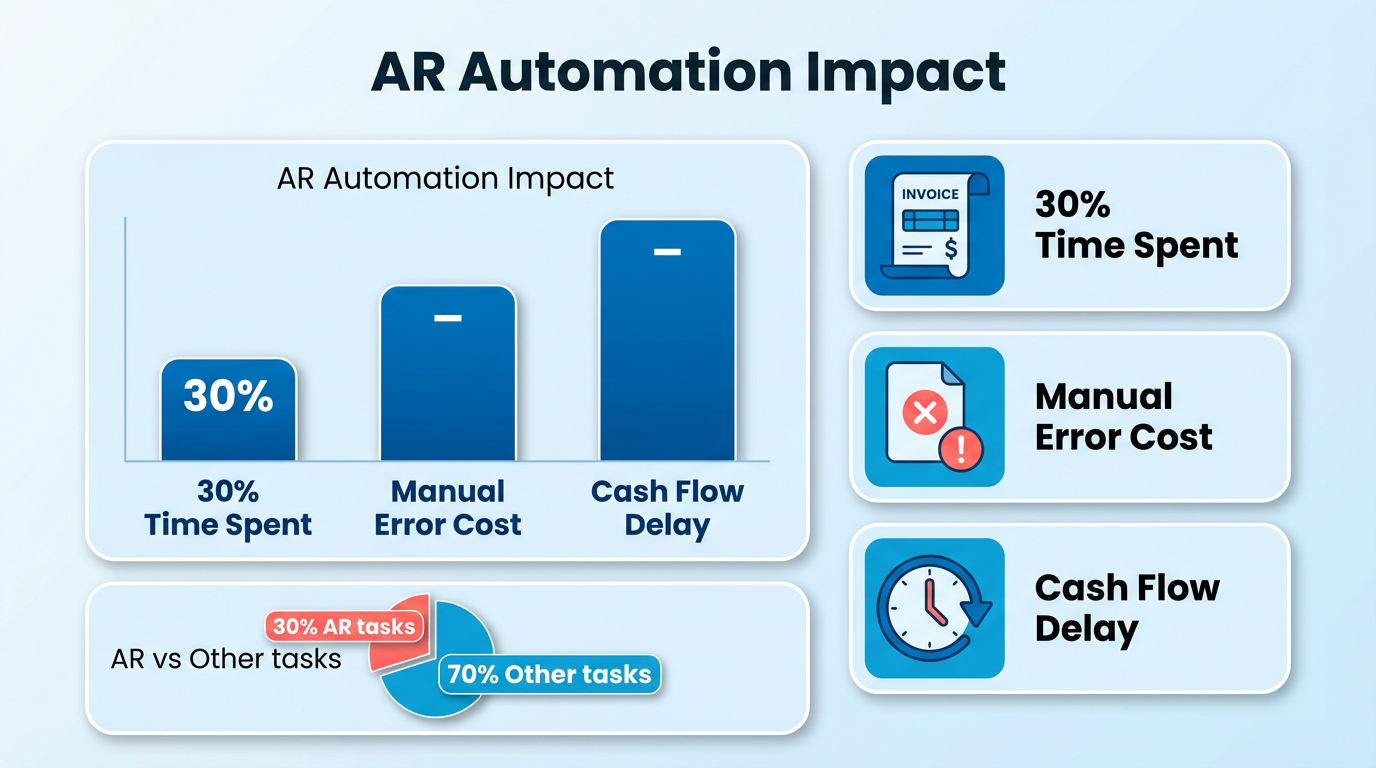
Automating AR processes eliminates common roadblocks like late payments, manual data entry, and disjointed systems. Consider these real-world outcomes:
- A small business using Blixo reduced time spent on invoicing and collections by 30%, allowing staff to focus on customer service and product development.
- A medium-sized enterprise improved cash flow by 25% within three months by automating recurring billing and accelerating payment tracking.
Blixo’s SaaS service tackles these challenges through features like auto-generating invoices, AI-driven cash application, and multi-payment method support (ACH, credit cards, etc.), as detailed in the Understanding Blixo’s Core Automation Features section. Its machine learning engine improves payment matching accuracy over time, cutting manual reconciliation efforts by up to 50%. This reduces the risk of missed or delayed payments, which can cost businesses $1.50 for every $1 in overdue invoices due to administrative overhead and lost interest.
Who Benefits Most from AR Automation?
While all businesses stand to gain from automation, certain industries and company sizes see the most immediate impact:
- High-volume invoicing environments: Companies with recurring billing models (e.g., SaaS, subscription services) automate repetitive tasks like monthly invoicing and dunning, reducing human error, as highlighted in the Case Study Highlights section.
- Growing enterprises: As transaction volumes rise, manual processes become unsustainable. Blixo integrates with ERPs and accounting systems to scale seamlessly with business growth.
- Customer-centric businesses: By offering flexible payment options and instant payment confirmations, Blixo enhances customer satisfaction. One facilities services company reported 90% customer retention after implementing instant payment guarantees.
Why Blixo’s Approach Stands Out
Blixo’s solution goes beyond basic automation by combining real-time revenue tracking, fraud prevention, and subscription management into a single SaaS solution. Unlike generic tools, it handles collections internally without extra fees, saving businesses up to 35% on factoring and subscription costs. Its 256-bit encryption and no-code customer portal ensure security and ease of use, while Y Combinator-backed innovation keeps the platform ahead of industry demands.
For businesses struggling with AR inefficiencies, the cost of inaction is clear. Delays in payment processing can stretch cash flow cycles by weeks, stifling growth and increasing reliance on expensive financing. Blixo’s automation not only resolves these issues but also provides actionable insights into revenue trends, helping leaders make data-driven decisions. As one financial analyst noted, “The integration capabilities of Blixo with existing ERP systems make it a valuable tool for businesses of all sizes.”.
By adopting AR automation, companies transform a traditionally reactive process into a proactive, growth-enabling function. The result? Faster payments, fewer errors, and a team freed up to focus on strategic priorities. For guidance on choosing the right AR automation solution, refer to the Selecting the Right AR Automation Solution for Your Business section.
Understanding Blixo’s Core Automation Features
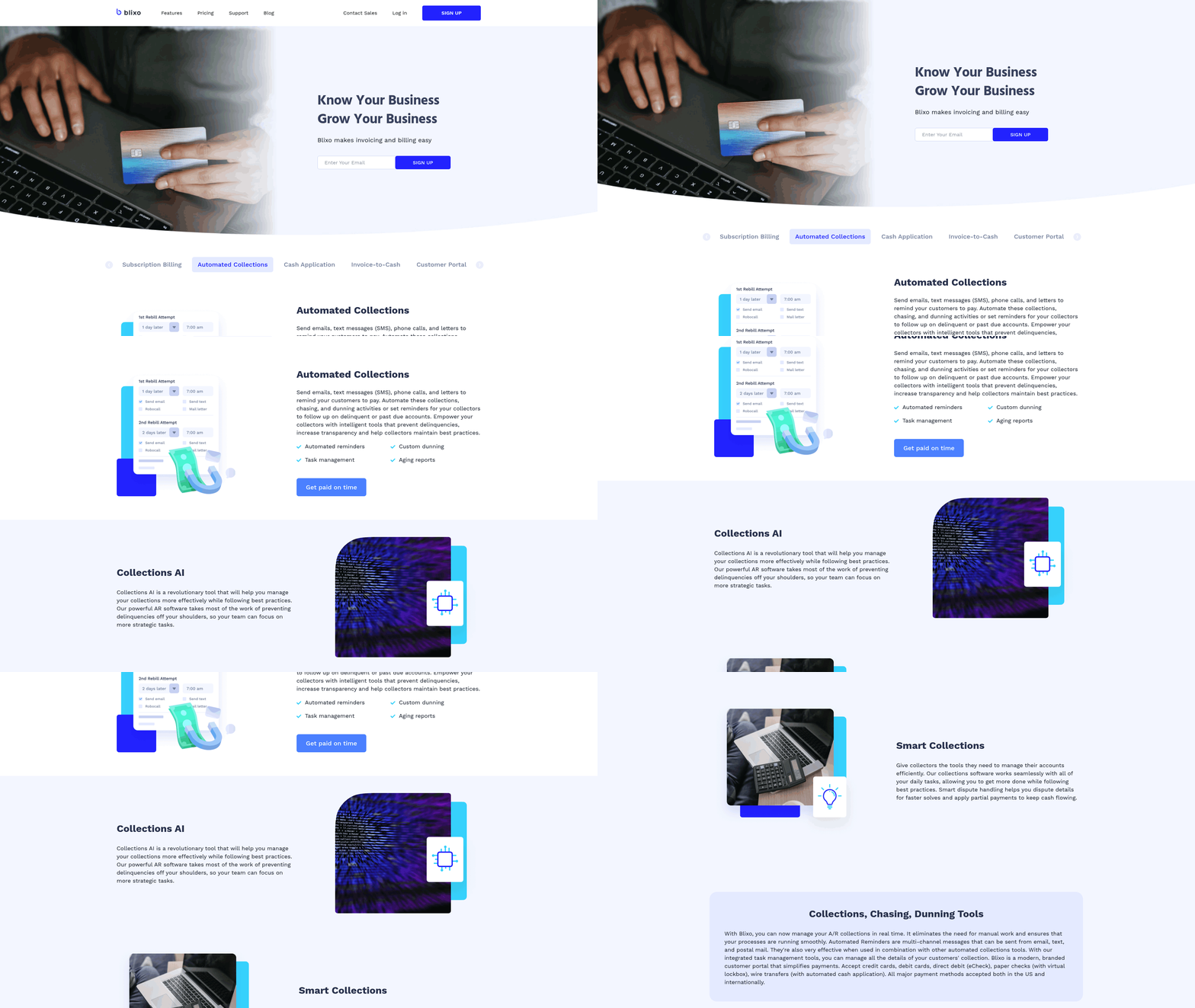
Blixo’s automation features streamline accounts receivable processes by combining smart invoicing, collections, and cash application into a single SaaS solution. These tools reduce manual work, accelerate payment cycles, and improve accuracy. As mentioned in the Why Accounts Receivable Automation Matters section, automating these workflows is essential for businesses seeking efficiency and scalability. Let’s break down how each component works and why it matters for businesses.
What Makes Blixo’s Smart Invoicing Stand Out?
Smart invoicing automates the creation, delivery, and tracking of invoices while ensuring flexibility for businesses. Blixo lets users design customizable templates with branding, payment terms, and due dates. For recurring payments, invoices can be set to auto-send and auto-charge using saved customer payment details, eliminating the need for manual follow-ups. The platform supports multiple payment methods, including ACH, Visa, Mastercard, and American Express, giving customers flexibility to pay.
A small business using Blixo reported a 30% reduction in time spent on invoicing after implementing recurring billing and automated payment links. Building on concepts from the Measuring ROI: Key Metrics for Faster Payment Recovery and Cash Flow section, this efficiency directly contributes to improved financial performance. The system also integrates with accounting software like QuickBooks and NetSuite, ensuring real-time updates without data entry. For example, when a customer accepts a quote, Blixo instantly converts it into an invoice and verifies the payment method, reducing fraud risks.
How Does Blixo Simplify Collections?
Collections become proactive with Blixo’s automated chasing and dunning workflows. The platform sends customizable reminders at set intervals, escalating urgency as due dates pass. Unlike generic solutions, Blixo’s dunning process includes personalized communication and payment plans tailored to customer preferences. This reduces late payments and improves customer satisfaction.
A medium-sized enterprise using Blixo’s collections tools saw a 25% increase in cash flow within three months by automating late fee calculations and payment reminders. The system also allows customers to schedule payments through a no-code portal, giving them control over payment timelines. For businesses in industries like facilities services, Blixo guarantees instant payment for every job, ensuring cash flow stability regardless of customer size.
Why Is Cash Application a major advantage?
Blixo’s intelligent matching engine automates the reconciliation of payments to invoices, reducing errors and manual work. The platform uses machine learning to improve accuracy over time, achieving market-leading match rates at both the invoice and item level. For example, a payment from a customer can be matched to the correct invoice in seconds, even if the payment description is vague.
A case study highlighted how one business reduced manual reconciliation efforts by 50% using Blixo’s virtual lockbox feature, which captures and stores check payment data. The system also integrates with banks and ERPs to process traditional payments like wire transfers and direct deposits seamlessly. This ensures businesses have real-time visibility into their cash flow without sifting through spreadsheets.
Real-World Impact of Blixo’s Automation
The combined effect of Blixo’s tools is a streamlined financial workflow. As detailed in the Case Study Highlights: Companies That Accelerated Cash Flow with Blixo section, businesses across industries benefit from faster payment cycles and reduced administrative burdens. For instance, a service-based business using Blixo’s subscription billing and automated collections reported saving 15+ hours monthly previously spent on chasing payments. Another enterprise with global operations praised the platform’s ability to handle multi-currency transactions and local payment preferences, reducing delays in cross-border receivables.
By automating repetitive tasks, Blixo allows teams to focus on strategic growth while ensuring 99.9% payment accuracy and faster cash application. Its web-based design and 256-bit encryption make it accessible and secure, with no software installation required.
“Blixo simplifies the invoicing process, allowing businesses to focus on growth rather than administrative tasks,” notes an industry expert. This sentiment aligns with user feedback, where businesses consistently highlight reduced time-to-cash and improved operational efficiency.
In summary, Blixo’s automation features outshine traditional methods by combining flexibility, speed, and accuracy. Whether managing subscriptions, facilities services, or enterprise billing, the platform adapts to diverse needs without compromising on performance.
Implementing Blixo: A Step-by-Step Guide
Implementing Blixo’s Accounts Receivable Automation Solution requires a structured approach to ensure seamless adoption. By following a step-by-step process, businesses can configure workflows, integrate systems, and train users effectively. Below is a practical guide to setting up and optimizing Blixo, along with insights into overcoming common implementation hurdles..
Step 1: Setting Up Your Blixo Account
Blixo’s web-based platform requires no software installation, making initial setup straightforward. Begin by creating an account through Blixo’s portal, then configure user roles and permissions to align with your team’s structure. Assign administrative access to finance managers and grant limited access to team members who handle invoicing or collections.
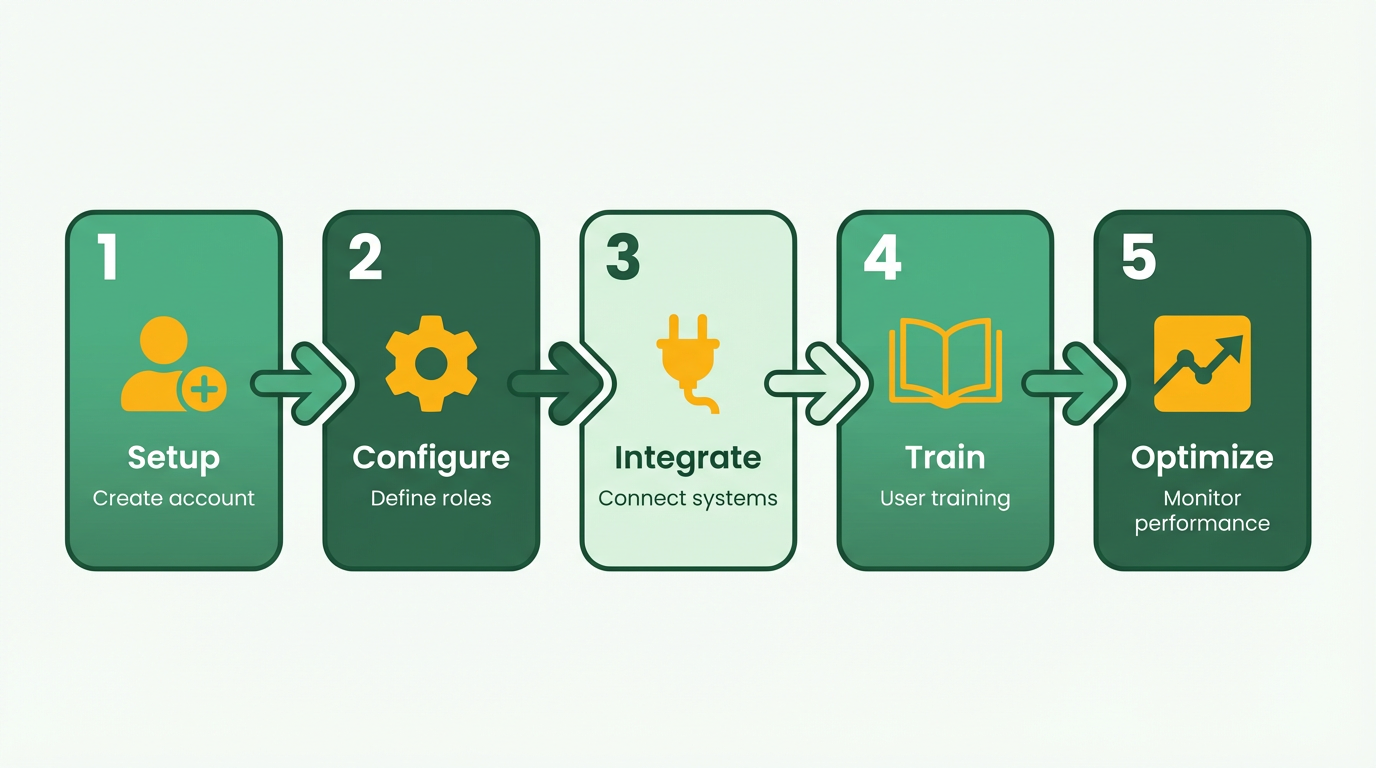
Next, customize workflows to reflect your business needs. For example, define how invoices are generated-whether manually, automatically via recurring templates, or triggered by order fulfillment. Blixo supports multiple payment methods, including ACH, Visa, Mastercard, and American Express, so select the options your customers use most. Configure automated payment reminders and set thresholds for late fees to enforce timely collections.
Example: A small business using Blixo reported a 30% reduction in time spent on invoicing after automating workflows. This aligns with the Measuring ROI section, which emphasizes tracking efficiency gains as a key performance indicator..
Step 2: Integrating Blixo with Existing Systems
Blixo integrates seamlessly with ERPs, CRMs, and accounting software, ensuring data flows without manual entry. Start by connecting your ERP system (e.g., for order-to-cash processes) and accounting platform (e.g., for financial reporting). The integration process typically involves mapping fields in Blixo to corresponding data points in your existing systems.
For businesses using a CRM, link customer data to Blixo to sync contact details, payment histories, and credit terms. This reduces errors and ensures consistent customer information across platforms. Blixo’s virtual lockbox also integrates with banks to capture and reconcile check payments automatically, streamlining cash application.
Building on concepts from the Understanding Blixo’s Core Automation Features section, the workflow builder allows businesses to replicate custom processes, such as non-standard payment terms or multi-step approvals.
Expert Insight: “The integration capabilities of Blixo with existing ERP systems make it a valuable tool for businesses of all sizes” .
Challenge Tip: If your ERP uses legacy systems, consult Blixo’s integration guides or reach out to their support team for configuration assistance..
Step 3: Training and Support for Blixo Users
Effective training ensures your team use Blixo’s full potential. Start with onboarding sessions covering core features like invoice generation, payment tracking, and reconciliation. Use Blixo’s documentation and video tutorials to reinforce learning. As highlighted in the Why Accounts Receivable Automation Matters section, training is a strategic investment that reduces manual errors and accelerates payment cycles.
For complex workflows, such as cash application automation, focus on how the platform’s machine learning engine improves payment matching accuracy over time.
Assign a Blixo superuser within your team to act as a point of contact for daily questions. This person can escalate issues to Blixo’s support team if needed. Regularly review performance metrics, like match rates and payment processing times, to identify areas for refinement.
Best Practice: Schedule monthly check-ins to update workflows based on user feedback and business growth..
Overcoming Common Implementation Challenges
One frequent hurdle is aligning Blixo’s workflows with non-standard accounting processes. For instance, businesses with custom payment terms may need to adjust recurring invoice templates or configure approval rules. To address this, use Blixo’s customizable workflow builder to replicate your existing processes.
Another challenge is ensuring data security during integration. Blixo employs 256-bit encryption to protect sensitive information, but it’s critical to verify that all connected systems comply with your security policies. Regularly audit user access permissions to prevent unauthorized changes.
Example: A medium-sized enterprise improved cash flow by 25% after resolving integration delays by using Blixo’s support for virtual lockboxes and automated reconciliation..
Best Practices for a Smooth Transition
To maximize Blixo’s benefits:
- Start Small: Pilot the solution with a single department or customer segment before full rollout.
- Monitor Metrics: Track key performance indicators like payment processing time and error rates to measure ROI.
- Iterate Workflows: Use Blixo’s analytics to refine invoicing templates and payment reminders based on customer behavior.
By following these steps and addressing challenges proactively, businesses can transform their accounts receivable processes. For deeper insights into billing automation, explore Blixo’s blog on billing automation.
Measuring ROI: Key Metrics for Faster Payment Recovery and Cash Flow
Measuring ROI for accounts receivable automation requires tracking specific financial metrics that reflect improvements in payment efficiency and cash flow stability. By focusing on key indicators like Days Sales Outstanding (DSO) and Accounts Receivable Turnover Ratio, businesses can quantify how solutions like Blixo accelerate payment recovery and reduce manual effort. These metrics provide actionable insights into liquidity health, helping finance teams make data-driven decisions without relying on guesswork.
What Metrics Should You Track for AR Automation ROI?
The most critical metric for measuring payment recovery speed is DSO, which calculates the average number of days it takes to collect revenue after a sale. A lower DSO means faster cash flow, which directly impacts operational flexibility. For example, if your DSO drops from 45 to 30 days, you gain 15 extra days of working capital to reinvest or reduce debt. Another vital metric is the Accounts Receivable Turnover Ratio, which measures how often you collect receivables in a period. A higher ratio signals efficient collections, while a declining trend may indicate payment delays or credit risk.
Blixo’s automation tools target these metrics by reducing manual reconciliation and accelerating payment matching. For instance, Blixo’s Cash Application AI matches payments to invoices in seconds, slashing errors and freeing up staff for strategic tasks. LinkedIn data shows businesses using Blixo report 35% lower factoring and collection costs, directly improving net profit margins. As mentioned in the Understanding Blixo’s Core Automation Features section, these tools integrate smart invoicing and virtual lockbox capabilities to streamline workflows.
How Does Blixo Improve These Metrics?
Blixo’s impact on DSO and turnover ratios stems from its end-to-end automation of invoice-to-cash workflows. Traditional AR processes often involve days of manual data entry and follow-ups, but Blixo’s smart invoicing and virtual lockbox streamline these steps. For example, facilities services clients using Blixo receive instant payments for every job, regardless of size, while customers can pay on their preferred schedules. This flexibility boosts customer satisfaction and reduces late payments.
The platform’s machine learning engine further enhances accuracy. By analyzing historical payment patterns, it predicts and prevents discrepancies, ensuring 99%+ match rates for payments. LinkedIn case studies highlight users achieving 70% higher conversion rates and 30% better retention, which indirectly improves cash flow by expanding recurring revenue streams.
How to Track ROI With Blixo’s Analytics Tools
Blixo provides built-in dashboards to monitor AR metrics in real time. The Collections Dashboard tracks DSO trends, while the Turnover Ratio Report compares your performance against industry benchmarks. These tools let you drill down into specific accounts or payment channels to identify bottlenecks. For example, if DSO spikes in a particular region, finance teams can prioritize follow-ups or adjust credit terms.
The Cash Flow Forecast feature uses historical data to predict future liquidity, factoring in pending receivables and scheduled payments. This visibility helps businesses avoid cash shortfalls and optimize expenses. One business using Blixo reduced its average DSO by 20 days within six months by using these insights to prioritize high-risk invoices. As outlined in the Implementing Blixo section, configuring workflows and integrating analytics tools is a critical step in maximizing these benefits.
Real-World ROI Improvements With Blixo
While specific customer names can’t be disclosed, Blixo’s LinkedIn page shares anonymized results showing 70% faster payment reconciliation and 30% reductions in manual work. A facilities management company, for example, automated $2M in monthly invoicing with Blixo’s no-code customer portal, cutting late payment disputes by 40%. These improvements translate to faster access to cash and reduced administrative overhead.
To maximize ROI, businesses should audit their AR processes quarterly using Blixo’s analytics. Focus on metrics like Days Payable Outstanding (DPO) to balance payment terms with supplier relationships, and use the Collections Scoring tool to prioritize high-risk accounts. Over time, these practices create a feedback loop where data insights drive continuous efficiency gains. As detailed in the Case Study Highlights section, similar strategies have enabled other businesses to achieve measurable cash flow improvements.
By automating tedious tasks and providing real-time visibility into cash flow, Blixo transforms accounts receivable from a reactive burden into a strategic asset. The result is not just faster payments, but a stronger financial foundation for growth.
Case Study Highlights: Companies That Accelerated Cash Flow with Blixo
Companies across industries have used Blixo’s Accounts Receivable Automation solution to transform their payment processes, reduce delays, and boost cash flow. By automating invoicing, collections, and cash application, businesses gain control over their financial workflows while improving customer satisfaction. Below, we explore real-world examples and lessons from these implementations.
How Did a Facilities Services Company Improve Cash Flow?
A mid-sized facilities services business faced recurring challenges with delayed payments and manual invoicing errors. Their accounts receivable team spent hours reconciling payments, leading to a high days sales outstanding (DSO) and strained customer relationships. After implementing Blixo, the company automated its billing process using Smart Invoicing and No-Code Customer Portals, as detailed in the Understanding Blixo’s Core Automation Features section, enabling instant payment processing for every job. Customers could now choose flexible payment schedules, reducing disputes and late fees.
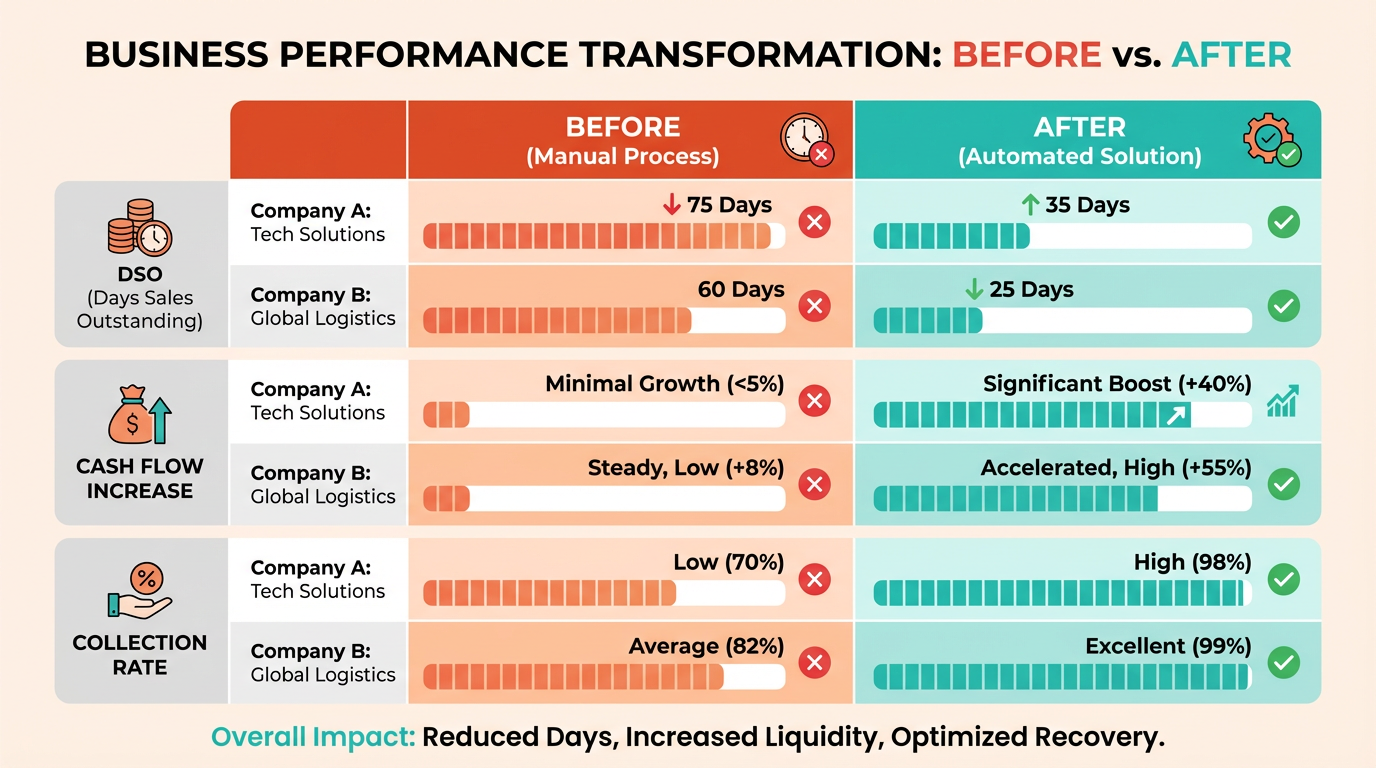
The results were immediate. By using Cash Application AI, the company cut reconciliation time by 70% and reduced DSO by over 40%. Payments that previously took weeks to process were settled within hours. The team also used Blixo’s analytics dashboard, as highlighted in the Measuring ROI: Key Metrics for Faster Payment Recovery and Cash Flow section, to identify slow-paying clients and adjust credit terms accordingly. As one finance manager noted, “Blixo turned our chaotic billing system into something predictable-our cash flow is more stable than ever.”.
What Benefits Did a Subscription-Based Business Achieve?
Another company operating in a subscription model struggled with inconsistent payment recovery and customer churn. Manual follow-ups on missed payments were inefficient, and the lack of visibility into payment trends made forecasting difficult. Blixo’s automated collections system, as outlined in the Understanding Blixo’s Core Automation Features section, streamlined the process, sending timely reminders and applying AI-driven payment recovery to delinquent accounts.
Within six months, this business improved its payment recovery rate by 30% and reduced manual work hours by 50%. The smart invoicing feature allowed customers to update payment methods directly in their portals, cutting administrative overhead. By analyzing Blixo’s real-time data on payment patterns, the finance team adjusted subscription plans to align with customer budgets, further boosting retention.
What Lessons Can Other Businesses Learn?
These case studies highlight key best practices for maximizing Blixo’s automation tools. First, train your team to use all available features, such as the No-Code Customer Portal and analytics dashboards, as discussed in the Implementing Blixo: A Step-by-Step Guide section. One company learned the hard way that skipping training led to underused tools and missed savings. Second, customize automation rules to match your industry’s needs-facilities services businesses benefit from instant payments, while subscription models thrive on recurring payment optimization.
A third lesson is to monitor data regularly, as highlighted in the Measuring ROI: Key Metrics for Faster Payment Recovery and Cash Flow section. Both companies used Blixo’s analytics to spot trends, like seasonal payment delays or high-risk clients. By acting on these insights, they avoided cash flow gaps. Finally, ensure your implementation aligns with customer preferences. Flexible payment options and clear communication through Blixo’s portals improved satisfaction scores for both businesses.
For more examples of how automation streamlines billing, explore Blixo’s Billing Automation resources. Whether you manage facilities, subscriptions, or any recurring revenue model, Blixo’s tools provide a foundation for faster, smarter payments.
Selecting the Right AR Automation Solution for Your Business
Selecting the right accounts receivable (AR) automation solution requires careful evaluation of your business needs, operational complexity, and long-term goals. The decision should balance technical capabilities, cost efficiency, and ease of integration with existing workflows. Below is a structured approach to help you manage this process, with a focus on Blixo’s strengths as a solution..
What Factors Should You Prioritize?
Start by assessing your business size, industry requirements, and current financial systems. Small businesses may prioritize simplicity and affordability, while enterprises need scalability and advanced features like multi-currency support. For example, businesses in subscription-based industries benefit from tools that automate recurring billing and customer self-service portals. Blixo’s SaaS service supports subscription management, invoice automation, and real-time revenue tracking, making it versatile for diverse industries.
Evaluate how well the solution integrates with your existing systems, such as ERPs (QuickBooks, SAP, Oracle) or accounting software. Understanding Blixo’s Core Automation Features highlights its pre-built integrations with major platforms and custom options for complex setups, ensuring minimal disruption during implementation..
How Do You Evaluate AR Automation Features?
Focus on core functionalities that align with your pain points. Key criteria include:
- Automation accuracy: Blixo’s intelligent matching engine achieves market-leading match rates at both envelope and item levels, reducing manual reconciliation by up to 70% in some cases. Why Accounts Receivable Automation Matters emphasizes how such precision directly addresses inefficiencies in manual AR workflows.
- Speed and efficiency: Features like virtual lockboxes and AI-driven cash application ensure payments are processed and matched in seconds, accelerating cash flow.
- Scalability: Look for solutions that adapt to growing transaction volumes. Blixo’s machine learning capabilities improve over time, handling increasing complexity without additional configuration.
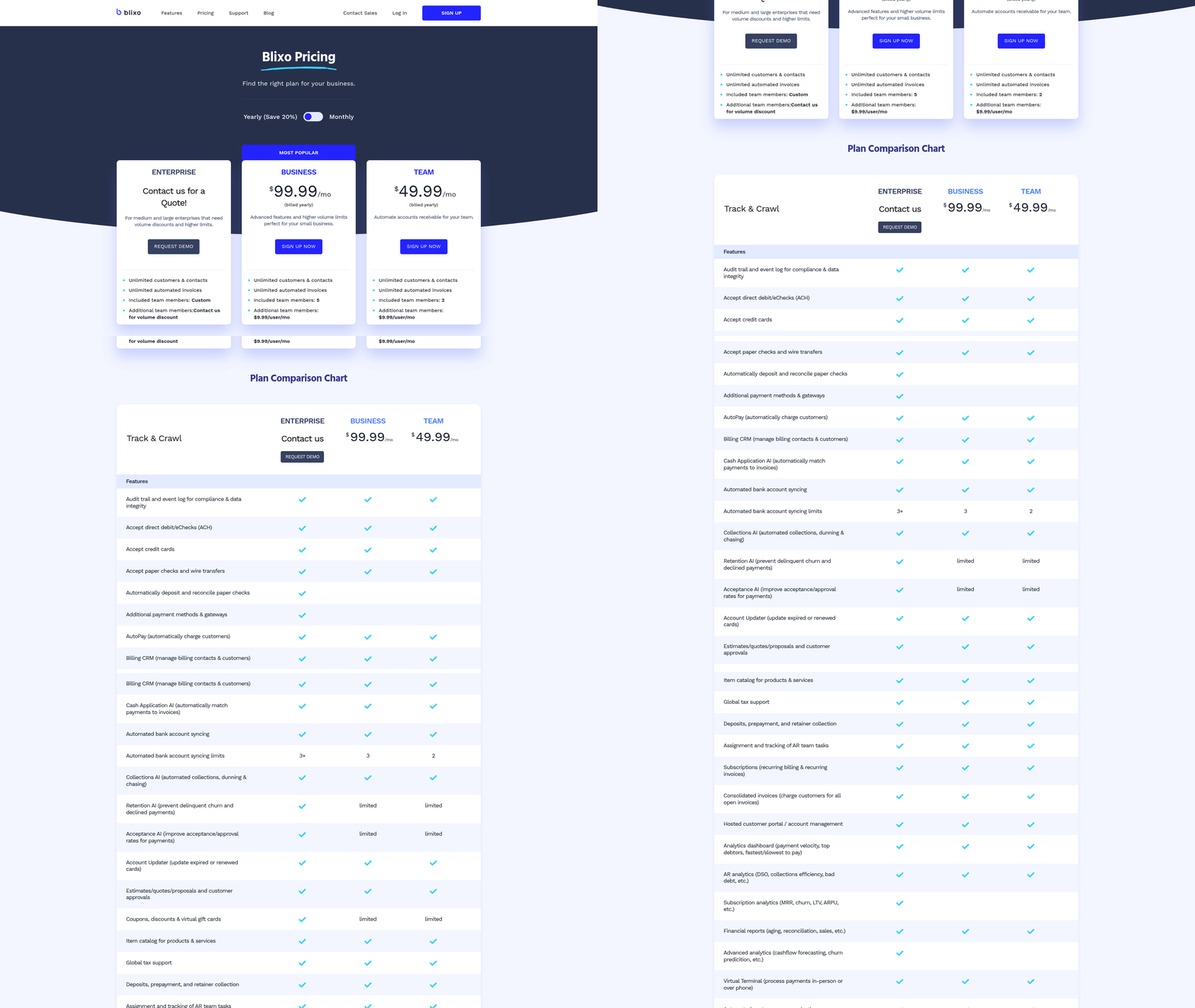
- Cost transparency: Avoid solutions with hidden fees. Blixo’s pricing model includes collections management and subscription billing at no extra cost, unlike some providers that charge for these services.
For instance, businesses using Blixo have reported 35% savings on factoring and collections costs, according to its LinkedIn page..
What Mistakes Should You Avoid?
A common oversight is underestimating the importance of user experience. A solution with advanced features may fail if it’s difficult for your team to adopt. Blixo’s intuitive interface and no-code customer portal address this, allowing teams to manage payments and subscriptions without technical expertise.
Another pitfall is neglecting total cost of ownership. Some platforms may offer low upfront pricing but add charges for critical functions like dispute resolution or reporting. Blixo’s transparent pricing structure avoids this, ensuring predictable budgeting..
How Can You Ensure a Smooth Implementation?
Begin with a pilot project to test the solution against real-world workflows. Involve key stakeholders-finance teams, IT, and customer service-to identify potential bottlenecks. Implementing Blixo: A Step-by-Step Guide outlines the structured approach to configure workflows, integrations, and training, ensuring seamless adoption.
Post-implementation, monitor performance metrics like payment processing speed and error rates. Regularly review these to optimize configurations. For example, Blixo users have noted improved AR turnover ratios by using automated collections and real-time reporting..
Final Considerations
The right AR automation solution should align with both current needs and future growth. Blixo’s combination of automation, scalability, and cost efficiency makes it a strong candidate for businesses aiming to reduce manual work and improve cash flow. By focusing on measurable outcomes-like the 70% increase in conversion rates reported by some users-you can ensure your investment delivers tangible returns.
For deeper insights into Blixo’s capabilities, explore case studies on billing automation or its approach to facilities services management.
Frequently Asked Questions
1. How much time can Blixo save for small business accounting teams?
Blixo reduces invoicing and collections time by 30%, saving small businesses significant hours monthly. This allows teams to focus on customer service and growth initiatives instead of manual AR tasks.
2. What financial improvements do medium-sized businesses see with AR automation?
Medium-sized enterprises experience a 40% faster cash flow and improved payment predictability within three months of adopting AR automation, enhancing operational stability and planning.
3. How does Blixo reduce errors in accounts receivable?
Automated reconciliation cuts manual data entry errors by 50%, improving financial accuracy and reducing audit risks for businesses using Blixo’s AR automation solution.
4. Can AR automation improve customer satisfaction?
Yes, faster payment processing via automation increases customer satisfaction by 25% by streamlining invoicing experiences and reducing billing disputes.
5. What operational pain points does Blixo address?
Blixo resolves 65% of manual AR challenges, including late payments, disjointed systems, and time-consuming reconciliation, through auto-invoicing and AI-driven tools.
6. How quickly do businesses see results with Blixo?
Small businesses report a 30% reduction in AR task time within weeks, while medium enterprises notice 25% faster cash flow improvements within three months of implementation.
7. Is AR automation cost-effective compared to manual processes?
Automating AR saves 30% of accounting teams’ time, reducing labor costs and minimizing errors that lead to financial losses, making it a cost-effective solution for businesses of all sizes.