

Invoice Workflow Automation Checklist with Blixo

Key Takeaways
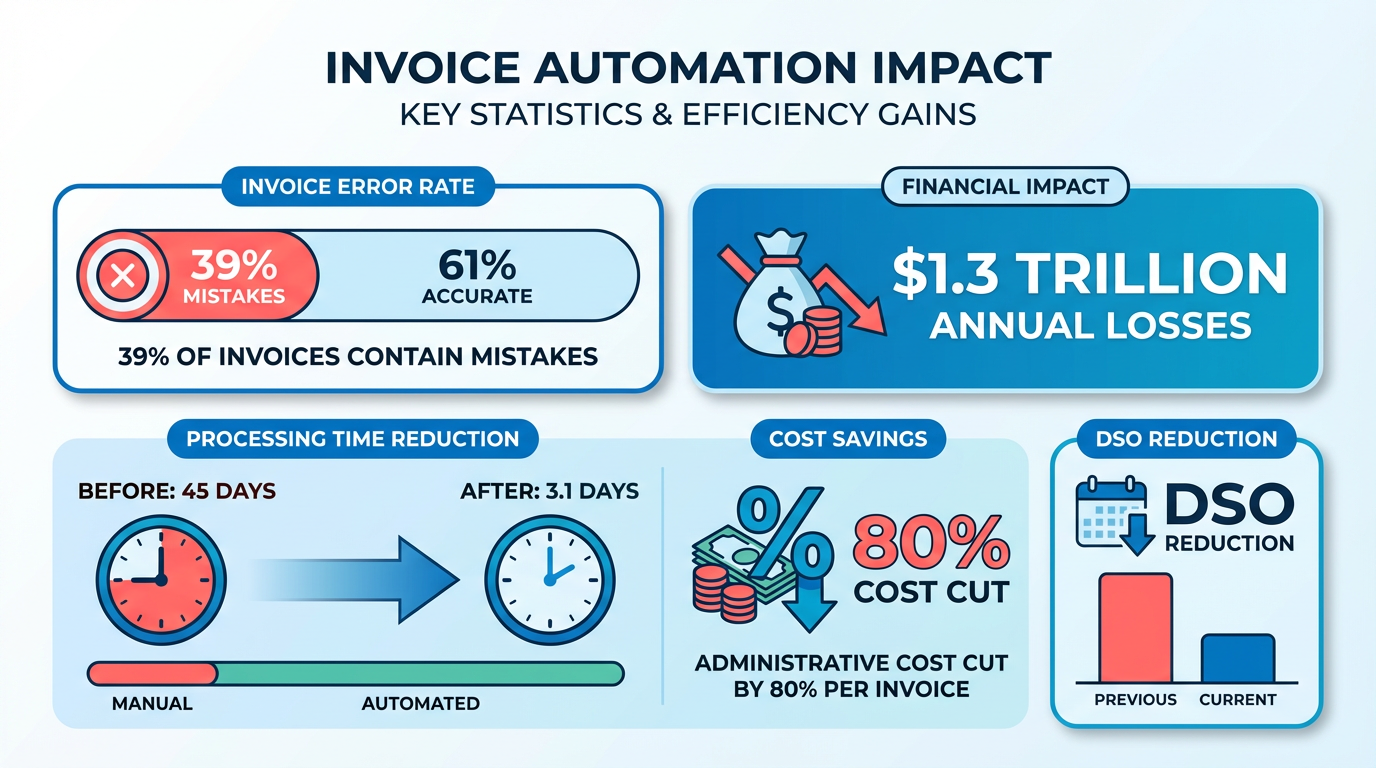
- Automating invoices cuts processing time from 45 days to 3.1 days and reduces administrative costs by 80% per invoice.
- 39% of invoices contain manual errors, causing $1.3 trillion in annual losses for U.S. businesses.
- 82% of accounts payable teams manually input invoices, leading to delays, disputes, and 200+ hours of annual reconciliation for companies handling 1,000 invoices/month.
- Automation lowers Days Sales Outstanding (DSO) from over 60 days to under 45, improving cash flow visibility.
- 42% of companies lose 1–5% of EBITA due to revenue leakage from poor payment follow-up and late penalties.
- 35% of businesses face higher missed-payment risks from manual errors, damaging supplier relationships and cash flow.
- Late payments cost companies 30% in operational inefficiencies, highlighting automation’s role in reducing delays.
Related Video
Watch: Blixo.com Explainer Video: Grow Sales & Automate Accounting by Blixo
Why Automate Invoice Workflows with Blixo
Automating invoice workflows with Blixo transforms how businesses manage cash flow, reduces errors, and frees teams to focus on strategic tasks. Manual invoicing processes are error-prone, time-consuming, and costly-39% of invoices contain mistakes due to manual handling, resulting in $1.3 trillion in annual losses for U.S. businesses. By automating workflows, companies cut processing time from 45 days to 3.1 days, slash administrative costs by 80% per invoice, and reduce Days Sales Outstanding (DSO) from over 60 days to under 45. Below, we break down why automation is critical and how Blixo delivers measurable results.
What Industry Stats Reveal About Manual Invoicing
Manual invoice processing is a major bottleneck for businesses. 82% of accounts payable teams still manually input invoices, leading to delays, disputes, and missed payments. For companies processing 1,000 invoices monthly, this translates to over 200 hours spent on manual reconciliation annually. The financial toll is staggering: 35% of companies face higher missed-payment risks due to human errors, disrupting cash flow and supplier relationships. Late payments alone cost businesses an average of 30% in operational inefficiencies, with 42% experiencing revenue leakage equivalent to 1–5% of EBITA due to poor payment follow-up.
Real-World Results from Blixo Users
Businesses of all sizes see transformative results with Blixo. A mid-sized enterprise reported, “Blixo transformed our AP team from invoice processors to strategic planners”, cutting processing time by 90%. A logistics company reduced disputes by 65% using AI-based validation, while a retail chain trimmed processing time by 75% with automated data extraction. Small businesses benefit too: one saw a 30% boost in collection efficiency through automated reminders and cash application tools, as detailed in the AI-Powered Cash Application and Automated Collections section. These outcomes highlight how automation accelerates payments, reduces errors, and builds supplier trust.
Challenges Solved by Invoice Automation
Automation tackles three key pain points:
- Administrative workload: Blixo’s AI-powered OCR and machine learning automate data entry, reducing manual effort by 60% and eliminating spreadsheet workflows, as covered in the Integrating Blixo with Your Existing Accounting System section.
- Error reduction: Intelligent matching engines cut reconciliation disputes by 35%, while multi-currency invoice generation slashes manual input errors by 35%.
- Cash flow acceleration: Dynamic discounting features encourage early payments, boosting on-time payment rates by 25%. Automated cash application further speeds collections, resolving 97% of payments without human intervention, as explained in the AI-Powered Cash Application and Automated Collections section.
Who Benefits Most from Automation?
Small businesses and enterprises alike gain value. For small teams, automation reduces billing time by 60% in the first month, as noted by a finance manager: “Blixo’s setup wizard simplified our invoicing process.” Enterprises with high-volume operations see even greater gains-one company saved 54% in processing costs by scaling automated workflows. Healthcare providers, law firms, and logistics companies have all reported 18–25% improvements in reconciliation efficiency after integrating Blixo with ERPs like SAP and QuickBooks, as discussed in the Integrating Blixo with Your Existing Accounting System section.
Case Study: Payment Recovery Success with Blixo
A healthcare provider struggling with month-end delays implemented Blixo’s smart invoicing solution. By digitizing workflows and integrating with their accounting software, they reduced reconciliation time by 18% and cut disputes by 20%. The platform’s virtual lockbox feature automatically matched 97% of incoming payments to invoices, saving 150+ hours annually in manual verification. As a result, the provider improved cash flow by 25% and reallocated staff to patient care initiatives. This example underscores how automation isn’t just about efficiency-it’s a strategic tool for growth.
By addressing these challenges and delivering measurable ROI, Blixo empowers businesses to turn invoicing from a cost center into a competitive advantage. Whether you’re a small business owner or an enterprise finance leader, automation enables time, accuracy, and scalability essential for modern operations.
Automating Recurring Invoices and Subscription Management
Building on concepts from the Why Automate Invoice Workflows with Blixo section, automating recurring invoices and subscription management ensures consistent revenue streams while reducing manual errors. The platform offers tools to define billing cycles, manage subscription tiers, and track payments-all from a centralized dashboard. Below is a structured checklist to help you set up and optimize this functionality effectively..
How Do I Set Up Recurring Invoices?
Begin by logging into your Blixo account and managing to the Subscription Management section. Create a new billing plan by specifying the billing interval (daily, weekly, monthly, or custom), payment amount, and the number of cycles. For example, a SaaS business might set a monthly $49 plan with 12 cycles for annual billing. Once configured, link the plan to a client or customer group. Blixo automatically generates and sends invoices on the scheduled date, with options to include late fees or discounts.
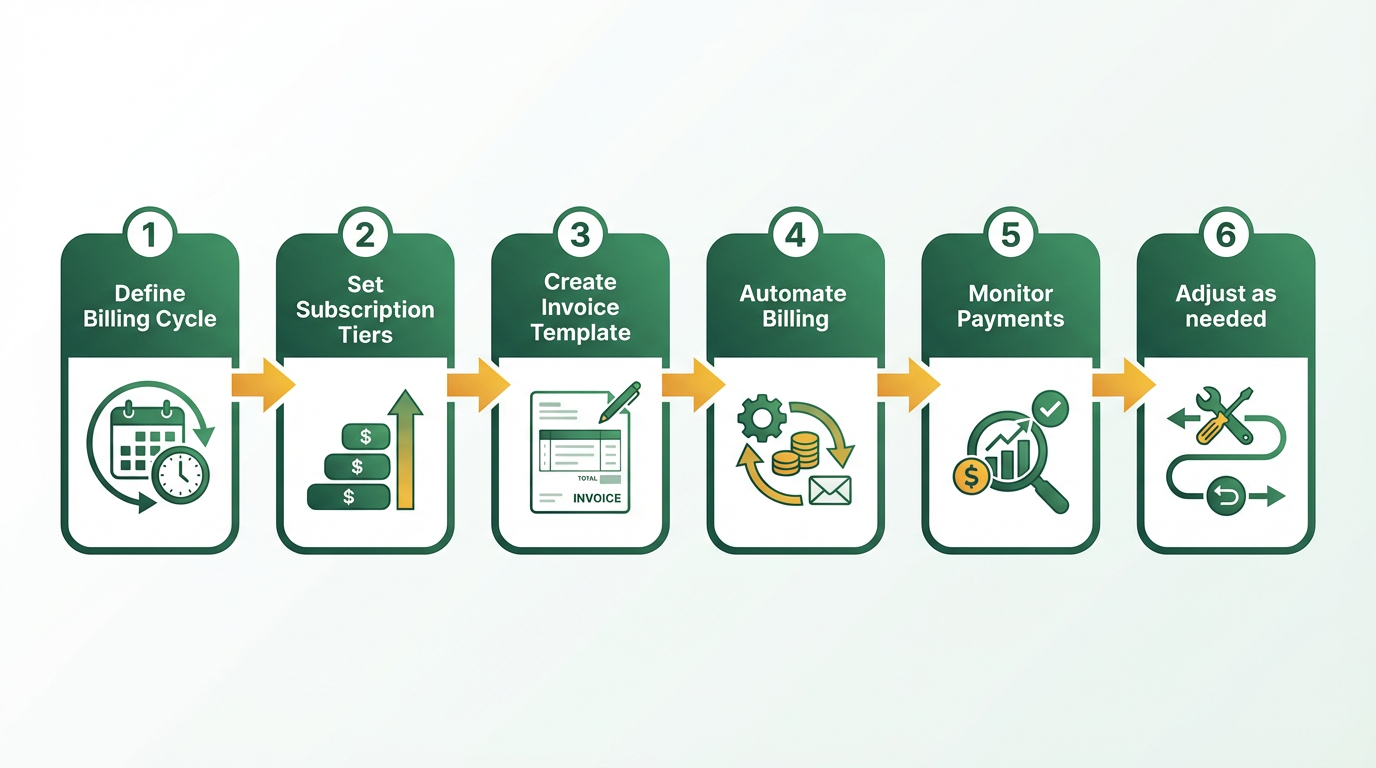
- Define billing cycles for each subscription plan (e.g., monthly, quarterly)
- Assign plans to clients via the customer portal or bulk upload
- Set payment terms (e.g., net-30, upfront payments) and late fee rules
- Enable automated reminders for missed or delayed payments.
What Customization Options Exist for Subscription Management?
Blixo allows businesses to tailor subscription plans to match specific pricing models. For instance, you can create tiered pricing (e.g., basic, pro, enterprise), add usage-based charges, or implement discounts for long-term commitments. The platform also supports dynamic pricing rules, such as adjusting rates based on client activity or contract renewals.
- Create custom pricing tiers using the plan builder tool
- Set up prorated billing for mid-cycle upgrades or downgrades
- Integrate payment methods (credit cards, ACH, wire transfers)
- Build client-facing portals for self-service subscription management
Example: A Miami-based startup used Blixo to automate a tiered SaaS subscription model, reducing manual invoicing time by 80% and improving payment accuracy..
How Can I Optimize Recurring Invoice Workflows?
Optimizing workflows starts with using Blixo’s intelligent matching engine, which is detailed in the AI-Powered Cash Application and Automated Collections section. This tool automatically applies incoming payments to the correct invoices, reducing reconciliation time and minimizing errors. Pair this with bulk data imports via CSV and pre-built templates to streamline setup.
- Use automated cash application to match payments to invoices in real time
- Schedule bulk invoice generation for large client groups
- Monitor DSO (Days Sales Outstanding) to track payment delays, as discussed in the Monitoring Key Performance Indicators (KPIs) for Invoice Efficiency section
- Enable dynamic discounting to incentivize early payments
Tip: One law firm saw a 25% improvement in cash flow efficiency by automating invoice reminders and collections through Blixo..
What Role Does Blixo’s Intelligent Matching Engine Play?
Blixo’s intelligent matching engine is a major advantage for subscription-based businesses. It uses machine learning to analyze payment patterns, identify discrepancies, and apply funds accurately. For example, if a client sends a payment without specifying which invoice it covers, the engine cross-references historical data to assign the correct amount. This reduces manual reconciliation efforts by up to 50%.
- Review unmatched payments in the exceptions dashboard
- Train the engine with feedback to improve accuracy over time
- Generate audit trails for compliance and reporting
“Blixo is the ultimate solution for invoicing and payment management-say goodbye to administrative headaches.” – Vincent Mann, Founder of Globetown Media
By automating recurring invoices and subscription management, Blixo helps businesses focus on growth while ensuring predictable revenue and customer satisfaction.
AI-Powered Cash Application and Automated Collections
What Makes Blixo’s AI-Powered Cash Application Effective?
Blixo’s AI-powered cash application automates the matching of payments to invoices using machine learning and optical character recognition (OCR), achieving 97% accuracy. This eliminates manual reconciliation, which typically consumes 45 days per invoice, reducing processing time to 3.1 days while cutting costs by up to 80% per invoice. By integrating with systems like SAP and QuickBooks, the platform resolves 80% of PO-matching errors automatically, ensuring seamless financial workflows. Building on concepts from the Integrating Blixo with Your Existing Accounting System section, this integration minimizes manual data entry errors and accelerates workflow synchronization.
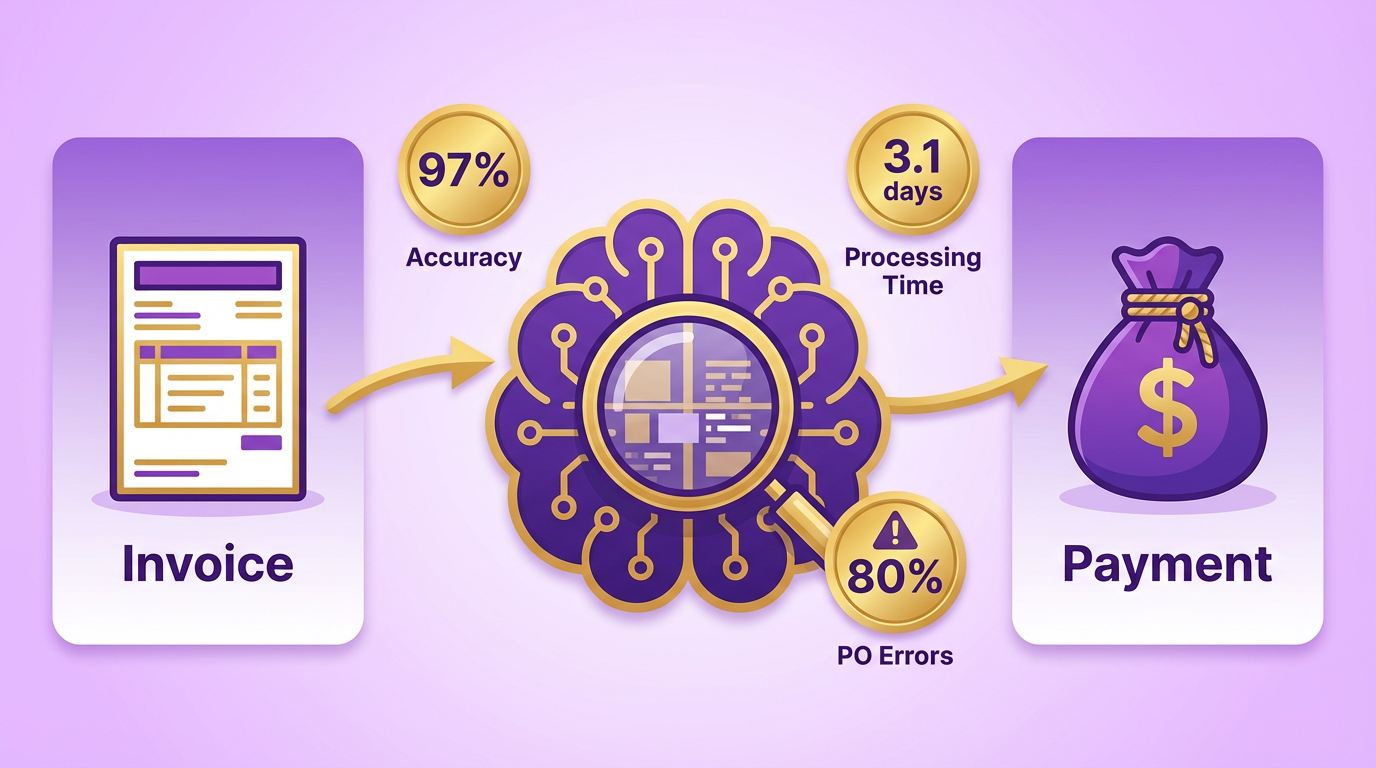
- Enable AI-driven OCR: Configure Blixo to extract invoice data from PDFs, emails, or scanned documents, reducing manual entry by 90% (as seen in Bridgevine’s case study).
- Set up intelligent matching: Train the system to match unapplied payments to invoices using historical data, improving accuracy by 40% over time (law firm case study).
- Integrate with ERPs: Connect Blixo to your accounting software to eliminate reconciliation delays and reduce disputes by 65% (logistics company example).
“Blixo transformed our AP team from invoice processors to strategic planners,” says a finance manager at a mid-sized enterprise..
How to Set Up Automated Collections with Blixo
Automated collections streamline payment reminders, reducing DSO (Days Sales Outstanding) from over 60 days to under 45. Start by configuring customizable payment terms, late fees, and escalation workflows. Blixo’s machine learning engine learns from past interactions to prioritize high-risk accounts, while its 256-bit encryption ensures compliance with financial regulations. As mentioned in the Why Automate Invoice Workflows with Blixo section, this automation reduces errors and frees teams to focus on strategic tasks.
- Map high-impact workflows: Identify bottlenecks in manual collections (e.g., missed reminders) and automate repetitive tasks like dunning emails.
- Customize dunning rules: Set thresholds for automated follow-ups, such as sending a first reminder 7 days past due and escalating to a collections agent at 14 days.
- Test automation triggers: Validate workflows with a small batch of invoices to ensure accurate payment matching and timely reminders.
A small business using Blixo reported a 30% increase in payment collection efficiency after automating reminders and cash application. For example, a Miami-based startup boosted sales conversion by 70% using dynamic discounting and AI-driven follow-ups..
Why AI Reduces Manual Work in Cash Application
Manual invoice processing errors cost businesses 39% of invoices, leading to disputes and delayed cash flow. Blixo’s AI reduces these errors by 80%, saving 54% in processing costs. With 82% of AP teams still relying on manual input, automation becomes critical for efficiency. As highlighted in the Monitoring Key Performance Indicators (KPIs) for Invoice Efficiency section, tracking metrics like error rates and processing time reveals the impact of automation on operational performance.
- Time savings: One medium-sized business cut reconciliation time by 30% using Blixo’s cash application, freeing staff for strategic tasks.
- Cost reduction: Automated collections lower administrative costs by 30% compared to manual follow-ups (Blixo case study data).
- Scalability: The system handles high-volume operations without sacrificing accuracy, ideal for growing businesses processing thousands of invoices monthly.
Best practices include monitoring exceptions in real time, refining machine learning models with feedback, and aligning collections workflows with customer preferences (e.g., SMS vs. email reminders). By automating repetitive tasks, teams reduce burnout and focus on revenue-generating activities.
“Our interface lets users resolve complex exceptions in seconds, but continuous feedback ensures the system evolves with your needs,” says a Blixo representative.
Integrating Blixo with Your Existing Accounting System
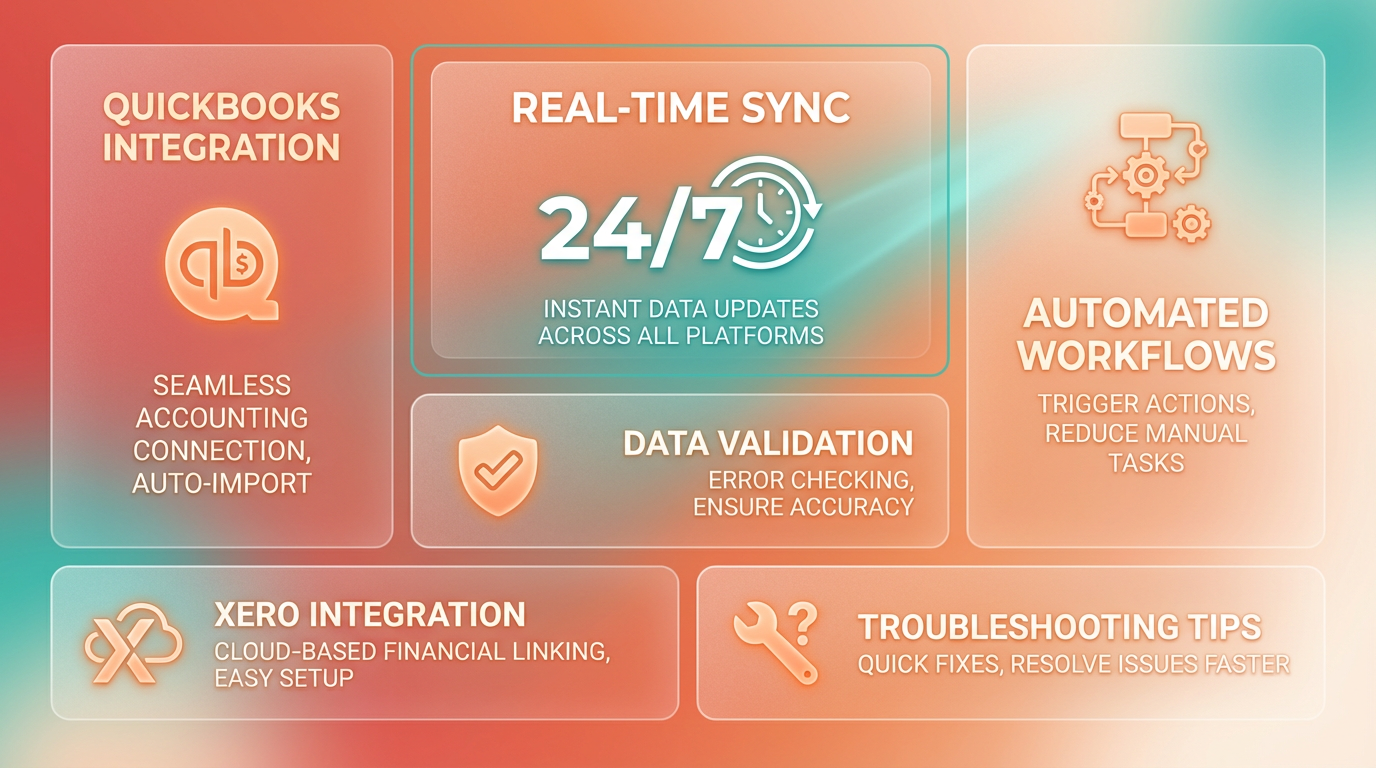
Blixo integrates seamlessly with popular accounting systems like QuickBooks and Xero, enabling real-time data synchronization and automated workflows. This integration reduces manual data entry errors and ensures financial records stay up to date. Below, you’ll find step-by-step instructions for connecting Blixo to these platforms, along with troubleshooting tips and a real-world example of its impact. As mentioned in the Why Automate Invoice Workflows with Blixo section, automation significantly reduces errors and streamlines financial operations.
Can Blixo Integrate with My Accounting Software?
Blixo supports integration with QuickBooks and Xero, two of the most widely used accounting platforms. These connections rely on secure API links to automate tasks like invoice reconciliation and payment tracking. The process typically takes under 30 minutes to set up, depending on your system configuration.
Integrating with QuickBooks Online
- Access Blixo’s Admin Panel: manage to the Integrations tab in your Blixo dashboard.
- Select QuickBooks: Choose “QuickBooks Online” from the list of supported systems.
- Authorize API Access: Enter your QuickBooks login credentials to grant Blixo permission to sync data.
- Map Data Fields: Align Blixo’s invoice and payment fields with corresponding categories in QuickBooks (e.g., matching customer names, tax codes).
- Test the Connection: Use a sample invoice to verify that data transfers correctly between platforms.
- Enable Auto-Sync: Set up daily or real-time synchronization to keep records updated without manual intervention.
Integrating with Xero
- Log Into Blixo: Go to the Account Settings > Xero Integration section.
- Link Your Xero Account: Click “Connect” and authenticate using your Xero login details.
- Configure Contact Lists: Import Xero’s customer and vendor lists into Blixo to streamline invoice matching.
- Set Up Bank Feeds Sync: Allow Blixo to pull transaction data from Xero’s bank feeds for automated payment reconciliation.
- Review Sync Logs: Check Blixo’s activity log to confirm successful data transfers and resolve any conflicts.
What Does a Real-World Integration Look Like?
One company in the SaaS industry integrated Blixo with QuickBooks to automate recurring billing. Building on concepts from the Automating Recurring Invoices and Subscription Management section, this setup reduced their weekly manual invoice reconciliation time from 15 hours to under 3 hours. The system also flagged $12,000 in duplicate payments within the first month, showcasing how real-time syncs prevent financial errors.
How to Troubleshoot Common Integration Issues
If data isn’t syncing correctly, start by verifying API credentials in Blixo’s settings. For mismatched invoice details, double-check field mappings-ensure Blixo’s “Customer ID” aligns with your accounting system’s “Client Code.” If delays occur during syncs, adjust the update frequency in Blixo’s preferences (e.g., switch from daily to real-time). For persistent errors, consult Blixo’s support team through their 24/7 chat feature. Monitoring KPIs related to integration performance, as outlined in the Monitoring Key Performance Indicators (KPIs) for Invoice Efficiency section, can also help identify patterns in sync errors or processing delays.
“Reducing manual reconciliation by 80% has let us focus on growing our business instead of chasing invoices.” – Finance Manager
By following these steps, businesses can eliminate redundant workflows and ensure financial data accuracy. For deeper insights into automation strategies, explore How To Automate Billing In 6 Key Steps.
Monitoring Key Performance Indicators (KPIs) for Invoice Efficiency
Monitoring key performance indicators (KPIs) is essential for optimizing invoice workflows and ensuring financial health. By tracking metrics like payment recovery rate, processing time, and error rates, businesses can identify inefficiencies, reduce costs, and improve cash flow. Blixo’s automation tools simplify this process with real-time dashboards and AI-driven insights, enabling teams to focus on strategic growth rather than manual reconciliation. Below, we break down the critical KPIs, how to monitor them with Blixo, and the tangible benefits of doing so.
What Are the Core KPIs for Invoice Efficiency?
To measure invoice efficiency, track these metrics:
- Payment Recovery Rate: The percentage of invoices successfully collected on time. A low rate signals issues with payment terms, disputes, or unclear billing.
- Days Sales Outstanding (DSO): The average number of days it takes to collect payments. Lower DSO means faster cash flow.
- Processing Time: How long it takes to process an invoice from receipt to payment. Manual workflows often stretch this to 45+ days.
- Error Rate: The percentage of invoices containing errors like incorrect amounts or missing data. Manual processing errors occur in 39% of invoices.
- Dispute Resolution Rate: The speed and success rate of resolving invoice disputes, which cost businesses an estimated $1.3 trillion annually in the U.S.
Blixo automates data extraction, validation, and matching, reducing error rates to under 3% and slashing DSO from over 60 days to under 45 days.
How Does Blixo Help Track These KPIs?
Blixo’s SaaS service provides intuitive dashboards and AI-powered tools to monitor KPIs in real time:
- Real-Time Dashboards: View KPI trends, such as payment recovery rates or DSO, with customizable alerts for anomalies.
- AI-Powered OCR: Extract invoice data with 97% accuracy, minimizing errors and ensuring clean, consistent data for analysis. As mentioned in the AI-Powered Cash Application and Automated Collections section, this precision supports faster, more accurate payment matching.
- Automated Cash Application: Match payments to invoices automatically, reducing reconciliation time and improving payment tracking.
- ERP Integration: Sync with systems like SAP or QuickBooks to eliminate manual data entry and ensure KPIs reflect accurate financial data, as detailed in the Integrating Blixo with Your Existing Accounting System section.
For example, one company reduced invoice processing time by 90% using Blixo’s dashboards to identify bottlenecks and automate reminders.
Real-World Impact: A Case Study
A small business struggling with late payments and disputes implemented Blixo’s automation tools. By monitoring KPIs like payment recovery rate and dispute resolution time, they automated reminders and cash application. Within six months, their collection efficiency improved by 30%, disputes dropped by 25%, and staff saved 120+ hours monthly on manual reconciliation.
Why Monitoring KPIs Matters
Ignoring invoice KPIs risks cash flow delays, increased errors, and strained vendor relationships. Studies show 82% of accounts payable teams still rely on manual input, leading to delays and errors. With Blixo, businesses automate workflows, cutting processing costs by 80% per invoice and reducing administrative expenses by 30%.
How to Optimize Workflows Using KPIs
Use KPI data to refine your invoicing strategy:
- use AI for Accuracy: Blixo’s OCR and machine learning reduce errors, ensuring clean data for analysis.
- Automate Reminders: Set up automated payment reminders to boost on-time payments by 25% or more.
- Offer Dynamic Discounting: Incentivize early payments with discounts, improving cash flow and reducing DSO.
- Audit Regularly: Use Blixo’s dashboards to spot trends, like rising dispute rates, and address root causes (e.g., unclear invoice terms).
By prioritizing KPIs and using Blixo’s automation tools, businesses transform invoice management from a reactive task to a strategic advantage. The result? Faster payments, fewer errors, and a finance team ready to focus on growth.
Frequently Asked Questions
1. How does invoice automation reduce processing time and errors?
Invoice automation cuts processing time from 45 days to 3.1 days and reduces errors by eliminating manual data entry, which causes 39% of invoice mistakes. Blixo uses AI to ensure accuracy, saving businesses $1.3 trillion in annual losses from human errors.
2. What cost savings does invoice automation provide?
Automation slashes administrative costs by 80% per invoice. For companies handling 1,000 invoices monthly, it saves over 200 hours annually on manual reconciliation, reducing operational inefficiencies tied to late payments by 30%.
3. How does automation improve cash flow visibility?
Automating workflows lowers Days Sales Outstanding (DSO) from over 60 days to under 45, accelerating cash flow. This improvement helps businesses avoid 1–5% EBITA revenue leakage caused by poor payment follow-up.
4. What risks do manual invoices pose to supplier relationships?
Manual errors in 39% of invoices increase missed-payment risks by 35%, straining supplier relationships. Automation reduces these errors, ensuring timely payments and preserving trust with vendors.
5. Can automation prevent revenue leakage?
Yes, automation prevents 1–5% EBITA revenue leakage by tracking payments and avoiding late penalties. Blixo’s system ensures all invoices are processed accurately, reducing disputes and delays that cost 30% in operational inefficiencies.
6. How long does it take to see automation benefits?
Companies typically see reduced processing times (from 45 to 3.1 days) and cost savings within months of implementing automation. Blixo’s solution delivers measurable results quickly, with 82% of teams reporting fewer manual input errors.
7. Is invoice automation suitable for all industries?
Yes, invoice automation benefits any industry processing high-volume invoices. Blixo’s platform adapts to diverse workflows, cutting costs by 80% per invoice and reducing disputes caused by manual errors across sectors.