

Implement V1 Invoice Automation with Blixo

Key Takeaways
- Manual invoicing increases administrative costs by 30% and raises DSO by 30% due to inefficiencies.
- Businesses processing 1,000 monthly invoices spend over 200 hours annually on manual reconciliation.
- Manual data entry errors cause 35% of companies to face higher missed-payment risks, disrupting cash flow.
- Blixo’s smart invoicing automates multi-currency invoice generation and delivery, reducing human errors.
- Recurring billing features include proration and dunning rules, streamlining subscription management.
- Automation cuts invoice processing time and lowers administrative expenses by eliminating spreadsheet workflows.
- Automated cash application through Blixo improves payment accuracy, accelerating collections and reducing delays.
Why V1 Invoice Automation Matters
Automation transforms accounts receivable (AR) by addressing inefficiencies that plague manual workflows. For businesses still relying on spreadsheets and manual data entry, the cost is steep: up to 30% higher administrative expenses and a 30% increase in Days Sales Outstanding (DSO). With Blixo’s V1 invoice automation, companies eliminate these pain points by streamlining invoicing, collections, and cash application into a single SaaS solution. This section breaks down why automation is critical, who benefits most, and how real-world businesses achieve measurable results.
How Manual Invoicing Hurts Business Efficiency
Manual AR processes are slow, error-prone, and costly. A single data entry mistake can delay payments for days, while tracking invoices across spreadsheets wastes hours each week. As mentioned in the Preparing for Implementation section, evaluating current workflows is the first step toward identifying inefficiencies. For example, businesses handling 1,000 invoices monthly might spend 200+ hours annually on reconciliation alone. These inefficiencies compound: 35% of companies report higher missed-payment risks due to manual errors, directly impacting cash flow.
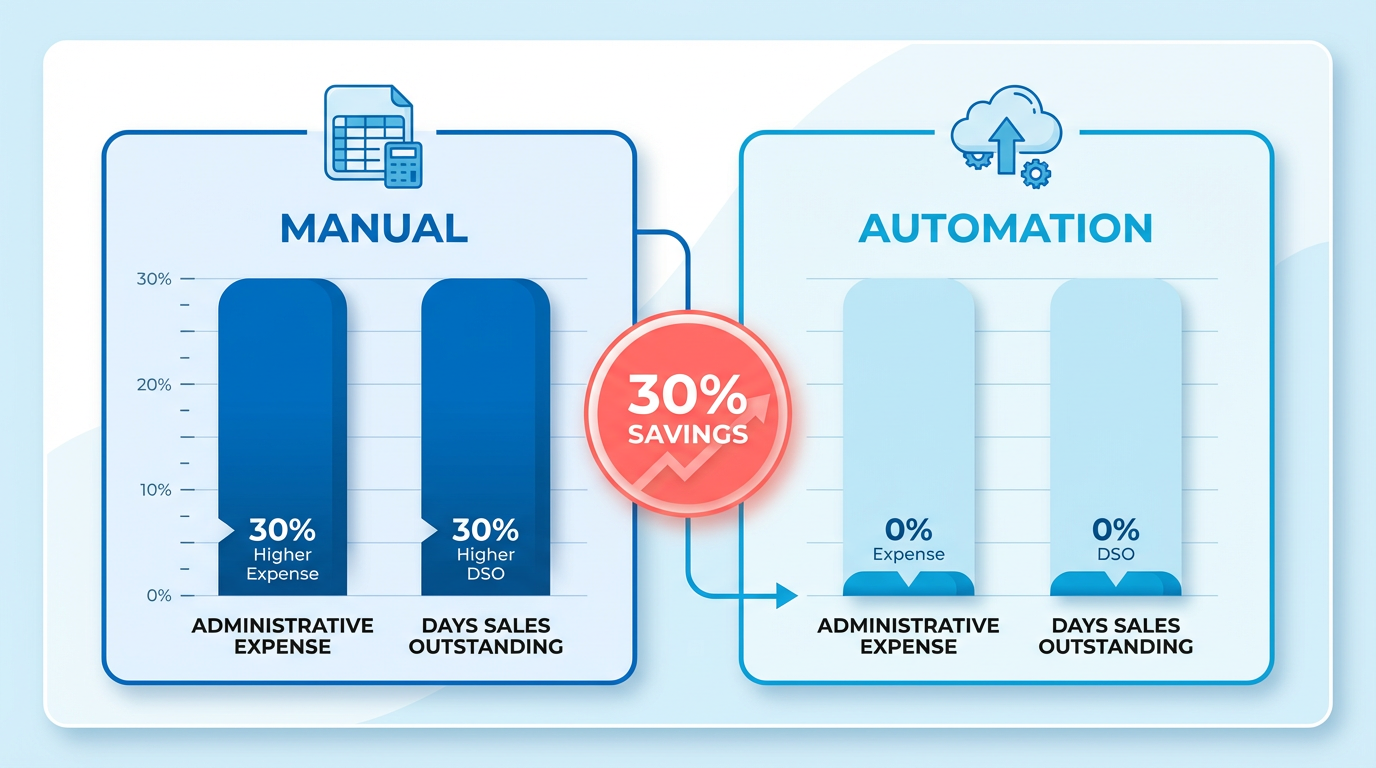
Blixo’s automation solves this by replacing fragmented workflows with intelligent systems. Its smart invoicing module auto-generates and delivers invoices in multiple currencies, while recurring billing automates subscription plans with proration and dunning rules. Building on concepts from the Understanding Blixo’s Automation Features section, these tools reduce manual tasks by 30%, cutting administrative costs and accelerating payment cycles.
What Makes Blixo’s Automation Stand Out?
Blixo’s SaaS service targets three critical pain points:
- Payment Delays: Automated reminders and flexible payment portals boost on-time payments by 25%.
- Error Reduction: Intelligent matching lowers reconciliation disputes by 35%, saving hours in manual verification.
- Cash-Flow Visibility: Real-time dashboards and predictive analytics give finance teams immediate insights into receivables.
For high-volume operations, these features translate to a 30% improvement in DSO. A logistics firm, for instance, reduced reconciliation disputes by 20% after implementing Blixo’s cash application tools. As discussed in the Implementing V1 Invoice Automation section, integrating these tools with existing systems is a key step in achieving such results. Similarly, a healthcare provider cut month-end closing times by 18% by linking Blixo to its ERP system.
Who Benefits Most from V1 Automation?
Blixo’s solution is tailored for businesses facing specific challenges:
- Small and Medium Businesses (SMBs): Automate invoicing to compete with larger firms. A law firm improved cash-flow efficiency by 25% using Blixo’s dynamic discounting and reminder systems.
- Enterprises with High Invoice Volumes: One SaaS provider gained 25% greater billing accuracy through automated proration, reducing customer disputes.
- Global Operations: Multi-currency and multi-language support helped a retail chain cut regional payment delays by 20%.
- Startups: A fintech startup saw a 70% increase in sales conversions by optimizing payment terms and automating dunning.
Real-World Proof: Case Studies in Action
Blixo’s impact is backed by measurable results:
- A small business increased collection efficiency by 30% using automated reminders and cash application tools.
- A healthcare provider reduced month-end reconciliation time by 18% after integrating Blixo with its accounting software.
- A logistics company cut disputes by 20% through intelligent matching and virtual lockbox features.
User feedback reinforces these gains. Vincent Mann, founder of a media company, calls Blixo “the ultimate solution for invoicing and payment management,” eliminating administrative headaches. Another user, Dave, notes the platform is “10× more powerful” than previous systems.
Why This Matters for Your Business
Manual invoicing isn’t just inefficient-it’s a barrier to growth. Companies that automate see faster payments, fewer errors, and better resource allocation. Blixo’s V1 solution addresses these challenges head-on, offering a scalable platform for businesses of all sizes. By reducing DSO by 30% and cutting administrative costs by the same margin, Blixo ensures a measurable return on investment. For teams struggling with delayed payments or error-prone workflows, automation isn’t optional-it’s a strategic necessity.
Understanding Blixo’s Automation Features
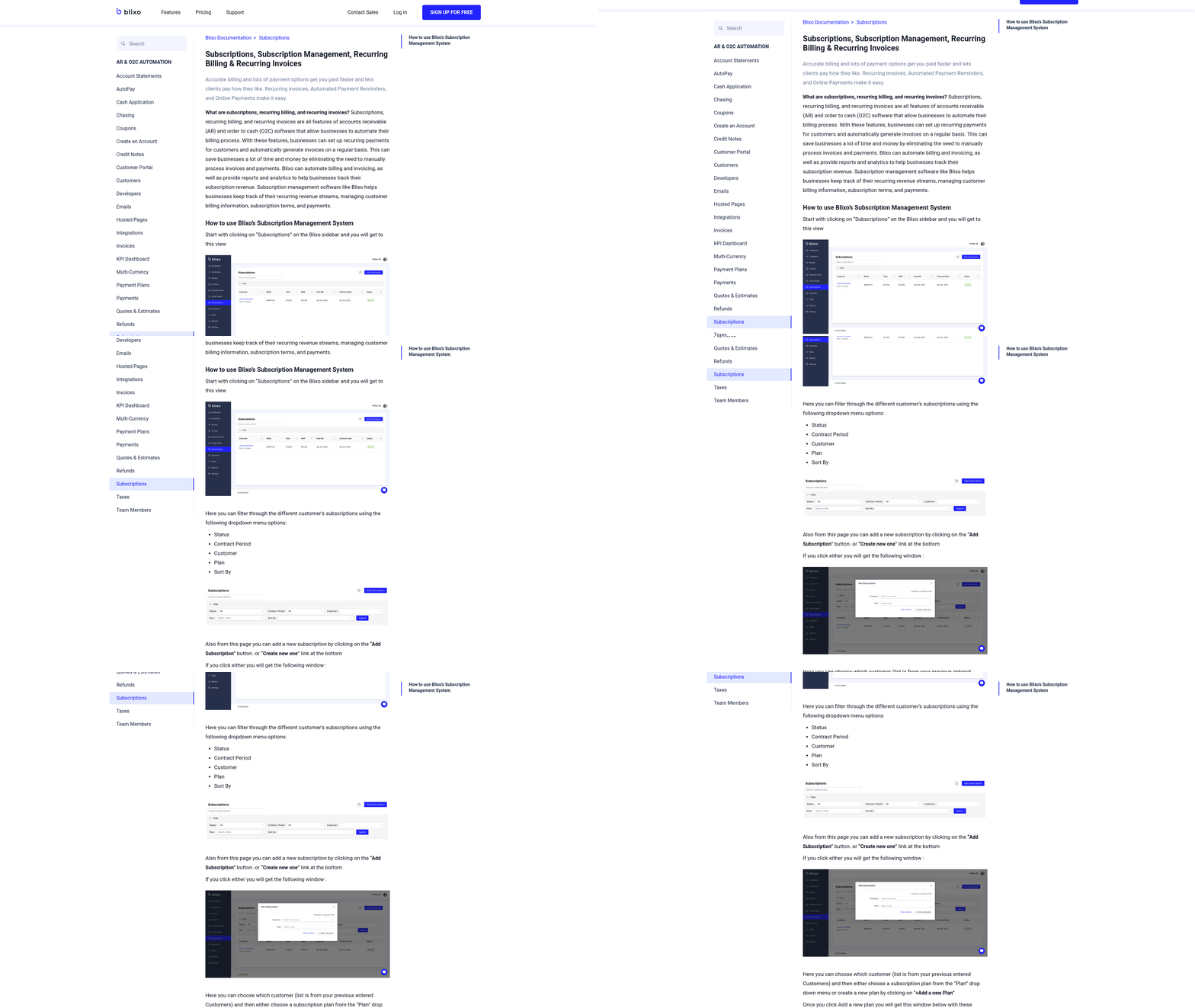
Blixo’s automation features transform accounts receivable (AR) processes by automating repetitive tasks, reducing errors, and improving cash flow visibility. At its core, the platform uses AI and machine learning to handle invoicing, payment matching, and collections, ensuring businesses save time and reduce costs. As mentioned in the Why V1 Invoice Automation Matters section, automation addresses inefficiencies in manual workflows, such as those relying on spreadsheets, which can lead to significant financial losses. For example, one logistics firm reported a 20% drop in reconciliation disputes after implementing Blixo’s intelligent matching engine. Below, we break down how each feature works and the benefits it delivers.
How Does Blixo Automate Accounts Receivable Workflows?
Blixo’s AR automation covers the full lifecycle of invoice management, from generation to payment reconciliation. Its smart invoicing system auto-generates and sends invoices in multiple currencies, reducing manual input errors by up to 35%. The platform also supports dynamic discounting, letting businesses offer early payment incentives to boost on-time payments by 25%. For instance, a small business saw a 30% increase in collection efficiency by using automated reminders and cash application. By integrating with ERPs and accounting tools, Blixo ensures real-time data sync, cutting month-end closing times for healthcare providers by 18%. Building on concepts from the Implementing V1 Invoice Automation section, this integration is crucial for maintaining accurate and up-to-date financial records across systems.
What Makes Blixo’s AI-Powered Cash Application Unique?
Blixo’s AI-powered cash application uses machine learning to match incoming payments to the correct invoices, even when customer details are incomplete. This reduces reconciliation errors by 35% and lowers missed-payment risk by 35%. The system learns from historical data, improving matching accuracy by 20% annually. As discussed in the Optimizing and Refining Automation Workflows section, continuous learning and performance monitoring are essential for sustaining these improvements over time. For example, a SaaS provider achieved 25% higher billing accuracy through automated proration for subscription changes. When exceptions occur-like partial payments or overpayments-Blixo flags them for review while resolving 85% of cases automatically. This means fewer manual interventions and faster cash application for businesses.
How Do Subscription Management and Collections Work?
Blixo’s subscription management tools are designed for recurring billing scenarios, supporting proration, auto-dunning, and custom payment plans. A global SaaS company reduced customer churn by 15% using subscription analytics to identify at-risk accounts. The platform also offers a custom self-service portal where customers can view invoices, make payments, and update payment methods. This portal, which integrates with CRMs and supports multi-language support, helped a law firm improve cash-flow efficiency by 25%. Automated dunning workflows further reduce late payments by sending tiered reminders, with one startup reporting a 70% lift in sales conversions through strategic discounting and timely follow-ups.
Can Blixo Handle Complex Payment Matching and Collections?
The intelligent matching engine is a cornerstone of Blixo’s automation. It digitizes check payments via a virtual lockbox and matches them to invoices using advanced algorithms. A healthcare provider reduced reconciliation disputes by 18% after linking Blixo to its ERP system. For high-volume operations, the engine handles thousands of transactions daily, resolving 98% of payments without human input. When discrepancies arise-such as mismatched amounts-Blixo generates detailed reports for quick resolution. As covered in the Common Challenges and Troubleshooting section, these reports are critical for addressing issues like data migration hiccups and ensuring smooth operations. This ensures businesses maintain accurate records while minimizing delays. As one user noted, “Blixo is 10× more powerful than what I’ve used before,” highlighting its ability to scale with growing needs.
Preparing for Implementation
Before implementing V1 invoice automation with Blixo, you need to evaluate your current accounts receivable processes. Start by mapping out all manual steps, from invoice creation to payment tracking. Identify repetitive tasks, error-prone areas, and delays that automation can resolve. This assessment ensures you align Blixo’s features with your specific needs, as detailed in the Understanding Blixo’s Automation Features section.
How Do You Evaluate Your Current Accounts Receivable Processes?
A process audit reveals inefficiencies in your workflow. For example, if your team spends hours manually reconciling invoices or chasing late payments, automation can streamline these tasks. Document pain points like inconsistent data entry or delayed client communications. This baseline helps measure improvements after implementation, building on concepts from the Why V1 Invoice Automation Matters section.
To conduct the audit:
- Review invoice lifecycle stages (creation, approval, delivery, payment).
- Track time spent on each task using a spreadsheet or time-tracking tool.
- Survey your team to highlight bottlenecks and recurring issues.
- Quantify errors such as duplicate invoices or missed deadlines.
Focus on metrics like average processing time and error rates. If your team handles 200 invoices monthly and 10% require corrections, automation could reduce this rate by automating validation checks, as outlined in the Optimizing and Refining Automation Workflows section.
What Steps Are Required to Set Up a Blixo Account?
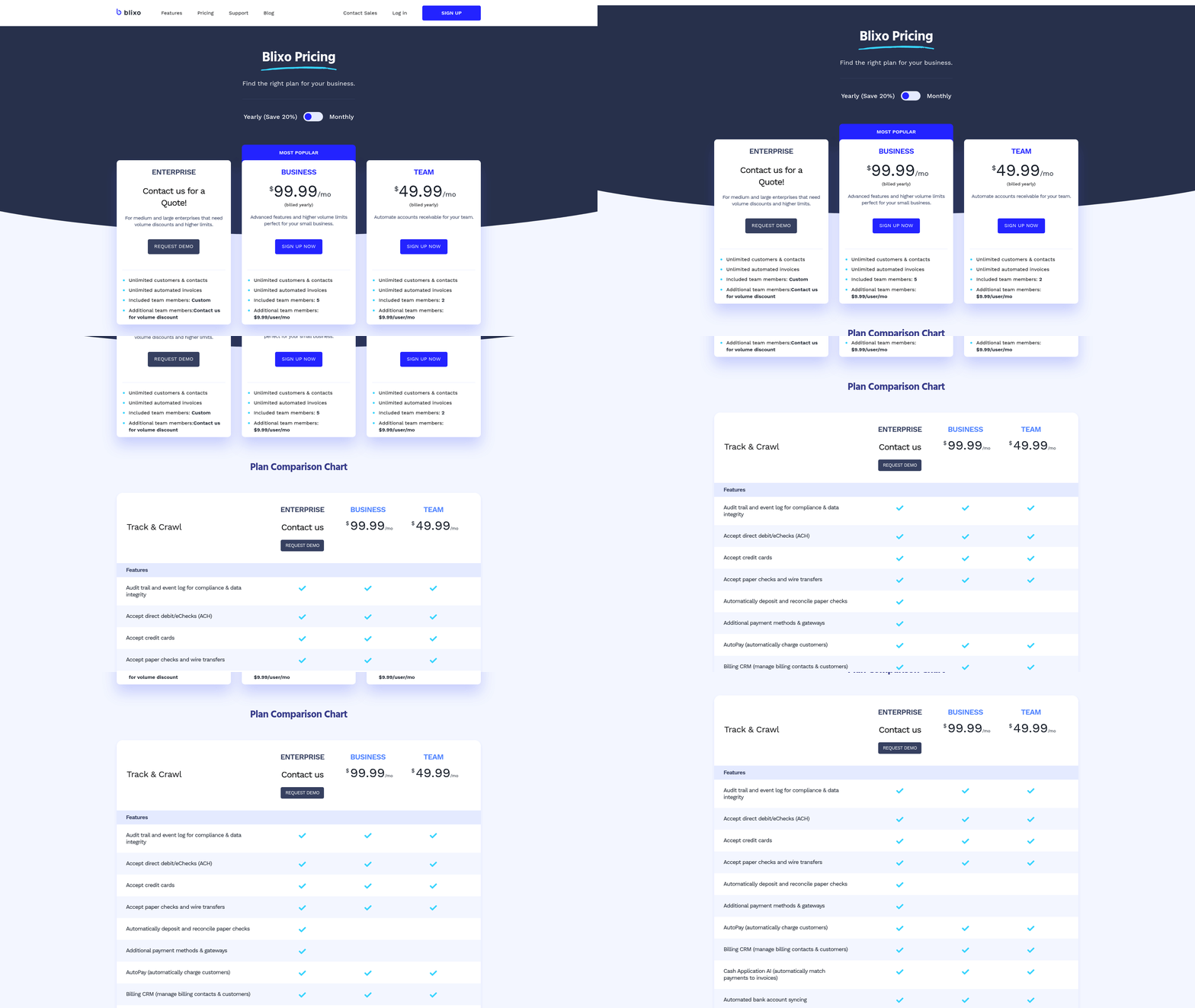
Creating a Blixo account begins with signing up, followed by configuring your workspace. Start by visiting Blixo’s SaaS service and completing the registration form. Once verified, set up your company profile, including banking details and tax information. This ensures invoices are generated with the correct data from day one.
Next, define user roles based on your team structure. For example, assign “Admin” permissions to finance leads and “Viewer” access to department managers. Enable two-factor authentication for security. Blixo’s onboarding team can guide you through these initial steps if needed.
After account creation, test core features:
- Create a sample invoice using your branding.
- Simulate sending it to a test email address.
- Track its status through Blixo’s dashboard. This trial run confirms that your setup meets your workflow requirements.
How Do You Migrate Data to Blixo?
Migrating historical invoice data to Blixo ensures continuity. Start by exporting data from your current system in CSV or Excel format. Ensure fields like invoice numbers, dates, and client names match Blixo’s required format. If your legacy data is disorganized, clean it up before importing.
Blixo’s import tool allows batch uploads of up to 10,000 records at a time. Map your exported columns to Blixo’s database fields to avoid mismatches. For instance, link your “Client ID” column to Blixo’s “Customer Reference” field. After uploading, review a random sample of migrated records to verify accuracy.
If you encounter errors during migration, use Blixo’s support resources. The platform offers templates and tutorials to resolve common issues, as addressed in the Common Challenges and Troubleshooting section. Once data is successfully migrated, test automated workflows with a small subset of invoices to ensure everything functions as expected.
How Do You Train Your Team on Blixo?
Training ensures your team uses Blixo efficiently. Begin with a live demo covering invoice creation, client communication, and payment tracking. Highlight features like recurring invoice templates and automated reminders. For example, show how setting up a monthly subscription invoice takes just 60 seconds.
Create a knowledge base with step-by-step guides and troubleshooting tips. Encourage team members to practice with test invoices before processing real transactions. Schedule follow-up sessions to address questions and refine workflows. Blixo’s support team can also provide customized training modules if needed.
Final Preparations Before Going Live
Before activating V1 automation, review all configurations:
- Confirm workflows match your business rules (e.g., late fee calculations).
- Test notifications to ensure clients receive reminders on time.
- Validate integrations with your accounting software.
Run a full-system trial for a week using test data. Monitor performance metrics like invoice approval speed and error rates. This dry run exposes any overlooked gaps, such as missing client contact details. Once confident in your setup, deploy Blixo across all active accounts.
By completing these steps, you’ll maximize Blixo’s potential to reduce manual work, minimize errors, and accelerate cash flow. The next section outlines the actual implementation process.
Implementing V1 Invoice Automation
Implementing V1 invoice automation with Blixo streamlines billing, reduces manual errors, and accelerates cash flow. By breaking the process into structured steps-configuration, integration, testing, and monitoring-you can ensure a seamless transition to automated invoicing. Below is a step-by-step guide tailored to Blixo’s SaaS service, focusing on actionable workflows and measurable outcomes.
How Do You Configure Automated Invoicing Workflows?
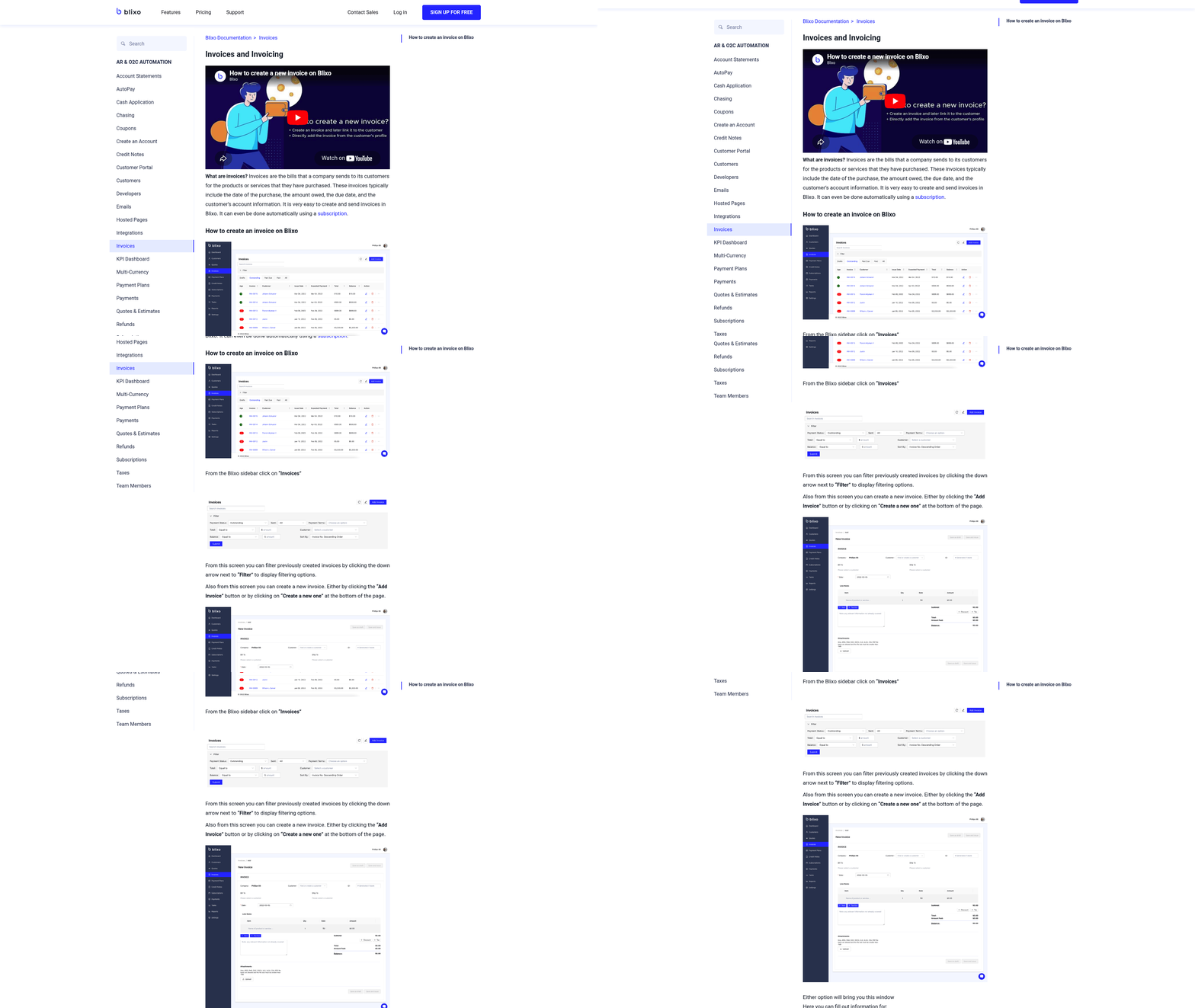
Blixo’s V1 automation starts by defining triggers, templates, and payment rules. First, create invoice templates that align with your branding and legal requirements. These templates dynamically pull data from your ERP or CRM, eliminating manual entry. Next, set triggers for invoice generation-such as order fulfillment or service completion-to automate timing.
For example, if your business bills clients monthly for subscription services, Blixo can auto-generate and send invoices on the first day of each month. Pair this with payment gateway integration to let clients pay directly via email or portal. This reduces follow-up time and accelerates collections.
“Blixo’s setup wizard simplified our invoicing process. We cut billing time by 60% in the first month.” – Finance Manager
What Are Smart Invoicing and Payment Reminder Strategies?
Blixo’s smart invoicing uses conditional logic to personalize workflows. Define dynamic due dates based on client agreements, and set automated reminders for 1 day, 3 days, and 7 days post-due date. These reminders adapt to client preferences-some may receive SMS alerts, while others get email notifications.
To avoid overwhelming clients, Blixo allows tiered escalation. If a payment remains unpaid after two reminders, the system can notify your finance team for manual intervention. For recurring invoices, Blixo detects patterns like failed card payments and suggests alternative actions, such as updating payment methods.
How Do You Integrate Blixo with Accounting and ERP Systems?
Blixo connects to accounting systems through pre-built APIs or CSV imports. Begin by mapping Blixo’s data fields (e.g., client names, product codes) to your ERP’s database. For platforms like QuickBooks or SAP, Blixo’s integration tools synchronize invoice data in real time, ensuring consistency across systems.
As mentioned in the Preparing for Implementation section, testing data flows by generating a sample invoice in Blixo and verifying its appearance in your accounting software ensures accuracy. Blixo also supports role-based access, so finance teams can view dashboards without altering core configurations.
What Testing and Refinement Practices Work Best?
After initial setup, simulate scenarios to identify gaps. For instance, create a test invoice with a future due date and monitor whether reminders trigger on schedule. Check if discounts or late fees are applied correctly. Blixo’s sandbox environment lets you run these tests without affecting live data.
Refine workflows by analyzing client behavior. If a segment frequently misses payments, adjust reminder intervals or add a prepayment clause in their invoice terms. Building on concepts from the Understanding Blixo’s Automation Features section, Blixo logs all automation actions, making it easy to trace issues like misrouted emails.
How Do You Monitor Results and Optimize KPIs?
Track key metrics like Days Sales Outstanding (DSO), payment success rate, and invoice error rate using Blixo’s analytics dashboard. A DSO below 30 days indicates efficient collections, while a 95%+ success rate shows strong payment compliance.
Building on strategies from the Optimizing and Refining Automation Workflows section, use A/B testing for invoice designs: send two versions to different client groups and compare open rates or payment speeds. Blixo’s reporting highlights which templates drive faster action. Regularly revisit workflows to update terms, such as adjusting late fees based on industry benchmarks.
By following these steps, you can implement V1 invoice automation that minimizes manual work and maximizes revenue predictability. Blixo’s SaaS service adapts to evolving business needs, ensuring your invoicing strategy stays agile.
Optimizing and Refining Automation Workflows
Optimizing and refining automation workflows with Blixo ensures your invoice automation remains efficient and aligned with evolving business needs. Start by using Blixo’s built-in tools to monitor performance, identify bottlenecks, and refine rules for maximum impact. Below are actionable steps to fine-tune your workflows and maintain peak efficiency.
How Can You Monitor Workflow Performance?
Blixo’s reporting and analytics features let you track key metrics like processing time, error rates, and approval delays. Begin by accessing the Workflow Dashboard, which provides real-time insights into each step of your automation. As mentioned in the Understanding Blixo’s Automation Features section, these tools use AI and machine learning to enhance accuracy. Focus on metrics such as task completion time and error frequency to spot inefficiencies. For example, if invoice approvals consistently take longer than expected, you might adjust routing rules to prioritize urgent requests.
Use custom alerts to stay informed about critical issues. Building on concepts from the Implementing V1 Invoice Automation section, setting up notifications for failed tasks or stalled workflows ensures timely interventions. Regularly exporting performance data from Blixo’s analytics tools also helps identify trends over time, like seasonal spikes in invoice volume that require workflow adjustments.
What Steps Should You Take to Refine Workflows?
After identifying underperforming areas, refine your automation rules to address specific pain points. For instance, if manual intervention is frequent during data extraction, update Blixo’s automation rules to handle edge cases-such as processing invoices with non-standard formats. Use the Rule Builder in Blixo to create custom conditions, like auto-approving invoices below a certain amount or flagging those exceeding budget thresholds for review.
Test changes incrementally. Create a sandbox environment to simulate workflow adjustments before deploying them company-wide. This approach aligns with best practices outlined in the Preparing for Implementation section, which emphasizes evaluating existing processes before automation. For example, one business reduced processing errors by 30% after refining their rules to automatically validate vendor details against an updated database.
How Do You Stay Updated on Blixo’s Latest Features?
Blixo regularly introduces updates to enhance automation capabilities. Stay informed by checking the Blixo Blog for announcements about new tools, such as AI-driven data extraction improvements or integration with additional accounting platforms. Subscribing to their release notes ensures you’re the first to know about features that could streamline your workflows further.
When a new feature launches, evaluate its relevance to your use case. For instance, if Blixo rolls out a machine learning model to predict invoice fraud, integrate it into your workflow to reduce risk. The platform’s compatibility with custom APIs also means you can adapt third-party tools seamlessly. Schedule quarterly reviews of Blixo’s feature updates to align them with your automation strategy and employee training programs.
By continuously monitoring performance, refining rules, and adopting new features, your Blixo workflows will stay agile and efficient. Prioritize regular audits and team training to ensure everyone uses the platform’s full potential.
Common Challenges and Troubleshooting
Common Challenges and Troubleshooting
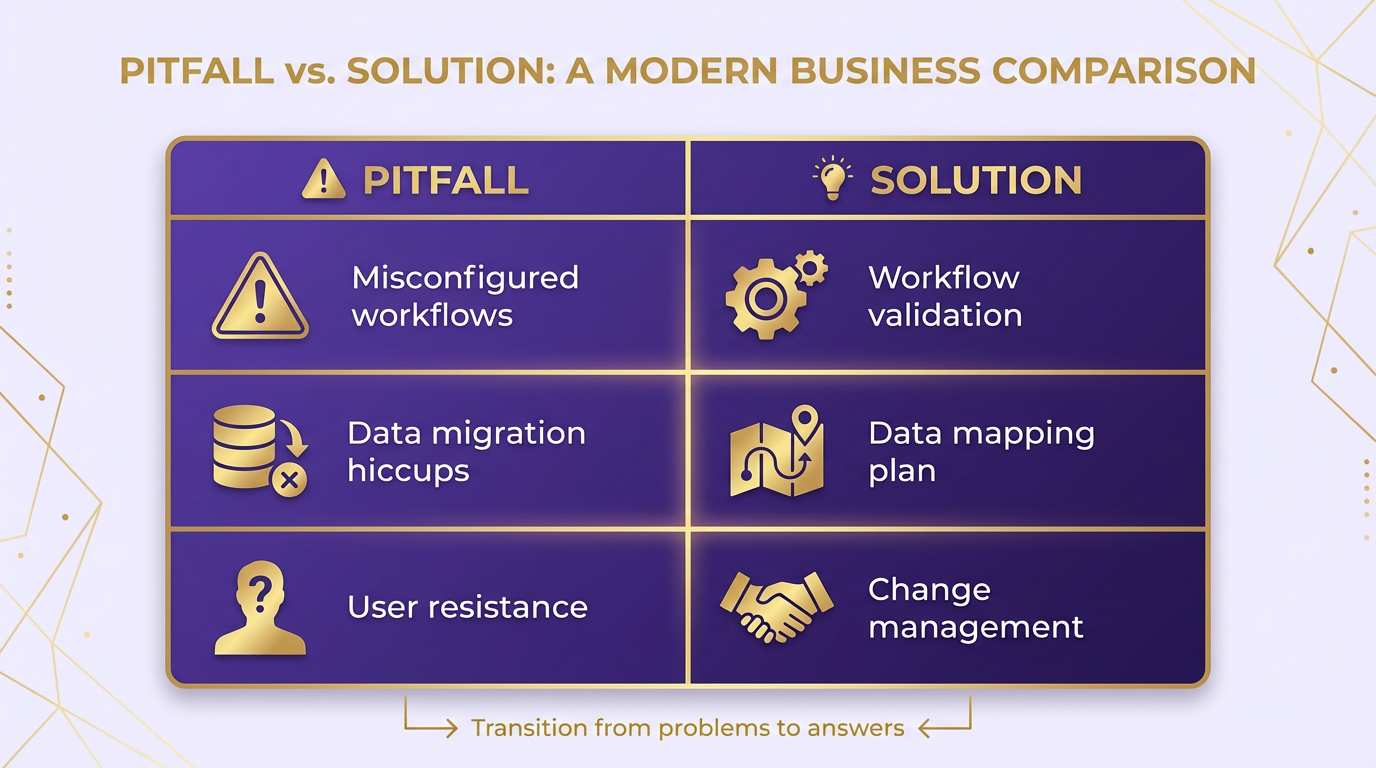
Implementing V1 invoice automation with Blixo can streamline financial workflows, but challenges like configuration errors, data migration hiccups, and user resistance often arise. Addressing these issues early prevents delays and ensures smooth adoption. Below, we break down common pitfalls and actionable solutions.
What Are the Most Common Errors in Invoice Automation?
Misconfigured workflows and incomplete data integration are frequent roadblocks. For example, a mismatch between invoice templates and Blixo’s required fields can cause processing delays. Similarly, missing API keys or incorrect authentication tokens may block system access.
To resolve these issues:
- Validate all input data against Blixo’s schema before migration.
- Use Blixo’s built-in validation tools to test API connections.
- Double-check workflow triggers and approval rules in the automation dashboard.
A misconfigured workflow might silently fail, so enable logging to capture errors. For instance, if invoices are stuck in “Pending” status, review the workflow’s conditional logic and ensure all required fields are populated.
How Do You Troubleshoot Data Migration Issues?
Data migration errors often stem from incompatible formats or missing records. For example, a company might import invoices with inconsistent date formats (e.g., “01/01/24” vs. “Jan 1, 2024”), causing parsing failures. As mentioned in the Preparing for Implementation section, standardizing data formats in your source system before migration is critical.
To fix this:
- Standardize data formats in your source system before migration.
- Use Blixo’s template builder to map fields correctly.
- Run a small batch of test migrations to identify and resolve discrepancies.
One business migrated 10,000 invoices but encountered 200 errors due to missing vendor codes. By exporting the failed records and updating the missing data, they completed the migration within 48 hours.
How Can You Improve User Adoption of Blixo?
Resistance to change is a common challenge. Users may struggle with navigation or doubt the system’s reliability. For example, a finance team might hesitate to trust automated approvals until they see consistent accuracy. Building on concepts from the Implementing V1 Invoice Automation section, hands-on training sessions tailored to roles (e.g., accounts payable vs. management) are essential for reducing friction.
To overcome this:
- Provide hands-on training sessions tailored to roles (e.g., accounts payable vs. management).
- Share success metrics, like reduced processing time or fewer errors.
- Assign superusers to assist with onboarding and answer questions.
A mid-sized company boosted adoption by creating a “Blixo Champions” program, where trained employees demonstrated workflows in team meetings. Within two weeks, 90% of staff reported confidence in using the tool.
How Do You use Blixo’s Support Resources?
Blixo offers documentation, forums, and support tickets to resolve issues. For technical problems, start with the Help Center, which includes API reference guides and migration checklists. If you can’t find answers, post in the Community Forum to access peer solutions.
For urgent issues, open a support ticket with detailed logs and error messages. Blixo’s team typically responds within 24 hours. For example, a user struggling with recurring invoice configurations received step-by-step guidance via email, resolving the issue in under an hour.
What Can You Learn from Real-World Case Studies?
Many businesses have successfully managed Blixo’s challenges. One company faced workflow configuration errors during a merger but used Blixo’s Template Sync feature to align systems. As detailed in the Understanding Blixo’s Automation Features section, this functionality enables seamless synchronization across platforms. Another overcame user resistance by integrating Blixo with their existing ERP system, reducing manual data entry by 70%.
A third organization migrated 50,000 historical invoices using Blixo’s automated parser. Initial errors were traced to inconsistent vendor names (e.g., “Acme Inc.” vs. “Acme, Inc.”). By standardizing the database and running test batches, they achieved a 99.8% success rate.
These examples highlight the importance of testing, training, and using Blixo’s tools. By addressing issues methodically, teams can maximize efficiency and minimize disruptions during automation.
Frequently Asked Questions
1. How does invoice automation reduce administrative costs?
Invoice automation cuts administrative costs by 30% by eliminating manual data entry and spreadsheet workflows, reducing errors, and streamlining reconciliation. Automated systems like Blixo handle tasks in minutes, saving 200+ hours annually for businesses processing 1,000 monthly invoices.
2. What features does Blixo offer for recurring billing?
Blixo automates recurring billing with proration for partial periods and dunning rules to manage failed payments. These features simplify subscription management, ensuring accurate invoicing and reducing manual interventions for businesses with recurring revenue streams.
3. How does Blixo handle multi-currency invoicing?
Blixo auto-generates and delivers invoices in multiple currencies, minimizing errors from manual conversion. This feature supports global businesses, improving payment accuracy and reducing delays caused by currency-related discrepancies.
4. How much time does automation save for invoice-heavy businesses?
Automation saves over 200 hours annually for businesses processing 1,000 invoices monthly. By replacing manual reconciliation with smart invoicing, teams avoid spreadsheet workflows, reducing administrative tasks by 30% and accelerating payment cycles.
5. What impact does automation have on payment accuracy?
Automated cash application improves payment accuracy by 35%, reducing missed-payment risks caused by manual errors. Blixo’s system accelerates collections and minimizes delays, directly improving cash flow stability for businesses.
6. Who benefits most from invoice automation?
Businesses processing high invoice volumes or struggling with manual reconciliation benefit most. Companies with recurring billing, multi-currency needs, or high error rates see measurable improvements in cost savings and operational efficiency.