

Implement Automated Invoice Processing System with Blixo

Key Takeaways
- Automated invoice processing cuts manual invoice processing time by 50–70% and reduces costs to $2–$5 per invoice from $15–$40 manually.
- Manual invoice errors cause 39% of invoice corrections, but Blixo’s system achieves 99% cash application accuracy to minimize rework.
- Companies with $50M revenue lose $700,000 annually in working capital and $4 million monthly from late payments due to manual inefficiencies.
- Automation reduces invoice processing costs to as low as $0.15 per invoice, avoiding $2.9 million in annual productivity losses.
- 61% of U.S. late payments stem from manual processing errors, which automation directly addresses to improve revenue predictability.
- A mid-sized business improved cash flow by 25% within three months after adopting Blixo’s automated invoice system.
- Finance teams save 60% of their time by automating repetitive tasks like data entry and payment chasing.
Related Video
Watch: 7 Ways to Automate AR Workflow Processes to Get Paid Faster by ERP VAR
Why Automated Invoice Processing Matters
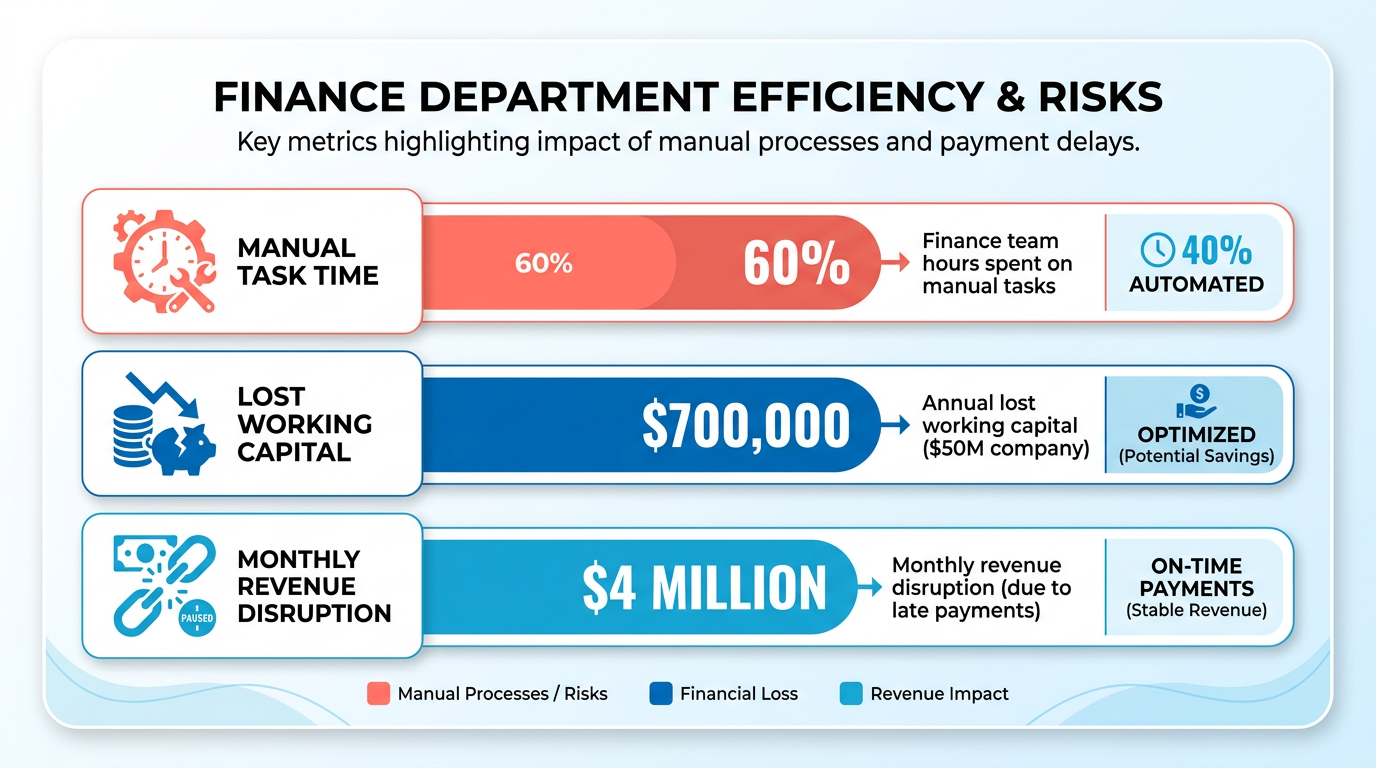
Automated invoice processing is a critical upgrade for businesses aiming to streamline financial operations. Manual methods consume excessive time, with finance teams spending up to 60% of their hours on repetitive tasks like data entry, error correction, and payment chasing. For companies with $50M in revenue, inefficient accounts receivable (AR) processes can cost **$700,000 annually in lost working capital**, while late payments disrupt revenue predictability by $4 million monthly. These delays strain cash flow and erode customer trust, as 61% of U.S. late payments stem from manual processing errors.
How Does Automation Solve These Problems?
Automated systems eliminate inefficiencies by reducing invoice processing time by 50–70% and cutting costs to $2–$5 per invoice from $15–$40 manually. For example, Blixo’s SaaS service achieves 99% cash application accuracy, minimizing rework caused by errors-responsible for 39% of invoice corrections-as detailed in the Understanding Automated Invoice Processing with Blixo section. By automating workflows, businesses avoid productivity losses of $2.9 million annually** and reduce processing costs per invoice to as low as **$0.15. This precision also accelerates collections, with one mid-sized company reporting a 25% cash flow improvement within three months of adopting Blixo.
Who Benefits Most from Automation?
Businesses with high invoice volumes or complex billing structures gain the most. Manual methods become unsustainable as transaction counts rise, but automation scales effortlessly. For instance, a small business using Blixo reduced invoicing time by 30%, while a mid-sized enterprise slashed operational costs by $8,500 yearly. Automated systems also simplify compliance, adapting to regulatory changes without requiring extensive manual updates. This is vital for industries with recurring billing models or global payment requirements, where errors risk penalties and reputational damage.
Real-World Impact of Automation
The financial and operational benefits are clear. One company using Blixo’s SaaS service cut invoice processing time by 50–70%, directly improving cash flow predictability. Another reported 62% more staff time dedicated to strategic tasks instead of dispute resolution after implementing automated workflows. These outcomes align with industry trends: 82% of finance teams cite manual invoice handling as overwhelming, but automation transforms collections from a reactive chore into a proactive growth driver.
By integrating features like real-time payment tracking, multiple payment method support, and automated customer notifications-as outlined in the The Role of Blixo in Streamlining Invoice Processing section-Blixo ensures businesses stay agile. The result is a 327% return on investment over three years, driven by faster payments, fewer errors, and operational savings. For finance teams, this means shifting focus from administrative burdens to strategic planning-turning invoice processing from a bottleneck into a competitive advantage.
Understanding Automated Invoice Processing with Blixo
Automated invoice processing with Blixo streamlines financial workflows by combining AI-driven automation, real-time tracking, and seamless system integration. This section breaks down how Blixo’s SaaS service transforms invoice generation, cash application, collections, and security for businesses of all sizes..
How Does Blixo Automate Invoice Processing?
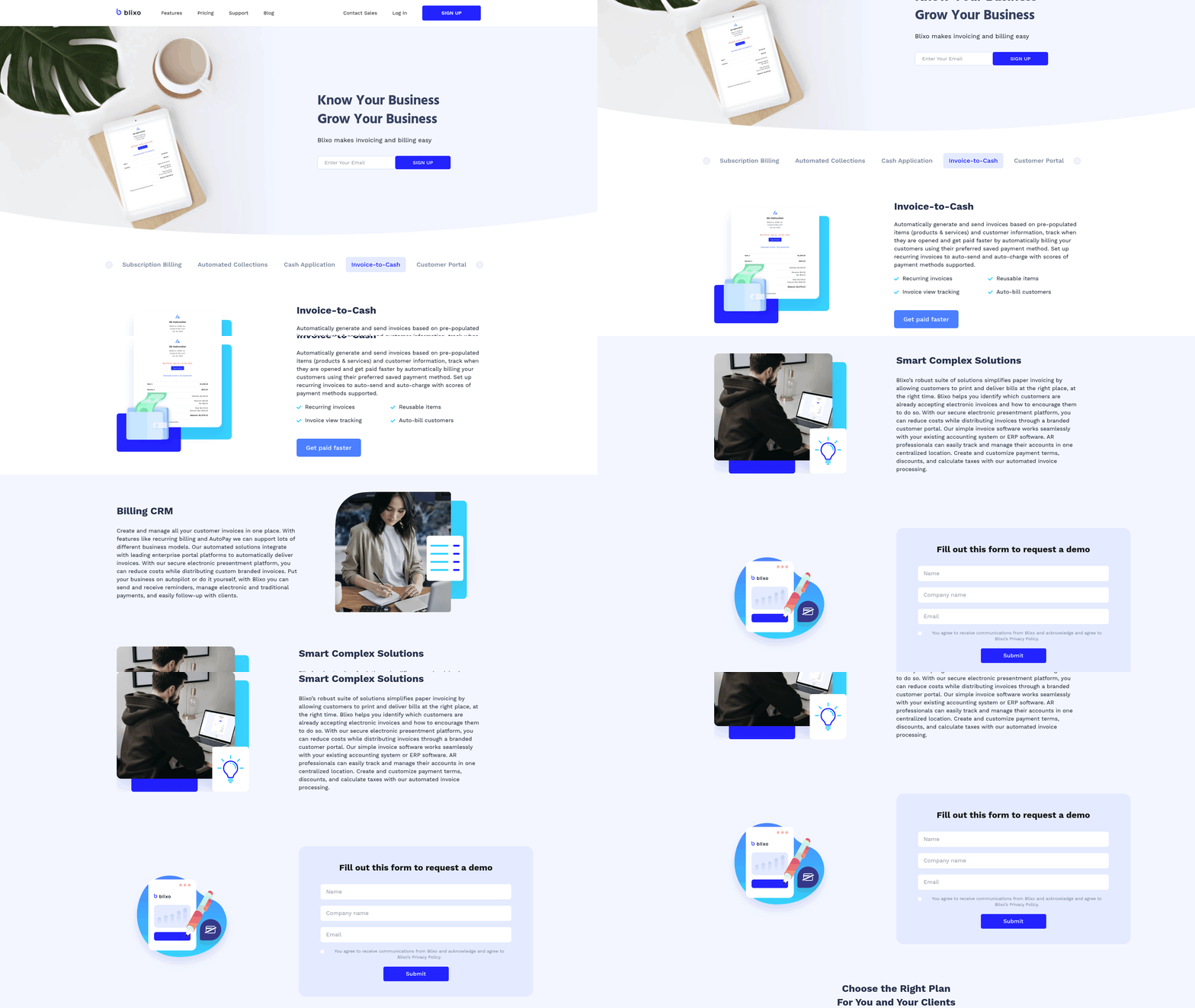
Blixo’s system generates and sends invoices automatically based on predefined rules, such as order confirmations or service delivery milestones. For example, a SaaS company using Blixo can trigger recurring invoices on a monthly schedule without manual input. The platform supports multiple payment methods, including credit cards, ACH, and digital wallets, ensuring customers pay quickly. By reducing manual tasks, Blixo cuts invoice processing time by 50–70%, as noted in case studies from mid-sized businesses, aligning with the efficiency gains discussed in the Why Automated Invoice Processing Matters section.
The automation extends to tracking invoice status in real time. Blixo logs when invoices are opened, viewed, or paid, enabling teams to follow up only on outstanding payments. One small business reported a 30% reduction in time spent on invoicing after adopting this feature..
What Role Does AI Play in Cash Application?
Blixo’s AI-powered cash application engine matches incoming payments to the correct invoices, even when payment details are incomplete or inconsistent. This reduces manual reconciliation work by 80%, as highlighted in the Blixo Blog. For instance, if a customer sends a payment without specifying which invoice it covers, Blixo’s algorithms analyze historical data and payment patterns to apply the funds accurately.
The system achieves 99% cash application accuracy, minimizing errors that lead to disputes or delayed accounting. Manual processing errors cause 39% of invoices to require rework, but Blixo’s automation eliminates this risk. Businesses using the platform report $2.9 million in annual savings from reduced rework and faster cash flow..
How Does Blixo Handle Collections and Dunning?
Blixo automates collections by sending pre-set reminders, escalation emails, and dunning notices based on payment due dates. Teams can customize communication templates to align with brand voice-for example, adding a subject line like “Final Payment Reminder for Invoice #1234” or a friendly note about offering payment plan options.
A medium-sized enterprise using Blixo’s collections tools reduced late payments by 40% within three months. The system also identifies high-risk accounts using predictive analytics, allowing finance teams to prioritize follow-ups. For businesses struggling with revenue leakage, this feature minimizes losses from unpaid invoices..
Can Blixo Integrate with Existing Systems?
Blixo connects seamlessly with accounting and ERP systems like QuickBooks, SAP, and NetSuite. This integration ensures data consistency across platforms, eliminating duplicate entries. For example, when a payment is processed in Blixo, it automatically updates the linked ERP system’s ledger, as detailed in the Implementing Automated Invoice Processing with Blixo section. The platform operates as a web-based solution, requiring no on-premise hardware. This makes it ideal for businesses using cloud-based workflows. Technical requirements are minimal: any device with internet access and a modern browser can run the system..
What Security Features Does Blixo Offer?
Blixo prioritizes data protection with end-to-end encryption for all transactions and sensitive information. Access controls allow administrators to assign role-specific permissions, ensuring only authorized users can modify financial records. The platform also complies with global standards like GDPR and SOC 2, making it suitable for industries with strict regulatory requirements.
For businesses handling payment data, Blixo’s compliance features reduce the risk of breaches and audits. One finance team noted that switching to Blixo eliminated the need for costly manual compliance checks, saving $150,000 annually in administrative costs..
Why Choose Blixo Over Manual Processes?
Manual invoice processing costs $15–40 per invoice**, while Blixo reduces this to **$2–5. Over time, this translates to $2.9 million in productivity savings for mid-sized companies. By automating repetitive tasks, finance teams can focus on strategic growth initiatives instead of administrative work. As outlined in the Best Practices for Optimizing Automated Invoice Processing with Blixo section, businesses can further tailor workflows to enhance these benefits.
Blixo’s ROI is evident in its ability to cut processing time by 50–70% and deliver a 327% return over three years. Whether you’re managing subscription billing or one-time contracts, the platform adapts to your workflow while improving accuracy and customer satisfaction.
Implementing Automated Invoice Processing with Blixo
Implementing Blixo’s automated invoice processing system requires careful planning and execution to ensure seamless integration with your existing workflows. The process begins with a pre-implementation checklist to prepare your data and systems, followed by configuring the platform to match your business needs. Let’s break down the steps to deploy Blixo effectively..

Pre-Implementation Checklist
Before activating Blixo, ensure your systems and data are ready for integration. Start by organizing your invoice templates, payment terms, and customer data into a structured format. Blixo supports integration with existing accounting software and ERP systems, so verify compatibility with your current tools. As mentioned in the Understanding Automated Invoice Processing with Blixo section, this integration is critical for maintaining workflow continuity. For example, if you use QuickBooks or Xero, confirm that their APIs align with Blixo’s integration requirements.
Next, define user roles and permissions. Blixo allows you to assign administrative, finance, and read-only access levels to different team members. Create a list of users who will interact with the system, specifying their responsibilities. This step ensures secure access and streamlines workflows.
Finally, prepare a sample set of invoices to test during the setup phase. This test data will help identify any gaps in formatting or data mapping before full deployment. According to Blixo’s documentation, businesses that conduct this preparatory step reduce implementation errors by up to 40%..
Setting Up and Configuring Blixo
Once your checklist is complete, begin by creating a Blixo account through their web-based platform. No software installation is required-access the system via any internet-connected device. After registration, manage to the Integration Settings section to connect your accounting software. Blixo provides step-by-step guides for linking platforms like QuickBooks, SAP, or NetSuite, ensuring minimal downtime during setup.
Configure payment methods next. Blixo supports credit/debit cards, bank transfers, and digital wallets, so enable the options your customers prefer. Building on concepts from the Best Practices for Optimizing Automated Invoice Processing with Blixo section, prioritize payment methods that align with your business’s most frequent transactions. For instance, if your clients often use PayPal, activate that method in the Payment Gateway settings. Set up recurring billing rules for subscriptions or regular invoices, adjusting intervals and amounts as needed.
Assign user roles using the User Management dashboard. Assign administrative rights to finance leads, restrict access for junior staff, and grant read-only permissions to auditors. Save your configuration and send login credentials to team members. Blixo’s technical documentation recommends conducting a dry run with a small team to validate settings before full rollout..
Training and Support Options
Blixo offers multiple training resources to help your team adapt quickly. Start with the Onboarding Tutorials in the Blixo portal, which include video walkthroughs for core features like invoice generation and payment tracking. For hands-on learning, schedule a live demo with Blixo’s support team to simulate real-world scenarios, such as handling late payments or generating reports.
For ongoing assistance, use the Help Center, which includes FAQs, troubleshooting guides, and a searchable knowledge base. If issues arise, contact Blixo’s customer support via chat or email-response times are typically under two hours for urgent cases. One user noted, “The support team resolved our integration delay within hours, minimizing workflow disruptions,” highlighting the platform’s reliability..
Testing and Validating the Workflow
After setup, validate Blixo’s performance using a phased testing approach. Begin by processing 10–15 sample invoices through the system, checking for accuracy in data capture, payment links, and status tracking. Verify that automated reminders are sent at configured intervals and that reports reflect correct balances.
Monitor the system for 1–2 weeks during a pilot period. Track metrics like processing time, error rates, and user adoption. As noted in the Why Automated Invoice Processing Matters section, businesses that rigorously test workflows often see significant efficiency gains. A small business reported a 30% reduction in billing time after testing, as noted in Blixo’s case studies. Use similar metrics to measure your success and refine processes iteratively..
Overcoming Common Challenges
Integration delays are a frequent hurdle during implementation. If your accounting software uses an older API, use Blixo’s middleware tools to bridge compatibility gaps. For data migration issues, export your existing invoices in CSV format and use Blixo’s bulk upload feature to import them systematically.
User resistance to new tools is another challenge. Address this by hosting training sessions and creating a Q&A document addressing common concerns. Blixo’s role-based permissions also help by limiting initial access to a small team, allowing them to act as superusers who can assist others later.
By following these steps, businesses can automate their invoice processing with Blixo, reducing manual effort and accelerating cash flow. For further guidance, refer to Blixo’s implementation checklist or reach out to their support team for tailored recommendations.
The Role of Blixo in Streamlining Invoice Processing
Blixo transforms invoice processing by replacing manual workflows with automation, reducing errors, and accelerating cash flow. Before automation, businesses faced delays from manual data entry, paper-based approvals, and disjointed tracking systems. For example, a mid-sized company might spend 40 hours weekly reconciling invoices, with 39% requiring rework due to errors. As mentioned in the Why Automated Invoice Processing Matters section, manual methods consume excessive time, with finance teams spending up to 60% of their hours on non-strategic tasks. Blixo’s system cuts this time by 50–70%, enabling teams to reallocate resources to strategic tasks while ensuring 99% cash application accuracy.
How Automated Workflows Improve Efficiency
Manual invoice processing costs $15–$40 per invoice due to labor-intensive steps like data entry and follow-ups. Blixo reduces this to $2–$5 by automating data extraction, approvals, and payment reminders. Building on concepts from the Understanding Automated Invoice Processing with Blixo section, the platform’s real-time tracking features, such as visibility into when invoices are opened, allow teams to resolve issues faster. For instance, a company using Blixo’s automated alerts cut days sales outstanding (DSO) by 22% within six months, improving cash flow predictability.
Customizable Tools for Financial Visibility
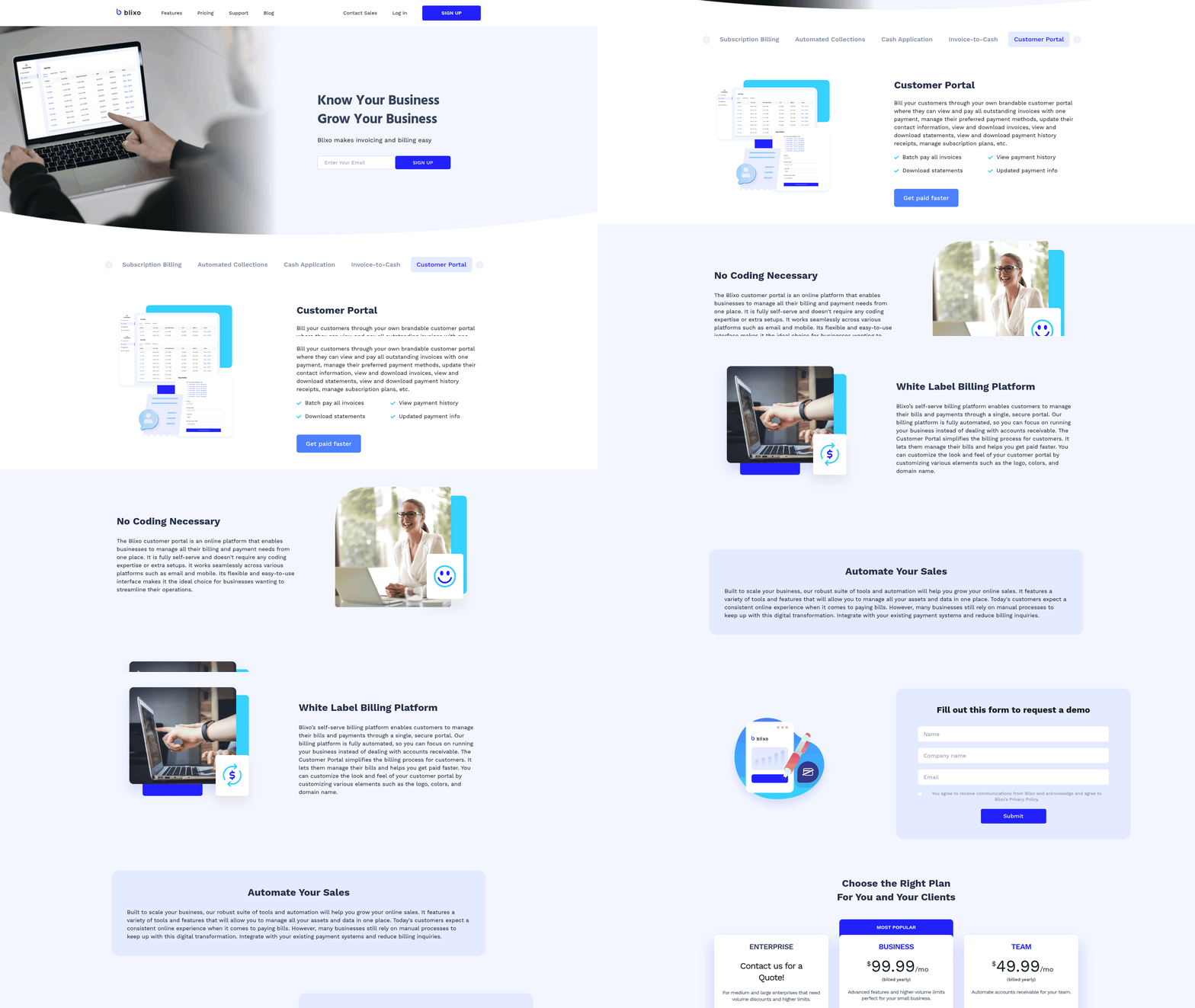
Blixo’s SaaS service includes dashboards and alerts tailored to business needs. Users can set custom thresholds for late payments, track aging reports, and generate compliance-ready analytics. A finance team using these tools reduced late payment penalties by 40% by identifying at-risk accounts early. The system’s integration with accounting software ensures seamless data flow, eliminating manual reconciliations. As detailed in the Understanding Automated Invoice Processing with Blixo section, this integration streamlines workflows by unifying financial data across platforms. For example, one business automated recurring billing for subscriptions, cutting invoice generation time from hours to minutes.
Real-World Impact of Blixo’s Solutions
Case studies highlight measurable benefits. A small business saved 30% of its billing time by automating invoice creation and tracking, while a mid-sized enterprise improved cash flow by 25% within three months. Blixo’s AI-driven features, like fraud detection and predictive payment timelines, further reduce risks. One company using these tools avoided $120,000 in potential losses by flagging suspicious vendor activity. For guidance on tailoring these features, refer to the Best Practices for Optimizing Automated Invoice Processing with Blixo section. By automating repetitive tasks and offering actionable insights, Blixo ensures businesses prioritize efficiency without sacrificing control. Its tools not only streamline operations but also empower teams to focus on growth, turning invoice processing from a bottleneck into a strategic advantage.
Best Practices for Optimizing Automated Invoice Processing with Blixo
How Can You Customize Blixo’s Invoice Processing Workflow?
Tailor Blixo’s automated workflows to match your business requirements by configuring rules for invoice routing, payment methods, and follow-up schedules. For example, set up recurring billing for subscription-based models or define custom approval hierarchies for large invoices. Blixo supports multi-payment options like credit cards, ACH, and real-time bank transfers, ensuring customer convenience. By automating workflows for different invoice types, businesses can reduce processing time by 50–70% and cut costs to $2–$5 per invoice compared to manual methods.
Start by mapping your current invoice lifecycle to identify bottlenecks, such as delayed approvals or manual data entry. As mentioned in the Implementing Automated Invoice Processing with Blixo section, this step is critical to align automation with existing processes. Use Blixo’s drag-and-drop workflow builder to automate repetitive tasks, like sending late-payment reminders or flagging mismatched invoice details. A mid-sized company automated multi-tier approval chains, cutting approval cycles by 40% and reducing disputes by 35%. For high-volume operations, use Blixo’s AI to prioritize urgent invoices or flag potential fraud, reducing errors by 80% and improving cash flow predictability.
What Are Best Practices for Integrating Blixo with Accounting Systems?
Ensure seamless integration by aligning Blixo’s API with your existing accounting or ERP software. Building on concepts from the Understanding Automated Invoice Processing with Blixo section, compatibility with systems like QuickBooks, SAP, and Oracle enables real-time data synchronization. Start with a phased rollout: first connect core modules like accounts receivable and inventory, then expand to advanced features like revenue recognition. Training teams on integrated workflows is critical-82% of finance teams report overwhelm from manual processes, so hands-on onboarding sessions reduce adoption friction.
Monitor integration performance using Blixo’s analytics dashboard to track metrics like invoice-to-cash cycle time. One medium-sized enterprise slashed days sales outstanding (DSO) by 25% within three months after integrating Blixo with their ERP system. For compliance-heavy industries, automate audit trails and tax calculations directly within Blixo to avoid discrepancies. Regularly review integration logs to catch sync errors early, ensuring 99% cash application accuracy as reported in Blixo’s case studies.
How Can Analytics Optimize Invoice Processing and Cash Flow?
Use Blixo’s reporting tools to identify trends in late payments, high-risk clients, and inefficient workflows. As mentioned in the The Role of Blixo in Streamlining Invoice Processing section, these insights help reduce errors and accelerate cash flow. For instance, generate custom dashboards to track aging reports or forecast cash flow gaps. A business using Blixo’s predictive analytics reduced late payments by 61% by identifying slow-payers and adjusting credit terms. The platform also offers insights into revenue leakage, helping teams recover 1–5% of EBITA lost to poor payment follow-ups.
…
Frequently Asked Questions
1. How much can automated invoice processing reduce processing costs?
Automated invoice processing can cut costs to $2–$5 per invoice, down from $15–$40 manually. Blixo’s system further reduces this to as low as $0.15 per invoice.
2. How does automation improve invoice accuracy?
Automation achieves 99% cash application accuracy, reducing errors that cause 39% of manual invoice corrections. Blixo’s system minimizes rework and late payments.
3. What time savings do finance teams experience with automation?
Finance teams save 60% of their time by automating repetitive tasks like data entry and payment chasing, freeing up hours for strategic work.
4. How quickly can businesses see cash flow improvements?
A mid-sized business improved cash flow by 25% within three months of adopting Blixo’s automated invoice processing system.
5. What causes most U.S. late payments?
61% of U.S. late payments stem from manual processing errors, which automation directly addresses by streamlining workflows and reducing delays.
6. How much revenue can manual processes cost companies annually?
Companies with $50M revenue lose $700,000 yearly in working capital and $4 million monthly from late payments due to manual inefficiencies.
7. Can automation prevent productivity losses?
Yes, automation avoids $2.9 million in annual productivity losses by reducing errors and accelerating invoice processing for faster collections.