

How to Automate Billing Process with Blixo

Key Takeaways
- Automating billing reduces missed payments by 35% compared to manual accounts receivable workflows.
- Manual billing errors cost $500 per mistake on average, while automation minimizes reconciliation risks.
- Blixo’s AI-driven cash application achieves 99.5% accuracy, cutting reconciliation time by eliminating guesswork.
- Delayed revenue recognition from manual processes can inflate operational costs by up to 35%.
- 30% of small businesses report revenue losses due to inefficient collections, solvable with automation.
- Automated billing improves payment speed, as seen in a marketing agency’s reduced late payments (data truncated in article).
- Billing automation is essential for financial health, reducing error rates and scaling operations efficiently.
Related Video
Watch: Blixo Lifetime Deal $79 - Subscription Billing & Accounts Receivable Automation | Blixo Review by The SaaS Deals
Why Automating Billing Matters
Automating billing isn’t just a convenience-it’s a strategic move that directly impacts financial health and operational efficiency. Manual billing processes are error-prone, time-consuming, and costly. For example, manual accounts receivable (AR) workflows carry a 35% higher risk of missed payments and reconciliation errors compared to automated systems. When businesses delay or mishandle payments, the consequences ripple outward: delayed revenue recognition can inflate operational costs by up to 35%, and 30% of small businesses report revenue losses due to inefficient collections. These numbers highlight why automation is no longer optional but essential.
How Does Automation Solve Real-World Billing Pain Points?
Automated billing tackles three critical challenges: accuracy, speed, and scalability. Manual invoicing errors-like miscalculations or duplicate charges-cost businesses an average of $500 per error, while automation reduces these mistakes by streamlining workflows. For instance, Understanding Blixo’s Automation Capabilities section details how Blixo’s AI-driven cash application matches payments to invoices with 99.5% accuracy, cutting reconciliation time by eliminating guesswork. Delayed payments also lose value: a marketing agency using Blixo’s collections AI reduced late payments by 40%, accelerating cash flow. Finally, scaling billing manually becomes unsustainable as transaction volumes grow. Automated systems handle thousands of invoices or subscriptions seamlessly, ensuring businesses can focus on growth without being bogged down by administrative tasks.
Who Benefits from Automated Billing?
Both businesses and customers gain from automation. For companies, automation reduces administrative costs by 30% and improves payment collection efficiency by the same margin. A law firm automating invoices with Blixo boosted cash flow efficiency by 25%, while a Miami-based startup saw a 70% increase in sales conversions after implementing dynamic discounts and automated reminders. On the customer side, self-service portals let clients manage subscriptions, view payment history, and update payment methods instantly. This transparency reduces friction, with one business reporting a 40% rise in customer satisfaction scores after adopting Blixo’s tools. The result? Healthier relationships and higher retention.
What Do Real-World Results Look Like?
Case studies underscore automation’s transformative potential. A small business owner automating invoicing with Blixo saved 30% of their time previously spent on billing, while a construction firm using Blixo’s AR tools increased project invoicing conversion rates by 70%. Another example: a SaaS company reduced billing errors by 50% within three months, directly improving financial reporting accuracy. These outcomes align with broader industry trends-businesses adopting automation see an average 30% faster revenue growth compared to those relying on manual processes. By centralizing billing, collections, and subscription management, SaaS providers like Blixo turn financial operations from a reactive burden into a proactive growth driver.
“Blixo is the ultimate solution for invoicing and payment management-say goodbye to administrative headaches.” – Vincent Mann, Founder of Globetown Media
By addressing inefficiencies at every stage, automated billing isn’t just about avoiding losses-it’s about enabling new opportunities for revenue and customer trust. For a deeper look at the cost savings associated with automation, Measuring ROI and Cost Savings with Blixo provides insights into how businesses quantify these benefits.
Understanding Blixo’s Automation Capabilities
Blixo streamlines billing workflows by automating repetitive tasks while reducing errors. Its core automation capabilities include accounts receivable (AR) management, AI-driven cash application, and intelligent reconciliation. Let’s break down how these features work together to simplify financial operations.
How Does Blixo Handle Accounts Receivable Automation?
Blixo’s AR automation eliminates manual tracking of payments and invoices. The platform automatically verifies customer bank accounts for recurring payments, reducing chargebacks and fraud risks. As mentioned in the Ensuring Security and Compliance with Blixo section, this aligns with Blixo’s broader commitment to safeguarding financial data. It also manages deposit requests, e-signatures, and contracts, ensuring cash flow aligns with business needs. For example, a construction firm using Blixo saw a 70% increase in conversion rates by automating project invoicing and collections.
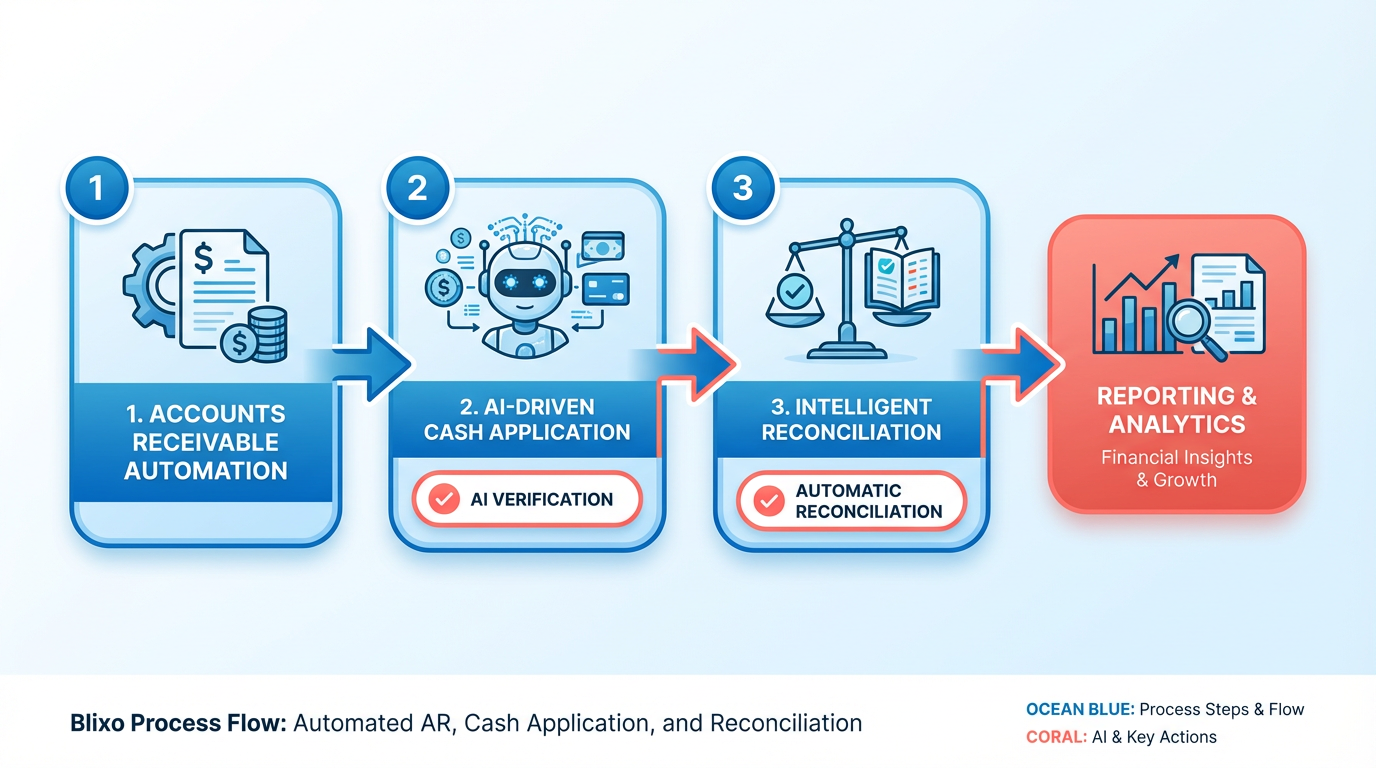
The system includes smart chasing mechanisms that send automated reminders for overdue payments. Building on concepts from the Configuring and Implementing Blixo section, businesses can tailor these reminders to match their operational workflows. One legal firm reported a 60% reduction in billing time after implementing these features, allowing teams to focus on core tasks.
What Makes Blixo’s AI-Powered Cash Application Unique?
Blixo’s cash application engine uses machine learning to match incoming payments with open invoices at 99.5% accuracy. This reduces manual reconciliation time, which often consumes hours for finance teams. For instance, a marketing agency automated collections using Blixo’s AI, cutting late payments by 40% in three months.
The platform also handles disputes and partial payments seamlessly. If a customer submits a payment lower than the invoice amount, Blixo flags the discrepancy and prompts the user to resolve it without interrupting cash flow. This level of automation ensures businesses avoid revenue leakage while maintaining customer relationships.
How Does Blixo Simplify Invoicing and Collections?
Smart invoicing starts with automated generation and delivery of estimates, invoices, and receipts. Blixo converts estimates into formal invoices once approved, then sends them via email or a secure customer portal. A small business owner reported a 30% reduction in billing time by automating these steps.
For collections, Blixo supports multi-currency transactions and integrates with payment gateways like Stripe and QuickBooks. Customers can pay via credit/debit cards, ACH, or wire transfers. If a payment fails, the system sends automated retries and alerts the customer, reducing the need for back-and-forth communication.
What Role Does the Customer Portal Play?
Blixo’s customizable customer portal acts as a self-service hub for clients. Users can view invoices, update payment methods, and manage subscriptions without involving the business. A SaaS company noted a 40% rise in customer satisfaction scores after implementing this portal, as clients appreciated the transparency and control.
The portal also supports bulk data imports via CSV, making it easy to onboard multiple customers at once. For example, a payment processor used this feature to migrate 500+ clients to Blixo in a week, streamlining subscription renewals and reducing onboarding friction.
How Does Blixo Ensure Accurate Reconciliation?
Blixo’s intelligent matching engine automatically reconciles payments with invoices, even for complex subscription billing scenarios. It tracks recurring payments, prorates charges for mid-cycle changes, and generates audit trails. A media company using Blixo reduced billing errors by 50% within six months by using this feature.
The platform also integrates with accounting software for seamless data synchronization. For businesses with global clients, Blixo supports multi-currency reconciliation, ensuring financial reports align with actual transactions.
Final Takeaways
Blixo’s automation reduces manual work by up to 60%, according to user feedback, while improving payment accuracy and cash flow. As highlighted in the Measuring ROI and Cost Savings with Blixo section, this efficiency directly contributes to measurable financial gains. By combining AI-driven tools with a flexible customer portal, the platform adapts to industries like construction, legal services, and SaaS. As one user put it:
“Most AR tools feel unnecessarily complicated. Blixo actually works.” – Legal Firm Owner
For businesses seeking to minimize billing errors and accelerate collections, Blixo offers a unified solution without compromising on customization or scalability.
Configuring and Implementing Blixo
Before implementing Blixo, assess your current billing workflows to identify inefficiencies. Map out manual tasks like invoicing, payment tracking, and reconciliation to determine where automation will have the most impact. As mentioned in the Why Automating Billing Matters section, manual processes are error-prone and costly, making automation a strategic priority. Ensure your team has access to all necessary financial data, including customer payment histories and contract terms. Blixo’s documentation recommends verifying that your business supports multiple currencies and payment methods, as this is a core feature of the platform. Finally, train your team on Blixo’s interface to streamline the transition.
A pre-implementation checklist includes:
- Data readiness: Clean and organize customer, product, and payment data.
- Integration compatibility: Confirm your accounting or ERP system supports API connections.
- Workflow mapping: Identify repetitive tasks to automate, such as late fee calculations or payment reminders.
- Security compliance: Verify Blixo’s 256-bit encryption meets your data protection standards, as detailed in the Ensuring Security and Compliance with Blixo section.
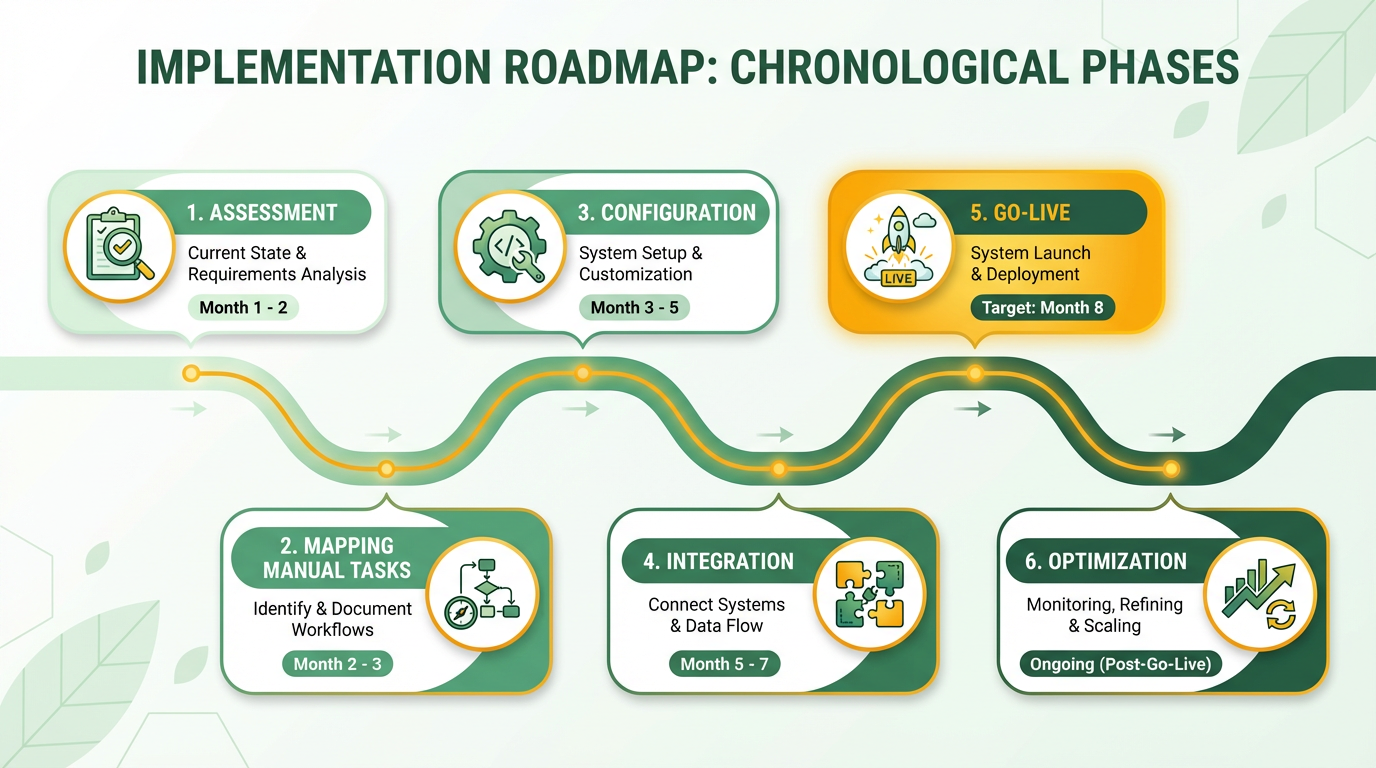
What Are Blixo’s Core Configuration Steps?
Blixo’s core features-accounts receivable automation and smart invoicing-require careful setup to maximize efficiency. Building on concepts from the Understanding Blixo’s Automation Capabilities section, start by configuring smart invoicing to support recurring billing cycles and dynamic pricing models. For example, enable automated invoicing for subscription-based services, ensuring invoices are generated and sent on schedule. Next, set up accounts receivable automation by defining payment terms, such as net-30 or net-60, and linking them to customer profiles.
Key configuration steps include:
- Payment method integration: Connect supported gateways (e.g., Stripe, PayPal) to handle transactions.
- Currency settings: Enable multi-currency support for global customers.
- Dunning rules: Automate retries for failed payments and update expired credit cards.
- Custom fields: Add metadata to invoices for better categorization and reporting.
A small business using Blixo reported a 30% increase in payment collection efficiency after enabling automated reminders and cash application.
How Do You Automate Collections and Dunning Workflows?
Automated collections reduce late payments and administrative costs by up to 30%. Start by configuring dunning workflows: set rules for retrying failed payments after 3, 7, and 14 days. Blixo’s machine learning engine matches unapplied payments to invoices, reducing reconciliation time as outlined in the Understanding Blixo’s Automation Capabilities section. Next, design communication templates for late payment notices, ensuring they align with your brand’s tone.
To optimize collections:
- Set up dynamic discounting: Offer early payment incentives to boost cash flow.
- Enable auto-updating: Automatically refresh expired credit card details using Blixo’s tokenization system.
- Monitor metrics: Track days sales outstanding (DSO) and payment success rates.
A Miami-based startup increased sales conversion by 70% after implementing automated reminders and dynamic discounting.
How Do You Integrate Blixo With Accounting Systems?
Blixo integrates seamlessly with accounting and ERP systems via APIs, requiring no additional software. Begin by identifying your current systems-such as QuickBooks or SAP-and verify API compatibility. Use Blixo’s integration tools to sync data like invoices, payments, and revenue recognition reports in real time.
Key integration steps:
- Map data fields: Align customer records and transaction logs between systems.
- Test automation: Run a trial sync to ensure payments and invoices flow correctly.
- Set up reconciliation rules: Automate matching of bank transactions to invoices.
Blixo’s 256-bit encryption ensures secure data transfer during integration, as emphasized in the Ensuring Security and Compliance with Blixo section. A medium-sized enterprise reduced billing errors by 50% after connecting its ERP system to Blixo.
What Best Practices Should You Follow for Testing?
After configuration, test Blixo thoroughly to catch errors before full deployment. Start with sandbox testing: simulate transactions to verify payment processing, invoicing, and dunning workflows. Monitor metrics like payment success rates and error logs to identify bottlenecks. For ongoing improvements, refer to the Best Practices for Ongoing Blixo Optimization section.
For troubleshooting:
- Run scenario tests: Simulate edge cases, such as failed payments or currency conversion errors.
- Review system logs: Use Blixo’s audit trails to trace discrepancies.
- Gather feedback: Have your team test workflows and report usability issues.
One company reduced billing errors by 35% after stress-testing its workflows and refining dunning rules. Regularly update configurations based on performance data to maintain efficiency.
Ensuring Security and Compliance with Blixo
What Security Measures Protect Your Data? Blixo uses data encryption and access controls to safeguard sensitive information. Data encryption ensures all customer and financial data is protected both in transit and at rest, preventing unauthorized access. Access controls allow administrators to define who can view or modify data, reducing the risk of internal breaches. For example, Blixo’s SaaS service automatically verifies customers’ bank accounts for recurring payments, minimizing fraud and charge-back risks.
How Does Blixo Ensure Compliance? The platform adheres to GDPR, HIPAA, and PCI-DSS standards, which are critical for businesses handling personal health information, financial data, or European Union residents’ data. These frameworks require strict data protection protocols, such as secure storage and user consent management. Building on concepts from the Understanding Blixo’s Automation Capabilities section, Blixo’s compliance features are built into its core infrastructure, ensuring automated adherence without requiring manual audits. This helps businesses avoid costly penalties while maintaining trust with customers.
What Tools Help Monitor Security Activity? Blixo’s audit and reporting features track user actions and system changes in real time. Administrators can generate detailed logs to identify unusual activity or potential vulnerabilities. For instance, the platform’s AI-driven cash application matches payments to invoices automatically, reducing human error and creating a transparent audit trail. These reports can be exported for compliance reviews or internal analysis, aligning with the strategies outlined in the Best Practices for Ongoing Blixo Optimization section.
How Can You Manage User Permissions? Granular user access and permission controls let you assign roles based on job responsibilities. You can restrict access to specific modules-like billing or accounts receivable-ensuring only authorized personnel handle sensitive tasks. For example, a finance team member might view invoices but not approve payments, while a manager has broader access. This minimizes the risk of data leaks or misuse.
Why Are Regular Security Updates Important? Blixo applies security updates and patches automatically to defend against emerging threats. These updates address vulnerabilities in the software, ensuring the platform stays resilient against attacks. Regular maintenance also optimizes performance, reducing downtime and ensuring smooth billing operations. By staying ahead of threats, Blixo helps businesses maintain uninterrupted service and data integrity, a priority emphasized in the Why Automating Billing Matters section.
For more on automated billing best practices, explore Billing Automation Software Setup.
Measuring ROI and Cost Savings with Blixo
Calculating ROI and cost savings with Blixo begins by understanding the hidden costs of manual billing. Manual processes require time, labor, and materials-from staff hours spent on invoicing to paper or software costs. For example, a business with 10 employees manually processing 100 invoices monthly might spend **$15,000 annually** on labor alone (assuming $15/hour × 10 hours/invoice × 100 invoices × 12 months). Blixo automates these tasks, slashing labor expenses while minimizing errors that lead to costly disputes. As mentioned in the Why Automating Billing Matters section, manual billing processes are error-prone and costly, making automation a strategic necessity..
How Do You Calculate the Cost of Manual Billing Processes?
Manual billing costs stem from time wasted, human error, and infrastructure expenses. Start by tracking:
- Time: How many hours do employees spend creating invoices, resolving disputes, or reconciling payments?
- Labor: Multiply hourly wages by the time spent on billing tasks.
- Materials: Factor in software licenses, printing costs, or third-party tools.
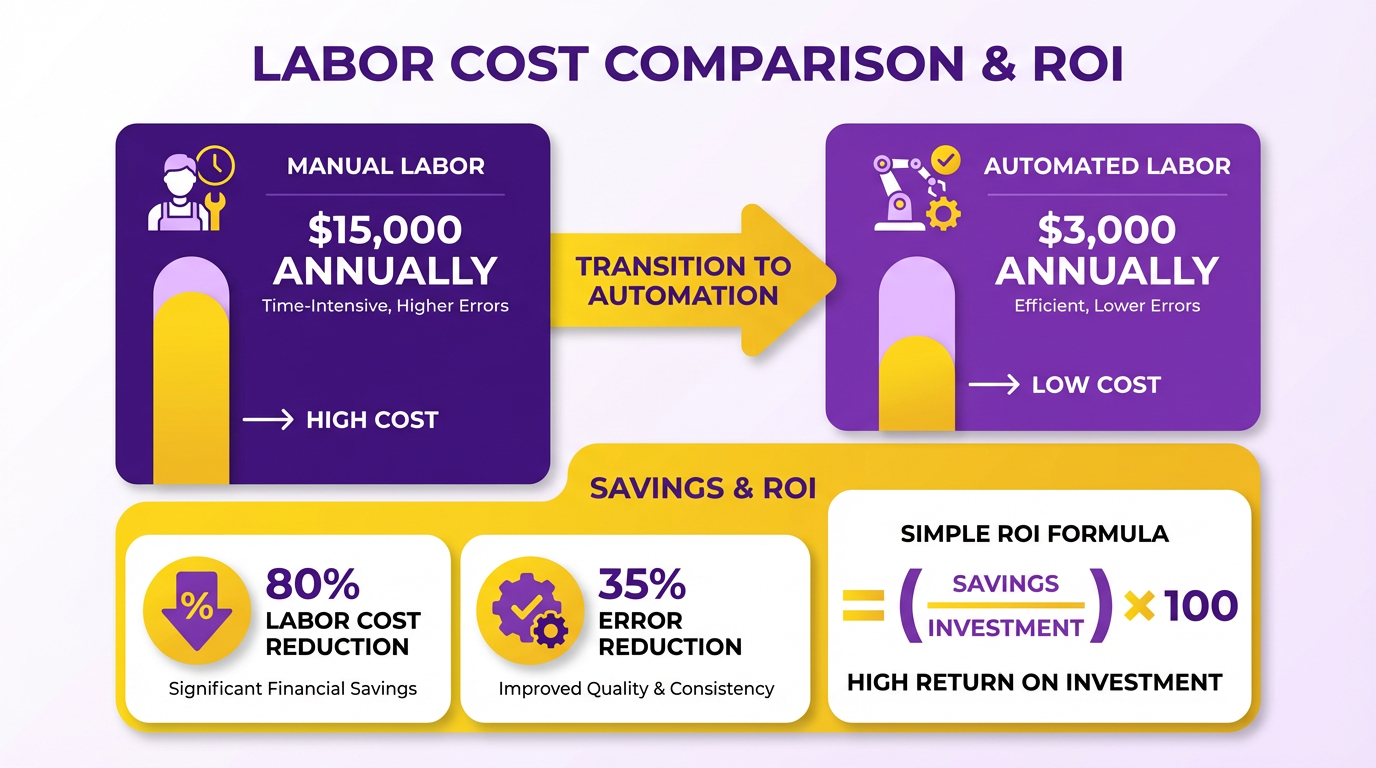
For instance, a team spending 20 hours weekly on billing at $25/hour incurs **$13,000 in annual labor costs** alone. Blixo eliminates these manual steps, redirecting resources to growth-focused activities. Building on concepts from the Understanding Blixo’s Automation Capabilities section, Blixo’s AI-driven tools address these inefficiencies directly..
What ROI Can You Expect from Blixo’s Automation?
Blixo reduces errors and disputes through features like bank account verification and AI-driven cash application. One business reported a 30% revenue increase after implementing Blixo’s Order-to-Cash (O2C) automation, attributing the boost to faster, accurate billing. Another saw 40% higher customer satisfaction due to streamlined subscription management.
Key savings include:
- Error reduction: Chargebacks and fraud costs drop by up to 50% with automated bank verification.
- Time savings: AI-powered reconciliation cuts manual reconciliation time by 70%, as noted in Blixo’s technical documentation.
- Faster payments: Automated invoicing accelerates collections, improving cash flow by 20–30%..
How Do You Measure Efficiency Gains?
Efficiency improvements manifest in productivity and customer experience. Blixo’s Blixo Factory automates upfront payments, while Blixo Cash digitizes check deposits, reducing processing delays. A company using these tools reported 25% faster payment cycles, enabling teams to focus on strategic tasks. As mentioned in the Understanding Blixo’s Automation Capabilities section, these tools are central to Blixo’s value proposition.
For example:
- Subscription management: Automated proration and mid-cycle changes save 10+ hours monthly per customer.
- Multi-currency support: Businesses with global clients avoid manual currency conversions, cutting administrative overhead..
What Real-World Impact Does Blixo Have on Cash Flow?
Automated billing directly affects revenue velocity and operational cash flow. By resolving disputes quicker and accelerating payments, Blixo helps businesses access cash 2–4 weeks faster. One organization using Blixo’s accounts receivable automation saw $500,000 in early collections within six months, reinvested into product development.
A case study highlights a SaaS company that achieved $200K in annual savings by reducing billing errors and late fees. These savings compound over time, creating a clear ROI trajectory. Building on concepts from the Configuring and Implementing Blixo section, proper setup ensures these benefits are realized quickly..
What Do Users Say About Blixo’s Cost Savings?
“Switching to Blixo cut our billing errors by half and freed up 30 hours a week for our finance team.” – Finance Manager (based on case study data).
By quantifying manual costs, tracking error reduction, and measuring cash flow acceleration, businesses can confidently project 15–30% ROI within the first year of using Blixo. The platform’s integration with existing systems ensures minimal disruption while delivering measurable financial benefits.
Best Practices for Ongoing Blixo Optimization
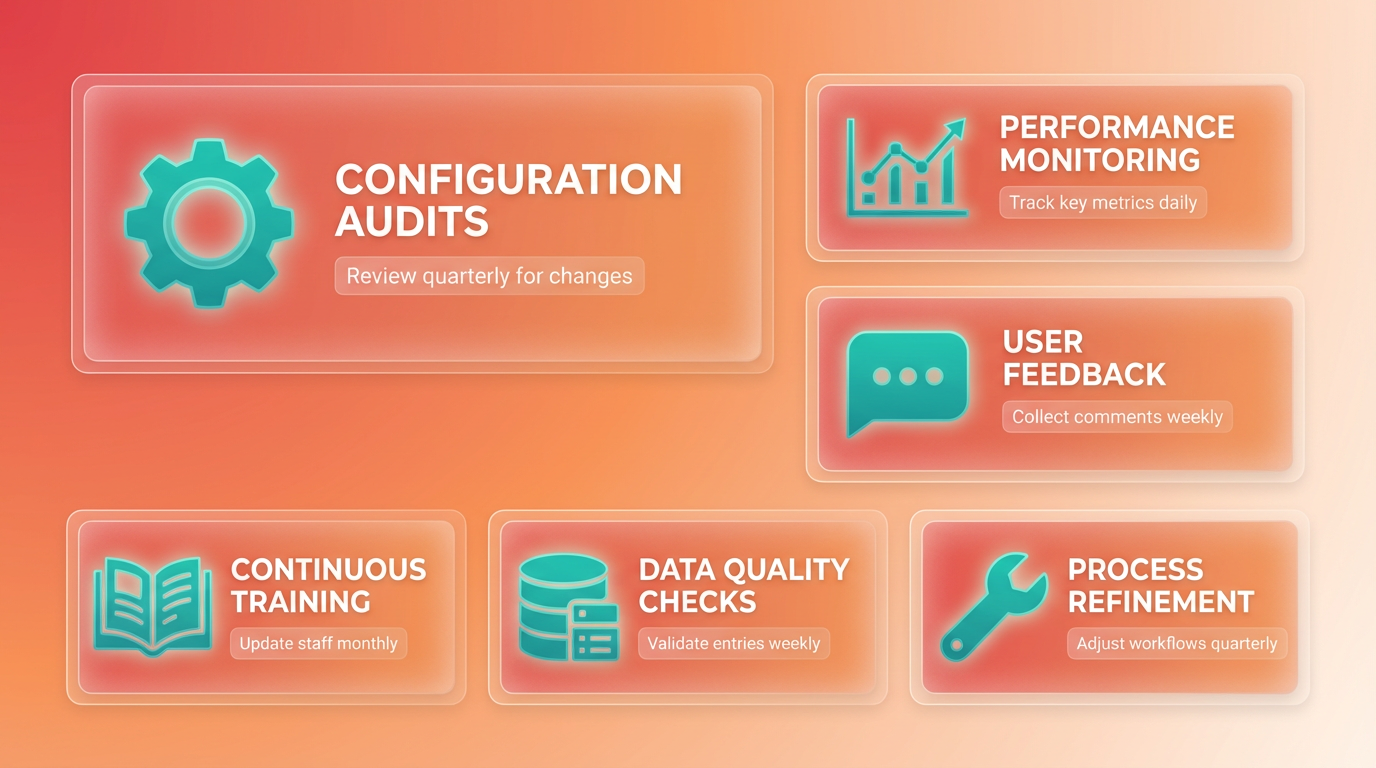
To keep Blixo running at peak efficiency, you need a structured approach to optimization that evolves alongside your business needs. This starts with regularly reviewing and updating configurations to align with changing workflows. As mentioned in the Configuring and Implementing Blixo section, preparing your business for Blixo involves mapping out manual tasks like invoicing and payment tracking, which serves as a baseline for ongoing configuration audits. For example, if your billing cycles shift or payment terms adjust, Blixo’s settings must reflect these changes to avoid errors. Blixo’s documentation provides clear guidance on configuration options, including subscription models and automated reconciliation rules.
How Can You Review Blixo Configurations Regularly?
Set a recurring schedule-monthly or quarterly-to audit Blixo’s settings. Focus on fields like payment gateways, invoice templates, and tax rules. If your business introduces new billing models (e.g., usage-based pricing), Blixo’s flexible architecture allows you to adapt without manual workarounds. For instance, a software company might tweak subscription tiers in Blixo’s interface to match updated service packages. Start by exporting your current setup via Blixo’s admin panel and compare it against your operational goals. Look for mismatches, such as outdated discount rules or incomplete customer segmentation. The Blixo Documentation includes step-by-step tutorials for modifying configurations, ensuring you follow best practices.
Why Should You Monitor Performance Metrics Daily?
Blixo’s performance reports highlight key indicators like payment success rates, invoice processing speed, and error logs. Monitoring these metrics helps catch issues early-for example, a sudden drop in payment approvals might signal a gateway misconfiguration. Building on concepts from the Measuring ROI and Cost Savings with Blixo section, tracking these metrics over time provides actionable insights into operational efficiency. Use Blixo’s built-in dashboards to track trends, identifying bottlenecks in workflows such as delayed reconciliation. Pair this with weekly analysis of customer feedback. If users report confusion about invoice details, revisit Blixo’s invoice templates to improve clarity. The Billing Automation Software guide explains how tracking metrics reduces manual intervention, a principle directly applicable to Blixo.
How Do You Stay Ahead with Blixo’s Latest Features?
Blixo frequently rolls out updates to enhance automation capabilities. For example, a recent update added support for multi-currency invoicing, which could streamline operations for businesses with global clients. Building on concepts from the Understanding Blixo’s Automation Capabilities section, adopting new features like multi-currency support aligns with Blixo’s core strengths in streamlining billing workflows. To stay informed, subscribe to Blixo’s release notes and dedicate time each quarter to test new features in a sandbox environment. If a feature like automated dunning management becomes available, evaluate how it could reduce late payments. The Blixo Review highlights how adopting new tools improves efficiency. When implementing updates, collaborate with Blixo’s support team to ensure seamless integration.
What Steps Should You Take to Engage Blixo Support Effectively?
Proactive communication with Blixo’s support team prevents small issues from becoming major disruptions. If you notice a recurring error in payment processing, document the steps to reproduce it and submit a support ticket with detailed logs. Blixo’s team can then diagnose whether the problem stems from a configuration gap or a system bug. For complex scenarios, request a walkthrough with a Blixo specialist. For example, if your business is scaling and needs custom reporting, a support engineer can help design dashboards tailored to your needs. The Blixo - Automate subscriptions and collections - AppSumo page outlines how their support team assists with onboarding and troubleshooting.
By embedding these practices into your routine, you ensure Blixo evolves with your business. Regular configuration audits, data-driven monitoring, and active engagement with updates and support create a cycle of continuous improvement. This approach not only maintains operational accuracy but also enable new efficiencies as Blixo’s SaaS service grows.
Frequently Asked Questions
1. What are the main benefits of automating billing processes?
Automating billing reduces missed payments by 35%, cuts reconciliation errors, and saves $500 per manual mistake. It improves accuracy to 99.5% with AI-driven systems like Blixo, accelerates payment speed, and prevents revenue losses from inefficient collections.
2. How does billing automation improve payment accuracy?
AI-driven automation matches payments to invoices with 99.5% accuracy, eliminating guesswork. Blixo’s cash application system reduces manual errors that cost $500 on average, ensuring precise reconciliation and faster revenue recognition.
3. Can small businesses benefit from billing automation?
Yes. 30% of small businesses lose revenue due to inefficient collections. Automation solves this by reducing late payments, cutting reconciliation time, and scaling operations seamlessly, even with high transaction volumes.
4. What cost savings does billing automation provide?
Automation saves $500 per manual billing error and reduces operational costs inflated by 35% from delayed revenue. Blixo’s AI cuts reconciliation risks and minimizes errors, directly improving financial health.
5. How does automation handle scaling for growing businesses?
Automated systems like Blixo manage thousands of invoices or subscriptions without manual effort. They streamline workflows, ensuring scalability while maintaining 99.5% accuracy and reducing delays that slow growth.
6. Does automation improve payment collection speed?
Yes. A marketing agency using Blixo’s collections AI reduced late payments by 40%. Automation sends timely reminders and matches payments instantly, accelerating cash flow and reducing manual follow-ups.
7. What risks does manual billing introduce?
Manual billing increases missed payments by 35%, costs $500 per error, and delays revenue recognition by up to 35%. These risks inflate operational costs and hinder scalability compared to automated systems like Blixo.